


Comment éditer des PDFs sur Mac

Lors du développement d'applications modernes .NET nécessitant des capacités de génération et de manipulation de PDF, choisir la bonne bibliothèque peut avoir un impact significatif sur le succès de votre projet. Deux options importantes dans l'écosystème .NET sont IronPDF et PDFSharpCore, chacune offrant des approches distinctes pour la gestion des PDF. Cette comparaison complète vous aidera à prendre une décision éclairée en fonction de vos besoins spécifiques, de votre budget et de vos besoins techniques.
Aperçu rapide de la comparaison
Avant de plonger dans les détails techniques, voici un tableau de comparaison complet qui résume les principales différences entre IronPDF et PDFSharpCore :
| Catégorie | Fonctionnalité/aspect | IronPDF | PDFSharpCore | Avantage clé |
|---|---|---|---|---|
| Architecture de base | Philosophie de conception | Rendu basé sur Chrome, API intuitives | Construction légère et manuelle du PDF | IronPDF : Un développement plus rapide |
| Complexité de l'API | Des méthodes simples comme RenderHtmlAsPdf() |
Dessin manuel avec XGraphics | IronPDF : Une API plus simple | |
| Courbe d'apprentissage | 1-2 jours en général | 3 à 5 jours en moyenne | IronPDF : Adoption plus rapide | |
| Support de plateforme | Multiplateforme | Prise en charge native, sans paquets supplémentaires | Prise en charge multiplateforme complète | Les deux : déploiement moderne |
| Versions .NET | .NET 10, 9, 8, 7, 6, 5, Core 3.1+, Framework 4.6.2+ | .NET 6+, .NET Standard 2.0 | IronPDF : Une compatibilité élargie | |
| Systèmes d'exploitation | Windows, Linux, macOS, Docker, Azure, AWS | Windows, Linux, macOS | IronPDF : Optimisé pour l'informatique en nuage | |
| HTML en PDF | Moteur de rendu | Moteur Chrome V8 complet | Pas de support HTML natif | IronPDF : Capacité HTML |
| Prise en charge CSS3/HTML5 | Assistance complète | Nécessite des bibliothèques tierces | IronPDF : Normes web modernes | |
| Exécution de JavaScript | Prise en charge complète de JavaScript | N/A | IronPDF : Contenu dynamique | |
| Fonctionnalités principales | Extraction de texte | ExtractAllText() intégré |
Soutien limité | IronPDF : Extraction supérieure |
| Filigrane | Basé sur HTML/CSS, stylisation complète | Dessin manuel requis | IronPDF : Filigranes riches | |
| Signatures numériques | Signatures visuelles intégrées | Not supported | IronPDF : Sécurité d'entreprise | |
| Chiffrement | AES-256, gestionnaires personnalisés | Prise en charge du cryptage de base | IronPDF : Sécurité avancée | |
| En-têtes/pieds de page | Contenu dynamique basé sur HTML | Positionnement manuel | IronPDF : En-têtes dynamiques | |
| Performance | Vitesse de rendu HTML | 0.8-2s typique (moteur Chrome) | N/A | IronPDF : Rendu HTML |
| Traitement de documents volumineux | Optimisé pour l'échelle | Mémoire efficace | PDFSharpCore : Diminution de la mémoire | |
| Prise en charge du threading | Async/await natif, traitement parallèle | Opérations sûres pour les threads | IronPDF : Une meilleure évolutivité | |
| Expérience du développeur | Documentation | Tutoriels détaillés, documentation sur les API, vidéos | Documentation de base | IronPDF : De meilleures ressources |
| Exemples de code | plus de 100 échantillons prêts à l'emploi | Exemples de communautés | IronPDF : Exemples détaillés | |
| Support IntelliSense | IntelliSense complet, docs XML | IntelliSense standard | Les deux : intégration IDE | |
| Licensing & Pricing | Type de licence | Commercial, perpétuel | Licence MIT (gratuite) | PDFSharpCore : Aucun coût |
| Prix d'entrée | Lite : $999 (1 dev, 1 projet) | Gratuit | PDFSharpCore : Coût nul | |
| Support | assistance technique 24/5 incluse | Soutien communautaire uniquement | IronPDF : Professional support | |
| Parfait pour | Cas d'Utilisation | Applications web, rapports, entreprise | PDF simples, projets à budget limité | En fonction du contexte |
Introduction à IronPDF et PDFSharpCore
Qu'est-ce qu'IronPDF ?
IronPDF est une bibliothèque commerciale complète .NET conçue pour rendre la génération, l'édition et la manipulation de PDF sans effort pour les développeurs. Construit sur un moteur de rendu basé sur Chrome, il excelle dans la conversion de contenu HTML, CSS et JavaScript en PDF parfaits. La bibliothèque propose un ensemble de fonctionnalités étendu qui inclut la conversion de HTML en PDF, les signatures numériques, le filigranage, le cryptage PDF et la gestion des formulaires.
IronPDF prend en charge les versions modernes de .NET, y compris .NET 10, 9, 8, 7, 6, 5, Core 3.1+ et Framework 4.6.2+, ce qui le rend polyvalent pour les applications nouvelles et héritées. Son architecture optimisée pour le cloud assure un déploiement fluide sur Azure, AWS et environnements Docker.
Qu'est-ce que PDFSharpCore ?
PDFSharpCore est une bibliothèque open-source qui sert de port .NET Core de la bibliothèque originale PDFSharp. Publié sous la licence MIT, il se concentre sur la création programmatique de PDF et la manipulation de base sans dépendre de bibliothèques spécifiques à Windows. Cela en fait un excellent choix pour les projets multi-plateformes fonctionnant sur Linux, macOS et Windows.
Bien que PDFSharpCore n'offre pas de conversion HTML en PDF native, il fournit un contrôle précis sur la création de documents PDF via son API de dessin. Les développeurs peuvent construire manuellement des documents PDF en positionnant le texte, les images et les graphiques à l'aide de commandes de dessin basées sur les coordonnées.
Installation et Configuration
Installer IronPDF
Pour commencer à utiliser IronPDF dans votre projet, vous pouvez l'installer facilement via le gestionnaire de packages NuGet. Suivez ces étapes :
- Ouvrez votre projet dans Visual Studio.
- Allez dans Outils > Gestionnaire de packages NuGet > Gérer les packages NuGet pour la solution.
- Recherchez IronPDF dans le gestionnaire NuGet.
- Sélectionnez votre projet, puis cliquez sur Installer pour ajouter IronPDF à votre projet.
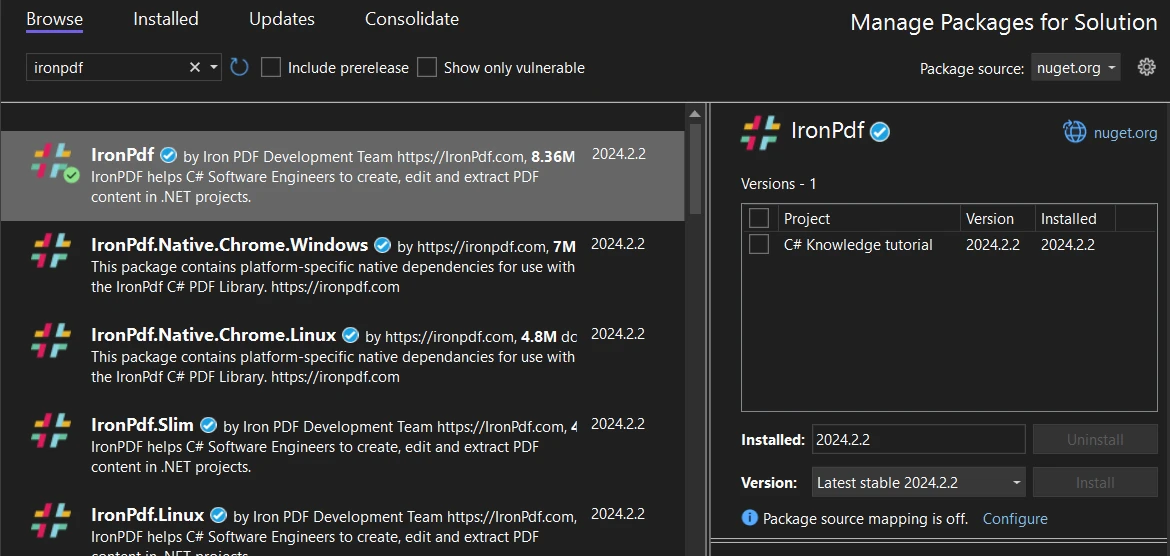 Installation d'IronPDF via l'interface NuGet de Visual Studio
Alternativement, vous pouvez utiliser la console du gestionnaire de packages pour installer IronPDF avec la commande suivante :
Install-Package IronPdf
Installation de PDFSharpCore
Pour installer PDFSharpCore via NuGet, suivez ces instructions :
- Assurez-vous que votre projet Visual Studio est ouvert.
- Allez dans Outils > Gestionnaire de packages NuGet > Gérer les packages NuGet pour la solution.
- Dans le gestionnaire de packages NuGet, recherchez PDFSharpCore.
- Sélectionnez votre projet et cliquez sur Installer pour incorporer PDFSharpCore.
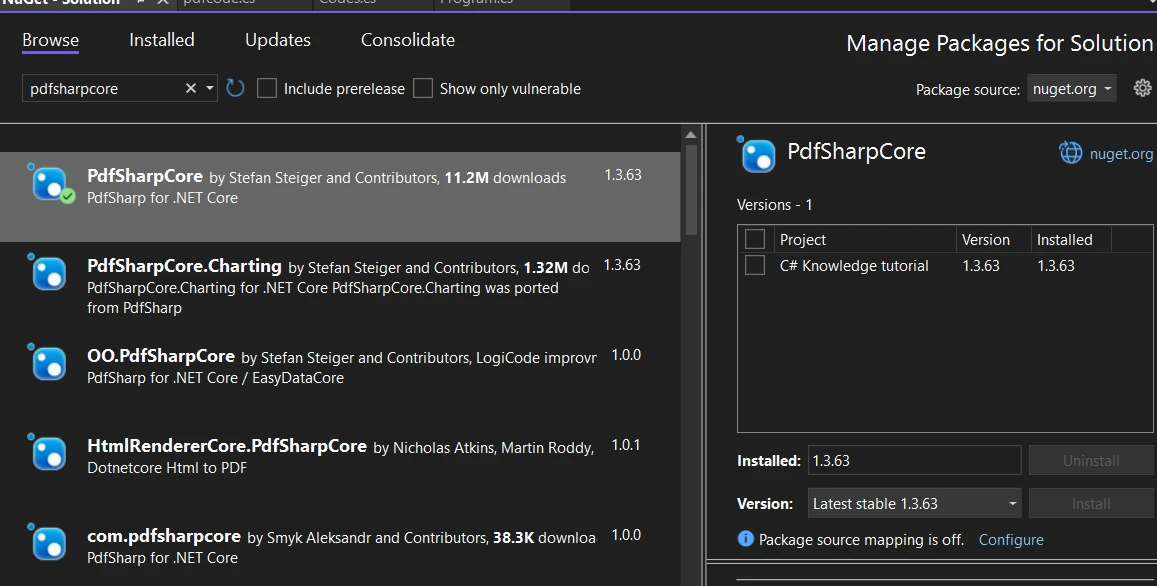 Installation de PDFSharpCore via le gestionnaire de packages NuGet
Pour les développeurs préférant la console du gestionnaire de packages, PDFSharpCore peut être installé avec cette commande :
Install-Package PdfSharpCore
Création de fichiers PDF :IronPDF vs PDFSharpCore
IronPDF: Approche moderne basée sur HTML
IronPDF révolutionne la création de PDF en exploitant les technologies web que les développeurs connaissent déjà. Son moteur de rendu basé sur Chrome assure que votre HTML, CSS et JavaScript sont rendus exactement comme ils apparaîtraient dans un navigateur moderne.
Chaîne HTML en PDF avec fonctionnalités avancées
Les capacités de conversion HTML vers PDF d'IronPDF vont bien au-delà du simple rendu de texte. Voici un exemple amélioré qui démontre sa puissance :
using IronPdf;
using IronPdf.Rendering;

class Program
{
    static void Main(string[] args)
    {
        // Apply your license key (required for production)
        License.LicenseKey = "Your-License-Key";

        // Create renderer with optimized settings
        var renderer = new ChromePdfRenderer()
        {
            RenderingOptions = new ChromePdfRenderOptions()
            {
                // Set margins for professional appearance
                MarginTop = 25,
                MarginBottom = 25,
                MarginLeft = 20,
                MarginRight = 20,

                // Enable JavaScript execution for dynamic content
                EnableJavaScript = true,

                // Wait for AJAX/animations to complete
                RenderDelay = 500,

                // Set paper orientation and size
                PaperOrientation = PdfPaperOrientation.Portrait,
                PaperSize = PdfPaperSize.A4,

                // Enable printing of background colors and images
                PrintHtmlBackgrounds = true
            }
        };

        // HTML with Bootstrap styling and charts
        string htmlContent = @"
            <!DOCTYPE html>
            <html>
            <head>
                <link href='https://cdn.jsdelivr.net/npm/bootstrap@5.1.3/dist/css/bootstrap.min.css' rel='stylesheet'>
                <script src='https://cdn.jsdelivr.net/npm/chart.js'></script>
                <style>
                    body { font-family: 'Segoe UI', Tahoma, Geneva, Verdana, sans-serif; }
                    .header { background: linear-gradient(135deg, #667eea 0%, #764ba2 100%); color: white; padding: 30px; }
                    .chart-container { width: 100%; height: 300px; margin: 20px 0; }
                </style>
            </head>
            <body>
                <div class='header text-center'>
                    <h1>2024 Sales Performance Report</h1>
                    <p class='lead'>Comprehensive Analysis & Insights</p>
                </div>

                <div class='container mt-4'>
                    <div class='row'>
                        <div class='col-md-6'>
                            <div class='card'>
                                <div class='card-body'>
                                    <h5 class='card-title'>Q1 Performance Metrics</h5>
                                    <table class='table table-striped'>
                                        <thead>
                                            <tr>
                                                <th>Month</th>
                                                <th>Revenue</th>
                                                <th>Growth</th>
                                            </tr>
                                        </thead>
                                        <tbody>
                                            <tr>
                                                <td>January</td>
                                                <td>$50,000</td>
                                                <td><span class='badge bg-success'>+12%</span></td>
                                            </tr>
                                            <tr>
                                                <td>February</td>
                                                <td>$55,000</td>
                                                <td><span class='badge bg-success'>+10%</span></td>
                                            </tr>
                                            <tr>
                                                <td>March</td>
                                                <td>$60,000</td>
                                                <td><span class='badge bg-success'>+9%</span></td>
                                            </tr>
                                        </tbody>
                                    </table>
                                </div>
                            </div>
                        </div>
                        <div class='col-md-6'>
                            <div class='card'>
                                <div class='card-body'>
                                    <h5 class='card-title'>Revenue Trend</h5>
                                    <canvas id='revenueChart'></canvas>
                                </div>
                            </div>
                        </div>
                    </div>

                    <div class='alert alert-info mt-4'>
                        <strong>Key Insight:</strong> Q1 showed consistent growth across all months,
                        with total revenue reaching $165,000, representing a 31% increase YoY.
                    </div>
                </div>

                <script>
                    // Create an interactive chart
                    const ctx = document.getElementById('revenueChart').getContext('2d');
                    new Chart(ctx, {
                        type: 'line',
                        data: {
                            labels: ['January', 'February', 'March'],
                            datasets: [{
                                label: 'Revenue',
                                data: [50000, 55000, 60000],
                                borderColor: '#667eea',
                                backgroundColor: 'rgba(102, 126, 234, 0.1)',
                                tension: 0.4
                            }]
                        },
                        options: {
                            responsive: true,
                            maintainAspectRatio: false
                        }
                    });
                </script>
            </body>
            </html>";

        // Render the HTML to PDF
        var pdf = renderer.RenderHtmlAsPdf(htmlContent);

        // Add metadata for better document management
        pdf.MetaData.Author = "Sales Department";
        pdf.MetaData.Title = "Q1 2024 Sales Report";
        pdf.MetaData.Subject = "Quarterly Performance Analysis";
        pdf.MetaData.Keywords = "sales, performance, Q1, 2024";
        pdf.MetaData.CreationDate = DateTime.Now;

        // Save the PDF
        pdf.SaveAs("sales-report-q1-2024.pdf");
        Console.WriteLine("Professional sales report generated successfully!");
    }
}
using IronPdf;
using IronPdf.Rendering;
class Program
{
static void Main(string[] args)
{
// Apply your license key (required for production)
License.LicenseKey = "Your-License-Key";
// Create renderer with optimized settings
var renderer = new ChromePdfRenderer()
{
RenderingOptions = new ChromePdfRenderOptions()
{
// Set margins for professional appearance
MarginTop = 25,
MarginBottom = 25,
MarginLeft = 20,
MarginRight = 20,
// Enable JavaScript execution for dynamic content
EnableJavaScript = true,
// Wait for AJAX/animations to complete
RenderDelay = 500,
// Set paper orientation and size
PaperOrientation = PdfPaperOrientation.Portrait,
PaperSize = PdfPaperSize.A4,
// Enable printing of background colors and images
PrintHtmlBackgrounds = true
}
};
// HTML with Bootstrap styling and charts
string htmlContent = @"
<!DOCTYPE html>
<html>
<head>
<link href='https://cdn.jsdelivr.net/npm/bootstrap@5.1.3/dist/css/bootstrap.min.css' rel='stylesheet'>
<script src='https://cdn.jsdelivr.net/npm/chart.js'></script>
<style>
body { font-family: 'Segoe UI', Tahoma, Geneva, Verdana, sans-serif; }
.header { background: linear-gradient(135deg, #667eea 0%, #764ba2 100%); color: white; padding: 30px; }
.chart-container { width: 100%; height: 300px; margin: 20px 0; }
</style>
</head>
<body>
<div class='header text-center'>
<h1>2024 Sales Performance Report</h1>
<p class='lead'>Comprehensive Analysis & Insights</p>
</div>
<div class='container mt-4'>
<div class='row'>
<div class='col-md-6'>
<div class='card'>
<div class='card-body'>
<h5 class='card-title'>Q1 Performance Metrics</h5>
<table class='table table-striped'>
<thead>
<tr>
<th>Month</th>
<th>Revenue</th>
<th>Growth</th>
</tr>
</thead>
<tbody>
<tr>
<td>January</td>
<td>$50,000</td>
<td><span class='badge bg-success'>+12%</span></td>
</tr>
<tr>
<td>February</td>
<td>$55,000</td>
<td><span class='badge bg-success'>+10%</span></td>
</tr>
<tr>
<td>March</td>
<td>$60,000</td>
<td><span class='badge bg-success'>+9%</span></td>
</tr>
</tbody>
</table>
</div>
</div>
</div>
<div class='col-md-6'>
<div class='card'>
<div class='card-body'>
<h5 class='card-title'>Revenue Trend</h5>
<canvas id='revenueChart'></canvas>
</div>
</div>
</div>
</div>
<div class='alert alert-info mt-4'>
<strong>Key Insight:</strong> Q1 showed consistent growth across all months,
with total revenue reaching $165,000, representing a 31% increase YoY.
</div>
</div>
<script>
// Create an interactive chart
const ctx = document.getElementById('revenueChart').getContext('2d');
new Chart(ctx, {
type: 'line',
data: {
labels: ['January', 'February', 'March'],
datasets: [{
label: 'Revenue',
data: [50000, 55000, 60000],
borderColor: '#667eea',
backgroundColor: 'rgba(102, 126, 234, 0.1)',
tension: 0.4
}]
},
options: {
responsive: true,
maintainAspectRatio: false
}
});
</script>
</body>
</html>";
// Render the HTML to PDF
var pdf = renderer.RenderHtmlAsPdf(htmlContent);
// Add metadata for better document management
pdf.MetaData.Author = "Sales Department";
pdf.MetaData.Title = "Q1 2024 Sales Report";
pdf.MetaData.Subject = "Quarterly Performance Analysis";
pdf.MetaData.Keywords = "sales, performance, Q1, 2024";
pdf.MetaData.CreationDate = DateTime.Now;
// Save the PDF
pdf.SaveAs("sales-report-q1-2024.pdf");
Console.WriteLine("Professional sales report generated successfully!");
}
}Imports IronPdf
Imports IronPdf.Rendering
Friend Class Program
Shared Sub Main(ByVal args() As String)
' Apply your license key (required for production)
License.LicenseKey = "Your-License-Key"
' Create renderer with optimized settings
Dim renderer = New ChromePdfRenderer() With {
.RenderingOptions = New ChromePdfRenderOptions() With {
.MarginTop = 25,
.MarginBottom = 25,
.MarginLeft = 20,
.MarginRight = 20,
.EnableJavaScript = True,
.RenderDelay = 500,
.PaperOrientation = PdfPaperOrientation.Portrait,
.PaperSize = PdfPaperSize.A4,
.PrintHtmlBackgrounds = True
}
}
' HTML with Bootstrap styling and charts
Dim htmlContent As String = "
<!DOCTYPE html>
<html>
<head>
<link href='https://cdn.jsdelivr.net/npm/bootstrap@5.1.3/dist/css/bootstrap.min.css' rel='stylesheet'>
<script src='https://cdn.jsdelivr.net/npm/chart.js'></script>
<style>
body { font-family: 'Segoe UI', Tahoma, Geneva, Verdana, sans-serif; }
.header { background: linear-gradient(135deg, #667eea 0%, #764ba2 100%); color: white; padding: 30px; }
.chart-container { width: 100%; height: 300px; margin: 20px 0; }
</style>
</head>
<body>
<div class='header text-center'>
<h1>2024 Sales Performance Report</h1>
<p class='lead'>Comprehensive Analysis & Insights</p>
</div>
<div class='container mt-4'>
<div class='row'>
<div class='col-md-6'>
<div class='card'>
<div class='card-body'>
<h5 class='card-title'>Q1 Performance Metrics</h5>
<table class='table table-striped'>
<thead>
<tr>
<th>Month</th>
<th>Revenue</th>
<th>Growth</th>
</tr>
</thead>
<tbody>
<tr>
<td>January</td>
<td>$50,000</td>
<td><span class='badge bg-success'>+12%</span></td>
</tr>
<tr>
<td>February</td>
<td>$55,000</td>
<td><span class='badge bg-success'>+10%</span></td>
</tr>
<tr>
<td>March</td>
<td>$60,000</td>
<td><span class='badge bg-success'>+9%</span></td>
</tr>
</tbody>
</table>
</div>
</div>
</div>
<div class='col-md-6'>
<div class='card'>
<div class='card-body'>
<h5 class='card-title'>Revenue Trend</h5>
<canvas id='revenueChart'></canvas>
</div>
</div>
</div>
</div>
<div class='alert alert-info mt-4'>
<strong>Key Insight:</strong> Q1 showed consistent growth across all months,
with total revenue reaching $165,000, representing a 31% increase YoY.
</div>
</div>
<script>
// Create an interactive chart
const ctx = document.getElementById('revenueChart').getContext('2d');
new Chart(ctx, {
type: 'line',
data: {
labels: ['January', 'February', 'March'],
datasets: [{
label: 'Revenue',
data: [50000, 55000, 60000],
borderColor: '#667eea',
backgroundColor: 'rgba(102, 126, 234, 0.1)',
tension: 0.4
}]
},
options: {
responsive: true,
maintainAspectRatio: false
}
});
</script>
</body>
</html>"
' Render the HTML to PDF
Dim pdf = renderer.RenderHtmlAsPdf(htmlContent)
' Add metadata for better document management
pdf.MetaData.Author = "Sales Department"
pdf.MetaData.Title = "Q1 2024 Sales Report"
pdf.MetaData.Subject = "Quarterly Performance Analysis"
pdf.MetaData.Keywords = "sales, performance, Q1, 2024"
pdf.MetaData.CreationDate = DateTime.Now
' Save the PDF
pdf.SaveAs("sales-report-q1-2024.pdf")
Console.WriteLine("Professional sales report generated successfully!")
End Sub
End ClassCe exemple présente plusieurs fonctionnalités avancées d'IronPDF :
- Intégration Bootstrap : exploite les frameworks CSS populaires pour un style Professional
- Graphiques JavaScript : Affiche des visualisations dynamiques Chart.js dans le PDF
- Conception adaptative : Gère intelligemment les mises en page adaptatives
- Gestion des métadonnées : Ajoute des métadonnées consultables pour les systèmes de gestion documentaire
- Délais de rendu : Garantit que le contenu JavaScript est entièrement chargé avant le rendu.
La classe ChromePdfRenderer offre un contrôle étendu sur le processus de rendu. Les options clés incluent :
EnableJavaScript: Exécute du code JavaScript avant le renduRenderDelay: Attend le chargement du contenu asynchronePrintHtmlBackgrounds: Conserve les couleurs et images de fondPaperOrientationetPaperSize: Contrôle la mise en page- Paramètres de marge pour une apparence professionnelle du document
Conversion de fichiers HTML et d'URL
IronPDF excelle également dans la conversion de fichiers HTML existants et de pages web en direct :
using IronPdf;

class Program
{
    static async Task Main(string[] args)
    {
        License.LicenseKey = "Your-License-Key";

        var renderer = new ChromePdfRenderer();

        // Convert a local HTML file with external resources
        var filePdf = renderer.RenderHtmlFileAsPdf(@"C:\Reports\template.html");
        filePdf.SaveAs("from-file.pdf");

        // Convert a URL with authentication
        renderer.LoginCredentials = new ChromeHttpLoginCredentials()
        {
            Username = "user@example.com",
            Password = "secure-password"
        };

        // Render a password-protected page
        var urlPdf = await renderer.RenderUrlAsPdfAsync("https://secure.example.com/reports");
        urlPdf.SaveAs("secure-report.pdf");
    }
}
using IronPdf;
class Program
{
static async Task Main(string[] args)
{
License.LicenseKey = "Your-License-Key";
var renderer = new ChromePdfRenderer();
// Convert a local HTML file with external resources
var filePdf = renderer.RenderHtmlFileAsPdf(@"C:\Reports\template.html");
filePdf.SaveAs("from-file.pdf");
// Convert a URL with authentication
renderer.LoginCredentials = new ChromeHttpLoginCredentials()
{
Username = "user@example.com",
Password = "secure-password"
};
// Render a password-protected page
var urlPdf = await renderer.RenderUrlAsPdfAsync("https://secure.example.com/reports");
urlPdf.SaveAs("secure-report.pdf");
}
}Imports IronPdf
Friend Class Program
Shared Async Function Main(ByVal args() As String) As Task
License.LicenseKey = "Your-License-Key"
Dim renderer = New ChromePdfRenderer()
' Convert a local HTML file with external resources
Dim filePdf = renderer.RenderHtmlFileAsPdf("C:\Reports\template.html")
filePdf.SaveAs("from-file.pdf")
' Convert a URL with authentication
renderer.LoginCredentials = New ChromeHttpLoginCredentials() With {
.Username = "user@example.com",
.Password = "secure-password"
}
' Render a password-protected page
Dim urlPdf = Await renderer.RenderUrlAsPdfAsync("https://secure.example.com/reports")
urlPdf.SaveAs("secure-report.pdf")
End Function
End ClassPDFSharpCore : Construction manuelle de documents
PDFSharpCore adopte une approche fondamentalement différente, exigeant des développeurs qu'ils construisent manuellement des documents PDF à l'aide de commandes de dessin. Bien que cela fournisse un contrôle précis, cela nécessite significativement plus de code pour des mises en page complexes.
using PdfSharpCore.Drawing;
using PdfSharpCore.Pdf;
using System;

class Program
{
    static void Main()
    {
        // Create a new PDF document
        var document = new PdfDocument();
        document.Info.Title = "Sales Report Q1 2024";
        document.Info.Author = "Sales Department";

        // Add a page
        var page = document.AddPage();
        page.Size = PdfSharpCore.PageSize.A4;

        // Create graphics object for drawing
        var gfx = XGraphics.FromPdfPage(page);

        // Define fonts
        var titleFont = new XFont("Arial", 24, XFontStyle.Bold);
        var headingFont = new XFont("Arial", 14, XFontStyle.Bold);
        var normalFont = new XFont("Arial", 11, XFontStyle.Regular);

        // Draw title with gradient-like effect (manual implementation)
        var titleBrush = new XLinearGradientBrush(
            new XPoint(0, 0),
            new XPoint(page.Width, 0),
            XColors.DarkBlue,
            XColors.Purple
        );
        gfx.DrawRectangle(titleBrush, 0, 0, page.Width, 80);
        gfx.DrawString("2024 Sales Performance Report",
            titleFont, XBrushes.White,
            new XRect(0, 20, page.Width, 40),
            XStringFormats.TopCenter);

        // Draw table manually
        double yPosition = 120;
        double margin = 50;
        double columnWidth = (page.Width - 2 * margin) / 3;

        // Table header
        gfx.DrawRectangle(XBrushes.LightGray, margin, yPosition, page.Width - 2 * margin, 25);
        gfx.DrawString("Month", headingFont, XBrushes.Black,
            new XRect(margin, yPosition, columnWidth, 25),
            XStringFormats.Center);
        gfx.DrawString("Revenue", headingFont, XBrushes.Black,
            new XRect(margin + columnWidth, yPosition, columnWidth, 25),
            XStringFormats.Center);
        gfx.DrawString("Growth", headingFont, XBrushes.Black,
            new XRect(margin + 2 * columnWidth, yPosition, columnWidth, 25),
            XStringFormats.Center);

        // Table data
        string[,] data = {
            { "January", "$50,000", "+12%" },
            { "February", "$55,000", "+10%" },
            { "March", "$60,000", "+9%" }
        };

        yPosition += 25;
        for (int i = 0; i < 3; i++)
        {
            // Alternate row colors
            if (i % 2 == 0)
            {
                gfx.DrawRectangle(XBrushes.WhiteSmoke, margin, yPosition, page.Width - 2 * margin, 20);
            }

            for (int j = 0; j < 3; j++)
            {
                gfx.DrawString(data[i, j], normalFont, XBrushes.Black,
                    new XRect(margin + j * columnWidth, yPosition, columnWidth, 20),
                    XStringFormats.Center);
            }
            yPosition += 20;
        }

        // Draw a simple line chart (very basic implementation)
        yPosition += 40;
        gfx.DrawString("Revenue Trend", headingFont, XBrushes.Black,
            new XRect(margin, yPosition, page.Width - 2 * margin, 25),
            XStringFormats.TopLeft);

        // Chart area
        yPosition += 30;
        double chartHeight = 150;
        double chartWidth = page.Width - 2 * margin;

        // Draw axes
        gfx.DrawLine(XPens.Black, margin, yPosition + chartHeight, margin + chartWidth, yPosition + chartHeight);
        gfx.DrawLine(XPens.Black, margin, yPosition, margin, yPosition + chartHeight);

        // Plot points (simplified)
        double[] revenues = { 50000, 55000, 60000 };
        double maxRevenue = 65000;
        double xStep = chartWidth / 3;

        for (int i = 0; i < revenues.Length; i++)
        {
            double x = margin + (i + 0.5) * xStep;
            double y = yPosition + chartHeight - (revenues[i] / maxRevenue * chartHeight);

            // Draw point
            gfx.DrawEllipse(XBrushes.Blue, x - 3, y - 3, 6, 6);

            // Draw connecting lines
            if (i > 0)
            {
                double prevX = margin + (i - 0.5) * xStep;
                double prevY = yPosition + chartHeight - (revenues[i - 1] / maxRevenue * chartHeight);
                gfx.DrawLine(new XPen(XColors.Blue, 2), prevX, prevY, x, y);
            }

            // Labels
            gfx.DrawString($"${revenues[i]:N0}", normalFont, XBrushes.Black,
                new XRect(x - 30, y - 20, 60, 15),
                XStringFormats.TopCenter);
        }

        // Save the document
        document.Save("pdfsharp-sales-report.pdf");
        Console.WriteLine("PDF created with PDFSharpCore");
    }
}
using PdfSharpCore.Drawing;
using PdfSharpCore.Pdf;
using System;
class Program
{
static void Main()
{
// Create a new PDF document
var document = new PdfDocument();
document.Info.Title = "Sales Report Q1 2024";
document.Info.Author = "Sales Department";
// Add a page
var page = document.AddPage();
page.Size = PdfSharpCore.PageSize.A4;
// Create graphics object for drawing
var gfx = XGraphics.FromPdfPage(page);
// Define fonts
var titleFont = new XFont("Arial", 24, XFontStyle.Bold);
var headingFont = new XFont("Arial", 14, XFontStyle.Bold);
var normalFont = new XFont("Arial", 11, XFontStyle.Regular);
// Draw title with gradient-like effect (manual implementation)
var titleBrush = new XLinearGradientBrush(
new XPoint(0, 0),
new XPoint(page.Width, 0),
XColors.DarkBlue,
XColors.Purple
);
gfx.DrawRectangle(titleBrush, 0, 0, page.Width, 80);
gfx.DrawString("2024 Sales Performance Report",
titleFont, XBrushes.White,
new XRect(0, 20, page.Width, 40),
XStringFormats.TopCenter);
// Draw table manually
double yPosition = 120;
double margin = 50;
double columnWidth = (page.Width - 2 * margin) / 3;
// Table header
gfx.DrawRectangle(XBrushes.LightGray, margin, yPosition, page.Width - 2 * margin, 25);
gfx.DrawString("Month", headingFont, XBrushes.Black,
new XRect(margin, yPosition, columnWidth, 25),
XStringFormats.Center);
gfx.DrawString("Revenue", headingFont, XBrushes.Black,
new XRect(margin + columnWidth, yPosition, columnWidth, 25),
XStringFormats.Center);
gfx.DrawString("Growth", headingFont, XBrushes.Black,
new XRect(margin + 2 * columnWidth, yPosition, columnWidth, 25),
XStringFormats.Center);
// Table data
string[,] data = {
{ "January", "$50,000", "+12%" },
{ "February", "$55,000", "+10%" },
{ "March", "$60,000", "+9%" }
};
yPosition += 25;
for (int i = 0; i < 3; i++)
{
// Alternate row colors
if (i % 2 == 0)
{
gfx.DrawRectangle(XBrushes.WhiteSmoke, margin, yPosition, page.Width - 2 * margin, 20);
}
for (int j = 0; j < 3; j++)
{
gfx.DrawString(data[i, j], normalFont, XBrushes.Black,
new XRect(margin + j * columnWidth, yPosition, columnWidth, 20),
XStringFormats.Center);
}
yPosition += 20;
}
// Draw a simple line chart (very basic implementation)
yPosition += 40;
gfx.DrawString("Revenue Trend", headingFont, XBrushes.Black,
new XRect(margin, yPosition, page.Width - 2 * margin, 25),
XStringFormats.TopLeft);
// Chart area
yPosition += 30;
double chartHeight = 150;
double chartWidth = page.Width - 2 * margin;
// Draw axes
gfx.DrawLine(XPens.Black, margin, yPosition + chartHeight, margin + chartWidth, yPosition + chartHeight);
gfx.DrawLine(XPens.Black, margin, yPosition, margin, yPosition + chartHeight);
// Plot points (simplified)
double[] revenues = { 50000, 55000, 60000 };
double maxRevenue = 65000;
double xStep = chartWidth / 3;
for (int i = 0; i < revenues.Length; i++)
{
double x = margin + (i + 0.5) * xStep;
double y = yPosition + chartHeight - (revenues[i] / maxRevenue * chartHeight);
// Draw point
gfx.DrawEllipse(XBrushes.Blue, x - 3, y - 3, 6, 6);
// Draw connecting lines
if (i > 0)
{
double prevX = margin + (i - 0.5) * xStep;
double prevY = yPosition + chartHeight - (revenues[i - 1] / maxRevenue * chartHeight);
gfx.DrawLine(new XPen(XColors.Blue, 2), prevX, prevY, x, y);
}
// Labels
gfx.DrawString($"${revenues[i]:N0}", normalFont, XBrushes.Black,
new XRect(x - 30, y - 20, 60, 15),
XStringFormats.TopCenter);
}
// Save the document
document.Save("pdfsharp-sales-report.pdf");
Console.WriteLine("PDF created with PDFSharpCore");
}
}Imports PdfSharpCore.Drawing
Imports PdfSharpCore.Pdf
Imports System
Friend Class Program
Shared Sub Main()
' Create a new PDF document
Dim document = New PdfDocument()
document.Info.Title = "Sales Report Q1 2024"
document.Info.Author = "Sales Department"
' Add a page
Dim page = document.AddPage()
page.Size = PdfSharpCore.PageSize.A4
' Create graphics object for drawing
Dim gfx = XGraphics.FromPdfPage(page)
' Define fonts
Dim titleFont = New XFont("Arial", 24, XFontStyle.Bold)
Dim headingFont = New XFont("Arial", 14, XFontStyle.Bold)
Dim normalFont = New XFont("Arial", 11, XFontStyle.Regular)
' Draw title with gradient-like effect (manual implementation)
Dim titleBrush = New XLinearGradientBrush(New XPoint(0, 0), New XPoint(page.Width, 0), XColors.DarkBlue, XColors.Purple)
gfx.DrawRectangle(titleBrush, 0, 0, page.Width, 80)
gfx.DrawString("2024 Sales Performance Report", titleFont, XBrushes.White, New XRect(0, 20, page.Width, 40), XStringFormats.TopCenter)
' Draw table manually
Dim yPosition As Double = 120
Dim margin As Double = 50
Dim columnWidth As Double = (page.Width - 2 * margin) / 3
' Table header
gfx.DrawRectangle(XBrushes.LightGray, margin, yPosition, page.Width - 2 * margin, 25)
gfx.DrawString("Month", headingFont, XBrushes.Black, New XRect(margin, yPosition, columnWidth, 25), XStringFormats.Center)
gfx.DrawString("Revenue", headingFont, XBrushes.Black, New XRect(margin + columnWidth, yPosition, columnWidth, 25), XStringFormats.Center)
gfx.DrawString("Growth", headingFont, XBrushes.Black, New XRect(margin + 2 * columnWidth, yPosition, columnWidth, 25), XStringFormats.Center)
' Table data
Dim data(,) As String = {
{ "January", "$50,000", "+12%" },
{ "February", "$55,000", "+10%" },
{ "March", "$60,000", "+9%" }
}
yPosition += 25
For i As Integer = 0 To 2
' Alternate row colors
If i Mod 2 = 0 Then
gfx.DrawRectangle(XBrushes.WhiteSmoke, margin, yPosition, page.Width - 2 * margin, 20)
End If
For j As Integer = 0 To 2
gfx.DrawString(data(i, j), normalFont, XBrushes.Black, New XRect(margin + j * columnWidth, yPosition, columnWidth, 20), XStringFormats.Center)
Next j
yPosition += 20
Next i
' Draw a simple line chart (very basic implementation)
yPosition += 40
gfx.DrawString("Revenue Trend", headingFont, XBrushes.Black, New XRect(margin, yPosition, page.Width - 2 * margin, 25), XStringFormats.TopLeft)
' Chart area
yPosition += 30
Dim chartHeight As Double = 150
Dim chartWidth As Double = page.Width - 2 * margin
' Draw axes
gfx.DrawLine(XPens.Black, margin, yPosition + chartHeight, margin + chartWidth, yPosition + chartHeight)
gfx.DrawLine(XPens.Black, margin, yPosition, margin, yPosition + chartHeight)
' Plot points (simplified)
Dim revenues() As Double = { 50000, 55000, 60000 }
Dim maxRevenue As Double = 65000
Dim xStep As Double = chartWidth / 3
For i As Integer = 0 To revenues.Length - 1
Dim x As Double = margin + (i + 0.5) * xStep
Dim y As Double = yPosition + chartHeight - (revenues(i) / maxRevenue * chartHeight)
' Draw point
gfx.DrawEllipse(XBrushes.Blue, x - 3, y - 3, 6, 6)
' Draw connecting lines
If i > 0 Then
Dim prevX As Double = margin + (i - 0.5) * xStep
Dim prevY As Double = yPosition + chartHeight - (revenues(i - 1) / maxRevenue * chartHeight)
gfx.DrawLine(New XPen(XColors.Blue, 2), prevX, prevY, x, y)
End If
' Labels
gfx.DrawString($"${revenues(i):N0}", normalFont, XBrushes.Black, New XRect(x - 30, y - 20, 60, 15), XStringFormats.TopCenter)
Next i
' Save the document
document.Save("pdfsharp-sales-report.pdf")
Console.WriteLine("PDF created with PDFSharpCore")
End Sub
End ClassComme vous pouvez le voir, créer même un document modérément complexe avec PDFSharpCore nécessite :
- Positionnement manuel de chaque élément
- Calculs complexes pour les mises en page
- Pas de support intégré pour HTML ou CSS
- Mise en œuvre manuelle de graphiques.
- Beaucoup plus de code pour le même résultat
HTML à PDF avec PDFSharpCore
Comme PDFSharpCore ne prend pas en charge nativement la conversion HTML en PDF, les développeurs doivent utiliser des bibliothèques tierces. Un choix populaire est la combinaison de PDFSharpCore avec HtmlRenderer :
using PdfSharpCore.Pdf;
using TheArtOfDev.HtmlRenderer.PdfSharp;

var document = new PdfDocument();
string htmlContent = File.ReadAllText("template.html");

// Note: HtmlRenderer has limited CSS support
PdfGenerator.AddPdfPages(document, htmlContent, PdfSharpCore.PageSize.A4);
document.Save("from-html.pdf");
using PdfSharpCore.Pdf;
using TheArtOfDev.HtmlRenderer.PdfSharp;
var document = new PdfDocument();
string htmlContent = File.ReadAllText("template.html");
// Note: HtmlRenderer has limited CSS support
PdfGenerator.AddPdfPages(document, htmlContent, PdfSharpCore.PageSize.A4);
document.Save("from-html.pdf");Imports PdfSharpCore.Pdf
Imports TheArtOfDev.HtmlRenderer.PdfSharp
Private document = New PdfDocument()
Private htmlContent As String = File.ReadAllText("template.html")
' Note: HtmlRenderer has limited CSS support
PdfGenerator.AddPdfPages(document, htmlContent, PdfSharpCore.PageSize.A4)
document.Save("from-html.pdf")Cependant, cette approche présente des limites significatives :
- Support CSS3 limité (pas de flexbox, pas de CSS Grid, pas de support de cadre moderne)
- Pas d'exécution JavaScript
- Mauvaise gestion des fonctionnalités web modernes
- Rendu incohérent par rapport aux navigateurs
Support des frameworks CSS modernes : Bootstrap et au-delà
Lorsque vous développez des applications nécessitant la génération de PDF à partir de contenu web, le support de Bootstrap et des frameworks CSS modernes est crucial. La plupart des applications web utilisent ces frameworks pour un design constant, et la possibilité de convertir ces interfaces en PDF sans modification réduit considérablement le temps de développement.
IronPDF: Prise en charge complète de Bootstrap et du framework CSS
Bootstrap 5 : moteur de mise en page Flexbox complet, CSS Grid, classes utilitaires et tous les systèmes de composants Bootstrap 4 : Composants de carte complets, navigation, utilitaires Flex et classes responsives
- Tailwind CSS : Toutes les classes utilitaires bénéficient d'un rendu précis
- Fondation : Système de grille complet et bibliothèque de composants
- CSS3 moderne : Flexbox, CSS Grid, propriétés personnalisées, animations, transitions et transformations
Preuve du monde réel :IronPDF affiche la page d'accueil Bootstrap et tous les modèles officiels avec une précision parfaite.
Exemple de code : Tableau de bord de progression du projet
using IronPdf;
// Set your IronPDF license key
IronPdf.License.LicenseKey = "License-Key goes here";
var renderer = new ChromePdfRenderer();
string bootstrapProgress = @"
<!DOCTYPE html>
<html>
<head>
<link href='https://cdn.jsdelivr.net/npm/bootstrap@5.3.0/dist/css/bootstrap.min.css' rel='stylesheet'>
<style>
.project-card {
transition: all 0.3s ease;
border-left: 4px solid transparent;
}
.project-card.active { border-left-color: #0d6efd; }
.progress-label { font-size: 0.75rem; font-weight: 600; }
</style>
</head>
<body>
<div class='container my-5'>
<div class='d-flex justify-content-between align-items-center mb-4'>
<div>
<h1 class='display-6 mb-1'>Project Portfolio Status</h1>
<p class='text-muted mb-0'>Q1 2025 Development Pipeline</p>
</div>
<div>
<span class='badge bg-success fs-6'>8 Active Projects</span>
</div>
</div>
<div class='row g-4 mb-4'>
<div class='col-md-3'>
<div class='card text-center shadow-sm'>
<div class='card-body'>
<div class='display-4 text-primary mb-2'>72%</div>
<h6 class='text-muted text-uppercase mb-0'>Overall Progress</h6>
</div>
</div>
</div>
<div class='col-md-3'>
<div class='card text-center shadow-sm'>
<div class='card-body'>
<div class='display-4 text-success mb-2'>5</div>
<h6 class='text-muted text-uppercase mb-0'>On Track</h6>
</div>
</div>
</div>
<div class='col-md-3'>
<div class='card text-center shadow-sm'>
<div class='card-body'>
<div class='display-4 text-warning mb-2'>2</div>
<h6 class='text-muted text-uppercase mb-0'>At Risk</h6>
</div>
</div>
</div>
<div class='col-md-3'>
<div class='card text-center shadow-sm'>
<div class='card-body'>
<div class='display-4 text-danger mb-2'>1</div>
<h6 class='text-muted text-uppercase mb-0'>Delayed</h6>
</div>
</div>
</div>
</div>
<div class='card shadow-sm mb-4'>
<div class='card-header bg-primary text-white'>
<h5 class='mb-0'>Active Projects</h5>
</div>
<div class='card-body p-0'>
<div class='list-group list-group-flush'>
<div class='list-group-item'>
<div class='d-flex justify-content-between align-items-start mb-3'>
<div>
<h6 class='mb-1'>E-Commerce Platform Redesign</h6>
<small class='text-muted'>Lead: Sarah Chen | Due: Apr 15, 2025</small>
</div>
<span class='badge bg-success'>On Track</span>
</div>
<div class='mb-2'>
<div class='d-flex justify-content-between align-items-center mb-1'>
<span class='progress-label text-muted'>COMPLETION</span>
<span class='progress-label text-primary'>85%</span>
</div>
<div class='progress' style='height: 8px;'>
<div class='progress-bar bg-primary' role='progressbar' style='width: 85%'></div>
</div>
</div>
<div class='d-flex gap-2 flex-wrap'>
<span class='badge bg-light text-dark'>Frontend: 90%</span>
<span class='badge bg-light text-dark'>Backend: 80%</span>
<span class='badge bg-light text-dark'>Testing: 85%</span>
</div>
</div>
<div class='list-group-item'>
<div class='d-flex justify-content-between align-items-start mb-3'>
<div>
<h6 class='mb-1'>Mobile App Integration</h6>
<small class='text-muted'>Lead: Marcus Johnson | Due: Mar 30, 2025</small>
</div>
<span class='badge bg-success'>On Track</span>
</div>
<div class='mb-2'>
<div class='d-flex justify-content-between align-items-center mb-1'>
<span class='progress-label text-muted'>COMPLETION</span>
<span class='progress-label text-success'>92%</span>
</div>
<div class='progress' style='height: 8px;'>
<div class='progress-bar bg-success' role='progressbar' style='width: 92%'></div>
</div>
</div>
<div class='d-flex gap-2 flex-wrap'>
<span class='badge bg-light text-dark'>iOS: 95%</span>
<span class='badge bg-light text-dark'>Android: 90%</span>
<span class='badge bg-light text-dark'>API: 100%</span>
</div>
</div>
<div class='list-group-item'>
<div class='d-flex justify-content-between align-items-start mb-3'>
<div>
<h6 class='mb-1'>Customer Analytics Dashboard</h6>
<small class='text-muted'>Lead: Emily Rodriguez | Due: Apr 22, 2025</small>
</div>
<span class='badge bg-warning text-dark'>At Risk</span>
</div>
<div class='mb-2'>
<div class='d-flex justify-content-between align-items-center mb-1'>
<span class='progress-label text-muted'>COMPLETION</span>
<span class='progress-label text-warning'>58%</span>
</div>
<div class='progress' style='height: 8px;'>
<div class='progress-bar bg-warning' role='progressbar' style='width: 58%'></div>
</div>
</div>
<div class='d-flex gap-2 flex-wrap'>
<span class='badge bg-light text-dark'>Data Pipeline: 65%</span>
<span class='badge bg-light text-dark'>UI: 50%</span>
<span class='badge bg-light text-dark'>Reports: 45%</span>
</div>
<div class='alert alert-warning mt-2 mb-0 py-2'>
<small><strong>Issue:</strong> Resource constraints affecting timeline. Review scheduled for next week.</small>
</div>
</div>
<div class='list-group-item'>
<div class='d-flex justify-content-between align-items-start mb-3'>
<div>
<h6 class='mb-1'>Security Infrastructure Upgrade</h6>
<small class='text-muted'>Lead: David Kim | Due: Mar 25, 2025</small>
</div>
<span class='badge bg-danger'>Delayed</span>
</div>
<div class='mb-2'>
<div class='d-flex justify-content-between align-items-center mb-1'>
<span class='progress-label text-muted'>COMPLETION</span>
<span class='progress-label text-danger'>42%</span>
</div>
<div class='progress' style='height: 8px;'>
<div class='progress-bar bg-danger' role='progressbar' style='width: 42%'></div>
</div>
</div>
<div class='d-flex gap-2 flex-wrap'>
<span class='badge bg-light text-dark'>Authentication: 60%</span>
<span class='badge bg-light text-dark'>Chiffrement: 40%</span>
<span class='badge bg-light text-dark'>Audit Logs: 25%</span>
</div>
<div class='alert alert-danger mt-2 mb-0 py-2'>
<small><strong>Critical:</strong> 7 days behind schedule. Additional resources allocated. Daily standup required.</small>
</div>
</div>
</div>
</div>
</div>
<div class='row g-4'>
<div class='col-md-6'>
<div class='card shadow-sm'>
<div class='card-header bg-white'>
<h5 class='mb-0'>Sprint Velocity</h5>
</div>
<div class='card-body'>
<div class='mb-3'>
<div class='d-flex justify-content-between mb-1'>
<span class='text-muted'>Current Sprint</span>
<strong>42 Story Points</strong>
</div>
<div class='progress' style='height: 20px;'>
<div class='progress-bar bg-success' style='width: 84%'>84% Complete</div>
</div>
</div>
<div class='mb-3'>
<div class='d-flex justify-content-between mb-1'>
<span class='text-muted'>Previous Sprint</span>
<strong>38 Story Points</strong>
</div>
<div class='progress' style='height: 20px;'>
<div class='progress-bar bg-info' style='width: 100%'>Completed</div>
</div>
</div>
<div class='mb-0'>
<div class='d-flex justify-content-between mb-1'>
<span class='text-muted'>Average Velocity</span>
<strong>40 Story Points</strong>
</div>
<div class='progress' style='height: 20px;'>
<div class='progress-bar bg-primary' style='width: 100%'>Baseline</div>
</div>
</div>
</div>
</div>
</div>
<div class='col-md-6'>
<div class='card shadow-sm'>
<div class='card-header bg-white'>
<h5 class='mb-0'>Team Capacity</h5>
</div>
<div class='card-body'>
<div class='d-flex justify-content-between align-items-center mb-3'>
<div>
<h6 class='mb-0'>Frontend Team</h6>
<small class='text-muted'>6 developers</small>
</div>
<span class='badge bg-success'>92% Utilized</span>
</div>
<div class='d-flex justify-content-between align-items-center mb-3'>
<div>
<h6 class='mb-0'>Backend Team</h6>
<small class='text-muted'>5 developers</small>
</div>
<span class='badge bg-success'>88% Utilized</span>
</div>
<div class='d-flex justify-content-between align-items-center mb-3'>
<div>
<h6 class='mb-0'>QA Team</h6>
<small class='text-muted'>3 testers</small>
</div>
<span class='badge bg-warning text-dark'>105% Utilized</span>
</div>
<div class='d-flex justify-content-between align-items-center mb-0'>
<div>
<h6 class='mb-0'>DevOps Team</h6>
<small class='text-muted'>2 engineers</small>
</div>
<span class='badge bg-danger'>110% Utilized</span>
</div>
</div>
</div>
</div>
</div>
</div>
</body>
</html>";
var pdf = renderer.RenderHtmlAsPdf(bootstrapProgress);
pdf.SaveAs("project-progress.pdf");using IronPdf;
// Set your IronPDF license key
IronPdf.License.LicenseKey = "License-Key goes here";
var renderer = new ChromePdfRenderer();
string bootstrapProgress = @"
<!DOCTYPE html>
<html>
<head>
<link href='https://cdn.jsdelivr.net/npm/bootstrap@5.3.0/dist/css/bootstrap.min.css' rel='stylesheet'>
<style>
.project-card {
transition: all 0.3s ease;
border-left: 4px solid transparent;
}
.project-card.active { border-left-color: #0d6efd; }
.progress-label { font-size: 0.75rem; font-weight: 600; }
</style>
</head>
<body>
<div class='container my-5'>
<div class='d-flex justify-content-between align-items-center mb-4'>
<div>
<h1 class='display-6 mb-1'>Project Portfolio Status</h1>
<p class='text-muted mb-0'>Q1 2025 Development Pipeline</p>
</div>
<div>
<span class='badge bg-success fs-6'>8 Active Projects</span>
</div>
</div>
<div class='row g-4 mb-4'>
<div class='col-md-3'>
<div class='card text-center shadow-sm'>
<div class='card-body'>
<div class='display-4 text-primary mb-2'>72%</div>
<h6 class='text-muted text-uppercase mb-0'>Overall Progress</h6>
</div>
</div>
</div>
<div class='col-md-3'>
<div class='card text-center shadow-sm'>
<div class='card-body'>
<div class='display-4 text-success mb-2'>5</div>
<h6 class='text-muted text-uppercase mb-0'>On Track</h6>
</div>
</div>
</div>
<div class='col-md-3'>
<div class='card text-center shadow-sm'>
<div class='card-body'>
<div class='display-4 text-warning mb-2'>2</div>
<h6 class='text-muted text-uppercase mb-0'>At Risk</h6>
</div>
</div>
</div>
<div class='col-md-3'>
<div class='card text-center shadow-sm'>
<div class='card-body'>
<div class='display-4 text-danger mb-2'>1</div>
<h6 class='text-muted text-uppercase mb-0'>Delayed</h6>
</div>
</div>
</div>
</div>
<div class='card shadow-sm mb-4'>
<div class='card-header bg-primary text-white'>
<h5 class='mb-0'>Active Projects</h5>
</div>
<div class='card-body p-0'>
<div class='list-group list-group-flush'>
<div class='list-group-item'>
<div class='d-flex justify-content-between align-items-start mb-3'>
<div>
<h6 class='mb-1'>E-Commerce Platform Redesign</h6>
<small class='text-muted'>Lead: Sarah Chen | Due: Apr 15, 2025</small>
</div>
<span class='badge bg-success'>On Track</span>
</div>
<div class='mb-2'>
<div class='d-flex justify-content-between align-items-center mb-1'>
<span class='progress-label text-muted'>COMPLETION</span>
<span class='progress-label text-primary'>85%</span>
</div>
<div class='progress' style='height: 8px;'>
<div class='progress-bar bg-primary' role='progressbar' style='width: 85%'></div>
</div>
</div>
<div class='d-flex gap-2 flex-wrap'>
<span class='badge bg-light text-dark'>Frontend: 90%</span>
<span class='badge bg-light text-dark'>Backend: 80%</span>
<span class='badge bg-light text-dark'>Testing: 85%</span>
</div>
</div>
<div class='list-group-item'>
<div class='d-flex justify-content-between align-items-start mb-3'>
<div>
<h6 class='mb-1'>Mobile App Integration</h6>
<small class='text-muted'>Lead: Marcus Johnson | Due: Mar 30, 2025</small>
</div>
<span class='badge bg-success'>On Track</span>
</div>
<div class='mb-2'>
<div class='d-flex justify-content-between align-items-center mb-1'>
<span class='progress-label text-muted'>COMPLETION</span>
<span class='progress-label text-success'>92%</span>
</div>
<div class='progress' style='height: 8px;'>
<div class='progress-bar bg-success' role='progressbar' style='width: 92%'></div>
</div>
</div>
<div class='d-flex gap-2 flex-wrap'>
<span class='badge bg-light text-dark'>iOS: 95%</span>
<span class='badge bg-light text-dark'>Android: 90%</span>
<span class='badge bg-light text-dark'>API: 100%</span>
</div>
</div>
<div class='list-group-item'>
<div class='d-flex justify-content-between align-items-start mb-3'>
<div>
<h6 class='mb-1'>Customer Analytics Dashboard</h6>
<small class='text-muted'>Lead: Emily Rodriguez | Due: Apr 22, 2025</small>
</div>
<span class='badge bg-warning text-dark'>At Risk</span>
</div>
<div class='mb-2'>
<div class='d-flex justify-content-between align-items-center mb-1'>
<span class='progress-label text-muted'>COMPLETION</span>
<span class='progress-label text-warning'>58%</span>
</div>
<div class='progress' style='height: 8px;'>
<div class='progress-bar bg-warning' role='progressbar' style='width: 58%'></div>
</div>
</div>
<div class='d-flex gap-2 flex-wrap'>
<span class='badge bg-light text-dark'>Data Pipeline: 65%</span>
<span class='badge bg-light text-dark'>UI: 50%</span>
<span class='badge bg-light text-dark'>Reports: 45%</span>
</div>
<div class='alert alert-warning mt-2 mb-0 py-2'>
<small><strong>Issue:</strong> Resource constraints affecting timeline. Review scheduled for next week.</small>
</div>
</div>
<div class='list-group-item'>
<div class='d-flex justify-content-between align-items-start mb-3'>
<div>
<h6 class='mb-1'>Security Infrastructure Upgrade</h6>
<small class='text-muted'>Lead: David Kim | Due: Mar 25, 2025</small>
</div>
<span class='badge bg-danger'>Delayed</span>
</div>
<div class='mb-2'>
<div class='d-flex justify-content-between align-items-center mb-1'>
<span class='progress-label text-muted'>COMPLETION</span>
<span class='progress-label text-danger'>42%</span>
</div>
<div class='progress' style='height: 8px;'>
<div class='progress-bar bg-danger' role='progressbar' style='width: 42%'></div>
</div>
</div>
<div class='d-flex gap-2 flex-wrap'>
<span class='badge bg-light text-dark'>Authentication: 60%</span>
<span class='badge bg-light text-dark'>Chiffrement: 40%</span>
<span class='badge bg-light text-dark'>Audit Logs: 25%</span>
</div>
<div class='alert alert-danger mt-2 mb-0 py-2'>
<small><strong>Critical:</strong> 7 days behind schedule. Additional resources allocated. Daily standup required.</small>
</div>
</div>
</div>
</div>
</div>
<div class='row g-4'>
<div class='col-md-6'>
<div class='card shadow-sm'>
<div class='card-header bg-white'>
<h5 class='mb-0'>Sprint Velocity</h5>
</div>
<div class='card-body'>
<div class='mb-3'>
<div class='d-flex justify-content-between mb-1'>
<span class='text-muted'>Current Sprint</span>
<strong>42 Story Points</strong>
</div>
<div class='progress' style='height: 20px;'>
<div class='progress-bar bg-success' style='width: 84%'>84% Complete</div>
</div>
</div>
<div class='mb-3'>
<div class='d-flex justify-content-between mb-1'>
<span class='text-muted'>Previous Sprint</span>
<strong>38 Story Points</strong>
</div>
<div class='progress' style='height: 20px;'>
<div class='progress-bar bg-info' style='width: 100%'>Completed</div>
</div>
</div>
<div class='mb-0'>
<div class='d-flex justify-content-between mb-1'>
<span class='text-muted'>Average Velocity</span>
<strong>40 Story Points</strong>
</div>
<div class='progress' style='height: 20px;'>
<div class='progress-bar bg-primary' style='width: 100%'>Baseline</div>
</div>
</div>
</div>
</div>
</div>
<div class='col-md-6'>
<div class='card shadow-sm'>
<div class='card-header bg-white'>
<h5 class='mb-0'>Team Capacity</h5>
</div>
<div class='card-body'>
<div class='d-flex justify-content-between align-items-center mb-3'>
<div>
<h6 class='mb-0'>Frontend Team</h6>
<small class='text-muted'>6 developers</small>
</div>
<span class='badge bg-success'>92% Utilized</span>
</div>
<div class='d-flex justify-content-between align-items-center mb-3'>
<div>
<h6 class='mb-0'>Backend Team</h6>
<small class='text-muted'>5 developers</small>
</div>
<span class='badge bg-success'>88% Utilized</span>
</div>
<div class='d-flex justify-content-between align-items-center mb-3'>
<div>
<h6 class='mb-0'>QA Team</h6>
<small class='text-muted'>3 testers</small>
</div>
<span class='badge bg-warning text-dark'>105% Utilized</span>
</div>
<div class='d-flex justify-content-between align-items-center mb-0'>
<div>
<h6 class='mb-0'>DevOps Team</h6>
<small class='text-muted'>2 engineers</small>
</div>
<span class='badge bg-danger'>110% Utilized</span>
</div>
</div>
</div>
</div>
</div>
</div>
</body>
</html>";
var pdf = renderer.RenderHtmlAsPdf(bootstrapProgress);
pdf.SaveAs("project-progress.pdf");Imports IronPdf
' Set your IronPDF license key
IronPdf.License.LicenseKey = "License-Key goes here"
Dim renderer As New ChromePdfRenderer()
Dim bootstrapProgress As String = "
<!DOCTYPE html>
<html>
<head>
<link href='https://cdn.jsdelivr.net/npm/bootstrap@5.3.0/dist/css/bootstrap.min.css' rel='stylesheet'>
<style>
.project-card {
transition: all 0.3s ease;
border-left: 4px solid transparent;
}
.project-card.active { border-left-color: #0d6efd; }
.progress-label { font-size: 0.75rem; font-weight: 600; }
</style>
</head>
<body>
<div class='container my-5'>
<div class='d-flex justify-content-between align-items-center mb-4'>
<div>
<h1 class='display-6 mb-1'>Project Portfolio Status</h1>
<p class='text-muted mb-0'>Q1 2025 Development Pipeline</p>
</div>
<div>
<span class='badge bg-success fs-6'>8 Active Projects</span>
</div>
</div>
<div class='row g-4 mb-4'>
<div class='col-md-3'>
<div class='card text-center shadow-sm'>
<div class='card-body'>
<div class='display-4 text-primary mb-2'>72%</div>
<h6 class='text-muted text-uppercase mb-0'>Overall Progress</h6>
</div>
</div>
</div>
<div class='col-md-3'>
<div class='card text-center shadow-sm'>
<div class='card-body'>
<div class='display-4 text-success mb-2'>5</div>
<h6 class='text-muted text-uppercase mb-0'>On Track</h6>
</div>
</div>
</div>
<div class='col-md-3'>
<div class='card text-center shadow-sm'>
<div class='card-body'>
<div class='display-4 text-warning mb-2'>2</div>
<h6 class='text-muted text-uppercase mb-0'>At Risk</h6>
</div>
</div>
</div>
<div class='col-md-3'>
<div class='card text-center shadow-sm'>
<div class='card-body'>
<div class='display-4 text-danger mb-2'>1</div>
<h6 class='text-muted text-uppercase mb-0'>Delayed</h6>
</div>
</div>
</div>
</div>
<div class='card shadow-sm mb-4'>
<div class='card-header bg-primary text-white'>
<h5 class='mb-0'>Active Projects</h5>
</div>
<div class='card-body p-0'>
<div class='list-group list-group-flush'>
<div class='list-group-item'>
<div class='d-flex justify-content-between align-items-start mb-3'>
<div>
<h6 class='mb-1'>E-Commerce Platform Redesign</h6>
<small class='text-muted'>Lead: Sarah Chen | Due: Apr 15, 2025</small>
</div>
<span class='badge bg-success'>On Track</span>
</div>
<div class='mb-2'>
<div class='d-flex justify-content-between align-items-center mb-1'>
<span class='progress-label text-muted'>COMPLETION</span>
<span class='progress-label text-primary'>85%</span>
</div>
<div class='progress' style='height: 8px;'>
<div class='progress-bar bg-primary' role='progressbar' style='width: 85%'></div>
</div>
</div>
<div class='d-flex gap-2 flex-wrap'>
<span class='badge bg-light text-dark'>Frontend: 90%</span>
<span class='badge bg-light text-dark'>Backend: 80%</span>
<span class='badge bg-light text-dark'>Testing: 85%</span>
</div>
</div>
<div class='list-group-item'>
<div class='d-flex justify-content-between align-items-start mb-3'>
<div>
<h6 class='mb-1'>Mobile App Integration</h6>
<small class='text-muted'>Lead: Marcus Johnson | Due: Mar 30, 2025</small>
</div>
<span class='badge bg-success'>On Track</span>
</div>
<div class='mb-2'>
<div class='d-flex justify-content-between align-items-center mb-1'>
<span class='progress-label text-muted'>COMPLETION</span>
<span class='progress-label text-success'>92%</span>
</div>
<div class='progress' style='height: 8px;'>
<div class='progress-bar bg-success' role='progressbar' style='width: 92%'></div>
</div>
</div>
<div class='d-flex gap-2 flex-wrap'>
<span class='badge bg-light text-dark'>iOS: 95%</span>
<span class='badge bg-light text-dark'>Android: 90%</span>
<span class='badge bg-light text-dark'>API: 100%</span>
</div>
</div>
<div class='list-group-item'>
<div class='d-flex justify-content-between align-items-start mb-3'>
<div>
<h6 class='mb-1'>Customer Analytics Dashboard</h6>
<small class='text-muted'>Lead: Emily Rodriguez | Due: Apr 22, 2025</small>
</div>
<span class='badge bg-warning text-dark'>At Risk</span>
</div>
<div class='mb-2'>
<div class='d-flex justify-content-between align-items-center mb-1'>
<span class='progress-label text-muted'>COMPLETION</span>
<span class='progress-label text-warning'>58%</span>
</div>
<div class='progress' style='height: 8px;'>
<div class='progress-bar bg-warning' role='progressbar' style='width: 58%'></div>
</div>
</div>
<div class='d-flex gap-2 flex-wrap'>
<span class='badge bg-light text-dark'>Data Pipeline: 65%</span>
<span class='badge bg-light text-dark'>UI: 50%</span>
<span class='badge bg-light text-dark'>Reports: 45%</span>
</div>
<div class='alert alert-warning mt-2 mb-0 py-2'>
<small><strong>Issue:</strong> Resource constraints affecting timeline. Review scheduled for next week.</small>
</div>
</div>
<div class='list-group-item'>
<div class='d-flex justify-content-between align-items-start mb-3'>
<div>
<h6 class='mb-1'>Security Infrastructure Upgrade</h6>
<small class='text-muted'>Lead: David Kim | Due: Mar 25, 2025</small>
</div>
<span class='badge bg-danger'>Delayed</span>
</div>
<div class='mb-2'>
<div class='d-flex justify-content-between align-items-center mb-1'>
<span class='progress-label text-muted'>COMPLETION</span>
<span class='progress-label text-danger'>42%</span>
</div>
<div class='progress' style='height: 8px;'>
<div class='progress-bar bg-danger' role='progressbar' style='width: 42%'></div>
</div>
</div>
<div class='d-flex gap-2 flex-wrap'>
<span class='badge bg-light text-dark'>Authentication: 60%</span>
<span class='badge bg-light text-dark'>Chiffrement: 40%</span>
<span class='badge bg-light text-dark'>Audit Logs: 25%</span>
</div>
<div class='alert alert-danger mt-2 mb-0 py-2'>
<small><strong>Critical:</strong> 7 days behind schedule. Additional resources allocated. Daily standup required.</small>
</div>
</div>
</div>
</div>
</div>
<div class='row g-4'>
<div class='col-md-6'>
<div class='card shadow-sm'>
<div class='card-header bg-white'>
<h5 class='mb-0'>Sprint Velocity</h5>
</div>
<div class='card-body'>
<div class='mb-3'>
<div class='d-flex justify-content-between mb-1'>
<span class='text-muted'>Current Sprint</span>
<strong>42 Story Points</strong>
</div>
<div class='progress' style='height: 20px;'>
<div class='progress-bar bg-success' style='width: 84%'>84% Complete</div>
</div>
</div>
<div class='mb-3'>
<div class='d-flex justify-content-between mb-1'>
<span class='text-muted'>Previous Sprint</span>
<strong>38 Story Points</strong>
</div>
<div class='progress' style='height: 20px;'>
<div class='progress-bar bg-info' style='width: 100%'>Completed</div>
</div>
</div>
<div class='mb-0'>
<div class='d-flex justify-content-between mb-1'>
<span class='text-muted'>Average Velocity</span>
<strong>40 Story Points</strong>
</div>
<div class='progress' style='height: 20px;'>
<div class='progress-bar bg-primary' style='width: 100%'>Baseline</div>
</div>
</div>
</div>
</div>
</div>
<div class='col-md-6'>
<div class='card shadow-sm'>
<div class='card-header bg-white'>
<h5 class='mb-0'>Team Capacity</h5>
</div>
<div class='card-body'>
<div class='d-flex justify-content-between align-items-center mb-3'>
<div>
<h6 class='mb-0'>Frontend Team</h6>
<small class='text-muted'>6 developers</small>
</div>
<span class='badge bg-success'>92% Utilized</span>
</div>
<div class='d-flex justify-content-between align-items-center mb-3'>
<div>
<h6 class='mb-0'>Backend Team</h6>
<small class='text-muted'>5 developers</small>
</div>
<span class='badge bg-success'>88% Utilized</span>
</div>
<div class='d-flex justify-content-between align-items-center mb-3'>
<div>
<h6 class='mb-0'>QA Team</h6>
<small class='text-muted'>3 testers</small>
</div>
<span class='badge bg-warning text-dark'>105% Utilized</span>
</div>
<div class='d-flex justify-content-between align-items-center mb-0'>
<div>
<h6 class='mb-0'>DevOps Team</h6>
<small class='text-muted'>2 engineers</small>
</div>
<span class='badge bg-danger'>110% Utilized</span>
</div>
</div>
</div>
</div>
</div>
</div>
</body>
</html>"
Dim pdf = renderer.RenderHtmlAsPdf(bootstrapProgress)
pdf.SaveAs("project-progress.pdf")Résultat : PDF de gestion de projet Professional avec des mises en page basées sur la technologie flexbox de Bootstrap 5, des composants de barre de progression, des utilitaires de badges, des systèmes de cartes réactifs et des composants d'alerte — le tout avec un alignement, un espacement et une précision des couleurs parfaits.
PDFSharpCore : Aucun support HTML natif
PDFSharpCore ne possède pas de moteur de rendu HTML natif . La bibliothèque est exclusivement conçue pour la manipulation de PDF au bas niveau et les opérations de dessin :
- Aucune prise en charge de Bootstrap : impossible de traiter les frameworks HTML/CSS.
- Ni Flexbox ni CSS Grid : aucune capacité de rendu CSS.
- Construction manuelle uniquement : nécessite le dessin de texte, de formes et d'images à l'aide d'API basées sur les coordonnées. Outils externes requis : utilisation de moteurs de rendu HTML ou de services de conversion tiers.
L'intégration HtmlRenderer (tierce partie) offre uniquement un support HTML de base avec des limitations sévères - pas de flexbox, pas de CSS Grid, et pas de support de cadre moderne.
Impact sur le développement : les équipes doivent soit abandonner complètement les flux de travail basés sur HTML, soit intégrer plusieurs outils (PDFSharpCore + moteur de rendu HTML externe), ce qui ajoute de la complexité, une charge de maintenance et des problèmes de compatibilité potentiels entre les versions de la bibliothèque.
Pour une compatibilité détaillée avec le framework Bootstrap et les capacités de rendu CSS3, consultez le Guide CSS Bootstrap & Flexbox.
Comparaison des fonctionnalités avancées
Extraction de texte
L'une des opérations PDF les plus courantes est l'extraction de texte pour l'indexation, l'analyse ou la conversion. Voici comment les deux bibliothèques gèrent cette tâche :
Extraction de texte IronPDF
IronPDF propose des capacités d'extraction de texte robustes avec une API simple :
using IronPdf;

// Extract all text from a PDF
var pdf = PdfDocument.FromFile("report.pdf");
string allText = pdf.ExtractAllText();

// Extract text from specific pages
for (int i = 0; i < pdf.PageCount; i++)
{
    string pageText = pdf.ExtractTextFromPage(i);
    Console.WriteLine($"Page {i + 1}: {pageText.Substring(0, Math.Min(100, pageText.Length))}...");
}

// Extract text from a specific region
var pageIndex = 0;
var region = new Rectangle(50, 50, 200, 100); // x, y, width, height
string regionText = pdf.ExtractTextFromPage(pageIndex, region);
using IronPdf;
// Extract all text from a PDF
var pdf = PdfDocument.FromFile("report.pdf");
string allText = pdf.ExtractAllText();
// Extract text from specific pages
for (int i = 0; i < pdf.PageCount; i++)
{
string pageText = pdf.ExtractTextFromPage(i);
Console.WriteLine($"Page {i + 1}: {pageText.Substring(0, Math.Min(100, pageText.Length))}...");
}
// Extract text from a specific region
var pageIndex = 0;
var region = new Rectangle(50, 50, 200, 100); // x, y, width, height
string regionText = pdf.ExtractTextFromPage(pageIndex, region);Imports IronPdf
' Extract all text from a PDF
Private pdf = PdfDocument.FromFile("report.pdf")
Private allText As String = pdf.ExtractAllText()
' Extract text from specific pages
For i As Integer = 0 To pdf.PageCount - 1
Dim pageText As String = pdf.ExtractTextFromPage(i)
Console.WriteLine($"Page {i + 1}: {pageText.Substring(0, Math.Min(100, pageText.Length))}...")
Next i
' Extract text from a specific region
Dim pageIndex = 0
Dim region = New Rectangle(50, 50, 200, 100) ' x, y, width, height
Dim regionText As String = pdf.ExtractTextFromPage(pageIndex, region)Extraction de texte PDFSharpCore
PDFSharpCore dispose de capacités limitées d'extraction de texte native. Comme indiqué dans les articles de comparaison, il produit souvent des résultats fragmentés ou incomplets :
// PDFSharpCore doesn't have reliable text extraction
// This is a significant limitation for many use cases
// PDFSharpCore doesn't have reliable text extraction
// This is a significant limitation for many use cases' PDFSharpCore doesn't have reliable text extraction
' This is a significant limitation for many use casesFiligranage
Le filigranage des PDF est essentiel pour le branding et la sécurité des documents.
Filigranage IronPDF
using IronPdf;

var pdf = PdfDocument.FromFile("document.pdf");

// HTML-based watermark with full CSS support
string watermarkHtml = @"
    <div style='
        font-size: 48px;
        color: rgba(255, 0, 0, 0.3);
        transform: rotate(-45deg);
        text-align: center;
        font-weight: bold;
    '>
        CONFIDENTIAL
    </div>";

pdf.ApplyWatermark(watermarkHtml, 50, VerticalAlignment.Middle, HorizontalAlignment.Center);

// Image watermark
pdf.ApplyWatermark("logo.png", 30, VerticalAlignment.Bottom, HorizontalAlignment.Right);

pdf.SaveAs("watermarked.pdf");
using IronPdf;
var pdf = PdfDocument.FromFile("document.pdf");
// HTML-based watermark with full CSS support
string watermarkHtml = @"
<div style='
font-size: 48px;
color: rgba(255, 0, 0, 0.3);
transform: rotate(-45deg);
text-align: center;
font-weight: bold;
'>
CONFIDENTIAL
</div>";
pdf.ApplyWatermark(watermarkHtml, 50, VerticalAlignment.Middle, HorizontalAlignment.Center);
// Image watermark
pdf.ApplyWatermark("logo.png", 30, VerticalAlignment.Bottom, HorizontalAlignment.Right);
pdf.SaveAs("watermarked.pdf");Imports IronPdf
Private pdf = PdfDocument.FromFile("document.pdf")
' HTML-based watermark with full CSS support
Private watermarkHtml As String = "
<div style='
font-size: 48px;
color: rgba(255, 0, 0, 0.3);
transform: rotate(-45deg);
text-align: center;
font-weight: bold;
'>
CONFIDENTIAL
</div>"
pdf.ApplyWatermark(watermarkHtml, 50, VerticalAlignment.Middle, HorizontalAlignment.Center)
' Image watermark
pdf.ApplyWatermark("logo.png", 30, VerticalAlignment.Bottom, HorizontalAlignment.Right)
pdf.SaveAs("watermarked.pdf")Filigranage PDFSharpCore
using PdfSharpCore.Drawing;
using PdfSharpCore.Pdf;
using PdfSharpCore.Pdf.IO;

var document = PdfReader.Open("document.pdf", PdfDocumentOpenMode.Modify);

foreach (var page in document.Pages)
{
    var gfx = XGraphics.FromPdfPage(page, XGraphicsPdfPageOptions.Append);

    // Create watermark font
    var font = new XFont("Arial", 48);

    // Calculate rotation
    gfx.TranslateTransform(page.Width / 2, page.Height / 2);
    gfx.RotateTransform(-45);

    // Draw watermark
    var size = gfx.MeasureString("CONFIDENTIAL", font);
    gfx.DrawString("CONFIDENTIAL", font,
        new XSolidBrush(XColor.FromArgb(128, 255, 0, 0)),
        new XRect(-size.Width / 2, -size.Height / 2, size.Width, size.Height),
        XStringFormats.Center);
}

document.Save("watermarked-pdfsharp.pdf");
using PdfSharpCore.Drawing;
using PdfSharpCore.Pdf;
using PdfSharpCore.Pdf.IO;
var document = PdfReader.Open("document.pdf", PdfDocumentOpenMode.Modify);
foreach (var page in document.Pages)
{
var gfx = XGraphics.FromPdfPage(page, XGraphicsPdfPageOptions.Append);
// Create watermark font
var font = new XFont("Arial", 48);
// Calculate rotation
gfx.TranslateTransform(page.Width / 2, page.Height / 2);
gfx.RotateTransform(-45);
// Draw watermark
var size = gfx.MeasureString("CONFIDENTIAL", font);
gfx.DrawString("CONFIDENTIAL", font,
new XSolidBrush(XColor.FromArgb(128, 255, 0, 0)),
new XRect(-size.Width / 2, -size.Height / 2, size.Width, size.Height),
XStringFormats.Center);
}
document.Save("watermarked-pdfsharp.pdf");Imports PdfSharpCore.Drawing
Imports PdfSharpCore.Pdf
Imports PdfSharpCore.Pdf.IO
Private document = PdfReader.Open("document.pdf", PdfDocumentOpenMode.Modify)
For Each page In document.Pages
Dim gfx = XGraphics.FromPdfPage(page, XGraphicsPdfPageOptions.Append)
' Create watermark font
Dim font = New XFont("Arial", 48)
' Calculate rotation
gfx.TranslateTransform(page.Width \ 2, page.Height \ 2)
gfx.RotateTransform(-45)
' Draw watermark
Dim size = gfx.MeasureString("CONFIDENTIAL", font)
gfx.DrawString("CONFIDENTIAL", font, New XSolidBrush(XColor.FromArgb(128, 255, 0, 0)), New XRect(-size.Width \ 2, -size.Height \ 2, size.Width, size.Height), XStringFormats.Center)
Next page
document.Save("watermarked-pdfsharp.pdf")Signatures numériques
Les signatures numériques assurent l'authenticité et l'intégrité des documents.
Signatures numériques IronPDF
using IronPdf;
using IronPdf.Signing;

var pdf = PdfDocument.FromFile("contract.pdf");

// Create a signature with certificate
var signature = new PdfSignature("certificate.pfx", "password")
{
    SigningContact = "legal@company.com",
    SigningLocation = "New York, NY",
    SigningReason = "Contract Approval"
};

// Add visual signature
var signatureImage = new PdfSignature("certificate.pfx", "password")
{
    SignatureImage = new PdfSignatureImage("signature.png", 0, 0, 200, 100)
};

// Apply signature to the last page
pdf.Sign(signature);
pdf.SaveAs("signed-contract.pdf");
using IronPdf;
using IronPdf.Signing;
var pdf = PdfDocument.FromFile("contract.pdf");
// Create a signature with certificate
var signature = new PdfSignature("certificate.pfx", "password")
{
SigningContact = "legal@company.com",
SigningLocation = "New York, NY",
SigningReason = "Contract Approval"
};
// Add visual signature
var signatureImage = new PdfSignature("certificate.pfx", "password")
{
SignatureImage = new PdfSignatureImage("signature.png", 0, 0, 200, 100)
};
// Apply signature to the last page
pdf.Sign(signature);
pdf.SaveAs("signed-contract.pdf");Imports IronPdf
Imports IronPdf.Signing
Private pdf = PdfDocument.FromFile("contract.pdf")
' Create a signature with certificate
Private signature = New PdfSignature("certificate.pfx", "password") With {
.SigningContact = "legal@company.com",
.SigningLocation = "New York, NY",
.SigningReason = "Contract Approval"
}
' Add visual signature
Private signatureImage = New PdfSignature("certificate.pfx", "password") With {.SignatureImage = New PdfSignatureImage("signature.png", 0, 0, 200, 100)}
' Apply signature to the last page
pdf.Sign(signature)
pdf.SaveAs("signed-contract.pdf")Signatures numériques PDFSharpCore
PDFSharpCore ne prend pas en charge les signatures numériques nativement, ce qui représente une limitation significative pour les applications commerciales nécessitant la sécurité des documents.
Gestion des formulaires
Travailler avec des formulaires PDF est essentiel pour les documents interactifs.
Gestion des formulaires IronPDF
using IronPdf;

// Create a form from HTML
var html = @"
    <form>
        <label>Name: <input type='text' name='fullName' required></label><br>
        <label>Email: <input type='email' name='email' required></label><br>
        <label>Subscribe: <input type='checkbox' name='subscribe' value='yes'></label><br>
        <label>
            Plan:
            <select name='plan'>
                <option value='basic'>Basic</option>
                <option value='pro'>Professional</option>
                <option value='enterprise'>Enterprise</option>
            </select>
        </label>
    </form>";

var renderer = new ChromePdfRenderer();
var pdf = renderer.RenderHtmlAsPdf(html);

// Fill existing form
var filledPdf = PdfDocument.FromFile("application-form.pdf");
filledPdf.Form.FindFormField("fullName").Value = "John Doe";
filledPdf.Form.FindFormField("email").Value = "john@example.com";
filledPdf.Form.FindFormField("subscribe").Value = "yes";

filledPdf.SaveAs("completed-application.pdf");
using IronPdf;
// Create a form from HTML
var html = @"
<form>
<label>Name: <input type='text' name='fullName' required></label><br>
<label>Email: <input type='email' name='email' required></label><br>
<label>Subscribe: <input type='checkbox' name='subscribe' value='yes'></label><br>
<label>
Plan:
<select name='plan'>
<option value='basic'>Basic</option>
<option value='pro'>Professional</option>
<option value='enterprise'>Enterprise</option>
</select>
</label>
</form>";
var renderer = new ChromePdfRenderer();
var pdf = renderer.RenderHtmlAsPdf(html);
// Fill existing form
var filledPdf = PdfDocument.FromFile("application-form.pdf");
filledPdf.Form.FindFormField("fullName").Value = "John Doe";
filledPdf.Form.FindFormField("email").Value = "john@example.com";
filledPdf.Form.FindFormField("subscribe").Value = "yes";
filledPdf.SaveAs("completed-application.pdf");Imports IronPdf
' Create a form from HTML
Private html = "
<form>
<label>Name: <input type='text' name='fullName' required></label><br>
<label>Email: <input type='email' name='email' required></label><br>
<label>Subscribe: <input type='checkbox' name='subscribe' value='yes'></label><br>
<label>
Plan:
<select name='plan'>
<option value='basic'>Basic</option>
<option value='pro'>Professional</option>
<option value='enterprise'>Enterprise</option>
</select>
</label>
</form>"
Private renderer = New ChromePdfRenderer()
Private pdf = renderer.RenderHtmlAsPdf(html)
' Fill existing form
Private filledPdf = PdfDocument.FromFile("application-form.pdf")
filledPdf.Form.FindFormField("fullName").Value = "John Doe"
filledPdf.Form.FindFormField("email").Value = "john@example.com"
filledPdf.Form.FindFormField("subscribe").Value = "yes"
filledPdf.SaveAs("completed-application.pdf")Benchmarks de Performance
Voici des comparaisons de performance basées sur des modèles d'utilisation typiques :
Rendu HTML en PDF
| Cas de Test | IronPDF | PDFSharpCore (avec HtmlRenderer) |
|---|---|---|
| HTML simple (1 page) | Rapide (surcharge du moteur Chrome) | Plus rapide pour une sortie triviale |
| HTML complexe avec CSS3 | Rendu complet, sortie précise | Échoue souvent ou rend incorrectement |
| Graphiques JavaScript | Exécution complète de JavaScript | Non pris en charge |
| Lot de documents volumineux | Traitement asynchrone/parallel optimisé | Empreinte mémoire réduite |
| Utilisation de la mémoire | Supérieur (moteur Chrome) | Inférieur (bibliothèque légère) |
Principales Informations de Performance
-
IronPDF excelle à :
- Rendu HTML complexe avec compatibilité complète au navigateur
- Traitement parallèle pour les opérations groupées
- Performance cohérente à travers différents types de contenu
- Opérations Async pour une meilleure évolutivité
- PDFSharpCore est meilleur pour :
- Création programmatique de PDF simple
- Empreinte mémoire réduite
- Modifications simples de documents
Exemple de Performance du Monde Réel
//IronPDF- Batch processing with parallel execution
using IronPdf;
using System.Threading.Tasks;

class BatchProcessor
{
    public static async Task ProcessInvoicesAsync(List<string> htmlInvoices)
    {
        var renderer = new ChromePdfRenderer();

        // Process multiple PDFs in parallel
        var tasks = htmlInvoices.Select(async (html, index) =>
        {
            var pdf = await renderer.RenderHtmlAsPdfAsync(html);
            await pdf.SaveAsAsync($"invoice-{index}.pdf");
        });

        await Task.WhenAll(tasks);
    }
}
//IronPDF- Batch processing with parallel execution
using IronPdf;
using System.Threading.Tasks;
class BatchProcessor
{
public static async Task ProcessInvoicesAsync(List<string> htmlInvoices)
{
var renderer = new ChromePdfRenderer();
// Process multiple PDFs in parallel
var tasks = htmlInvoices.Select(async (html, index) =>
{
var pdf = await renderer.RenderHtmlAsPdfAsync(html);
await pdf.SaveAsAsync($"invoice-{index}.pdf");
});
await Task.WhenAll(tasks);
}
}Imports IronPdf
Imports System.Threading.Tasks
Class BatchProcessor
Public Shared Async Function ProcessInvoicesAsync(htmlInvoices As List(Of String)) As Task
Dim renderer = New ChromePdfRenderer()
' Process multiple PDFs in parallel
Dim tasks = htmlInvoices.Select(Function(html, index) _
Async Function()
Dim pdf = Await renderer.RenderHtmlAsPdfAsync(html)
Await pdf.SaveAsAsync($"invoice-{index}.pdf")
End Function)
Await Task.WhenAll(tasks)
End Function
End ClassCas d'Utilisation du Monde Réel
Quand choisir IronPDF
IronPDF est idéal pour :
-
Intégration d'Applications Web
- Conversion de contenu web dynamique en PDF
- Génération de rapports depuis des tableaux de bord web
- Création de factures à partir de modèles HTML
-
Gestion Documentaire pour Entreprises
- Mise en œuvre de flux de travail documentaire avec signatures numériques
- Création de PDF sécurisés et cryptés pour les données sensibles
- Traitement groupé de grands volumes de documents
-
Applications SaaS
- Génération de PDF multi-locataire
- Déploiements natifs cloud sur Azure/AWS
- Traitement asynchrone haute performance
- Reporting Complexe
- États financiers avec graphiques et schémas
- Matériel marketing avec média riche
- Documentation technique avec mise en surbrillance du code
Quand Choisir PDFSharpCore
PDFSharpCore convient pour :
-
Projets Soucieux du Budget
- Projets open-source sans budget de licence
- Besoins de génération PDF simples
- Projets académiques ou personnels
-
Opérations de PDF de Base
- Création de PDFs simples basés texte
- Fusion de documents basique
- Ajout de graphiques ou formes simples
- Applications Légères
- Systèmes embarqués avec contraintes mémoire
- Outils ligne de commande simples
- Microservices avec dépendances minimales
Licences et Tarification
Licence IronPDF
IronPDF offre des options de licence flexibles (tarification à partir d'avril 2026) :
- Lite License: $999 (1 developer, 1 location, 1 project)
- Plus License: $1,499 (3 developers, 3 locations, 3 projects)
- Professional License: $2,399 (10 developers, 10 locations, 10 projects)
- Essai gratuit : essai complet de 30 jours
Avantages additionnels :
- Licence perpétuelle (achat unique)
- Redistribution sans redevance disponible
- Support d'ingénierie 24/5 inclus
- Mises à jour gratuites pour un an
- Le bundle Iron Suite disponible pour des économies supplémentaires
Licence PDFSharpCore
PDFSharpCore est entièrement gratuit sous la licence MIT :
- Pas de coût de licence
- Pas de restrictions sur l'utilisation commerciale
- Support communautaire seulement
- Pas de mises à jour garanties ni de corrections de bugs
Expérience Développeur
Documentation et Ressources
IronPDF propose :
PDFSharpCore offre :
- Documentation basique GitHub
- Exemples communautaires
- Tutoriels officiels limités
Comparaison de Support
| Type de Support | IronPDF | PDFSharpCore |
|---|---|---|
| Support Professionnel | 24/5 inclus | None |
| Délai de Réponse | 24-48 heures | Dépendant de la communauté |
| Accès Direct à l'Ingénierie | Oui | Non |
| Garanties de Correction de Bugs | Oui | Non |
Conclusion
IronPDF et PDFSharpCore jouent tous deux des rôles importants dans l'écosystème PDF .NET, mais ils répondent à des besoins et des cas d'utilisation différents.
Choisissez IronPDF quand :
- Vous avez besoin d'une conversion de HTML en PDF robuste avec un support complet de CSS3 et JavaScript
- Votre projet nécessite des fonctionnalités avancées comme les signatures numériques, le cryptage ou la gestion des formulaires
- Vous construisez des applications d'entreprise ou commerciales
- Vous appréciez une documentation complète et un support professionnel
- La performance et la fiabilité sont critiques
- Vous avez besoin d'options de déploiement prêtes pour le cloud
Choisissez PDFSharpCore quand :
- Vous travaillez sur un projet à budget-contraint ou open-source
- Vos besoins en PDF sont simples et ne nécessitent pas de rendu HTML
- Vous préférez un contrôle manuel sur la construction de PDFs
- L'empreinte mémoire est une préoccupation critique
- Vous êtes à l'aise avec le support communautaire
L'approche moderne d'IronPDF pour la génération de PDF, combinée à son ensemble de fonctionnalités étendues et son excellent support, en fait le choix supérieur pour la plupart des applications professionnelles. Bien qu'elle nécessite un investissement en licence, le temps gagné en développement et la fiabilité acquise justifient souvent le coût pour les projets commerciaux.
Prêt à faire l'expérience de la différence ? Commencez votre essai gratuit de 30 jours d'IronPDF et voyez comment il peut transformer votre flux de travail de génération de PDF. Avec une documentation complète, un support réactif et une API riche en fonctionnalités,IronPDF permet aux développeurs de créer des PDFs professionnels avec un minimum d'effort.

Questions Fréquemment Posées
Comment puis-je convertir HTML en PDF en C# ?
Vous pouvez utiliser la méthode RenderHtmlAsPdf d'IronPDF pour convertir des chaînes HTML en PDFs. Cette méthode prend en charge l'exécution complète de CSS3 et JavaScript, garantissant un rendu de haute fidélité.
Quelles sont les principales différences entre IronPDF et PDFSharpCore ?
IronPDF est une bibliothèque commerciale avec des fonctionnalités avancées telles que la conversion HTML en PDF, les signatures numériques et l'optimisation pour les plateformes cloud. PDFSharpCore est open-source, se concentrant sur la création basique de PDF via des commandes de dessin manuelles et ne possède pas de conversion HTML en PDF native.
Puis-je extraire du texte des PDFs en utilisant ces bibliothèques ?
IronPDF offre des capacités robustes d'extraction de texte avec des méthodes telles que ExtractAllText() et ExtractTextFromPage(), préservant la structure du document. PDFSharpCore a des fonctions d'extraction de texte limitées, résultant souvent en des sorties fragmentées.
Quelle est la meilleure façon d'ajouter des signatures numériques aux PDFs en C# ?
IronPDF permet un support complet des signatures numériques, y compris les signatures visuelles et l'utilisation de certificats. Il offre des options personnalisables pour signer les PDFs, le rendant adapté aux flux de travail de documents sécurisés.
Comment ces bibliothèques performent-elles en termes de vitesse de rendu HTML ?
IronPDF rend généralement les HTML complexes en PDF en environ 0,8-2 secondes avec un support complet de CSS3 et JavaScript. PDFSharpCore est plus rapide pour la création de PDF programmatique simple mais ne supporte pas les technologies web modernes, ce qui affecte ses capacités de rendu.
Y a-t-il une version d'essai disponible pour évaluer les bibliothèques PDF ?
IronPDF offre une version d'essai gratuite de 30 jours, vous permettant d'explorer toutes les fonctionnalités, y compris la conversion HTML en PDF. PDFSharpCore est gratuit sous la licence MIT, offrant une fonctionnalité basique sans période d'essai.
Quelle bibliothèque est plus adaptée pour gérer les formulaires PDF ?
IronPDF excelle dans la gestion des formulaires avec la capacité de créer et remplir des formulaires à partir de HTML et d'extraire les données des formulaires. PDFSharpCore supporte la gestion basique des formulaires mais nécessite la création manuelle des champs et n'offre pas le même niveau d'automatisation.
Comment chaque bibliothèque supporte-t-elle le développement multiplateforme ?
Les deux IronPDF et PDFSharpCore supportent Windows, Linux et macOS. IronPDF dispose de configurations optimisées pour les plateformes cloud comme Azure et AWS, tandis que PDFSharpCore peut nécessiter un réglage supplémentaire pour les environnements cloud.
Quel type de support puis-je attendre de ces bibliothèques ?
IronPDF offre un support technique professionnel 24/5 avec des temps de réponse de 24 à 48 heures, ainsi qu'une documentation détaillée. PDFSharpCore s'appuie sur le soutien communautaire via les forums et GitHub, sans garantie de temps de réponse.
Comment chaque bibliothèque gère-t-elle les performances pour les opérations PDF complexes ?
IronPDF excelle dans la gestion du rendu HTML complexe et supporte le traitement parallèle pour les opérations par lots, offrant un débit supérieur. PDFSharpCore montre des avantages en efficacité mémoire pour les documents simples mais manque de capacités de rendu avancées.









 Commencez GRATUITEMENT
 Commencez GRATUITEMENT
 Réservez une démonstration en direct gratuite
















