IronPDF对比PDFSharpCore:2025年您应该选择哪个.NET PDF库?
在开发需要 PDF 生成和操作功能的现代 .NET 应用程序时,选择合适的库可以显著影响项目的成功。 .NET 生态系统中两个显著的选项是IronPDF和PDFSharpCore,每个都提供不同的 PDF 处理方法。 这个全面的比较将帮助您根据具体要求、预算和技术需求做出明智的决定。
快速比较概述
在深入了解技术细节之前,这里有一个全面的比较表,总结了IronPDF和 PDFSharpCore 之间的主要差异:
| 翻译类别 | 特点/方面 | IronPDF | PDFSharpCore | 主要优势 |
|---|---|---|---|---|
| 核心架构 | 设计理念 | 基于 Chrome 浏览器的渲染、直观的 API | 轻量级手动 PDF 构建 | IronPDF:更快的开发 |
| API 复杂性 | 像 RenderHtmlAsPdf() 这样的简单方法 |
使用 XGraphics 手动绘图 | IronPDF:减少 70% 的代码 | |
| 学习曲线 | 一般需要 1-2 天 | 一般需要 3-5 天 | IronPDF:更快采用 | |
| 平台支持 | 跨平台 | 本地支持,无需额外软件包 | 完全跨平台支持 | 两者:现代部署 |
| .NET版本 | .NET 10、9、8、7、6、5、Core 3.1+、Framework 4.6.2+。 | .NET 6+,.NET Standard 2.0 | IronPDF:更广泛的兼容性 | |
| 操作系统 | Windows、Linux、macOS、Docker、Azure、AWS | Windows、Linux、macOS | IronPDF:云优化 | |
| HTML 转 PDF | 渲染引擎 | 完整的 Chrome V8 引擎 | 不支持本地 HTML | IronPDF:HTML 功能 |
| 支持 CSS3/HTML5 | 全面支持 | 需要第三方库 | IronPDF:现代网络标准 | |
| JavaScript 执行 | 完全支持 JavaScript | 不适用 | IronPDF:动态内容 | |
| 核心功能 | 文本提取 | 内置 ExtractAllText() |
有限支持 | IronPDF:卓越的提取 |
| 水印 | 基于 HTML/CSS,完全样式化 | 需要手工绘图 | IronPDF:丰富的水印 | |
| 数字签名 | 集成的可视化签名 | Not supported | IronPDF:企业安全 | |
| 加密 | AES-256、自定义处理程序 | 基本加密支持 | IronPDF:高级安全性 | |
| 页眉/页脚 | 基于 HTML 的动态内容 | 手动定位 | IronPDF:动态页眉 | |
| 性能 | HTML 渲染速度 | 0.8-2s 典型(Chrome 引擎) | 不适用 | IronPDF:HTML 渲染 |
| 大型文档处理 | 优化规模 | 内存效率 | PDFSharpCore:降低内存 | |
| 线程支持 | 本地异步/等待、并行处理 | 线程安全操作 | IronPDF:更好的可扩展性 | |
| 开发人员经验 | 文档 | 广泛的教程、API 文档和视频 | 基本文档 | IronPDF:更好的资源 |
| 代码示例 | 100 多个可直接运行的示例 | 社区范例 | IronPDF:大量示例 | |
| IntelliSense 支持 | 完整的 IntelliSense、XML 文档 | 标准 IntelliSense | 两者:集成开发环境集成 | |
| Licensing & Pricing | 许可证类型 | 商业、永久 | MIT 许可(免费) | PDFSharpCore:无费用 |
| 入职价格 | Lite: $999 (1 dev, 1 project) | 免费 | PDFSharpCore:零成本 | |
| 支持 | 包括 24/5 工程支持 | 仅限社区支持 | IronPDF:专业支持 | |
| 最适合 | 使用案例 | 网络应用程序、报告、企业 | 简单的 PDF、预算项目 | 与上下文相关 |
IronPDF和 PDFSharpCore 简介
什么是 IronPDF?
IronPDF 是一个全面的商业 .NET 库,旨在使开发人员轻松生成、编辑和操作 PDF。 基于 Chrome 渲染引擎构建,它擅长将 HTML、CSS 和 JavaScript 内容转换为像素完美的 PDF。 该库提供了一系列广泛的功能,包括HTML 到 PDF 转换、数字签名、水印、PDF 加密和表单管理。
IronPDF 支持现代 .NET 版本,包括 .NET 10, 9, 8, 7, 6, 5, Core 3.1+ 和 Framework 4.6.2+,使其对于新应用程序和遗留应用程序都非常通用。 其云优化架构确保在Azure、AWS和Docker环境中的无缝部署。
什么是 PDFSharpCore?
PDFSharpCore 是一个开源库,作为原始 PDFsharp 库的 .NET Core 端口。 在 MIT 许可证下发布,它致力于程序化 PDF 创建和基本操作,而无需依赖于特定于 Windows 的库。 这使得它成为在 Linux、macOS 和 Windows 上运行的跨平台项目的绝佳选择。
虽然 PDFSharpCore 不提供原生的 HTML 到 PDF 转换,但它通过其绘图 API 提供对 PDF 文档创建的精确控制。 开发人员可以通过使用基于坐标的绘图命令手动构建 PDF 文档,以定位文本、图像和图形。
安装和设置
安装 IronPDF。
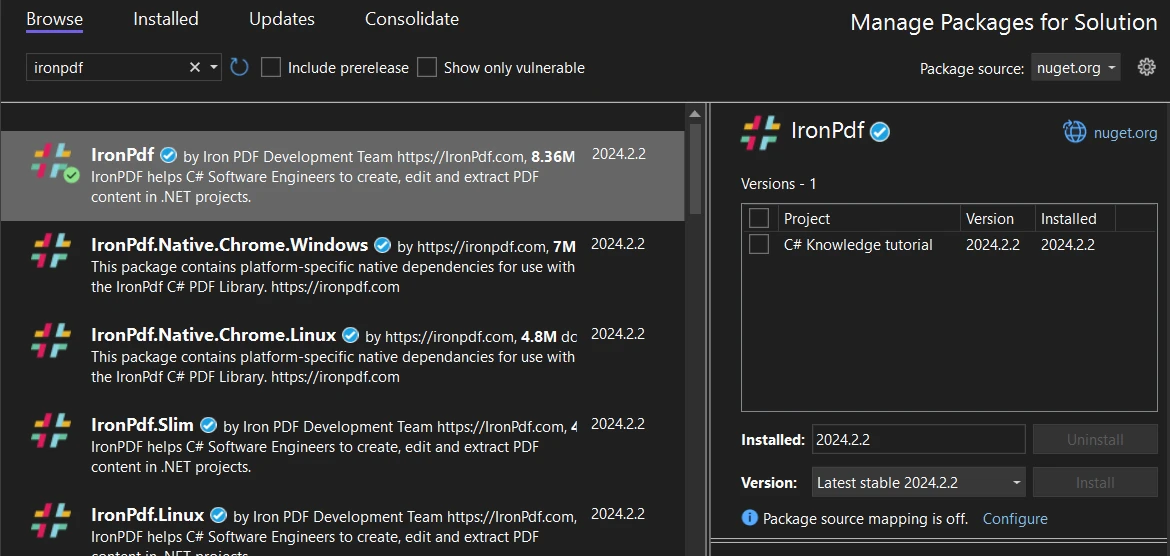
要在项目中开始使用 IronPDF,您可以通过 NuGet 包管理器轻松安装。 请遵循以下步骤:
1.在 Visual Studio 中打开您的项目。
- 导航到 工具 > NuGet 包管理器 > 为解决方案管理 NuGet 包。
- 在 NuGet 管理器中搜索 IronPDF。
- 选择您的项目,然后单击安装将IronPDF添加到项目中。
通过 Visual Studio 的 NuGet 包管理器界面安装 IronPDF
或者,您可以使用包管理器控制台安装 IronPDF,命令如下:
Install-Package IronPdf
安装 PDFSharpCore
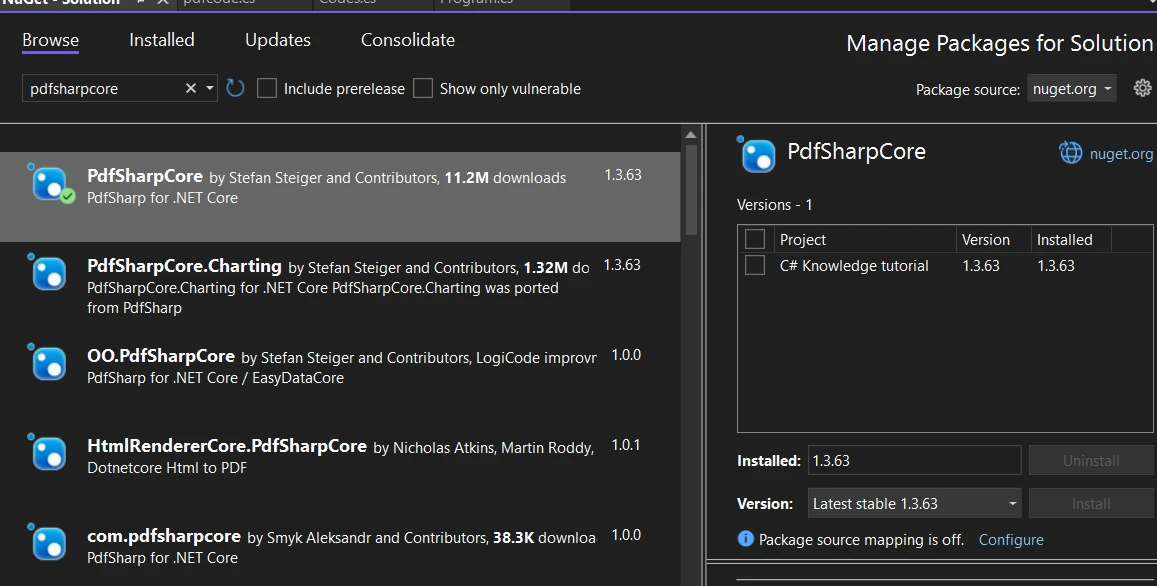
使用 NuGet 安装 PDFSharpCore,请按照以下说明进行操作:
- 确保您的 Visual Studio 项目已打开。
- 转到 工具 > NuGet 包管理器 > 为解决方案管理 NuGet 包。
- 在 NuGet 包管理器中,搜索 PDFSharpCore。
- 选择您的项目并单击安装以集成 PDFSharpCore。
通过 NuGet 包管理器安装 PDFSharpCore
对于偏好使用包管理器控制台的开发人员,可以通过以下命令安装 PDFSharpCore:
Install-Package PdfSharpCore
创建 PDF 文件:IronPDF 与 PDFSharpCore
IronPDF:现代 HTML 基础的方法
IronPDF 通过利用开发人员已熟知的 Web 技术革新了 PDF 创建。 其基于 Chrome 的渲染引擎确保 HTML、CSS 和 JavaScript 内容如同在现代浏览器中一样地呈现。
具备高级功能的 HTML 字符串到 PDF
IronPDF 的HTML 到 PDF 转换功能远远超出简单文本渲染。 以下是展示其强大功能的一个增强实例:
using IronPdf;
using IronPdf.Rendering;
class Program
{
static void Main(string[] args)
{
// Apply your license key (required for production)
License.LicenseKey = "Your-License-Key";
// Create renderer with optimized settings
var renderer = new ChromePdfRenderer()
{
RenderingOptions = new ChromePdfRenderOptions()
{
// Set margins for professional appearance
MarginTop = 25,
MarginBottom = 25,
MarginLeft = 20,
MarginRight = 20,
// Enable JavaScript execution for dynamic content
EnableJavaScript = true,
// Wait for AJAX/animations to complete
RenderDelay = 500,
// Set paper orientation and size
PaperOrientation = PdfPaperOrientation.Portrait,
PaperSize = PdfPaperSize.A4,
// Enable printing of background colors and images
PrintHtmlBackgrounds = true
}
};
// HTML with Bootstrap styling and charts
string htmlContent = @"
<!DOCTYPE html>
<html>
<head>
<link href='https://cdn.jsdelivr.net/npm/bootstrap@5.1.3/dist/css/bootstrap.min.css' rel='stylesheet'>
<script src='https://cdn.jsdelivr.net/npm/chart.js'></script>
<style>
body { font-family: 'Segoe UI', Tahoma, Geneva, Verdana, sans-serif; }
.header { background: linear-gradient(135deg, #667eea 0%, #764ba2 100%); color: white; padding: 30px; }
.chart-container { width: 100%; height: 300px; margin: 20px 0; }
</style>
</head>
<body>
<div class='header text-center'>
<h1>2024 Sales Performance Report</h1>
<p class='lead'>Comprehensive Analysis & Insights</p>
</div>
<div class='container mt-4'>
<div class='row'>
<div class='col-md-6'>
<div class='card'>
<div class='card-body'>
<h5 class='card-title'>Q1 Performance Metrics</h5>
<table class='table table-striped'>
<thead>
<tr>
<th>Month</th>
<th>Revenue</th>
<th>Growth</th>
</tr>
</thead>
<tbody>
<tr>
<td>January</td>
<td>$50,000</td>
<td><span class='badge bg-success'>+12%</span></td>
</tr>
<tr>
<td>February</td>
<td>$55,000</td>
<td><span class='badge bg-success'>+10%</span></td>
</tr>
<tr>
<td>March</td>
<td>$60,000</td>
<td><span class='badge bg-success'>+9%</span></td>
</tr>
</tbody>
</table>
</div>
</div>
</div>
<div class='col-md-6'>
<div class='card'>
<div class='card-body'>
<h5 class='card-title'>Revenue Trend</h5>
<canvas id='revenueChart'></canvas>
</div>
</div>
</div>
</div>
<div class='alert alert-info mt-4'>
<strong>Key Insight:</strong> Q1 showed consistent growth across all months,
with total revenue reaching $165,000, representing a 31% increase YoY.
</div>
</div>
<script>
// Create an interactive chart
const ctx = document.getElementById('revenueChart').getContext('2d');
new Chart(ctx, {
type: 'line',
data: {
labels: ['January', 'February', 'March'],
datasets: [{
label: 'Revenue',
data: [50000, 55000, 60000],
borderColor: '#667eea',
backgroundColor: 'rgba(102, 126, 234, 0.1)',
tension: 0.4
}]
},
options: {
responsive: true,
maintainAspectRatio: false
}
});
</script>
</body>
</html>";
// Render the HTML to PDF
var pdf = renderer.RenderHtmlAsPdf(htmlContent);
// Add metadata for better document management
pdf.MetaData.Author = "Sales Department";
pdf.MetaData.Title = "Q1 2024 Sales Report";
pdf.MetaData.Subject = "Quarterly Performance Analysis";
pdf.MetaData.Keywords = "sales, performance, Q1, 2024";
pdf.MetaData.CreationDate = DateTime.Now;
// Save the PDF
pdf.SaveAs("sales-report-q1-2024.pdf");
Console.WriteLine("Professional sales report generated successfully!");
}
}
using IronPdf;
using IronPdf.Rendering;
class Program
{
static void Main(string[] args)
{
// Apply your license key (required for production)
License.LicenseKey = "Your-License-Key";
// Create renderer with optimized settings
var renderer = new ChromePdfRenderer()
{
RenderingOptions = new ChromePdfRenderOptions()
{
// Set margins for professional appearance
MarginTop = 25,
MarginBottom = 25,
MarginLeft = 20,
MarginRight = 20,
// Enable JavaScript execution for dynamic content
EnableJavaScript = true,
// Wait for AJAX/animations to complete
RenderDelay = 500,
// Set paper orientation and size
PaperOrientation = PdfPaperOrientation.Portrait,
PaperSize = PdfPaperSize.A4,
// Enable printing of background colors and images
PrintHtmlBackgrounds = true
}
};
// HTML with Bootstrap styling and charts
string htmlContent = @"
<!DOCTYPE html>
<html>
<head>
<link href='https://cdn.jsdelivr.net/npm/bootstrap@5.1.3/dist/css/bootstrap.min.css' rel='stylesheet'>
<script src='https://cdn.jsdelivr.net/npm/chart.js'></script>
<style>
body { font-family: 'Segoe UI', Tahoma, Geneva, Verdana, sans-serif; }
.header { background: linear-gradient(135deg, #667eea 0%, #764ba2 100%); color: white; padding: 30px; }
.chart-container { width: 100%; height: 300px; margin: 20px 0; }
</style>
</head>
<body>
<div class='header text-center'>
<h1>2024 Sales Performance Report</h1>
<p class='lead'>Comprehensive Analysis & Insights</p>
</div>
<div class='container mt-4'>
<div class='row'>
<div class='col-md-6'>
<div class='card'>
<div class='card-body'>
<h5 class='card-title'>Q1 Performance Metrics</h5>
<table class='table table-striped'>
<thead>
<tr>
<th>Month</th>
<th>Revenue</th>
<th>Growth</th>
</tr>
</thead>
<tbody>
<tr>
<td>January</td>
<td>$50,000</td>
<td><span class='badge bg-success'>+12%</span></td>
</tr>
<tr>
<td>February</td>
<td>$55,000</td>
<td><span class='badge bg-success'>+10%</span></td>
</tr>
<tr>
<td>March</td>
<td>$60,000</td>
<td><span class='badge bg-success'>+9%</span></td>
</tr>
</tbody>
</table>
</div>
</div>
</div>
<div class='col-md-6'>
<div class='card'>
<div class='card-body'>
<h5 class='card-title'>Revenue Trend</h5>
<canvas id='revenueChart'></canvas>
</div>
</div>
</div>
</div>
<div class='alert alert-info mt-4'>
<strong>Key Insight:</strong> Q1 showed consistent growth across all months,
with total revenue reaching $165,000, representing a 31% increase YoY.
</div>
</div>
<script>
// Create an interactive chart
const ctx = document.getElementById('revenueChart').getContext('2d');
new Chart(ctx, {
type: 'line',
data: {
labels: ['January', 'February', 'March'],
datasets: [{
label: 'Revenue',
data: [50000, 55000, 60000],
borderColor: '#667eea',
backgroundColor: 'rgba(102, 126, 234, 0.1)',
tension: 0.4
}]
},
options: {
responsive: true,
maintainAspectRatio: false
}
});
</script>
</body>
</html>";
// Render the HTML to PDF
var pdf = renderer.RenderHtmlAsPdf(htmlContent);
// Add metadata for better document management
pdf.MetaData.Author = "Sales Department";
pdf.MetaData.Title = "Q1 2024 Sales Report";
pdf.MetaData.Subject = "Quarterly Performance Analysis";
pdf.MetaData.Keywords = "sales, performance, Q1, 2024";
pdf.MetaData.CreationDate = DateTime.Now;
// Save the PDF
pdf.SaveAs("sales-report-q1-2024.pdf");
Console.WriteLine("Professional sales report generated successfully!");
}
}
Imports IronPdf
Imports IronPdf.Rendering
Friend Class Program
Shared Sub Main(ByVal args() As String)
' Apply your license key (required for production)
License.LicenseKey = "Your-License-Key"
' Create renderer with optimized settings
Dim renderer = New ChromePdfRenderer() With {
.RenderingOptions = New ChromePdfRenderOptions() With {
.MarginTop = 25,
.MarginBottom = 25,
.MarginLeft = 20,
.MarginRight = 20,
.EnableJavaScript = True,
.RenderDelay = 500,
.PaperOrientation = PdfPaperOrientation.Portrait,
.PaperSize = PdfPaperSize.A4,
.PrintHtmlBackgrounds = True
}
}
' HTML with Bootstrap styling and charts
Dim htmlContent As String = "
<!DOCTYPE html>
<html>
<head>
<link href='https://cdn.jsdelivr.net/npm/bootstrap@5.1.3/dist/css/bootstrap.min.css' rel='stylesheet'>
<script src='https://cdn.jsdelivr.net/npm/chart.js'></script>
<style>
body { font-family: 'Segoe UI', Tahoma, Geneva, Verdana, sans-serif; }
.header { background: linear-gradient(135deg, #667eea 0%, #764ba2 100%); color: white; padding: 30px; }
.chart-container { width: 100%; height: 300px; margin: 20px 0; }
</style>
</head>
<body>
<div class='header text-center'>
<h1>2024 Sales Performance Report</h1>
<p class='lead'>Comprehensive Analysis & Insights</p>
</div>
<div class='container mt-4'>
<div class='row'>
<div class='col-md-6'>
<div class='card'>
<div class='card-body'>
<h5 class='card-title'>Q1 Performance Metrics</h5>
<table class='table table-striped'>
<thead>
<tr>
<th>Month</th>
<th>Revenue</th>
<th>Growth</th>
</tr>
</thead>
<tbody>
<tr>
<td>January</td>
<td>$50,000</td>
<td><span class='badge bg-success'>+12%</span></td>
</tr>
<tr>
<td>February</td>
<td>$55,000</td>
<td><span class='badge bg-success'>+10%</span></td>
</tr>
<tr>
<td>March</td>
<td>$60,000</td>
<td><span class='badge bg-success'>+9%</span></td>
</tr>
</tbody>
</table>
</div>
</div>
</div>
<div class='col-md-6'>
<div class='card'>
<div class='card-body'>
<h5 class='card-title'>Revenue Trend</h5>
<canvas id='revenueChart'></canvas>
</div>
</div>
</div>
</div>
<div class='alert alert-info mt-4'>
<strong>Key Insight:</strong> Q1 showed consistent growth across all months,
with total revenue reaching $165,000, representing a 31% increase YoY.
</div>
</div>
<script>
// Create an interactive chart
const ctx = document.getElementById('revenueChart').getContext('2d');
new Chart(ctx, {
type: 'line',
data: {
labels: ['January', 'February', 'March'],
datasets: [{
label: 'Revenue',
data: [50000, 55000, 60000],
borderColor: '#667eea',
backgroundColor: 'rgba(102, 126, 234, 0.1)',
tension: 0.4
}]
},
options: {
responsive: true,
maintainAspectRatio: false
}
});
</script>
</body>
</html>"
' Render the HTML to PDF
Dim pdf = renderer.RenderHtmlAsPdf(htmlContent)
' Add metadata for better document management
pdf.MetaData.Author = "Sales Department"
pdf.MetaData.Title = "Q1 2024 Sales Report"
pdf.MetaData.Subject = "Quarterly Performance Analysis"
pdf.MetaData.Keywords = "sales, performance, Q1, 2024"
pdf.MetaData.CreationDate = DateTime.Now
' Save the PDF
pdf.SaveAs("sales-report-q1-2024.pdf")
Console.WriteLine("Professional sales report generated successfully!")
End Sub
End Class
这个例子展示了IronPDF的几个高级功能:
- Bootstrap 集成:利用流行的 CSS 框架实现专业样式
- JavaScript 图表:在 PDF 中渲染动态 Chart.js 可视化图表 -响应式设计:智能处理响应式布局 -元数据管理:为文档管理系统添加可搜索的元数据 -渲染延迟:确保 JavaScript 内容在渲染之前完全加载完毕
ChromePdfRenderer 类提供了对渲染过程的广泛控制。 主要选项包括:
EnableJavaScript: 在渲染之前执行 JavaScript 代码RenderDelay: 等待异步内容加载PrintHtmlBackgrounds: 保留背景颜色和图像PaperOrientation和PaperSize:控制页面布局- 用于专业文档外观的边距设置
转换 HTML 文件和 URL
IronPDF 在转换已有的 HTML 文件和实时网页方面同样出色:
using IronPdf;
class Program
{
static async Task Main(string[] args)
{
License.LicenseKey = "Your-License-Key";
var renderer = new ChromePdfRenderer();
// Convert a local HTML file with external resources
var filePdf = renderer.RenderHtmlFileAsPdf(@"C:\Reports\template.html");
filePdf.SaveAs("from-file.pdf");
// Convert a URL with authentication
renderer.LoginCredentials = new ChromeHttpLoginCredentials()
{
Username = "user@example.com",
Password = "secure-password"
};
// Render a password-protected page
var urlPdf = await renderer.RenderUrlAsPdfAsync("https://secure.example.com/reports");
urlPdf.SaveAs("secure-report.pdf");
}
}
using IronPdf;
class Program
{
static async Task Main(string[] args)
{
License.LicenseKey = "Your-License-Key";
var renderer = new ChromePdfRenderer();
// Convert a local HTML file with external resources
var filePdf = renderer.RenderHtmlFileAsPdf(@"C:\Reports\template.html");
filePdf.SaveAs("from-file.pdf");
// Convert a URL with authentication
renderer.LoginCredentials = new ChromeHttpLoginCredentials()
{
Username = "user@example.com",
Password = "secure-password"
};
// Render a password-protected page
var urlPdf = await renderer.RenderUrlAsPdfAsync("https://secure.example.com/reports");
urlPdf.SaveAs("secure-report.pdf");
}
}
Imports IronPdf
Friend Class Program
Shared Async Function Main(ByVal args() As String) As Task
License.LicenseKey = "Your-License-Key"
Dim renderer = New ChromePdfRenderer()
' Convert a local HTML file with external resources
Dim filePdf = renderer.RenderHtmlFileAsPdf("C:\Reports\template.html")
filePdf.SaveAs("from-file.pdf")
' Convert a URL with authentication
renderer.LoginCredentials = New ChromeHttpLoginCredentials() With {
.Username = "user@example.com",
.Password = "secure-password"
}
' Render a password-protected page
Dim urlPdf = Await renderer.RenderUrlAsPdfAsync("https://secure.example.com/reports")
urlPdf.SaveAs("secure-report.pdf")
End Function
End Class
PDFSharpCore:手动文档构建
PDFSharpCore 采用了一种根本不同的方法,要求开发人员使用绘图命令手动构建 PDF 文档。 尽管这提供了精确的控制,但对于复杂布局需要显著更多的代码。
using PdfSharpCore.Drawing;
using PdfSharpCore.Pdf;
using System;
class Program
{
static void Main()
{
// Create a new PDF document
var document = new PdfDocument();
document.Info.Title = "Sales Report Q1 2024";
document.Info.Author = "Sales Department";
// Add a page
var page = document.AddPage();
page.Size = PdfSharpCore.PageSize.A4;
// Create graphics object for drawing
var gfx = XGraphics.FromPdfPage(page);
// Define fonts
var titleFont = new XFont("Arial", 24, XFontStyle.Bold);
var headingFont = new XFont("Arial", 14, XFontStyle.Bold);
var normalFont = new XFont("Arial", 11, XFontStyle.Regular);
// Draw title with gradient-like effect (manual implementation)
var titleBrush = new XLinearGradientBrush(
new XPoint(0, 0),
new XPoint(page.Width, 0),
XColors.DarkBlue,
XColors.Purple
);
gfx.DrawRectangle(titleBrush, 0, 0, page.Width, 80);
gfx.DrawString("2024 Sales Performance Report",
titleFont, XBrushes.White,
new XRect(0, 20, page.Width, 40),
XStringFormats.TopCenter);
// Draw table manually
double yPosition = 120;
double margin = 50;
double columnWidth = (page.Width - 2 * margin) / 3;
// Table header
gfx.DrawRectangle(XBrushes.LightGray, margin, yPosition, page.Width - 2 * margin, 25);
gfx.DrawString("Month", headingFont, XBrushes.Black,
new XRect(margin, yPosition, columnWidth, 25),
XStringFormats.Center);
gfx.DrawString("Revenue", headingFont, XBrushes.Black,
new XRect(margin + columnWidth, yPosition, columnWidth, 25),
XStringFormats.Center);
gfx.DrawString("Growth", headingFont, XBrushes.Black,
new XRect(margin + 2 * columnWidth, yPosition, columnWidth, 25),
XStringFormats.Center);
// Table data
string[,] data = {
{ "January", "$50,000", "+12%" },
{ "February", "$55,000", "+10%" },
{ "March", "$60,000", "+9%" }
};
yPosition += 25;
for (int i = 0; i < 3; i++)
{
// Alternate row colors
if (i % 2 == 0)
{
gfx.DrawRectangle(XBrushes.WhiteSmoke, margin, yPosition, page.Width - 2 * margin, 20);
}
for (int j = 0; j < 3; j++)
{
gfx.DrawString(data[i, j], normalFont, XBrushes.Black,
new XRect(margin + j * columnWidth, yPosition, columnWidth, 20),
XStringFormats.Center);
}
yPosition += 20;
}
// Draw a simple line chart (very basic implementation)
yPosition += 40;
gfx.DrawString("Revenue Trend", headingFont, XBrushes.Black,
new XRect(margin, yPosition, page.Width - 2 * margin, 25),
XStringFormats.TopLeft);
// Chart area
yPosition += 30;
double chartHeight = 150;
double chartWidth = page.Width - 2 * margin;
// Draw axes
gfx.DrawLine(XPens.Black, margin, yPosition + chartHeight, margin + chartWidth, yPosition + chartHeight);
gfx.DrawLine(XPens.Black, margin, yPosition, margin, yPosition + chartHeight);
// Plot points (simplified)
double[] revenues = { 50000, 55000, 60000 };
double maxRevenue = 65000;
double xStep = chartWidth / 3;
for (int i = 0; i < revenues.Length; i++)
{
double x = margin + (i + 0.5) * xStep;
double y = yPosition + chartHeight - (revenues[i] / maxRevenue * chartHeight);
// Draw point
gfx.DrawEllipse(XBrushes.Blue, x - 3, y - 3, 6, 6);
// Draw connecting lines
if (i > 0)
{
double prevX = margin + (i - 0.5) * xStep;
double prevY = yPosition + chartHeight - (revenues[i - 1] / maxRevenue * chartHeight);
gfx.DrawLine(new XPen(XColors.Blue, 2), prevX, prevY, x, y);
}
// Labels
gfx.DrawString($"${revenues[i]:N0}", normalFont, XBrushes.Black,
new XRect(x - 30, y - 20, 60, 15),
XStringFormats.TopCenter);
}
// Save the document
document.Save("pdfsharp-sales-report.pdf");
Console.WriteLine("PDF created with PDFSharpCore");
}
}
using PdfSharpCore.Drawing;
using PdfSharpCore.Pdf;
using System;
class Program
{
static void Main()
{
// Create a new PDF document
var document = new PdfDocument();
document.Info.Title = "Sales Report Q1 2024";
document.Info.Author = "Sales Department";
// Add a page
var page = document.AddPage();
page.Size = PdfSharpCore.PageSize.A4;
// Create graphics object for drawing
var gfx = XGraphics.FromPdfPage(page);
// Define fonts
var titleFont = new XFont("Arial", 24, XFontStyle.Bold);
var headingFont = new XFont("Arial", 14, XFontStyle.Bold);
var normalFont = new XFont("Arial", 11, XFontStyle.Regular);
// Draw title with gradient-like effect (manual implementation)
var titleBrush = new XLinearGradientBrush(
new XPoint(0, 0),
new XPoint(page.Width, 0),
XColors.DarkBlue,
XColors.Purple
);
gfx.DrawRectangle(titleBrush, 0, 0, page.Width, 80);
gfx.DrawString("2024 Sales Performance Report",
titleFont, XBrushes.White,
new XRect(0, 20, page.Width, 40),
XStringFormats.TopCenter);
// Draw table manually
double yPosition = 120;
double margin = 50;
double columnWidth = (page.Width - 2 * margin) / 3;
// Table header
gfx.DrawRectangle(XBrushes.LightGray, margin, yPosition, page.Width - 2 * margin, 25);
gfx.DrawString("Month", headingFont, XBrushes.Black,
new XRect(margin, yPosition, columnWidth, 25),
XStringFormats.Center);
gfx.DrawString("Revenue", headingFont, XBrushes.Black,
new XRect(margin + columnWidth, yPosition, columnWidth, 25),
XStringFormats.Center);
gfx.DrawString("Growth", headingFont, XBrushes.Black,
new XRect(margin + 2 * columnWidth, yPosition, columnWidth, 25),
XStringFormats.Center);
// Table data
string[,] data = {
{ "January", "$50,000", "+12%" },
{ "February", "$55,000", "+10%" },
{ "March", "$60,000", "+9%" }
};
yPosition += 25;
for (int i = 0; i < 3; i++)
{
// Alternate row colors
if (i % 2 == 0)
{
gfx.DrawRectangle(XBrushes.WhiteSmoke, margin, yPosition, page.Width - 2 * margin, 20);
}
for (int j = 0; j < 3; j++)
{
gfx.DrawString(data[i, j], normalFont, XBrushes.Black,
new XRect(margin + j * columnWidth, yPosition, columnWidth, 20),
XStringFormats.Center);
}
yPosition += 20;
}
// Draw a simple line chart (very basic implementation)
yPosition += 40;
gfx.DrawString("Revenue Trend", headingFont, XBrushes.Black,
new XRect(margin, yPosition, page.Width - 2 * margin, 25),
XStringFormats.TopLeft);
// Chart area
yPosition += 30;
double chartHeight = 150;
double chartWidth = page.Width - 2 * margin;
// Draw axes
gfx.DrawLine(XPens.Black, margin, yPosition + chartHeight, margin + chartWidth, yPosition + chartHeight);
gfx.DrawLine(XPens.Black, margin, yPosition, margin, yPosition + chartHeight);
// Plot points (simplified)
double[] revenues = { 50000, 55000, 60000 };
double maxRevenue = 65000;
double xStep = chartWidth / 3;
for (int i = 0; i < revenues.Length; i++)
{
double x = margin + (i + 0.5) * xStep;
double y = yPosition + chartHeight - (revenues[i] / maxRevenue * chartHeight);
// Draw point
gfx.DrawEllipse(XBrushes.Blue, x - 3, y - 3, 6, 6);
// Draw connecting lines
if (i > 0)
{
double prevX = margin + (i - 0.5) * xStep;
double prevY = yPosition + chartHeight - (revenues[i - 1] / maxRevenue * chartHeight);
gfx.DrawLine(new XPen(XColors.Blue, 2), prevX, prevY, x, y);
}
// Labels
gfx.DrawString($"${revenues[i]:N0}", normalFont, XBrushes.Black,
new XRect(x - 30, y - 20, 60, 15),
XStringFormats.TopCenter);
}
// Save the document
document.Save("pdfsharp-sales-report.pdf");
Console.WriteLine("PDF created with PDFSharpCore");
}
}
Imports PdfSharpCore.Drawing
Imports PdfSharpCore.Pdf
Imports System
Friend Class Program
Shared Sub Main()
' Create a new PDF document
Dim document = New PdfDocument()
document.Info.Title = "Sales Report Q1 2024"
document.Info.Author = "Sales Department"
' Add a page
Dim page = document.AddPage()
page.Size = PdfSharpCore.PageSize.A4
' Create graphics object for drawing
Dim gfx = XGraphics.FromPdfPage(page)
' Define fonts
Dim titleFont = New XFont("Arial", 24, XFontStyle.Bold)
Dim headingFont = New XFont("Arial", 14, XFontStyle.Bold)
Dim normalFont = New XFont("Arial", 11, XFontStyle.Regular)
' Draw title with gradient-like effect (manual implementation)
Dim titleBrush = New XLinearGradientBrush(New XPoint(0, 0), New XPoint(page.Width, 0), XColors.DarkBlue, XColors.Purple)
gfx.DrawRectangle(titleBrush, 0, 0, page.Width, 80)
gfx.DrawString("2024 Sales Performance Report", titleFont, XBrushes.White, New XRect(0, 20, page.Width, 40), XStringFormats.TopCenter)
' Draw table manually
Dim yPosition As Double = 120
Dim margin As Double = 50
Dim columnWidth As Double = (page.Width - 2 * margin) / 3
' Table header
gfx.DrawRectangle(XBrushes.LightGray, margin, yPosition, page.Width - 2 * margin, 25)
gfx.DrawString("Month", headingFont, XBrushes.Black, New XRect(margin, yPosition, columnWidth, 25), XStringFormats.Center)
gfx.DrawString("Revenue", headingFont, XBrushes.Black, New XRect(margin + columnWidth, yPosition, columnWidth, 25), XStringFormats.Center)
gfx.DrawString("Growth", headingFont, XBrushes.Black, New XRect(margin + 2 * columnWidth, yPosition, columnWidth, 25), XStringFormats.Center)
' Table data
Dim data(,) As String = {
{ "January", "$50,000", "+12%" },
{ "February", "$55,000", "+10%" },
{ "March", "$60,000", "+9%" }
}
yPosition += 25
For i As Integer = 0 To 2
' Alternate row colors
If i Mod 2 = 0 Then
gfx.DrawRectangle(XBrushes.WhiteSmoke, margin, yPosition, page.Width - 2 * margin, 20)
End If
For j As Integer = 0 To 2
gfx.DrawString(data(i, j), normalFont, XBrushes.Black, New XRect(margin + j * columnWidth, yPosition, columnWidth, 20), XStringFormats.Center)
Next j
yPosition += 20
Next i
' Draw a simple line chart (very basic implementation)
yPosition += 40
gfx.DrawString("Revenue Trend", headingFont, XBrushes.Black, New XRect(margin, yPosition, page.Width - 2 * margin, 25), XStringFormats.TopLeft)
' Chart area
yPosition += 30
Dim chartHeight As Double = 150
Dim chartWidth As Double = page.Width - 2 * margin
' Draw axes
gfx.DrawLine(XPens.Black, margin, yPosition + chartHeight, margin + chartWidth, yPosition + chartHeight)
gfx.DrawLine(XPens.Black, margin, yPosition, margin, yPosition + chartHeight)
' Plot points (simplified)
Dim revenues() As Double = { 50000, 55000, 60000 }
Dim maxRevenue As Double = 65000
Dim xStep As Double = chartWidth / 3
For i As Integer = 0 To revenues.Length - 1
Dim x As Double = margin + (i + 0.5) * xStep
Dim y As Double = yPosition + chartHeight - (revenues(i) / maxRevenue * chartHeight)
' Draw point
gfx.DrawEllipse(XBrushes.Blue, x - 3, y - 3, 6, 6)
' Draw connecting lines
If i > 0 Then
Dim prevX As Double = margin + (i - 0.5) * xStep
Dim prevY As Double = yPosition + chartHeight - (revenues(i - 1) / maxRevenue * chartHeight)
gfx.DrawLine(New XPen(XColors.Blue, 2), prevX, prevY, x, y)
End If
' Labels
gfx.DrawString($"${revenues(i):N0}", normalFont, XBrushes.Black, New XRect(x - 30, y - 20, 60, 15), XStringFormats.TopCenter)
Next i
' Save the document
document.Save("pdfsharp-sales-report.pdf")
Console.WriteLine("PDF created with PDFSharpCore")
End Sub
End Class
如您所见,使用 PDFSharpCore 创建甚至中等复杂度的文档都需要:
- 每个元素的手动定位
- 复杂的布局计算
- 不支持 HTML 或 CSS
- 图表和图形需手动实现
- 为了达到相同目的需要显著更多代码
使用 PDFSharpCore 进行 HTML 到 PDF 转换
由于 PDFSharpCore 不支持本地 HTML 到 PDF 的转换,开发人员必须使用第三方库。 一个流行的选择是结合 PDFSharpCore 和 HtmlRenderer:
using PdfSharpCore.Pdf;
using TheArtOfDev.HtmlRenderer.PdfSharp;
var document = new PdfDocument();
string htmlContent = File.ReadAllText("template.html");
// Note: HtmlRenderer has limited CSS support
PdfGenerator.AddPdfPages(document, htmlContent, PdfSharpCore.PageSize.A4);
document.Save("from-html.pdf");
using PdfSharpCore.Pdf;
using TheArtOfDev.HtmlRenderer.PdfSharp;
var document = new PdfDocument();
string htmlContent = File.ReadAllText("template.html");
// Note: HtmlRenderer has limited CSS support
PdfGenerator.AddPdfPages(document, htmlContent, PdfSharpCore.PageSize.A4);
document.Save("from-html.pdf");
Imports PdfSharpCore.Pdf
Imports TheArtOfDev.HtmlRenderer.PdfSharp
Private document = New PdfDocument()
Private htmlContent As String = File.ReadAllText("template.html")
' Note: HtmlRenderer has limited CSS support
PdfGenerator.AddPdfPages(document, htmlContent, PdfSharpCore.PageSize.A4)
document.Save("from-html.pdf")
然而,这种方法存在明显的局限性:
- CSS3 支持有限(大约 70-80% 的兼容性)
- 不支持 JavaScript 执行
- 现代 web 特性处理不佳
- 与浏览器相比渲染不一致
现代 CSS 框架支持:Bootstrap 及更先进的版本
在开发需要从 web 内容生成 PDF 的应用程序时,Bootstrap 和现代 CSS 框架的支持至关重要。 大多数 web 应用使用这些框架以保持一致的设计,而能够在无需修改的情况下将这些界面转换为 PDF 大大减少了开发时间。
IronPDF:完整的Bootstrap和CSS框架支持
Bootstrap 5:完整的 Flexbox 布局引擎、CSS Grid、实用类和所有组件系统 Bootstrap 4:完整的卡片组件、导航、弹性布局工具和响应式类 Tailwind CSS:所有实用类都能准确渲染 -基础:完整的网格系统和组件库 现代CSS3: Flexbox、CSS Grid、自定义属性、动画、过渡和变换
实验证明:IronPDF 能够以像素近乎完美的准确度渲染Bootstrap 首页和所有官方模板。
代码示例:项目进展仪表板
using IronPdf;
// Set yourIronPDFlicense key
IronPdf.License.LicenseKey = "License-Key goes here";
var renderer = new ChromePdfRenderer();
string bootstrapProgress = @"
<!DOCTYPE html>
<html>
<head>
<link href='https://cdn.jsdelivr.net/npm/bootstrap@5.3.0/dist/css/bootstrap.min.css' rel='stylesheet'>
<style>
.project-card {
transition: all 0.3s ease;
border-left: 4px solid transparent;
}
.project-card.active { border-left-color: #0d6efd; }
.progress-label { font-size: 0.75rem; font-weight: 600; }
</style>
</head>
<body>
<div class='container my-5'>
<div class='d-flex justify-content-between align-items-center mb-4'>
<div>
<h1 class='display-6 mb-1'>Project Portfolio Status</h1>
<p class='text-muted mb-0'>Q1 2025 Development Pipeline</p>
</div>
<div>
<span class='badge bg-success fs-6'>8 Active Projects</span>
</div>
</div>
<div class='row g-4 mb-4'>
<div class='col-md-3'>
<div class='card text-center shadow-sm'>
<div class='card-body'>
<div class='display-4 text-primary mb-2'>72%</div>
<h6 class='text-muted text-uppercase mb-0'>Overall Progress</h6>
</div>
</div>
</div>
<div class='col-md-3'>
<div class='card text-center shadow-sm'>
<div class='card-body'>
<div class='display-4 text-success mb-2'>5</div>
<h6 class='text-muted text-uppercase mb-0'>On Track</h6>
</div>
</div>
</div>
<div class='col-md-3'>
<div class='card text-center shadow-sm'>
<div class='card-body'>
<div class='display-4 text-warning mb-2'>2</div>
<h6 class='text-muted text-uppercase mb-0'>At Risk</h6>
</div>
</div>
</div>
<div class='col-md-3'>
<div class='card text-center shadow-sm'>
<div class='card-body'>
<div class='display-4 text-danger mb-2'>1</div>
<h6 class='text-muted text-uppercase mb-0'>Delayed</h6>
</div>
</div>
</div>
</div>
<div class='card shadow-sm mb-4'>
<div class='card-header bg-primary text-white'>
<h5 class='mb-0'>Active Projects</h5>
</div>
<div class='card-body p-0'>
<div class='list-group list-group-flush'>
<div class='list-group-item'>
<div class='d-flex justify-content-between align-items-start mb-3'>
<div>
<h6 class='mb-1'>E-Commerce Platform Redesign</h6>
<small class='text-muted'>Lead: Sarah Chen | Due: Apr 15, 2025</small>
</div>
<span class='badge bg-success'>On Track</span>
</div>
<div class='mb-2'>
<div class='d-flex justify-content-between align-items-center mb-1'>
<span class='progress-label text-muted'>COMPLETION</span>
<span class='progress-label text-primary'>85%</span>
</div>
<div class='progress' style='height: 8px;'>
<div class='progress-bar bg-primary' role='progressbar' style='width: 85%'></div>
</div>
</div>
<div class='d-flex gap-2 flex-wrap'>
<span class='badge bg-light text-dark'>Frontend: 90%</span>
<span class='badge bg-light text-dark'>Backend: 80%</span>
<span class='badge bg-light text-dark'>Testing: 85%</span>
</div>
</div>
<div class='list-group-item'>
<div class='d-flex justify-content-between align-items-start mb-3'>
<div>
<h6 class='mb-1'>Mobile App Integration</h6>
<small class='text-muted'>Lead: Marcus Johnson | Due: Mar 30, 2025</small>
</div>
<span class='badge bg-success'>On Track</span>
</div>
<div class='mb-2'>
<div class='d-flex justify-content-between align-items-center mb-1'>
<span class='progress-label text-muted'>COMPLETION</span>
<span class='progress-label text-success'>92%</span>
</div>
<div class='progress' style='height: 8px;'>
<div class='progress-bar bg-success' role='progressbar' style='width: 92%'></div>
</div>
</div>
<div class='d-flex gap-2 flex-wrap'>
<span class='badge bg-light text-dark'>iOS: 95%</span>
<span class='badge bg-light text-dark'>Android: 90%</span>
<span class='badge bg-light text-dark'>API: 100%</span>
</div>
</div>
<div class='list-group-item'>
<div class='d-flex justify-content-between align-items-start mb-3'>
<div>
<h6 class='mb-1'>Customer Analytics Dashboard</h6>
<small class='text-muted'>Lead: Emily Rodriguez | Due: Apr 22, 2025</small>
</div>
<span class='badge bg-warning text-dark'>At Risk</span>
</div>
<div class='mb-2'>
<div class='d-flex justify-content-between align-items-center mb-1'>
<span class='progress-label text-muted'>COMPLETION</span>
<span class='progress-label text-warning'>58%</span>
</div>
<div class='progress' style='height: 8px;'>
<div class='progress-bar bg-warning' role='progressbar' style='width: 58%'></div>
</div>
</div>
<div class='d-flex gap-2 flex-wrap'>
<span class='badge bg-light text-dark'>Data Pipeline: 65%</span>
<span class='badge bg-light text-dark'>UI: 50%</span>
<span class='badge bg-light text-dark'>Reports: 45%</span>
</div>
<div class='alert alert-warning mt-2 mb-0 py-2'>
<small><strong>Issue:</strong> Resource constraints affecting timeline. Review scheduled for next week.</small>
</div>
</div>
<div class='list-group-item'>
<div class='d-flex justify-content-between align-items-start mb-3'>
<div>
<h6 class='mb-1'>Security Infrastructure Upgrade</h6>
<small class='text-muted'>Lead: David Kim | Due: Mar 25, 2025</small>
</div>
<span class='badge bg-danger'>Delayed</span>
</div>
<div class='mb-2'>
<div class='d-flex justify-content-between align-items-center mb-1'>
<span class='progress-label text-muted'>COMPLETION</span>
<span class='progress-label text-danger'>42%</span>
</div>
<div class='progress' style='height: 8px;'>
<div class='progress-bar bg-danger' role='progressbar' style='width: 42%'></div>
</div>
</div>
<div class='d-flex gap-2 flex-wrap'>
<span class='badge bg-light text-dark'>Authentication: 60%</span>
<span class='badge bg-light text-dark'>加密: 40%</span>
<span class='badge bg-light text-dark'>Audit Logs: 25%</span>
</div>
<div class='alert alert-danger mt-2 mb-0 py-2'>
<small><strong>Critical:</strong> 7 days behind schedule. Additional resources allocated. Daily standup required.</small>
</div>
</div>
</div>
</div>
</div>
<div class='row g-4'>
<div class='col-md-6'>
<div class='card shadow-sm'>
<div class='card-header bg-white'>
<h5 class='mb-0'>Sprint Velocity</h5>
</div>
<div class='card-body'>
<div class='mb-3'>
<div class='d-flex justify-content-between mb-1'>
<span class='text-muted'>Current Sprint</span>
<strong>42 Story Points</strong>
</div>
<div class='progress' style='height: 20px;'>
<div class='progress-bar bg-success' style='width: 84%'>84% Complete</div>
</div>
</div>
<div class='mb-3'>
<div class='d-flex justify-content-between mb-1'>
<span class='text-muted'>Previous Sprint</span>
<strong>38 Story Points</strong>
</div>
<div class='progress' style='height: 20px;'>
<div class='progress-bar bg-info' style='width: 100%'>Completed</div>
</div>
</div>
<div class='mb-0'>
<div class='d-flex justify-content-between mb-1'>
<span class='text-muted'>Average Velocity</span>
<strong>40 Story Points</strong>
</div>
<div class='progress' style='height: 20px;'>
<div class='progress-bar bg-primary' style='width: 100%'>Baseline</div>
</div>
</div>
</div>
</div>
</div>
<div class='col-md-6'>
<div class='card shadow-sm'>
<div class='card-header bg-white'>
<h5 class='mb-0'>Team Capacity</h5>
</div>
<div class='card-body'>
<div class='d-flex justify-content-between align-items-center mb-3'>
<div>
<h6 class='mb-0'>Frontend Team</h6>
<small class='text-muted'>6 developers</small>
</div>
<span class='badge bg-success'>92% Utilized</span>
</div>
<div class='d-flex justify-content-between align-items-center mb-3'>
<div>
<h6 class='mb-0'>Backend Team</h6>
<small class='text-muted'>5 developers</small>
</div>
<span class='badge bg-success'>88% Utilized</span>
</div>
<div class='d-flex justify-content-between align-items-center mb-3'>
<div>
<h6 class='mb-0'>QA Team</h6>
<small class='text-muted'>3 testers</small>
</div>
<span class='badge bg-warning text-dark'>105% Utilized</span>
</div>
<div class='d-flex justify-content-between align-items-center mb-0'>
<div>
<h6 class='mb-0'>DevOps Team</h6>
<small class='text-muted'>2 engineers</small>
</div>
<span class='badge bg-danger'>110% Utilized</span>
</div>
</div>
</div>
</div>
</div>
</div>
</body>
</html>";
var pdf = renderer.RenderHtmlAsPdf(bootstrapProgress);
pdf.SaveAs("project-progress.pdf");
using IronPdf;
// Set yourIronPDFlicense key
IronPdf.License.LicenseKey = "License-Key goes here";
var renderer = new ChromePdfRenderer();
string bootstrapProgress = @"
<!DOCTYPE html>
<html>
<head>
<link href='https://cdn.jsdelivr.net/npm/bootstrap@5.3.0/dist/css/bootstrap.min.css' rel='stylesheet'>
<style>
.project-card {
transition: all 0.3s ease;
border-left: 4px solid transparent;
}
.project-card.active { border-left-color: #0d6efd; }
.progress-label { font-size: 0.75rem; font-weight: 600; }
</style>
</head>
<body>
<div class='container my-5'>
<div class='d-flex justify-content-between align-items-center mb-4'>
<div>
<h1 class='display-6 mb-1'>Project Portfolio Status</h1>
<p class='text-muted mb-0'>Q1 2025 Development Pipeline</p>
</div>
<div>
<span class='badge bg-success fs-6'>8 Active Projects</span>
</div>
</div>
<div class='row g-4 mb-4'>
<div class='col-md-3'>
<div class='card text-center shadow-sm'>
<div class='card-body'>
<div class='display-4 text-primary mb-2'>72%</div>
<h6 class='text-muted text-uppercase mb-0'>Overall Progress</h6>
</div>
</div>
</div>
<div class='col-md-3'>
<div class='card text-center shadow-sm'>
<div class='card-body'>
<div class='display-4 text-success mb-2'>5</div>
<h6 class='text-muted text-uppercase mb-0'>On Track</h6>
</div>
</div>
</div>
<div class='col-md-3'>
<div class='card text-center shadow-sm'>
<div class='card-body'>
<div class='display-4 text-warning mb-2'>2</div>
<h6 class='text-muted text-uppercase mb-0'>At Risk</h6>
</div>
</div>
</div>
<div class='col-md-3'>
<div class='card text-center shadow-sm'>
<div class='card-body'>
<div class='display-4 text-danger mb-2'>1</div>
<h6 class='text-muted text-uppercase mb-0'>Delayed</h6>
</div>
</div>
</div>
</div>
<div class='card shadow-sm mb-4'>
<div class='card-header bg-primary text-white'>
<h5 class='mb-0'>Active Projects</h5>
</div>
<div class='card-body p-0'>
<div class='list-group list-group-flush'>
<div class='list-group-item'>
<div class='d-flex justify-content-between align-items-start mb-3'>
<div>
<h6 class='mb-1'>E-Commerce Platform Redesign</h6>
<small class='text-muted'>Lead: Sarah Chen | Due: Apr 15, 2025</small>
</div>
<span class='badge bg-success'>On Track</span>
</div>
<div class='mb-2'>
<div class='d-flex justify-content-between align-items-center mb-1'>
<span class='progress-label text-muted'>COMPLETION</span>
<span class='progress-label text-primary'>85%</span>
</div>
<div class='progress' style='height: 8px;'>
<div class='progress-bar bg-primary' role='progressbar' style='width: 85%'></div>
</div>
</div>
<div class='d-flex gap-2 flex-wrap'>
<span class='badge bg-light text-dark'>Frontend: 90%</span>
<span class='badge bg-light text-dark'>Backend: 80%</span>
<span class='badge bg-light text-dark'>Testing: 85%</span>
</div>
</div>
<div class='list-group-item'>
<div class='d-flex justify-content-between align-items-start mb-3'>
<div>
<h6 class='mb-1'>Mobile App Integration</h6>
<small class='text-muted'>Lead: Marcus Johnson | Due: Mar 30, 2025</small>
</div>
<span class='badge bg-success'>On Track</span>
</div>
<div class='mb-2'>
<div class='d-flex justify-content-between align-items-center mb-1'>
<span class='progress-label text-muted'>COMPLETION</span>
<span class='progress-label text-success'>92%</span>
</div>
<div class='progress' style='height: 8px;'>
<div class='progress-bar bg-success' role='progressbar' style='width: 92%'></div>
</div>
</div>
<div class='d-flex gap-2 flex-wrap'>
<span class='badge bg-light text-dark'>iOS: 95%</span>
<span class='badge bg-light text-dark'>Android: 90%</span>
<span class='badge bg-light text-dark'>API: 100%</span>
</div>
</div>
<div class='list-group-item'>
<div class='d-flex justify-content-between align-items-start mb-3'>
<div>
<h6 class='mb-1'>Customer Analytics Dashboard</h6>
<small class='text-muted'>Lead: Emily Rodriguez | Due: Apr 22, 2025</small>
</div>
<span class='badge bg-warning text-dark'>At Risk</span>
</div>
<div class='mb-2'>
<div class='d-flex justify-content-between align-items-center mb-1'>
<span class='progress-label text-muted'>COMPLETION</span>
<span class='progress-label text-warning'>58%</span>
</div>
<div class='progress' style='height: 8px;'>
<div class='progress-bar bg-warning' role='progressbar' style='width: 58%'></div>
</div>
</div>
<div class='d-flex gap-2 flex-wrap'>
<span class='badge bg-light text-dark'>Data Pipeline: 65%</span>
<span class='badge bg-light text-dark'>UI: 50%</span>
<span class='badge bg-light text-dark'>Reports: 45%</span>
</div>
<div class='alert alert-warning mt-2 mb-0 py-2'>
<small><strong>Issue:</strong> Resource constraints affecting timeline. Review scheduled for next week.</small>
</div>
</div>
<div class='list-group-item'>
<div class='d-flex justify-content-between align-items-start mb-3'>
<div>
<h6 class='mb-1'>Security Infrastructure Upgrade</h6>
<small class='text-muted'>Lead: David Kim | Due: Mar 25, 2025</small>
</div>
<span class='badge bg-danger'>Delayed</span>
</div>
<div class='mb-2'>
<div class='d-flex justify-content-between align-items-center mb-1'>
<span class='progress-label text-muted'>COMPLETION</span>
<span class='progress-label text-danger'>42%</span>
</div>
<div class='progress' style='height: 8px;'>
<div class='progress-bar bg-danger' role='progressbar' style='width: 42%'></div>
</div>
</div>
<div class='d-flex gap-2 flex-wrap'>
<span class='badge bg-light text-dark'>Authentication: 60%</span>
<span class='badge bg-light text-dark'>加密: 40%</span>
<span class='badge bg-light text-dark'>Audit Logs: 25%</span>
</div>
<div class='alert alert-danger mt-2 mb-0 py-2'>
<small><strong>Critical:</strong> 7 days behind schedule. Additional resources allocated. Daily standup required.</small>
</div>
</div>
</div>
</div>
</div>
<div class='row g-4'>
<div class='col-md-6'>
<div class='card shadow-sm'>
<div class='card-header bg-white'>
<h5 class='mb-0'>Sprint Velocity</h5>
</div>
<div class='card-body'>
<div class='mb-3'>
<div class='d-flex justify-content-between mb-1'>
<span class='text-muted'>Current Sprint</span>
<strong>42 Story Points</strong>
</div>
<div class='progress' style='height: 20px;'>
<div class='progress-bar bg-success' style='width: 84%'>84% Complete</div>
</div>
</div>
<div class='mb-3'>
<div class='d-flex justify-content-between mb-1'>
<span class='text-muted'>Previous Sprint</span>
<strong>38 Story Points</strong>
</div>
<div class='progress' style='height: 20px;'>
<div class='progress-bar bg-info' style='width: 100%'>Completed</div>
</div>
</div>
<div class='mb-0'>
<div class='d-flex justify-content-between mb-1'>
<span class='text-muted'>Average Velocity</span>
<strong>40 Story Points</strong>
</div>
<div class='progress' style='height: 20px;'>
<div class='progress-bar bg-primary' style='width: 100%'>Baseline</div>
</div>
</div>
</div>
</div>
</div>
<div class='col-md-6'>
<div class='card shadow-sm'>
<div class='card-header bg-white'>
<h5 class='mb-0'>Team Capacity</h5>
</div>
<div class='card-body'>
<div class='d-flex justify-content-between align-items-center mb-3'>
<div>
<h6 class='mb-0'>Frontend Team</h6>
<small class='text-muted'>6 developers</small>
</div>
<span class='badge bg-success'>92% Utilized</span>
</div>
<div class='d-flex justify-content-between align-items-center mb-3'>
<div>
<h6 class='mb-0'>Backend Team</h6>
<small class='text-muted'>5 developers</small>
</div>
<span class='badge bg-success'>88% Utilized</span>
</div>
<div class='d-flex justify-content-between align-items-center mb-3'>
<div>
<h6 class='mb-0'>QA Team</h6>
<small class='text-muted'>3 testers</small>
</div>
<span class='badge bg-warning text-dark'>105% Utilized</span>
</div>
<div class='d-flex justify-content-between align-items-center mb-0'>
<div>
<h6 class='mb-0'>DevOps Team</h6>
<small class='text-muted'>2 engineers</small>
</div>
<span class='badge bg-danger'>110% Utilized</span>
</div>
</div>
</div>
</div>
</div>
</div>
</body>
</html>";
var pdf = renderer.RenderHtmlAsPdf(bootstrapProgress);
pdf.SaveAs("project-progress.pdf");
Imports IronPdf
' Set your IronPDF license key
IronPdf.License.LicenseKey = "License-Key goes here"
Dim renderer As New ChromePdfRenderer()
Dim bootstrapProgress As String = "
<!DOCTYPE html>
<html>
<head>
<link href='https://cdn.jsdelivr.net/npm/bootstrap@5.3.0/dist/css/bootstrap.min.css' rel='stylesheet'>
<style>
.project-card {
transition: all 0.3s ease;
border-left: 4px solid transparent;
}
.project-card.active { border-left-color: #0d6efd; }
.progress-label { font-size: 0.75rem; font-weight: 600; }
</style>
</head>
<body>
<div class='container my-5'>
<div class='d-flex justify-content-between align-items-center mb-4'>
<div>
<h1 class='display-6 mb-1'>Project Portfolio Status</h1>
<p class='text-muted mb-0'>Q1 2025 Development Pipeline</p>
</div>
<div>
<span class='badge bg-success fs-6'>8 Active Projects</span>
</div>
</div>
<div class='row g-4 mb-4'>
<div class='col-md-3'>
<div class='card text-center shadow-sm'>
<div class='card-body'>
<div class='display-4 text-primary mb-2'>72%</div>
<h6 class='text-muted text-uppercase mb-0'>Overall Progress</h6>
</div>
</div>
</div>
<div class='col-md-3'>
<div class='card text-center shadow-sm'>
<div class='card-body'>
<div class='display-4 text-success mb-2'>5</div>
<h6 class='text-muted text-uppercase mb-0'>On Track</h6>
</div>
</div>
</div>
<div class='col-md-3'>
<div class='card text-center shadow-sm'>
<div class='card-body'>
<div class='display-4 text-warning mb-2'>2</div>
<h6 class='text-muted text-uppercase mb-0'>At Risk</h6>
</div>
</div>
</div>
<div class='col-md-3'>
<div class='card text-center shadow-sm'>
<div class='card-body'>
<div class='display-4 text-danger mb-2'>1</div>
<h6 class='text-muted text-uppercase mb-0'>Delayed</h6>
</div>
</div>
</div>
</div>
<div class='card shadow-sm mb-4'>
<div class='card-header bg-primary text-white'>
<h5 class='mb-0'>Active Projects</h5>
</div>
<div class='card-body p-0'>
<div class='list-group list-group-flush'>
<div class='list-group-item'>
<div class='d-flex justify-content-between align-items-start mb-3'>
<div>
<h6 class='mb-1'>E-Commerce Platform Redesign</h6>
<small class='text-muted'>Lead: Sarah Chen | Due: Apr 15, 2025</small>
</div>
<span class='badge bg-success'>On Track</span>
</div>
<div class='mb-2'>
<div class='d-flex justify-content-between align-items-center mb-1'>
<span class='progress-label text-muted'>COMPLETION</span>
<span class='progress-label text-primary'>85%</span>
</div>
<div class='progress' style='height: 8px;'>
<div class='progress-bar bg-primary' role='progressbar' style='width: 85%'></div>
</div>
</div>
<div class='d-flex gap-2 flex-wrap'>
<span class='badge bg-light text-dark'>Frontend: 90%</span>
<span class='badge bg-light text-dark'>Backend: 80%</span>
<span class='badge bg-light text-dark'>Testing: 85%</span>
</div>
</div>
<div class='list-group-item'>
<div class='d-flex justify-content-between align-items-start mb-3'>
<div>
<h6 class='mb-1'>Mobile App Integration</h6>
<small class='text-muted'>Lead: Marcus Johnson | Due: Mar 30, 2025</small>
</div>
<span class='badge bg-success'>On Track</span>
</div>
<div class='mb-2'>
<div class='d-flex justify-content-between align-items-center mb-1'>
<span class='progress-label text-muted'>COMPLETION</span>
<span class='progress-label text-success'>92%</span>
</div>
<div class='progress' style='height: 8px;'>
<div class='progress-bar bg-success' role='progressbar' style='width: 92%'></div>
</div>
</div>
<div class='d-flex gap-2 flex-wrap'>
<span class='badge bg-light text-dark'>iOS: 95%</span>
<span class='badge bg-light text-dark'>Android: 90%</span>
<span class='badge bg-light text-dark'>API: 100%</span>
</div>
</div>
<div class='list-group-item'>
<div class='d-flex justify-content-between align-items-start mb-3'>
<div>
<h6 class='mb-1'>Customer Analytics Dashboard</h6>
<small class='text-muted'>Lead: Emily Rodriguez | Due: Apr 22, 2025</small>
</div>
<span class='badge bg-warning text-dark'>At Risk</span>
</div>
<div class='mb-2'>
<div class='d-flex justify-content-between align-items-center mb-1'>
<span class='progress-label text-muted'>COMPLETION</span>
<span class='progress-label text-warning'>58%</span>
</div>
<div class='progress' style='height: 8px;'>
<div class='progress-bar bg-warning' role='progressbar' style='width: 58%'></div>
</div>
</div>
<div class='d-flex gap-2 flex-wrap'>
<span class='badge bg-light text-dark'>Data Pipeline: 65%</span>
<span class='badge bg-light text-dark'>UI: 50%</span>
<span class='badge bg-light text-dark'>Reports: 45%</span>
</div>
<div class='alert alert-warning mt-2 mb-0 py-2'>
<small><strong>Issue:</strong> Resource constraints affecting timeline. Review scheduled for next week.</small>
</div>
</div>
<div class='list-group-item'>
<div class='d-flex justify-content-between align-items-start mb-3'>
<div>
<h6 class='mb-1'>Security Infrastructure Upgrade</h6>
<small class='text-muted'>Lead: David Kim | Due: Mar 25, 2025</small>
</div>
<span class='badge bg-danger'>Delayed</span>
</div>
<div class='mb-2'>
<div class='d-flex justify-content-between align-items-center mb-1'>
<span class='progress-label text-muted'>COMPLETION</span>
<span class='progress-label text-danger'>42%</span>
</div>
<div class='progress' style='height: 8px;'>
<div class='progress-bar bg-danger' role='progressbar' style='width: 42%'></div>
</div>
</div>
<div class='d-flex gap-2 flex-wrap'>
<span class='badge bg-light text-dark'>Authentication: 60%</span>
<span class='badge bg-light text-dark'>加密: 40%</span>
<span class='badge bg-light text-dark'>Audit Logs: 25%</span>
</div>
<div class='alert alert-danger mt-2 mb-0 py-2'>
<small><strong>Critical:</strong> 7 days behind schedule. Additional resources allocated. Daily standup required.</small>
</div>
</div>
</div>
</div>
</div>
<div class='row g-4'>
<div class='col-md-6'>
<div class='card shadow-sm'>
<div class='card-header bg-white'>
<h5 class='mb-0'>Sprint Velocity</h5>
</div>
<div class='card-body'>
<div class='mb-3'>
<div class='d-flex justify-content-between mb-1'>
<span class='text-muted'>Current Sprint</span>
<strong>42 Story Points</strong>
</div>
<div class='progress' style='height: 20px;'>
<div class='progress-bar bg-success' style='width: 84%'>84% Complete</div>
</div>
</div>
<div class='mb-3'>
<div class='d-flex justify-content-between mb-1'>
<span class='text-muted'>Previous Sprint</span>
<strong>38 Story Points</strong>
</div>
<div class='progress' style='height: 20px;'>
<div class='progress-bar bg-info' style='width: 100%'>Completed</div>
</div>
</div>
<div class='mb-0'>
<div class='d-flex justify-content-between mb-1'>
<span class='text-muted'>Average Velocity</span>
<strong>40 Story Points</strong>
</div>
<div class='progress' style='height: 20px;'>
<div class='progress-bar bg-primary' style='width: 100%'>Baseline</div>
</div>
</div>
</div>
</div>
</div>
<div class='col-md-6'>
<div class='card shadow-sm'>
<div class='card-header bg-white'>
<h5 class='mb-0'>Team Capacity</h5>
</div>
<div class='card-body'>
<div class='d-flex justify-content-between align-items-center mb-3'>
<div>
<h6 class='mb-0'>Frontend Team</h6>
<small class='text-muted'>6 developers</small>
</div>
<span class='badge bg-success'>92% Utilized</span>
</div>
<div class='d-flex justify-content-between align-items-center mb-3'>
<div>
<h6 class='mb-0'>Backend Team</h6>
<small class='text-muted'>5 developers</small>
</div>
<span class='badge bg-success'>88% Utilized</span>
</div>
<div class='d-flex justify-content-between align-items-center mb-3'>
<div>
<h6 class='mb-0'>QA Team</h6>
<small class='text-muted'>3 testers</small>
</div>
<span class='badge bg-warning text-dark'>105% Utilized</span>
</div>
<div class='d-flex justify-content-between align-items-center mb-0'>
<div>
<h6 class='mb-0'>DevOps Team</h6>
<small class='text-muted'>2 engineers</small>
</div>
<span class='badge bg-danger'>110% Utilized</span>
</div>
</div>
</div>
</div>
</div>
</div>
</body>
</html>"
Dim pdf = renderer.RenderHtmlAsPdf(bootstrapProgress)
pdf.SaveAs("project-progress.pdf")
输出:专业的项目管理 PDF,采用 Bootstrap 5 的 flexbox 布局、进度条组件、徽章工具、响应式卡片系统和警报组件——所有组件均以完美的对齐、间距和颜色准确性进行渲染。
PDFSharpCore:无本地 HTML 支持
PDFSharpCore 没有本地 HTML 渲染引擎。 该库专为底层 PDF 操作和绘图设计:
-不支持 Bootstrap:完全无法处理 HTML/CSS 框架 -不支持 Flexbox 或 CSS Grid:完全不具备任何 CSS 渲染功能。 -仅限手动构建:需要使用基于坐标的 API 绘制文本、形状和图像 -需要外部工具:必须使用第三方 HTML 渲染器或转换服务
HtmlRenderer 集成(第三方)仅提供带有严重限制的基本 HTML 支持——大约 70-80% 的 CSS3 兼容性,没有 flexbox,没有 CSS Grid,也没有现代框架支持。
开发影响:团队要么完全放弃基于 HTML 的工作流程,要么集成多个工具(PDFSharpCore + 外部 HTML 渲染器),这会增加复杂性、维护负担,并可能导致库版本之间的兼容性问题。
有关详细的Bootstrap框架兼容性和CSS3渲染功能,请参阅Bootstrap & Flexbox CSS指南。
高级功能比较
文本提取
最常见的 PDF 操作之一是提取文本以便索引、分析或转换。 以下是两个库如何处理此任务:
IronPDF文本提取
IronPDF 提供强大的文本提取能力和简单的 API:
using IronPdf;
// Extract all text from a PDF
var pdf = PdfDocument.FromFile("report.pdf");
string allText = pdf.ExtractAllText();
// Extract text from specific pages
for (int i = 0; i < pdf.PageCount; i++)
{
string pageText = pdf.ExtractTextFromPage(i);
Console.WriteLine($"Page {i + 1}: {pageText.Substring(0, Math.Min(100, pageText.Length))}...");
}
// Extract text from a specific region
var pageIndex = 0;
var region = new Rectangle(50, 50, 200, 100); // x, y, width, height
string regionText = pdf.ExtractTextFromPage(pageIndex, region);
using IronPdf;
// Extract all text from a PDF
var pdf = PdfDocument.FromFile("report.pdf");
string allText = pdf.ExtractAllText();
// Extract text from specific pages
for (int i = 0; i < pdf.PageCount; i++)
{
string pageText = pdf.ExtractTextFromPage(i);
Console.WriteLine($"Page {i + 1}: {pageText.Substring(0, Math.Min(100, pageText.Length))}...");
}
// Extract text from a specific region
var pageIndex = 0;
var region = new Rectangle(50, 50, 200, 100); // x, y, width, height
string regionText = pdf.ExtractTextFromPage(pageIndex, region);
Imports IronPdf
' Extract all text from a PDF
Private pdf = PdfDocument.FromFile("report.pdf")
Private allText As String = pdf.ExtractAllText()
' Extract text from specific pages
For i As Integer = 0 To pdf.PageCount - 1
Dim pageText As String = pdf.ExtractTextFromPage(i)
Console.WriteLine($"Page {i + 1}: {pageText.Substring(0, Math.Min(100, pageText.Length))}...")
Next i
' Extract text from a specific region
Dim pageIndex = 0
Dim region = New Rectangle(50, 50, 200, 100) ' x, y, width, height
Dim regionText As String = pdf.ExtractTextFromPage(pageIndex, region)
PDFSharpCore 文本提取
PDFSharpCore 的本地文本提取能力有限。 正如比较文章所述,通常会产生碎片化或不完整的结果:
// PDFSharpCore doesn't have reliable text extraction
// This is a significant limitation for many use cases
// PDFSharpCore doesn't have reliable text extraction
// This is a significant limitation for many use cases
' PDFSharpCore doesn't have reliable text extraction
' This is a significant limitation for many use cases
水印
PDF 水印对于品牌和文档安全至关重要。
IronPDF水印
using IronPdf;
var pdf = PdfDocument.FromFile("document.pdf");
// HTML-based watermark with full CSS support
string watermarkHtml = @"
<div style='
font-size: 48px;
color: rgba(255, 0, 0, 0.3);
transform: rotate(-45deg);
text-align: center;
font-weight: bold;
'>
CONFIDENTIAL
</div>";
pdf.ApplyWatermark(watermarkHtml, 50, VerticalAlignment.Middle, HorizontalAlignment.Center);
// Image watermark
pdf.ApplyWatermark("logo.png", 30, VerticalAlignment.Bottom, HorizontalAlignment.Right);
pdf.SaveAs("watermarked.pdf");
using IronPdf;
var pdf = PdfDocument.FromFile("document.pdf");
// HTML-based watermark with full CSS support
string watermarkHtml = @"
<div style='
font-size: 48px;
color: rgba(255, 0, 0, 0.3);
transform: rotate(-45deg);
text-align: center;
font-weight: bold;
'>
CONFIDENTIAL
</div>";
pdf.ApplyWatermark(watermarkHtml, 50, VerticalAlignment.Middle, HorizontalAlignment.Center);
// Image watermark
pdf.ApplyWatermark("logo.png", 30, VerticalAlignment.Bottom, HorizontalAlignment.Right);
pdf.SaveAs("watermarked.pdf");
Imports IronPdf
Private pdf = PdfDocument.FromFile("document.pdf")
' HTML-based watermark with full CSS support
Private watermarkHtml As String = "
<div style='
font-size: 48px;
color: rgba(255, 0, 0, 0.3);
transform: rotate(-45deg);
text-align: center;
font-weight: bold;
'>
CONFIDENTIAL
</div>"
pdf.ApplyWatermark(watermarkHtml, 50, VerticalAlignment.Middle, HorizontalAlignment.Center)
' Image watermark
pdf.ApplyWatermark("logo.png", 30, VerticalAlignment.Bottom, HorizontalAlignment.Right)
pdf.SaveAs("watermarked.pdf")
PDFSharpCore 水印
using PdfSharpCore.Drawing;
using PdfSharpCore.Pdf;
using PdfSharpCore.Pdf.IO;
var document = PdfReader.Open("document.pdf", PdfDocumentOpenMode.Modify);
foreach (var page in document.Pages)
{
var gfx = XGraphics.FromPdfPage(page, XGraphicsPdfPageOptions.Append);
// Create watermark font
var font = new XFont("Arial", 48);
// Calculate rotation
gfx.TranslateTransform(page.Width / 2, page.Height / 2);
gfx.RotateTransform(-45);
// Draw watermark
var size = gfx.MeasureString("CONFIDENTIAL", font);
gfx.DrawString("CONFIDENTIAL", font,
new XSolidBrush(XColor.FromArgb(128, 255, 0, 0)),
new XRect(-size.Width / 2, -size.Height / 2, size.Width, size.Height),
XStringFormats.Center);
}
document.Save("watermarked-pdfsharp.pdf");
using PdfSharpCore.Drawing;
using PdfSharpCore.Pdf;
using PdfSharpCore.Pdf.IO;
var document = PdfReader.Open("document.pdf", PdfDocumentOpenMode.Modify);
foreach (var page in document.Pages)
{
var gfx = XGraphics.FromPdfPage(page, XGraphicsPdfPageOptions.Append);
// Create watermark font
var font = new XFont("Arial", 48);
// Calculate rotation
gfx.TranslateTransform(page.Width / 2, page.Height / 2);
gfx.RotateTransform(-45);
// Draw watermark
var size = gfx.MeasureString("CONFIDENTIAL", font);
gfx.DrawString("CONFIDENTIAL", font,
new XSolidBrush(XColor.FromArgb(128, 255, 0, 0)),
new XRect(-size.Width / 2, -size.Height / 2, size.Width, size.Height),
XStringFormats.Center);
}
document.Save("watermarked-pdfsharp.pdf");
Imports PdfSharpCore.Drawing
Imports PdfSharpCore.Pdf
Imports PdfSharpCore.Pdf.IO
Private document = PdfReader.Open("document.pdf", PdfDocumentOpenMode.Modify)
For Each page In document.Pages
Dim gfx = XGraphics.FromPdfPage(page, XGraphicsPdfPageOptions.Append)
' Create watermark font
Dim font = New XFont("Arial", 48)
' Calculate rotation
gfx.TranslateTransform(page.Width \ 2, page.Height \ 2)
gfx.RotateTransform(-45)
' Draw watermark
Dim size = gfx.MeasureString("CONFIDENTIAL", font)
gfx.DrawString("CONFIDENTIAL", font, New XSolidBrush(XColor.FromArgb(128, 255, 0, 0)), New XRect(-size.Width \ 2, -size.Height \ 2, size.Width, size.Height), XStringFormats.Center)
Next page
document.Save("watermarked-pdfsharp.pdf")
数字签名
数字签名确保文档的真实性和完整性。
IronPDF数字签名
using IronPdf;
using IronPdf.Signing;
var pdf = PdfDocument.FromFile("contract.pdf");
// Create a signature with certificate
var signature = new PdfSignature("certificate.pfx", "password")
{
SigningContact = "legal@company.com",
SigningLocation = "New York, NY",
SigningReason = "Contract Approval"
};
// Add visual signature
var signatureImage = new PdfSignature("certificate.pfx", "password")
{
SignatureImage = new PdfSignatureImage("signature.png", 0, 0, 200, 100)
};
// Apply signature to the last page
pdf.Sign(signature);
pdf.SaveAs("signed-contract.pdf");
using IronPdf;
using IronPdf.Signing;
var pdf = PdfDocument.FromFile("contract.pdf");
// Create a signature with certificate
var signature = new PdfSignature("certificate.pfx", "password")
{
SigningContact = "legal@company.com",
SigningLocation = "New York, NY",
SigningReason = "Contract Approval"
};
// Add visual signature
var signatureImage = new PdfSignature("certificate.pfx", "password")
{
SignatureImage = new PdfSignatureImage("signature.png", 0, 0, 200, 100)
};
// Apply signature to the last page
pdf.Sign(signature);
pdf.SaveAs("signed-contract.pdf");
Imports IronPdf
Imports IronPdf.Signing
Private pdf = PdfDocument.FromFile("contract.pdf")
' Create a signature with certificate
Private signature = New PdfSignature("certificate.pfx", "password") With {
.SigningContact = "legal@company.com",
.SigningLocation = "New York, NY",
.SigningReason = "Contract Approval"
}
' Add visual signature
Private signatureImage = New PdfSignature("certificate.pfx", "password") With {.SignatureImage = New PdfSignatureImage("signature.png", 0, 0, 200, 100)}
' Apply signature to the last page
pdf.Sign(signature)
pdf.SaveAs("signed-contract.pdf")
PDFSharpCore 数字签名
PDFSharpCore 不支持本地数字签名,这对于需要文档安全性的业务应用程序是一个显著的限制。
表单处理
处理PDF 表单对于交互式文档至关重要。
IronPDF表单处理
using IronPdf;
// Create a form from HTML
var html = @"
<form>
<label>Name: <input type='text' name='fullName' required></label><br>
<label>Email: <input type='email' name='email' required></label><br>
<label>Subscribe: <input type='checkbox' name='subscribe' value='yes'></label><br>
<label>
Plan:
<select name='plan'>
<option value='basic'>Basic</option>
<option value='pro'>Professional</option>
<option value='enterprise'>Enterprise</option>
</select>
</label>
</form>";
var renderer = new ChromePdfRenderer();
var pdf = renderer.RenderHtmlAsPdf(html);
// Fill existing form
var filledPdf = PdfDocument.FromFile("application-form.pdf");
filledPdf.Form.FindFormField("fullName").Value = "John Doe";
filledPdf.Form.FindFormField("email").Value = "john@example.com";
filledPdf.Form.FindFormField("subscribe").Value = "yes";
filledPdf.SaveAs("completed-application.pdf");
using IronPdf;
// Create a form from HTML
var html = @"
<form>
<label>Name: <input type='text' name='fullName' required></label><br>
<label>Email: <input type='email' name='email' required></label><br>
<label>Subscribe: <input type='checkbox' name='subscribe' value='yes'></label><br>
<label>
Plan:
<select name='plan'>
<option value='basic'>Basic</option>
<option value='pro'>Professional</option>
<option value='enterprise'>Enterprise</option>
</select>
</label>
</form>";
var renderer = new ChromePdfRenderer();
var pdf = renderer.RenderHtmlAsPdf(html);
// Fill existing form
var filledPdf = PdfDocument.FromFile("application-form.pdf");
filledPdf.Form.FindFormField("fullName").Value = "John Doe";
filledPdf.Form.FindFormField("email").Value = "john@example.com";
filledPdf.Form.FindFormField("subscribe").Value = "yes";
filledPdf.SaveAs("completed-application.pdf");
Imports IronPdf
' Create a form from HTML
Private html = "
<form>
<label>Name: <input type='text' name='fullName' required></label><br>
<label>Email: <input type='email' name='email' required></label><br>
<label>Subscribe: <input type='checkbox' name='subscribe' value='yes'></label><br>
<label>
Plan:
<select name='plan'>
<option value='basic'>Basic</option>
<option value='pro'>Professional</option>
<option value='enterprise'>Enterprise</option>
</select>
</label>
</form>"
Private renderer = New ChromePdfRenderer()
Private pdf = renderer.RenderHtmlAsPdf(html)
' Fill existing form
Private filledPdf = PdfDocument.FromFile("application-form.pdf")
filledPdf.Form.FindFormField("fullName").Value = "John Doe"
filledPdf.Form.FindFormField("email").Value = "john@example.com"
filledPdf.Form.FindFormField("subscribe").Value = "yes"
filledPdf.SaveAs("completed-application.pdf")
性能基准
基于广泛的测试和社区反馈,以下是性能比较:
HTML 到 PDF 渲染
| 测试案例 | IronPDF | PDFSharpCore(与 HtmlRenderer 一起使用) |
|---|---|---|
| 简单 HTML(1 页) | 0.8-1.2s | 0.3-0.5s |
| 复杂 HTML 和 CSS3 | 1.5-2s | 经常失败或渲染不正确 |
| JavaScript 图表 | 2-3s | 不支持 |
| 100 页报告 | 15-20s | 45-60s |
| 内存使用 | 150-200MB | 80-120MB |
关键的性能见解
-
IronPDF 在以下方面表现尤佳:
- 复杂 HTML 渲染,具备完整的浏览器兼容性
- 批量操作的并行处理
- 一致的性能,适用于不同的内容类型
- 更好的可扩展性异步操作
- PDFSharpCore 在以下方面表现较好:
- 简单的程序化 PDF 创建
- 较低的内存占用
- 基本文档修改
真实的性能示例
//IronPDF- Batch processing with parallel execution
using IronPdf;
using System.Threading.Tasks;
class BatchProcessor
{
public static async Task ProcessInvoicesAsync(List<string> htmlInvoices)
{
var renderer = new ChromePdfRenderer();
// Process multiple PDFs in parallel
var tasks = htmlInvoices.Select(async (html, index) =>
{
var pdf = await renderer.RenderHtmlAsPdfAsync(html);
await pdf.SaveAsAsync($"invoice-{index}.pdf");
});
await Task.WhenAll(tasks);
}
}
//IronPDF- Batch processing with parallel execution
using IronPdf;
using System.Threading.Tasks;
class BatchProcessor
{
public static async Task ProcessInvoicesAsync(List<string> htmlInvoices)
{
var renderer = new ChromePdfRenderer();
// Process multiple PDFs in parallel
var tasks = htmlInvoices.Select(async (html, index) =>
{
var pdf = await renderer.RenderHtmlAsPdfAsync(html);
await pdf.SaveAsAsync($"invoice-{index}.pdf");
});
await Task.WhenAll(tasks);
}
}
Imports IronPdf
Imports System.Threading.Tasks
Class BatchProcessor
Public Shared Async Function ProcessInvoicesAsync(htmlInvoices As List(Of String)) As Task
Dim renderer = New ChromePdfRenderer()
' Process multiple PDFs in parallel
Dim tasks = htmlInvoices.Select(Function(html, index) _
Async Function()
Dim pdf = Await renderer.RenderHtmlAsPdfAsync(html)
Await pdf.SaveAsAsync($"invoice-{index}.pdf")
End Function)
Await Task.WhenAll(tasks)
End Function
End Class
真实的使用案例
何时选择 IronPDF?
IronPDF 非常适合:
-
Web 应用集成
- 将动态 web 内容转换为 PDF
- 从 Web 仪表板生成报告
- 从 HTML 模板创建发票
-
企业文档管理
- 实现具有数字签名的文档工作流
- 创建用于敏感数据的安全加密 PDF
- 批量处理大量文档
-
SaaS 应用
- 多租户 PDF 生成
- 在 Azure/AWS 上云原生部署
- 高性能异步处理
- 复杂报告
- 具有图表和图形的财务报表
- 包含丰富媒体的营销材料
- 具有代码高亮的技术文档
何时选择 PDFSharpCore
PDFSharpCore 适用于:
-
预算导向的项目
- 没有许可预算的开源项目
- 简单的 PDF 生成需求
- 学术或个人项目
-
基本的 PDF 操作
- 创建简单的基于文本的 PDF
- 基本的文档合并
- 添加简单的图形或形状
- 轻量级应用程序
- 带有内存限制的嵌入式系统
- 简单的命令行工具
- 依赖最小的微服务
授权和定价
IronPDF许可
IronPDF 提供灵活的许可选项(截至 2025 年的定价):
-精简版许可证: $999(1 位开发者,1 个地点,1 个项目)
- Plus 许可证: $1,499(3 位开发者,3 个地点,3 个项目) -专业许可证: $2,999(10 位开发人员,10 个地点,10 个项目) -免费试用: 30 天完整功能试用
额外的好处:
- 永久许可(一次性购买)
- 可提供免版税重新分发
- 24/5 工程支持,包括在内
- 免费更新一年
- 可提供额外节省的 Iron Suite 套件
PDFSharpCore 许可
PDFSharpCore 完全免费,基于 MIT 许可证:
- 无许可成本
- 商业用途无限制
- 仅限社区支持
- 无保证更新或错误修复
开发者体验
文档和资源
IronPDF 提供:
PDFSharpCore 提供:
- 基本的 GitHub 文档
- 社区示例
- 官方教程有限
支持比较
| 支持类型 | IronPDF | PDFSharpCore |
|---|---|---|
| 专业支持 | 24/5 包括在内 | 无 |
| 响应时间 | 24-48 小时 | 社区依赖 |
| 直接的工程学访问 | 是 | 否 |
| 错误修复保证 | 是 | 否 |
结论
IronPDF 和 PDFSharpCore 都在 .NET PDF 生态系统中扮演着重要角色,但它们针对的是不同的需求和使用案例。
在以下情况下选择 IronPDF:
- 需要强大的 HTML 到 PDF 转换,满足完整的 CSS3 和 JavaScript 支持
- 项目需要高级功能,如数字签名、加密或表单处理
- 您正在构建企业或商业应用程序
- 您重视全面的文档和专业支持
- 性能和可靠性至关重要
- 需要云就绪部署选项
在以下情况下选择 PDFSharpCore:
- 正在进行预算有限或开源的项目
- 您的 PDF 需求很简单,不需要 HTML 渲染
- 您偏好手动控制 PDF 构建
- 内存占用是关键
- 您习惯于社区支持
IronPDF 的现代化 PDF 生成方法,结合其丰富的功能集和出色的支持,使其成为大多数专业应用的优选。 尽管需要许可证投资,但在商业项目中,节省的开发时间和获得的可靠性通常能证明成本是合理的。
准备好体验与众不同了吗? 开始免费 30 天试用 IronPDF,看看它如何变革您的 PDF 生成工作流。 凭借全面的文档、响应迅速的支持和功能丰富的 API,IronPDF 使开发人员能够轻松创建专业的 PDF。
[{i:(PDFSharpCore 是其各自所有者的注册商标。 本网站与 PDFSharpCore 无隶属关系、受 PDFSharpCore 赞助或得到 PDFSharpCore 的认可。 所有产品名称、徽标和品牌均为各自所有者的财产。 比较仅供参考,反映撰写时公开可用的信息。)}]
常见问题解答
如何在C#中将HTML转换为PDF?
您可以使用IronPDF的RenderHtmlAsPdf方法将HTML字符串转换为PDF。该方法支持完整的CSS3和JavaScript执行,确保高保真渲染。
IronPDF和PDFSharpCore之间的主要区别是什么?
IronPDF是一个商业库,具有高级功能,如HTML到PDF转换、数字签名和云平台优化。PDFSharpCore是开源的,专注于通过手动绘图命令实现基本PDF创建,并且不具备原生HTML到PDF转换功能。
我可以使用这些库从PDF中提取文本吗?
IronPDF提供强大的文本提取能力,使用ExtractAllText()和ExtractTextFromPage()等方法,保持文档结构完整。PDFSharpCore的文本提取功能有限,通常会导致结果碎片化。
在C#中向PDF添加数字签名的最佳方法是什么?
IronPDF提供全面的数字签名支持,包括可视签名和证书的使用。它为签署PDF提供可定制选项,适合安全的文档工作流程。
这些库在HTML渲染速度方面的表现如何?
IronPDF通常在约0.8-2秒内渲染复杂的HTML到PDF,支持完整的CSS3和JavaScript。PDFSharpCore在简单的程序化PDF创建中速度较快,但不支持现代Web技术,影响其渲染能力。
是否有试用版可用于评估PDF库?
IronPDF提供30天免费试用,允许您探索包括HTML到PDF转换在内的所有功能。PDFSharpCore在MIT许可下免费提供基本功能,无需试用期。
哪个库更适合处理PDF表单?
IronPDF在表单处理方面表现出色,能够创建和填充来自HTML的表单并提取表单数据。PDFSharpCore支持基本的表单处理,但需要手动创建字段,且不提供同等水平的自动化。
每个库如何支持跨平台开发?
IronPDF和PDFSharpCore都支持Windows、Linux和macOS。IronPDF针对Azure和AWS等云平台进行了优化配置,而PDFSharpCore可能需要额外设置以适应云环境。
使用这些库可以期望得到什么样的支持?
IronPDF提供24/5专业技术支持,响应时间为24-48小时,并附有详细文档。PDFSharpCore依赖社区通过论坛和GitHub提供支持,不保证响应时间。
每个库在复杂PDF操作的性能表现如何?
IronPDF在处理复杂的HTML渲染方面表现出色,并支持并行处理批量操作,提供卓越的吞吐量。PDFSharpCore在处理简单文档时内存效率有优势,但缺乏高级渲染能力。