


C# 上最好的 PDF 库是什么?

Full Comparison
Looking for a detailed feature-by-feature breakdown? See how IronPDF stacks up against Apryse PDF on pricing, HTML support, and licensing.
为什么要对比IronPDF和Apryse C# PDF库?
IronPDF和 Apryse C# 是两个优秀的.NET PDF 库,各有其独特的优势。 IronPDF在HTML 转 PDF 方面表现出色,它完全支持 Bootstrap,并具有丰富的编辑功能。 与此同时,Apryse 专注于文档注释和编辑,以满足Enterprise合规性需求。
作为 C# 开发人员,在构建生成、编辑或显示文档的应用程序时,您经常会遇到与 PDF 相关的任务。 可靠的PDF库对于提高效率至关重要。 这些库提供了用于复杂操作的内置函数,例如转换文档、编辑文本和处理 PDF 中的图像。 如果没有它们,你就需要从头开始编写所有功能,这既耗时又容易出错。
本文将对两个流行的 PDF 库进行比较: IronPDF和Apryse C# 。 IronPDF提供可靠的功能,简化.NET环境中的 PDF 操作,从 HTML 到 PDF 的转换到高级文档编辑。 Apryse C# 提供了一种直接的 PDF 操作方法,注重效率和易用性。 本分析将探讨每个库的具体功能,以帮助您确定最适合您项目的库。
什么是Apryse C# PDF库?

Apryse C#是一个完整的.NET应用程序 PDF 库,旨在简化 C# 环境中的 PDF 操作。 它以前被称为 PDFTron SDK,为寻求精确 PDF 处理功能的开发人员提供了广泛的功能和工具。
Apryse C#提供了哪些关键功能?
-轻松与.NET项目集成:与.NET无缝集成,包括ASP.NET Core和传统的.NET Framework应用程序。 -文档创建和编辑:从头开始创建 PDF 或编辑现有 PDF,包括文本、图像、表单和页面操作——重新排序、合并或拆分。
什么是IronPDF C#库?
IronPDF是一个功能全面的 PDF 库,专为.NET开发人员量身打造。 它简化了复杂的 PDF 操作,可以直接在 C# 应用程序中创建、编辑和转换PDF 文档。 IronPDF支持多种编程语言,包括 Java、Python 和 C#,能够高效可靠地满足各种 PDF 处理需求。
IronPDF提供哪些主要功能?
-无缝集成.NET :轻松集成,支持.NET Framework和.NET Core ,包括ASP.NET项目。
如何创建C#控制台应用程序?
在 Visual Studio 中创建控制台应用程序为.NET开发项目奠定了基础,包括使用IronPDF或 Apryse C# 等 PDF 库的项目。 请按照以下步骤开始:
如何启动 Visual Studio?
在您的计算机上打开 Visual Studio。 如果您尚未安装 Visual Studio,请从微软官方网站下载并安装,并选择适合您需求的版本。
如何创建新项目?
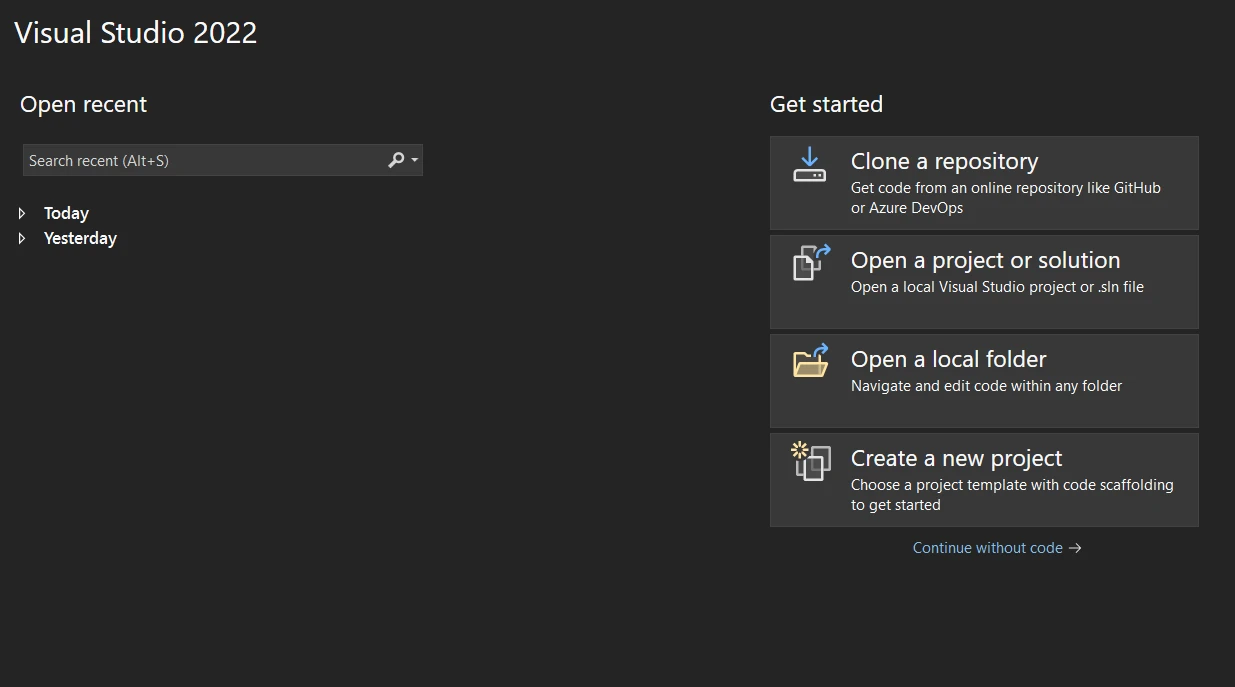
Visual Studio 打开后,从初始仪表板中选择"创建新项目"。
我应该选择哪种项目类型?
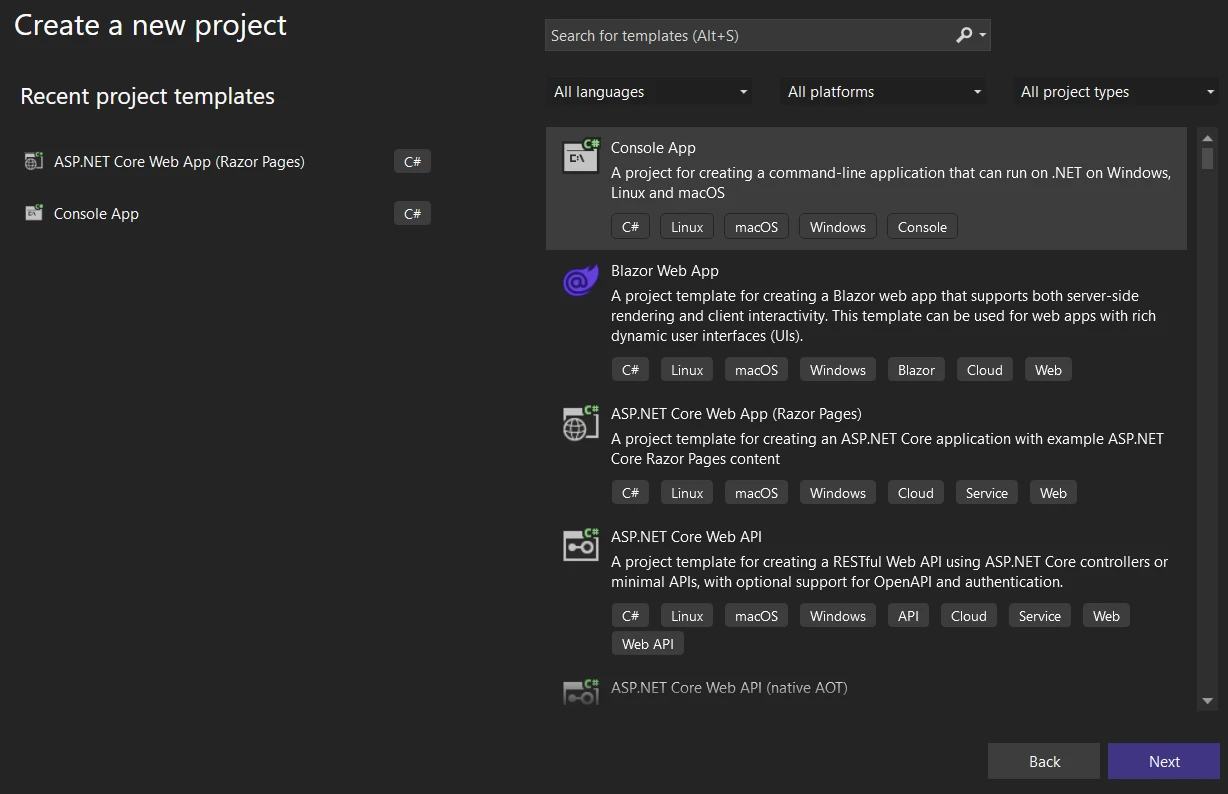
在"创建新项目"窗口中,您将看到各种项目模板。 在搜索框中输入"控制台",或从列表中找到"控制台应用程序"。选择 C# 专用模板。
如何配置我的项目?
选择"控制台应用程序"后,单击"下一步"。配置您的新项目:
-项目名称:请输入项目的描述性名称。 -保存位置:选择您喜欢的保存位置。 -解决方案名称:默认为您的项目名称,但可以自定义。
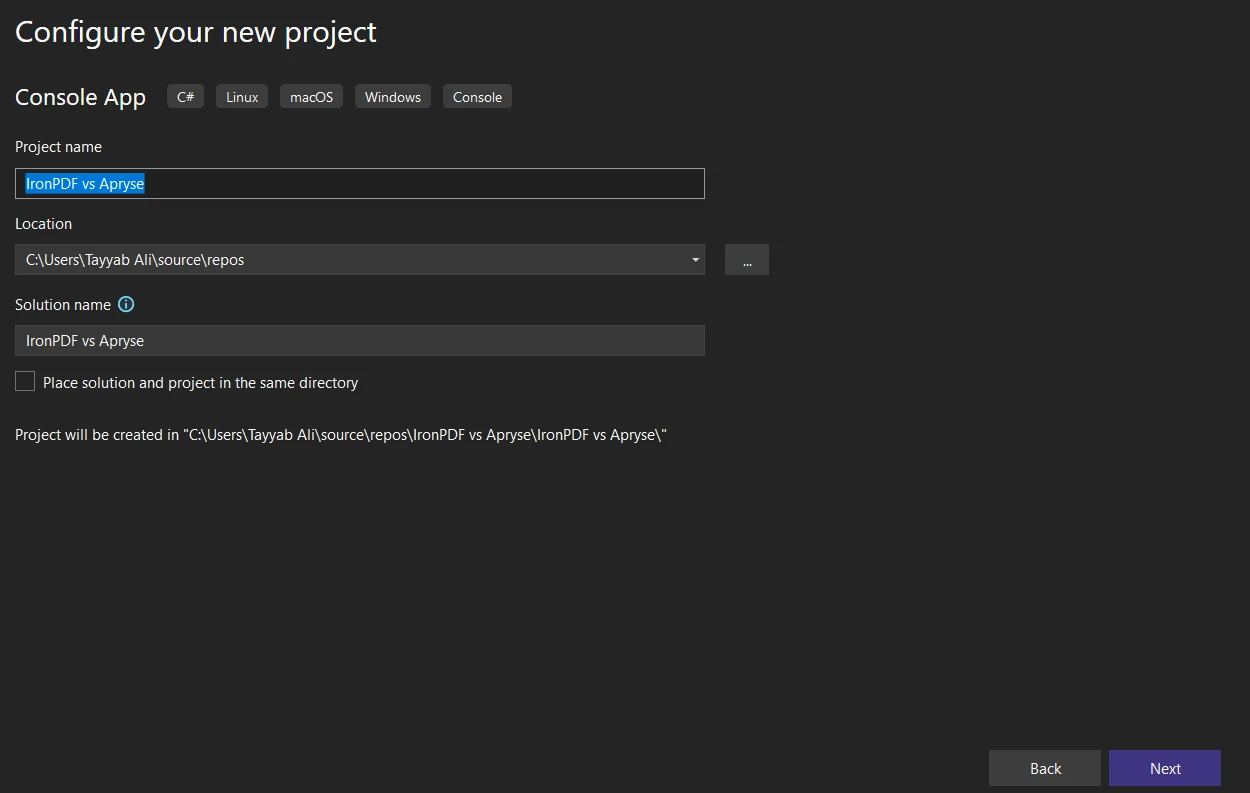
-框架:选择您的.NET版本。 除非有特殊要求,否则通常建议使用最新版本。
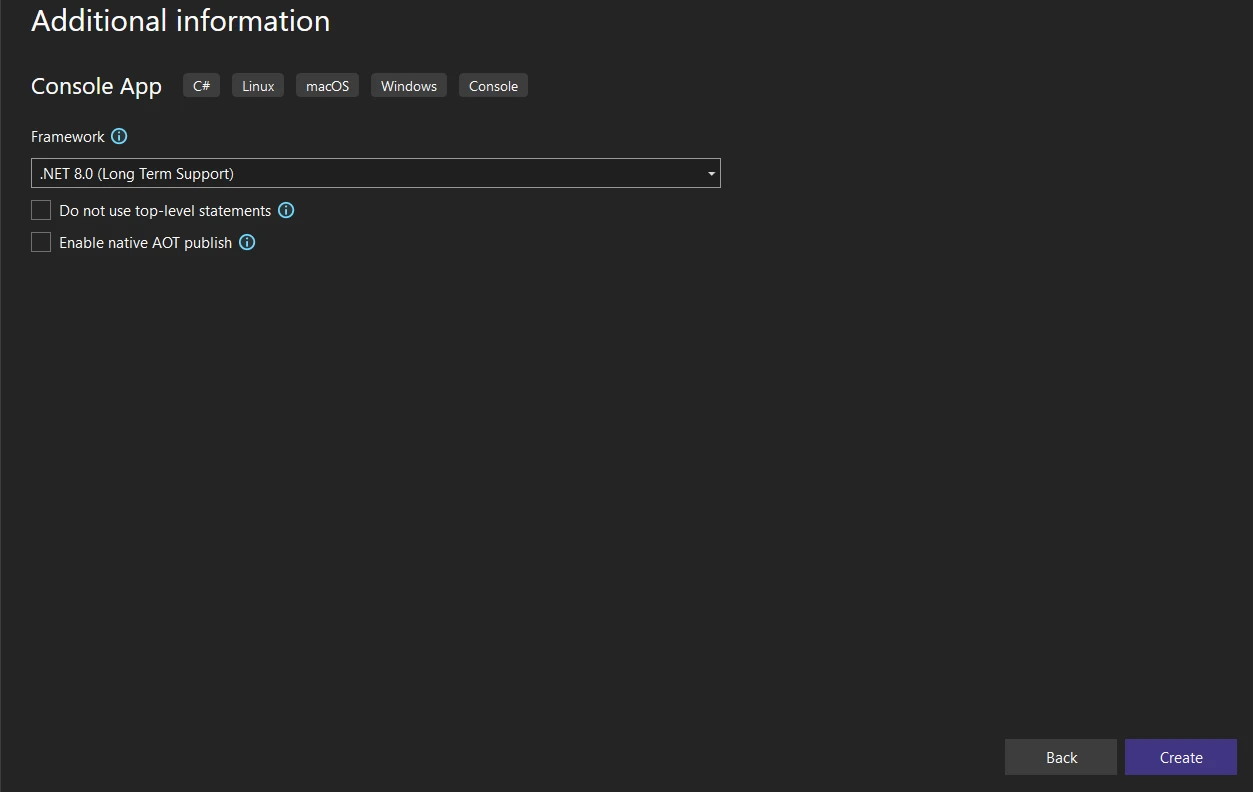
如何完成项目创建?
配置好项目设置后,单击"创建"。Visual Studio 将创建一个新的控制台应用程序项目,其中包含一个默认的Program.cs文件。
项目结构是什么?
在"解决方案资源管理器"窗格中查看生成的项目结构。 对于控制台应用程序,您主要会使用Program.cs文件,并在其中编写 C# 代码。
如何安装IronPDF库?
将IronPDF集成到您的.NET项目中,即可使用其完整的 PDF 处理功能。 多种安装方式可根据您的工作流程偏好提供灵活性。
如何使用NuGet包管理器进行安装?
Visual Studio 中的NuGet包管理器提供了一个用于管理库的图形界面。
1.在 Visual Studio 中打开您的项目。
- 在解决方案资源管理器中右键单击您的项目,然后选择"管理NuGet程序包"。
- 点击"浏览"选项卡并搜索"IronPDF"。
- 从结果中选择IronPDF ,然后单击"安装"。
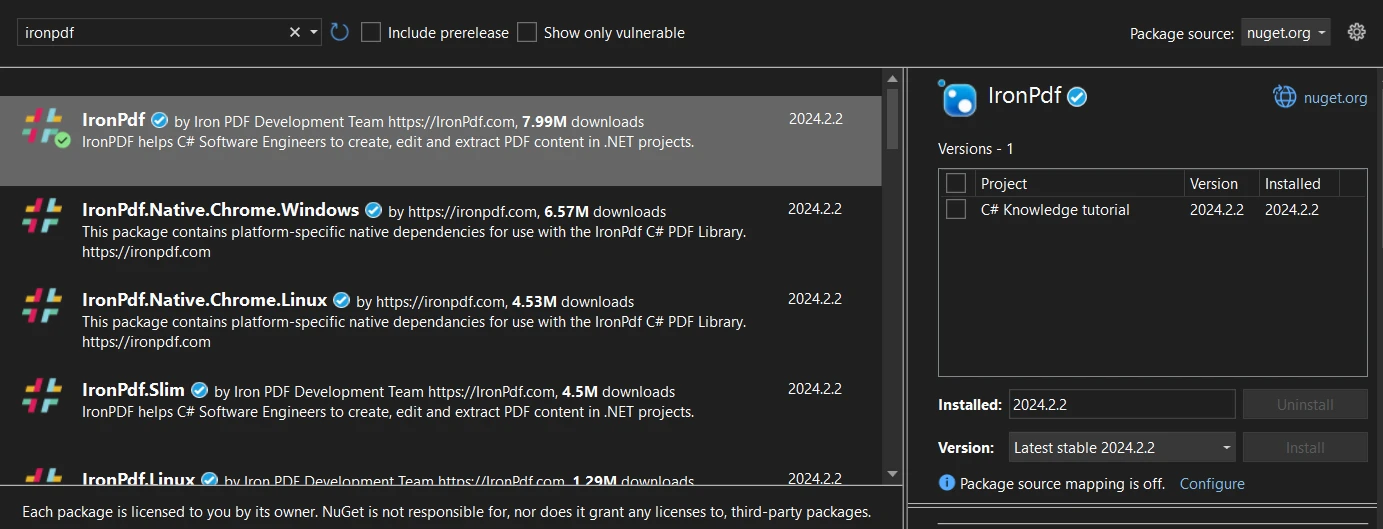
如何使用命令行安装?
软件包管理器控制台提供直接命令行安装。
- 打开你的 Visual Studio 项目。
- 转到 工具 > NuGet 包管理器 > 包管理器控制台。
- 输入以下命令:
Install-Package IronPdf
此命令会将最新版本的IronPDF安装到您的项目中。
如何直接从NuGet下载?
您可以在集成前手动下载软件包。
- 访问NuGet网站并搜索"IronPDF"。
- 在IronPDF包页面上,点击"下载包"以获取.nupkg文件。
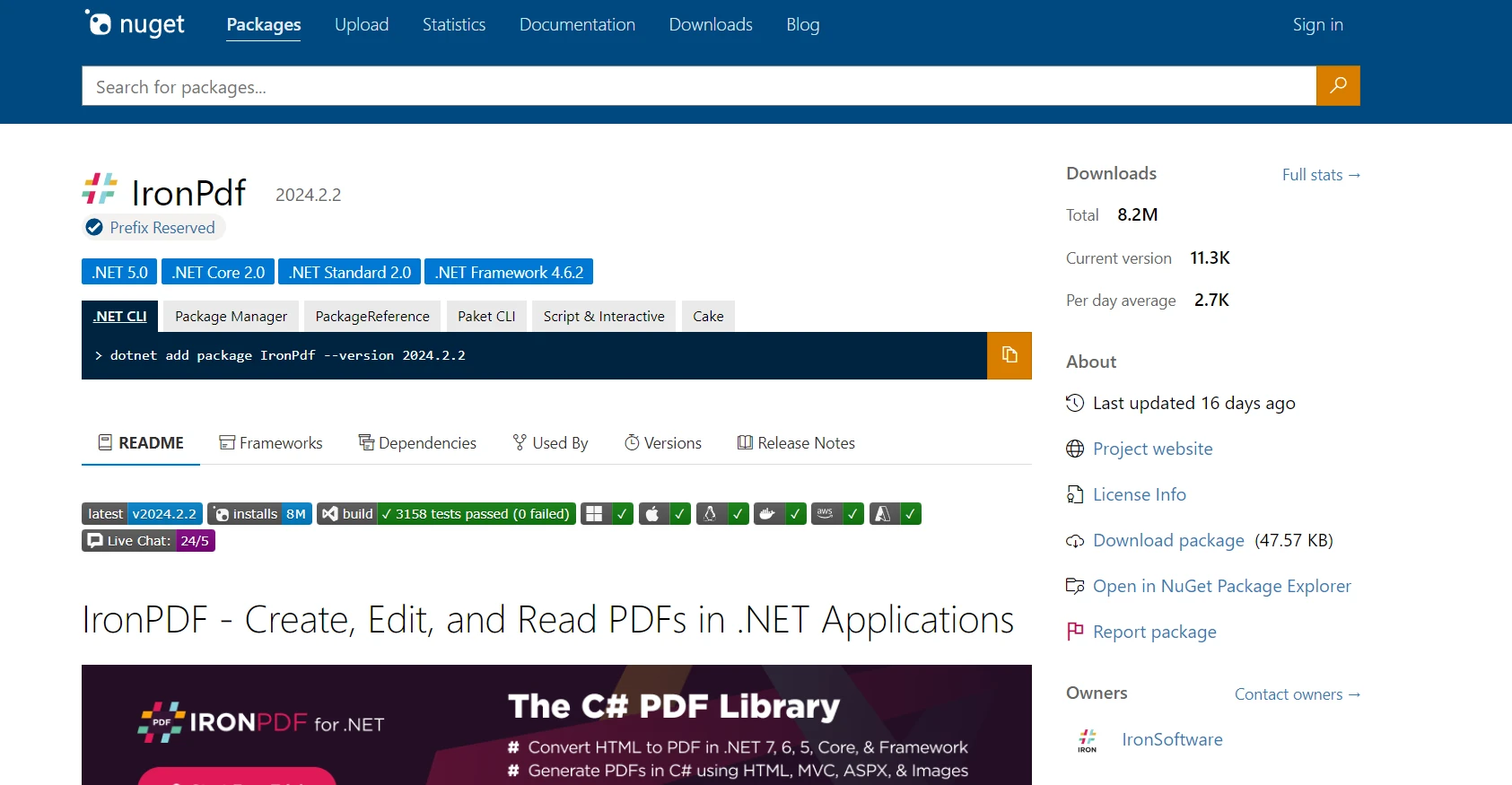
- 通过解决方案资源管理器手动添加下载的程序包 > 右键单击项目 > "添加 > 引用"。
每种方法都成功集成了IronPDF,使您可以使用其有效的 PDF 处理功能。
如何安装Apryse C#?
将 Apryse C# 集成到您的项目中,会因您的.NET Framework或.NET Core环境而异。 以下步骤概述了一般的安装过程:
如何安装适用于.NET Framework 的Apryse?
1.下载适用于 Windows 的 Apryse SDK:您需要访问Apryse SDK for Windows 页面,下载适用于.NET Framework应用程序的 SDK。
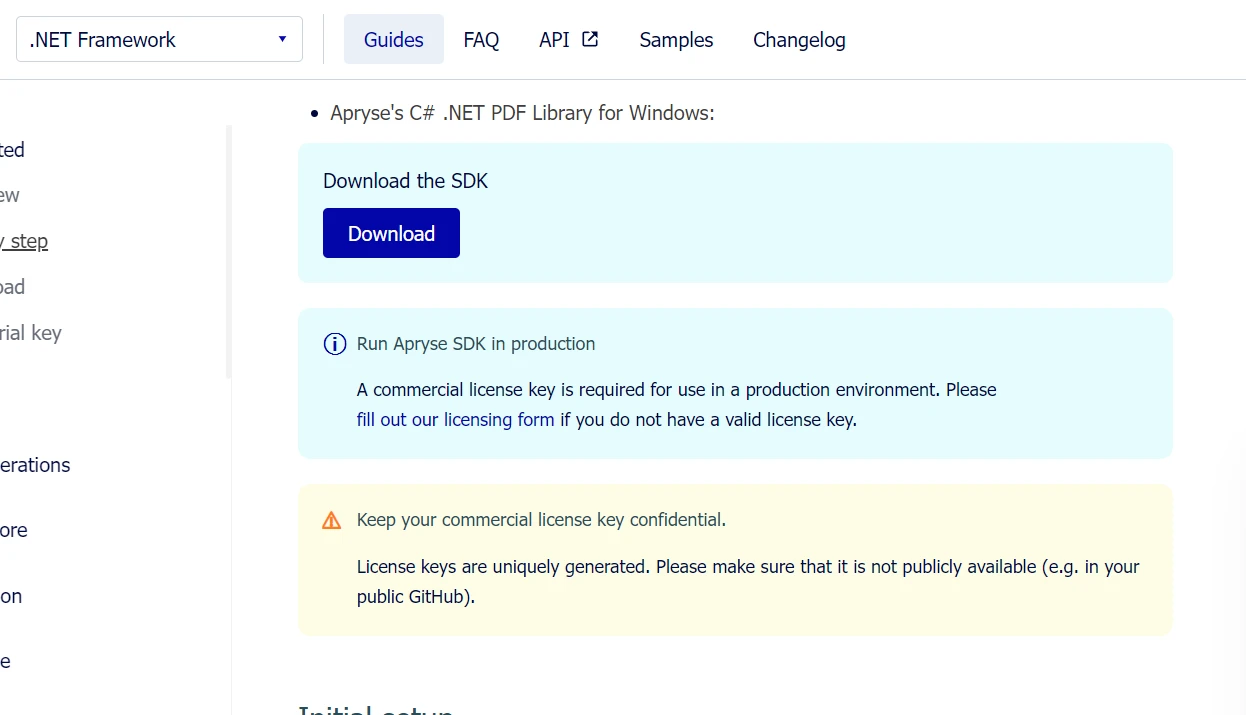
2.解压 SDK:下载后,将 SDK 解压到系统上的一个已知位置。 3.获取 Apryse 试用密钥:在 Apryse 平台上注册以获取试用密钥,您可以使用该密钥激活 SDK 的试用功能。 4.设置项目:在 Visual Studio 中创建一个新的.NET Framework控制台应用程序。 然后,将提取的 SDK 中的 Lib 文件夹添加到您的项目目录中。 5.添加引用:右键单击项目中的"引用",选择"添加引用",然后导航到Lib文件夹,其中您已复制了PDFNetLoader.dll和适用于您的架构(x86 或 x64)的相应PDFNet.dll 。 确保将 PDFNet.dll 的 "复制本地 "属性设置为 false。 6.配置 App.config:确保您的 App.config 文件中的loadFromRemoteSources设置已启用为 true。
SDK 包含示例文件夹,您可以打开这些文件夹并直接作为解决方案运行。## IronPDF的高级功能
HTML 到 PDF 转换
IronPDF在将 HTML 转换为 PDF 文档方面非常有效,这是生成报告、发票或网页快照的 Web 应用程序的一项关键功能。 该库能够准确地渲染 HTML、CSS 和JavaScript,并在生成的 PDF 中保留网页内容的布局和样式。
将 HTML 字符串转换为 PDF
将 HTML 字符串直接转换为 PDF 可以实现从应用程序生成的内容或存储的变量动态创建文档。 这种方法有利于根据用户输入创建自定义报告、收据或文档。
using IronPdf;

// Secure the server environment to disable local disk access or cross-origin requests
Installation.EnableWebSecurity = true;

// Set your IronPDF license key
IronPdf.License.LicenseKey = "License-Key goes here";

// Instantiate a PDF renderer
var renderer = new ChromePdfRenderer();

// Define a simple HTML string to convert to PDF
string htmlContent = @"
<!DOCTYPE html>
<html lang='en'>
<head>
    <meta charset='UTF-8'>
    <meta name='viewport' content='width=device-width, initial-scale=1.0'>
    <title>My PDF</title>
    <style>
        body {
            font-family: Arial, sans-serif;
        }
        h1 {
            color: #333;
            text-align: center;
        }
        p {
            color: #666;
            text-align: justify;
        }
    </style>
</head>
<body>
    <h1>Welcome to My PDF</h1>
    <p>This is a sample paragraph demonstrating how to create a PDF from HTML using IronPdf in C#.</p>
    <p>You can add more content here as needed.</p>
</body>
</html>";

// Render the HTML string as a PDF
var pdf = renderer.RenderHtmlAsPdf(htmlContent);

// Save the resulting PDF to a file
pdf.SaveAs("output.pdf");
using IronPdf;
// Secure the server environment to disable local disk access or cross-origin requests
Installation.EnableWebSecurity = true;
// Set your IronPDF license key
IronPdf.License.LicenseKey = "License-Key goes here";
// Instantiate a PDF renderer
var renderer = new ChromePdfRenderer();
// Define a simple HTML string to convert to PDF
string htmlContent = @"
<!DOCTYPE html>
<html lang='en'>
<head>
<meta charset='UTF-8'>
<meta name='viewport' content='width=device-width, initial-scale=1.0'>
<title>My PDF</title>
<style>
body {
font-family: Arial, sans-serif;
}
h1 {
color: #333;
text-align: center;
}
p {
color: #666;
text-align: justify;
}
</style>
</head>
<body>
<h1>Welcome to My PDF</h1>
<p>This is a sample paragraph demonstrating how to create a PDF from HTML using IronPdf in C#.</p>
<p>You can add more content here as needed.</p>
</body>
</html>";
// Render the HTML string as a PDF
var pdf = renderer.RenderHtmlAsPdf(htmlContent);
// Save the resulting PDF to a file
pdf.SaveAs("output.pdf");Imports IronPdf
' Secure the server environment to disable local disk access or cross-origin requests
Installation.EnableWebSecurity = True
' Set your IronPDF license key
IronPdf.License.LicenseKey = "License-Key goes here"
' Instantiate a PDF renderer
Dim renderer = New ChromePdfRenderer()
' Define a simple HTML string to convert to PDF
Dim htmlContent As String = "
<!DOCTYPE html>
<html lang='en'>
<head>
<meta charset='UTF-8'>
<meta name='viewport' content='width=device-width, initial-scale=1.0'>
<title>My PDF</title>
<style>
body {
font-family: Arial, sans-serif;
}
h1 {
color: #333;
text-align: center;
}
p {
color: #666;
text-align: justify;
}
</style>
</head>
<body>
<h1>Welcome to My PDF</h1>
<p>This is a sample paragraph demonstrating how to create a PDF from HTML using IronPdf in C#.</p>
<p>You can add more content here as needed.</p>
</body>
</html>"
' Render the HTML string as a PDF
Dim pdf = renderer.RenderHtmlAsPdf(htmlContent)
' Save the resulting PDF to a file
pdf.SaveAs("output.pdf")将 HTML 文件转换为 PDF
如果您的磁盘上存储有 HTML 文件, IronPDF可以将这些文件转换为 PDF 文档。 此方法非常适合保存在项目或服务器中的现有 HTML 文档、模板或报告。
using IronPdf;

// Set your IronPDF license key
IronPdf.License.LicenseKey = "License-Key goes here";

// Secure the server environment to disable local disk access or cross-origin requests
Installation.EnableWebSecurity = true;

// Instantiate a PDF renderer
var renderer = new ChromePdfRenderer();

// Render the HTML file as a PDF
var pdf = renderer.RenderHtmlFileAsPdf("invoice.html");

// Save the resulting PDF to a file
pdf.SaveAs("file.pdf");
using IronPdf;
// Set your IronPDF license key
IronPdf.License.LicenseKey = "License-Key goes here";
// Secure the server environment to disable local disk access or cross-origin requests
Installation.EnableWebSecurity = true;
// Instantiate a PDF renderer
var renderer = new ChromePdfRenderer();
// Render the HTML file as a PDF
var pdf = renderer.RenderHtmlFileAsPdf("invoice.html");
// Save the resulting PDF to a file
pdf.SaveAs("file.pdf");Imports IronPdf
' Set your IronPDF license key
IronPdf.License.LicenseKey = "License-Key goes here"
' Secure the server environment to disable local disk access or cross-origin requests
Installation.EnableWebSecurity = True
' Instantiate a PDF renderer
Dim renderer = New ChromePdfRenderer()
' Render the HTML file as a PDF
Dim pdf = renderer.RenderHtmlFileAsPdf("invoice.html")
' Save the resulting PDF to a file
pdf.SaveAs("file.pdf")将 URL 转换为 PDF
IronPDF可以通过提供 URL 将实时网页转换为 PDF 文档。 此功能可捕获当前网页状态,包括复杂的布局、CSS 和 JavaScript 生成的内容。
using IronPdf;

// Set your IronPDF license key
IronPdf.License.LicenseKey = "License-Key goes here";

// Secure the server environment to disable local disk access or cross-origin requests
Installation.EnableWebSecurity = true;

// Instantiate a PDF renderer
var renderer = new ChromePdfRenderer();

// Render the URL as a PDF
var pdf = renderer.RenderUrlAsPdf("___PROTECTED_URL_100___");

// Save the resulting PDF to a file
pdf.SaveAs("url.pdf");
using IronPdf;
// Set your IronPDF license key
IronPdf.License.LicenseKey = "License-Key goes here";
// Secure the server environment to disable local disk access or cross-origin requests
Installation.EnableWebSecurity = true;
// Instantiate a PDF renderer
var renderer = new ChromePdfRenderer();
// Render the URL as a PDF
var pdf = renderer.RenderUrlAsPdf("___PROTECTED_URL_100___");
// Save the resulting PDF to a file
pdf.SaveAs("url.pdf");Imports IronPdf
' Set your IronPDF license key
IronPdf.License.LicenseKey = "License-Key goes here"
' Secure the server environment to disable local disk access or cross-origin requests
Installation.EnableWebSecurity = True
' Instantiate a PDF renderer
Dim renderer As New ChromePdfRenderer()
' Render the URL as a PDF
Dim pdf = renderer.RenderUrlAsPdf("___PROTECTED_URL_100___")
' Save the resulting PDF to a file
pdf.SaveAs("url.pdf")支持 Bootstrap 和现代 CSS 框架
从现代 Web 应用程序生成 PDF 时,对 Bootstrap 和 CSS 框架的全面支持至关重要。 各组织机构都依赖 Bootstrap 构建 Web 界面,因此准确地将其转换为 PDF 对于报告、发票和文档至关重要。
IronPDF支持的 Bootstrap 功能
IronPDF:完整的 Bootstrap 支持
- Bootstrap 5:完全支持 Flexbox 布局、CSS Grid、实用类和响应式组件
- Bootstrap 4:完整的卡片系统、导航组件和弹性实用程序 Tailwind CSS:所有实用类都能准确渲染。 -基础:完整的网格系统和组件支持 -现代 CSS3:完整的 flexbox、CSS Grid、自定义属性、动画和过渡效果
IronPDF可以以像素级的精度渲染 Bootstrap 主页和所有官方示例。
代码示例:业务指标仪表板
using IronPdf;

// Set your IronPDF license key
IronPdf.License.LicenseKey = "License-Key goes here";

var renderer = new ChromePdfRenderer();
string bootstrapDashboard = @"
<!DOCTYPE html>
<html>
<head>
    <link href='___PROTECTED_URL_101___ rel='stylesheet'>
    <style>
        .metric-card { transition: transform 0.2s; }
        .metric-card:hover { transform: translateY(-5px); }
        .trend-up { color: #28a745; }
        .trend-down { color: #dc3545; }
    </style>
</head>
<body>
    <div class='container-fluid py-4'>
        <div class='d-flex justify-content-between align-items-center mb-4'>
            <h1 class='display-5'>Business Performance Dashboard</h1>
            <div class='text-muted'>Last updated: March 2025</div>
        </div>

        <div class='row g-4 mb-4'>
            <div class='col-md-3'>
                <div class='card metric-card shadow-sm border-start border-primary border-4'>
                    <div class='card-body'>
                        <div class='d-flex justify-content-between align-items-center mb-2'>
                            <h6 class='text-muted text-uppercase mb-0'>Total Revenue</h6>
                            <span class='badge bg-primary'>Q1 2025</span>
                        </div>
                        <h2 class='mb-1'>$2.4M</h2>
                        <div class='trend-up'>
                            <i>↑</i> <strong>+18.5%</strong> from last quarter
                        </div>
                    </div>
                </div>
            </div>

            <div class='col-md-3'>
                <div class='card metric-card shadow-sm border-start border-success border-4'>
                    <div class='card-body'>
                        <div class='d-flex justify-content-between align-items-center mb-2'>
                            <h6 class='text-muted text-uppercase mb-0'>New Customers</h6>
                            <span class='badge bg-success'>Active</span>
                        </div>
                        <h2 class='mb-1'>1,284</h2>
                        <div class='trend-up'>
                            <i>↑</i> <strong>+24.3%</strong> growth rate
                        </div>
                    </div>
                </div>
            </div>

            <div class='col-md-3'>
                <div class='card metric-card shadow-sm border-start border-warning border-4'>
                    <div class='card-body'>
                        <div class='d-flex justify-content-between align-items-center mb-2'>
                            <h6 class='text-muted text-uppercase mb-0'>Avg Order Value</h6>
                            <span class='badge bg-warning text-dark'>Updated</span>
                        </div>
                        <h2 class='mb-1'>$1,847</h2>
                        <div class='trend-up'>
                            <i>↑</i> <strong>+5.2%</strong> increase
                        </div>
                    </div>
                </div>
            </div>

            <div class='col-md-3'>
                <div class='card metric-card shadow-sm border-start border-info border-4'>
                    <div class='card-body'>
                        <div class='d-flex justify-content-between align-items-center mb-2'>
                            <h6 class='text-muted text-uppercase mb-0'>Satisfaction Rate</h6>
                            <span class='badge bg-info'>Excellent</span>
                        </div>
                        <h2 class='mb-1'>94.7%</h2>
                        <div class='trend-up'>
                            <i>↑</i> <strong>+2.1pts</strong> improvement
                        </div>
                    </div>
                </div>
            </div>
        </div>

        <div class='row g-4'>
            <div class='col-md-8'>
                <div class='card shadow-sm'>
                    <div class='card-header bg-white d-flex justify-content-between align-items-center'>
                        <h5 class='mb-0'>Revenue Breakdown by Category</h5>
                        <div class='btn-group btn-group-sm' role='group'>
                            <button type='button' class='btn btn-outline-primary active'>Monthly</button>
                            <button type='button' class='btn btn-outline-primary'>Quarterly</button>
                            <button type='button' class='btn btn-outline-primary'>Annual</button>
                        </div>
                    </div>
                    <div class='card-body'>
                        <div class='table-responsive'>
                            <table class='table table-hover mb-0'>
                                <thead class='table-light'>
                                    <tr>
                                        <th>Category</th>
                                        <th>Revenue</th>
                                        <th>Orders</th>
                                        <th>Avg Value</th>
                                        <th class='text-end'>Trend</th>
                                    </tr>
                                </thead>
                                <tbody>
                                    <tr>
                                        <td><span class='badge bg-primary me-2'>A</span>Enterprise Solutions</td>
                                        <td><strong>$1,245,000</strong></td>
                                        <td>142</td>
                                        <td>$8,768</td>
                                        <td class='text-end'><span class='badge bg-success'>+12%</span></td>
                                    </tr>
                                    <tr>
                                        <td><span class='badge bg-success me-2'>B</span>Professional Services</td>
                                        <td><strong>$687,500</strong></td>
                                        <td>458</td>
                                        <td>$1,501</td>
                                        <td class='text-end'><span class='badge bg-success'>+18%</span></td>
                                    </tr>
                                    <tr>
                                        <td><span class='badge bg-info me-2'>C</span>Standard Packages</td>
                                        <td><strong>$412,300</strong></td>
                                        <td>891</td>
                                        <td>$463</td>
                                        <td class='text-end'><span class='badge bg-success'>+8%</span></td>
                                    </tr>
                                    <tr>
                                        <td><span class='badge bg-warning me-2'>D</span>Custom Development</td>
                                        <td><strong>$55,200</strong></td>
                                        <td>12</td>
                                        <td>$4,600</td>
                                        <td class='text-end'><span class='badge bg-danger'>-3%</span></td>
                                    </tr>
                                </tbody>
                            </table>
                        </div>
                    </div>
                </div>
            </div>

            <div class='col-md-4'>
                <div class='card shadow-sm'>
                    <div class='card-header bg-white'>
                        <h5 class='mb-0'>Quick Actions</h5>
                    </div>
                    <div class='card-body'>
                        <div class='d-grid gap-2'>
                            <button class='btn btn-primary'>Generate Full Report</button>
                            <button class='btn btn-outline-primary'>Export to Excel</button>
                            <button class='btn btn-outline-secondary'>Schedule Email</button>
                            <button class='btn btn-outline-info'>Share Dashboard</button>
                        </div>
                    </div>
                </div>

                <div class='card shadow-sm mt-3'>
                    <div class='card-header bg-white'>
                        <h5 class='mb-0'>Key Insights</h5>
                    </div>
                    <div class='card-body'>
                        <div class='alert alert-success mb-2'>
                            <small><strong>Top Performer:</strong> Enterprise Solutions leading revenue growth</small>
                        </div>
                        <div class='alert alert-info mb-2'>
                            <small><strong>Growth Driver:</strong> Professional Services showing strongest customer acquisition</small>
                        </div>
                        <div class='alert alert-warning mb-0'>
                            <small><strong>Attention Needed:</strong> Custom Development segment requires review</small>
                        </div>
                    </div>
                </div>
            </div>
        </div>
    </div>
</body>
</html>";

var pdf = renderer.RenderHtmlAsPdf(bootstrapDashboard);
pdf.SaveAs("business-dashboard.pdf");
using IronPdf;
// Set your IronPDF license key
IronPdf.License.LicenseKey = "License-Key goes here";
var renderer = new ChromePdfRenderer();
string bootstrapDashboard = @"
<!DOCTYPE html>
<html>
<head>
<link href='___PROTECTED_URL_101___ rel='stylesheet'>
<style>
.metric-card { transition: transform 0.2s; }
.metric-card:hover { transform: translateY(-5px); }
.trend-up { color: #28a745; }
.trend-down { color: #dc3545; }
</style>
</head>
<body>
<div class='container-fluid py-4'>
<div class='d-flex justify-content-between align-items-center mb-4'>
<h1 class='display-5'>Business Performance Dashboard</h1>
<div class='text-muted'>Last updated: March 2025</div>
</div>
<div class='row g-4 mb-4'>
<div class='col-md-3'>
<div class='card metric-card shadow-sm border-start border-primary border-4'>
<div class='card-body'>
<div class='d-flex justify-content-between align-items-center mb-2'>
<h6 class='text-muted text-uppercase mb-0'>Total Revenue</h6>
<span class='badge bg-primary'>Q1 2025</span>
</div>
<h2 class='mb-1'>$2.4M</h2>
<div class='trend-up'>
<i>↑</i> <strong>+18.5%</strong> from last quarter
</div>
</div>
</div>
</div>
<div class='col-md-3'>
<div class='card metric-card shadow-sm border-start border-success border-4'>
<div class='card-body'>
<div class='d-flex justify-content-between align-items-center mb-2'>
<h6 class='text-muted text-uppercase mb-0'>New Customers</h6>
<span class='badge bg-success'>Active</span>
</div>
<h2 class='mb-1'>1,284</h2>
<div class='trend-up'>
<i>↑</i> <strong>+24.3%</strong> growth rate
</div>
</div>
</div>
</div>
<div class='col-md-3'>
<div class='card metric-card shadow-sm border-start border-warning border-4'>
<div class='card-body'>
<div class='d-flex justify-content-between align-items-center mb-2'>
<h6 class='text-muted text-uppercase mb-0'>Avg Order Value</h6>
<span class='badge bg-warning text-dark'>Updated</span>
</div>
<h2 class='mb-1'>$1,847</h2>
<div class='trend-up'>
<i>↑</i> <strong>+5.2%</strong> increase
</div>
</div>
</div>
</div>
<div class='col-md-3'>
<div class='card metric-card shadow-sm border-start border-info border-4'>
<div class='card-body'>
<div class='d-flex justify-content-between align-items-center mb-2'>
<h6 class='text-muted text-uppercase mb-0'>Satisfaction Rate</h6>
<span class='badge bg-info'>Excellent</span>
</div>
<h2 class='mb-1'>94.7%</h2>
<div class='trend-up'>
<i>↑</i> <strong>+2.1pts</strong> improvement
</div>
</div>
</div>
</div>
</div>
<div class='row g-4'>
<div class='col-md-8'>
<div class='card shadow-sm'>
<div class='card-header bg-white d-flex justify-content-between align-items-center'>
<h5 class='mb-0'>Revenue Breakdown by Category</h5>
<div class='btn-group btn-group-sm' role='group'>
<button type='button' class='btn btn-outline-primary active'>Monthly</button>
<button type='button' class='btn btn-outline-primary'>Quarterly</button>
<button type='button' class='btn btn-outline-primary'>Annual</button>
</div>
</div>
<div class='card-body'>
<div class='table-responsive'>
<table class='table table-hover mb-0'>
<thead class='table-light'>
<tr>
<th>Category</th>
<th>Revenue</th>
<th>Orders</th>
<th>Avg Value</th>
<th class='text-end'>Trend</th>
</tr>
</thead>
<tbody>
<tr>
<td><span class='badge bg-primary me-2'>A</span>Enterprise Solutions</td>
<td><strong>$1,245,000</strong></td>
<td>142</td>
<td>$8,768</td>
<td class='text-end'><span class='badge bg-success'>+12%</span></td>
</tr>
<tr>
<td><span class='badge bg-success me-2'>B</span>Professional Services</td>
<td><strong>$687,500</strong></td>
<td>458</td>
<td>$1,501</td>
<td class='text-end'><span class='badge bg-success'>+18%</span></td>
</tr>
<tr>
<td><span class='badge bg-info me-2'>C</span>Standard Packages</td>
<td><strong>$412,300</strong></td>
<td>891</td>
<td>$463</td>
<td class='text-end'><span class='badge bg-success'>+8%</span></td>
</tr>
<tr>
<td><span class='badge bg-warning me-2'>D</span>Custom Development</td>
<td><strong>$55,200</strong></td>
<td>12</td>
<td>$4,600</td>
<td class='text-end'><span class='badge bg-danger'>-3%</span></td>
</tr>
</tbody>
</table>
</div>
</div>
</div>
</div>
<div class='col-md-4'>
<div class='card shadow-sm'>
<div class='card-header bg-white'>
<h5 class='mb-0'>Quick Actions</h5>
</div>
<div class='card-body'>
<div class='d-grid gap-2'>
<button class='btn btn-primary'>Generate Full Report</button>
<button class='btn btn-outline-primary'>Export to Excel</button>
<button class='btn btn-outline-secondary'>Schedule Email</button>
<button class='btn btn-outline-info'>Share Dashboard</button>
</div>
</div>
</div>
<div class='card shadow-sm mt-3'>
<div class='card-header bg-white'>
<h5 class='mb-0'>Key Insights</h5>
</div>
<div class='card-body'>
<div class='alert alert-success mb-2'>
<small><strong>Top Performer:</strong> Enterprise Solutions leading revenue growth</small>
</div>
<div class='alert alert-info mb-2'>
<small><strong>Growth Driver:</strong> Professional Services showing strongest customer acquisition</small>
</div>
<div class='alert alert-warning mb-0'>
<small><strong>Attention Needed:</strong> Custom Development segment requires review</small>
</div>
</div>
</div>
</div>
</div>
</div>
</body>
</html>";
var pdf = renderer.RenderHtmlAsPdf(bootstrapDashboard);
pdf.SaveAs("business-dashboard.pdf");Imports IronPdf
' Set your IronPDF license key
IronPdf.License.LicenseKey = "License-Key goes here"
Dim renderer As New ChromePdfRenderer()
Dim bootstrapDashboard As String = "
<!DOCTYPE html>
<html>
<head>
<link href='___PROTECTED_URL_101___ rel='stylesheet'>
<style>
.metric-card { transition: transform 0.2s; }
.metric-card:hover { transform: translateY(-5px); }
.trend-up { color: #28a745; }
.trend-down { color: #dc3545; }
</style>
</head>
<body>
<div class='container-fluid py-4'>
<div class='d-flex justify-content-between align-items-center mb-4'>
<h1 class='display-5'>Business Performance Dashboard</h1>
<div class='text-muted'>Last updated: March 2025</div>
</div>
<div class='row g-4 mb-4'>
<div class='col-md-3'>
<div class='card metric-card shadow-sm border-start border-primary border-4'>
<div class='card-body'>
<div class='d-flex justify-content-between align-items-center mb-2'>
<h6 class='text-muted text-uppercase mb-0'>Total Revenue</h6>
<span class='badge bg-primary'>Q1 2025</span>
</div>
<h2 class='mb-1'>$2.4M</h2>
<div class='trend-up'>
<i>↑</i> <strong>+18.5%</strong> from last quarter
</div>
</div>
</div>
</div>
<div class='col-md-3'>
<div class='card metric-card shadow-sm border-start border-success border-4'>
<div class='card-body'>
<div class='d-flex justify-content-between align-items-center mb-2'>
<h6 class='text-muted text-uppercase mb-0'>New Customers</h6>
<span class='badge bg-success'>Active</span>
</div>
<h2 class='mb-1'>1,284</h2>
<div class='trend-up'>
<i>↑</i> <strong>+24.3%</strong> growth rate
</div>
</div>
</div>
</div>
<div class='col-md-3'>
<div class='card metric-card shadow-sm border-start border-warning border-4'>
<div class='card-body'>
<div class='d-flex justify-content-between align-items-center mb-2'>
<h6 class='text-muted text-uppercase mb-0'>Avg Order Value</h6>
<span class='badge bg-warning text-dark'>Updated</span>
</div>
<h2 class='mb-1'>$1,847</h2>
<div class='trend-up'>
<i>↑</i> <strong>+5.2%</strong> increase
</div>
</div>
</div>
</div>
<div class='col-md-3'>
<div class='card metric-card shadow-sm border-start border-info border-4'>
<div class='card-body'>
<div class='d-flex justify-content-between align-items-center mb-2'>
<h6 class='text-muted text-uppercase mb-0'>Satisfaction Rate</h6>
<span class='badge bg-info'>Excellent</span>
</div>
<h2 class='mb-1'>94.7%</h2>
<div class='trend-up'>
<i>↑</i> <strong>+2.1pts</strong> improvement
</div>
</div>
</div>
</div>
</div>
<div class='row g-4'>
<div class='col-md-8'>
<div class='card shadow-sm'>
<div class='card-header bg-white d-flex justify-content-between align-items-center'>
<h5 class='mb-0'>Revenue Breakdown by Category</h5>
<div class='btn-group btn-group-sm' role='group'>
<button type='button' class='btn btn-outline-primary active'>Monthly</button>
<button type='button' class='btn btn-outline-primary'>Quarterly</button>
<button type='button' class='btn btn-outline-primary'>Annual</button>
</div>
</div>
<div class='card-body'>
<div class='table-responsive'>
<table class='table table-hover mb-0'>
<thead class='table-light'>
<tr>
<th>Category</th>
<th>Revenue</th>
<th>Orders</th>
<th>Avg Value</th>
<th class='text-end'>Trend</th>
</tr>
</thead>
<tbody>
<tr>
<td><span class='badge bg-primary me-2'>A</span>Enterprise Solutions</td>
<td><strong>$1,245,000</strong></td>
<td>142</td>
<td>$8,768</td>
<td class='text-end'><span class='badge bg-success'>+12%</span></td>
</tr>
<tr>
<td><span class='badge bg-success me-2'>B</span>Professional Services</td>
<td><strong>$687,500</strong></td>
<td>458</td>
<td>$1,501</td>
<td class='text-end'><span class='badge bg-success'>+18%</span></td>
</tr>
<tr>
<td><span class='badge bg-info me-2'>C</span>Standard Packages</td>
<td><strong>$412,300</strong></td>
<td>891</td>
<td>$463</td>
<td class='text-end'><span class='badge bg-success'>+8%</span></td>
</tr>
<tr>
<td><span class='badge bg-warning me-2'>D</span>Custom Development</td>
<td><strong>$55,200</strong></td>
<td>12</td>
<td>$4,600</td>
<td class='text-end'><span class='badge bg-danger'>-3%</span></td>
</tr>
</tbody>
</table>
</div>
</div>
</div>
</div>
<div class='col-md-4'>
<div class='card shadow-sm'>
<div class='card-header bg-white'>
<h5 class='mb-0'>Quick Actions</h5>
</div>
<div class='card-body'>
<div class='d-grid gap-2'>
<button class='btn btn-primary'>Generate Full Report</button>
<button class='btn btn-outline-primary'>Export to Excel</button>
<button class='btn btn-outline-secondary'>Schedule Email</button>
<button class='btn btn-outline-info'>Share Dashboard</button>
</div>
</div>
</div>
<div class='card shadow-sm mt-3'>
<div class='card-header bg-white'>
<h5 class='mb-0'>Key Insights</h5>
</div>
<div class='card-body'>
<div class='alert alert-success mb-2'>
<small><strong>Top Performer:</strong> Enterprise Solutions leading revenue growth</small>
</div>
<div class='alert alert-info mb-2'>
<small><strong>Growth Driver:</strong> Professional Services showing strongest customer acquisition</small>
</div>
<div class='alert alert-warning mb-0'>
<small><strong>Attention Needed:</strong> Custom Development segment requires review</small>
</div>
</div>
</div>
</div>
</div>
</div>
</body>
</html>"
Dim pdf = renderer.RenderHtmlAsPdf(bootstrapDashboard)
pdf.SaveAs("business-dashboard.pdf")输出:Professional的商业仪表盘 PDF,采用 Bootstrap 5 的 flexbox 网格系统、带边框实用程序的卡片组件、徽章元素、响应式表格和颜色编码的指标——所有元素均以完美的布局保留和排版进行渲染。
Apryse 的 CSS 框架局限性
Apryse 的 HTML2PDF 模块使用自定义渲染引擎(非 Chromium),该引擎的限制已记录在案:
-部分 Flexbox 支持: Bootstrap 4/5 布局可能无法正确渲染。
- CSS Grid 功能有限:现代基于网格的设计经常失败
- JavaScript限制:与浏览器环境相比,执行量最小 -框架兼容性:需要对 Bootstrap 组件进行广泛的测试
HTML2PDF 文档明确警告,复杂的 CSS 可能无法按预期渲染。 开发者报告称导航栏、基于 flex 的卡片布局和响应式实用程序存在问题。
开发影响:使用 Apryse 的团队必须创建并行的"PDF 安全"CSS 或大幅简化 Bootstrap 布局,这会增加开发开销并限制 Web 和 PDF 输出之间的设计一致性。
要获得完整的 Bootstrap 框架支持和完整的 CSS3 渲染,请参阅Bootstrap 和 Flexbox CSS 指南。
合并和拆分PDF
IronPDF让合并多个 PDF 文档或将 PDF 分割成更小的文件变得简单易行。 对于需要组织有序的PDF内容结构的文档管理系统而言,此功能至关重要。
using IronPdf;

// Set your IronPDF license key
IronPdf.License.LicenseKey = "License-Key goes here";

// Secure the server environment to disable local disk access or cross-origin requests
Installation.EnableWebSecurity = true;

// Define HTML content for two PDFs to merge
var htmlA = @"
    <h1>PDF A</h1>
    <p>This is the content of PDF A.</p>
    <p>This is the first page of PDF A.</p>
    <div style='page-break-after: always;'></div>
    <p>This is the second page of PDF A.</p>";

var htmlB = @"
    <h1>PDF B</h1>
    <p>This is the content of PDF B.</p>
    <p>This is the first page of PDF B.</p>
    <div style='page-break-after: always;'></div>
    <p>This is the second page of PDF B.</p>";

// Instantiate a PDF renderer
var renderer = new ChromePdfRenderer();

// Render the HTML content as separate PDF documents
var pdfDocA = renderer.RenderHtmlAsPdf(htmlA);
var pdfDocB = renderer.RenderHtmlAsPdf(htmlB);

// Merge the two PDFs into one
var mergedPdf = PdfDocument.Merge(pdfDocA, pdfDocB);

// Save the merged PDF to a file
mergedPdf.SaveAs("Merged.pdf");
using IronPdf;
// Set your IronPDF license key
IronPdf.License.LicenseKey = "License-Key goes here";
// Secure the server environment to disable local disk access or cross-origin requests
Installation.EnableWebSecurity = true;
// Define HTML content for two PDFs to merge
var htmlA = @"
<h1>PDF A</h1>
<p>This is the content of PDF A.</p>
<p>This is the first page of PDF A.</p>
<div style='page-break-after: always;'></div>
<p>This is the second page of PDF A.</p>";
var htmlB = @"
<h1>PDF B</h1>
<p>This is the content of PDF B.</p>
<p>This is the first page of PDF B.</p>
<div style='page-break-after: always;'></div>
<p>This is the second page of PDF B.</p>";
// Instantiate a PDF renderer
var renderer = new ChromePdfRenderer();
// Render the HTML content as separate PDF documents
var pdfDocA = renderer.RenderHtmlAsPdf(htmlA);
var pdfDocB = renderer.RenderHtmlAsPdf(htmlB);
// Merge the two PDFs into one
var mergedPdf = PdfDocument.Merge(pdfDocA, pdfDocB);
// Save the merged PDF to a file
mergedPdf.SaveAs("Merged.pdf");Imports IronPdf
' Set your IronPDF license key
IronPdf.License.LicenseKey = "License-Key goes here"
' Secure the server environment to disable local disk access or cross-origin requests
Installation.EnableWebSecurity = True
' Define HTML content for two PDFs to merge
Dim htmlA = "
<h1>PDF A</h1>
<p>This is the content of PDF A.</p>
<p>This is the first page of PDF A.</p>
<div style='page-break-after: always;'></div>
<p>This is the second page of PDF A.</p>"
Dim htmlB = "
<h1>PDF B</h1>
<p>This is the content of PDF B.</p>
<p>This is the first page of PDF B.</p>
<div style='page-break-after: always;'></div>
<p>This is the second page of PDF B.</p>"
' Instantiate a PDF renderer
Dim renderer = New ChromePdfRenderer()
' Render the HTML content as separate PDF documents
Dim pdfDocA = renderer.RenderHtmlAsPdf(htmlA)
Dim pdfDocB = renderer.RenderHtmlAsPdf(htmlB)
' Merge the two PDFs into one
Dim mergedPdf = PdfDocument.Merge(pdfDocA, pdfDocB)
' Save the merged PDF to a file
mergedPdf.SaveAs("Merged.pdf")在PDF中添加水印
IronPDF允许您在 PDF 页面中添加水印,用于品牌宣传或将文档标记为机密。 该库能够处理文本和图像水印的复杂性,从而在应用和显示方面提供灵活性。
using IronPdf;

// Set your IronPDF license key
IronPdf.License.LicenseKey = "License-Key goes here";

// Secure the server environment to disable local disk access or cross-origin requests
Installation.EnableWebSecurity = true;

// Instantiate a PDF renderer
var renderer = new ChromePdfRenderer();

// Render a URL as a PDF
var pdf = renderer.RenderUrlAsPdf("___PROTECTED_URL_102___");

// Apply a watermark to the PDF
pdf.ApplyWatermark("<h2 style='color:red'>SAMPLE</h2>", 30, IronPdf.Editing.VerticalAlignment.Middle, IronPdf.Editing.HorizontalAlignment.Center);

// Save the watermarked PDF to a file
pdf.SaveAs("Watermarked.pdf");
```### How Do I Work with PDF Forms?

IronPDF supports complete [interactive PDF form handling](https://ironpdf.com/how-to/create-forms/). You can create, fill, and submit PDF forms programmatically, which is particularly useful for automating form processing or integrating form data collection into your workflows.

```csharp
using IronPdf;

// Set your IronPDF license key
IronPdf.License.LicenseKey = "License-Key goes here";

// Secure the server environment to disable local disk access or cross-origin requests
Installation.EnableWebSecurity = true;

// Define HTML content with form elements
const string formHtml = @"
    <html>
        <body>
            <h2>Employee Information Form</h2>
            <form>
                First name: <br>
                Last name: <br>
                <br>
                <p>Please select your department:</p>
                <select name='department'>
                    <option value='HR'>HR</option>
                    <option value='Finance'>Finance</option>
                    <option value='IT'>IT</option>
                    <option value='Marketing'>Marketing</option>
                </select>
                <br>
                <br>
                <p>Please select your employment status:</p>
                <label for='fulltime'>Full-time</label> <br>
                <label for='parttime'>Part-time</label> <br>
                <br>
                <p>Please select your skills:</p>
                <label for='skill1'> Programming</label><br>
                <label for='skill2'> Design</label><br>
                <label for='skill3'> Marketing</label><br>
            </form>
        </body>
    </html>";

// Instantiate a PDF renderer
var renderer = new ChromePdfRenderer();
renderer.RenderingOptions.CreatePdfFormsFromHtml = true;

// Render the HTML form content as a PDF
renderer.RenderHtmlAsPdf(formHtml).SaveAs("EmployeeInfoForm.pdf");
using IronPdf;
// Set your IronPDF license key
IronPdf.License.LicenseKey = "License-Key goes here";
// Secure the server environment to disable local disk access or cross-origin requests
Installation.EnableWebSecurity = true;
// Instantiate a PDF renderer
var renderer = new ChromePdfRenderer();
// Render a URL as a PDF
var pdf = renderer.RenderUrlAsPdf("___PROTECTED_URL_102___");
// Apply a watermark to the PDF
pdf.ApplyWatermark("<h2 style='color:red'>SAMPLE</h2>", 30, IronPdf.Editing.VerticalAlignment.Middle, IronPdf.Editing.HorizontalAlignment.Center);
// Save the watermarked PDF to a file
pdf.SaveAs("Watermarked.pdf");
```### How Do I Work with PDF Forms?
IronPDF supports complete [interactive PDF form handling](https://ironpdf.com/how-to/create-forms/). You can create, fill, and submit PDF forms programmatically, which is particularly useful for automating form processing or integrating form data collection into your workflows.
```csharp
using IronPdf;
// Set your IronPDF license key
IronPdf.License.LicenseKey = "License-Key goes here";
// Secure the server environment to disable local disk access or cross-origin requests
Installation.EnableWebSecurity = true;
// Define HTML content with form elements
const string formHtml = @"
<html>
<body>
<h2>Employee Information Form</h2>
<form>
First name: <br>
Last name: <br>
<br>
<p>Please select your department:</p>
<select name='department'>
<option value='HR'>HR</option>
<option value='Finance'>Finance</option>
<option value='IT'>IT</option>
<option value='Marketing'>Marketing</option>
</select>
<br>
<br>
<p>Please select your employment status:</p>
<label for='fulltime'>Full-time</label> <br>
<label for='parttime'>Part-time</label> <br>
<br>
<p>Please select your skills:</p>
<label for='skill1'> Programming</label><br>
<label for='skill2'> Design</label><br>
<label for='skill3'> Marketing</label><br>
</form>
</body>
</html>";
// Instantiate a PDF renderer
var renderer = new ChromePdfRenderer();
renderer.RenderingOptions.CreatePdfFormsFromHtml = true;
// Render the HTML form content as a PDF
renderer.RenderHtmlAsPdf(formHtml).SaveAs("EmployeeInfoForm.pdf");Imports IronPdf
' Set your IronPDF license key
IronPdf.License.LicenseKey = "License-Key goes here"
' Secure the server environment to disable local disk access or cross-origin requests
Installation.EnableWebSecurity = True
' Instantiate a PDF renderer
Dim renderer As New ChromePdfRenderer()
' Render a URL as a PDF
Dim pdf = renderer.RenderUrlAsPdf("___PROTECTED_URL_102___")
' Apply a watermark to the PDF
pdf.ApplyWatermark("<h2 style='color:red'>SAMPLE</h2>", 30, IronPdf.Editing.VerticalAlignment.Middle, IronPdf.Editing.HorizontalAlignment.Center)
' Save the watermarked PDF to a file
pdf.SaveAs("Watermarked.pdf")
Imports IronPdf
' Set your IronPDF license key
IronPdf.License.LicenseKey = "License-Key goes here"
' Secure the server environment to disable local disk access or cross-origin requests
Installation.EnableWebSecurity = True
' Define HTML content with form elements
Const formHtml As String = "
<html>
<body>
<h2>Employee Information Form</h2>
<form>
First name: <br>
Last name: <br>
<br>
<p>Please select your department:</p>
<select name='department'>
<option value='HR'>HR</option>
<option value='Finance'>Finance</option>
<option value='IT'>IT</option>
<option value='Marketing'>Marketing</option>
</select>
<br>
<br>
<p>Please select your employment status:</p>
<label for='fulltime'>Full-time</label> <br>
<label for='parttime'>Part-time</label> <br>
<br>
<p>Please select your skills:</p>
<label for='skill1'> Programming</label><br>
<label for='skill2'> Design</label><br>
<label for='skill3'> Marketing</label><br>
</form>
</body>
</html>"
' Instantiate a PDF renderer
Dim renderer As New ChromePdfRenderer()
renderer.RenderingOptions.CreatePdfFormsFromHtml = True
' Render the HTML form content as a PDF
renderer.RenderHtmlAsPdf(formHtml).SaveAs("EmployeeInfoForm.pdf")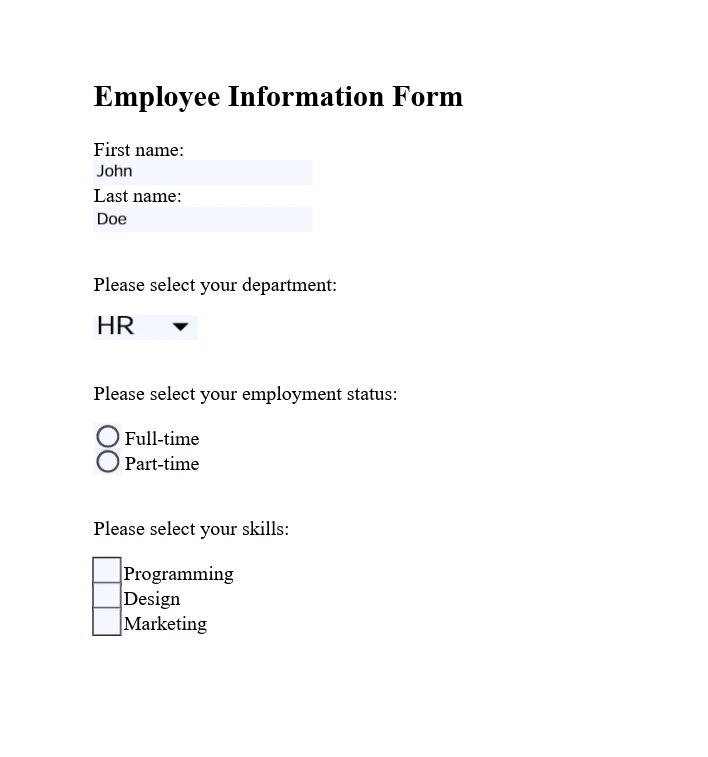
如何保护和加密PDF文件?
IronPDF提供可靠的功能来保护 PDF 文档,包括加密、权限设置和数字签名。 这些措施可确保敏感信息的安全保护和文档的完整性维护。
using IronPdf;

// Set your IronPDF license key
IronPdf.License.LicenseKey = "License-Key goes here";

// Secure the server environment to disable local disk access or cross-origin requests
Installation.EnableWebSecurity = true;

// Load an existing PDF file
var pdf = PdfDocument.FromFile("invoice.pdf");

// Set document security settings
pdf.SecuritySettings.OwnerPassword = "top-secret"; // Password to edit the PDF
pdf.SecuritySettings.UserPassword = "sharable";   // Password to open the PDF

// Save the secured PDF to a file
pdf.SaveAs("secured.pdf");
using IronPdf;
// Set your IronPDF license key
IronPdf.License.LicenseKey = "License-Key goes here";
// Secure the server environment to disable local disk access or cross-origin requests
Installation.EnableWebSecurity = true;
// Load an existing PDF file
var pdf = PdfDocument.FromFile("invoice.pdf");
// Set document security settings
pdf.SecuritySettings.OwnerPassword = "top-secret"; // Password to edit the PDF
pdf.SecuritySettings.UserPassword = "sharable"; // Password to open the PDF
// Save the secured PDF to a file
pdf.SaveAs("secured.pdf");Imports IronPdf
' Set your IronPDF license key
IronPdf.License.LicenseKey = "License-Key goes here"
' Secure the server environment to disable local disk access or cross-origin requests
Installation.EnableWebSecurity = True
' Load an existing PDF file
Dim pdf = PdfDocument.FromFile("invoice.pdf")
' Set document security settings
pdf.SecuritySettings.OwnerPassword = "top-secret" ' Password to edit the PDF
pdf.SecuritySettings.UserPassword = "sharable" ' Password to open the PDF
' Save the secured PDF to a file
pdf.SaveAs("secured.pdf")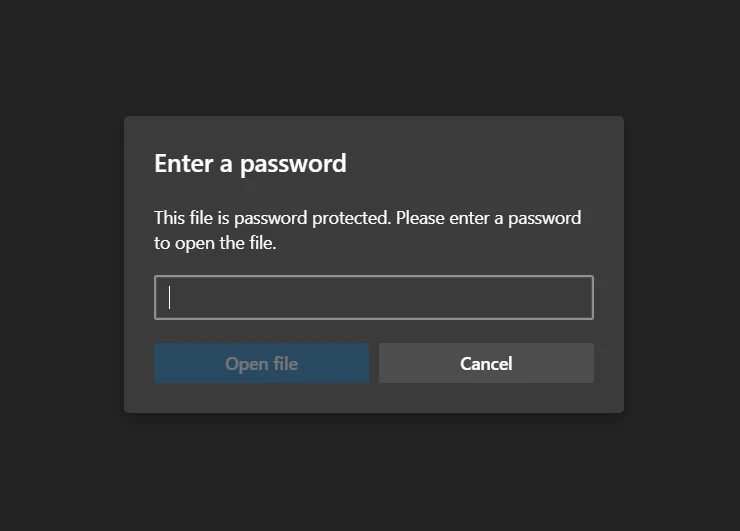
有哪些高级编辑选项?
IronPDF除了提供基本修改功能外,还提供高级编辑功能。 这些功能包括添加页眉和页脚、自定义页面布局以及嵌入图像和字体。 这些功能支持动态生成 PDF 文件,并可根据特定应用需求进行定制。
using IronPdf;

// Set your IronPDF license key
IronPdf.License.LicenseKey = "License-Key goes here";

// Secure the server environment to disable local disk access or cross-origin requests
Installation.EnableWebSecurity = true;

// Instantiate a PDF renderer
var renderer = new IronPdf.ChromePdfRenderer();

// Define multi-page HTML content with page breaks
var multiPageHtml = @"
    <p> This is 1st Page</p>
    <div style = 'page-break-after: always;' ></div>
    <p> This is 2nd Page</p>
    <div style = 'page-break-after: always;' ></div>
    <p> This is 3rd Page</p>
    <div style = 'page-break-after: always;' ></div>
    <p> This is 4th Page</p>
    <div style = 'page-break-after: always;' ></div>
    <p> This is 5th Page</p>
    <div style = 'page-break-after: always;' ></div>
    <p> This is 6th Page</p>
    <div style = 'page-break-after: always;' ></div>
    <p> This is 7th Page</p>";

// Render the HTML content as a PDF
var pdfDoc = renderer.RenderHtmlAsPdf(multiPageHtml);

// Create a header for the first page only
var firstPageHeader = new HtmlHeaderFooter();
firstPageHeader.HtmlFragment = "This is the First Page Header";
pdfDoc.AddHtmlHeaders(firstPageHeader, 1);

// Save the resulting PDF with headers to a file
pdfDoc.SaveAs("PagesWithHeaders.pdf");
using IronPdf;
// Set your IronPDF license key
IronPdf.License.LicenseKey = "License-Key goes here";
// Secure the server environment to disable local disk access or cross-origin requests
Installation.EnableWebSecurity = true;
// Instantiate a PDF renderer
var renderer = new IronPdf.ChromePdfRenderer();
// Define multi-page HTML content with page breaks
var multiPageHtml = @"
<p> This is 1st Page</p>
<div style = 'page-break-after: always;' ></div>
<p> This is 2nd Page</p>
<div style = 'page-break-after: always;' ></div>
<p> This is 3rd Page</p>
<div style = 'page-break-after: always;' ></div>
<p> This is 4th Page</p>
<div style = 'page-break-after: always;' ></div>
<p> This is 5th Page</p>
<div style = 'page-break-after: always;' ></div>
<p> This is 6th Page</p>
<div style = 'page-break-after: always;' ></div>
<p> This is 7th Page</p>";
// Render the HTML content as a PDF
var pdfDoc = renderer.RenderHtmlAsPdf(multiPageHtml);
// Create a header for the first page only
var firstPageHeader = new HtmlHeaderFooter();
firstPageHeader.HtmlFragment = "This is the First Page Header";
pdfDoc.AddHtmlHeaders(firstPageHeader, 1);
// Save the resulting PDF with headers to a file
pdfDoc.SaveAs("PagesWithHeaders.pdf");Imports IronPdf
' Set your IronPDF license key
IronPdf.License.LicenseKey = "License-Key goes here"
' Secure the server environment to disable local disk access or cross-origin requests
Installation.EnableWebSecurity = True
' Instantiate a PDF renderer
Dim renderer = New IronPdf.ChromePdfRenderer()
' Define multi-page HTML content with page breaks
Dim multiPageHtml = "
<p> This is 1st Page</p>
<div style = 'page-break-after: always;' ></div>
<p> This is 2nd Page</p>
<div style = 'page-break-after: always;' ></div>
<p> This is 3rd Page</p>
<div style = 'page-break-after: always;' ></div>
<p> This is 4th Page</p>
<div style = 'page-break-after: always;' ></div>
<p> This is 5th Page</p>
<div style = 'page-break-after: always;' ></div>
<p> This is 6th Page</p>
<div style = 'page-break-after: always;' ></div>
<p> This is 7th Page</p>"
' Render the HTML content as a PDF
Dim pdfDoc = renderer.RenderHtmlAsPdf(multiPageHtml)
' Create a header for the first page only
Dim firstPageHeader = New HtmlHeaderFooter()
firstPageHeader.HtmlFragment = "This is the First Page Header"
pdfDoc.AddHtmlHeaders(firstPageHeader, 1)
' Save the resulting PDF with headers to a file
pdfDoc.SaveAs("PagesWithHeaders.pdf")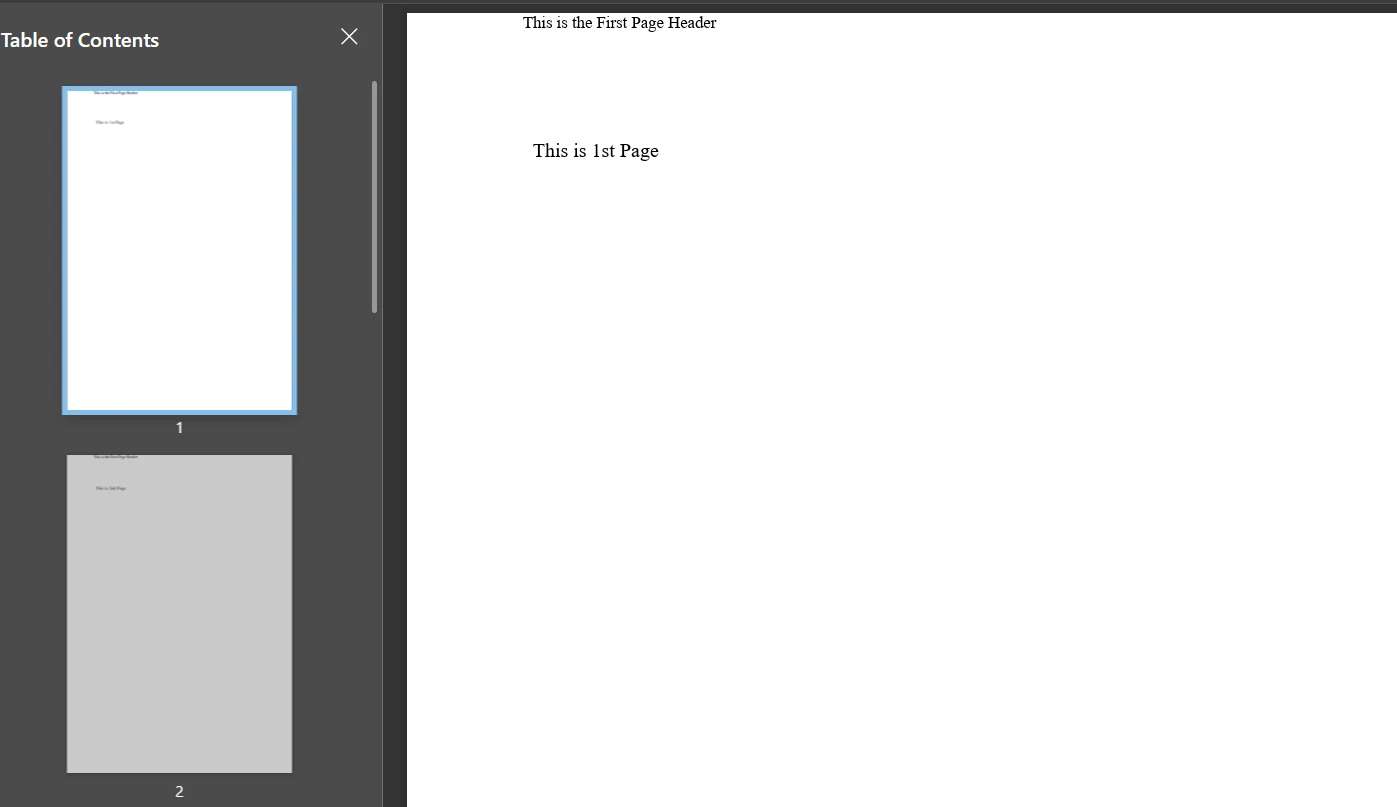
Apryse C# 提供了哪些高级功能?
如何添加注释和标记?
Apryse C# 使您能够以编程方式向 PDF 文档添加注释和标记。 这包括文本注释、高亮显示、下划线和形状——对于文档审阅过程或添加补充信息至关重要。
using pdftron;
using pdftron.PDF;
using pdftron.SDF;

class Program
{
    static void Main()
    {
        // Initialize the PDFNet library with your license key
        PDFNet.Initialize("License");

        // Open an existing PDF document
        using (PDFDoc doc = new PDFDoc("input.pdf"))
        {
            // Access the first page of the document
            Page page = doc.GetPage(1);

            // Create a text annotation on the document
            Text txt = Text.Create(doc, new Rect(10, 20, 30, 40));
            txt.SetIcon("UserIcon");
            txt.SetContents("It's an annotation!");
            page.AnnotPushBack(txt);

            // Save the modified document
            doc.Save("output.pdf", SDFDoc.SaveOptions.e_linearized);
        }
    }
}
using pdftron;
using pdftron.PDF;
using pdftron.SDF;
class Program
{
static void Main()
{
// Initialize the PDFNet library with your license key
PDFNet.Initialize("License");
// Open an existing PDF document
using (PDFDoc doc = new PDFDoc("input.pdf"))
{
// Access the first page of the document
Page page = doc.GetPage(1);
// Create a text annotation on the document
Text txt = Text.Create(doc, new Rect(10, 20, 30, 40));
txt.SetIcon("UserIcon");
txt.SetContents("It's an annotation!");
page.AnnotPushBack(txt);
// Save the modified document
doc.Save("output.pdf", SDFDoc.SaveOptions.e_linearized);
}
}
}Imports pdftron
Imports pdftron.PDF
Imports pdftron.SDF
Friend Class Program
Shared Sub Main()
' Initialize the PDFNet library with your license key
PDFNet.Initialize("License")
' Open an existing PDF document
Using doc As New PDFDoc("input.pdf")
' Access the first page of the document
Dim page As Page = doc.GetPage(1)
' Create a text annotation on the document
Dim txt As Text = Text.Create(doc, New Rect(10, 20, 30, 40))
txt.SetIcon("UserIcon")
txt.SetContents("It's an annotation!")
page.AnnotPushBack(txt)
' Save the modified document
doc.Save("output.pdf", SDFDoc.SaveOptions.e_linearized)
End Using
End Sub
End Class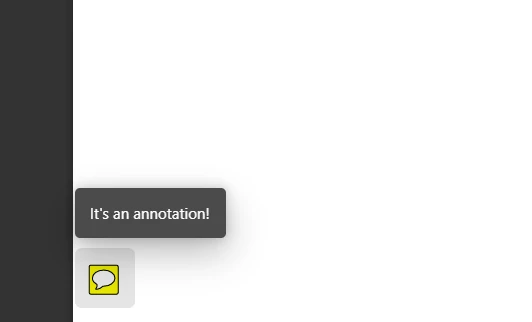
如何将文档转换为PDF格式?
Apryse C# 能够将各种文档格式转换为 PDF,包括Office 文档、图像和 HTML。 此功能可确保归档、共享或显示文档时采用统一的文档格式。
using pdftron;
using pdftron.PDF;

class Program
{
    static void Main()
    {
        // Initialize the PDFNet library
        PDFNet.Initialize();

        // Create a new PDF document
        PDFDoc pdfdoc = new PDFDoc();

        // Convert a Word document to PDF and add it to the PDF document
        Convert.ToPdf(pdfdoc, "input.docx");

        // Save the newly created PDF document
        pdfdoc.Save("output.pdf", SDFDoc.SaveOptions.e_linearized);
    }
}
using pdftron;
using pdftron.PDF;
class Program
{
static void Main()
{
// Initialize the PDFNet library
PDFNet.Initialize();
// Create a new PDF document
PDFDoc pdfdoc = new PDFDoc();
// Convert a Word document to PDF and add it to the PDF document
Convert.ToPdf(pdfdoc, "input.docx");
// Save the newly created PDF document
pdfdoc.Save("output.pdf", SDFDoc.SaveOptions.e_linearized);
}
}Imports pdftron
Imports pdftron.PDF
Friend Class Program
Shared Sub Main()
' Initialize the PDFNet library
PDFNet.Initialize()
' Create a new PDF document
Dim pdfdoc As New PDFDoc()
' Convert a Word document to PDF and add it to the PDF document
Convert.ToPdf(pdfdoc, "input.docx")
' Save the newly created PDF document
pdfdoc.Save("output.pdf", SDFDoc.SaveOptions.e_linearized)
End Sub
End Class如何从PDF文件中提取内容?
Apryse C# 擅长从 PDF 文档中提取文本、图像和其他内容。 此功能支持内容分析、数据提取和信息检索应用,从而实现高效的 PDF 内容处理。
using pdftron;
using pdftron.PDF;
using pdftron.SDF;

class Program
{
    static void Main()
    {
        // Initialize the PDFNet library
        PDFNet.Initialize();

        // Open an existing PDF document
        using (PDFDoc doc = new PDFDoc("input.pdf"))
        {
            // Iterate through each page of the document
            PageIterator itr = doc.GetPageIterator();
            for (; itr.HasNext(); itr.Next())
            {
                Page page = itr.Current();

                // Extract text from the page
                TextExtractor txt = new TextExtractor();
                txt.Begin(page);

                // Print the extracted text to the console
                Console.WriteLine(txt.GetAsText());
            }
        }
    }
}
using pdftron;
using pdftron.PDF;
using pdftron.SDF;
class Program
{
static void Main()
{
// Initialize the PDFNet library
PDFNet.Initialize();
// Open an existing PDF document
using (PDFDoc doc = new PDFDoc("input.pdf"))
{
// Iterate through each page of the document
PageIterator itr = doc.GetPageIterator();
for (; itr.HasNext(); itr.Next())
{
Page page = itr.Current();
// Extract text from the page
TextExtractor txt = new TextExtractor();
txt.Begin(page);
// Print the extracted text to the console
Console.WriteLine(txt.GetAsText());
}
}
}
}Imports pdftron
Imports pdftron.PDF
Imports pdftron.SDF
Friend Class Program
Shared Sub Main()
' Initialize the PDFNet library
PDFNet.Initialize()
' Open an existing PDF document
Using doc As New PDFDoc("input.pdf")
' Iterate through each page of the document
Dim itr As PageIterator = doc.GetPageIterator()
Do While itr.HasNext()
Dim page As Page = itr.Current()
' Extract text from the page
Dim txt As New TextExtractor()
txt.Begin(page)
' Print the extracted text to the console
Console.WriteLine(txt.GetAsText())
itr.Next()
Loop
End Using
End Sub
End Class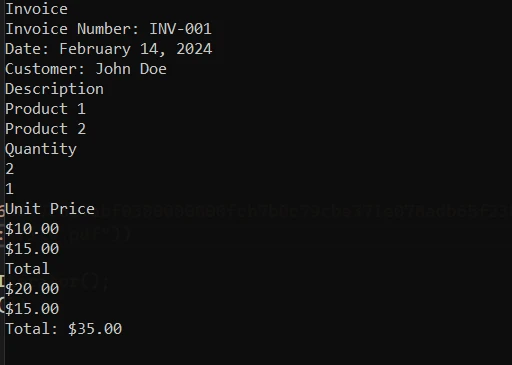
如何使用 Apryse 保护 PDF 文件?
Apryse C# 提供用于保护 PDF 文档的完整工具。 您可以应用密码保护、加密文档和管理用户权限来保护敏感信息。
using pdftron;
using pdftron.SDF;
using pdftron.PDF;

class Program
{
    static void Main()
    {
        // Initialize the PDFNet library
        PDFNet.Initialize();

        // Open an existing PDF document
        using (PDFDoc doc = new PDFDoc("input.pdf"))
        {
            // Initialize the security handler
            doc.InitSecurityHandler();

            // Create a new security handler
            SecurityHandler newHandler = new SecurityHandler();

            // Set the user password for the document
            newHandler.ChangeUserPassword("new_password");

            // Grant permission to print the document
            newHandler.SetPermission(SecurityHandler.Permission.e_print, true);

            // Apply the security handler to the document
            doc.SetSecurityHandler(newHandler);

            // Save the secured document
            doc.Save("output.pdf", SDFDoc.SaveOptions.e_linearized);
        }
    }
}
using pdftron;
using pdftron.SDF;
using pdftron.PDF;
class Program
{
static void Main()
{
// Initialize the PDFNet library
PDFNet.Initialize();
// Open an existing PDF document
using (PDFDoc doc = new PDFDoc("input.pdf"))
{
// Initialize the security handler
doc.InitSecurityHandler();
// Create a new security handler
SecurityHandler newHandler = new SecurityHandler();
// Set the user password for the document
newHandler.ChangeUserPassword("new_password");
// Grant permission to print the document
newHandler.SetPermission(SecurityHandler.Permission.e_print, true);
// Apply the security handler to the document
doc.SetSecurityHandler(newHandler);
// Save the secured document
doc.Save("output.pdf", SDFDoc.SaveOptions.e_linearized);
}
}
}Imports pdftron
Imports pdftron.SDF
Imports pdftron.PDF
Friend Class Program
Shared Sub Main()
' Initialize the PDFNet library
PDFNet.Initialize()
' Open an existing PDF document
Using doc As New PDFDoc("input.pdf")
' Initialize the security handler
doc.InitSecurityHandler()
' Create a new security handler
Dim newHandler As New SecurityHandler()
' Set the user password for the document
newHandler.ChangeUserPassword("new_password")
' Grant permission to print the document
newHandler.SetPermission(SecurityHandler.Permission.e_print, True)
' Apply the security handler to the document
doc.SetSecurityHandler(newHandler)
' Save the secured document
doc.Save("output.pdf", SDFDoc.SaveOptions.e_linearized)
End Using
End Sub
End Class如何删除敏感信息?
Apryse C# 支持从 PDF 文档中删除敏感信息——这对于合规性和隐私问题至关重要。 此功能允许永久删除或模糊PDF中的文本和图像。
using pdftron;
using pdftron.PDF;
using pdftron.SDF;

class Program
{
    static void Main()
    {
        // Initialize the PDFNet library
        PDFNet.Initialize();

        // Open an existing PDF document
        using (PDFDoc doc = new PDFDoc("input.pdf"))
        {
            // Define redaction areas on specific pages
            Redactor.Redaction[] redactions = {
                new Redactor.Redaction(1, new Rect(100, 100, 200, 200), false, "redacted"),
            };

            // Apply redactions to the document
            Redactor.Redact(doc, redactions);

            // Save the redacted document
            doc.Save("output.pdf", SDFDoc.SaveOptions.e_linearized);
        }
    }
}
using pdftron;
using pdftron.PDF;
using pdftron.SDF;
class Program
{
static void Main()
{
// Initialize the PDFNet library
PDFNet.Initialize();
// Open an existing PDF document
using (PDFDoc doc = new PDFDoc("input.pdf"))
{
// Define redaction areas on specific pages
Redactor.Redaction[] redactions = {
new Redactor.Redaction(1, new Rect(100, 100, 200, 200), false, "redacted"),
};
// Apply redactions to the document
Redactor.Redact(doc, redactions);
// Save the redacted document
doc.Save("output.pdf", SDFDoc.SaveOptions.e_linearized);
}
}
}Imports pdftron
Imports pdftron.PDF
Imports pdftron.SDF
Friend Class Program
Shared Sub Main()
' Initialize the PDFNet library
PDFNet.Initialize()
' Open an existing PDF document
Using doc As New PDFDoc("input.pdf")
' Define redaction areas on specific pages
Dim redactions() As Redactor.Redaction = { New Redactor.Redaction(1, New Rect(100, 100, 200, 200), False, "redacted")}
' Apply redactions to the document
Redactor.Redact(doc, redactions)
' Save the redacted document
doc.Save("output.pdf", SDFDoc.SaveOptions.e_linearized)
End Using
End Sub
End Class有哪些文档和支持服务?
IronPDF提供哪些支持?
文档: IronPDF提供完整的文档,涵盖从入门指南到高级功能(如HTML 到 PDF 转换、 PDF 编辑、合并、拆分和安全性)等主题。 该文档提供了易于理解的内容,包含大量的代码示例和解释,指导您完成各种 PDF 功能的实现。
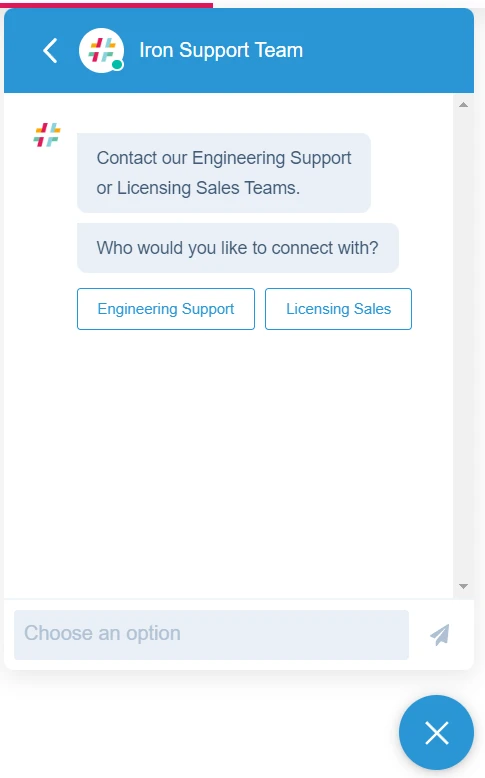
支持: IronPDF通过多种渠道提供帮助,包括电子邮件支持、工单支持和在线工程支持聊天,您可以通过这些渠道与他们的技术团队联系,解决具体问题。 您的应用程序可以立即受益于他们的反馈系统。
Apryse C#提供了什么支持?
文档: Apryse C#(以前称为 PDFTron for .NET)提供详细的文档,包括完整的 API 参考、开发人员指南和各种 PDF 操作任务的示例代码。
支持: Apryse 为开发者提供电子邮件支持,开发者可以通过与技术团队的直接沟通来解决故障排除和实施方面的问题。 您也可以在 Stack Overflow 上提问。
有哪些许可选项和定价?
IronPDF有哪些许可选项?
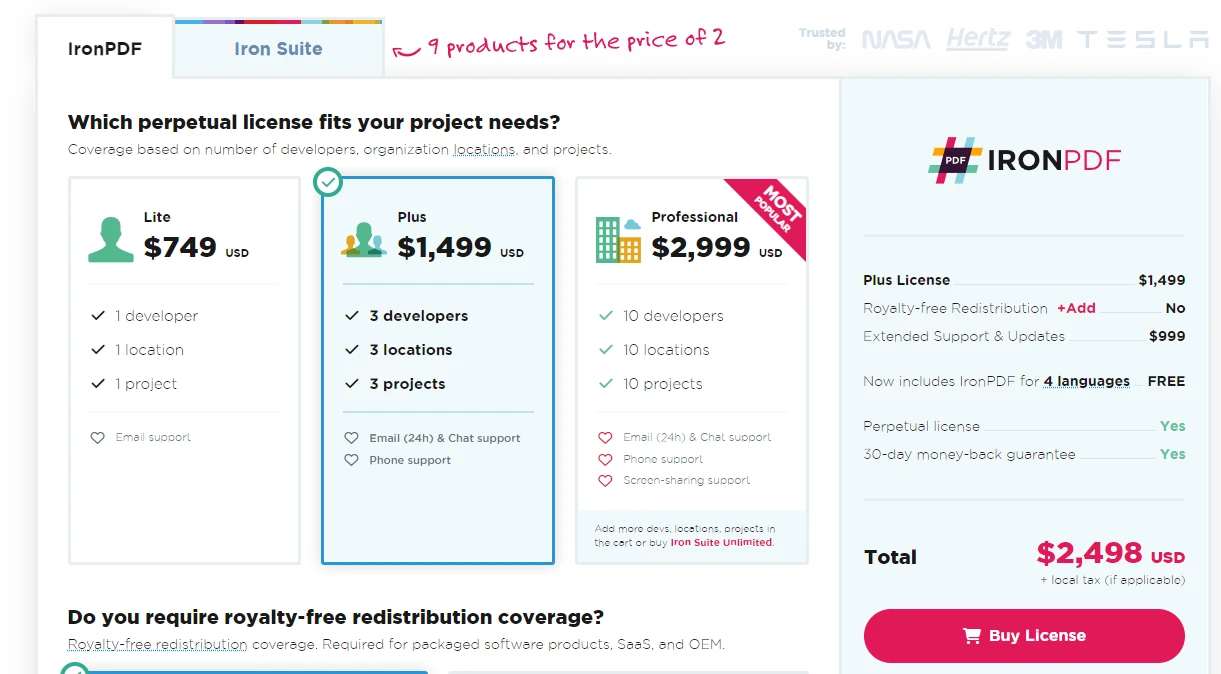
IronPDF提供多种许可选项,以满足不同的项目需求。 定价从$999的Lite许可证开始。 这些许可证根据开发者数量、地点和涵盖的项目而有所不同。 IronPDF还提供免版税的再分发选项和扩展支持,附加组件有特定的定价。
IronPDF的永久许可选项包括:
- Lite版:费用为$999,适合1个开发人员,1个位置,1个项目,包含电子邮件支持。
- Plus版:售价为$1,499,涵盖最多3个开发人员、3个位置和3个项目,提供24小时电子邮件和聊天支持及电话支持。
- Professional版:价格为$2,399,此版本适用于最多10个开发人员、10个位置和10个项目,提供全面支持,包括电子邮件、聊天、电话和屏幕共享支持。
他们还提供每月 500 美元的订阅服务,其中包括 10,000 次 API 调用,额外调用每次收费 0.02 美元。 IronPDF提供Enterprise解决方案,价格根据报价而定,可无限次使用。 该解决方案包含无限永久许可和 API 调用等功能。
Apryse C#的许可证选项有哪些?
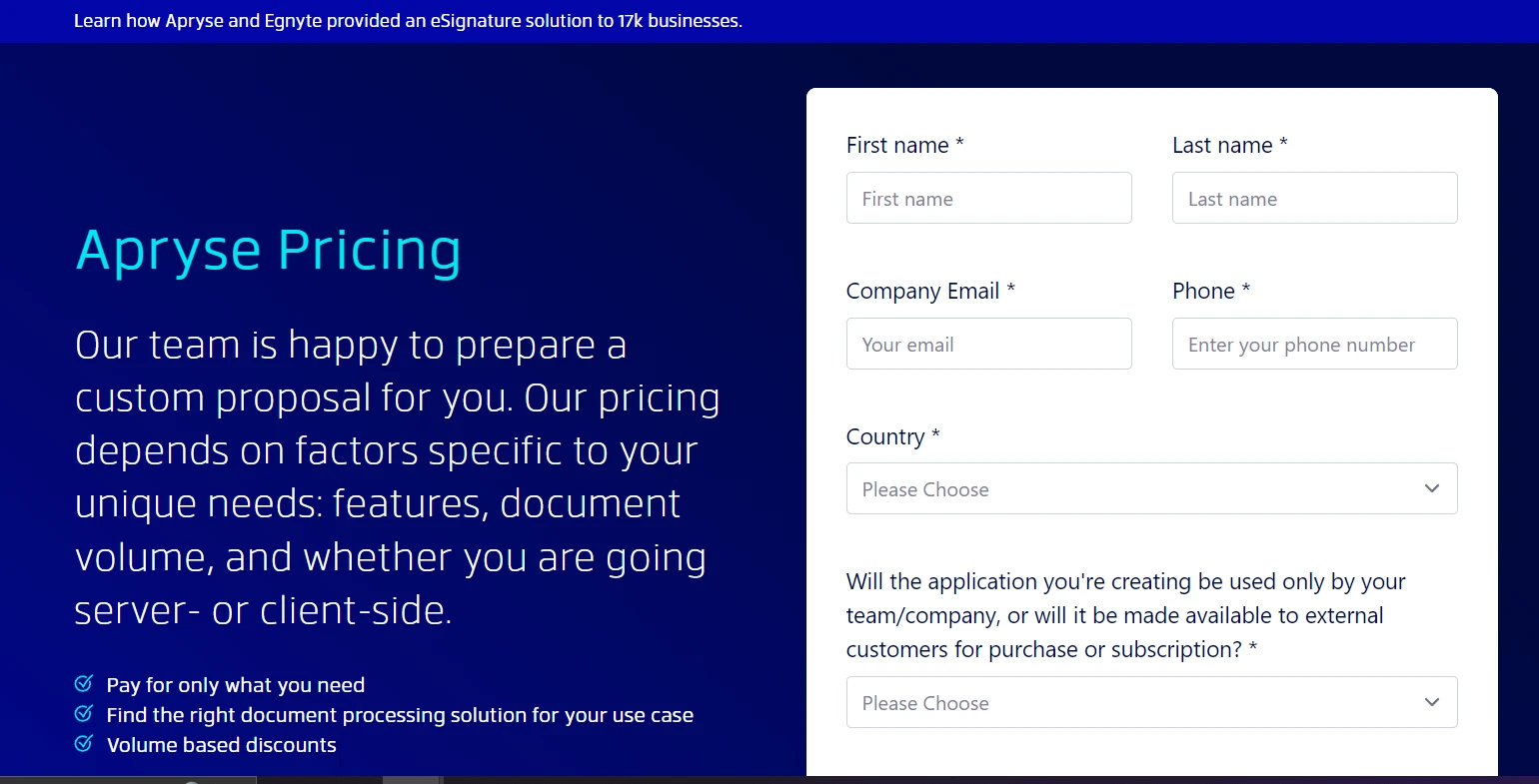
Apryse C# 根据具体的项目需求(包括功能、文档量和部署方案)提供可定制的定价。 您必须联系他们的销售团队才能获得Apryse的定价信息。
我应该选择哪个PDF库?
IronPDF和 Apryse C# 都为处理 PDF 的.NET开发人员提供了有效的功能。 IronPDF凭借其强大的PDF处理功能,在竞争中脱颖而出。 它功能强大,包括使用 IronPDF 进行广泛的编辑和IronPDF合并。 Iron Suite套件以经济实惠的价格提供多种工具,为您的开发提供满足各种需求的可靠实用程序。
IronPDF 因其在大多数 PDF 处理场景中的整体通用性和价值主张而脱颖而出。 您的最终决定应与您的项目需求和开发所需的具体功能相符。
常见问题解答
IronPDF和Apryse C#在PDF操作方面的主要区别是什么?
IronPDF以其与.NET的无缝集成以及在HTML到PDF转换、表单处理和安全特性方面的先进能力而闻名。Apryse C#,前称为PDFTron SDK,专注于内容提取和文档转换,提供如注释和涂销等高级特性。
如何在.NET应用程序中将HTML转换为PDF?
可以使用IronPDF库的RenderHtmlAsPdf方法将HTML字符串直接转换为PDF文档。这对从网页内容或HTML模板生成PDF非常有用。
在.NET项目中安装IronPDF的步骤是什么?
IronPDF可以通过Visual Studio中的NuGet包管理器轻松安装。您也可以使用包管理器控制台执行命令Install-Package IronPDF或直接从NuGet网站下载。
IronPDF如何处理PDF安全和加密?
IronPDF提供全面的安全选项,包括加密文档、设置用户权限和管理数字签名的能力。这确保PDF受到保护并符合安全标准。
IronPDF提供哪些高级PDF编辑功能?
IronPDF支持一系列高级编辑功能,包括合并和拆分文档、添加水印,以及自定义页眉和页脚。它还提供版面定制选项以便更个性化地创建文档。
IronPDF用户有哪些支持和资源可用?
IronPDF提供广泛的文档、电子邮件支持、基于工单的支持和实时工程师聊天,以协助开发者实施和排查问题。这确保用户拥有进行有效PDF操作所需的资源。
IronPDF有哪些许可选项?
IronPDF提供多种许可选项,包括Lite、Plus和Professional许可证,以满足不同的支持和开发者需求。还提供月度订阅模式和企业解决方案以供更广泛使用。
如何使用Apryse C#从PDF中提取文本?
Apryse C#提供强大的文本提取功能,允许开发者通过编程方式从PDF中提取内容。该功能对需要数据分析或内容操作的应用程序至关重要。
Apryse C#可以将哪些文档格式转换为PDF?
Apryse C#支持将各种文档格式,包括Office文档、图像和HTML文件,转换为PDF。这一功能对于在不同平台上保持文档展示的一致性至关重要。
IronPDF对.NET开发者的主要特性是什么?
IronPDF以其先进的功能而闻名,如HTML到PDF转换、全面的表单处理和文档安全。因其性能、可扩展性及与.NET的无缝集成而广受赞誉,使其成为广泛PDF处理场景的理想选择。







 免费开始
免费开始 免费开始
免费开始 预定免费现场演示
















