using IronPdf;

// Disable local disk access or cross-origin requests
Installation.EnableWebSecurity = true;

// Instantiate Renderer
var renderer = new ChromePdfRenderer();

// Create a PDF from a HTML string using C#
var pdf = renderer.RenderHtmlAsPdf("<h1>Hello World</h1>");

// Export to a file or Stream
pdf.SaveAs("output.pdf");

// Advanced Example with HTML Assets
// Load external html assets: Images, CSS and JavaScript.
// An optional BasePath 'C:\site\assets\' is set as the file location to load assets from
var myAdvancedPdf = renderer.RenderHtmlAsPdf("<img src='icons/iron.png'>", @"C:\site\assets\");
myAdvancedPdf.SaveAs("html-with-assets.pdf");
using IronPdf;// Disable local disk access or cross-origin requestsInstallation.EnableWebSecurity = true;// Instantiate Renderervar renderer = new ChromePdfRenderer();// Create a PDF from a HTML string using C#var pdf = renderer.RenderHtmlAsPdf("<h1>Hello World</h1>");// Export to a file or Streampdf.SaveAs("output.pdf");// Advanced Example with HTML Assets// Load external html assets: Images, CSS and JavaScript.// An optional BasePath 'C:\site\assets\' is set as the file location to load assets fromvar myAdvancedPdf = renderer.RenderHtmlAsPdf("<img src='icons/iron.png'>", @"C:\site\assets\");myAdvancedPdf.SaveAs("html-with-assets.pdf");
## Dlaczego warto porównać IronPDF i Apryse C# PDF Libraries?
IronPDF i Apryse C# to znane biblioteki PDF dla platformy .NET, z których każda ma swoje unikalne zalety. IronPDF wyróżnia się w [konwersji HTML do PDF](https://ironpdf.com/tutorials/html-to-pdf/) dzięki pełnej obsłudze Bootstrap i rozbudowanym [funkcjom edycji](https://ironpdf.com/features/edit/). Tymczasem firma Apryse specjalizuje się w adnotacjach i redagowaniu dokumentów, zaspokajając potrzeby Enterprise w zakresie zgodności z przepisami.
Jako programiści C# często stajecie przed zadaniami związanymi z plikami PDF podczas tworzenia aplikacji, które generują, edytują lub wyświetlają dokumenty. Niezawodna biblioteka PDF ma kluczowe znaczenie dla wydajności. Biblioteki te oferują wbudowane funkcje do wykonywania złożonych operacji, takich jak [konwersja dokumentów](https://ironpdf.com/features/convert/), [edycja tekstu](https://ironpdf.com/how-to/find-replace-text/) i [obsługa obrazów w plikach PDF](https://ironpdf.com/how-to/add-images-to-pdfs/). Bez nich trzeba by było pisać całą funkcjonalność od podstaw, co jest zarówno czasochłonne, jak i podatne na błędy.
W niniejszym porównaniu przeanalizowano dwie popularne biblioteki PDF: [**IronPDF**](https://ironpdf.com) i [**Apryse C#**](https://apryse.com/). IronPDF zapewnia niezawodne funkcje, które upraszczają operacje związane z plikami PDF w [środowiskach .NET](https://ironpdf.com/docs/), od konwersji HTML do PDF po zaawansowaną edycję dokumentów. Apryse C# oferuje proste podejście do manipulacji plikami PDF, kładąc nacisk na wydajność i łatwość użytkowania. W niniejszej analizie omówiono konkretne możliwości każdej biblioteki, aby pomóc Ci wybrać tę, która najlepiej pasuje do Twojego projektu.
## Co to jest biblioteka Apryse C# PDF?

[**Apryse C#**](https://apryse.com/) to kompletna biblioteka PDF dla aplikacji .NET, zaprojektowana w celu uproszczenia operacji na plikach PDF w środowiskach C#. Wcześniej znany jako PDFTron SDK, oferuje szeroki zakres funkcji i narzędzi dla programistów poszukujących precyzyjnych możliwości obsługi plików PDF.
### Jakie kluczowe funkcje oferuje Apryse C#?
- **Łatwa integracja z projektami .NET:** Płynna integracja z platformą .NET, w tym z [aplikacjami ASP.NET Core](https://ironpdf.com/how-to/aspx-to-pdf/) i tradycyjnymi aplikacjami .NET Framework.
- **Tworzenie i edycja dokumentów:** Twórz pliki PDF od podstaw lub edytuj istniejące, w tym tekst, obrazy, formularze oraz manipuluj stronami - [zmieniaj kolejność, scałaj lub dziel](https://ironpdf.com/how-to/merge-or-split-pdfs/).
- **Konwersja HTML do PDF:** Bezpośrednia [konwersja treści HTML do formatu PDF](https://ironpdf.com/how-to/html-string-to-pdf/) w przypadku faktur, raportów i dokumentacji stron internetowych.
- **Obsługa wielu pól formularzy:** Niezawodne tworzenie, edycja i programowe wypełnianie [pól formularzy PDF](https://ironpdf.com/how-to/create-forms/) w celu zautomatyzowania przepływu pracy.
- **Wyodrębnianie tekstu i treści:** Wyodrębnianie [tekstu i treści](https://ironpdf.com/how-to/extract-text-and-images/) z plików PDF do celów analizy, narzędzi wyszukiwania i zarządzania treścią.
- **Bezpieczeństwo i szyfrowanie:** Kompleksowe zabezpieczenia, w tym [szyfrowanie dokumentów](https://ironpdf.com/how-to/pdf-permissions-passwords/), zarządzanie uprawnieniami i podpisy cyfrowe.
- **Zaawansowane funkcje PDF:** Obsługa [adnotacji](https://ironpdf.com/how-to/annotations/), [zakładek](https://ironpdf.com/how-to/bookmarks/) i hiperłączy w interaktywnych plikach PDF.
## Co to jest biblioteka IronPDF C#?
[**IronPDF**](https://ironpdf.com) to wszechstronna biblioteka PDF dostosowana do potrzeb programistów .NET. Upraszcza to złożoną obsługę plików PDF, umożliwiając [tworzenie](https://ironpdf.com/features/create/), [edycję](https://ironpdf.com/features/edit/) i [konwersję](https://ironpdf.com/features/convert/) dokumentów PDF bezpośrednio w aplikacjach C#. Dostępny dla wielu języków programowania, w tym Java, Python i C#, IronPDF zaspokaja różnorodne potrzeby związane z przetwarzaniem plików PDF, zapewniając wydajność i niezawodność.
### Jakie kluczowe funkcje oferuje IronPDF?
- **Płynna integracja z platformą .NET:** Łatwa integracja obsługująca zarówno [.NET Framework](https://ironpdf.com/get-started/windows/), jak i [.NET Core](https://ironpdf.com/get-started/quickstart/), w tym [projekty ASP.NET](https://ironpdf.com/how-to/aspx-to-pdf/).
- **Konwersja HTML do PDF:** Konwertuj [**HTML do PDF**](https://ironpdf.com/tutorials/html-to-pdf/) w wysokiej jakości, idealne rozwiązanie dla raportów, paragonów i dokumentacji z szablonów HTML.
- **Zaawansowana edycja plików PDF:** Rozbudowane możliwości edycji, w tym [dodawanie tekstu](https://ironpdf.com/how-to/draw-text-and-bitmap/), [obrazów](https://ironpdf.com/how-to/add-images-to-pdfs/) i [grafiki wektorowej](https://ironpdf.com/how-to/draw-line-and-rectangle/).
- **Obsługa formularzy PDF:** Twórz, edytuj i wypełniaj [**formularze PDF**](https://ironpdf.com/how-to/edit-forms/) programowo w celu zautomatyzowania przepływu dokumentów.
- **Pobieranie treści:** Pobieranie [tekstu, obrazów i metadanych](https://ironpdf.com/how-to/extract-text-and-images/) do analizy treści i migracji danych.
- **Bezpieczeństwo dokumentów:** [**ochrona hasłem**](https://ironpdf.com/examples/security-and-metadata/), szyfrowanie i [zarządzanie uprawnieniami](https://ironpdf.com/how-to/pdf-permissions-passwords/).
- **Wydajność i skalowalność:** Ulepszone pod kątem prędkości i [przetwarzania dużych ilości ](https://ironpdf.com/how-to/async/) w aplikacjach o wysokim zapotrzebowaniu.
- **Kompletna dokumentacja:** Obszerna [dokumentacja](https://ironpdf.com/docs/) i responsywny zespół wsparcia technicznego zapewniający pomoc przy wdrażaniu.
- **Zgodność ze standardami PDF:** Obsługa formatów [**PDF/A**](https://ironpdf.com/how-to/pdfa/), [**PDF/UA**](https://ironpdf.com/how-to/pdfua/) i innych specyfikacji branżowych.
## Jak stworzyć aplikację konsolową C#?
Utworzenie aplikacji konsolowej w Visual Studio stanowi podstawę dla projektów programistycznych w środowisku .NET, w tym tych wykorzystujących biblioteki PDF, takie jak IronPDF lub Apryse C#. Aby rozpocząć, wykonaj następujące kroki:
### Jak uruchomić program Visual Studio?
Otwórz program Visual Studio na swoim komputerze. Jeśli nie masz jeszcze zainstalowanego programu Visual Studio, pobierz go i zainstaluj z oficjalnej strony Microsoftu, wybierając wersję odpowiednią do swoich potrzeb.
### Jak utworzyć nowy projekt?
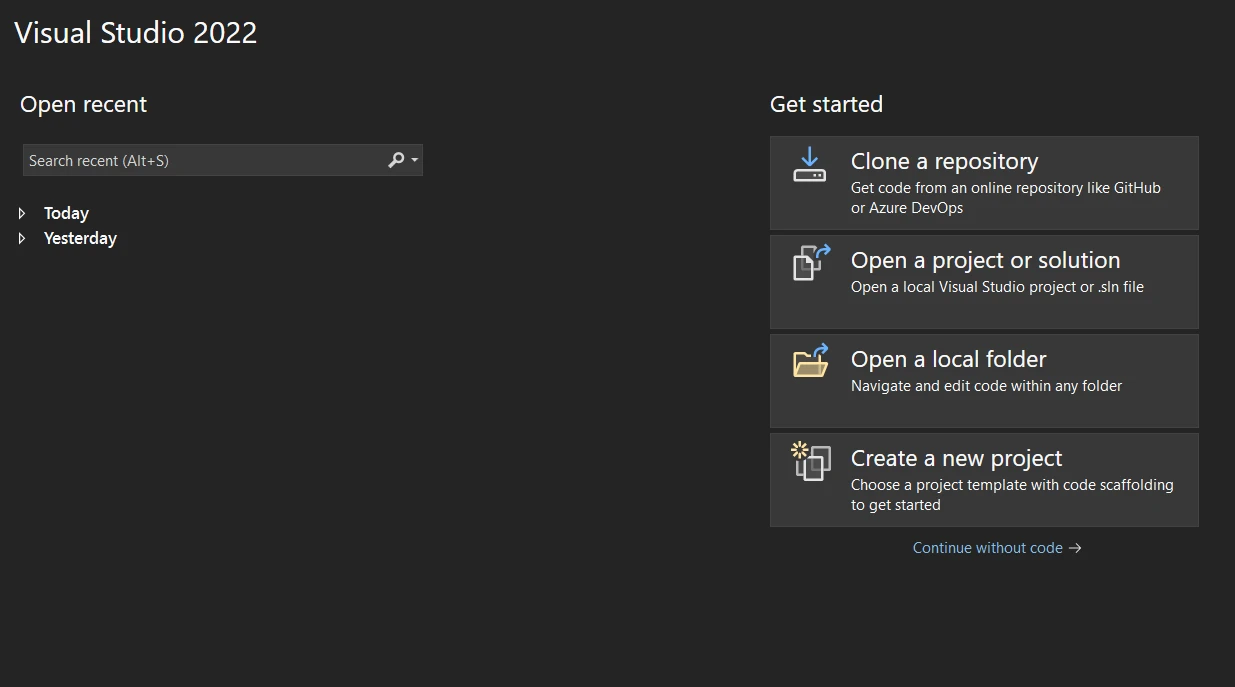
Po uruchomieniu programu Visual Studio wybierz opcję "Utwórz nowy projekt" na początkowym pulpicie nawigacyjnym.
### Jaki typ projektu powinienem wybrać?
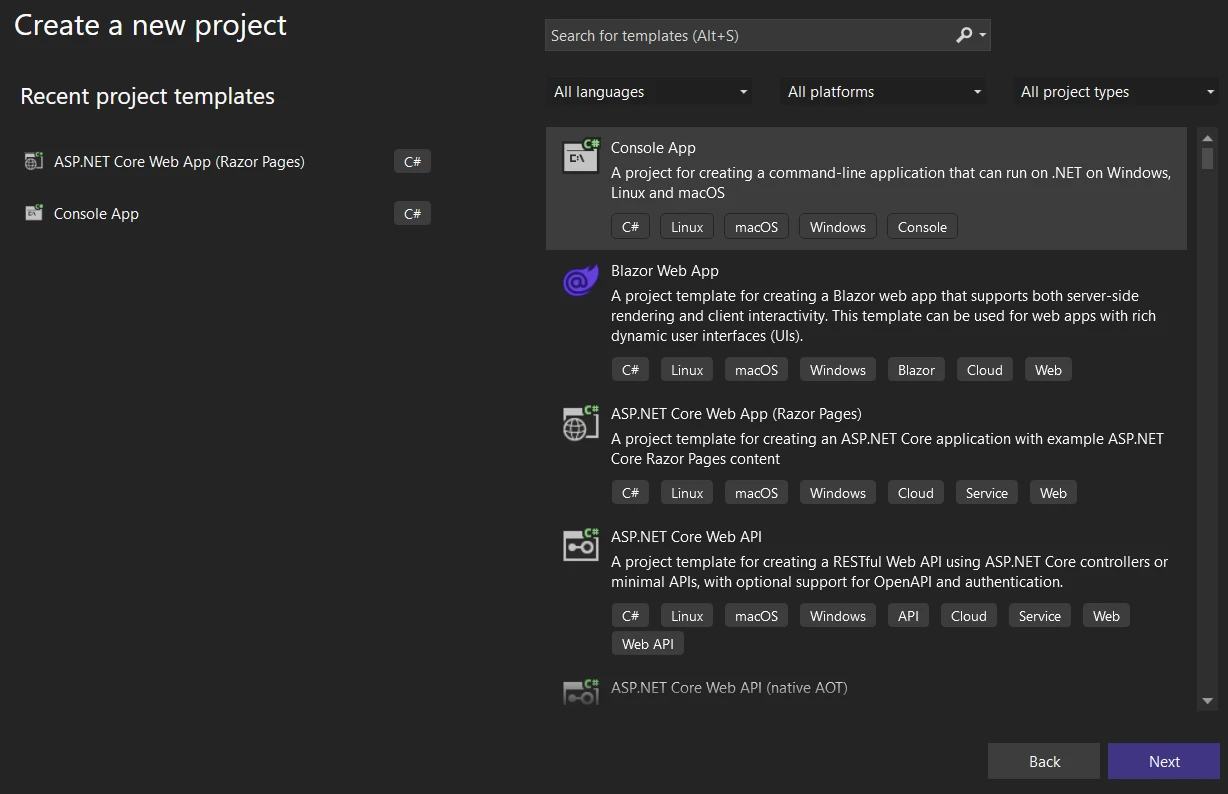
W oknie "Utwórz nowy projekt" zobaczysz różne szablony projektów. Wpisz "Console" w polu wyszukiwania lub znajdź "Console Application" na liście. Wybierz szablon przeznaczony dla języka C#.
### Jak skonfigurować mój projekt?
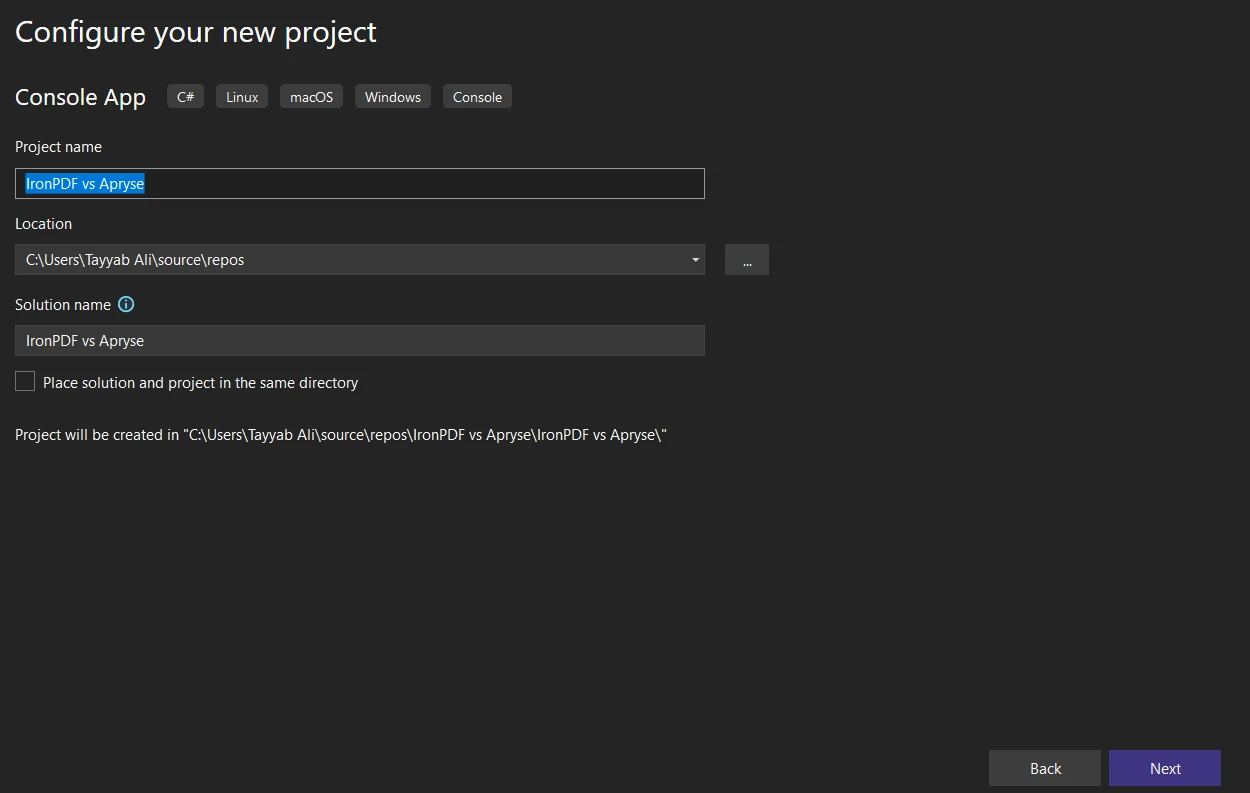
Po wybraniu opcji "Aplikacja konsolowa" kliknij "Dalej". Skonfiguruj nowy projekt:
- **Nazwa projektu:** Wprowadź opisową nazwę swojego projektu.
- **Lokalizacja:** Wybierz preferowaną lokalizację zapisu.
- **Nazwa rozwiązania:** Domyślnie jest to nazwa projektu, ale można ją dostosować.
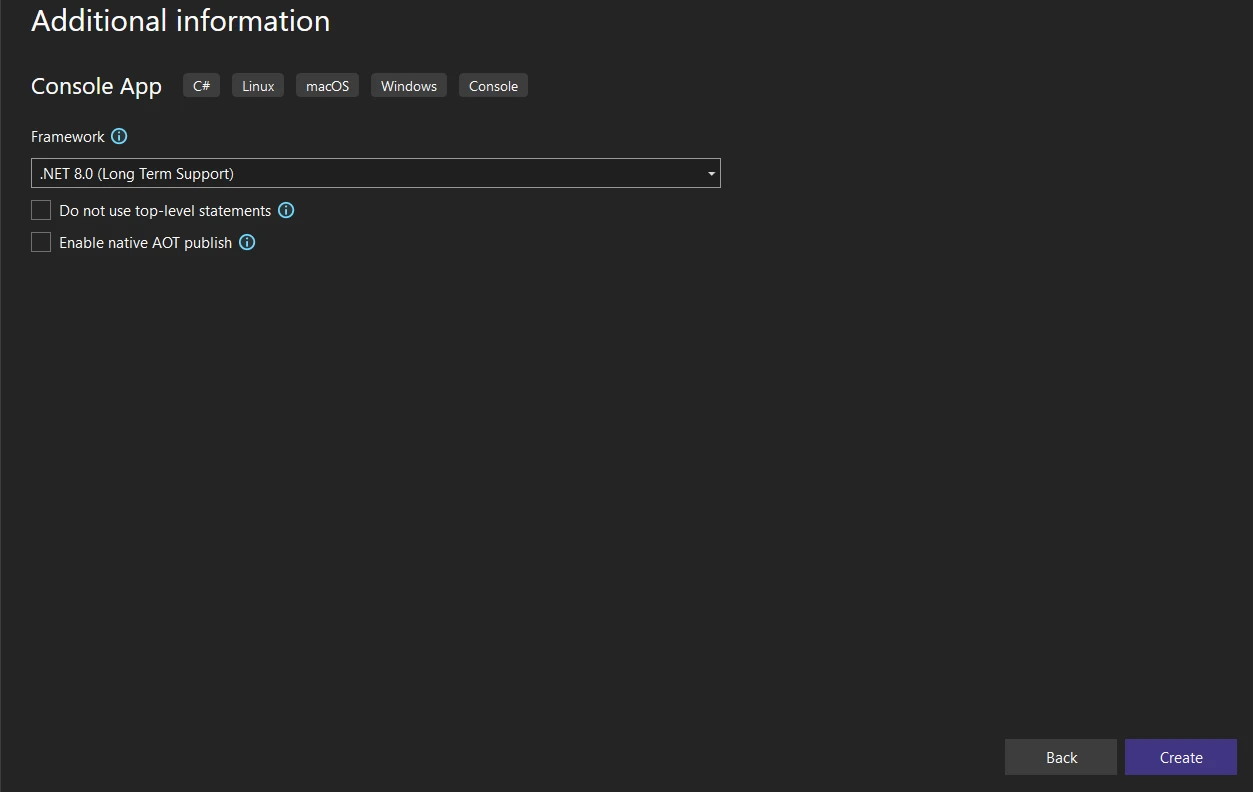
- **Framework:** Wybierz wersję .NET. Zazwyczaj zaleca się korzystanie z [najnowszej wersji,](https://ironpdf.com/get-started/installation-overview/) chyba że konkretne wymagania stanowią inaczej.
### Jak zakończyć tworzenie projektu?
Po skonfigurowaniu ustawień projektu kliknij "Utwórz". Visual Studio utworzy nowy projekt aplikacji konsolowej z domyślnym plikiem **Program.cs**.
### Jaka jest struktura projektu?
Zapoznaj się z wygenerowaną strukturą projektu w okienku Solution Explorer. Będziesz pracować głównie z plikiem **Program.cs** dla aplikacji konsolowych, w którym będziesz pisać kod w języku C#.
## Jak zainstalować bibliotekę IronPDF?
Włączenie IronPDF do projektu .NET umożliwia korzystanie z pełnego zakresu funkcji manipulacji plikami PDF. Kilka metod instalacji zapewnia elastyczność w zależności od preferencji dotyczących przepływu pracy.
### Jak zainstalować za pomocą menedżera pakietów NuGet?
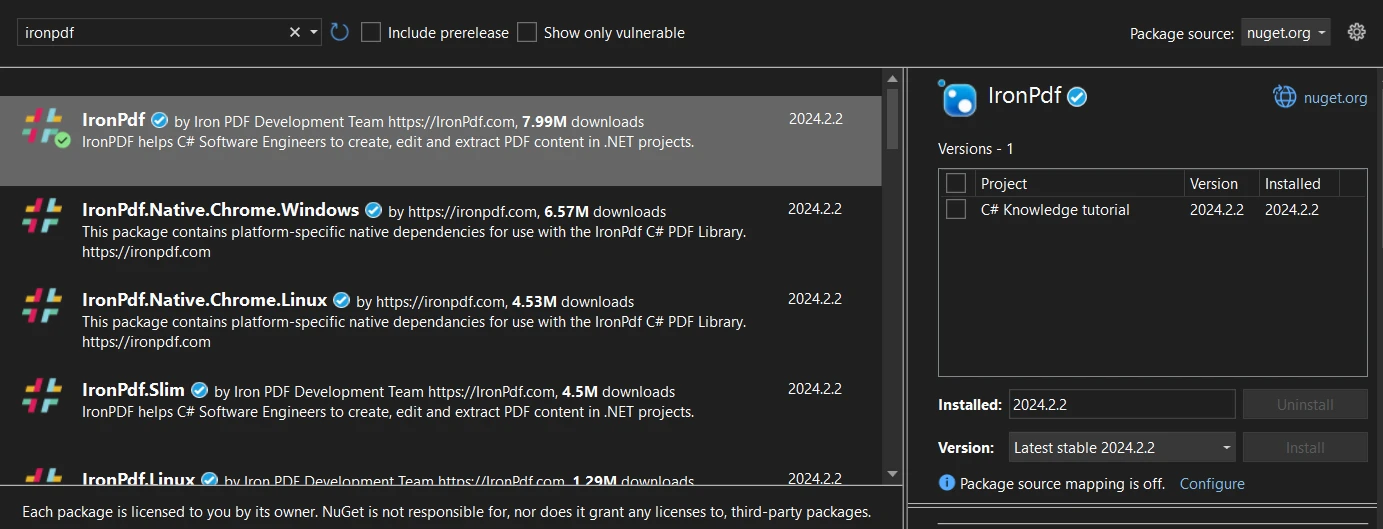
[Menedżer pakietów NuGet](https://ironpdf.com/get-started/advanced-installation-nuget/) w Visual Studio zapewnia graficzny interfejs do zarządzania bibliotekami.
1. Otwórz swój projekt w Visual Studio.
2. Kliknij prawym przyciskiem myszy swój projekt w Eksploratorze rozwiązań i wybierz opcję "Zarządzaj pakietami NuGet".
3. Kliknij kartę "Przeglądaj" i wyszukaj "IronPDF."
4. Wybierz IronPDF z wyników i kliknij "Zainstaluj".
### Jak zainstalować za pomocą wiersza poleceń?
Konsola menedżera pakietów umożliwia bezpośrednią instalację z wiersza poleceń.
1. Otwórz projekt w programie Visual Studio.
2. Przejdź do Narzędzia > Menedżer pakietów NuGet > Konsola menedżera pakietów.
3. Wpisz następujące polecenie:
```shell
:ProductInstall
```
To polecenie instaluje najnowszą wersję IronPDF w Twoim projekcie.
### Jak pobrać bezpośrednio z NuGet?
Pakiet można ręcznie pobrać przed integracją.
1. Odwiedź [**stronę NuGet**](https://www.nuget.org/) i wyszukaj "IronPDF."
2. Na [**stronie pakietu IronPDF**](https://www.nuget.org/packages/IronPdf) kliknij "Pobierz Pakiet" aby uzyskać plik .nupkg.
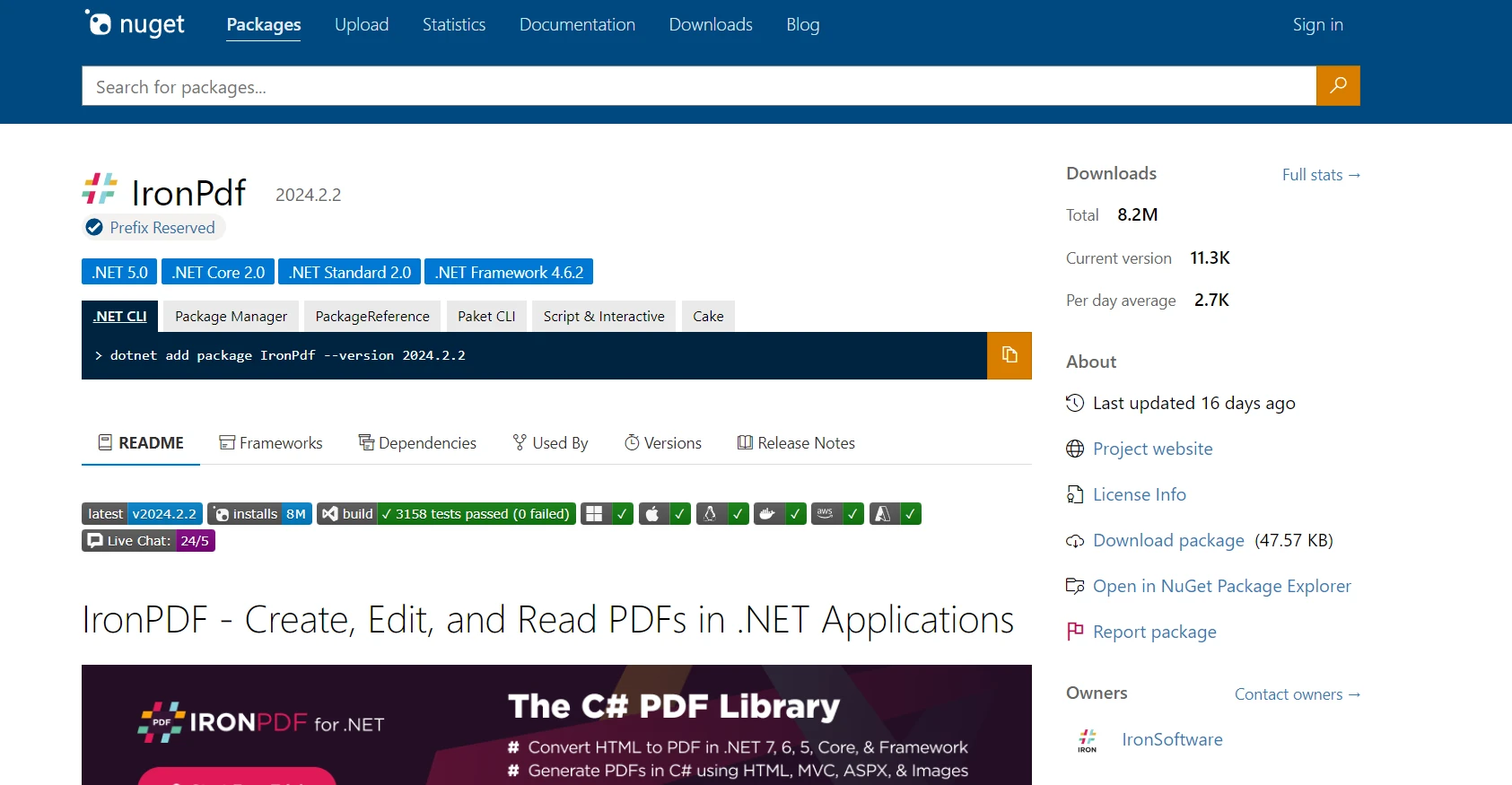
3. Dodaj pobrany pakiet ręcznie przez Eksploratora Rozwiązań > kliknij prawym przyciskiem myszy projekt > "Dodaj > Odwołanie."
Każda metoda z powodzeniem integruje IronPDF, umożliwiając korzystanie z [efektywnych funkcji przetwarzania PDF](https://ironpdf.com/features/).
## Jak zainstalować Apryse C#?
Integracja Apryse C# w projekt zależy od Twojego środowiska .NET Framework lub .NET Core. Poniższe kroki przedstawiają ogólny proces instalacji:
### Jak zainstalować Apryse dla .NET Framework?
1. **Pobierz SDK Apryse dla Windows:** Trzeba będzie odwiedzić [**stronę SDK Apryse dla Windows**](https://docs.apryse.com/documentation/dotnet/get-started/integration/windows/), aby pobrać SDK odpowiednie dla aplikacji .NET Framework.
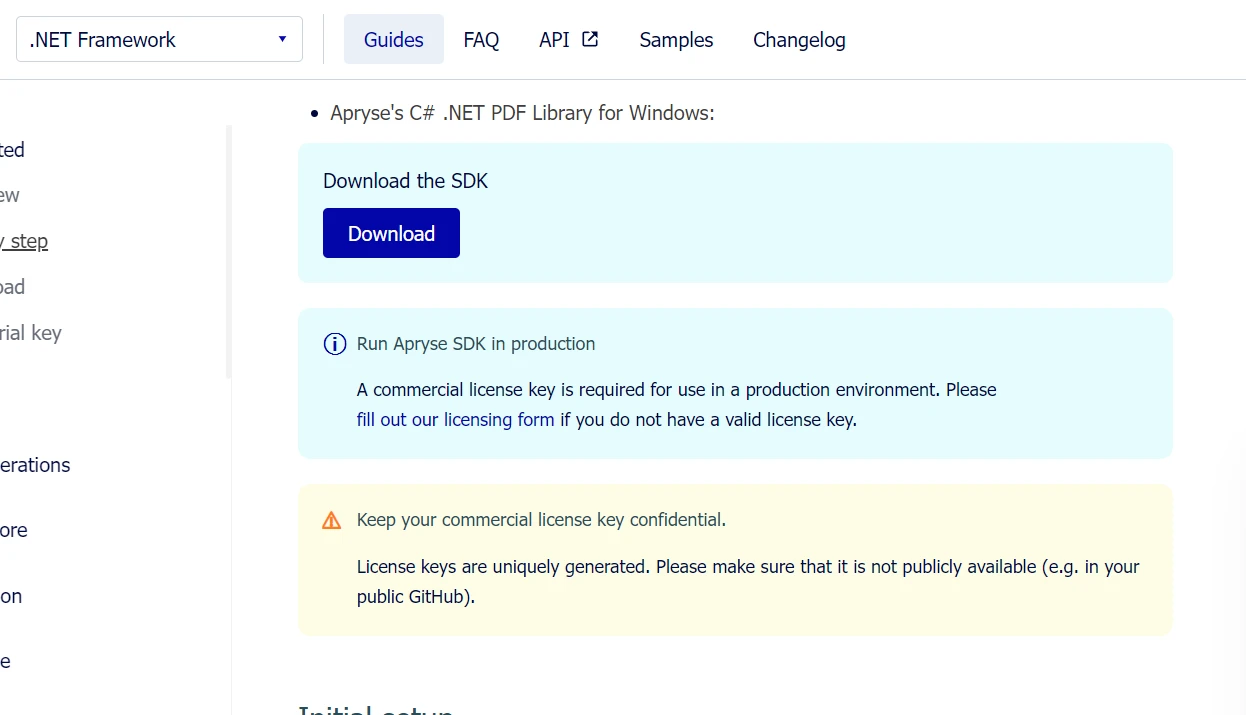
2. **Rozpakuj SDK:** Po pobraniu rozpakuj SDK w znanym miejscu w swoim systemie.
3. **Uzyskaj klucz próbny Apryse:** Zarejestruj się na platformie Apryse, aby uzyskać klucz próbny, którego użyjesz do aktywacji funkcji próbnych SDK.
4. **Skonfiguruj projekt:** W Visual Studio stwórz nową aplikację konsolową .NET Framework. Następnie dodaj folder **Lib** z rozpakowanego SDK do katalogu swojego projektu.
5. **Dodaj referencje:** Kliknij prawym przyciskiem myszy na Referencje w projekcie, wybierz "Dodaj odniesienie," i przejdź do folderu **Lib** gdzie skopiowałeś **PDFNetLoader.dll** i odpowiedni **PDFNet.dll** dla swojej architektury (x86 lub x64). Upewnij się, że ustawiono "Copy Local" dla **PDFNet.dll** na false.
6. **Skonfiguruj App.config:** Upewnij się, że plik App.config ma ustawienie **loadFromRemoteSources** włączone na true.
SDK zawiera foldery z przykładami, które można otworzyć i uruchomić bezpośrednio jako rozwiązania.## Zaawansowane funkcje IronPDF
### Konwersja HTML do PDF
IronPDF jest bardzo skuteczny w konwertowaniu HTML na dokumenty PDF, co jest kluczowe dla aplikacji webowych, które generują raporty, faktury lub migawki stron internetowych. Biblioteka dokładnie renderuje HTML, CSS i JavaScript, zachowując układ i style treści webowej w wygenerowanych PDF.
#### Konwersja ciągu HTML na PDF
Konwersja ciągów HTML bezpośrednio na PDF umożliwia dynamiczne tworzenie dokumentów z treści generowanej przez aplikację lub przechowywanych zmiennych. Ta metoda jest korzystna przy tworzeniu raportów, paragonów czy dokumentów dostosowanych na podstawie danych wejściowych użytkownika.
```csharp
using IronPdf;

// Secure the server environment to disable local disk access or cross-origin requests
Installation.EnableWebSecurity = true;

// Set your IronPDF license key
IronPdf.License.LicenseKey = "License-Key goes here";

// Instantiate a PDF renderer
var renderer = new ChromePdfRenderer();

// Define a simple HTML string to convert to PDF
string htmlContent = @"
<!DOCTYPE html>
<html lang='en'>
<head>
    <meta charset='UTF-8'>
    <meta name='viewport' content='width=device-width, initial-scale=1.0'>
    <title>My PDF</title>
    <style>
        body {
            font-family: Arial, sans-serif;
        }
        h1 {
            color: #333;
            text-align: center;
        }
        p {
            color: #666;
            text-align: justify;
        }
    </style>
</head>
<body>
    <h1>Welcome to My PDF</h1>
    <p>This is a sample paragraph demonstrating how to create a PDF from HTML using IronPdf in C#.</p>
    <p>You can add more content here as needed.</p>
</body>
</html>";

// Render the HTML string as a PDF
var pdf = renderer.RenderHtmlAsPdf(htmlContent);

// Save the resulting PDF to a file
pdf.SaveAs("output.pdf");
```
#### Konwersja pliku HTML na PDF
Jeśli masz pliki HTML zapisane na dysku, IronPDF może przekształcić te pliki w dokumenty PDF. Ta metoda jest idealna dla istniejących dokumentów HTML, szablonów lub raportów zapisanych w Twoim projekcie lub serwerze.
```csharp
using IronPdf;
// Set your IronPDF license key
IronPdf.License.LicenseKey = "License-Key goes here";
// Secure the server environment to disable local disk access or cross-origin requests
Installation.EnableWebSecurity = true;
// Instantiate a PDF renderer
var renderer = new ChromePdfRenderer();
// Render the HTML file as a PDF
var pdf = renderer.RenderHtmlFileAsPdf("invoice.html");
// Save the resulting PDF to a file
pdf.SaveAs("file.pdf");
```
#### Konwersja URL do PDF
IronPDF może przekonwertować aktywne strony internetowe na dokumenty PDF podając URL. Ta funkcja przechwytuje aktualny stan strony, w tym złożone układy, CSS i treści generowane przez JavaScript.
```csharp
using IronPdf;
// Set your IronPDF license key
IronPdf.License.LicenseKey = "License-Key goes here";
// Secure the server environment to disable local disk access or cross-origin requests
Installation.EnableWebSecurity = true;
// Instantiate a PDF renderer
var renderer = new ChromePdfRenderer();
// Render the URL as a PDF
var pdf = renderer.RenderUrlAsPdf("___PROTECTED_URL_100___");
// Save the resulting PDF to a file
pdf.SaveAs("url.pdf");
```
### Obsługa Bootstrapa i nowoczesnych frameworków CSS
Pełna obsługa Bootstrapa i frameworków CSS jest kluczowa przy generowaniu PDF z nowoczesnych aplikacji webowych. Organizacje polegają na Bootstrap do interfejsów webowych, dlatego dokładna konwersja do PDF jest kluczowa dla raportów, faktur i dokumentacji.
#### Funkcje Bootstrapa obsługiwane przez IronPDF
### IronPDF: Kompleksowe wsparcie dla Bootstrap
- **Bootstrap 5:** Pełna obsługa układów flexbox, CSS Grid, klas użytkowych i responsywnych komponentów
- **Bootstrap 4:** Kompleksowe systemy kart, komponenty nawigacyjne i narzędzia flex
- **Tailwind CSS:** Wszystkie klasy użytkowe renderują się dokładnie
- **Foundation:** Kompletny system siatki i wsparcie dla komponentów
- **Nowoczesne CSS3:** Pełne flexbox, CSS Grid, właściwości niestandardowe, animacje i przejścia
IronPDF renderuje stronę główną Bootstrapa i wszystkie oficjalne przykłady z perfekcyjną dokładnością pikselową.
**Przykład kodu: Pulpit nawigacyjny wskaźników biznesowych**
```csharp
using IronPdf;
// Set your IronPDF license key
IronPdf.License.LicenseKey = "License-Key goes here";
var renderer = new ChromePdfRenderer();
string bootstrapDashboard = @"
<!DOCTYPE html>
<html>
<head>
<link href='___PROTECTED_URL_101___ rel='stylesheet'>
<style>
.metric-card { transition: transform 0.2s; }
.metric-card:hover { transform: translateY(-5px); }
.trend-up { color: #28a745; }
.trend-down { color: #dc3545; }
</style>
</head>
<body>
<div class='container-fluid py-4'>
<div class='d-flex justify-content-between align-items-center mb-4'>
<h1 class='display-5'>Business Performance Dashboard</h1>
<div class='text-muted'>Last updated: March 2025</div>
</div>
<div class='row g-4 mb-4'>
<div class='col-md-3'>
<div class='card metric-card shadow-sm border-start border-primary border-4'>
<div class='card-body'>
<div class='d-flex justify-content-between align-items-center mb-2'>
<h6 class='text-muted text-uppercase mb-0'>Total Revenue</h6>
<span class='badge bg-primary'>Q1 2025</span>
</div>
<h2 class='mb-1'>$2.4M</h2>
<div class='trend-up'>
<i>↑</i> <strong>+18.5%</strong> from last quarter
</div>
</div>
</div>
</div>
<div class='col-md-3'>
<div class='card metric-card shadow-sm border-start border-success border-4'>
<div class='card-body'>
<div class='d-flex justify-content-between align-items-center mb-2'>
<h6 class='text-muted text-uppercase mb-0'>New Customers</h6>
<span class='badge bg-success'>Active</span>
</div>
<h2 class='mb-1'>1,284</h2>
<div class='trend-up'>
<i>↑</i> <strong>+24.3%</strong> growth rate
</div>
</div>
</div>
</div>
<div class='col-md-3'>
<div class='card metric-card shadow-sm border-start border-warning border-4'>
<div class='card-body'>
<div class='d-flex justify-content-between align-items-center mb-2'>
<h6 class='text-muted text-uppercase mb-0'>Avg Order Value</h6>
<span class='badge bg-warning text-dark'>Updated</span>
</div>
<h2 class='mb-1'>$1,847</h2>
<div class='trend-up'>
<i>↑</i> <strong>+5.2%</strong> increase
</div>
</div>
</div>
</div>
<div class='col-md-3'>
<div class='card metric-card shadow-sm border-start border-info border-4'>
<div class='card-body'>
<div class='d-flex justify-content-between align-items-center mb-2'>
<h6 class='text-muted text-uppercase mb-0'>Satisfaction Rate</h6>
<span class='badge bg-info'>Excellent</span>
</div>
<h2 class='mb-1'>94.7%</h2>
<div class='trend-up'>
<i>↑</i> <strong>+2.1pts</strong> improvement
</div>
</div>
</div>
</div>
</div>
<div class='row g-4'>
<div class='col-md-8'>
<div class='card shadow-sm'>
<div class='card-header bg-white d-flex justify-content-between align-items-center'>
<h5 class='mb-0'>Revenue Breakdown by Category</h5>
<div class='btn-group btn-group-sm' role='group'>
<button type='button' class='btn btn-outline-primary active'>Monthly</button>
<button type='button' class='btn btn-outline-primary'>Quarterly</button>
<button type='button' class='btn btn-outline-primary'>Annual</button>
</div>
</div>
<div class='card-body'>
<div class='table-responsive'>
<table class='table table-hover mb-0'>
<thead class='table-light'>
<tr>
<th>Category</th>
<th>Revenue</th>
<th>Orders</th>
<th>Avg Value</th>
<th class='text-end'>Trend</th>
</tr>
</thead>
<tbody>
<tr>
<td><span class='badge bg-primary me-2'>A</span>Enterprise Solutions</td>
<td><strong>$1,245,000</strong></td>
<td>142</td>
<td>$8,768</td>
<td class='text-end'><span class='badge bg-success'>+12%</span></td>
</tr>
<tr>
<td><span class='badge bg-success me-2'>B</span>Professional Services</td>
<td><strong>$687,500</strong></td>
<td>458</td>
<td>$1,501</td>
<td class='text-end'><span class='badge bg-success'>+18%</span></td>
</tr>
<tr>
<td><span class='badge bg-info me-2'>C</span>Standard Packages</td>
<td><strong>$412,300</strong></td>
<td>891</td>
<td>$463</td>
<td class='text-end'><span class='badge bg-success'>+8%</span></td>
</tr>
<tr>
<td><span class='badge bg-warning me-2'>D</span>Custom Development</td>
<td><strong>$55,200</strong></td>
<td>12</td>
<td>$4,600</td>
<td class='text-end'><span class='badge bg-danger'>-3%</span></td>
</tr>
</tbody>
</table>
</div>
</div>
</div>
</div>
<div class='col-md-4'>
<div class='card shadow-sm'>
<div class='card-header bg-white'>
<h5 class='mb-0'>Quick Actions</h5>
</div>
<div class='card-body'>
<div class='d-grid gap-2'>
<button class='btn btn-primary'>Generate Full Report</button>
<button class='btn btn-outline-primary'>Export to Excel</button>
<button class='btn btn-outline-secondary'>Schedule Email</button>
<button class='btn btn-outline-info'>Share Dashboard</button>
</div>
</div>
</div>
<div class='card shadow-sm mt-3'>
<div class='card-header bg-white'>
<h5 class='mb-0'>Key Insights</h5>
</div>
<div class='card-body'>
<div class='alert alert-success mb-2'>
<small><strong>Top Performer:</strong> Enterprise Solutions leading revenue growth</small>
</div>
<div class='alert alert-info mb-2'>
<small><strong>Growth Driver:</strong> Professional Services showing strongest customer acquisition</small>
</div>
<div class='alert alert-warning mb-0'>
<small><strong>Attention Needed:</strong> Custom Development segment requires review</small>
</div>
</div>
</div>
</div>
</div>
</div>
</body>
</html>";
var pdf = renderer.RenderHtmlAsPdf(bootstrapDashboard);
pdf.SaveAs("business-dashboard.pdf");
```
**Wynik:** Profesjonalny PDF z pulpitna nawigacyjnym biznesowym z systemem siatki opartym na flexbox Bootstrap 5, komponentami kart z narzędziami do obramowania, elementami odznak, responsywnymi tabelami i metrykami o kolorystyce - wszystko renderowane z idealnym zachowaniem układu i typografii.
### Ograniczenia frameworku CSS Apryse
Moduł HTML2PDF Apryse używa silnika renderującego niestandardowego (nie Chromium) z udokumentowanymi ograniczeniami:
- **Częściowe wsparcie dla flexbox:** Układy Bootstrap 4/5 mogą nie renderować się poprawnie
- **Ograniczony CSS Grid:** Nowoczesne projekty oparte na siatce często zawodzą
- **Ograniczenia JavaScript:** Minimalne wykonanie w porównaniu do środowisk przeglądarkowych
- **Zgodność z frameworkiem:** Wymaga intensywnych testów dla komponentów Bootstrap
Dokumentacja HTML2PDF wyraźnie ostrzega, że złożone CSS mogą nie renderować się zgodnie z oczekiwaniami. Programiści zgłaszają problemy z paskami nawigacyjnymi, układami kart opartymi na flex i narzędziami responsywnymi.
**Wpływ na rozwój:** Zespoły używające Apryse muszą tworzyć równoległe CSS "bezpieczne dla PDF" lub znacząco uproszczać układy Bootstrap, dodając nakład pracy w zakresie rozwoju i ograniczając konsekwencję projektu pomiędzy wynikami webowymi i PDF.
Aby uzyskać pełne wsparcie frameworku Bootstrap z pełnym renderowaniem CSS3, zobacz [Przewodnik Bootstrap & Flexbox CSS](https://ironpdf.com/troubleshooting/bootstrap-flex-css/).
### Scalanie i dzielenie plików PDF
IronPDF ułatwia łączenie wielu dokumentów PDF lub dzielenie PDF na mniejsze pliki. Ta funkcjonalność jest niezbędna dla systemów zarządzania dokumentami wymagających zorganizowanej struktury treści PDF.
```csharp
using IronPdf;
// Set your IronPDF license key
IronPdf.License.LicenseKey = "License-Key goes here";
// Secure the server environment to disable local disk access or cross-origin requests
Installation.EnableWebSecurity = true;
// Define HTML content for two PDFs to merge
var htmlA = @"
<h1>PDF A</h1>
<p>This is the content of PDF A.</p>
<p>This is the first page of PDF A.</p>
<div style='page-break-after: always;'></div>
<p>This is the second page of PDF A.</p>";
var htmlB = @"
<h1>PDF B</h1>
<p>This is the content of PDF B.</p>
<p>This is the first page of PDF B.</p>
<div style='page-break-after: always;'></div>
<p>This is the second page of PDF B.</p>";
// Instantiate a PDF renderer
var renderer = new ChromePdfRenderer();
// Render the HTML content as separate PDF documents
var pdfDocA = renderer.RenderHtmlAsPdf(htmlA);
var pdfDocB = renderer.RenderHtmlAsPdf(htmlB);
// Merge the two PDFs into one
var mergedPdf = PdfDocument.Merge(pdfDocA, pdfDocB);
// Save the merged PDF to a file
mergedPdf.SaveAs("Merged.pdf");
```
### Dodawanie znaków wodnych do PDF
IronPDF umożliwia dodawanie znaków wodnych do stron PDF w celach brandingowych lub oznaczania dokumentów jako poufne. Biblioteka zarządza złożonością zarówno znaków wodnych tekstowych, jak i obrazowych, zapewniając elastyczność w zastosowaniu i wyświetlaniu.
```csharp
using IronPdf;
// Set your IronPDF license key
IronPdf.License.LicenseKey = "License-Key goes here";
// Secure the server environment to disable local disk access or cross-origin requests
Installation.EnableWebSecurity = true;
// Instantiate a PDF renderer
var renderer = new ChromePdfRenderer();
// Render a URL as a PDF
var pdf = renderer.RenderUrlAsPdf("___PROTECTED_URL_102___");
// Apply a watermark to the PDF
pdf.ApplyWatermark("<h2 style='color:red'>SAMPLE</h2>", 30, IronPdf.Editing.VerticalAlignment.Middle, IronPdf.Editing.HorizontalAlignment.Center);
// Save the watermarked PDF to a file
pdf.SaveAs("Watermarked.pdf");
```### How Do I Work with PDF Forms?
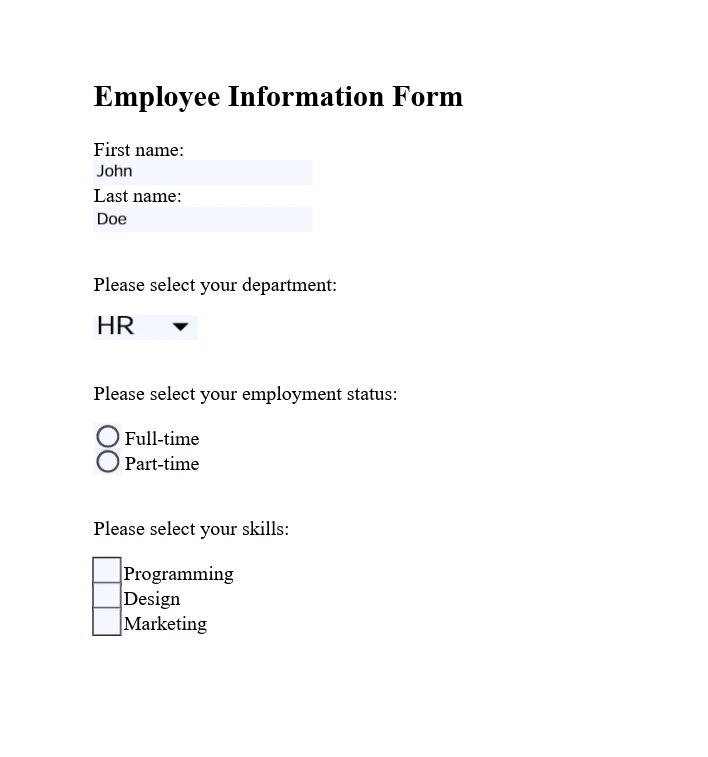
IronPDF supports complete [interactive PDF form handling](https://ironpdf.com/how-to/create-forms/). You can create, fill, and submit PDF forms programmatically, which is particularly useful for automating form processing or integrating form data collection into your workflows.
```csharp
using IronPdf;
// Set your IronPDF license key
IronPdf.License.LicenseKey = "License-Key goes here";
// Secure the server environment to disable local disk access or cross-origin requests
Installation.EnableWebSecurity = true;
// Define HTML content with form elements
const string formHtml = @"
<html>
<body>
<h2>Employee Information Form</h2>
<form>
First name: <br>
Last name: <br>
<br>
<p>Please select your department:</p>
<select name='department'>
<option value='HR'>HR</option>
<option value='Finance'>Finance</option>
<option value='IT'>IT</option>
<option value='Marketing'>Marketing</option>
</select>
<br>
<br>
<p>Please select your employment status:</p>
<label for='fulltime'>Full-time</label> <br>
<label for='parttime'>Part-time</label> <br>
<br>
<p>Please select your skills:</p>
<label for='skill1'> Programming</label><br>
<label for='skill2'> Design</label><br>
<label for='skill3'> Marketing</label><br>
</form>
</body>
</html>";
// Instantiate a PDF renderer
var renderer = new ChromePdfRenderer();
renderer.RenderingOptions.CreatePdfFormsFromHtml = true;
// Render the HTML form content as a PDF
renderer.RenderHtmlAsPdf(formHtml).SaveAs("EmployeeInfoForm.pdf");
```
### Jak zabezpieczyć i zaszyfrować PDF?
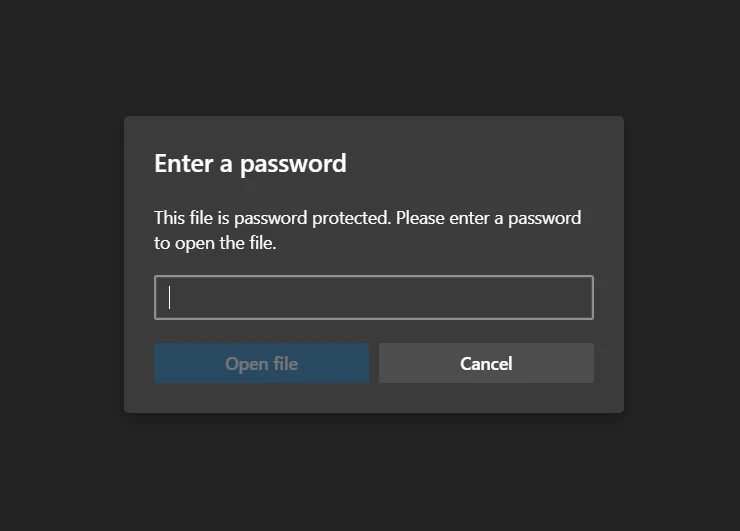
IronPDF zapewnia niezawodne funkcje do [zabezpieczania dokumentów PDF](https://ironpdf.com/how-to/pdf-permissions-passwords/), w tym szyfrowanie, ustawienia uprawnień i [podpisy cyfrowe](https://ironpdf.com/how-to/signing/). Te funkcje zapewniają ochronę poufnych informacji i utrzymanie integralności dokumentu.
```csharp
using IronPdf;
// Set your IronPDF license key
IronPdf.License.LicenseKey = "License-Key goes here";
// Secure the server environment to disable local disk access or cross-origin requests
Installation.EnableWebSecurity = true;
// Load an existing PDF file
var pdf = PdfDocument.FromFile("invoice.pdf");
// Set document security settings
pdf.SecuritySettings.OwnerPassword = "top-secret"; // Password to edit the PDF
pdf.SecuritySettings.UserPassword = "sharable"; // Password to open the PDF
// Save the secured PDF to a file
pdf.SaveAs("secured.pdf");
```
### Jakie zaawansowane opcje edycji są dostępne?
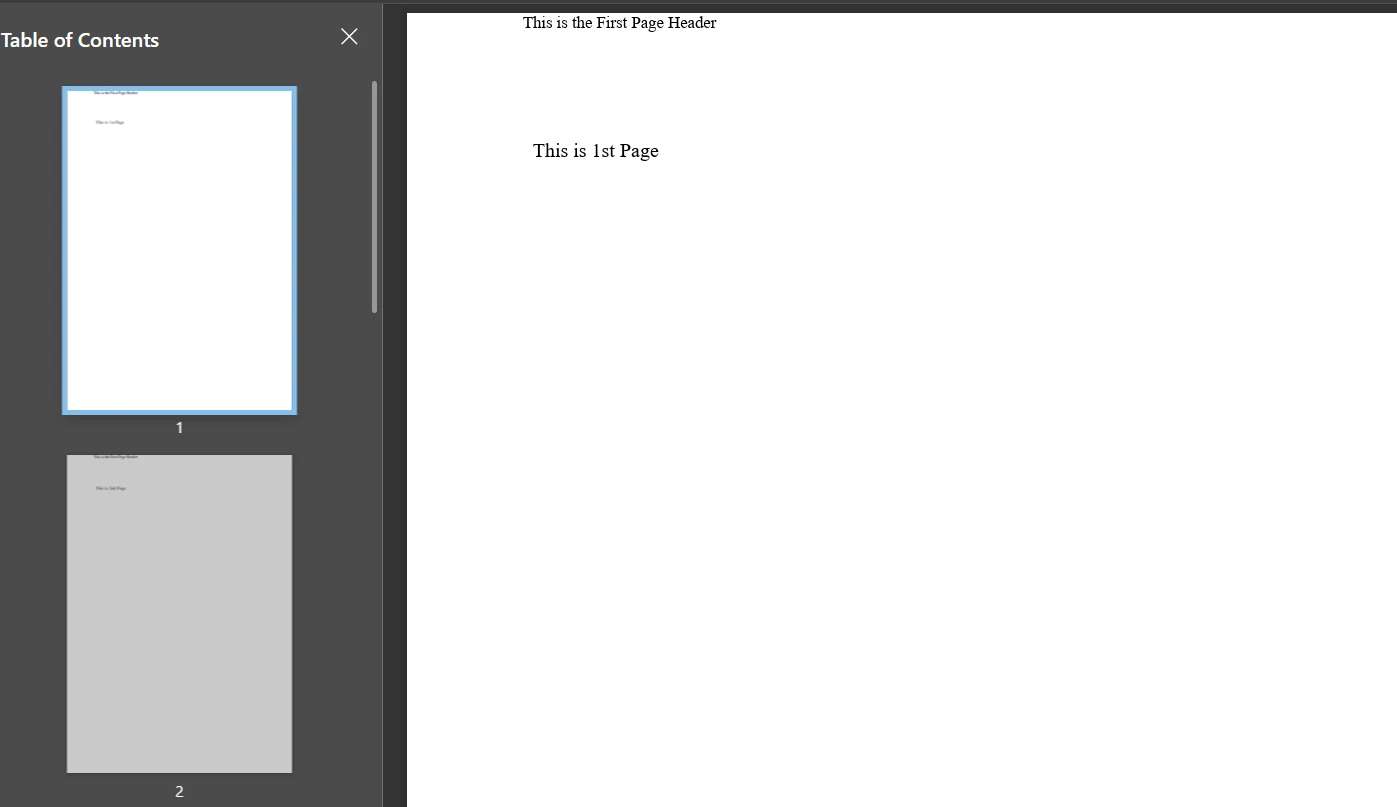
IronPDF oferuje [zaawansowane możliwości edycji](https://ironpdf.com/features/edit/) wykraczające poza podstawowe modyfikacje. Te obejmują [dodawanie nagłówków i stopek](https://ironpdf.com/how-to/headers-and-footers/), [dostosowywanie układu strony](https://ironpdf.com/how-to/page-orientation-rotation/), i [osadzanie obrazów i czcionek](https://ironpdf.com/how-to/manage-fonts/). Te funkcje umożliwiają dynamiczne generowanie i dostosowywanie PDFów do specyficznych wymagań aplikacji.
```csharp
using IronPdf;
// Set your IronPDF license key
IronPdf.License.LicenseKey = "License-Key goes here";
// Secure the server environment to disable local disk access or cross-origin requests
Installation.EnableWebSecurity = true;
// Instantiate a PDF renderer
var renderer = new IronPdf.ChromePdfRenderer();
// Define multi-page HTML content with page breaks
var multiPageHtml = @"
<p> This is 1st Page</p>
<div style = 'page-break-after: always;' ></div>
<p> This is 2nd Page</p>
<div style = 'page-break-after: always;' ></div>
<p> This is 3rd Page</p>
<div style = 'page-break-after: always;' ></div>
<p> This is 4th Page</p>
<div style = 'page-break-after: always;' ></div>
<p> This is 5th Page</p>
<div style = 'page-break-after: always;' ></div>
<p> This is 6th Page</p>
<div style = 'page-break-after: always;' ></div>
<p> This is 7th Page</p>";
// Render the HTML content as a PDF
var pdfDoc = renderer.RenderHtmlAsPdf(multiPageHtml);
// Create a header for the first page only
var firstPageHeader = new HtmlHeaderFooter();
firstPageHeader.HtmlFragment = "This is the First Page Header";
pdfDoc.AddHtmlHeaders(firstPageHeader, 1);
// Save the resulting PDF with headers to a file
pdfDoc.SaveAs("PagesWithHeaders.pdf");
```
## Jakie zaawansowane funkcje oferuje Apryse C#?
### Jak dodać adnotacje i markup?
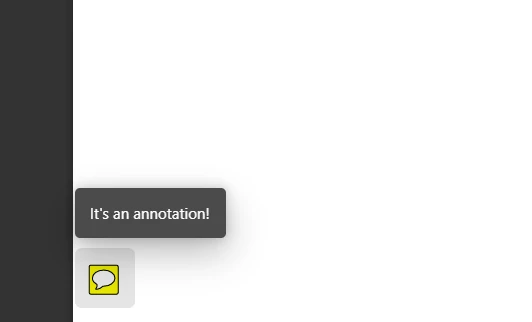
Apryse C# umożliwia [dodawanie adnotacji i markup](https://ironpdf.com/how-to/annotations/) do dokumentów PDF programowo. To obejmuje adnotacje tekstowe, podkreślenia, linie i kształty - istotne dla procesów przeglądu dokumentów lub dodawania informacji dodatkowych.
```csharp
using pdftron;
using pdftron.PDF;
using pdftron.SDF;
class Program
{
static void Main()
{
// Initialize the PDFNet library with your license key
PDFNet.Initialize("License");
// Open an existing PDF document
using (PDFDoc doc = new PDFDoc("input.pdf"))
{
// Access the first page of the document
Page page = doc.GetPage(1);
// Create a text annotation on the document
Text txt = Text.Create(doc, new Rect(10, 20, 30, 40));
txt.SetIcon("UserIcon");
txt.SetContents("It's an annotation!");
page.AnnotPushBack(txt);
// Save the modified document
doc.Save("output.pdf", SDFDoc.SaveOptions.e_linearized);
}
}
}
```
### Jak konwertować dokumenty na PDF?
Apryse C# umożliwia [konwersję różnych formatów dokumentów](https://ironpdf.com/features/convert/) na PDF, w tym [dokumentów Office](https://ironpdf.com/how-to/docx-to-pdf/), [obrazów](https://ironpdf.com/how-to/image-to-pdf/) i HTML. Ta funkcja zapewnia jednolite formaty dokumentów do archiwizacji, udostępniania lub wyświetlania.
```csharp
using pdftron;
using pdftron.PDF;
class Program
{
static void Main()
{
// Initialize the PDFNet library
PDFNet.Initialize();
// Create a new PDF document
PDFDoc pdfdoc = new PDFDoc();
// Convert a Word document to PDF and add it to the PDF document
Convert.ToPdf(pdfdoc, "input.docx");
// Save the newly created PDF document
pdfdoc.Save("output.pdf", SDFDoc.SaveOptions.e_linearized);
}
}
```
### Jak wydobyć treść z PDF?
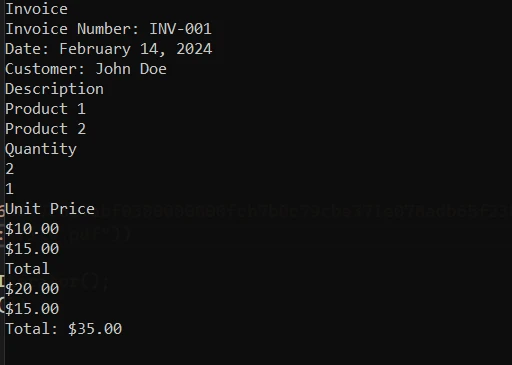
Apryse C# wyróżnia się w [wyciąganiu tekstu, obrazów i innych treści](https://ironpdf.com/how-to/extract-text-and-images/) z dokumentów PDF. Ta możliwość wspiera analizę treści, ekstrakcję danych i aplikacje do odzyskiwania informacji, umożliwiając efektywne przetwarzanie treści PDF.
```csharp
using pdftron;
using pdftron.PDF;
using pdftron.SDF;
class Program
{
static void Main()
{
// Initialize the PDFNet library
PDFNet.Initialize();
// Open an existing PDF document
using (PDFDoc doc = new PDFDoc("input.pdf"))
{
// Iterate through each page of the document
PageIterator itr = doc.GetPageIterator();
for (; itr.HasNext(); itr.Next())
{
Page page = itr.Current();
// Extract text from the page
TextExtractor txt = new TextExtractor();
txt.Begin(page);
// Print the extracted text to the console
Console.WriteLine(txt.GetAsText());
}
}
}
}
```
### Jak zabezpieczać pliki PDF z Apryse?
Apryse C# zapewnia kompletne narzędzia do [zabezpieczania dokumentów PDF](https://ironpdf.com/features/secure/). Możesz zastosować ochronę hasłem, zaszyfrować dokumenty i zarządzać uprawnieniami użytkowników, aby zabezpieczyć poufne informacje.
```csharp
using pdftron;
using pdftron.SDF;
using pdftron.PDF;
class Program
{
static void Main()
{
// Initialize the PDFNet library
PDFNet.Initialize();
// Open an existing PDF document
using (PDFDoc doc = new PDFDoc("input.pdf"))
{
// Initialize the security handler
doc.InitSecurityHandler();
// Create a new security handler
SecurityHandler newHandler = new SecurityHandler();
// Set the user password for the document
newHandler.ChangeUserPassword("new_password");
// Grant permission to print the document
newHandler.SetPermission(SecurityHandler.Permission.e_print, true);
// Apply the security handler to the document
doc.SetSecurityHandler(newHandler);
// Save the secured document
doc.Save("output.pdf", SDFDoc.SaveOptions.e_linearized);
}
}
}
```
### Jak redagować poufne informacje?
Apryse C# wspiera [redagowanie poufnych informacji](https://ironpdf.com/how-to/redact-text/) z dokumentów PDF - istotne dla wymogów prawnych i prywatności. Ta funkcja pozwala na trwałe usunięcie lub zamaskowanie tekstu i obrazów wewnątrz PDF.
```csharp
using pdftron;
using pdftron.PDF;
using pdftron.SDF;
class Program
{
static void Main()
{
// Initialize the PDFNet library
PDFNet.Initialize();
// Open an existing PDF document
using (PDFDoc doc = new PDFDoc("input.pdf"))
{
// Define redaction areas on specific pages
Redactor.Redaction[] redactions = {
new Redactor.Redaction(1, new Rect(100, 100, 200, 200), false, "redacted"),
};
// Apply redactions to the document
Redactor.Redact(doc, redactions);
// Save the redacted document
doc.Save("output.pdf", SDFDoc.SaveOptions.e_linearized);
}
}
}
```
## Jaką dokumentację i wsparcie są dostępne?
### Jakie wsparcie zapewnia IronPDF?
**Dokumentacja:** IronPDF oferuje [kompletną dokumentację](https://ironpdf.com/docs/) obejmującą tematy od [przewodników startowych](https://ironpdf.com/get-started/quickstart/) po zaawansowane funkcje jak [konwersja HTML na PDF](https://ironpdf.com/tutorials/html-to-pdf/), [edycja PDF](https://ironpdf.com/tutorials/csharp-edit-pdf-complete-tutorial/), [scalanie](https://ironpdf.com/how-to/merge-or-split-pdfs/), [dzielenie](https://ironpdf.com/how-to/split-multipage-pdf/), i [zabezpieczenia](https://ironpdf.com/tutorials/csharp-pdf-security-complete-tutorial/). Dokumentacja dostarcza łatwych do śledzenia treści z obszernymi przykładami kodu i wyjaśnieniami, które prowadzą cię przez wdrażanie różnych funkcji PDF.
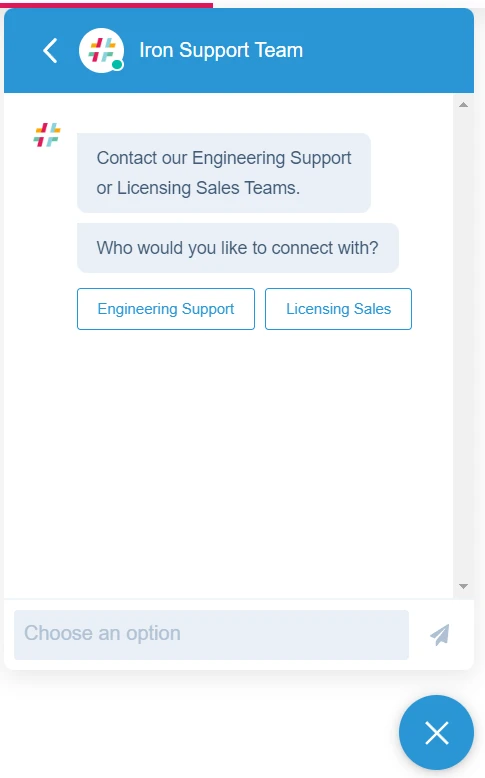
**Wsparcie:** IronPDF zapewnia pomoc przez różne kanały, w tym wsparcie e-mail, wsparcie przez zgłoszenia i czat [inżynieryjne wsparcie na żywo](https://ironpdf.com/troubleshooting/engineering-support-for-ironpdf/), gdzie można połączyć się z ich zespołem technicznym w sprawie specyficznych problemów. Twoja aplikacja może natychmiast skorzystać z ich systemu informacji zwrotnej.
### Jakie wsparcie zapewnia Apryse C#?
**Dokumentacja:** Apryse C# (dawniej PDFTron dla .NET) zapewnia szczegółową dokumentację obejmującą pełną dokumentację API, przewodniki dla developerów i przykładowy kod dla różnych zadań manipulacji PDF.
**Wsparcie:** Apryse oferuje wsparcie dla deweloperów poprzez bezpośrednią komunikację e-mail z ich zespołem technicznym w celu rozwiązywania problemów i pytań dotyczących implementacji. Można również zadawać pytania na Stack Overflow.
## Jakie są opcje licencyjne i ceny?
### Jakie są opcje licencyjne IronPDF?
IronPDF oferuje kilka [opcji licencyjnych](https://ironpdf.com/licensing/) dostosowanych do różnych potrzeb projektowych. Ceny zaczynają się od `$liteLicense` za licencję Lite. Te licencje różnią się w zależności od liczby deweloperów, lokalizacji i projektów objętych licencją. IronPDF zapewnia również opcje redystrybucji bez opłat licencyjnych i rozszerzone wsparcie z konkretnymi cenami dla dodatków.
Opcje licencji wieczystej IronPDF obejmują:
- **Lite Edition:** Kosztuje `$liteLicense`, odpowiednia dla 1 dewelopera, 1 lokalizacji i 1 projektu, z uwzględnieniem wsparcia e-mail.
- **Plus Edition:** Kosztuje `$plusLicenseOriginal`, obejmuje do 3 deweloperów, 3 lokalizacje i 3 projekty, z 24-godzinnym wsparciem e-mail i czatu oraz wsparciem telefonicznym.
- **Professional Edition:** W cenie `$professionalLicenseOriginal`, ta edycja obejmuje do 10 deweloperów, 10 lokalizacji i 10 projektów, zapewniając kompleksowe wsparcie, w tym wsparcie e-mail, czatu, telefoniczne i udostępniania ekranu.
Oferują również miesięczną subskrypcję w cenie 500 USD, obejmującą 10 000 wywołań API, a każde dodatkowe wywołanie kosztuje 0,02 USD. W celu zapewnienia nieograniczonego użytkowania IronPDF oferuje rozwiązanie dla przedsiębiorstw z cennikiem opartym na wycenie. To rozwiązanie obejmuje między innymi nieograniczoną Licencję wieczystą oraz wywołania API.
### Jakie są opcje licencji Apryse C#?
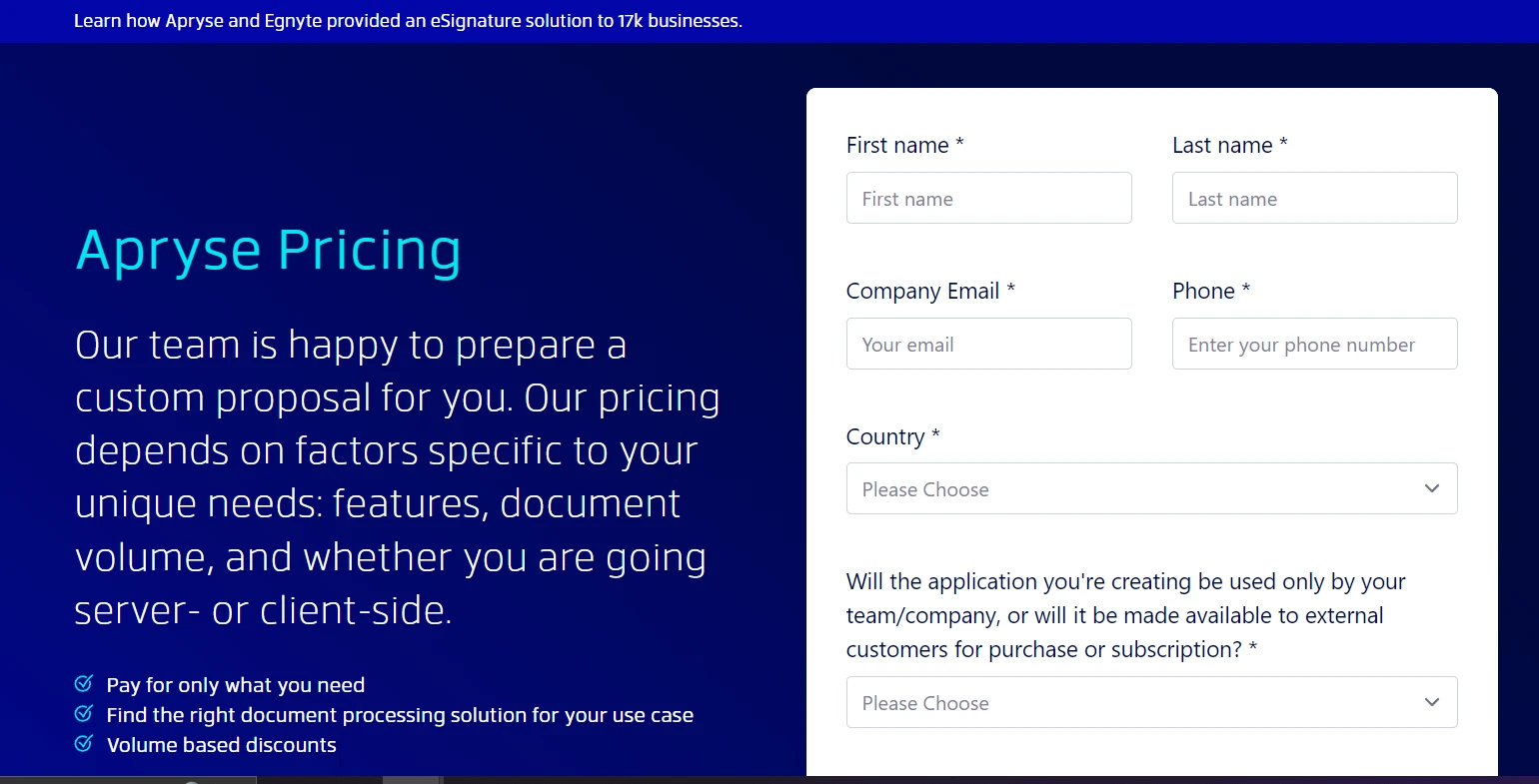
Apryse C# oferuje elastyczne ceny dostosowane do konkretnych wymagań projektu, w tym funkcji, objętości dokumentów i scenariuszy wdrożenia. Aby uzyskać [**informacje na temat cen Apryse,**](https://apryse.com/pricing) należy skontaktować się z zespołem sprzedaży.
## Którą bibliotekę PDF wybrać?
Zarówno IronPDF, jak i Apryse C# zapewniają skuteczne możliwości dla programistów .NET pracujących z plikami PDF. IronPDF zapewnia przewagę dzięki rozbudowanym funkcjom edycji plików PDF. Wyróżnia się pełnym zestawem funkcji, w tym [rozbudowaną edycją](https://ironpdf.com/tutorials/csharp-edit-pdf-complete-tutorial/) i [**scałaniem plików PDF przy użyciu IronPDF**](https://ironpdf.com/examples/merge-pdfs/). [Pakiet](https://ironsoftware.com/enterprise/securedoc/) [Iron Suite](https://ironsoftware.com/enterprise/securedoc/) zapewnia dostęp do wielu narzędzi w przystępnej cenie, wyposażając Twoje środowisko programistyczne w niezawodne narzędzia dostosowane do różnych potrzeb.
IronPDF wyróżnia się ogólną wszechstronnością i wartością dodaną w większości scenariuszy przetwarzania plików PDF. Ostateczna decyzja powinna być zgodna z wymaganiami projektu i konkretnymi funkcjami potrzebnymi do jego realizacji.
[[i:(Apryse C# jest zastrzeżonym znakiem towarowym odpowiedniego właściciela. Ta strona nie jest powiązana z Apryse C#, nie jest przez nią promowana ani sponsorowana. Wszystkie nazwy produktów, logo i marki są własnością ich odpowiednich właścicieli. Porównania mają charakter wyłącznie informacyjny i odzwierciedlają informacje dostępne publicznie w momencie pisania.)]]
Dlaczego warto porównać IronPDF i Apryse C# PDF Libraries?
IronPDF i Apryse C# to znane biblioteki PDF dla platformy .NET, z których każda ma swoje unikalne zalety. IronPDF wyróżnia się w konwersji HTML do PDF dzięki pełnej obsłudze Bootstrap i rozbudowanym funkcjom edycji. Tymczasem firma Apryse specjalizuje się w adnotacjach i redagowaniu dokumentów, zaspokajając potrzeby Enterprise w zakresie zgodności z przepisami.
Jako programiści C# często stajecie przed zadaniami związanymi z plikami PDF podczas tworzenia aplikacji, które generują, edytują lub wyświetlają dokumenty. Niezawodna biblioteka PDF ma kluczowe znaczenie dla wydajności. Biblioteki te oferują wbudowane funkcje do wykonywania złożonych operacji, takich jak konwersja dokumentów, edycja tekstu i obsługa obrazów w plikach PDF. Bez nich trzeba by było pisać całą funkcjonalność od podstaw, co jest zarówno czasochłonne, jak i podatne na błędy.
W niniejszym porównaniu przeanalizowano dwie popularne biblioteki PDF: IronPDF i Apryse C#. IronPDF zapewnia niezawodne funkcje, które upraszczają operacje związane z plikami PDF w środowiskach .NET, od konwersji HTML do PDF po zaawansowaną edycję dokumentów. Apryse C# oferuje proste podejście do manipulacji plikami PDF, kładąc nacisk na wydajność i łatwość użytkowania. W niniejszej analizie omówiono konkretne możliwości każdej biblioteki, aby pomóc Ci wybrać tę, która najlepiej pasuje do Twojego projektu.
Co to jest biblioteka Apryse C# PDF?
Apryse C# to kompletna biblioteka PDF dla aplikacji .NET, zaprojektowana w celu uproszczenia operacji na plikach PDF w środowiskach C#. Wcześniej znany jako PDFTron SDK, oferuje szeroki zakres funkcji i narzędzi dla programistów poszukujących precyzyjnych możliwości obsługi plików PDF.
Jakie kluczowe funkcje oferuje Apryse C#?
Łatwa integracja z projektami .NET: Płynna integracja z platformą .NET, w tym z aplikacjami ASP.NET Core i tradycyjnymi aplikacjami .NET Framework.
Tworzenie i edycja dokumentów: Twórz pliki PDF od podstaw lub edytuj istniejące, w tym tekst, obrazy, formularze oraz manipuluj stronami - zmieniaj kolejność, scałaj lub dziel.
Obsługa wielu pól formularzy: Niezawodne tworzenie, edycja i programowe wypełnianie pól formularzy PDF w celu zautomatyzowania przepływu pracy.
Wyodrębnianie tekstu i treści: Wyodrębnianie tekstu i treści z plików PDF do celów analizy, narzędzi wyszukiwania i zarządzania treścią.
Bezpieczeństwo i szyfrowanie: Kompleksowe zabezpieczenia, w tym szyfrowanie dokumentów, zarządzanie uprawnieniami i podpisy cyfrowe.
Zaawansowane funkcje PDF: Obsługa adnotacji, zakładek i hiperłączy w interaktywnych plikach PDF.
Co to jest biblioteka IronPDF C#?
IronPDF to wszechstronna biblioteka PDF dostosowana do potrzeb programistów .NET. Upraszcza to złożoną obsługę plików PDF, umożliwiając tworzenie, edycję i konwersję dokumentów PDF bezpośrednio w aplikacjach C#. Dostępny dla wielu języków programowania, w tym Java, Python i C#, IronPDF zaspokaja różnorodne potrzeby związane z przetwarzaniem plików PDF, zapewniając wydajność i niezawodność.
Wydajność i skalowalność: Ulepszone pod kątem prędkości i przetwarzania dużych ilości w aplikacjach o wysokim zapotrzebowaniu.
Kompletna dokumentacja: Obszerna dokumentacja i responsywny zespół wsparcia technicznego zapewniający pomoc przy wdrażaniu.
Zgodność ze standardami PDF: Obsługa formatów PDF/A, PDF/UA i innych specyfikacji branżowych.
Jak stworzyć aplikację konsolową C#?
Utworzenie aplikacji konsolowej w Visual Studio stanowi podstawę dla projektów programistycznych w środowisku .NET, w tym tych wykorzystujących biblioteki PDF, takie jak IronPDF lub Apryse C#. Aby rozpocząć, wykonaj następujące kroki:
Jak uruchomić program Visual Studio?
Otwórz program Visual Studio na swoim komputerze. Jeśli nie masz jeszcze zainstalowanego programu Visual Studio, pobierz go i zainstaluj z oficjalnej strony Microsoftu, wybierając wersję odpowiednią do swoich potrzeb.
Jak utworzyć nowy projekt?
Po uruchomieniu programu Visual Studio wybierz opcję "Utwórz nowy projekt" na początkowym pulpicie nawigacyjnym.
Jaki typ projektu powinienem wybrać?
W oknie "Utwórz nowy projekt" zobaczysz różne szablony projektów. Wpisz "Console" w polu wyszukiwania lub znajdź "Console Application" na liście. Wybierz szablon przeznaczony dla języka C#.
Jak skonfigurować mój projekt?
Po wybraniu opcji "Aplikacja konsolowa" kliknij "Dalej". Skonfiguruj nowy projekt:
Nazwa projektu: Wprowadź opisową nazwę swojego projektu.
Nazwa rozwiązania: Domyślnie jest to nazwa projektu, ale można ją dostosować.
Framework: Wybierz wersję .NET. Zazwyczaj zaleca się korzystanie z najnowszej wersji, chyba że konkretne wymagania stanowią inaczej.
Jak zakończyć tworzenie projektu?
Po skonfigurowaniu ustawień projektu kliknij "Utwórz". Visual Studio utworzy nowy projekt aplikacji konsolowej z domyślnym plikiem Program.cs.
Jaka jest struktura projektu?
Zapoznaj się z wygenerowaną strukturą projektu w okienku Solution Explorer. Będziesz pracować głównie z plikiem Program.cs dla aplikacji konsolowych, w którym będziesz pisać kod w języku C#.
Jak zainstalować bibliotekę IronPDF?
Włączenie IronPDF do projektu .NET umożliwia korzystanie z pełnego zakresu funkcji manipulacji plikami PDF. Kilka metod instalacji zapewnia elastyczność w zależności od preferencji dotyczących przepływu pracy.
Jak zainstalować za pomocą menedżera pakietów NuGet?
Menedżer pakietów NuGet w Visual Studio zapewnia graficzny interfejs do zarządzania bibliotekami.
Otwórz swój projekt w Visual Studio.
Kliknij prawym przyciskiem myszy swój projekt w Eksploratorze rozwiązań i wybierz opcję "Zarządzaj pakietami NuGet".
Kliknij kartę "Przeglądaj" i wyszukaj "IronPDF."
Wybierz IronPDF z wyników i kliknij "Zainstaluj".
Jak zainstalować za pomocą wiersza poleceń?
Konsola menedżera pakietów umożliwia bezpośrednią instalację z wiersza poleceń.
Integracja Apryse C# w projekt zależy od Twojego środowiska .NET Framework lub .NET Core. Poniższe kroki przedstawiają ogólny proces instalacji:
Jak zainstalować Apryse dla .NET Framework?
Pobierz SDK Apryse dla Windows: Trzeba będzie odwiedzić stronę SDK Apryse dla Windows, aby pobrać SDK odpowiednie dla aplikacji .NET Framework.
Rozpakuj SDK: Po pobraniu rozpakuj SDK w znanym miejscu w swoim systemie.
Uzyskaj klucz próbny Apryse: Zarejestruj się na platformie Apryse, aby uzyskać klucz próbny, którego użyjesz do aktywacji funkcji próbnych SDK.
Skonfiguruj projekt: W Visual Studio stwórz nową aplikację konsolową .NET Framework. Następnie dodaj folder Lib z rozpakowanego SDK do katalogu swojego projektu.
Dodaj referencje: Kliknij prawym przyciskiem myszy na Referencje w projekcie, wybierz "Dodaj odniesienie," i przejdź do folderu Lib gdzie skopiowałeś PDFNetLoader.dll i odpowiedni PDFNet.dll dla swojej architektury (x86 lub x64). Upewnij się, że ustawiono "Copy Local" dla PDFNet.dll na false.
Skonfiguruj App.config: Upewnij się, że plik App.config ma ustawienie loadFromRemoteSources włączone na true.
SDK zawiera foldery z przykładami, które można otworzyć i uruchomić bezpośrednio jako rozwiązania.## Zaawansowane funkcje IronPDF
Konwersja HTML do PDF
IronPDF jest bardzo skuteczny w konwertowaniu HTML na dokumenty PDF, co jest kluczowe dla aplikacji webowych, które generują raporty, faktury lub migawki stron internetowych. Biblioteka dokładnie renderuje HTML, CSS i JavaScript, zachowując układ i style treści webowej w wygenerowanych PDF.
Konwersja ciągu HTML na PDF
Konwersja ciągów HTML bezpośrednio na PDF umożliwia dynamiczne tworzenie dokumentów z treści generowanej przez aplikację lub przechowywanych zmiennych. Ta metoda jest korzystna przy tworzeniu raportów, paragonów czy dokumentów dostosowanych na podstawie danych wejściowych użytkownika.
using IronPdf;// Secure the server environment to disable local disk access or cross-origin requestsInstallation.EnableWebSecurity = true;// Set your IronPDF license keyIronPdf.License.LicenseKey = "License-Key goes here";// Instantiate a PDF renderervar renderer = new ChromePdfRenderer();// Define a simple HTML string to convert to PDFstring htmlContent = @"<!DOCTYPE html><html lang='en'><head> <meta charset='UTF-8'> <meta name='viewport' content='width=device-width, initial-scale=1.0'> <title>My PDF</title> <style> body { font-family: Arial, sans-serif; } h1 { color: #333; text-align: center; } p { color: #666; text-align: justify; } </style></head><body> <h1>Welcome to My PDF</h1> <p>This is a sample paragraph demonstrating how to create a PDF from HTML using IronPdf in C#.</p> <p>You can add more content here as needed.</p></body></html>";// Render the HTML string as a PDFvar pdf = renderer.RenderHtmlAsPdf(htmlContent);// Save the resulting PDF to a filepdf.SaveAs("output.pdf");
using IronPdf;

// Secure the server environment to disable local disk access or cross-origin requests
Installation.EnableWebSecurity = true;

// Set your IronPDF license key
IronPdf.License.LicenseKey = "License-Key goes here";

// Instantiate a PDF renderer
var renderer = new ChromePdfRenderer();

// Define a simple HTML string to convert to PDF
string htmlContent = @"
<!DOCTYPE html>
<html lang='en'>
<head>
    <meta charset='UTF-8'>
    <meta name='viewport' content='width=device-width, initial-scale=1.0'>
    <title>My PDF</title>
    <style>
        body {
            font-family: Arial, sans-serif;
        }
        h1 {
            color: #333;
            text-align: center;
        }
        p {
            color: #666;
            text-align: justify;
        }
    </style>
</head>
<body>
    <h1>Welcome to My PDF</h1>
    <p>This is a sample paragraph demonstrating how to create a PDF from HTML using IronPdf in C#.</p>
    <p>You can add more content here as needed.</p>
</body>
</html>";

// Render the HTML string as a PDF
var pdf = renderer.RenderHtmlAsPdf(htmlContent);

// Save the resulting PDF to a file
pdf.SaveAs("output.pdf");
ImportsIronPdf' Secure the server environment to disable local disk access or cross-origin requestsInstallation.EnableWebSecurity = True' Set your IronPDF license keyIronPdf.License.LicenseKey = "License-Key goes here"' Instantiate a PDF rendererDim renderer = New ChromePdfRenderer()' Define a simple HTML string to convert to PDFDim htmlContent AsString = "<!DOCTYPE html><html lang='en'><head> <meta charset='UTF-8'> <meta name='viewport' content='width=device-width, initial-scale=1.0'> <title>My PDF</title> <style> body { font-family: Arial, sans-serif; } h1 { color: #333; text-align: center; } p { color: #666; text-align: justify; } </style></head><body> <h1>Welcome to My PDF</h1> <p>This is a sample paragraph demonstrating how to create a PDF from HTML using IronPdf in C#.</p> <p>You can add more content here as needed.</p></body></html>"' Render the HTML string as a PDFDim pdf = renderer.RenderHtmlAsPdf(htmlContent)' Save the resulting PDF to a filepdf.SaveAs("output.pdf")
Imports IronPdf

' Secure the server environment to disable local disk access or cross-origin requests
Installation.EnableWebSecurity = True

' Set your IronPDF license key
IronPdf.License.LicenseKey = "License-Key goes here"

' Instantiate a PDF renderer
Dim renderer = New ChromePdfRenderer()

' Define a simple HTML string to convert to PDF
Dim htmlContent As String = "
<!DOCTYPE html>
<html lang='en'>
<head>
    <meta charset='UTF-8'>
    <meta name='viewport' content='width=device-width, initial-scale=1.0'>
    <title>My PDF</title>
    <style>
        body {
            font-family: Arial, sans-serif;
        }
        h1 {
            color: #333;
            text-align: center;
        }
        p {
            color: #666;
            text-align: justify;
        }
    </style>
</head>
<body>
    <h1>Welcome to My PDF</h1>
    <p>This is a sample paragraph demonstrating how to create a PDF from HTML using IronPdf in C#.</p>
    <p>You can add more content here as needed.</p>
</body>
</html>"

' Render the HTML string as a PDF
Dim pdf = renderer.RenderHtmlAsPdf(htmlContent)

' Save the resulting PDF to a file
pdf.SaveAs("output.pdf")
Konwersja pliku HTML na PDF
Jeśli masz pliki HTML zapisane na dysku, IronPDF może przekształcić te pliki w dokumenty PDF. Ta metoda jest idealna dla istniejących dokumentów HTML, szablonów lub raportów zapisanych w Twoim projekcie lub serwerze.
using IronPdf;// Set your IronPDF license keyIronPdf.License.LicenseKey = "License-Key goes here";// Secure the server environment to disable local disk access or cross-origin requestsInstallation.EnableWebSecurity = true;// Instantiate a PDF renderervar renderer = new ChromePdfRenderer();// Render the HTML file as a PDFvar pdf = renderer.RenderHtmlFileAsPdf("invoice.html");// Save the resulting PDF to a filepdf.SaveAs("file.pdf");
using IronPdf;

// Set your IronPDF license key
IronPdf.License.LicenseKey = "License-Key goes here";

// Secure the server environment to disable local disk access or cross-origin requests
Installation.EnableWebSecurity = true;

// Instantiate a PDF renderer
var renderer = new ChromePdfRenderer();

// Render the HTML file as a PDF
var pdf = renderer.RenderHtmlFileAsPdf("invoice.html");

// Save the resulting PDF to a file
pdf.SaveAs("file.pdf");
ImportsIronPdf' Set your IronPDF license keyIronPdf.License.LicenseKey = "License-Key goes here"' Secure the server environment to disable local disk access or cross-origin requestsInstallation.EnableWebSecurity = True' Instantiate a PDF rendererDim renderer = New ChromePdfRenderer()' Render the HTML file as a PDFDim pdf = renderer.RenderHtmlFileAsPdf("invoice.html")' Save the resulting PDF to a filepdf.SaveAs("file.pdf")
Imports IronPdf

' Set your IronPDF license key
IronPdf.License.LicenseKey = "License-Key goes here"

' Secure the server environment to disable local disk access or cross-origin requests
Installation.EnableWebSecurity = True

' Instantiate a PDF renderer
Dim renderer = New ChromePdfRenderer()

' Render the HTML file as a PDF
Dim pdf = renderer.RenderHtmlFileAsPdf("invoice.html")

' Save the resulting PDF to a file
pdf.SaveAs("file.pdf")
Konwersja URL do PDF
IronPDF może przekonwertować aktywne strony internetowe na dokumenty PDF podając URL. Ta funkcja przechwytuje aktualny stan strony, w tym złożone układy, CSS i treści generowane przez JavaScript.
using IronPdf;// Set your IronPDF license keyIronPdf.License.LicenseKey = "License-Key goes here";// Secure the server environment to disable local disk access or cross-origin requestsInstallation.EnableWebSecurity = true;// Instantiate a PDF renderervar renderer = new ChromePdfRenderer();// Render the URL as a PDFvar pdf = renderer.RenderUrlAsPdf("___PROTECTED_URL_100___");// Save the resulting PDF to a filepdf.SaveAs("url.pdf");
using IronPdf;

// Set your IronPDF license key
IronPdf.License.LicenseKey = "License-Key goes here";

// Secure the server environment to disable local disk access or cross-origin requests
Installation.EnableWebSecurity = true;

// Instantiate a PDF renderer
var renderer = new ChromePdfRenderer();

// Render the URL as a PDF
var pdf = renderer.RenderUrlAsPdf("___PROTECTED_URL_100___");

// Save the resulting PDF to a file
pdf.SaveAs("url.pdf");
ImportsIronPdf' Set your IronPDF license keyIronPdf.License.LicenseKey = "License-Key goes here"' Secure the server environment to disable local disk access or cross-origin requestsInstallation.EnableWebSecurity = True' Instantiate a PDF rendererDim renderer As New ChromePdfRenderer()' Render the URL as a PDFDim pdf = renderer.RenderUrlAsPdf("___PROTECTED_URL_100___")' Save the resulting PDF to a filepdf.SaveAs("url.pdf")
Imports IronPdf

' Set your IronPDF license key
IronPdf.License.LicenseKey = "License-Key goes here"

' Secure the server environment to disable local disk access or cross-origin requests
Installation.EnableWebSecurity = True

' Instantiate a PDF renderer
Dim renderer As New ChromePdfRenderer()

' Render the URL as a PDF
Dim pdf = renderer.RenderUrlAsPdf("___PROTECTED_URL_100___")

' Save the resulting PDF to a file
pdf.SaveAs("url.pdf")
Obsługa Bootstrapa i nowoczesnych frameworków CSS
Pełna obsługa Bootstrapa i frameworków CSS jest kluczowa przy generowaniu PDF z nowoczesnych aplikacji webowych. Organizacje polegają na Bootstrap do interfejsów webowych, dlatego dokładna konwersja do PDF jest kluczowa dla raportów, faktur i dokumentacji.
Wynik: Profesjonalny PDF z pulpitna nawigacyjnym biznesowym z systemem siatki opartym na flexbox Bootstrap 5, komponentami kart z narzędziami do obramowania, elementami odznak, responsywnymi tabelami i metrykami o kolorystyce - wszystko renderowane z idealnym zachowaniem układu i typografii.
Ograniczenia frameworku CSS Apryse
Moduł HTML2PDF Apryse używa silnika renderującego niestandardowego (nie Chromium) z udokumentowanymi ograniczeniami:
Częściowe wsparcie dla flexbox: Układy Bootstrap 4/5 mogą nie renderować się poprawnie
Ograniczony CSS Grid: Nowoczesne projekty oparte na siatce często zawodzą
Ograniczenia JavaScript: Minimalne wykonanie w porównaniu do środowisk przeglądarkowych
Zgodność z frameworkiem: Wymaga intensywnych testów dla komponentów Bootstrap
Dokumentacja HTML2PDF wyraźnie ostrzega, że złożone CSS mogą nie renderować się zgodnie z oczekiwaniami. Programiści zgłaszają problemy z paskami nawigacyjnymi, układami kart opartymi na flex i narzędziami responsywnymi.
Wpływ na rozwój: Zespoły używające Apryse muszą tworzyć równoległe CSS "bezpieczne dla PDF" lub znacząco uproszczać układy Bootstrap, dodając nakład pracy w zakresie rozwoju i ograniczając konsekwencję projektu pomiędzy wynikami webowymi i PDF.
IronPDF ułatwia łączenie wielu dokumentów PDF lub dzielenie PDF na mniejsze pliki. Ta funkcjonalność jest niezbędna dla systemów zarządzania dokumentami wymagających zorganizowanej struktury treści PDF.
using IronPdf;// Set your IronPDF license keyIronPdf.License.LicenseKey = "License-Key goes here";// Secure the server environment to disable local disk access or cross-origin requestsInstallation.EnableWebSecurity = true;// Define HTML content for two PDFs to mergevar htmlA = @" <h1>PDF A</h1> <p>This is the content of PDF A.</p> <p>This is the first page of PDF A.</p> <div style='page-break-after: always;'></div> <p>This is the second page of PDF A.</p>";var htmlB = @" <h1>PDF B</h1> <p>This is the content of PDF B.</p> <p>This is the first page of PDF B.</p> <div style='page-break-after: always;'></div> <p>This is the second page of PDF B.</p>";// Instantiate a PDF renderervar renderer = new ChromePdfRenderer();// Render the HTML content as separate PDF documentsvar pdfDocA = renderer.RenderHtmlAsPdf(htmlA);var pdfDocB = renderer.RenderHtmlAsPdf(htmlB);// Merge the two PDFs into onevar mergedPdf = PdfDocument.Merge(pdfDocA, pdfDocB);// Save the merged PDF to a filemergedPdf.SaveAs("Merged.pdf");
using IronPdf;

// Set your IronPDF license key
IronPdf.License.LicenseKey = "License-Key goes here";

// Secure the server environment to disable local disk access or cross-origin requests
Installation.EnableWebSecurity = true;

// Define HTML content for two PDFs to merge
var htmlA = @"
    <h1>PDF A</h1>
    <p>This is the content of PDF A.</p>
    <p>This is the first page of PDF A.</p>
    <div style='page-break-after: always;'></div>
    <p>This is the second page of PDF A.</p>";

var htmlB = @"
    <h1>PDF B</h1>
    <p>This is the content of PDF B.</p>
    <p>This is the first page of PDF B.</p>
    <div style='page-break-after: always;'></div>
    <p>This is the second page of PDF B.</p>";

// Instantiate a PDF renderer
var renderer = new ChromePdfRenderer();

// Render the HTML content as separate PDF documents
var pdfDocA = renderer.RenderHtmlAsPdf(htmlA);
var pdfDocB = renderer.RenderHtmlAsPdf(htmlB);

// Merge the two PDFs into one
var mergedPdf = PdfDocument.Merge(pdfDocA, pdfDocB);

// Save the merged PDF to a file
mergedPdf.SaveAs("Merged.pdf");
ImportsIronPdf' Set your IronPDF license keyIronPdf.License.LicenseKey = "License-Key goes here"' Secure the server environment to disable local disk access or cross-origin requestsInstallation.EnableWebSecurity = True' Define HTML content for two PDFs to mergeDim htmlA = " <h1>PDF A</h1> <p>This is the content of PDF A.</p> <p>This is the first page of PDF A.</p> <div style='page-break-after: always;'></div> <p>This is the second page of PDF A.</p>"Dim htmlB = " <h1>PDF B</h1> <p>This is the content of PDF B.</p> <p>This is the first page of PDF B.</p> <div style='page-break-after: always;'></div> <p>This is the second page of PDF B.</p>"' Instantiate a PDF rendererDim renderer = New ChromePdfRenderer()' Render the HTML content as separate PDF documentsDim pdfDocA = renderer.RenderHtmlAsPdf(htmlA)Dim pdfDocB = renderer.RenderHtmlAsPdf(htmlB)' Merge the two PDFs into oneDim mergedPdf = PdfDocument.Merge(pdfDocA, pdfDocB)' Save the merged PDF to a filemergedPdf.SaveAs("Merged.pdf")
Imports IronPdf

' Set your IronPDF license key
IronPdf.License.LicenseKey = "License-Key goes here"

' Secure the server environment to disable local disk access or cross-origin requests
Installation.EnableWebSecurity = True

' Define HTML content for two PDFs to merge
Dim htmlA = "
    <h1>PDF A</h1>
    <p>This is the content of PDF A.</p>
    <p>This is the first page of PDF A.</p>
    <div style='page-break-after: always;'></div>
    <p>This is the second page of PDF A.</p>"

Dim htmlB = "
    <h1>PDF B</h1>
    <p>This is the content of PDF B.</p>
    <p>This is the first page of PDF B.</p>
    <div style='page-break-after: always;'></div>
    <p>This is the second page of PDF B.</p>"

' Instantiate a PDF renderer
Dim renderer = New ChromePdfRenderer()

' Render the HTML content as separate PDF documents
Dim pdfDocA = renderer.RenderHtmlAsPdf(htmlA)
Dim pdfDocB = renderer.RenderHtmlAsPdf(htmlB)

' Merge the two PDFs into one
Dim mergedPdf = PdfDocument.Merge(pdfDocA, pdfDocB)

' Save the merged PDF to a file
mergedPdf.SaveAs("Merged.pdf")
Dodawanie znaków wodnych do PDF
IronPDF umożliwia dodawanie znaków wodnych do stron PDF w celach brandingowych lub oznaczania dokumentów jako poufne. Biblioteka zarządza złożonością zarówno znaków wodnych tekstowych, jak i obrazowych, zapewniając elastyczność w zastosowaniu i wyświetlaniu.
using IronPdf;// Set your IronPDF license keyIronPdf.License.LicenseKey = "License-Key goes here";// Secure the server environment to disable local disk access or cross-origin requestsInstallation.EnableWebSecurity = true;// Instantiate a PDF renderervar renderer = new ChromePdfRenderer();// Render a URL as a PDFvar pdf = renderer.RenderUrlAsPdf("___PROTECTED_URL_102___");// Apply a watermark to the PDFpdf.ApplyWatermark("<h2 style='color:red'>SAMPLE</h2>", 30, IronPdf.Editing.VerticalAlignment.Middle, IronPdf.Editing.HorizontalAlignment.Center);// Save the watermarked PDF to a filepdf.SaveAs("Watermarked.pdf");```### HowDoIWork with PDFForms?IronPDF supports complete [interactive PDF form handling](https://ironpdf.com/how-to/create-forms/). You can create, fill, and submit PDF forms programmatically, which is particularly useful for automating form processing or integrating form data collection into your workflows.```csharpusing IronPdf;// Set your IronPDF license keyIronPdf.License.LicenseKey = "License-Key goes here";// Secure the server environment to disable local disk access or cross-origin requestsInstallation.EnableWebSecurity = true;// Define HTML content with form elementsconst string formHtml = @" <html> <body> <h2>Employee Information Form</h2> <form> First name: <br> Last name: <br> <br> <p>Please select your department:</p> <select name='department'> <option value='HR'>HR</option> <option value='Finance'>Finance</option> <option value='IT'>IT</option> <option value='Marketing'>Marketing</option> </select> <br> <br> <p>Please select your employment status:</p> <label for='fulltime'>Full-time</label> <br> <label for='parttime'>Part-time</label> <br> <br> <p>Please select your skills:</p> <label for='skill1'> Programming</label><br> <label for='skill2'> Design</label><br> <label for='skill3'> Marketing</label><br> </form> </body> </html>";// Instantiate a PDF renderervar renderer = new ChromePdfRenderer();renderer.RenderingOptions.CreatePdfFormsFromHtml = true;// Render the HTML form content as a PDFrenderer.RenderHtmlAsPdf(formHtml).SaveAs("EmployeeInfoForm.pdf");
using IronPdf;

// Set your IronPDF license key
IronPdf.License.LicenseKey = "License-Key goes here";

// Secure the server environment to disable local disk access or cross-origin requests
Installation.EnableWebSecurity = true;

// Instantiate a PDF renderer
var renderer = new ChromePdfRenderer();

// Render a URL as a PDF
var pdf = renderer.RenderUrlAsPdf("___PROTECTED_URL_102___");

// Apply a watermark to the PDF
pdf.ApplyWatermark("<h2 style='color:red'>SAMPLE</h2>", 30, IronPdf.Editing.VerticalAlignment.Middle, IronPdf.Editing.HorizontalAlignment.Center);

// Save the watermarked PDF to a file
pdf.SaveAs("Watermarked.pdf");
```### How Do I Work with PDF Forms?

IronPDF supports complete [interactive PDF form handling](https://ironpdf.com/how-to/create-forms/). You can create, fill, and submit PDF forms programmatically, which is particularly useful for automating form processing or integrating form data collection into your workflows.

```csharp
using IronPdf;

// Set your IronPDF license key
IronPdf.License.LicenseKey = "License-Key goes here";

// Secure the server environment to disable local disk access or cross-origin requests
Installation.EnableWebSecurity = true;

// Define HTML content with form elements
const string formHtml = @"
    <html>
        <body>
            <h2>Employee Information Form</h2>
            <form>
                First name: <br>
                Last name: <br>
                <br>
                <p>Please select your department:</p>
                <select name='department'>
                    <option value='HR'>HR</option>
                    <option value='Finance'>Finance</option>
                    <option value='IT'>IT</option>
                    <option value='Marketing'>Marketing</option>
                </select>
                <br>
                <br>
                <p>Please select your employment status:</p>
                <label for='fulltime'>Full-time</label> <br>
                <label for='parttime'>Part-time</label> <br>
                <br>
                <p>Please select your skills:</p>
                <label for='skill1'> Programming</label><br>
                <label for='skill2'> Design</label><br>
                <label for='skill3'> Marketing</label><br>
            </form>
        </body>
    </html>";

// Instantiate a PDF renderer
var renderer = new ChromePdfRenderer();
renderer.RenderingOptions.CreatePdfFormsFromHtml = true;

// Render the HTML form content as a PDF
renderer.RenderHtmlAsPdf(formHtml).SaveAs("EmployeeInfoForm.pdf");
ImportsIronPdf' Set your IronPDF license keyIronPdf.License.LicenseKey = "License-Key goes here"' Secure the server environment to disable local disk access or cross-origin requestsInstallation.EnableWebSecurity = True' Instantiate a PDF rendererDim renderer As New ChromePdfRenderer()' Render a URL as a PDFDim pdf = renderer.RenderUrlAsPdf("___PROTECTED_URL_102___")' Apply a watermark to the PDFpdf.ApplyWatermark("<h2 style='color:red'>SAMPLE</h2>", 30, IronPdf.Editing.VerticalAlignment.Middle, IronPdf.Editing.HorizontalAlignment.Center)' Save the watermarked PDF to a filepdf.SaveAs("Watermarked.pdf")ImportsIronPdf' Set your IronPDF license keyIronPdf.License.LicenseKey = "License-Key goes here"' Secure the server environment to disable local disk access or cross-origin requestsInstallation.EnableWebSecurity = True' Define HTML content with form elementsConst formHtml AsString = " <html> <body> <h2>Employee Information Form</h2> <form> First name: <br> Last name: <br> <br> <p>Please select your department:</p> <select name='department'> <option value='HR'>HR</option> <option value='Finance'>Finance</option> <option value='IT'>IT</option> <option value='Marketing'>Marketing</option> </select> <br> <br> <p>Please select your employment status:</p> <label for='fulltime'>Full-time</label> <br> <label for='parttime'>Part-time</label> <br> <br> <p>Please select your skills:</p> <label for='skill1'> Programming</label><br> <label for='skill2'> Design</label><br> <label for='skill3'> Marketing</label><br> </form> </body> </html>"' Instantiate a PDF rendererDim renderer As New ChromePdfRenderer()renderer.RenderingOptions.CreatePdfFormsFromHtml = True' Render the HTML form content as a PDFrenderer.RenderHtmlAsPdf(formHtml).SaveAs("EmployeeInfoForm.pdf")
Imports IronPdf

' Set your IronPDF license key
IronPdf.License.LicenseKey = "License-Key goes here"

' Secure the server environment to disable local disk access or cross-origin requests
Installation.EnableWebSecurity = True

' Instantiate a PDF renderer
Dim renderer As New ChromePdfRenderer()

' Render a URL as a PDF
Dim pdf = renderer.RenderUrlAsPdf("___PROTECTED_URL_102___")

' Apply a watermark to the PDF
pdf.ApplyWatermark("<h2 style='color:red'>SAMPLE</h2>", 30, IronPdf.Editing.VerticalAlignment.Middle, IronPdf.Editing.HorizontalAlignment.Center)

' Save the watermarked PDF to a file
pdf.SaveAs("Watermarked.pdf")

Imports IronPdf

' Set your IronPDF license key
IronPdf.License.LicenseKey = "License-Key goes here"

' Secure the server environment to disable local disk access or cross-origin requests
Installation.EnableWebSecurity = True

' Define HTML content with form elements
Const formHtml As String = "
    <html>
        <body>
            <h2>Employee Information Form</h2>
            <form>
                First name: <br>
                Last name: <br>
                <br>
                <p>Please select your department:</p>
                <select name='department'>
                    <option value='HR'>HR</option>
                    <option value='Finance'>Finance</option>
                    <option value='IT'>IT</option>
                    <option value='Marketing'>Marketing</option>
                </select>
                <br>
                <br>
                <p>Please select your employment status:</p>
                <label for='fulltime'>Full-time</label> <br>
                <label for='parttime'>Part-time</label> <br>
                <br>
                <p>Please select your skills:</p>
                <label for='skill1'> Programming</label><br>
                <label for='skill2'> Design</label><br>
                <label for='skill3'> Marketing</label><br>
            </form>
        </body>
    </html>"

' Instantiate a PDF renderer
Dim renderer As New ChromePdfRenderer()
renderer.RenderingOptions.CreatePdfFormsFromHtml = True

' Render the HTML form content as a PDF
renderer.RenderHtmlAsPdf(formHtml).SaveAs("EmployeeInfoForm.pdf")
Jak zabezpieczyć i zaszyfrować PDF?
IronPDF zapewnia niezawodne funkcje do zabezpieczania dokumentów PDF, w tym szyfrowanie, ustawienia uprawnień i podpisy cyfrowe. Te funkcje zapewniają ochronę poufnych informacji i utrzymanie integralności dokumentu.
using IronPdf;// Set your IronPDF license keyIronPdf.License.LicenseKey = "License-Key goes here";// Secure the server environment to disable local disk access or cross-origin requestsInstallation.EnableWebSecurity = true;// Load an existing PDF filevar pdf = PdfDocument.FromFile("invoice.pdf");// Set document security settingspdf.SecuritySettings.OwnerPassword = "top-secret"; // Password to edit the PDFpdf.SecuritySettings.UserPassword = "sharable"; // Password to open the PDF// Save the secured PDF to a filepdf.SaveAs("secured.pdf");
using IronPdf;

// Set your IronPDF license key
IronPdf.License.LicenseKey = "License-Key goes here";

// Secure the server environment to disable local disk access or cross-origin requests
Installation.EnableWebSecurity = true;

// Load an existing PDF file
var pdf = PdfDocument.FromFile("invoice.pdf");

// Set document security settings
pdf.SecuritySettings.OwnerPassword = "top-secret"; // Password to edit the PDF
pdf.SecuritySettings.UserPassword = "sharable";   // Password to open the PDF

// Save the secured PDF to a file
pdf.SaveAs("secured.pdf");
ImportsIronPdf' Set your IronPDF license keyIronPdf.License.LicenseKey = "License-Key goes here"' Secure the server environment to disable local disk access or cross-origin requestsInstallation.EnableWebSecurity = True' Load an existing PDF fileDim pdf = PdfDocument.FromFile("invoice.pdf")' Set document security settingspdf.SecuritySettings.OwnerPassword = "top-secret" ' Password to edit the PDFpdf.SecuritySettings.UserPassword = "sharable" ' Password to open the PDF' Save the secured PDF to a filepdf.SaveAs("secured.pdf")
Imports IronPdf

' Set your IronPDF license key
IronPdf.License.LicenseKey = "License-Key goes here"

' Secure the server environment to disable local disk access or cross-origin requests
Installation.EnableWebSecurity = True

' Load an existing PDF file
Dim pdf = PdfDocument.FromFile("invoice.pdf")

' Set document security settings
pdf.SecuritySettings.OwnerPassword = "top-secret" ' Password to edit the PDF
pdf.SecuritySettings.UserPassword = "sharable" ' Password to open the PDF

' Save the secured PDF to a file
pdf.SaveAs("secured.pdf")
using IronPdf;// Set your IronPDF license keyIronPdf.License.LicenseKey = "License-Key goes here";// Secure the server environment to disable local disk access or cross-origin requestsInstallation.EnableWebSecurity = true;// Instantiate a PDF renderervar renderer = new IronPdf.ChromePdfRenderer();// Define multi-page HTML content with page breaksvar multiPageHtml = @" <p> This is 1st Page</p> <div style = 'page-break-after: always;' ></div> <p> This is 2nd Page</p> <div style = 'page-break-after: always;' ></div> <p> This is 3rd Page</p> <div style = 'page-break-after: always;' ></div> <p> This is 4th Page</p> <div style = 'page-break-after: always;' ></div> <p> This is 5th Page</p> <div style = 'page-break-after: always;' ></div> <p> This is 6th Page</p> <div style = 'page-break-after: always;' ></div> <p> This is 7th Page</p>";// Render the HTML content as a PDFvar pdfDoc = renderer.RenderHtmlAsPdf(multiPageHtml);// Create a header for the first page onlyvar firstPageHeader = new HtmlHeaderFooter();firstPageHeader.HtmlFragment = "This is the First Page Header";pdfDoc.AddHtmlHeaders(firstPageHeader, 1);// Save the resulting PDF with headers to a filepdfDoc.SaveAs("PagesWithHeaders.pdf");
using IronPdf;

// Set your IronPDF license key
IronPdf.License.LicenseKey = "License-Key goes here";

// Secure the server environment to disable local disk access or cross-origin requests
Installation.EnableWebSecurity = true;

// Instantiate a PDF renderer
var renderer = new IronPdf.ChromePdfRenderer();

// Define multi-page HTML content with page breaks
var multiPageHtml = @"
    <p> This is 1st Page</p>
    <div style = 'page-break-after: always;' ></div>
    <p> This is 2nd Page</p>
    <div style = 'page-break-after: always;' ></div>
    <p> This is 3rd Page</p>
    <div style = 'page-break-after: always;' ></div>
    <p> This is 4th Page</p>
    <div style = 'page-break-after: always;' ></div>
    <p> This is 5th Page</p>
    <div style = 'page-break-after: always;' ></div>
    <p> This is 6th Page</p>
    <div style = 'page-break-after: always;' ></div>
    <p> This is 7th Page</p>";

// Render the HTML content as a PDF
var pdfDoc = renderer.RenderHtmlAsPdf(multiPageHtml);

// Create a header for the first page only
var firstPageHeader = new HtmlHeaderFooter();
firstPageHeader.HtmlFragment = "This is the First Page Header";
pdfDoc.AddHtmlHeaders(firstPageHeader, 1);

// Save the resulting PDF with headers to a file
pdfDoc.SaveAs("PagesWithHeaders.pdf");
ImportsIronPdf' Set your IronPDF license keyIronPdf.License.LicenseKey = "License-Key goes here"' Secure the server environment to disable local disk access or cross-origin requestsInstallation.EnableWebSecurity = True' Instantiate a PDF rendererDim renderer = New IronPdf.ChromePdfRenderer()' Define multi-page HTML content with page breaksDim multiPageHtml = " <p> This is 1st Page</p> <div style = 'page-break-after: always;' ></div> <p> This is 2nd Page</p> <div style = 'page-break-after: always;' ></div> <p> This is 3rd Page</p> <div style = 'page-break-after: always;' ></div> <p> This is 4th Page</p> <div style = 'page-break-after: always;' ></div> <p> This is 5th Page</p> <div style = 'page-break-after: always;' ></div> <p> This is 6th Page</p> <div style = 'page-break-after: always;' ></div> <p> This is 7th Page</p>"' Render the HTML content as a PDFDim pdfDoc = renderer.RenderHtmlAsPdf(multiPageHtml)' Create a header for the first page onlyDim firstPageHeader = New HtmlHeaderFooter()firstPageHeader.HtmlFragment = "This is the First Page Header"pdfDoc.AddHtmlHeaders(firstPageHeader, 1)' Save the resulting PDF with headers to a filepdfDoc.SaveAs("PagesWithHeaders.pdf")
Imports IronPdf

' Set your IronPDF license key
IronPdf.License.LicenseKey = "License-Key goes here"

' Secure the server environment to disable local disk access or cross-origin requests
Installation.EnableWebSecurity = True

' Instantiate a PDF renderer
Dim renderer = New IronPdf.ChromePdfRenderer()

' Define multi-page HTML content with page breaks
Dim multiPageHtml = "
    <p> This is 1st Page</p>
    <div style = 'page-break-after: always;' ></div>
    <p> This is 2nd Page</p>
    <div style = 'page-break-after: always;' ></div>
    <p> This is 3rd Page</p>
    <div style = 'page-break-after: always;' ></div>
    <p> This is 4th Page</p>
    <div style = 'page-break-after: always;' ></div>
    <p> This is 5th Page</p>
    <div style = 'page-break-after: always;' ></div>
    <p> This is 6th Page</p>
    <div style = 'page-break-after: always;' ></div>
    <p> This is 7th Page</p>"

' Render the HTML content as a PDF
Dim pdfDoc = renderer.RenderHtmlAsPdf(multiPageHtml)

' Create a header for the first page only
Dim firstPageHeader = New HtmlHeaderFooter()
firstPageHeader.HtmlFragment = "This is the First Page Header"
pdfDoc.AddHtmlHeaders(firstPageHeader, 1)

' Save the resulting PDF with headers to a file
pdfDoc.SaveAs("PagesWithHeaders.pdf")
Jakie zaawansowane funkcje oferuje Apryse C#?
Jak dodać adnotacje i markup?
Apryse C# umożliwia dodawanie adnotacji i markup do dokumentów PDF programowo. To obejmuje adnotacje tekstowe, podkreślenia, linie i kształty - istotne dla procesów przeglądu dokumentów lub dodawania informacji dodatkowych.
using pdftron;using pdftron.PDF;using pdftron.SDF;class Program{ static voidMain() { // Initialize the PDFNet library with your license keyPDFNet.Initialize("License"); // Open an existing PDF document using (PDFDoc doc = new PDFDoc("input.pdf")) { // Access the first page of the document Page page = doc.GetPage(1); // Create a text annotation on the document Text txt = Text.Create(doc, new Rect(10, 20, 30, 40)); txt.SetIcon("UserIcon"); txt.SetContents("It's an annotation!"); page.AnnotPushBack(txt); // Save the modified document doc.Save("output.pdf", SDFDoc.SaveOptions.e_linearized); } }}
using pdftron;
using pdftron.PDF;
using pdftron.SDF;

class Program
{
    static void Main()
    {
        // Initialize the PDFNet library with your license key
        PDFNet.Initialize("License");

        // Open an existing PDF document
        using (PDFDoc doc = new PDFDoc("input.pdf"))
        {
            // Access the first page of the document
            Page page = doc.GetPage(1);

            // Create a text annotation on the document
            Text txt = Text.Create(doc, new Rect(10, 20, 30, 40));
            txt.SetIcon("UserIcon");
            txt.SetContents("It's an annotation!");
            page.AnnotPushBack(txt);

            // Save the modified document
            doc.Save("output.pdf", SDFDoc.SaveOptions.e_linearized);
        }
    }
}
Imports pdftronImports pdftron.PDFImports pdftron.SDFFriend Class ProgramShared Sub Main() ' Initialize the PDFNet library with your license keyPDFNet.Initialize("License") ' Open an existing PDF documentUsing doc As New PDFDoc("input.pdf") ' Access the first page of the document Dim page AsPage = doc.GetPage(1) ' Create a text annotation on the document Dim txt AsText = Text.Create(doc, New Rect(10, 20, 30, 40)) txt.SetIcon("UserIcon") txt.SetContents("It's an annotation!") page.AnnotPushBack(txt) ' Save the modified document doc.Save("output.pdf", SDFDoc.SaveOptions.e_linearized)EndUsing End SubEnd Class
Imports pdftron
Imports pdftron.PDF
Imports pdftron.SDF

Friend Class Program
	Shared Sub Main()
		' Initialize the PDFNet library with your license key
		PDFNet.Initialize("License")

		' Open an existing PDF document
		Using doc As New PDFDoc("input.pdf")
			' Access the first page of the document
			Dim page As Page = doc.GetPage(1)

			' Create a text annotation on the document
			Dim txt As Text = Text.Create(doc, New Rect(10, 20, 30, 40))
			txt.SetIcon("UserIcon")
			txt.SetContents("It's an annotation!")
			page.AnnotPushBack(txt)

			' Save the modified document
			doc.Save("output.pdf", SDFDoc.SaveOptions.e_linearized)
		End Using
	End Sub
End Class
using pdftron;using pdftron.PDF;class Program{ static voidMain() { // Initialize the PDFNet libraryPDFNet.Initialize(); // Create a new PDF document PDFDoc pdfdoc = new PDFDoc(); // Convert a Word document to PDF and add it to the PDF documentConvert.ToPdf(pdfdoc, "input.docx"); // Save the newly created PDF document pdfdoc.Save("output.pdf", SDFDoc.SaveOptions.e_linearized); }}
using pdftron;
using pdftron.PDF;

class Program
{
    static void Main()
    {
        // Initialize the PDFNet library
        PDFNet.Initialize();

        // Create a new PDF document
        PDFDoc pdfdoc = new PDFDoc();

        // Convert a Word document to PDF and add it to the PDF document
        Convert.ToPdf(pdfdoc, "input.docx");

        // Save the newly created PDF document
        pdfdoc.Save("output.pdf", SDFDoc.SaveOptions.e_linearized);
    }
}
Imports pdftronImports pdftron.PDFFriend Class ProgramShared Sub Main() ' Initialize the PDFNet libraryPDFNet.Initialize() ' Create a new PDF document Dim pdfdoc As New PDFDoc() ' Convert a Word document to PDF and add it to the PDF documentConvert.ToPdf(pdfdoc, "input.docx") ' Save the newly created PDF document pdfdoc.Save("output.pdf", SDFDoc.SaveOptions.e_linearized) End SubEnd Class
Imports pdftron
Imports pdftron.PDF

Friend Class Program
	Shared Sub Main()
		' Initialize the PDFNet library
		PDFNet.Initialize()

		' Create a new PDF document
		Dim pdfdoc As New PDFDoc()

		' Convert a Word document to PDF and add it to the PDF document
		Convert.ToPdf(pdfdoc, "input.docx")

		' Save the newly created PDF document
		pdfdoc.Save("output.pdf", SDFDoc.SaveOptions.e_linearized)
	End Sub
End Class
Jak wydobyć treść z PDF?
Apryse C# wyróżnia się w wyciąganiu tekstu, obrazów i innych treści z dokumentów PDF. Ta możliwość wspiera analizę treści, ekstrakcję danych i aplikacje do odzyskiwania informacji, umożliwiając efektywne przetwarzanie treści PDF.
using pdftron;using pdftron.PDF;using pdftron.SDF;class Program{ static voidMain() { // Initialize the PDFNet libraryPDFNet.Initialize(); // Open an existing PDF document using (PDFDoc doc = new PDFDoc("input.pdf")) { // Iterate through each page of the document PageIterator itr = doc.GetPageIterator(); for (; itr.HasNext(); itr.Next()) { Page page = itr.Current(); // Extract text from the page TextExtractor txt = new TextExtractor(); txt.Begin(page); // Print the extracted text to the consoleConsole.WriteLine(txt.GetAsText()); } } }}
using pdftron;
using pdftron.PDF;
using pdftron.SDF;

class Program
{
    static void Main()
    {
        // Initialize the PDFNet library
        PDFNet.Initialize();

        // Open an existing PDF document
        using (PDFDoc doc = new PDFDoc("input.pdf"))
        {
            // Iterate through each page of the document
            PageIterator itr = doc.GetPageIterator();
            for (; itr.HasNext(); itr.Next())
            {
                Page page = itr.Current();

                // Extract text from the page
                TextExtractor txt = new TextExtractor();
                txt.Begin(page);

                // Print the extracted text to the console
                Console.WriteLine(txt.GetAsText());
            }
        }
    }
}
Imports pdftronImports pdftron.PDFImports pdftron.SDFFriend Class ProgramShared Sub Main() ' Initialize the PDFNet libraryPDFNet.Initialize() ' Open an existing PDF documentUsing doc As New PDFDoc("input.pdf") ' Iterate through each page of the document Dim itr AsPageIterator = doc.GetPageIterator() Do While itr.HasNext() Dim page AsPage = itr.Current() ' Extract text from the page Dim txt As New TextExtractor() txt.Begin(page) ' Print the extracted text to the consoleConsole.WriteLine(txt.GetAsText()) itr.Next() LoopEndUsing End SubEnd Class
Imports pdftron
Imports pdftron.PDF
Imports pdftron.SDF

Friend Class Program
	Shared Sub Main()
		' Initialize the PDFNet library
		PDFNet.Initialize()

		' Open an existing PDF document
		Using doc As New PDFDoc("input.pdf")
			' Iterate through each page of the document
			Dim itr As PageIterator = doc.GetPageIterator()
			Do While itr.HasNext()
				Dim page As Page = itr.Current()

				' Extract text from the page
				Dim txt As New TextExtractor()
				txt.Begin(page)

				' Print the extracted text to the console
				Console.WriteLine(txt.GetAsText())
				itr.Next()
			Loop
		End Using
	End Sub
End Class
Jak zabezpieczać pliki PDF z Apryse?
Apryse C# zapewnia kompletne narzędzia do zabezpieczania dokumentów PDF. Możesz zastosować ochronę hasłem, zaszyfrować dokumenty i zarządzać uprawnieniami użytkowników, aby zabezpieczyć poufne informacje.
using pdftron;using pdftron.SDF;using pdftron.PDF;class Program{ static voidMain() { // Initialize the PDFNet libraryPDFNet.Initialize(); // Open an existing PDF document using (PDFDoc doc = new PDFDoc("input.pdf")) { // Initialize the security handler doc.InitSecurityHandler(); // Create a new security handler SecurityHandler newHandler = new SecurityHandler(); // Set the user password for the document newHandler.ChangeUserPassword("new_password"); // Grant permission to print the document newHandler.SetPermission(SecurityHandler.Permission.e_print, true); // Apply the security handler to the document doc.SetSecurityHandler(newHandler); // Save the secured document doc.Save("output.pdf", SDFDoc.SaveOptions.e_linearized); } }}
using pdftron;
using pdftron.SDF;
using pdftron.PDF;

class Program
{
    static void Main()
    {
        // Initialize the PDFNet library
        PDFNet.Initialize();

        // Open an existing PDF document
        using (PDFDoc doc = new PDFDoc("input.pdf"))
        {
            // Initialize the security handler
            doc.InitSecurityHandler();

            // Create a new security handler
            SecurityHandler newHandler = new SecurityHandler();

            // Set the user password for the document
            newHandler.ChangeUserPassword("new_password");

            // Grant permission to print the document
            newHandler.SetPermission(SecurityHandler.Permission.e_print, true);

            // Apply the security handler to the document
            doc.SetSecurityHandler(newHandler);

            // Save the secured document
            doc.Save("output.pdf", SDFDoc.SaveOptions.e_linearized);
        }
    }
}
Imports pdftronImports pdftron.SDFImports pdftron.PDFFriend Class ProgramShared Sub Main() ' Initialize the PDFNet libraryPDFNet.Initialize() ' Open an existing PDF documentUsing doc As New PDFDoc("input.pdf") ' Initialize the security handler doc.InitSecurityHandler() ' Create a new security handler Dim newHandler As New SecurityHandler() ' Set the user password for the document newHandler.ChangeUserPassword("new_password") ' Grant permission to print the document newHandler.SetPermission(SecurityHandler.Permission.e_print, True) ' Apply the security handler to the document doc.SetSecurityHandler(newHandler) ' Save the secured document doc.Save("output.pdf", SDFDoc.SaveOptions.e_linearized)EndUsing End SubEnd Class
Imports pdftron
Imports pdftron.SDF
Imports pdftron.PDF

Friend Class Program
	Shared Sub Main()
		' Initialize the PDFNet library
		PDFNet.Initialize()

		' Open an existing PDF document
		Using doc As New PDFDoc("input.pdf")
			' Initialize the security handler
			doc.InitSecurityHandler()

			' Create a new security handler
			Dim newHandler As New SecurityHandler()

			' Set the user password for the document
			newHandler.ChangeUserPassword("new_password")

			' Grant permission to print the document
			newHandler.SetPermission(SecurityHandler.Permission.e_print, True)

			' Apply the security handler to the document
			doc.SetSecurityHandler(newHandler)

			' Save the secured document
			doc.Save("output.pdf", SDFDoc.SaveOptions.e_linearized)
		End Using
	End Sub
End Class
Jak redagować poufne informacje?
Apryse C# wspiera redagowanie poufnych informacji z dokumentów PDF - istotne dla wymogów prawnych i prywatności. Ta funkcja pozwala na trwałe usunięcie lub zamaskowanie tekstu i obrazów wewnątrz PDF.
using pdftron;using pdftron.PDF;using pdftron.SDF;class Program{ static voidMain() { // Initialize the PDFNet libraryPDFNet.Initialize(); // Open an existing PDF document using (PDFDoc doc = new PDFDoc("input.pdf")) { // Define redaction areas on specific pages Redactor.Redaction[] redactions = { new Redactor.Redaction(1, new Rect(100, 100, 200, 200), false, "redacted"), }; // Apply redactions to the documentRedactor.Redact(doc, redactions); // Save the redacted document doc.Save("output.pdf", SDFDoc.SaveOptions.e_linearized); } }}
using pdftron;
using pdftron.PDF;
using pdftron.SDF;

class Program
{
    static void Main()
    {
        // Initialize the PDFNet library
        PDFNet.Initialize();

        // Open an existing PDF document
        using (PDFDoc doc = new PDFDoc("input.pdf"))
        {
            // Define redaction areas on specific pages
            Redactor.Redaction[] redactions = {
                new Redactor.Redaction(1, new Rect(100, 100, 200, 200), false, "redacted"),
            };

            // Apply redactions to the document
            Redactor.Redact(doc, redactions);

            // Save the redacted document
            doc.Save("output.pdf", SDFDoc.SaveOptions.e_linearized);
        }
    }
}
Imports pdftronImports pdftron.PDFImports pdftron.SDFFriend Class ProgramShared Sub Main() ' Initialize the PDFNet libraryPDFNet.Initialize() ' Open an existing PDF documentUsing doc As New PDFDoc("input.pdf") ' Define redaction areas on specific pages Dim redactions() AsRedactor.Redaction = { New Redactor.Redaction(1, New Rect(100, 100, 200, 200), False, "redacted")} ' Apply redactions to the documentRedactor.Redact(doc, redactions) ' Save the redacted document doc.Save("output.pdf", SDFDoc.SaveOptions.e_linearized)EndUsing End SubEnd Class
Imports pdftron
Imports pdftron.PDF
Imports pdftron.SDF

Friend Class Program
	Shared Sub Main()
		' Initialize the PDFNet library
		PDFNet.Initialize()

		' Open an existing PDF document
		Using doc As New PDFDoc("input.pdf")
			' Define redaction areas on specific pages
			Dim redactions() As Redactor.Redaction = { New Redactor.Redaction(1, New Rect(100, 100, 200, 200), False, "redacted")}

			' Apply redactions to the document
			Redactor.Redact(doc, redactions)

			' Save the redacted document
			doc.Save("output.pdf", SDFDoc.SaveOptions.e_linearized)
		End Using
	End Sub
End Class
Wsparcie: IronPDF zapewnia pomoc przez różne kanały, w tym wsparcie e-mail, wsparcie przez zgłoszenia i czat inżynieryjne wsparcie na żywo, gdzie można połączyć się z ich zespołem technicznym w sprawie specyficznych problemów. Twoja aplikacja może natychmiast skorzystać z ich systemu informacji zwrotnej.
Jakie wsparcie zapewnia Apryse C#?
Dokumentacja: Apryse C# (dawniej PDFTron dla .NET) zapewnia szczegółową dokumentację obejmującą pełną dokumentację API, przewodniki dla developerów i przykładowy kod dla różnych zadań manipulacji PDF.
Wsparcie: Apryse oferuje wsparcie dla deweloperów poprzez bezpośrednią komunikację e-mail z ich zespołem technicznym w celu rozwiązywania problemów i pytań dotyczących implementacji. Można również zadawać pytania na Stack Overflow.
Jakie są opcje licencyjne i ceny?
Jakie są opcje licencyjne IronPDF?
IronPDF oferuje kilka opcji licencyjnych dostosowanych do różnych potrzeb projektowych. Ceny zaczynają się od $999 za licencję Lite. Te licencje różnią się w zależności od liczby deweloperów, lokalizacji i projektów objętych licencją. IronPDF zapewnia również opcje redystrybucji bez opłat licencyjnych i rozszerzone wsparcie z konkretnymi cenami dla dodatków.
Opcje licencji wieczystej IronPDF obejmują:
Lite Edition: Kosztuje $999, odpowiednia dla 1 dewelopera, 1 lokalizacji i 1 projektu, z uwzględnieniem wsparcia e-mail.
Plus Edition: Kosztuje $1,499, obejmuje do 3 deweloperów, 3 lokalizacje i 3 projekty, z 24-godzinnym wsparciem e-mail i czatu oraz wsparciem telefonicznym.
Professional Edition: W cenie $2,399, ta edycja obejmuje do 10 deweloperów, 10 lokalizacji i 10 projektów, zapewniając kompleksowe wsparcie, w tym wsparcie e-mail, czatu, telefoniczne i udostępniania ekranu.
Oferują również miesięczną subskrypcję w cenie 500 USD, obejmującą 10 000 wywołań API, a każde dodatkowe wywołanie kosztuje 0,02 USD. W celu zapewnienia nieograniczonego użytkowania IronPDF oferuje rozwiązanie dla przedsiębiorstw z cennikiem opartym na wycenie. To rozwiązanie obejmuje między innymi nieograniczoną Licencję wieczystą oraz wywołania API.
Jakie są opcje licencji Apryse C#?
Apryse C# oferuje elastyczne ceny dostosowane do konkretnych wymagań projektu, w tym funkcji, objętości dokumentów i scenariuszy wdrożenia. Aby uzyskać informacje na temat cen Apryse, należy skontaktować się z zespołem sprzedaży.
Którą bibliotekę PDF wybrać?
Zarówno IronPDF, jak i Apryse C# zapewniają skuteczne możliwości dla programistów .NET pracujących z plikami PDF. IronPDF zapewnia przewagę dzięki rozbudowanym funkcjom edycji plików PDF. Wyróżnia się pełnym zestawem funkcji, w tym rozbudowaną edycją i scałaniem plików PDF przy użyciu IronPDF. PakietIron Suite zapewnia dostęp do wielu narzędzi w przystępnej cenie, wyposażając Twoje środowisko programistyczne w niezawodne narzędzia dostosowane do różnych potrzeb.
IronPDF wyróżnia się ogólną wszechstronnością i wartością dodaną w większości scenariuszy przetwarzania plików PDF. Ostateczna decyzja powinna być zgodna z wymaganiami projektu i konkretnymi funkcjami potrzebnymi do jego realizacji.
Zwróć uwagę: Apryse C# jest zastrzeżonym znakiem towarowym odpowiedniego właściciela. Ta strona nie jest powiązana z Apryse C#, nie jest przez nią promowana ani sponsorowana. Wszystkie nazwy produktów, logo i marki są własnością ich odpowiednich właścicieli. Porównania mają charakter wyłącznie informacyjny i odzwierciedlają informacje dostępne publicznie w momencie pisania.
Curtis Chau posiada tytuł licencjata z informatyki (Uniwersytet Carleton) i specjalizuje się w front-endowym rozwoju, z ekspertką w Node.js, TypeScript, JavaScript i React. Pasjonuje się tworzeniem intuicyjnych i estetycznie przyjemnych interfejsów użytkownika, Curtis cieszy się pracą z nowoczesnymi frameworkami i tworzeniem dobrze zorganizowanych, atrakcyjnych wizualnie podręczników.