
如何使用 C# 管理 PDF 中的字体

IronPDF 可在 C# 中实现全面的字体管理,包括在 PDF 文档中查找、添加、嵌入、解嵌入和替换字体,以确保在所有平台上显示一致的文本。
字体是一组具有一致风格和设计的字符、符号和字形。 它代表特定的字体、大小、粗细和样式(如常规、粗体、斜体等)。 字体用于排版,以视觉上吸引人的一致方式展示文本。
IronPDF 提供了一种方便的方式来管理字体,提供的功能包括查找字体、获取字体、嵌入字体、取消嵌入字体和替换字体。 无论您是创建新的 PDF 还是编辑现有文档,正确的字体管理都能确保您的 PDF 在所有平台和设备上正确显示。
快速入门:管理和嵌入 PDF 中的字体
开始使用 IronPDF 来简化 PDF 文档中的字体管理。 本指南介绍了如何在 PDF 中嵌入字体,以实现跨平台的视觉一致性。 只需几行代码,您就可以增强文档外观并保持兼容性。
-
1Install IronPDF with NuGet Package Manager
-
2复制并运行这段代码。
ChromePdfRenderer renderer = new ChromePdfRenderer(); PdfDocument pdf = renderer.RenderHtmlAsPdf("<p style='font-family:MyCustomFont;'>Hello world!</p>"); pdf.Fonts.Add(File.ReadAllBytes("MyCustomFont.ttf")).Embed(); pdf.SaveAs("withCustomFont.pdf");C# -
3部署到您的生产环境中进行测试
通过免费试用立即在您的项目中开始使用IronPDF
最小工作流程(5 个步骤)
- 下载 IronPDF C# 库。
- 使用
Add方法将字体添加到集合中 - 使用
Embed方法嵌入字体以获得持久的视觉效果 - 使用
Unembed方法减小文件大小 - 使用
Replace方法轻松替换字体
如何在 PDF 中查找和检索字体?
如何检索 PDF 中的所有字体?
访问PdfFontCollection对象。 可以通过遍历Fonts属性。 这在使用 IronPDF 表单或分析文档结构时尤其有用。
using IronPdf;
using IronPdf.Fonts;
using System.Collections.Generic;

// Import PDF
PdfDocument pdf = PdfDocument.FromFile("sample.pdf");

// Retreive font
PdfFontCollection fonts = pdf.Fonts;Imports IronPdf
Imports IronPdf.Fonts
Imports System.Collections.Generic
' Import PDF
Private pdf As PdfDocument = PdfDocument.FromFile("sample.pdf")
' Retreive font
Private fonts As PdfFontCollection = pdf.Fonts如何按名称查找特定字体?
using IronPDF 可以直接查找特定字体。 使用PdfFontCollection对象,指定字体名称以访问字体对象和检查属性。 当您需要替换 PDF 文档中的文本,同时保持字体一致性时,这一功能就显得至关重要。
using IronPdf;
using IronPdf.Fonts;
using System.Collections.Generic;
using System.Linq;

// Import PDF
PdfDocument pdf = PdfDocument.FromFile("sample.pdf");

// Find font
PdfFont font = pdf.Fonts["SpecialFontName"];Imports IronPdf
Imports IronPdf.Fonts
Imports System.Collections.Generic
Imports System.Linq
' Import PDF
Private pdf As PdfDocument = PdfDocument.FromFile("sample.pdf")
' Find font
Private font As PdfFont = pdf.Fonts("SpecialFontName")如何在 PDF 中添加字体?
使用Add方法将标准字体或字体文件作为字节数据添加。 接受字体名称的方法只接受 14 种标准字体中的一种。 添加标准字体并不会嵌入这些字体,因为它们保证在操作系统中可用。 将 HTML 转换为 PDF 时,IronPDF 会自动处理 HTML 中的网络字体。
using IronPdf;
using IronPdf.Fonts;

// Import PDF
PdfDocument pdf = PdfDocument.FromFile("sample.pdf");

// Add font
pdf.Fonts.Add("Helvetica");Imports IronPdf
Imports IronPdf.Fonts
' Import PDF
Private pdf As PdfDocument = PdfDocument.FromFile("sample.pdf")
' Add font
pdf.Fonts.Add("Helvetica")对于包括 web 字体和图标字体在内的高级字体管理,IronPDF 可为现代排版需求提供全面支持。


为什么要在 PDF 中嵌入字体?
嵌入字体包括 PDF 文档中的字体字节流数据。 这样可以确保正确显示,而无需在查看系统上安装字体。 虽然这会增加文件的大小,但却能保证视觉上的一致性。 这在创建 PDF/A 兼容文档或确保文档可移植性时至关重要。
using IronPdf;
using System.Linq;

// Import PDF
PdfDocument pdf = PdfDocument.FromFile("sample.pdf");

// Add the font
byte[] fontData = System.IO.File.ReadAllBytes("dir/to/font.ttf");

// Embed the font
pdf.Fonts.Last().Embed(fontData);Imports IronPdf
Imports System.Linq
' Import PDF
Private pdf As PdfDocument = PdfDocument.FromFile("sample.pdf")
' Add the font
Private fontData() As Byte = System.IO.File.ReadAllBytes("dir/to/font.ttf")
' Embed the font
pdf.Fonts.Last().Embed(fontData)字体嵌入对于国际语言和 UTF-8 支持尤为重要,以确保字符在所有系统中正确显示。
何时应将字体从 PDF 文件中解嵌?
取消嵌入从PDF中移除嵌入的字体字节流数据以减小文件大小。使用Unembed方法实现此目的。 这种技术与 PDF 压缩策略配合使用效果很好,可以最大限度地减小文件大小。
using IronPdf;
using IronPdf.Fonts;

// Import PDF
PdfDocument pdf = PdfDocument.FromFile("sample.pdf");

// Get fonts
PdfFontCollection fonts = pdf.Fonts;

// Unembed a font
pdf.Fonts[0].Unembed();Imports IronPdf
Imports IronPdf.Fonts
' Import PDF
Private pdf As PdfDocument = PdfDocument.FromFile("sample.pdf")
' Get fonts
Private fonts As PdfFontCollection = pdf.Fonts
' Unembed a font
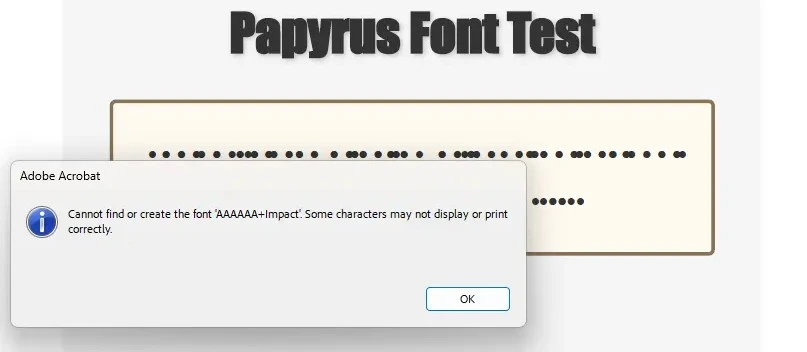
pdf.Fonts(0).Unembed()如果不常用的字体在解嵌入后缺乏回退功能,它们可能会在输出的 PDF 中出现损坏。 检查 Adobe 是否显示相同的问题--如果是,这是预期行为。 如果不符合要求,请联系支持部门进行调查。 损坏的字体显示如下:
如何替换 PDF 文档中的字体?
字体替换保留原始字体数据结构,包括样式和字符编码,同时替换指定字体。 确保新字体与原字体保持一致。 在编辑 PDF 文件或跨文档标准化字体时,此功能非常有用。
在极少数情况下,视觉效果可能无法完全匹配。 这是目前字体替换方法的局限性。
using IronPdf;
using IronPdf.Fonts;
using System.Linq;

// Import PDF
PdfDocument pdf = PdfDocument.FromFile("sample.pdf");

byte[] fontData = System.IO.File.ReadAllBytes("dir/to/font.ttf");
// Get and replace Font
pdf.Fonts["Courier"].ReplaceWith(fontData);Imports IronPdf
Imports IronPdf.Fonts
Imports System.Linq
' Import PDF
Private pdf As PdfDocument = PdfDocument.FromFile("sample.pdf")
Private fontData() As Byte = System.IO.File.ReadAllBytes("dir/to/font.ttf")
' Get and replace Font
pdf.Fonts("Courier").ReplaceWith(fontData)14 种标准 PDF 字体是什么?
14 种标准字体(Base 14 Fonts 或 Standard Type 1 Fonts)在 PDF 阅读器中得到广泛支持,无需嵌入。 PDF 标准保证了这些字体在处理 PDF 文档时可用。 在从各种来源创建 PDF 时,这些字体对于保持兼容性至关重要。
- Courier
- Courier-Bold
- Courier-Oblique
- Courier-BoldOblique
- Helvetica
- Helvetica-Bold
- Helvetica-Oblique
- Helvetica-BoldOblique
- Times-Roman
- Times-Bold
- Times-Italic
- Times-BoldItalic
- Symbol
- ZapfDingbats
哪些字体名称可以映射到标准字体?
为方便起见,多个字符串名称指向同一标准字体。 在使用不同的 PDF 工具以及 合并或拆分 PDF 时,该映射系统可确保兼容性。
映射到 Courier
StandardFont.Courier- Courier
- CourierNew
- CourierNewPSMT
- CourierStd
映射到 Courier-Bold
StandardFont.CourierBold- Courier,Bold
- Courier-Bold
- CourierBold
- CourierNew,Bold
- CourierNew-Bold
- CourierNewBold
- CourierNewPS-BoldMT
- CourierStd-Bold
映射到 Courier-Oblique
StandardFont.CourierOblique- Courier,Italic
- Courier-Oblique
- CourierItalic
- CourierNew,Italic
- CourierNew-Italic
- CourierNewItalic
- CourierNewPS-ItalicMT
- CourierStd-Oblique
映射到 Courier-BoldOblique
StandardFont.CourierBoldOblique- Courier,BoldItalic
- Courier-BoldOblique
- CourierBoldItalic
- CourierNew,BoldItalic
- CourierNew-BoldItalic
- CourierNewBoldItalic
- CourierNewPS-BoldItalicMT
- CourierStd-BoldOblique
映射到 Helvetica
StandardFont.Helvetica- Arial
- ArialMT
- Helvetica
映射到 Helvetica-Bold
StandardFont.HelveticaBold- Arial,Bold
- Arial-Bold
- Arial-BoldMT
- ArialBold
- ArialMT,Bold
- ArialRoundedMTBold
- Helvetica,Bold
- Helvetica-Bold
- HelveticaBold
映射到 Helvetica-Oblique
StandardFont.HelveticaOblique- Arial,Italic
- Arial-Italic
- Arial-ItalicMT
- ArialItalic
- ArialMT,Italic
- Helvetica,Italic
- Helvetica-Italic
- Helvetica-Oblique
- HelveticaItalic
映射到 Helvetica-BoldOblique
StandardFont.HelveticaBoldOblique- Arial,BoldItalic
- Arial-BoldItalic
- Arial-BoldItalicMT
- ArialBoldItalic
- ArialMT,BoldItalic
- Helvetica,BoldItalic
- Helvetica-BoldItalic
- Helvetica-BoldOblique
- HelveticaBoldItalic
映射到 Times-Roman
StandardFont.Times- Times-Roman
- TimesNewRoman
- TimesNewRomanPS
- TimesNewRomanPSMT
映射到 Times-Bold
StandardFont.TimesBold- Times-Bold
- TimesBold
- TimesNewRoman,Bold
- TimesNewRoman-Bold
- TimesNewRomanBold
- TimesNewRomanPS-Bold
- TimesNewRomanPS-BoldMT
- TimesNewRomanPSMT,Bold
映射到 Times-Italic
StandardFont.TimesOblique- Times-Italic
- TimesItalic
- TimesNewRoman,Italic
- TimesNewRoman-Italic
- TimesNewRomanItalic
- TimesNewRomanPS-Italic
- TimesNewRomanPS-ItalicMT
- TimesNewRomanPSMT,Italic
映射到 Times-BoldItalic
StandardFont.TimesBoldOblique- Times-BoldItalic
- TimesBoldItalic
- TimesNewRoman,BoldItalic
- TimesNewRoman-BoldItalic
- TimesNewRomanBoldItalic
- TimesNewRomanPS-BoldItalic
- TimesNewRomanPS-BoldItalicMT
- TimesNewRomanPSMT,BoldItalic
映射到 Symbol
StandardFont.Symbol- Symbol
- SymbolMT
映射到 ZapfDingbats
StandardFont.Dingbats- ZapfDingbats
常见问题解答
如何使用 C# 在 PDF 文档中嵌入自定义字体?
using IronPDF 时,您可以通过在 Fonts 集合上调用 Add 方法,随后调用 Embed 方法来嵌入自定义字体。只需将字体文件加载为字节数组并添加到 PDF 中:pdf.Fonts.Add(File.ReadAllBytes("MyCustomFont.ttf")).Embed()。这可确保您的 PDF 在所有平台上都能正确显示。
如何检索现有 PDF 文档中的所有字体?
IronPDF 通过 Fonts 属性访问所有文档字体,该属性返回一个 PdfFontCollection 对象。您可以遍历该集合以检索字体信息,包括字体名称、嵌入状态和字体类型,从而轻松分析文档结构和字体使用情况。
在 PDF 中按名称查找特定字体的最佳方法是什么?
IronPDF 允许您使用 PdfFontCollection 对象查找特定字体。您可以通过指定字体名称来搜索字体,从而访问字体对象及其属性。当您需要替换或修改 PDF 文档中的特定字体时,这一功能尤其有用。
能否移除嵌入的字体以减小 PDF 文件的大小?
是的,IronPDF 提供了 Unembed 方法,允许您从 PDF 文档中移除嵌入的字体。这可以在保持文档结构的同时大幅减小文件大小,但可能会影响未安装所需字体的系统上的 PDF 显示效果。
如何替换现有 PDF 文档中的字体?
IronPDF 提供的 "替换 "方法让字体替换变得简单明了。您可以在 PDF 文档中用新字体轻松替换现有字体,这对于保持品牌一致性或用现代字体更新旧文档非常有用。
When is it beneficial to unembed fonts from a PDF?
Unembedding fonts from a PDF can be beneficial for reducing the file size, especially if the fonts are standard and widely available on most systems. However, ensure that the fonts have suitable fallbacks to avoid display issues post-unembedding, as visual rendering may be compromised otherwise.
What are the 14 standard PDF fonts supported by IronPDF?
The 14 standard PDF fonts, also known as Base 14 Fonts or Standard Type 1 Fonts, include Courier, Helvetica, Times-Roman, Symbol, and ZapfDingbats, among others. These fonts are universally supported in PDF viewers and do not require embedding, ensuring compatibility across various platforms.
How does IronPDF handle font replacement in PDFs?
IronPDF allows for font replacement where you can substitute one font for another while preserving the font's data structure, including styling and encoding. This is useful for standardizing fonts in a document, although slight visual differences may occur in some cases.
Can IronPDF manage web fonts and icon fonts in PDFs?
Yes, IronPDF provides comprehensive support for web fonts and icon fonts, accommodating modern typography needs. This is particularly advantageous when converting HTML to PDF, as IronPDF automatically handles web fonts incorporated in your HTML code.
How does IronPDF support PDF/A compliance concerning fonts?
IronPDF offers features to manage font embedding and consistency, critical for creating PDF/A compliant documents. By ensuring that fonts are properly embedded and displayed, IronPDF aids in meeting the standards required for long-term archiving of electronic documents.

Curtis Chau 拥有卡尔顿大学的计算机科学学士学位,专注于前端开发,精通 Node.js、TypeScript、JavaScript 和 React。他热衷于打造直观且美观的用户界面,喜欢使用现代框架并创建结构良好、视觉吸引力强的手册。













