
如何使用 IronPDF 在 C# 中添加和删除 PDF 附件

IronPDF使您能够通过简单的C#方法(如RemoveAttachment())以编程方式在PDF文档中添加、检索和删除文件附件,使您可以将补充文件直接嵌入您的PDF中。
PDF 文档中的附件是指嵌入在 PDF 文件本身内的文件或附加数据。 这不同于 PDF 的常规内容,包括可见的文本、图像和格式,当您查看 PDF 时可以看到。 这些附件可以是各种文件类型,包括图像、文件、电子表格或其他格式。 通常,附件用于提供用户在打开 PDF 时可以访问的附加参考资料或补充数据。 在创建综合 PDF 报告或需要将多个 PDF 文件与支持文档合并时,这种能力尤其有用。
快速入门:向 PDF 添加附件
using IronPDF 为您的 PDF 文档添加附件。 该快速示例演示了如何将文件嵌入为 PDF 中的附件。 加载您现有的PDF,使用AddAttachment方法,并保存更新后的文档。 此过程可确保您的补充材料与 PDF 一起包含,使其可从任何 PDF 浏览器直接访问。
-
1Install IronPDF with NuGet Package Manager
-
2复制并运行这段代码。
var pdf = IronPdf.PdfDocument.FromFile("example.pdf"); pdf.Attachments.AddAttachment("file.txt", System.IO.File.ReadAllBytes("file.txt")); pdf.SaveAs("updated.pdf");Dim pdf = IronPdf.PdfDocument.FromFile("example.pdf") pdf.Attachments.AddAttachment("file.txt", System.IO.File.ReadAllBytes("file.txt")) pdf.SaveAs("updated.pdf")Dim pdf = IronPdf.PdfDocument.FromFile("example.pdf") pdf.Attachments.AddAttachment("file.txt", System.IO.File.ReadAllBytes("file.txt")) pdf.SaveAs("updated.pdf") -
3部署到您的生产环境中进行测试
通过免费试用立即在您的项目中开始使用IronPDF
最小工作流程(5 个步骤)
- 从 NuGet 下载 IronPDF C# 库。
- 加载现有的PDF或渲染一个新PDF
- 使用
File.ReadAllBytes将文件导入为byte[] - 使用
AddAttachment将其附加到 PDF 中 - 使用
RemoveAttachment删除附件
如何将文件添加为 PDF 的附件?
要添加文件作为附件,首先将其加载为byte[]。 最简单的方法是使用File.ReadAllBytes方法。 在文件加载为AddAttachment方法将对象添加到PDF中作为附件:
using IronPdf;
using System.IO;

// Import attachment file
byte[] fileData = File.ReadAllBytes(@"path/to/file");

// Open existing PDF
PdfDocument pdf = PdfDocument.FromFile("sample.pdf");

// Add attachment to the PDF
pdf.Attachments.AddAttachment("Example", fileData);

pdf.SaveAs("addAttachment.pdf");
using IronPdf;
using System.IO;
// Import attachment file
byte[] fileData = File.ReadAllBytes(@"path/to/file");
// Open existing PDF
PdfDocument pdf = PdfDocument.FromFile("sample.pdf");
// Add attachment to the PDF
pdf.Attachments.AddAttachment("Example", fileData);
pdf.SaveAs("addAttachment.pdf");Imports IronPdf
Imports System.IO
' Import attachment file
Private fileData() As Byte = File.ReadAllBytes("path/to/file")
' Open existing PDF
Private pdf As PdfDocument = PdfDocument.FromFile("sample.pdf")
' Add attachment to the PDF
pdf.Attachments.AddAttachment("Example", fileData)
pdf.SaveAs("addAttachment.pdf")Imports IronPdf
Imports System.IO
' Import attachment file
Private fileData() As Byte = File.ReadAllBytes("path/to/file")
' Open existing PDF
Private pdf As PdfDocument = PdfDocument.FromFile("sample.pdf")
' Add attachment to the PDF
pdf.Attachments.AddAttachment("Example", fileData)
pdf.SaveAs("addAttachment.pdf")PdfAttachment对象,您可以保留以供将来参考或在需要时稍后删除。 这种方法类似于在 PDF 中添加图片或管理其他 PDF 资产。
保存 PDF 后,您可以从 PDF 查看器的工具栏中打开附件。 下图演示了在 Google Chrome 浏览器的 PDF 查看器中找到此功能的位置:
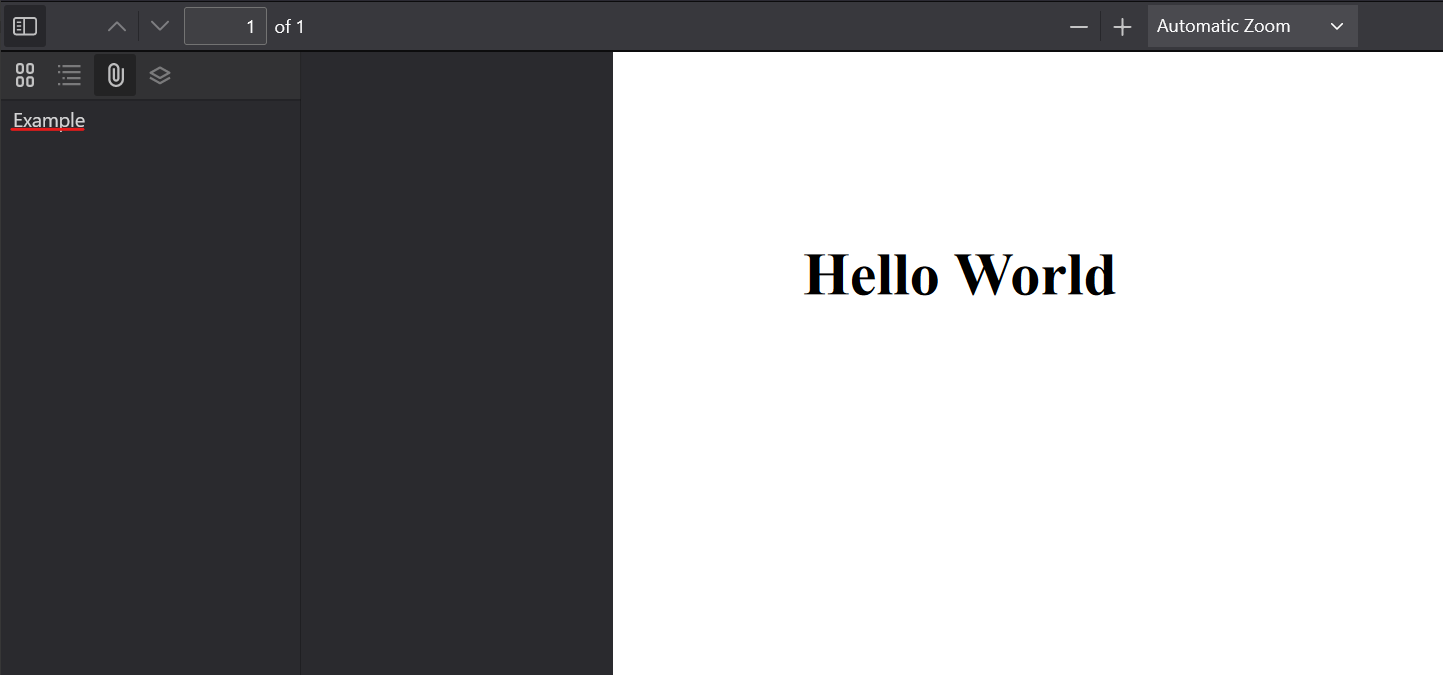
在这里,您可以点击它并将附件保存到您的存储器中。
我可以为 PDF 附加哪些文件类型?
IronPDF 支持将几乎任何文件类型附加到 PDF 文档。 常见的附件类型包括
- 办公文档(DOCX、XLSX、PPTX)
- 图片(JPG、PNG、GIF、SVG)
- 文本文件(TXT、CSV、XML)
- 存档(ZIP、RAR)
- 其他 PDF 文件
附件系统使用二进制数据,因此任何可以读取字节的文件都可以作为附件。 在处理特定文档类型时,您还可以考虑 IronPDF 的内置转换功能,例如 将 DOCX 转换为 PDF 或 将图像转换为 PDF 。
附件在 PDF 浏览器中的哪些位置出现?
不同的 PDF 阅读器会在不同的位置显示附件:
- Adobe Acrobat:在导航窗格中显示回形针图标
- Chrome PDF 查看器:点击时在左侧边栏显示附件
- Firefox PDF 查看器:在专用面板中显示附件
- Microsoft Edge:与 Chrome 浏览器类似,具有侧边栏附件视图
大多数现代 PDF 阅读器都支持附件,但不同应用程序的界面可能略有不同。
添加后 PdfAttachment 对象会发生什么变化?
当您调用PdfAttachment对象:
- 名称:附件的显示名称
- 数据:所附文件的二进制内容
- 描述:附件的可选元数据
该对象被添加到PDF的内部附件集合中,并且在明确删除之前,通过Attachments属性保持可访问。
Attachments
如何从现有 PDF 中检索附件?
PDF中的附件可以通过访问PdfDocument属性以二进制数据形式检索。 通过二进制数据,您可以将附件导出为其各自的文件格式。
using IronPdf;
using System.IO;

// Open existing PDF
PdfDocument pdf = PdfDocument.FromFile("addAttachment.pdf");

// Iterate through all attachments
foreach (var attachment in pdf.Attachments)
{
    if (attachment.Name.Contains("Example"))
    {
        // Save byte to file
        File.WriteAllBytes($"{attachment.Name}.doc", attachment.Data);
    }
}
using IronPdf;
using System.IO;
// Open existing PDF
PdfDocument pdf = PdfDocument.FromFile("addAttachment.pdf");
// Iterate through all attachments
foreach (var attachment in pdf.Attachments)
{
if (attachment.Name.Contains("Example"))
{
// Save byte to file
File.WriteAllBytes($"{attachment.Name}.doc", attachment.Data);
}
}Imports IronPdf
Imports System.IO
' Open existing PDF
Private pdf As PdfDocument = PdfDocument.FromFile("addAttachment.pdf")
' Iterate through all attachments
For Each attachment In pdf.Attachments
If attachment.Name.Contains("Example") Then
' Save byte to file
File.WriteAllBytes($"{attachment.Name}.doc", attachment.Data)
End If
Next attachmentImports IronPdf
Imports System.IO
' Open existing PDF
Private pdf As PdfDocument = PdfDocument.FromFile("addAttachment.pdf")
' Iterate through all attachments
For Each attachment In pdf.Attachments
If attachment.Name.Contains("Example") Then
' Save byte to file
File.WriteAllBytes($"{attachment.Name}.doc", attachment.Data)
End If
Next attachment当您需要从 PDF 中提取内容或以编程方式处理附件文档时,这一过程尤其有用。
如何访问 PDF 中的多个附件?
Attachments属性返回一个集合,您可以使用LINQ遍历或查询该集合:
// Get all attachments as a list
var allAttachments = pdf.Attachments.ToList();

// Filter attachments by size (e.g., files larger than 1MB)
var largeAttachments = pdf.Attachments
    .Where(a => a.Data.Length > 1024 * 1024)
    .ToList();

// Find specific attachment by exact name
var specificAttachment = pdf.Attachments
    .FirstOrDefault(a => a.Name == "report.xlsx");
// Get all attachments as a list
var allAttachments = pdf.Attachments.ToList();
// Filter attachments by size (e.g., files larger than 1MB)
var largeAttachments = pdf.Attachments
.Where(a => a.Data.Length > 1024 * 1024)
.ToList();
// Find specific attachment by exact name
var specificAttachment = pdf.Attachments
.FirstOrDefault(a => a.Name == "report.xlsx");' Get all attachments as a list
Dim allAttachments = pdf.Attachments.ToList()
' Filter attachments by size (e.g., files larger than 1MB)
Dim largeAttachments = pdf.Attachments _
.Where(Function(a) a.Data.Length > 1024 * 1024) _
.ToList()
' Find specific attachment by exact name
Dim specificAttachment = pdf.Attachments _
.FirstOrDefault(Function(a) a.Name = "report.xlsx")' Get all attachments as a list
Dim allAttachments = pdf.Attachments.ToList()
' Filter attachments by size (e.g., files larger than 1MB)
Dim largeAttachments = pdf.Attachments _
.Where(Function(a) a.Data.Length > 1024 * 1024) _
.ToList()
' Find specific attachment by exact name
Dim specificAttachment = pdf.Attachments _
.FirstOrDefault(Function(a) a.Name = "report.xlsx")检索到的附件具有哪些属性?
每个PdfAttachment对象提供:
Name:附件的显示名称Data:作为字节数组的二进制内容Description:可选的描述元数据(如果已设置)
您可以根据自己的要求使用这些属性来识别、过滤和处理附件。
如何按名称或类型筛选附件?
由于附件是以其显示名称存储的,因此您可以使用字符串操作对其进行过滤:
// Filter by file extension (assuming names include extensions)
var imageAttachments = pdf.Attachments
    .Where(a => a.Name.EndsWith(".jpg") ||
                a.Name.EndsWith(".png") ||
                a.Name.EndsWith(".gif"))
    .ToList();

// Filter by name pattern
var reportsOnly = pdf.Attachments
    .Where(a => a.Name.StartsWith("Report_"))
    .ToList();
// Filter by file extension (assuming names include extensions)
var imageAttachments = pdf.Attachments
.Where(a => a.Name.EndsWith(".jpg") ||
a.Name.EndsWith(".png") ||
a.Name.EndsWith(".gif"))
.ToList();
// Filter by name pattern
var reportsOnly = pdf.Attachments
.Where(a => a.Name.StartsWith("Report_"))
.ToList();' Filter by file extension (assuming names include extensions)
Dim imageAttachments = pdf.Attachments _
.Where(Function(a) a.Name.EndsWith(".jpg") OrElse _
a.Name.EndsWith(".png") OrElse _
a.Name.EndsWith(".gif")) _
.ToList()
' Filter by name pattern
Dim reportsOnly = pdf.Attachments _
.Where(Function(a) a.Name.StartsWith("Report_")) _
.ToList()' Filter by file extension (assuming names include extensions)
Dim imageAttachments = pdf.Attachments _
.Where(Function(a) a.Name.EndsWith(".jpg") OrElse _
a.Name.EndsWith(".png") OrElse _
a.Name.EndsWith(".gif")) _
.ToList()
' Filter by name pattern
Dim reportsOnly = pdf.Attachments _
.Where(Function(a) a.Name.StartsWith("Report_")) _
.ToList()


如何删除 PDF 中的附件?
要删除附件,请使用RemoveAttachment函数。 此方法需要附件的引用,可以通过Attachments属性检索。 下面是如何使用上面保存的文件进行翻译的方法:
using IronPdf;
using System.Linq;

// Open existing PDF
PdfDocument pdf = PdfDocument.FromFile("addAttachment.pdf");

// Add attachment to the PDF
PdfAttachmentCollection retrieveAttachments = pdf.Attachments;

// Remove attachment from PDF
pdf.Attachments.RemoveAttachment(retrieveAttachments.First());

pdf.SaveAs("removeAttachment.pdf");
using IronPdf;
using System.Linq;
// Open existing PDF
PdfDocument pdf = PdfDocument.FromFile("addAttachment.pdf");
// Add attachment to the PDF
PdfAttachmentCollection retrieveAttachments = pdf.Attachments;
// Remove attachment from PDF
pdf.Attachments.RemoveAttachment(retrieveAttachments.First());
pdf.SaveAs("removeAttachment.pdf");Imports IronPdf
Imports System.Linq
' Open existing PDF
Private pdf As PdfDocument = PdfDocument.FromFile("addAttachment.pdf")
' Add attachment to the PDF
Private retrieveAttachments As PdfAttachmentCollection = pdf.Attachments
' Remove attachment from PDF
pdf.Attachments.RemoveAttachment(retrieveAttachments.First())
pdf.SaveAs("removeAttachment.pdf")Imports IronPdf
Imports System.Linq
' Open existing PDF
Private pdf As PdfDocument = PdfDocument.FromFile("addAttachment.pdf")
' Add attachment to the PDF
Private retrieveAttachments As PdfAttachmentCollection = pdf.Attachments
' Remove attachment from PDF
pdf.Attachments.RemoveAttachment(retrieveAttachments.First())
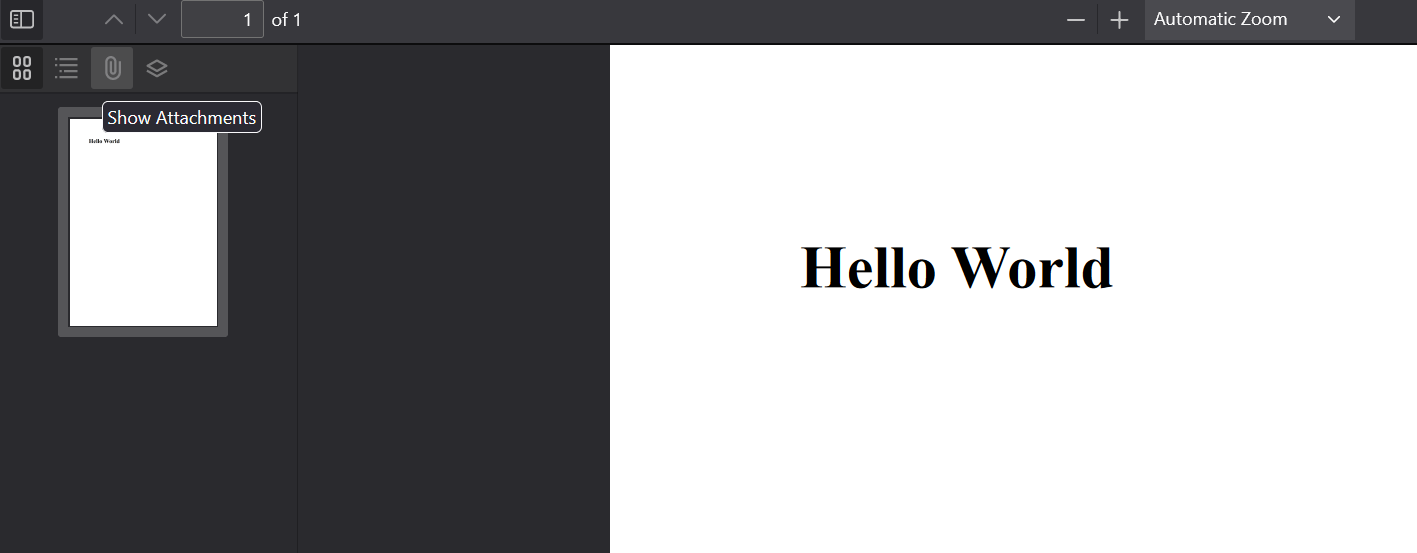
pdf.SaveAs("removeAttachment.pdf")删除附件并在 PDF 查看器中打开生成的文件后,您会看到附件不再出现:
当我删除附件时会发生什么?
当您删除附件时: 1.从 PDF 文件中完全删除附件数据 2.文件大小约减去所删除附件的大小 3.清理 PDF 结构中对该附件的任何引用 4.保存 PDF 后,更改将永久有效
我能否一次删除多个附件?
是的,您可以在一次操作中删除多个附件。 下面是一个例子:
// Remove all attachments that match a pattern
var attachmentsToRemove = pdf.Attachments
    .Where(a => a.Name.StartsWith("temp_"))
    .ToList();

foreach (var attachment in attachmentsToRemove)
{
    pdf.Attachments.RemoveAttachment(attachment);
}

// Or remove all attachments at once
while (pdf.Attachments.Count > 0)
{
    pdf.Attachments.RemoveAttachment(pdf.Attachments.First());
}
// Remove all attachments that match a pattern
var attachmentsToRemove = pdf.Attachments
.Where(a => a.Name.StartsWith("temp_"))
.ToList();
foreach (var attachment in attachmentsToRemove)
{
pdf.Attachments.RemoveAttachment(attachment);
}
// Or remove all attachments at once
while (pdf.Attachments.Count > 0)
{
pdf.Attachments.RemoveAttachment(pdf.Attachments.First());
}Imports System.Linq
' Remove all attachments that match a pattern
Dim attachmentsToRemove = pdf.Attachments _
.Where(Function(a) a.Name.StartsWith("temp_")) _
.ToList()
For Each attachment In attachmentsToRemove
pdf.Attachments.RemoveAttachment(attachment)
Next
' Or remove all attachments at once
While pdf.Attachments.Count > 0
pdf.Attachments.RemoveAttachment(pdf.Attachments.First())
End WhileImports System.Linq
' Remove all attachments that match a pattern
Dim attachmentsToRemove = pdf.Attachments _
.Where(Function(a) a.Name.StartsWith("temp_")) _
.ToList()
For Each attachment In attachmentsToRemove
pdf.Attachments.RemoveAttachment(attachment)
Next
' Or remove all attachments at once
While pdf.Attachments.Count > 0
pdf.Attachments.RemoveAttachment(pdf.Attachments.First())
End While如何验证附件已成功删除?
您可以通过以下几种方式验证附件的删除:
// Check the attachment count
int attachmentCountBefore = pdf.Attachments.Count;
pdf.Attachments.RemoveAttachment(targetAttachment);
int attachmentCountAfter = pdf.Attachments.Count;

// Verify the count decreased
if (attachmentCountAfter < attachmentCountBefore)
{
    Console.WriteLine("Attachment successfully removed");
}

// Check if specific attachment exists
bool attachmentExists = pdf.Attachments
    .Any(a => a.Name == "specificFile.txt");
// Check the attachment count
int attachmentCountBefore = pdf.Attachments.Count;
pdf.Attachments.RemoveAttachment(targetAttachment);
int attachmentCountAfter = pdf.Attachments.Count;
// Verify the count decreased
if (attachmentCountAfter < attachmentCountBefore)
{
Console.WriteLine("Attachment successfully removed");
}
// Check if specific attachment exists
bool attachmentExists = pdf.Attachments
.Any(a => a.Name == "specificFile.txt");' Check the attachment count
Dim attachmentCountBefore As Integer = pdf.Attachments.Count
pdf.Attachments.RemoveAttachment(targetAttachment)
Dim attachmentCountAfter As Integer = pdf.Attachments.Count
' Verify the count decreased
If attachmentCountAfter < attachmentCountBefore Then
Console.WriteLine("Attachment successfully removed")
End If
' Check if specific attachment exists
Dim attachmentExists As Boolean = pdf.Attachments _
.Any(Function(a) a.Name = "specificFile.txt")' Check the attachment count
Dim attachmentCountBefore As Integer = pdf.Attachments.Count
pdf.Attachments.RemoveAttachment(targetAttachment)
Dim attachmentCountAfter As Integer = pdf.Attachments.Count
' Verify the count decreased
If attachmentCountAfter < attachmentCountBefore Then
Console.WriteLine("Attachment successfully removed")
End If
' Check if specific attachment exists
Dim attachmentExists As Boolean = pdf.Attachments _
.Any(Function(a) a.Name = "specificFile.txt")PDF 附件的最佳实践
在 IronPDF 中处理 PDF 附件时,请考虑以下最佳实践:
- 文件大小管理:注意附件大小,因为它们直接增加了PDF文件大小
- 命名约定:使用清晰描述性的附件名称,帮助用户识别
- 安全考虑:在处理敏感附件时,考虑应用PDF密码和权限
- 性能:对于大型附件或多个文件,考虑使用异步操作以保持应用响应
准备好看看您还能做些什么吗? 在这里查看我们的教程页面:组织PDF
常见问题解答
如何用 C# 编程向 PDF 添加文件附件?
IronPDF 提供了一个简单的 AddAttachment() 方法,用于将文件嵌入到 PDF 中。首先,使用 File.ReadAllBytes() 将文件加载为字节数组,然后在 PdfDocument 对象上使用 AddAttachment 方法。该方法将文件名和字节数组作为参数。
PDF 文件可以附加哪些类型的文件?
IronPDF 允许您为 PDF 附加各种类型的文件,包括图片、文档、电子表格和其他格式。这些附件直接嵌入到 PDF 文件中,并可通过任何标准 PDF 浏览器的附件面板进行访问。
如何加载现有 PDF 文件以添加附件?
您可以使用 IronPDF 的 PdfDocument.FromFile() 方法加载现有 PDF。加载完成后,您可以使用 Attachments 属性管理附件,包括使用 AddAttachment() 添加新附件或删除现有附件。
PDF 内容和 PDF 附件有什么区别?
PDF 内容包括您在查看 PDF 时看到的可见文本、图像和格式。附件是嵌入在 PDF 中的独立文件,不会出现在主文档视图中。使用 IronPDF,可以通过 PDF 查看器的附件面板访问附件,并将其作为补充材料。
如何删除 PDF 中的附件?
IronPDF 提供了一个 RemoveAttachment() 方法,用于以编程方式删除 PDF 中的嵌入文件。AddAttachment 函数返回一个 PdfAttachment 对象,您可以在以后的移除操作中引用该对象。
用户在哪里可以找到 PDF 浏览器中的附件?
using IronPDF 添加附件后,用户可以通过 PDF 查看器的工具栏访问这些附件。大多数 PDF 查看器(包括 Google Chrome 浏览器的内置查看器)都会显示一个附件图标或面板,可在其中打开或保存嵌入的文件。
Is it possible to filter PDF attachments by type or name in IronPDF?
Yes, you can filter attachments using the Attachments collection based on file extensions or specific name patterns.
What are the best practices for managing PDF attachments in IronPDF?
Some best practices include managing file sizes, using descriptive naming conventions, securing sensitive content with passwords, and leveraging asynchronous operations for better performance.
How can I verify if an attachment was successfully removed?
You can verify attachment removal by checking the number of attachments before and after removal or confirming the absence of the specific attachment by name in the Attachments collection.
What happens to the PDF file size when attachments are removed using IronPDF?
Removing attachments with IronPDF reduces the file size roughly by the size of the attachment, as the attachment data is completely removed from the PDF file.

Curtis Chau 拥有卡尔顿大学的计算机科学学士学位,专注于前端开发,精通 Node.js、TypeScript、JavaScript 和 React。他热衷于打造直观且美观的用户界面,喜欢使用现代框架并创建结构良好、视觉吸引力强的手册。



