
ClickOnce 发布错误

Curtis Chau
Updated: 2026年4月24日
当您尝试运行使用 IronPDF 发布的 ClickOnce 项目时,可能会遇到以下运行时错误。
ERROR: Error while deploying IronPdf Chrome renderer: 'Multiple issues occurred while trying to deploy Chrome (Failed to locate 'IronInterop' at 'C:\iron testing\NETPublish(ClickOnce)\IronPdfZipClickOnce\bin\Debug\net8.0-windows\') (Failed to locate 'IronInterop' at 'C:\iron testing\NETPublish(ClickOnce)\IronPdfZipClickOnce\bin\Debug\net8.0-windows') (Invalid assembly version for 'IronInterop' (actual: 2025.2.0.15; expected: 2025.4.0.16). This version of IronPdf requires updated native dependencies. Please clear your build output directory of old assemblies so IronPdf can automatically download the new dependencies at runtime. Alternatively, you may add NuGet package IronPdf.Native.Chrome.Windows version 2025.4.16 to your project and rebuild.)[Issue Code IRONPDF-CHROME-DEPLOYMENT-ERROR-WIN].To learn more about making an engineering support request please visit: <a href=https://ironpdf.com/troubleshooting/engineering-request-pdf/>. To learn how to solve this issue please read https://ironpdf.com/troubleshooting/error-while-deploying-chrome-dependencies/ [Issue Code IRONPDF-CHROME-DEPLOYMENT-ERROR-WIN]Text
此错误可能是因为项目使用了本地IronPDF安装中的IronPdfInterop.dll,而不是与可执行文件一起打包的版本。如果您检查运行的应用程序使用的DLL版本,您会发现其版本是2025.4.0.4。
请注意: 要查找此版本,请运行程序,打开 Windows 资源管理器,然后单击"CPU"选项卡以选择正在运行的进程。
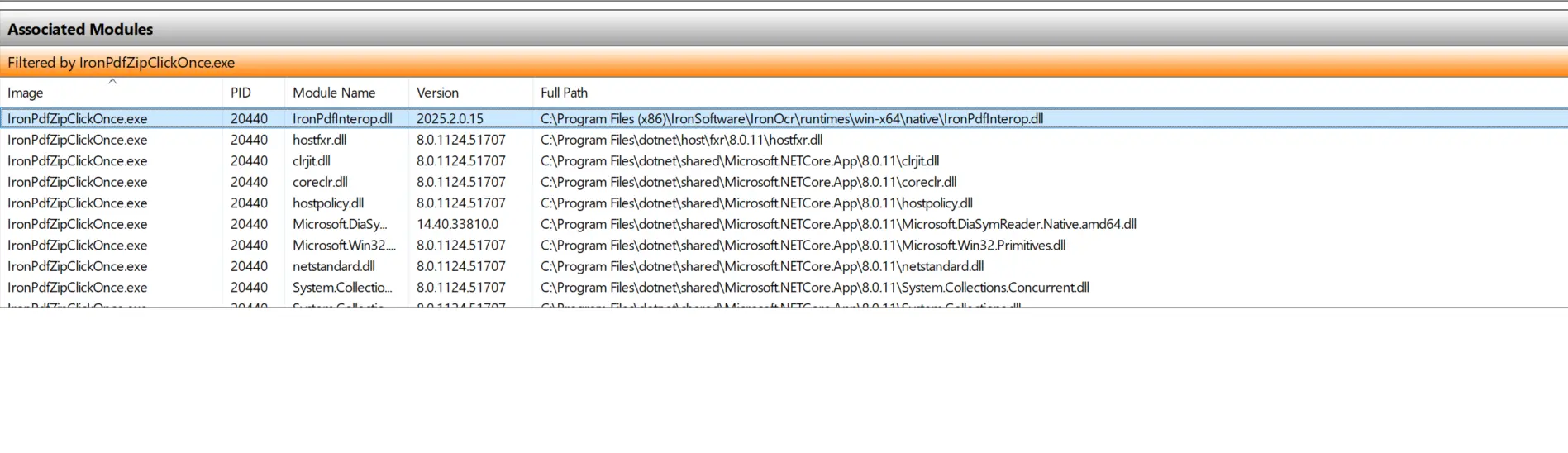
您可能已经注意到 IronPDFInterop.dll 的路径是来自 IronPDF 安装的默认路径。
解决方案
核心问题是项目引用了本地 IronPDF 安装中的 DLL,而不是已发布文件中封装的版本。有两个解决方案。
解决方案 1
请更新现有的IronPDF安装以匹配所需版本2025.4.4。如果成功,Windows资源管理器中显示的IronPdfInterop.dll版本应该是2025.4.0.4,而不是过时的版本。
解决方案 2
如果您计算机上的 IronPDF 安装未使用,请卸载它以避免版本不匹配。
有关如何安装和创建ClickOnce项目的更多信息,请参阅微软官方文档。

技术作家
Curtis Chau 拥有卡尔顿大学的计算机科学学士学位,专注于前端开发,精通 Node.js、TypeScript、JavaScript 和 React。他热衷于打造直观且美观的用户界面,喜欢使用现代框架并创建结构良好、视觉吸引力强的手册。
...
阅读更多


