
ClickOnce 게시 오류

IronPDF 사용하는 게시된 ClickOnce 프로젝트를 실행하려고 하면 다음과 같은 런타임 오류가 발생할 수 있습니다.
ERROR: Error while deploying IronPdf Chrome renderer: 'Multiple issues occurred while trying to deploy Chrome (Failed to locate 'IronInterop' at 'C:\iron testing\NETPublish(ClickOnce)\IronPdfZipClickOnce\bin\Debug\net8.0-windows\') (Failed to locate 'IronInterop' at 'C:\iron testing\NETPublish(ClickOnce)\IronPdfZipClickOnce\bin\Debug\net8.0-windows') (Invalid assembly version for 'IronInterop' (actual: 2025.2.0.15; expected: 2025.4.0.16). This version of IronPdf requires updated native dependencies. Please clear your build output directory of old assemblies so IronPdf can automatically download the new dependencies at runtime. Alternatively, you may add NuGet package IronPdf.Native.Chrome.Windows version 2025.4.16 to your project and rebuild.)[Issue Code IRONPDF-CHROME-DEPLOYMENT-ERROR-WIN].To learn more about making an engineering support request please visit: <a href=https://ironpdf.com/troubleshooting/engineering-request-pdf/>. To learn how to solve this issue please read https://ironpdf.com/troubleshooting/error-while-deploying-chrome-dependencies/ [Issue Code IRONPDF-CHROME-DEPLOYMENT-ERROR-WIN]이 오류는 프로젝트가 실행 파일에 포함된 것 대신 로컬 IronPDF 설치에서 IronPdfInterop.dll을 사용하기 때문에 발생할 수 있습니다. 실행 중인 애플리케이션이 사용하는 DLL의 버전을 확인하면 필요한 릴리스 버전 2025.4.0.4 대신에 버전이 2025.2.0.15임을 알 수 있습니다.
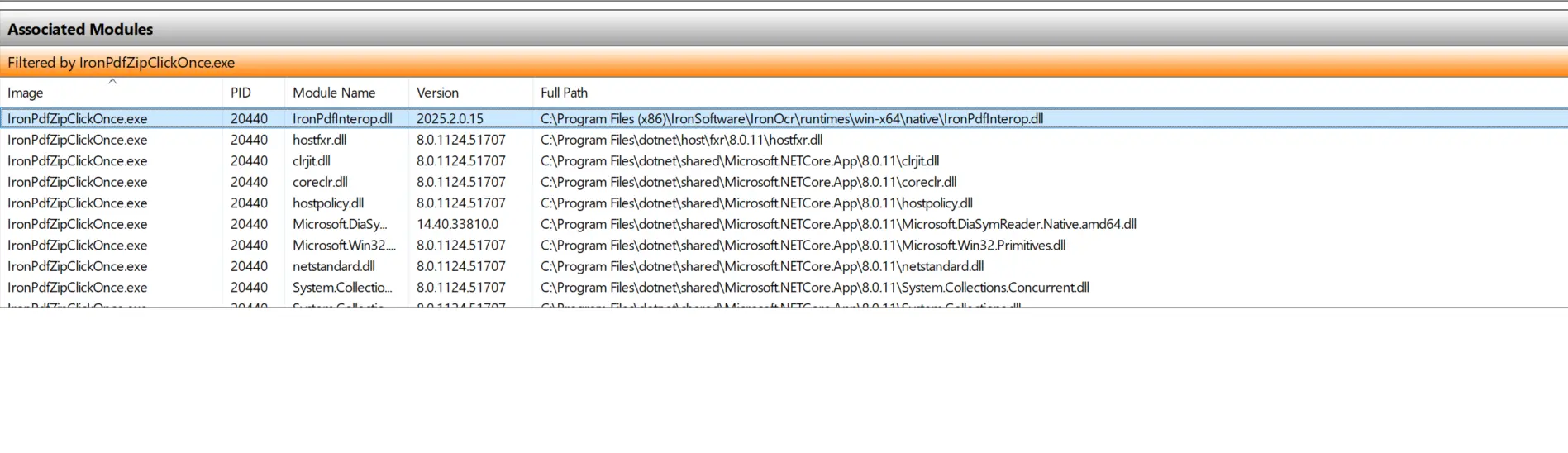
IronPDFInterop.dll의 경로가 IronPDF 설치 시 기본 경로라는 것을 눈치채셨을 수도 있습니다.
솔루션
핵심 문제는 프로젝트가 게시된 파일에 포함된 DLL 대신 로컬 IronPDF 설치의 DLL을 참조한다는 것입니다. 이를 해결할 수 있는 두 가지 방법이 있습니다.
해결책 1
기존 IronPDF 설치를 필요한 버전, 2025.4.4로 업데이트해 주세요. 성공적으로 완료되면, Windows 리소스 관리자에 표시된 IronPdfInterop.dll의 버전은 오래된 것이 아닌 2025.4.0.4이어야 합니다.
해결책 2
컴퓨터에 설치된 IronPDF 사용하지 않는 경우, 버전 불일치를 방지하기 위해 제거하십시오.
설치 및 ClickOnce 프로젝트를 만드는 방법에 대한 자세한 정보는 Microsoft의 공식 문서를 여기에서 참조해주세요.

커티스 차우는 칼턴 대학교에서 컴퓨터 과학 학사 학위를 취득했으며, Node.js, TypeScript, JavaScript, React를 전문으로 하는 프론트엔드 개발자입니다. 직관적이고 미적으로 뛰어난 사용자 인터페이스를 만드는 데 열정을 가진 그는 최신 프레임워크를 활용하고, 잘 구성되고 시각적으로 매력적인 매뉴얼을 제작하는 것을 즐깁니다.



