# C#에서 AI 기반 PDF 처리: 문서 요약, 추출 및 분석을 IronPDF로 처리하기
**AI 기반 PDF 처리**를 사용하여 **IronPDF**에서 .NET 개발자가 기존 PDF 워크플로의 상단에 **문서를 요약**, **구조화된 데이터 추출**, 및 **질문 응답 시스템을 구축**할 수 있습니다. **Microsoft Semantic Kernel**을 기반으로 **Azure OpenAI** 및 **OpenAI** 모델과 원활하게 연결되는 `IronPdf.Extensions.AI` 패키지를 사용하여. **법률 자료 검색 도구** , **금융 분석 파이프라인** 또는 **문서 인텔리전스 플랫폼을** 구축하든 IronPDF PDF 추출 및 컨텍스트 준비를 처리하므로 AI 로직에 집중할 수 있습니다.
*as-heading:2(요약: 빠른 시작 가이드)*
이 튜토리얼에서는 C# .NET 환경에서 IronPDF AI 서비스에 연결하여 문서 요약, 데이터 추출 및 지능형 쿼리를 수행하는 방법을 다룹니다.
- 이 솔루션은 법률 정보 검색 시스템, 금융 분석 도구, 규정 준수 검토 플랫폼 또는 대량의 PDF 문서에서 의미를 추출해야 하는 모든 애플리케이션과 같은 문서 인텔리전스 애플리케이션을 개발하는 .NET 개발자를 **위한 것입니다** .
- **개발하게 될 기능:** 단일 문서 요약, 사용자 지정 스키마를 사용한 구조화된 JSON 데이터 추출, 문서 콘텐츠 기반 질의응답, 장문 문서용 RAG 파이프라인, 문서 라이브러리 전반에 걸친 배치 AI 처리 워크플로.
- **실행 환경:** Azure OpenAI 또는 OpenAI API 키가 있는 모든 .NET 6 이상 환경. AI 확장 기능은 Microsoft Semantic Kernel과 통합되어 컨텍스트 창 관리, 청킹 및 오케스트레이션을 자동으로 처리합니다.
- **이 접근 방식을 사용해야 하는 경우:** 애플리케이션에서 텍스트 추출을 넘어 PDF를 처리해야 하는 경우(예: 계약 의무 이해, 연구 논문 요약, 재무 표를 구조화된 데이터로 추출, 문서 내용에 대한 사용자 질문에 대규모로 답변)에 사용합니다.
- **기술적으로 중요한 이유:** 원시 텍스트 추출은 문서 구조를 손실합니다. 표가 무너지고, 다단 레이아웃이 깨지며, 의미 관계가 사라집니다. IronPDF 문서 구조를 보존하고 토큰 제한을 관리하여 AI가 처리할 수 있도록 문서를 준비하므로, 모델은 깔끔하고 잘 정리된 입력을 받게 됩니다.
단 몇 줄의 코드로 PDF 내용을 요약하세요:
```cs
:title=One-Line PDF Summarization (after initialization)
await IronPdf.AI.PdfAIEngine.Summarize("contract.pdf", "summary.txt", azureEndpoint, azureApiKey);
```
IronPDF 를 구매하거나 30일 평가판에 가입한 후에는 애플리케이션 시작 부분에 라이선스 키를 입력하세요.
```cs
IronPdf.License.LicenseKey = "KEY";
```
!!!--LIBRARY_NUGET_INSTALL_BLOCK--!!!
*as-heading:2(목차)*
- [AI와 PDF의 기회](#the-ai-pdf-opportunity)
- [IronPDF의 내장 AI 통합 기능](#ironpdfs-built-in-ai-integration)
- [문서 요약](#document-summarization)
- [지능형 데이터 추출](#intelligent-data-extraction)
- [문서 기반 질의응답](#question-answering-over-documents)
- [일괄 AI 처리](#batch-ai-processing)
- [실제 활용 사례](#real-world-use-cases)
- [문제 해결 및 기술 지원](#troubleshooting-technical-support)
## AI와 PDF의 기회
### PDF가 가장 활용되지 않은 데이터 소스인 이유는 무엇일까요?
PDF는 현대 기업에서 구조화된 비즈니스 지식을 저장하는 가장 큰 저장소 중 하나입니다. 계약서, 재무제표, 규정 준수 보고서, 법률 서류, 연구 논문과 같은 전문 문서는 대부분 PDF 형식으로 저장됩니다. 이 문서에는 계약 조건(의무 및 책임 명시), 재무 지표(투자 결정에 영향을 미치는 요소), 규제 요건(규정 준수 보장), 연구 결과(전략 수립 지침) 등 중요한 비즈니스 정보가 담겨 있습니다.
하지만 기존의 PDF 처리 방식에는 심각한 한계가 있었습니다. 기본적인 텍스트 추출 도구는 페이지에서 원시 문자를 추출할 수 있지만 중요한 맥락을 잃어버립니다. 표 구조는 뒤죽박죽된 텍스트로 변하고, 다단 레이아웃은 의미를 알 수 없게 되며, 섹션 간의 의미적 관계가 사라집니다.
이번 혁신의 핵심은 인공지능이 맥락과 구조를 이해하는 능력에 있습니다. 현대의 법학 석사(LLM)는 단순히 단어만 보는 것이 아니라 문서의 구성 방식을 이해하고, 계약 조항이나 재무표와 같은 패턴을 인식하며, 복잡한 레이아웃에서도 의미를 추출할 수 있습니다. GPT-5의 실시간 라우터를 갖춘 통합 추론 시스템과 Claude Sonnet 4.5의 향상된 에이전트 기능은 이전 모델에 비해 오류 발생률이 크게 감소하여 전문적인 문서 분석에 신뢰할 수 있는 성능을 제공합니다.
### 법학 석사(LLM)는 문서 구조를 어떻게 이해하는가?
대규모 언어 모델은 PDF 분석에 정교한 자연어 처리 기능을 제공합니다. GPT-5의 하이브리드 아키텍처는 여러 하위 모델(메인, 미니, 사고, 나노)과 작업 복잡성에 따라 최적의 변형을 동적으로 선택하는 실시간 라우터를 특징으로 합니다. 간단한 질문은 더 빠른 모델로 연결되고, 복잡한 추론 작업에는 전체 모델이 사용됩니다.
Claude Opus 4.6은 특히 장시간 실행되는 에이전트 작업에 탁월하며, 분할된 작업에 대해 에이전트 팀이 직접 협력하고 100만 토큰 규모의 컨텍스트 창을 통해 문서 라이브러리 전체를 분할 없이 처리할 수 있습니다.
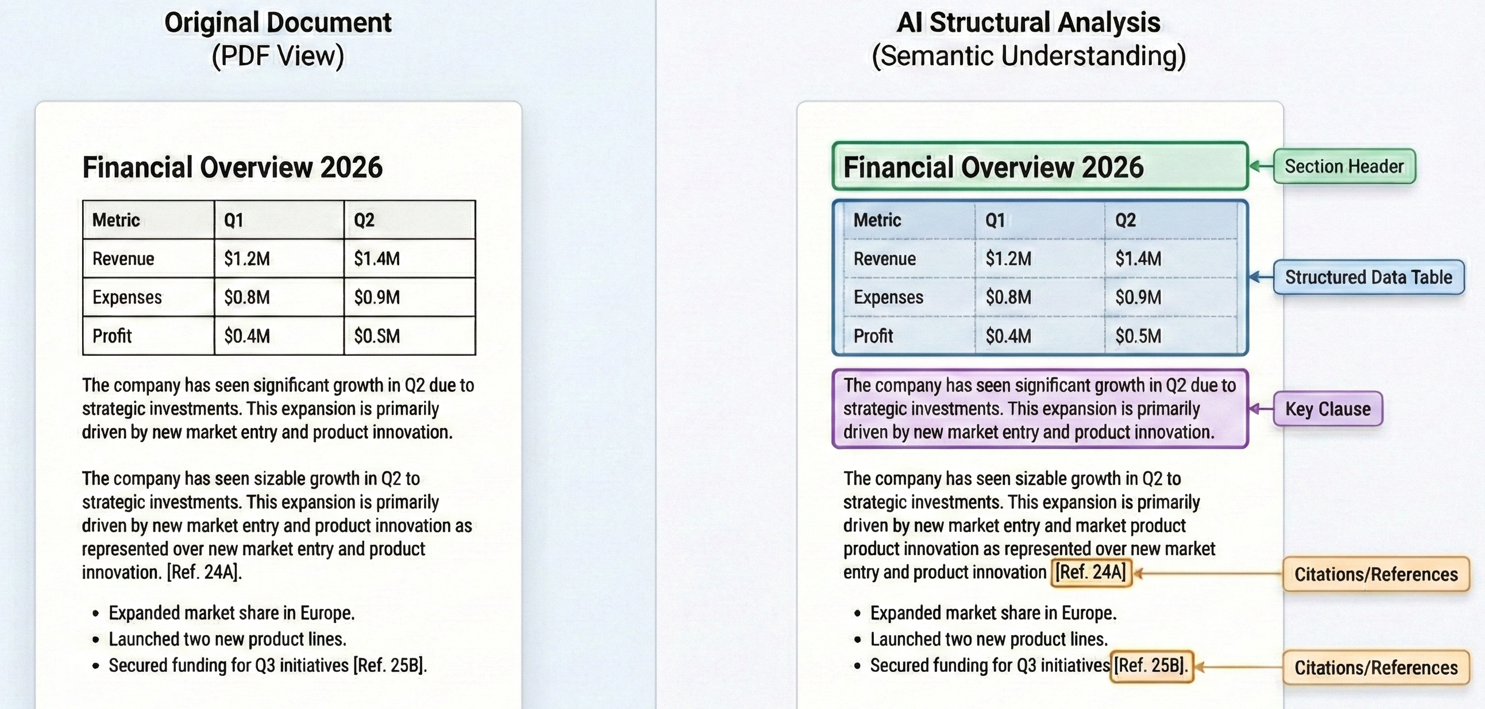
이러한 맥락적 이해를 통해 LLM은 진정한 이해를 필요로 하는 작업을 수행할 수 있습니다. 법학 석사(LLM)는 계약을 분석할 때 "해지"라는 단어가 포함된 조항을 식별할 뿐만 아니라 해지가 허용되는 구체적인 조건, 관련 통지 요건 및 그로 인해 발생하는 책임까지 이해할 수 있습니다. 이러한 기능을 가능하게 하는 기술적 기반은 최신 LLM(로지스틱 회귀 모델)에 사용되는 트랜스포머 아키텍처이며, GPT-5의 컨텍스트 창은 최대 272,000개의 입력 토큰을 지원하고 Claude Sonnet 4.5는 200,000개의 토큰 창을 통해 포괄적인 문서 처리 범위를 제공합니다.
## IronPDF의 내장 AI 통합 기능
### IronPDF 및 AI 확장 프로그램 설치
AI 기반 PDF 처리를 시작하려면 핵심 IronPDF 라이브러리, AI 확장 패키지 및 Microsoft Semantic Kernel 종속성이 필요합니다.
NuGet 패키지 관리자를 사용하여 IronPDF 설치하세요.
```shell
:InstallCmd Install-Package IronPdf, IronPdf.Extensions.AI, Microsoft.SemanticKernel, Microsoft.SemanticKernel.Plugins.Memory
```
이 패키지들은 함께 작동하여 완벽한 솔루션을 제공합니다. IronPDF 텍스트 추출, 페이지 렌더링, 형식 변환 등 모든 PDF 관련 작업을 처리하며, AI 확장 기능은 Microsoft Semantic Kernel을 통해 언어 모델과의 통합을 관리합니다.
[[i:(Semantic Kernel 패키지에는 실험적 API가 포함되어 있습니다. 컴파일러 경고를 억제하려면 .csproj PropertyGroup에 `<NoWarn>$(NoWarn);SKEXP0001;SKEXP0010;SKEXP0050</NoWarn>`을 추가하십시오.)]]
### OpenAI/Azure API 키 구성하기
AI 기능을 활용하기 전에 AI 서비스 제공업체에 대한 액세스 권한을 구성해야 합니다. IronPDF의 AI 확장 프로그램은 OpenAI와 Azure OpenAI를 모두 지원합니다. Azure OpenAI는 향상된 보안 기능, 규정 준수 인증, 특정 지리적 지역 내에 데이터를 보관할 수 있는 기능 등을 제공하기 때문에 기업 애플리케이션에 자주 사용됩니다.
Azure OpenAI를 구성하려면 Azure 포털에서 채팅 및 임베딩 모델 모두에 대한 Azure 엔드포인트 URL, API 키 및 배포 이름이 필요합니다.
### AI 엔진 초기화
IronPDF의 AI 확장 프로그램은 내부적으로 Microsoft Semantic Kernel을 사용합니다. AI 기능을 사용하기 전에 Azure OpenAI 자격 증명으로 커널을 초기화하고 문서 처리를 위한 메모리 저장소를 구성해야 합니다.
```cs
using IronPdf;
using IronPdf.AI;
using Microsoft.SemanticKernel;
using Microsoft.SemanticKernel.Memory;
using Microsoft.SemanticKernel.Connectors.OpenAI;

// Initialize IronPDF AI with Azure OpenAI credentials

// Azure OpenAI configuration
string azureEndpoint = "https://your-resource.openai.azure.com/";
string apiKey = "your-azure-api-key";
string chatDeployment = "gpt-4o";
string embeddingDeployment = "text-embedding-ada-002";

// Initialize Semantic Kernel with Azure OpenAI
var kernel = Kernel.CreateBuilder()
    .AddAzureOpenAITextEmbeddingGeneration(embeddingDeployment, azureEndpoint, apiKey)
    .AddAzureOpenAIChatCompletion(chatDeployment, azureEndpoint, apiKey)
    .Build();

// Create memory store for document embeddings
var memory = new MemoryBuilder()
    .WithMemoryStore(new VolatileMemoryStore())
    .WithAzureOpenAITextEmbeddingGeneration(embeddingDeployment, azureEndpoint, apiKey)
    .Build();

// Initialize IronPDF AI
IronDocumentAI.Initialize(kernel, memory);

Console.WriteLine("IronPDF AI initialized successfully with Azure OpenAI");
```
초기화 과정에서 두 가지 핵심 구성 요소가 생성됩니다.
- **커널:** Azure OpenAI를 통해 채팅 자동 완성 및 텍스트 임베딩 생성을 처리합니다.
- **메모리:** 의미 검색 및 검색 작업을 위한 문서 임베딩을 저장합니다.
`IronDocumentAI.Initialize()` 초기화가 완료되면 애플리케이션 전반에서 AI 기능을 사용할 수 있습니다. 실제 운영 환경에서는 자격 증명을 환경 변수 또는 Azure Key Vault에 저장하는 것이 강력히 권장됩니다.
### IronPDF AI 컨텍스트에 맞게 PDF를 어떻게 준비할까요?
AI 기반 PDF 처리에서 가장 어려운 측면 중 하나는 언어 모델이 이해할 수 있도록 문서를 준비하는 것입니다. GPT-5는 최대 272,000개의 입력 토큰을 지원하고 Claude Opus 4.6은 이제 100만 개의 토큰 컨텍스트 창을 제공하지만, 단일 법률 계약이나 재무 보고서만으로도 이전 모델의 한계를 쉽게 초과할 수 있습니다.
IronPDF의 AI 확장 프로그램은 지능형 문서 준비를 통해 이러한 복잡성을 처리합니다. AI 메서드를 호출하면 IronPDF 먼저 단락 식별, 표 구조 유지, 섹션 간 관계 유지 등 구조적 정보를 보존하면서 PDF에서 텍스트를 추출합니다.
문맥 제한을 초과하는 문서의 경우, IronPDF 섹션 제목, 페이지 나누기 또는 단락 경계와 같은 문서 구조의 자연스러운 구분점인 의미론적 분기점에서 전략적으로 문서를 분할합니다.
---
## 문서 요약
### 단일 문서 요약
문서 요약은 긴 문서를 이해하기 쉬운 핵심 내용으로 압축하여 즉각적인 가치를 제공합니다. `Summarize` 메서드는 워크플로 전체를 처리합니다: 텍스트를 추출하고, AI 소비를 위한 프리페어링을 하고, 언어 모델의 요약을 요청하고, 결과를 저장합니다.
#### 입력
<iframe loading="lazy" src="/static-assets/pdf/tutorials/ai-powered-pdf-processing-csharp/sample-report.pdf" width="100%" height="400px">
</iframe>
<br />
이 코드는 `PdfDocument.FromFile()`를 사용하여 PDF를 로드하고, `pdf.Summarize()`를 호출하여 간결한 요약을 생성한 다음 결과를 텍스트 파일에 저장합니다.
```cs
using IronPdf;
using IronPdf.AI;
using Microsoft.SemanticKernel;
using Microsoft.SemanticKernel.Memory;
using Microsoft.SemanticKernel.Connectors.OpenAI;
// Summarize a PDF document using IronPDF AI
// Azure OpenAI configuration
string azureEndpoint = "https://your-resource.openai.azure.com/";
string apiKey = "your-azure-api-key";
string chatDeployment = "gpt-4o";
string embeddingDeployment = "text-embedding-ada-002";
// Initialize Semantic Kernel
var kernel = Kernel.CreateBuilder()
.AddAzureOpenAITextEmbeddingGeneration(embeddingDeployment, azureEndpoint, apiKey)
.AddAzureOpenAIChatCompletion(chatDeployment, azureEndpoint, apiKey)
.Build();
var memory = new MemoryBuilder()
.WithMemoryStore(new VolatileMemoryStore())
.WithAzureOpenAITextEmbeddingGeneration(embeddingDeployment, azureEndpoint, apiKey)
.Build();
IronDocumentAI.Initialize(kernel, memory);
// Load and summarize PDF
var pdf = PdfDocument.FromFile("sample-report.pdf");
string summary = await pdf.Summarize();
Console.WriteLine("Document Summary:");
Console.WriteLine(summary);
File.WriteAllText("report-summary.txt", summary);
Console.WriteLine("\nSummary saved to report-summary.txt");
```
<br />
#### 콘솔 출력
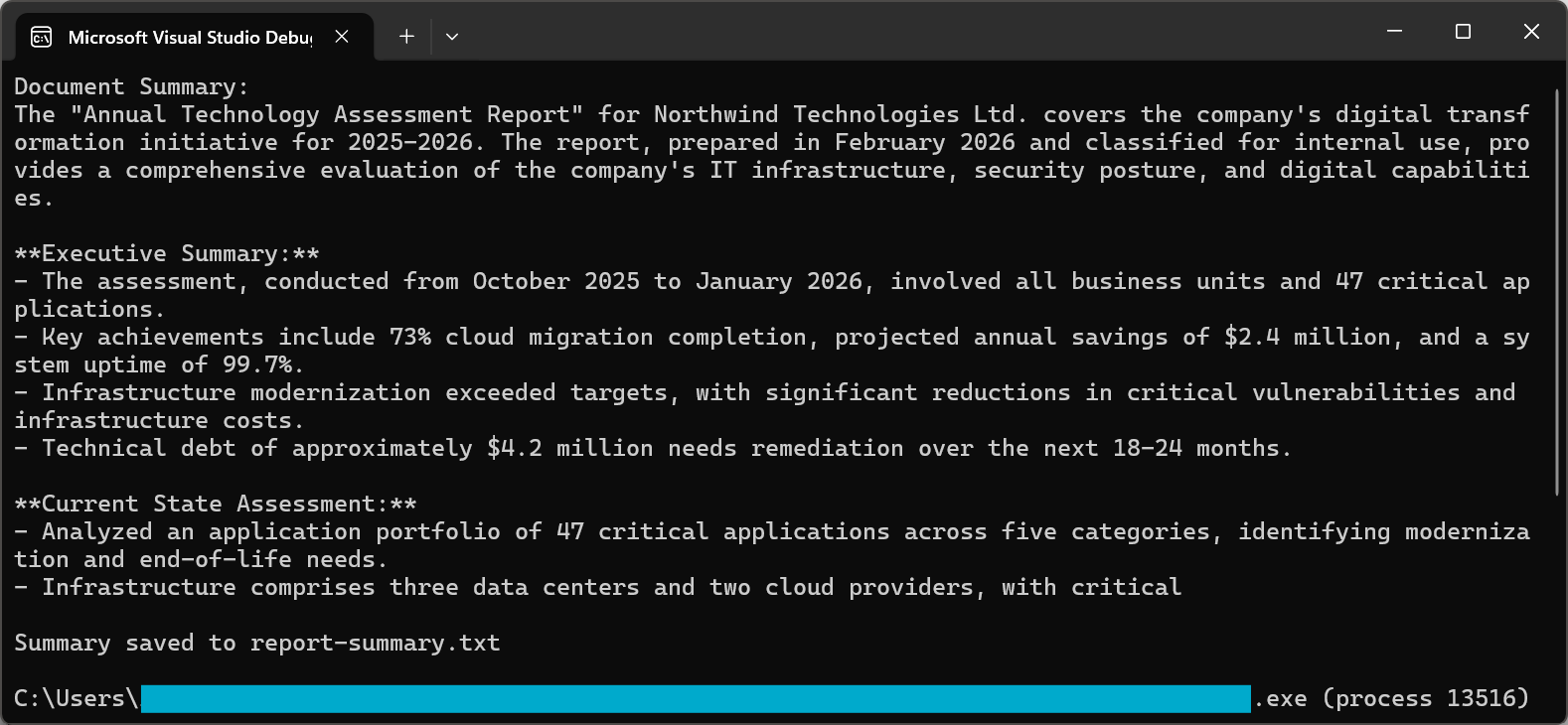
요약 과정은 정교한 프롬프트를 사용하여 고품질 결과를 보장합니다. 2026년 버전의 GPT-5와 Claude Sonnet 4.5는 모두 지시어 따라쓰기 기능이 크게 향상되어 요약 내용이 핵심 정보를 간결하고 읽기 쉽게 유지되도록 합니다.
문서 요약 기법 및 고급 옵션에 대한 자세한 설명은 [사용 설명서를](https://ironpdf.com/how-to/openai/) 참조하십시오.
### 다중 문서 합성
실제 상황에서는 여러 문서에 걸쳐 있는 정보를 종합해야 하는 경우가 많습니다. 법무팀은 여러 계약서 전체에서 공통 조항을 파악해야 할 수도 있고, 재무 분석가는 분기별 보고서의 지표를 비교하고 싶어할 수도 있습니다.
다중 문서 종합 접근 방식은 각 문서를 개별적으로 처리하여 핵심 정보를 추출한 다음, 이러한 통찰력을 종합하여 최종 종합 결과를 도출하는 것입니다.
이 예제는 여러 PDF를 통해 반복하여 각 PDF에 대해 `pdf.Summarize()`를 호출한 다음, 결합된 요약을 사용하여 통합된 종합을 생성하는 `pdf.Query()`를 사용합니다.
```cs
using IronPdf;
using IronPdf.AI;
using Microsoft.SemanticKernel;
using Microsoft.SemanticKernel.Memory;
using Microsoft.SemanticKernel.Connectors.OpenAI;
// Synthesize insights across multiple related documents (e.g., quarterly reports into annual summary)
// Azure OpenAI configuration
string azureEndpoint = "https://your-resource.openai.azure.com/";
string apiKey = "your-azure-api-key";
string chatDeployment = "gpt-4o";
string embeddingDeployment = "text-embedding-ada-002";
// Initialize Semantic Kernel
var kernel = Kernel.CreateBuilder()
.AddAzureOpenAITextEmbeddingGeneration(embeddingDeployment, azureEndpoint, apiKey)
.AddAzureOpenAIChatCompletion(chatDeployment, azureEndpoint, apiKey)
.Build();
var memory = new MemoryBuilder()
.WithMemoryStore(new VolatileMemoryStore())
.WithAzureOpenAITextEmbeddingGeneration(embeddingDeployment, azureEndpoint, apiKey)
.Build();
IronDocumentAI.Initialize(kernel, memory);
// Define documents to synthesize
string[] documentPaths = {
"Q1-report.pdf",
"Q2-report.pdf",
"Q3-report.pdf",
"Q4-report.pdf"
};
var documentSummaries = new List<string>();
// Summarize each document
foreach (string path in documentPaths)
{
var pdf = PdfDocument.FromFile(path);
string summary = await pdf.Summarize();
documentSummaries.Add($"=== {Path.GetFileName(path)} ===\n{summary}");
Console.WriteLine($"Processed: {path}");
}
// Combine and synthesize across all documents
string combinedSummaries = string.Join("\n\n", documentSummaries);
var synthesisDoc = PdfDocument.FromFile(documentPaths[0]);
string synthesisQuery = @"Based on the quarterly summaries below, provide an annual synthesis:
ll trends across quarters
chievements and challenges
over-year patterns
s:
inedSummaries;
string synthesis = await synthesisDoc.Query(synthesisQuery);
Console.WriteLine("\n=== Annual Synthesis ===");
Console.WriteLine(synthesis);
File.WriteAllText("annual-synthesis.txt", synthesis);
```
이 패턴은 대규모 문서 세트에도 효과적으로 적용됩니다. 문서를 병렬로 처리하고 중간 결과를 관리함으로써 수백 또는 수천 개의 문서를 분석하고 일관성 있는 종합 결과를 유지할 수 있습니다.
### 요약 보고서 생성
경영진 요약은 일반적인 요약과는 다른 접근 방식이 필요합니다. 단순히 내용을 압축하는 것이 아니라, 경영진 요약 보고서는 가장 중요한 비즈니스 정보를 파악하고, 핵심 결정이나 권고사항을 강조하며, 경영진이 검토하기에 적합한 형식으로 결과를 제시해야 합니다.
코드는 비즈니스 언어로 주요 결정, 중요한 발견, 재정적 영향 및 위험 평가를 요청하는 구조화된 프롬프트와 함께 `pdf.Query()`을 사용합니다.
```cs
using IronPdf;
using IronPdf.AI;
using Microsoft.SemanticKernel;
using Microsoft.SemanticKernel.Memory;
using Microsoft.SemanticKernel.Connectors.OpenAI;
// Generate executive summary from strategic documents for C-suite leadership
// Azure OpenAI configuration
string azureEndpoint = "https://your-resource.openai.azure.com/";
string apiKey = "your-azure-api-key";
string chatDeployment = "gpt-4o";
string embeddingDeployment = "text-embedding-ada-002";
// Initialize Semantic Kernel
var kernel = Kernel.CreateBuilder()
.AddAzureOpenAITextEmbeddingGeneration(embeddingDeployment, azureEndpoint, apiKey)
.AddAzureOpenAIChatCompletion(chatDeployment, azureEndpoint, apiKey)
.Build();
var memory = new MemoryBuilder()
.WithMemoryStore(new VolatileMemoryStore())
.WithAzureOpenAITextEmbeddingGeneration(embeddingDeployment, azureEndpoint, apiKey)
.Build();
IronDocumentAI.Initialize(kernel, memory);
var pdf = PdfDocument.FromFile("strategic-plan.pdf");
string executiveQuery = @"Create an executive summary for C-suite leadership. Include:
cisions Required:**
ny decisions needing executive approval
al Findings:**
5 most important findings (bullet points)
ial Impact:**
e/cost implications if mentioned
ssessment:**
riority risks identified
ended Actions:**
ate next steps
er 500 words. Use business language appropriate for board presentation.";
string executiveSummary = await pdf.Query(executiveQuery);
File.WriteAllText("executive-summary.txt", executiveSummary);
Console.WriteLine("Executive summary saved to executive-summary.txt");
```
그 결과로 나온 요약 보고서는 포괄적인 내용보다는 실행 가능한 정보를 우선시하여, 과도한 세부 정보 없이 의사 결정권자에게 필요한 정보만을 정확하게 제공합니다.
---
## 지능형 데이터 추출
### 구조화된 데이터를 JSON으로 추출
AI 기반 PDF 처리의 가장 강력한 응용 분야 중 하나는 비정형 문서에서 정형 데이터를 추출하는 것입니다. 2026년에 성공적인 구조적 추출을 위한 핵심은 구조화된 출력 모드를 갖춘 JSON 스키마를 사용하는 것입니다. GPT-5는 향상된 구조화된 출력을 제공하며, Claude Sonnet 4.5는 안정적인 데이터 추출을 위한 향상된 도구 통합 기능을 제공합니다.
#### 입력
<iframe loading="lazy" src="/static-assets/pdf/tutorials/ai-powered-pdf-processing-csharp/sample-invoice.pdf" width="100%" height="400px">
</iframe>
<br />
코드는 JSON 스키마 프롬프트와 함께 `pdf.Query()`를 호출한 다음, `JsonSerializer.Deserialize()`를 사용하여 추출된 송장 데이터를 분석하고 검증합니다.
```cs
using IronPdf;
using IronPdf.AI;
using Microsoft.SemanticKernel;
using Microsoft.SemanticKernel.Memory;
using Microsoft.SemanticKernel.Connectors.OpenAI;
using System.Text.Json;
// Extract structured invoice data as JSON from PDF
// Azure OpenAI configuration
string azureEndpoint = "https://your-resource.openai.azure.com/";
string apiKey = "your-azure-api-key";
string chatDeployment = "gpt-4o";
string embeddingDeployment = "text-embedding-ada-002";
// Initialize Semantic Kernel
var kernel = Kernel.CreateBuilder()
.AddAzureOpenAITextEmbeddingGeneration(embeddingDeployment, azureEndpoint, apiKey)
.AddAzureOpenAIChatCompletion(chatDeployment, azureEndpoint, apiKey)
.Build();
var memory = new MemoryBuilder()
.WithMemoryStore(new VolatileMemoryStore())
.WithAzureOpenAITextEmbeddingGeneration(embeddingDeployment, azureEndpoint, apiKey)
.Build();
IronDocumentAI.Initialize(kernel, memory);
var pdf = PdfDocument.FromFile("sample-invoice.pdf");
// Define JSON schema for extraction
string extractionQuery = @"Extract invoice data and return as JSON with this exact structure:
voiceNumber"": ""string"",
voiceDate"": ""YYYY-MM-DD"",
eDate"": ""YYYY-MM-DD"",
ndor"": {
""name"": ""string"",
""address"": ""string"",
""taxId"": ""string or null""
stomer"": {
""name"": ""string"",
""address"": ""string""
neItems"": [
{
""description"": ""string"",
""quantity"": number,
""unitPrice"": number,
""total"": number
}
btotal"": number,
xRate"": number,
xAmount"": number,
tal"": number,
rrency"": ""string""
NLY valid JSON, no additional text.";
string jsonResponse = await pdf.Query(extractionQuery);
// Parse and save JSON
try
{
var invoiceData = JsonSerializer.Deserialize<JsonElement>(jsonResponse);
string formattedJson = JsonSerializer.Serialize(invoiceData, new JsonSerializerOptions { WriteIndented = true });
Console.WriteLine("Extracted Invoice Data:");
Console.WriteLine(formattedJson);
File.WriteAllText("invoice-data.json", formattedJson);
}
catch (JsonException)
{
Console.WriteLine("Unable to parse JSON response");
File.WriteAllText("invoice-raw-response.txt", jsonResponse);
}
```
<br />
#### 생성된 JSON 파일의 부분 스크린샷
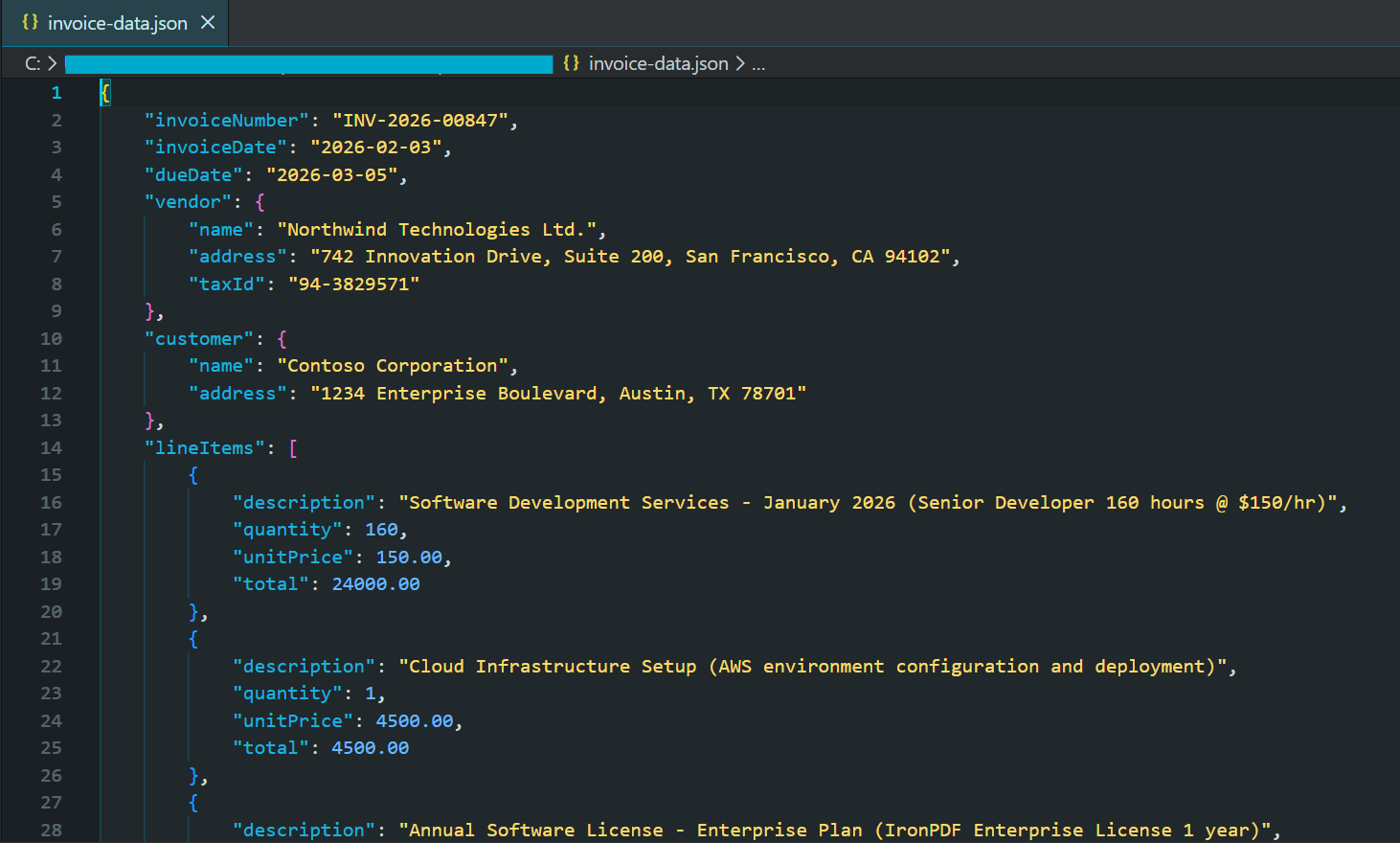
2026년의 최신 AI 모델은 제공된 스키마를 준수하는 유효한 JSON 응답을 보장하는 구조화된 출력 모드를 지원합니다. 이로써 잘못된 응답에 대한 복잡한 오류 처리가 필요 없어집니다.
### 계약 조항 식별
법률 계약에는 계약 해지 조항, 책임 제한 조항, 면책 요건, 지적 재산권 양도 조항, 기밀 유지 의무 조항 등 특별히 중요한 특정 유형의 조항이 포함되어 있습니다. AI 기반 절 식별 기능은 높은 정확도를 유지하면서 이러한 분석을 자동화합니다.
이 예제는 조항에 초점을 맞춘 JSON 스키마와 함께 `pdf.Query()`을 사용하여 계약 유형, 당사자, 중요한 날짜, 개별 조항 및 위험 수준을 추출합니다.
```cs
using IronPdf;
using IronPdf.AI;
using Microsoft.SemanticKernel;
using Microsoft.SemanticKernel.Memory;
using Microsoft.SemanticKernel.Connectors.OpenAI;
using System.Text.Json;
// Analyze contract clauses and identify key terms, risks, and critical dates
// Azure OpenAI configuration
string azureEndpoint = "https://your-resource.openai.azure.com/";
string apiKey = "your-azure-api-key";
string chatDeployment = "gpt-4o";
string embeddingDeployment = "text-embedding-ada-002";
// Initialize Semantic Kernel
var kernel = Kernel.CreateBuilder()
.AddAzureOpenAITextEmbeddingGeneration(embeddingDeployment, azureEndpoint, apiKey)
.AddAzureOpenAIChatCompletion(chatDeployment, azureEndpoint, apiKey)
.Build();
var memory = new MemoryBuilder()
.WithMemoryStore(new VolatileMemoryStore())
.WithAzureOpenAITextEmbeddingGeneration(embeddingDeployment, azureEndpoint, apiKey)
.Build();
IronDocumentAI.Initialize(kernel, memory);
var pdf = PdfDocument.FromFile("contract.pdf");
// Define JSON schema for contract analysis
string clauseQuery = @"Analyze this contract and identify key clauses. Return JSON:
ntractType"": ""string"",
rties"": [""string""],
fectiveDate"": ""string"",
auses"": [
{
""type"": ""Termination|Liability|Indemnification|Confidentiality|IP|Payment|Warranty|Other"",
""title"": ""string"",
""summary"": ""string"",
""riskLevel"": ""Low|Medium|High"",
""keyTerms"": [""string""]
}
iticalDates"": [
{
""description"": ""string"",
""date"": ""string""
}
erallRiskAssessment"": ""Low|Medium|High"",
commendations"": [""string""]
: termination rights, liability caps, indemnification, IP ownership, confidentiality, payment terms.
NLY valid JSON.";
string analysisJson = await pdf.Query(clauseQuery);
try
{
var analysis = JsonSerializer.Deserialize<JsonElement>(analysisJson);
string formatted = JsonSerializer.Serialize(analysis, new JsonSerializerOptions { WriteIndented = true });
Console.WriteLine("Contract Clause Analysis:");
Console.WriteLine(formatted);
File.WriteAllText("contract-analysis.json", formatted);
// Display high-risk clauses
Console.WriteLine("\n=== High Risk Clauses ===");
foreach (var clause in analysis.GetProperty("clauses").EnumerateArray())
{
if (clause.GetProperty("riskLevel").GetString() == "High")
{
Console.WriteLine($"- {clause.GetProperty("type")}: {clause.GetProperty("summary")}");
}
}
}
catch (JsonException)
{
Console.WriteLine("Unable to parse contract analysis");
File.WriteAllText("contract-analysis-raw.txt", analysisJson);
}
```
이 기능은 계약 검토를 순차적이고 수동적인 프로세스에서 자동화되고 확장 가능한 워크플로로 전환합니다. 법무팀은 수백 건의 계약서 전반에 걸쳐 위험도가 높은 조항을 신속하게 파악할 수 있습니다.
### 금융 데이터 분석
재무 문서는 복잡한 서술과 표 속에 중요한 정량적 데이터를 담고 있습니다. AI 기반 구문 분석은 문맥을 이해하기 때문에 재무 문서 분석에 탁월합니다. 즉, 과거 실적과 미래 예측을 구분하고, 숫자가 천 단위인지 백만 단위인지 식별하며, 다양한 지표 간의 관계를 파악합니다.
코드는 재무 JSON 스키마와 함께 `pdf.Query()`을 사용하여 손익계산서 데이터, 대차대조표 메트릭 및 향후 지침을 구조화된 출력으로 추출합니다.
```cs
using IronPdf;
using IronPdf.AI;
using Microsoft.SemanticKernel;
using Microsoft.SemanticKernel.Memory;
using Microsoft.SemanticKernel.Connectors.OpenAI;
using System.Text.Json;
// Extract financial metrics from annual reports and earnings documents
// Azure OpenAI configuration
string azureEndpoint = "https://your-resource.openai.azure.com/";
string apiKey = "your-azure-api-key";
string chatDeployment = "gpt-4o";
string embeddingDeployment = "text-embedding-ada-002";
// Initialize Semantic Kernel
var kernel = Kernel.CreateBuilder()
.AddAzureOpenAITextEmbeddingGeneration(embeddingDeployment, azureEndpoint, apiKey)
.AddAzureOpenAIChatCompletion(chatDeployment, azureEndpoint, apiKey)
.Build();
var memory = new MemoryBuilder()
.WithMemoryStore(new VolatileMemoryStore())
.WithAzureOpenAITextEmbeddingGeneration(embeddingDeployment, azureEndpoint, apiKey)
.Build();
IronDocumentAI.Initialize(kernel, memory);
var pdf = PdfDocument.FromFile("annual-report.pdf");
// Define JSON schema for financial extraction (numbers in millions)
string financialQuery = @"Extract financial metrics from this document. Return JSON:
portPeriod"": ""string"",
mpany"": ""string"",
rrency"": ""string"",
comeStatement"": {
""revenue"": number,
""costOfRevenue"": number,
""grossProfit"": number,
""operatingExpenses"": number,
""operatingIncome"": number,
""netIncome"": number,
""eps"": number
lanceSheet"": {
""totalAssets"": number,
""totalLiabilities"": number,
""shareholdersEquity"": number,
""cash"": number,
""totalDebt"": number
yMetrics"": {
""revenueGrowthYoY"": ""string"",
""grossMargin"": ""string"",
""operatingMargin"": ""string"",
""netMargin"": ""string"",
""debtToEquity"": number
idance"": {
""nextQuarterRevenue"": ""string"",
""fullYearRevenue"": ""string"",
""notes"": ""string""
for unavailable data. Numbers in millions unless stated.
NLY valid JSON.";
string financialJson = await pdf.Query(financialQuery);
try
{
var financials = JsonSerializer.Deserialize<JsonElement>(financialJson);
string formatted = JsonSerializer.Serialize(financials, new JsonSerializerOptions { WriteIndented = true });
Console.WriteLine("Extracted Financial Data:");
Console.WriteLine(formatted);
File.WriteAllText("financial-data.json", formatted);
}
catch (JsonException)
{
Console.WriteLine("Unable to parse financial data");
File.WriteAllText("financial-raw.txt", financialJson);
}
```
추출된 구조화된 데이터는 재무 모델, 시계열 데이터베이스 또는 분석 플랫폼에 직접 입력되어 보고 기간 전반에 걸쳐 지표를 자동으로 추적할 수 있습니다.
### 사용자 지정 추출 프롬프트
많은 조직은 특정 도메인, 문서 형식 또는 비즈니스 프로세스에 따라 고유한 추출 요구 사항을 가지고 있습니다. IronPDF의 AI 통합 기능은 사용자 지정 추출 프롬프트를 완벽하게 지원하므로 추출해야 할 정보와 그 구조를 정확하게 정의할 수 있습니다.
이 예제는 학술 논문에서 방법론, 주요 발견과 신뢰 수준, 및 한계를 추출하는 연구 중심의 스키마와 함께 `pdf.Query()`을 보여줍니다.
```cs
using IronPdf;
using IronPdf.AI;
using Microsoft.SemanticKernel;
using Microsoft.SemanticKernel.Memory;
using Microsoft.SemanticKernel.Connectors.OpenAI;
using System.Text.Json;
// Extract structured research metadata from academic papers
// Azure OpenAI configuration
string azureEndpoint = "https://your-resource.openai.azure.com/";
string apiKey = "your-azure-api-key";
string chatDeployment = "gpt-4o";
string embeddingDeployment = "text-embedding-ada-002";
// Initialize Semantic Kernel
var kernel = Kernel.CreateBuilder()
.AddAzureOpenAITextEmbeddingGeneration(embeddingDeployment, azureEndpoint, apiKey)
.AddAzureOpenAIChatCompletion(chatDeployment, azureEndpoint, apiKey)
.Build();
var memory = new MemoryBuilder()
.WithMemoryStore(new VolatileMemoryStore())
.WithAzureOpenAITextEmbeddingGeneration(embeddingDeployment, azureEndpoint, apiKey)
.Build();
IronDocumentAI.Initialize(kernel, memory);
var pdf = PdfDocument.FromFile("research-paper.pdf");
// Define JSON schema for research paper extraction
string researchQuery = @"Extract structured information from this research paper. Return JSON:
tle"": ""string"",
thors"": [""string""],
stitution"": ""string"",
blicationDate"": ""string"",
stract"": ""string"",
searchQuestion"": ""string"",
thodology"": {
""type"": ""Quantitative|Qualitative|Mixed Methods"",
""approach"": ""string"",
""sampleSize"": ""string"",
""dataCollection"": ""string""
yFindings"": [
{
""finding"": ""string"",
""significance"": ""string"",
""confidence"": ""High|Medium|Low""
}
mitations"": [""string""],
tureWork"": [""string""],
ywords"": [""string""]
extracting verifiable claims and noting uncertainty.
NLY valid JSON.";
string extractionResult = await pdf.Query(researchQuery);
try
{
var research = JsonSerializer.Deserialize<JsonElement>(extractionResult);
string formatted = JsonSerializer.Serialize(research, new JsonSerializerOptions { WriteIndented = true });
Console.WriteLine("Research Paper Extraction:");
Console.WriteLine(formatted);
File.WriteAllText("research-extraction.json", formatted);
// Display key findings with confidence levels
Console.WriteLine("\n=== Key Findings ===");
foreach (var finding in research.GetProperty("keyFindings").EnumerateArray())
{
string confidence = finding.GetProperty("confidence").GetString() ?? "Unknown";
Console.WriteLine($"[{confidence}] {finding.GetProperty("finding")}");
}
}
catch (JsonException)
{
Console.WriteLine("Unable to parse research extraction");
File.WriteAllText("research-raw.txt", extractionResult);
}
```
맞춤형 프롬프트를 통해 AI 기반 데이터 추출 기능을 일반적인 도구에서 사용자의 특정 요구 사항에 맞춘 전문 솔루션으로 전환할 수 있습니다.
---
## 문서를 통한 질의응답
### PDF 질의응답 시스템 구축하기
질문 답변 시스템을 통해 사용자는 PDF 문서와 대화형으로 상호 작용할 수 있으며, 자연어로 질문하고 정확하고 맥락에 맞는 답변을 받을 수 있습니다. 기본 패턴은 PDF에서 텍스트를 추출하고, 이를 사용자의 질문과 결합하여 프롬프트를 생성한 다음, AI에게 답변을 요청하는 것입니다.
#### 입력
<iframe loading="lazy" src="/static-assets/pdf/tutorials/ai-powered-pdf-processing-csharp/sample-legal-document.pdf" width="100%" height="400px">
</iframe>
<br />
코드는 문서를 시맨틱 검색을 위해 인덱싱할 `pdf.Memorize()`를 호출한 다음, `pdf.Query()`을 사용하여 사용자 질문에 응답하는 대화형 루프에 진입합니다.
```cs
using IronPdf;
using IronPdf.AI;
using Microsoft.SemanticKernel;
using Microsoft.SemanticKernel.Memory;
using Microsoft.SemanticKernel.Connectors.OpenAI;
// Interactive Q&A system for querying PDF documents
// Azure OpenAI configuration
string azureEndpoint = "https://your-resource.openai.azure.com/";
string apiKey = "your-azure-api-key";
string chatDeployment = "gpt-4o";
string embeddingDeployment = "text-embedding-ada-002";
// Initialize Semantic Kernel
var kernel = Kernel.CreateBuilder()
.AddAzureOpenAITextEmbeddingGeneration(embeddingDeployment, azureEndpoint, apiKey)
.AddAzureOpenAIChatCompletion(chatDeployment, azureEndpoint, apiKey)
.Build();
var memory = new MemoryBuilder()
.WithMemoryStore(new VolatileMemoryStore())
.WithAzureOpenAITextEmbeddingGeneration(embeddingDeployment, azureEndpoint, apiKey)
.Build();
IronDocumentAI.Initialize(kernel, memory);
var pdf = PdfDocument.FromFile("sample-legal-document.pdf");
// Memorize document to enable persistent querying
await pdf.Memorize();
Console.WriteLine("PDF Q&A System - Type 'exit' to quit\n");
Console.WriteLine($"Document loaded and memorized: {pdf.PageCount} pages\n");
// Interactive Q&A loop
while (true)
{
Console.Write("Your question: ");
string? question = Console.ReadLine();
if (string.IsNullOrWhiteSpace(question) || question.ToLower() == "exit")
break;
string answer = await pdf.Query(question);
Console.WriteLine($"\nAnswer: {answer}\n");
Console.WriteLine(new string('-', 50) + "\n");
}
Console.WriteLine("Q&A session ended.");
```
<br />
#### 콘솔 출력
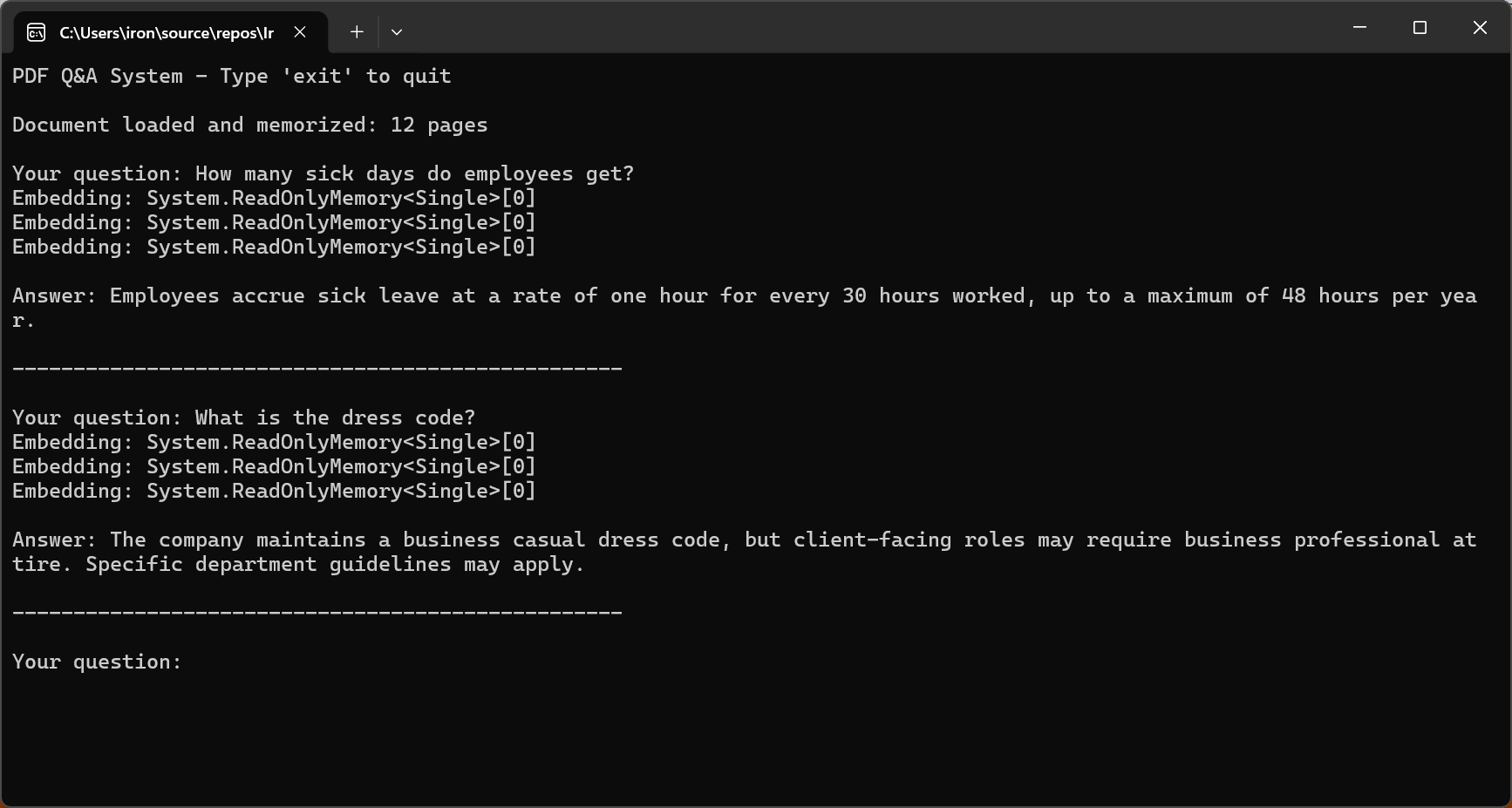
2026년 효과적인 질의응답의 핵심은 인공지능이 오직 문서 내용에만 근거하여 답변하도록 제한하는 것입니다. GPT-5의 "안전한 완료" 훈련 방식과 Claude Sonnet 4.5의 개선된 정렬 기능은 환각 발생률을 크게 줄여줍니다.
### 컨텍스트 창을 위해 긴 문서를 청크 단위로 분할
대부분의 실제 문서들은 AI 컨텍스트 처리 범위를 초과합니다. 이러한 문서를 처리하려면 효과적인 청킹 전략이 필수적입니다. 청킹은 의미적 일관성을 유지하면서 문서를 문맥 범위 내에 맞도록 충분히 작은 세그먼트로 나누는 것을 의미합니다.
이 코드는 `pdf.Pages`를 통해 반복하였으며, `DocumentChunk` 객체를 구성 가능한 `maxChunkTokens` 및 `overlapTokens`와 함께 생성하여 맥락 연속성을 제공합니다.
```cs
using IronPdf;
// Split long documents into overlapping chunks for RAG systems
var pdf = PdfDocument.FromFile("long-document.pdf");
// Chunking configuration
int maxChunkTokens = 4000; // Leave room for prompts and responses
int overlapTokens = 200; // Overlap for context continuity
int approxCharsPerToken = 4; // Rough estimate for tokenization
int maxChunkChars = maxChunkTokens * approxCharsPerToken;
int overlapChars = overlapTokens * approxCharsPerToken;
var chunks = new List<DocumentChunk>();
var currentChunk = new System.Text.StringBuilder();
int chunkStartPage = 1;
int currentPage = 1;
for (int i = 0; i < pdf.PageCount; i++)
{
string pageText = pdf.Pages[i].Text;
currentPage = i + 1;
if (currentChunk.Length + pageText.Length > maxChunkChars && currentChunk.Length > 0)
{
chunks.Add(new DocumentChunk
{
Text = currentChunk.ToString(),
StartPage = chunkStartPage,
EndPage = currentPage - 1,
ChunkIndex = chunks.Count
});
// Create overlap with previous chunk for continuity
string overlap = currentChunk.Length > overlapChars
? currentChunk.ToString().Substring(currentChunk.Length - overlapChars)
: currentChunk.ToString();
currentChunk.Clear();
currentChunk.Append(overlap);
chunkStartPage = currentPage - 1;
}
currentChunk.AppendLine($"\n--- Page {currentPage} ---\n");
currentChunk.Append(pageText);
}
if (currentChunk.Length > 0)
{
chunks.Add(new DocumentChunk
{
Text = currentChunk.ToString(),
StartPage = chunkStartPage,
EndPage = currentPage,
ChunkIndex = chunks.Count
});
}
Console.WriteLine($"Document chunked into {chunks.Count} segments");
foreach (var chunk in chunks)
{
Console.WriteLine($" Chunk {chunk.ChunkIndex + 1}: Pages {chunk.StartPage}-{chunk.EndPage} ({chunk.Text.Length} chars)");
}
// Save chunk metadata for RAG indexing
File.WriteAllText("chunks-metadata.json", System.Text.Json.JsonSerializer.Serialize(
chunks.Select(c => new { c.ChunkIndex, c.StartPage, c.EndPage, Length = c.Text.Length }),
new System.Text.Json.JsonSerializerOptions { WriteIndented = true }
));
ic class DocumentChunk
public string Text { get; set; } = "";
public int StartPage { get; set; }
public int EndPage { get; set; }
public int ChunkIndex { get; set; }
```
<br />
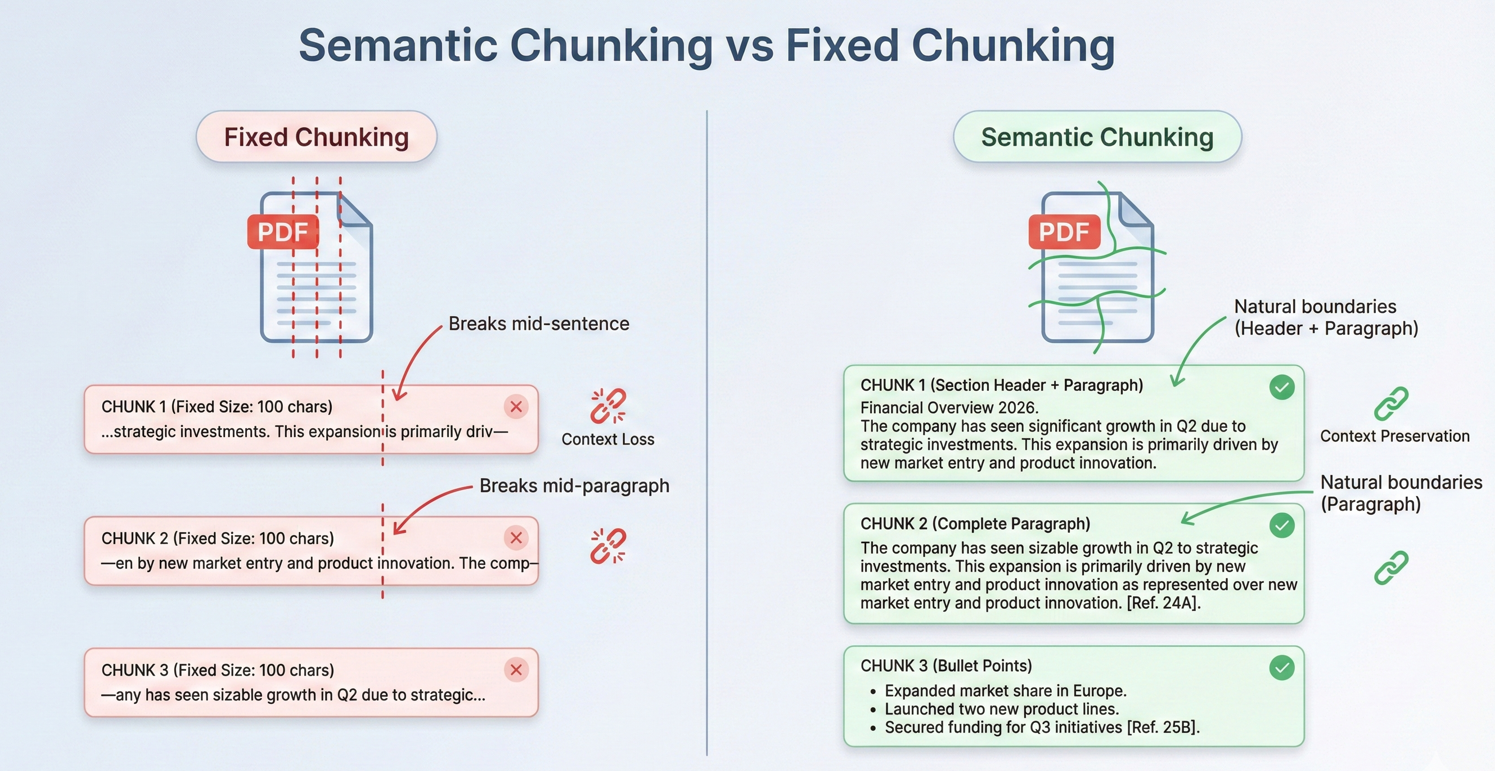
겹치는 데이터 덩어리는 경계를 넘어 연속성을 제공하여 관련 정보가 덩어리 경계를 넘나들더라도 AI가 충분한 맥락을 확보할 수 있도록 합니다.
### RAG(Retrieval-Augmented Generation) 패턴
검색 증강 생성(RAG)은 2026년 AI 기반 문서 분석을 위한 강력한 패턴을 제시합니다. RAG 시스템은 전체 문서를 AI에 입력하는 대신, 먼저 주어진 쿼리와 관련된 부분만 검색한 다음, 해당 부분을 컨텍스트로 사용하여 답변을 생성합니다.
RAG 워크플로는 문서 준비(문서 분할 및 임베딩 생성), 검색(관련 문서 조각 검색), 생성(검색된 문서 조각을 AI 응답의 컨텍스트로 사용)의 세 가지 주요 단계로 구성됩니다.
코드는 각 PDF를 인덱싱하기 위해 `pdf.Memorize()`를 호출한 다음, 결합된 문서 메모리에서 답변을 검색하기 위해 `pdf.Query()`를 사용합니다.
```cs
using IronPdf;
using IronPdf.AI;
using Microsoft.SemanticKernel;
using Microsoft.SemanticKernel.Memory;
using Microsoft.SemanticKernel.Connectors.OpenAI;
// Retrieval-Augmented Generation (RAG) system for querying across multiple indexed documents
// Azure OpenAI configuration
string azureEndpoint = "https://your-resource.openai.azure.com/";
string apiKey = "your-azure-api-key";
string chatDeployment = "gpt-4o";
string embeddingDeployment = "text-embedding-ada-002";
// Initialize Semantic Kernel
var kernel = Kernel.CreateBuilder()
.AddAzureOpenAITextEmbeddingGeneration(embeddingDeployment, azureEndpoint, apiKey)
.AddAzureOpenAIChatCompletion(chatDeployment, azureEndpoint, apiKey)
.Build();
var memory = new MemoryBuilder()
.WithMemoryStore(new VolatileMemoryStore())
.WithAzureOpenAITextEmbeddingGeneration(embeddingDeployment, azureEndpoint, apiKey)
.Build();
IronDocumentAI.Initialize(kernel, memory);
// Index all documents in folder
string[] documentPaths = Directory.GetFiles("documents/", "*.pdf");
Console.WriteLine($"Indexing {documentPaths.Length} documents...\n");
// Memorize each document (creates embeddings for retrieval)
foreach (string path in documentPaths)
{
var pdf = PdfDocument.FromFile(path);
await pdf.Memorize();
Console.WriteLine($"Indexed: {Path.GetFileName(path)} ({pdf.PageCount} pages)");
}
Console.WriteLine("\n=== RAG System Ready ===\n");
// Query across all indexed documents
string query = "What are the key compliance requirements for data retention?";
Console.WriteLine($"Query: {query}\n");
var searchPdf = PdfDocument.FromFile(documentPaths[0]);
string answer = await searchPdf.Query(query);
Console.WriteLine($"Answer: {answer}");
// Interactive query loop
Console.WriteLine("\n--- Enter questions (type 'exit' to quit) ---\n");
while (true)
{
Console.Write("Question: ");
string? userQuery = Console.ReadLine();
if (string.IsNullOrWhiteSpace(userQuery) || userQuery.ToLower() == "exit")
break;
string response = await searchPdf.Query(userQuery);
Console.WriteLine($"\nAnswer: {response}\n");
}
```
RAG 시스템은 법률 사례 데이터베이스, 기술 문서 라이브러리, 연구 아카이브와 같은 대규모 문서 컬렉션을 처리하는 데 탁월합니다. 관련 부분만 추출함으로써, 그들은 사실상 무제한의 문서 크기에 대응하면서도 응답 품질을 유지합니다.
### PDF 페이지에서 출처 인용하기
전문적인 용도에서는 AI 답변이 검증 가능해야 합니다. 인용 접근 방식은 청크 분할 및 검색 중에 청크 출처에 대한 메타데이터를 유지하는 것을 포함합니다. 각 청크는 텍스트 콘텐츠뿐만 아니라 원본 페이지 번호, 섹션 제목 및 문서 내 위치도 저장합니다.
#### 입력
<iframe loading="lazy" src="/static-assets/pdf/tutorials/ai-powered-pdf-processing-csharp/sample-legal-document.pdf" width="100%" height="400px">
</iframe>
<br />
코드는 인용 지침과 함께 `pdf.Query()`을 사용한 다음, 정규식과 함께 `ExtractCitedPages()`을 호출하여 페이지 참조를 분석하고 `pdf.Pages[pageNum - 1].Text`을 사용하여 소스를 검증합니다.
```cs
using IronPdf;
using IronPdf.AI;
using Microsoft.SemanticKernel;
using Microsoft.SemanticKernel.Memory;
using Microsoft.SemanticKernel.Connectors.OpenAI;
using System.Text.RegularExpressions;
// Answer questions with page citations and source verification
// Azure OpenAI configuration
string azureEndpoint = "https://your-resource.openai.azure.com/";
string apiKey = "your-azure-api-key";
string chatDeployment = "gpt-4o";
string embeddingDeployment = "text-embedding-ada-002";
// Initialize Semantic Kernel
var kernel = Kernel.CreateBuilder()
.AddAzureOpenAITextEmbeddingGeneration(embeddingDeployment, azureEndpoint, apiKey)
.AddAzureOpenAIChatCompletion(chatDeployment, azureEndpoint, apiKey)
.Build();
var memory = new MemoryBuilder()
.WithMemoryStore(new VolatileMemoryStore())
.WithAzureOpenAITextEmbeddingGeneration(embeddingDeployment, azureEndpoint, apiKey)
.Build();
IronDocumentAI.Initialize(kernel, memory);
var pdf = PdfDocument.FromFile("sample-legal-document.pdf");
await pdf.Memorize();
string question = "What are the termination conditions in this agreement?";
// Request citations in query
string citationQuery = $@"{question}
T: Include specific page citations in your answer using the format (Page X) or (Pages X-Y).
e information that appears in the document.";
string answerWithCitations = await pdf.Query(citationQuery);
Console.WriteLine("Question: " + question);
Console.WriteLine("\nAnswer with Citations:");
Console.WriteLine(answerWithCitations);
// Extract cited page numbers using regex
var citedPages = ExtractCitedPages(answerWithCitations);
Console.WriteLine($"\nCited pages: {string.Join(", ", citedPages)}");
// Verify citations with page excerpts
Console.WriteLine("\n=== Source Verification ===");
foreach (int pageNum in citedPages.Take(3))
{
if (pageNum <= pdf.PageCount && pageNum > 0)
{
string pageText = pdf.Pages[pageNum - 1].Text;
string excerpt = pageText.Length > 200 ? pageText.Substring(0, 200) + "..." : pageText;
Console.WriteLine($"\nPage {pageNum} excerpt:\n{excerpt}");
}
}
// Extract page numbers from citation format (Page X) or (Pages X-Y)
List<int> ExtractCitedPages(string text)
{
var pages = new HashSet<int>();
var matches = Regex.Matches(text, @"\(Pages?\s*(\d+)(?:\s*-\s*(\d+))?\)", RegexOptions.IgnoreCase);
foreach (Match match in matches)
{
int startPage = int.Parse(match.Groups[1].Value);
pages.Add(startPage);
if (match.Groups[2].Success)
{
int endPage = int.Parse(match.Groups[2].Value);
for (int p = startPage; p <= endPage; p++)
pages.Add(p);
}
}
return pages.OrderBy(p => p).ToList();
}
```
<br />
#### 콘솔 출력
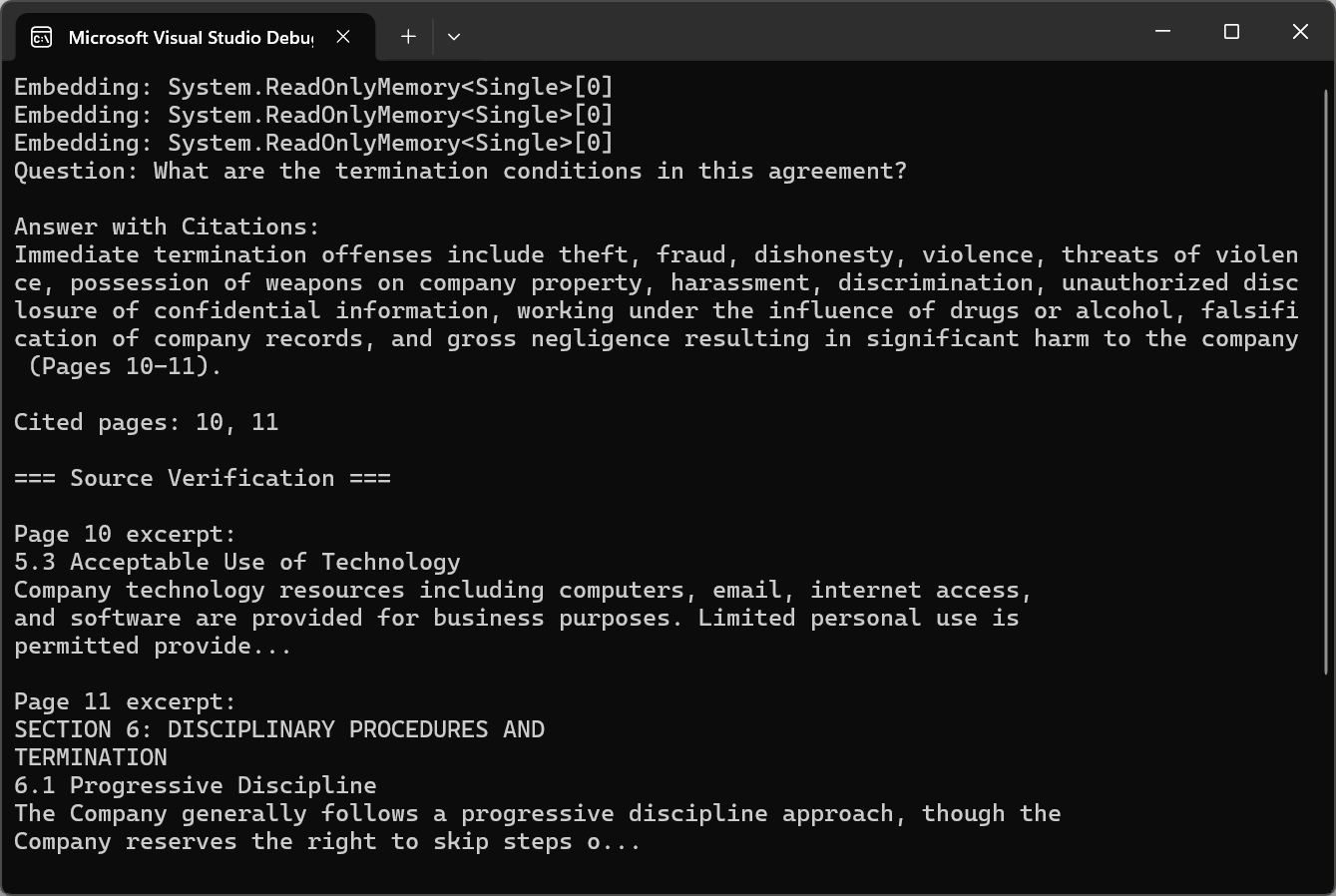
인용 기능을 통해 AI가 생성한 불투명한 답변을 투명하고 검증 가능한 정보로 변환할 수 있습니다. 사용자는 원자료를 검토하여 답변의 타당성을 검증하고 AI 기반 분석에 대한 신뢰도를 높일 수 있습니다.
---
## 일괄 AI 처리
### 대규모 문서 라이브러리 처리
기업 문서 처리에는 수천 또는 수백만 개의 PDF 파일이 포함되는 경우가 많습니다. 확장 가능한 배치 처리의 기반은 병렬화입니다. IronPDF 는 스레드 안전성을 보장하므로, 여러 PDF 파일을 동시에 처리해도 간섭이 발생하지 않습니다.
이 코드는 구성 가능한 `maxConcurrency`가 있는 `SemaphoreSlim`을 사용하여 PDF를 병렬로 처리하고, 각각에 대해 `pdf.Summarize()`을 호출하면서 결과를 `ConcurrentBag`에 추적합니다.
```cs
using IronPdf;
using IronPdf.AI;
using Microsoft.SemanticKernel;
using Microsoft.SemanticKernel.Memory;
using Microsoft.SemanticKernel.Connectors.OpenAI;
using System;
using System.Collections.Concurrent;
using System.Text;
// Process multiple documents in parallel with rate limiting
// Azure OpenAI configuration
string azureEndpoint = "https://your-resource.openai.azure.com/";
string apiKey = "your-azure-api-key";
string chatDeployment = "gpt-4o";
string embeddingDeployment = "text-embedding-ada-002";
// Initialize Semantic Kernel
var kernel = Kernel.CreateBuilder()
.AddAzureOpenAITextEmbeddingGeneration(embeddingDeployment, azureEndpoint, apiKey)
.AddAzureOpenAIChatCompletion(chatDeployment, azureEndpoint, apiKey)
.Build();
var memory = new MemoryBuilder()
.WithMemoryStore(new VolatileMemoryStore())
.WithAzureOpenAITextEmbeddingGeneration(embeddingDeployment, azureEndpoint, apiKey)
.Build();
IronDocumentAI.Initialize(kernel, memory);
// Configure parallel processing with rate limiting
int maxConcurrency = 3;
string inputFolder = "documents/";
string outputFolder = "summaries/";
Directory.CreateDirectory(outputFolder);
string[] pdfFiles = Directory.GetFiles(inputFolder, "*.pdf");
Console.WriteLine($"Processing {pdfFiles.Length} documents...\n");
var results = new ConcurrentBag<ProcessingResult>();
var semaphore = new SemaphoreSlim(maxConcurrency);
var tasks = pdfFiles.Select(async filePath =>
{
await semaphore.WaitAsync();
var result = new ProcessingResult { FilePath = filePath };
try
{
var stopwatch = System.Diagnostics.Stopwatch.StartNew();
var pdf = PdfDocument.FromFile(filePath);
string summary = await pdf.Summarize();
string outputPath = Path.Combine(outputFolder,
Path.GetFileNameWithoutExtension(filePath) + "-summary.txt");
await File.WriteAllTextAsync(outputPath, summary);
stopwatch.Stop();
result.Success = true;
result.ProcessingTime = stopwatch.Elapsed;
result.OutputPath = outputPath;
Console.WriteLine($"[OK] {Path.GetFileName(filePath)} ({stopwatch.ElapsedMilliseconds}ms)");
}
catch (Exception ex)
{
result.Success = false;
result.ErrorMessage = ex.Message;
Console.WriteLine($"[ERROR] {Path.GetFileName(filePath)}: {ex.Message}");
}
finally
{
semaphore.Release();
results.Add(result);
}
}).ToArray();
await Task.WhenAll(tasks);
// Generate processing report
var successful = results.Where(r => r.Success).ToList();
var failed = results.Where(r => !r.Success).ToList();
var report = new StringBuilder();
report.AppendLine("=== Batch Processing Report ===");
report.AppendLine($"Successful: {successful.Count}");
report.AppendLine($"Failed: {failed.Count}");
if (successful.Any())
{
var avgTime = TimeSpan.FromMilliseconds(successful.Average(r => r.ProcessingTime.TotalMilliseconds));
report.AppendLine($"Average processing time: {avgTime.TotalSeconds:F1}s");
}
if (failed.Any())
{
report.AppendLine("\nFailed documents:");
foreach (var fail in failed)
report.AppendLine($" - {Path.GetFileName(fail.FilePath)}: {fail.ErrorMessage}");
}
string reportText = report.ToString();
Console.WriteLine($"\n{reportText}");
File.WriteAllText(Path.Combine(outputFolder, "processing-report.txt"), reportText);
s ProcessingResult
public string FilePath { get; set; } = "";
public bool Success { get; set; }
public TimeSpan ProcessingTime { get; set; }
public string OutputPath { get; set; } = "";
public string ErrorMessage { get; set; } = "";
```
대규모 환경에서는 견고한 오류 처리가 매우 중요합니다. 운영 시스템은 지수 백오프를 사용한 재시도 로직, 실패한 문서에 대한 별도의 오류 로깅, 그리고 재개 가능한 처리를 구현합니다.
### 비용 관리 및 토큰 사용
AI API 비용은 일반적으로 토큰당 부과됩니다. 2026년 기준으로 GPT-5는 입력 토큰 백만 개당 1.25달러, 출력 토큰 백만 개당 10달러이며, Claude Sonnet 4.5는 입력 토큰 백만 개당 3달러, 출력 토큰 백만 개당 15달러입니다. 주요 비용 최적화 전략은 불필요한 토큰 사용을 최소화하는 것입니다.
OpenAI의 배치 API는 처리 시간이 더 오래 걸리는 대신(최대 24시간) 토큰 비용을 50% 할인해 줍니다. 야간 처리 또는 주기적 분석의 경우, 일괄 처리는 상당한 비용 절감을 가져다줍니다.
코드는 `pdf.ExtractAllText()`을 사용하여 텍스트를 추출하고, JSONL 일괄 요청을 생성하고, OpenAI 파일 엔드포인트에 `HttpClient`을 통해 업로드한 후 배치 API에 제출합니다.
```cs
using IronPdf;
using System.Text.Json;
using System.Net.Http.Headers;
// Use OpenAI Batch API for 50% cost savings on large-scale document processing
string openAiApiKey = "your-openai-api-key";
string inputFolder = "documents/";
// Prepare batch requests in JSONL format
var batchRequests = new List<string>();
string[] pdfFiles = Directory.GetFiles(inputFolder, "*.pdf");
Console.WriteLine($"Preparing batch for {pdfFiles.Length} documents...\n");
foreach (string filePath in pdfFiles)
{
var pdf = PdfDocument.FromFile(filePath);
string pdfText = pdf.ExtractAllText();
// Truncate to stay within batch API limits
if (pdfText.Length > 100000)
pdfText = pdfText.Substring(0, 100000) + "\n[Truncated...]";
var request = new
{
custom_id = Path.GetFileNameWithoutExtension(filePath),
method = "POST",
url = "/v1/chat/completions",
body = new
{
model = "gpt-4o",
messages = new[]
{
new { role = "system", content = "Summarize the following document concisely." },
new { role = "user", content = pdfText }
},
max_tokens = 1000
}
};
batchRequests.Add(JsonSerializer.Serialize(request));
}
// Create JSONL file
string batchFilePath = "batch-requests.jsonl";
File.WriteAllLines(batchFilePath, batchRequests);
Console.WriteLine($"Created batch file with {batchRequests.Count} requests");
// Upload file to OpenAI
using var httpClient = new HttpClient();
httpClient.DefaultRequestHeaders.Authorization = new AuthenticationHeaderValue("Bearer", openAiApiKey);
using var fileContent = new MultipartFormDataContent();
fileContent.Add(new ByteArrayContent(File.ReadAllBytes(batchFilePath)), "file", "batch-requests.jsonl");
fileContent.Add(new StringContent("batch"), "purpose");
var uploadResponse = await httpClient.PostAsync("https://api.openai.com/v1/files", fileContent);
var uploadResult = JsonSerializer.Deserialize<JsonElement>(await uploadResponse.Content.ReadAsStringAsync());
string fileId = uploadResult.GetProperty("id").GetString()!;
Console.WriteLine($"Uploaded file: {fileId}");
// Create batch job (24-hour completion window for 50% discount)
var batchJobRequest = new
{
input_file_id = fileId,
endpoint = "/v1/chat/completions",
completion_window = "24h"
};
var batchResponse = await httpClient.PostAsync(
"https://api.openai.com/v1/batches",
new StringContent(JsonSerializer.Serialize(batchJobRequest), System.Text.Encoding.UTF8, "application/json")
);
var batchResult = JsonSerializer.Deserialize<JsonElement>(await batchResponse.Content.ReadAsStringAsync());
string batchId = batchResult.GetProperty("id").GetString()!;
Console.WriteLine($"\nBatch job created: {batchId}");
Console.WriteLine("Job will complete within 24 hours");
Console.WriteLine($"Check status: GET https://api.openai.com/v1/batches/{batchId}");
File.WriteAllText("batch-job-id.txt", batchId);
Console.WriteLine("\nBatch ID saved to batch-job-id.txt");
```
운영 환경에서 토큰 사용량을 모니터링하는 것은 필수적입니다. 많은 조직들이 문서의 80%는 더 작고 저렴한 모델로 처리할 수 있으며, 고가의 모델은 복잡한 경우에만 사용한다는 사실을 알게 됩니다.
### 캐싱 및 증분 처리
문서가 점진적으로 업데이트되는 문서 모음의 경우, 지능형 캐싱 및 점진적 처리 전략을 통해 비용을 크게 절감할 수 있습니다. 문서 수준 캐싱은 원본 PDF의 해시값과 함께 결과를 저장하여 변경되지 않은 문서를 불필요하게 재처리하는 것을 방지합니다.
`DocumentCacheManager` 클래스는 `CacheEntry` 객체에 `LastAccessed` 타임스탬프와 함께 결과를 저장하여 SHA256을 사용한 `ComputeFileHash()`로 변경 사항을 감지합니다.
```cs
using IronPdf;
using IronPdf.AI;
using Microsoft.SemanticKernel;
using Microsoft.SemanticKernel.Memory;
using Microsoft.SemanticKernel.Connectors.OpenAI;
using System;
using System.Collections.Generic;
using System.Security.Cryptography;
using System.Text.Json;
// Cache AI processing results using file hashes to avoid reprocessing unchanged documents
// Azure OpenAI configuration
string azureEndpoint = "https://your-resource.openai.azure.com/";
string apiKey = "your-azure-api-key";
string chatDeployment = "gpt-4o";
string embeddingDeployment = "text-embedding-ada-002";
// Initialize Semantic Kernel
var kernel = Kernel.CreateBuilder()
.AddAzureOpenAITextEmbeddingGeneration(embeddingDeployment, azureEndpoint, apiKey)
.AddAzureOpenAIChatCompletion(chatDeployment, azureEndpoint, apiKey)
.Build();
var memory = new MemoryBuilder()
.WithMemoryStore(new VolatileMemoryStore())
.WithAzureOpenAITextEmbeddingGeneration(embeddingDeployment, azureEndpoint, apiKey)
.Build();
IronDocumentAI.Initialize(kernel, memory);
// Configure caching
string cacheFolder = "ai-cache/";
string documentsFolder = "documents/";
Directory.CreateDirectory(cacheFolder);
var cacheManager = new DocumentCacheManager(cacheFolder);
// Process documents with caching
string[] pdfFiles = Directory.GetFiles(documentsFolder, "*.pdf");
int cached = 0, processed = 0;
foreach (string filePath in pdfFiles)
{
string fileName = Path.GetFileName(filePath);
string fileHash = cacheManager.ComputeFileHash(filePath);
var cachedResult = cacheManager.GetCachedResult(fileName, fileHash);
if (cachedResult != null)
{
Console.WriteLine($"[CACHE HIT] {fileName}");
cached++;
continue;
}
Console.WriteLine($"[PROCESSING] {fileName}");
var pdf = PdfDocument.FromFile(filePath);
string summary = await pdf.Summarize();
cacheManager.CacheResult(fileName, fileHash, summary);
processed++;
}
Console.WriteLine($"\nProcessing complete: {cached} cached, {processed} newly processed");
Console.WriteLine($"Cost savings: {(cached * 100.0 / Math.Max(1, cached + processed)):F1}% served from cache");
ash-based cache manager with JSON index
s DocumentCacheManager
private readonly string _cacheFolder;
private readonly string _indexPath;
private Dictionary<string, CacheEntry> _index;
public DocumentCacheManager(string cacheFolder)
{
_cacheFolder = cacheFolder;
_indexPath = Path.Combine(cacheFolder, "cache-index.json");
_index = LoadIndex();
}
private Dictionary<string, CacheEntry> LoadIndex()
{
if (File.Exists(_indexPath))
{
string json = File.ReadAllText(_indexPath);
return JsonSerializer.Deserialize<Dictionary<string, CacheEntry>>(json) ?? new();
}
return new Dictionary<string, CacheEntry>();
}
private void SaveIndex()
{
string json = JsonSerializer.Serialize(_index, new JsonSerializerOptions { WriteIndented = true });
File.WriteAllText(_indexPath, json);
}
// SHA256 hash to detect file changes
public string ComputeFileHash(string filePath)
{
using var sha256 = SHA256.Create();
using var stream = File.OpenRead(filePath);
byte[] hash = sha256.ComputeHash(stream);
return Convert.ToHexString(hash);
}
public string? GetCachedResult(string fileName, string currentHash)
{
if (_index.TryGetValue(fileName, out var entry))
{
if (entry.FileHash == currentHash && File.Exists(entry.CachePath))
{
entry.LastAccessed = DateTime.UtcNow;
SaveIndex();
return File.ReadAllText(entry.CachePath);
}
}
return null;
}
public void CacheResult(string fileName, string fileHash, string result)
{
string cachePath = Path.Combine(_cacheFolder, $"{Path.GetFileNameWithoutExtension(fileName)}-{fileHash[..8]}.txt");
File.WriteAllText(cachePath, result);
_index[fileName] = new CacheEntry
{
FileHash = fileHash,
CachePath = cachePath,
CreatedAt = DateTime.UtcNow,
LastAccessed = DateTime.UtcNow
};
SaveIndex();
}
s CacheEntry
public string FileHash { get; set; } = "";
public string CachePath { get; set; } = "";
public DateTime CreatedAt { get; set; }
public DateTime LastAccessed { get; set; }
```
2026년에 출시될 GPT-5와 Claude Sonnet 4.5는 반복 패턴에 대한 토큰 소비량을 50~90%까지 줄일 수 있는 자동 프롬프트 캐싱 기능을 제공하여 대규모 운영에서 상당한 비용 절감을 실현할 수 있습니다.
---
## 실제 활용 사례
### 법률 조사 및 계약 분석
전통적인 법률 증거 수집 과정에는 수많은 하급 변호사들이 수십만 페이지에 달하는 자료를 수작업으로 검토하는 작업이 필요했습니다. AI 기반 검색은 관련 문서를 신속하게 식별하고, 권한 검토를 자동으로 수행하며, 핵심 증거 사실을 추출하는 등 이 과정을 혁신적으로 변화시킵니다.
IronPDF의 AI 통합 기능은 특권 탐지, 관련성 점수 매기기, 쟁점 식별 및 주요 날짜 추출과 같은 정교한 법률 워크플로우를 지원합니다. 로펌들은 증거 검토 시간을 70~80% 단축하여 더 적은 팀으로 더 큰 규모의 사건을 처리할 수 있게 되었다고 보고합니다.
2026년에는 GPT-5와 클로드 소네 4.5의 향상된 정확도와 환각 발생률 감소로 법률 전문가들은 점점 더 중요해지는 결정을 내릴 때 AI 기반 분석을 신뢰할 수 있게 될 것입니다.
### 재무 보고서 분석
금융 분석가들은 실적 보고서, SEC 공시 자료, 애널리스트 발표 자료에서 데이터를 추출하는 데 엄청난 시간을 소비합니다. AI 기반 금융 문서 처리 시스템은 이러한 데이터 추출을 자동화하여 분석가가 데이터 수집보다는 해석에 집중할 수 있도록 합니다.
이 예제는 여러 10-K 제출물을 처리하여, `pdf.Query()`와 `CompanyFinancials` JSON 스케마를 사용하여 회사 간의 수익, 마진 및 위험 요소를 추출하고 비교합니다.
```cs
using IronPdf;
using IronPdf.AI;
using Microsoft.SemanticKernel;
using Microsoft.SemanticKernel.Memory;
using Microsoft.SemanticKernel.Connectors.OpenAI;
using System.Collections.Generic;
using System.Text.Json;
using System.Text;
// Compare financial metrics across multiple company filings for sector analysis
// Azure OpenAI configuration
string azureEndpoint = "https://your-resource.openai.azure.com/";
string apiKey = "your-azure-api-key";
string chatDeployment = "gpt-4o";
string embeddingDeployment = "text-embedding-ada-002";
// Initialize Semantic Kernel
var kernel = Kernel.CreateBuilder()
.AddAzureOpenAITextEmbeddingGeneration(embeddingDeployment, azureEndpoint, apiKey)
.AddAzureOpenAIChatCompletion(chatDeployment, azureEndpoint, apiKey)
.Build();
var memory = new MemoryBuilder()
.WithMemoryStore(new VolatileMemoryStore())
.WithAzureOpenAITextEmbeddingGeneration(embeddingDeployment, azureEndpoint, apiKey)
.Build();
IronDocumentAI.Initialize(kernel, memory);
// Analyze company filings
string[] companyFilings = {
"filings/company-a-10k.pdf",
"filings/company-b-10k.pdf",
"filings/company-c-10k.pdf"
};
var sectorData = new List<CompanyFinancials>();
foreach (string filing in companyFilings)
{
Console.WriteLine($"Analyzing: {Path.GetFileName(filing)}");
var pdf = PdfDocument.FromFile(filing);
// Define JSON schema for 10-K extraction (numbers in millions USD)
string extractionQuery = @"Extract key financial metrics from this 10-K filing. Return JSON:
mpanyName"": ""string"",
scalYear"": ""string"",
venue"": number,
venueGrowth"": number,
ossMargin"": number,
eratingMargin"": number,
tIncome"": number,
s"": number,
talDebt"": number,
shPosition"": number,
ployeeCount"": number,
yRisks"": [""string""],
idance"": ""string""
in millions USD. Growth/margins as percentages.
NLY valid JSON.";
string result = await pdf.Query(extractionQuery);
try
{
var financials = JsonSerializer.Deserialize<CompanyFinancials>(result);
if (financials != null)
sectorData.Add(financials);
}
catch
{
Console.WriteLine($" Warning: Could not parse financials for {filing}");
}
}
// Generate sector comparison report
var report = new StringBuilder();
report.AppendLine("=== Sector Analysis Report ===\n");
report.AppendLine("Revenue Comparison (millions USD):");
foreach (var company in sectorData.OrderByDescending(c => c.Revenue))
report.AppendLine($" {company.CompanyName}: ${company.Revenue:N0} ({company.RevenueGrowth:+0.0;-0.0}% YoY)");
report.AppendLine("\nProfitability Margins:");
foreach (var company in sectorData.OrderByDescending(c => c.OperatingMargin))
report.AppendLine($" {company.CompanyName}: {company.GrossMargin:F1}% gross, {company.OperatingMargin:F1}% operating");
report.AppendLine("\nFinancial Health (Debt vs Cash):");
foreach (var company in sectorData)
{
double netDebt = company.TotalDebt - company.CashPosition;
string status = netDebt < 0 ? "Net Cash" : "Net Debt";
report.AppendLine($" {company.CompanyName}: {status} ${Math.Abs(netDebt):N0}M");
}
string reportText = report.ToString();
Console.WriteLine($"\n{reportText}");
File.WriteAllText("sector-analysis-report.txt", reportText);
// Save full JSON data
string outputJson = JsonSerializer.Serialize(sectorData, new JsonSerializerOptions { WriteIndented = true });
File.WriteAllText("sector-analysis.json", outputJson);
Console.WriteLine("Analysis saved to sector-analysis.json and sector-analysis-report.txt");
s CompanyFinancials
public string CompanyName { get; set; } = "";
public string FiscalYear { get; set; } = "";
public double Revenue { get; set; }
public double RevenueGrowth { get; set; }
public double GrossMargin { get; set; }
public double OperatingMargin { get; set; }
public double NetIncome { get; set; }
public double Eps { get; set; }
public double TotalDebt { get; set; }
public double CashPosition { get; set; }
public int EmployeeCount { get; set; }
public List<string> KeyRisks { get; set; } = new();
public string Guidance { get; set; } = "";
```
투자 회사들은 AI 기반 분석을 활용하여 매일 수천 건의 문서를 처리함으로써 분석가들이 더 광범위한 시장 상황을 파악하고 새로운 기회에 더 빠르게 대응할 수 있도록 지원합니다.
### 연구 논문 요약
학술 연구를 통해 매년 수백만 편의 논문이 발표됩니다. AI 기반 요약 기능은 연구자들이 논문의 관련성을 신속하게 평가하고, 핵심 결과를 파악하며, 자세히 읽어볼 가치가 있는 논문을 식별하는 데 도움을 줍니다. 효과적인 연구 요약은 연구 질문을 명확히 하고, 연구 방법을 설명하며, 주요 결과를 적절한 주의사항과 함께 요약하고, 결과를 맥락에 맞게 제시해야 합니다.
연구 기관들은 AI 요약 기능을 활용하여 기관의 지식 기반을 유지하고, 새로운 논문을 자동으로 처리합니다. 2026년에는 GPT-5의 향상된 과학적 추론 능력과 Claude Sonnet 4.5의 강화된 분석 기능을 통해 학술 요약의 정확도가 새로운 수준에 도달합니다.
### 정부 문서 처리
정부 기관은 규정, 대중 의견, 환경 영향 평가서, 법원 제출 서류, 감사 보고서 등 방대한 양의 문서를 생산합니다. AI 기반 문서 처리는 규정 준수 분석, 환경 영향 평가 및 입법 추적을 통해 정부 정보를 실질적인 조치에 활용할 수 있도록 지원합니다.
대중 의견 분석은 고유한 어려움을 수반합니다. 주요 규제 제안에는 수십만 건의 의견이 접수될 수 있기 때문입니다. AI 시스템은 댓글을 주제별로 분류하고, 공통 주제를 파악하고, 조직적인 캠페인을 감지하고, 정부 기관의 대응을 필요로 하는 실질적인 논거를 추출할 수 있습니다.
2026년형 인공지능 모델은 정부 문서 처리 분야에 전례 없는 역량을 제공하여 민주적 투명성과 정보에 기반한 정책 결정을 지원합니다.
---
## 문제 해결 및 기술 지원
### 흔히 발생하는 오류에 대한 빠른 해결 방법
- **첫 렌더링 속도가 느린가요?** 정상입니다. Chrome은 초기화에 2~3초가 걸리다가 이후 속도가 빨라집니다.
- **클라우드 관련 문제가 있나요?** 최소한 Azure B1 또는 그에 상응하는 리소스를 사용하세요.
- **누락된 에셋이 있나요?** 기본 경로를 설정하거나 base64로 임베드하세요.
- **누락된 요소가 있나요?** JavaScript 실행을 위해 RenderDelay를 추가하세요.
- **메모리 문제가 있나요?** 성능 개선을 위해 최신 IronPDF 버전으로 업데이트하세요.
- **양식 필드에 문제가 있나요?** 필드 이름이 고유한지 확인하고 최신 버전으로 업데이트하세요.
### IronPDF 만든 엔지니어들에게 24시간 언제든 도움을 받으세요. (PDF 파일 이용)
IronPDF 연중무휴 24시간 엔지니어 지원을 제공합니다. HTML을 PDF로 변환하거나 AI 통합에 문제가 있으신가요? 문의하기:
- [종합적인 문제 해결 가이드](https://ironpdf.com/troubleshooting/)
- [성능 최적화 전략](https://ironpdf.com/troubleshooting/ironpdf-performance-assistance/)
- [엔지니어링 지원 요청](https://ironpdf.com/troubleshooting/engineering-request-pdf/)
- [빠른 문제 해결 체크리스트](https://ironpdf.com/troubleshooting/quick-ironpdf-troubleshooting/)
---
## 다음 단계
이제 AI 기반 PDF 처리 방식을 이해하셨으니, 다음 단계는 IronPDF의 더욱 폭넓은 기능을 살펴보는 것입니다. [OpenAI 통합 가이드는](https://ironpdf.com/how-to/openai/) 요약, 질의 및 기억 패턴에 대한 심층적인 내용을 다루고 있으며, [텍스트 및 이미지 추출 튜토리얼은](https://ironpdf.com/how-to/extract-text-and-images/) AI 분석 전에 PDF를 전처리하는 방법을 보여줍니다. 문서 통합 워크플로의 경우, 일괄 처리를 위해 [PDF를 병합하고 분할하는](https://ironpdf.com/how-to/merge-or-split-pdfs/) 방법을 알아보세요.
AI 기능을 넘어 더 나아가고 싶다면, 워터마크, 머리글, 바닥글, 양식 및 주석을 다루는 [완벽한 PDF 편집 튜토리얼을](https://ironpdf.com/tutorials/csharp-edit-pdf-complete-tutorial/) 참고하세요. 대안적인 AI 통합 접근 방식에 대해서는 [ChatGPT C# 튜토리얼에서](https://ironpdf.com/blog/using-ironpdf/chatgpt-csharp-tutorial/) 다양한 패턴을 보여줍니다. 프로덕션 배포는 웹 앱 및 함수용 [Azure 배포 가이드](https://ironpdf.com/troubleshooting/azure/) 에서 다루며, [C# PDF 생성 튜토리얼에서는](https://ironpdf.com/how-to/create-new-pdfs/) HTML, URL 및 원시 콘텐츠에서 PDF를 생성하는 방법을 다룹니다.
시작할 준비 되셨나요? 워터마크 없이 실제 환경에서 테스트해 볼 수 있는 [30일 무료 체험판을 시작해 보세요.](https://ironpdf.com/licensing/) 팀 규모에 맞춰 확장 가능한 [유연한 라이선스를](https://ironpdf.com/licensing/) 제공합니다. AI 통합 또는 IronPDF 다른 기능에 대한 질문이 있으시면 [엔지니어링 지원팀](https://ironpdf.com/troubleshooting/engineering-request-pdf/) 에서 도와드리겠습니다.
AI 기반 PDF 처리를 사용하여 IronPDF에서 .NET 개발자가 기존 PDF 워크플로의 상단에 문서를 요약, 구조화된 데이터 추출, 및 질문 응답 시스템을 구축할 수 있습니다. Microsoft Semantic Kernel을 기반으로 Azure OpenAI 및 OpenAI 모델과 원활하게 연결되는 IronPdf.Extensions.AI 패키지를 사용하여. 법률 자료 검색 도구 , 금융 분석 파이프라인 또는 문서 인텔리전스 플랫폼을 구축하든 IronPDF PDF 추출 및 컨텍스트 준비를 처리하므로 AI 로직에 집중할 수 있습니다.
요약: 빠른 시작 가이드
이 튜토리얼에서는 C# .NET 환경에서 IronPDF AI 서비스에 연결하여 문서 요약, 데이터 추출 및 지능형 쿼리를 수행하는 방법을 다룹니다.
이 솔루션은 법률 정보 검색 시스템, 금융 분석 도구, 규정 준수 검토 플랫폼 또는 대량의 PDF 문서에서 의미를 추출해야 하는 모든 애플리케이션과 같은 문서 인텔리전스 애플리케이션을 개발하는 .NET 개발자를 위한 것입니다 .
개발하게 될 기능: 단일 문서 요약, 사용자 지정 스키마를 사용한 구조화된 JSON 데이터 추출, 문서 콘텐츠 기반 질의응답, 장문 문서용 RAG 파이프라인, 문서 라이브러리 전반에 걸친 배치 AI 처리 워크플로.
실행 환경: Azure OpenAI 또는 OpenAI API 키가 있는 모든 .NET 6 이상 환경. AI 확장 기능은 Microsoft Semantic Kernel과 통합되어 컨텍스트 창 관리, 청킹 및 오케스트레이션을 자동으로 처리합니다.
이 접근 방식을 사용해야 하는 경우: 애플리케이션에서 텍스트 추출을 넘어 PDF를 처리해야 하는 경우(예: 계약 의무 이해, 연구 논문 요약, 재무 표를 구조화된 데이터로 추출, 문서 내용에 대한 사용자 질문에 대규모로 답변)에 사용합니다.
기술적으로 중요한 이유: 원시 텍스트 추출은 문서 구조를 손실합니다. 표가 무너지고, 다단 레이아웃이 깨지며, 의미 관계가 사라집니다. IronPDF 문서 구조를 보존하고 토큰 제한을 관리하여 AI가 처리할 수 있도록 문서를 준비하므로, 모델은 깔끔하고 잘 정리된 입력을 받게 됩니다.
PDF는 현대 기업에서 구조화된 비즈니스 지식을 저장하는 가장 큰 저장소 중 하나입니다. 계약서, 재무제표, 규정 준수 보고서, 법률 서류, 연구 논문과 같은 전문 문서는 대부분 PDF 형식으로 저장됩니다. 이 문서에는 계약 조건(의무 및 책임 명시), 재무 지표(투자 결정에 영향을 미치는 요소), 규제 요건(규정 준수 보장), 연구 결과(전략 수립 지침) 등 중요한 비즈니스 정보가 담겨 있습니다.
하지만 기존의 PDF 처리 방식에는 심각한 한계가 있었습니다. 기본적인 텍스트 추출 도구는 페이지에서 원시 문자를 추출할 수 있지만 중요한 맥락을 잃어버립니다. 표 구조는 뒤죽박죽된 텍스트로 변하고, 다단 레이아웃은 의미를 알 수 없게 되며, 섹션 간의 의미적 관계가 사라집니다.
이번 혁신의 핵심은 인공지능이 맥락과 구조를 이해하는 능력에 있습니다. 현대의 법학 석사(LLM)는 단순히 단어만 보는 것이 아니라 문서의 구성 방식을 이해하고, 계약 조항이나 재무표와 같은 패턴을 인식하며, 복잡한 레이아웃에서도 의미를 추출할 수 있습니다. GPT-5의 실시간 라우터를 갖춘 통합 추론 시스템과 Claude Sonnet 4.5의 향상된 에이전트 기능은 이전 모델에 비해 오류 발생률이 크게 감소하여 전문적인 문서 분석에 신뢰할 수 있는 성능을 제공합니다.
법학 석사(LLM)는 문서 구조를 어떻게 이해하는가?
대규모 언어 모델은 PDF 분석에 정교한 자연어 처리 기능을 제공합니다. GPT-5의 하이브리드 아키텍처는 여러 하위 모델(메인, 미니, 사고, 나노)과 작업 복잡성에 따라 최적의 변형을 동적으로 선택하는 실시간 라우터를 특징으로 합니다. 간단한 질문은 더 빠른 모델로 연결되고, 복잡한 추론 작업에는 전체 모델이 사용됩니다.
Claude Opus 4.6은 특히 장시간 실행되는 에이전트 작업에 탁월하며, 분할된 작업에 대해 에이전트 팀이 직접 협력하고 100만 토큰 규모의 컨텍스트 창을 통해 문서 라이브러리 전체를 분할 없이 처리할 수 있습니다.
이러한 맥락적 이해를 통해 LLM은 진정한 이해를 필요로 하는 작업을 수행할 수 있습니다. 법학 석사(LLM)는 계약을 분석할 때 "해지"라는 단어가 포함된 조항을 식별할 뿐만 아니라 해지가 허용되는 구체적인 조건, 관련 통지 요건 및 그로 인해 발생하는 책임까지 이해할 수 있습니다. 이러한 기능을 가능하게 하는 기술적 기반은 최신 LLM(로지스틱 회귀 모델)에 사용되는 트랜스포머 아키텍처이며, GPT-5의 컨텍스트 창은 최대 272,000개의 입력 토큰을 지원하고 Claude Sonnet 4.5는 200,000개의 토큰 창을 통해 포괄적인 문서 처리 범위를 제공합니다.
IronPDF의 내장 AI 통합 기능
IronPDF 및 AI 확장 프로그램 설치
AI 기반 PDF 처리를 시작하려면 핵심 IronPDF 라이브러리, AI 확장 패키지 및 Microsoft Semantic Kernel 종속성이 필요합니다.
이 패키지들은 함께 작동하여 완벽한 솔루션을 제공합니다. IronPDF 텍스트 추출, 페이지 렌더링, 형식 변환 등 모든 PDF 관련 작업을 처리하며, AI 확장 기능은 Microsoft Semantic Kernel을 통해 언어 모델과의 통합을 관리합니다.
참고해 주세요: Semantic Kernel 패키지에는 실험적 API가 포함되어 있습니다. 컴파일러 경고를 억제하려면 .csproj PropertyGroup에 <NoWarn>$(NoWarn);SKEXP0001;SKEXP0010;SKEXP0050</NoWarn>을 추가하십시오.
OpenAI/Azure API 키 구성하기
AI 기능을 활용하기 전에 AI 서비스 제공업체에 대한 액세스 권한을 구성해야 합니다. IronPDF의 AI 확장 프로그램은 OpenAI와 Azure OpenAI를 모두 지원합니다. Azure OpenAI는 향상된 보안 기능, 규정 준수 인증, 특정 지리적 지역 내에 데이터를 보관할 수 있는 기능 등을 제공하기 때문에 기업 애플리케이션에 자주 사용됩니다.
Azure OpenAI를 구성하려면 Azure 포털에서 채팅 및 임베딩 모델 모두에 대한 Azure 엔드포인트 URL, API 키 및 배포 이름이 필요합니다.
AI 엔진 초기화
IronPDF의 AI 확장 프로그램은 내부적으로 Microsoft Semantic Kernel을 사용합니다. AI 기능을 사용하기 전에 Azure OpenAI 자격 증명으로 커널을 초기화하고 문서 처리를 위한 메모리 저장소를 구성해야 합니다.
using IronPdf;using IronPdf.AI;using Microsoft.SemanticKernel;using Microsoft.SemanticKernel.Memory;using Microsoft.SemanticKernel.Connectors.OpenAI;// Initialize IronPDF AI with Azure OpenAI credentials// Azure OpenAI configurationstring azureEndpoint = "https://your-resource.openai.azure.com/";string apiKey = "your-azure-api-key";string chatDeployment = "gpt-4o";string embeddingDeployment = "text-embedding-ada-002";// Initialize Semantic Kernel with Azure OpenAIvar kernel = Kernel.CreateBuilder() .AddAzureOpenAITextEmbeddingGeneration(embeddingDeployment, azureEndpoint, apiKey) .AddAzureOpenAIChatCompletion(chatDeployment, azureEndpoint, apiKey) .Build();// Create memory store for document embeddingsvar memory = new MemoryBuilder() .WithMemoryStore(new VolatileMemoryStore()) .WithAzureOpenAITextEmbeddingGeneration(embeddingDeployment, azureEndpoint, apiKey) .Build();// Initialize IronPDF AIIronDocumentAI.Initialize(kernel, memory);Console.WriteLine("IronPDF AI initialized successfully with Azure OpenAI");
using IronPdf;
using IronPdf.AI;
using Microsoft.SemanticKernel;
using Microsoft.SemanticKernel.Memory;
using Microsoft.SemanticKernel.Connectors.OpenAI;

// Initialize IronPDF AI with Azure OpenAI credentials

// Azure OpenAI configuration
string azureEndpoint = "https://your-resource.openai.azure.com/";
string apiKey = "your-azure-api-key";
string chatDeployment = "gpt-4o";
string embeddingDeployment = "text-embedding-ada-002";

// Initialize Semantic Kernel with Azure OpenAI
var kernel = Kernel.CreateBuilder()
    .AddAzureOpenAITextEmbeddingGeneration(embeddingDeployment, azureEndpoint, apiKey)
    .AddAzureOpenAIChatCompletion(chatDeployment, azureEndpoint, apiKey)
    .Build();

// Create memory store for document embeddings
var memory = new MemoryBuilder()
    .WithMemoryStore(new VolatileMemoryStore())
    .WithAzureOpenAITextEmbeddingGeneration(embeddingDeployment, azureEndpoint, apiKey)
    .Build();

// Initialize IronPDF AI
IronDocumentAI.Initialize(kernel, memory);

Console.WriteLine("IronPDF AI initialized successfully with Azure OpenAI");
ImportsIronPdfImportsIronPdf.AIImportsMicrosoft.SemanticKernelImportsMicrosoft.SemanticKernel.MemoryImportsMicrosoft.SemanticKernel.Connectors.OpenAI' Initialize IronPDF AI with Azure OpenAI credentials' Azure OpenAI configurationDim azureEndpoint AsString = "https://your-resource.openai.azure.com/"Dim apiKey AsString = "your-azure-api-key"Dim chatDeployment AsString = "gpt-4o"Dim embeddingDeployment AsString = "text-embedding-ada-002"' Initialize Semantic Kernel with Azure OpenAIDim kernel = Kernel.CreateBuilder() _ .AddAzureOpenAITextEmbeddingGeneration(embeddingDeployment, azureEndpoint, apiKey) _ .AddAzureOpenAIChatCompletion(chatDeployment, azureEndpoint, apiKey) _ .Build()' Create memory store for document embeddingsDim memory = New MemoryBuilder() _ .WithMemoryStore(New VolatileMemoryStore()) _ .WithAzureOpenAITextEmbeddingGeneration(embeddingDeployment, azureEndpoint, apiKey) _ .Build()' Initialize IronPDF AIIronDocumentAI.Initialize(kernel, memory)Console.WriteLine("IronPDF AI initialized successfully with Azure OpenAI")
Imports IronPdf
Imports IronPdf.AI
Imports Microsoft.SemanticKernel
Imports Microsoft.SemanticKernel.Memory
Imports Microsoft.SemanticKernel.Connectors.OpenAI

' Initialize IronPDF AI with Azure OpenAI credentials

' Azure OpenAI configuration
Dim azureEndpoint As String = "https://your-resource.openai.azure.com/"
Dim apiKey As String = "your-azure-api-key"
Dim chatDeployment As String = "gpt-4o"
Dim embeddingDeployment As String = "text-embedding-ada-002"

' Initialize Semantic Kernel with Azure OpenAI
Dim kernel = Kernel.CreateBuilder() _
    .AddAzureOpenAITextEmbeddingGeneration(embeddingDeployment, azureEndpoint, apiKey) _
    .AddAzureOpenAIChatCompletion(chatDeployment, azureEndpoint, apiKey) _
    .Build()

' Create memory store for document embeddings
Dim memory = New MemoryBuilder() _
    .WithMemoryStore(New VolatileMemoryStore()) _
    .WithAzureOpenAITextEmbeddingGeneration(embeddingDeployment, azureEndpoint, apiKey) _
    .Build()

' Initialize IronPDF AI
IronDocumentAI.Initialize(kernel, memory)

Console.WriteLine("IronPDF AI initialized successfully with Azure OpenAI")
초기화 과정에서 두 가지 핵심 구성 요소가 생성됩니다.
커널: Azure OpenAI를 통해 채팅 자동 완성 및 텍스트 임베딩 생성을 처리합니다.
메모리: 의미 검색 및 검색 작업을 위한 문서 임베딩을 저장합니다.
IronDocumentAI.Initialize() 초기화가 완료되면 애플리케이션 전반에서 AI 기능을 사용할 수 있습니다. 실제 운영 환경에서는 자격 증명을 환경 변수 또는 Azure Key Vault에 저장하는 것이 강력히 권장됩니다.
IronPDF AI 컨텍스트에 맞게 PDF를 어떻게 준비할까요?
AI 기반 PDF 처리에서 가장 어려운 측면 중 하나는 언어 모델이 이해할 수 있도록 문서를 준비하는 것입니다. GPT-5는 최대 272,000개의 입력 토큰을 지원하고 Claude Opus 4.6은 이제 100만 개의 토큰 컨텍스트 창을 제공하지만, 단일 법률 계약이나 재무 보고서만으로도 이전 모델의 한계를 쉽게 초과할 수 있습니다.
IronPDF의 AI 확장 프로그램은 지능형 문서 준비를 통해 이러한 복잡성을 처리합니다. AI 메서드를 호출하면 IronPDF 먼저 단락 식별, 표 구조 유지, 섹션 간 관계 유지 등 구조적 정보를 보존하면서 PDF에서 텍스트를 추출합니다.
문맥 제한을 초과하는 문서의 경우, IronPDF 섹션 제목, 페이지 나누기 또는 단락 경계와 같은 문서 구조의 자연스러운 구분점인 의미론적 분기점에서 전략적으로 문서를 분할합니다.
문서 요약
단일 문서 요약
문서 요약은 긴 문서를 이해하기 쉬운 핵심 내용으로 압축하여 즉각적인 가치를 제공합니다. Summarize 메서드는 워크플로 전체를 처리합니다: 텍스트를 추출하고, AI 소비를 위한 프리페어링을 하고, 언어 모델의 요약을 요청하고, 결과를 저장합니다.
입력
이 코드는 PdfDocument.FromFile()를 사용하여 PDF를 로드하고, pdf.Summarize()를 호출하여 간결한 요약을 생성한 다음 결과를 텍스트 파일에 저장합니다.
using IronPdf;using IronPdf.AI;using Microsoft.SemanticKernel;using Microsoft.SemanticKernel.Memory;using Microsoft.SemanticKernel.Connectors.OpenAI;// Summarize a PDF document using IronPDF AI// Azure OpenAI configurationstring azureEndpoint = "https://your-resource.openai.azure.com/";string apiKey = "your-azure-api-key";string chatDeployment = "gpt-4o";string embeddingDeployment = "text-embedding-ada-002";// Initialize Semantic Kernelvar kernel = Kernel.CreateBuilder() .AddAzureOpenAITextEmbeddingGeneration(embeddingDeployment, azureEndpoint, apiKey) .AddAzureOpenAIChatCompletion(chatDeployment, azureEndpoint, apiKey) .Build();var memory = new MemoryBuilder() .WithMemoryStore(new VolatileMemoryStore()) .WithAzureOpenAITextEmbeddingGeneration(embeddingDeployment, azureEndpoint, apiKey) .Build();IronDocumentAI.Initialize(kernel, memory);// Load and summarize PDFvar pdf = PdfDocument.FromFile("sample-report.pdf");string summary = await pdf.Summarize();Console.WriteLine("Document Summary:");Console.WriteLine(summary);File.WriteAllText("report-summary.txt", summary);Console.WriteLine("\nSummary saved to report-summary.txt");
using IronPdf;
using IronPdf.AI;
using Microsoft.SemanticKernel;
using Microsoft.SemanticKernel.Memory;
using Microsoft.SemanticKernel.Connectors.OpenAI;

// Summarize a PDF document using IronPDF AI

// Azure OpenAI configuration
string azureEndpoint = "https://your-resource.openai.azure.com/";
string apiKey = "your-azure-api-key";
string chatDeployment = "gpt-4o";
string embeddingDeployment = "text-embedding-ada-002";

// Initialize Semantic Kernel
var kernel = Kernel.CreateBuilder()
    .AddAzureOpenAITextEmbeddingGeneration(embeddingDeployment, azureEndpoint, apiKey)
    .AddAzureOpenAIChatCompletion(chatDeployment, azureEndpoint, apiKey)
    .Build();

var memory = new MemoryBuilder()
    .WithMemoryStore(new VolatileMemoryStore())
    .WithAzureOpenAITextEmbeddingGeneration(embeddingDeployment, azureEndpoint, apiKey)
    .Build();

IronDocumentAI.Initialize(kernel, memory);

// Load and summarize PDF
var pdf = PdfDocument.FromFile("sample-report.pdf");
string summary = await pdf.Summarize();

Console.WriteLine("Document Summary:");
Console.WriteLine(summary);

File.WriteAllText("report-summary.txt", summary);
Console.WriteLine("\nSummary saved to report-summary.txt");
Imports IronPdf
Imports IronPdf.AI
Imports Microsoft.SemanticKernel
Imports Microsoft.SemanticKernel.Memory
Imports Microsoft.SemanticKernel.Connectors.OpenAI

' Summarize a PDF document using IronPDF AI

' Azure OpenAI configuration
Dim azureEndpoint As String = "https://your-resource.openai.azure.com/"
Dim apiKey As String = "your-azure-api-key"
Dim chatDeployment As String = "gpt-4o"
Dim embeddingDeployment As String = "text-embedding-ada-002"

' Initialize Semantic Kernel
Dim kernel = Kernel.CreateBuilder() _
    .AddAzureOpenAITextEmbeddingGeneration(embeddingDeployment, azureEndpoint, apiKey) _
    .AddAzureOpenAIChatCompletion(chatDeployment, azureEndpoint, apiKey) _
    .Build()

Dim memory = New MemoryBuilder() _
    .WithMemoryStore(New VolatileMemoryStore()) _
    .WithAzureOpenAITextEmbeddingGeneration(embeddingDeployment, azureEndpoint, apiKey) _
    .Build()

IronDocumentAI.Initialize(kernel, memory)

' Load and summarize PDF
Dim pdf = PdfDocument.FromFile("sample-report.pdf")
Dim summary As String = Await pdf.Summarize()

Console.WriteLine("Document Summary:")
Console.WriteLine(summary)

File.WriteAllText("report-summary.txt", summary)
Console.WriteLine(vbCrLf & "Summary saved to report-summary.txt")
콘솔 출력
요약 과정은 정교한 프롬프트를 사용하여 고품질 결과를 보장합니다. 2026년 버전의 GPT-5와 Claude Sonnet 4.5는 모두 지시어 따라쓰기 기능이 크게 향상되어 요약 내용이 핵심 정보를 간결하고 읽기 쉽게 유지되도록 합니다.
실제 상황에서는 여러 문서에 걸쳐 있는 정보를 종합해야 하는 경우가 많습니다. 법무팀은 여러 계약서 전체에서 공통 조항을 파악해야 할 수도 있고, 재무 분석가는 분기별 보고서의 지표를 비교하고 싶어할 수도 있습니다.
다중 문서 종합 접근 방식은 각 문서를 개별적으로 처리하여 핵심 정보를 추출한 다음, 이러한 통찰력을 종합하여 최종 종합 결과를 도출하는 것입니다.
이 예제는 여러 PDF를 통해 반복하여 각 PDF에 대해 pdf.Summarize()를 호출한 다음, 결합된 요약을 사용하여 통합된 종합을 생성하는 pdf.Query()를 사용합니다.
using IronPdf;using IronPdf.AI;using Microsoft.SemanticKernel;using Microsoft.SemanticKernel.Memory;using Microsoft.SemanticKernel.Connectors.OpenAI;// Synthesize insights across multiple related documents (e.g., quarterly reports into annual summary)// Azure OpenAI configurationstring azureEndpoint = "https://your-resource.openai.azure.com/";string apiKey = "your-azure-api-key";string chatDeployment = "gpt-4o";string embeddingDeployment = "text-embedding-ada-002";// Initialize Semantic Kernelvar kernel = Kernel.CreateBuilder() .AddAzureOpenAITextEmbeddingGeneration(embeddingDeployment, azureEndpoint, apiKey) .AddAzureOpenAIChatCompletion(chatDeployment, azureEndpoint, apiKey) .Build();var memory = new MemoryBuilder() .WithMemoryStore(new VolatileMemoryStore()) .WithAzureOpenAITextEmbeddingGeneration(embeddingDeployment, azureEndpoint, apiKey) .Build();IronDocumentAI.Initialize(kernel, memory);// Define documents to synthesizestring[] documentPaths = { "Q1-report.pdf", "Q2-report.pdf", "Q3-report.pdf", "Q4-report.pdf"};var documentSummaries = new List<string>();// Summarize each documentforeach (string path in documentPaths){ var pdf = PdfDocument.FromFile(path); string summary = await pdf.Summarize(); documentSummaries.Add($"=== {Path.GetFileName(path)} ===\n{summary}");Console.WriteLine($"Processed: {path}");}// Combine and synthesize across all documentsstring combinedSummaries = string.Join("\n\n", documentSummaries);var synthesisDoc = PdfDocument.FromFile(documentPaths[0]);string synthesisQuery = @"Based on the quarterly summaries below, provide an annual synthesis:ll trends across quarterschievements and challengesover-year patternss:inedSummaries;string synthesis = await synthesisDoc.Query(synthesisQuery);Console.WriteLine("\n=== AnnualSynthesis ===");Console.WriteLine(synthesis);File.WriteAllText("annual-synthesis.txt", synthesis);
using IronPdf;
using IronPdf.AI;
using Microsoft.SemanticKernel;
using Microsoft.SemanticKernel.Memory;
using Microsoft.SemanticKernel.Connectors.OpenAI;

// Synthesize insights across multiple related documents (e.g., quarterly reports into annual summary)

// Azure OpenAI configuration
string azureEndpoint = "https://your-resource.openai.azure.com/";
string apiKey = "your-azure-api-key";
string chatDeployment = "gpt-4o";
string embeddingDeployment = "text-embedding-ada-002";

// Initialize Semantic Kernel
var kernel = Kernel.CreateBuilder()
    .AddAzureOpenAITextEmbeddingGeneration(embeddingDeployment, azureEndpoint, apiKey)
    .AddAzureOpenAIChatCompletion(chatDeployment, azureEndpoint, apiKey)
    .Build();

var memory = new MemoryBuilder()
    .WithMemoryStore(new VolatileMemoryStore())
    .WithAzureOpenAITextEmbeddingGeneration(embeddingDeployment, azureEndpoint, apiKey)
    .Build();

IronDocumentAI.Initialize(kernel, memory);

// Define documents to synthesize
string[] documentPaths = {
    "Q1-report.pdf",
    "Q2-report.pdf",
    "Q3-report.pdf",
    "Q4-report.pdf"
};

var documentSummaries = new List<string>();

// Summarize each document
foreach (string path in documentPaths)
{
    var pdf = PdfDocument.FromFile(path);
    string summary = await pdf.Summarize();
    documentSummaries.Add($"=== {Path.GetFileName(path)} ===\n{summary}");
    Console.WriteLine($"Processed: {path}");
}

// Combine and synthesize across all documents
string combinedSummaries = string.Join("\n\n", documentSummaries);

var synthesisDoc = PdfDocument.FromFile(documentPaths[0]);

string synthesisQuery = @"Based on the quarterly summaries below, provide an annual synthesis:
ll trends across quarters
chievements and challenges
over-year patterns

s:
inedSummaries;

string synthesis = await synthesisDoc.Query(synthesisQuery);

Console.WriteLine("\n=== Annual Synthesis ===");
Console.WriteLine(synthesis);

File.WriteAllText("annual-synthesis.txt", synthesis);
ImportsIronPdfImportsIronPdf.AIImportsMicrosoft.SemanticKernelImportsMicrosoft.SemanticKernel.MemoryImportsMicrosoft.SemanticKernel.Connectors.OpenAIImportsSystem.IO' Synthesize insights across multiple related documents (e.g., quarterly reports into annual summary)' Azure OpenAI configurationDim azureEndpoint AsString = "https://your-resource.openai.azure.com/"Dim apiKey AsString = "your-azure-api-key"Dim chatDeployment AsString = "gpt-4o"Dim embeddingDeployment AsString = "text-embedding-ada-002"' Initialize Semantic KernelDim kernel = Kernel.CreateBuilder() _ .AddAzureOpenAITextEmbeddingGeneration(embeddingDeployment, azureEndpoint, apiKey) _ .AddAzureOpenAIChatCompletion(chatDeployment, azureEndpoint, apiKey) _ .Build()Dim memory = New MemoryBuilder() _ .WithMemoryStore(New VolatileMemoryStore()) _ .WithAzureOpenAITextEmbeddingGeneration(embeddingDeployment, azureEndpoint, apiKey) _ .Build()IronDocumentAI.Initialize(kernel, memory)' Define documents to synthesizeDim documentPaths AsString() = { "Q1-report.pdf", "Q2-report.pdf", "Q3-report.pdf", "Q4-report.pdf"}Dim documentSummaries = New List(OfString)()' Summarize each documentFor Each path AsStringIn documentPaths Dim pdf = PdfDocument.FromFile(path) Dim summary AsString = Await pdf.Summarize() documentSummaries.Add($"=== {Path.GetFileName(path)} ==={vbCrLf}{summary}")Console.WriteLine($"Processed: {path}")Next' Combine and synthesize across all documentsDim combinedSummaries AsString = String.Join(vbCrLf & vbCrLf, documentSummaries)Dim synthesisDoc = PdfDocument.FromFile(documentPaths(0))Dim synthesisQuery AsString = "Based on the quarterly summaries below, provide an annual synthesis:" & vbCrLf & "Overall trends across quarters" & vbCrLf & "Key achievements and challenges" & vbCrLf & "Year-over-year patterns" & vbCrLf & vbCrLf & combinedSummariesDim synthesis AsString = Await synthesisDoc.Query(synthesisQuery)Console.WriteLine(vbCrLf & "=== Annual Synthesis ===")Console.WriteLine(synthesis)File.WriteAllText("annual-synthesis.txt", synthesis)
Imports IronPdf
Imports IronPdf.AI
Imports Microsoft.SemanticKernel
Imports Microsoft.SemanticKernel.Memory
Imports Microsoft.SemanticKernel.Connectors.OpenAI
Imports System.IO

' Synthesize insights across multiple related documents (e.g., quarterly reports into annual summary)

' Azure OpenAI configuration
Dim azureEndpoint As String = "https://your-resource.openai.azure.com/"
Dim apiKey As String = "your-azure-api-key"
Dim chatDeployment As String = "gpt-4o"
Dim embeddingDeployment As String = "text-embedding-ada-002"

' Initialize Semantic Kernel
Dim kernel = Kernel.CreateBuilder() _
    .AddAzureOpenAITextEmbeddingGeneration(embeddingDeployment, azureEndpoint, apiKey) _
    .AddAzureOpenAIChatCompletion(chatDeployment, azureEndpoint, apiKey) _
    .Build()

Dim memory = New MemoryBuilder() _
    .WithMemoryStore(New VolatileMemoryStore()) _
    .WithAzureOpenAITextEmbeddingGeneration(embeddingDeployment, azureEndpoint, apiKey) _
    .Build()

IronDocumentAI.Initialize(kernel, memory)

' Define documents to synthesize
Dim documentPaths As String() = {
    "Q1-report.pdf",
    "Q2-report.pdf",
    "Q3-report.pdf",
    "Q4-report.pdf"
}

Dim documentSummaries = New List(Of String)()

' Summarize each document
For Each path As String In documentPaths
    Dim pdf = PdfDocument.FromFile(path)
    Dim summary As String = Await pdf.Summarize()
    documentSummaries.Add($"=== {Path.GetFileName(path)} ==={vbCrLf}{summary}")
    Console.WriteLine($"Processed: {path}")
Next

' Combine and synthesize across all documents
Dim combinedSummaries As String = String.Join(vbCrLf & vbCrLf, documentSummaries)

Dim synthesisDoc = PdfDocument.FromFile(documentPaths(0))

Dim synthesisQuery As String = "Based on the quarterly summaries below, provide an annual synthesis:" & vbCrLf &
    "Overall trends across quarters" & vbCrLf &
    "Key achievements and challenges" & vbCrLf &
    "Year-over-year patterns" & vbCrLf & vbCrLf &
    combinedSummaries

Dim synthesis As String = Await synthesisDoc.Query(synthesisQuery)

Console.WriteLine(vbCrLf & "=== Annual Synthesis ===")
Console.WriteLine(synthesis)

File.WriteAllText("annual-synthesis.txt", synthesis)
이 패턴은 대규모 문서 세트에도 효과적으로 적용됩니다. 문서를 병렬로 처리하고 중간 결과를 관리함으로써 수백 또는 수천 개의 문서를 분석하고 일관성 있는 종합 결과를 유지할 수 있습니다.
요약 보고서 생성
경영진 요약은 일반적인 요약과는 다른 접근 방식이 필요합니다. 단순히 내용을 압축하는 것이 아니라, 경영진 요약 보고서는 가장 중요한 비즈니스 정보를 파악하고, 핵심 결정이나 권고사항을 강조하며, 경영진이 검토하기에 적합한 형식으로 결과를 제시해야 합니다.
코드는 비즈니스 언어로 주요 결정, 중요한 발견, 재정적 영향 및 위험 평가를 요청하는 구조화된 프롬프트와 함께 pdf.Query()을 사용합니다.
using IronPdf;using IronPdf.AI;using Microsoft.SemanticKernel;using Microsoft.SemanticKernel.Memory;using Microsoft.SemanticKernel.Connectors.OpenAI;// Generate executive summary from strategic documents for C-suite leadership// Azure OpenAI configurationstring azureEndpoint = "https://your-resource.openai.azure.com/";string apiKey = "your-azure-api-key";string chatDeployment = "gpt-4o";string embeddingDeployment = "text-embedding-ada-002";// Initialize Semantic Kernelvar kernel = Kernel.CreateBuilder() .AddAzureOpenAITextEmbeddingGeneration(embeddingDeployment, azureEndpoint, apiKey) .AddAzureOpenAIChatCompletion(chatDeployment, azureEndpoint, apiKey) .Build();var memory = new MemoryBuilder() .WithMemoryStore(new VolatileMemoryStore()) .WithAzureOpenAITextEmbeddingGeneration(embeddingDeployment, azureEndpoint, apiKey) .Build();IronDocumentAI.Initialize(kernel, memory);var pdf = PdfDocument.FromFile("strategic-plan.pdf");string executiveQuery = @"Create an executive summary for C-suite leadership. Include:cisions Required:**ny decisions needing executive approvalal Findings:**5 most important findings (bullet points)ial Impact:**e/cost implications if mentionedssessment:**riority risks identifiedended Actions:**ate next stepser 500 words. Use business language appropriate for board presentation.";string executiveSummary = await pdf.Query(executiveQuery);File.WriteAllText("executive-summary.txt", executiveSummary);Console.WriteLine("Executive summary saved to executive-summary.txt");
using IronPdf;
using IronPdf.AI;
using Microsoft.SemanticKernel;
using Microsoft.SemanticKernel.Memory;
using Microsoft.SemanticKernel.Connectors.OpenAI;

// Generate executive summary from strategic documents for C-suite leadership

// Azure OpenAI configuration
string azureEndpoint = "https://your-resource.openai.azure.com/";
string apiKey = "your-azure-api-key";
string chatDeployment = "gpt-4o";
string embeddingDeployment = "text-embedding-ada-002";

// Initialize Semantic Kernel
var kernel = Kernel.CreateBuilder()
    .AddAzureOpenAITextEmbeddingGeneration(embeddingDeployment, azureEndpoint, apiKey)
    .AddAzureOpenAIChatCompletion(chatDeployment, azureEndpoint, apiKey)
    .Build();

var memory = new MemoryBuilder()
    .WithMemoryStore(new VolatileMemoryStore())
    .WithAzureOpenAITextEmbeddingGeneration(embeddingDeployment, azureEndpoint, apiKey)
    .Build();

IronDocumentAI.Initialize(kernel, memory);

var pdf = PdfDocument.FromFile("strategic-plan.pdf");

string executiveQuery = @"Create an executive summary for C-suite leadership. Include:

cisions Required:**
ny decisions needing executive approval

al Findings:**
5 most important findings (bullet points)

ial Impact:**
e/cost implications if mentioned

ssessment:**
riority risks identified

ended Actions:**
ate next steps

er 500 words. Use business language appropriate for board presentation.";

string executiveSummary = await pdf.Query(executiveQuery);

File.WriteAllText("executive-summary.txt", executiveSummary);
Console.WriteLine("Executive summary saved to executive-summary.txt");
ImportsIronPdfImportsIronPdf.AIImportsMicrosoft.SemanticKernelImportsMicrosoft.SemanticKernel.MemoryImportsMicrosoft.SemanticKernel.Connectors.OpenAI' Generate executive summary from strategic documents for C-suite leadership' Azure OpenAI configurationDim azureEndpoint AsString = "https://your-resource.openai.azure.com/"Dim apiKey AsString = "your-azure-api-key"Dim chatDeployment AsString = "gpt-4o"Dim embeddingDeployment AsString = "text-embedding-ada-002"' Initialize Semantic KernelDim kernel = Kernel.CreateBuilder() _ .AddAzureOpenAITextEmbeddingGeneration(embeddingDeployment, azureEndpoint, apiKey) _ .AddAzureOpenAIChatCompletion(chatDeployment, azureEndpoint, apiKey) _ .Build()Dim memory = New MemoryBuilder() _ .WithMemoryStore(New VolatileMemoryStore()) _ .WithAzureOpenAITextEmbeddingGeneration(embeddingDeployment, azureEndpoint, apiKey) _ .Build()IronDocumentAI.Initialize(kernel, memory)Dim pdf = PdfDocument.FromFile("strategic-plan.pdf")Dim executiveQuery AsString = "Create an executive summary for C-suite leadership. Include:cisions Required:**ny decisions needing executive approvalal Findings:**5 most important findings (bullet points)ial Impact:**e/cost implications if mentionedssessment:**riority risks identifiedended Actions:**ate next stepser 500 words. Use business language appropriate for board presentation."Dim executiveSummary AsString = Await pdf.Query(executiveQuery)File.WriteAllText("executive-summary.txt", executiveSummary)Console.WriteLine("Executive summary saved to executive-summary.txt")
Imports IronPdf
Imports IronPdf.AI
Imports Microsoft.SemanticKernel
Imports Microsoft.SemanticKernel.Memory
Imports Microsoft.SemanticKernel.Connectors.OpenAI

' Generate executive summary from strategic documents for C-suite leadership

' Azure OpenAI configuration
Dim azureEndpoint As String = "https://your-resource.openai.azure.com/"
Dim apiKey As String = "your-azure-api-key"
Dim chatDeployment As String = "gpt-4o"
Dim embeddingDeployment As String = "text-embedding-ada-002"

' Initialize Semantic Kernel
Dim kernel = Kernel.CreateBuilder() _
    .AddAzureOpenAITextEmbeddingGeneration(embeddingDeployment, azureEndpoint, apiKey) _
    .AddAzureOpenAIChatCompletion(chatDeployment, azureEndpoint, apiKey) _
    .Build()

Dim memory = New MemoryBuilder() _
    .WithMemoryStore(New VolatileMemoryStore()) _
    .WithAzureOpenAITextEmbeddingGeneration(embeddingDeployment, azureEndpoint, apiKey) _
    .Build()

IronDocumentAI.Initialize(kernel, memory)

Dim pdf = PdfDocument.FromFile("strategic-plan.pdf")

Dim executiveQuery As String = "Create an executive summary for C-suite leadership. Include:

cisions Required:**
ny decisions needing executive approval

al Findings:**
5 most important findings (bullet points)

ial Impact:**
e/cost implications if mentioned

ssessment:**
riority risks identified

ended Actions:**
ate next steps

er 500 words. Use business language appropriate for board presentation."

Dim executiveSummary As String = Await pdf.Query(executiveQuery)

File.WriteAllText("executive-summary.txt", executiveSummary)
Console.WriteLine("Executive summary saved to executive-summary.txt")
그 결과로 나온 요약 보고서는 포괄적인 내용보다는 실행 가능한 정보를 우선시하여, 과도한 세부 정보 없이 의사 결정권자에게 필요한 정보만을 정확하게 제공합니다.
지능형 데이터 추출
구조화된 데이터를 JSON으로 추출
AI 기반 PDF 처리의 가장 강력한 응용 분야 중 하나는 비정형 문서에서 정형 데이터를 추출하는 것입니다. 2026년에 성공적인 구조적 추출을 위한 핵심은 구조화된 출력 모드를 갖춘 JSON 스키마를 사용하는 것입니다. GPT-5는 향상된 구조화된 출력을 제공하며, Claude Sonnet 4.5는 안정적인 데이터 추출을 위한 향상된 도구 통합 기능을 제공합니다.
입력
코드는 JSON 스키마 프롬프트와 함께 pdf.Query()를 호출한 다음, JsonSerializer.Deserialize()를 사용하여 추출된 송장 데이터를 분석하고 검증합니다.
using IronPdf;using IronPdf.AI;using Microsoft.SemanticKernel;using Microsoft.SemanticKernel.Memory;using Microsoft.SemanticKernel.Connectors.OpenAI;using System.Text.Json;// Extract structured invoice data as JSON from PDF// Azure OpenAI configurationstring azureEndpoint = "https://your-resource.openai.azure.com/";string apiKey = "your-azure-api-key";string chatDeployment = "gpt-4o";string embeddingDeployment = "text-embedding-ada-002";// Initialize Semantic Kernelvar kernel = Kernel.CreateBuilder() .AddAzureOpenAITextEmbeddingGeneration(embeddingDeployment, azureEndpoint, apiKey) .AddAzureOpenAIChatCompletion(chatDeployment, azureEndpoint, apiKey) .Build();var memory = new MemoryBuilder() .WithMemoryStore(new VolatileMemoryStore()) .WithAzureOpenAITextEmbeddingGeneration(embeddingDeployment, azureEndpoint, apiKey) .Build();IronDocumentAI.Initialize(kernel, memory);var pdf = PdfDocument.FromFile("sample-invoice.pdf");// Define JSON schema for extractionstring extractionQuery = @"Extract invoice data and return as JSON with this exact structure:voiceNumber"": ""string"",voiceDate"": ""YYYY-MM-DD"",eDate"": ""YYYY-MM-DD"",ndor"": {""name"": ""string"",""address"": ""string"",""taxId"": ""string or null""stomer"": {""name"": ""string"",""address"": ""string""neItems"": [{ ""description"": ""string"", ""quantity"": number, ""unitPrice"": number, ""total"": number}btotal"": number,xRate"": number,xAmount"": number,tal"": number,rrency"": ""string""NLY valid JSON, no additional text.";string jsonResponse = await pdf.Query(extractionQuery);// Parse and save JSONtry{ var invoiceData = JsonSerializer.Deserialize<JsonElement>(jsonResponse); string formattedJson = JsonSerializer.Serialize(invoiceData, new JsonSerializerOptions { WriteIndented = true });Console.WriteLine("Extracted Invoice Data:");Console.WriteLine(formattedJson);File.WriteAllText("invoice-data.json", formattedJson);}catch (JsonException){Console.WriteLine("Unable to parse JSON response");File.WriteAllText("invoice-raw-response.txt", jsonResponse);}
using IronPdf;
using IronPdf.AI;
using Microsoft.SemanticKernel;
using Microsoft.SemanticKernel.Memory;
using Microsoft.SemanticKernel.Connectors.OpenAI;
using System.Text.Json;

// Extract structured invoice data as JSON from PDF

// Azure OpenAI configuration
string azureEndpoint = "https://your-resource.openai.azure.com/";
string apiKey = "your-azure-api-key";
string chatDeployment = "gpt-4o";
string embeddingDeployment = "text-embedding-ada-002";

// Initialize Semantic Kernel
var kernel = Kernel.CreateBuilder()
    .AddAzureOpenAITextEmbeddingGeneration(embeddingDeployment, azureEndpoint, apiKey)
    .AddAzureOpenAIChatCompletion(chatDeployment, azureEndpoint, apiKey)
    .Build();

var memory = new MemoryBuilder()
    .WithMemoryStore(new VolatileMemoryStore())
    .WithAzureOpenAITextEmbeddingGeneration(embeddingDeployment, azureEndpoint, apiKey)
    .Build();

IronDocumentAI.Initialize(kernel, memory);

var pdf = PdfDocument.FromFile("sample-invoice.pdf");

// Define JSON schema for extraction
string extractionQuery = @"Extract invoice data and return as JSON with this exact structure:

voiceNumber"": ""string"",
voiceDate"": ""YYYY-MM-DD"",
eDate"": ""YYYY-MM-DD"",
ndor"": {
""name"": ""string"",
""address"": ""string"",
""taxId"": ""string or null""

stomer"": {
""name"": ""string"",
""address"": ""string""

neItems"": [
{
    ""description"": ""string"",
    ""quantity"": number,
    ""unitPrice"": number,
    ""total"": number
}

btotal"": number,
xRate"": number,
xAmount"": number,
tal"": number,
rrency"": ""string""


NLY valid JSON, no additional text.";

string jsonResponse = await pdf.Query(extractionQuery);

// Parse and save JSON
try
{
    var invoiceData = JsonSerializer.Deserialize<JsonElement>(jsonResponse);
    string formattedJson = JsonSerializer.Serialize(invoiceData, new JsonSerializerOptions { WriteIndented = true });

    Console.WriteLine("Extracted Invoice Data:");
    Console.WriteLine(formattedJson);

    File.WriteAllText("invoice-data.json", formattedJson);
}
catch (JsonException)
{
    Console.WriteLine("Unable to parse JSON response");
    File.WriteAllText("invoice-raw-response.txt", jsonResponse);
}
ImportsIronPdfImportsIronPdf.AIImportsMicrosoft.SemanticKernelImportsMicrosoft.SemanticKernel.MemoryImportsMicrosoft.SemanticKernel.Connectors.OpenAIImportsSystem.Text.Json' Extract structured invoice data as JSON from PDF' Azure OpenAI configurationDim azureEndpoint AsString = "https://your-resource.openai.azure.com/"Dim apiKey AsString = "your-azure-api-key"Dim chatDeployment AsString = "gpt-4o"Dim embeddingDeployment AsString = "text-embedding-ada-002"' Initialize Semantic KernelDim kernel = Kernel.CreateBuilder() _ .AddAzureOpenAITextEmbeddingGeneration(embeddingDeployment, azureEndpoint, apiKey) _ .AddAzureOpenAIChatCompletion(chatDeployment, azureEndpoint, apiKey) _ .Build()Dim memory = New MemoryBuilder() _ .WithMemoryStore(New VolatileMemoryStore()) _ .WithAzureOpenAITextEmbeddingGeneration(embeddingDeployment, azureEndpoint, apiKey) _ .Build()IronDocumentAI.Initialize(kernel, memory)Dim pdf = PdfDocument.FromFile("sample-invoice.pdf")' Define JSON schema for extractionDim extractionQuery AsString = "Extract invoice data and return as JSON with this exact structure:voiceNumber"": ""string"",voiceDate"": ""YYYY-MM-DD"",eDate"": ""YYYY-MM-DD"",ndor"": {""name"": ""string"",""address"": ""string"",""taxId"": ""string or null""stomer"": {""name"": ""string"",""address"": ""string""neItems"": [{ ""description"": ""string"", ""quantity"": number, ""unitPrice"": number, ""total"": number}btotal"": number,xRate"": number,xAmount"": number,tal"": number,rrency"": ""string""NLY valid JSON, no additional text."Dim jsonResponse AsString = Await pdf.QueryAsync(extractionQuery)' Parse and save JSONTry Dim invoiceData = JsonSerializer.Deserialize(OfJsonElement)(jsonResponse) Dim formattedJson AsString = JsonSerializer.Serialize(invoiceData, New JsonSerializerOptionsWith {.WriteIndented = True})Console.WriteLine("Extracted Invoice Data:")Console.WriteLine(formattedJson)File.WriteAllText("invoice-data.json", formattedJson)Catch ex AsJsonExceptionConsole.WriteLine("Unable to parse JSON response")File.WriteAllText("invoice-raw-response.txt", jsonResponse)EndTry
Imports IronPdf
Imports IronPdf.AI
Imports Microsoft.SemanticKernel
Imports Microsoft.SemanticKernel.Memory
Imports Microsoft.SemanticKernel.Connectors.OpenAI
Imports System.Text.Json

' Extract structured invoice data as JSON from PDF

' Azure OpenAI configuration
Dim azureEndpoint As String = "https://your-resource.openai.azure.com/"
Dim apiKey As String = "your-azure-api-key"
Dim chatDeployment As String = "gpt-4o"
Dim embeddingDeployment As String = "text-embedding-ada-002"

' Initialize Semantic Kernel
Dim kernel = Kernel.CreateBuilder() _
    .AddAzureOpenAITextEmbeddingGeneration(embeddingDeployment, azureEndpoint, apiKey) _
    .AddAzureOpenAIChatCompletion(chatDeployment, azureEndpoint, apiKey) _
    .Build()

Dim memory = New MemoryBuilder() _
    .WithMemoryStore(New VolatileMemoryStore()) _
    .WithAzureOpenAITextEmbeddingGeneration(embeddingDeployment, azureEndpoint, apiKey) _
    .Build()

IronDocumentAI.Initialize(kernel, memory)

Dim pdf = PdfDocument.FromFile("sample-invoice.pdf")

' Define JSON schema for extraction
Dim extractionQuery As String = "Extract invoice data and return as JSON with this exact structure:

voiceNumber"": ""string"",
voiceDate"": ""YYYY-MM-DD"",
eDate"": ""YYYY-MM-DD"",
ndor"": {
""name"": ""string"",
""address"": ""string"",
""taxId"": ""string or null""

stomer"": {
""name"": ""string"",
""address"": ""string""

neItems"": [
{
    ""description"": ""string"",
    ""quantity"": number,
    ""unitPrice"": number,
    ""total"": number
}

btotal"": number,
xRate"": number,
xAmount"": number,
tal"": number,
rrency"": ""string""

NLY valid JSON, no additional text."

Dim jsonResponse As String = Await pdf.QueryAsync(extractionQuery)

' Parse and save JSON
Try
    Dim invoiceData = JsonSerializer.Deserialize(Of JsonElement)(jsonResponse)
    Dim formattedJson As String = JsonSerializer.Serialize(invoiceData, New JsonSerializerOptions With {.WriteIndented = True})

    Console.WriteLine("Extracted Invoice Data:")
    Console.WriteLine(formattedJson)

    File.WriteAllText("invoice-data.json", formattedJson)
Catch ex As JsonException
    Console.WriteLine("Unable to parse JSON response")
    File.WriteAllText("invoice-raw-response.txt", jsonResponse)
End Try
생성된 JSON 파일의 부분 스크린샷
2026년의 최신 AI 모델은 제공된 스키마를 준수하는 유효한 JSON 응답을 보장하는 구조화된 출력 모드를 지원합니다. 이로써 잘못된 응답에 대한 복잡한 오류 처리가 필요 없어집니다.
계약 조항 식별
법률 계약에는 계약 해지 조항, 책임 제한 조항, 면책 요건, 지적 재산권 양도 조항, 기밀 유지 의무 조항 등 특별히 중요한 특정 유형의 조항이 포함되어 있습니다. AI 기반 절 식별 기능은 높은 정확도를 유지하면서 이러한 분석을 자동화합니다.
이 예제는 조항에 초점을 맞춘 JSON 스키마와 함께 pdf.Query()을 사용하여 계약 유형, 당사자, 중요한 날짜, 개별 조항 및 위험 수준을 추출합니다.
using IronPdf;
using IronPdf.AI;
using Microsoft.SemanticKernel;
using Microsoft.SemanticKernel.Memory;
using Microsoft.SemanticKernel.Connectors.OpenAI;
using System.Text.Json;

// Analyze contract clauses and identify key terms, risks, and critical dates

// Azure OpenAI configuration
string azureEndpoint = "https://your-resource.openai.azure.com/";
string apiKey = "your-azure-api-key";
string chatDeployment = "gpt-4o";
string embeddingDeployment = "text-embedding-ada-002";

// Initialize Semantic Kernel
var kernel = Kernel.CreateBuilder()
    .AddAzureOpenAITextEmbeddingGeneration(embeddingDeployment, azureEndpoint, apiKey)
    .AddAzureOpenAIChatCompletion(chatDeployment, azureEndpoint, apiKey)
    .Build();

var memory = new MemoryBuilder()
    .WithMemoryStore(new VolatileMemoryStore())
    .WithAzureOpenAITextEmbeddingGeneration(embeddingDeployment, azureEndpoint, apiKey)
    .Build();

IronDocumentAI.Initialize(kernel, memory);

var pdf = PdfDocument.FromFile("contract.pdf");

// Define JSON schema for contract analysis
string clauseQuery = @"Analyze this contract and identify key clauses. Return JSON:

ntractType"": ""string"",
rties"": [""string""],
fectiveDate"": ""string"",
auses"": [
{
    ""type"": ""Termination|Liability|Indemnification|Confidentiality|IP|Payment|Warranty|Other"",
    ""title"": ""string"",
    ""summary"": ""string"",
    ""riskLevel"": ""Low|Medium|High"",
    ""keyTerms"": [""string""]
}

iticalDates"": [
{
    ""description"": ""string"",
    ""date"": ""string""
}

erallRiskAssessment"": ""Low|Medium|High"",
commendations"": [""string""]


: termination rights, liability caps, indemnification, IP ownership, confidentiality, payment terms.
NLY valid JSON.";

string analysisJson = await pdf.Query(clauseQuery);

try
{
    var analysis = JsonSerializer.Deserialize<JsonElement>(analysisJson);
    string formatted = JsonSerializer.Serialize(analysis, new JsonSerializerOptions { WriteIndented = true });

    Console.WriteLine("Contract Clause Analysis:");
    Console.WriteLine(formatted);

    File.WriteAllText("contract-analysis.json", formatted);

    // Display high-risk clauses
    Console.WriteLine("\n=== High Risk Clauses ===");
    foreach (var clause in analysis.GetProperty("clauses").EnumerateArray())
    {
        if (clause.GetProperty("riskLevel").GetString() == "High")
        {
            Console.WriteLine($"- {clause.GetProperty("type")}: {clause.GetProperty("summary")}");
        }
    }
}
catch (JsonException)
{
    Console.WriteLine("Unable to parse contract analysis");
    File.WriteAllText("contract-analysis-raw.txt", analysisJson);
}
ImportsIronPdfImportsIronPdf.AIImportsMicrosoft.SemanticKernelImportsMicrosoft.SemanticKernel.MemoryImportsMicrosoft.SemanticKernel.Connectors.OpenAIImportsSystem.Text.Json' Analyze contract clauses and identify key terms, risks, and critical dates' Azure OpenAI configurationDim azureEndpoint AsString = "https://your-resource.openai.azure.com/"Dim apiKey AsString = "your-azure-api-key"Dim chatDeployment AsString = "gpt-4o"Dim embeddingDeployment AsString = "text-embedding-ada-002"' Initialize Semantic KernelDim kernel = Kernel.CreateBuilder() _ .AddAzureOpenAITextEmbeddingGeneration(embeddingDeployment, azureEndpoint, apiKey) _ .AddAzureOpenAIChatCompletion(chatDeployment, azureEndpoint, apiKey) _ .Build()Dim memory = New MemoryBuilder() _ .WithMemoryStore(New VolatileMemoryStore()) _ .WithAzureOpenAITextEmbeddingGeneration(embeddingDeployment, azureEndpoint, apiKey) _ .Build()IronDocumentAI.Initialize(kernel, memory)Dim pdf = PdfDocument.FromFile("contract.pdf")' Define JSON schema for contract analysisDim clauseQuery AsString = "Analyze this contract and identify key clauses. Return JSON:ntractType"": ""string"",rties"": [""string""],fectiveDate"": ""string"",auses"": [{ ""type"": ""Termination|Liability|Indemnification|Confidentiality|IP|Payment|Warranty|Other"", ""title"": ""string"", ""summary"": ""string"", ""riskLevel"": ""Low|Medium|High"", ""keyTerms"": [""string""]}iticalDates"": [{ ""description"": ""string"", ""date"": ""string""}erallRiskAssessment"": ""Low|Medium|High"",commendations"": [""string""]: termination rights, liability caps, indemnification, IP ownership, confidentiality, payment terms.NLY valid JSON."Dim analysisJson AsString = Await pdf.Query(clauseQuery)Try Dim analysis = JsonSerializer.Deserialize(OfJsonElement)(analysisJson) Dim formatted AsString = JsonSerializer.Serialize(analysis, New JsonSerializerOptionsWith {.WriteIndented = True})Console.WriteLine("Contract Clause Analysis:")Console.WriteLine(formatted)File.WriteAllText("contract-analysis.json", formatted) ' Display high-risk clausesConsole.WriteLine(vbCrLf & "=== High Risk Clauses ===") For Each clause In analysis.GetProperty("clauses").EnumerateArray() If clause.GetProperty("riskLevel").GetString() = "High" ThenConsole.WriteLine($"- {clause.GetProperty("type")}: {clause.GetProperty("summary")}") End If NextCatch ex AsJsonExceptionConsole.WriteLine("Unable to parse contract analysis")File.WriteAllText("contract-analysis-raw.txt", analysisJson)EndTry
Imports IronPdf
Imports IronPdf.AI
Imports Microsoft.SemanticKernel
Imports Microsoft.SemanticKernel.Memory
Imports Microsoft.SemanticKernel.Connectors.OpenAI
Imports System.Text.Json

' Analyze contract clauses and identify key terms, risks, and critical dates

' Azure OpenAI configuration
Dim azureEndpoint As String = "https://your-resource.openai.azure.com/"
Dim apiKey As String = "your-azure-api-key"
Dim chatDeployment As String = "gpt-4o"
Dim embeddingDeployment As String = "text-embedding-ada-002"

' Initialize Semantic Kernel
Dim kernel = Kernel.CreateBuilder() _
    .AddAzureOpenAITextEmbeddingGeneration(embeddingDeployment, azureEndpoint, apiKey) _
    .AddAzureOpenAIChatCompletion(chatDeployment, azureEndpoint, apiKey) _
    .Build()

Dim memory = New MemoryBuilder() _
    .WithMemoryStore(New VolatileMemoryStore()) _
    .WithAzureOpenAITextEmbeddingGeneration(embeddingDeployment, azureEndpoint, apiKey) _
    .Build()

IronDocumentAI.Initialize(kernel, memory)

Dim pdf = PdfDocument.FromFile("contract.pdf")

' Define JSON schema for contract analysis
Dim clauseQuery As String = "Analyze this contract and identify key clauses. Return JSON:

ntractType"": ""string"",
rties"": [""string""],
fectiveDate"": ""string"",
auses"": [
{
    ""type"": ""Termination|Liability|Indemnification|Confidentiality|IP|Payment|Warranty|Other"",
    ""title"": ""string"",
    ""summary"": ""string"",
    ""riskLevel"": ""Low|Medium|High"",
    ""keyTerms"": [""string""]
}

iticalDates"": [
{
    ""description"": ""string"",
    ""date"": ""string""
}

erallRiskAssessment"": ""Low|Medium|High"",
commendations"": [""string""]

: termination rights, liability caps, indemnification, IP ownership, confidentiality, payment terms.
NLY valid JSON."

Dim analysisJson As String = Await pdf.Query(clauseQuery)

Try
    Dim analysis = JsonSerializer.Deserialize(Of JsonElement)(analysisJson)
    Dim formatted As String = JsonSerializer.Serialize(analysis, New JsonSerializerOptions With {.WriteIndented = True})

    Console.WriteLine("Contract Clause Analysis:")
    Console.WriteLine(formatted)

    File.WriteAllText("contract-analysis.json", formatted)

    ' Display high-risk clauses
    Console.WriteLine(vbCrLf & "=== High Risk Clauses ===")
    For Each clause In analysis.GetProperty("clauses").EnumerateArray()
        If clause.GetProperty("riskLevel").GetString() = "High" Then
            Console.WriteLine($"- {clause.GetProperty("type")}: {clause.GetProperty("summary")}")
        End If
    Next
Catch ex As JsonException
    Console.WriteLine("Unable to parse contract analysis")
    File.WriteAllText("contract-analysis-raw.txt", analysisJson)
End Try
이 기능은 계약 검토를 순차적이고 수동적인 프로세스에서 자동화되고 확장 가능한 워크플로로 전환합니다. 법무팀은 수백 건의 계약서 전반에 걸쳐 위험도가 높은 조항을 신속하게 파악할 수 있습니다.
금융 데이터 분석
재무 문서는 복잡한 서술과 표 속에 중요한 정량적 데이터를 담고 있습니다. AI 기반 구문 분석은 문맥을 이해하기 때문에 재무 문서 분석에 탁월합니다. 즉, 과거 실적과 미래 예측을 구분하고, 숫자가 천 단위인지 백만 단위인지 식별하며, 다양한 지표 간의 관계를 파악합니다.
코드는 재무 JSON 스키마와 함께 pdf.Query()을 사용하여 손익계산서 데이터, 대차대조표 메트릭 및 향후 지침을 구조화된 출력으로 추출합니다.
using IronPdf;using IronPdf.AI;using Microsoft.SemanticKernel;using Microsoft.SemanticKernel.Memory;using Microsoft.SemanticKernel.Connectors.OpenAI;using System.Text.Json;// Extract financial metrics from annual reports and earnings documents// Azure OpenAI configurationstring azureEndpoint = "https://your-resource.openai.azure.com/";string apiKey = "your-azure-api-key";string chatDeployment = "gpt-4o";string embeddingDeployment = "text-embedding-ada-002";// Initialize Semantic Kernelvar kernel = Kernel.CreateBuilder() .AddAzureOpenAITextEmbeddingGeneration(embeddingDeployment, azureEndpoint, apiKey) .AddAzureOpenAIChatCompletion(chatDeployment, azureEndpoint, apiKey) .Build();var memory = new MemoryBuilder() .WithMemoryStore(new VolatileMemoryStore()) .WithAzureOpenAITextEmbeddingGeneration(embeddingDeployment, azureEndpoint, apiKey) .Build();IronDocumentAI.Initialize(kernel, memory);var pdf = PdfDocument.FromFile("annual-report.pdf");// Define JSON schema for financial extraction (numbers in millions)string financialQuery = @"Extract financial metrics from this document. Return JSON:portPeriod"": ""string"",mpany"": ""string"",rrency"": ""string"",comeStatement"": {""revenue"": number,""costOfRevenue"": number,""grossProfit"": number,""operatingExpenses"": number,""operatingIncome"": number,""netIncome"": number,""eps"": numberlanceSheet"": {""totalAssets"": number,""totalLiabilities"": number,""shareholdersEquity"": number,""cash"": number,""totalDebt"": numberyMetrics"": {""revenueGrowthYoY"": ""string"",""grossMargin"": ""string"",""operatingMargin"": ""string"",""netMargin"": ""string"",""debtToEquity"": numberidance"": {""nextQuarterRevenue"": ""string"",""fullYearRevenue"": ""string"",""notes"": ""string"" for unavailable data. Numbers in millions unless stated.NLY valid JSON.";string financialJson = await pdf.Query(financialQuery);try{ var financials = JsonSerializer.Deserialize<JsonElement>(financialJson); string formatted = JsonSerializer.Serialize(financials, new JsonSerializerOptions { WriteIndented = true });Console.WriteLine("Extracted Financial Data:");Console.WriteLine(formatted);File.WriteAllText("financial-data.json", formatted);}catch (JsonException){Console.WriteLine("Unable to parse financial data");File.WriteAllText("financial-raw.txt", financialJson);}
using IronPdf;
using IronPdf.AI;
using Microsoft.SemanticKernel;
using Microsoft.SemanticKernel.Memory;
using Microsoft.SemanticKernel.Connectors.OpenAI;
using System.Text.Json;

// Extract financial metrics from annual reports and earnings documents

// Azure OpenAI configuration
string azureEndpoint = "https://your-resource.openai.azure.com/";
string apiKey = "your-azure-api-key";
string chatDeployment = "gpt-4o";
string embeddingDeployment = "text-embedding-ada-002";

// Initialize Semantic Kernel
var kernel = Kernel.CreateBuilder()
    .AddAzureOpenAITextEmbeddingGeneration(embeddingDeployment, azureEndpoint, apiKey)
    .AddAzureOpenAIChatCompletion(chatDeployment, azureEndpoint, apiKey)
    .Build();

var memory = new MemoryBuilder()
    .WithMemoryStore(new VolatileMemoryStore())
    .WithAzureOpenAITextEmbeddingGeneration(embeddingDeployment, azureEndpoint, apiKey)
    .Build();

IronDocumentAI.Initialize(kernel, memory);

var pdf = PdfDocument.FromFile("annual-report.pdf");

// Define JSON schema for financial extraction (numbers in millions)
string financialQuery = @"Extract financial metrics from this document. Return JSON:

portPeriod"": ""string"",
mpany"": ""string"",
rrency"": ""string"",
comeStatement"": {
""revenue"": number,
""costOfRevenue"": number,
""grossProfit"": number,
""operatingExpenses"": number,
""operatingIncome"": number,
""netIncome"": number,
""eps"": number

lanceSheet"": {
""totalAssets"": number,
""totalLiabilities"": number,
""shareholdersEquity"": number,
""cash"": number,
""totalDebt"": number

yMetrics"": {
""revenueGrowthYoY"": ""string"",
""grossMargin"": ""string"",
""operatingMargin"": ""string"",
""netMargin"": ""string"",
""debtToEquity"": number

idance"": {
""nextQuarterRevenue"": ""string"",
""fullYearRevenue"": ""string"",
""notes"": ""string""


 for unavailable data. Numbers in millions unless stated.
NLY valid JSON.";

string financialJson = await pdf.Query(financialQuery);

try
{
    var financials = JsonSerializer.Deserialize<JsonElement>(financialJson);
    string formatted = JsonSerializer.Serialize(financials, new JsonSerializerOptions { WriteIndented = true });

    Console.WriteLine("Extracted Financial Data:");
    Console.WriteLine(formatted);

    File.WriteAllText("financial-data.json", formatted);
}
catch (JsonException)
{
    Console.WriteLine("Unable to parse financial data");
    File.WriteAllText("financial-raw.txt", financialJson);
}
ImportsIronPdfImportsIronPdf.AIImportsMicrosoft.SemanticKernelImportsMicrosoft.SemanticKernel.MemoryImportsMicrosoft.SemanticKernel.Connectors.OpenAIImportsSystem.Text.Json' Extract financial metrics from annual reports and earnings documents' Azure OpenAI configurationDim azureEndpoint AsString = "https://your-resource.openai.azure.com/"Dim apiKey AsString = "your-azure-api-key"Dim chatDeployment AsString = "gpt-4o"Dim embeddingDeployment AsString = "text-embedding-ada-002"' Initialize Semantic KernelDim kernel = Kernel.CreateBuilder() _ .AddAzureOpenAITextEmbeddingGeneration(embeddingDeployment, azureEndpoint, apiKey) _ .AddAzureOpenAIChatCompletion(chatDeployment, azureEndpoint, apiKey) _ .Build()Dim memory = New MemoryBuilder() _ .WithMemoryStore(New VolatileMemoryStore()) _ .WithAzureOpenAITextEmbeddingGeneration(embeddingDeployment, azureEndpoint, apiKey) _ .Build()IronDocumentAI.Initialize(kernel, memory)Dim pdf = PdfDocument.FromFile("annual-report.pdf")' Define JSON schema for financial extraction (numbers in millions)Dim financialQuery AsString = "Extract financial metrics from this document. Return JSON:portPeriod"": ""string"",mpany"": ""string"",rrency"": ""string"",comeStatement"": {""revenue"": number,""costOfRevenue"": number,""grossProfit"": number,""operatingExpenses"": number,""operatingIncome"": number,""netIncome"": number,""eps"": numberlanceSheet"": {""totalAssets"": number,""totalLiabilities"": number,""shareholdersEquity"": number,""cash"": number,""totalDebt"": numberyMetrics"": {""revenueGrowthYoY"": ""string"",""grossMargin"": ""string"",""operatingMargin"": ""string"",""netMargin"": ""string"",""debtToEquity"": numberidance"": {""nextQuarterRevenue"": ""string"",""fullYearRevenue"": ""string"",""notes"": ""string"" for unavailable data. Numbers in millions unless stated.NLY valid JSON."Dim financialJson AsString = Await pdf.Query(financialQuery)Try Dim financials = JsonSerializer.Deserialize(OfJsonElement)(financialJson) Dim formatted AsString = JsonSerializer.Serialize(financials, New JsonSerializerOptionsWith {.WriteIndented = True})Console.WriteLine("Extracted Financial Data:")Console.WriteLine(formatted)File.WriteAllText("financial-data.json", formatted)Catch ex AsJsonExceptionConsole.WriteLine("Unable to parse financial data")File.WriteAllText("financial-raw.txt", financialJson)EndTry
Imports IronPdf
Imports IronPdf.AI
Imports Microsoft.SemanticKernel
Imports Microsoft.SemanticKernel.Memory
Imports Microsoft.SemanticKernel.Connectors.OpenAI
Imports System.Text.Json

' Extract financial metrics from annual reports and earnings documents

' Azure OpenAI configuration
Dim azureEndpoint As String = "https://your-resource.openai.azure.com/"
Dim apiKey As String = "your-azure-api-key"
Dim chatDeployment As String = "gpt-4o"
Dim embeddingDeployment As String = "text-embedding-ada-002"

' Initialize Semantic Kernel
Dim kernel = Kernel.CreateBuilder() _
    .AddAzureOpenAITextEmbeddingGeneration(embeddingDeployment, azureEndpoint, apiKey) _
    .AddAzureOpenAIChatCompletion(chatDeployment, azureEndpoint, apiKey) _
    .Build()

Dim memory = New MemoryBuilder() _
    .WithMemoryStore(New VolatileMemoryStore()) _
    .WithAzureOpenAITextEmbeddingGeneration(embeddingDeployment, azureEndpoint, apiKey) _
    .Build()

IronDocumentAI.Initialize(kernel, memory)

Dim pdf = PdfDocument.FromFile("annual-report.pdf")

' Define JSON schema for financial extraction (numbers in millions)
Dim financialQuery As String = "Extract financial metrics from this document. Return JSON:

portPeriod"": ""string"",
mpany"": ""string"",
rrency"": ""string"",
comeStatement"": {
""revenue"": number,
""costOfRevenue"": number,
""grossProfit"": number,
""operatingExpenses"": number,
""operatingIncome"": number,
""netIncome"": number,
""eps"": number

lanceSheet"": {
""totalAssets"": number,
""totalLiabilities"": number,
""shareholdersEquity"": number,
""cash"": number,
""totalDebt"": number

yMetrics"": {
""revenueGrowthYoY"": ""string"",
""grossMargin"": ""string"",
""operatingMargin"": ""string"",
""netMargin"": ""string"",
""debtToEquity"": number

idance"": {
""nextQuarterRevenue"": ""string"",
""fullYearRevenue"": ""string"",
""notes"": ""string""


 for unavailable data. Numbers in millions unless stated.
NLY valid JSON."

Dim financialJson As String = Await pdf.Query(financialQuery)

Try
    Dim financials = JsonSerializer.Deserialize(Of JsonElement)(financialJson)
    Dim formatted As String = JsonSerializer.Serialize(financials, New JsonSerializerOptions With {.WriteIndented = True})

    Console.WriteLine("Extracted Financial Data:")
    Console.WriteLine(formatted)

    File.WriteAllText("financial-data.json", formatted)
Catch ex As JsonException
    Console.WriteLine("Unable to parse financial data")
    File.WriteAllText("financial-raw.txt", financialJson)
End Try
추출된 구조화된 데이터는 재무 모델, 시계열 데이터베이스 또는 분석 플랫폼에 직접 입력되어 보고 기간 전반에 걸쳐 지표를 자동으로 추적할 수 있습니다.
사용자 지정 추출 프롬프트
많은 조직은 특정 도메인, 문서 형식 또는 비즈니스 프로세스에 따라 고유한 추출 요구 사항을 가지고 있습니다. IronPDF의 AI 통합 기능은 사용자 지정 추출 프롬프트를 완벽하게 지원하므로 추출해야 할 정보와 그 구조를 정확하게 정의할 수 있습니다.
이 예제는 학술 논문에서 방법론, 주요 발견과 신뢰 수준, 및 한계를 추출하는 연구 중심의 스키마와 함께 pdf.Query()을 보여줍니다.
using IronPdf;using IronPdf.AI;using Microsoft.SemanticKernel;using Microsoft.SemanticKernel.Memory;using Microsoft.SemanticKernel.Connectors.OpenAI;using System.Text.Json;// Extract structured research metadata from academic papers// Azure OpenAI configurationstring azureEndpoint = "https://your-resource.openai.azure.com/";string apiKey = "your-azure-api-key";string chatDeployment = "gpt-4o";string embeddingDeployment = "text-embedding-ada-002";// Initialize Semantic Kernelvar kernel = Kernel.CreateBuilder() .AddAzureOpenAITextEmbeddingGeneration(embeddingDeployment, azureEndpoint, apiKey) .AddAzureOpenAIChatCompletion(chatDeployment, azureEndpoint, apiKey) .Build();var memory = new MemoryBuilder() .WithMemoryStore(new VolatileMemoryStore()) .WithAzureOpenAITextEmbeddingGeneration(embeddingDeployment, azureEndpoint, apiKey) .Build();IronDocumentAI.Initialize(kernel, memory);var pdf = PdfDocument.FromFile("research-paper.pdf");// Define JSON schema for research paper extractionstring researchQuery = @"Extract structured information from this research paper. Return JSON:tle"": ""string"",thors"": [""string""],stitution"": ""string"",blicationDate"": ""string"",stract"": ""string"",searchQuestion"": ""string"",thodology"": {""type"": ""Quantitative|Qualitative|Mixed Methods"",""approach"": ""string"",""sampleSize"": ""string"",""dataCollection"": ""string""yFindings"": [{ ""finding"": ""string"", ""significance"": ""string"", ""confidence"": ""High|Medium|Low""}mitations"": [""string""],tureWork"": [""string""],ywords"": [""string""] extracting verifiable claims and noting uncertainty.NLY valid JSON.";string extractionResult = await pdf.Query(researchQuery);try{ var research = JsonSerializer.Deserialize<JsonElement>(extractionResult); string formatted = JsonSerializer.Serialize(research, new JsonSerializerOptions { WriteIndented = true });Console.WriteLine("Research Paper Extraction:");Console.WriteLine(formatted);File.WriteAllText("research-extraction.json", formatted); // Display key findings with confidence levelsConsole.WriteLine("\n=== Key Findings ==="); foreach (var finding in research.GetProperty("keyFindings").EnumerateArray()) { string confidence = finding.GetProperty("confidence").GetString() ?? "Unknown";Console.WriteLine($"[{confidence}] {finding.GetProperty("finding")}"); }}catch (JsonException){Console.WriteLine("Unable to parse research extraction");File.WriteAllText("research-raw.txt", extractionResult);}
using IronPdf;
using IronPdf.AI;
using Microsoft.SemanticKernel;
using Microsoft.SemanticKernel.Memory;
using Microsoft.SemanticKernel.Connectors.OpenAI;
using System.Text.Json;

// Extract structured research metadata from academic papers

// Azure OpenAI configuration
string azureEndpoint = "https://your-resource.openai.azure.com/";
string apiKey = "your-azure-api-key";
string chatDeployment = "gpt-4o";
string embeddingDeployment = "text-embedding-ada-002";

// Initialize Semantic Kernel
var kernel = Kernel.CreateBuilder()
    .AddAzureOpenAITextEmbeddingGeneration(embeddingDeployment, azureEndpoint, apiKey)
    .AddAzureOpenAIChatCompletion(chatDeployment, azureEndpoint, apiKey)
    .Build();

var memory = new MemoryBuilder()
    .WithMemoryStore(new VolatileMemoryStore())
    .WithAzureOpenAITextEmbeddingGeneration(embeddingDeployment, azureEndpoint, apiKey)
    .Build();

IronDocumentAI.Initialize(kernel, memory);

var pdf = PdfDocument.FromFile("research-paper.pdf");

// Define JSON schema for research paper extraction
string researchQuery = @"Extract structured information from this research paper. Return JSON:

tle"": ""string"",
thors"": [""string""],
stitution"": ""string"",
blicationDate"": ""string"",
stract"": ""string"",
searchQuestion"": ""string"",
thodology"": {
""type"": ""Quantitative|Qualitative|Mixed Methods"",
""approach"": ""string"",
""sampleSize"": ""string"",
""dataCollection"": ""string""

yFindings"": [
{
    ""finding"": ""string"",
    ""significance"": ""string"",
    ""confidence"": ""High|Medium|Low""
}

mitations"": [""string""],
tureWork"": [""string""],
ywords"": [""string""]


 extracting verifiable claims and noting uncertainty.
NLY valid JSON.";

string extractionResult = await pdf.Query(researchQuery);

try
{
    var research = JsonSerializer.Deserialize<JsonElement>(extractionResult);
    string formatted = JsonSerializer.Serialize(research, new JsonSerializerOptions { WriteIndented = true });

    Console.WriteLine("Research Paper Extraction:");
    Console.WriteLine(formatted);

    File.WriteAllText("research-extraction.json", formatted);

    // Display key findings with confidence levels
    Console.WriteLine("\n=== Key Findings ===");
    foreach (var finding in research.GetProperty("keyFindings").EnumerateArray())
    {
        string confidence = finding.GetProperty("confidence").GetString() ?? "Unknown";
        Console.WriteLine($"[{confidence}] {finding.GetProperty("finding")}");
    }
}
catch (JsonException)
{
    Console.WriteLine("Unable to parse research extraction");
    File.WriteAllText("research-raw.txt", extractionResult);
}
ImportsIronPdfImportsIronPdf.AIImportsMicrosoft.SemanticKernelImportsMicrosoft.SemanticKernel.MemoryImportsMicrosoft.SemanticKernel.Connectors.OpenAIImportsSystem.Text.Json' Extract structured research metadata from academic papers' Azure OpenAI configurationDim azureEndpoint AsString = "https://your-resource.openai.azure.com/"Dim apiKey AsString = "your-azure-api-key"Dim chatDeployment AsString = "gpt-4o"Dim embeddingDeployment AsString = "text-embedding-ada-002"' Initialize Semantic KernelDim kernel = Kernel.CreateBuilder() _ .AddAzureOpenAITextEmbeddingGeneration(embeddingDeployment, azureEndpoint, apiKey) _ .AddAzureOpenAIChatCompletion(chatDeployment, azureEndpoint, apiKey) _ .Build()Dim memory = New MemoryBuilder() _ .WithMemoryStore(New VolatileMemoryStore()) _ .WithAzureOpenAITextEmbeddingGeneration(embeddingDeployment, azureEndpoint, apiKey) _ .Build()IronDocumentAI.Initialize(kernel, memory)Dim pdf = PdfDocument.FromFile("research-paper.pdf")' Define JSON schema for research paper extractionDim researchQuery AsString = "Extract structured information from this research paper. Return JSON:tle"": ""string"",thors"": [""string""],stitution"": ""string"",blicationDate"": ""string"",stract"": ""string"",searchQuestion"": ""string"",thodology"": {""type"": ""Quantitative|Qualitative|Mixed Methods"",""approach"": ""string"",""sampleSize"": ""string"",""dataCollection"": ""string""yFindings"": [{ ""finding"": ""string"", ""significance"": ""string"", ""confidence"": ""High|Medium|Low""}mitations"": [""string""],tureWork"": [""string""],ywords"": [""string""] extracting verifiable claims and noting uncertainty.NLY valid JSON."Dim extractionResult AsString = Await pdf.Query(researchQuery)Try Dim research = JsonSerializer.Deserialize(OfJsonElement)(extractionResult) Dim formatted AsString = JsonSerializer.Serialize(research, New JsonSerializerOptionsWith {.WriteIndented = True})Console.WriteLine("Research Paper Extraction:")Console.WriteLine(formatted)File.WriteAllText("research-extraction.json", formatted) ' Display key findings with confidence levelsConsole.WriteLine(vbCrLf & "=== Key Findings ===") For Each finding In research.GetProperty("keyFindings").EnumerateArray() Dim confidence AsString = finding.GetProperty("confidence").GetString() OrElse"Unknown"Console.WriteLine($"[{confidence}] {finding.GetProperty("finding")}") NextCatch ex AsJsonExceptionConsole.WriteLine("Unable to parse research extraction")File.WriteAllText("research-raw.txt", extractionResult)EndTry
Imports IronPdf
Imports IronPdf.AI
Imports Microsoft.SemanticKernel
Imports Microsoft.SemanticKernel.Memory
Imports Microsoft.SemanticKernel.Connectors.OpenAI
Imports System.Text.Json

' Extract structured research metadata from academic papers

' Azure OpenAI configuration
Dim azureEndpoint As String = "https://your-resource.openai.azure.com/"
Dim apiKey As String = "your-azure-api-key"
Dim chatDeployment As String = "gpt-4o"
Dim embeddingDeployment As String = "text-embedding-ada-002"

' Initialize Semantic Kernel
Dim kernel = Kernel.CreateBuilder() _
    .AddAzureOpenAITextEmbeddingGeneration(embeddingDeployment, azureEndpoint, apiKey) _
    .AddAzureOpenAIChatCompletion(chatDeployment, azureEndpoint, apiKey) _
    .Build()

Dim memory = New MemoryBuilder() _
    .WithMemoryStore(New VolatileMemoryStore()) _
    .WithAzureOpenAITextEmbeddingGeneration(embeddingDeployment, azureEndpoint, apiKey) _
    .Build()

IronDocumentAI.Initialize(kernel, memory)

Dim pdf = PdfDocument.FromFile("research-paper.pdf")

' Define JSON schema for research paper extraction
Dim researchQuery As String = "Extract structured information from this research paper. Return JSON:

tle"": ""string"",
thors"": [""string""],
stitution"": ""string"",
blicationDate"": ""string"",
stract"": ""string"",
searchQuestion"": ""string"",
thodology"": {
""type"": ""Quantitative|Qualitative|Mixed Methods"",
""approach"": ""string"",
""sampleSize"": ""string"",
""dataCollection"": ""string""

yFindings"": [
{
    ""finding"": ""string"",
    ""significance"": ""string"",
    ""confidence"": ""High|Medium|Low""
}

mitations"": [""string""],
tureWork"": [""string""],
ywords"": [""string""]

 extracting verifiable claims and noting uncertainty.
NLY valid JSON."

Dim extractionResult As String = Await pdf.Query(researchQuery)

Try
    Dim research = JsonSerializer.Deserialize(Of JsonElement)(extractionResult)
    Dim formatted As String = JsonSerializer.Serialize(research, New JsonSerializerOptions With {.WriteIndented = True})

    Console.WriteLine("Research Paper Extraction:")
    Console.WriteLine(formatted)

    File.WriteAllText("research-extraction.json", formatted)

    ' Display key findings with confidence levels
    Console.WriteLine(vbCrLf & "=== Key Findings ===")
    For Each finding In research.GetProperty("keyFindings").EnumerateArray()
        Dim confidence As String = finding.GetProperty("confidence").GetString() OrElse "Unknown"
        Console.WriteLine($"[{confidence}] {finding.GetProperty("finding")}")
    Next
Catch ex As JsonException
    Console.WriteLine("Unable to parse research extraction")
    File.WriteAllText("research-raw.txt", extractionResult)
End Try
맞춤형 프롬프트를 통해 AI 기반 데이터 추출 기능을 일반적인 도구에서 사용자의 특정 요구 사항에 맞춘 전문 솔루션으로 전환할 수 있습니다.
이 종류의 라이브러리 중 가장 좋아하는 것은 IronPDF입니다. PDF 파일을 빠르고 효율적으로 조작할 수 있습니다. 또한 PDF/A 형식으로 내보내기 및 PDF 문서의 디지털 서명과 같은 많은 유용한 기능을 가지고 있습니다.
질문 답변 시스템을 통해 사용자는 PDF 문서와 대화형으로 상호 작용할 수 있으며, 자연어로 질문하고 정확하고 맥락에 맞는 답변을 받을 수 있습니다. 기본 패턴은 PDF에서 텍스트를 추출하고, 이를 사용자의 질문과 결합하여 프롬프트를 생성한 다음, AI에게 답변을 요청하는 것입니다.
입력
코드는 문서를 시맨틱 검색을 위해 인덱싱할 pdf.Memorize()를 호출한 다음, pdf.Query()을 사용하여 사용자 질문에 응답하는 대화형 루프에 진입합니다.
using IronPdf;using IronPdf.AI;using Microsoft.SemanticKernel;using Microsoft.SemanticKernel.Memory;using Microsoft.SemanticKernel.Connectors.OpenAI;// Interactive Q&A system for querying PDF documents// Azure OpenAI configurationstring azureEndpoint = "https://your-resource.openai.azure.com/";string apiKey = "your-azure-api-key";string chatDeployment = "gpt-4o";string embeddingDeployment = "text-embedding-ada-002";// Initialize Semantic Kernelvar kernel = Kernel.CreateBuilder() .AddAzureOpenAITextEmbeddingGeneration(embeddingDeployment, azureEndpoint, apiKey) .AddAzureOpenAIChatCompletion(chatDeployment, azureEndpoint, apiKey) .Build();var memory = new MemoryBuilder() .WithMemoryStore(new VolatileMemoryStore()) .WithAzureOpenAITextEmbeddingGeneration(embeddingDeployment, azureEndpoint, apiKey) .Build();IronDocumentAI.Initialize(kernel, memory);var pdf = PdfDocument.FromFile("sample-legal-document.pdf");// Memorize document to enable persistent queryingawait pdf.Memorize();Console.WriteLine("PDF Q&A System - Type 'exit' to quit\n");Console.WriteLine($"Document loaded and memorized: {pdf.PageCount} pages\n");// Interactive Q&A loopwhile (true){Console.Write("Your question: "); string? question = Console.ReadLine(); if (string.IsNullOrWhiteSpace(question) || question.ToLower() == "exit") break; string answer = await pdf.Query(question);Console.WriteLine($"\nAnswer: {answer}\n");Console.WriteLine(new string('-', 50) + "\n");}Console.WriteLine("Q&A session ended.");
using IronPdf;
using IronPdf.AI;
using Microsoft.SemanticKernel;
using Microsoft.SemanticKernel.Memory;
using Microsoft.SemanticKernel.Connectors.OpenAI;

// Interactive Q&A system for querying PDF documents

// Azure OpenAI configuration
string azureEndpoint = "https://your-resource.openai.azure.com/";
string apiKey = "your-azure-api-key";
string chatDeployment = "gpt-4o";
string embeddingDeployment = "text-embedding-ada-002";

// Initialize Semantic Kernel
var kernel = Kernel.CreateBuilder()
    .AddAzureOpenAITextEmbeddingGeneration(embeddingDeployment, azureEndpoint, apiKey)
    .AddAzureOpenAIChatCompletion(chatDeployment, azureEndpoint, apiKey)
    .Build();

var memory = new MemoryBuilder()
    .WithMemoryStore(new VolatileMemoryStore())
    .WithAzureOpenAITextEmbeddingGeneration(embeddingDeployment, azureEndpoint, apiKey)
    .Build();

IronDocumentAI.Initialize(kernel, memory);

var pdf = PdfDocument.FromFile("sample-legal-document.pdf");

// Memorize document to enable persistent querying
await pdf.Memorize();

Console.WriteLine("PDF Q&A System - Type 'exit' to quit\n");
Console.WriteLine($"Document loaded and memorized: {pdf.PageCount} pages\n");

// Interactive Q&A loop
while (true)
{
    Console.Write("Your question: ");
    string? question = Console.ReadLine();

    if (string.IsNullOrWhiteSpace(question) || question.ToLower() == "exit")
        break;

    string answer = await pdf.Query(question);

    Console.WriteLine($"\nAnswer: {answer}\n");
    Console.WriteLine(new string('-', 50) + "\n");
}

Console.WriteLine("Q&A session ended.");
ImportsIronPdfImportsIronPdf.AIImportsMicrosoft.SemanticKernelImportsMicrosoft.SemanticKernel.MemoryImportsMicrosoft.SemanticKernel.Connectors.OpenAI' Interactive Q&A system for querying PDF documents' Azure OpenAI configurationDim azureEndpoint AsString = "https://your-resource.openai.azure.com/"Dim apiKey AsString = "your-azure-api-key"Dim chatDeployment AsString = "gpt-4o"Dim embeddingDeployment AsString = "text-embedding-ada-002"' Initialize Semantic KernelDim kernel = Kernel.CreateBuilder() _ .AddAzureOpenAITextEmbeddingGeneration(embeddingDeployment, azureEndpoint, apiKey) _ .AddAzureOpenAIChatCompletion(chatDeployment, azureEndpoint, apiKey) _ .Build()Dim memory = New MemoryBuilder() _ .WithMemoryStore(New VolatileMemoryStore()) _ .WithAzureOpenAITextEmbeddingGeneration(embeddingDeployment, azureEndpoint, apiKey) _ .Build()IronDocumentAI.Initialize(kernel, memory)Dim pdf = PdfDocument.FromFile("sample-legal-document.pdf")' Memorize document to enable persistent queryingAwait pdf.Memorize()Console.WriteLine("PDF Q&A System - Type 'exit' to quit" & vbCrLf)Console.WriteLine($"Document loaded and memorized: {pdf.PageCount} pages" & vbCrLf)' Interactive Q&A loopWhile TrueConsole.Write("Your question: ") Dim question AsString = Console.ReadLine() IfString.IsNullOrWhiteSpace(question) OrElse question.ToLower() = "exit" ThenExitWhile End If Dim answer AsString = Await pdf.Query(question)Console.WriteLine($"{vbCrLf}Answer: {answer}{vbCrLf}")Console.WriteLine(New String("-"c, 50) & vbCrLf)EndWhileConsole.WriteLine("Q&A session ended.")
Imports IronPdf
Imports IronPdf.AI
Imports Microsoft.SemanticKernel
Imports Microsoft.SemanticKernel.Memory
Imports Microsoft.SemanticKernel.Connectors.OpenAI

' Interactive Q&A system for querying PDF documents

' Azure OpenAI configuration
Dim azureEndpoint As String = "https://your-resource.openai.azure.com/"
Dim apiKey As String = "your-azure-api-key"
Dim chatDeployment As String = "gpt-4o"
Dim embeddingDeployment As String = "text-embedding-ada-002"

' Initialize Semantic Kernel
Dim kernel = Kernel.CreateBuilder() _
    .AddAzureOpenAITextEmbeddingGeneration(embeddingDeployment, azureEndpoint, apiKey) _
    .AddAzureOpenAIChatCompletion(chatDeployment, azureEndpoint, apiKey) _
    .Build()

Dim memory = New MemoryBuilder() _
    .WithMemoryStore(New VolatileMemoryStore()) _
    .WithAzureOpenAITextEmbeddingGeneration(embeddingDeployment, azureEndpoint, apiKey) _
    .Build()

IronDocumentAI.Initialize(kernel, memory)

Dim pdf = PdfDocument.FromFile("sample-legal-document.pdf")

' Memorize document to enable persistent querying
Await pdf.Memorize()

Console.WriteLine("PDF Q&A System - Type 'exit' to quit" & vbCrLf)
Console.WriteLine($"Document loaded and memorized: {pdf.PageCount} pages" & vbCrLf)

' Interactive Q&A loop
While True
    Console.Write("Your question: ")
    Dim question As String = Console.ReadLine()

    If String.IsNullOrWhiteSpace(question) OrElse question.ToLower() = "exit" Then
        Exit While
    End If

    Dim answer As String = Await pdf.Query(question)

    Console.WriteLine($"{vbCrLf}Answer: {answer}{vbCrLf}")
    Console.WriteLine(New String("-"c, 50) & vbCrLf)
End While

Console.WriteLine("Q&A session ended.")
콘솔 출력
2026년 효과적인 질의응답의 핵심은 인공지능이 오직 문서 내용에만 근거하여 답변하도록 제한하는 것입니다. GPT-5의 "안전한 완료" 훈련 방식과 Claude Sonnet 4.5의 개선된 정렬 기능은 환각 발생률을 크게 줄여줍니다.
컨텍스트 창을 위해 긴 문서를 청크 단위로 분할
대부분의 실제 문서들은 AI 컨텍스트 처리 범위를 초과합니다. 이러한 문서를 처리하려면 효과적인 청킹 전략이 필수적입니다. 청킹은 의미적 일관성을 유지하면서 문서를 문맥 범위 내에 맞도록 충분히 작은 세그먼트로 나누는 것을 의미합니다.
이 코드는 pdf.Pages를 통해 반복하였으며, DocumentChunk 객체를 구성 가능한 maxChunkTokens 및 overlapTokens와 함께 생성하여 맥락 연속성을 제공합니다.
using IronPdf;// Split long documents into overlapping chunks for RAG systemsvar pdf = PdfDocument.FromFile("long-document.pdf");// Chunking configurationint maxChunkTokens = 4000; // Leave room for prompts and responsesint overlapTokens = 200; // Overlap for context continuityint approxCharsPerToken = 4; // Rough estimate for tokenizationint maxChunkChars = maxChunkTokens * approxCharsPerToken;int overlapChars = overlapTokens * approxCharsPerToken;var chunks = new List<DocumentChunk>();var currentChunk = new System.Text.StringBuilder();int chunkStartPage = 1;int currentPage = 1;for (int i = 0; i < pdf.PageCount; i++){ string pageText = pdf.Pages[i].Text; currentPage = i + 1; if (currentChunk.Length + pageText.Length > maxChunkChars && currentChunk.Length > 0) { chunks.Add(new DocumentChunk {Text = currentChunk.ToString(),StartPage = chunkStartPage,EndPage = currentPage - 1,ChunkIndex = chunks.Count }); // Create overlap with previous chunk for continuity string overlap = currentChunk.Length > overlapChars ? currentChunk.ToString().Substring(currentChunk.Length - overlapChars) : currentChunk.ToString(); currentChunk.Clear(); currentChunk.Append(overlap); chunkStartPage = currentPage - 1; } currentChunk.AppendLine($"\n--- Page {currentPage} ---\n"); currentChunk.Append(pageText);}if (currentChunk.Length > 0){ chunks.Add(new DocumentChunk {Text = currentChunk.ToString(),StartPage = chunkStartPage,EndPage = currentPage,ChunkIndex = chunks.Count });}Console.WriteLine($"Document chunked into {chunks.Count} segments");foreach (var chunk in chunks){Console.WriteLine($" Chunk {chunk.ChunkIndex + 1}: Pages {chunk.StartPage}-{chunk.EndPage} ({chunk.Text.Length} chars)");}// Save chunk metadata for RAG indexingFile.WriteAllText("chunks-metadata.json", System.Text.Json.JsonSerializer.Serialize( chunks.Select(c => new { c.ChunkIndex, c.StartPage, c.EndPage, Length = c.Text.Length }), new System.Text.Json.JsonSerializerOptions { WriteIndented = true }));ic class DocumentChunkpublic string Text { get; set; } = "";public intStartPage { get; set; }public intEndPage { get; set; }public intChunkIndex { get; set; }
using IronPdf;

// Split long documents into overlapping chunks for RAG systems

var pdf = PdfDocument.FromFile("long-document.pdf");

// Chunking configuration
int maxChunkTokens = 4000;      // Leave room for prompts and responses
int overlapTokens = 200;        // Overlap for context continuity
int approxCharsPerToken = 4;    // Rough estimate for tokenization

int maxChunkChars = maxChunkTokens * approxCharsPerToken;
int overlapChars = overlapTokens * approxCharsPerToken;

var chunks = new List<DocumentChunk>();
var currentChunk = new System.Text.StringBuilder();
int chunkStartPage = 1;
int currentPage = 1;

for (int i = 0; i < pdf.PageCount; i++)
{
    string pageText = pdf.Pages[i].Text;
    currentPage = i + 1;

    if (currentChunk.Length + pageText.Length > maxChunkChars && currentChunk.Length > 0)
    {
        chunks.Add(new DocumentChunk
        {
            Text = currentChunk.ToString(),
            StartPage = chunkStartPage,
            EndPage = currentPage - 1,
            ChunkIndex = chunks.Count
        });

        // Create overlap with previous chunk for continuity
        string overlap = currentChunk.Length > overlapChars
            ? currentChunk.ToString().Substring(currentChunk.Length - overlapChars)
            : currentChunk.ToString();

        currentChunk.Clear();
        currentChunk.Append(overlap);
        chunkStartPage = currentPage - 1;
    }

    currentChunk.AppendLine($"\n--- Page {currentPage} ---\n");
    currentChunk.Append(pageText);
}

if (currentChunk.Length > 0)
{
    chunks.Add(new DocumentChunk
    {
        Text = currentChunk.ToString(),
        StartPage = chunkStartPage,
        EndPage = currentPage,
        ChunkIndex = chunks.Count
    });
}

Console.WriteLine($"Document chunked into {chunks.Count} segments");
foreach (var chunk in chunks)
{
    Console.WriteLine($"  Chunk {chunk.ChunkIndex + 1}: Pages {chunk.StartPage}-{chunk.EndPage} ({chunk.Text.Length} chars)");
}

// Save chunk metadata for RAG indexing
File.WriteAllText("chunks-metadata.json", System.Text.Json.JsonSerializer.Serialize(
    chunks.Select(c => new { c.ChunkIndex, c.StartPage, c.EndPage, Length = c.Text.Length }),
    new System.Text.Json.JsonSerializerOptions { WriteIndented = true }
));


ic class DocumentChunk

public string Text { get; set; } = "";
public int StartPage { get; set; }
public int EndPage { get; set; }
public int ChunkIndex { get; set; }
ImportsIronPdfImportsSystem.IOImportsSystem.TextImportsSystem.Text.Json' Split long documents into overlapping chunks for RAG systemsDim pdf = PdfDocument.FromFile("long-document.pdf")' Chunking configurationDim maxChunkTokens AsInteger = 4000 ' Leave room for prompts and responsesDim overlapTokens AsInteger = 200 ' Overlap for context continuityDim approxCharsPerToken AsInteger = 4 ' Rough estimate for tokenizationDim maxChunkChars AsInteger = maxChunkTokens * approxCharsPerTokenDim overlapChars AsInteger = overlapTokens * approxCharsPerTokenDim chunks As New List(OfDocumentChunk)()Dim currentChunk As New StringBuilder()Dim chunkStartPage AsInteger = 1Dim currentPage AsInteger = 1For i AsInteger = 0 To pdf.PageCount - 1 Dim pageText AsString = pdf.Pages(i).Text currentPage = i + 1 If currentChunk.Length + pageText.Length > maxChunkChars AndAlso currentChunk.Length > 0 Then chunks.Add(New DocumentChunkWith { .Text = currentChunk.ToString(), .StartPage = chunkStartPage, .EndPage = currentPage - 1, .ChunkIndex = chunks.Count }) ' Create overlap with previous chunk for continuity Dim overlap AsString = If(currentChunk.Length > overlapChars, currentChunk.ToString().Substring(currentChunk.Length - overlapChars), currentChunk.ToString()) currentChunk.Clear() currentChunk.Append(overlap) chunkStartPage = currentPage - 1 End If currentChunk.AppendLine(vbCrLf & "--- Page " & currentPage & " ---" & vbCrLf) currentChunk.Append(pageText)NextIf currentChunk.Length > 0 Then chunks.Add(New DocumentChunkWith { .Text = currentChunk.ToString(), .StartPage = chunkStartPage, .EndPage = currentPage, .ChunkIndex = chunks.Count })End IfConsole.WriteLine($"Document chunked into {chunks.Count} segments")For Each chunk In chunksConsole.WriteLine($" Chunk {chunk.ChunkIndex + 1}: Pages {chunk.StartPage}-{chunk.EndPage} ({chunk.Text.Length} chars)")Next' Save chunk metadata for RAG indexingFile.WriteAllText("chunks-metadata.json", JsonSerializer.Serialize( chunks.Select(Function(c) New With {.ChunkIndex = c.ChunkIndex, .StartPage = c.StartPage, .EndPage = c.EndPage, .Length = c.Text.Length}), New JsonSerializerOptionsWith {.WriteIndented = True}))Public Class DocumentChunk Public Property TextAsString = "" Public Property StartPageAsInteger Public Property EndPageAsInteger Public Property ChunkIndexAsIntegerEnd Class
Imports IronPdf
Imports System.IO
Imports System.Text
Imports System.Text.Json

' Split long documents into overlapping chunks for RAG systems

Dim pdf = PdfDocument.FromFile("long-document.pdf")

' Chunking configuration
Dim maxChunkTokens As Integer = 4000      ' Leave room for prompts and responses
Dim overlapTokens As Integer = 200        ' Overlap for context continuity
Dim approxCharsPerToken As Integer = 4    ' Rough estimate for tokenization

Dim maxChunkChars As Integer = maxChunkTokens * approxCharsPerToken
Dim overlapChars As Integer = overlapTokens * approxCharsPerToken

Dim chunks As New List(Of DocumentChunk)()
Dim currentChunk As New StringBuilder()
Dim chunkStartPage As Integer = 1
Dim currentPage As Integer = 1

For i As Integer = 0 To pdf.PageCount - 1
    Dim pageText As String = pdf.Pages(i).Text
    currentPage = i + 1

    If currentChunk.Length + pageText.Length > maxChunkChars AndAlso currentChunk.Length > 0 Then
        chunks.Add(New DocumentChunk With {
            .Text = currentChunk.ToString(),
            .StartPage = chunkStartPage,
            .EndPage = currentPage - 1,
            .ChunkIndex = chunks.Count
        })

        ' Create overlap with previous chunk for continuity
        Dim overlap As String = If(currentChunk.Length > overlapChars,
            currentChunk.ToString().Substring(currentChunk.Length - overlapChars),
            currentChunk.ToString())

        currentChunk.Clear()
        currentChunk.Append(overlap)
        chunkStartPage = currentPage - 1
    End If

    currentChunk.AppendLine(vbCrLf & "--- Page " & currentPage & " ---" & vbCrLf)
    currentChunk.Append(pageText)
Next

If currentChunk.Length > 0 Then
    chunks.Add(New DocumentChunk With {
        .Text = currentChunk.ToString(),
        .StartPage = chunkStartPage,
        .EndPage = currentPage,
        .ChunkIndex = chunks.Count
    })
End If

Console.WriteLine($"Document chunked into {chunks.Count} segments")
For Each chunk In chunks
    Console.WriteLine($"  Chunk {chunk.ChunkIndex + 1}: Pages {chunk.StartPage}-{chunk.EndPage} ({chunk.Text.Length} chars)")
Next

' Save chunk metadata for RAG indexing
File.WriteAllText("chunks-metadata.json", JsonSerializer.Serialize(
    chunks.Select(Function(c) New With {.ChunkIndex = c.ChunkIndex, .StartPage = c.StartPage, .EndPage = c.EndPage, .Length = c.Text.Length}),
    New JsonSerializerOptions With {.WriteIndented = True}
))

Public Class DocumentChunk
    Public Property Text As String = ""
    Public Property StartPage As Integer
    Public Property EndPage As Integer
    Public Property ChunkIndex As Integer
End Class
겹치는 데이터 덩어리는 경계를 넘어 연속성을 제공하여 관련 정보가 덩어리 경계를 넘나들더라도 AI가 충분한 맥락을 확보할 수 있도록 합니다.
RAG(Retrieval-Augmented Generation) 패턴
검색 증강 생성(RAG)은 2026년 AI 기반 문서 분석을 위한 강력한 패턴을 제시합니다. RAG 시스템은 전체 문서를 AI에 입력하는 대신, 먼저 주어진 쿼리와 관련된 부분만 검색한 다음, 해당 부분을 컨텍스트로 사용하여 답변을 생성합니다.
RAG 워크플로는 문서 준비(문서 분할 및 임베딩 생성), 검색(관련 문서 조각 검색), 생성(검색된 문서 조각을 AI 응답의 컨텍스트로 사용)의 세 가지 주요 단계로 구성됩니다.
코드는 각 PDF를 인덱싱하기 위해 pdf.Memorize()를 호출한 다음, 결합된 문서 메모리에서 답변을 검색하기 위해 pdf.Query()를 사용합니다.
using IronPdf;using IronPdf.AI;using Microsoft.SemanticKernel;using Microsoft.SemanticKernel.Memory;using Microsoft.SemanticKernel.Connectors.OpenAI;// Retrieval-Augmented Generation (RAG) system for querying across multiple indexed documents// Azure OpenAI configurationstring azureEndpoint = "https://your-resource.openai.azure.com/";string apiKey = "your-azure-api-key";string chatDeployment = "gpt-4o";string embeddingDeployment = "text-embedding-ada-002";// Initialize Semantic Kernelvar kernel = Kernel.CreateBuilder() .AddAzureOpenAITextEmbeddingGeneration(embeddingDeployment, azureEndpoint, apiKey) .AddAzureOpenAIChatCompletion(chatDeployment, azureEndpoint, apiKey) .Build();var memory = new MemoryBuilder() .WithMemoryStore(new VolatileMemoryStore()) .WithAzureOpenAITextEmbeddingGeneration(embeddingDeployment, azureEndpoint, apiKey) .Build();IronDocumentAI.Initialize(kernel, memory);// Index all documents in folderstring[] documentPaths = Directory.GetFiles("documents/", "*.pdf");Console.WriteLine($"Indexing {documentPaths.Length} documents...\n");// Memorize each document (creates embeddings for retrieval)foreach (string path in documentPaths){ var pdf = PdfDocument.FromFile(path); await pdf.Memorize();Console.WriteLine($"Indexed: {Path.GetFileName(path)} ({pdf.PageCount} pages)");}Console.WriteLine("\n=== RAG System Ready ===\n");// Query across all indexed documentsstring query = "What are the key compliance requirements for data retention?";Console.WriteLine($"Query: {query}\n");var searchPdf = PdfDocument.FromFile(documentPaths[0]);string answer = await searchPdf.Query(query);Console.WriteLine($"Answer: {answer}");// Interactive query loopConsole.WriteLine("\n--- Enter questions (type 'exit' to quit) ---\n");while (true){Console.Write("Question: "); string? userQuery = Console.ReadLine(); if (string.IsNullOrWhiteSpace(userQuery) || userQuery.ToLower() == "exit") break; string response = await searchPdf.Query(userQuery);Console.WriteLine($"\nAnswer: {response}\n");}
using IronPdf;
using IronPdf.AI;
using Microsoft.SemanticKernel;
using Microsoft.SemanticKernel.Memory;
using Microsoft.SemanticKernel.Connectors.OpenAI;

// Retrieval-Augmented Generation (RAG) system for querying across multiple indexed documents

// Azure OpenAI configuration
string azureEndpoint = "https://your-resource.openai.azure.com/";
string apiKey = "your-azure-api-key";
string chatDeployment = "gpt-4o";
string embeddingDeployment = "text-embedding-ada-002";

// Initialize Semantic Kernel
var kernel = Kernel.CreateBuilder()
    .AddAzureOpenAITextEmbeddingGeneration(embeddingDeployment, azureEndpoint, apiKey)
    .AddAzureOpenAIChatCompletion(chatDeployment, azureEndpoint, apiKey)
    .Build();

var memory = new MemoryBuilder()
    .WithMemoryStore(new VolatileMemoryStore())
    .WithAzureOpenAITextEmbeddingGeneration(embeddingDeployment, azureEndpoint, apiKey)
    .Build();

IronDocumentAI.Initialize(kernel, memory);

// Index all documents in folder
string[] documentPaths = Directory.GetFiles("documents/", "*.pdf");

Console.WriteLine($"Indexing {documentPaths.Length} documents...\n");

// Memorize each document (creates embeddings for retrieval)
foreach (string path in documentPaths)
{
    var pdf = PdfDocument.FromFile(path);
    await pdf.Memorize();
    Console.WriteLine($"Indexed: {Path.GetFileName(path)} ({pdf.PageCount} pages)");
}

Console.WriteLine("\n=== RAG System Ready ===\n");

// Query across all indexed documents
string query = "What are the key compliance requirements for data retention?";

Console.WriteLine($"Query: {query}\n");

var searchPdf = PdfDocument.FromFile(documentPaths[0]);
string answer = await searchPdf.Query(query);

Console.WriteLine($"Answer: {answer}");

// Interactive query loop
Console.WriteLine("\n--- Enter questions (type 'exit' to quit) ---\n");

while (true)
{
    Console.Write("Question: ");
    string? userQuery = Console.ReadLine();

    if (string.IsNullOrWhiteSpace(userQuery) || userQuery.ToLower() == "exit")
        break;

    string response = await searchPdf.Query(userQuery);
    Console.WriteLine($"\nAnswer: {response}\n");
}
ImportsIronPdfImportsIronPdf.AIImportsMicrosoft.SemanticKernelImportsMicrosoft.SemanticKernel.MemoryImportsMicrosoft.SemanticKernel.Connectors.OpenAIImportsSystem.IO' Retrieval-Augmented Generation (RAG) system for querying across multiple indexed documents' Azure OpenAI configurationDim azureEndpoint AsString = "https://your-resource.openai.azure.com/"Dim apiKey AsString = "your-azure-api-key"Dim chatDeployment AsString = "gpt-4o"Dim embeddingDeployment AsString = "text-embedding-ada-002"' Initialize Semantic KernelDim kernel = Kernel.CreateBuilder() _ .AddAzureOpenAITextEmbeddingGeneration(embeddingDeployment, azureEndpoint, apiKey) _ .AddAzureOpenAIChatCompletion(chatDeployment, azureEndpoint, apiKey) _ .Build()Dim memory = New MemoryBuilder() _ .WithMemoryStore(New VolatileMemoryStore()) _ .WithAzureOpenAITextEmbeddingGeneration(embeddingDeployment, azureEndpoint, apiKey) _ .Build()IronDocumentAI.Initialize(kernel, memory)' Index all documents in folderDim documentPaths AsString() = Directory.GetFiles("documents/", "*.pdf")Console.WriteLine($"Indexing {documentPaths.Length} documents..." & vbCrLf)' Memorize each document (creates embeddings for retrieval)For Each path AsStringIn documentPaths Dim pdf = PdfDocument.FromFile(path)Await pdf.Memorize()Console.WriteLine($"Indexed: {Path.GetFileName(path)} ({pdf.PageCount} pages)")NextConsole.WriteLine(vbCrLf & "=== RAG System Ready ===" & vbCrLf)' Query across all indexed documentsDim query AsString = "What are the key compliance requirements for data retention?"Console.WriteLine($"Query: {query}" & vbCrLf)Dim searchPdf = PdfDocument.FromFile(documentPaths(0))Dim answer AsString = Await searchPdf.Query(query)Console.WriteLine($"Answer: {answer}")' Interactive query loopConsole.WriteLine(vbCrLf & "--- Enter questions (type 'exit' to quit) ---" & vbCrLf)While TrueConsole.Write("Question: ") Dim userQuery AsString = Console.ReadLine() IfString.IsNullOrWhiteSpace(userQuery) OrElse userQuery.ToLower() = "exit" ThenExitWhile End If Dim response AsString = Await searchPdf.Query(userQuery)Console.WriteLine(vbCrLf & $"Answer: {response}" & vbCrLf)EndWhile
Imports IronPdf
Imports IronPdf.AI
Imports Microsoft.SemanticKernel
Imports Microsoft.SemanticKernel.Memory
Imports Microsoft.SemanticKernel.Connectors.OpenAI
Imports System.IO

' Retrieval-Augmented Generation (RAG) system for querying across multiple indexed documents

' Azure OpenAI configuration
Dim azureEndpoint As String = "https://your-resource.openai.azure.com/"
Dim apiKey As String = "your-azure-api-key"
Dim chatDeployment As String = "gpt-4o"
Dim embeddingDeployment As String = "text-embedding-ada-002"

' Initialize Semantic Kernel
Dim kernel = Kernel.CreateBuilder() _
    .AddAzureOpenAITextEmbeddingGeneration(embeddingDeployment, azureEndpoint, apiKey) _
    .AddAzureOpenAIChatCompletion(chatDeployment, azureEndpoint, apiKey) _
    .Build()

Dim memory = New MemoryBuilder() _
    .WithMemoryStore(New VolatileMemoryStore()) _
    .WithAzureOpenAITextEmbeddingGeneration(embeddingDeployment, azureEndpoint, apiKey) _
    .Build()

IronDocumentAI.Initialize(kernel, memory)

' Index all documents in folder
Dim documentPaths As String() = Directory.GetFiles("documents/", "*.pdf")

Console.WriteLine($"Indexing {documentPaths.Length} documents..." & vbCrLf)

' Memorize each document (creates embeddings for retrieval)
For Each path As String In documentPaths
    Dim pdf = PdfDocument.FromFile(path)
    Await pdf.Memorize()
    Console.WriteLine($"Indexed: {Path.GetFileName(path)} ({pdf.PageCount} pages)")
Next

Console.WriteLine(vbCrLf & "=== RAG System Ready ===" & vbCrLf)

' Query across all indexed documents
Dim query As String = "What are the key compliance requirements for data retention?"

Console.WriteLine($"Query: {query}" & vbCrLf)

Dim searchPdf = PdfDocument.FromFile(documentPaths(0))
Dim answer As String = Await searchPdf.Query(query)

Console.WriteLine($"Answer: {answer}")

' Interactive query loop
Console.WriteLine(vbCrLf & "--- Enter questions (type 'exit' to quit) ---" & vbCrLf)

While True
    Console.Write("Question: ")
    Dim userQuery As String = Console.ReadLine()

    If String.IsNullOrWhiteSpace(userQuery) OrElse userQuery.ToLower() = "exit" Then
        Exit While
    End If

    Dim response As String = Await searchPdf.Query(userQuery)
    Console.WriteLine(vbCrLf & $"Answer: {response}" & vbCrLf)
End While
RAG 시스템은 법률 사례 데이터베이스, 기술 문서 라이브러리, 연구 아카이브와 같은 대규모 문서 컬렉션을 처리하는 데 탁월합니다. 관련 부분만 추출함으로써, 그들은 사실상 무제한의 문서 크기에 대응하면서도 응답 품질을 유지합니다.
PDF 페이지에서 출처 인용하기
전문적인 용도에서는 AI 답변이 검증 가능해야 합니다. 인용 접근 방식은 청크 분할 및 검색 중에 청크 출처에 대한 메타데이터를 유지하는 것을 포함합니다. 각 청크는 텍스트 콘텐츠뿐만 아니라 원본 페이지 번호, 섹션 제목 및 문서 내 위치도 저장합니다.
입력
코드는 인용 지침과 함께 pdf.Query()을 사용한 다음, 정규식과 함께 ExtractCitedPages()을 호출하여 페이지 참조를 분석하고 pdf.Pages[pageNum - 1].Text을 사용하여 소스를 검증합니다.
using IronPdf;using IronPdf.AI;using Microsoft.SemanticKernel;using Microsoft.SemanticKernel.Memory;using Microsoft.SemanticKernel.Connectors.OpenAI;using System.Text.RegularExpressions;// Answer questions with page citations and source verification// Azure OpenAI configurationstring azureEndpoint = "https://your-resource.openai.azure.com/";string apiKey = "your-azure-api-key";string chatDeployment = "gpt-4o";string embeddingDeployment = "text-embedding-ada-002";// Initialize Semantic Kernelvar kernel = Kernel.CreateBuilder() .AddAzureOpenAITextEmbeddingGeneration(embeddingDeployment, azureEndpoint, apiKey) .AddAzureOpenAIChatCompletion(chatDeployment, azureEndpoint, apiKey) .Build();var memory = new MemoryBuilder() .WithMemoryStore(new VolatileMemoryStore()) .WithAzureOpenAITextEmbeddingGeneration(embeddingDeployment, azureEndpoint, apiKey) .Build();IronDocumentAI.Initialize(kernel, memory);var pdf = PdfDocument.FromFile("sample-legal-document.pdf");await pdf.Memorize();string question = "What are the termination conditions in this agreement?";// Request citations in querystring citationQuery = $@"{question}T: Include specific page citations in your answer using the format (Page X) or (Pages X-Y).e information that appears in the document.";string answerWithCitations = await pdf.Query(citationQuery);Console.WriteLine("Question: " + question);Console.WriteLine("\nAnswer with Citations:");Console.WriteLine(answerWithCitations);// Extract cited page numbers using regexvar citedPages = ExtractCitedPages(answerWithCitations);Console.WriteLine($"\nCited pages: {string.Join(", ", citedPages)}");// Verify citations with page excerptsConsole.WriteLine("\n=== Source Verification ===");foreach (int pageNum in citedPages.Take(3)){ if (pageNum <= pdf.PageCount && pageNum > 0) { string pageText = pdf.Pages[pageNum - 1].Text; string excerpt = pageText.Length > 200 ? pageText.Substring(0, 200) + "..." : pageText;Console.WriteLine($"\nPage {pageNum} excerpt:\n{excerpt}"); }}// Extract page numbers from citation format (Page X) or (Pages X-Y)List<int> ExtractCitedPages(string text){ var pages = new HashSet<int>(); var matches = Regex.Matches(text, @"\(Pages?\s*(\d+)(?:\s*-\s*(\d+))?\)", RegexOptions.IgnoreCase); foreach (Match match in matches) { int startPage = int.Parse(match.Groups[1].Value); pages.Add(startPage); if (match.Groups[2].Success) { int endPage = int.Parse(match.Groups[2].Value); for (int p = startPage; p <= endPage; p++) pages.Add(p); } } return pages.OrderBy(p => p).ToList();}
using IronPdf;
using IronPdf.AI;
using Microsoft.SemanticKernel;
using Microsoft.SemanticKernel.Memory;
using Microsoft.SemanticKernel.Connectors.OpenAI;
using System.Text.RegularExpressions;

// Answer questions with page citations and source verification

// Azure OpenAI configuration
string azureEndpoint = "https://your-resource.openai.azure.com/";
string apiKey = "your-azure-api-key";
string chatDeployment = "gpt-4o";
string embeddingDeployment = "text-embedding-ada-002";

// Initialize Semantic Kernel
var kernel = Kernel.CreateBuilder()
    .AddAzureOpenAITextEmbeddingGeneration(embeddingDeployment, azureEndpoint, apiKey)
    .AddAzureOpenAIChatCompletion(chatDeployment, azureEndpoint, apiKey)
    .Build();

var memory = new MemoryBuilder()
    .WithMemoryStore(new VolatileMemoryStore())
    .WithAzureOpenAITextEmbeddingGeneration(embeddingDeployment, azureEndpoint, apiKey)
    .Build();

IronDocumentAI.Initialize(kernel, memory);

var pdf = PdfDocument.FromFile("sample-legal-document.pdf");
await pdf.Memorize();

string question = "What are the termination conditions in this agreement?";

// Request citations in query
string citationQuery = $@"{question}

T: Include specific page citations in your answer using the format (Page X) or (Pages X-Y).
e information that appears in the document.";

string answerWithCitations = await pdf.Query(citationQuery);

Console.WriteLine("Question: " + question);
Console.WriteLine("\nAnswer with Citations:");
Console.WriteLine(answerWithCitations);

// Extract cited page numbers using regex
var citedPages = ExtractCitedPages(answerWithCitations);
Console.WriteLine($"\nCited pages: {string.Join(", ", citedPages)}");

// Verify citations with page excerpts
Console.WriteLine("\n=== Source Verification ===");
foreach (int pageNum in citedPages.Take(3))
{
    if (pageNum <= pdf.PageCount && pageNum > 0)
    {
        string pageText = pdf.Pages[pageNum - 1].Text;
        string excerpt = pageText.Length > 200 ? pageText.Substring(0, 200) + "..." : pageText;
        Console.WriteLine($"\nPage {pageNum} excerpt:\n{excerpt}");
    }
}

// Extract page numbers from citation format (Page X) or (Pages X-Y)
List<int> ExtractCitedPages(string text)
{
    var pages = new HashSet<int>();
    var matches = Regex.Matches(text, @"\(Pages?\s*(\d+)(?:\s*-\s*(\d+))?\)", RegexOptions.IgnoreCase);

    foreach (Match match in matches)
    {
        int startPage = int.Parse(match.Groups[1].Value);
        pages.Add(startPage);

        if (match.Groups[2].Success)
        {
            int endPage = int.Parse(match.Groups[2].Value);
            for (int p = startPage; p <= endPage; p++)
                pages.Add(p);
        }
    }
    return pages.OrderBy(p => p).ToList();
}
ImportsIronPdfImportsIronPdf.AIImportsMicrosoft.SemanticKernelImportsMicrosoft.SemanticKernel.MemoryImportsMicrosoft.SemanticKernel.Connectors.OpenAIImportsSystem.Text.RegularExpressions' Answer questions with page citations and source verification' Azure OpenAI configurationDim azureEndpoint AsString = "https://your-resource.openai.azure.com/"Dim apiKey AsString = "your-azure-api-key"Dim chatDeployment AsString = "gpt-4o"Dim embeddingDeployment AsString = "text-embedding-ada-002"' Initialize Semantic KernelDim kernel = Kernel.CreateBuilder() _ .AddAzureOpenAITextEmbeddingGeneration(embeddingDeployment, azureEndpoint, apiKey) _ .AddAzureOpenAIChatCompletion(chatDeployment, azureEndpoint, apiKey) _ .Build()Dim memory = New MemoryBuilder() _ .WithMemoryStore(New VolatileMemoryStore()) _ .WithAzureOpenAITextEmbeddingGeneration(embeddingDeployment, azureEndpoint, apiKey) _ .Build()IronDocumentAI.Initialize(kernel, memory)Dim pdf = PdfDocument.FromFile("sample-legal-document.pdf")Await pdf.Memorize()Dim question AsString = "What are the termination conditions in this agreement?"' Request citations in queryDim citationQuery AsString = $"{question}T: Include specific page citations in your answer using the format (Page X) or (Pages X-Y).e information that appears in the document."Dim answerWithCitations AsString = Await pdf.Query(citationQuery)Console.WriteLine("Question: " & question)Console.WriteLine(vbCrLf & "Answer with Citations:")Console.WriteLine(answerWithCitations)' Extract cited page numbers using regexDim citedPages = ExtractCitedPages(answerWithCitations)Console.WriteLine(vbCrLf & "Cited pages: " & String.Join(", ", citedPages))' Verify citations with page excerptsConsole.WriteLine(vbCrLf & "=== Source Verification ===")For Each pageNum AsIntegerIn citedPages.Take(3) If pageNum <= pdf.PageCountAndAlso pageNum > 0 Then Dim pageText AsString = pdf.Pages(pageNum - 1).Text Dim excerpt AsString = If(pageText.Length > 200, pageText.Substring(0, 200) & "...", pageText)Console.WriteLine(vbCrLf & "Page " & pageNum & " excerpt:" & vbCrLf & excerpt) End IfNext' Extract page numbers from citation format (Page X) or (Pages X-Y)FunctionExtractCitedPages(ByVal text AsString) AsList(OfInteger) Dim pages = New HashSet(OfInteger)() Dim matches = Regex.Matches(text, "\((Pages?)\s*(\d+)(?:\s*-\s*(\d+))?\)", RegexOptions.IgnoreCase) For Each match AsMatchIn matches Dim startPage AsInteger = Integer.Parse(match.Groups(2).Value) pages.Add(startPage) If match.Groups(3).SuccessThen Dim endPage AsInteger = Integer.Parse(match.Groups(3).Value) For p AsInteger = startPage To endPage pages.Add(p) Next End If Next Return pages.OrderBy(Function(p) p).ToList()End Function
Imports IronPdf
Imports IronPdf.AI
Imports Microsoft.SemanticKernel
Imports Microsoft.SemanticKernel.Memory
Imports Microsoft.SemanticKernel.Connectors.OpenAI
Imports System.Text.RegularExpressions

' Answer questions with page citations and source verification

' Azure OpenAI configuration
Dim azureEndpoint As String = "https://your-resource.openai.azure.com/"
Dim apiKey As String = "your-azure-api-key"
Dim chatDeployment As String = "gpt-4o"
Dim embeddingDeployment As String = "text-embedding-ada-002"

' Initialize Semantic Kernel
Dim kernel = Kernel.CreateBuilder() _
    .AddAzureOpenAITextEmbeddingGeneration(embeddingDeployment, azureEndpoint, apiKey) _
    .AddAzureOpenAIChatCompletion(chatDeployment, azureEndpoint, apiKey) _
    .Build()

Dim memory = New MemoryBuilder() _
    .WithMemoryStore(New VolatileMemoryStore()) _
    .WithAzureOpenAITextEmbeddingGeneration(embeddingDeployment, azureEndpoint, apiKey) _
    .Build()

IronDocumentAI.Initialize(kernel, memory)

Dim pdf = PdfDocument.FromFile("sample-legal-document.pdf")
Await pdf.Memorize()

Dim question As String = "What are the termination conditions in this agreement?"

' Request citations in query
Dim citationQuery As String = $"{question}

T: Include specific page citations in your answer using the format (Page X) or (Pages X-Y).
e information that appears in the document."

Dim answerWithCitations As String = Await pdf.Query(citationQuery)

Console.WriteLine("Question: " & question)
Console.WriteLine(vbCrLf & "Answer with Citations:")
Console.WriteLine(answerWithCitations)

' Extract cited page numbers using regex
Dim citedPages = ExtractCitedPages(answerWithCitations)
Console.WriteLine(vbCrLf & "Cited pages: " & String.Join(", ", citedPages))

' Verify citations with page excerpts
Console.WriteLine(vbCrLf & "=== Source Verification ===")
For Each pageNum As Integer In citedPages.Take(3)
    If pageNum <= pdf.PageCount AndAlso pageNum > 0 Then
        Dim pageText As String = pdf.Pages(pageNum - 1).Text
        Dim excerpt As String = If(pageText.Length > 200, pageText.Substring(0, 200) & "...", pageText)
        Console.WriteLine(vbCrLf & "Page " & pageNum & " excerpt:" & vbCrLf & excerpt)
    End If
Next

' Extract page numbers from citation format (Page X) or (Pages X-Y)
Function ExtractCitedPages(ByVal text As String) As List(Of Integer)
    Dim pages = New HashSet(Of Integer)()
    Dim matches = Regex.Matches(text, "\((Pages?)\s*(\d+)(?:\s*-\s*(\d+))?\)", RegexOptions.IgnoreCase)

    For Each match As Match In matches
        Dim startPage As Integer = Integer.Parse(match.Groups(2).Value)
        pages.Add(startPage)

        If match.Groups(3).Success Then
            Dim endPage As Integer = Integer.Parse(match.Groups(3).Value)
            For p As Integer = startPage To endPage
                pages.Add(p)
            Next
        End If
    Next
    Return pages.OrderBy(Function(p) p).ToList()
End Function
콘솔 출력
인용 기능을 통해 AI가 생성한 불투명한 답변을 투명하고 검증 가능한 정보로 변환할 수 있습니다. 사용자는 원자료를 검토하여 답변의 타당성을 검증하고 AI 기반 분석에 대한 신뢰도를 높일 수 있습니다.
일괄 AI 처리
대규모 문서 라이브러리 처리
기업 문서 처리에는 수천 또는 수백만 개의 PDF 파일이 포함되는 경우가 많습니다. 확장 가능한 배치 처리의 기반은 병렬화입니다. IronPDF 는 스레드 안전성을 보장하므로, 여러 PDF 파일을 동시에 처리해도 간섭이 발생하지 않습니다.
이 코드는 구성 가능한 maxConcurrency가 있는 SemaphoreSlim을 사용하여 PDF를 병렬로 처리하고, 각각에 대해 pdf.Summarize()을 호출하면서 결과를 ConcurrentBag에 추적합니다.
using IronPdf;
using IronPdf.AI;
using Microsoft.SemanticKernel;
using Microsoft.SemanticKernel.Memory;
using Microsoft.SemanticKernel.Connectors.OpenAI;
using System;
using System.Collections.Concurrent;
using System.Text;

// Process multiple documents in parallel with rate limiting

// Azure OpenAI configuration
string azureEndpoint = "https://your-resource.openai.azure.com/";
string apiKey = "your-azure-api-key";
string chatDeployment = "gpt-4o";
string embeddingDeployment = "text-embedding-ada-002";

// Initialize Semantic Kernel
var kernel = Kernel.CreateBuilder()
    .AddAzureOpenAITextEmbeddingGeneration(embeddingDeployment, azureEndpoint, apiKey)
    .AddAzureOpenAIChatCompletion(chatDeployment, azureEndpoint, apiKey)
    .Build();

var memory = new MemoryBuilder()
    .WithMemoryStore(new VolatileMemoryStore())
    .WithAzureOpenAITextEmbeddingGeneration(embeddingDeployment, azureEndpoint, apiKey)
    .Build();

IronDocumentAI.Initialize(kernel, memory);

// Configure parallel processing with rate limiting
int maxConcurrency = 3;
string inputFolder = "documents/";
string outputFolder = "summaries/";

Directory.CreateDirectory(outputFolder);

string[] pdfFiles = Directory.GetFiles(inputFolder, "*.pdf");
Console.WriteLine($"Processing {pdfFiles.Length} documents...\n");

var results = new ConcurrentBag<ProcessingResult>();
var semaphore = new SemaphoreSlim(maxConcurrency);

var tasks = pdfFiles.Select(async filePath =>
{
    await semaphore.WaitAsync();
    var result = new ProcessingResult { FilePath = filePath };

    try
    {
        var stopwatch = System.Diagnostics.Stopwatch.StartNew();

        var pdf = PdfDocument.FromFile(filePath);
        string summary = await pdf.Summarize();

        string outputPath = Path.Combine(outputFolder,
            Path.GetFileNameWithoutExtension(filePath) + "-summary.txt");
        await File.WriteAllTextAsync(outputPath, summary);

        stopwatch.Stop();
        result.Success = true;
        result.ProcessingTime = stopwatch.Elapsed;
        result.OutputPath = outputPath;

        Console.WriteLine($"[OK] {Path.GetFileName(filePath)} ({stopwatch.ElapsedMilliseconds}ms)");
    }
    catch (Exception ex)
    {
        result.Success = false;
        result.ErrorMessage = ex.Message;
        Console.WriteLine($"[ERROR] {Path.GetFileName(filePath)}: {ex.Message}");
    }
    finally
    {
        semaphore.Release();
        results.Add(result);
    }
}).ToArray();

await Task.WhenAll(tasks);

// Generate processing report
var successful = results.Where(r => r.Success).ToList();
var failed = results.Where(r => !r.Success).ToList();

var report = new StringBuilder();
report.AppendLine("=== Batch Processing Report ===");
report.AppendLine($"Successful: {successful.Count}");
report.AppendLine($"Failed: {failed.Count}");

if (successful.Any())
{
    var avgTime = TimeSpan.FromMilliseconds(successful.Average(r => r.ProcessingTime.TotalMilliseconds));
    report.AppendLine($"Average processing time: {avgTime.TotalSeconds:F1}s");
}

if (failed.Any())
{
    report.AppendLine("\nFailed documents:");
    foreach (var fail in failed)
        report.AppendLine($"  - {Path.GetFileName(fail.FilePath)}: {fail.ErrorMessage}");
}

string reportText = report.ToString();
Console.WriteLine($"\n{reportText}");
File.WriteAllText(Path.Combine(outputFolder, "processing-report.txt"), reportText);


s ProcessingResult

public string FilePath { get; set; } = "";
public bool Success { get; set; }
public TimeSpan ProcessingTime { get; set; }
public string OutputPath { get; set; } = "";
public string ErrorMessage { get; set; } = "";
ImportsIronPdfImportsIronPdf.AIImportsMicrosoft.SemanticKernelImportsMicrosoft.SemanticKernel.MemoryImportsMicrosoft.SemanticKernel.Connectors.OpenAIImportsSystemImportsSystem.Collections.ConcurrentImportsSystem.TextImportsSystem.IOImportsSystem.LinqImportsSystem.ThreadingImportsSystem.Threading.Tasks' Process multiple documents in parallel with rate limiting' Azure OpenAI configurationDim azureEndpoint AsString = "https://your-resource.openai.azure.com/"Dim apiKey AsString = "your-azure-api-key"Dim chatDeployment AsString = "gpt-4o"Dim embeddingDeployment AsString = "text-embedding-ada-002"' Initialize Semantic KernelDim kernel = Kernel.CreateBuilder() _ .AddAzureOpenAITextEmbeddingGeneration(embeddingDeployment, azureEndpoint, apiKey) _ .AddAzureOpenAIChatCompletion(chatDeployment, azureEndpoint, apiKey) _ .Build()Dim memory = New MemoryBuilder() _ .WithMemoryStore(New VolatileMemoryStore()) _ .WithAzureOpenAITextEmbeddingGeneration(embeddingDeployment, azureEndpoint, apiKey) _ .Build()IronDocumentAI.Initialize(kernel, memory)' Configure parallel processing with rate limitingDim maxConcurrency AsInteger = 3Dim inputFolder AsString = "documents/"Dim outputFolder AsString = "summaries/"Directory.CreateDirectory(outputFolder)Dim pdfFiles AsString() = Directory.GetFiles(inputFolder, "*.pdf")Console.WriteLine($"Processing {pdfFiles.Length} documents...{vbCrLf}")Dim results = New ConcurrentBag(OfProcessingResult)()Dim semaphore = New SemaphoreSlim(maxConcurrency)Dim tasks = pdfFiles.Select(Async Function(filePath)Await semaphore.WaitAsync() Dim result = New ProcessingResultWith {.FilePath = filePath}Try Dim stopwatch = System.Diagnostics.Stopwatch.StartNew() Dim pdf = PdfDocument.FromFile(filePath) Dim summary AsString = Await pdf.Summarize() Dim outputPath = Path.Combine(outputFolder, Path.GetFileNameWithoutExtension(filePath) & "-summary.txt")AwaitFile.WriteAllTextAsync(outputPath, summary) stopwatch.Stop() result.Success = True result.ProcessingTime = stopwatch.Elapsed result.OutputPath = outputPathConsole.WriteLine($"[OK] {Path.GetFileName(filePath)} ({stopwatch.ElapsedMilliseconds}ms)")Catch ex AsException result.Success = False result.ErrorMessage = ex.MessageConsole.WriteLine($"[ERROR] {Path.GetFileName(filePath)}: {ex.Message}")Finally semaphore.Release() results.Add(result)EndTry End Function).ToArray()AwaitTask.WhenAll(tasks)' Generate processing reportDim successful = results.Where(Function(r) r.Success).ToList()Dim failed = results.Where(Function(r) Not r.Success).ToList()Dim report = New StringBuilder()report.AppendLine("=== Batch Processing Report ===")report.AppendLine($"Successful: {successful.Count}")report.AppendLine($"Failed: {failed.Count}")If successful.Any() Then Dim avgTime = TimeSpan.FromMilliseconds(successful.Average(Function(r) r.ProcessingTime.TotalMilliseconds)) report.AppendLine($"Average processing time: {avgTime.TotalSeconds:F1}s")End IfIf failed.Any() Then report.AppendLine($"{vbCrLf}Failed documents:") For Each fail In failed report.AppendLine($" - {Path.GetFileName(fail.FilePath)}: {fail.ErrorMessage}") NextEnd IfDim reportText AsString = report.ToString()Console.WriteLine($"{vbCrLf}{reportText}")File.WriteAllText(Path.Combine(outputFolder, "processing-report.txt"), reportText)Public Class ProcessingResult Public Property FilePathAsString = "" Public Property SuccessAsBoolean Public Property ProcessingTimeAsTimeSpan Public Property OutputPathAsString = "" Public Property ErrorMessageAsString = ""End Class
Imports IronPdf
Imports IronPdf.AI
Imports Microsoft.SemanticKernel
Imports Microsoft.SemanticKernel.Memory
Imports Microsoft.SemanticKernel.Connectors.OpenAI
Imports System
Imports System.Collections.Concurrent
Imports System.Text
Imports System.IO
Imports System.Linq
Imports System.Threading
Imports System.Threading.Tasks

' Process multiple documents in parallel with rate limiting

' Azure OpenAI configuration
Dim azureEndpoint As String = "https://your-resource.openai.azure.com/"
Dim apiKey As String = "your-azure-api-key"
Dim chatDeployment As String = "gpt-4o"
Dim embeddingDeployment As String = "text-embedding-ada-002"

' Initialize Semantic Kernel
Dim kernel = Kernel.CreateBuilder() _
    .AddAzureOpenAITextEmbeddingGeneration(embeddingDeployment, azureEndpoint, apiKey) _
    .AddAzureOpenAIChatCompletion(chatDeployment, azureEndpoint, apiKey) _
    .Build()

Dim memory = New MemoryBuilder() _
    .WithMemoryStore(New VolatileMemoryStore()) _
    .WithAzureOpenAITextEmbeddingGeneration(embeddingDeployment, azureEndpoint, apiKey) _
    .Build()

IronDocumentAI.Initialize(kernel, memory)

' Configure parallel processing with rate limiting
Dim maxConcurrency As Integer = 3
Dim inputFolder As String = "documents/"
Dim outputFolder As String = "summaries/"

Directory.CreateDirectory(outputFolder)

Dim pdfFiles As String() = Directory.GetFiles(inputFolder, "*.pdf")
Console.WriteLine($"Processing {pdfFiles.Length} documents...{vbCrLf}")

Dim results = New ConcurrentBag(Of ProcessingResult)()
Dim semaphore = New SemaphoreSlim(maxConcurrency)

Dim tasks = pdfFiles.Select(Async Function(filePath)
                                Await semaphore.WaitAsync()
                                Dim result = New ProcessingResult With {.FilePath = filePath}

                                Try
                                    Dim stopwatch = System.Diagnostics.Stopwatch.StartNew()

                                    Dim pdf = PdfDocument.FromFile(filePath)
                                    Dim summary As String = Await pdf.Summarize()

                                    Dim outputPath = Path.Combine(outputFolder, Path.GetFileNameWithoutExtension(filePath) & "-summary.txt")
                                    Await File.WriteAllTextAsync(outputPath, summary)

                                    stopwatch.Stop()
                                    result.Success = True
                                    result.ProcessingTime = stopwatch.Elapsed
                                    result.OutputPath = outputPath

                                    Console.WriteLine($"[OK] {Path.GetFileName(filePath)} ({stopwatch.ElapsedMilliseconds}ms)")
                                Catch ex As Exception
                                    result.Success = False
                                    result.ErrorMessage = ex.Message
                                    Console.WriteLine($"[ERROR] {Path.GetFileName(filePath)}: {ex.Message}")
                                Finally
                                    semaphore.Release()
                                    results.Add(result)
                                End Try
                            End Function).ToArray()

Await Task.WhenAll(tasks)

' Generate processing report
Dim successful = results.Where(Function(r) r.Success).ToList()
Dim failed = results.Where(Function(r) Not r.Success).ToList()

Dim report = New StringBuilder()
report.AppendLine("=== Batch Processing Report ===")
report.AppendLine($"Successful: {successful.Count}")
report.AppendLine($"Failed: {failed.Count}")

If successful.Any() Then
    Dim avgTime = TimeSpan.FromMilliseconds(successful.Average(Function(r) r.ProcessingTime.TotalMilliseconds))
    report.AppendLine($"Average processing time: {avgTime.TotalSeconds:F1}s")
End If

If failed.Any() Then
    report.AppendLine($"{vbCrLf}Failed documents:")
    For Each fail In failed
        report.AppendLine($"  - {Path.GetFileName(fail.FilePath)}: {fail.ErrorMessage}")
    Next
End If

Dim reportText As String = report.ToString()
Console.WriteLine($"{vbCrLf}{reportText}")
File.WriteAllText(Path.Combine(outputFolder, "processing-report.txt"), reportText)

Public Class ProcessingResult
    Public Property FilePath As String = ""
    Public Property Success As Boolean
    Public Property ProcessingTime As TimeSpan
    Public Property OutputPath As String = ""
    Public Property ErrorMessage As String = ""
End Class
대규모 환경에서는 견고한 오류 처리가 매우 중요합니다. 운영 시스템은 지수 백오프를 사용한 재시도 로직, 실패한 문서에 대한 별도의 오류 로깅, 그리고 재개 가능한 처리를 구현합니다.
비용 관리 및 토큰 사용
AI API 비용은 일반적으로 토큰당 부과됩니다. 2026년 기준으로 GPT-5는 입력 토큰 백만 개당 1.25달러, 출력 토큰 백만 개당 10달러이며, Claude Sonnet 4.5는 입력 토큰 백만 개당 3달러, 출력 토큰 백만 개당 15달러입니다. 주요 비용 최적화 전략은 불필요한 토큰 사용을 최소화하는 것입니다.
OpenAI의 배치 API는 처리 시간이 더 오래 걸리는 대신(최대 24시간) 토큰 비용을 50% 할인해 줍니다. 야간 처리 또는 주기적 분석의 경우, 일괄 처리는 상당한 비용 절감을 가져다줍니다.
코드는 pdf.ExtractAllText()을 사용하여 텍스트를 추출하고, JSONL 일괄 요청을 생성하고, OpenAI 파일 엔드포인트에 HttpClient을 통해 업로드한 후 배치 API에 제출합니다.
using IronPdf;using System.Text.Json;using System.Net.Http.Headers;// Use OpenAI Batch API for 50% cost savings on large-scale document processingstring openAiApiKey = "your-openai-api-key";string inputFolder = "documents/";// Prepare batch requests in JSONL formatvar batchRequests = new List<string>();string[] pdfFiles = Directory.GetFiles(inputFolder, "*.pdf");Console.WriteLine($"Preparing batch for {pdfFiles.Length} documents...\n");foreach (string filePath in pdfFiles){ var pdf = PdfDocument.FromFile(filePath); string pdfText = pdf.ExtractAllText(); // Truncate to stay within batch API limits if (pdfText.Length > 100000) pdfText = pdfText.Substring(0, 100000) + "\n[Truncated...]"; var request = new { custom_id = Path.GetFileNameWithoutExtension(filePath), method = "POST", url = "/v1/chat/completions", body = new { model = "gpt-4o", messages = new[] { new { role = "system", content = "Summarize the following document concisely." }, new { role = "user", content = pdfText } }, max_tokens = 1000 } }; batchRequests.Add(JsonSerializer.Serialize(request));}// Create JSONL filestring batchFilePath = "batch-requests.jsonl";File.WriteAllLines(batchFilePath, batchRequests);Console.WriteLine($"Created batch file with {batchRequests.Count} requests");// Upload file to OpenAIusing var httpClient = new HttpClient();httpClient.DefaultRequestHeaders.Authorization = new AuthenticationHeaderValue("Bearer", openAiApiKey);using var fileContent = new MultipartFormDataContent();fileContent.Add(new ByteArrayContent(File.ReadAllBytes(batchFilePath)), "file", "batch-requests.jsonl");fileContent.Add(new StringContent("batch"), "purpose");var uploadResponse = await httpClient.PostAsync("https://api.openai.com/v1/files", fileContent);var uploadResult = JsonSerializer.Deserialize<JsonElement>(await uploadResponse.Content.ReadAsStringAsync());string fileId = uploadResult.GetProperty("id").GetString()!;Console.WriteLine($"Uploaded file: {fileId}");// Create batch job (24-hour completion window for 50% discount)var batchJobRequest = new{ input_file_id = fileId, endpoint = "/v1/chat/completions", completion_window = "24h"};var batchResponse = await httpClient.PostAsync( "https://api.openai.com/v1/batches", new StringContent(JsonSerializer.Serialize(batchJobRequest), System.Text.Encoding.UTF8, "application/json"));var batchResult = JsonSerializer.Deserialize<JsonElement>(await batchResponse.Content.ReadAsStringAsync());string batchId = batchResult.GetProperty("id").GetString()!;Console.WriteLine($"\nBatch job created: {batchId}");Console.WriteLine("Job will complete within 24 hours");Console.WriteLine($"Check status: GET https://api.openai.com/v1/batches/{batchId}");File.WriteAllText("batch-job-id.txt", batchId);Console.WriteLine("\nBatch ID saved to batch-job-id.txt");
using IronPdf;
using System.Text.Json;
using System.Net.Http.Headers;

// Use OpenAI Batch API for 50% cost savings on large-scale document processing

string openAiApiKey = "your-openai-api-key";
string inputFolder = "documents/";

// Prepare batch requests in JSONL format
var batchRequests = new List<string>();
string[] pdfFiles = Directory.GetFiles(inputFolder, "*.pdf");

Console.WriteLine($"Preparing batch for {pdfFiles.Length} documents...\n");

foreach (string filePath in pdfFiles)
{
    var pdf = PdfDocument.FromFile(filePath);
    string pdfText = pdf.ExtractAllText();

    // Truncate to stay within batch API limits
    if (pdfText.Length > 100000)
        pdfText = pdfText.Substring(0, 100000) + "\n[Truncated...]";

    var request = new
    {
        custom_id = Path.GetFileNameWithoutExtension(filePath),
        method = "POST",
        url = "/v1/chat/completions",
        body = new
        {
            model = "gpt-4o",
            messages = new[]
            {
                new { role = "system", content = "Summarize the following document concisely." },
                new { role = "user", content = pdfText }
            },
            max_tokens = 1000
        }
    };

    batchRequests.Add(JsonSerializer.Serialize(request));
}

// Create JSONL file
string batchFilePath = "batch-requests.jsonl";
File.WriteAllLines(batchFilePath, batchRequests);
Console.WriteLine($"Created batch file with {batchRequests.Count} requests");

// Upload file to OpenAI
using var httpClient = new HttpClient();
httpClient.DefaultRequestHeaders.Authorization = new AuthenticationHeaderValue("Bearer", openAiApiKey);

using var fileContent = new MultipartFormDataContent();
fileContent.Add(new ByteArrayContent(File.ReadAllBytes(batchFilePath)), "file", "batch-requests.jsonl");
fileContent.Add(new StringContent("batch"), "purpose");

var uploadResponse = await httpClient.PostAsync("https://api.openai.com/v1/files", fileContent);
var uploadResult = JsonSerializer.Deserialize<JsonElement>(await uploadResponse.Content.ReadAsStringAsync());
string fileId = uploadResult.GetProperty("id").GetString()!;
Console.WriteLine($"Uploaded file: {fileId}");

// Create batch job (24-hour completion window for 50% discount)
var batchJobRequest = new
{
    input_file_id = fileId,
    endpoint = "/v1/chat/completions",
    completion_window = "24h"
};

var batchResponse = await httpClient.PostAsync(
    "https://api.openai.com/v1/batches",
    new StringContent(JsonSerializer.Serialize(batchJobRequest), System.Text.Encoding.UTF8, "application/json")
);

var batchResult = JsonSerializer.Deserialize<JsonElement>(await batchResponse.Content.ReadAsStringAsync());
string batchId = batchResult.GetProperty("id").GetString()!;

Console.WriteLine($"\nBatch job created: {batchId}");
Console.WriteLine("Job will complete within 24 hours");
Console.WriteLine($"Check status: GET https://api.openai.com/v1/batches/{batchId}");

File.WriteAllText("batch-job-id.txt", batchId);
Console.WriteLine("\nBatch ID saved to batch-job-id.txt");
ImportsIronPdfImportsSystem.Text.JsonImportsSystem.Net.Http.Headers' Use OpenAI Batch API for 50% cost savings on large-scale document processingDim openAiApiKey AsString = "your-openai-api-key"Dim inputFolder AsString = "documents/"' Prepare batch requests in JSONL formatDim batchRequests As New List(OfString)()Dim pdfFiles AsString() = Directory.GetFiles(inputFolder, "*.pdf")Console.WriteLine($"Preparing batch for {pdfFiles.Length} documents..." & vbCrLf)For Each filePath AsStringIn pdfFiles Dim pdf = PdfDocument.FromFile(filePath) Dim pdfText AsString = pdf.ExtractAllText() ' Truncate to stay within batch API limits If pdfText.Length > 100000 Then pdfText = pdfText.Substring(0, 100000) & vbCrLf & "[Truncated...]" End If Dim request = New With { .custom_id = Path.GetFileNameWithoutExtension(filePath), .method = "POST", .url = "/v1/chat/completions", .body = New With { .model = "gpt-4o", .messages = New Object() { New With {.role = "system", .content = "Summarize the following document concisely."}, New With {.role = "user", .content = pdfText} }, .max_tokens = 1000 } } batchRequests.Add(JsonSerializer.Serialize(request))Next' Create JSONL fileDim batchFilePath AsString = "batch-requests.jsonl"File.WriteAllLines(batchFilePath, batchRequests)Console.WriteLine($"Created batch file with {batchRequests.Count} requests")' Upload file to OpenAIUsing httpClient As New HttpClient() httpClient.DefaultRequestHeaders.Authorization = New AuthenticationHeaderValue("Bearer", openAiApiKey)Using fileContent As New MultipartFormDataContent() fileContent.Add(New ByteArrayContent(File.ReadAllBytes(batchFilePath)), "file", "batch-requests.jsonl") fileContent.Add(New StringContent("batch"), "purpose") Dim uploadResponse = Await httpClient.PostAsync("https://api.openai.com/v1/files", fileContent) Dim uploadResult = JsonSerializer.Deserialize(OfJsonElement)(Await uploadResponse.Content.ReadAsStringAsync()) Dim fileId AsString = uploadResult.GetProperty("id").GetString()Console.WriteLine($"Uploaded file: {fileId}") ' Create batch job (24-hour completion window for 50% discount) Dim batchJobRequest = New With { .input_file_id = fileId, .endpoint = "/v1/chat/completions", .completion_window = "24h" } Dim batchResponse = Await httpClient.PostAsync( "https://api.openai.com/v1/batches", New StringContent(JsonSerializer.Serialize(batchJobRequest), System.Text.Encoding.UTF8, "application/json") ) Dim batchResult = JsonSerializer.Deserialize(OfJsonElement)(Await batchResponse.Content.ReadAsStringAsync()) Dim batchId AsString = batchResult.GetProperty("id").GetString()Console.WriteLine(vbCrLf & $"Batch job created: {batchId}")Console.WriteLine("Job will complete within 24 hours")Console.WriteLine($"Check status: GET https://api.openai.com/v1/batches/{batchId}")File.WriteAllText("batch-job-id.txt", batchId)Console.WriteLine(vbCrLf & "Batch ID saved to batch-job-id.txt")EndUsingEndUsing
Imports IronPdf
Imports System.Text.Json
Imports System.Net.Http.Headers

' Use OpenAI Batch API for 50% cost savings on large-scale document processing

Dim openAiApiKey As String = "your-openai-api-key"
Dim inputFolder As String = "documents/"

' Prepare batch requests in JSONL format
Dim batchRequests As New List(Of String)()
Dim pdfFiles As String() = Directory.GetFiles(inputFolder, "*.pdf")

Console.WriteLine($"Preparing batch for {pdfFiles.Length} documents..." & vbCrLf)

For Each filePath As String In pdfFiles
    Dim pdf = PdfDocument.FromFile(filePath)
    Dim pdfText As String = pdf.ExtractAllText()

    ' Truncate to stay within batch API limits
    If pdfText.Length > 100000 Then
        pdfText = pdfText.Substring(0, 100000) & vbCrLf & "[Truncated...]"
    End If

    Dim request = New With {
        .custom_id = Path.GetFileNameWithoutExtension(filePath),
        .method = "POST",
        .url = "/v1/chat/completions",
        .body = New With {
            .model = "gpt-4o",
            .messages = New Object() {
                New With {.role = "system", .content = "Summarize the following document concisely."},
                New With {.role = "user", .content = pdfText}
            },
            .max_tokens = 1000
        }
    }

    batchRequests.Add(JsonSerializer.Serialize(request))
Next

' Create JSONL file
Dim batchFilePath As String = "batch-requests.jsonl"
File.WriteAllLines(batchFilePath, batchRequests)
Console.WriteLine($"Created batch file with {batchRequests.Count} requests")

' Upload file to OpenAI
Using httpClient As New HttpClient()
    httpClient.DefaultRequestHeaders.Authorization = New AuthenticationHeaderValue("Bearer", openAiApiKey)

    Using fileContent As New MultipartFormDataContent()
        fileContent.Add(New ByteArrayContent(File.ReadAllBytes(batchFilePath)), "file", "batch-requests.jsonl")
        fileContent.Add(New StringContent("batch"), "purpose")

        Dim uploadResponse = Await httpClient.PostAsync("https://api.openai.com/v1/files", fileContent)
        Dim uploadResult = JsonSerializer.Deserialize(Of JsonElement)(Await uploadResponse.Content.ReadAsStringAsync())
        Dim fileId As String = uploadResult.GetProperty("id").GetString()
        Console.WriteLine($"Uploaded file: {fileId}")

        ' Create batch job (24-hour completion window for 50% discount)
        Dim batchJobRequest = New With {
            .input_file_id = fileId,
            .endpoint = "/v1/chat/completions",
            .completion_window = "24h"
        }

        Dim batchResponse = Await httpClient.PostAsync(
            "https://api.openai.com/v1/batches",
            New StringContent(JsonSerializer.Serialize(batchJobRequest), System.Text.Encoding.UTF8, "application/json")
        )

        Dim batchResult = JsonSerializer.Deserialize(Of JsonElement)(Await batchResponse.Content.ReadAsStringAsync())
        Dim batchId As String = batchResult.GetProperty("id").GetString()

        Console.WriteLine(vbCrLf & $"Batch job created: {batchId}")
        Console.WriteLine("Job will complete within 24 hours")
        Console.WriteLine($"Check status: GET https://api.openai.com/v1/batches/{batchId}")

        File.WriteAllText("batch-job-id.txt", batchId)
        Console.WriteLine(vbCrLf & "Batch ID saved to batch-job-id.txt")
    End Using
End Using
운영 환경에서 토큰 사용량을 모니터링하는 것은 필수적입니다. 많은 조직들이 문서의 80%는 더 작고 저렴한 모델로 처리할 수 있으며, 고가의 모델은 복잡한 경우에만 사용한다는 사실을 알게 됩니다.
캐싱 및 증분 처리
문서가 점진적으로 업데이트되는 문서 모음의 경우, 지능형 캐싱 및 점진적 처리 전략을 통해 비용을 크게 절감할 수 있습니다. 문서 수준 캐싱은 원본 PDF의 해시값과 함께 결과를 저장하여 변경되지 않은 문서를 불필요하게 재처리하는 것을 방지합니다.
DocumentCacheManager 클래스는 CacheEntry 객체에 LastAccessed 타임스탬프와 함께 결과를 저장하여 SHA256을 사용한 ComputeFileHash()로 변경 사항을 감지합니다.
using IronPdf;
using IronPdf.AI;
using Microsoft.SemanticKernel;
using Microsoft.SemanticKernel.Memory;
using Microsoft.SemanticKernel.Connectors.OpenAI;
using System;
using System.Collections.Generic;
using System.Security.Cryptography;
using System.Text.Json;

// Cache AI processing results using file hashes to avoid reprocessing unchanged documents

// Azure OpenAI configuration
string azureEndpoint = "https://your-resource.openai.azure.com/";
string apiKey = "your-azure-api-key";
string chatDeployment = "gpt-4o";
string embeddingDeployment = "text-embedding-ada-002";

// Initialize Semantic Kernel
var kernel = Kernel.CreateBuilder()
    .AddAzureOpenAITextEmbeddingGeneration(embeddingDeployment, azureEndpoint, apiKey)
    .AddAzureOpenAIChatCompletion(chatDeployment, azureEndpoint, apiKey)
    .Build();

var memory = new MemoryBuilder()
    .WithMemoryStore(new VolatileMemoryStore())
    .WithAzureOpenAITextEmbeddingGeneration(embeddingDeployment, azureEndpoint, apiKey)
    .Build();

IronDocumentAI.Initialize(kernel, memory);

// Configure caching
string cacheFolder = "ai-cache/";
string documentsFolder = "documents/";

Directory.CreateDirectory(cacheFolder);

var cacheManager = new DocumentCacheManager(cacheFolder);

// Process documents with caching
string[] pdfFiles = Directory.GetFiles(documentsFolder, "*.pdf");
int cached = 0, processed = 0;

foreach (string filePath in pdfFiles)
{
    string fileName = Path.GetFileName(filePath);
    string fileHash = cacheManager.ComputeFileHash(filePath);

    var cachedResult = cacheManager.GetCachedResult(fileName, fileHash);

    if (cachedResult != null)
    {
        Console.WriteLine($"[CACHE HIT] {fileName}");
        cached++;
        continue;
    }

    Console.WriteLine($"[PROCESSING] {fileName}");
    var pdf = PdfDocument.FromFile(filePath);
    string summary = await pdf.Summarize();

    cacheManager.CacheResult(fileName, fileHash, summary);
    processed++;
}

Console.WriteLine($"\nProcessing complete: {cached} cached, {processed} newly processed");
Console.WriteLine($"Cost savings: {(cached * 100.0 / Math.Max(1, cached + processed)):F1}% served from cache");


ash-based cache manager with JSON index
s DocumentCacheManager

private readonly string _cacheFolder;
private readonly string _indexPath;
private Dictionary<string, CacheEntry> _index;

public DocumentCacheManager(string cacheFolder)
{
    _cacheFolder = cacheFolder;
    _indexPath = Path.Combine(cacheFolder, "cache-index.json");
    _index = LoadIndex();
}

private Dictionary<string, CacheEntry> LoadIndex()
{
    if (File.Exists(_indexPath))
    {
        string json = File.ReadAllText(_indexPath);
        return JsonSerializer.Deserialize<Dictionary<string, CacheEntry>>(json) ?? new();
    }
    return new Dictionary<string, CacheEntry>();
}

private void SaveIndex()
{
    string json = JsonSerializer.Serialize(_index, new JsonSerializerOptions { WriteIndented = true });
    File.WriteAllText(_indexPath, json);
}

// SHA256 hash to detect file changes
public string ComputeFileHash(string filePath)
{
    using var sha256 = SHA256.Create();
    using var stream = File.OpenRead(filePath);
    byte[] hash = sha256.ComputeHash(stream);
    return Convert.ToHexString(hash);
}

public string? GetCachedResult(string fileName, string currentHash)
{
    if (_index.TryGetValue(fileName, out var entry))
    {
        if (entry.FileHash == currentHash && File.Exists(entry.CachePath))
        {
            entry.LastAccessed = DateTime.UtcNow;
            SaveIndex();
            return File.ReadAllText(entry.CachePath);
        }
    }
    return null;
}

public void CacheResult(string fileName, string fileHash, string result)
{
    string cachePath = Path.Combine(_cacheFolder, $"{Path.GetFileNameWithoutExtension(fileName)}-{fileHash[..8]}.txt");
    File.WriteAllText(cachePath, result);

    _index[fileName] = new CacheEntry
    {
        FileHash = fileHash,
        CachePath = cachePath,
        CreatedAt = DateTime.UtcNow,
        LastAccessed = DateTime.UtcNow
    };

    SaveIndex();
}


s CacheEntry

public string FileHash { get; set; } = "";
public string CachePath { get; set; } = "";
public DateTime CreatedAt { get; set; }
public DateTime LastAccessed { get; set; }
ImportsIronPdfImportsIronPdf.AIImportsMicrosoft.SemanticKernelImportsMicrosoft.SemanticKernel.MemoryImportsMicrosoft.SemanticKernel.Connectors.OpenAIImportsSystemImportsSystem.Collections.GenericImportsSystem.Security.CryptographyImportsSystem.Text.Json' Cache AI processing results using file hashes to avoid reprocessing unchanged documents' Azure OpenAI configurationDim azureEndpoint AsString = "https://your-resource.openai.azure.com/"Dim apiKey AsString = "your-azure-api-key"Dim chatDeployment AsString = "gpt-4o"Dim embeddingDeployment AsString = "text-embedding-ada-002"' Initialize Semantic KernelDim kernel = Kernel.CreateBuilder() _ .AddAzureOpenAITextEmbeddingGeneration(embeddingDeployment, azureEndpoint, apiKey) _ .AddAzureOpenAIChatCompletion(chatDeployment, azureEndpoint, apiKey) _ .Build()Dim memory = New MemoryBuilder() _ .WithMemoryStore(New VolatileMemoryStore()) _ .WithAzureOpenAITextEmbeddingGeneration(embeddingDeployment, azureEndpoint, apiKey) _ .Build()IronDocumentAI.Initialize(kernel, memory)' Configure cachingDim cacheFolder AsString = "ai-cache/"Dim documentsFolder AsString = "documents/"Directory.CreateDirectory(cacheFolder)Dim cacheManager = New DocumentCacheManager(cacheFolder)' Process documents with cachingDim pdfFiles AsString() = Directory.GetFiles(documentsFolder, "*.pdf")Dim cached AsInteger = 0, processed AsInteger = 0For Each filePath AsStringIn pdfFiles Dim fileName AsString = Path.GetFileName(filePath) Dim fileHash AsString = cacheManager.ComputeFileHash(filePath) Dim cachedResult AsString = cacheManager.GetCachedResult(fileName, fileHash) If cachedResult IsNot Nothing ThenConsole.WriteLine($"[CACHE HIT] {fileName}") cached += 1 Continue For End IfConsole.WriteLine($"[PROCESSING] {fileName}") Dim pdf = PdfDocument.FromFile(filePath) Dim summary AsString = Await pdf.Summarize() cacheManager.CacheResult(fileName, fileHash, summary) processed += 1NextConsole.WriteLine(vbCrLf & $"Processing complete: {cached} cached, {processed} newly processed")Console.WriteLine($"Cost savings: {(cached * 100.0 / Math.Max(1, cached + processed)):F1}% served from cache")' Hash-based cache manager with JSON indexPublic Class DocumentCacheManager PrivateReadOnly _cacheFolder AsString PrivateReadOnly _indexPath AsString Private _index AsDictionary(OfString, CacheEntry) Public Sub New(cacheFolder AsString) _cacheFolder = cacheFolder _indexPath = Path.Combine(cacheFolder, "cache-index.json") _index = LoadIndex() End Sub Private Function LoadIndex() AsDictionary(OfString, CacheEntry) IfFile.Exists(_indexPath) Then Dim json AsString = File.ReadAllText(_indexPath) ReturnJsonSerializer.Deserialize(OfDictionary(OfString, CacheEntry))(json) OrElse New Dictionary(OfString, CacheEntry)() End If Return New Dictionary(OfString, CacheEntry)() End Function Private Sub SaveIndex() Dim json AsString = JsonSerializer.Serialize(_index, New JsonSerializerOptionsWith {.WriteIndented = True})File.WriteAllText(_indexPath, json) End Sub ' SHA256 hash to detect file changes Public Function ComputeFileHash(filePath AsString) AsStringUsing sha256 = SHA256.Create()Using stream = File.OpenRead(filePath) Dim hash AsByte() = sha256.ComputeHash(stream) ReturnConvert.ToHexString(hash)EndUsingEndUsing End Function Public Function GetCachedResult(fileName AsString, currentHash AsString) AsString If _index.TryGetValue(fileName, entry) Then If entry.FileHash = currentHash AndAlsoFile.Exists(entry.CachePath) Then entry.LastAccessed = DateTime.UtcNowSaveIndex() ReturnFile.ReadAllText(entry.CachePath) End If End If Return Nothing End Function Public Sub CacheResult(fileName AsString, fileHash AsString, result AsString) Dim cachePath AsString = Path.Combine(_cacheFolder, $"{Path.GetFileNameWithoutExtension(fileName)}-{fileHash.Substring(0, 8)}.txt")File.WriteAllText(cachePath, result) _index(fileName) = New CacheEntryWith { .FileHash = fileHash, .CachePath = cachePath, .CreatedAt = DateTime.UtcNow, .LastAccessed = DateTime.UtcNow }SaveIndex() End SubEnd ClassPublic Class CacheEntry Public Property FileHashAsString = "" Public Property CachePathAsString = "" Public Property CreatedAtAsDateTime Public Property LastAccessedAsDateTimeEnd Class
Imports IronPdf
Imports IronPdf.AI
Imports Microsoft.SemanticKernel
Imports Microsoft.SemanticKernel.Memory
Imports Microsoft.SemanticKernel.Connectors.OpenAI
Imports System
Imports System.Collections.Generic
Imports System.Security.Cryptography
Imports System.Text.Json

' Cache AI processing results using file hashes to avoid reprocessing unchanged documents

' Azure OpenAI configuration
Dim azureEndpoint As String = "https://your-resource.openai.azure.com/"
Dim apiKey As String = "your-azure-api-key"
Dim chatDeployment As String = "gpt-4o"
Dim embeddingDeployment As String = "text-embedding-ada-002"

' Initialize Semantic Kernel
Dim kernel = Kernel.CreateBuilder() _
    .AddAzureOpenAITextEmbeddingGeneration(embeddingDeployment, azureEndpoint, apiKey) _
    .AddAzureOpenAIChatCompletion(chatDeployment, azureEndpoint, apiKey) _
    .Build()

Dim memory = New MemoryBuilder() _
    .WithMemoryStore(New VolatileMemoryStore()) _
    .WithAzureOpenAITextEmbeddingGeneration(embeddingDeployment, azureEndpoint, apiKey) _
    .Build()

IronDocumentAI.Initialize(kernel, memory)

' Configure caching
Dim cacheFolder As String = "ai-cache/"
Dim documentsFolder As String = "documents/"

Directory.CreateDirectory(cacheFolder)

Dim cacheManager = New DocumentCacheManager(cacheFolder)

' Process documents with caching
Dim pdfFiles As String() = Directory.GetFiles(documentsFolder, "*.pdf")
Dim cached As Integer = 0, processed As Integer = 0

For Each filePath As String In pdfFiles
    Dim fileName As String = Path.GetFileName(filePath)
    Dim fileHash As String = cacheManager.ComputeFileHash(filePath)

    Dim cachedResult As String = cacheManager.GetCachedResult(fileName, fileHash)

    If cachedResult IsNot Nothing Then
        Console.WriteLine($"[CACHE HIT] {fileName}")
        cached += 1
        Continue For
    End If

    Console.WriteLine($"[PROCESSING] {fileName}")
    Dim pdf = PdfDocument.FromFile(filePath)
    Dim summary As String = Await pdf.Summarize()

    cacheManager.CacheResult(fileName, fileHash, summary)
    processed += 1
Next

Console.WriteLine(vbCrLf & $"Processing complete: {cached} cached, {processed} newly processed")
Console.WriteLine($"Cost savings: {(cached * 100.0 / Math.Max(1, cached + processed)):F1}% served from cache")

' Hash-based cache manager with JSON index
Public Class DocumentCacheManager

    Private ReadOnly _cacheFolder As String
    Private ReadOnly _indexPath As String
    Private _index As Dictionary(Of String, CacheEntry)

    Public Sub New(cacheFolder As String)
        _cacheFolder = cacheFolder
        _indexPath = Path.Combine(cacheFolder, "cache-index.json")
        _index = LoadIndex()
    End Sub

    Private Function LoadIndex() As Dictionary(Of String, CacheEntry)
        If File.Exists(_indexPath) Then
            Dim json As String = File.ReadAllText(_indexPath)
            Return JsonSerializer.Deserialize(Of Dictionary(Of String, CacheEntry))(json) OrElse New Dictionary(Of String, CacheEntry)()
        End If
        Return New Dictionary(Of String, CacheEntry)()
    End Function

    Private Sub SaveIndex()
        Dim json As String = JsonSerializer.Serialize(_index, New JsonSerializerOptions With {.WriteIndented = True})
        File.WriteAllText(_indexPath, json)
    End Sub

    ' SHA256 hash to detect file changes
    Public Function ComputeFileHash(filePath As String) As String
        Using sha256 = SHA256.Create()
            Using stream = File.OpenRead(filePath)
                Dim hash As Byte() = sha256.ComputeHash(stream)
                Return Convert.ToHexString(hash)
            End Using
        End Using
    End Function

    Public Function GetCachedResult(fileName As String, currentHash As String) As String
        If _index.TryGetValue(fileName, entry) Then
            If entry.FileHash = currentHash AndAlso File.Exists(entry.CachePath) Then
                entry.LastAccessed = DateTime.UtcNow
                SaveIndex()
                Return File.ReadAllText(entry.CachePath)
            End If
        End If
        Return Nothing
    End Function

    Public Sub CacheResult(fileName As String, fileHash As String, result As String)
        Dim cachePath As String = Path.Combine(_cacheFolder, $"{Path.GetFileNameWithoutExtension(fileName)}-{fileHash.Substring(0, 8)}.txt")
        File.WriteAllText(cachePath, result)

        _index(fileName) = New CacheEntry With {
            .FileHash = fileHash,
            .CachePath = cachePath,
            .CreatedAt = DateTime.UtcNow,
            .LastAccessed = DateTime.UtcNow
        }

        SaveIndex()
    End Sub

End Class

Public Class CacheEntry

    Public Property FileHash As String = ""
    Public Property CachePath As String = ""
    Public Property CreatedAt As DateTime
    Public Property LastAccessed As DateTime

End Class
2026년에 출시될 GPT-5와 Claude Sonnet 4.5는 반복 패턴에 대한 토큰 소비량을 50~90%까지 줄일 수 있는 자동 프롬프트 캐싱 기능을 제공하여 대규모 운영에서 상당한 비용 절감을 실현할 수 있습니다.
실제 활용 사례
법률 조사 및 계약 분석
전통적인 법률 증거 수집 과정에는 수많은 하급 변호사들이 수십만 페이지에 달하는 자료를 수작업으로 검토하는 작업이 필요했습니다. AI 기반 검색은 관련 문서를 신속하게 식별하고, 권한 검토를 자동으로 수행하며, 핵심 증거 사실을 추출하는 등 이 과정을 혁신적으로 변화시킵니다.
IronPDF의 AI 통합 기능은 특권 탐지, 관련성 점수 매기기, 쟁점 식별 및 주요 날짜 추출과 같은 정교한 법률 워크플로우를 지원합니다. 로펌들은 증거 검토 시간을 70~80% 단축하여 더 적은 팀으로 더 큰 규모의 사건을 처리할 수 있게 되었다고 보고합니다.
2026년에는 GPT-5와 클로드 소네 4.5의 향상된 정확도와 환각 발생률 감소로 법률 전문가들은 점점 더 중요해지는 결정을 내릴 때 AI 기반 분석을 신뢰할 수 있게 될 것입니다.
재무 보고서 분석
금융 분석가들은 실적 보고서, SEC 공시 자료, 애널리스트 발표 자료에서 데이터를 추출하는 데 엄청난 시간을 소비합니다. AI 기반 금융 문서 처리 시스템은 이러한 데이터 추출을 자동화하여 분석가가 데이터 수집보다는 해석에 집중할 수 있도록 합니다.
이 예제는 여러 10-K 제출물을 처리하여, pdf.Query()와 CompanyFinancials JSON 스케마를 사용하여 회사 간의 수익, 마진 및 위험 요소를 추출하고 비교합니다.
using IronPdf;using IronPdf.AI;using Microsoft.SemanticKernel;using Microsoft.SemanticKernel.Memory;using Microsoft.SemanticKernel.Connectors.OpenAI;using System.Collections.Generic;using System.Text.Json;using System.Text;// Compare financial metrics across multiple company filings for sector analysis// Azure OpenAI configurationstring azureEndpoint = "https://your-resource.openai.azure.com/";string apiKey = "your-azure-api-key";string chatDeployment = "gpt-4o";string embeddingDeployment = "text-embedding-ada-002";// Initialize Semantic Kernelvar kernel = Kernel.CreateBuilder() .AddAzureOpenAITextEmbeddingGeneration(embeddingDeployment, azureEndpoint, apiKey) .AddAzureOpenAIChatCompletion(chatDeployment, azureEndpoint, apiKey) .Build();var memory = new MemoryBuilder() .WithMemoryStore(new VolatileMemoryStore()) .WithAzureOpenAITextEmbeddingGeneration(embeddingDeployment, azureEndpoint, apiKey) .Build();IronDocumentAI.Initialize(kernel, memory);// Analyze company filingsstring[] companyFilings = { "filings/company-a-10k.pdf", "filings/company-b-10k.pdf", "filings/company-c-10k.pdf"};var sectorData = new List<CompanyFinancials>();foreach (string filing in companyFilings){Console.WriteLine($"Analyzing: {Path.GetFileName(filing)}"); var pdf = PdfDocument.FromFile(filing); // Define JSON schema for 10-K extraction (numbers in millions USD) string extractionQuery = @"Extract key financial metrics from this 10-K filing. Return JSON:mpanyName"": ""string"",scalYear"": ""string"",venue"": number,venueGrowth"": number,ossMargin"": number,eratingMargin"": number,tIncome"": number,s"": number,talDebt"": number,shPosition"": number,ployeeCount"": number,yRisks"": [""string""],idance"": ""string""in millions USD. Growth/margins as percentages.NLY valid JSON."; string result = await pdf.Query(extractionQuery); try { var financials = JsonSerializer.Deserialize<CompanyFinancials>(result); if (financials != null) sectorData.Add(financials); } catch {Console.WriteLine($" Warning: Could not parse financials for {filing}"); }}// Generate sector comparison reportvar report = new StringBuilder();report.AppendLine("=== Sector Analysis Report ===\n");report.AppendLine("Revenue Comparison (millions USD):");foreach (var company in sectorData.OrderByDescending(c => c.Revenue)) report.AppendLine($" {company.CompanyName}: ${company.Revenue:N0} ({company.RevenueGrowth:+0.0;-0.0}% YoY)");report.AppendLine("\nProfitability Margins:");foreach (var company in sectorData.OrderByDescending(c => c.OperatingMargin)) report.AppendLine($" {company.CompanyName}: {company.GrossMargin:F1}% gross, {company.OperatingMargin:F1}% operating");report.AppendLine("\nFinancial Health (Debt vs Cash):");foreach (var company in sectorData){ double netDebt = company.TotalDebt - company.CashPosition; string status = netDebt < 0 ? "Net Cash" : "Net Debt"; report.AppendLine($" {company.CompanyName}: {status} ${Math.Abs(netDebt):N0}M");}string reportText = report.ToString();Console.WriteLine($"\n{reportText}");File.WriteAllText("sector-analysis-report.txt", reportText);// Save full JSON datastring outputJson = JsonSerializer.Serialize(sectorData, new JsonSerializerOptions { WriteIndented = true });File.WriteAllText("sector-analysis.json", outputJson);Console.WriteLine("Analysis saved to sector-analysis.json and sector-analysis-report.txt");s CompanyFinancialspublic stringCompanyName { get; set; } = "";public stringFiscalYear { get; set; } = "";public doubleRevenue { get; set; }public doubleRevenueGrowth { get; set; }public doubleGrossMargin { get; set; }public doubleOperatingMargin { get; set; }public doubleNetIncome { get; set; }public doubleEps { get; set; }public doubleTotalDebt { get; set; }public doubleCashPosition { get; set; }public intEmployeeCount { get; set; }publicList<string> KeyRisks { get; set; } = new();public stringGuidance { get; set; } = "";
using IronPdf;
using IronPdf.AI;
using Microsoft.SemanticKernel;
using Microsoft.SemanticKernel.Memory;
using Microsoft.SemanticKernel.Connectors.OpenAI;
using System.Collections.Generic;
using System.Text.Json;
using System.Text;

// Compare financial metrics across multiple company filings for sector analysis

// Azure OpenAI configuration
string azureEndpoint = "https://your-resource.openai.azure.com/";
string apiKey = "your-azure-api-key";
string chatDeployment = "gpt-4o";
string embeddingDeployment = "text-embedding-ada-002";

// Initialize Semantic Kernel
var kernel = Kernel.CreateBuilder()
    .AddAzureOpenAITextEmbeddingGeneration(embeddingDeployment, azureEndpoint, apiKey)
    .AddAzureOpenAIChatCompletion(chatDeployment, azureEndpoint, apiKey)
    .Build();

var memory = new MemoryBuilder()
    .WithMemoryStore(new VolatileMemoryStore())
    .WithAzureOpenAITextEmbeddingGeneration(embeddingDeployment, azureEndpoint, apiKey)
    .Build();

IronDocumentAI.Initialize(kernel, memory);

// Analyze company filings
string[] companyFilings = {
    "filings/company-a-10k.pdf",
    "filings/company-b-10k.pdf",
    "filings/company-c-10k.pdf"
};

var sectorData = new List<CompanyFinancials>();

foreach (string filing in companyFilings)
{
    Console.WriteLine($"Analyzing: {Path.GetFileName(filing)}");

    var pdf = PdfDocument.FromFile(filing);

    // Define JSON schema for 10-K extraction (numbers in millions USD)
    string extractionQuery = @"Extract key financial metrics from this 10-K filing. Return JSON:

mpanyName"": ""string"",
scalYear"": ""string"",
venue"": number,
venueGrowth"": number,
ossMargin"": number,
eratingMargin"": number,
tIncome"": number,
s"": number,
talDebt"": number,
shPosition"": number,
ployeeCount"": number,
yRisks"": [""string""],
idance"": ""string""


in millions USD. Growth/margins as percentages.
NLY valid JSON.";

    string result = await pdf.Query(extractionQuery);

    try
    {
        var financials = JsonSerializer.Deserialize<CompanyFinancials>(result);
        if (financials != null)
            sectorData.Add(financials);
    }
    catch
    {
        Console.WriteLine($"  Warning: Could not parse financials for {filing}");
    }
}

// Generate sector comparison report
var report = new StringBuilder();
report.AppendLine("=== Sector Analysis Report ===\n");

report.AppendLine("Revenue Comparison (millions USD):");
foreach (var company in sectorData.OrderByDescending(c => c.Revenue))
    report.AppendLine($"  {company.CompanyName}: ${company.Revenue:N0} ({company.RevenueGrowth:+0.0;-0.0}% YoY)");

report.AppendLine("\nProfitability Margins:");
foreach (var company in sectorData.OrderByDescending(c => c.OperatingMargin))
    report.AppendLine($"  {company.CompanyName}: {company.GrossMargin:F1}% gross, {company.OperatingMargin:F1}% operating");

report.AppendLine("\nFinancial Health (Debt vs Cash):");
foreach (var company in sectorData)
{
    double netDebt = company.TotalDebt - company.CashPosition;
    string status = netDebt < 0 ? "Net Cash" : "Net Debt";
    report.AppendLine($"  {company.CompanyName}: {status} ${Math.Abs(netDebt):N0}M");
}

string reportText = report.ToString();
Console.WriteLine($"\n{reportText}");
File.WriteAllText("sector-analysis-report.txt", reportText);

// Save full JSON data
string outputJson = JsonSerializer.Serialize(sectorData, new JsonSerializerOptions { WriteIndented = true });
File.WriteAllText("sector-analysis.json", outputJson);

Console.WriteLine("Analysis saved to sector-analysis.json and sector-analysis-report.txt");


s CompanyFinancials

public string CompanyName { get; set; } = "";
public string FiscalYear { get; set; } = "";
public double Revenue { get; set; }
public double RevenueGrowth { get; set; }
public double GrossMargin { get; set; }
public double OperatingMargin { get; set; }
public double NetIncome { get; set; }
public double Eps { get; set; }
public double TotalDebt { get; set; }
public double CashPosition { get; set; }
public int EmployeeCount { get; set; }
public List<string> KeyRisks { get; set; } = new();
public string Guidance { get; set; } = "";
ImportsIronPdfImportsIronPdf.AIImportsMicrosoft.SemanticKernelImportsMicrosoft.SemanticKernel.MemoryImportsMicrosoft.SemanticKernel.Connectors.OpenAIImportsSystem.Collections.GenericImportsSystem.Text.JsonImportsSystem.TextImportsSystem.IO' Compare financial metrics across multiple company filings for sector analysis' Azure OpenAI configurationDim azureEndpoint AsString = "https://your-resource.openai.azure.com/"Dim apiKey AsString = "your-azure-api-key"Dim chatDeployment AsString = "gpt-4o"Dim embeddingDeployment AsString = "text-embedding-ada-002"' Initialize Semantic KernelDim kernel = Kernel.CreateBuilder() _ .AddAzureOpenAITextEmbeddingGeneration(embeddingDeployment, azureEndpoint, apiKey) _ .AddAzureOpenAIChatCompletion(chatDeployment, azureEndpoint, apiKey) _ .Build()Dim memory = New MemoryBuilder() _ .WithMemoryStore(New VolatileMemoryStore()) _ .WithAzureOpenAITextEmbeddingGeneration(embeddingDeployment, azureEndpoint, apiKey) _ .Build()IronDocumentAI.Initialize(kernel, memory)' Analyze company filingsDim companyFilings AsString() = { "filings/company-a-10k.pdf", "filings/company-b-10k.pdf", "filings/company-c-10k.pdf"}Dim sectorData = New List(OfCompanyFinancials)()For Each filing AsStringIn companyFilingsConsole.WriteLine($"Analyzing: {Path.GetFileName(filing)}") Dim pdf = PdfDocument.FromFile(filing) ' Define JSON schema for 10-K extraction (numbers in millions USD) Dim extractionQuery AsString = "Extract key financial metrics from this 10-K filing. Return JSON:mpanyName"": ""string"",scalYear"": ""string"",venue"": number,venueGrowth"": number,ossMargin"": number,eratingMargin"": number,tIncome"": number,s"": number,talDebt"": number,shPosition"": number,ployeeCount"": number,yRisks"": [""string""],idance"": ""string""in millions USD. Growth/margins as percentages.NLY valid JSON." Dim result AsString = Await pdf.Query(extractionQuery)Try Dim financials = JsonSerializer.Deserialize(OfCompanyFinancials)(result) If financials IsNot Nothing Then sectorData.Add(financials) End IfCatchConsole.WriteLine($" Warning: Could not parse financials for {filing}")EndTryNext' Generate sector comparison reportDim report = New StringBuilder()report.AppendLine("=== Sector Analysis Report ===" & vbCrLf)report.AppendLine("Revenue Comparison (millions USD):")For Each company In sectorData.OrderByDescending(Function(c) c.Revenue) report.AppendLine($" {company.CompanyName}: ${company.Revenue:N0} ({company.RevenueGrowth:+0.0;-0.0}% YoY)")Nextreport.AppendLine(vbCrLf & "Profitability Margins:")For Each company In sectorData.OrderByDescending(Function(c) c.OperatingMargin) report.AppendLine($" {company.CompanyName}: {company.GrossMargin:F1}% gross, {company.OperatingMargin:F1}% operating")Nextreport.AppendLine(vbCrLf & "Financial Health (Debt vs Cash):")For Each company In sectorData Dim netDebt AsDouble = company.TotalDebt - company.CashPosition Dim status AsString = If(netDebt < 0, "Net Cash", "Net Debt") report.AppendLine($" {company.CompanyName}: {status} ${Math.Abs(netDebt):N0}M")NextDim reportText AsString = report.ToString()Console.WriteLine(vbCrLf & reportText)File.WriteAllText("sector-analysis-report.txt", reportText)' Save full JSON dataDim outputJson AsString = JsonSerializer.Serialize(sectorData, New JsonSerializerOptionsWith {.WriteIndented = True})File.WriteAllText("sector-analysis.json", outputJson)Console.WriteLine("Analysis saved to sector-analysis.json and sector-analysis-report.txt")Public Class CompanyFinancials Public Property CompanyNameAsString = "" Public Property FiscalYearAsString = "" Public Property RevenueAsDouble Public Property RevenueGrowthAsDouble Public Property GrossMarginAsDouble Public Property OperatingMarginAsDouble Public Property NetIncomeAsDouble Public Property EpsAsDouble Public Property TotalDebtAsDouble Public Property CashPositionAsDouble Public Property EmployeeCountAsInteger Public Property KeyRisksAsList(OfString) = New List(OfString)() Public Property GuidanceAsString = ""End Class
Imports IronPdf
Imports IronPdf.AI
Imports Microsoft.SemanticKernel
Imports Microsoft.SemanticKernel.Memory
Imports Microsoft.SemanticKernel.Connectors.OpenAI
Imports System.Collections.Generic
Imports System.Text.Json
Imports System.Text
Imports System.IO

' Compare financial metrics across multiple company filings for sector analysis

' Azure OpenAI configuration
Dim azureEndpoint As String = "https://your-resource.openai.azure.com/"
Dim apiKey As String = "your-azure-api-key"
Dim chatDeployment As String = "gpt-4o"
Dim embeddingDeployment As String = "text-embedding-ada-002"

' Initialize Semantic Kernel
Dim kernel = Kernel.CreateBuilder() _
    .AddAzureOpenAITextEmbeddingGeneration(embeddingDeployment, azureEndpoint, apiKey) _
    .AddAzureOpenAIChatCompletion(chatDeployment, azureEndpoint, apiKey) _
    .Build()

Dim memory = New MemoryBuilder() _
    .WithMemoryStore(New VolatileMemoryStore()) _
    .WithAzureOpenAITextEmbeddingGeneration(embeddingDeployment, azureEndpoint, apiKey) _
    .Build()

IronDocumentAI.Initialize(kernel, memory)

' Analyze company filings
Dim companyFilings As String() = {
    "filings/company-a-10k.pdf",
    "filings/company-b-10k.pdf",
    "filings/company-c-10k.pdf"
}

Dim sectorData = New List(Of CompanyFinancials)()

For Each filing As String In companyFilings
    Console.WriteLine($"Analyzing: {Path.GetFileName(filing)}")

    Dim pdf = PdfDocument.FromFile(filing)

    ' Define JSON schema for 10-K extraction (numbers in millions USD)
    Dim extractionQuery As String = "Extract key financial metrics from this 10-K filing. Return JSON:

mpanyName"": ""string"",
scalYear"": ""string"",
venue"": number,
venueGrowth"": number,
ossMargin"": number,
eratingMargin"": number,
tIncome"": number,
s"": number,
talDebt"": number,
shPosition"": number,
ployeeCount"": number,
yRisks"": [""string""],
idance"": ""string""


in millions USD. Growth/margins as percentages.
NLY valid JSON."

    Dim result As String = Await pdf.Query(extractionQuery)

    Try
        Dim financials = JsonSerializer.Deserialize(Of CompanyFinancials)(result)
        If financials IsNot Nothing Then
            sectorData.Add(financials)
        End If
    Catch
        Console.WriteLine($"  Warning: Could not parse financials for {filing}")
    End Try
Next

' Generate sector comparison report
Dim report = New StringBuilder()
report.AppendLine("=== Sector Analysis Report ===" & vbCrLf)

report.AppendLine("Revenue Comparison (millions USD):")
For Each company In sectorData.OrderByDescending(Function(c) c.Revenue)
    report.AppendLine($"  {company.CompanyName}: ${company.Revenue:N0} ({company.RevenueGrowth:+0.0;-0.0}% YoY)")
Next

report.AppendLine(vbCrLf & "Profitability Margins:")
For Each company In sectorData.OrderByDescending(Function(c) c.OperatingMargin)
    report.AppendLine($"  {company.CompanyName}: {company.GrossMargin:F1}% gross, {company.OperatingMargin:F1}% operating")
Next

report.AppendLine(vbCrLf & "Financial Health (Debt vs Cash):")
For Each company In sectorData
    Dim netDebt As Double = company.TotalDebt - company.CashPosition
    Dim status As String = If(netDebt < 0, "Net Cash", "Net Debt")
    report.AppendLine($"  {company.CompanyName}: {status} ${Math.Abs(netDebt):N0}M")
Next

Dim reportText As String = report.ToString()
Console.WriteLine(vbCrLf & reportText)
File.WriteAllText("sector-analysis-report.txt", reportText)

' Save full JSON data
Dim outputJson As String = JsonSerializer.Serialize(sectorData, New JsonSerializerOptions With {.WriteIndented = True})
File.WriteAllText("sector-analysis.json", outputJson)

Console.WriteLine("Analysis saved to sector-analysis.json and sector-analysis-report.txt")

Public Class CompanyFinancials
    Public Property CompanyName As String = ""
    Public Property FiscalYear As String = ""
    Public Property Revenue As Double
    Public Property RevenueGrowth As Double
    Public Property GrossMargin As Double
    Public Property OperatingMargin As Double
    Public Property NetIncome As Double
    Public Property Eps As Double
    Public Property TotalDebt As Double
    Public Property CashPosition As Double
    Public Property EmployeeCount As Integer
    Public Property KeyRisks As List(Of String) = New List(Of String)()
    Public Property Guidance As String = ""
End Class
투자 회사들은 AI 기반 분석을 활용하여 매일 수천 건의 문서를 처리함으로써 분석가들이 더 광범위한 시장 상황을 파악하고 새로운 기회에 더 빠르게 대응할 수 있도록 지원합니다.
연구 논문 요약
학술 연구를 통해 매년 수백만 편의 논문이 발표됩니다. AI 기반 요약 기능은 연구자들이 논문의 관련성을 신속하게 평가하고, 핵심 결과를 파악하며, 자세히 읽어볼 가치가 있는 논문을 식별하는 데 도움을 줍니다. 효과적인 연구 요약은 연구 질문을 명확히 하고, 연구 방법을 설명하며, 주요 결과를 적절한 주의사항과 함께 요약하고, 결과를 맥락에 맞게 제시해야 합니다.
연구 기관들은 AI 요약 기능을 활용하여 기관의 지식 기반을 유지하고, 새로운 논문을 자동으로 처리합니다. 2026년에는 GPT-5의 향상된 과학적 추론 능력과 Claude Sonnet 4.5의 강화된 분석 기능을 통해 학술 요약의 정확도가 새로운 수준에 도달합니다.
정부 문서 처리
정부 기관은 규정, 대중 의견, 환경 영향 평가서, 법원 제출 서류, 감사 보고서 등 방대한 양의 문서를 생산합니다. AI 기반 문서 처리는 규정 준수 분석, 환경 영향 평가 및 입법 추적을 통해 정부 정보를 실질적인 조치에 활용할 수 있도록 지원합니다.
대중 의견 분석은 고유한 어려움을 수반합니다. 주요 규제 제안에는 수십만 건의 의견이 접수될 수 있기 때문입니다. AI 시스템은 댓글을 주제별로 분류하고, 공통 주제를 파악하고, 조직적인 캠페인을 감지하고, 정부 기관의 대응을 필요로 하는 실질적인 논거를 추출할 수 있습니다.
2026년형 인공지능 모델은 정부 문서 처리 분야에 전례 없는 역량을 제공하여 민주적 투명성과 정보에 기반한 정책 결정을 지원합니다.
문제 해결 및 기술 지원
흔히 발생하는 오류에 대한 빠른 해결 방법
첫 렌더링 속도가 느린가요? 정상입니다. Chrome은 초기화에 2~3초가 걸리다가 이후 속도가 빨라집니다.
클라우드 관련 문제가 있나요? 최소한 Azure B1 또는 그에 상응하는 리소스를 사용하세요.
누락된 에셋이 있나요? 기본 경로를 설정하거나 base64로 임베드하세요.
누락된 요소가 있나요? JavaScript 실행을 위해 RenderDelay를 추가하세요.
메모리 문제가 있나요? 성능 개선을 위해 최신 IronPDF 버전으로 업데이트하세요.
양식 필드에 문제가 있나요? 필드 이름이 고유한지 확인하고 최신 버전으로 업데이트하세요.
IronPDF 만든 엔지니어들에게 24시간 언제든 도움을 받으세요. (PDF 파일 이용)
IronPDF 연중무휴 24시간 엔지니어 지원을 제공합니다. HTML을 PDF로 변환하거나 AI 통합에 문제가 있으신가요? 문의하기:
이제 AI 기반 PDF 처리 방식을 이해하셨으니, 다음 단계는 IronPDF의 더욱 폭넓은 기능을 살펴보는 것입니다. OpenAI 통합 가이드는 요약, 질의 및 기억 패턴에 대한 심층적인 내용을 다루고 있으며, 텍스트 및 이미지 추출 튜토리얼은 AI 분석 전에 PDF를 전처리하는 방법을 보여줍니다. 문서 통합 워크플로의 경우, 일괄 처리를 위해 PDF를 병합하고 분할하는 방법을 알아보세요.
시작할 준비 되셨나요? 워터마크 없이 실제 환경에서 테스트해 볼 수 있는 30일 무료 체험판을 시작해 보세요. 팀 규모에 맞춰 확장 가능한 유연한 라이선스를 제공합니다. AI 통합 또는 IronPDF 다른 기능에 대한 질문이 있으시면 엔지니어링 지원팀 에서 도와드리겠습니다.
자주 묻는 질문
C#에서 PDF 처리에 AI를 사용하는 것의 이점은 무엇인가요?
C# 기반의 AI PDF 처리 기능은 문서 요약, JSON 형식의 데이터 추출, 질의응답 시스템 구축과 같은 고급 기능을 제공합니다. 이를 통해 대량의 문서를 처리할 때 효율성과 정확성을 향상시킬 수 있습니다.
IronPDF는 문서 요약을 위해 AI를 어떻게 통합하나요?
IronPDF는 GPT-5 및 Claude와 같은 모델을 활용하여 AI를 통합합니다. 이러한 모델은 문서를 분석하고 요약하여 더 쉽게 통찰력을 얻고 방대한 텍스트를 빠르게 이해할 수 있도록 도와줍니다.
AI 기반 PDF 처리에서 RAG 패턴의 역할은 무엇인가요?
RAG(Retrieve and Generate) 패턴은 AI 기반 PDF 처리에서 정보 검색 및 생성 품질을 향상시켜 보다 정확하고 문맥에 맞는 문서 분석을 가능하게 하는 데 사용됩니다.
IronPDF를 사용하여 PDF에서 구조화된 데이터를 추출하는 방법은 무엇입니까?
IronPDF는 PDF에서 구조화된 데이터를 JSON과 같은 형식으로 추출하여 다양한 애플리케이션 및 시스템 간의 원활한 데이터 통합 및 분석을 지원합니다.
IronPDF는 AI를 사용하여 대규모 문서 라이브러리를 처리할 수 있습니까?
네, IronPDF는 AI 모델을 사용하여 요약 및 데이터 추출과 같은 작업을 자동화함으로써 대규모 문서 라이브러리를 효율적으로 처리할 수 있으며, OpenAI 및 Azure OpenAI 통합을 통해 확장성도 뛰어납니다.
IronPDF는 PDF 처리를 위해 어떤 AI 모델을 지원하나요?
IronPDF는 GPT-5 및 Claude와 같은 고급 AI 모델을 지원하며, 이러한 모델은 문서 요약 및 질의응답 시스템 구축과 같은 작업에 사용되어 전반적인 처리 기능을 향상시킵니다.
IronPDF는 어떻게 질의응답 시스템 구축을 지원합니까?
IronPDF는 문서를 처리하고 분석하여 관련 정보를 추출함으로써 질의응답 시스템 구축을 지원하며, 추출된 정보는 사용자의 질문에 정확한 답변을 생성하는 데 사용될 수 있습니다.
C#에서 AI 기반 PDF 처리를 위한 주요 사용 사례는 무엇입니까?
주요 활용 사례로는 문서 요약, 구조화된 데이터 추출, 질의응답 시스템 개발, OpenAI와 같은 AI 통합을 활용한 대규모 문서 처리 작업 등이 있습니다.
IronPDF를 Azure OpenAI와 함께 사용하여 문서를 처리할 수 있습니까?
예, IronPDF는 Azure OpenAI와 통합하여 문서 처리 작업을 향상시키고 PDF 문서 요약, 추출 및 분석을 위한 확장 가능한 솔루션을 제공할 수 있습니다.
IronPDF는 AI를 활용하여 문서 분석 기능을 어떻게 향상시키나요?
IronPDF는 AI 모델을 활용하여 요약, 데이터 추출, 정보 검색 등의 작업을 자동화하고 향상시켜 문서 분석을 개선하고, 보다 효율적이고 정확한 문서 처리를 가능하게 합니다.


 NuGet을 사용하여 설치하세요