Imports IronPdf
Imports IronPdf.AI
Imports Microsoft.SemanticKernel
Imports Microsoft.SemanticKernel.Memory
Imports Microsoft.SemanticKernel.Connectors.OpenAI

' Summarize a PDF document using IronPDF AI

' Azure OpenAI configuration
Dim azureEndpoint As String = "https://your-resource.openai.azure.com/"
Dim apiKey As String = "your-azure-api-key"
Dim chatDeployment As String = "gpt-4o"
Dim embeddingDeployment As String = "text-embedding-ada-002"

' Initialize Semantic Kernel
Dim kernel = Kernel.CreateBuilder() _
    .AddAzureOpenAITextEmbeddingGeneration(embeddingDeployment, azureEndpoint, apiKey) _
    .AddAzureOpenAIChatCompletion(chatDeployment, azureEndpoint, apiKey) _
    .Build()

Dim memory = New MemoryBuilder() _
    .WithMemoryStore(New VolatileMemoryStore()) _
    .WithAzureOpenAITextEmbeddingGeneration(embeddingDeployment, azureEndpoint, apiKey) _
    .Build()

IronDocumentAI.Initialize(kernel, memory)

' Load and summarize PDF
Dim pdf = PdfDocument.FromFile("sample-report.pdf")
Dim summary As String = Await pdf.Summarize()

Console.WriteLine("Document Summary:")
Console.WriteLine(summary)

File.WriteAllText("report-summary.txt", summary)
Console.WriteLine(vbCrLf & "Summary saved to report-summary.txt")
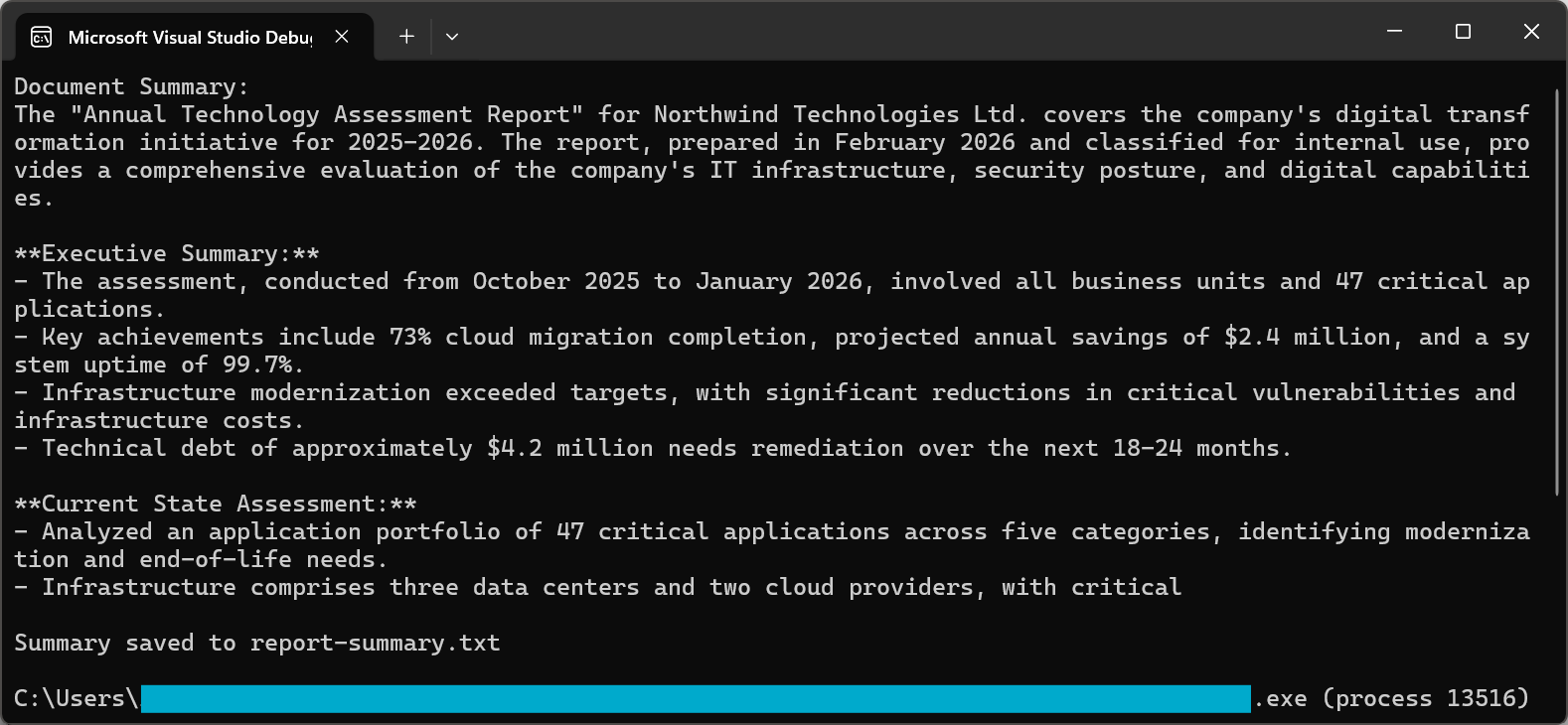
控制台输出
总结过程使用了复杂的提示,以确保高质量的结果。 2026 年的 GPT-5 和 Claude Sonnet 4.5 均大幅改进了指令跟踪功能,确保摘要在捕捉基本信息的同时保持简洁和可读性。
using IronPdf;using IronPdf.AI;using Microsoft.SemanticKernel;using Microsoft.SemanticKernel.Memory;using Microsoft.SemanticKernel.Connectors.OpenAI;// Synthesize insights across multiple related documents (e.g., quarterly reports into annual summary)// Azure OpenAI configurationstring azureEndpoint = "https://your-resource.openai.azure.com/";string apiKey = "your-azure-api-key";string chatDeployment = "gpt-4o";string embeddingDeployment = "text-embedding-ada-002";// Initialize Semantic Kernelvar kernel = Kernel.CreateBuilder() .AddAzureOpenAITextEmbeddingGeneration(embeddingDeployment, azureEndpoint, apiKey) .AddAzureOpenAIChatCompletion(chatDeployment, azureEndpoint, apiKey) .Build();var memory = new MemoryBuilder() .WithMemoryStore(new VolatileMemoryStore()) .WithAzureOpenAITextEmbeddingGeneration(embeddingDeployment, azureEndpoint, apiKey) .Build();IronDocumentAI.Initialize(kernel, memory);// Define documents to synthesizestring[] documentPaths = { "Q1-report.pdf", "Q2-report.pdf", "Q3-report.pdf", "Q4-report.pdf"};var documentSummaries = new List<string>();// Summarize each documentforeach (string path in documentPaths){ var pdf = PdfDocument.FromFile(path); string summary = await pdf.Summarize(); documentSummaries.Add($"=== {Path.GetFileName(path)} ===\n{summary}");Console.WriteLine($"Processed: {path}");}// Combine and synthesize across all documentsstring combinedSummaries = string.Join("\n\n", documentSummaries);var synthesisDoc = PdfDocument.FromFile(documentPaths[0]);string synthesisQuery = @"Based on the quarterly summaries below, provide an annual synthesis:ll trends across quarterschievements and challengesover-year patternss:inedSummaries;string synthesis = await synthesisDoc.Query(synthesisQuery);Console.WriteLine("\n=== AnnualSynthesis ===");Console.WriteLine(synthesis);File.WriteAllText("annual-synthesis.txt", synthesis);
using IronPdf;
using IronPdf.AI;
using Microsoft.SemanticKernel;
using Microsoft.SemanticKernel.Memory;
using Microsoft.SemanticKernel.Connectors.OpenAI;

// Synthesize insights across multiple related documents (e.g., quarterly reports into annual summary)

// Azure OpenAI configuration
string azureEndpoint = "https://your-resource.openai.azure.com/";
string apiKey = "your-azure-api-key";
string chatDeployment = "gpt-4o";
string embeddingDeployment = "text-embedding-ada-002";

// Initialize Semantic Kernel
var kernel = Kernel.CreateBuilder()
    .AddAzureOpenAITextEmbeddingGeneration(embeddingDeployment, azureEndpoint, apiKey)
    .AddAzureOpenAIChatCompletion(chatDeployment, azureEndpoint, apiKey)
    .Build();

var memory = new MemoryBuilder()
    .WithMemoryStore(new VolatileMemoryStore())
    .WithAzureOpenAITextEmbeddingGeneration(embeddingDeployment, azureEndpoint, apiKey)
    .Build();

IronDocumentAI.Initialize(kernel, memory);

// Define documents to synthesize
string[] documentPaths = {
    "Q1-report.pdf",
    "Q2-report.pdf",
    "Q3-report.pdf",
    "Q4-report.pdf"
};

var documentSummaries = new List<string>();

// Summarize each document
foreach (string path in documentPaths)
{
    var pdf = PdfDocument.FromFile(path);
    string summary = await pdf.Summarize();
    documentSummaries.Add($"=== {Path.GetFileName(path)} ===\n{summary}");
    Console.WriteLine($"Processed: {path}");
}

// Combine and synthesize across all documents
string combinedSummaries = string.Join("\n\n", documentSummaries);

var synthesisDoc = PdfDocument.FromFile(documentPaths[0]);

string synthesisQuery = @"Based on the quarterly summaries below, provide an annual synthesis:
ll trends across quarters
chievements and challenges
over-year patterns

s:
inedSummaries;

string synthesis = await synthesisDoc.Query(synthesisQuery);

Console.WriteLine("\n=== Annual Synthesis ===");
Console.WriteLine(synthesis);

File.WriteAllText("annual-synthesis.txt", synthesis);
ImportsIronPdfImportsIronPdf.AIImportsMicrosoft.SemanticKernelImportsMicrosoft.SemanticKernel.MemoryImportsMicrosoft.SemanticKernel.Connectors.OpenAIImportsSystem.IO' Synthesize insights across multiple related documents (e.g., quarterly reports into annual summary)' Azure OpenAI configurationDim azureEndpoint AsString = "https://your-resource.openai.azure.com/"Dim apiKey AsString = "your-azure-api-key"Dim chatDeployment AsString = "gpt-4o"Dim embeddingDeployment AsString = "text-embedding-ada-002"' Initialize Semantic KernelDim kernel = Kernel.CreateBuilder() _ .AddAzureOpenAITextEmbeddingGeneration(embeddingDeployment, azureEndpoint, apiKey) _ .AddAzureOpenAIChatCompletion(chatDeployment, azureEndpoint, apiKey) _ .Build()Dim memory = New MemoryBuilder() _ .WithMemoryStore(New VolatileMemoryStore()) _ .WithAzureOpenAITextEmbeddingGeneration(embeddingDeployment, azureEndpoint, apiKey) _ .Build()IronDocumentAI.Initialize(kernel, memory)' Define documents to synthesizeDim documentPaths AsString() = { "Q1-report.pdf", "Q2-report.pdf", "Q3-report.pdf", "Q4-report.pdf"}Dim documentSummaries = New List(OfString)()' Summarize each documentFor Each path AsStringIn documentPaths Dim pdf = PdfDocument.FromFile(path) Dim summary AsString = Await pdf.Summarize() documentSummaries.Add($"=== {Path.GetFileName(path)} ==={vbCrLf}{summary}")Console.WriteLine($"Processed: {path}")Next' Combine and synthesize across all documentsDim combinedSummaries AsString = String.Join(vbCrLf & vbCrLf, documentSummaries)Dim synthesisDoc = PdfDocument.FromFile(documentPaths(0))Dim synthesisQuery AsString = "Based on the quarterly summaries below, provide an annual synthesis:" & vbCrLf & "Overall trends across quarters" & vbCrLf & "Key achievements and challenges" & vbCrLf & "Year-over-year patterns" & vbCrLf & vbCrLf & combinedSummariesDim synthesis AsString = Await synthesisDoc.Query(synthesisQuery)Console.WriteLine(vbCrLf & "=== Annual Synthesis ===")Console.WriteLine(synthesis)File.WriteAllText("annual-synthesis.txt", synthesis)
Imports IronPdf
Imports IronPdf.AI
Imports Microsoft.SemanticKernel
Imports Microsoft.SemanticKernel.Memory
Imports Microsoft.SemanticKernel.Connectors.OpenAI
Imports System.IO

' Synthesize insights across multiple related documents (e.g., quarterly reports into annual summary)

' Azure OpenAI configuration
Dim azureEndpoint As String = "https://your-resource.openai.azure.com/"
Dim apiKey As String = "your-azure-api-key"
Dim chatDeployment As String = "gpt-4o"
Dim embeddingDeployment As String = "text-embedding-ada-002"

' Initialize Semantic Kernel
Dim kernel = Kernel.CreateBuilder() _
    .AddAzureOpenAITextEmbeddingGeneration(embeddingDeployment, azureEndpoint, apiKey) _
    .AddAzureOpenAIChatCompletion(chatDeployment, azureEndpoint, apiKey) _
    .Build()

Dim memory = New MemoryBuilder() _
    .WithMemoryStore(New VolatileMemoryStore()) _
    .WithAzureOpenAITextEmbeddingGeneration(embeddingDeployment, azureEndpoint, apiKey) _
    .Build()

IronDocumentAI.Initialize(kernel, memory)

' Define documents to synthesize
Dim documentPaths As String() = {
    "Q1-report.pdf",
    "Q2-report.pdf",
    "Q3-report.pdf",
    "Q4-report.pdf"
}

Dim documentSummaries = New List(Of String)()

' Summarize each document
For Each path As String In documentPaths
    Dim pdf = PdfDocument.FromFile(path)
    Dim summary As String = Await pdf.Summarize()
    documentSummaries.Add($"=== {Path.GetFileName(path)} ==={vbCrLf}{summary}")
    Console.WriteLine($"Processed: {path}")
Next

' Combine and synthesize across all documents
Dim combinedSummaries As String = String.Join(vbCrLf & vbCrLf, documentSummaries)

Dim synthesisDoc = PdfDocument.FromFile(documentPaths(0))

Dim synthesisQuery As String = "Based on the quarterly summaries below, provide an annual synthesis:" & vbCrLf &
    "Overall trends across quarters" & vbCrLf &
    "Key achievements and challenges" & vbCrLf &
    "Year-over-year patterns" & vbCrLf & vbCrLf &
    combinedSummaries

Dim synthesis As String = Await synthesisDoc.Query(synthesisQuery)

Console.WriteLine(vbCrLf & "=== Annual Synthesis ===")
Console.WriteLine(synthesis)

File.WriteAllText("annual-synthesis.txt", synthesis)
using IronPdf;using IronPdf.AI;using Microsoft.SemanticKernel;using Microsoft.SemanticKernel.Memory;using Microsoft.SemanticKernel.Connectors.OpenAI;// Generate executive summary from strategic documents for C-suite leadership// Azure OpenAI configurationstring azureEndpoint = "https://your-resource.openai.azure.com/";string apiKey = "your-azure-api-key";string chatDeployment = "gpt-4o";string embeddingDeployment = "text-embedding-ada-002";// Initialize Semantic Kernelvar kernel = Kernel.CreateBuilder() .AddAzureOpenAITextEmbeddingGeneration(embeddingDeployment, azureEndpoint, apiKey) .AddAzureOpenAIChatCompletion(chatDeployment, azureEndpoint, apiKey) .Build();var memory = new MemoryBuilder() .WithMemoryStore(new VolatileMemoryStore()) .WithAzureOpenAITextEmbeddingGeneration(embeddingDeployment, azureEndpoint, apiKey) .Build();IronDocumentAI.Initialize(kernel, memory);var pdf = PdfDocument.FromFile("strategic-plan.pdf");string executiveQuery = @"Create an executive summary for C-suite leadership. Include:cisions Required:**ny decisions needing executive approvalal Findings:**5 most important findings (bullet points)ial Impact:**e/cost implications if mentionedssessment:**riority risks identifiedended Actions:**ate next stepser 500 words. Use business language appropriate for board presentation.";string executiveSummary = await pdf.Query(executiveQuery);File.WriteAllText("executive-summary.txt", executiveSummary);Console.WriteLine("Executive summary saved to executive-summary.txt");
using IronPdf;
using IronPdf.AI;
using Microsoft.SemanticKernel;
using Microsoft.SemanticKernel.Memory;
using Microsoft.SemanticKernel.Connectors.OpenAI;

// Generate executive summary from strategic documents for C-suite leadership

// Azure OpenAI configuration
string azureEndpoint = "https://your-resource.openai.azure.com/";
string apiKey = "your-azure-api-key";
string chatDeployment = "gpt-4o";
string embeddingDeployment = "text-embedding-ada-002";

// Initialize Semantic Kernel
var kernel = Kernel.CreateBuilder()
    .AddAzureOpenAITextEmbeddingGeneration(embeddingDeployment, azureEndpoint, apiKey)
    .AddAzureOpenAIChatCompletion(chatDeployment, azureEndpoint, apiKey)
    .Build();

var memory = new MemoryBuilder()
    .WithMemoryStore(new VolatileMemoryStore())
    .WithAzureOpenAITextEmbeddingGeneration(embeddingDeployment, azureEndpoint, apiKey)
    .Build();

IronDocumentAI.Initialize(kernel, memory);

var pdf = PdfDocument.FromFile("strategic-plan.pdf");

string executiveQuery = @"Create an executive summary for C-suite leadership. Include:

cisions Required:**
ny decisions needing executive approval

al Findings:**
5 most important findings (bullet points)

ial Impact:**
e/cost implications if mentioned

ssessment:**
riority risks identified

ended Actions:**
ate next steps

er 500 words. Use business language appropriate for board presentation.";

string executiveSummary = await pdf.Query(executiveQuery);

File.WriteAllText("executive-summary.txt", executiveSummary);
Console.WriteLine("Executive summary saved to executive-summary.txt");
ImportsIronPdfImportsIronPdf.AIImportsMicrosoft.SemanticKernelImportsMicrosoft.SemanticKernel.MemoryImportsMicrosoft.SemanticKernel.Connectors.OpenAI' Generate executive summary from strategic documents for C-suite leadership' Azure OpenAI configurationDim azureEndpoint AsString = "https://your-resource.openai.azure.com/"Dim apiKey AsString = "your-azure-api-key"Dim chatDeployment AsString = "gpt-4o"Dim embeddingDeployment AsString = "text-embedding-ada-002"' Initialize Semantic KernelDim kernel = Kernel.CreateBuilder() _ .AddAzureOpenAITextEmbeddingGeneration(embeddingDeployment, azureEndpoint, apiKey) _ .AddAzureOpenAIChatCompletion(chatDeployment, azureEndpoint, apiKey) _ .Build()Dim memory = New MemoryBuilder() _ .WithMemoryStore(New VolatileMemoryStore()) _ .WithAzureOpenAITextEmbeddingGeneration(embeddingDeployment, azureEndpoint, apiKey) _ .Build()IronDocumentAI.Initialize(kernel, memory)Dim pdf = PdfDocument.FromFile("strategic-plan.pdf")Dim executiveQuery AsString = "Create an executive summary for C-suite leadership. Include:cisions Required:**ny decisions needing executive approvalal Findings:**5 most important findings (bullet points)ial Impact:**e/cost implications if mentionedssessment:**riority risks identifiedended Actions:**ate next stepser 500 words. Use business language appropriate for board presentation."Dim executiveSummary AsString = Await pdf.Query(executiveQuery)File.WriteAllText("executive-summary.txt", executiveSummary)Console.WriteLine("Executive summary saved to executive-summary.txt")
Imports IronPdf
Imports IronPdf.AI
Imports Microsoft.SemanticKernel
Imports Microsoft.SemanticKernel.Memory
Imports Microsoft.SemanticKernel.Connectors.OpenAI

' Generate executive summary from strategic documents for C-suite leadership

' Azure OpenAI configuration
Dim azureEndpoint As String = "https://your-resource.openai.azure.com/"
Dim apiKey As String = "your-azure-api-key"
Dim chatDeployment As String = "gpt-4o"
Dim embeddingDeployment As String = "text-embedding-ada-002"

' Initialize Semantic Kernel
Dim kernel = Kernel.CreateBuilder() _
    .AddAzureOpenAITextEmbeddingGeneration(embeddingDeployment, azureEndpoint, apiKey) _
    .AddAzureOpenAIChatCompletion(chatDeployment, azureEndpoint, apiKey) _
    .Build()

Dim memory = New MemoryBuilder() _
    .WithMemoryStore(New VolatileMemoryStore()) _
    .WithAzureOpenAITextEmbeddingGeneration(embeddingDeployment, azureEndpoint, apiKey) _
    .Build()

IronDocumentAI.Initialize(kernel, memory)

Dim pdf = PdfDocument.FromFile("strategic-plan.pdf")

Dim executiveQuery As String = "Create an executive summary for C-suite leadership. Include:

cisions Required:**
ny decisions needing executive approval

al Findings:**
5 most important findings (bullet points)

ial Impact:**
e/cost implications if mentioned

ssessment:**
riority risks identified

ended Actions:**
ate next steps

er 500 words. Use business language appropriate for board presentation."

Dim executiveSummary As String = Await pdf.Query(executiveQuery)

File.WriteAllText("executive-summary.txt", executiveSummary)
Console.WriteLine("Executive summary saved to executive-summary.txt")
using IronPdf;using IronPdf.AI;using Microsoft.SemanticKernel;using Microsoft.SemanticKernel.Memory;using Microsoft.SemanticKernel.Connectors.OpenAI;using System.Text.Json;// Extract structured research metadata from academic papers// Azure OpenAI configurationstring azureEndpoint = "https://your-resource.openai.azure.com/";string apiKey = "your-azure-api-key";string chatDeployment = "gpt-4o";string embeddingDeployment = "text-embedding-ada-002";// Initialize Semantic Kernelvar kernel = Kernel.CreateBuilder() .AddAzureOpenAITextEmbeddingGeneration(embeddingDeployment, azureEndpoint, apiKey) .AddAzureOpenAIChatCompletion(chatDeployment, azureEndpoint, apiKey) .Build();var memory = new MemoryBuilder() .WithMemoryStore(new VolatileMemoryStore()) .WithAzureOpenAITextEmbeddingGeneration(embeddingDeployment, azureEndpoint, apiKey) .Build();IronDocumentAI.Initialize(kernel, memory);var pdf = PdfDocument.FromFile("research-paper.pdf");// Define JSON schema for research paper extractionstring researchQuery = @"Extract structured information from this research paper. Return JSON:tle"": ""string"",thors"": [""string""],stitution"": ""string"",blicationDate"": ""string"",stract"": ""string"",searchQuestion"": ""string"",thodology"": {""type"": ""Quantitative|Qualitative|Mixed Methods"",""approach"": ""string"",""sampleSize"": ""string"",""dataCollection"": ""string""yFindings"": [{ ""finding"": ""string"", ""significance"": ""string"", ""confidence"": ""High|Medium|Low""}mitations"": [""string""],tureWork"": [""string""],ywords"": [""string""] extracting verifiable claims and noting uncertainty.NLY valid JSON.";string extractionResult = await pdf.Query(researchQuery);try{ var research = JsonSerializer.Deserialize<JsonElement>(extractionResult); string formatted = JsonSerializer.Serialize(research, new JsonSerializerOptions { WriteIndented = true });Console.WriteLine("Research Paper Extraction:");Console.WriteLine(formatted);File.WriteAllText("research-extraction.json", formatted); // Display key findings with confidence levelsConsole.WriteLine("\n=== Key Findings ==="); foreach (var finding in research.GetProperty("keyFindings").EnumerateArray()) { string confidence = finding.GetProperty("confidence").GetString() ?? "Unknown";Console.WriteLine($"[{confidence}] {finding.GetProperty("finding")}"); }}catch (JsonException){Console.WriteLine("Unable to parse research extraction");File.WriteAllText("research-raw.txt", extractionResult);}
using IronPdf;
using IronPdf.AI;
using Microsoft.SemanticKernel;
using Microsoft.SemanticKernel.Memory;
using Microsoft.SemanticKernel.Connectors.OpenAI;
using System.Text.Json;

// Extract structured research metadata from academic papers

// Azure OpenAI configuration
string azureEndpoint = "https://your-resource.openai.azure.com/";
string apiKey = "your-azure-api-key";
string chatDeployment = "gpt-4o";
string embeddingDeployment = "text-embedding-ada-002";

// Initialize Semantic Kernel
var kernel = Kernel.CreateBuilder()
    .AddAzureOpenAITextEmbeddingGeneration(embeddingDeployment, azureEndpoint, apiKey)
    .AddAzureOpenAIChatCompletion(chatDeployment, azureEndpoint, apiKey)
    .Build();

var memory = new MemoryBuilder()
    .WithMemoryStore(new VolatileMemoryStore())
    .WithAzureOpenAITextEmbeddingGeneration(embeddingDeployment, azureEndpoint, apiKey)
    .Build();

IronDocumentAI.Initialize(kernel, memory);

var pdf = PdfDocument.FromFile("research-paper.pdf");

// Define JSON schema for research paper extraction
string researchQuery = @"Extract structured information from this research paper. Return JSON:

tle"": ""string"",
thors"": [""string""],
stitution"": ""string"",
blicationDate"": ""string"",
stract"": ""string"",
searchQuestion"": ""string"",
thodology"": {
""type"": ""Quantitative|Qualitative|Mixed Methods"",
""approach"": ""string"",
""sampleSize"": ""string"",
""dataCollection"": ""string""

yFindings"": [
{
    ""finding"": ""string"",
    ""significance"": ""string"",
    ""confidence"": ""High|Medium|Low""
}

mitations"": [""string""],
tureWork"": [""string""],
ywords"": [""string""]


 extracting verifiable claims and noting uncertainty.
NLY valid JSON.";

string extractionResult = await pdf.Query(researchQuery);

try
{
    var research = JsonSerializer.Deserialize<JsonElement>(extractionResult);
    string formatted = JsonSerializer.Serialize(research, new JsonSerializerOptions { WriteIndented = true });

    Console.WriteLine("Research Paper Extraction:");
    Console.WriteLine(formatted);

    File.WriteAllText("research-extraction.json", formatted);

    // Display key findings with confidence levels
    Console.WriteLine("\n=== Key Findings ===");
    foreach (var finding in research.GetProperty("keyFindings").EnumerateArray())
    {
        string confidence = finding.GetProperty("confidence").GetString() ?? "Unknown";
        Console.WriteLine($"[{confidence}] {finding.GetProperty("finding")}");
    }
}
catch (JsonException)
{
    Console.WriteLine("Unable to parse research extraction");
    File.WriteAllText("research-raw.txt", extractionResult);
}
ImportsIronPdfImportsIronPdf.AIImportsMicrosoft.SemanticKernelImportsMicrosoft.SemanticKernel.MemoryImportsMicrosoft.SemanticKernel.Connectors.OpenAIImportsSystem.Text.Json' Extract structured research metadata from academic papers' Azure OpenAI configurationDim azureEndpoint AsString = "https://your-resource.openai.azure.com/"Dim apiKey AsString = "your-azure-api-key"Dim chatDeployment AsString = "gpt-4o"Dim embeddingDeployment AsString = "text-embedding-ada-002"' Initialize Semantic KernelDim kernel = Kernel.CreateBuilder() _ .AddAzureOpenAITextEmbeddingGeneration(embeddingDeployment, azureEndpoint, apiKey) _ .AddAzureOpenAIChatCompletion(chatDeployment, azureEndpoint, apiKey) _ .Build()Dim memory = New MemoryBuilder() _ .WithMemoryStore(New VolatileMemoryStore()) _ .WithAzureOpenAITextEmbeddingGeneration(embeddingDeployment, azureEndpoint, apiKey) _ .Build()IronDocumentAI.Initialize(kernel, memory)Dim pdf = PdfDocument.FromFile("research-paper.pdf")' Define JSON schema for research paper extractionDim researchQuery AsString = "Extract structured information from this research paper. Return JSON:tle"": ""string"",thors"": [""string""],stitution"": ""string"",blicationDate"": ""string"",stract"": ""string"",searchQuestion"": ""string"",thodology"": {""type"": ""Quantitative|Qualitative|Mixed Methods"",""approach"": ""string"",""sampleSize"": ""string"",""dataCollection"": ""string""yFindings"": [{ ""finding"": ""string"", ""significance"": ""string"", ""confidence"": ""High|Medium|Low""}mitations"": [""string""],tureWork"": [""string""],ywords"": [""string""] extracting verifiable claims and noting uncertainty.NLY valid JSON."Dim extractionResult AsString = Await pdf.Query(researchQuery)Try Dim research = JsonSerializer.Deserialize(OfJsonElement)(extractionResult) Dim formatted AsString = JsonSerializer.Serialize(research, New JsonSerializerOptionsWith {.WriteIndented = True})Console.WriteLine("Research Paper Extraction:")Console.WriteLine(formatted)File.WriteAllText("research-extraction.json", formatted) ' Display key findings with confidence levelsConsole.WriteLine(vbCrLf & "=== Key Findings ===") For Each finding In research.GetProperty("keyFindings").EnumerateArray() Dim confidence AsString = finding.GetProperty("confidence").GetString() OrElse"Unknown"Console.WriteLine($"[{confidence}] {finding.GetProperty("finding")}") NextCatch ex AsJsonExceptionConsole.WriteLine("Unable to parse research extraction")File.WriteAllText("research-raw.txt", extractionResult)EndTry
Imports IronPdf
Imports IronPdf.AI
Imports Microsoft.SemanticKernel
Imports Microsoft.SemanticKernel.Memory
Imports Microsoft.SemanticKernel.Connectors.OpenAI
Imports System.Text.Json

' Extract structured research metadata from academic papers

' Azure OpenAI configuration
Dim azureEndpoint As String = "https://your-resource.openai.azure.com/"
Dim apiKey As String = "your-azure-api-key"
Dim chatDeployment As String = "gpt-4o"
Dim embeddingDeployment As String = "text-embedding-ada-002"

' Initialize Semantic Kernel
Dim kernel = Kernel.CreateBuilder() _
    .AddAzureOpenAITextEmbeddingGeneration(embeddingDeployment, azureEndpoint, apiKey) _
    .AddAzureOpenAIChatCompletion(chatDeployment, azureEndpoint, apiKey) _
    .Build()

Dim memory = New MemoryBuilder() _
    .WithMemoryStore(New VolatileMemoryStore()) _
    .WithAzureOpenAITextEmbeddingGeneration(embeddingDeployment, azureEndpoint, apiKey) _
    .Build()

IronDocumentAI.Initialize(kernel, memory)

Dim pdf = PdfDocument.FromFile("research-paper.pdf")

' Define JSON schema for research paper extraction
Dim researchQuery As String = "Extract structured information from this research paper. Return JSON:

tle"": ""string"",
thors"": [""string""],
stitution"": ""string"",
blicationDate"": ""string"",
stract"": ""string"",
searchQuestion"": ""string"",
thodology"": {
""type"": ""Quantitative|Qualitative|Mixed Methods"",
""approach"": ""string"",
""sampleSize"": ""string"",
""dataCollection"": ""string""

yFindings"": [
{
    ""finding"": ""string"",
    ""significance"": ""string"",
    ""confidence"": ""High|Medium|Low""
}

mitations"": [""string""],
tureWork"": [""string""],
ywords"": [""string""]

 extracting verifiable claims and noting uncertainty.
NLY valid JSON."

Dim extractionResult As String = Await pdf.Query(researchQuery)

Try
    Dim research = JsonSerializer.Deserialize(Of JsonElement)(extractionResult)
    Dim formatted As String = JsonSerializer.Serialize(research, New JsonSerializerOptions With {.WriteIndented = True})

    Console.WriteLine("Research Paper Extraction:")
    Console.WriteLine(formatted)

    File.WriteAllText("research-extraction.json", formatted)

    ' Display key findings with confidence levels
    Console.WriteLine(vbCrLf & "=== Key Findings ===")
    For Each finding In research.GetProperty("keyFindings").EnumerateArray()
        Dim confidence As String = finding.GetProperty("confidence").GetString() OrElse "Unknown"
        Console.WriteLine($"[{confidence}] {finding.GetProperty("finding")}")
    Next
Catch ex As JsonException
    Console.WriteLine("Unable to parse research extraction")
    File.WriteAllText("research-raw.txt", extractionResult)
End Try
自定义提示将人工智能驱动的提取从通用工具转变为针对您的特定需求量身定制的专业解决方案。
我最喜欢的这种库是 IronPDF。它允许快速高效地操作 PDF 文件。它还具有许多有价值的功能,比如导出为 PDF/A 格式和数字签名 PDF 文档。
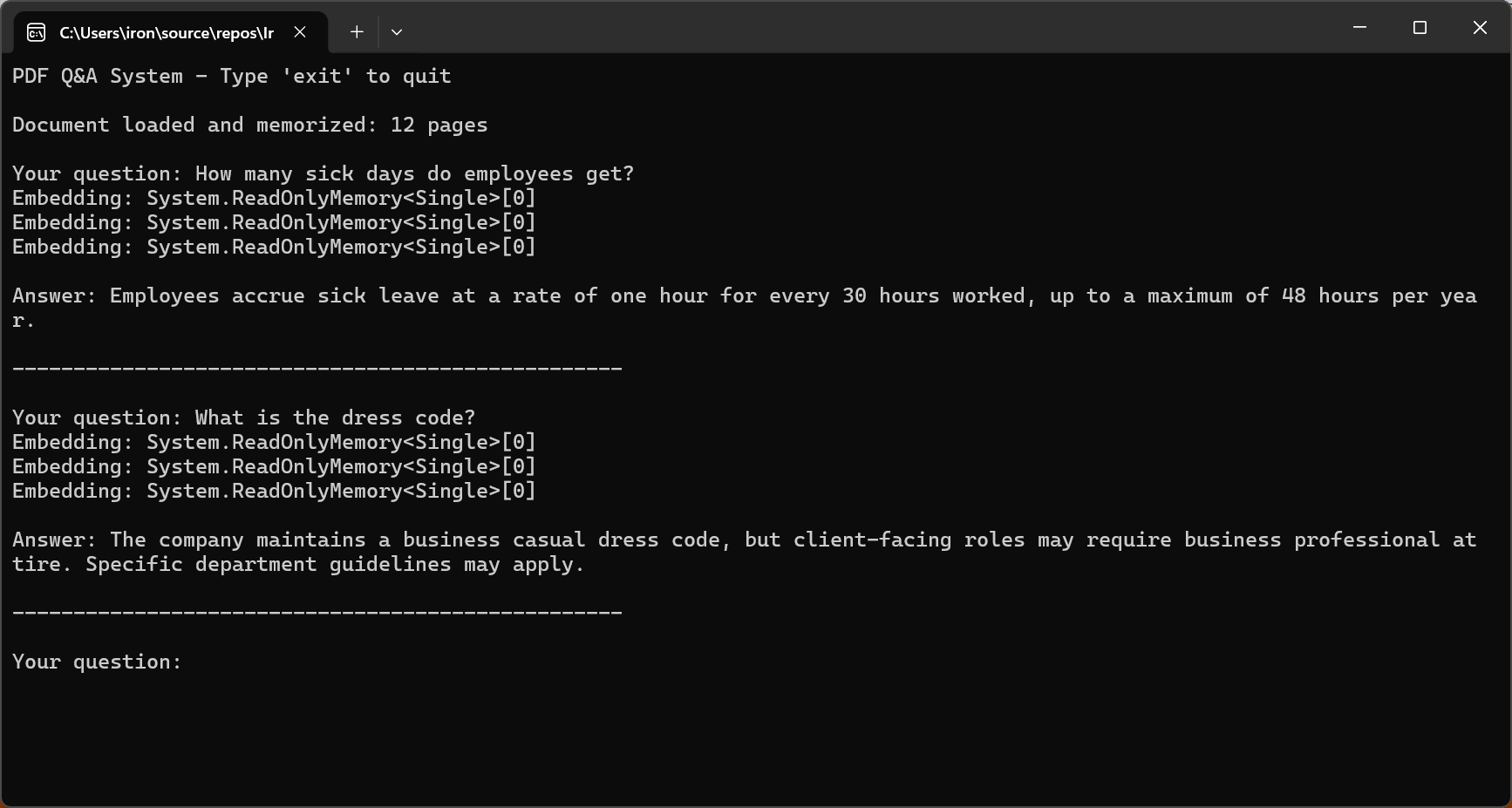
问题解答系统使用户能够与 PDF 文档进行对话式交互,用自然语言提出问题并获得准确的上下文答案。 基本模式包括从 PDF 中提取文本,在提示中将文本与用户的问题相结合,然后请求人工智能给出答案。
输入
代码调用pdf.Query()进入交互循环以回答用户问题。
using IronPdf;using IronPdf.AI;using Microsoft.SemanticKernel;using Microsoft.SemanticKernel.Memory;using Microsoft.SemanticKernel.Connectors.OpenAI;// Interactive Q&A system for querying PDF documents// Azure OpenAI configurationstring azureEndpoint = "https://your-resource.openai.azure.com/";string apiKey = "your-azure-api-key";string chatDeployment = "gpt-4o";string embeddingDeployment = "text-embedding-ada-002";// Initialize Semantic Kernelvar kernel = Kernel.CreateBuilder() .AddAzureOpenAITextEmbeddingGeneration(embeddingDeployment, azureEndpoint, apiKey) .AddAzureOpenAIChatCompletion(chatDeployment, azureEndpoint, apiKey) .Build();var memory = new MemoryBuilder() .WithMemoryStore(new VolatileMemoryStore()) .WithAzureOpenAITextEmbeddingGeneration(embeddingDeployment, azureEndpoint, apiKey) .Build();IronDocumentAI.Initialize(kernel, memory);var pdf = PdfDocument.FromFile("sample-legal-document.pdf");// Memorize document to enable persistent queryingawait pdf.Memorize();Console.WriteLine("PDF Q&A System - Type 'exit' to quit\n");Console.WriteLine($"Document loaded and memorized: {pdf.PageCount} pages\n");// Interactive Q&A loopwhile (true){Console.Write("Your question: "); string? question = Console.ReadLine(); if (string.IsNullOrWhiteSpace(question) || question.ToLower() == "exit") break; string answer = await pdf.Query(question);Console.WriteLine($"\nAnswer: {answer}\n");Console.WriteLine(new string('-', 50) + "\n");}Console.WriteLine("Q&A session ended.");
using IronPdf;
using IronPdf.AI;
using Microsoft.SemanticKernel;
using Microsoft.SemanticKernel.Memory;
using Microsoft.SemanticKernel.Connectors.OpenAI;

// Interactive Q&A system for querying PDF documents

// Azure OpenAI configuration
string azureEndpoint = "https://your-resource.openai.azure.com/";
string apiKey = "your-azure-api-key";
string chatDeployment = "gpt-4o";
string embeddingDeployment = "text-embedding-ada-002";

// Initialize Semantic Kernel
var kernel = Kernel.CreateBuilder()
    .AddAzureOpenAITextEmbeddingGeneration(embeddingDeployment, azureEndpoint, apiKey)
    .AddAzureOpenAIChatCompletion(chatDeployment, azureEndpoint, apiKey)
    .Build();

var memory = new MemoryBuilder()
    .WithMemoryStore(new VolatileMemoryStore())
    .WithAzureOpenAITextEmbeddingGeneration(embeddingDeployment, azureEndpoint, apiKey)
    .Build();

IronDocumentAI.Initialize(kernel, memory);

var pdf = PdfDocument.FromFile("sample-legal-document.pdf");

// Memorize document to enable persistent querying
await pdf.Memorize();

Console.WriteLine("PDF Q&A System - Type 'exit' to quit\n");
Console.WriteLine($"Document loaded and memorized: {pdf.PageCount} pages\n");

// Interactive Q&A loop
while (true)
{
    Console.Write("Your question: ");
    string? question = Console.ReadLine();

    if (string.IsNullOrWhiteSpace(question) || question.ToLower() == "exit")
        break;

    string answer = await pdf.Query(question);

    Console.WriteLine($"\nAnswer: {answer}\n");
    Console.WriteLine(new string('-', 50) + "\n");
}

Console.WriteLine("Q&A session ended.");
ImportsIronPdfImportsIronPdf.AIImportsMicrosoft.SemanticKernelImportsMicrosoft.SemanticKernel.MemoryImportsMicrosoft.SemanticKernel.Connectors.OpenAI' Interactive Q&A system for querying PDF documents' Azure OpenAI configurationDim azureEndpoint AsString = "https://your-resource.openai.azure.com/"Dim apiKey AsString = "your-azure-api-key"Dim chatDeployment AsString = "gpt-4o"Dim embeddingDeployment AsString = "text-embedding-ada-002"' Initialize Semantic KernelDim kernel = Kernel.CreateBuilder() _ .AddAzureOpenAITextEmbeddingGeneration(embeddingDeployment, azureEndpoint, apiKey) _ .AddAzureOpenAIChatCompletion(chatDeployment, azureEndpoint, apiKey) _ .Build()Dim memory = New MemoryBuilder() _ .WithMemoryStore(New VolatileMemoryStore()) _ .WithAzureOpenAITextEmbeddingGeneration(embeddingDeployment, azureEndpoint, apiKey) _ .Build()IronDocumentAI.Initialize(kernel, memory)Dim pdf = PdfDocument.FromFile("sample-legal-document.pdf")' Memorize document to enable persistent queryingAwait pdf.Memorize()Console.WriteLine("PDF Q&A System - Type 'exit' to quit" & vbCrLf)Console.WriteLine($"Document loaded and memorized: {pdf.PageCount} pages" & vbCrLf)' Interactive Q&A loopWhile TrueConsole.Write("Your question: ") Dim question AsString = Console.ReadLine() IfString.IsNullOrWhiteSpace(question) OrElse question.ToLower() = "exit" ThenExitWhile End If Dim answer AsString = Await pdf.Query(question)Console.WriteLine($"{vbCrLf}Answer: {answer}{vbCrLf}")Console.WriteLine(New String("-"c, 50) & vbCrLf)EndWhileConsole.WriteLine("Q&A session ended.")
Imports IronPdf
Imports IronPdf.AI
Imports Microsoft.SemanticKernel
Imports Microsoft.SemanticKernel.Memory
Imports Microsoft.SemanticKernel.Connectors.OpenAI

' Interactive Q&A system for querying PDF documents

' Azure OpenAI configuration
Dim azureEndpoint As String = "https://your-resource.openai.azure.com/"
Dim apiKey As String = "your-azure-api-key"
Dim chatDeployment As String = "gpt-4o"
Dim embeddingDeployment As String = "text-embedding-ada-002"

' Initialize Semantic Kernel
Dim kernel = Kernel.CreateBuilder() _
    .AddAzureOpenAITextEmbeddingGeneration(embeddingDeployment, azureEndpoint, apiKey) _
    .AddAzureOpenAIChatCompletion(chatDeployment, azureEndpoint, apiKey) _
    .Build()

Dim memory = New MemoryBuilder() _
    .WithMemoryStore(New VolatileMemoryStore()) _
    .WithAzureOpenAITextEmbeddingGeneration(embeddingDeployment, azureEndpoint, apiKey) _
    .Build()

IronDocumentAI.Initialize(kernel, memory)

Dim pdf = PdfDocument.FromFile("sample-legal-document.pdf")

' Memorize document to enable persistent querying
Await pdf.Memorize()

Console.WriteLine("PDF Q&A System - Type 'exit' to quit" & vbCrLf)
Console.WriteLine($"Document loaded and memorized: {pdf.PageCount} pages" & vbCrLf)

' Interactive Q&A loop
While True
    Console.Write("Your question: ")
    Dim question As String = Console.ReadLine()

    If String.IsNullOrWhiteSpace(question) OrElse question.ToLower() = "exit" Then
        Exit While
    End If

    Dim answer As String = Await pdf.Query(question)

    Console.WriteLine($"{vbCrLf}Answer: {answer}{vbCrLf}")
    Console.WriteLine(New String("-"c, 50) & vbCrLf)
End While

Console.WriteLine("Q&A session ended.")
控制台输出
2026 年有效问答的关键在于限制人工智能仅根据文档内容进行回答。 GPT-5 的 "安全完成 "训练方法和 Claude Sonnet 4.5 改进的对齐方式大大降低了幻听率。
为上下文窗口对长文档进行分块
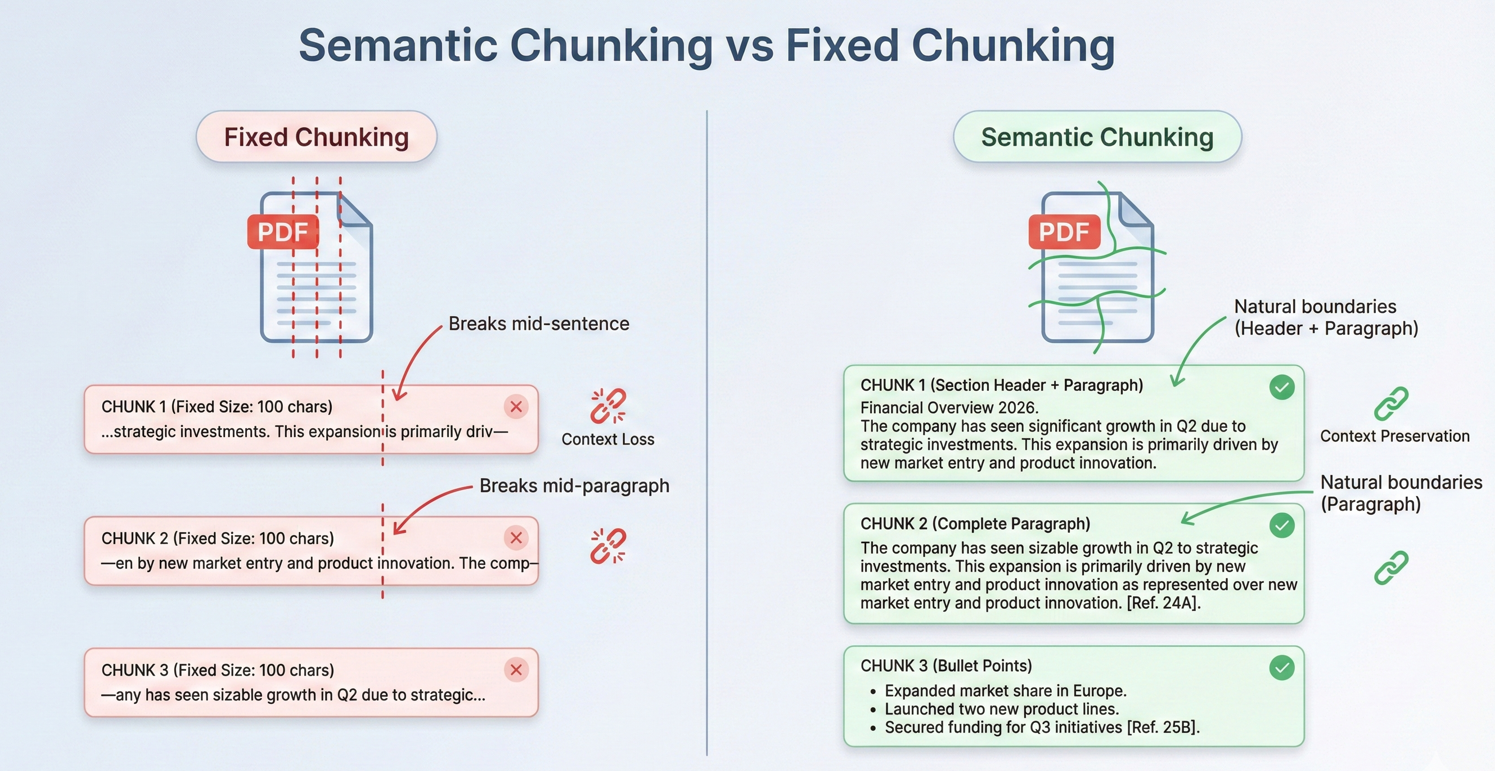
现实世界中的大多数文档都超出了 AI 上下文窗口的范围。 有效的分块策略对于处理这些文档至关重要。 分块是指将文档分成足够小的片段,以适应上下文窗口,同时保持语义的连贯性。
此代码遍历overlapTokens。
using IronPdf;// Split long documents into overlapping chunks for RAG systemsvar pdf = PdfDocument.FromFile("long-document.pdf");// Chunking configurationint maxChunkTokens = 4000; // Leave room for prompts and responsesint overlapTokens = 200; // Overlap for context continuityint approxCharsPerToken = 4; // Rough estimate for tokenizationint maxChunkChars = maxChunkTokens * approxCharsPerToken;int overlapChars = overlapTokens * approxCharsPerToken;var chunks = new List<DocumentChunk>();var currentChunk = new System.Text.StringBuilder();int chunkStartPage = 1;int currentPage = 1;for (int i = 0; i < pdf.PageCount; i++){ string pageText = pdf.Pages[i].Text; currentPage = i + 1; if (currentChunk.Length + pageText.Length > maxChunkChars && currentChunk.Length > 0) { chunks.Add(new DocumentChunk {Text = currentChunk.ToString(),StartPage = chunkStartPage,EndPage = currentPage - 1,ChunkIndex = chunks.Count }); // Create overlap with previous chunk for continuity string overlap = currentChunk.Length > overlapChars ? currentChunk.ToString().Substring(currentChunk.Length - overlapChars) : currentChunk.ToString(); currentChunk.Clear(); currentChunk.Append(overlap); chunkStartPage = currentPage - 1; } currentChunk.AppendLine($"\n--- Page {currentPage} ---\n"); currentChunk.Append(pageText);}if (currentChunk.Length > 0){ chunks.Add(new DocumentChunk {Text = currentChunk.ToString(),StartPage = chunkStartPage,EndPage = currentPage,ChunkIndex = chunks.Count });}Console.WriteLine($"Document chunked into {chunks.Count} segments");foreach (var chunk in chunks){Console.WriteLine($" Chunk {chunk.ChunkIndex + 1}: Pages {chunk.StartPage}-{chunk.EndPage} ({chunk.Text.Length} chars)");}// Save chunk metadata for RAG indexingFile.WriteAllText("chunks-metadata.json", System.Text.Json.JsonSerializer.Serialize( chunks.Select(c => new { c.ChunkIndex, c.StartPage, c.EndPage, Length = c.Text.Length }), new System.Text.Json.JsonSerializerOptions { WriteIndented = true }));ic class DocumentChunkpublic string Text { get; set; } = "";public intStartPage { get; set; }public intEndPage { get; set; }public intChunkIndex { get; set; }
using IronPdf;

// Split long documents into overlapping chunks for RAG systems

var pdf = PdfDocument.FromFile("long-document.pdf");

// Chunking configuration
int maxChunkTokens = 4000;      // Leave room for prompts and responses
int overlapTokens = 200;        // Overlap for context continuity
int approxCharsPerToken = 4;    // Rough estimate for tokenization

int maxChunkChars = maxChunkTokens * approxCharsPerToken;
int overlapChars = overlapTokens * approxCharsPerToken;

var chunks = new List<DocumentChunk>();
var currentChunk = new System.Text.StringBuilder();
int chunkStartPage = 1;
int currentPage = 1;

for (int i = 0; i < pdf.PageCount; i++)
{
    string pageText = pdf.Pages[i].Text;
    currentPage = i + 1;

    if (currentChunk.Length + pageText.Length > maxChunkChars && currentChunk.Length > 0)
    {
        chunks.Add(new DocumentChunk
        {
            Text = currentChunk.ToString(),
            StartPage = chunkStartPage,
            EndPage = currentPage - 1,
            ChunkIndex = chunks.Count
        });

        // Create overlap with previous chunk for continuity
        string overlap = currentChunk.Length > overlapChars
            ? currentChunk.ToString().Substring(currentChunk.Length - overlapChars)
            : currentChunk.ToString();

        currentChunk.Clear();
        currentChunk.Append(overlap);
        chunkStartPage = currentPage - 1;
    }

    currentChunk.AppendLine($"\n--- Page {currentPage} ---\n");
    currentChunk.Append(pageText);
}

if (currentChunk.Length > 0)
{
    chunks.Add(new DocumentChunk
    {
        Text = currentChunk.ToString(),
        StartPage = chunkStartPage,
        EndPage = currentPage,
        ChunkIndex = chunks.Count
    });
}

Console.WriteLine($"Document chunked into {chunks.Count} segments");
foreach (var chunk in chunks)
{
    Console.WriteLine($"  Chunk {chunk.ChunkIndex + 1}: Pages {chunk.StartPage}-{chunk.EndPage} ({chunk.Text.Length} chars)");
}

// Save chunk metadata for RAG indexing
File.WriteAllText("chunks-metadata.json", System.Text.Json.JsonSerializer.Serialize(
    chunks.Select(c => new { c.ChunkIndex, c.StartPage, c.EndPage, Length = c.Text.Length }),
    new System.Text.Json.JsonSerializerOptions { WriteIndented = true }
));


ic class DocumentChunk

public string Text { get; set; } = "";
public int StartPage { get; set; }
public int EndPage { get; set; }
public int ChunkIndex { get; set; }
ImportsIronPdfImportsSystem.IOImportsSystem.TextImportsSystem.Text.Json' Split long documents into overlapping chunks for RAG systemsDim pdf = PdfDocument.FromFile("long-document.pdf")' Chunking configurationDim maxChunkTokens AsInteger = 4000 ' Leave room for prompts and responsesDim overlapTokens AsInteger = 200 ' Overlap for context continuityDim approxCharsPerToken AsInteger = 4 ' Rough estimate for tokenizationDim maxChunkChars AsInteger = maxChunkTokens * approxCharsPerTokenDim overlapChars AsInteger = overlapTokens * approxCharsPerTokenDim chunks As New List(OfDocumentChunk)()Dim currentChunk As New StringBuilder()Dim chunkStartPage AsInteger = 1Dim currentPage AsInteger = 1For i AsInteger = 0 To pdf.PageCount - 1 Dim pageText AsString = pdf.Pages(i).Text currentPage = i + 1 If currentChunk.Length + pageText.Length > maxChunkChars AndAlso currentChunk.Length > 0 Then chunks.Add(New DocumentChunkWith { .Text = currentChunk.ToString(), .StartPage = chunkStartPage, .EndPage = currentPage - 1, .ChunkIndex = chunks.Count }) ' Create overlap with previous chunk for continuity Dim overlap AsString = If(currentChunk.Length > overlapChars, currentChunk.ToString().Substring(currentChunk.Length - overlapChars), currentChunk.ToString()) currentChunk.Clear() currentChunk.Append(overlap) chunkStartPage = currentPage - 1 End If currentChunk.AppendLine(vbCrLf & "--- Page " & currentPage & " ---" & vbCrLf) currentChunk.Append(pageText)NextIf currentChunk.Length > 0 Then chunks.Add(New DocumentChunkWith { .Text = currentChunk.ToString(), .StartPage = chunkStartPage, .EndPage = currentPage, .ChunkIndex = chunks.Count })End IfConsole.WriteLine($"Document chunked into {chunks.Count} segments")For Each chunk In chunksConsole.WriteLine($" Chunk {chunk.ChunkIndex + 1}: Pages {chunk.StartPage}-{chunk.EndPage} ({chunk.Text.Length} chars)")Next' Save chunk metadata for RAG indexingFile.WriteAllText("chunks-metadata.json", JsonSerializer.Serialize( chunks.Select(Function(c) New With {.ChunkIndex = c.ChunkIndex, .StartPage = c.StartPage, .EndPage = c.EndPage, .Length = c.Text.Length}), New JsonSerializerOptionsWith {.WriteIndented = True}))Public Class DocumentChunk Public Property TextAsString = "" Public Property StartPageAsInteger Public Property EndPageAsInteger Public Property ChunkIndexAsIntegerEnd Class
Imports IronPdf
Imports System.IO
Imports System.Text
Imports System.Text.Json

' Split long documents into overlapping chunks for RAG systems

Dim pdf = PdfDocument.FromFile("long-document.pdf")

' Chunking configuration
Dim maxChunkTokens As Integer = 4000      ' Leave room for prompts and responses
Dim overlapTokens As Integer = 200        ' Overlap for context continuity
Dim approxCharsPerToken As Integer = 4    ' Rough estimate for tokenization

Dim maxChunkChars As Integer = maxChunkTokens * approxCharsPerToken
Dim overlapChars As Integer = overlapTokens * approxCharsPerToken

Dim chunks As New List(Of DocumentChunk)()
Dim currentChunk As New StringBuilder()
Dim chunkStartPage As Integer = 1
Dim currentPage As Integer = 1

For i As Integer = 0 To pdf.PageCount - 1
    Dim pageText As String = pdf.Pages(i).Text
    currentPage = i + 1

    If currentChunk.Length + pageText.Length > maxChunkChars AndAlso currentChunk.Length > 0 Then
        chunks.Add(New DocumentChunk With {
            .Text = currentChunk.ToString(),
            .StartPage = chunkStartPage,
            .EndPage = currentPage - 1,
            .ChunkIndex = chunks.Count
        })

        ' Create overlap with previous chunk for continuity
        Dim overlap As String = If(currentChunk.Length > overlapChars,
            currentChunk.ToString().Substring(currentChunk.Length - overlapChars),
            currentChunk.ToString())

        currentChunk.Clear()
        currentChunk.Append(overlap)
        chunkStartPage = currentPage - 1
    End If

    currentChunk.AppendLine(vbCrLf & "--- Page " & currentPage & " ---" & vbCrLf)
    currentChunk.Append(pageText)
Next

If currentChunk.Length > 0 Then
    chunks.Add(New DocumentChunk With {
        .Text = currentChunk.ToString(),
        .StartPage = chunkStartPage,
        .EndPage = currentPage,
        .ChunkIndex = chunks.Count
    })
End If

Console.WriteLine($"Document chunked into {chunks.Count} segments")
For Each chunk In chunks
    Console.WriteLine($"  Chunk {chunk.ChunkIndex + 1}: Pages {chunk.StartPage}-{chunk.EndPage} ({chunk.Text.Length} chars)")
Next

' Save chunk metadata for RAG indexing
File.WriteAllText("chunks-metadata.json", JsonSerializer.Serialize(
    chunks.Select(Function(c) New With {.ChunkIndex = c.ChunkIndex, .StartPage = c.StartPage, .EndPage = c.EndPage, .Length = c.Text.Length}),
    New JsonSerializerOptions With {.WriteIndented = True}
))

Public Class DocumentChunk
    Public Property Text As String = ""
    Public Property StartPage As Integer
    Public Property EndPage As Integer
    Public Property ChunkIndex As Integer
End Class
using IronPdf;using IronPdf.AI;using Microsoft.SemanticKernel;using Microsoft.SemanticKernel.Memory;using Microsoft.SemanticKernel.Connectors.OpenAI;// Retrieval-Augmented Generation (RAG) system for querying across multiple indexed documents// Azure OpenAI configurationstring azureEndpoint = "https://your-resource.openai.azure.com/";string apiKey = "your-azure-api-key";string chatDeployment = "gpt-4o";string embeddingDeployment = "text-embedding-ada-002";// Initialize Semantic Kernelvar kernel = Kernel.CreateBuilder() .AddAzureOpenAITextEmbeddingGeneration(embeddingDeployment, azureEndpoint, apiKey) .AddAzureOpenAIChatCompletion(chatDeployment, azureEndpoint, apiKey) .Build();var memory = new MemoryBuilder() .WithMemoryStore(new VolatileMemoryStore()) .WithAzureOpenAITextEmbeddingGeneration(embeddingDeployment, azureEndpoint, apiKey) .Build();IronDocumentAI.Initialize(kernel, memory);// Index all documents in folderstring[] documentPaths = Directory.GetFiles("documents/", "*.pdf");Console.WriteLine($"Indexing {documentPaths.Length} documents...\n");// Memorize each document (creates embeddings for retrieval)foreach (string path in documentPaths){ var pdf = PdfDocument.FromFile(path); await pdf.Memorize();Console.WriteLine($"Indexed: {Path.GetFileName(path)} ({pdf.PageCount} pages)");}Console.WriteLine("\n=== RAG System Ready ===\n");// Query across all indexed documentsstring query = "What are the key compliance requirements for data retention?";Console.WriteLine($"Query: {query}\n");var searchPdf = PdfDocument.FromFile(documentPaths[0]);string answer = await searchPdf.Query(query);Console.WriteLine($"Answer: {answer}");// Interactive query loopConsole.WriteLine("\n--- Enter questions (type 'exit' to quit) ---\n");while (true){Console.Write("Question: "); string? userQuery = Console.ReadLine(); if (string.IsNullOrWhiteSpace(userQuery) || userQuery.ToLower() == "exit") break; string response = await searchPdf.Query(userQuery);Console.WriteLine($"\nAnswer: {response}\n");}
using IronPdf;
using IronPdf.AI;
using Microsoft.SemanticKernel;
using Microsoft.SemanticKernel.Memory;
using Microsoft.SemanticKernel.Connectors.OpenAI;

// Retrieval-Augmented Generation (RAG) system for querying across multiple indexed documents

// Azure OpenAI configuration
string azureEndpoint = "https://your-resource.openai.azure.com/";
string apiKey = "your-azure-api-key";
string chatDeployment = "gpt-4o";
string embeddingDeployment = "text-embedding-ada-002";

// Initialize Semantic Kernel
var kernel = Kernel.CreateBuilder()
    .AddAzureOpenAITextEmbeddingGeneration(embeddingDeployment, azureEndpoint, apiKey)
    .AddAzureOpenAIChatCompletion(chatDeployment, azureEndpoint, apiKey)
    .Build();

var memory = new MemoryBuilder()
    .WithMemoryStore(new VolatileMemoryStore())
    .WithAzureOpenAITextEmbeddingGeneration(embeddingDeployment, azureEndpoint, apiKey)
    .Build();

IronDocumentAI.Initialize(kernel, memory);

// Index all documents in folder
string[] documentPaths = Directory.GetFiles("documents/", "*.pdf");

Console.WriteLine($"Indexing {documentPaths.Length} documents...\n");

// Memorize each document (creates embeddings for retrieval)
foreach (string path in documentPaths)
{
    var pdf = PdfDocument.FromFile(path);
    await pdf.Memorize();
    Console.WriteLine($"Indexed: {Path.GetFileName(path)} ({pdf.PageCount} pages)");
}

Console.WriteLine("\n=== RAG System Ready ===\n");

// Query across all indexed documents
string query = "What are the key compliance requirements for data retention?";

Console.WriteLine($"Query: {query}\n");

var searchPdf = PdfDocument.FromFile(documentPaths[0]);
string answer = await searchPdf.Query(query);

Console.WriteLine($"Answer: {answer}");

// Interactive query loop
Console.WriteLine("\n--- Enter questions (type 'exit' to quit) ---\n");

while (true)
{
    Console.Write("Question: ");
    string? userQuery = Console.ReadLine();

    if (string.IsNullOrWhiteSpace(userQuery) || userQuery.ToLower() == "exit")
        break;

    string response = await searchPdf.Query(userQuery);
    Console.WriteLine($"\nAnswer: {response}\n");
}
ImportsIronPdfImportsIronPdf.AIImportsMicrosoft.SemanticKernelImportsMicrosoft.SemanticKernel.MemoryImportsMicrosoft.SemanticKernel.Connectors.OpenAIImportsSystem.IO' Retrieval-Augmented Generation (RAG) system for querying across multiple indexed documents' Azure OpenAI configurationDim azureEndpoint AsString = "https://your-resource.openai.azure.com/"Dim apiKey AsString = "your-azure-api-key"Dim chatDeployment AsString = "gpt-4o"Dim embeddingDeployment AsString = "text-embedding-ada-002"' Initialize Semantic KernelDim kernel = Kernel.CreateBuilder() _ .AddAzureOpenAITextEmbeddingGeneration(embeddingDeployment, azureEndpoint, apiKey) _ .AddAzureOpenAIChatCompletion(chatDeployment, azureEndpoint, apiKey) _ .Build()Dim memory = New MemoryBuilder() _ .WithMemoryStore(New VolatileMemoryStore()) _ .WithAzureOpenAITextEmbeddingGeneration(embeddingDeployment, azureEndpoint, apiKey) _ .Build()IronDocumentAI.Initialize(kernel, memory)' Index all documents in folderDim documentPaths AsString() = Directory.GetFiles("documents/", "*.pdf")Console.WriteLine($"Indexing {documentPaths.Length} documents..." & vbCrLf)' Memorize each document (creates embeddings for retrieval)For Each path AsStringIn documentPaths Dim pdf = PdfDocument.FromFile(path)Await pdf.Memorize()Console.WriteLine($"Indexed: {Path.GetFileName(path)} ({pdf.PageCount} pages)")NextConsole.WriteLine(vbCrLf & "=== RAG System Ready ===" & vbCrLf)' Query across all indexed documentsDim query AsString = "What are the key compliance requirements for data retention?"Console.WriteLine($"Query: {query}" & vbCrLf)Dim searchPdf = PdfDocument.FromFile(documentPaths(0))Dim answer AsString = Await searchPdf.Query(query)Console.WriteLine($"Answer: {answer}")' Interactive query loopConsole.WriteLine(vbCrLf & "--- Enter questions (type 'exit' to quit) ---" & vbCrLf)While TrueConsole.Write("Question: ") Dim userQuery AsString = Console.ReadLine() IfString.IsNullOrWhiteSpace(userQuery) OrElse userQuery.ToLower() = "exit" ThenExitWhile End If Dim response AsString = Await searchPdf.Query(userQuery)Console.WriteLine(vbCrLf & $"Answer: {response}" & vbCrLf)EndWhile
Imports IronPdf
Imports IronPdf.AI
Imports Microsoft.SemanticKernel
Imports Microsoft.SemanticKernel.Memory
Imports Microsoft.SemanticKernel.Connectors.OpenAI
Imports System.IO

' Retrieval-Augmented Generation (RAG) system for querying across multiple indexed documents

' Azure OpenAI configuration
Dim azureEndpoint As String = "https://your-resource.openai.azure.com/"
Dim apiKey As String = "your-azure-api-key"
Dim chatDeployment As String = "gpt-4o"
Dim embeddingDeployment As String = "text-embedding-ada-002"

' Initialize Semantic Kernel
Dim kernel = Kernel.CreateBuilder() _
    .AddAzureOpenAITextEmbeddingGeneration(embeddingDeployment, azureEndpoint, apiKey) _
    .AddAzureOpenAIChatCompletion(chatDeployment, azureEndpoint, apiKey) _
    .Build()

Dim memory = New MemoryBuilder() _
    .WithMemoryStore(New VolatileMemoryStore()) _
    .WithAzureOpenAITextEmbeddingGeneration(embeddingDeployment, azureEndpoint, apiKey) _
    .Build()

IronDocumentAI.Initialize(kernel, memory)

' Index all documents in folder
Dim documentPaths As String() = Directory.GetFiles("documents/", "*.pdf")

Console.WriteLine($"Indexing {documentPaths.Length} documents..." & vbCrLf)

' Memorize each document (creates embeddings for retrieval)
For Each path As String In documentPaths
    Dim pdf = PdfDocument.FromFile(path)
    Await pdf.Memorize()
    Console.WriteLine($"Indexed: {Path.GetFileName(path)} ({pdf.PageCount} pages)")
Next

Console.WriteLine(vbCrLf & "=== RAG System Ready ===" & vbCrLf)

' Query across all indexed documents
Dim query As String = "What are the key compliance requirements for data retention?"

Console.WriteLine($"Query: {query}" & vbCrLf)

Dim searchPdf = PdfDocument.FromFile(documentPaths(0))
Dim answer As String = Await searchPdf.Query(query)

Console.WriteLine($"Answer: {answer}")

' Interactive query loop
Console.WriteLine(vbCrLf & "--- Enter questions (type 'exit' to quit) ---" & vbCrLf)

While True
    Console.Write("Question: ")
    Dim userQuery As String = Console.ReadLine()

    If String.IsNullOrWhiteSpace(userQuery) OrElse userQuery.ToLower() = "exit" Then
        Exit While
    End If

    Dim response As String = Await searchPdf.Query(userQuery)
    Console.WriteLine(vbCrLf & $"Answer: {response}" & vbCrLf)
End While
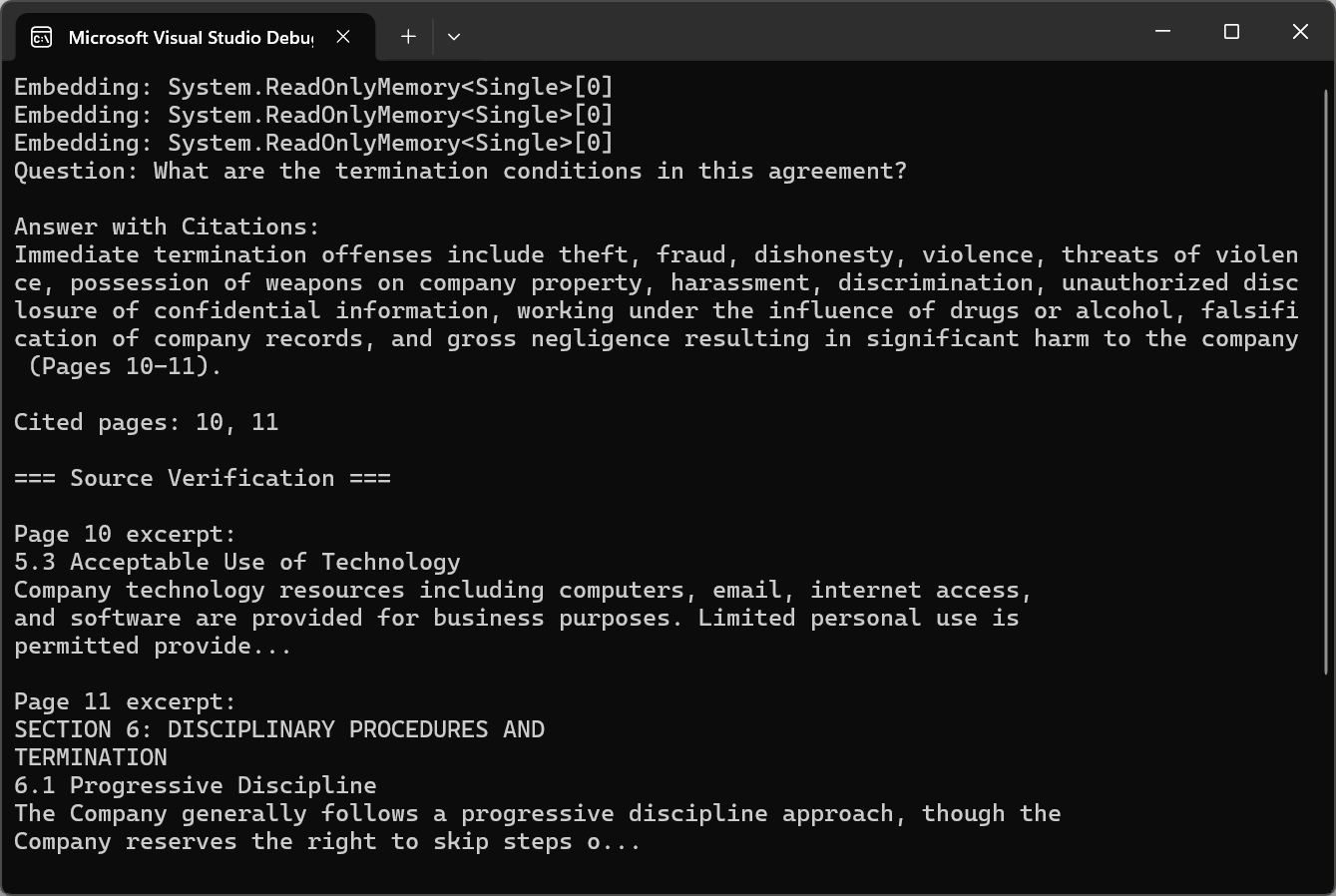
using IronPdf;using IronPdf.AI;using Microsoft.SemanticKernel;using Microsoft.SemanticKernel.Memory;using Microsoft.SemanticKernel.Connectors.OpenAI;using System.Text.RegularExpressions;// Answer questions with page citations and source verification// Azure OpenAI configurationstring azureEndpoint = "https://your-resource.openai.azure.com/";string apiKey = "your-azure-api-key";string chatDeployment = "gpt-4o";string embeddingDeployment = "text-embedding-ada-002";// Initialize Semantic Kernelvar kernel = Kernel.CreateBuilder() .AddAzureOpenAITextEmbeddingGeneration(embeddingDeployment, azureEndpoint, apiKey) .AddAzureOpenAIChatCompletion(chatDeployment, azureEndpoint, apiKey) .Build();var memory = new MemoryBuilder() .WithMemoryStore(new VolatileMemoryStore()) .WithAzureOpenAITextEmbeddingGeneration(embeddingDeployment, azureEndpoint, apiKey) .Build();IronDocumentAI.Initialize(kernel, memory);var pdf = PdfDocument.FromFile("sample-legal-document.pdf");await pdf.Memorize();string question = "What are the termination conditions in this agreement?";// Request citations in querystring citationQuery = $@"{question}T: Include specific page citations in your answer using the format (Page X) or (Pages X-Y).e information that appears in the document.";string answerWithCitations = await pdf.Query(citationQuery);Console.WriteLine("Question: " + question);Console.WriteLine("\nAnswer with Citations:");Console.WriteLine(answerWithCitations);// Extract cited page numbers using regexvar citedPages = ExtractCitedPages(answerWithCitations);Console.WriteLine($"\nCited pages: {string.Join(", ", citedPages)}");// Verify citations with page excerptsConsole.WriteLine("\n=== Source Verification ===");foreach (int pageNum in citedPages.Take(3)){ if (pageNum <= pdf.PageCount && pageNum > 0) { string pageText = pdf.Pages[pageNum - 1].Text; string excerpt = pageText.Length > 200 ? pageText.Substring(0, 200) + "..." : pageText;Console.WriteLine($"\nPage {pageNum} excerpt:\n{excerpt}"); }}// Extract page numbers from citation format (Page X) or (Pages X-Y)List<int> ExtractCitedPages(string text){ var pages = new HashSet<int>(); var matches = Regex.Matches(text, @"\(Pages?\s*(\d+)(?:\s*-\s*(\d+))?\)", RegexOptions.IgnoreCase); foreach (Match match in matches) { int startPage = int.Parse(match.Groups[1].Value); pages.Add(startPage); if (match.Groups[2].Success) { int endPage = int.Parse(match.Groups[2].Value); for (int p = startPage; p <= endPage; p++) pages.Add(p); } } return pages.OrderBy(p => p).ToList();}
using IronPdf;
using IronPdf.AI;
using Microsoft.SemanticKernel;
using Microsoft.SemanticKernel.Memory;
using Microsoft.SemanticKernel.Connectors.OpenAI;
using System.Text.RegularExpressions;

// Answer questions with page citations and source verification

// Azure OpenAI configuration
string azureEndpoint = "https://your-resource.openai.azure.com/";
string apiKey = "your-azure-api-key";
string chatDeployment = "gpt-4o";
string embeddingDeployment = "text-embedding-ada-002";

// Initialize Semantic Kernel
var kernel = Kernel.CreateBuilder()
    .AddAzureOpenAITextEmbeddingGeneration(embeddingDeployment, azureEndpoint, apiKey)
    .AddAzureOpenAIChatCompletion(chatDeployment, azureEndpoint, apiKey)
    .Build();

var memory = new MemoryBuilder()
    .WithMemoryStore(new VolatileMemoryStore())
    .WithAzureOpenAITextEmbeddingGeneration(embeddingDeployment, azureEndpoint, apiKey)
    .Build();

IronDocumentAI.Initialize(kernel, memory);

var pdf = PdfDocument.FromFile("sample-legal-document.pdf");
await pdf.Memorize();

string question = "What are the termination conditions in this agreement?";

// Request citations in query
string citationQuery = $@"{question}

T: Include specific page citations in your answer using the format (Page X) or (Pages X-Y).
e information that appears in the document.";

string answerWithCitations = await pdf.Query(citationQuery);

Console.WriteLine("Question: " + question);
Console.WriteLine("\nAnswer with Citations:");
Console.WriteLine(answerWithCitations);

// Extract cited page numbers using regex
var citedPages = ExtractCitedPages(answerWithCitations);
Console.WriteLine($"\nCited pages: {string.Join(", ", citedPages)}");

// Verify citations with page excerpts
Console.WriteLine("\n=== Source Verification ===");
foreach (int pageNum in citedPages.Take(3))
{
    if (pageNum <= pdf.PageCount && pageNum > 0)
    {
        string pageText = pdf.Pages[pageNum - 1].Text;
        string excerpt = pageText.Length > 200 ? pageText.Substring(0, 200) + "..." : pageText;
        Console.WriteLine($"\nPage {pageNum} excerpt:\n{excerpt}");
    }
}

// Extract page numbers from citation format (Page X) or (Pages X-Y)
List<int> ExtractCitedPages(string text)
{
    var pages = new HashSet<int>();
    var matches = Regex.Matches(text, @"\(Pages?\s*(\d+)(?:\s*-\s*(\d+))?\)", RegexOptions.IgnoreCase);

    foreach (Match match in matches)
    {
        int startPage = int.Parse(match.Groups[1].Value);
        pages.Add(startPage);

        if (match.Groups[2].Success)
        {
            int endPage = int.Parse(match.Groups[2].Value);
            for (int p = startPage; p <= endPage; p++)
                pages.Add(p);
        }
    }
    return pages.OrderBy(p => p).ToList();
}
ImportsIronPdfImportsIronPdf.AIImportsMicrosoft.SemanticKernelImportsMicrosoft.SemanticKernel.MemoryImportsMicrosoft.SemanticKernel.Connectors.OpenAIImportsSystem.Text.RegularExpressions' Answer questions with page citations and source verification' Azure OpenAI configurationDim azureEndpoint AsString = "https://your-resource.openai.azure.com/"Dim apiKey AsString = "your-azure-api-key"Dim chatDeployment AsString = "gpt-4o"Dim embeddingDeployment AsString = "text-embedding-ada-002"' Initialize Semantic KernelDim kernel = Kernel.CreateBuilder() _ .AddAzureOpenAITextEmbeddingGeneration(embeddingDeployment, azureEndpoint, apiKey) _ .AddAzureOpenAIChatCompletion(chatDeployment, azureEndpoint, apiKey) _ .Build()Dim memory = New MemoryBuilder() _ .WithMemoryStore(New VolatileMemoryStore()) _ .WithAzureOpenAITextEmbeddingGeneration(embeddingDeployment, azureEndpoint, apiKey) _ .Build()IronDocumentAI.Initialize(kernel, memory)Dim pdf = PdfDocument.FromFile("sample-legal-document.pdf")Await pdf.Memorize()Dim question AsString = "What are the termination conditions in this agreement?"' Request citations in queryDim citationQuery AsString = $"{question}T: Include specific page citations in your answer using the format (Page X) or (Pages X-Y).e information that appears in the document."Dim answerWithCitations AsString = Await pdf.Query(citationQuery)Console.WriteLine("Question: " & question)Console.WriteLine(vbCrLf & "Answer with Citations:")Console.WriteLine(answerWithCitations)' Extract cited page numbers using regexDim citedPages = ExtractCitedPages(answerWithCitations)Console.WriteLine(vbCrLf & "Cited pages: " & String.Join(", ", citedPages))' Verify citations with page excerptsConsole.WriteLine(vbCrLf & "=== Source Verification ===")For Each pageNum AsIntegerIn citedPages.Take(3) If pageNum <= pdf.PageCountAndAlso pageNum > 0 Then Dim pageText AsString = pdf.Pages(pageNum - 1).Text Dim excerpt AsString = If(pageText.Length > 200, pageText.Substring(0, 200) & "...", pageText)Console.WriteLine(vbCrLf & "Page " & pageNum & " excerpt:" & vbCrLf & excerpt) End IfNext' Extract page numbers from citation format (Page X) or (Pages X-Y)FunctionExtractCitedPages(ByVal text AsString) AsList(OfInteger) Dim pages = New HashSet(OfInteger)() Dim matches = Regex.Matches(text, "\((Pages?)\s*(\d+)(?:\s*-\s*(\d+))?\)", RegexOptions.IgnoreCase) For Each match AsMatchIn matches Dim startPage AsInteger = Integer.Parse(match.Groups(2).Value) pages.Add(startPage) If match.Groups(3).SuccessThen Dim endPage AsInteger = Integer.Parse(match.Groups(3).Value) For p AsInteger = startPage To endPage pages.Add(p) Next End If Next Return pages.OrderBy(Function(p) p).ToList()End Function
Imports IronPdf
Imports IronPdf.AI
Imports Microsoft.SemanticKernel
Imports Microsoft.SemanticKernel.Memory
Imports Microsoft.SemanticKernel.Connectors.OpenAI
Imports System.Text.RegularExpressions

' Answer questions with page citations and source verification

' Azure OpenAI configuration
Dim azureEndpoint As String = "https://your-resource.openai.azure.com/"
Dim apiKey As String = "your-azure-api-key"
Dim chatDeployment As String = "gpt-4o"
Dim embeddingDeployment As String = "text-embedding-ada-002"

' Initialize Semantic Kernel
Dim kernel = Kernel.CreateBuilder() _
    .AddAzureOpenAITextEmbeddingGeneration(embeddingDeployment, azureEndpoint, apiKey) _
    .AddAzureOpenAIChatCompletion(chatDeployment, azureEndpoint, apiKey) _
    .Build()

Dim memory = New MemoryBuilder() _
    .WithMemoryStore(New VolatileMemoryStore()) _
    .WithAzureOpenAITextEmbeddingGeneration(embeddingDeployment, azureEndpoint, apiKey) _
    .Build()

IronDocumentAI.Initialize(kernel, memory)

Dim pdf = PdfDocument.FromFile("sample-legal-document.pdf")
Await pdf.Memorize()

Dim question As String = "What are the termination conditions in this agreement?"

' Request citations in query
Dim citationQuery As String = $"{question}

T: Include specific page citations in your answer using the format (Page X) or (Pages X-Y).
e information that appears in the document."

Dim answerWithCitations As String = Await pdf.Query(citationQuery)

Console.WriteLine("Question: " & question)
Console.WriteLine(vbCrLf & "Answer with Citations:")
Console.WriteLine(answerWithCitations)

' Extract cited page numbers using regex
Dim citedPages = ExtractCitedPages(answerWithCitations)
Console.WriteLine(vbCrLf & "Cited pages: " & String.Join(", ", citedPages))

' Verify citations with page excerpts
Console.WriteLine(vbCrLf & "=== Source Verification ===")
For Each pageNum As Integer In citedPages.Take(3)
    If pageNum <= pdf.PageCount AndAlso pageNum > 0 Then
        Dim pageText As String = pdf.Pages(pageNum - 1).Text
        Dim excerpt As String = If(pageText.Length > 200, pageText.Substring(0, 200) & "...", pageText)
        Console.WriteLine(vbCrLf & "Page " & pageNum & " excerpt:" & vbCrLf & excerpt)
    End If
Next

' Extract page numbers from citation format (Page X) or (Pages X-Y)
Function ExtractCitedPages(ByVal text As String) As List(Of Integer)
    Dim pages = New HashSet(Of Integer)()
    Dim matches = Regex.Matches(text, "\((Pages?)\s*(\d+)(?:\s*-\s*(\d+))?\)", RegexOptions.IgnoreCase)

    For Each match As Match In matches
        Dim startPage As Integer = Integer.Parse(match.Groups(2).Value)
        pages.Add(startPage)

        If match.Groups(3).Success Then
            Dim endPage As Integer = Integer.Parse(match.Groups(3).Value)
            For p As Integer = startPage To endPage
                pages.Add(p)
            Next
        End If
    Next
    Return pages.OrderBy(Function(p) p).ToList()
End Function
using IronPdf;
using IronPdf.AI;
using Microsoft.SemanticKernel;
using Microsoft.SemanticKernel.Memory;
using Microsoft.SemanticKernel.Connectors.OpenAI;
using System;
using System.Collections.Concurrent;
using System.Text;

// Process multiple documents in parallel with rate limiting

// Azure OpenAI configuration
string azureEndpoint = "https://your-resource.openai.azure.com/";
string apiKey = "your-azure-api-key";
string chatDeployment = "gpt-4o";
string embeddingDeployment = "text-embedding-ada-002";

// Initialize Semantic Kernel
var kernel = Kernel.CreateBuilder()
    .AddAzureOpenAITextEmbeddingGeneration(embeddingDeployment, azureEndpoint, apiKey)
    .AddAzureOpenAIChatCompletion(chatDeployment, azureEndpoint, apiKey)
    .Build();

var memory = new MemoryBuilder()
    .WithMemoryStore(new VolatileMemoryStore())
    .WithAzureOpenAITextEmbeddingGeneration(embeddingDeployment, azureEndpoint, apiKey)
    .Build();

IronDocumentAI.Initialize(kernel, memory);

// Configure parallel processing with rate limiting
int maxConcurrency = 3;
string inputFolder = "documents/";
string outputFolder = "summaries/";

Directory.CreateDirectory(outputFolder);

string[] pdfFiles = Directory.GetFiles(inputFolder, "*.pdf");
Console.WriteLine($"Processing {pdfFiles.Length} documents...\n");

var results = new ConcurrentBag<ProcessingResult>();
var semaphore = new SemaphoreSlim(maxConcurrency);

var tasks = pdfFiles.Select(async filePath =>
{
    await semaphore.WaitAsync();
    var result = new ProcessingResult { FilePath = filePath };

    try
    {
        var stopwatch = System.Diagnostics.Stopwatch.StartNew();

        var pdf = PdfDocument.FromFile(filePath);
        string summary = await pdf.Summarize();

        string outputPath = Path.Combine(outputFolder,
            Path.GetFileNameWithoutExtension(filePath) + "-summary.txt");
        await File.WriteAllTextAsync(outputPath, summary);

        stopwatch.Stop();
        result.Success = true;
        result.ProcessingTime = stopwatch.Elapsed;
        result.OutputPath = outputPath;

        Console.WriteLine($"[OK] {Path.GetFileName(filePath)} ({stopwatch.ElapsedMilliseconds}ms)");
    }
    catch (Exception ex)
    {
        result.Success = false;
        result.ErrorMessage = ex.Message;
        Console.WriteLine($"[ERROR] {Path.GetFileName(filePath)}: {ex.Message}");
    }
    finally
    {
        semaphore.Release();
        results.Add(result);
    }
}).ToArray();

await Task.WhenAll(tasks);

// Generate processing report
var successful = results.Where(r => r.Success).ToList();
var failed = results.Where(r => !r.Success).ToList();

var report = new StringBuilder();
report.AppendLine("=== Batch Processing Report ===");
report.AppendLine($"Successful: {successful.Count}");
report.AppendLine($"Failed: {failed.Count}");

if (successful.Any())
{
    var avgTime = TimeSpan.FromMilliseconds(successful.Average(r => r.ProcessingTime.TotalMilliseconds));
    report.AppendLine($"Average processing time: {avgTime.TotalSeconds:F1}s");
}

if (failed.Any())
{
    report.AppendLine("\nFailed documents:");
    foreach (var fail in failed)
        report.AppendLine($"  - {Path.GetFileName(fail.FilePath)}: {fail.ErrorMessage}");
}

string reportText = report.ToString();
Console.WriteLine($"\n{reportText}");
File.WriteAllText(Path.Combine(outputFolder, "processing-report.txt"), reportText);


s ProcessingResult

public string FilePath { get; set; } = "";
public bool Success { get; set; }
public TimeSpan ProcessingTime { get; set; }
public string OutputPath { get; set; } = "";
public string ErrorMessage { get; set; } = "";
ImportsIronPdfImportsIronPdf.AIImportsMicrosoft.SemanticKernelImportsMicrosoft.SemanticKernel.MemoryImportsMicrosoft.SemanticKernel.Connectors.OpenAIImportsSystemImportsSystem.Collections.ConcurrentImportsSystem.TextImportsSystem.IOImportsSystem.LinqImportsSystem.ThreadingImportsSystem.Threading.Tasks' Process multiple documents in parallel with rate limiting' Azure OpenAI configurationDim azureEndpoint AsString = "https://your-resource.openai.azure.com/"Dim apiKey AsString = "your-azure-api-key"Dim chatDeployment AsString = "gpt-4o"Dim embeddingDeployment AsString = "text-embedding-ada-002"' Initialize Semantic KernelDim kernel = Kernel.CreateBuilder() _ .AddAzureOpenAITextEmbeddingGeneration(embeddingDeployment, azureEndpoint, apiKey) _ .AddAzureOpenAIChatCompletion(chatDeployment, azureEndpoint, apiKey) _ .Build()Dim memory = New MemoryBuilder() _ .WithMemoryStore(New VolatileMemoryStore()) _ .WithAzureOpenAITextEmbeddingGeneration(embeddingDeployment, azureEndpoint, apiKey) _ .Build()IronDocumentAI.Initialize(kernel, memory)' Configure parallel processing with rate limitingDim maxConcurrency AsInteger = 3Dim inputFolder AsString = "documents/"Dim outputFolder AsString = "summaries/"Directory.CreateDirectory(outputFolder)Dim pdfFiles AsString() = Directory.GetFiles(inputFolder, "*.pdf")Console.WriteLine($"Processing {pdfFiles.Length} documents...{vbCrLf}")Dim results = New ConcurrentBag(OfProcessingResult)()Dim semaphore = New SemaphoreSlim(maxConcurrency)Dim tasks = pdfFiles.Select(Async Function(filePath)Await semaphore.WaitAsync() Dim result = New ProcessingResultWith {.FilePath = filePath}Try Dim stopwatch = System.Diagnostics.Stopwatch.StartNew() Dim pdf = PdfDocument.FromFile(filePath) Dim summary AsString = Await pdf.Summarize() Dim outputPath = Path.Combine(outputFolder, Path.GetFileNameWithoutExtension(filePath) & "-summary.txt")AwaitFile.WriteAllTextAsync(outputPath, summary) stopwatch.Stop() result.Success = True result.ProcessingTime = stopwatch.Elapsed result.OutputPath = outputPathConsole.WriteLine($"[OK] {Path.GetFileName(filePath)} ({stopwatch.ElapsedMilliseconds}ms)")Catch ex AsException result.Success = False result.ErrorMessage = ex.MessageConsole.WriteLine($"[ERROR] {Path.GetFileName(filePath)}: {ex.Message}")Finally semaphore.Release() results.Add(result)EndTry End Function).ToArray()AwaitTask.WhenAll(tasks)' Generate processing reportDim successful = results.Where(Function(r) r.Success).ToList()Dim failed = results.Where(Function(r) Not r.Success).ToList()Dim report = New StringBuilder()report.AppendLine("=== Batch Processing Report ===")report.AppendLine($"Successful: {successful.Count}")report.AppendLine($"Failed: {failed.Count}")If successful.Any() Then Dim avgTime = TimeSpan.FromMilliseconds(successful.Average(Function(r) r.ProcessingTime.TotalMilliseconds)) report.AppendLine($"Average processing time: {avgTime.TotalSeconds:F1}s")End IfIf failed.Any() Then report.AppendLine($"{vbCrLf}Failed documents:") For Each fail In failed report.AppendLine($" - {Path.GetFileName(fail.FilePath)}: {fail.ErrorMessage}") NextEnd IfDim reportText AsString = report.ToString()Console.WriteLine($"{vbCrLf}{reportText}")File.WriteAllText(Path.Combine(outputFolder, "processing-report.txt"), reportText)Public Class ProcessingResult Public Property FilePathAsString = "" Public Property SuccessAsBoolean Public Property ProcessingTimeAsTimeSpan Public Property OutputPathAsString = "" Public Property ErrorMessageAsString = ""End Class
Imports IronPdf
Imports IronPdf.AI
Imports Microsoft.SemanticKernel
Imports Microsoft.SemanticKernel.Memory
Imports Microsoft.SemanticKernel.Connectors.OpenAI
Imports System
Imports System.Collections.Concurrent
Imports System.Text
Imports System.IO
Imports System.Linq
Imports System.Threading
Imports System.Threading.Tasks

' Process multiple documents in parallel with rate limiting

' Azure OpenAI configuration
Dim azureEndpoint As String = "https://your-resource.openai.azure.com/"
Dim apiKey As String = "your-azure-api-key"
Dim chatDeployment As String = "gpt-4o"
Dim embeddingDeployment As String = "text-embedding-ada-002"

' Initialize Semantic Kernel
Dim kernel = Kernel.CreateBuilder() _
    .AddAzureOpenAITextEmbeddingGeneration(embeddingDeployment, azureEndpoint, apiKey) _
    .AddAzureOpenAIChatCompletion(chatDeployment, azureEndpoint, apiKey) _
    .Build()

Dim memory = New MemoryBuilder() _
    .WithMemoryStore(New VolatileMemoryStore()) _
    .WithAzureOpenAITextEmbeddingGeneration(embeddingDeployment, azureEndpoint, apiKey) _
    .Build()

IronDocumentAI.Initialize(kernel, memory)

' Configure parallel processing with rate limiting
Dim maxConcurrency As Integer = 3
Dim inputFolder As String = "documents/"
Dim outputFolder As String = "summaries/"

Directory.CreateDirectory(outputFolder)

Dim pdfFiles As String() = Directory.GetFiles(inputFolder, "*.pdf")
Console.WriteLine($"Processing {pdfFiles.Length} documents...{vbCrLf}")

Dim results = New ConcurrentBag(Of ProcessingResult)()
Dim semaphore = New SemaphoreSlim(maxConcurrency)

Dim tasks = pdfFiles.Select(Async Function(filePath)
                                Await semaphore.WaitAsync()
                                Dim result = New ProcessingResult With {.FilePath = filePath}

                                Try
                                    Dim stopwatch = System.Diagnostics.Stopwatch.StartNew()

                                    Dim pdf = PdfDocument.FromFile(filePath)
                                    Dim summary As String = Await pdf.Summarize()

                                    Dim outputPath = Path.Combine(outputFolder, Path.GetFileNameWithoutExtension(filePath) & "-summary.txt")
                                    Await File.WriteAllTextAsync(outputPath, summary)

                                    stopwatch.Stop()
                                    result.Success = True
                                    result.ProcessingTime = stopwatch.Elapsed
                                    result.OutputPath = outputPath

                                    Console.WriteLine($"[OK] {Path.GetFileName(filePath)} ({stopwatch.ElapsedMilliseconds}ms)")
                                Catch ex As Exception
                                    result.Success = False
                                    result.ErrorMessage = ex.Message
                                    Console.WriteLine($"[ERROR] {Path.GetFileName(filePath)}: {ex.Message}")
                                Finally
                                    semaphore.Release()
                                    results.Add(result)
                                End Try
                            End Function).ToArray()

Await Task.WhenAll(tasks)

' Generate processing report
Dim successful = results.Where(Function(r) r.Success).ToList()
Dim failed = results.Where(Function(r) Not r.Success).ToList()

Dim report = New StringBuilder()
report.AppendLine("=== Batch Processing Report ===")
report.AppendLine($"Successful: {successful.Count}")
report.AppendLine($"Failed: {failed.Count}")

If successful.Any() Then
    Dim avgTime = TimeSpan.FromMilliseconds(successful.Average(Function(r) r.ProcessingTime.TotalMilliseconds))
    report.AppendLine($"Average processing time: {avgTime.TotalSeconds:F1}s")
End If

If failed.Any() Then
    report.AppendLine($"{vbCrLf}Failed documents:")
    For Each fail In failed
        report.AppendLine($"  - {Path.GetFileName(fail.FilePath)}: {fail.ErrorMessage}")
    Next
End If

Dim reportText As String = report.ToString()
Console.WriteLine($"{vbCrLf}{reportText}")
File.WriteAllText(Path.Combine(outputFolder, "processing-report.txt"), reportText)

Public Class ProcessingResult
    Public Property FilePath As String = ""
    Public Property Success As Boolean
    Public Property ProcessingTime As TimeSpan
    Public Property OutputPath As String = ""
    Public Property ErrorMessage As String = ""
End Class
OpenAI 的批量 API 提供 50% 的令牌费用折扣,以换取更长的处理时间(最长 24 小时)。 对于隔夜处理或定期分析,批处理可节省大量成本。
代码使用HttpClient上传到OpenAI文件端点,并提交批处理API。
using IronPdf;using System.Text.Json;using System.Net.Http.Headers;// Use OpenAI Batch API for 50% cost savings on large-scale document processingstring openAiApiKey = "your-openai-api-key";string inputFolder = "documents/";// Prepare batch requests in JSONL formatvar batchRequests = new List<string>();string[] pdfFiles = Directory.GetFiles(inputFolder, "*.pdf");Console.WriteLine($"Preparing batch for {pdfFiles.Length} documents...\n");foreach (string filePath in pdfFiles){ var pdf = PdfDocument.FromFile(filePath); string pdfText = pdf.ExtractAllText(); // Truncate to stay within batch API limits if (pdfText.Length > 100000) pdfText = pdfText.Substring(0, 100000) + "\n[Truncated...]"; var request = new { custom_id = Path.GetFileNameWithoutExtension(filePath), method = "POST", url = "/v1/chat/completions", body = new { model = "gpt-4o", messages = new[] { new { role = "system", content = "Summarize the following document concisely." }, new { role = "user", content = pdfText } }, max_tokens = 1000 } }; batchRequests.Add(JsonSerializer.Serialize(request));}// Create JSONL filestring batchFilePath = "batch-requests.jsonl";File.WriteAllLines(batchFilePath, batchRequests);Console.WriteLine($"Created batch file with {batchRequests.Count} requests");// Upload file to OpenAIusing var httpClient = new HttpClient();httpClient.DefaultRequestHeaders.Authorization = new AuthenticationHeaderValue("Bearer", openAiApiKey);using var fileContent = new MultipartFormDataContent();fileContent.Add(new ByteArrayContent(File.ReadAllBytes(batchFilePath)), "file", "batch-requests.jsonl");fileContent.Add(new StringContent("batch"), "purpose");var uploadResponse = await httpClient.PostAsync("https://api.openai.com/v1/files", fileContent);var uploadResult = JsonSerializer.Deserialize<JsonElement>(await uploadResponse.Content.ReadAsStringAsync());string fileId = uploadResult.GetProperty("id").GetString()!;Console.WriteLine($"Uploaded file: {fileId}");// Create batch job (24-hour completion window for 50% discount)var batchJobRequest = new{ input_file_id = fileId, endpoint = "/v1/chat/completions", completion_window = "24h"};var batchResponse = await httpClient.PostAsync( "https://api.openai.com/v1/batches", new StringContent(JsonSerializer.Serialize(batchJobRequest), System.Text.Encoding.UTF8, "application/json"));var batchResult = JsonSerializer.Deserialize<JsonElement>(await batchResponse.Content.ReadAsStringAsync());string batchId = batchResult.GetProperty("id").GetString()!;Console.WriteLine($"\nBatch job created: {batchId}");Console.WriteLine("Job will complete within 24 hours");Console.WriteLine($"Check status: GET https://api.openai.com/v1/batches/{batchId}");File.WriteAllText("batch-job-id.txt", batchId);Console.WriteLine("\nBatch ID saved to batch-job-id.txt");
using IronPdf;
using System.Text.Json;
using System.Net.Http.Headers;

// Use OpenAI Batch API for 50% cost savings on large-scale document processing

string openAiApiKey = "your-openai-api-key";
string inputFolder = "documents/";

// Prepare batch requests in JSONL format
var batchRequests = new List<string>();
string[] pdfFiles = Directory.GetFiles(inputFolder, "*.pdf");

Console.WriteLine($"Preparing batch for {pdfFiles.Length} documents...\n");

foreach (string filePath in pdfFiles)
{
    var pdf = PdfDocument.FromFile(filePath);
    string pdfText = pdf.ExtractAllText();

    // Truncate to stay within batch API limits
    if (pdfText.Length > 100000)
        pdfText = pdfText.Substring(0, 100000) + "\n[Truncated...]";

    var request = new
    {
        custom_id = Path.GetFileNameWithoutExtension(filePath),
        method = "POST",
        url = "/v1/chat/completions",
        body = new
        {
            model = "gpt-4o",
            messages = new[]
            {
                new { role = "system", content = "Summarize the following document concisely." },
                new { role = "user", content = pdfText }
            },
            max_tokens = 1000
        }
    };

    batchRequests.Add(JsonSerializer.Serialize(request));
}

// Create JSONL file
string batchFilePath = "batch-requests.jsonl";
File.WriteAllLines(batchFilePath, batchRequests);
Console.WriteLine($"Created batch file with {batchRequests.Count} requests");

// Upload file to OpenAI
using var httpClient = new HttpClient();
httpClient.DefaultRequestHeaders.Authorization = new AuthenticationHeaderValue("Bearer", openAiApiKey);

using var fileContent = new MultipartFormDataContent();
fileContent.Add(new ByteArrayContent(File.ReadAllBytes(batchFilePath)), "file", "batch-requests.jsonl");
fileContent.Add(new StringContent("batch"), "purpose");

var uploadResponse = await httpClient.PostAsync("https://api.openai.com/v1/files", fileContent);
var uploadResult = JsonSerializer.Deserialize<JsonElement>(await uploadResponse.Content.ReadAsStringAsync());
string fileId = uploadResult.GetProperty("id").GetString()!;
Console.WriteLine($"Uploaded file: {fileId}");

// Create batch job (24-hour completion window for 50% discount)
var batchJobRequest = new
{
    input_file_id = fileId,
    endpoint = "/v1/chat/completions",
    completion_window = "24h"
};

var batchResponse = await httpClient.PostAsync(
    "https://api.openai.com/v1/batches",
    new StringContent(JsonSerializer.Serialize(batchJobRequest), System.Text.Encoding.UTF8, "application/json")
);

var batchResult = JsonSerializer.Deserialize<JsonElement>(await batchResponse.Content.ReadAsStringAsync());
string batchId = batchResult.GetProperty("id").GetString()!;

Console.WriteLine($"\nBatch job created: {batchId}");
Console.WriteLine("Job will complete within 24 hours");
Console.WriteLine($"Check status: GET https://api.openai.com/v1/batches/{batchId}");

File.WriteAllText("batch-job-id.txt", batchId);
Console.WriteLine("\nBatch ID saved to batch-job-id.txt");
ImportsIronPdfImportsSystem.Text.JsonImportsSystem.Net.Http.Headers' Use OpenAI Batch API for 50% cost savings on large-scale document processingDim openAiApiKey AsString = "your-openai-api-key"Dim inputFolder AsString = "documents/"' Prepare batch requests in JSONL formatDim batchRequests As New List(OfString)()Dim pdfFiles AsString() = Directory.GetFiles(inputFolder, "*.pdf")Console.WriteLine($"Preparing batch for {pdfFiles.Length} documents..." & vbCrLf)For Each filePath AsStringIn pdfFiles Dim pdf = PdfDocument.FromFile(filePath) Dim pdfText AsString = pdf.ExtractAllText() ' Truncate to stay within batch API limits If pdfText.Length > 100000 Then pdfText = pdfText.Substring(0, 100000) & vbCrLf & "[Truncated...]" End If Dim request = New With { .custom_id = Path.GetFileNameWithoutExtension(filePath), .method = "POST", .url = "/v1/chat/completions", .body = New With { .model = "gpt-4o", .messages = New Object() { New With {.role = "system", .content = "Summarize the following document concisely."}, New With {.role = "user", .content = pdfText} }, .max_tokens = 1000 } } batchRequests.Add(JsonSerializer.Serialize(request))Next' Create JSONL fileDim batchFilePath AsString = "batch-requests.jsonl"File.WriteAllLines(batchFilePath, batchRequests)Console.WriteLine($"Created batch file with {batchRequests.Count} requests")' Upload file to OpenAIUsing httpClient As New HttpClient() httpClient.DefaultRequestHeaders.Authorization = New AuthenticationHeaderValue("Bearer", openAiApiKey)Using fileContent As New MultipartFormDataContent() fileContent.Add(New ByteArrayContent(File.ReadAllBytes(batchFilePath)), "file", "batch-requests.jsonl") fileContent.Add(New StringContent("batch"), "purpose") Dim uploadResponse = Await httpClient.PostAsync("https://api.openai.com/v1/files", fileContent) Dim uploadResult = JsonSerializer.Deserialize(OfJsonElement)(Await uploadResponse.Content.ReadAsStringAsync()) Dim fileId AsString = uploadResult.GetProperty("id").GetString()Console.WriteLine($"Uploaded file: {fileId}") ' Create batch job (24-hour completion window for 50% discount) Dim batchJobRequest = New With { .input_file_id = fileId, .endpoint = "/v1/chat/completions", .completion_window = "24h" } Dim batchResponse = Await httpClient.PostAsync( "https://api.openai.com/v1/batches", New StringContent(JsonSerializer.Serialize(batchJobRequest), System.Text.Encoding.UTF8, "application/json") ) Dim batchResult = JsonSerializer.Deserialize(OfJsonElement)(Await batchResponse.Content.ReadAsStringAsync()) Dim batchId AsString = batchResult.GetProperty("id").GetString()Console.WriteLine(vbCrLf & $"Batch job created: {batchId}")Console.WriteLine("Job will complete within 24 hours")Console.WriteLine($"Check status: GET https://api.openai.com/v1/batches/{batchId}")File.WriteAllText("batch-job-id.txt", batchId)Console.WriteLine(vbCrLf & "Batch ID saved to batch-job-id.txt")EndUsingEndUsing
Imports IronPdf
Imports System.Text.Json
Imports System.Net.Http.Headers

' Use OpenAI Batch API for 50% cost savings on large-scale document processing

Dim openAiApiKey As String = "your-openai-api-key"
Dim inputFolder As String = "documents/"

' Prepare batch requests in JSONL format
Dim batchRequests As New List(Of String)()
Dim pdfFiles As String() = Directory.GetFiles(inputFolder, "*.pdf")

Console.WriteLine($"Preparing batch for {pdfFiles.Length} documents..." & vbCrLf)

For Each filePath As String In pdfFiles
    Dim pdf = PdfDocument.FromFile(filePath)
    Dim pdfText As String = pdf.ExtractAllText()

    ' Truncate to stay within batch API limits
    If pdfText.Length > 100000 Then
        pdfText = pdfText.Substring(0, 100000) & vbCrLf & "[Truncated...]"
    End If

    Dim request = New With {
        .custom_id = Path.GetFileNameWithoutExtension(filePath),
        .method = "POST",
        .url = "/v1/chat/completions",
        .body = New With {
            .model = "gpt-4o",
            .messages = New Object() {
                New With {.role = "system", .content = "Summarize the following document concisely."},
                New With {.role = "user", .content = pdfText}
            },
            .max_tokens = 1000
        }
    }

    batchRequests.Add(JsonSerializer.Serialize(request))
Next

' Create JSONL file
Dim batchFilePath As String = "batch-requests.jsonl"
File.WriteAllLines(batchFilePath, batchRequests)
Console.WriteLine($"Created batch file with {batchRequests.Count} requests")

' Upload file to OpenAI
Using httpClient As New HttpClient()
    httpClient.DefaultRequestHeaders.Authorization = New AuthenticationHeaderValue("Bearer", openAiApiKey)

    Using fileContent As New MultipartFormDataContent()
        fileContent.Add(New ByteArrayContent(File.ReadAllBytes(batchFilePath)), "file", "batch-requests.jsonl")
        fileContent.Add(New StringContent("batch"), "purpose")

        Dim uploadResponse = Await httpClient.PostAsync("https://api.openai.com/v1/files", fileContent)
        Dim uploadResult = JsonSerializer.Deserialize(Of JsonElement)(Await uploadResponse.Content.ReadAsStringAsync())
        Dim fileId As String = uploadResult.GetProperty("id").GetString()
        Console.WriteLine($"Uploaded file: {fileId}")

        ' Create batch job (24-hour completion window for 50% discount)
        Dim batchJobRequest = New With {
            .input_file_id = fileId,
            .endpoint = "/v1/chat/completions",
            .completion_window = "24h"
        }

        Dim batchResponse = Await httpClient.PostAsync(
            "https://api.openai.com/v1/batches",
            New StringContent(JsonSerializer.Serialize(batchJobRequest), System.Text.Encoding.UTF8, "application/json")
        )

        Dim batchResult = JsonSerializer.Deserialize(Of JsonElement)(Await batchResponse.Content.ReadAsStringAsync())
        Dim batchId As String = batchResult.GetProperty("id").GetString()

        Console.WriteLine(vbCrLf & $"Batch job created: {batchId}")
        Console.WriteLine("Job will complete within 24 hours")
        Console.WriteLine($"Check status: GET https://api.openai.com/v1/batches/{batchId}")

        File.WriteAllText("batch-job-id.txt", batchId)
        Console.WriteLine(vbCrLf & "Batch ID saved to batch-job-id.txt")
    End Using
End Using
using IronPdf;
using IronPdf.AI;
using Microsoft.SemanticKernel;
using Microsoft.SemanticKernel.Memory;
using Microsoft.SemanticKernel.Connectors.OpenAI;
using System;
using System.Collections.Generic;
using System.Security.Cryptography;
using System.Text.Json;

// Cache AI processing results using file hashes to avoid reprocessing unchanged documents

// Azure OpenAI configuration
string azureEndpoint = "https://your-resource.openai.azure.com/";
string apiKey = "your-azure-api-key";
string chatDeployment = "gpt-4o";
string embeddingDeployment = "text-embedding-ada-002";

// Initialize Semantic Kernel
var kernel = Kernel.CreateBuilder()
    .AddAzureOpenAITextEmbeddingGeneration(embeddingDeployment, azureEndpoint, apiKey)
    .AddAzureOpenAIChatCompletion(chatDeployment, azureEndpoint, apiKey)
    .Build();

var memory = new MemoryBuilder()
    .WithMemoryStore(new VolatileMemoryStore())
    .WithAzureOpenAITextEmbeddingGeneration(embeddingDeployment, azureEndpoint, apiKey)
    .Build();

IronDocumentAI.Initialize(kernel, memory);

// Configure caching
string cacheFolder = "ai-cache/";
string documentsFolder = "documents/";

Directory.CreateDirectory(cacheFolder);

var cacheManager = new DocumentCacheManager(cacheFolder);

// Process documents with caching
string[] pdfFiles = Directory.GetFiles(documentsFolder, "*.pdf");
int cached = 0, processed = 0;

foreach (string filePath in pdfFiles)
{
    string fileName = Path.GetFileName(filePath);
    string fileHash = cacheManager.ComputeFileHash(filePath);

    var cachedResult = cacheManager.GetCachedResult(fileName, fileHash);

    if (cachedResult != null)
    {
        Console.WriteLine($"[CACHE HIT] {fileName}");
        cached++;
        continue;
    }

    Console.WriteLine($"[PROCESSING] {fileName}");
    var pdf = PdfDocument.FromFile(filePath);
    string summary = await pdf.Summarize();

    cacheManager.CacheResult(fileName, fileHash, summary);
    processed++;
}

Console.WriteLine($"\nProcessing complete: {cached} cached, {processed} newly processed");
Console.WriteLine($"Cost savings: {(cached * 100.0 / Math.Max(1, cached + processed)):F1}% served from cache");


ash-based cache manager with JSON index
s DocumentCacheManager

private readonly string _cacheFolder;
private readonly string _indexPath;
private Dictionary<string, CacheEntry> _index;

public DocumentCacheManager(string cacheFolder)
{
    _cacheFolder = cacheFolder;
    _indexPath = Path.Combine(cacheFolder, "cache-index.json");
    _index = LoadIndex();
}

private Dictionary<string, CacheEntry> LoadIndex()
{
    if (File.Exists(_indexPath))
    {
        string json = File.ReadAllText(_indexPath);
        return JsonSerializer.Deserialize<Dictionary<string, CacheEntry>>(json) ?? new();
    }
    return new Dictionary<string, CacheEntry>();
}

private void SaveIndex()
{
    string json = JsonSerializer.Serialize(_index, new JsonSerializerOptions { WriteIndented = true });
    File.WriteAllText(_indexPath, json);
}

// SHA256 hash to detect file changes
public string ComputeFileHash(string filePath)
{
    using var sha256 = SHA256.Create();
    using var stream = File.OpenRead(filePath);
    byte[] hash = sha256.ComputeHash(stream);
    return Convert.ToHexString(hash);
}

public string? GetCachedResult(string fileName, string currentHash)
{
    if (_index.TryGetValue(fileName, out var entry))
    {
        if (entry.FileHash == currentHash && File.Exists(entry.CachePath))
        {
            entry.LastAccessed = DateTime.UtcNow;
            SaveIndex();
            return File.ReadAllText(entry.CachePath);
        }
    }
    return null;
}

public void CacheResult(string fileName, string fileHash, string result)
{
    string cachePath = Path.Combine(_cacheFolder, $"{Path.GetFileNameWithoutExtension(fileName)}-{fileHash[..8]}.txt");
    File.WriteAllText(cachePath, result);

    _index[fileName] = new CacheEntry
    {
        FileHash = fileHash,
        CachePath = cachePath,
        CreatedAt = DateTime.UtcNow,
        LastAccessed = DateTime.UtcNow
    };

    SaveIndex();
}


s CacheEntry

public string FileHash { get; set; } = "";
public string CachePath { get; set; } = "";
public DateTime CreatedAt { get; set; }
public DateTime LastAccessed { get; set; }
ImportsIronPdfImportsIronPdf.AIImportsMicrosoft.SemanticKernelImportsMicrosoft.SemanticKernel.MemoryImportsMicrosoft.SemanticKernel.Connectors.OpenAIImportsSystemImportsSystem.Collections.GenericImportsSystem.Security.CryptographyImportsSystem.Text.Json' Cache AI processing results using file hashes to avoid reprocessing unchanged documents' Azure OpenAI configurationDim azureEndpoint AsString = "https://your-resource.openai.azure.com/"Dim apiKey AsString = "your-azure-api-key"Dim chatDeployment AsString = "gpt-4o"Dim embeddingDeployment AsString = "text-embedding-ada-002"' Initialize Semantic KernelDim kernel = Kernel.CreateBuilder() _ .AddAzureOpenAITextEmbeddingGeneration(embeddingDeployment, azureEndpoint, apiKey) _ .AddAzureOpenAIChatCompletion(chatDeployment, azureEndpoint, apiKey) _ .Build()Dim memory = New MemoryBuilder() _ .WithMemoryStore(New VolatileMemoryStore()) _ .WithAzureOpenAITextEmbeddingGeneration(embeddingDeployment, azureEndpoint, apiKey) _ .Build()IronDocumentAI.Initialize(kernel, memory)' Configure cachingDim cacheFolder AsString = "ai-cache/"Dim documentsFolder AsString = "documents/"Directory.CreateDirectory(cacheFolder)Dim cacheManager = New DocumentCacheManager(cacheFolder)' Process documents with cachingDim pdfFiles AsString() = Directory.GetFiles(documentsFolder, "*.pdf")Dim cached AsInteger = 0, processed AsInteger = 0For Each filePath AsStringIn pdfFiles Dim fileName AsString = Path.GetFileName(filePath) Dim fileHash AsString = cacheManager.ComputeFileHash(filePath) Dim cachedResult AsString = cacheManager.GetCachedResult(fileName, fileHash) If cachedResult IsNot Nothing ThenConsole.WriteLine($"[CACHE HIT] {fileName}") cached += 1 Continue For End IfConsole.WriteLine($"[PROCESSING] {fileName}") Dim pdf = PdfDocument.FromFile(filePath) Dim summary AsString = Await pdf.Summarize() cacheManager.CacheResult(fileName, fileHash, summary) processed += 1NextConsole.WriteLine(vbCrLf & $"Processing complete: {cached} cached, {processed} newly processed")Console.WriteLine($"Cost savings: {(cached * 100.0 / Math.Max(1, cached + processed)):F1}% served from cache")' Hash-based cache manager with JSON indexPublic Class DocumentCacheManager PrivateReadOnly _cacheFolder AsString PrivateReadOnly _indexPath AsString Private _index AsDictionary(OfString, CacheEntry) Public Sub New(cacheFolder AsString) _cacheFolder = cacheFolder _indexPath = Path.Combine(cacheFolder, "cache-index.json") _index = LoadIndex() End Sub Private Function LoadIndex() AsDictionary(OfString, CacheEntry) IfFile.Exists(_indexPath) Then Dim json AsString = File.ReadAllText(_indexPath) ReturnJsonSerializer.Deserialize(OfDictionary(OfString, CacheEntry))(json) OrElse New Dictionary(OfString, CacheEntry)() End If Return New Dictionary(OfString, CacheEntry)() End Function Private Sub SaveIndex() Dim json AsString = JsonSerializer.Serialize(_index, New JsonSerializerOptionsWith {.WriteIndented = True})File.WriteAllText(_indexPath, json) End Sub ' SHA256 hash to detect file changes Public Function ComputeFileHash(filePath AsString) AsStringUsing sha256 = SHA256.Create()Using stream = File.OpenRead(filePath) Dim hash AsByte() = sha256.ComputeHash(stream) ReturnConvert.ToHexString(hash)EndUsingEndUsing End Function Public Function GetCachedResult(fileName AsString, currentHash AsString) AsString If _index.TryGetValue(fileName, entry) Then If entry.FileHash = currentHash AndAlsoFile.Exists(entry.CachePath) Then entry.LastAccessed = DateTime.UtcNowSaveIndex() ReturnFile.ReadAllText(entry.CachePath) End If End If Return Nothing End Function Public Sub CacheResult(fileName AsString, fileHash AsString, result AsString) Dim cachePath AsString = Path.Combine(_cacheFolder, $"{Path.GetFileNameWithoutExtension(fileName)}-{fileHash.Substring(0, 8)}.txt")File.WriteAllText(cachePath, result) _index(fileName) = New CacheEntryWith { .FileHash = fileHash, .CachePath = cachePath, .CreatedAt = DateTime.UtcNow, .LastAccessed = DateTime.UtcNow }SaveIndex() End SubEnd ClassPublic Class CacheEntry Public Property FileHashAsString = "" Public Property CachePathAsString = "" Public Property CreatedAtAsDateTime Public Property LastAccessedAsDateTimeEnd Class
Imports IronPdf
Imports IronPdf.AI
Imports Microsoft.SemanticKernel
Imports Microsoft.SemanticKernel.Memory
Imports Microsoft.SemanticKernel.Connectors.OpenAI
Imports System
Imports System.Collections.Generic
Imports System.Security.Cryptography
Imports System.Text.Json

' Cache AI processing results using file hashes to avoid reprocessing unchanged documents

' Azure OpenAI configuration
Dim azureEndpoint As String = "https://your-resource.openai.azure.com/"
Dim apiKey As String = "your-azure-api-key"
Dim chatDeployment As String = "gpt-4o"
Dim embeddingDeployment As String = "text-embedding-ada-002"

' Initialize Semantic Kernel
Dim kernel = Kernel.CreateBuilder() _
    .AddAzureOpenAITextEmbeddingGeneration(embeddingDeployment, azureEndpoint, apiKey) _
    .AddAzureOpenAIChatCompletion(chatDeployment, azureEndpoint, apiKey) _
    .Build()

Dim memory = New MemoryBuilder() _
    .WithMemoryStore(New VolatileMemoryStore()) _
    .WithAzureOpenAITextEmbeddingGeneration(embeddingDeployment, azureEndpoint, apiKey) _
    .Build()

IronDocumentAI.Initialize(kernel, memory)

' Configure caching
Dim cacheFolder As String = "ai-cache/"
Dim documentsFolder As String = "documents/"

Directory.CreateDirectory(cacheFolder)

Dim cacheManager = New DocumentCacheManager(cacheFolder)

' Process documents with caching
Dim pdfFiles As String() = Directory.GetFiles(documentsFolder, "*.pdf")
Dim cached As Integer = 0, processed As Integer = 0

For Each filePath As String In pdfFiles
    Dim fileName As String = Path.GetFileName(filePath)
    Dim fileHash As String = cacheManager.ComputeFileHash(filePath)

    Dim cachedResult As String = cacheManager.GetCachedResult(fileName, fileHash)

    If cachedResult IsNot Nothing Then
        Console.WriteLine($"[CACHE HIT] {fileName}")
        cached += 1
        Continue For
    End If

    Console.WriteLine($"[PROCESSING] {fileName}")
    Dim pdf = PdfDocument.FromFile(filePath)
    Dim summary As String = Await pdf.Summarize()

    cacheManager.CacheResult(fileName, fileHash, summary)
    processed += 1
Next

Console.WriteLine(vbCrLf & $"Processing complete: {cached} cached, {processed} newly processed")
Console.WriteLine($"Cost savings: {(cached * 100.0 / Math.Max(1, cached + processed)):F1}% served from cache")

' Hash-based cache manager with JSON index
Public Class DocumentCacheManager

    Private ReadOnly _cacheFolder As String
    Private ReadOnly _indexPath As String
    Private _index As Dictionary(Of String, CacheEntry)

    Public Sub New(cacheFolder As String)
        _cacheFolder = cacheFolder
        _indexPath = Path.Combine(cacheFolder, "cache-index.json")
        _index = LoadIndex()
    End Sub

    Private Function LoadIndex() As Dictionary(Of String, CacheEntry)
        If File.Exists(_indexPath) Then
            Dim json As String = File.ReadAllText(_indexPath)
            Return JsonSerializer.Deserialize(Of Dictionary(Of String, CacheEntry))(json) OrElse New Dictionary(Of String, CacheEntry)()
        End If
        Return New Dictionary(Of String, CacheEntry)()
    End Function

    Private Sub SaveIndex()
        Dim json As String = JsonSerializer.Serialize(_index, New JsonSerializerOptions With {.WriteIndented = True})
        File.WriteAllText(_indexPath, json)
    End Sub

    ' SHA256 hash to detect file changes
    Public Function ComputeFileHash(filePath As String) As String
        Using sha256 = SHA256.Create()
            Using stream = File.OpenRead(filePath)
                Dim hash As Byte() = sha256.ComputeHash(stream)
                Return Convert.ToHexString(hash)
            End Using
        End Using
    End Function

    Public Function GetCachedResult(fileName As String, currentHash As String) As String
        If _index.TryGetValue(fileName, entry) Then
            If entry.FileHash = currentHash AndAlso File.Exists(entry.CachePath) Then
                entry.LastAccessed = DateTime.UtcNow
                SaveIndex()
                Return File.ReadAllText(entry.CachePath)
            End If
        End If
        Return Nothing
    End Function

    Public Sub CacheResult(fileName As String, fileHash As String, result As String)
        Dim cachePath As String = Path.Combine(_cacheFolder, $"{Path.GetFileNameWithoutExtension(fileName)}-{fileHash.Substring(0, 8)}.txt")
        File.WriteAllText(cachePath, result)

        _index(fileName) = New CacheEntry With {
            .FileHash = fileHash,
            .CachePath = cachePath,
            .CreatedAt = DateTime.UtcNow,
            .LastAccessed = DateTime.UtcNow
        }

        SaveIndex()
    End Sub

End Class

Public Class CacheEntry

    Public Property FileHash As String = ""
    Public Property CachePath As String = ""
    Public Property CreatedAt As DateTime
    Public Property LastAccessed As DateTime

End Class
GPT-5 和 Claude Sonnet 4.5 in 2026 还具有自动提示缓存功能,可将重复模式的有效令牌消耗量减少 50-90%--这对于大规模运营而言是一项重大的成本节约。
using IronPdf;using IronPdf.AI;using Microsoft.SemanticKernel;using Microsoft.SemanticKernel.Memory;using Microsoft.SemanticKernel.Connectors.OpenAI;using System.Collections.Generic;using System.Text.Json;using System.Text;// Compare financial metrics across multiple company filings for sector analysis// Azure OpenAI configurationstring azureEndpoint = "https://your-resource.openai.azure.com/";string apiKey = "your-azure-api-key";string chatDeployment = "gpt-4o";string embeddingDeployment = "text-embedding-ada-002";// Initialize Semantic Kernelvar kernel = Kernel.CreateBuilder() .AddAzureOpenAITextEmbeddingGeneration(embeddingDeployment, azureEndpoint, apiKey) .AddAzureOpenAIChatCompletion(chatDeployment, azureEndpoint, apiKey) .Build();var memory = new MemoryBuilder() .WithMemoryStore(new VolatileMemoryStore()) .WithAzureOpenAITextEmbeddingGeneration(embeddingDeployment, azureEndpoint, apiKey) .Build();IronDocumentAI.Initialize(kernel, memory);// Analyze company filingsstring[] companyFilings = { "filings/company-a-10k.pdf", "filings/company-b-10k.pdf", "filings/company-c-10k.pdf"};var sectorData = new List<CompanyFinancials>();foreach (string filing in companyFilings){Console.WriteLine($"Analyzing: {Path.GetFileName(filing)}"); var pdf = PdfDocument.FromFile(filing); // Define JSON schema for 10-K extraction (numbers in millions USD) string extractionQuery = @"Extract key financial metrics from this 10-K filing. Return JSON:mpanyName"": ""string"",scalYear"": ""string"",venue"": number,venueGrowth"": number,ossMargin"": number,eratingMargin"": number,tIncome"": number,s"": number,talDebt"": number,shPosition"": number,ployeeCount"": number,yRisks"": [""string""],idance"": ""string""in millions USD. Growth/margins as percentages.NLY valid JSON."; string result = await pdf.Query(extractionQuery); try { var financials = JsonSerializer.Deserialize<CompanyFinancials>(result); if (financials != null) sectorData.Add(financials); } catch {Console.WriteLine($" Warning: Could not parse financials for {filing}"); }}// Generate sector comparison reportvar report = new StringBuilder();report.AppendLine("=== Sector Analysis Report ===\n");report.AppendLine("Revenue Comparison (millions USD):");foreach (var company in sectorData.OrderByDescending(c => c.Revenue)) report.AppendLine($" {company.CompanyName}: ${company.Revenue:N0} ({company.RevenueGrowth:+0.0;-0.0}% YoY)");report.AppendLine("\nProfitability Margins:");foreach (var company in sectorData.OrderByDescending(c => c.OperatingMargin)) report.AppendLine($" {company.CompanyName}: {company.GrossMargin:F1}% gross, {company.OperatingMargin:F1}% operating");report.AppendLine("\nFinancial Health (Debt vs Cash):");foreach (var company in sectorData){ double netDebt = company.TotalDebt - company.CashPosition; string status = netDebt < 0 ? "Net Cash" : "Net Debt"; report.AppendLine($" {company.CompanyName}: {status} ${Math.Abs(netDebt):N0}M");}string reportText = report.ToString();Console.WriteLine($"\n{reportText}");File.WriteAllText("sector-analysis-report.txt", reportText);// Save full JSON datastring outputJson = JsonSerializer.Serialize(sectorData, new JsonSerializerOptions { WriteIndented = true });File.WriteAllText("sector-analysis.json", outputJson);Console.WriteLine("Analysis saved to sector-analysis.json and sector-analysis-report.txt");s CompanyFinancialspublic stringCompanyName { get; set; } = "";public stringFiscalYear { get; set; } = "";public doubleRevenue { get; set; }public doubleRevenueGrowth { get; set; }public doubleGrossMargin { get; set; }public doubleOperatingMargin { get; set; }public doubleNetIncome { get; set; }public doubleEps { get; set; }public doubleTotalDebt { get; set; }public doubleCashPosition { get; set; }public intEmployeeCount { get; set; }publicList<string> KeyRisks { get; set; } = new();public stringGuidance { get; set; } = "";
using IronPdf;
using IronPdf.AI;
using Microsoft.SemanticKernel;
using Microsoft.SemanticKernel.Memory;
using Microsoft.SemanticKernel.Connectors.OpenAI;
using System.Collections.Generic;
using System.Text.Json;
using System.Text;

// Compare financial metrics across multiple company filings for sector analysis

// Azure OpenAI configuration
string azureEndpoint = "https://your-resource.openai.azure.com/";
string apiKey = "your-azure-api-key";
string chatDeployment = "gpt-4o";
string embeddingDeployment = "text-embedding-ada-002";

// Initialize Semantic Kernel
var kernel = Kernel.CreateBuilder()
    .AddAzureOpenAITextEmbeddingGeneration(embeddingDeployment, azureEndpoint, apiKey)
    .AddAzureOpenAIChatCompletion(chatDeployment, azureEndpoint, apiKey)
    .Build();

var memory = new MemoryBuilder()
    .WithMemoryStore(new VolatileMemoryStore())
    .WithAzureOpenAITextEmbeddingGeneration(embeddingDeployment, azureEndpoint, apiKey)
    .Build();

IronDocumentAI.Initialize(kernel, memory);

// Analyze company filings
string[] companyFilings = {
    "filings/company-a-10k.pdf",
    "filings/company-b-10k.pdf",
    "filings/company-c-10k.pdf"
};

var sectorData = new List<CompanyFinancials>();

foreach (string filing in companyFilings)
{
    Console.WriteLine($"Analyzing: {Path.GetFileName(filing)}");

    var pdf = PdfDocument.FromFile(filing);

    // Define JSON schema for 10-K extraction (numbers in millions USD)
    string extractionQuery = @"Extract key financial metrics from this 10-K filing. Return JSON:

mpanyName"": ""string"",
scalYear"": ""string"",
venue"": number,
venueGrowth"": number,
ossMargin"": number,
eratingMargin"": number,
tIncome"": number,
s"": number,
talDebt"": number,
shPosition"": number,
ployeeCount"": number,
yRisks"": [""string""],
idance"": ""string""


in millions USD. Growth/margins as percentages.
NLY valid JSON.";

    string result = await pdf.Query(extractionQuery);

    try
    {
        var financials = JsonSerializer.Deserialize<CompanyFinancials>(result);
        if (financials != null)
            sectorData.Add(financials);
    }
    catch
    {
        Console.WriteLine($"  Warning: Could not parse financials for {filing}");
    }
}

// Generate sector comparison report
var report = new StringBuilder();
report.AppendLine("=== Sector Analysis Report ===\n");

report.AppendLine("Revenue Comparison (millions USD):");
foreach (var company in sectorData.OrderByDescending(c => c.Revenue))
    report.AppendLine($"  {company.CompanyName}: ${company.Revenue:N0} ({company.RevenueGrowth:+0.0;-0.0}% YoY)");

report.AppendLine("\nProfitability Margins:");
foreach (var company in sectorData.OrderByDescending(c => c.OperatingMargin))
    report.AppendLine($"  {company.CompanyName}: {company.GrossMargin:F1}% gross, {company.OperatingMargin:F1}% operating");

report.AppendLine("\nFinancial Health (Debt vs Cash):");
foreach (var company in sectorData)
{
    double netDebt = company.TotalDebt - company.CashPosition;
    string status = netDebt < 0 ? "Net Cash" : "Net Debt";
    report.AppendLine($"  {company.CompanyName}: {status} ${Math.Abs(netDebt):N0}M");
}

string reportText = report.ToString();
Console.WriteLine($"\n{reportText}");
File.WriteAllText("sector-analysis-report.txt", reportText);

// Save full JSON data
string outputJson = JsonSerializer.Serialize(sectorData, new JsonSerializerOptions { WriteIndented = true });
File.WriteAllText("sector-analysis.json", outputJson);

Console.WriteLine("Analysis saved to sector-analysis.json and sector-analysis-report.txt");


s CompanyFinancials

public string CompanyName { get; set; } = "";
public string FiscalYear { get; set; } = "";
public double Revenue { get; set; }
public double RevenueGrowth { get; set; }
public double GrossMargin { get; set; }
public double OperatingMargin { get; set; }
public double NetIncome { get; set; }
public double Eps { get; set; }
public double TotalDebt { get; set; }
public double CashPosition { get; set; }
public int EmployeeCount { get; set; }
public List<string> KeyRisks { get; set; } = new();
public string Guidance { get; set; } = "";
ImportsIronPdfImportsIronPdf.AIImportsMicrosoft.SemanticKernelImportsMicrosoft.SemanticKernel.MemoryImportsMicrosoft.SemanticKernel.Connectors.OpenAIImportsSystem.Collections.GenericImportsSystem.Text.JsonImportsSystem.TextImportsSystem.IO' Compare financial metrics across multiple company filings for sector analysis' Azure OpenAI configurationDim azureEndpoint AsString = "https://your-resource.openai.azure.com/"Dim apiKey AsString = "your-azure-api-key"Dim chatDeployment AsString = "gpt-4o"Dim embeddingDeployment AsString = "text-embedding-ada-002"' Initialize Semantic KernelDim kernel = Kernel.CreateBuilder() _ .AddAzureOpenAITextEmbeddingGeneration(embeddingDeployment, azureEndpoint, apiKey) _ .AddAzureOpenAIChatCompletion(chatDeployment, azureEndpoint, apiKey) _ .Build()Dim memory = New MemoryBuilder() _ .WithMemoryStore(New VolatileMemoryStore()) _ .WithAzureOpenAITextEmbeddingGeneration(embeddingDeployment, azureEndpoint, apiKey) _ .Build()IronDocumentAI.Initialize(kernel, memory)' Analyze company filingsDim companyFilings AsString() = { "filings/company-a-10k.pdf", "filings/company-b-10k.pdf", "filings/company-c-10k.pdf"}Dim sectorData = New List(OfCompanyFinancials)()For Each filing AsStringIn companyFilingsConsole.WriteLine($"Analyzing: {Path.GetFileName(filing)}") Dim pdf = PdfDocument.FromFile(filing) ' Define JSON schema for 10-K extraction (numbers in millions USD) Dim extractionQuery AsString = "Extract key financial metrics from this 10-K filing. Return JSON:mpanyName"": ""string"",scalYear"": ""string"",venue"": number,venueGrowth"": number,ossMargin"": number,eratingMargin"": number,tIncome"": number,s"": number,talDebt"": number,shPosition"": number,ployeeCount"": number,yRisks"": [""string""],idance"": ""string""in millions USD. Growth/margins as percentages.NLY valid JSON." Dim result AsString = Await pdf.Query(extractionQuery)Try Dim financials = JsonSerializer.Deserialize(OfCompanyFinancials)(result) If financials IsNot Nothing Then sectorData.Add(financials) End IfCatchConsole.WriteLine($" Warning: Could not parse financials for {filing}")EndTryNext' Generate sector comparison reportDim report = New StringBuilder()report.AppendLine("=== Sector Analysis Report ===" & vbCrLf)report.AppendLine("Revenue Comparison (millions USD):")For Each company In sectorData.OrderByDescending(Function(c) c.Revenue) report.AppendLine($" {company.CompanyName}: ${company.Revenue:N0} ({company.RevenueGrowth:+0.0;-0.0}% YoY)")Nextreport.AppendLine(vbCrLf & "Profitability Margins:")For Each company In sectorData.OrderByDescending(Function(c) c.OperatingMargin) report.AppendLine($" {company.CompanyName}: {company.GrossMargin:F1}% gross, {company.OperatingMargin:F1}% operating")Nextreport.AppendLine(vbCrLf & "Financial Health (Debt vs Cash):")For Each company In sectorData Dim netDebt AsDouble = company.TotalDebt - company.CashPosition Dim status AsString = If(netDebt < 0, "Net Cash", "Net Debt") report.AppendLine($" {company.CompanyName}: {status} ${Math.Abs(netDebt):N0}M")NextDim reportText AsString = report.ToString()Console.WriteLine(vbCrLf & reportText)File.WriteAllText("sector-analysis-report.txt", reportText)' Save full JSON dataDim outputJson AsString = JsonSerializer.Serialize(sectorData, New JsonSerializerOptionsWith {.WriteIndented = True})File.WriteAllText("sector-analysis.json", outputJson)Console.WriteLine("Analysis saved to sector-analysis.json and sector-analysis-report.txt")Public Class CompanyFinancials Public Property CompanyNameAsString = "" Public Property FiscalYearAsString = "" Public Property RevenueAsDouble Public Property RevenueGrowthAsDouble Public Property GrossMarginAsDouble Public Property OperatingMarginAsDouble Public Property NetIncomeAsDouble Public Property EpsAsDouble Public Property TotalDebtAsDouble Public Property CashPositionAsDouble Public Property EmployeeCountAsInteger Public Property KeyRisksAsList(OfString) = New List(OfString)() Public Property GuidanceAsString = ""End Class
Imports IronPdf
Imports IronPdf.AI
Imports Microsoft.SemanticKernel
Imports Microsoft.SemanticKernel.Memory
Imports Microsoft.SemanticKernel.Connectors.OpenAI
Imports System.Collections.Generic
Imports System.Text.Json
Imports System.Text
Imports System.IO

' Compare financial metrics across multiple company filings for sector analysis

' Azure OpenAI configuration
Dim azureEndpoint As String = "https://your-resource.openai.azure.com/"
Dim apiKey As String = "your-azure-api-key"
Dim chatDeployment As String = "gpt-4o"
Dim embeddingDeployment As String = "text-embedding-ada-002"

' Initialize Semantic Kernel
Dim kernel = Kernel.CreateBuilder() _
    .AddAzureOpenAITextEmbeddingGeneration(embeddingDeployment, azureEndpoint, apiKey) _
    .AddAzureOpenAIChatCompletion(chatDeployment, azureEndpoint, apiKey) _
    .Build()

Dim memory = New MemoryBuilder() _
    .WithMemoryStore(New VolatileMemoryStore()) _
    .WithAzureOpenAITextEmbeddingGeneration(embeddingDeployment, azureEndpoint, apiKey) _
    .Build()

IronDocumentAI.Initialize(kernel, memory)

' Analyze company filings
Dim companyFilings As String() = {
    "filings/company-a-10k.pdf",
    "filings/company-b-10k.pdf",
    "filings/company-c-10k.pdf"
}

Dim sectorData = New List(Of CompanyFinancials)()

For Each filing As String In companyFilings
    Console.WriteLine($"Analyzing: {Path.GetFileName(filing)}")

    Dim pdf = PdfDocument.FromFile(filing)

    ' Define JSON schema for 10-K extraction (numbers in millions USD)
    Dim extractionQuery As String = "Extract key financial metrics from this 10-K filing. Return JSON:

mpanyName"": ""string"",
scalYear"": ""string"",
venue"": number,
venueGrowth"": number,
ossMargin"": number,
eratingMargin"": number,
tIncome"": number,
s"": number,
talDebt"": number,
shPosition"": number,
ployeeCount"": number,
yRisks"": [""string""],
idance"": ""string""


in millions USD. Growth/margins as percentages.
NLY valid JSON."

    Dim result As String = Await pdf.Query(extractionQuery)

    Try
        Dim financials = JsonSerializer.Deserialize(Of CompanyFinancials)(result)
        If financials IsNot Nothing Then
            sectorData.Add(financials)
        End If
    Catch
        Console.WriteLine($"  Warning: Could not parse financials for {filing}")
    End Try
Next

' Generate sector comparison report
Dim report = New StringBuilder()
report.AppendLine("=== Sector Analysis Report ===" & vbCrLf)

report.AppendLine("Revenue Comparison (millions USD):")
For Each company In sectorData.OrderByDescending(Function(c) c.Revenue)
    report.AppendLine($"  {company.CompanyName}: ${company.Revenue:N0} ({company.RevenueGrowth:+0.0;-0.0}% YoY)")
Next

report.AppendLine(vbCrLf & "Profitability Margins:")
For Each company In sectorData.OrderByDescending(Function(c) c.OperatingMargin)
    report.AppendLine($"  {company.CompanyName}: {company.GrossMargin:F1}% gross, {company.OperatingMargin:F1}% operating")
Next

report.AppendLine(vbCrLf & "Financial Health (Debt vs Cash):")
For Each company In sectorData
    Dim netDebt As Double = company.TotalDebt - company.CashPosition
    Dim status As String = If(netDebt < 0, "Net Cash", "Net Debt")
    report.AppendLine($"  {company.CompanyName}: {status} ${Math.Abs(netDebt):N0}M")
Next

Dim reportText As String = report.ToString()
Console.WriteLine(vbCrLf & reportText)
File.WriteAllText("sector-analysis-report.txt", reportText)

' Save full JSON data
Dim outputJson As String = JsonSerializer.Serialize(sectorData, New JsonSerializerOptions With {.WriteIndented = True})
File.WriteAllText("sector-analysis.json", outputJson)

Console.WriteLine("Analysis saved to sector-analysis.json and sector-analysis-report.txt")

Public Class CompanyFinancials
    Public Property CompanyName As String = ""
    Public Property FiscalYear As String = ""
    Public Property Revenue As Double
    Public Property RevenueGrowth As Double
    Public Property GrossMargin As Double
    Public Property OperatingMargin As Double
    Public Property NetIncome As Double
    Public Property Eps As Double
    Public Property TotalDebt As Double
    Public Property CashPosition As Double
    Public Property EmployeeCount As Integer
    Public Property KeyRisks As List(Of String) = New List(Of String)()
    Public Property Guidance As String = ""
End Class


 使用 NuGet 安装