using IronPdf;using IronPdf.AI;using Microsoft.SemanticKernel;using Microsoft.SemanticKernel.Connectors.OpenAI;using Microsoft.SemanticKernel.Memory;using System;using System.Threading.Tasks;// Setup OpenAIvar azureEndpoint = "<<enter your azure endpoint here>>";var apiKey = "<<enter your azure API key here>>";var builder = Kernel.CreateBuilder() .AddAzureOpenAITextEmbeddingGeneration("oaiembed", azureEndpoint, apiKey) .AddAzureOpenAIChatCompletion("oaichat", azureEndpoint, apiKey);var kernel = builder.Build();// Setup Memoryvar memory_builder = new MemoryBuilder() // optionally use new ChromaMemoryStore("http://127.0.0.1:8000") (see https://github.com/microsoft/semantic-kernel/blob/main/dotnet/notebooks/09-memory-with-chroma.ipynb) .WithMemoryStore(new VolatileMemoryStore()) .WithAzureOpenAITextEmbeddingGeneration("oaiembed", azureEndpoint, apiKey);var memory = memory_builder.Build();// Initialize IronAIIronDocumentAI.Initialize(kernel, memory);License.LicenseKey = "<<enter your IronPdf license key here";// Import PDF documentPdfDocument pdf = PdfDocument.FromFile("wikipedia.pdf");// Summarize the documentConsole.WriteLine("Please wait while I summarize the document...");string summary = await pdf.Summarize(); // optionally pass AI instance or use AI instance directlyConsole.WriteLine($"Document summary: {summary}\n\n");
using IronPdf;
using IronPdf.AI;
using Microsoft.SemanticKernel;
using Microsoft.SemanticKernel.Connectors.OpenAI;
using Microsoft.SemanticKernel.Memory;
using System;
using System.Threading.Tasks;

// Setup OpenAI
var azureEndpoint = "<<enter your azure endpoint here>>";
var apiKey = "<<enter your azure API key here>>";
var builder = Kernel.CreateBuilder()
    .AddAzureOpenAITextEmbeddingGeneration("oaiembed", azureEndpoint, apiKey)
    .AddAzureOpenAIChatCompletion("oaichat", azureEndpoint, apiKey);
var kernel = builder.Build();

// Setup Memory
var memory_builder = new MemoryBuilder()
    // optionally use new ChromaMemoryStore("http://127.0.0.1:8000") (see https://github.com/microsoft/semantic-kernel/blob/main/dotnet/notebooks/09-memory-with-chroma.ipynb)
    .WithMemoryStore(new VolatileMemoryStore())
    .WithAzureOpenAITextEmbeddingGeneration("oaiembed", azureEndpoint, apiKey);
var memory = memory_builder.Build();

// Initialize IronAI
IronDocumentAI.Initialize(kernel, memory);

License.LicenseKey = "<<enter your IronPdf license key here";

// Import PDF document
PdfDocument pdf = PdfDocument.FromFile("wikipedia.pdf");

// Summarize the document
Console.WriteLine("Please wait while I summarize the document...");
string summary = await pdf.Summarize(); // optionally pass AI instance or use AI instance directly
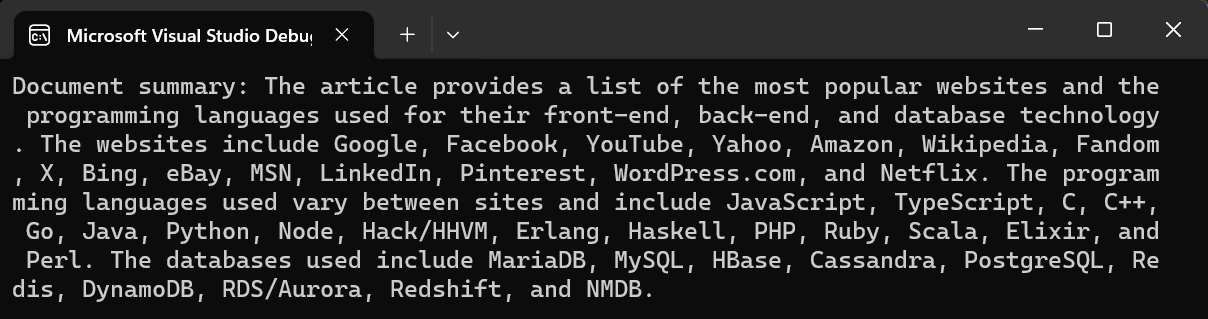
Console.WriteLine($"Document summary: {summary}\n\n");
ImportsMicrosoft.VisualBasicImportsIronPdfImportsIronPdf.AIImportsMicrosoft.SemanticKernelImportsMicrosoft.SemanticKernel.Connectors.OpenAIImportsMicrosoft.SemanticKernel.MemoryImportsSystemImportsSystem.Threading.Tasks' Setup OpenAIPrivate azureEndpoint = "<<enter your azure endpoint here>>"Private apiKey = "<<enter your azure API key here>>"Private builder = Kernel.CreateBuilder().AddAzureOpenAITextEmbeddingGeneration("oaiembed", azureEndpoint, apiKey).AddAzureOpenAIChatCompletion("oaichat", azureEndpoint, apiKey)Private kernel = builder.Build()' Setup MemoryPrivate memory_builder = (New MemoryBuilder()).WithMemoryStore(New VolatileMemoryStore()).WithAzureOpenAITextEmbeddingGeneration("oaiembed", azureEndpoint, apiKey)Private memory = memory_builder.Build()' Initialize IronAIIronDocumentAI.Initialize(kernel, memory)License.LicenseKey = "<<enter your IronPdf license key here"' Import PDF documentDim pdf AsPdfDocument = PdfDocument.FromFile("wikipedia.pdf")' Summarize the documentConsole.WriteLine("Please wait while I summarize the document...")Dim summary AsString = Await pdf.Summarize() ' optionally pass AI instance or use AI instance directlyConsole.WriteLine($"Document summary: {summary}" & vbLf & vbLf)
Imports Microsoft.VisualBasic
Imports IronPdf
Imports IronPdf.AI
Imports Microsoft.SemanticKernel
Imports Microsoft.SemanticKernel.Connectors.OpenAI
Imports Microsoft.SemanticKernel.Memory
Imports System
Imports System.Threading.Tasks
' Setup OpenAI
Private azureEndpoint = "<<enter your azure endpoint here>>"
Private apiKey = "<<enter your azure API key here>>"
Private builder = Kernel.CreateBuilder().AddAzureOpenAITextEmbeddingGeneration("oaiembed", azureEndpoint, apiKey).AddAzureOpenAIChatCompletion("oaichat", azureEndpoint, apiKey)
Private kernel = builder.Build()
' Setup Memory
Private memory_builder = (New MemoryBuilder()).WithMemoryStore(New VolatileMemoryStore()).WithAzureOpenAITextEmbeddingGeneration("oaiembed", azureEndpoint, apiKey)
Private memory = memory_builder.Build()
' Initialize IronAI
IronDocumentAI.Initialize(kernel, memory)
License.LicenseKey = "<<enter your IronPdf license key here"
' Import PDF document
Dim pdf As PdfDocument = PdfDocument.FromFile("wikipedia.pdf")
' Summarize the document
Console.WriteLine("Please wait while I summarize the document...")
Dim summary As String = Await pdf.Summarize() ' optionally pass AI instance or use AI instance directly
Console.WriteLine($"Document summary: {summary}" & vbLf & vbLf)
using IronPdf;using IronPdf.AI;using Microsoft.SemanticKernel;using Microsoft.SemanticKernel.Connectors.OpenAI;using Microsoft.SemanticKernel.Memory;using System;using System.Threading.Tasks;// Setup OpenAIvar azureEndpoint = "<<enter your azure endpoint here>>";var apiKey = "<<enter your azure API key here>>";var builder = Kernel.CreateBuilder() .AddAzureOpenAITextEmbeddingGeneration("oaiembed", azureEndpoint, apiKey) .AddAzureOpenAIChatCompletion("oaichat", azureEndpoint, apiKey);var kernel = builder.Build();// Setup Memoryvar memory_builder = new MemoryBuilder() // optionally use new ChromaMemoryStore("http://127.0.0.1:8000") (see https://github.com/microsoft/semantic-kernel/blob/main/dotnet/notebooks/09-memory-with-chroma.ipynb) .WithMemoryStore(new VolatileMemoryStore()) .WithAzureOpenAITextEmbeddingGeneration("oaiembed", azureEndpoint, apiKey);var memory = memory_builder.Build();// Initialize IronAIIronDocumentAI.Initialize(kernel, memory);License.LicenseKey = "<<enter your IronPdf license key here";// Import PDF documentPdfDocument pdf = PdfDocument.FromFile("wikipedia.pdf");// Summarize the documentConsole.WriteLine("Please wait while I summarize the document...");string summary = await pdf.Summarize(); // optionally pass AI instance or use AI instance directlyConsole.WriteLine($"Document summary: {summary}\n\n");
using IronPdf;
using IronPdf.AI;
using Microsoft.SemanticKernel;
using Microsoft.SemanticKernel.Connectors.OpenAI;
using Microsoft.SemanticKernel.Memory;
using System;
using System.Threading.Tasks;

// Setup OpenAI
var azureEndpoint = "<<enter your azure endpoint here>>";
var apiKey = "<<enter your azure API key here>>";
var builder = Kernel.CreateBuilder()
    .AddAzureOpenAITextEmbeddingGeneration("oaiembed", azureEndpoint, apiKey)
    .AddAzureOpenAIChatCompletion("oaichat", azureEndpoint, apiKey);
var kernel = builder.Build();

// Setup Memory
var memory_builder = new MemoryBuilder()
    // optionally use new ChromaMemoryStore("http://127.0.0.1:8000") (see https://github.com/microsoft/semantic-kernel/blob/main/dotnet/notebooks/09-memory-with-chroma.ipynb)
    .WithMemoryStore(new VolatileMemoryStore())
    .WithAzureOpenAITextEmbeddingGeneration("oaiembed", azureEndpoint, apiKey);
var memory = memory_builder.Build();

// Initialize IronAI
IronDocumentAI.Initialize(kernel, memory);

License.LicenseKey = "<<enter your IronPdf license key here";

// Import PDF document
PdfDocument pdf = PdfDocument.FromFile("wikipedia.pdf");

// Summarize the document
Console.WriteLine("Please wait while I summarize the document...");
string summary = await pdf.Summarize(); // optionally pass AI instance or use AI instance directly
Console.WriteLine($"Document summary: {summary}\n\n");
ImportsMicrosoft.VisualBasicImportsIronPdfImportsIronPdf.AIImportsMicrosoft.SemanticKernelImportsMicrosoft.SemanticKernel.Connectors.OpenAIImportsMicrosoft.SemanticKernel.MemoryImportsSystemImportsSystem.Threading.Tasks' Setup OpenAIPrivate azureEndpoint = "<<enter your azure endpoint here>>"Private apiKey = "<<enter your azure API key here>>"Private builder = Kernel.CreateBuilder().AddAzureOpenAITextEmbeddingGeneration("oaiembed", azureEndpoint, apiKey).AddAzureOpenAIChatCompletion("oaichat", azureEndpoint, apiKey)Private kernel = builder.Build()' Setup MemoryPrivate memory_builder = (New MemoryBuilder()).WithMemoryStore(New VolatileMemoryStore()).WithAzureOpenAITextEmbeddingGeneration("oaiembed", azureEndpoint, apiKey)Private memory = memory_builder.Build()' Initialize IronAIIronDocumentAI.Initialize(kernel, memory)License.LicenseKey = "<<enter your IronPdf license key here"' Import PDF documentDim pdf AsPdfDocument = PdfDocument.FromFile("wikipedia.pdf")' Summarize the documentConsole.WriteLine("Please wait while I summarize the document...")Dim summary AsString = Await pdf.Summarize() ' optionally pass AI instance or use AI instance directlyConsole.WriteLine($"Document summary: {summary}" & vbLf & vbLf)
Imports Microsoft.VisualBasic
Imports IronPdf
Imports IronPdf.AI
Imports Microsoft.SemanticKernel
Imports Microsoft.SemanticKernel.Connectors.OpenAI
Imports Microsoft.SemanticKernel.Memory
Imports System
Imports System.Threading.Tasks

' Setup OpenAI
Private azureEndpoint = "<<enter your azure endpoint here>>"
Private apiKey = "<<enter your azure API key here>>"
Private builder = Kernel.CreateBuilder().AddAzureOpenAITextEmbeddingGeneration("oaiembed", azureEndpoint, apiKey).AddAzureOpenAIChatCompletion("oaichat", azureEndpoint, apiKey)
Private kernel = builder.Build()

' Setup Memory
Private memory_builder = (New MemoryBuilder()).WithMemoryStore(New VolatileMemoryStore()).WithAzureOpenAITextEmbeddingGeneration("oaiembed", azureEndpoint, apiKey)
Private memory = memory_builder.Build()

' Initialize IronAI
IronDocumentAI.Initialize(kernel, memory)

License.LicenseKey = "<<enter your IronPdf license key here"

' Import PDF document
Dim pdf As PdfDocument = PdfDocument.FromFile("wikipedia.pdf")

' Summarize the document
Console.WriteLine("Please wait while I summarize the document...")
Dim summary As String = Await pdf.Summarize() ' optionally pass AI instance or use AI instance directly
Console.WriteLine($"Document summary: {summary}" & vbLf & vbLf)
IronPDF 的最小工作流程包括 5 个步骤:1)下载 C# 库;2)准备 Azure 端点和 API 密钥;3)导入目标 PDF 文档;4)使用 Summarize 方法生成摘要;5)使用 Query 方法进行连续查询。
人工智能扩展如何与 Microsoft Semantic Kernel 集成?
IronPDF for .NET 的人工智能扩展基于微软语义内核(Microsoft Semantic Kernel)构建,简化了.NET 应用程序中的人工智能服务集成。该 SDK 可处理连接 OpenAI 服务的复杂性,并为特定于 PDF 的 AI 操作提供直接的 API。
How does IronPDF ensure security when handling sensitive PDF documents?
IronPDF offers various security and encryption options to protect PDFs, including permissions and password protection. These options help secure documents before and after AI processing, ensuring sensitive information is safeguarded.
What is the role of Microsoft Semantic Kernel in IronPDF's AI extension?
Microsoft Semantic Kernel is the foundation for IronPDF's AI extension, facilitating the integration of AI services in .NET applications. It powers features like summarization and querying by providing structured support for OpenAI capabilities.
How can I optimize performance when using IronPDF's AI features?
For optimal performance with IronPDF's AI features, consider caching strategies, implementing rate limiting, and using optimized deployment configurations. The documentation also suggests techniques for managing performance with large documents and concurrent users.