
AWS Lambda 上的字体显示异常

Curtis Chau
Updated: 2026年4月22日
在 Linux 系统中渲染 PDF 文档可能会导致字符显示异常,如下图所示。 有时字符在 Windows 环境下显示正常,但在 Linux 环境下却无法正确显示。
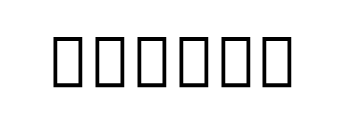
原因
原因是操作系统中缺少该字体。
解决方案
如果您已知晓字体名称,那就太好了——您可以跳过步骤 1。
- 要查找字体名称,请尝试在 Windows 上渲染 HTML 代码,并使用 Adobe 检查字符。
- 一旦确定了字体名称,您就可以从网上下载字体文件,例如从 Google Fonts 下载。
- 若要通过 Dockerfile 添加并安装字体,请将字体放置在项目中,**并将"复制到输出目录"设置为"始终复制"。**接下来,使用以下代码在 Dockerfile 中添加并安装该字体:
# Copy the Cambria Math font into the container
# Ensure the font file (cambria.ttc) exists in your project directory
COPY cambria.ttc /usr/share/fonts/

# Install fontconfig to update the font cache
# This will install fontconfig and refresh the font cache to recognize the newly added fonts
RUN dnf install -y fontconfig && \
fc-cache -fvText
说明
-
COPY cambria.ttc /usr/share/fonts/: 此行将 Cambria Math 字体从项目目录复制到容器的字体目录中。 请确保项目目录中包含字体文件 (
cambria.ttc)。 -
**运行 dnf install -y fontconfig && **: 此命令用于安装
fontconfig软件包,该软件包是 Linux 系统中管理和配置字体访问所必需的。-y标记会自动确认软件包的安装。 -
fc-cache -fv:此命令用于更新字体缓存,确保容器内的应用程序能够使用新复制的字体。 标志
-f(强制)和-v(详细)分别用于强制重新生成缓存以及提供详细输出。

技术作家
Curtis Chau 拥有卡尔顿大学的计算机科学学士学位,专注于前端开发,精通 Node.js、TypeScript、JavaScript 和 React。他热衷于打造直观且美观的用户界面,喜欢使用现代框架并创建结构良好、视觉吸引力强的手册。
...
阅读更多












