
AWS Lambda 上的字型顯示異常

Curtis Chau
Updated: 2026年4月22日
在 Linux 系統中渲染 PDF 文件可能會導致字元顯示異常,如下圖所示。 有時字元在 Windows 環境中看似顯示正常,但在 Linux 環境中卻無法正確顯示。
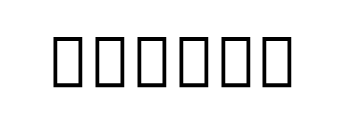
理由
原因是作業系統中缺少該字型。
解決方案
若您已知字型名稱,那就太好了——您可以跳過步驟 1。
- 若要找出字型名稱,請嘗試在 Windows 上渲染 HTML 並使用 Adobe 檢視字元。
- 一旦確認字型名稱,即可從線上來源(例如 Google Fonts)下載字型檔案。
- 若要透過 Dockerfile 新增並安裝字型,請將字型放置於專案中,並將**"複製到輸出目錄"設定為"始終複製"。**接著,請使用以下程式碼在 Dockerfile 中新增並安裝該字型:
# Copy the Cambria Math font into the container
# Ensure the font file (cambria.ttc) exists in your project directory
COPY cambria.ttc /usr/share/fonts/

# Install fontconfig to update the font cache
# This will install fontconfig and refresh the font cache to recognize the newly added fonts
RUN dnf install -y fontconfig && \
fc-cache -fvText
說明
-
COPY cambria.ttc /usr/share/fonts/:此指令會將 Cambria Math 字型從您的專案目錄複製到容器的字型目錄中。 請確保專案目錄中已存在字型檔案 (
cambria.ttc)。 -
**執行 dnf install -y fontconfig && **: 此指令會安裝
fontconfig套件,該套件對於在 Linux 中管理與設定字型存取至關重要。-y標誌會自動確認套件的安裝狀態。 -
fc-cache -fv:此指令會更新字型快取,確保容器內的應用程式能夠使用新複製的字型。 標記
-f(強制)和-v(詳盡)分別用於強制重新生成快取,以及提供詳細的輸出內容。

技術作家
Curtis Chau擁有Carleton大學的電腦科學學士學位,專精於前端開發,擁有Node.js、TypeScript、JavaScript和React的專業知識。Curtis熱衷於建立直觀且美觀的使用者介面,喜愛使用現代框架並建立結構良好、視覺吸引力的手冊。
...
閱讀更多












