
Procesamiento de PDF impulsado por IA en C#: Resumir, Extraer y Analizar Documentos con IronPDF

Procesamiento de PDF potenciado por IA en C# con IronPDF permite a los desarrolladores de .NET resumir documentos, extraer datos estructurados, y construir soluciones de preguntas y respuestas directamente sobre flujos de trabajo PDF existentes, utilizando el paquete IronPdf.Extensions.AI construido sobre el Microsoft Semantic Kernel para conectar con modelos de Azure OpenAI y OpenAI. Tanto si está creando herramientas de descubrimiento legal, pipelines de análisis financiero o plataformas de inteligencia documental, IronPDF se encarga de la extracción de PDF y la preparación del contexto para que usted pueda centrarse en la lógica de la IA.
Este tutorial explica cómo conectar IronPDF a servicios de inteligencia artificial para resumir documentos, extraer datos y realizar consultas inteligentes en C# .NET.
- ¿Para quién es esto?: Desarrolladores de .NET que construyen aplicaciones de inteligencia documental, sistemas de descubrimiento legal, herramientas de análisis financiero, plataformas de revisión de cumplimiento, o cualquier aplicación que necesite extraer significado de grandes volúmenes de documentos PDF.
- Qué harás: Resumen de un solo documento, extracción de datos JSON estructurados con esquemas personalizados, respuesta a preguntas sobre el contenido del documento, canalizaciones RAG para documentos largos y flujos de trabajo de procesamiento de IA por lotes en bibliotecas de documentos.
- Dónde se ejecuta: Cualquier entorno .NET 6+ con una clave Azure OpenAI u OpenAI API. La extensión AI se integra con Microsoft Semantic Kernel y se encarga automáticamente de la gestión de ventanas contextuales, la fragmentación y la orquestación.
- Cuándo usar este enfoque: Cuando tu aplicación necesita procesar PDFs más allá de la extracción de texto, como entender obligaciones contractuales, resumir artículos de investigación, extraer tablas financieras como datos estructurados o responder preguntas de los usuarios sobre el contenido del documento a gran escala.
- Por qué es importante técnicamente: La extracción de texto en bruto pierde la estructura del documento: las tablas colapsan, los diseños de varias columnas se rompen y las relaciones semánticas desaparecen. IronPDF prepara los documentos para el consumo de IA preservando la estructura y gestionando los límites de tokens, para que el modelo reciba una entrada limpia y bien organizada.
Resuma un PDF con unas pocas líneas de código:
-
1Instalar IronPDF con NuGet Package Manager
-
2Copie y ejecute este fragmento de código.
await IronPdf.AI.PdfAIEngine.Summarize("contract.pdf", "summary.txt", azureEndpoint, azureApiKey);Await IronPdf.AI.PdfAIEngine.Summarize("contract.pdf", "summary.txt", azureEndpoint, azureApiKey)Await IronPdf.AI.PdfAIEngine.Summarize("contract.pdf", "summary.txt", azureEndpoint, azureApiKey) -
3Despliegue para probar en su entorno real
Empiece a usar IronPDF en su proyecto hoy con una prueba gratuita
Una vez que haya adquirido IronPDF o se haya suscrito a una versión de prueba de 30 días, añada su clave de licencia al inicio de su solicitud.
IronPdf.License.LicenseKey = "KEY";IronPdf.License.LicenseKey = "KEY";Imports IronPdf
IronPdf.License.LicenseKey = "KEY"Imports IronPdf
IronPdf.License.LicenseKey = "KEY" Instalar con NuGet
- La oportunidad de IA + PDF
- Integración de IA incorporada en IronPDF
- Resumir documentos
- Extracción de datos inteligente
- Preguntas y respuestas sobre documentos
- Procesamiento por lotes con IA
- Casos de uso del mundo real
- Solución de problemas y soporte técnico
La oportunidad AI + PDF
Por qué los PDF son la mayor fuente de datos sin explotar
Los PDFs representan uno de los mayores repositorios de conocimiento empresarial estructurado en la empresa moderna. Los documentos profesionales: contratos, estados financieros, informes de cumplimiento, escritos legales y artículos de investigación se almacenan predominantemente en formato PDF. Estos documentos contienen información empresarial esencial: cláusulas contractuales que definen obligaciones y responsabilidades, métricas financieras que impulsan las decisiones de inversión, requisitos normativos que garantizan el cumplimiento y resultados de investigaciones que orientan la estrategia.
Sin embargo, los enfoques tradicionales del procesamiento de PDF se han visto muy limitados. Las herramientas básicas de extracción de texto pueden extraer caracteres en bruto de una página, pero pierden un contexto crucial: las estructuras de tablas se convierten en texto desordenado, los diseños de varias columnas pierden sentido y las relaciones semánticas entre secciones desaparecen.
El avance procede de la capacidad de la IA para comprender el contexto y la estructura. Los LLM modernos no solo ven palabras, comprenden la organización de documentos, reconocen patrones como cláusulas contractuales o tablas financieras y pueden extraer significado incluso de diseños complejos. Los nombres de los modelos referidos a lo largo de este tutorial reflejan la generación líder disponible al momento de escribir; sustituyan los equivalentes actuales de su proveedor a medida que evolucionan. Por ejemplo, el sistema de razonamiento unificado de GPT-5 con su enrutador en tiempo real y las capacidades agenticas mejoradas de Claude Sonnet 4.5, ambos demuestran tasas de alucinaciones significativamente reducidas en comparación con modelos anteriores, haciéndolos confiables para análisis de documentos profesionales.
Cómo entienden los LLM la estructura de los documentos
Los grandes modelos lingüísticos aportan sofisticadas capacidades de procesamiento del lenguaje natural al análisis de PDF. La arquitectura híbrida de GPT-5 presenta múltiples submodelos (principal, mini, pensamiento, nano) con un enrutador en tiempo real que selecciona dinámicamente la variante óptima según la complejidad de la tarea: preguntas sencillas se dirigen a modelos más rápidos, mientras que tareas de razonamiento complejo involucran al modelo completo.
Claude Opus 4.6 destaca especialmente en las tareas agénticas de larga duración, con equipos de agentes que se coordinan directamente en trabajos segmentados y una ventana contextual de 1M de tokens que puede procesar bibliotecas de documentos enteras sin fragmentación.
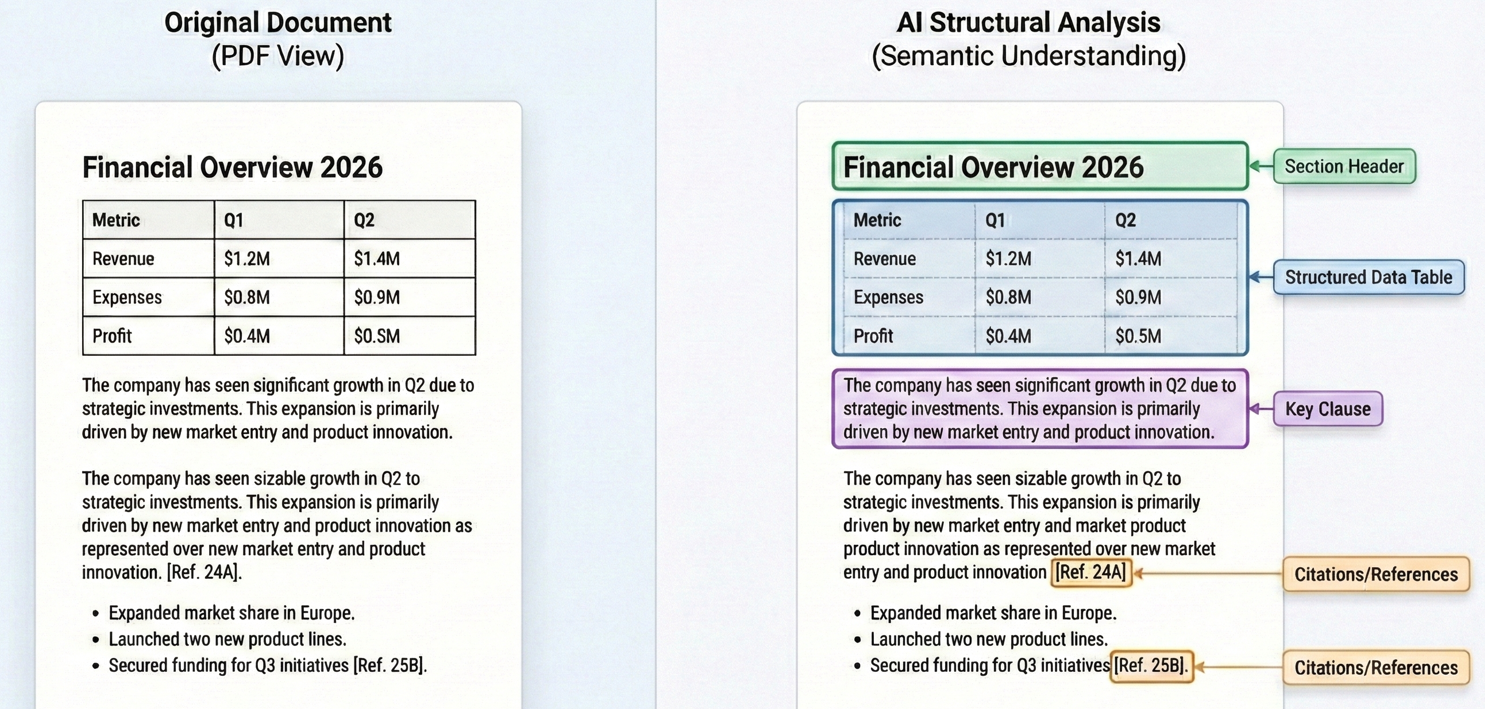
Esta comprensión contextual permite a los LLM realizar tareas que requieren una verdadera comprensión. Al analizar un contrato, un LLM puede identificar no solo las cláusulas que contienen la palabra "rescisión", sino también comprender las condiciones específicas en las que se permite la rescisión, los requisitos de notificación y las responsabilidades derivadas. La base técnica que permite esta capacidad es la arquitectura de transformadores de los LLM modernos, con la ventana contextual de GPT-5, que admite hasta 272.000 tokens de entrada, y la ventana de tokens de 200.000 de Claude Sonnet 4.5, que proporciona una amplia cobertura de documentos.
Integración de IA integrada en IronPDF
Instalación de IronPDF y AI Extensions
Para empezar con el procesamiento de PDF basado en IA se requiere la biblioteca principal IronPDF, el paquete de extensiones de IA y las dependencias de Microsoft Semantic Kernel.
Instale IronPDF con el gestor de paquetes NuGet:
Estos paquetes funcionan conjuntamente para ofrecer una solución completa. IronPDF maneja todas las operaciones relacionadas con PDF: extracción de texto, representación de páginas, conversión de formato, mientras que la extensión de IA gestiona la integración con modelos de lenguaje a través de Microsoft Semantic Kernel.
<NoWarn>$(NoWarn);SKEXP0001;SKEXP0010;SKEXP0050</NoWarn> a tu PropertyGroup de .csproj para suprimir advertencias del compilador.Configurar su clave de API OpenAI/Azure
Antes de poder aprovechar las funciones de IA, es necesario configurar el acceso a un proveedor de servicios de IA. La extensión AI de IronPDF es compatible con OpenAI y Azure OpenAI. Azure OpenAI suele preferirse para aplicaciones empresariales porque ofrece funciones de seguridad mejoradas, certificaciones de cumplimiento y la capacidad de mantener los datos dentro de regiones geográficas específicas.
Para configurar Azure OpenAI, necesitará la URL del punto final de Azure, la clave de API y los nombres de implementación tanto para el chat como para incrustar modelos desde el portal de Azure.
Inicialización del motor de IA
La extensión AI de IronPDF utiliza Microsoft Semantic Kernel. Antes de utilizar cualquier función de IA, debe inicializar el núcleo con sus credenciales de Azure OpenAI y configurar el almacén de memoria para el procesamiento de documentos.
using IronPdf;
using IronPdf.AI;
using Microsoft.SemanticKernel;
using Microsoft.SemanticKernel.Memory;
using Microsoft.SemanticKernel.Connectors.OpenAI;

// Initialize IronPDF AI with Azure OpenAI credentials

// Azure OpenAI configuration
string azureEndpoint = "https://your-resource.openai.azure.com/";
string apiKey = "your-azure-api-key";
string chatDeployment = "gpt-4o";
string embeddingDeployment = "text-embedding-ada-002";

// Initialize Semantic Kernel with Azure OpenAI
var kernel = Kernel.CreateBuilder()
    .AddAzureOpenAITextEmbeddingGeneration(embeddingDeployment, azureEndpoint, apiKey)
    .AddAzureOpenAIChatCompletion(chatDeployment, azureEndpoint, apiKey)
    .Build();

// Create memory store for document embeddings
var memory = new MemoryBuilder()
    .WithMemoryStore(new VolatileMemoryStore())
    .WithAzureOpenAITextEmbeddingGeneration(embeddingDeployment, azureEndpoint, apiKey)
    .Build();

// Initialize IronPDF AI
IronDocumentAI.Initialize(kernel, memory);

Console.WriteLine("IronPDF AI initialized successfully with Azure OpenAI");
using IronPdf;
using IronPdf.AI;
using Microsoft.SemanticKernel;
using Microsoft.SemanticKernel.Memory;
using Microsoft.SemanticKernel.Connectors.OpenAI;
// Initialize IronPDF AI with Azure OpenAI credentials
// Azure OpenAI configuration
string azureEndpoint = "https://your-resource.openai.azure.com/";
string apiKey = "your-azure-api-key";
string chatDeployment = "gpt-4o";
string embeddingDeployment = "text-embedding-ada-002";
// Initialize Semantic Kernel with Azure OpenAI
var kernel = Kernel.CreateBuilder()
.AddAzureOpenAITextEmbeddingGeneration(embeddingDeployment, azureEndpoint, apiKey)
.AddAzureOpenAIChatCompletion(chatDeployment, azureEndpoint, apiKey)
.Build();
// Create memory store for document embeddings
var memory = new MemoryBuilder()
.WithMemoryStore(new VolatileMemoryStore())
.WithAzureOpenAITextEmbeddingGeneration(embeddingDeployment, azureEndpoint, apiKey)
.Build();
// Initialize IronPDF AI
IronDocumentAI.Initialize(kernel, memory);
Console.WriteLine("IronPDF AI initialized successfully with Azure OpenAI");Imports IronPdf
Imports IronPdf.AI
Imports Microsoft.SemanticKernel
Imports Microsoft.SemanticKernel.Memory
Imports Microsoft.SemanticKernel.Connectors.OpenAI
' Initialize IronPDF AI with Azure OpenAI credentials
' Azure OpenAI configuration
Dim azureEndpoint As String = "https://your-resource.openai.azure.com/"
Dim apiKey As String = "your-azure-api-key"
Dim chatDeployment As String = "gpt-4o"
Dim embeddingDeployment As String = "text-embedding-ada-002"
' Initialize Semantic Kernel with Azure OpenAI
Dim kernel = Kernel.CreateBuilder() _
.AddAzureOpenAITextEmbeddingGeneration(embeddingDeployment, azureEndpoint, apiKey) _
.AddAzureOpenAIChatCompletion(chatDeployment, azureEndpoint, apiKey) _
.Build()
' Create memory store for document embeddings
Dim memory = New MemoryBuilder() _
.WithMemoryStore(New VolatileMemoryStore()) _
.WithAzureOpenAITextEmbeddingGeneration(embeddingDeployment, azureEndpoint, apiKey) _
.Build()
' Initialize IronPDF AI
IronDocumentAI.Initialize(kernel, memory)
Console.WriteLine("IronPDF AI initialized successfully with Azure OpenAI")Imports IronPdf
Imports IronPdf.AI
Imports Microsoft.SemanticKernel
Imports Microsoft.SemanticKernel.Memory
Imports Microsoft.SemanticKernel.Connectors.OpenAI
' Initialize IronPDF AI with Azure OpenAI credentials
' Azure OpenAI configuration
Dim azureEndpoint As String = "https://your-resource.openai.azure.com/"
Dim apiKey As String = "your-azure-api-key"
Dim chatDeployment As String = "gpt-4o"
Dim embeddingDeployment As String = "text-embedding-ada-002"
' Initialize Semantic Kernel with Azure OpenAI
Dim kernel = Kernel.CreateBuilder() _
.AddAzureOpenAITextEmbeddingGeneration(embeddingDeployment, azureEndpoint, apiKey) _
.AddAzureOpenAIChatCompletion(chatDeployment, azureEndpoint, apiKey) _
.Build()
' Create memory store for document embeddings
Dim memory = New MemoryBuilder() _
.WithMemoryStore(New VolatileMemoryStore()) _
.WithAzureOpenAITextEmbeddingGeneration(embeddingDeployment, azureEndpoint, apiKey) _
.Build()
' Initialize IronPDF AI
IronDocumentAI.Initialize(kernel, memory)
Console.WriteLine("IronPDF AI initialized successfully with Azure OpenAI")La inicialización crea dos componentes clave:
- Núcleo: Maneja las finalizaciones de chat y la generación de texto incrustado a través de Azure OpenAI
- Memoria: Almacena incrustaciones de documentos para operaciones de búsqueda y recuperación semántica
Una vez inicializado con IronDocumentAI.Initialize(), puedes usar características de IA en toda tu aplicación. Para las aplicaciones de producción, se recomienda encarecidamente almacenar las credenciales en variables de entorno o en Azure Key Vault.
Cómo prepara IronPDF los PDF para el contexto de la IA
Uno de los aspectos más complicados del procesamiento de PDF con IA es preparar los documentos para que los consuman los modelos lingüísticos. Aunque GPT-5 admite hasta 272.000 tokens de entrada y Claude Opus 4.6 ofrece ahora una ventana contextual de 1 millón de tokens, un único contrato legal o informe financiero puede superar fácilmente los límites de los modelos anteriores.
La extensión de IA de IronPDF gestiona esta complejidad mediante la preparación inteligente de documentos. Cuando llamas a un método de IA, IronPDF primero extrae texto del PDF mientras preserva información estructural: identifica párrafos, conserva estructuras de tablas y mantiene las relaciones entre secciones.
Para documentos que exceden los límites de contexto, IronPDF implementa fragmentación estratégica en puntos de ruptura semánticos: divisiones naturales en la estructura del documento, como encabezados de sección, saltos de página o límites de párrafo.
Resumen de documentos
Resúmenes de documentos individuales
El resumen de documentos ofrece un valor inmediato al condensar documentos extensos en información digerible. El método Summarize maneja todo el flujo de trabajo: extrae texto, lo prepara para consumo de IA, solicita un resumen al modelo de lenguaje y guarda los resultados.
Entrada
El código carga un PDF usando PdfDocument.FromFile() y llama a pdf.Summarize() para generar un resumen conciso, luego guarda el resultado en un archivo de texto.
using IronPdf;
using IronPdf.AI;
using Microsoft.SemanticKernel;
using Microsoft.SemanticKernel.Memory;
using Microsoft.SemanticKernel.Connectors.OpenAI;

// Summarize a PDF document using IronPDF AI

// Azure OpenAI configuration
string azureEndpoint = "https://your-resource.openai.azure.com/";
string apiKey = "your-azure-api-key";
string chatDeployment = "gpt-4o";
string embeddingDeployment = "text-embedding-ada-002";

// Initialize Semantic Kernel
var kernel = Kernel.CreateBuilder()
    .AddAzureOpenAITextEmbeddingGeneration(embeddingDeployment, azureEndpoint, apiKey)
    .AddAzureOpenAIChatCompletion(chatDeployment, azureEndpoint, apiKey)
    .Build();

var memory = new MemoryBuilder()
    .WithMemoryStore(new VolatileMemoryStore())
    .WithAzureOpenAITextEmbeddingGeneration(embeddingDeployment, azureEndpoint, apiKey)
    .Build();

IronDocumentAI.Initialize(kernel, memory);

// Load and summarize PDF
var pdf = PdfDocument.FromFile("sample-report.pdf");
string summary = await pdf.Summarize();

Console.WriteLine("Document Summary:");
Console.WriteLine(summary);

File.WriteAllText("report-summary.txt", summary);
Console.WriteLine("\nSummary saved to report-summary.txt");
using IronPdf;
using IronPdf.AI;
using Microsoft.SemanticKernel;
using Microsoft.SemanticKernel.Memory;
using Microsoft.SemanticKernel.Connectors.OpenAI;
// Summarize a PDF document using IronPDF AI
// Azure OpenAI configuration
string azureEndpoint = "https://your-resource.openai.azure.com/";
string apiKey = "your-azure-api-key";
string chatDeployment = "gpt-4o";
string embeddingDeployment = "text-embedding-ada-002";
// Initialize Semantic Kernel
var kernel = Kernel.CreateBuilder()
.AddAzureOpenAITextEmbeddingGeneration(embeddingDeployment, azureEndpoint, apiKey)
.AddAzureOpenAIChatCompletion(chatDeployment, azureEndpoint, apiKey)
.Build();
var memory = new MemoryBuilder()
.WithMemoryStore(new VolatileMemoryStore())
.WithAzureOpenAITextEmbeddingGeneration(embeddingDeployment, azureEndpoint, apiKey)
.Build();
IronDocumentAI.Initialize(kernel, memory);
// Load and summarize PDF
var pdf = PdfDocument.FromFile("sample-report.pdf");
string summary = await pdf.Summarize();
Console.WriteLine("Document Summary:");
Console.WriteLine(summary);
File.WriteAllText("report-summary.txt", summary);
Console.WriteLine("\nSummary saved to report-summary.txt");Imports IronPdf
Imports IronPdf.AI
Imports Microsoft.SemanticKernel
Imports Microsoft.SemanticKernel.Memory
Imports Microsoft.SemanticKernel.Connectors.OpenAI
' Summarize a PDF document using IronPDF AI
' Azure OpenAI configuration
Dim azureEndpoint As String = "https://your-resource.openai.azure.com/"
Dim apiKey As String = "your-azure-api-key"
Dim chatDeployment As String = "gpt-4o"
Dim embeddingDeployment As String = "text-embedding-ada-002"
' Initialize Semantic Kernel
Dim kernel = Kernel.CreateBuilder() _
.AddAzureOpenAITextEmbeddingGeneration(embeddingDeployment, azureEndpoint, apiKey) _
.AddAzureOpenAIChatCompletion(chatDeployment, azureEndpoint, apiKey) _
.Build()
Dim memory = New MemoryBuilder() _
.WithMemoryStore(New VolatileMemoryStore()) _
.WithAzureOpenAITextEmbeddingGeneration(embeddingDeployment, azureEndpoint, apiKey) _
.Build()
IronDocumentAI.Initialize(kernel, memory)
' Load and summarize PDF
Dim pdf = PdfDocument.FromFile("sample-report.pdf")
Dim summary As String = Await pdf.Summarize()
Console.WriteLine("Document Summary:")
Console.WriteLine(summary)
File.WriteAllText("report-summary.txt", summary)
Console.WriteLine(vbCrLf & "Summary saved to report-summary.txt")Imports IronPdf
Imports IronPdf.AI
Imports Microsoft.SemanticKernel
Imports Microsoft.SemanticKernel.Memory
Imports Microsoft.SemanticKernel.Connectors.OpenAI
' Summarize a PDF document using IronPDF AI
' Azure OpenAI configuration
Dim azureEndpoint As String = "https://your-resource.openai.azure.com/"
Dim apiKey As String = "your-azure-api-key"
Dim chatDeployment As String = "gpt-4o"
Dim embeddingDeployment As String = "text-embedding-ada-002"
' Initialize Semantic Kernel
Dim kernel = Kernel.CreateBuilder() _
.AddAzureOpenAITextEmbeddingGeneration(embeddingDeployment, azureEndpoint, apiKey) _
.AddAzureOpenAIChatCompletion(chatDeployment, azureEndpoint, apiKey) _
.Build()
Dim memory = New MemoryBuilder() _
.WithMemoryStore(New VolatileMemoryStore()) _
.WithAzureOpenAITextEmbeddingGeneration(embeddingDeployment, azureEndpoint, apiKey) _
.Build()
IronDocumentAI.Initialize(kernel, memory)
' Load and summarize PDF
Dim pdf = PdfDocument.FromFile("sample-report.pdf")
Dim summary As String = Await pdf.Summarize()
Console.WriteLine("Document Summary:")
Console.WriteLine(summary)
File.WriteAllText("report-summary.txt", summary)
Console.WriteLine(vbCrLf & "Summary saved to report-summary.txt")Salida de consola
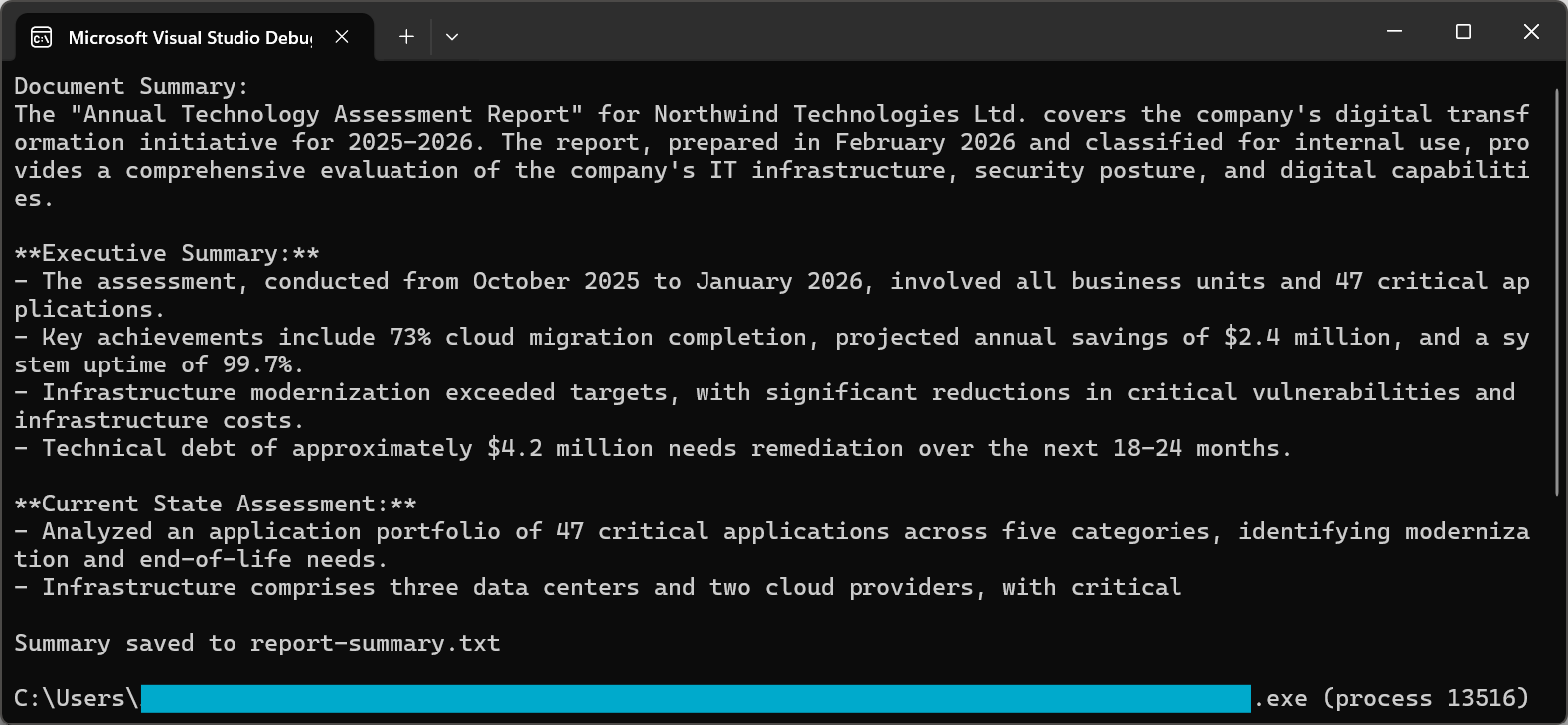
El proceso de resumen utiliza sofisticadas instrucciones para garantizar resultados de alta calidad. Tanto GPT-5 como Claude Sonnet 4.5 en 2026 incorporan funciones de seguimiento de instrucciones significativamente mejoradas, lo que garantiza que los resúmenes capten la información esencial sin dejar de ser concisos y legibles.
Para una explicación más detallada de las técnicas de resumen de documentos y opciones avanzadas, por favor consulta nuestra guía práctica.
Síntesis de documentos múltiples
Muchas situaciones del mundo real requieren sintetizar información de varios documentos. Un equipo jurídico puede necesitar identificar cláusulas comunes en una cartera de contratos, o un analista financiero puede querer comparar métricas en informes trimestrales.
El enfoque de la síntesis de documentos múltiples consiste en procesar cada documento por separado para extraer la información clave y, a continuación, agregar estos datos para la síntesis final.
Este ejemplo itera a través de múltiples PDFs, llamando pdf.Summarize() en cada uno, luego usa pdf.Query() con los resúmenes combinados para generar una síntesis unificada.
using IronPdf;
using IronPdf.AI;
using Microsoft.SemanticKernel;
using Microsoft.SemanticKernel.Memory;
using Microsoft.SemanticKernel.Connectors.OpenAI;

// Synthesize insights across multiple related documents (e.g., quarterly reports into annual summary)

// Azure OpenAI configuration
string azureEndpoint = "https://your-resource.openai.azure.com/";
string apiKey = "your-azure-api-key";
string chatDeployment = "gpt-4o";
string embeddingDeployment = "text-embedding-ada-002";

// Initialize Semantic Kernel
var kernel = Kernel.CreateBuilder()
    .AddAzureOpenAITextEmbeddingGeneration(embeddingDeployment, azureEndpoint, apiKey)
    .AddAzureOpenAIChatCompletion(chatDeployment, azureEndpoint, apiKey)
    .Build();

var memory = new MemoryBuilder()
    .WithMemoryStore(new VolatileMemoryStore())
    .WithAzureOpenAITextEmbeddingGeneration(embeddingDeployment, azureEndpoint, apiKey)
    .Build();

IronDocumentAI.Initialize(kernel, memory);

// Define documents to synthesize
string[] documentPaths = {
    "Q1-report.pdf",
    "Q2-report.pdf",
    "Q3-report.pdf",
    "Q4-report.pdf"
};

var documentSummaries = new List<string>();

// Summarize each document
foreach (string path in documentPaths)
{
    var pdf = PdfDocument.FromFile(path);
    string summary = await pdf.Summarize();
    documentSummaries.Add($"=== {Path.GetFileName(path)} ===\n{summary}");
    Console.WriteLine($"Processed: {path}");
}

// Combine and synthesize across all documents
string combinedSummaries = string.Join("\n\n", documentSummaries);

var synthesisDoc = PdfDocument.FromFile(documentPaths[0]);

string synthesisQuery = @"Based on the quarterly summaries below, provide an annual synthesis:
ll trends across quarters
chievements and challenges
over-year patterns

s:
inedSummaries;

string synthesis = await synthesisDoc.Query(synthesisQuery);

Console.WriteLine("\n=== Annual Synthesis ===");
Console.WriteLine(synthesis);

File.WriteAllText("annual-synthesis.txt", synthesis);
using IronPdf;
using IronPdf.AI;
using Microsoft.SemanticKernel;
using Microsoft.SemanticKernel.Memory;
using Microsoft.SemanticKernel.Connectors.OpenAI;
// Synthesize insights across multiple related documents (e.g., quarterly reports into annual summary)
// Azure OpenAI configuration
string azureEndpoint = "https://your-resource.openai.azure.com/";
string apiKey = "your-azure-api-key";
string chatDeployment = "gpt-4o";
string embeddingDeployment = "text-embedding-ada-002";
// Initialize Semantic Kernel
var kernel = Kernel.CreateBuilder()
.AddAzureOpenAITextEmbeddingGeneration(embeddingDeployment, azureEndpoint, apiKey)
.AddAzureOpenAIChatCompletion(chatDeployment, azureEndpoint, apiKey)
.Build();
var memory = new MemoryBuilder()
.WithMemoryStore(new VolatileMemoryStore())
.WithAzureOpenAITextEmbeddingGeneration(embeddingDeployment, azureEndpoint, apiKey)
.Build();
IronDocumentAI.Initialize(kernel, memory);
// Define documents to synthesize
string[] documentPaths = {
"Q1-report.pdf",
"Q2-report.pdf",
"Q3-report.pdf",
"Q4-report.pdf"
};
var documentSummaries = new List<string>();
// Summarize each document
foreach (string path in documentPaths)
{
var pdf = PdfDocument.FromFile(path);
string summary = await pdf.Summarize();
documentSummaries.Add($"=== {Path.GetFileName(path)} ===\n{summary}");
Console.WriteLine($"Processed: {path}");
}
// Combine and synthesize across all documents
string combinedSummaries = string.Join("\n\n", documentSummaries);
var synthesisDoc = PdfDocument.FromFile(documentPaths[0]);
string synthesisQuery = @"Based on the quarterly summaries below, provide an annual synthesis:
ll trends across quarters
chievements and challenges
over-year patterns
s:
inedSummaries;
string synthesis = await synthesisDoc.Query(synthesisQuery);
Console.WriteLine("\n=== Annual Synthesis ===");
Console.WriteLine(synthesis);
File.WriteAllText("annual-synthesis.txt", synthesis);Imports IronPdf
Imports IronPdf.AI
Imports Microsoft.SemanticKernel
Imports Microsoft.SemanticKernel.Memory
Imports Microsoft.SemanticKernel.Connectors.OpenAI
Imports System.IO
' Synthesize insights across multiple related documents (e.g., quarterly reports into annual summary)
' Azure OpenAI configuration
Dim azureEndpoint As String = "https://your-resource.openai.azure.com/"
Dim apiKey As String = "your-azure-api-key"
Dim chatDeployment As String = "gpt-4o"
Dim embeddingDeployment As String = "text-embedding-ada-002"
' Initialize Semantic Kernel
Dim kernel = Kernel.CreateBuilder() _
.AddAzureOpenAITextEmbeddingGeneration(embeddingDeployment, azureEndpoint, apiKey) _
.AddAzureOpenAIChatCompletion(chatDeployment, azureEndpoint, apiKey) _
.Build()
Dim memory = New MemoryBuilder() _
.WithMemoryStore(New VolatileMemoryStore()) _
.WithAzureOpenAITextEmbeddingGeneration(embeddingDeployment, azureEndpoint, apiKey) _
.Build()
IronDocumentAI.Initialize(kernel, memory)
' Define documents to synthesize
Dim documentPaths As String() = {
"Q1-report.pdf",
"Q2-report.pdf",
"Q3-report.pdf",
"Q4-report.pdf"
}
Dim documentSummaries = New List(Of String)()
' Summarize each document
For Each path As String In documentPaths
Dim pdf = PdfDocument.FromFile(path)
Dim summary As String = Await pdf.Summarize()
documentSummaries.Add($"=== {Path.GetFileName(path)} ==={vbCrLf}{summary}")
Console.WriteLine($"Processed: {path}")
Next
' Combine and synthesize across all documents
Dim combinedSummaries As String = String.Join(vbCrLf & vbCrLf, documentSummaries)
Dim synthesisDoc = PdfDocument.FromFile(documentPaths(0))
Dim synthesisQuery As String = "Based on the quarterly summaries below, provide an annual synthesis:" & vbCrLf &
"Overall trends across quarters" & vbCrLf &
"Key achievements and challenges" & vbCrLf &
"Year-over-year patterns" & vbCrLf & vbCrLf &
combinedSummaries
Dim synthesis As String = Await synthesisDoc.Query(synthesisQuery)
Console.WriteLine(vbCrLf & "=== Annual Synthesis ===")
Console.WriteLine(synthesis)
File.WriteAllText("annual-synthesis.txt", synthesis)Imports IronPdf
Imports IronPdf.AI
Imports Microsoft.SemanticKernel
Imports Microsoft.SemanticKernel.Memory
Imports Microsoft.SemanticKernel.Connectors.OpenAI
Imports System.IO
' Synthesize insights across multiple related documents (e.g., quarterly reports into annual summary)
' Azure OpenAI configuration
Dim azureEndpoint As String = "https://your-resource.openai.azure.com/"
Dim apiKey As String = "your-azure-api-key"
Dim chatDeployment As String = "gpt-4o"
Dim embeddingDeployment As String = "text-embedding-ada-002"
' Initialize Semantic Kernel
Dim kernel = Kernel.CreateBuilder() _
.AddAzureOpenAITextEmbeddingGeneration(embeddingDeployment, azureEndpoint, apiKey) _
.AddAzureOpenAIChatCompletion(chatDeployment, azureEndpoint, apiKey) _
.Build()
Dim memory = New MemoryBuilder() _
.WithMemoryStore(New VolatileMemoryStore()) _
.WithAzureOpenAITextEmbeddingGeneration(embeddingDeployment, azureEndpoint, apiKey) _
.Build()
IronDocumentAI.Initialize(kernel, memory)
' Define documents to synthesize
Dim documentPaths As String() = {
"Q1-report.pdf",
"Q2-report.pdf",
"Q3-report.pdf",
"Q4-report.pdf"
}
Dim documentSummaries = New List(Of String)()
' Summarize each document
For Each path As String In documentPaths
Dim pdf = PdfDocument.FromFile(path)
Dim summary As String = Await pdf.Summarize()
documentSummaries.Add($"=== {Path.GetFileName(path)} ==={vbCrLf}{summary}")
Console.WriteLine($"Processed: {path}")
Next
' Combine and synthesize across all documents
Dim combinedSummaries As String = String.Join(vbCrLf & vbCrLf, documentSummaries)
Dim synthesisDoc = PdfDocument.FromFile(documentPaths(0))
Dim synthesisQuery As String = "Based on the quarterly summaries below, provide an annual synthesis:" & vbCrLf &
"Overall trends across quarters" & vbCrLf &
"Key achievements and challenges" & vbCrLf &
"Year-over-year patterns" & vbCrLf & vbCrLf &
combinedSummaries
Dim synthesis As String = Await synthesisDoc.Query(synthesisQuery)
Console.WriteLine(vbCrLf & "=== Annual Synthesis ===")
Console.WriteLine(synthesis)
File.WriteAllText("annual-synthesis.txt", synthesis)Este patrón se adapta con eficacia a grandes conjuntos de documentos. Al procesar los documentos en paralelo y gestionar los resultados intermedios, se pueden analizar cientos o miles de documentos manteniendo una síntesis coherente.
Generación de resúmenes
Los resúmenes ejecutivos requieren un enfoque diferente al de los resúmenes estándar. En lugar de limitarse a condensar el contenido, un resumen ejecutivo debe identificar la información más crítica para la empresa, destacar las decisiones o recomendaciones clave y presentar las conclusiones en un formato adecuado para su revisión por parte de los directivos.
El código usa pdf.Query() con una solicitud estructurada pidiendo decisiones clave, hallazgos críticos, impacto financiero y evaluación de riesgos en lenguaje empresarial.
using IronPdf;
using IronPdf.AI;
using Microsoft.SemanticKernel;
using Microsoft.SemanticKernel.Memory;
using Microsoft.SemanticKernel.Connectors.OpenAI;

// Generate executive summary from strategic documents for C-suite leadership

// Azure OpenAI configuration
string azureEndpoint = "https://your-resource.openai.azure.com/";
string apiKey = "your-azure-api-key";
string chatDeployment = "gpt-4o";
string embeddingDeployment = "text-embedding-ada-002";

// Initialize Semantic Kernel
var kernel = Kernel.CreateBuilder()
    .AddAzureOpenAITextEmbeddingGeneration(embeddingDeployment, azureEndpoint, apiKey)
    .AddAzureOpenAIChatCompletion(chatDeployment, azureEndpoint, apiKey)
    .Build();

var memory = new MemoryBuilder()
    .WithMemoryStore(new VolatileMemoryStore())
    .WithAzureOpenAITextEmbeddingGeneration(embeddingDeployment, azureEndpoint, apiKey)
    .Build();

IronDocumentAI.Initialize(kernel, memory);

var pdf = PdfDocument.FromFile("strategic-plan.pdf");

string executiveQuery = @"Create an executive summary for C-suite leadership. Include:

cisions Required:**
ny decisions needing executive approval

al Findings:**
5 most important findings (bullet points)

ial Impact:**
e/cost implications if mentioned

ssessment:**
riority risks identified

ended Actions:**
ate next steps

er 500 words. Use business language appropriate for board presentation.";

string executiveSummary = await pdf.Query(executiveQuery);

File.WriteAllText("executive-summary.txt", executiveSummary);
Console.WriteLine("Executive summary saved to executive-summary.txt");
using IronPdf;
using IronPdf.AI;
using Microsoft.SemanticKernel;
using Microsoft.SemanticKernel.Memory;
using Microsoft.SemanticKernel.Connectors.OpenAI;
// Generate executive summary from strategic documents for C-suite leadership
// Azure OpenAI configuration
string azureEndpoint = "https://your-resource.openai.azure.com/";
string apiKey = "your-azure-api-key";
string chatDeployment = "gpt-4o";
string embeddingDeployment = "text-embedding-ada-002";
// Initialize Semantic Kernel
var kernel = Kernel.CreateBuilder()
.AddAzureOpenAITextEmbeddingGeneration(embeddingDeployment, azureEndpoint, apiKey)
.AddAzureOpenAIChatCompletion(chatDeployment, azureEndpoint, apiKey)
.Build();
var memory = new MemoryBuilder()
.WithMemoryStore(new VolatileMemoryStore())
.WithAzureOpenAITextEmbeddingGeneration(embeddingDeployment, azureEndpoint, apiKey)
.Build();
IronDocumentAI.Initialize(kernel, memory);
var pdf = PdfDocument.FromFile("strategic-plan.pdf");
string executiveQuery = @"Create an executive summary for C-suite leadership. Include:
cisions Required:**
ny decisions needing executive approval
al Findings:**
5 most important findings (bullet points)
ial Impact:**
e/cost implications if mentioned
ssessment:**
riority risks identified
ended Actions:**
ate next steps
er 500 words. Use business language appropriate for board presentation.";
string executiveSummary = await pdf.Query(executiveQuery);
File.WriteAllText("executive-summary.txt", executiveSummary);
Console.WriteLine("Executive summary saved to executive-summary.txt");Imports IronPdf
Imports IronPdf.AI
Imports Microsoft.SemanticKernel
Imports Microsoft.SemanticKernel.Memory
Imports Microsoft.SemanticKernel.Connectors.OpenAI
' Generate executive summary from strategic documents for C-suite leadership
' Azure OpenAI configuration
Dim azureEndpoint As String = "https://your-resource.openai.azure.com/"
Dim apiKey As String = "your-azure-api-key"
Dim chatDeployment As String = "gpt-4o"
Dim embeddingDeployment As String = "text-embedding-ada-002"
' Initialize Semantic Kernel
Dim kernel = Kernel.CreateBuilder() _
.AddAzureOpenAITextEmbeddingGeneration(embeddingDeployment, azureEndpoint, apiKey) _
.AddAzureOpenAIChatCompletion(chatDeployment, azureEndpoint, apiKey) _
.Build()
Dim memory = New MemoryBuilder() _
.WithMemoryStore(New VolatileMemoryStore()) _
.WithAzureOpenAITextEmbeddingGeneration(embeddingDeployment, azureEndpoint, apiKey) _
.Build()
IronDocumentAI.Initialize(kernel, memory)
Dim pdf = PdfDocument.FromFile("strategic-plan.pdf")
Dim executiveQuery As String = "Create an executive summary for C-suite leadership. Include:
cisions Required:**
ny decisions needing executive approval
al Findings:**
5 most important findings (bullet points)
ial Impact:**
e/cost implications if mentioned
ssessment:**
riority risks identified
ended Actions:**
ate next steps
er 500 words. Use business language appropriate for board presentation."
Dim executiveSummary As String = Await pdf.Query(executiveQuery)
File.WriteAllText("executive-summary.txt", executiveSummary)
Console.WriteLine("Executive summary saved to executive-summary.txt")Imports IronPdf
Imports IronPdf.AI
Imports Microsoft.SemanticKernel
Imports Microsoft.SemanticKernel.Memory
Imports Microsoft.SemanticKernel.Connectors.OpenAI
' Generate executive summary from strategic documents for C-suite leadership
' Azure OpenAI configuration
Dim azureEndpoint As String = "https://your-resource.openai.azure.com/"
Dim apiKey As String = "your-azure-api-key"
Dim chatDeployment As String = "gpt-4o"
Dim embeddingDeployment As String = "text-embedding-ada-002"
' Initialize Semantic Kernel
Dim kernel = Kernel.CreateBuilder() _
.AddAzureOpenAITextEmbeddingGeneration(embeddingDeployment, azureEndpoint, apiKey) _
.AddAzureOpenAIChatCompletion(chatDeployment, azureEndpoint, apiKey) _
.Build()
Dim memory = New MemoryBuilder() _
.WithMemoryStore(New VolatileMemoryStore()) _
.WithAzureOpenAITextEmbeddingGeneration(embeddingDeployment, azureEndpoint, apiKey) _
.Build()
IronDocumentAI.Initialize(kernel, memory)
Dim pdf = PdfDocument.FromFile("strategic-plan.pdf")
Dim executiveQuery As String = "Create an executive summary for C-suite leadership. Include:
cisions Required:**
ny decisions needing executive approval
al Findings:**
5 most important findings (bullet points)
ial Impact:**
e/cost implications if mentioned
ssessment:**
riority risks identified
ended Actions:**
ate next steps
er 500 words. Use business language appropriate for board presentation."
Dim executiveSummary As String = Await pdf.Query(executiveQuery)
File.WriteAllText("executive-summary.txt", executiveSummary)
Console.WriteLine("Executive summary saved to executive-summary.txt")El resumen ejecutivo resultante da prioridad a la información práctica sobre la cobertura exhaustiva, ofreciendo exactamente lo que necesitan los responsables de la toma de decisiones sin abrumar con detalles.
Extracción inteligente de datos
Extracción de datos estructurados a JSON
Una de las aplicaciones más potentes del procesamiento de PDF con IA es la extracción de datos estructurados de documentos no estructurados. La clave del éxito de la extracción estructurada en 2026 es utilizar esquemas JSON con modos de salida estructurados. GPT-5 introduce salidas estructuradas mejoradas, mientras que Claude Sonnet 4.5 ofrece una orquestación de herramientas mejorada para una extracción de datos fiable.
Entrada
El código llama a pdf.Query() con una solicitud de esquema JSON, luego usa JsonSerializer.Deserialize() para analizar y validar los datos de la factura extraídos.
using IronPdf;
using IronPdf.AI;
using Microsoft.SemanticKernel;
using Microsoft.SemanticKernel.Memory;
using Microsoft.SemanticKernel.Connectors.OpenAI;
using System.Text.Json;

// Extract structured invoice data as JSON from PDF

// Azure OpenAI configuration
string azureEndpoint = "https://your-resource.openai.azure.com/";
string apiKey = "your-azure-api-key";
string chatDeployment = "gpt-4o";
string embeddingDeployment = "text-embedding-ada-002";

// Initialize Semantic Kernel
var kernel = Kernel.CreateBuilder()
    .AddAzureOpenAITextEmbeddingGeneration(embeddingDeployment, azureEndpoint, apiKey)
    .AddAzureOpenAIChatCompletion(chatDeployment, azureEndpoint, apiKey)
    .Build();

var memory = new MemoryBuilder()
    .WithMemoryStore(new VolatileMemoryStore())
    .WithAzureOpenAITextEmbeddingGeneration(embeddingDeployment, azureEndpoint, apiKey)
    .Build();

IronDocumentAI.Initialize(kernel, memory);

var pdf = PdfDocument.FromFile("sample-invoice.pdf");

// Define JSON schema for extraction
string extractionQuery = @"Extract invoice data and return as JSON with this exact structure:

voiceNumber"": ""string"",
voiceDate"": ""YYYY-MM-DD"",
eDate"": ""YYYY-MM-DD"",
ndor"": {
""name"": ""string"",
""address"": ""string"",
""taxId"": ""string or null""

stomer"": {
""name"": ""string"",
""address"": ""string""

neItems"": [
{
    ""description"": ""string"",
    ""quantity"": number,
    ""unitPrice"": number,
    ""total"": number
}

btotal"": number,
xRate"": number,
xAmount"": number,
tal"": number,
rrency"": ""string""


NLY valid JSON, no additional text.";

string jsonResponse = await pdf.Query(extractionQuery);

// Parse and save JSON
try
{
    var invoiceData = JsonSerializer.Deserialize<JsonElement>(jsonResponse);
    string formattedJson = JsonSerializer.Serialize(invoiceData, new JsonSerializerOptions { WriteIndented = true });

    Console.WriteLine("Extracted Invoice Data:");
    Console.WriteLine(formattedJson);

    File.WriteAllText("invoice-data.json", formattedJson);
}
catch (JsonException)
{
    Console.WriteLine("Unable to parse JSON response");
    File.WriteAllText("invoice-raw-response.txt", jsonResponse);
}
using IronPdf;
using IronPdf.AI;
using Microsoft.SemanticKernel;
using Microsoft.SemanticKernel.Memory;
using Microsoft.SemanticKernel.Connectors.OpenAI;
using System.Text.Json;
// Extract structured invoice data as JSON from PDF
// Azure OpenAI configuration
string azureEndpoint = "https://your-resource.openai.azure.com/";
string apiKey = "your-azure-api-key";
string chatDeployment = "gpt-4o";
string embeddingDeployment = "text-embedding-ada-002";
// Initialize Semantic Kernel
var kernel = Kernel.CreateBuilder()
.AddAzureOpenAITextEmbeddingGeneration(embeddingDeployment, azureEndpoint, apiKey)
.AddAzureOpenAIChatCompletion(chatDeployment, azureEndpoint, apiKey)
.Build();
var memory = new MemoryBuilder()
.WithMemoryStore(new VolatileMemoryStore())
.WithAzureOpenAITextEmbeddingGeneration(embeddingDeployment, azureEndpoint, apiKey)
.Build();
IronDocumentAI.Initialize(kernel, memory);
var pdf = PdfDocument.FromFile("sample-invoice.pdf");
// Define JSON schema for extraction
string extractionQuery = @"Extract invoice data and return as JSON with this exact structure:
voiceNumber"": ""string"",
voiceDate"": ""YYYY-MM-DD"",
eDate"": ""YYYY-MM-DD"",
ndor"": {
""name"": ""string"",
""address"": ""string"",
""taxId"": ""string or null""
stomer"": {
""name"": ""string"",
""address"": ""string""
neItems"": [
{
""description"": ""string"",
""quantity"": number,
""unitPrice"": number,
""total"": number
}
btotal"": number,
xRate"": number,
xAmount"": number,
tal"": number,
rrency"": ""string""
NLY valid JSON, no additional text.";
string jsonResponse = await pdf.Query(extractionQuery);
// Parse and save JSON
try
{
var invoiceData = JsonSerializer.Deserialize<JsonElement>(jsonResponse);
string formattedJson = JsonSerializer.Serialize(invoiceData, new JsonSerializerOptions { WriteIndented = true });
Console.WriteLine("Extracted Invoice Data:");
Console.WriteLine(formattedJson);
File.WriteAllText("invoice-data.json", formattedJson);
}
catch (JsonException)
{
Console.WriteLine("Unable to parse JSON response");
File.WriteAllText("invoice-raw-response.txt", jsonResponse);
}Imports IronPdf
Imports IronPdf.AI
Imports Microsoft.SemanticKernel
Imports Microsoft.SemanticKernel.Memory
Imports Microsoft.SemanticKernel.Connectors.OpenAI
Imports System.Text.Json
' Extract structured invoice data as JSON from PDF
' Azure OpenAI configuration
Dim azureEndpoint As String = "https://your-resource.openai.azure.com/"
Dim apiKey As String = "your-azure-api-key"
Dim chatDeployment As String = "gpt-4o"
Dim embeddingDeployment As String = "text-embedding-ada-002"
' Initialize Semantic Kernel
Dim kernel = Kernel.CreateBuilder() _
.AddAzureOpenAITextEmbeddingGeneration(embeddingDeployment, azureEndpoint, apiKey) _
.AddAzureOpenAIChatCompletion(chatDeployment, azureEndpoint, apiKey) _
.Build()
Dim memory = New MemoryBuilder() _
.WithMemoryStore(New VolatileMemoryStore()) _
.WithAzureOpenAITextEmbeddingGeneration(embeddingDeployment, azureEndpoint, apiKey) _
.Build()
IronDocumentAI.Initialize(kernel, memory)
Dim pdf = PdfDocument.FromFile("sample-invoice.pdf")
' Define JSON schema for extraction
Dim extractionQuery As String = "Extract invoice data and return as JSON with this exact structure:
voiceNumber"": ""string"",
voiceDate"": ""YYYY-MM-DD"",
eDate"": ""YYYY-MM-DD"",
ndor"": {
""name"": ""string"",
""address"": ""string"",
""taxId"": ""string or null""
stomer"": {
""name"": ""string"",
""address"": ""string""
neItems"": [
{
""description"": ""string"",
""quantity"": number,
""unitPrice"": number,
""total"": number
}
btotal"": number,
xRate"": number,
xAmount"": number,
tal"": number,
rrency"": ""string""
NLY valid JSON, no additional text."
Dim jsonResponse As String = Await pdf.QueryAsync(extractionQuery)
' Parse and save JSON
Try
Dim invoiceData = JsonSerializer.Deserialize(Of JsonElement)(jsonResponse)
Dim formattedJson As String = JsonSerializer.Serialize(invoiceData, New JsonSerializerOptions With {.WriteIndented = True})
Console.WriteLine("Extracted Invoice Data:")
Console.WriteLine(formattedJson)
File.WriteAllText("invoice-data.json", formattedJson)
Catch ex As JsonException
Console.WriteLine("Unable to parse JSON response")
File.WriteAllText("invoice-raw-response.txt", jsonResponse)
End TryImports IronPdf
Imports IronPdf.AI
Imports Microsoft.SemanticKernel
Imports Microsoft.SemanticKernel.Memory
Imports Microsoft.SemanticKernel.Connectors.OpenAI
Imports System.Text.Json
' Extract structured invoice data as JSON from PDF
' Azure OpenAI configuration
Dim azureEndpoint As String = "https://your-resource.openai.azure.com/"
Dim apiKey As String = "your-azure-api-key"
Dim chatDeployment As String = "gpt-4o"
Dim embeddingDeployment As String = "text-embedding-ada-002"
' Initialize Semantic Kernel
Dim kernel = Kernel.CreateBuilder() _
.AddAzureOpenAITextEmbeddingGeneration(embeddingDeployment, azureEndpoint, apiKey) _
.AddAzureOpenAIChatCompletion(chatDeployment, azureEndpoint, apiKey) _
.Build()
Dim memory = New MemoryBuilder() _
.WithMemoryStore(New VolatileMemoryStore()) _
.WithAzureOpenAITextEmbeddingGeneration(embeddingDeployment, azureEndpoint, apiKey) _
.Build()
IronDocumentAI.Initialize(kernel, memory)
Dim pdf = PdfDocument.FromFile("sample-invoice.pdf")
' Define JSON schema for extraction
Dim extractionQuery As String = "Extract invoice data and return as JSON with this exact structure:
voiceNumber"": ""string"",
voiceDate"": ""YYYY-MM-DD"",
eDate"": ""YYYY-MM-DD"",
ndor"": {
""name"": ""string"",
""address"": ""string"",
""taxId"": ""string or null""
stomer"": {
""name"": ""string"",
""address"": ""string""
neItems"": [
{
""description"": ""string"",
""quantity"": number,
""unitPrice"": number,
""total"": number
}
btotal"": number,
xRate"": number,
xAmount"": number,
tal"": number,
rrency"": ""string""
NLY valid JSON, no additional text."
Dim jsonResponse As String = Await pdf.QueryAsync(extractionQuery)
' Parse and save JSON
Try
Dim invoiceData = JsonSerializer.Deserialize(Of JsonElement)(jsonResponse)
Dim formattedJson As String = JsonSerializer.Serialize(invoiceData, New JsonSerializerOptions With {.WriteIndented = True})
Console.WriteLine("Extracted Invoice Data:")
Console.WriteLine(formattedJson)
File.WriteAllText("invoice-data.json", formattedJson)
Catch ex As JsonException
Console.WriteLine("Unable to parse JSON response")
File.WriteAllText("invoice-raw-response.txt", jsonResponse)
End TryCaptura de pantalla parcial del archivo JSON generado
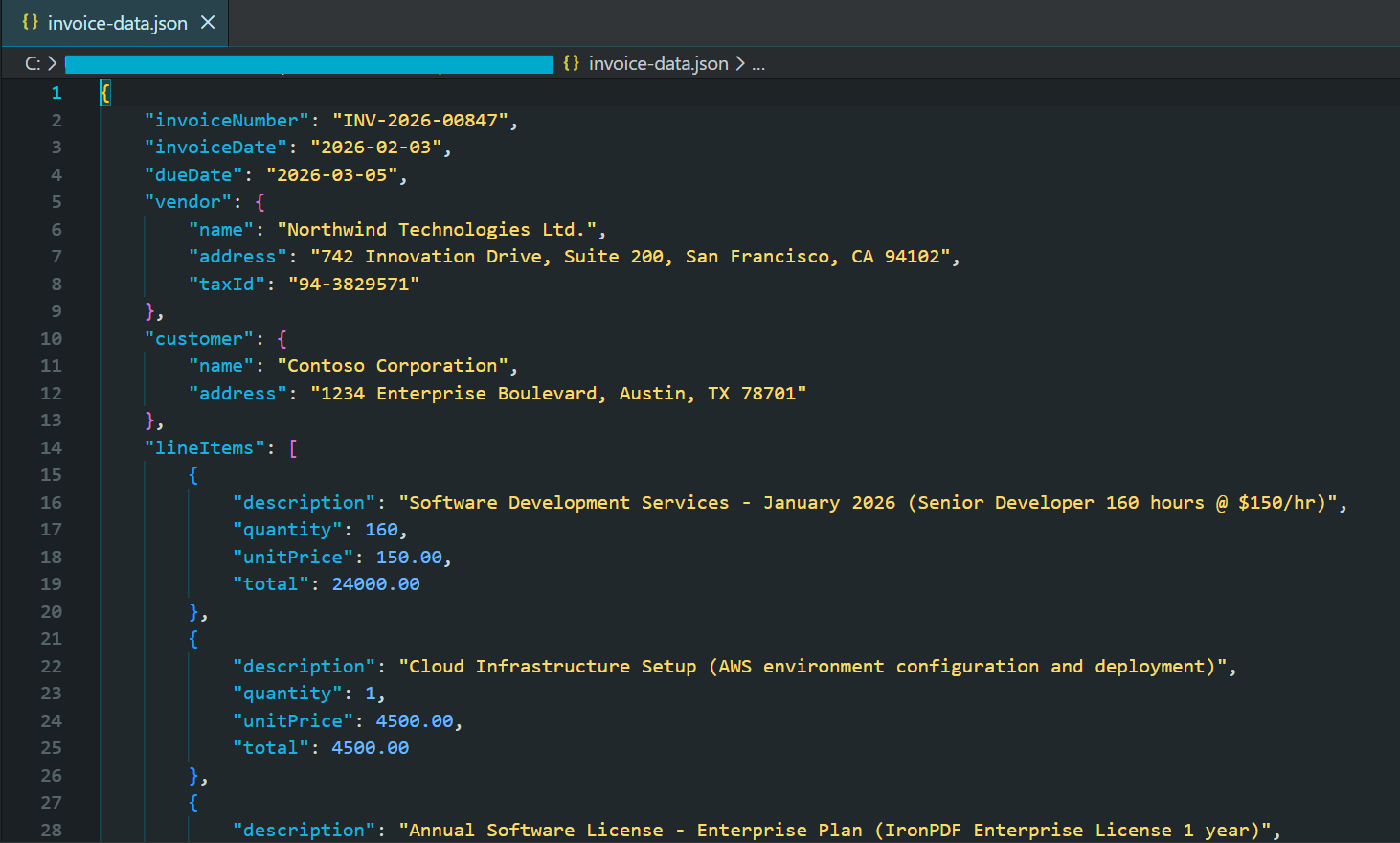
Los modelos modernos de IA en 2026 admiten modos de salida estructurados que garantizan respuestas JSON válidas que se ajustan a los esquemas proporcionados. Esto elimina la necesidad de una compleja gestión de errores en torno a respuestas malformadas.
Identificación de cláusulas contractuales
Los contratos legales contienen tipos específicos de cláusulas que revisten especial importancia: cláusulas de rescisión, limitaciones de responsabilidad, requisitos de indemnización, cesiones de propiedad intelectual y obligaciones de confidencialidad. La identificación de cláusulas mediante IA automatiza este análisis y mantiene un alto nivel de precisión.
Este ejemplo usa pdf.Query() con un esquema JSON enfocado en cláusulas para extraer tipo de contrato, partes, fechas críticas y cláusulas individuales con niveles de riesgo.
using IronPdf;
using IronPdf.AI;
using Microsoft.SemanticKernel;
using Microsoft.SemanticKernel.Memory;
using Microsoft.SemanticKernel.Connectors.OpenAI;
using System.Text.Json;

// Analyze contract clauses and identify key terms, risks, and critical dates

// Azure OpenAI configuration
string azureEndpoint = "https://your-resource.openai.azure.com/";
string apiKey = "your-azure-api-key";
string chatDeployment = "gpt-4o";
string embeddingDeployment = "text-embedding-ada-002";

// Initialize Semantic Kernel
var kernel = Kernel.CreateBuilder()
    .AddAzureOpenAITextEmbeddingGeneration(embeddingDeployment, azureEndpoint, apiKey)
    .AddAzureOpenAIChatCompletion(chatDeployment, azureEndpoint, apiKey)
    .Build();

var memory = new MemoryBuilder()
    .WithMemoryStore(new VolatileMemoryStore())
    .WithAzureOpenAITextEmbeddingGeneration(embeddingDeployment, azureEndpoint, apiKey)
    .Build();

IronDocumentAI.Initialize(kernel, memory);

var pdf = PdfDocument.FromFile("contract.pdf");

// Define JSON schema for contract analysis
string clauseQuery = @"Analyze this contract and identify key clauses. Return JSON:

ntractType"": ""string"",
rties"": [""string""],
fectiveDate"": ""string"",
auses"": [
{
    ""type"": ""Termination|Liability|Indemnification|Confidentiality|IP|Payment|Warranty|Other"",
    ""title"": ""string"",
    ""summary"": ""string"",
    ""riskLevel"": ""Low|Medium|High"",
    ""keyTerms"": [""string""]
}

iticalDates"": [
{
    ""description"": ""string"",
    ""date"": ""string""
}

erallRiskAssessment"": ""Low|Medium|High"",
commendations"": [""string""]


: termination rights, liability caps, indemnification, IP ownership, confidentiality, payment terms.
NLY valid JSON.";

string analysisJson = await pdf.Query(clauseQuery);

try
{
    var analysis = JsonSerializer.Deserialize<JsonElement>(analysisJson);
    string formatted = JsonSerializer.Serialize(analysis, new JsonSerializerOptions { WriteIndented = true });

    Console.WriteLine("Contract Clause Analysis:");
    Console.WriteLine(formatted);

    File.WriteAllText("contract-analysis.json", formatted);

    // Display high-risk clauses
    Console.WriteLine("\n=== High Risk Clauses ===");
    foreach (var clause in analysis.GetProperty("clauses").EnumerateArray())
    {
        if (clause.GetProperty("riskLevel").GetString() == "High")
        {
            Console.WriteLine($"- {clause.GetProperty("type")}: {clause.GetProperty("summary")}");
        }
    }
}
catch (JsonException)
{
    Console.WriteLine("Unable to parse contract analysis");
    File.WriteAllText("contract-analysis-raw.txt", analysisJson);
}
using IronPdf;
using IronPdf.AI;
using Microsoft.SemanticKernel;
using Microsoft.SemanticKernel.Memory;
using Microsoft.SemanticKernel.Connectors.OpenAI;
using System.Text.Json;
// Analyze contract clauses and identify key terms, risks, and critical dates
// Azure OpenAI configuration
string azureEndpoint = "https://your-resource.openai.azure.com/";
string apiKey = "your-azure-api-key";
string chatDeployment = "gpt-4o";
string embeddingDeployment = "text-embedding-ada-002";
// Initialize Semantic Kernel
var kernel = Kernel.CreateBuilder()
.AddAzureOpenAITextEmbeddingGeneration(embeddingDeployment, azureEndpoint, apiKey)
.AddAzureOpenAIChatCompletion(chatDeployment, azureEndpoint, apiKey)
.Build();
var memory = new MemoryBuilder()
.WithMemoryStore(new VolatileMemoryStore())
.WithAzureOpenAITextEmbeddingGeneration(embeddingDeployment, azureEndpoint, apiKey)
.Build();
IronDocumentAI.Initialize(kernel, memory);
var pdf = PdfDocument.FromFile("contract.pdf");
// Define JSON schema for contract analysis
string clauseQuery = @"Analyze this contract and identify key clauses. Return JSON:
ntractType"": ""string"",
rties"": [""string""],
fectiveDate"": ""string"",
auses"": [
{
""type"": ""Termination|Liability|Indemnification|Confidentiality|IP|Payment|Warranty|Other"",
""title"": ""string"",
""summary"": ""string"",
""riskLevel"": ""Low|Medium|High"",
""keyTerms"": [""string""]
}
iticalDates"": [
{
""description"": ""string"",
""date"": ""string""
}
erallRiskAssessment"": ""Low|Medium|High"",
commendations"": [""string""]
: termination rights, liability caps, indemnification, IP ownership, confidentiality, payment terms.
NLY valid JSON.";
string analysisJson = await pdf.Query(clauseQuery);
try
{
var analysis = JsonSerializer.Deserialize<JsonElement>(analysisJson);
string formatted = JsonSerializer.Serialize(analysis, new JsonSerializerOptions { WriteIndented = true });
Console.WriteLine("Contract Clause Analysis:");
Console.WriteLine(formatted);
File.WriteAllText("contract-analysis.json", formatted);
// Display high-risk clauses
Console.WriteLine("\n=== High Risk Clauses ===");
foreach (var clause in analysis.GetProperty("clauses").EnumerateArray())
{
if (clause.GetProperty("riskLevel").GetString() == "High")
{
Console.WriteLine($"- {clause.GetProperty("type")}: {clause.GetProperty("summary")}");
}
}
}
catch (JsonException)
{
Console.WriteLine("Unable to parse contract analysis");
File.WriteAllText("contract-analysis-raw.txt", analysisJson);
}Imports IronPdf
Imports IronPdf.AI
Imports Microsoft.SemanticKernel
Imports Microsoft.SemanticKernel.Memory
Imports Microsoft.SemanticKernel.Connectors.OpenAI
Imports System.Text.Json
' Analyze contract clauses and identify key terms, risks, and critical dates
' Azure OpenAI configuration
Dim azureEndpoint As String = "https://your-resource.openai.azure.com/"
Dim apiKey As String = "your-azure-api-key"
Dim chatDeployment As String = "gpt-4o"
Dim embeddingDeployment As String = "text-embedding-ada-002"
' Initialize Semantic Kernel
Dim kernel = Kernel.CreateBuilder() _
.AddAzureOpenAITextEmbeddingGeneration(embeddingDeployment, azureEndpoint, apiKey) _
.AddAzureOpenAIChatCompletion(chatDeployment, azureEndpoint, apiKey) _
.Build()
Dim memory = New MemoryBuilder() _
.WithMemoryStore(New VolatileMemoryStore()) _
.WithAzureOpenAITextEmbeddingGeneration(embeddingDeployment, azureEndpoint, apiKey) _
.Build()
IronDocumentAI.Initialize(kernel, memory)
Dim pdf = PdfDocument.FromFile("contract.pdf")
' Define JSON schema for contract analysis
Dim clauseQuery As String = "Analyze this contract and identify key clauses. Return JSON:
ntractType"": ""string"",
rties"": [""string""],
fectiveDate"": ""string"",
auses"": [
{
""type"": ""Termination|Liability|Indemnification|Confidentiality|IP|Payment|Warranty|Other"",
""title"": ""string"",
""summary"": ""string"",
""riskLevel"": ""Low|Medium|High"",
""keyTerms"": [""string""]
}
iticalDates"": [
{
""description"": ""string"",
""date"": ""string""
}
erallRiskAssessment"": ""Low|Medium|High"",
commendations"": [""string""]
: termination rights, liability caps, indemnification, IP ownership, confidentiality, payment terms.
NLY valid JSON."
Dim analysisJson As String = Await pdf.Query(clauseQuery)
Try
Dim analysis = JsonSerializer.Deserialize(Of JsonElement)(analysisJson)
Dim formatted As String = JsonSerializer.Serialize(analysis, New JsonSerializerOptions With {.WriteIndented = True})
Console.WriteLine("Contract Clause Analysis:")
Console.WriteLine(formatted)
File.WriteAllText("contract-analysis.json", formatted)
' Display high-risk clauses
Console.WriteLine(vbCrLf & "=== High Risk Clauses ===")
For Each clause In analysis.GetProperty("clauses").EnumerateArray()
If clause.GetProperty("riskLevel").GetString() = "High" Then
Console.WriteLine($"- {clause.GetProperty("type")}: {clause.GetProperty("summary")}")
End If
Next
Catch ex As JsonException
Console.WriteLine("Unable to parse contract analysis")
File.WriteAllText("contract-analysis-raw.txt", analysisJson)
End TryImports IronPdf
Imports IronPdf.AI
Imports Microsoft.SemanticKernel
Imports Microsoft.SemanticKernel.Memory
Imports Microsoft.SemanticKernel.Connectors.OpenAI
Imports System.Text.Json
' Analyze contract clauses and identify key terms, risks, and critical dates
' Azure OpenAI configuration
Dim azureEndpoint As String = "https://your-resource.openai.azure.com/"
Dim apiKey As String = "your-azure-api-key"
Dim chatDeployment As String = "gpt-4o"
Dim embeddingDeployment As String = "text-embedding-ada-002"
' Initialize Semantic Kernel
Dim kernel = Kernel.CreateBuilder() _
.AddAzureOpenAITextEmbeddingGeneration(embeddingDeployment, azureEndpoint, apiKey) _
.AddAzureOpenAIChatCompletion(chatDeployment, azureEndpoint, apiKey) _
.Build()
Dim memory = New MemoryBuilder() _
.WithMemoryStore(New VolatileMemoryStore()) _
.WithAzureOpenAITextEmbeddingGeneration(embeddingDeployment, azureEndpoint, apiKey) _
.Build()
IronDocumentAI.Initialize(kernel, memory)
Dim pdf = PdfDocument.FromFile("contract.pdf")
' Define JSON schema for contract analysis
Dim clauseQuery As String = "Analyze this contract and identify key clauses. Return JSON:
ntractType"": ""string"",
rties"": [""string""],
fectiveDate"": ""string"",
auses"": [
{
""type"": ""Termination|Liability|Indemnification|Confidentiality|IP|Payment|Warranty|Other"",
""title"": ""string"",
""summary"": ""string"",
""riskLevel"": ""Low|Medium|High"",
""keyTerms"": [""string""]
}
iticalDates"": [
{
""description"": ""string"",
""date"": ""string""
}
erallRiskAssessment"": ""Low|Medium|High"",
commendations"": [""string""]
: termination rights, liability caps, indemnification, IP ownership, confidentiality, payment terms.
NLY valid JSON."
Dim analysisJson As String = Await pdf.Query(clauseQuery)
Try
Dim analysis = JsonSerializer.Deserialize(Of JsonElement)(analysisJson)
Dim formatted As String = JsonSerializer.Serialize(analysis, New JsonSerializerOptions With {.WriteIndented = True})
Console.WriteLine("Contract Clause Analysis:")
Console.WriteLine(formatted)
File.WriteAllText("contract-analysis.json", formatted)
' Display high-risk clauses
Console.WriteLine(vbCrLf & "=== High Risk Clauses ===")
For Each clause In analysis.GetProperty("clauses").EnumerateArray()
If clause.GetProperty("riskLevel").GetString() = "High" Then
Console.WriteLine($"- {clause.GetProperty("type")}: {clause.GetProperty("summary")}")
End If
Next
Catch ex As JsonException
Console.WriteLine("Unable to parse contract analysis")
File.WriteAllText("contract-analysis-raw.txt", analysisJson)
End TryEsta capacidad transforma la revisión de contratos de un proceso secuencial y manual a un flujo de trabajo automatizado y escalable. Los equipos jurídicos pueden identificar rápidamente las disposiciones de alto riesgo en cientos de contratos.
Interpretación de datos financieros
Los documentos financieros contienen datos cuantitativos críticos integrados en narraciones y tablas complejas. El análisis potenciado por IA sobresale en documentos financieros porque comprende el contexto: distingue entre resultados históricos y proyecciones futuras, identifica si los números están en miles o millones y comprende las relaciones entre diferentes métricas.
El código usa pdf.Query() con un esquema JSON financiero para extraer datos de estados financieros, métricas de balance y orientación futura en una salida estructurada.
using IronPdf;
using IronPdf.AI;
using Microsoft.SemanticKernel;
using Microsoft.SemanticKernel.Memory;
using Microsoft.SemanticKernel.Connectors.OpenAI;
using System.Text.Json;

// Extract financial metrics from annual reports and earnings documents

// Azure OpenAI configuration
string azureEndpoint = "https://your-resource.openai.azure.com/";
string apiKey = "your-azure-api-key";
string chatDeployment = "gpt-4o";
string embeddingDeployment = "text-embedding-ada-002";

// Initialize Semantic Kernel
var kernel = Kernel.CreateBuilder()
    .AddAzureOpenAITextEmbeddingGeneration(embeddingDeployment, azureEndpoint, apiKey)
    .AddAzureOpenAIChatCompletion(chatDeployment, azureEndpoint, apiKey)
    .Build();

var memory = new MemoryBuilder()
    .WithMemoryStore(new VolatileMemoryStore())
    .WithAzureOpenAITextEmbeddingGeneration(embeddingDeployment, azureEndpoint, apiKey)
    .Build();

IronDocumentAI.Initialize(kernel, memory);

var pdf = PdfDocument.FromFile("annual-report.pdf");

// Define JSON schema for financial extraction (numbers in millions)
string financialQuery = @"Extract financial metrics from this document. Return JSON:

portPeriod"": ""string"",
mpany"": ""string"",
rrency"": ""string"",
comeStatement"": {
""revenue"": number,
""costOfRevenue"": number,
""grossProfit"": number,
""operatingExpenses"": number,
""operatingIncome"": number,
""netIncome"": number,
""eps"": number

lanceSheet"": {
""totalAssets"": number,
""totalLiabilities"": number,
""shareholdersEquity"": number,
""cash"": number,
""totalDebt"": number

yMetrics"": {
""revenueGrowthYoY"": ""string"",
""grossMargin"": ""string"",
""operatingMargin"": ""string"",
""netMargin"": ""string"",
""debtToEquity"": number

idance"": {
""nextQuarterRevenue"": ""string"",
""fullYearRevenue"": ""string"",
""notes"": ""string""


 for unavailable data. Numbers in millions unless stated.
NLY valid JSON.";

string financialJson = await pdf.Query(financialQuery);

try
{
    var financials = JsonSerializer.Deserialize<JsonElement>(financialJson);
    string formatted = JsonSerializer.Serialize(financials, new JsonSerializerOptions { WriteIndented = true });

    Console.WriteLine("Extracted Financial Data:");
    Console.WriteLine(formatted);

    File.WriteAllText("financial-data.json", formatted);
}
catch (JsonException)
{
    Console.WriteLine("Unable to parse financial data");
    File.WriteAllText("financial-raw.txt", financialJson);
}
using IronPdf;
using IronPdf.AI;
using Microsoft.SemanticKernel;
using Microsoft.SemanticKernel.Memory;
using Microsoft.SemanticKernel.Connectors.OpenAI;
using System.Text.Json;
// Extract financial metrics from annual reports and earnings documents
// Azure OpenAI configuration
string azureEndpoint = "https://your-resource.openai.azure.com/";
string apiKey = "your-azure-api-key";
string chatDeployment = "gpt-4o";
string embeddingDeployment = "text-embedding-ada-002";
// Initialize Semantic Kernel
var kernel = Kernel.CreateBuilder()
.AddAzureOpenAITextEmbeddingGeneration(embeddingDeployment, azureEndpoint, apiKey)
.AddAzureOpenAIChatCompletion(chatDeployment, azureEndpoint, apiKey)
.Build();
var memory = new MemoryBuilder()
.WithMemoryStore(new VolatileMemoryStore())
.WithAzureOpenAITextEmbeddingGeneration(embeddingDeployment, azureEndpoint, apiKey)
.Build();
IronDocumentAI.Initialize(kernel, memory);
var pdf = PdfDocument.FromFile("annual-report.pdf");
// Define JSON schema for financial extraction (numbers in millions)
string financialQuery = @"Extract financial metrics from this document. Return JSON:
portPeriod"": ""string"",
mpany"": ""string"",
rrency"": ""string"",
comeStatement"": {
""revenue"": number,
""costOfRevenue"": number,
""grossProfit"": number,
""operatingExpenses"": number,
""operatingIncome"": number,
""netIncome"": number,
""eps"": number
lanceSheet"": {
""totalAssets"": number,
""totalLiabilities"": number,
""shareholdersEquity"": number,
""cash"": number,
""totalDebt"": number
yMetrics"": {
""revenueGrowthYoY"": ""string"",
""grossMargin"": ""string"",
""operatingMargin"": ""string"",
""netMargin"": ""string"",
""debtToEquity"": number
idance"": {
""nextQuarterRevenue"": ""string"",
""fullYearRevenue"": ""string"",
""notes"": ""string""
for unavailable data. Numbers in millions unless stated.
NLY valid JSON.";
string financialJson = await pdf.Query(financialQuery);
try
{
var financials = JsonSerializer.Deserialize<JsonElement>(financialJson);
string formatted = JsonSerializer.Serialize(financials, new JsonSerializerOptions { WriteIndented = true });
Console.WriteLine("Extracted Financial Data:");
Console.WriteLine(formatted);
File.WriteAllText("financial-data.json", formatted);
}
catch (JsonException)
{
Console.WriteLine("Unable to parse financial data");
File.WriteAllText("financial-raw.txt", financialJson);
}Imports IronPdf
Imports IronPdf.AI
Imports Microsoft.SemanticKernel
Imports Microsoft.SemanticKernel.Memory
Imports Microsoft.SemanticKernel.Connectors.OpenAI
Imports System.Text.Json
' Extract financial metrics from annual reports and earnings documents
' Azure OpenAI configuration
Dim azureEndpoint As String = "https://your-resource.openai.azure.com/"
Dim apiKey As String = "your-azure-api-key"
Dim chatDeployment As String = "gpt-4o"
Dim embeddingDeployment As String = "text-embedding-ada-002"
' Initialize Semantic Kernel
Dim kernel = Kernel.CreateBuilder() _
.AddAzureOpenAITextEmbeddingGeneration(embeddingDeployment, azureEndpoint, apiKey) _
.AddAzureOpenAIChatCompletion(chatDeployment, azureEndpoint, apiKey) _
.Build()
Dim memory = New MemoryBuilder() _
.WithMemoryStore(New VolatileMemoryStore()) _
.WithAzureOpenAITextEmbeddingGeneration(embeddingDeployment, azureEndpoint, apiKey) _
.Build()
IronDocumentAI.Initialize(kernel, memory)
Dim pdf = PdfDocument.FromFile("annual-report.pdf")
' Define JSON schema for financial extraction (numbers in millions)
Dim financialQuery As String = "Extract financial metrics from this document. Return JSON:
portPeriod"": ""string"",
mpany"": ""string"",
rrency"": ""string"",
comeStatement"": {
""revenue"": number,
""costOfRevenue"": number,
""grossProfit"": number,
""operatingExpenses"": number,
""operatingIncome"": number,
""netIncome"": number,
""eps"": number
lanceSheet"": {
""totalAssets"": number,
""totalLiabilities"": number,
""shareholdersEquity"": number,
""cash"": number,
""totalDebt"": number
yMetrics"": {
""revenueGrowthYoY"": ""string"",
""grossMargin"": ""string"",
""operatingMargin"": ""string"",
""netMargin"": ""string"",
""debtToEquity"": number
idance"": {
""nextQuarterRevenue"": ""string"",
""fullYearRevenue"": ""string"",
""notes"": ""string""
for unavailable data. Numbers in millions unless stated.
NLY valid JSON."
Dim financialJson As String = Await pdf.Query(financialQuery)
Try
Dim financials = JsonSerializer.Deserialize(Of JsonElement)(financialJson)
Dim formatted As String = JsonSerializer.Serialize(financials, New JsonSerializerOptions With {.WriteIndented = True})
Console.WriteLine("Extracted Financial Data:")
Console.WriteLine(formatted)
File.WriteAllText("financial-data.json", formatted)
Catch ex As JsonException
Console.WriteLine("Unable to parse financial data")
File.WriteAllText("financial-raw.txt", financialJson)
End TryImports IronPdf
Imports IronPdf.AI
Imports Microsoft.SemanticKernel
Imports Microsoft.SemanticKernel.Memory
Imports Microsoft.SemanticKernel.Connectors.OpenAI
Imports System.Text.Json
' Extract financial metrics from annual reports and earnings documents
' Azure OpenAI configuration
Dim azureEndpoint As String = "https://your-resource.openai.azure.com/"
Dim apiKey As String = "your-azure-api-key"
Dim chatDeployment As String = "gpt-4o"
Dim embeddingDeployment As String = "text-embedding-ada-002"
' Initialize Semantic Kernel
Dim kernel = Kernel.CreateBuilder() _
.AddAzureOpenAITextEmbeddingGeneration(embeddingDeployment, azureEndpoint, apiKey) _
.AddAzureOpenAIChatCompletion(chatDeployment, azureEndpoint, apiKey) _
.Build()
Dim memory = New MemoryBuilder() _
.WithMemoryStore(New VolatileMemoryStore()) _
.WithAzureOpenAITextEmbeddingGeneration(embeddingDeployment, azureEndpoint, apiKey) _
.Build()
IronDocumentAI.Initialize(kernel, memory)
Dim pdf = PdfDocument.FromFile("annual-report.pdf")
' Define JSON schema for financial extraction (numbers in millions)
Dim financialQuery As String = "Extract financial metrics from this document. Return JSON:
portPeriod"": ""string"",
mpany"": ""string"",
rrency"": ""string"",
comeStatement"": {
""revenue"": number,
""costOfRevenue"": number,
""grossProfit"": number,
""operatingExpenses"": number,
""operatingIncome"": number,
""netIncome"": number,
""eps"": number
lanceSheet"": {
""totalAssets"": number,
""totalLiabilities"": number,
""shareholdersEquity"": number,
""cash"": number,
""totalDebt"": number
yMetrics"": {
""revenueGrowthYoY"": ""string"",
""grossMargin"": ""string"",
""operatingMargin"": ""string"",
""netMargin"": ""string"",
""debtToEquity"": number
idance"": {
""nextQuarterRevenue"": ""string"",
""fullYearRevenue"": ""string"",
""notes"": ""string""
for unavailable data. Numbers in millions unless stated.
NLY valid JSON."
Dim financialJson As String = Await pdf.Query(financialQuery)
Try
Dim financials = JsonSerializer.Deserialize(Of JsonElement)(financialJson)
Dim formatted As String = JsonSerializer.Serialize(financials, New JsonSerializerOptions With {.WriteIndented = True})
Console.WriteLine("Extracted Financial Data:")
Console.WriteLine(formatted)
File.WriteAllText("financial-data.json", formatted)
Catch ex As JsonException
Console.WriteLine("Unable to parse financial data")
File.WriteAllText("financial-raw.txt", financialJson)
End TryLos datos estructurados extraídos pueden introducirse directamente en modelos financieros, bases de datos de series temporales o plataformas analíticas, lo que permite un seguimiento automatizado de las métricas a lo largo de los periodos de información.
Propuestas de extracción personalizadas
Muchas organizaciones tienen requisitos de extracción únicos basados en su dominio específico, formatos de documentos o procesos empresariales. La integración de IA de IronPDF es totalmente compatible con indicaciones de extracción personalizadas, lo que le permite definir exactamente qué información debe extraerse y cómo debe estructurarse.
Este ejemplo demuestra pdf.Query() con un esquema enfocado en investigación extrayendo metodología, hallazgos clave con niveles de confianza y limitaciones de trabajos académicos.
using IronPdf;
using IronPdf.AI;
using Microsoft.SemanticKernel;
using Microsoft.SemanticKernel.Memory;
using Microsoft.SemanticKernel.Connectors.OpenAI;
using System.Text.Json;

// Extract structured research metadata from academic papers

// Azure OpenAI configuration
string azureEndpoint = "https://your-resource.openai.azure.com/";
string apiKey = "your-azure-api-key";
string chatDeployment = "gpt-4o";
string embeddingDeployment = "text-embedding-ada-002";

// Initialize Semantic Kernel
var kernel = Kernel.CreateBuilder()
    .AddAzureOpenAITextEmbeddingGeneration(embeddingDeployment, azureEndpoint, apiKey)
    .AddAzureOpenAIChatCompletion(chatDeployment, azureEndpoint, apiKey)
    .Build();

var memory = new MemoryBuilder()
    .WithMemoryStore(new VolatileMemoryStore())
    .WithAzureOpenAITextEmbeddingGeneration(embeddingDeployment, azureEndpoint, apiKey)
    .Build();

IronDocumentAI.Initialize(kernel, memory);

var pdf = PdfDocument.FromFile("research-paper.pdf");

// Define JSON schema for research paper extraction
string researchQuery = @"Extract structured information from this research paper. Return JSON:

tle"": ""string"",
thors"": [""string""],
stitution"": ""string"",
blicationDate"": ""string"",
stract"": ""string"",
searchQuestion"": ""string"",
thodology"": {
""type"": ""Quantitative|Qualitative|Mixed Methods"",
""approach"": ""string"",
""sampleSize"": ""string"",
""dataCollection"": ""string""

yFindings"": [
{
    ""finding"": ""string"",
    ""significance"": ""string"",
    ""confidence"": ""High|Medium|Low""
}

mitations"": [""string""],
tureWork"": [""string""],
ywords"": [""string""]


 extracting verifiable claims and noting uncertainty.
NLY valid JSON.";

string extractionResult = await pdf.Query(researchQuery);

try
{
    var research = JsonSerializer.Deserialize<JsonElement>(extractionResult);
    string formatted = JsonSerializer.Serialize(research, new JsonSerializerOptions { WriteIndented = true });

    Console.WriteLine("Research Paper Extraction:");
    Console.WriteLine(formatted);

    File.WriteAllText("research-extraction.json", formatted);

    // Display key findings with confidence levels
    Console.WriteLine("\n=== Key Findings ===");
    foreach (var finding in research.GetProperty("keyFindings").EnumerateArray())
    {
        string confidence = finding.GetProperty("confidence").GetString() ?? "Unknown";
        Console.WriteLine($"[{confidence}] {finding.GetProperty("finding")}");
    }
}
catch (JsonException)
{
    Console.WriteLine("Unable to parse research extraction");
    File.WriteAllText("research-raw.txt", extractionResult);
}
using IronPdf;
using IronPdf.AI;
using Microsoft.SemanticKernel;
using Microsoft.SemanticKernel.Memory;
using Microsoft.SemanticKernel.Connectors.OpenAI;
using System.Text.Json;
// Extract structured research metadata from academic papers
// Azure OpenAI configuration
string azureEndpoint = "https://your-resource.openai.azure.com/";
string apiKey = "your-azure-api-key";
string chatDeployment = "gpt-4o";
string embeddingDeployment = "text-embedding-ada-002";
// Initialize Semantic Kernel
var kernel = Kernel.CreateBuilder()
.AddAzureOpenAITextEmbeddingGeneration(embeddingDeployment, azureEndpoint, apiKey)
.AddAzureOpenAIChatCompletion(chatDeployment, azureEndpoint, apiKey)
.Build();
var memory = new MemoryBuilder()
.WithMemoryStore(new VolatileMemoryStore())
.WithAzureOpenAITextEmbeddingGeneration(embeddingDeployment, azureEndpoint, apiKey)
.Build();
IronDocumentAI.Initialize(kernel, memory);
var pdf = PdfDocument.FromFile("research-paper.pdf");
// Define JSON schema for research paper extraction
string researchQuery = @"Extract structured information from this research paper. Return JSON:
tle"": ""string"",
thors"": [""string""],
stitution"": ""string"",
blicationDate"": ""string"",
stract"": ""string"",
searchQuestion"": ""string"",
thodology"": {
""type"": ""Quantitative|Qualitative|Mixed Methods"",
""approach"": ""string"",
""sampleSize"": ""string"",
""dataCollection"": ""string""
yFindings"": [
{
""finding"": ""string"",
""significance"": ""string"",
""confidence"": ""High|Medium|Low""
}
mitations"": [""string""],
tureWork"": [""string""],
ywords"": [""string""]
extracting verifiable claims and noting uncertainty.
NLY valid JSON.";
string extractionResult = await pdf.Query(researchQuery);
try
{
var research = JsonSerializer.Deserialize<JsonElement>(extractionResult);
string formatted = JsonSerializer.Serialize(research, new JsonSerializerOptions { WriteIndented = true });
Console.WriteLine("Research Paper Extraction:");
Console.WriteLine(formatted);
File.WriteAllText("research-extraction.json", formatted);
// Display key findings with confidence levels
Console.WriteLine("\n=== Key Findings ===");
foreach (var finding in research.GetProperty("keyFindings").EnumerateArray())
{
string confidence = finding.GetProperty("confidence").GetString() ?? "Unknown";
Console.WriteLine($"[{confidence}] {finding.GetProperty("finding")}");
}
}
catch (JsonException)
{
Console.WriteLine("Unable to parse research extraction");
File.WriteAllText("research-raw.txt", extractionResult);
}Imports IronPdf
Imports IronPdf.AI
Imports Microsoft.SemanticKernel
Imports Microsoft.SemanticKernel.Memory
Imports Microsoft.SemanticKernel.Connectors.OpenAI
Imports System.Text.Json
' Extract structured research metadata from academic papers
' Azure OpenAI configuration
Dim azureEndpoint As String = "https://your-resource.openai.azure.com/"
Dim apiKey As String = "your-azure-api-key"
Dim chatDeployment As String = "gpt-4o"
Dim embeddingDeployment As String = "text-embedding-ada-002"
' Initialize Semantic Kernel
Dim kernel = Kernel.CreateBuilder() _
.AddAzureOpenAITextEmbeddingGeneration(embeddingDeployment, azureEndpoint, apiKey) _
.AddAzureOpenAIChatCompletion(chatDeployment, azureEndpoint, apiKey) _
.Build()
Dim memory = New MemoryBuilder() _
.WithMemoryStore(New VolatileMemoryStore()) _
.WithAzureOpenAITextEmbeddingGeneration(embeddingDeployment, azureEndpoint, apiKey) _
.Build()
IronDocumentAI.Initialize(kernel, memory)
Dim pdf = PdfDocument.FromFile("research-paper.pdf")
' Define JSON schema for research paper extraction
Dim researchQuery As String = "Extract structured information from this research paper. Return JSON:
tle"": ""string"",
thors"": [""string""],
stitution"": ""string"",
blicationDate"": ""string"",
stract"": ""string"",
searchQuestion"": ""string"",
thodology"": {
""type"": ""Quantitative|Qualitative|Mixed Methods"",
""approach"": ""string"",
""sampleSize"": ""string"",
""dataCollection"": ""string""
yFindings"": [
{
""finding"": ""string"",
""significance"": ""string"",
""confidence"": ""High|Medium|Low""
}
mitations"": [""string""],
tureWork"": [""string""],
ywords"": [""string""]
extracting verifiable claims and noting uncertainty.
NLY valid JSON."
Dim extractionResult As String = Await pdf.Query(researchQuery)
Try
Dim research = JsonSerializer.Deserialize(Of JsonElement)(extractionResult)
Dim formatted As String = JsonSerializer.Serialize(research, New JsonSerializerOptions With {.WriteIndented = True})
Console.WriteLine("Research Paper Extraction:")
Console.WriteLine(formatted)
File.WriteAllText("research-extraction.json", formatted)
' Display key findings with confidence levels
Console.WriteLine(vbCrLf & "=== Key Findings ===")
For Each finding In research.GetProperty("keyFindings").EnumerateArray()
Dim confidence As String = finding.GetProperty("confidence").GetString() OrElse "Unknown"
Console.WriteLine($"[{confidence}] {finding.GetProperty("finding")}")
Next
Catch ex As JsonException
Console.WriteLine("Unable to parse research extraction")
File.WriteAllText("research-raw.txt", extractionResult)
End TryImports IronPdf
Imports IronPdf.AI
Imports Microsoft.SemanticKernel
Imports Microsoft.SemanticKernel.Memory
Imports Microsoft.SemanticKernel.Connectors.OpenAI
Imports System.Text.Json
' Extract structured research metadata from academic papers
' Azure OpenAI configuration
Dim azureEndpoint As String = "https://your-resource.openai.azure.com/"
Dim apiKey As String = "your-azure-api-key"
Dim chatDeployment As String = "gpt-4o"
Dim embeddingDeployment As String = "text-embedding-ada-002"
' Initialize Semantic Kernel
Dim kernel = Kernel.CreateBuilder() _
.AddAzureOpenAITextEmbeddingGeneration(embeddingDeployment, azureEndpoint, apiKey) _
.AddAzureOpenAIChatCompletion(chatDeployment, azureEndpoint, apiKey) _
.Build()
Dim memory = New MemoryBuilder() _
.WithMemoryStore(New VolatileMemoryStore()) _
.WithAzureOpenAITextEmbeddingGeneration(embeddingDeployment, azureEndpoint, apiKey) _
.Build()
IronDocumentAI.Initialize(kernel, memory)
Dim pdf = PdfDocument.FromFile("research-paper.pdf")
' Define JSON schema for research paper extraction
Dim researchQuery As String = "Extract structured information from this research paper. Return JSON:
tle"": ""string"",
thors"": [""string""],
stitution"": ""string"",
blicationDate"": ""string"",
stract"": ""string"",
searchQuestion"": ""string"",
thodology"": {
""type"": ""Quantitative|Qualitative|Mixed Methods"",
""approach"": ""string"",
""sampleSize"": ""string"",
""dataCollection"": ""string""
yFindings"": [
{
""finding"": ""string"",
""significance"": ""string"",
""confidence"": ""High|Medium|Low""
}
mitations"": [""string""],
tureWork"": [""string""],
ywords"": [""string""]
extracting verifiable claims and noting uncertainty.
NLY valid JSON."
Dim extractionResult As String = Await pdf.Query(researchQuery)
Try
Dim research = JsonSerializer.Deserialize(Of JsonElement)(extractionResult)
Dim formatted As String = JsonSerializer.Serialize(research, New JsonSerializerOptions With {.WriteIndented = True})
Console.WriteLine("Research Paper Extraction:")
Console.WriteLine(formatted)
File.WriteAllText("research-extraction.json", formatted)
' Display key findings with confidence levels
Console.WriteLine(vbCrLf & "=== Key Findings ===")
For Each finding In research.GetProperty("keyFindings").EnumerateArray()
Dim confidence As String = finding.GetProperty("confidence").GetString() OrElse "Unknown"
Console.WriteLine($"[{confidence}] {finding.GetProperty("finding")}")
Next
Catch ex As JsonException
Console.WriteLine("Unable to parse research extraction")
File.WriteAllText("research-raw.txt", extractionResult)
End TryLas instrucciones personalizadas transforman la extracción asistida por IA de una herramienta genérica en una solución especializada adaptada a sus necesidades específicas.

Mi biblioteca favorita de este tipo es IronPDF. Permite una manipulación rápida y eficiente de archivos PDF. También tiene muchas funciones valiosas, como exportar al formato PDF/A y firmar documentos PDF digitalmente.

IronOCR significa que podemos ahorrar $40,000 anualmente en el procesamiento manual, mientras mejoramos la productividad y liberamos recursos para tareas de alto impacto. Lo recomendaría encarecidamente.

Respuesta a preguntas sobre documentos
Creación de un sistema de preguntas y respuestas en PDF
Los sistemas de respuesta a preguntas permiten a los usuarios interactuar con documentos PDF de forma conversacional, formulando preguntas en lenguaje natural y recibiendo respuestas precisas y contextuales. El patrón básico consiste en extraer texto del PDF, combinarlo con la pregunta del usuario en un prompt y solicitar una respuesta a la IA.
Entrada
El código llama a pdf.Memorize() para indexar el documento para búsqueda semántica, luego entra en un bucle interactivo usando pdf.Query() para responder preguntas de los usuarios.
using IronPdf;
using IronPdf.AI;
using Microsoft.SemanticKernel;
using Microsoft.SemanticKernel.Memory;
using Microsoft.SemanticKernel.Connectors.OpenAI;

// Interactive Q&A system for querying PDF documents

// Azure OpenAI configuration
string azureEndpoint = "https://your-resource.openai.azure.com/";
string apiKey = "your-azure-api-key";
string chatDeployment = "gpt-4o";
string embeddingDeployment = "text-embedding-ada-002";

// Initialize Semantic Kernel
var kernel = Kernel.CreateBuilder()
    .AddAzureOpenAITextEmbeddingGeneration(embeddingDeployment, azureEndpoint, apiKey)
    .AddAzureOpenAIChatCompletion(chatDeployment, azureEndpoint, apiKey)
    .Build();

var memory = new MemoryBuilder()
    .WithMemoryStore(new VolatileMemoryStore())
    .WithAzureOpenAITextEmbeddingGeneration(embeddingDeployment, azureEndpoint, apiKey)
    .Build();

IronDocumentAI.Initialize(kernel, memory);

var pdf = PdfDocument.FromFile("sample-legal-document.pdf");

// Memorize document to enable persistent querying
await pdf.Memorize();

Console.WriteLine("PDF Q&A System - Type 'exit' to quit\n");
Console.WriteLine($"Document loaded and memorized: {pdf.PageCount} pages\n");

// Interactive Q&A loop
while (true)
{
    Console.Write("Your question: ");
    string? question = Console.ReadLine();

    if (string.IsNullOrWhiteSpace(question) || question.ToLower() == "exit")
        break;

    string answer = await pdf.Query(question);

    Console.WriteLine($"\nAnswer: {answer}\n");
    Console.WriteLine(new string('-', 50) + "\n");
}

Console.WriteLine("Q&A session ended.");
using IronPdf;
using IronPdf.AI;
using Microsoft.SemanticKernel;
using Microsoft.SemanticKernel.Memory;
using Microsoft.SemanticKernel.Connectors.OpenAI;
// Interactive Q&A system for querying PDF documents
// Azure OpenAI configuration
string azureEndpoint = "https://your-resource.openai.azure.com/";
string apiKey = "your-azure-api-key";
string chatDeployment = "gpt-4o";
string embeddingDeployment = "text-embedding-ada-002";
// Initialize Semantic Kernel
var kernel = Kernel.CreateBuilder()
.AddAzureOpenAITextEmbeddingGeneration(embeddingDeployment, azureEndpoint, apiKey)
.AddAzureOpenAIChatCompletion(chatDeployment, azureEndpoint, apiKey)
.Build();
var memory = new MemoryBuilder()
.WithMemoryStore(new VolatileMemoryStore())
.WithAzureOpenAITextEmbeddingGeneration(embeddingDeployment, azureEndpoint, apiKey)
.Build();
IronDocumentAI.Initialize(kernel, memory);
var pdf = PdfDocument.FromFile("sample-legal-document.pdf");
// Memorize document to enable persistent querying
await pdf.Memorize();
Console.WriteLine("PDF Q&A System - Type 'exit' to quit\n");
Console.WriteLine($"Document loaded and memorized: {pdf.PageCount} pages\n");
// Interactive Q&A loop
while (true)
{
Console.Write("Your question: ");
string? question = Console.ReadLine();
if (string.IsNullOrWhiteSpace(question) || question.ToLower() == "exit")
break;
string answer = await pdf.Query(question);
Console.WriteLine($"\nAnswer: {answer}\n");
Console.WriteLine(new string('-', 50) + "\n");
}
Console.WriteLine("Q&A session ended.");Imports IronPdf
Imports IronPdf.AI
Imports Microsoft.SemanticKernel
Imports Microsoft.SemanticKernel.Memory
Imports Microsoft.SemanticKernel.Connectors.OpenAI
' Interactive Q&A system for querying PDF documents
' Azure OpenAI configuration
Dim azureEndpoint As String = "https://your-resource.openai.azure.com/"
Dim apiKey As String = "your-azure-api-key"
Dim chatDeployment As String = "gpt-4o"
Dim embeddingDeployment As String = "text-embedding-ada-002"
' Initialize Semantic Kernel
Dim kernel = Kernel.CreateBuilder() _
.AddAzureOpenAITextEmbeddingGeneration(embeddingDeployment, azureEndpoint, apiKey) _
.AddAzureOpenAIChatCompletion(chatDeployment, azureEndpoint, apiKey) _
.Build()
Dim memory = New MemoryBuilder() _
.WithMemoryStore(New VolatileMemoryStore()) _
.WithAzureOpenAITextEmbeddingGeneration(embeddingDeployment, azureEndpoint, apiKey) _
.Build()
IronDocumentAI.Initialize(kernel, memory)
Dim pdf = PdfDocument.FromFile("sample-legal-document.pdf")
' Memorize document to enable persistent querying
Await pdf.Memorize()
Console.WriteLine("PDF Q&A System - Type 'exit' to quit" & vbCrLf)
Console.WriteLine($"Document loaded and memorized: {pdf.PageCount} pages" & vbCrLf)
' Interactive Q&A loop
While True
Console.Write("Your question: ")
Dim question As String = Console.ReadLine()
If String.IsNullOrWhiteSpace(question) OrElse question.ToLower() = "exit" Then
Exit While
End If
Dim answer As String = Await pdf.Query(question)
Console.WriteLine($"{vbCrLf}Answer: {answer}{vbCrLf}")
Console.WriteLine(New String("-"c, 50) & vbCrLf)
End While
Console.WriteLine("Q&A session ended.")Imports IronPdf
Imports IronPdf.AI
Imports Microsoft.SemanticKernel
Imports Microsoft.SemanticKernel.Memory
Imports Microsoft.SemanticKernel.Connectors.OpenAI
' Interactive Q&A system for querying PDF documents
' Azure OpenAI configuration
Dim azureEndpoint As String = "https://your-resource.openai.azure.com/"
Dim apiKey As String = "your-azure-api-key"
Dim chatDeployment As String = "gpt-4o"
Dim embeddingDeployment As String = "text-embedding-ada-002"
' Initialize Semantic Kernel
Dim kernel = Kernel.CreateBuilder() _
.AddAzureOpenAITextEmbeddingGeneration(embeddingDeployment, azureEndpoint, apiKey) _
.AddAzureOpenAIChatCompletion(chatDeployment, azureEndpoint, apiKey) _
.Build()
Dim memory = New MemoryBuilder() _
.WithMemoryStore(New VolatileMemoryStore()) _
.WithAzureOpenAITextEmbeddingGeneration(embeddingDeployment, azureEndpoint, apiKey) _
.Build()
IronDocumentAI.Initialize(kernel, memory)
Dim pdf = PdfDocument.FromFile("sample-legal-document.pdf")
' Memorize document to enable persistent querying
Await pdf.Memorize()
Console.WriteLine("PDF Q&A System - Type 'exit' to quit" & vbCrLf)
Console.WriteLine($"Document loaded and memorized: {pdf.PageCount} pages" & vbCrLf)
' Interactive Q&A loop
While True
Console.Write("Your question: ")
Dim question As String = Console.ReadLine()
If String.IsNullOrWhiteSpace(question) OrElse question.ToLower() = "exit" Then
Exit While
End If
Dim answer As String = Await pdf.Query(question)
Console.WriteLine($"{vbCrLf}Answer: {answer}{vbCrLf}")
Console.WriteLine(New String("-"c, 50) & vbCrLf)
End While
Console.WriteLine("Q&A session ended.")Salida de consola
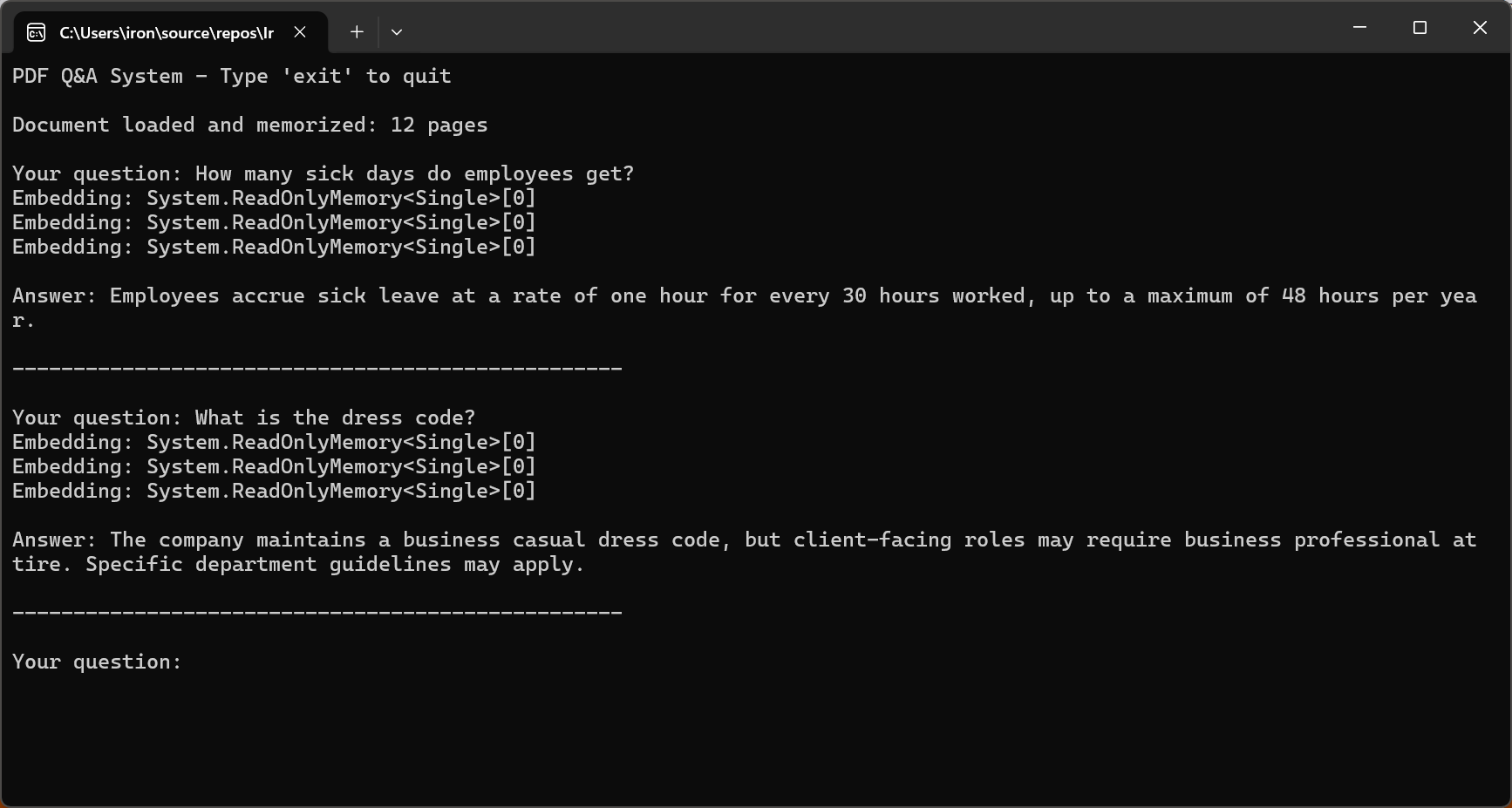
La clave para que las preguntas y respuestas sean eficaces en 2026 es obligar a la IA a responder basándose únicamente en el contenido del documento. El método de entrenamiento "safe completions" de GPT-5 y la alineación mejorada de Claude Sonnet 4.5 reducen sustancialmente las tasas de alucinación.
Corte de documentos largos para ventanas contextuales
La mayoría de los documentos del mundo real superan las ventanas contextuales de AI. Para procesar estos documentos es esencial contar con estrategias de fragmentación eficaces. La fragmentación consiste en dividir los documentos en segmentos lo suficientemente pequeños como para que quepan en ventanas contextuales, manteniendo al mismo tiempo la coherencia semántica.
Este código itera a través de pdf.Pages, creando objetos DocumentChunk con maxChunkTokens y overlapTokens configurables para la continuidad del contexto.
using IronPdf;

// Split long documents into overlapping chunks for RAG systems

var pdf = PdfDocument.FromFile("long-document.pdf");

// Chunking configuration
int maxChunkTokens = 4000;      // Leave room for prompts and responses
int overlapTokens = 200;        // Overlap for context continuity
int approxCharsPerToken = 4;    // Rough estimate for tokenization

int maxChunkChars = maxChunkTokens * approxCharsPerToken;
int overlapChars = overlapTokens * approxCharsPerToken;

var chunks = new List<DocumentChunk>();
var currentChunk = new System.Text.StringBuilder();
int chunkStartPage = 1;
int currentPage = 1;

for (int i = 0; i < pdf.PageCount; i++)
{
    string pageText = pdf.Pages[i].Text;
    currentPage = i + 1;

    if (currentChunk.Length + pageText.Length > maxChunkChars && currentChunk.Length > 0)
    {
        chunks.Add(new DocumentChunk
        {
            Text = currentChunk.ToString(),
            StartPage = chunkStartPage,
            EndPage = currentPage - 1,
            ChunkIndex = chunks.Count
        });

        // Create overlap with previous chunk for continuity
        string overlap = currentChunk.Length > overlapChars
            ? currentChunk.ToString().Substring(currentChunk.Length - overlapChars)
            : currentChunk.ToString();

        currentChunk.Clear();
        currentChunk.Append(overlap);
        chunkStartPage = currentPage - 1;
    }

    currentChunk.AppendLine($"\n--- Page {currentPage} ---\n");
    currentChunk.Append(pageText);
}

if (currentChunk.Length > 0)
{
    chunks.Add(new DocumentChunk
    {
        Text = currentChunk.ToString(),
        StartPage = chunkStartPage,
        EndPage = currentPage,
        ChunkIndex = chunks.Count
    });
}

Console.WriteLine($"Document chunked into {chunks.Count} segments");
foreach (var chunk in chunks)
{
    Console.WriteLine($"  Chunk {chunk.ChunkIndex + 1}: Pages {chunk.StartPage}-{chunk.EndPage} ({chunk.Text.Length} chars)");
}

// Save chunk metadata for RAG indexing
File.WriteAllText("chunks-metadata.json", System.Text.Json.JsonSerializer.Serialize(
    chunks.Select(c => new { c.ChunkIndex, c.StartPage, c.EndPage, Length = c.Text.Length }),
    new System.Text.Json.JsonSerializerOptions { WriteIndented = true }
));


ic class DocumentChunk

public string Text { get; set; } = "";
public int StartPage { get; set; }
public int EndPage { get; set; }
public int ChunkIndex { get; set; }
using IronPdf;
// Split long documents into overlapping chunks for RAG systems
var pdf = PdfDocument.FromFile("long-document.pdf");
// Chunking configuration
int maxChunkTokens = 4000; // Leave room for prompts and responses
int overlapTokens = 200; // Overlap for context continuity
int approxCharsPerToken = 4; // Rough estimate for tokenization
int maxChunkChars = maxChunkTokens * approxCharsPerToken;
int overlapChars = overlapTokens * approxCharsPerToken;
var chunks = new List<DocumentChunk>();
var currentChunk = new System.Text.StringBuilder();
int chunkStartPage = 1;
int currentPage = 1;
for (int i = 0; i < pdf.PageCount; i++)
{
string pageText = pdf.Pages[i].Text;
currentPage = i + 1;
if (currentChunk.Length + pageText.Length > maxChunkChars && currentChunk.Length > 0)
{
chunks.Add(new DocumentChunk
{
Text = currentChunk.ToString(),
StartPage = chunkStartPage,
EndPage = currentPage - 1,
ChunkIndex = chunks.Count
});
// Create overlap with previous chunk for continuity
string overlap = currentChunk.Length > overlapChars
? currentChunk.ToString().Substring(currentChunk.Length - overlapChars)
: currentChunk.ToString();
currentChunk.Clear();
currentChunk.Append(overlap);
chunkStartPage = currentPage - 1;
}
currentChunk.AppendLine($"\n--- Page {currentPage} ---\n");
currentChunk.Append(pageText);
}
if (currentChunk.Length > 0)
{
chunks.Add(new DocumentChunk
{
Text = currentChunk.ToString(),
StartPage = chunkStartPage,
EndPage = currentPage,
ChunkIndex = chunks.Count
});
}
Console.WriteLine($"Document chunked into {chunks.Count} segments");
foreach (var chunk in chunks)
{
Console.WriteLine($" Chunk {chunk.ChunkIndex + 1}: Pages {chunk.StartPage}-{chunk.EndPage} ({chunk.Text.Length} chars)");
}
// Save chunk metadata for RAG indexing
File.WriteAllText("chunks-metadata.json", System.Text.Json.JsonSerializer.Serialize(
chunks.Select(c => new { c.ChunkIndex, c.StartPage, c.EndPage, Length = c.Text.Length }),
new System.Text.Json.JsonSerializerOptions { WriteIndented = true }
));
ic class DocumentChunk
public string Text { get; set; } = "";
public int StartPage { get; set; }
public int EndPage { get; set; }
public int ChunkIndex { get; set; }Imports IronPdf
Imports System.IO
Imports System.Text
Imports System.Text.Json
' Split long documents into overlapping chunks for RAG systems
Dim pdf = PdfDocument.FromFile("long-document.pdf")
' Chunking configuration
Dim maxChunkTokens As Integer = 4000 ' Leave room for prompts and responses
Dim overlapTokens As Integer = 200 ' Overlap for context continuity
Dim approxCharsPerToken As Integer = 4 ' Rough estimate for tokenization
Dim maxChunkChars As Integer = maxChunkTokens * approxCharsPerToken
Dim overlapChars As Integer = overlapTokens * approxCharsPerToken
Dim chunks As New List(Of DocumentChunk)()
Dim currentChunk As New StringBuilder()
Dim chunkStartPage As Integer = 1
Dim currentPage As Integer = 1
For i As Integer = 0 To pdf.PageCount - 1
Dim pageText As String = pdf.Pages(i).Text
currentPage = i + 1
If currentChunk.Length + pageText.Length > maxChunkChars AndAlso currentChunk.Length > 0 Then
chunks.Add(New DocumentChunk With {
.Text = currentChunk.ToString(),
.StartPage = chunkStartPage,
.EndPage = currentPage - 1,
.ChunkIndex = chunks.Count
})
' Create overlap with previous chunk for continuity
Dim overlap As String = If(currentChunk.Length > overlapChars,
currentChunk.ToString().Substring(currentChunk.Length - overlapChars),
currentChunk.ToString())
currentChunk.Clear()
currentChunk.Append(overlap)
chunkStartPage = currentPage - 1
End If
currentChunk.AppendLine(vbCrLf & "--- Page " & currentPage & " ---" & vbCrLf)
currentChunk.Append(pageText)
Next
If currentChunk.Length > 0 Then
chunks.Add(New DocumentChunk With {
.Text = currentChunk.ToString(),
.StartPage = chunkStartPage,
.EndPage = currentPage,
.ChunkIndex = chunks.Count
})
End If
Console.WriteLine($"Document chunked into {chunks.Count} segments")
For Each chunk In chunks
Console.WriteLine($" Chunk {chunk.ChunkIndex + 1}: Pages {chunk.StartPage}-{chunk.EndPage} ({chunk.Text.Length} chars)")
Next
' Save chunk metadata for RAG indexing
File.WriteAllText("chunks-metadata.json", JsonSerializer.Serialize(
chunks.Select(Function(c) New With {.ChunkIndex = c.ChunkIndex, .StartPage = c.StartPage, .EndPage = c.EndPage, .Length = c.Text.Length}),
New JsonSerializerOptions With {.WriteIndented = True}
))
Public Class DocumentChunk
Public Property Text As String = ""
Public Property StartPage As Integer
Public Property EndPage As Integer
Public Property ChunkIndex As Integer
End ClassImports IronPdf
Imports System.IO
Imports System.Text
Imports System.Text.Json
' Split long documents into overlapping chunks for RAG systems
Dim pdf = PdfDocument.FromFile("long-document.pdf")
' Chunking configuration
Dim maxChunkTokens As Integer = 4000 ' Leave room for prompts and responses
Dim overlapTokens As Integer = 200 ' Overlap for context continuity
Dim approxCharsPerToken As Integer = 4 ' Rough estimate for tokenization
Dim maxChunkChars As Integer = maxChunkTokens * approxCharsPerToken
Dim overlapChars As Integer = overlapTokens * approxCharsPerToken
Dim chunks As New List(Of DocumentChunk)()
Dim currentChunk As New StringBuilder()
Dim chunkStartPage As Integer = 1
Dim currentPage As Integer = 1
For i As Integer = 0 To pdf.PageCount - 1
Dim pageText As String = pdf.Pages(i).Text
currentPage = i + 1
If currentChunk.Length + pageText.Length > maxChunkChars AndAlso currentChunk.Length > 0 Then
chunks.Add(New DocumentChunk With {
.Text = currentChunk.ToString(),
.StartPage = chunkStartPage,
.EndPage = currentPage - 1,
.ChunkIndex = chunks.Count
})
' Create overlap with previous chunk for continuity
Dim overlap As String = If(currentChunk.Length > overlapChars,
currentChunk.ToString().Substring(currentChunk.Length - overlapChars),
currentChunk.ToString())
currentChunk.Clear()
currentChunk.Append(overlap)
chunkStartPage = currentPage - 1
End If
currentChunk.AppendLine(vbCrLf & "--- Page " & currentPage & " ---" & vbCrLf)
currentChunk.Append(pageText)
Next
If currentChunk.Length > 0 Then
chunks.Add(New DocumentChunk With {
.Text = currentChunk.ToString(),
.StartPage = chunkStartPage,
.EndPage = currentPage,
.ChunkIndex = chunks.Count
})
End If
Console.WriteLine($"Document chunked into {chunks.Count} segments")
For Each chunk In chunks
Console.WriteLine($" Chunk {chunk.ChunkIndex + 1}: Pages {chunk.StartPage}-{chunk.EndPage} ({chunk.Text.Length} chars)")
Next
' Save chunk metadata for RAG indexing
File.WriteAllText("chunks-metadata.json", JsonSerializer.Serialize(
chunks.Select(Function(c) New With {.ChunkIndex = c.ChunkIndex, .StartPage = c.StartPage, .EndPage = c.EndPage, .Length = c.Text.Length}),
New JsonSerializerOptions With {.WriteIndented = True}
))
Public Class DocumentChunk
Public Property Text As String = ""
Public Property StartPage As Integer
Public Property EndPage As Integer
Public Property ChunkIndex As Integer
End Class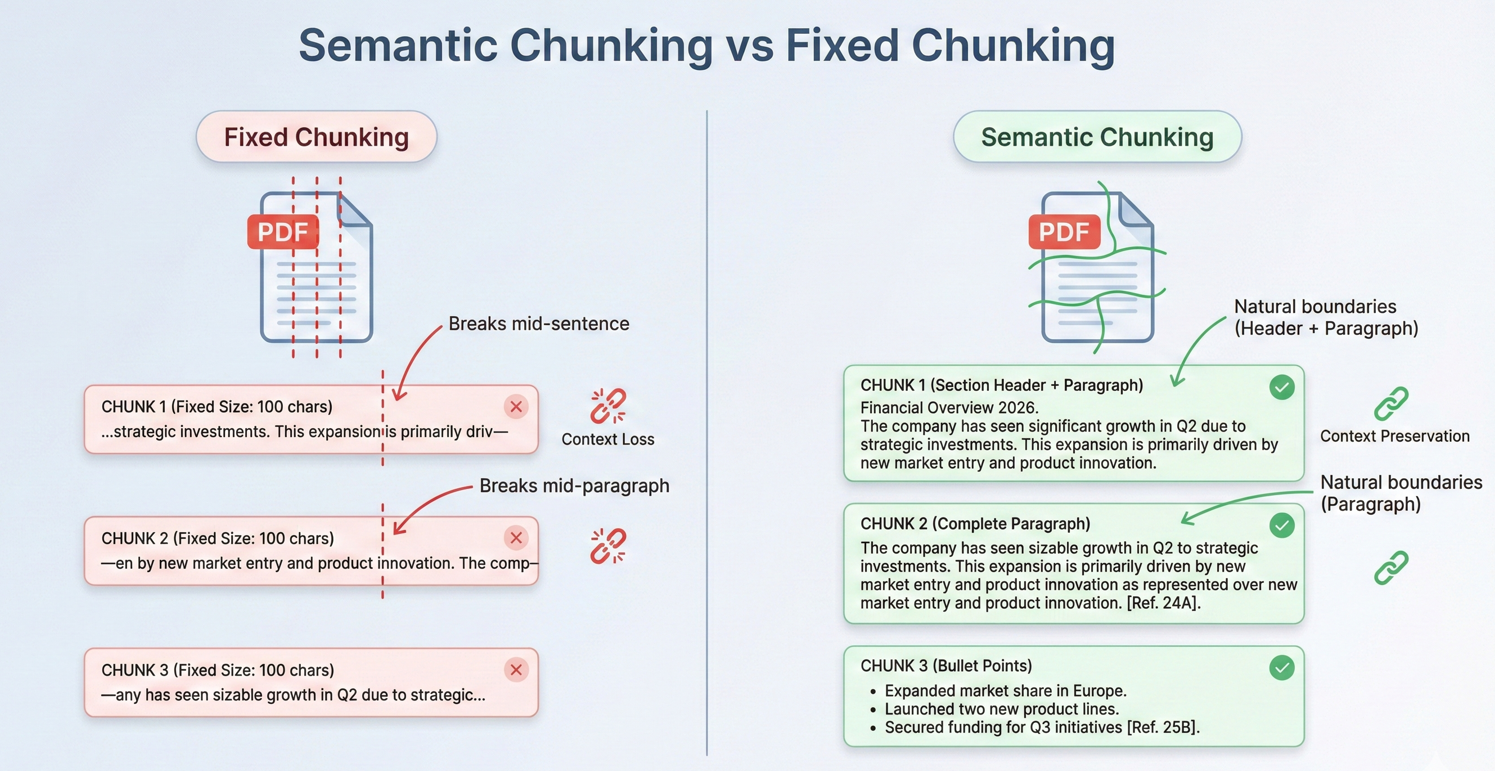
Los trozos superpuestos proporcionan continuidad a través de los límites, garantizando que la IA tenga suficiente contexto incluso cuando la información relevante se extiende a través de los límites de los trozos.
Patrones RAG (Recuperación-Generación Aumentada)
La generación mejorada de recuperación representa un poderoso patrón para el análisis de documentos impulsado por IA en 2026. En lugar de alimentar a la IA con documentos enteros, los sistemas RAG recuperan primero solo las partes relevantes para una consulta determinada y, a continuación, utilizan esas partes como contexto para generar respuestas.
El flujo de trabajo de la RAG consta de tres fases principales: preparación del documento (fragmentación y creación de incrustaciones), recuperación (búsqueda de fragmentos relevantes) y generación (uso de los fragmentos recuperados como contexto para las respuestas de la IA).
El código indexa múltiples PDFs llamando pdf.Memorize() en cada uno, luego usa pdf.Query() para recuperar respuestas de la memoria documental combinada.
using IronPdf;
using IronPdf.AI;
using Microsoft.SemanticKernel;
using Microsoft.SemanticKernel.Memory;
using Microsoft.SemanticKernel.Connectors.OpenAI;

// Retrieval-Augmented Generation (RAG) system for querying across multiple indexed documents

// Azure OpenAI configuration
string azureEndpoint = "https://your-resource.openai.azure.com/";
string apiKey = "your-azure-api-key";
string chatDeployment = "gpt-4o";
string embeddingDeployment = "text-embedding-ada-002";

// Initialize Semantic Kernel
var kernel = Kernel.CreateBuilder()
    .AddAzureOpenAITextEmbeddingGeneration(embeddingDeployment, azureEndpoint, apiKey)
    .AddAzureOpenAIChatCompletion(chatDeployment, azureEndpoint, apiKey)
    .Build();

var memory = new MemoryBuilder()
    .WithMemoryStore(new VolatileMemoryStore())
    .WithAzureOpenAITextEmbeddingGeneration(embeddingDeployment, azureEndpoint, apiKey)
    .Build();

IronDocumentAI.Initialize(kernel, memory);

// Index all documents in folder
string[] documentPaths = Directory.GetFiles("documents/", "*.pdf");

Console.WriteLine($"Indexing {documentPaths.Length} documents...\n");

// Memorize each document (creates embeddings for retrieval)
foreach (string path in documentPaths)
{
    var pdf = PdfDocument.FromFile(path);
    await pdf.Memorize();
    Console.WriteLine($"Indexed: {Path.GetFileName(path)} ({pdf.PageCount} pages)");
}

Console.WriteLine("\n=== RAG System Ready ===\n");

// Query across all indexed documents
string query = "What are the key compliance requirements for data retention?";

Console.WriteLine($"Query: {query}\n");

var searchPdf = PdfDocument.FromFile(documentPaths[0]);
string answer = await searchPdf.Query(query);

Console.WriteLine($"Answer: {answer}");

// Interactive query loop
Console.WriteLine("\n--- Enter questions (type 'exit' to quit) ---\n");

while (true)
{
    Console.Write("Question: ");
    string? userQuery = Console.ReadLine();

    if (string.IsNullOrWhiteSpace(userQuery) || userQuery.ToLower() == "exit")
        break;

    string response = await searchPdf.Query(userQuery);
    Console.WriteLine($"\nAnswer: {response}\n");
}
using IronPdf;
using IronPdf.AI;
using Microsoft.SemanticKernel;
using Microsoft.SemanticKernel.Memory;
using Microsoft.SemanticKernel.Connectors.OpenAI;
// Retrieval-Augmented Generation (RAG) system for querying across multiple indexed documents
// Azure OpenAI configuration
string azureEndpoint = "https://your-resource.openai.azure.com/";
string apiKey = "your-azure-api-key";
string chatDeployment = "gpt-4o";
string embeddingDeployment = "text-embedding-ada-002";
// Initialize Semantic Kernel
var kernel = Kernel.CreateBuilder()
.AddAzureOpenAITextEmbeddingGeneration(embeddingDeployment, azureEndpoint, apiKey)
.AddAzureOpenAIChatCompletion(chatDeployment, azureEndpoint, apiKey)
.Build();
var memory = new MemoryBuilder()
.WithMemoryStore(new VolatileMemoryStore())
.WithAzureOpenAITextEmbeddingGeneration(embeddingDeployment, azureEndpoint, apiKey)
.Build();
IronDocumentAI.Initialize(kernel, memory);
// Index all documents in folder
string[] documentPaths = Directory.GetFiles("documents/", "*.pdf");
Console.WriteLine($"Indexing {documentPaths.Length} documents...\n");
// Memorize each document (creates embeddings for retrieval)
foreach (string path in documentPaths)
{
var pdf = PdfDocument.FromFile(path);
await pdf.Memorize();
Console.WriteLine($"Indexed: {Path.GetFileName(path)} ({pdf.PageCount} pages)");
}
Console.WriteLine("\n=== RAG System Ready ===\n");
// Query across all indexed documents
string query = "What are the key compliance requirements for data retention?";
Console.WriteLine($"Query: {query}\n");
var searchPdf = PdfDocument.FromFile(documentPaths[0]);
string answer = await searchPdf.Query(query);
Console.WriteLine($"Answer: {answer}");
// Interactive query loop
Console.WriteLine("\n--- Enter questions (type 'exit' to quit) ---\n");
while (true)
{
Console.Write("Question: ");
string? userQuery = Console.ReadLine();
if (string.IsNullOrWhiteSpace(userQuery) || userQuery.ToLower() == "exit")
break;
string response = await searchPdf.Query(userQuery);
Console.WriteLine($"\nAnswer: {response}\n");
}Imports IronPdf
Imports IronPdf.AI
Imports Microsoft.SemanticKernel
Imports Microsoft.SemanticKernel.Memory
Imports Microsoft.SemanticKernel.Connectors.OpenAI
Imports System.IO
' Retrieval-Augmented Generation (RAG) system for querying across multiple indexed documents
' Azure OpenAI configuration
Dim azureEndpoint As String = "https://your-resource.openai.azure.com/"
Dim apiKey As String = "your-azure-api-key"
Dim chatDeployment As String = "gpt-4o"
Dim embeddingDeployment As String = "text-embedding-ada-002"
' Initialize Semantic Kernel
Dim kernel = Kernel.CreateBuilder() _
.AddAzureOpenAITextEmbeddingGeneration(embeddingDeployment, azureEndpoint, apiKey) _
.AddAzureOpenAIChatCompletion(chatDeployment, azureEndpoint, apiKey) _
.Build()
Dim memory = New MemoryBuilder() _
.WithMemoryStore(New VolatileMemoryStore()) _
.WithAzureOpenAITextEmbeddingGeneration(embeddingDeployment, azureEndpoint, apiKey) _
.Build()
IronDocumentAI.Initialize(kernel, memory)
' Index all documents in folder
Dim documentPaths As String() = Directory.GetFiles("documents/", "*.pdf")
Console.WriteLine($"Indexing {documentPaths.Length} documents..." & vbCrLf)
' Memorize each document (creates embeddings for retrieval)
For Each path As String In documentPaths
Dim pdf = PdfDocument.FromFile(path)
Await pdf.Memorize()
Console.WriteLine($"Indexed: {Path.GetFileName(path)} ({pdf.PageCount} pages)")
Next
Console.WriteLine(vbCrLf & "=== RAG System Ready ===" & vbCrLf)
' Query across all indexed documents
Dim query As String = "What are the key compliance requirements for data retention?"
Console.WriteLine($"Query: {query}" & vbCrLf)
Dim searchPdf = PdfDocument.FromFile(documentPaths(0))
Dim answer As String = Await searchPdf.Query(query)
Console.WriteLine($"Answer: {answer}")
' Interactive query loop
Console.WriteLine(vbCrLf & "--- Enter questions (type 'exit' to quit) ---" & vbCrLf)
While True
Console.Write("Question: ")
Dim userQuery As String = Console.ReadLine()
If String.IsNullOrWhiteSpace(userQuery) OrElse userQuery.ToLower() = "exit" Then
Exit While
End If
Dim response As String = Await searchPdf.Query(userQuery)
Console.WriteLine(vbCrLf & $"Answer: {response}" & vbCrLf)
End WhileImports IronPdf
Imports IronPdf.AI
Imports Microsoft.SemanticKernel
Imports Microsoft.SemanticKernel.Memory
Imports Microsoft.SemanticKernel.Connectors.OpenAI
Imports System.IO
' Retrieval-Augmented Generation (RAG) system for querying across multiple indexed documents
' Azure OpenAI configuration
Dim azureEndpoint As String = "https://your-resource.openai.azure.com/"
Dim apiKey As String = "your-azure-api-key"
Dim chatDeployment As String = "gpt-4o"
Dim embeddingDeployment As String = "text-embedding-ada-002"
' Initialize Semantic Kernel
Dim kernel = Kernel.CreateBuilder() _
.AddAzureOpenAITextEmbeddingGeneration(embeddingDeployment, azureEndpoint, apiKey) _
.AddAzureOpenAIChatCompletion(chatDeployment, azureEndpoint, apiKey) _
.Build()
Dim memory = New MemoryBuilder() _
.WithMemoryStore(New VolatileMemoryStore()) _
.WithAzureOpenAITextEmbeddingGeneration(embeddingDeployment, azureEndpoint, apiKey) _
.Build()
IronDocumentAI.Initialize(kernel, memory)
' Index all documents in folder
Dim documentPaths As String() = Directory.GetFiles("documents/", "*.pdf")
Console.WriteLine($"Indexing {documentPaths.Length} documents..." & vbCrLf)
' Memorize each document (creates embeddings for retrieval)
For Each path As String In documentPaths
Dim pdf = PdfDocument.FromFile(path)
Await pdf.Memorize()
Console.WriteLine($"Indexed: {Path.GetFileName(path)} ({pdf.PageCount} pages)")
Next
Console.WriteLine(vbCrLf & "=== RAG System Ready ===" & vbCrLf)
' Query across all indexed documents
Dim query As String = "What are the key compliance requirements for data retention?"
Console.WriteLine($"Query: {query}" & vbCrLf)
Dim searchPdf = PdfDocument.FromFile(documentPaths(0))
Dim answer As String = Await searchPdf.Query(query)
Console.WriteLine($"Answer: {answer}")
' Interactive query loop
Console.WriteLine(vbCrLf & "--- Enter questions (type 'exit' to quit) ---" & vbCrLf)
While True
Console.Write("Question: ")
Dim userQuery As String = Console.ReadLine()
If String.IsNullOrWhiteSpace(userQuery) OrElse userQuery.ToLower() = "exit" Then
Exit While
End If
Dim response As String = Await searchPdf.Query(userQuery)
Console.WriteLine(vbCrLf & $"Answer: {response}" & vbCrLf)
End WhileLos sistemas RAG sobresalen al manejar grandes colecciones de documentos: bases de datos de casos legales, bibliotecas de documentación técnica, archivos de investigación. Al recuperar sólo las partes relevantes, se mantiene la calidad de la respuesta al tiempo que se adapta a documentos de tamaño ilimitado.
Citar fuentes de páginas PDF
Para aplicaciones profesionales, las respuestas de IA deben ser verificables. El enfoque de citación implica el mantenimiento de metadatos sobre el origen de los trozos durante la fragmentación y la recuperación. Cada fragmento almacena no solo el contenido del texto, sino también los números de página de origen, los encabezados de sección y la posición en el documento.
Entrada
El código usa pdf.Query() con instrucciones de citación, luego llama a ExtractCitedPages() con regex para analizar referencias de página y verificar fuentes usando pdf.Pages[pageNum - 1].Text.
using IronPdf;
using IronPdf.AI;
using Microsoft.SemanticKernel;
using Microsoft.SemanticKernel.Memory;
using Microsoft.SemanticKernel.Connectors.OpenAI;
using System.Text.RegularExpressions;

// Answer questions with page citations and source verification

// Azure OpenAI configuration
string azureEndpoint = "https://your-resource.openai.azure.com/";
string apiKey = "your-azure-api-key";
string chatDeployment = "gpt-4o";
string embeddingDeployment = "text-embedding-ada-002";

// Initialize Semantic Kernel
var kernel = Kernel.CreateBuilder()
    .AddAzureOpenAITextEmbeddingGeneration(embeddingDeployment, azureEndpoint, apiKey)
    .AddAzureOpenAIChatCompletion(chatDeployment, azureEndpoint, apiKey)
    .Build();

var memory = new MemoryBuilder()
    .WithMemoryStore(new VolatileMemoryStore())
    .WithAzureOpenAITextEmbeddingGeneration(embeddingDeployment, azureEndpoint, apiKey)
    .Build();

IronDocumentAI.Initialize(kernel, memory);

var pdf = PdfDocument.FromFile("sample-legal-document.pdf");
await pdf.Memorize();

string question = "What are the termination conditions in this agreement?";

// Request citations in query
string citationQuery = $@"{question}

T: Include specific page citations in your answer using the format (Page X) or (Pages X-Y).
e information that appears in the document.";

string answerWithCitations = await pdf.Query(citationQuery);

Console.WriteLine("Question: " + question);
Console.WriteLine("\nAnswer with Citations:");
Console.WriteLine(answerWithCitations);

// Extract cited page numbers using regex
var citedPages = ExtractCitedPages(answerWithCitations);
Console.WriteLine($"\nCited pages: {string.Join(", ", citedPages)}");

// Verify citations with page excerpts
Console.WriteLine("\n=== Source Verification ===");
foreach (int pageNum in citedPages.Take(3))
{
    if (pageNum <= pdf.PageCount && pageNum > 0)
    {
        string pageText = pdf.Pages[pageNum - 1].Text;
        string excerpt = pageText.Length > 200 ? pageText.Substring(0, 200) + "..." : pageText;
        Console.WriteLine($"\nPage {pageNum} excerpt:\n{excerpt}");
    }
}

// Extract page numbers from citation format (Page X) or (Pages X-Y)
List<int> ExtractCitedPages(string text)
{
    var pages = new HashSet<int>();
    var matches = Regex.Matches(text, @"\(Pages?\s*(\d+)(?:\s*-\s*(\d+))?\)", RegexOptions.IgnoreCase);

    foreach (Match match in matches)
    {
        int startPage = int.Parse(match.Groups[1].Value);
        pages.Add(startPage);

        if (match.Groups[2].Success)
        {
            int endPage = int.Parse(match.Groups[2].Value);
            for (int p = startPage; p <= endPage; p++)
                pages.Add(p);
        }
    }
    return pages.OrderBy(p => p).ToList();
}
using IronPdf;
using IronPdf.AI;
using Microsoft.SemanticKernel;
using Microsoft.SemanticKernel.Memory;
using Microsoft.SemanticKernel.Connectors.OpenAI;
using System.Text.RegularExpressions;
// Answer questions with page citations and source verification
// Azure OpenAI configuration
string azureEndpoint = "https://your-resource.openai.azure.com/";
string apiKey = "your-azure-api-key";
string chatDeployment = "gpt-4o";
string embeddingDeployment = "text-embedding-ada-002";
// Initialize Semantic Kernel
var kernel = Kernel.CreateBuilder()
.AddAzureOpenAITextEmbeddingGeneration(embeddingDeployment, azureEndpoint, apiKey)
.AddAzureOpenAIChatCompletion(chatDeployment, azureEndpoint, apiKey)
.Build();
var memory = new MemoryBuilder()
.WithMemoryStore(new VolatileMemoryStore())
.WithAzureOpenAITextEmbeddingGeneration(embeddingDeployment, azureEndpoint, apiKey)
.Build();
IronDocumentAI.Initialize(kernel, memory);
var pdf = PdfDocument.FromFile("sample-legal-document.pdf");
await pdf.Memorize();
string question = "What are the termination conditions in this agreement?";
// Request citations in query
string citationQuery = $@"{question}
T: Include specific page citations in your answer using the format (Page X) or (Pages X-Y).
e information that appears in the document.";
string answerWithCitations = await pdf.Query(citationQuery);
Console.WriteLine("Question: " + question);
Console.WriteLine("\nAnswer with Citations:");
Console.WriteLine(answerWithCitations);
// Extract cited page numbers using regex
var citedPages = ExtractCitedPages(answerWithCitations);
Console.WriteLine($"\nCited pages: {string.Join(", ", citedPages)}");
// Verify citations with page excerpts
Console.WriteLine("\n=== Source Verification ===");
foreach (int pageNum in citedPages.Take(3))
{
if (pageNum <= pdf.PageCount && pageNum > 0)
{
string pageText = pdf.Pages[pageNum - 1].Text;
string excerpt = pageText.Length > 200 ? pageText.Substring(0, 200) + "..." : pageText;
Console.WriteLine($"\nPage {pageNum} excerpt:\n{excerpt}");
}
}
// Extract page numbers from citation format (Page X) or (Pages X-Y)
List<int> ExtractCitedPages(string text)
{
var pages = new HashSet<int>();
var matches = Regex.Matches(text, @"\(Pages?\s*(\d+)(?:\s*-\s*(\d+))?\)", RegexOptions.IgnoreCase);
foreach (Match match in matches)
{
int startPage = int.Parse(match.Groups[1].Value);
pages.Add(startPage);
if (match.Groups[2].Success)
{
int endPage = int.Parse(match.Groups[2].Value);
for (int p = startPage; p <= endPage; p++)
pages.Add(p);
}
}
return pages.OrderBy(p => p).ToList();
}Imports IronPdf
Imports IronPdf.AI
Imports Microsoft.SemanticKernel
Imports Microsoft.SemanticKernel.Memory
Imports Microsoft.SemanticKernel.Connectors.OpenAI
Imports System.Text.RegularExpressions
' Answer questions with page citations and source verification
' Azure OpenAI configuration
Dim azureEndpoint As String = "https://your-resource.openai.azure.com/"
Dim apiKey As String = "your-azure-api-key"
Dim chatDeployment As String = "gpt-4o"
Dim embeddingDeployment As String = "text-embedding-ada-002"
' Initialize Semantic Kernel
Dim kernel = Kernel.CreateBuilder() _
.AddAzureOpenAITextEmbeddingGeneration(embeddingDeployment, azureEndpoint, apiKey) _
.AddAzureOpenAIChatCompletion(chatDeployment, azureEndpoint, apiKey) _
.Build()
Dim memory = New MemoryBuilder() _
.WithMemoryStore(New VolatileMemoryStore()) _
.WithAzureOpenAITextEmbeddingGeneration(embeddingDeployment, azureEndpoint, apiKey) _
.Build()
IronDocumentAI.Initialize(kernel, memory)
Dim pdf = PdfDocument.FromFile("sample-legal-document.pdf")
Await pdf.Memorize()
Dim question As String = "What are the termination conditions in this agreement?"
' Request citations in query
Dim citationQuery As String = $"{question}
T: Include specific page citations in your answer using the format (Page X) or (Pages X-Y).
e information that appears in the document."
Dim answerWithCitations As String = Await pdf.Query(citationQuery)
Console.WriteLine("Question: " & question)
Console.WriteLine(vbCrLf & "Answer with Citations:")
Console.WriteLine(answerWithCitations)
' Extract cited page numbers using regex
Dim citedPages = ExtractCitedPages(answerWithCitations)
Console.WriteLine(vbCrLf & "Cited pages: " & String.Join(", ", citedPages))
' Verify citations with page excerpts
Console.WriteLine(vbCrLf & "=== Source Verification ===")
For Each pageNum As Integer In citedPages.Take(3)
If pageNum <= pdf.PageCount AndAlso pageNum > 0 Then
Dim pageText As String = pdf.Pages(pageNum - 1).Text
Dim excerpt As String = If(pageText.Length > 200, pageText.Substring(0, 200) & "...", pageText)
Console.WriteLine(vbCrLf & "Page " & pageNum & " excerpt:" & vbCrLf & excerpt)
End If
Next
' Extract page numbers from citation format (Page X) or (Pages X-Y)
Function ExtractCitedPages(ByVal text As String) As List(Of Integer)
Dim pages = New HashSet(Of Integer)()
Dim matches = Regex.Matches(text, "\((Pages?)\s*(\d+)(?:\s*-\s*(\d+))?\)", RegexOptions.IgnoreCase)
For Each match As Match In matches
Dim startPage As Integer = Integer.Parse(match.Groups(2).Value)
pages.Add(startPage)
If match.Groups(3).Success Then
Dim endPage As Integer = Integer.Parse(match.Groups(3).Value)
For p As Integer = startPage To endPage
pages.Add(p)
Next
End If
Next
Return pages.OrderBy(Function(p) p).ToList()
End FunctionImports IronPdf
Imports IronPdf.AI
Imports Microsoft.SemanticKernel
Imports Microsoft.SemanticKernel.Memory
Imports Microsoft.SemanticKernel.Connectors.OpenAI
Imports System.Text.RegularExpressions
' Answer questions with page citations and source verification
' Azure OpenAI configuration
Dim azureEndpoint As String = "https://your-resource.openai.azure.com/"
Dim apiKey As String = "your-azure-api-key"
Dim chatDeployment As String = "gpt-4o"
Dim embeddingDeployment As String = "text-embedding-ada-002"
' Initialize Semantic Kernel
Dim kernel = Kernel.CreateBuilder() _
.AddAzureOpenAITextEmbeddingGeneration(embeddingDeployment, azureEndpoint, apiKey) _
.AddAzureOpenAIChatCompletion(chatDeployment, azureEndpoint, apiKey) _
.Build()
Dim memory = New MemoryBuilder() _
.WithMemoryStore(New VolatileMemoryStore()) _
.WithAzureOpenAITextEmbeddingGeneration(embeddingDeployment, azureEndpoint, apiKey) _
.Build()
IronDocumentAI.Initialize(kernel, memory)
Dim pdf = PdfDocument.FromFile("sample-legal-document.pdf")
Await pdf.Memorize()
Dim question As String = "What are the termination conditions in this agreement?"
' Request citations in query
Dim citationQuery As String = $"{question}
T: Include specific page citations in your answer using the format (Page X) or (Pages X-Y).
e information that appears in the document."
Dim answerWithCitations As String = Await pdf.Query(citationQuery)
Console.WriteLine("Question: " & question)
Console.WriteLine(vbCrLf & "Answer with Citations:")
Console.WriteLine(answerWithCitations)
' Extract cited page numbers using regex
Dim citedPages = ExtractCitedPages(answerWithCitations)
Console.WriteLine(vbCrLf & "Cited pages: " & String.Join(", ", citedPages))
' Verify citations with page excerpts
Console.WriteLine(vbCrLf & "=== Source Verification ===")
For Each pageNum As Integer In citedPages.Take(3)
If pageNum <= pdf.PageCount AndAlso pageNum > 0 Then
Dim pageText As String = pdf.Pages(pageNum - 1).Text
Dim excerpt As String = If(pageText.Length > 200, pageText.Substring(0, 200) & "...", pageText)
Console.WriteLine(vbCrLf & "Page " & pageNum & " excerpt:" & vbCrLf & excerpt)
End If
Next
' Extract page numbers from citation format (Page X) or (Pages X-Y)
Function ExtractCitedPages(ByVal text As String) As List(Of Integer)
Dim pages = New HashSet(Of Integer)()
Dim matches = Regex.Matches(text, "\((Pages?)\s*(\d+)(?:\s*-\s*(\d+))?\)", RegexOptions.IgnoreCase)
For Each match As Match In matches
Dim startPage As Integer = Integer.Parse(match.Groups(2).Value)
pages.Add(startPage)
If match.Groups(3).Success Then
Dim endPage As Integer = Integer.Parse(match.Groups(3).Value)
For p As Integer = startPage To endPage
pages.Add(p)
Next
End If
Next
Return pages.OrderBy(Function(p) p).ToList()
End FunctionSalida de consola
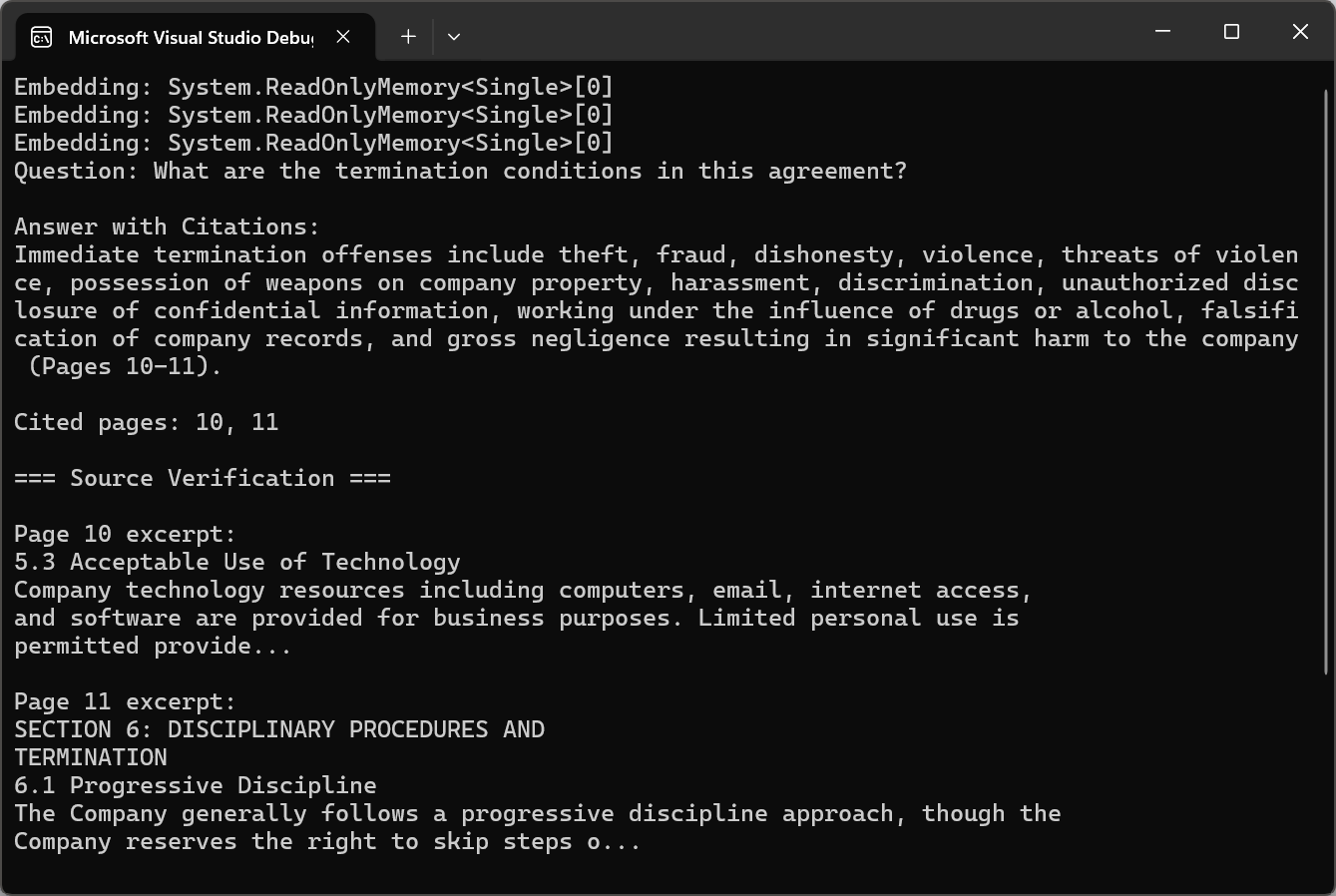
Las citas transforman las respuestas generadas por la IA de resultados opacos en información transparente y verificable. Los usuarios pueden revisar el material original para validar las respuestas y ganar confianza en el análisis asistido por IA.
Procesamiento de IA por lotes
Procesamiento de bibliotecas de documentos a escala
El procesamiento de documentos empresariales a menudo implica miles o millones de PDF. La base del procesamiento por lotes escalable es la paralelización. IronPDF es seguro para subprocesos, lo que permite el procesamiento simultáneo de PDF sin interferencias.
Este código usa SemaphoreSlim con maxConcurrency configurable para procesar PDFs en paralelo, llamando pdf.Summarize() en cada uno mientras rastrea resultados en un ConcurrentBag.
using IronPdf;
using IronPdf.AI;
using Microsoft.SemanticKernel;
using Microsoft.SemanticKernel.Memory;
using Microsoft.SemanticKernel.Connectors.OpenAI;
using System;
using System.Collections.Concurrent;
using System.Text;

// Process multiple documents in parallel with rate limiting

// Azure OpenAI configuration
string azureEndpoint = "https://your-resource.openai.azure.com/";
string apiKey = "your-azure-api-key";
string chatDeployment = "gpt-4o";
string embeddingDeployment = "text-embedding-ada-002";

// Initialize Semantic Kernel
var kernel = Kernel.CreateBuilder()
    .AddAzureOpenAITextEmbeddingGeneration(embeddingDeployment, azureEndpoint, apiKey)
    .AddAzureOpenAIChatCompletion(chatDeployment, azureEndpoint, apiKey)
    .Build();

var memory = new MemoryBuilder()
    .WithMemoryStore(new VolatileMemoryStore())
    .WithAzureOpenAITextEmbeddingGeneration(embeddingDeployment, azureEndpoint, apiKey)
    .Build();

IronDocumentAI.Initialize(kernel, memory);

// Configure parallel processing with rate limiting
int maxConcurrency = 3;
string inputFolder = "documents/";
string outputFolder = "summaries/";

Directory.CreateDirectory(outputFolder);

string[] pdfFiles = Directory.GetFiles(inputFolder, "*.pdf");
Console.WriteLine($"Processing {pdfFiles.Length} documents...\n");

var results = new ConcurrentBag<ProcessingResult>();
var semaphore = new SemaphoreSlim(maxConcurrency);

var tasks = pdfFiles.Select(async filePath =>
{
    await semaphore.WaitAsync();
    var result = new ProcessingResult { FilePath = filePath };

    try
    {
        var stopwatch = System.Diagnostics.Stopwatch.StartNew();

        var pdf = PdfDocument.FromFile(filePath);
        string summary = await pdf.Summarize();

        string outputPath = Path.Combine(outputFolder,
            Path.GetFileNameWithoutExtension(filePath) + "-summary.txt");
        await File.WriteAllTextAsync(outputPath, summary);

        stopwatch.Stop();
        result.Success = true;
        result.ProcessingTime = stopwatch.Elapsed;
        result.OutputPath = outputPath;

        Console.WriteLine($"[OK] {Path.GetFileName(filePath)} ({stopwatch.ElapsedMilliseconds}ms)");
    }
    catch (Exception ex)
    {
        result.Success = false;
        result.ErrorMessage = ex.Message;
        Console.WriteLine($"[ERROR] {Path.GetFileName(filePath)}: {ex.Message}");
    }
    finally
    {
        semaphore.Release();
        results.Add(result);
    }
}).ToArray();

await Task.WhenAll(tasks);

// Generate processing report
var successful = results.Where(r => r.Success).ToList();
var failed = results.Where(r => !r.Success).ToList();

var report = new StringBuilder();
report.AppendLine("=== Batch Processing Report ===");
report.AppendLine($"Successful: {successful.Count}");
report.AppendLine($"Failed: {failed.Count}");

if (successful.Any())
{
    var avgTime = TimeSpan.FromMilliseconds(successful.Average(r => r.ProcessingTime.TotalMilliseconds));
    report.AppendLine($"Average processing time: {avgTime.TotalSeconds:F1}s");
}

if (failed.Any())
{
    report.AppendLine("\nFailed documents:");
    foreach (var fail in failed)
        report.AppendLine($"  - {Path.GetFileName(fail.FilePath)}: {fail.ErrorMessage}");
}

string reportText = report.ToString();
Console.WriteLine($"\n{reportText}");
File.WriteAllText(Path.Combine(outputFolder, "processing-report.txt"), reportText);


s ProcessingResult

public string FilePath { get; set; } = "";
public bool Success { get; set; }
public TimeSpan ProcessingTime { get; set; }
public string OutputPath { get; set; } = "";
public string ErrorMessage { get; set; } = "";
using IronPdf;
using IronPdf.AI;
using Microsoft.SemanticKernel;
using Microsoft.SemanticKernel.Memory;
using Microsoft.SemanticKernel.Connectors.OpenAI;
using System;
using System.Collections.Concurrent;
using System.Text;
// Process multiple documents in parallel with rate limiting
// Azure OpenAI configuration
string azureEndpoint = "https://your-resource.openai.azure.com/";
string apiKey = "your-azure-api-key";
string chatDeployment = "gpt-4o";
string embeddingDeployment = "text-embedding-ada-002";
// Initialize Semantic Kernel
var kernel = Kernel.CreateBuilder()
.AddAzureOpenAITextEmbeddingGeneration(embeddingDeployment, azureEndpoint, apiKey)
.AddAzureOpenAIChatCompletion(chatDeployment, azureEndpoint, apiKey)
.Build();
var memory = new MemoryBuilder()
.WithMemoryStore(new VolatileMemoryStore())
.WithAzureOpenAITextEmbeddingGeneration(embeddingDeployment, azureEndpoint, apiKey)
.Build();
IronDocumentAI.Initialize(kernel, memory);
// Configure parallel processing with rate limiting
int maxConcurrency = 3;
string inputFolder = "documents/";
string outputFolder = "summaries/";
Directory.CreateDirectory(outputFolder);
string[] pdfFiles = Directory.GetFiles(inputFolder, "*.pdf");
Console.WriteLine($"Processing {pdfFiles.Length} documents...\n");
var results = new ConcurrentBag<ProcessingResult>();
var semaphore = new SemaphoreSlim(maxConcurrency);
var tasks = pdfFiles.Select(async filePath =>
{
await semaphore.WaitAsync();
var result = new ProcessingResult { FilePath = filePath };
try
{
var stopwatch = System.Diagnostics.Stopwatch.StartNew();
var pdf = PdfDocument.FromFile(filePath);
string summary = await pdf.Summarize();
string outputPath = Path.Combine(outputFolder,
Path.GetFileNameWithoutExtension(filePath) + "-summary.txt");
await File.WriteAllTextAsync(outputPath, summary);
stopwatch.Stop();
result.Success = true;
result.ProcessingTime = stopwatch.Elapsed;
result.OutputPath = outputPath;
Console.WriteLine($"[OK] {Path.GetFileName(filePath)} ({stopwatch.ElapsedMilliseconds}ms)");
}
catch (Exception ex)
{
result.Success = false;
result.ErrorMessage = ex.Message;
Console.WriteLine($"[ERROR] {Path.GetFileName(filePath)}: {ex.Message}");
}
finally
{
semaphore.Release();
results.Add(result);
}
}).ToArray();
await Task.WhenAll(tasks);
// Generate processing report
var successful = results.Where(r => r.Success).ToList();
var failed = results.Where(r => !r.Success).ToList();
var report = new StringBuilder();
report.AppendLine("=== Batch Processing Report ===");
report.AppendLine($"Successful: {successful.Count}");
report.AppendLine($"Failed: {failed.Count}");
if (successful.Any())
{
var avgTime = TimeSpan.FromMilliseconds(successful.Average(r => r.ProcessingTime.TotalMilliseconds));
report.AppendLine($"Average processing time: {avgTime.TotalSeconds:F1}s");
}
if (failed.Any())
{
report.AppendLine("\nFailed documents:");
foreach (var fail in failed)
report.AppendLine($" - {Path.GetFileName(fail.FilePath)}: {fail.ErrorMessage}");
}
string reportText = report.ToString();
Console.WriteLine($"\n{reportText}");
File.WriteAllText(Path.Combine(outputFolder, "processing-report.txt"), reportText);
s ProcessingResult
public string FilePath { get; set; } = "";
public bool Success { get; set; }
public TimeSpan ProcessingTime { get; set; }
public string OutputPath { get; set; } = "";
public string ErrorMessage { get; set; } = "";Imports IronPdf
Imports IronPdf.AI
Imports Microsoft.SemanticKernel
Imports Microsoft.SemanticKernel.Memory
Imports Microsoft.SemanticKernel.Connectors.OpenAI
Imports System
Imports System.Collections.Concurrent
Imports System.Text
Imports System.IO
Imports System.Linq
Imports System.Threading
Imports System.Threading.Tasks
' Process multiple documents in parallel with rate limiting
' Azure OpenAI configuration
Dim azureEndpoint As String = "https://your-resource.openai.azure.com/"
Dim apiKey As String = "your-azure-api-key"
Dim chatDeployment As String = "gpt-4o"
Dim embeddingDeployment As String = "text-embedding-ada-002"
' Initialize Semantic Kernel
Dim kernel = Kernel.CreateBuilder() _
.AddAzureOpenAITextEmbeddingGeneration(embeddingDeployment, azureEndpoint, apiKey) _
.AddAzureOpenAIChatCompletion(chatDeployment, azureEndpoint, apiKey) _
.Build()
Dim memory = New MemoryBuilder() _
.WithMemoryStore(New VolatileMemoryStore()) _
.WithAzureOpenAITextEmbeddingGeneration(embeddingDeployment, azureEndpoint, apiKey) _
.Build()
IronDocumentAI.Initialize(kernel, memory)
' Configure parallel processing with rate limiting
Dim maxConcurrency As Integer = 3
Dim inputFolder As String = "documents/"
Dim outputFolder As String = "summaries/"
Directory.CreateDirectory(outputFolder)
Dim pdfFiles As String() = Directory.GetFiles(inputFolder, "*.pdf")
Console.WriteLine($"Processing {pdfFiles.Length} documents...{vbCrLf}")
Dim results = New ConcurrentBag(Of ProcessingResult)()
Dim semaphore = New SemaphoreSlim(maxConcurrency)
Dim tasks = pdfFiles.Select(Async Function(filePath)
Await semaphore.WaitAsync()
Dim result = New ProcessingResult With {.FilePath = filePath}
Try
Dim stopwatch = System.Diagnostics.Stopwatch.StartNew()
Dim pdf = PdfDocument.FromFile(filePath)
Dim summary As String = Await pdf.Summarize()
Dim outputPath = Path.Combine(outputFolder, Path.GetFileNameWithoutExtension(filePath) & "-summary.txt")
Await File.WriteAllTextAsync(outputPath, summary)
stopwatch.Stop()
result.Success = True
result.ProcessingTime = stopwatch.Elapsed
result.OutputPath = outputPath
Console.WriteLine($"[OK] {Path.GetFileName(filePath)} ({stopwatch.ElapsedMilliseconds}ms)")
Catch ex As Exception
result.Success = False
result.ErrorMessage = ex.Message
Console.WriteLine($"[ERROR] {Path.GetFileName(filePath)}: {ex.Message}")
Finally
semaphore.Release()
results.Add(result)
End Try
End Function).ToArray()
Await Task.WhenAll(tasks)
' Generate processing report
Dim successful = results.Where(Function(r) r.Success).ToList()
Dim failed = results.Where(Function(r) Not r.Success).ToList()
Dim report = New StringBuilder()
report.AppendLine("=== Batch Processing Report ===")
report.AppendLine($"Successful: {successful.Count}")
report.AppendLine($"Failed: {failed.Count}")
If successful.Any() Then
Dim avgTime = TimeSpan.FromMilliseconds(successful.Average(Function(r) r.ProcessingTime.TotalMilliseconds))
report.AppendLine($"Average processing time: {avgTime.TotalSeconds:F1}s")
End If
If failed.Any() Then
report.AppendLine($"{vbCrLf}Failed documents:")
For Each fail In failed
report.AppendLine($" - {Path.GetFileName(fail.FilePath)}: {fail.ErrorMessage}")
Next
End If
Dim reportText As String = report.ToString()
Console.WriteLine($"{vbCrLf}{reportText}")
File.WriteAllText(Path.Combine(outputFolder, "processing-report.txt"), reportText)
Public Class ProcessingResult
Public Property FilePath As String = ""
Public Property Success As Boolean
Public Property ProcessingTime As TimeSpan
Public Property OutputPath As String = ""
Public Property ErrorMessage As String = ""
End ClassImports IronPdf
Imports IronPdf.AI
Imports Microsoft.SemanticKernel
Imports Microsoft.SemanticKernel.Memory
Imports Microsoft.SemanticKernel.Connectors.OpenAI
Imports System
Imports System.Collections.Concurrent
Imports System.Text
Imports System.IO
Imports System.Linq
Imports System.Threading
Imports System.Threading.Tasks
' Process multiple documents in parallel with rate limiting
' Azure OpenAI configuration
Dim azureEndpoint As String = "https://your-resource.openai.azure.com/"
Dim apiKey As String = "your-azure-api-key"
Dim chatDeployment As String = "gpt-4o"
Dim embeddingDeployment As String = "text-embedding-ada-002"
' Initialize Semantic Kernel
Dim kernel = Kernel.CreateBuilder() _
.AddAzureOpenAITextEmbeddingGeneration(embeddingDeployment, azureEndpoint, apiKey) _
.AddAzureOpenAIChatCompletion(chatDeployment, azureEndpoint, apiKey) _
.Build()
Dim memory = New MemoryBuilder() _
.WithMemoryStore(New VolatileMemoryStore()) _
.WithAzureOpenAITextEmbeddingGeneration(embeddingDeployment, azureEndpoint, apiKey) _
.Build()
IronDocumentAI.Initialize(kernel, memory)
' Configure parallel processing with rate limiting
Dim maxConcurrency As Integer = 3
Dim inputFolder As String = "documents/"
Dim outputFolder As String = "summaries/"
Directory.CreateDirectory(outputFolder)
Dim pdfFiles As String() = Directory.GetFiles(inputFolder, "*.pdf")
Console.WriteLine($"Processing {pdfFiles.Length} documents...{vbCrLf}")
Dim results = New ConcurrentBag(Of ProcessingResult)()
Dim semaphore = New SemaphoreSlim(maxConcurrency)
Dim tasks = pdfFiles.Select(Async Function(filePath)
Await semaphore.WaitAsync()
Dim result = New ProcessingResult With {.FilePath = filePath}
Try
Dim stopwatch = System.Diagnostics.Stopwatch.StartNew()
Dim pdf = PdfDocument.FromFile(filePath)
Dim summary As String = Await pdf.Summarize()
Dim outputPath = Path.Combine(outputFolder, Path.GetFileNameWithoutExtension(filePath) & "-summary.txt")
Await File.WriteAllTextAsync(outputPath, summary)
stopwatch.Stop()
result.Success = True
result.ProcessingTime = stopwatch.Elapsed
result.OutputPath = outputPath
Console.WriteLine($"[OK] {Path.GetFileName(filePath)} ({stopwatch.ElapsedMilliseconds}ms)")
Catch ex As Exception
result.Success = False
result.ErrorMessage = ex.Message
Console.WriteLine($"[ERROR] {Path.GetFileName(filePath)}: {ex.Message}")
Finally
semaphore.Release()
results.Add(result)
End Try
End Function).ToArray()
Await Task.WhenAll(tasks)
' Generate processing report
Dim successful = results.Where(Function(r) r.Success).ToList()
Dim failed = results.Where(Function(r) Not r.Success).ToList()
Dim report = New StringBuilder()
report.AppendLine("=== Batch Processing Report ===")
report.AppendLine($"Successful: {successful.Count}")
report.AppendLine($"Failed: {failed.Count}")
If successful.Any() Then
Dim avgTime = TimeSpan.FromMilliseconds(successful.Average(Function(r) r.ProcessingTime.TotalMilliseconds))
report.AppendLine($"Average processing time: {avgTime.TotalSeconds:F1}s")
End If
If failed.Any() Then
report.AppendLine($"{vbCrLf}Failed documents:")
For Each fail In failed
report.AppendLine($" - {Path.GetFileName(fail.FilePath)}: {fail.ErrorMessage}")
Next
End If
Dim reportText As String = report.ToString()
Console.WriteLine($"{vbCrLf}{reportText}")
File.WriteAllText(Path.Combine(outputFolder, "processing-report.txt"), reportText)
Public Class ProcessingResult
Public Property FilePath As String = ""
Public Property Success As Boolean
Public Property ProcessingTime As TimeSpan
Public Property OutputPath As String = ""
Public Property ErrorMessage As String = ""
End ClassEl manejo confiable de errores es crítico a gran escala. Los sistemas de producción implementan lógica de reintento con retroceso exponencial, registro de errores independiente para documentos fallidos y procesamiento reanudable.
Gestión de costes y uso de tokens
Los costes de la API de AI suelen cobrarse por token. En 2026, GPT-5 tiene un precio de 1,25 dólares por millón de tokens de entrada y 10 dólares por millón de tokens de salida, mientras que Claude Sonnet 4.5 cuesta 3 dólares por millón de tokens de entrada y 15 dólares por millón de tokens de salida. La principal estrategia de optimización de costes es minimizar el uso innecesario de tokens.
La API por lotes de OpenAI ofrece descuentos del 50% en el coste de los tokens a cambio de tiempos de procesamiento más largos (hasta 24 horas). Para el procesamiento nocturno o el análisis periódico, el procesamiento por lotes supone un ahorro sustancial.
El código extrae texto usando pdf.ExtractAllText(), crea solicitudes por lotes JSONL, sube vía HttpClient al endpoint de archivos OpenAI y se envía a la API por lotes.
using IronPdf;
using System.Text.Json;
using System.Net.Http.Headers;

// Use OpenAI Batch API for 50% cost savings on large-scale document processing

string openAiApiKey = "your-openai-api-key";
string inputFolder = "documents/";

// Prepare batch requests in JSONL format
var batchRequests = new List<string>();
string[] pdfFiles = Directory.GetFiles(inputFolder, "*.pdf");

Console.WriteLine($"Preparing batch for {pdfFiles.Length} documents...\n");

foreach (string filePath in pdfFiles)
{
    var pdf = PdfDocument.FromFile(filePath);
    string pdfText = pdf.ExtractAllText();

    // Truncate to stay within batch API limits
    if (pdfText.Length > 100000)
        pdfText = pdfText.Substring(0, 100000) + "\n[Truncated...]";

    var request = new
    {
        custom_id = Path.GetFileNameWithoutExtension(filePath),
        method = "POST",
        url = "/v1/chat/completions",
        body = new
        {
            model = "gpt-4o",
            messages = new[]
            {
                new { role = "system", content = "Summarize the following document concisely." },
                new { role = "user", content = pdfText }
            },
            max_tokens = 1000
        }
    };

    batchRequests.Add(JsonSerializer.Serialize(request));
}

// Create JSONL file
string batchFilePath = "batch-requests.jsonl";
File.WriteAllLines(batchFilePath, batchRequests);
Console.WriteLine($"Created batch file with {batchRequests.Count} requests");

// Upload file to OpenAI
using var httpClient = new HttpClient();
httpClient.DefaultRequestHeaders.Authorization = new AuthenticationHeaderValue("Bearer", openAiApiKey);

using var fileContent = new MultipartFormDataContent();
fileContent.Add(new ByteArrayContent(File.ReadAllBytes(batchFilePath)), "file", "batch-requests.jsonl");
fileContent.Add(new StringContent("batch"), "purpose");

var uploadResponse = await httpClient.PostAsync("https://api.openai.com/v1/files", fileContent);
var uploadResult = JsonSerializer.Deserialize<JsonElement>(await uploadResponse.Content.ReadAsStringAsync());
string fileId = uploadResult.GetProperty("id").GetString()!;
Console.WriteLine($"Uploaded file: {fileId}");

// Create batch job (24-hour completion window for 50% discount)
var batchJobRequest = new
{
    input_file_id = fileId,
    endpoint = "/v1/chat/completions",
    completion_window = "24h"
};

var batchResponse = await httpClient.PostAsync(
    "https://api.openai.com/v1/batches",
    new StringContent(JsonSerializer.Serialize(batchJobRequest), System.Text.Encoding.UTF8, "application/json")
);

var batchResult = JsonSerializer.Deserialize<JsonElement>(await batchResponse.Content.ReadAsStringAsync());
string batchId = batchResult.GetProperty("id").GetString()!;

Console.WriteLine($"\nBatch job created: {batchId}");
Console.WriteLine("Job will complete within 24 hours");
Console.WriteLine($"Check status: GET https://api.openai.com/v1/batches/{batchId}");

File.WriteAllText("batch-job-id.txt", batchId);
Console.WriteLine("\nBatch ID saved to batch-job-id.txt");
using IronPdf;
using System.Text.Json;
using System.Net.Http.Headers;
// Use OpenAI Batch API for 50% cost savings on large-scale document processing
string openAiApiKey = "your-openai-api-key";
string inputFolder = "documents/";
// Prepare batch requests in JSONL format
var batchRequests = new List<string>();
string[] pdfFiles = Directory.GetFiles(inputFolder, "*.pdf");
Console.WriteLine($"Preparing batch for {pdfFiles.Length} documents...\n");
foreach (string filePath in pdfFiles)
{
var pdf = PdfDocument.FromFile(filePath);
string pdfText = pdf.ExtractAllText();
// Truncate to stay within batch API limits
if (pdfText.Length > 100000)
pdfText = pdfText.Substring(0, 100000) + "\n[Truncated...]";
var request = new
{
custom_id = Path.GetFileNameWithoutExtension(filePath),
method = "POST",
url = "/v1/chat/completions",
body = new
{
model = "gpt-4o",
messages = new[]
{
new { role = "system", content = "Summarize the following document concisely." },
new { role = "user", content = pdfText }
},
max_tokens = 1000
}
};
batchRequests.Add(JsonSerializer.Serialize(request));
}
// Create JSONL file
string batchFilePath = "batch-requests.jsonl";
File.WriteAllLines(batchFilePath, batchRequests);
Console.WriteLine($"Created batch file with {batchRequests.Count} requests");
// Upload file to OpenAI
using var httpClient = new HttpClient();
httpClient.DefaultRequestHeaders.Authorization = new AuthenticationHeaderValue("Bearer", openAiApiKey);
using var fileContent = new MultipartFormDataContent();
fileContent.Add(new ByteArrayContent(File.ReadAllBytes(batchFilePath)), "file", "batch-requests.jsonl");
fileContent.Add(new StringContent("batch"), "purpose");
var uploadResponse = await httpClient.PostAsync("https://api.openai.com/v1/files", fileContent);
var uploadResult = JsonSerializer.Deserialize<JsonElement>(await uploadResponse.Content.ReadAsStringAsync());
string fileId = uploadResult.GetProperty("id").GetString()!;
Console.WriteLine($"Uploaded file: {fileId}");
// Create batch job (24-hour completion window for 50% discount)
var batchJobRequest = new
{
input_file_id = fileId,
endpoint = "/v1/chat/completions",
completion_window = "24h"
};
var batchResponse = await httpClient.PostAsync(
"https://api.openai.com/v1/batches",
new StringContent(JsonSerializer.Serialize(batchJobRequest), System.Text.Encoding.UTF8, "application/json")
);
var batchResult = JsonSerializer.Deserialize<JsonElement>(await batchResponse.Content.ReadAsStringAsync());
string batchId = batchResult.GetProperty("id").GetString()!;
Console.WriteLine($"\nBatch job created: {batchId}");
Console.WriteLine("Job will complete within 24 hours");
Console.WriteLine($"Check status: GET https://api.openai.com/v1/batches/{batchId}");
File.WriteAllText("batch-job-id.txt", batchId);
Console.WriteLine("\nBatch ID saved to batch-job-id.txt");Imports IronPdf
Imports System.Text.Json
Imports System.Net.Http.Headers
' Use OpenAI Batch API for 50% cost savings on large-scale document processing
Dim openAiApiKey As String = "your-openai-api-key"
Dim inputFolder As String = "documents/"
' Prepare batch requests in JSONL format
Dim batchRequests As New List(Of String)()
Dim pdfFiles As String() = Directory.GetFiles(inputFolder, "*.pdf")
Console.WriteLine($"Preparing batch for {pdfFiles.Length} documents..." & vbCrLf)
For Each filePath As String In pdfFiles
Dim pdf = PdfDocument.FromFile(filePath)
Dim pdfText As String = pdf.ExtractAllText()
' Truncate to stay within batch API limits
If pdfText.Length > 100000 Then
pdfText = pdfText.Substring(0, 100000) & vbCrLf & "[Truncated...]"
End If
Dim request = New With {
.custom_id = Path.GetFileNameWithoutExtension(filePath),
.method = "POST",
.url = "/v1/chat/completions",
.body = New With {
.model = "gpt-4o",
.messages = New Object() {
New With {.role = "system", .content = "Summarize the following document concisely."},
New With {.role = "user", .content = pdfText}
},
.max_tokens = 1000
}
}
batchRequests.Add(JsonSerializer.Serialize(request))
Next
' Create JSONL file
Dim batchFilePath As String = "batch-requests.jsonl"
File.WriteAllLines(batchFilePath, batchRequests)
Console.WriteLine($"Created batch file with {batchRequests.Count} requests")
' Upload file to OpenAI
Using httpClient As New HttpClient()
httpClient.DefaultRequestHeaders.Authorization = New AuthenticationHeaderValue("Bearer", openAiApiKey)
Using fileContent As New MultipartFormDataContent()
fileContent.Add(New ByteArrayContent(File.ReadAllBytes(batchFilePath)), "file", "batch-requests.jsonl")
fileContent.Add(New StringContent("batch"), "purpose")
Dim uploadResponse = Await httpClient.PostAsync("https://api.openai.com/v1/files", fileContent)
Dim uploadResult = JsonSerializer.Deserialize(Of JsonElement)(Await uploadResponse.Content.ReadAsStringAsync())
Dim fileId As String = uploadResult.GetProperty("id").GetString()
Console.WriteLine($"Uploaded file: {fileId}")
' Create batch job (24-hour completion window for 50% discount)
Dim batchJobRequest = New With {
.input_file_id = fileId,
.endpoint = "/v1/chat/completions",
.completion_window = "24h"
}
Dim batchResponse = Await httpClient.PostAsync(
"https://api.openai.com/v1/batches",
New StringContent(JsonSerializer.Serialize(batchJobRequest), System.Text.Encoding.UTF8, "application/json")
)
Dim batchResult = JsonSerializer.Deserialize(Of JsonElement)(Await batchResponse.Content.ReadAsStringAsync())
Dim batchId As String = batchResult.GetProperty("id").GetString()
Console.WriteLine(vbCrLf & $"Batch job created: {batchId}")
Console.WriteLine("Job will complete within 24 hours")
Console.WriteLine($"Check status: GET https://api.openai.com/v1/batches/{batchId}")
File.WriteAllText("batch-job-id.txt", batchId)
Console.WriteLine(vbCrLf & "Batch ID saved to batch-job-id.txt")
End Using
End UsingImports IronPdf
Imports System.Text.Json
Imports System.Net.Http.Headers
' Use OpenAI Batch API for 50% cost savings on large-scale document processing
Dim openAiApiKey As String = "your-openai-api-key"
Dim inputFolder As String = "documents/"
' Prepare batch requests in JSONL format
Dim batchRequests As New List(Of String)()
Dim pdfFiles As String() = Directory.GetFiles(inputFolder, "*.pdf")
Console.WriteLine($"Preparing batch for {pdfFiles.Length} documents..." & vbCrLf)
For Each filePath As String In pdfFiles
Dim pdf = PdfDocument.FromFile(filePath)
Dim pdfText As String = pdf.ExtractAllText()
' Truncate to stay within batch API limits
If pdfText.Length > 100000 Then
pdfText = pdfText.Substring(0, 100000) & vbCrLf & "[Truncated...]"
End If
Dim request = New With {
.custom_id = Path.GetFileNameWithoutExtension(filePath),
.method = "POST",
.url = "/v1/chat/completions",
.body = New With {
.model = "gpt-4o",
.messages = New Object() {
New With {.role = "system", .content = "Summarize the following document concisely."},
New With {.role = "user", .content = pdfText}
},
.max_tokens = 1000
}
}
batchRequests.Add(JsonSerializer.Serialize(request))
Next
' Create JSONL file
Dim batchFilePath As String = "batch-requests.jsonl"
File.WriteAllLines(batchFilePath, batchRequests)
Console.WriteLine($"Created batch file with {batchRequests.Count} requests")
' Upload file to OpenAI
Using httpClient As New HttpClient()
httpClient.DefaultRequestHeaders.Authorization = New AuthenticationHeaderValue("Bearer", openAiApiKey)
Using fileContent As New MultipartFormDataContent()
fileContent.Add(New ByteArrayContent(File.ReadAllBytes(batchFilePath)), "file", "batch-requests.jsonl")
fileContent.Add(New StringContent("batch"), "purpose")
Dim uploadResponse = Await httpClient.PostAsync("https://api.openai.com/v1/files", fileContent)
Dim uploadResult = JsonSerializer.Deserialize(Of JsonElement)(Await uploadResponse.Content.ReadAsStringAsync())
Dim fileId As String = uploadResult.GetProperty("id").GetString()
Console.WriteLine($"Uploaded file: {fileId}")
' Create batch job (24-hour completion window for 50% discount)
Dim batchJobRequest = New With {
.input_file_id = fileId,
.endpoint = "/v1/chat/completions",
.completion_window = "24h"
}
Dim batchResponse = Await httpClient.PostAsync(
"https://api.openai.com/v1/batches",
New StringContent(JsonSerializer.Serialize(batchJobRequest), System.Text.Encoding.UTF8, "application/json")
)
Dim batchResult = JsonSerializer.Deserialize(Of JsonElement)(Await batchResponse.Content.ReadAsStringAsync())
Dim batchId As String = batchResult.GetProperty("id").GetString()
Console.WriteLine(vbCrLf & $"Batch job created: {batchId}")
Console.WriteLine("Job will complete within 24 hours")
Console.WriteLine($"Check status: GET https://api.openai.com/v1/batches/{batchId}")
File.WriteAllText("batch-job-id.txt", batchId)
Console.WriteLine(vbCrLf & "Batch ID saved to batch-job-id.txt")
End Using
End UsingEl seguimiento del uso de tokens en producción es esencial. Muchas organizaciones descubren que el 80% de sus documentos pueden procesarse con modelos más pequeños y baratos, reservando los modelos caros solo para casos complejos.
Caché y procesamiento incremental
En el caso de las colecciones de documentos que se actualizan de forma incremental, las estrategias inteligentes de almacenamiento en caché y procesamiento incremental reducen drásticamente los costes. El almacenamiento en caché a nivel de documento almacena los resultados junto con un hash del PDF de origen, lo que evita el reprocesamiento innecesario de documentos sin modificar.
La clase DocumentCacheManager usa ComputeFileHash() con SHA256 para detectar cambios, almacenando resultados en objetos CacheEntry con marcas de tiempo LastAccessed.
using IronPdf;
using IronPdf.AI;
using Microsoft.SemanticKernel;
using Microsoft.SemanticKernel.Memory;
using Microsoft.SemanticKernel.Connectors.OpenAI;
using System;
using System.Collections.Generic;
using System.Security.Cryptography;
using System.Text.Json;

// Cache AI processing results using file hashes to avoid reprocessing unchanged documents

// Azure OpenAI configuration
string azureEndpoint = "https://your-resource.openai.azure.com/";
string apiKey = "your-azure-api-key";
string chatDeployment = "gpt-4o";
string embeddingDeployment = "text-embedding-ada-002";

// Initialize Semantic Kernel
var kernel = Kernel.CreateBuilder()
    .AddAzureOpenAITextEmbeddingGeneration(embeddingDeployment, azureEndpoint, apiKey)
    .AddAzureOpenAIChatCompletion(chatDeployment, azureEndpoint, apiKey)
    .Build();

var memory = new MemoryBuilder()
    .WithMemoryStore(new VolatileMemoryStore())
    .WithAzureOpenAITextEmbeddingGeneration(embeddingDeployment, azureEndpoint, apiKey)
    .Build();

IronDocumentAI.Initialize(kernel, memory);

// Configure caching
string cacheFolder = "ai-cache/";
string documentsFolder = "documents/";

Directory.CreateDirectory(cacheFolder);

var cacheManager = new DocumentCacheManager(cacheFolder);

// Process documents with caching
string[] pdfFiles = Directory.GetFiles(documentsFolder, "*.pdf");
int cached = 0, processed = 0;

foreach (string filePath in pdfFiles)
{
    string fileName = Path.GetFileName(filePath);
    string fileHash = cacheManager.ComputeFileHash(filePath);

    var cachedResult = cacheManager.GetCachedResult(fileName, fileHash);

    if (cachedResult != null)
    {
        Console.WriteLine($"[CACHE HIT] {fileName}");
        cached++;
        continue;
    }

    Console.WriteLine($"[PROCESSING] {fileName}");
    var pdf = PdfDocument.FromFile(filePath);
    string summary = await pdf.Summarize();

    cacheManager.CacheResult(fileName, fileHash, summary);
    processed++;
}

Console.WriteLine($"\nProcessing complete: {cached} cached, {processed} newly processed");
Console.WriteLine($"Cost savings: {(cached * 100.0 / Math.Max(1, cached + processed)):F1}% served from cache");


ash-based cache manager with JSON index
s DocumentCacheManager

private readonly string _cacheFolder;
private readonly string _indexPath;
private Dictionary<string, CacheEntry> _index;

public DocumentCacheManager(string cacheFolder)
{
    _cacheFolder = cacheFolder;
    _indexPath = Path.Combine(cacheFolder, "cache-index.json");
    _index = LoadIndex();
}

private Dictionary<string, CacheEntry> LoadIndex()
{
    if (File.Exists(_indexPath))
    {
        string json = File.ReadAllText(_indexPath);
        return JsonSerializer.Deserialize<Dictionary<string, CacheEntry>>(json) ?? new();
    }
    return new Dictionary<string, CacheEntry>();
}

private void SaveIndex()
{
    string json = JsonSerializer.Serialize(_index, new JsonSerializerOptions { WriteIndented = true });
    File.WriteAllText(_indexPath, json);
}

// SHA256 hash to detect file changes
public string ComputeFileHash(string filePath)
{
    using var sha256 = SHA256.Create();
    using var stream = File.OpenRead(filePath);
    byte[] hash = sha256.ComputeHash(stream);
    return Convert.ToHexString(hash);
}

public string? GetCachedResult(string fileName, string currentHash)
{
    if (_index.TryGetValue(fileName, out var entry))
    {
        if (entry.FileHash == currentHash && File.Exists(entry.CachePath))
        {
            entry.LastAccessed = DateTime.UtcNow;
            SaveIndex();
            return File.ReadAllText(entry.CachePath);
        }
    }
    return null;
}

public void CacheResult(string fileName, string fileHash, string result)
{
    string cachePath = Path.Combine(_cacheFolder, $"{Path.GetFileNameWithoutExtension(fileName)}-{fileHash[..8]}.txt");
    File.WriteAllText(cachePath, result);

    _index[fileName] = new CacheEntry
    {
        FileHash = fileHash,
        CachePath = cachePath,
        CreatedAt = DateTime.UtcNow,
        LastAccessed = DateTime.UtcNow
    };

    SaveIndex();
}


s CacheEntry

public string FileHash { get; set; } = "";
public string CachePath { get; set; } = "";
public DateTime CreatedAt { get; set; }
public DateTime LastAccessed { get; set; }
using IronPdf;
using IronPdf.AI;
using Microsoft.SemanticKernel;
using Microsoft.SemanticKernel.Memory;
using Microsoft.SemanticKernel.Connectors.OpenAI;
using System;
using System.Collections.Generic;
using System.Security.Cryptography;
using System.Text.Json;
// Cache AI processing results using file hashes to avoid reprocessing unchanged documents
// Azure OpenAI configuration
string azureEndpoint = "https://your-resource.openai.azure.com/";
string apiKey = "your-azure-api-key";
string chatDeployment = "gpt-4o";
string embeddingDeployment = "text-embedding-ada-002";
// Initialize Semantic Kernel
var kernel = Kernel.CreateBuilder()
.AddAzureOpenAITextEmbeddingGeneration(embeddingDeployment, azureEndpoint, apiKey)
.AddAzureOpenAIChatCompletion(chatDeployment, azureEndpoint, apiKey)
.Build();
var memory = new MemoryBuilder()
.WithMemoryStore(new VolatileMemoryStore())
.WithAzureOpenAITextEmbeddingGeneration(embeddingDeployment, azureEndpoint, apiKey)
.Build();
IronDocumentAI.Initialize(kernel, memory);
// Configure caching
string cacheFolder = "ai-cache/";
string documentsFolder = "documents/";
Directory.CreateDirectory(cacheFolder);
var cacheManager = new DocumentCacheManager(cacheFolder);
// Process documents with caching
string[] pdfFiles = Directory.GetFiles(documentsFolder, "*.pdf");
int cached = 0, processed = 0;
foreach (string filePath in pdfFiles)
{
string fileName = Path.GetFileName(filePath);
string fileHash = cacheManager.ComputeFileHash(filePath);
var cachedResult = cacheManager.GetCachedResult(fileName, fileHash);
if (cachedResult != null)
{
Console.WriteLine($"[CACHE HIT] {fileName}");
cached++;
continue;
}
Console.WriteLine($"[PROCESSING] {fileName}");
var pdf = PdfDocument.FromFile(filePath);
string summary = await pdf.Summarize();
cacheManager.CacheResult(fileName, fileHash, summary);
processed++;
}
Console.WriteLine($"\nProcessing complete: {cached} cached, {processed} newly processed");
Console.WriteLine($"Cost savings: {(cached * 100.0 / Math.Max(1, cached + processed)):F1}% served from cache");
ash-based cache manager with JSON index
s DocumentCacheManager
private readonly string _cacheFolder;
private readonly string _indexPath;
private Dictionary<string, CacheEntry> _index;
public DocumentCacheManager(string cacheFolder)
{
_cacheFolder = cacheFolder;
_indexPath = Path.Combine(cacheFolder, "cache-index.json");
_index = LoadIndex();
}
private Dictionary<string, CacheEntry> LoadIndex()
{
if (File.Exists(_indexPath))
{
string json = File.ReadAllText(_indexPath);
return JsonSerializer.Deserialize<Dictionary<string, CacheEntry>>(json) ?? new();
}
return new Dictionary<string, CacheEntry>();
}
private void SaveIndex()
{
string json = JsonSerializer.Serialize(_index, new JsonSerializerOptions { WriteIndented = true });
File.WriteAllText(_indexPath, json);
}
// SHA256 hash to detect file changes
public string ComputeFileHash(string filePath)
{
using var sha256 = SHA256.Create();
using var stream = File.OpenRead(filePath);
byte[] hash = sha256.ComputeHash(stream);
return Convert.ToHexString(hash);
}
public string? GetCachedResult(string fileName, string currentHash)
{
if (_index.TryGetValue(fileName, out var entry))
{
if (entry.FileHash == currentHash && File.Exists(entry.CachePath))
{
entry.LastAccessed = DateTime.UtcNow;
SaveIndex();
return File.ReadAllText(entry.CachePath);
}
}
return null;
}
public void CacheResult(string fileName, string fileHash, string result)
{
string cachePath = Path.Combine(_cacheFolder, $"{Path.GetFileNameWithoutExtension(fileName)}-{fileHash[..8]}.txt");
File.WriteAllText(cachePath, result);
_index[fileName] = new CacheEntry
{
FileHash = fileHash,
CachePath = cachePath,
CreatedAt = DateTime.UtcNow,
LastAccessed = DateTime.UtcNow
};
SaveIndex();
}
s CacheEntry
public string FileHash { get; set; } = "";
public string CachePath { get; set; } = "";
public DateTime CreatedAt { get; set; }
public DateTime LastAccessed { get; set; }Imports IronPdf
Imports IronPdf.AI
Imports Microsoft.SemanticKernel
Imports Microsoft.SemanticKernel.Memory
Imports Microsoft.SemanticKernel.Connectors.OpenAI
Imports System
Imports System.Collections.Generic
Imports System.Security.Cryptography
Imports System.Text.Json
' Cache AI processing results using file hashes to avoid reprocessing unchanged documents
' Azure OpenAI configuration
Dim azureEndpoint As String = "https://your-resource.openai.azure.com/"
Dim apiKey As String = "your-azure-api-key"
Dim chatDeployment As String = "gpt-4o"
Dim embeddingDeployment As String = "text-embedding-ada-002"
' Initialize Semantic Kernel
Dim kernel = Kernel.CreateBuilder() _
.AddAzureOpenAITextEmbeddingGeneration(embeddingDeployment, azureEndpoint, apiKey) _
.AddAzureOpenAIChatCompletion(chatDeployment, azureEndpoint, apiKey) _
.Build()
Dim memory = New MemoryBuilder() _
.WithMemoryStore(New VolatileMemoryStore()) _
.WithAzureOpenAITextEmbeddingGeneration(embeddingDeployment, azureEndpoint, apiKey) _
.Build()
IronDocumentAI.Initialize(kernel, memory)
' Configure caching
Dim cacheFolder As String = "ai-cache/"
Dim documentsFolder As String = "documents/"
Directory.CreateDirectory(cacheFolder)
Dim cacheManager = New DocumentCacheManager(cacheFolder)
' Process documents with caching
Dim pdfFiles As String() = Directory.GetFiles(documentsFolder, "*.pdf")
Dim cached As Integer = 0, processed As Integer = 0
For Each filePath As String In pdfFiles
Dim fileName As String = Path.GetFileName(filePath)
Dim fileHash As String = cacheManager.ComputeFileHash(filePath)
Dim cachedResult As String = cacheManager.GetCachedResult(fileName, fileHash)
If cachedResult IsNot Nothing Then
Console.WriteLine($"[CACHE HIT] {fileName}")
cached += 1
Continue For
End If
Console.WriteLine($"[PROCESSING] {fileName}")
Dim pdf = PdfDocument.FromFile(filePath)
Dim summary As String = Await pdf.Summarize()
cacheManager.CacheResult(fileName, fileHash, summary)
processed += 1
Next
Console.WriteLine(vbCrLf & $"Processing complete: {cached} cached, {processed} newly processed")
Console.WriteLine($"Cost savings: {(cached * 100.0 / Math.Max(1, cached + processed)):F1}% served from cache")
' Hash-based cache manager with JSON index
Public Class DocumentCacheManager
Private ReadOnly _cacheFolder As String
Private ReadOnly _indexPath As String
Private _index As Dictionary(Of String, CacheEntry)
Public Sub New(cacheFolder As String)
_cacheFolder = cacheFolder
_indexPath = Path.Combine(cacheFolder, "cache-index.json")
_index = LoadIndex()
End Sub
Private Function LoadIndex() As Dictionary(Of String, CacheEntry)
If File.Exists(_indexPath) Then
Dim json As String = File.ReadAllText(_indexPath)
Return JsonSerializer.Deserialize(Of Dictionary(Of String, CacheEntry))(json) OrElse New Dictionary(Of String, CacheEntry)()
End If
Return New Dictionary(Of String, CacheEntry)()
End Function
Private Sub SaveIndex()
Dim json As String = JsonSerializer.Serialize(_index, New JsonSerializerOptions With {.WriteIndented = True})
File.WriteAllText(_indexPath, json)
End Sub
' SHA256 hash to detect file changes
Public Function ComputeFileHash(filePath As String) As String
Using sha256 = SHA256.Create()
Using stream = File.OpenRead(filePath)
Dim hash As Byte() = sha256.ComputeHash(stream)
Return Convert.ToHexString(hash)
End Using
End Using
End Function
Public Function GetCachedResult(fileName As String, currentHash As String) As String
If _index.TryGetValue(fileName, entry) Then
If entry.FileHash = currentHash AndAlso File.Exists(entry.CachePath) Then
entry.LastAccessed = DateTime.UtcNow
SaveIndex()
Return File.ReadAllText(entry.CachePath)
End If
End If
Return Nothing
End Function
Public Sub CacheResult(fileName As String, fileHash As String, result As String)
Dim cachePath As String = Path.Combine(_cacheFolder, $"{Path.GetFileNameWithoutExtension(fileName)}-{fileHash.Substring(0, 8)}.txt")
File.WriteAllText(cachePath, result)
_index(fileName) = New CacheEntry With {
.FileHash = fileHash,
.CachePath = cachePath,
.CreatedAt = DateTime.UtcNow,
.LastAccessed = DateTime.UtcNow
}
SaveIndex()
End Sub
End Class
Public Class CacheEntry
Public Property FileHash As String = ""
Public Property CachePath As String = ""
Public Property CreatedAt As DateTime
Public Property LastAccessed As DateTime
End ClassImports IronPdf
Imports IronPdf.AI
Imports Microsoft.SemanticKernel
Imports Microsoft.SemanticKernel.Memory
Imports Microsoft.SemanticKernel.Connectors.OpenAI
Imports System
Imports System.Collections.Generic
Imports System.Security.Cryptography
Imports System.Text.Json
' Cache AI processing results using file hashes to avoid reprocessing unchanged documents
' Azure OpenAI configuration
Dim azureEndpoint As String = "https://your-resource.openai.azure.com/"
Dim apiKey As String = "your-azure-api-key"
Dim chatDeployment As String = "gpt-4o"
Dim embeddingDeployment As String = "text-embedding-ada-002"
' Initialize Semantic Kernel
Dim kernel = Kernel.CreateBuilder() _
.AddAzureOpenAITextEmbeddingGeneration(embeddingDeployment, azureEndpoint, apiKey) _
.AddAzureOpenAIChatCompletion(chatDeployment, azureEndpoint, apiKey) _
.Build()
Dim memory = New MemoryBuilder() _
.WithMemoryStore(New VolatileMemoryStore()) _
.WithAzureOpenAITextEmbeddingGeneration(embeddingDeployment, azureEndpoint, apiKey) _
.Build()
IronDocumentAI.Initialize(kernel, memory)
' Configure caching
Dim cacheFolder As String = "ai-cache/"
Dim documentsFolder As String = "documents/"
Directory.CreateDirectory(cacheFolder)
Dim cacheManager = New DocumentCacheManager(cacheFolder)
' Process documents with caching
Dim pdfFiles As String() = Directory.GetFiles(documentsFolder, "*.pdf")
Dim cached As Integer = 0, processed As Integer = 0
For Each filePath As String In pdfFiles
Dim fileName As String = Path.GetFileName(filePath)
Dim fileHash As String = cacheManager.ComputeFileHash(filePath)
Dim cachedResult As String = cacheManager.GetCachedResult(fileName, fileHash)
If cachedResult IsNot Nothing Then
Console.WriteLine($"[CACHE HIT] {fileName}")
cached += 1
Continue For
End If
Console.WriteLine($"[PROCESSING] {fileName}")
Dim pdf = PdfDocument.FromFile(filePath)
Dim summary As String = Await pdf.Summarize()
cacheManager.CacheResult(fileName, fileHash, summary)
processed += 1
Next
Console.WriteLine(vbCrLf & $"Processing complete: {cached} cached, {processed} newly processed")
Console.WriteLine($"Cost savings: {(cached * 100.0 / Math.Max(1, cached + processed)):F1}% served from cache")
' Hash-based cache manager with JSON index
Public Class DocumentCacheManager
Private ReadOnly _cacheFolder As String
Private ReadOnly _indexPath As String
Private _index As Dictionary(Of String, CacheEntry)
Public Sub New(cacheFolder As String)
_cacheFolder = cacheFolder
_indexPath = Path.Combine(cacheFolder, "cache-index.json")
_index = LoadIndex()
End Sub
Private Function LoadIndex() As Dictionary(Of String, CacheEntry)
If File.Exists(_indexPath) Then
Dim json As String = File.ReadAllText(_indexPath)
Return JsonSerializer.Deserialize(Of Dictionary(Of String, CacheEntry))(json) OrElse New Dictionary(Of String, CacheEntry)()
End If
Return New Dictionary(Of String, CacheEntry)()
End Function
Private Sub SaveIndex()
Dim json As String = JsonSerializer.Serialize(_index, New JsonSerializerOptions With {.WriteIndented = True})
File.WriteAllText(_indexPath, json)
End Sub
' SHA256 hash to detect file changes
Public Function ComputeFileHash(filePath As String) As String
Using sha256 = SHA256.Create()
Using stream = File.OpenRead(filePath)
Dim hash As Byte() = sha256.ComputeHash(stream)
Return Convert.ToHexString(hash)
End Using
End Using
End Function
Public Function GetCachedResult(fileName As String, currentHash As String) As String
If _index.TryGetValue(fileName, entry) Then
If entry.FileHash = currentHash AndAlso File.Exists(entry.CachePath) Then
entry.LastAccessed = DateTime.UtcNow
SaveIndex()
Return File.ReadAllText(entry.CachePath)
End If
End If
Return Nothing
End Function
Public Sub CacheResult(fileName As String, fileHash As String, result As String)
Dim cachePath As String = Path.Combine(_cacheFolder, $"{Path.GetFileNameWithoutExtension(fileName)}-{fileHash.Substring(0, 8)}.txt")
File.WriteAllText(cachePath, result)
_index(fileName) = New CacheEntry With {
.FileHash = fileHash,
.CachePath = cachePath,
.CreatedAt = DateTime.UtcNow,
.LastAccessed = DateTime.UtcNow
}
SaveIndex()
End Sub
End Class
Public Class CacheEntry
Public Property FileHash As String = ""
Public Property CachePath As String = ""
Public Property CreatedAt As DateTime
Public Property LastAccessed As DateTime
End ClassGPT-5 y Claude Sonnet 4.5 en 2026 también presentan almacenamiento en caché de solicitudes automático que puede reducir el consumo efectivo de tokens en un 50-90% para patrones repetidos, un ahorro significativo de costos para operaciones a gran escala.
Casos de uso del mundo real
Descubrimiento legal y análisis de contratos
Tradicionalmente, el descubrimiento legal requería ejércitos de abogados junior que revisaban manualmente cientos de miles de páginas. El descubrimiento impulsado por IA transforma este proceso, permitiendo la rápida identificación de documentos relevantes, la revisión automática de privilegios y la extracción de hechos probatorios clave.
La integración de IA de IronPDF permite sofisticados flujos de trabajo jurídicos: detección de privilegios, puntuación de relevancia, identificación de asuntos y extracción de fechas clave. Los bufetes de abogados afirman haber reducido el tiempo de revisión de las pruebas entre un 70 y un 80%, lo que les permite gestionar casos de mayor envergadura con equipos más reducidos.
Con la mejora de la precisión de GPT-5 y Claude Sonnet 4.5 y la reducción de las tasas de alucinación en 2026, los profesionales del Derecho podrán confiar en el análisis asistido por IA para tomar decisiones cada vez más críticas.
Análisis de informes financieros
Los analistas financieros dedican mucho tiempo a extraer datos de los informes de resultados, los archivos de la SEC y las presentaciones de analistas. El procesamiento de documentos financieros basado en IA automatiza esta extracción, lo que permite a los analistas centrarse en la interpretación en lugar de en la recopilación de datos.
Este ejemplo procesa múltiples presentaciones 10-K, usando pdf.Query() con un esquema JSON CompanyFinancials para extraer y comparar ingresos, márgenes y factores de riesgo en varias empresas.
using IronPdf;
using IronPdf.AI;
using Microsoft.SemanticKernel;
using Microsoft.SemanticKernel.Memory;
using Microsoft.SemanticKernel.Connectors.OpenAI;
using System.Collections.Generic;
using System.Text.Json;
using System.Text;

// Compare financial metrics across multiple company filings for sector analysis

// Azure OpenAI configuration
string azureEndpoint = "https://your-resource.openai.azure.com/";
string apiKey = "your-azure-api-key";
string chatDeployment = "gpt-4o";
string embeddingDeployment = "text-embedding-ada-002";

// Initialize Semantic Kernel
var kernel = Kernel.CreateBuilder()
    .AddAzureOpenAITextEmbeddingGeneration(embeddingDeployment, azureEndpoint, apiKey)
    .AddAzureOpenAIChatCompletion(chatDeployment, azureEndpoint, apiKey)
    .Build();

var memory = new MemoryBuilder()
    .WithMemoryStore(new VolatileMemoryStore())
    .WithAzureOpenAITextEmbeddingGeneration(embeddingDeployment, azureEndpoint, apiKey)
    .Build();

IronDocumentAI.Initialize(kernel, memory);

// Analyze company filings
string[] companyFilings = {
    "filings/company-a-10k.pdf",
    "filings/company-b-10k.pdf",
    "filings/company-c-10k.pdf"
};

var sectorData = new List<CompanyFinancials>();

foreach (string filing in companyFilings)
{
    Console.WriteLine($"Analyzing: {Path.GetFileName(filing)}");

    var pdf = PdfDocument.FromFile(filing);

    // Define JSON schema for 10-K extraction (numbers in millions USD)
    string extractionQuery = @"Extract key financial metrics from this 10-K filing. Return JSON:

mpanyName"": ""string"",
scalYear"": ""string"",
venue"": number,
venueGrowth"": number,
ossMargin"": number,
eratingMargin"": number,
tIncome"": number,
s"": number,
talDebt"": number,
shPosition"": number,
ployeeCount"": number,
yRisks"": [""string""],
idance"": ""string""


in millions USD. Growth/margins as percentages.
NLY valid JSON.";

    string result = await pdf.Query(extractionQuery);

    try
    {
        var financials = JsonSerializer.Deserialize<CompanyFinancials>(result);
        if (financials != null)
            sectorData.Add(financials);
    }
    catch
    {
        Console.WriteLine($"  Warning: Could not parse financials for {filing}");
    }
}

// Generate sector comparison report
var report = new StringBuilder();
report.AppendLine("=== Sector Analysis Report ===\n");

report.AppendLine("Revenue Comparison (millions USD):");
foreach (var company in sectorData.OrderByDescending(c => c.Revenue))
    report.AppendLine($"  {company.CompanyName}: ${company.Revenue:N0} ({company.RevenueGrowth:+0.0;-0.0}% YoY)");

report.AppendLine("\nProfitability Margins:");
foreach (var company in sectorData.OrderByDescending(c => c.OperatingMargin))
    report.AppendLine($"  {company.CompanyName}: {company.GrossMargin:F1}% gross, {company.OperatingMargin:F1}% operating");

report.AppendLine("\nFinancial Health (Debt vs Cash):");
foreach (var company in sectorData)
{
    double netDebt = company.TotalDebt - company.CashPosition;
    string status = netDebt < 0 ? "Net Cash" : "Net Debt";
    report.AppendLine($"  {company.CompanyName}: {status} ${Math.Abs(netDebt):N0}M");
}

string reportText = report.ToString();
Console.WriteLine($"\n{reportText}");
File.WriteAllText("sector-analysis-report.txt", reportText);

// Save full JSON data
string outputJson = JsonSerializer.Serialize(sectorData, new JsonSerializerOptions { WriteIndented = true });
File.WriteAllText("sector-analysis.json", outputJson);

Console.WriteLine("Analysis saved to sector-analysis.json and sector-analysis-report.txt");


s CompanyFinancials

public string CompanyName { get; set; } = "";
public string FiscalYear { get; set; } = "";
public double Revenue { get; set; }
public double RevenueGrowth { get; set; }
public double GrossMargin { get; set; }
public double OperatingMargin { get; set; }
public double NetIncome { get; set; }
public double Eps { get; set; }
public double TotalDebt { get; set; }
public double CashPosition { get; set; }
public int EmployeeCount { get; set; }
public List<string> KeyRisks { get; set; } = new();
public string Guidance { get; set; } = "";
using IronPdf;
using IronPdf.AI;
using Microsoft.SemanticKernel;
using Microsoft.SemanticKernel.Memory;
using Microsoft.SemanticKernel.Connectors.OpenAI;
using System.Collections.Generic;
using System.Text.Json;
using System.Text;
// Compare financial metrics across multiple company filings for sector analysis
// Azure OpenAI configuration
string azureEndpoint = "https://your-resource.openai.azure.com/";
string apiKey = "your-azure-api-key";
string chatDeployment = "gpt-4o";
string embeddingDeployment = "text-embedding-ada-002";
// Initialize Semantic Kernel
var kernel = Kernel.CreateBuilder()
.AddAzureOpenAITextEmbeddingGeneration(embeddingDeployment, azureEndpoint, apiKey)
.AddAzureOpenAIChatCompletion(chatDeployment, azureEndpoint, apiKey)
.Build();
var memory = new MemoryBuilder()
.WithMemoryStore(new VolatileMemoryStore())
.WithAzureOpenAITextEmbeddingGeneration(embeddingDeployment, azureEndpoint, apiKey)
.Build();
IronDocumentAI.Initialize(kernel, memory);
// Analyze company filings
string[] companyFilings = {
"filings/company-a-10k.pdf",
"filings/company-b-10k.pdf",
"filings/company-c-10k.pdf"
};
var sectorData = new List<CompanyFinancials>();
foreach (string filing in companyFilings)
{
Console.WriteLine($"Analyzing: {Path.GetFileName(filing)}");
var pdf = PdfDocument.FromFile(filing);
// Define JSON schema for 10-K extraction (numbers in millions USD)
string extractionQuery = @"Extract key financial metrics from this 10-K filing. Return JSON:
mpanyName"": ""string"",
scalYear"": ""string"",
venue"": number,
venueGrowth"": number,
ossMargin"": number,
eratingMargin"": number,
tIncome"": number,
s"": number,
talDebt"": number,
shPosition"": number,
ployeeCount"": number,
yRisks"": [""string""],
idance"": ""string""
in millions USD. Growth/margins as percentages.
NLY valid JSON.";
string result = await pdf.Query(extractionQuery);
try
{
var financials = JsonSerializer.Deserialize<CompanyFinancials>(result);
if (financials != null)
sectorData.Add(financials);
}
catch
{
Console.WriteLine($" Warning: Could not parse financials for {filing}");
}
}
// Generate sector comparison report
var report = new StringBuilder();
report.AppendLine("=== Sector Analysis Report ===\n");
report.AppendLine("Revenue Comparison (millions USD):");
foreach (var company in sectorData.OrderByDescending(c => c.Revenue))
report.AppendLine($" {company.CompanyName}: ${company.Revenue:N0} ({company.RevenueGrowth:+0.0;-0.0}% YoY)");
report.AppendLine("\nProfitability Margins:");
foreach (var company in sectorData.OrderByDescending(c => c.OperatingMargin))
report.AppendLine($" {company.CompanyName}: {company.GrossMargin:F1}% gross, {company.OperatingMargin:F1}% operating");
report.AppendLine("\nFinancial Health (Debt vs Cash):");
foreach (var company in sectorData)
{
double netDebt = company.TotalDebt - company.CashPosition;
string status = netDebt < 0 ? "Net Cash" : "Net Debt";
report.AppendLine($" {company.CompanyName}: {status} ${Math.Abs(netDebt):N0}M");
}
string reportText = report.ToString();
Console.WriteLine($"\n{reportText}");
File.WriteAllText("sector-analysis-report.txt", reportText);
// Save full JSON data
string outputJson = JsonSerializer.Serialize(sectorData, new JsonSerializerOptions { WriteIndented = true });
File.WriteAllText("sector-analysis.json", outputJson);
Console.WriteLine("Analysis saved to sector-analysis.json and sector-analysis-report.txt");
s CompanyFinancials
public string CompanyName { get; set; } = "";
public string FiscalYear { get; set; } = "";
public double Revenue { get; set; }
public double RevenueGrowth { get; set; }
public double GrossMargin { get; set; }
public double OperatingMargin { get; set; }
public double NetIncome { get; set; }
public double Eps { get; set; }
public double TotalDebt { get; set; }
public double CashPosition { get; set; }
public int EmployeeCount { get; set; }
public List<string> KeyRisks { get; set; } = new();
public string Guidance { get; set; } = "";Imports IronPdf
Imports IronPdf.AI
Imports Microsoft.SemanticKernel
Imports Microsoft.SemanticKernel.Memory
Imports Microsoft.SemanticKernel.Connectors.OpenAI
Imports System.Collections.Generic
Imports System.Text.Json
Imports System.Text
Imports System.IO
' Compare financial metrics across multiple company filings for sector analysis
' Azure OpenAI configuration
Dim azureEndpoint As String = "https://your-resource.openai.azure.com/"
Dim apiKey As String = "your-azure-api-key"
Dim chatDeployment As String = "gpt-4o"
Dim embeddingDeployment As String = "text-embedding-ada-002"
' Initialize Semantic Kernel
Dim kernel = Kernel.CreateBuilder() _
.AddAzureOpenAITextEmbeddingGeneration(embeddingDeployment, azureEndpoint, apiKey) _
.AddAzureOpenAIChatCompletion(chatDeployment, azureEndpoint, apiKey) _
.Build()
Dim memory = New MemoryBuilder() _
.WithMemoryStore(New VolatileMemoryStore()) _
.WithAzureOpenAITextEmbeddingGeneration(embeddingDeployment, azureEndpoint, apiKey) _
.Build()
IronDocumentAI.Initialize(kernel, memory)
' Analyze company filings
Dim companyFilings As String() = {
"filings/company-a-10k.pdf",
"filings/company-b-10k.pdf",
"filings/company-c-10k.pdf"
}
Dim sectorData = New List(Of CompanyFinancials)()
For Each filing As String In companyFilings
Console.WriteLine($"Analyzing: {Path.GetFileName(filing)}")
Dim pdf = PdfDocument.FromFile(filing)
' Define JSON schema for 10-K extraction (numbers in millions USD)
Dim extractionQuery As String = "Extract key financial metrics from this 10-K filing. Return JSON:
mpanyName"": ""string"",
scalYear"": ""string"",
venue"": number,
venueGrowth"": number,
ossMargin"": number,
eratingMargin"": number,
tIncome"": number,
s"": number,
talDebt"": number,
shPosition"": number,
ployeeCount"": number,
yRisks"": [""string""],
idance"": ""string""
in millions USD. Growth/margins as percentages.
NLY valid JSON."
Dim result As String = Await pdf.Query(extractionQuery)
Try
Dim financials = JsonSerializer.Deserialize(Of CompanyFinancials)(result)
If financials IsNot Nothing Then
sectorData.Add(financials)
End If
Catch
Console.WriteLine($" Warning: Could not parse financials for {filing}")
End Try
Next
' Generate sector comparison report
Dim report = New StringBuilder()
report.AppendLine("=== Sector Analysis Report ===" & vbCrLf)
report.AppendLine("Revenue Comparison (millions USD):")
For Each company In sectorData.OrderByDescending(Function(c) c.Revenue)
report.AppendLine($" {company.CompanyName}: ${company.Revenue:N0} ({company.RevenueGrowth:+0.0;-0.0}% YoY)")
Next
report.AppendLine(vbCrLf & "Profitability Margins:")
For Each company In sectorData.OrderByDescending(Function(c) c.OperatingMargin)
report.AppendLine($" {company.CompanyName}: {company.GrossMargin:F1}% gross, {company.OperatingMargin:F1}% operating")
Next
report.AppendLine(vbCrLf & "Financial Health (Debt vs Cash):")
For Each company In sectorData
Dim netDebt As Double = company.TotalDebt - company.CashPosition
Dim status As String = If(netDebt < 0, "Net Cash", "Net Debt")
report.AppendLine($" {company.CompanyName}: {status} ${Math.Abs(netDebt):N0}M")
Next
Dim reportText As String = report.ToString()
Console.WriteLine(vbCrLf & reportText)
File.WriteAllText("sector-analysis-report.txt", reportText)
' Save full JSON data
Dim outputJson As String = JsonSerializer.Serialize(sectorData, New JsonSerializerOptions With {.WriteIndented = True})
File.WriteAllText("sector-analysis.json", outputJson)
Console.WriteLine("Analysis saved to sector-analysis.json and sector-analysis-report.txt")
Public Class CompanyFinancials
Public Property CompanyName As String = ""
Public Property FiscalYear As String = ""
Public Property Revenue As Double
Public Property RevenueGrowth As Double
Public Property GrossMargin As Double
Public Property OperatingMargin As Double
Public Property NetIncome As Double
Public Property Eps As Double
Public Property TotalDebt As Double
Public Property CashPosition As Double
Public Property EmployeeCount As Integer
Public Property KeyRisks As List(Of String) = New List(Of String)()
Public Property Guidance As String = ""
End ClassImports IronPdf
Imports IronPdf.AI
Imports Microsoft.SemanticKernel
Imports Microsoft.SemanticKernel.Memory
Imports Microsoft.SemanticKernel.Connectors.OpenAI
Imports System.Collections.Generic
Imports System.Text.Json
Imports System.Text
Imports System.IO
' Compare financial metrics across multiple company filings for sector analysis
' Azure OpenAI configuration
Dim azureEndpoint As String = "https://your-resource.openai.azure.com/"
Dim apiKey As String = "your-azure-api-key"
Dim chatDeployment As String = "gpt-4o"
Dim embeddingDeployment As String = "text-embedding-ada-002"
' Initialize Semantic Kernel
Dim kernel = Kernel.CreateBuilder() _
.AddAzureOpenAITextEmbeddingGeneration(embeddingDeployment, azureEndpoint, apiKey) _
.AddAzureOpenAIChatCompletion(chatDeployment, azureEndpoint, apiKey) _
.Build()
Dim memory = New MemoryBuilder() _
.WithMemoryStore(New VolatileMemoryStore()) _
.WithAzureOpenAITextEmbeddingGeneration(embeddingDeployment, azureEndpoint, apiKey) _
.Build()
IronDocumentAI.Initialize(kernel, memory)
' Analyze company filings
Dim companyFilings As String() = {
"filings/company-a-10k.pdf",
"filings/company-b-10k.pdf",
"filings/company-c-10k.pdf"
}
Dim sectorData = New List(Of CompanyFinancials)()
For Each filing As String In companyFilings
Console.WriteLine($"Analyzing: {Path.GetFileName(filing)}")
Dim pdf = PdfDocument.FromFile(filing)
' Define JSON schema for 10-K extraction (numbers in millions USD)
Dim extractionQuery As String = "Extract key financial metrics from this 10-K filing. Return JSON:
mpanyName"": ""string"",
scalYear"": ""string"",
venue"": number,
venueGrowth"": number,
ossMargin"": number,
eratingMargin"": number,
tIncome"": number,
s"": number,
talDebt"": number,
shPosition"": number,
ployeeCount"": number,
yRisks"": [""string""],
idance"": ""string""
in millions USD. Growth/margins as percentages.
NLY valid JSON."
Dim result As String = Await pdf.Query(extractionQuery)
Try
Dim financials = JsonSerializer.Deserialize(Of CompanyFinancials)(result)
If financials IsNot Nothing Then
sectorData.Add(financials)
End If
Catch
Console.WriteLine($" Warning: Could not parse financials for {filing}")
End Try
Next
' Generate sector comparison report
Dim report = New StringBuilder()
report.AppendLine("=== Sector Analysis Report ===" & vbCrLf)
report.AppendLine("Revenue Comparison (millions USD):")
For Each company In sectorData.OrderByDescending(Function(c) c.Revenue)
report.AppendLine($" {company.CompanyName}: ${company.Revenue:N0} ({company.RevenueGrowth:+0.0;-0.0}% YoY)")
Next
report.AppendLine(vbCrLf & "Profitability Margins:")
For Each company In sectorData.OrderByDescending(Function(c) c.OperatingMargin)
report.AppendLine($" {company.CompanyName}: {company.GrossMargin:F1}% gross, {company.OperatingMargin:F1}% operating")
Next
report.AppendLine(vbCrLf & "Financial Health (Debt vs Cash):")
For Each company In sectorData
Dim netDebt As Double = company.TotalDebt - company.CashPosition
Dim status As String = If(netDebt < 0, "Net Cash", "Net Debt")
report.AppendLine($" {company.CompanyName}: {status} ${Math.Abs(netDebt):N0}M")
Next
Dim reportText As String = report.ToString()
Console.WriteLine(vbCrLf & reportText)
File.WriteAllText("sector-analysis-report.txt", reportText)
' Save full JSON data
Dim outputJson As String = JsonSerializer.Serialize(sectorData, New JsonSerializerOptions With {.WriteIndented = True})
File.WriteAllText("sector-analysis.json", outputJson)
Console.WriteLine("Analysis saved to sector-analysis.json and sector-analysis-report.txt")
Public Class CompanyFinancials
Public Property CompanyName As String = ""
Public Property FiscalYear As String = ""
Public Property Revenue As Double
Public Property RevenueGrowth As Double
Public Property GrossMargin As Double
Public Property OperatingMargin As Double
Public Property NetIncome As Double
Public Property Eps As Double
Public Property TotalDebt As Double
Public Property CashPosition As Double
Public Property EmployeeCount As Integer
Public Property KeyRisks As List(Of String) = New List(Of String)()
Public Property Guidance As String = ""
End ClassLas empresas de inversión utilizan análisis basados en IA para procesar miles de documentos al día, lo que permite a los analistas supervisar una cobertura de mercado más amplia y responder más rápidamente a las oportunidades emergentes.
Resumen de artículos de investigación
La investigación académica genera millones de artículos al año. Los resúmenes basados en IA ayudan a los investigadores a evaluar rápidamente la relevancia de los artículos, comprender las conclusiones clave e identificar los artículos que merecen una lectura detallada. Un resumen de investigación eficaz debe identificar la pregunta de investigación, explicar la metodología, resumir los resultados clave con las advertencias adecuadas y situar los resultados en su contexto.
Las instituciones de investigación utilizan el resumen de IA para mantener las bases de conocimientos institucionales, procesando automáticamente las nuevas publicaciones. Con el razonamiento científico mejorado de GPT-5 y las capacidades analíticas mejoradas de Claude Sonnet 4.5 en 2026, el resumen académico alcanza nuevos niveles de precisión.
Procesamiento de documentos gubernamentales
Las agencias gubernamentales producen colecciones masivas de documentos: regulaciones, comentarios públicos, declaraciones de impacto ambiental, presentaciones judiciales, informes de auditoría. El procesamiento de documentos basado en IA hace que la información gubernamental sea procesable a través del análisis del cumplimiento normativo, la evaluación del impacto medioambiental y el seguimiento legislativo.
El análisis de comentarios públicos presenta desafíos únicos: las propuestas regulatorias importantes pueden recibir cientos de miles de comentarios. Los sistemas de IA pueden clasificar los comentarios por temas, identificar temas comunes, detectar campañas coordinadas y extraer argumentos de fondo que justifiquen una respuesta de la agencia.
La generación 2026 de modelos de IA aporta capacidades sin precedentes al procesamiento de documentos gubernamentales, apoyando la transparencia democrática y la formulación de políticas informadas.
Solución de problemas y asistencia técnica
Soluciones rápidas a errores comunes
- ¿ Primer renderizado lento? Normal. Chrome se inicia en 2-3s, luego acelera.
- Aspectos relacionados con la nube? Utiliza al menos Azure B1 o recursos equivalentes.
- ¿Faltan activos? Establecer rutas base o incrustar como base64.
- ¿Elementos que faltan? Añadir RenderDelay para la ejecución de JavaScript.
- Problemas de memoria? Actualice a la última versión de IronPDF para corregir el rendimiento.
- Problemas con los campos de formulario Asegúrese de que los nombres sean únicos y actualícelos a la última versión.
Obtén ayuda de los ingenieros que construyeron IronPDF, 24/5
IronPDF ofrece soporte de ingenieros 24/5 (con 24/7 disponible a través del Soporte Premium). ¿Tienes problemas con la conversión de HTML a PDF o con la integración de AI? Póngase en contacto con nosotros:
- Guía completa de solución de problemas
- Estrategias de optimización de rendimiento
- Solicitudes de soporte técnico
- Lista rápida de verificación de solución de problemas
Próximos pasos
Ahora que ya conoce el procesamiento de PDF basado en IA, el siguiente paso es explorar las capacidades más amplias de IronPDF. La guía de integración de OpenAI proporciona una cobertura más profunda de patrones de resumen, consultas y memorización, mientras que el tutorial de extracción de texto e imágenes muestra cómo preprocesar PDFs antes del análisis de IA. Para flujos de trabajo de ensamblaje de documentos, aprende cómo fusionar y dividir PDFs para el procesamiento por lotes.
Cuando estés listo para expandir más allá de las características de IA, el tutorial completo de edición de PDF cubre marcas de agua, encabezados, pies de página, formularios y anotaciones. Para enfoques alternativos de integración de IA, el tutorial de ChatGPT C# demuestra diferentes patrones. El despliegue en producción se cubre en la guía de despliegue de Azure para WebApps y Funciones, y el tutorial de creación de PDF en C# cubre la generación de PDFs desde HTML, URLs y contenido en bruto.
¿Listo para comenzar? Comienza tu prueba gratuita de 30 días para probar en producción sin marcas de agua, con licencias flexibles que se escalan con tu equipo. Para preguntas sobre integración de IA o cualquier característica de IronPDF, nuestro equipo de soporte de ingeniería está disponible para ayudar.
Preguntas frecuentes
¿Cuáles son las características clave del procesamiento de PDF impulsado por AI en C# con IronPDF?
El procesamiento de PDF impulsado por AI en C# con IronPDF permite a los desarrolladores resumir documentos, extraer datos estructurados y construir sistemas de preguntas y respuestas utilizando el paquete IronPdf.Extensions.AI. Se integra con modelos de OpenAI y Azure OpenAI.
¿Cómo maneja IronPDF la resumencia de documentos?
IronPDF maneja la resumencia de documentos extrayendo texto de PDFs, preparándolo para el consumo por AI y utilizando modelos de lenguaje como GPT-5 para generar resúmenes concisos. Los desarrolladores pueden resumir un PDF con solo unas pocas líneas de código.
¿Puede utilizarse IronPDF para la síntesis de multdocumentos?
Sí, IronPDF admite la síntesis de multdocumentos resumiendo cada documento individualmente y luego agregando estos hallazgos para una síntesis unificada. Esto es útil para aplicaciones como comparar métricas entre múltiples informes o identificar cláusulas comunes en contratos.
¿Cuál es la ventaja de usar AI para la extracción de datos PDF con IronPDF?
La extracción de datos impulsada por AI con IronPDF permite extraer datos estructurados de documentos no estructurados como facturas e informes financieros en formato JSON. Utiliza modelos de OpenAI para asegurar que los datos se extraigan con precisión mientras se preserva el contexto y formato del documento.
¿Cómo maneja la extensión AI de IronPDF los documentos PDF largos?
La extensión AI de IronPDF admite estrategias de segmentación que dividen documentos largos en segmentos manejables que se ajustan dentro de ventanas de contexto. Esto asegura que la información relevante se preserve y procese con precisión por los modelos de AI.
¿Qué capacidades ofrece IronPDF para el análisis de documentos legales?
IronPDF ofrece capacidades para identificar y analizar cláusulas de contratos como condiciones de terminación, responsabilidades y términos de pago. Utiliza AI para automatizar procesos de revisión de documentos, reduciendo significativamente la carga laboral manual involucrada en la búsqueda legal.
¿Puede utilizarse IronPDF para procesar eficientemente bibliotecas de documentos por lotes?
Sí, IronPDF puede manejar el procesamiento por lotes de bibliotecas de documentos procesando PDFs en paralelo, con manejo de errores y soporte para el almacenamiento en caché de resultados. Esto permite una gestión eficiente de tareas de procesamiento de documentos a gran escala.
¿Cómo asegura IronPDF la verificabilidad de las respuestas generadas por AI?
IronPDF admite la citación de fuentes directamente desde las páginas de PDF, permitiendo a los usuarios verificar respuestas generadas por AI mediante la referencia de secciones específicas. Esta transparencia ayuda a mantener la confianza en el análisis de documentos asistido por AI.
¿Cuáles son algunos casos de uso del mundo real para el procesamiento de PDF impulsado por AI con IronPDF?
Los casos de uso del mundo real incluyen descubrimiento legal y análisis de contratos, análisis de informes financieros, verificación de cumplimiento y extracción de perspectivas accionables de grandes volúmenes de documentos profesionales almacenados en PDFs.
¿Cómo se integra IronPDF con Microsoft Semantic Kernel para mejorar las capacidades de AI?
IronPDF utiliza Microsoft Semantic Kernel para integrar características de AI como la finalización de chats y la generación de incrustaciones de texto con Azure OpenAI. Esta integración simplifica el manejo de tareas complejas de AI dentro de aplicaciones .NET.

Ahmad es un desarrollador full-stack con una sólida base en C#, Python y tecnologías web. Tiene un profundo interés en construir soluciones de software escalables y disfruta explorando cómo el diseño y la funcionalidad se encuentran en aplicaciones del mundo real.

