
クリックワンス発行エラー

IronPDF を使用する公開済みの ClickOnce プロジェクトを実行しようとすると、次のランタイムエラーが発生する場合があります。
ERROR: Error while deploying IronPdf Chrome renderer: 'Multiple issues occurred while trying to deploy Chrome (Failed to locate 'IronInterop' at 'C:\iron testing\NETPublish(ClickOnce)\IronPdfZipClickOnce\bin\Debug\net8.0-windows\') (Failed to locate 'IronInterop' at 'C:\iron testing\NETPublish(ClickOnce)\IronPdfZipClickOnce\bin\Debug\net8.0-windows') (Invalid assembly version for 'IronInterop' (actual: 2025.2.0.15; expected: 2025.4.0.16). This version of IronPdf requires updated native dependencies. Please clear your build output directory of old assemblies so IronPdf can automatically download the new dependencies at runtime. Alternatively, you may add NuGet package IronPdf.Native.Chrome.Windows version 2025.4.16 to your project and rebuild.)[Issue Code IRONPDF-CHROME-DEPLOYMENT-ERROR-WIN].To learn more about making an engineering support request please visit: <a href=https://ironpdf.com/troubleshooting/engineering-request-pdf/>. To learn how to solve this issue please read https://ironpdf.com/troubleshooting/error-while-deploying-chrome-dependencies/ [Issue Code IRONPDF-CHROME-DEPLOYMENT-ERROR-WIN]このエラーは、プロジェクトが実行ファイルに同梱されているものではなく、ローカルのIronPDFインストールからIronPdfInterop.dllを使用しているために発生する可能性があります。実行中のアプリケーションが使用しているDLLのバージョンを確認すると、必要なリリースバージョンではなく、バージョンが2025.2.0.15であることがわかります。
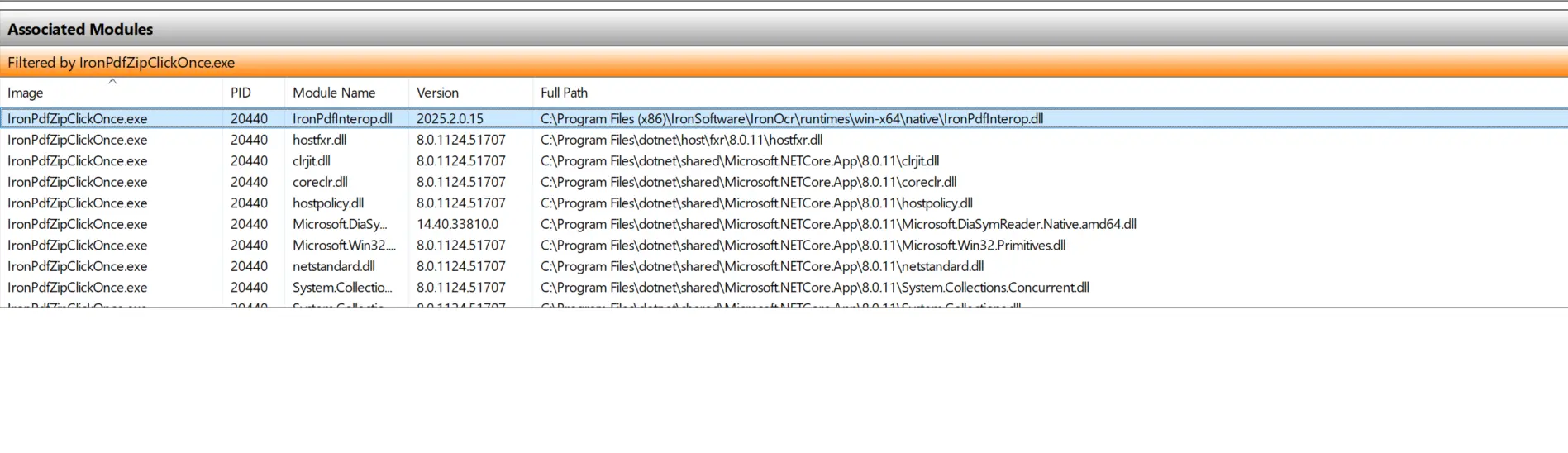
IronPDFInterop.dll へのパスが IronPDF インストールのデフォルトパスであることに気づいたかもしれません。
解決策
プロジェクトが公開ファイルと一緒にパッケージ化された DLL ではなく、ローカル IronPDF インストールから DLL を参照していることが主な問題です。これには 2 つの回避策があります。
解決策 1
既存のIronPDFインストールを必要なバージョンである2025.4.4に更新してください。成功すれば、Windowsリソースマネージャーに表示されるIronPdfInterop.dllのバージョンが古いものではなく、2025.4.0.4になるはずです。
解決策 2
コンピュータ上の IronPDF インストールが使用されていない場合は、バージョンの不一致を避けるためにアンインストールしてください。
インストール方法とClickOnceプロジェクトの作成に関する詳細は、Microsoftの公式ドキュメントをこちらをご参照ください。

Curtis Chauは、カールトン大学でコンピュータサイエンスの学士号を取得し、Node.js、TypeScript、JavaScript、およびReactに精通したフロントエンド開発を専門としています。直感的で美しいユーザーインターフェースを作成することに情熱を持ち、Curtisは現代のフレームワークを用いた開発や、構造の良い視覚的に魅力的なマニュアルの作成を楽しんでいます。



