
ClickOnce Publish Error

When you try to run a published ClickOnce project that uses IronPDF, you may encounter the following runtime error.
ERROR: Error while deploying IronPdf Chrome renderer: 'Multiple issues occurred while trying to deploy Chrome (Failed to locate 'IronInterop' at 'C:\iron testing\NETPublish(ClickOnce)\IronPdfZipClickOnce\bin\Debug\net8.0-windows\') (Failed to locate 'IronInterop' at 'C:\iron testing\NETPublish(ClickOnce)\IronPdfZipClickOnce\bin\Debug\net8.0-windows') (Invalid assembly version for 'IronInterop' (actual: 2025.2.0.15; expected: 2025.4.0.16). This version of IronPdf requires updated native dependencies. Please clear your build output directory of old assemblies so IronPdf can automatically download the new dependencies at runtime. Alternatively, you may add NuGet package IronPdf.Native.Chrome.Windows version 2025.4.16 to your project and rebuild.)[Issue Code IRONPDF-CHROME-DEPLOYMENT-ERROR-WIN].To learn more about making an engineering support request please visit: <a href=https://ironpdf.com/troubleshooting/engineering-request-pdf/>. To learn how to solve this issue please read https://ironpdf.com/troubleshooting/error-while-deploying-chrome-dependencies/ [Issue Code IRONPDF-CHROME-DEPLOYMENT-ERROR-WIN]This error can occur because the project is using IronPdfInterop.dll from a local IronPDF installation instead of the one packaged with the executable file. If you check the version of the DLL being used by the running application, you will see that its version is 2025.2.0.15 instead of the required release version, 2025.4.0.16.
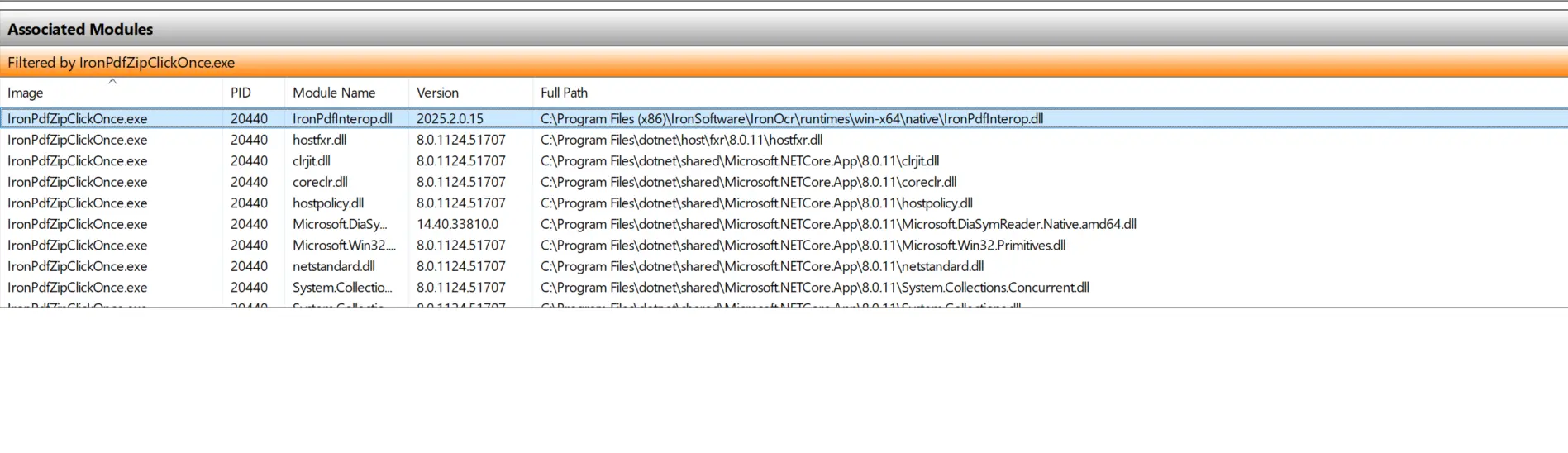
You may have noticed that the path to IronPdfInterop.dll is the default path from the IronPDF installation.
Solutions
The core issue is that the project references the DLL from the local IronPDF installation instead of the one packaged with the published file. There are two workarounds for this.
Solution 1
Please update the existing IronPDF installation to match the required version, 2025.4.16. If successful, the version of IronPdfInterop.dll shown in the Windows Resource Manager should be 2025.4.0.16 instead of an outdated one.
Solution 2
If the IronPDF installation on your machine is not in use, please uninstall it to avoid version mismatches.
For more information on how to install and create a ClickOnce project, please refer to the official documentation from Microsoft here.

Curtis Chau holds a Bachelor’s degree in Computer Science (Carleton University) and specializes in front-end development with expertise in Node.js, TypeScript, JavaScript, and React. Passionate about crafting intuitive and aesthetically pleasing user interfaces, Curtis enjoys working with modern frameworks and creating well-structured, visually appealing manuals.













