
Rectangle Construction and Positioning in IronPDF

When you draw rectangles in a PDF with IronPDF, the coordinate system differs from libraries like IronOCR and IronBarcode. IronOCR and IronBarcode define rectangles relative to an image input, while IronPDF works within the coordinate space of the PDF document itself.
Coordinate Origin
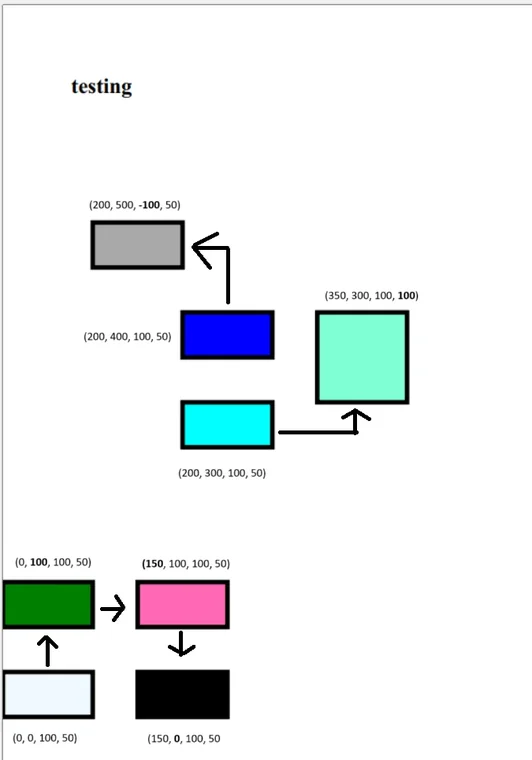
The origin point (0, 0) sits at the bottom-left corner of the page. When you specify a rectangle, that origin is treated as the rectangle's top-left corner, which determines the direction the shape is drawn.
Axis Behavior
How the x and y values shift the rectangle:
- Y-coordinate: increasing
ymoves the rectangle up; decreasing it moves the rectangle down. A negativeyplaces the rectangle below the(0, 0)point. - X-coordinate: increasing
xmoves the rectangle to the right. Decreasingx, or supplying a negative value, shifts it to the left.
Width and Height
Dimensions can be drawn in either direction from the starting point:
- Width: a positive
widthdraws to the right; a negative or decreasingwidthdraws to the left. - Height: a positive
heightextends upward; a negativeheightdraws downward.
Unit of Measurement
IronPDF measures its drawing API in points, giving the precision needed for document rendering and layout. The other Iron Software libraries differ:
- IronOCR: uses pixels exclusively, matching its focus on image-based text recognition.
- IronBarcode: uses pixels to locate barcode objects, but switches to points when stamping barcodes into a PDF so placement stays accurate in document formats.

Curtis Chau holds a Bachelor’s degree in Computer Science (Carleton University) and specializes in front-end development with expertise in Node.js, TypeScript, JavaScript, and React. Passionate about crafting intuitive and aesthetically pleasing user interfaces, Curtis enjoys working with modern frameworks and creating well-structured, visually appealing manuals.













