
Adding Bookmarks with ExtractTextFromPage

When you add bookmarks based on text content, searching with the Pages.Lines property can fail because the returned text comes back garbled or out of order, so a title-based search never matches. Extracting the page text with ExtractTextFromPage() reads each page in logical order and gives you a reliable string to search against.
LinkAnnotation class instead. It has built-in support for clickable links that navigate to a specific page and position, and is the recommended approach when available.Pages.Lines reconstructs text from how it visually appears on the page. That breaks down when text is drawn in a non-linear order, when custom fonts or encodings are in play, or when the PDF was generated from HTML or a third-party tool with a complex layout. The result is incomplete or mixed-up text that you cannot search dependably.
Solution
1. Read each page with ExtractTextFromPage()
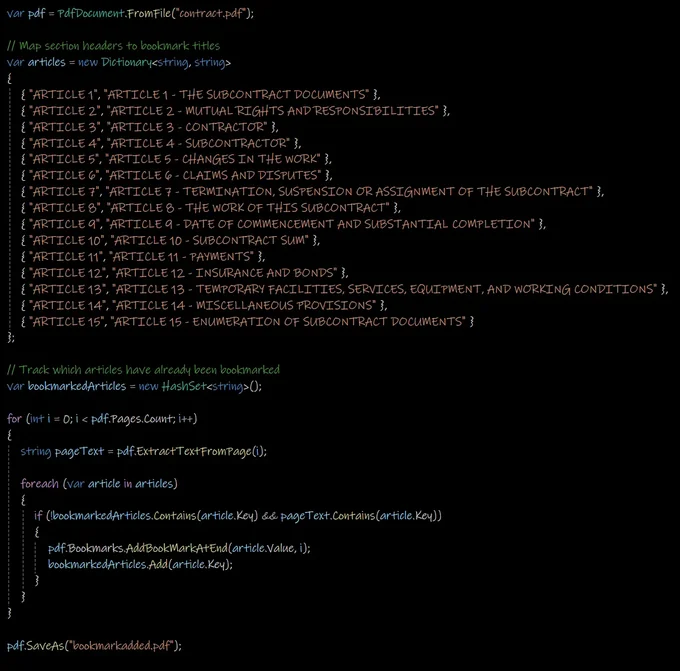
Pull the raw embedded text from every page rather than the visual reconstruction. ExtractTextFromPage() returns the page content in logical reading order, which makes a header search far more dependable across varying PDF structures.
2. Loop every page and bookmark each unique header
Walk all pages so no section is missed regardless of where it falls, and track which headers you have already seen so each one is bookmarked only once. A HashSet is a clean way to dedupe: given a document with sections titled "ARTICLE 1", "ARTICLE 2", and so on, it guarantees a single bookmark per article.
The output is a set of bookmarks pointing at each specified heading, even when the PDF came from a dynamic HTML source or carries complex formatting.

Curtis Chau holds a Bachelor’s degree in Computer Science (Carleton University) and specializes in front-end development with expertise in Node.js, TypeScript, JavaScript, and React. Passionate about crafting intuitive and aesthetically pleasing user interfaces, Curtis enjoys working with modern frameworks and creating well-structured, visually appealing manuals.













