# IronPDF Startup Crash with WEBSITE_RUN_FROM_PACKAGE
IronPDF can crash at startup on Azure App Service and Azure Functions when the app is deployed with `WEBSITE_RUN_FROM_PACKAGE = 1`. That setting mounts the app root (`C:\home\site\wwwroot`) as a read-only package filesystem, and IronPDF's startup file system scan fails against it, usually at the first IronPDF call such as setting the license key or connecting to a remote engine.
```txt
System.IO.FileNotFoundException
```
The scan is not something IronPDF intentionally requires. It is a side effect of Ninject's default extension auto-loading. Because `C:\home\site\wwwroot` is read-only under `WEBSITE_RUN_FROM_PACKAGE = 1`, the scan throws `FileNotFoundException` and initialization stops before any PDF work runs.
This is fixed in IronPDF `2026.8.1`. Earlier versions are affected, including `2026.7.0.2`, `2025.12.2`, and `2025.3.6` on Windows (`win-x64`) under .NET 10.
## Solution
Which step you need depends on whether you run the remote IronPdfEngine or native IronPDF.
### Remote IronPdfEngine and IronPdf.Slim
Upgrade to IronPDF `2026.8.1` or later. The startup scan no longer throws, so **`WEBSITE_RUN_FROM_PACKAGE = 1` can stay enabled** and no other change is required. Rendering happens on the engine, so no native binaries need to be extracted into the read-only app root.
See [Use IronPDF with in-Engine Mode](/get-started/ironpdfengine/) for connection setup.
### Native IronPDF
Upgrading alone is not enough here. At startup, native IronPDF extracts the Chrome renderer binaries and runtime libraries to a writable location, and a read-only `C:\home\site\wwwroot` blocks that extraction independently of the scan bug above.
In your Azure App Settings, set the following and then redeploy:
```txt
WEBSITE_RUN_FROM_PACKAGE = 0
```
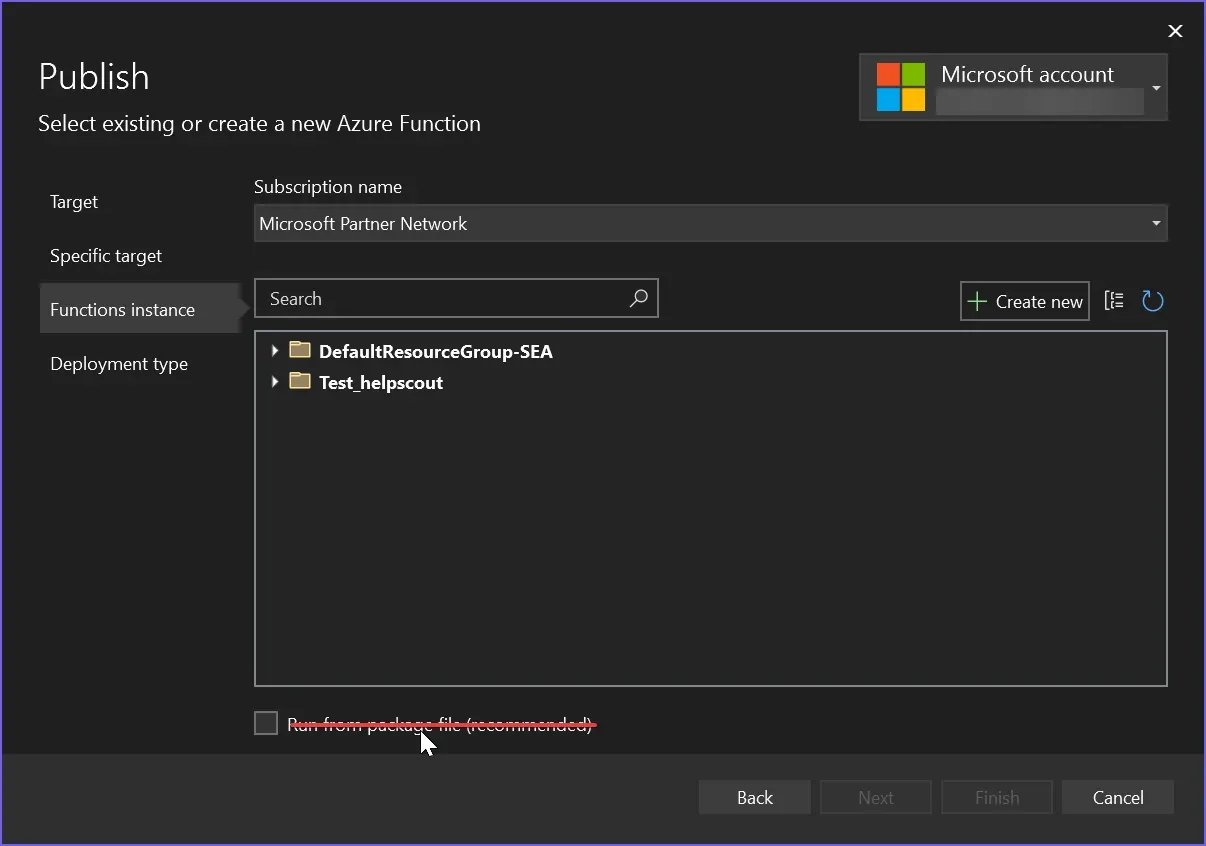
Deploying from Visual Studio? Uncheck **Run from package file (recommended)** during the Publish step.
- Depending on your deployment pipeline, this setting can be applied from several different places. Track down where it is defined and where it might be overwritten.
- **To apply the change:** you must redeploy. The setting alone has no effect until the app is redeployed.
#### Relocating the Writable Paths
From `2026.8.1`, when the native engine cannot deploy its Chromium and PDFium binaries on a read-only filesystem, the deployment error names the cause and the available remedies instead of surfacing an unclear downstream failure. One of those remedies is pointing IronPDF's writable paths somewhere outside the package mount:
```csharp
IronPdf.Installation.TempFolderPath = @"D:\home\data\ironsoftware\";
IronPdf.Installation.CustomDeploymentDirectory = @"D:\home\data\ironsoftware\";
```
On Linux App Service, use `/home/data/ironsoftware/` instead. Set these before the first IronPDF call. If the renderer still fails to deploy, set `WEBSITE_RUN_FROM_PACKAGE = 0` as described above.
### If You Cannot Upgrade
On versions before `2026.8.1`, `WEBSITE_RUN_FROM_PACKAGE = 0` is the only reliable fix for both the native engine and the remote engine, because the startup scan runs before either code path is reached.
For more background, see the [Azure Linux WEBSITE_RUN_FROM_PACKAGE guide](/troubleshooting/azure-linux-website-run-from-package/).
## Workarounds That Don't Work on Affected Versions
These were all tried against versions before `2026.8.1`, where the scan runs ahead of everything else:
- **Moving the first IronPDF call out of startup:** the crash still happens on first use from an on-demand endpoint.
- **Switching between `WEBSITE_RUN_FROM_ZIP` and `WEBSITE_RUN_FROM_PACKAGE`:** both mount read-only and fail the same way.
- **Using the remote `IronPdfEngine`:** the startup scan still runs first, so it fails before the remote connection is used. This is the specific behavior that `2026.8.1` fixes.
- **Setting `Installation.TempFolderPath` to a writable path:** the crash happens before that setting is read. From `2026.8.1` the setting is read normally.
IronPDF can crash at startup on Azure App Service and Azure Functions when the app is deployed with WEBSITE_RUN_FROM_PACKAGE = 1. That setting mounts the app root (C:\home\site\wwwroot) as a read-only package filesystem, and IronPDF's startup file system scan fails against it, usually at the first IronPDF call such as setting the license key or connecting to a remote engine.
System.IO.FileNotFoundException
System.IO.FileNotFoundException
Text
The scan is not something IronPDF intentionally requires. It is a side effect of Ninject's default extension auto-loading. Because C:\home\site\wwwroot is read-only under WEBSITE_RUN_FROM_PACKAGE = 1, the scan throws FileNotFoundException and initialization stops before any PDF work runs.
This is fixed in IronPDF 2026.8.1. Earlier versions are affected, including 2026.7.0.2, 2025.12.2, and 2025.3.6 on Windows (win-x64) under .NET 10.
Solution
Which step you need depends on whether you run the remote IronPdfEngine or native IronPDF.
Remote IronPdfEngine and IronPdf.Slim
Upgrade to IronPDF 2026.8.1 or later. The startup scan no longer throws, so WEBSITE_RUN_FROM_PACKAGE = 1 can stay enabled and no other change is required. Rendering happens on the engine, so no native binaries need to be extracted into the read-only app root.
Upgrading alone is not enough here. At startup, native IronPDF extracts the Chrome renderer binaries and runtime libraries to a writable location, and a read-only C:\home\site\wwwroot blocks that extraction independently of the scan bug above.
In your Azure App Settings, set the following and then redeploy:
WEBSITE_RUN_FROM_PACKAGE = 0
WEBSITE_RUN_FROM_PACKAGE = 0
Text
Deploying from Visual Studio? Uncheck Run from package file (recommended) during the Publish step.
Depending on your deployment pipeline, this setting can be applied from several different places. Track down where it is defined and where it might be overwritten.
To apply the change: you must redeploy. The setting alone has no effect until the app is redeployed.
Relocating the Writable Paths
From 2026.8.1, when the native engine cannot deploy its Chromium and PDFium binaries on a read-only filesystem, the deployment error names the cause and the available remedies instead of surfacing an unclear downstream failure. One of those remedies is pointing IronPDF's writable paths somewhere outside the package mount:
On Linux App Service, use /home/data/ironsoftware/ instead. Set these before the first IronPDF call. If the renderer still fails to deploy, set WEBSITE_RUN_FROM_PACKAGE = 0 as described above.
If You Cannot Upgrade
On versions before 2026.8.1, WEBSITE_RUN_FROM_PACKAGE = 0 is the only reliable fix for both the native engine and the remote engine, because the startup scan runs before either code path is reached.
These were all tried against versions before 2026.8.1, where the scan runs ahead of everything else:
Moving the first IronPDF call out of startup: the crash still happens on first use from an on-demand endpoint.
Switching between WEBSITE_RUN_FROM_ZIP and WEBSITE_RUN_FROM_PACKAGE: both mount read-only and fail the same way.
Using the remote IronPdfEngine: the startup scan still runs first, so it fails before the remote connection is used. This is the specific behavior that 2026.8.1 fixes.
Setting Installation.TempFolderPath to a writable path: the crash happens before that setting is read. From 2026.8.1 the setting is read normally.
Curtis Chau holds a Bachelor’s degree in Computer Science (Carleton University) and specializes in front-end development with expertise in Node.js, TypeScript, JavaScript, and React. Passionate about crafting intuitive and aesthetically pleasing user interfaces, Curtis enjoys working with modern frameworks and creating well-structured, visually appealing manuals.







