
PDF 렌더링 시 CSS 페이지 구분

Curtis Chau
Updated: 2026년 6월 29일
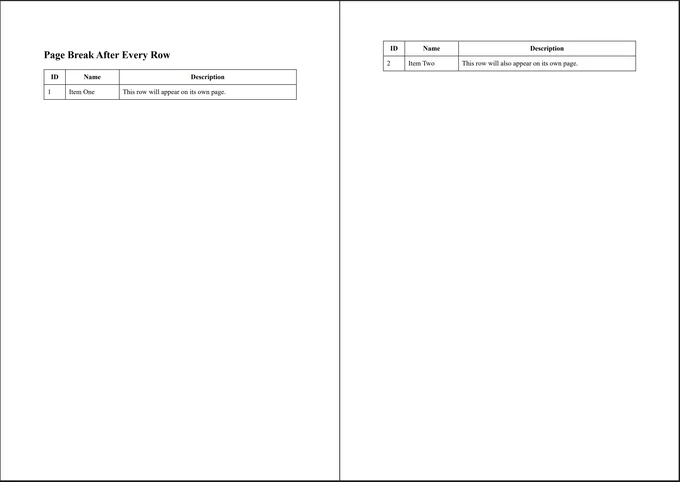
IronPDF는 표준 CSS 페이지 매김 규칙을 준수하여 HTML에 올바른 선언을 추가하여 페이지가 분할되는 위치를 제어할 수 있습니다. 이 예시는 각 테이블 행 뒤에 페이지 구분을 강제로 입력합니다.
해결책
1. CSS에 인쇄 규칙 추가하기
페이지 매김 규칙을 @media print 블록 내에 래핑하고, 각 <tr>에 줄 바꿈을 적용하세요. 호환성을 위해 이전 page-break-after과 현대 break-after이 모두 포함되어 있으며, 헤더 행은 정상적으로 흐르도록 남겨 놓습니다.
<!DOCTYPE html>
<html>
<head>
    <meta charset="UTF-8" />
    <title>Page Break After Each Table Row</title>
    <style>
        table {
            width: 100%;
            border-collapse: collapse;
        }
        th, td {
            border: 1px solid #333;
            padding: 8px;
        }
        /* PRINT RULES */
        @media print {
            tr {
                page-break-after: always; /* legacy */
                break-after: page; /* modern */
            }
            thead tr {
                page-break-after: auto;
                break-after: auto;
            }
        }
    </style>
</head>
<body>
    <h2>Page Break After Every Row</h2>
    <table>
        <thead>
            <tr>
                <th>ID</th>
                <th>Name</th>
                <th>Description</th>
            </tr>
        </thead>
        <tbody>
            <tr>
                <td>1</td>
                <td>Item One</td>
                <td>This row will appear on its own page.</td>
            </tr>
            <tr>
                <td>2</td>
                <td>Item Two</td>
                <td>This row will also appear on its own page.</td>
            </tr>
            <tr>
                <td>3</td>
                <td>Item Three</td>
                <td>Every row starts a new page.</td>
            </tr>
        </tbody>
    </table>
</body>
</html>HTML
렌더링 시, 각 본문 행은 자체 페이지에 위치하게 되며, thead 행은 추가 줄 바꿈을 방지하기 위해 auto 값을 유지합니다.
2. 행이 페이지를 가로질러 분할되지 않도록 방지하기
행 사이의 강제 줄 바꿈을 사용하지 않고 단일 행을 유지하고자 한다면, 강제 줄 바꿈을 제거하고 대신 page-break-inside: avoid를 사용하세요:
tr {
    page-break-inside: avoid; /* Prevent row from splitting */
    page-break-after: auto;
}Text
page-break-inside: avoid는 렌더러에게 전체 행을 절반으로 자르지 않고 다음 페이지로 밀어내도록 지시하고, auto 값은 자연스러운 페이지 매김이 줄 바꿈 위치를 결정할 수 있게 합니다.

기술 문서 작성자
커티스 차우는 칼턴 대학교에서 컴퓨터 과학 학사 학위를 취득했으며, Node.js, TypeScript, JavaScript, React를 전문으로 하는 프론트엔드 개발자입니다. 직관적이고 미적으로 뛰어난 사용자 인터페이스를 만드는 데 열정을 가진 그는 최신 프레임워크를 활용하고, 잘 구성되고 시각적으로 매력적인 매뉴얼을 제작하는 것을 즐깁니다.
...
더 읽어보기












