using IronPdf;

// Disable local disk access or cross-origin requests
Installation.EnableWebSecurity = true;

// Instantiate Renderer
var renderer = new ChromePdfRenderer();

// Create a PDF from a HTML string using C#
var pdf = renderer.RenderHtmlAsPdf("<h1>Hello World</h1>");

// Export to a file or Stream
pdf.SaveAs("output.pdf");

// Advanced Example with HTML Assets
// Load external html assets: Images, CSS and JavaScript.
// An optional BasePath 'C:\site\assets\' is set as the file location to load assets from
var myAdvancedPdf = renderer.RenderHtmlAsPdf("<img src='icons/iron.png'>", @"C:\site\assets\");
myAdvancedPdf.SaveAs("html-with-assets.pdf");
using IronPdf;// Disable local disk access or cross-origin requestsInstallation.EnableWebSecurity = true;// Instantiate Renderervar renderer = new ChromePdfRenderer();// Create a PDF from a HTML string using C#var pdf = renderer.RenderHtmlAsPdf("<h1>Hello World</h1>");// Export to a file or Streampdf.SaveAs("output.pdf");// Advanced Example with HTML Assets// Load external html assets: Images, CSS and JavaScript.// An optional BasePath 'C:\site\assets\' is set as the file location to load assets fromvar myAdvancedPdf = renderer.RenderHtmlAsPdf("<img src='icons/iron.png'>", @"C:\site\assets\");myAdvancedPdf.SaveAs("html-with-assets.pdf");
Çoğu insan bilgisayarda özel bir masaüstü uygulaması kullanarak PDF açar, ancak yazılım mühendisleri IronPDF kullanarak C# ile programlama yoluyla PDF içeriği oluşturabilir, görüntüleyebilir, açabilir, okuyabilir ve düzenleyebilir.
IronPDF, ASP.NET ve C# ile PDF dosyalarını okurken çok kullanışlı bir plugin oldu.
IronPDF kullanarak C# ile PDF belgeleri hızlı ve kolay bir şekilde oluşturmak mümkündür.
PDF belgelerinin tasarımı ve düzeninin çoğu, mevcut HTML varlıkları kullanılarak veya bu görev web tasarım çalışanlarına devredilerek gerçekleştirilebilir; Uygulamanıza PDF oluşturma özelliğini entegre etmenin zaman alıcı görevini üstlenir ve hazırlanan belgelerin PDF'lere dönüştürülmesini otomatikleştirir. .NET ile, şunları yapabilirsiniz:
* Web formlarını, yerel HTML sayfalarını ve diğer web sitelerini PDF formatına dönüştürün.
Kullanıcıların belgeleri indirmelerine, diğerleriyle e-posta aracılığıyla paylaşmalarına veya buluta kaydetmelerine izin verin.
* Müşterilere fatura kesmek ve teklif vermek; raporlar hazırlamak sözleşmeler ve diğer evraklar üzerinde pazarlık yapmak.
* .NET Framework ve .NET Core'da ASP.NET, ASP.NET Core, Web Forms, MVC, Web API'leri ve diğer programlama dilleriyle çalışın.
## IronPDF Kütüphanesini Kurma
Kütüphaneyi kurmanın iki yolu vardır:
### NuGet Paket Yöneticisi ile Kurulum
IronPDF, Visual Studio Eklentisi veya komut satırından NuGet Paket Yöneticisi kullanılarak yüklenebilir. Konsola gidin ve Visual Studio'da şu komutu yazın:
```shell
:ProductInstall
```
### DLL Dosyasını Doğrudan Web Sitesinden İndirin
Alternatif olarak, DLL'i doğrudan web sitesinden edinebilirsiniz.
IronPDF kullanan herhangi bir `cs` sınıf dosyasının en üstüne aşağıdaki yönergeyi eklemeyi unutmayın:
```cs
using IronPdf;
```
[IronPDF Detaylı Özellikler Genel Bakış](/features/) sayfasını inceleyin.
IronPDF bir zorunlu eklentidir. Hemen alın ve [IronPDF NuGet Paketi ile deneyin](https://www.nuget.org/packages/IronPdf/).
## Create a PDF File From an HTML String in .NET C#
Bir HTML dizesinden C# ile bir PDF dosyası oluşturmak, C# dilinde yeni bir PDF dosyası oluşturmanın etkili ve tatmin edici bir yöntemidir.
IronPDF DLL içindeki Google Chromium motorunun gömülü sürümüne teşekkürler, `ChromePdfRenderer` üzerinden gelen `RenderHtmlAsPdf` işlevi, herhangi bir HTML (HTML5) dizisini bir PDF belgesine dönüştürmenin kolay bir yolunu sunar.
```cs
// Create a renderer to convert HTML to PDF
var renderer = new ChromePdfRenderer();

// Convert an HTML string to a PDF
using var renderedPdf = renderer.RenderHtmlAsPdf("<h1>My First HTML to Pdf</h1>");

// Define the output path for the PDF
var outputPath = "My_First_Html.pdf";

// Save the rendered PDF to the specified path
renderedPdf.SaveAs(outputPath);

// Automatically open the newly created PDF
System.Diagnostics.Process.Start(outputPath);
```
`RenderHtmlAsPdf`, toplamda CSS, JavaScript ve resimleri destekleyen güçlü bir araçtır. Bu materyaller sabit diskte depolanmışsa, `RenderHtmlAsPdf` öğesinin ikinci argümanını ayarlamak gerekebilir.
Aşağıdaki kod bir PDF dosyası oluşturacaktır:
```cs
// Render HTML to PDF with a base path for local assets
var renderPdf = renderer.RenderHtmlAsPdf("<img src='image_1.png'/>", @"C:\Newproject");
```
Tüm CSS stil dosyaları, resimler ve referans verilen JavaScript dosyaları `BaseUrlPath` ile ilgili olacak ve daha düzenli ve mantıklı bir yapı sağlanacaktır. Elbette, internet üzerinden erişilebilen resimleri, stil dosyalarını ve varlıkları, Web Fontları, Google Fontları ve hatta jQuery gibi araçları kullanmayı tercih edebilirsiniz.
## Mevcut Bir HTML URL'sini Kullanarak PDF Belgesi Oluşturma
Mevcut URL'ler, C# ile verimli bir şekilde PDF'lere dönüştürülebilir; bu, ayrıca ekiplerin PDF tasarımı ve arka uç PDF işleme çalışmalarını çeşitli bölümler arasında bölmesine olanak tanır, bu yararlıdır.
Aşağıdaki kod, endeavorcreative.com sayfasını URL'sinden nasıl render edeceğinizi göstermektedir:
```cs
// Create a renderer for converting URLs to PDF
var renderer = new ChromePdfRenderer();
// Convert the specified URL to a PDF
using var renderedPdf = renderer.RenderUrlAsPdf("https://endeavorcreative.com/setting-up-wordpress-website-from-scratch/");
// Specify the output path for the PDF
var outputPath = "Url_pdf.pdf";
// Save the PDF to the specified path
renderedPdf.SaveAs(outputPath);
// Open the newly created PDF
System.Diagnostics.Process.Start(outputPath);
```
Sonuç olarak, oluşturulan PDF'de tüm köprüler (HTML bağlantıları) ve hatta HTML formları korunur.
## Mevcut Bir HTML Belgesinden PDF Belgesi Oluşturun
Bu bölüm, herhangi bir yerel HTML dosyasının nasıl render edileceğini gösterir. CSS, resimler ve JavaScript gibi tüm göreceli kaynaklar için dosya:/ protokolü kullanılarak dosyanın açıldığı görülecektir.
```cs
// Create a renderer for existing HTML files
var renderer = new ChromePdfRenderer();
// Render an HTML file to PDF
using var renderedPdf = renderer.RenderHtmlFileAsPdf("Assets/test1.html");
// Specify the output path for the PDF
var outputPath = "test1_pdf.pdf";
// Save the PDF to the specified path
renderedPdf.SaveAs(outputPath);
// Open the newly created PDF
System.Diagnostics.Process.Start(outputPath);
```
Bu stratejinin avantajı, geliştiricilerin HTML içeriğini oluştururken bir tarayıcıda test etmelerine olanak sağlamasıdır. IronPDF'nin işleme motoru, Chrome web tarayıcısına dayanır. Bu nedenle, XML içeriğini PDF'ye yazdırmak için XSLT şablonları kullanılabildiğinden, [XML'den PDF'ye Dönüştürme](/how-to/xml-to-pdf/) kullanılması tavsiye edilir.
## ASP.NET Web Forms'u PDF Dosyasına Dönüştürme
Tek bir kod satırı ile ASP.NET çevrimiçi formlarını HTML yerine PDF formatına dönüştürebilirsiniz. Kod satırını, sayfanın code-behind dosyasındaki `Page_Load` yöntemine yerleştirerek sayfada görünmesini sağlayın.
ASP.NET Web Forms Uygulamaları ya sıfırdan oluşturulabilir ya da önceki bir sürümden açılabilir.
NuGet paketini henüz yüklü değilse yükleyin.
`using` anahtar kelimesi `IronPdf` ad alanını ithal etmek için kullanılmalıdır.
PDF'ye dönüştürmek istediğiniz sayfanın arka plan koduna gidin. Örneğin, **Default.aspx.cs** dosyası ASP.NET kullanıyor.
`RenderThisPageAsPdf`, `AspxToPdf` sınıfındaki bir yöntemdir.
```cs
using IronPdf;
using System;
using System.Web.UI;
namespace WebApplication7
{
public partial class _Default : Page
{
protected void Page_Load(object sender, EventArgs e)
{
// Render the current page as a PDF in the browser
AspxToPdf.RenderThisPageAsPdf(AspxToPdf.FileBehavior.InBrowser);
}
}
}
```
Bu, [IronPdf.Extensions.ASPX NuGet Paketi](https://www.nuget.org/packages/IronPdf.Extensions.ASPX/)'nin yüklenmesini gerektirir. ASPX, MVC modeli ile yer değiştirdiği için .NET Core'da mevcut değildir.
## HTML Şablonlamayı Uygula
Intranet ve web sitesi geliştiricileri için, PDF şablon oluşturma veya "toplu üretim" yeteneği standart bir gerekliliktir.
İronPDF kütüphanesi, bir PDF belgesi için şablon oluşturmaktan ziyade, mevcut ve iyi test edilmiş teknolojiyi kullanarak HTML için bir şablon oluşturma imkanı sunar.
HTML şablonuna bir sorgu dizesi veya veritabanından gelen veriler eklenerek dinamik olarak oluşturulmuş bir PDF dosyası aşağıda gösterildiği gibi oluşturulur.
Örnek olarak, C# String sınıfını ve özelliklerini göz önünde bulundurun. Format metodu, temel "mail-merge" işlemleri için iyi çalışır.
```cs
// Basic HTML String Formatting
string formattedString = String.Format("<h1>Hello {0}!</h1>", "World");
```
HTML dosyaları oldukça geniş olabileceğinden, [[NAME]] gibi rastgele yer tutucuları kullanmak ve ardından bunları gerçek verilerle değiştirmek yaygın bir uygulamadır.
Aşağıdaki örnek, her biri farklı bir kullanıcı için özelleştirilecek üç PDF belgesi oluşturacaktır.
```cs
// Define an HTML template with a placeholder
var htmlTemplate = "<p>[[NAME]]</p>";
// Sample data to replace placeholders
var names = new[] { "John", "James", "Jenny" };
// Create a new PDF for each name
foreach (var name in names)
{
// Replace placeholder with actual name
var htmlInstance = htmlTemplate.Replace("[[NAME]]", name);
// Create a renderer and render the HTML as PDF
var renderer = new ChromePdfRenderer();
using var pdf = renderer.RenderHtmlAsPdf(htmlInstance);
// Save the PDF with the name in the filename
pdf.SaveAs($"{name}.pdf");
}
```
## ASP.NET MVC Rotalama: Bu Sayfanın PDF Sürümünü İndirin
ASP.NET MVC Framework ile kullanıcıyı bir PDF dosyasına yönlendirebilirsiniz.
Yeni bir ASP.NET MVC Uygulaması oluştururken veya mevcut bir uygulamaya MVC Controller eklerken, bu seçeneği seçin. Yeni proje sihirbazını başlatmak için ASP.NET Web Application (.NET Framework) > MVC'yi açılır menüden seçin. Alternatif olarak, mevcut bir MVC projesini açabilirsiniz. Controllers klasöründeki HomeController dosyasında yer alan Index yöntemini değiştirin veya Controllers klasöründe yeni bir denetleyici oluşturun.
Aşağıda kodun nasıl yazılması gerektiğine dair bir örnek bulunmaktadır:
```cs
using IronPdf;
using System;
using System.Web.Mvc;
namespace WebApplication8.Controllers
{
public class HomeController : Controller
{
public ActionResult Index()
{
// Render a URL as PDF and return it in the response
using var pdf = HtmlToPdf.StaticRenderUrlAsPdf(new Uri("https://en.wikipedia.org"));
return File(pdf.BinaryData, "application/pdf", "Wiki.Pdf");
}
public ActionResult About()
{
ViewBag.Message = "Your application description page.";
return View();
}
public ActionResult Contact()
{
ViewBag.Message = "Your contact page.";
return View();
}
}
}
```
## Bir PDF Belgesine Kapak Sayfası Ekleme
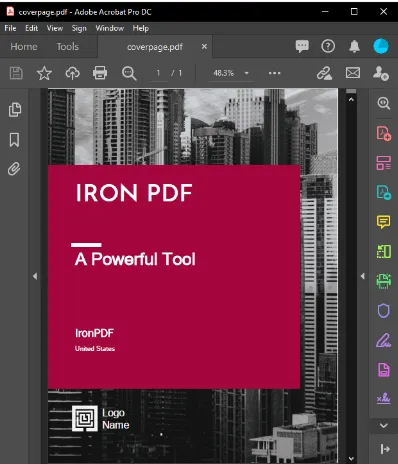 **Bir PDF belgesine Kapak Sayfası Ekleme**
IronPDF, PDF belgelerini birleştirme sürecini basitleştirir. Bu tekniğin en yaygın uygulaması, render edilmiş bir PDF belgesine bir kapak sayfası veya arka sayfa eklemektir.
Bunu başarmak için, bir kapak sayfası hazırlayın ve ardından `PdfDocument` özelliklerini kullanın.
İki belgeyi birleştirmek için [`Merge PDF Documents Method`](/how-to/merge-or-split-pdfs/) kullanın.
```cs
// Create a renderer and render a PDF from a URL
var renderer = new ChromePdfRenderer();
using var pdf = renderer.RenderUrlAsPdf("https://www.nuget.org/packages/IronPdf/");
// Merge the cover page with the rendered PDF
using var merged = PdfDocument.Merge(new PdfDocument("CoverPage.pdf"), pdf);
// Save the merged document
merged.SaveAs("Combined.Pdf");
```
## Belgenize Filigran Ekleyin
Son olarak, PDF belgelerine bir filigran eklemek C# kodu kullanarak gerçekleştirilebilir; bu, her sayfaya "gizli" veya "örnek" olduğunu belirten bir sorumluluk reddi eklemek için kullanılabilir
```cs
// Prepare a stamper with HTML content for the watermark
HtmlStamper stamper = new HtmlStamper("<h2 style='color:red'>SAMPLE</h2>")
{
HorizontalOffset = new Length(-3, MeasurementUnit.Inch),
VerticalAlignment = VerticalAlignment.Bottom
};
// Create a renderer and render a PDF from a URL
var renderer = new ChromePdfRenderer();
using var pdf = renderer.RenderUrlAsPdf("https://www.nuget.org/packages/IronPdf");
// Apply the watermark to the PDF
pdf.ApplyStamp(stamper);
// Save the watermarked PDF
pdf.SaveAs(@"C:\PathToWatermarked.pdf");
```
## PDF Dosyanız Bir Şifre Kullanılarak Korunabilir
Bir PDF belgesinin parola özelliğini ayarladığınızda, belge şifrelenecek ve kullanıcının belgeyi okumak için doğru parolayı sağlaması gerekecektir. Bu örnek, bir .NET Core Konsol Uygulamasında kullanılabilir.
```cs
using IronPdf;
namespace ConsoleApp
{
class Program
{
static void Main(string[] args)
{
// Create a renderer and render a PDF from HTML
var renderer = new ChromePdfRenderer();
using var pdfDocument = renderer.RenderHtmlAsPdf("<h1>Hello World</h1>");
// Set password to protect the PDF
pdfDocument.Password = "strong!@#pass&^%word";
// Save the secured PDF
pdfDocument.SaveAs("secured.pdf");
}
}
}
```
Yukarıda bahsedilen avantajlar olmadan, IronPDF ile ayrıca şunları yapabilirsiniz:
[PDF'lerden metin ve resim çıkarma](/how-to/extract-text-and-images/)
[PDF'lerin HTML içeriğini düzenleyin](/how-to/javascript-to-pdf/)
* [Ön plan ve arka plan resimlerini](/how-to/background-foreground/) geliştirin
* PDF'lere [dijital imza ekleyin](/examples/digitally-sign-a-pdf/)
* [PDF formlarınızı hızlı ve zahmetsizce](/how-to/create-forms/) otomatik doldurun
PDF'ler oluşturmak oldukça zorlu bir çalışmadır; bazı insanlar, en üstün belgeleri üretmek için kullanmaları gereken temel kavramlarla hiç karşılaşmamış olabilir. Sonuç olarak, IronPDF son derece yararlıdır, çünkü PDF'ler oluşturmayı basitleştirir ve sonuç olarak, PDF'ler ve HTML'den oluşturulan belgelerin orijinal sunumunu iyileştirir.
Dokümantasyon ve rakip analizi ile sağlanan bilgilere dayanarak: IronPDF, ofislerde veya okullarda çalışanlar da dahil olmak üzere herkesin görevlerini etkili bir şekilde tamamlamasını basit hale getirerek PDF oluştururken kullanılacak en etkili araçtır.
 **ASP.NET'te C# ve IronPDF kullanarak PDF dosyalarını görüntüleme**
IronPDF, vazgeçilmez bir .NET kütüphanesidir. Hemen alın ve [IronPDF NuGet Paketi ile deneyin](https://www.nuget.org/packages/IronPdf/).
Çoğu insan bilgisayarda özel bir masaüstü uygulaması kullanarak PDF açar, ancak yazılım mühendisleri IronPDF kullanarak C# ile programlama yoluyla PDF içeriği oluşturabilir, görüntüleyebilir, açabilir, okuyabilir ve düzenleyebilir.
IronPDF, ASP.NET ve C# ile PDF dosyalarını okurken çok kullanışlı bir plugin oldu.
IronPDF kullanarak C# ile PDF belgeleri hızlı ve kolay bir şekilde oluşturmak mümkündür.
PDF belgelerinin tasarımı ve düzeninin çoğu, mevcut HTML varlıkları kullanılarak veya bu görev web tasarım çalışanlarına devredilerek gerçekleştirilebilir; Uygulamanıza PDF oluşturma özelliğini entegre etmenin zaman alıcı görevini üstlenir ve hazırlanan belgelerin PDF'lere dönüştürülmesini otomatikleştirir. .NET ile, şunları yapabilirsiniz:
Web formlarını, yerel HTML sayfalarını ve diğer web sitelerini PDF formatına dönüştürün.
Kullanıcıların belgeleri indirmelerine, diğerleriyle e-posta aracılığıyla paylaşmalarına veya buluta kaydetmelerine izin verin.
Müşterilere fatura kesmek ve teklif vermek; raporlar hazırlamak sözleşmeler ve diğer evraklar üzerinde pazarlık yapmak.
.NET Framework ve .NET Core'da ASP.NET, ASP.NET Core, Web Forms, MVC, Web API'leri ve diğer programlama dilleriyle çalışın.
IronPDF Kütüphanesini Kurma
Kütüphaneyi kurmanın iki yolu vardır:
NuGet Paket Yöneticisi ile Kurulum
IronPDF, Visual Studio Eklentisi veya komut satırından NuGet Paket Yöneticisi kullanılarak yüklenebilir. Konsola gidin ve Visual Studio'da şu komutu yazın:
PM > Install-Package IronPdf
Install-Package IronPdf
DLL Dosyasını Doğrudan Web Sitesinden İndirin
Alternatif olarak, DLL'i doğrudan web sitesinden edinebilirsiniz.
IronPDF kullanan herhangi bir cs sınıf dosyasının en üstüne aşağıdaki yönergeyi eklemeyi unutmayın:
Bir HTML dizesinden C# ile bir PDF dosyası oluşturmak, C# dilinde yeni bir PDF dosyası oluşturmanın etkili ve tatmin edici bir yöntemidir.
IronPDF DLL içindeki Google Chromium motorunun gömülü sürümüne teşekkürler, ChromePdfRenderer üzerinden gelen RenderHtmlAsPdf işlevi, herhangi bir HTML (HTML5) dizisini bir PDF belgesine dönüştürmenin kolay bir yolunu sunar.
// Create a renderer to convert HTML to PDFvar renderer = new ChromePdfRenderer();// Convert an HTML string to a PDFusing var renderedPdf = renderer.RenderHtmlAsPdf("<h1>My First HTML to Pdf</h1>");// Define the output path for the PDFvar outputPath = "My_First_Html.pdf";// Save the rendered PDF to the specified pathrenderedPdf.SaveAs(outputPath);// Automatically open the newly created PDFSystem.Diagnostics.Process.Start(outputPath);
// Create a renderer to convert HTML to PDF
var renderer = new ChromePdfRenderer();

// Convert an HTML string to a PDF
using var renderedPdf = renderer.RenderHtmlAsPdf("<h1>My First HTML to Pdf</h1>");

// Define the output path for the PDF
var outputPath = "My_First_Html.pdf";

// Save the rendered PDF to the specified path
renderedPdf.SaveAs(outputPath);

// Automatically open the newly created PDF
System.Diagnostics.Process.Start(outputPath);
' Create a renderer to convert HTML to PDFDim renderer = New ChromePdfRenderer()' Convert an HTML string to a PDFDim renderedPdf = renderer.RenderHtmlAsPdf("<h1>My First HTML to Pdf</h1>")' Define the output path for the PDFDim outputPath = "My_First_Html.pdf"' Save the rendered PDF to the specified pathrenderedPdf.SaveAs(outputPath)' Automatically open the newly created PDFSystem.Diagnostics.Process.Start(outputPath)
' Create a renderer to convert HTML to PDF
Dim renderer = New ChromePdfRenderer()

' Convert an HTML string to a PDF
Dim renderedPdf = renderer.RenderHtmlAsPdf("<h1>My First HTML to Pdf</h1>")

' Define the output path for the PDF
Dim outputPath = "My_First_Html.pdf"

' Save the rendered PDF to the specified path
renderedPdf.SaveAs(outputPath)

' Automatically open the newly created PDF
System.Diagnostics.Process.Start(outputPath)
RenderHtmlAsPdf, toplamda CSS, JavaScript ve resimleri destekleyen güçlü bir araçtır. Bu materyaller sabit diskte depolanmışsa, RenderHtmlAsPdf öğesinin ikinci argümanını ayarlamak gerekebilir.
Aşağıdaki kod bir PDF dosyası oluşturacaktır:
// Render HTML to PDF with a base path for local assetsvar renderPdf = renderer.RenderHtmlAsPdf("<img src='image_1.png'/>", @"C:\Newproject");
// Render HTML to PDF with a base path for local assets
var renderPdf = renderer.RenderHtmlAsPdf("<img src='image_1.png'/>", @"C:\Newproject");
' Render HTML to PDF with a base path for local assetsDim renderPdf = renderer.RenderHtmlAsPdf("<img src='image_1.png'/>", "C:\Newproject")
' Render HTML to PDF with a base path for local assets
Dim renderPdf = renderer.RenderHtmlAsPdf("<img src='image_1.png'/>", "C:\Newproject")
Tüm CSS stil dosyaları, resimler ve referans verilen JavaScript dosyaları BaseUrlPath ile ilgili olacak ve daha düzenli ve mantıklı bir yapı sağlanacaktır. Elbette, internet üzerinden erişilebilen resimleri, stil dosyalarını ve varlıkları, Web Fontları, Google Fontları ve hatta jQuery gibi araçları kullanmayı tercih edebilirsiniz.
Mevcut Bir HTML URL'sini Kullanarak PDF Belgesi Oluşturma
Mevcut URL'ler, C# ile verimli bir şekilde PDF'lere dönüştürülebilir; bu, ayrıca ekiplerin PDF tasarımı ve arka uç PDF işleme çalışmalarını çeşitli bölümler arasında bölmesine olanak tanır, bu yararlıdır.
Aşağıdaki kod, endeavorcreative.com sayfasını URL'sinden nasıl render edeceğinizi göstermektedir:
// Create a renderer for converting URLs to PDFvar renderer = new ChromePdfRenderer();// Convert the specified URL to a PDFusing var renderedPdf = renderer.RenderUrlAsPdf("https://endeavorcreative.com/setting-up-wordpress-website-from-scratch/");// Specify the output path for the PDFvar outputPath = "Url_pdf.pdf";// Save the PDF to the specified pathrenderedPdf.SaveAs(outputPath);// Open the newly created PDFSystem.Diagnostics.Process.Start(outputPath);
// Create a renderer for converting URLs to PDF
var renderer = new ChromePdfRenderer();

// Convert the specified URL to a PDF
using var renderedPdf = renderer.RenderUrlAsPdf("https://endeavorcreative.com/setting-up-wordpress-website-from-scratch/");

// Specify the output path for the PDF
var outputPath = "Url_pdf.pdf";

// Save the PDF to the specified path
renderedPdf.SaveAs(outputPath);

// Open the newly created PDF
System.Diagnostics.Process.Start(outputPath);
' Create a renderer for converting URLs to PDFDim renderer = New ChromePdfRenderer()' Convert the specified URL to a PDFDim renderedPdf = renderer.RenderUrlAsPdf("https://endeavorcreative.com/setting-up-wordpress-website-from-scratch/")' Specify the output path for the PDFDim outputPath = "Url_pdf.pdf"' Save the PDF to the specified pathrenderedPdf.SaveAs(outputPath)' Open the newly created PDFSystem.Diagnostics.Process.Start(outputPath)
' Create a renderer for converting URLs to PDF
Dim renderer = New ChromePdfRenderer()

' Convert the specified URL to a PDF
Dim renderedPdf = renderer.RenderUrlAsPdf("https://endeavorcreative.com/setting-up-wordpress-website-from-scratch/")

' Specify the output path for the PDF
Dim outputPath = "Url_pdf.pdf"

' Save the PDF to the specified path
renderedPdf.SaveAs(outputPath)

' Open the newly created PDF
System.Diagnostics.Process.Start(outputPath)
Sonuç olarak, oluşturulan PDF'de tüm köprüler (HTML bağlantıları) ve hatta HTML formları korunur.
Mevcut Bir HTML Belgesinden PDF Belgesi Oluşturun
Bu bölüm, herhangi bir yerel HTML dosyasının nasıl render edileceğini gösterir. CSS, resimler ve JavaScript gibi tüm göreceli kaynaklar için dosya:/ protokolü kullanılarak dosyanın açıldığı görülecektir.
// Create a renderer for existing HTML filesvar renderer = new ChromePdfRenderer();// Render an HTML file to PDFusing var renderedPdf = renderer.RenderHtmlFileAsPdf("Assets/test1.html");// Specify the output path for the PDFvar outputPath = "test1_pdf.pdf";// Save the PDF to the specified pathrenderedPdf.SaveAs(outputPath);// Open the newly created PDFSystem.Diagnostics.Process.Start(outputPath);
// Create a renderer for existing HTML files
var renderer = new ChromePdfRenderer();

// Render an HTML file to PDF
using var renderedPdf = renderer.RenderHtmlFileAsPdf("Assets/test1.html");

// Specify the output path for the PDF
var outputPath = "test1_pdf.pdf";

// Save the PDF to the specified path
renderedPdf.SaveAs(outputPath);

// Open the newly created PDF
System.Diagnostics.Process.Start(outputPath);
' Create a renderer for existing HTML filesDim renderer = New ChromePdfRenderer()' Render an HTML file to PDFDim renderedPdf = renderer.RenderHtmlFileAsPdf("Assets/test1.html")' Specify the output path for the PDFDim outputPath = "test1_pdf.pdf"' Save the PDF to the specified pathrenderedPdf.SaveAs(outputPath)' Open the newly created PDFSystem.Diagnostics.Process.Start(outputPath)
' Create a renderer for existing HTML files
Dim renderer = New ChromePdfRenderer()

' Render an HTML file to PDF
Dim renderedPdf = renderer.RenderHtmlFileAsPdf("Assets/test1.html")

' Specify the output path for the PDF
Dim outputPath = "test1_pdf.pdf"

' Save the PDF to the specified path
renderedPdf.SaveAs(outputPath)

' Open the newly created PDF
System.Diagnostics.Process.Start(outputPath)
Bu stratejinin avantajı, geliştiricilerin HTML içeriğini oluştururken bir tarayıcıda test etmelerine olanak sağlamasıdır. IronPDF'nin işleme motoru, Chrome web tarayıcısına dayanır. Bu nedenle, XML içeriğini PDF'ye yazdırmak için XSLT şablonları kullanılabildiğinden, XML'den PDF'ye Dönüştürme kullanılması tavsiye edilir.
ASP.NET Web Forms'u PDF Dosyasına Dönüştürme
Tek bir kod satırı ile ASP.NET çevrimiçi formlarını HTML yerine PDF formatına dönüştürebilirsiniz. Kod satırını, sayfanın code-behind dosyasındaki Page_Load yöntemine yerleştirerek sayfada görünmesini sağlayın.
ASP.NET Web Forms Uygulamaları ya sıfırdan oluşturulabilir ya da önceki bir sürümden açılabilir.
NuGet paketini henüz yüklü değilse yükleyin.
using anahtar kelimesi IronPdf ad alanını ithal etmek için kullanılmalıdır.
PDF'ye dönüştürmek istediğiniz sayfanın arka plan koduna gidin. Örneğin, Default.aspx.cs dosyası ASP.NET kullanıyor.
RenderThisPageAsPdf, AspxToPdf sınıfındaki bir yöntemdir.
using IronPdf;using System;using System.Web.UI;namespace WebApplication7{ public partial class _Default : Page { protected voidPage_Load(object sender, EventArgs e) { // Render the current page as a PDF in the browserAspxToPdf.RenderThisPageAsPdf(AspxToPdf.FileBehavior.InBrowser); } }}
using IronPdf;
using System;
using System.Web.UI;

namespace WebApplication7
{
    public partial class _Default : Page
    {
        protected void Page_Load(object sender, EventArgs e)
        {
            // Render the current page as a PDF in the browser
            AspxToPdf.RenderThisPageAsPdf(AspxToPdf.FileBehavior.InBrowser);
        }
    }
}
ImportsIronPdfImportsSystemImportsSystem.Web.UINamespaceWebApplication7PartialPublic Class _DefaultInheritsPageProtected Sub Page_Load(ByVal sender AsObject, ByVal e AsEventArgs) ' Render the current page as a PDF in the browserAspxToPdf.RenderThisPageAsPdf(AspxToPdf.FileBehavior.InBrowser) End Sub End ClassEndNamespace
Imports IronPdf
Imports System
Imports System.Web.UI

Namespace WebApplication7
	Partial Public Class _Default
		Inherits Page

		Protected Sub Page_Load(ByVal sender As Object, ByVal e As EventArgs)
			' Render the current page as a PDF in the browser
			AspxToPdf.RenderThisPageAsPdf(AspxToPdf.FileBehavior.InBrowser)
		End Sub
	End Class
End Namespace
Intranet ve web sitesi geliştiricileri için, PDF şablon oluşturma veya "toplu üretim" yeteneği standart bir gerekliliktir.
İronPDF kütüphanesi, bir PDF belgesi için şablon oluşturmaktan ziyade, mevcut ve iyi test edilmiş teknolojiyi kullanarak HTML için bir şablon oluşturma imkanı sunar.
HTML şablonuna bir sorgu dizesi veya veritabanından gelen veriler eklenerek dinamik olarak oluşturulmuş bir PDF dosyası aşağıda gösterildiği gibi oluşturulur.
Örnek olarak, C# String sınıfını ve özelliklerini göz önünde bulundurun. Format metodu, temel "mail-merge" işlemleri için iyi çalışır.
// Basic HTML String Formattingstring formattedString = String.Format("<h1>Hello {0}!</h1>", "World");
' Basic HTML String Formatting
Dim formattedString As String = String.Format("<h1>Hello {0}!</h1>", "World")
HTML dosyaları oldukça geniş olabileceğinden, [[NAME]] gibi rastgele yer tutucuları kullanmak ve ardından bunları gerçek verilerle değiştirmek yaygın bir uygulamadır.
Aşağıdaki örnek, her biri farklı bir kullanıcı için özelleştirilecek üç PDF belgesi oluşturacaktır.
// Define an HTML template with a placeholdervar htmlTemplate = "<p>[[NAME]]</p>";// Sample data to replace placeholdersvar names = new[] { "John", "James", "Jenny" };// Create a new PDF for each nameforeach (var name in names){ // Replace placeholder with actual name var htmlInstance = htmlTemplate.Replace("[[NAME]]", name); // Create a renderer and render the HTML as PDF var renderer = new ChromePdfRenderer(); using var pdf = renderer.RenderHtmlAsPdf(htmlInstance); // Save the PDF with the name in the filename pdf.SaveAs($"{name}.pdf");}
// Define an HTML template with a placeholder
var htmlTemplate = "<p>[[NAME]]</p>";

// Sample data to replace placeholders
var names = new[] { "John", "James", "Jenny" };

// Create a new PDF for each name
foreach (var name in names)
{
    // Replace placeholder with actual name
    var htmlInstance = htmlTemplate.Replace("[[NAME]]", name);

    // Create a renderer and render the HTML as PDF
    var renderer = new ChromePdfRenderer();
    using var pdf = renderer.RenderHtmlAsPdf(htmlInstance);

    // Save the PDF with the name in the filename
    pdf.SaveAs($"{name}.pdf");
}
' Define an HTML template with a placeholderDim htmlTemplate = "<p>[[NAME]]</p>"' Sample data to replace placeholdersDim names = { "John", "James", "Jenny" }' Create a new PDF for each nameFor Each name In names ' Replace placeholder with actual name Dim htmlInstance = htmlTemplate.Replace("[[NAME]]", name) ' Create a renderer and render the HTML as PDF Dim renderer = New ChromePdfRenderer() Dim pdf = renderer.RenderHtmlAsPdf(htmlInstance) ' Save the PDF with the name in the filename pdf.SaveAs($"{name}.pdf")Next name
' Define an HTML template with a placeholder
Dim htmlTemplate = "<p>[[NAME]]</p>"

' Sample data to replace placeholders
Dim names = { "John", "James", "Jenny" }

' Create a new PDF for each name
For Each name In names
	' Replace placeholder with actual name
	Dim htmlInstance = htmlTemplate.Replace("[[NAME]]", name)

	' Create a renderer and render the HTML as PDF
	Dim renderer = New ChromePdfRenderer()
	Dim pdf = renderer.RenderHtmlAsPdf(htmlInstance)

	' Save the PDF with the name in the filename
	pdf.SaveAs($"{name}.pdf")
Next name
ASP.NET MVC Rotalama: Bu Sayfanın PDF Sürümünü İndirin
ASP.NET MVC Framework ile kullanıcıyı bir PDF dosyasına yönlendirebilirsiniz.
Yeni bir ASP.NET MVC Uygulaması oluştururken veya mevcut bir uygulamaya MVC Controller eklerken, bu seçeneği seçin. Yeni proje sihirbazını başlatmak için ASP.NET Web Application (.NET Framework) > MVC'yi açılır menüden seçin. Alternatif olarak, mevcut bir MVC projesini açabilirsiniz. Controllers klasöründeki HomeController dosyasında yer alan Index yöntemini değiştirin veya Controllers klasöründe yeni bir denetleyici oluşturun.
Aşağıda kodun nasıl yazılması gerektiğine dair bir örnek bulunmaktadır:
using IronPdf;using System;using System.Web.Mvc;namespace WebApplication8.Controllers{ public class HomeController : Controller { public ActionResultIndex() { // Render a URL as PDF and return it in the response using var pdf = HtmlToPdf.StaticRenderUrlAsPdf(new Uri("https://en.wikipedia.org")); returnFile(pdf.BinaryData, "application/pdf", "Wiki.Pdf"); } public ActionResultAbout() {ViewBag.Message = "Your application description page."; returnView(); } public ActionResultContact() {ViewBag.Message = "Your contact page."; returnView(); } }}
using IronPdf;
using System;
using System.Web.Mvc;

namespace WebApplication8.Controllers
{
    public class HomeController : Controller
    {
        public ActionResult Index()
        {
            // Render a URL as PDF and return it in the response
            using var pdf = HtmlToPdf.StaticRenderUrlAsPdf(new Uri("https://en.wikipedia.org"));
            return File(pdf.BinaryData, "application/pdf", "Wiki.Pdf");
        }

        public ActionResult About()
        {
            ViewBag.Message = "Your application description page.";
            return View();
        }

        public ActionResult Contact()
        {
            ViewBag.Message = "Your contact page.";
            return View();
        }
    }
}
ImportsIronPdfImportsSystemImportsSystem.Web.MvcNamespaceWebApplication8.Controllers Public Class HomeControllerInheritsController Public Function Index() AsActionResult ' Render a URL as PDF and return it in the response Dim pdf = HtmlToPdf.StaticRenderUrlAsPdf(New Uri("https://en.wikipedia.org")) ReturnFile(pdf.BinaryData, "application/pdf", "Wiki.Pdf") End Function Public Function About() AsActionResultViewBag.Message = "Your application description page." ReturnView() End Function Public Function Contact() AsActionResultViewBag.Message = "Your contact page." ReturnView() End Function End ClassEndNamespace
Imports IronPdf
Imports System
Imports System.Web.Mvc

Namespace WebApplication8.Controllers
	Public Class HomeController
		Inherits Controller

		Public Function Index() As ActionResult
			' Render a URL as PDF and return it in the response
			Dim pdf = HtmlToPdf.StaticRenderUrlAsPdf(New Uri("https://en.wikipedia.org"))
			Return File(pdf.BinaryData, "application/pdf", "Wiki.Pdf")
		End Function

		Public Function About() As ActionResult
			ViewBag.Message = "Your application description page."
			Return View()
		End Function

		Public Function Contact() As ActionResult
			ViewBag.Message = "Your contact page."
			Return View()
		End Function
	End Class
End Namespace
Bir PDF Belgesine Kapak Sayfası Ekleme
Bir PDF belgesine Kapak Sayfası Ekleme
IronPDF, PDF belgelerini birleştirme sürecini basitleştirir. Bu tekniğin en yaygın uygulaması, render edilmiş bir PDF belgesine bir kapak sayfası veya arka sayfa eklemektir.
Bunu başarmak için, bir kapak sayfası hazırlayın ve ardından PdfDocument özelliklerini kullanın.
// Create a renderer and render a PDF from a URLvar renderer = new ChromePdfRenderer();using var pdf = renderer.RenderUrlAsPdf("https://www.nuget.org/packages/IronPdf/");// Merge the cover page with the rendered PDFusing var merged = PdfDocument.Merge(new PdfDocument("CoverPage.pdf"), pdf);// Save the merged documentmerged.SaveAs("Combined.Pdf");
// Create a renderer and render a PDF from a URL
var renderer = new ChromePdfRenderer();
using var pdf = renderer.RenderUrlAsPdf("https://www.nuget.org/packages/IronPdf/");

// Merge the cover page with the rendered PDF
using var merged = PdfDocument.Merge(new PdfDocument("CoverPage.pdf"), pdf);

// Save the merged document
merged.SaveAs("Combined.Pdf");
' Create a renderer and render a PDF from a URLDim renderer = New ChromePdfRenderer()Dim pdf = renderer.RenderUrlAsPdf("https://www.nuget.org/packages/IronPdf/")' Merge the cover page with the rendered PDFDim merged = PdfDocument.Merge(New PdfDocument("CoverPage.pdf"), pdf)' Save the merged documentmerged.SaveAs("Combined.Pdf")
' Create a renderer and render a PDF from a URL
Dim renderer = New ChromePdfRenderer()
Dim pdf = renderer.RenderUrlAsPdf("https://www.nuget.org/packages/IronPdf/")

' Merge the cover page with the rendered PDF
Dim merged = PdfDocument.Merge(New PdfDocument("CoverPage.pdf"), pdf)

' Save the merged document
merged.SaveAs("Combined.Pdf")
Belgenize Filigran Ekleyin
Son olarak, PDF belgelerine bir filigran eklemek C# kodu kullanarak gerçekleştirilebilir; bu, her sayfaya "gizli" veya "örnek" olduğunu belirten bir sorumluluk reddi eklemek için kullanılabilir
// Prepare a stamper with HTML content for the watermarkHtmlStamper stamper = new HtmlStamper("<h2 style='color:red'>SAMPLE</h2>"){HorizontalOffset = new Length(-3, MeasurementUnit.Inch),VerticalAlignment = VerticalAlignment.Bottom};// Create a renderer and render a PDF from a URLvar renderer = new ChromePdfRenderer();using var pdf = renderer.RenderUrlAsPdf("https://www.nuget.org/packages/IronPdf");// Apply the watermark to the PDFpdf.ApplyStamp(stamper);// Save the watermarked PDFpdf.SaveAs(@"C:\PathToWatermarked.pdf");
// Prepare a stamper with HTML content for the watermark
HtmlStamper stamper = new HtmlStamper("<h2 style='color:red'>SAMPLE</h2>")
{
    HorizontalOffset = new Length(-3, MeasurementUnit.Inch),
    VerticalAlignment = VerticalAlignment.Bottom
};

// Create a renderer and render a PDF from a URL
var renderer = new ChromePdfRenderer();
using var pdf = renderer.RenderUrlAsPdf("https://www.nuget.org/packages/IronPdf");

// Apply the watermark to the PDF
pdf.ApplyStamp(stamper);

// Save the watermarked PDF
pdf.SaveAs(@"C:\PathToWatermarked.pdf");
' Prepare a stamper with HTML content for the watermarkDim stamper As New HtmlStamper("<h2 style='color:red'>SAMPLE</h2>") With { .HorizontalOffset = New Length(-3, MeasurementUnit.Inch), .VerticalAlignment = VerticalAlignment.Bottom}' Create a renderer and render a PDF from a URLDim renderer = New ChromePdfRenderer()Dim pdf = renderer.RenderUrlAsPdf("https://www.nuget.org/packages/IronPdf")' Apply the watermark to the PDFpdf.ApplyStamp(stamper)' Save the watermarked PDFpdf.SaveAs("C:\PathToWatermarked.pdf")
' Prepare a stamper with HTML content for the watermark
Dim stamper As New HtmlStamper("<h2 style='color:red'>SAMPLE</h2>") With {
	.HorizontalOffset = New Length(-3, MeasurementUnit.Inch),
	.VerticalAlignment = VerticalAlignment.Bottom
}

' Create a renderer and render a PDF from a URL
Dim renderer = New ChromePdfRenderer()
Dim pdf = renderer.RenderUrlAsPdf("https://www.nuget.org/packages/IronPdf")

' Apply the watermark to the PDF
pdf.ApplyStamp(stamper)

' Save the watermarked PDF
pdf.SaveAs("C:\PathToWatermarked.pdf")
PDF Dosyanız Bir Şifre Kullanılarak Korunabilir
Bir PDF belgesinin parola özelliğini ayarladığınızda, belge şifrelenecek ve kullanıcının belgeyi okumak için doğru parolayı sağlaması gerekecektir. Bu örnek, bir .NET Core Konsol Uygulamasında kullanılabilir.
using IronPdf;namespace ConsoleApp{ class Program { static voidMain(string[] args) { // Create a renderer and render a PDF from HTML var renderer = new ChromePdfRenderer(); using var pdfDocument = renderer.RenderHtmlAsPdf("<h1>Hello World</h1>"); // Set password to protect the PDF pdfDocument.Password = "strong!@#pass&^%word"; // Save the secured PDF pdfDocument.SaveAs("secured.pdf"); } }}
using IronPdf;

namespace ConsoleApp
{
    class Program
    {
        static void Main(string[] args)
        {
            // Create a renderer and render a PDF from HTML
            var renderer = new ChromePdfRenderer();
            using var pdfDocument = renderer.RenderHtmlAsPdf("<h1>Hello World</h1>");

            // Set password to protect the PDF
            pdfDocument.Password = "strong!@#pass&^%word";

            // Save the secured PDF
            pdfDocument.SaveAs("secured.pdf");
        }
    }
}
ImportsIronPdfNamespaceConsoleAppFriend Class ProgramShared Sub Main(ByVal args() AsString) ' Create a renderer and render a PDF from HTML Dim renderer = New ChromePdfRenderer() Dim pdfDocument = renderer.RenderHtmlAsPdf("<h1>Hello World</h1>") ' Set password to protect the PDF pdfDocument.Password = "strong!@#pass&^%word" ' Save the secured PDF pdfDocument.SaveAs("secured.pdf") End Sub End ClassEndNamespace
Imports IronPdf

Namespace ConsoleApp
	Friend Class Program
		Shared Sub Main(ByVal args() As String)
			' Create a renderer and render a PDF from HTML
			Dim renderer = New ChromePdfRenderer()
			Dim pdfDocument = renderer.RenderHtmlAsPdf("<h1>Hello World</h1>")

			' Set password to protect the PDF
			pdfDocument.Password = "strong!@#pass&^%word"

			' Save the secured PDF
			pdfDocument.SaveAs("secured.pdf")
		End Sub
	End Class
End Namespace
Yukarıda bahsedilen avantajlar olmadan, IronPDF ile ayrıca şunları yapabilirsiniz:
PDF'ler oluşturmak oldukça zorlu bir çalışmadır; bazı insanlar, en üstün belgeleri üretmek için kullanmaları gereken temel kavramlarla hiç karşılaşmamış olabilir. Sonuç olarak, IronPDF son derece yararlıdır, çünkü PDF'ler oluşturmayı basitleştirir ve sonuç olarak, PDF'ler ve HTML'den oluşturulan belgelerin orijinal sunumunu iyileştirir.
Dokümantasyon ve rakip analizi ile sağlanan bilgilere dayanarak: IronPDF, ofislerde veya okullarda çalışanlar da dahil olmak üzere herkesin görevlerini etkili bir şekilde tamamlamasını basit hale getirerek PDF oluştururken kullanılacak en etkili araçtır.
ASP.NET'te C# ve IronPDF kullanarak PDF dosyalarını görüntüleme
Curtis Chau, Bilgisayar Bilimleri alanında Lisans Derecesine (Carleton Üniversitesi) sahip ve Node.js, TypeScript, JavaScript ve React konularında uzmanlaşmış ön uç geliştirmeyle ilgileniyor. Sezgisel ve estetik açıdan hoş kullanıcı arayüzleri oluşturma tutkunu, Curtis modern çerçevelerle çalışmayı ve iyi yapılandırılmış, görsel olarak çekici kılavuzlar oluşturmayı seviyor.





 Bir PDF belgesine Kapak Sayfası Ekleme
 ASP.NET'te C# ve IronPDF kullanarak PDF dosyalarını görüntüleme







