




已更新 2026年4月23日
在 .NET 中用 Microsoft.Extensions.AI 簡化 LLM 整合
AI 正在改變軟體開發,但將大型語言模型 (LLM) 整合到 .NET 中一直很複雜。利用 IronPdf.AI 將 AI 整合推向更遠,為 .NET 應用程式帶來由 OpenAI 驅動的 PDF 解析、資料擷取和內容總結。
閱讀更多

陣列是C#中的基本資料結構,可讓開發者儲存和操作元素的集合。 使用陣列的一個關鍵方面就是了解陣列的長度,因為這直接影響我們如何存取、操作和迭代陣列元素。 有多種型別的陣列,並且可以是多維的,如單維陣列、不規則陣列或多維陣列。
在本綜合指南中,我們將深入探討C#陣列長度屬性的概念,涵蓋其重要性、確定方法及最佳實踐。 我們還可以使用C#陣列和C# PDF Library, IronPDF來建立和查找PDF陣列。
在C#中,陣列的長度表示它能夠容納的元素數量。 與某些動態資料結構不同,陣列的大小在初始化時就固定下來(如三維整數陣列)。 陣列長度是一個關鍵的參數,影響各種操作並確保適當的記憶體分配。
檢索C#陣列中元素長度的最簡單方法就是使用Length屬性。 這個屬性是所有陣列實例固有的,Length屬性返回元素的總數。
int[] numbers = { 1, 2, 3, 4, 5 };
int arrayLength = numbers.Length; // arrayLength will be 5Dim numbers() As Integer = { 1, 2, 3, 4, 5 }
Dim arrayLength As Integer = numbers.Length ' arrayLength will be 5雖然不如使用Length屬性變數有效,但通過迴圈迭代陣列也能讓您確定其長度。
int[] numbers = { 1, 2, 3, 4, 5 };
int arrayLength = 0;
foreach (var item in numbers)
{
    arrayLength++;
}
// arrayLength will be 5Dim numbers() As Integer = { 1, 2, 3, 4, 5 }
Dim arrayLength As Integer = 0
For Each item In numbers
arrayLength += 1
Next item
' arrayLength will be 5需要注意的是,為了提高效率,尤其是對於大陣列,建議使用Length屬性。
理解陣列長度和陣列維數間的區別是至關重要的。 長度指的是一維陣列中的元素總數,如上面的例子所示。 另一方面,維數代表多維陣列中的維度數量。
int[] dimension = new int[5]; // One-dimensional int array, Length: 5, Rank: 1
string[,] dimensionTwo = new string[3, 4]; // Two-dimensional string array, Length: 3 * 4 = 12, Rank: 2Dim dimension(4) As Integer ' One-dimensional int array, Length: 5, Rank: 1
Dim dimensionTwo(2, 3) As String ' Two-dimensional string array, Length: 3 * 4 = 12, Rank: 2區分這些概念對於適當的陣列初始化、操作、控制和使用多維陣列和單維陣列進行存取很重要。
在存取陣列中的元素時,務必確保索引在陣列長度範圍內。 嘗試存取有效範圍外的索引將導致IndexOutOfRangeException。
int[] numbers = { 1, 2, 3, 4, 5 };
// Incorrect usage leading to IndexOutOfRangeException
// int value = numbers[10]; // Avoid accessing elements beyond the array lengthDim numbers() As Integer = { 1, 2, 3, 4, 5 }
' Incorrect usage leading to IndexOutOfRangeException
' int value = numbers[10]; // Avoid accessing elements beyond the array length記住,陣列的長度在初始化後是固定的。 如果需要動態調整大小,請考慮使用其他資料結構,例如List,可以動態增長或縮小。
List<int> dynamicList = new List<int>();
dynamicList.Add(1);
dynamicList.Add(2);
// No fixed length; the list can dynamically growDim dynamicList As New List(Of Integer)()
dynamicList.Add(1)
dynamicList.Add(2)
' No fixed length; the list can dynamically grow
IronPDF是一個強大的C#程式庫,可讓開發者在其.NET應用程式中建立、操作和呈現PDF文件。 無論您是開發Web應用程式、桌面應用程式或任何其他.NET專案,IronPDF都簡化了處理PDF的過程,提供強大的功能集來生成、編輯和管理PDF文件。
IronPDF的突出功能是其HTML到PDF的轉換能力,這保持了您的版面和樣式不變。 它允許從Web內容生成PDF,非常適合報告、發票和文件。 HTML文件、URL和HTML字串都可以輕鬆轉換為PDF。
using IronPdf;

class Program
{
    static void Main(string[] args)
    {
        var renderer = new ChromePdfRenderer();

        // 1. Convert HTML String to PDF
        var htmlContent = "<h1>Hello, IronPDF!</h1><p>This is a PDF from an HTML string.</p>";
        var pdfFromHtmlString = renderer.RenderHtmlAsPdf(htmlContent);
        pdfFromHtmlString.SaveAs("HTMLStringToPDF.pdf");

        // 2. Convert HTML File to PDF
        var htmlFilePath = "path_to_your_html_file.html"; // Specify the path to your HTML file
        var pdfFromHtmlFile = renderer.RenderHtmlFileAsPdf(htmlFilePath);
        pdfFromHtmlFile.SaveAs("HTMLFileToPDF.pdf");

        // 3. Convert URL to PDF
        var url = "http://ironpdf.com"; // Specify the URL
        var pdfFromUrl = renderer.RenderUrlAsPdf(url);
        pdfFromUrl.SaveAs("URLToPDF.pdf");
    }
}Imports IronPdf
Friend Class Program
Shared Sub Main(ByVal args() As String)
Dim renderer = New ChromePdfRenderer()
' 1. Convert HTML String to PDF
Dim htmlContent = "<h1>Hello, IronPDF!</h1><p>This is a PDF from an HTML string.</p>"
Dim pdfFromHtmlString = renderer.RenderHtmlAsPdf(htmlContent)
pdfFromHtmlString.SaveAs("HTMLStringToPDF.pdf")
' 2. Convert HTML File to PDF
Dim htmlFilePath = "path_to_your_html_file.html" ' Specify the path to your HTML file
Dim pdfFromHtmlFile = renderer.RenderHtmlFileAsPdf(htmlFilePath)
pdfFromHtmlFile.SaveAs("HTMLFileToPDF.pdf")
' 3. Convert URL to PDF
Dim url = "http://ironpdf.com" ' Specify the URL
Dim pdfFromUrl = renderer.RenderUrlAsPdf(url)
pdfFromUrl.SaveAs("URLToPDF.pdf")
End Sub
End Class使用IronPDF,開發者可以無縫地將PDF功能整合到他們的應用程式中,從而可以建立動態和互動的PDF文件。 它支持各種任務,包括從HTML生成PDF,向現有的PDF中新增文字和圖片,從PDF中提取資料等。
要使用NuGet封裝管理器主控台安裝IronPDF:
此命令會下載並安裝IronPDF程式庫及其依賴關係到您的.NET專案中。 安裝後,您可以通過導入必要的命名空間開始在您的應用程式中使用IronPDF。
using IronPdf;
using System;
using System.Linq;

class Program
{
    public static void Main()
    {
        // PDF files to open
        string[] pdfFiles = { "GeneratedPDF_1.pdf", "GeneratedPDF_2.pdf", "GeneratedPDF_3.pdf" };
        PdfDocument[] pdfArray = new PdfDocument[pdfFiles.Length];

        // Counter to keep track of the index
        int index = 0;

        // Loop to open each PDF and extract information
        foreach (string pdfFile in pdfFiles)
        {
            // Load PDF document
            var pdfDocument = PdfDocument.FromFile(pdfFile);
            pdfArray[index++] = pdfDocument; // Add document to array, increment index
        }

        int arrayLength = pdfArray.Length;
        Console.WriteLine("PDF array Length: " + arrayLength);
    }
}Imports IronPdf
Imports System
Imports System.Linq
Module Program
Sub Main()
' PDF files to open
Dim pdfFiles As String() = {"GeneratedPDF_1.pdf", "GeneratedPDF_2.pdf", "GeneratedPDF_3.pdf"}
Dim pdfArray As PdfDocument() = New PdfDocument(pdfFiles.Length - 1) {}
' Counter to keep track of the index
Dim index As Integer = 0
' Loop to open each PDF and extract information
For Each pdfFile As String In pdfFiles
' Load PDF document
Dim pdfDocument = PdfDocument.FromFile(pdfFile)
pdfArray(index) = pdfDocument ' Add document to array
index += 1 ' Increment index
Next
Dim arrayLength As Integer = pdfArray.Length
Console.WriteLine("PDF array Length: " & arrayLength)
End Sub
End Module此C#程式碼利用IronPDF程式庫打開和處理現有的PDF文件。 它定義了一個PDF文件名的陣列(PdfDocument物件。 通過一個迴圈,使用IronPDF的pdfArray。 最後,程式碼將結果pdfArray的長度列印到控制台,提供有關處理和儲存的PDF數量的資訊。
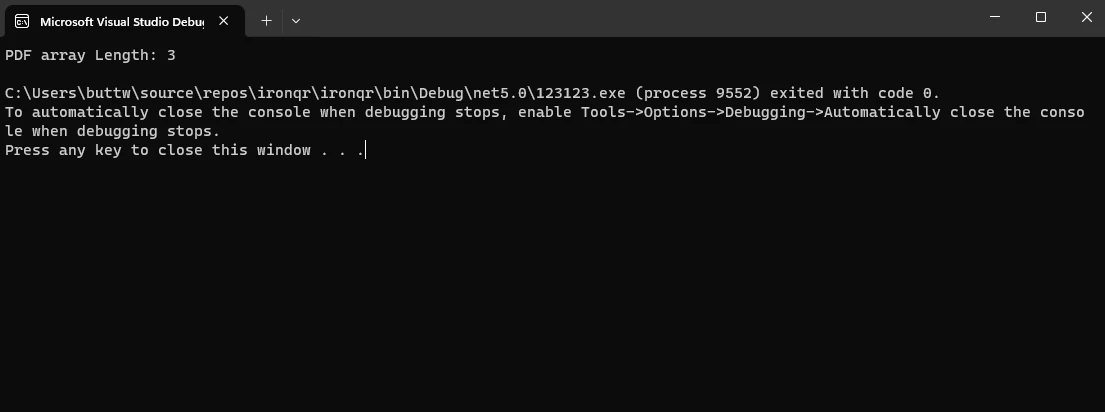
這篇文章提供了與C#陣列長度相關的重要概念的綜合概述,強調了它們在陣列操作中的重要性。 探索了確定陣列長度的方法、長度和維數之間的區別及最佳實踐。
該指南還介紹了IronPDF,一個強大的C#程式庫,用於PDF處理,展示了其在開啟現有的PDF文件、建立PdfDocument物件並儲存在陣列中的實際應用。 這本簡明而資訊豐富的指南是C#開發者掌握陣列操作及利用IronPDF在應用程式中有效處理PDF相關任務的寶貴資源。
為進一步探索IronPDF的可能性並釋放其全部潛力,開發者可以利用IronPDF免費試用授權。 要了解更多有關使用IronPDF生成和編輯PDF的資訊,請參見IronPDF文件檔案,有關閱讀PDF文件的教程,請參訪此IronPDF PDFReader C#教程。

Jacob Mellor是Iron Software的首席技術官,一位在C# PDF技術上開創先河的遠見工程師。作為Iron Software核心程式碼庫的原開發者,他從創立以來就一直在塑造公司的產品架構,與首席執行官Cameron Rimington一起將公司轉變為服務於NASA、特斯拉和全球政府公司的50多名人員的公司。



IronPDF 是 IRONSUITE 的一部分
10 款適用於辦公室文件的 .NET API 產品

當您需要您的PDF看起來像HTML一樣快速。












