


C# Continue(對於開發者的運行原理)

流程控制語句在程式設計中至關重要,因為它們決定了程式內指令的執行順序。 在 C# 中,用於控制迴圈的三個基本語句是 'continue'、'break' 和 'goto'。 這些語句為程式設計師提供了改變執行流程的能力,提高了程式碼的效率和可讀性。 在本文中,我們深入探討 C# 中 continue 和 break 方法的複雜性,探索其語法、應用和最佳實踐。 在文章的後面,我們還將學習有關從 Iron Software 的 IronPDF - 一個強大的 C# PDF 程式庫來讀取和寫入 PDF 文件。
瞭解 'continue;' 語句
continue 語句用於迴圈結構中以跳過剩餘的程式碼塊並進行到下一次迴圈。它基本上是告訴程式控制跳過當前迭代的剩餘程式碼,進行下一次迭代。
語法
continue;continue;continue範例
public class Program
{
    public static void Main()
    {
        Console.WriteLine("Demonstrate Continue Method in C#");
        Console.WriteLine("Print 1 to 10 skipping 5");

        for (int i = 0; i < 10; i++)
        {
            if (i == 5)
            {
                continue; // Skips iteration when i equals 5
            }
            Console.WriteLine(i);
        }
    }
}
public class Program
{
public static void Main()
{
Console.WriteLine("Demonstrate Continue Method in C#");
Console.WriteLine("Print 1 to 10 skipping 5");
for (int i = 0; i < 10; i++)
{
if (i == 5)
{
continue; // Skips iteration when i equals 5
}
Console.WriteLine(i);
}
}
}Public Class Program
Public Shared Sub Main()
Console.WriteLine("Demonstrate Continue Method in C#")
Console.WriteLine("Print 1 to 10 skipping 5")
For i As Integer = 0 To 9
If i = 5 Then
Continue For ' Skips iteration when i equals 5
End If
Console.WriteLine(i)
Next i
End Sub
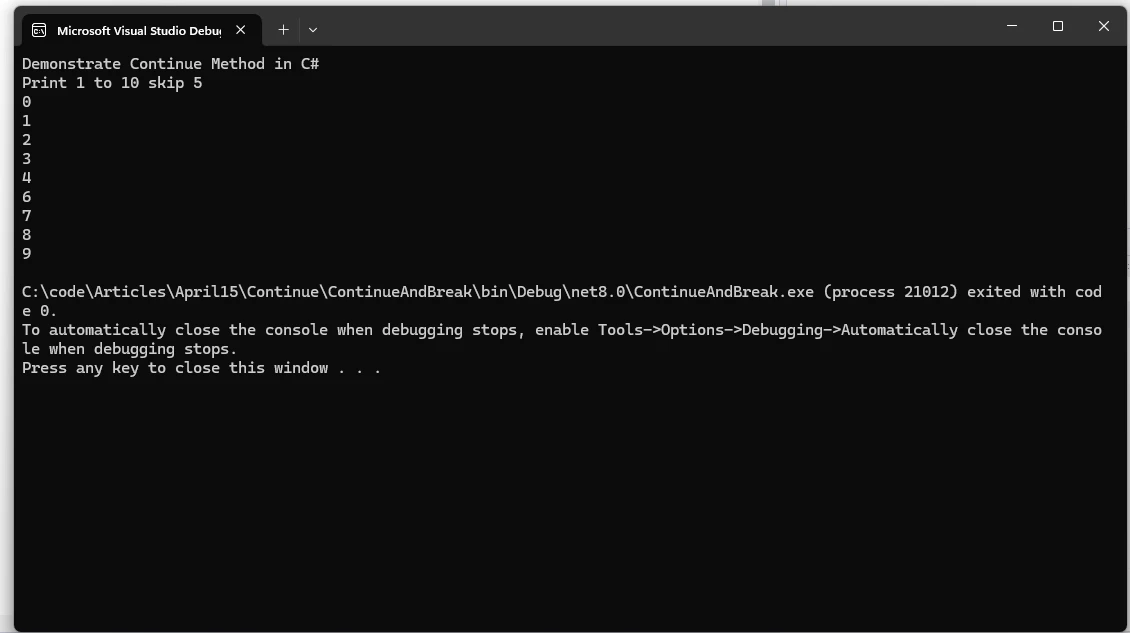
End Class在此範例中,當 i 等於 5 時,執行 continue 語句,跳過該迭代的迴圈內的剩餘程式碼。 結果是,數字 5 將不會被印出,迴圈將進行到下一次迭代。
輸出
探索 'break;' 方法
與 continue 相反,break 語句用於提前退出迴圈。 遇到時,它會終止迴圈的執行,無論迴圈的條件如何。 通常用於在某個條件滿足時提前退出迴圈,例如 while 迴圈。
範例
int[] numbers = { 1, 2, 3, 4, 5, 6, 7, 8, 9, 10 };
foreach (int number in numbers)
{
    if (number == 6)
    {
        break; // Exits loop when number equals 6
    }
    Console.WriteLine(number);
}
int[] numbers = { 1, 2, 3, 4, 5, 6, 7, 8, 9, 10 };
foreach (int number in numbers)
{
if (number == 6)
{
break; // Exits loop when number equals 6
}
Console.WriteLine(number);
}Dim numbers() As Integer = { 1, 2, 3, 4, 5, 6, 7, 8, 9, 10 }
For Each number As Integer In numbers
If number = 6 Then
Exit For ' Exits loop when number equals 6
End If
Console.WriteLine(number)
Next number在此範例中,迴圈遍歷 numbers 陣列。 當遇到數字 6 時,break 語句被執行,導致迴圈提前終止。 結果是,只有 1 至 5 的數字會被印出。
探索 'goto;' 語句
C# 中的 goto 語句提供了一種在相同方法、相同 switch 語句或相同迴圈內轉移控制到指定標籤的方法。儘管 goto 可以是一個強大的工具,用來改變執行流程以跳躍語句,但由於其可能使程式碼變得不易讀和難以維護,在現代編程實踐中往往不被推薦。 然而,有些情況下 goto 可以被有效和安全地使用。
語法
C# 中的 goto 語句的語法是簡單明瞭的:
goto label;goto label;GoTo label標籤是一個識別符,後面跟著一個冒號 (:),指出程式碼中的目標位置。
範例
考慮一個情境,您希望在滿足特定條件時提前退出巢狀迴圈。 您可以使用 goto 語句達到這一目的:
for (int i = 0; i < 5; i++)
{
    for (int j = 0; j < 5; j++)
    {
        if (i * j > 10)
        {
            goto exitLoop;
        }
        Console.WriteLine($"i: {i}, j: {j}");
    }
}
exitLoop:
Console.WriteLine("Exited the nested loop prematurely.");
for (int i = 0; i < 5; i++)
{
for (int j = 0; j < 5; j++)
{
if (i * j > 10)
{
goto exitLoop;
}
Console.WriteLine($"i: {i}, j: {j}");
}
}
exitLoop:
Console.WriteLine("Exited the nested loop prematurely.");For i As Integer = 0 To 4
For j As Integer = 0 To 4
If i * j > 10 Then
GoTo exitLoop
End If
Console.WriteLine($"i: {i}, j: {j}")
Next j
Next i
exitLoop:
Console.WriteLine("Exited the nested loop prematurely.")在此範例中,goto 語句在條件 i * j > 10 滿足時將控制轉移到 exitLoop 標籤,有效地中斷了巢狀迴圈。
介紹 IronPDF - 全面的 PDF 程式庫 來自 Iron Software
IronPDF,由 Iron Software 開發,是一個功能強大的 C# PDF 程式庫,為在 .NET 專案中處理 PDF 提供一個一體化的解決方案。 無論您需要建立、編輯、匯出、保護、載入還是操作 PDF 文件,IronPDF 都能滿足您的需求。 以下是一些主要功能和使用場景:
- HTML 到 PDF 轉換: 無縫地將 HTML 內容轉換為 PDF 格式。 您可以從 HTML、MVC、ASPX 甚至圖像生成 PDF。
- 簽署、編輯和讀取 PDF:IronPDF 擁有超過 50 個功能,使您能夠簽署、編輯和提取 PDF 文件中的內容。 無論您是新增數位簽名還是修改現有的 PDF,IronPDF 都讓一切變得簡單明瞭。
- 跨平台支持:IronPDF 為 C#、F# 和 VB.NET 設計,並且它運行於多個 .NET 版本上,包括 .NET Core、.NET Standard 和 .NET Framework。 它也適用於 Java、Node.js 和 Python。
- 相容性和環境:
- .NET 版本: 支持 C#、VB.NET 和 F#。
- 項目型別: 使用於 web (Blazor 和 WebForms)、桌面 (WPF 和 MAUI) 和控制台應用。
- 應用環境: 相容於 Windows、Linux、Mac、Docker、Azure、AWS 等。
- IDE: 與 Microsoft Visual Studio 和 JetBrains Rider 無縫整合。
- 操作系統和處理器: 可運行於 Windows、Mac 和 Linux (x64, x86, ARM)。
- PDF 標準和編輯:
- 支持各種 PDF 版本 (1.2 - 1.7)、PDF/UA 和 PDF/A。
- 設定 PDF 檔的屬性、安全性和壓縮。
- 編輯元資料、修訂歷史和文件結構。
- 應用頁面範本、頁眉、頁腳和頁面設定。
- 性能優化:
- 完整的多執行緒和非同步支持,用於高效的 PDF 生成。
- 優先考慮準確性、易用性和速度。
既然我們已瞭解 IronPDF 程式庫,讓我們撰寫一個應用程式來使用 IronPDF 和 continue 語句、break 語句及 goto 語句。
使用 Continue 語句生成 PDF 文件
首先,讓我們建立一個 Visual Studio 主控台應用程式。
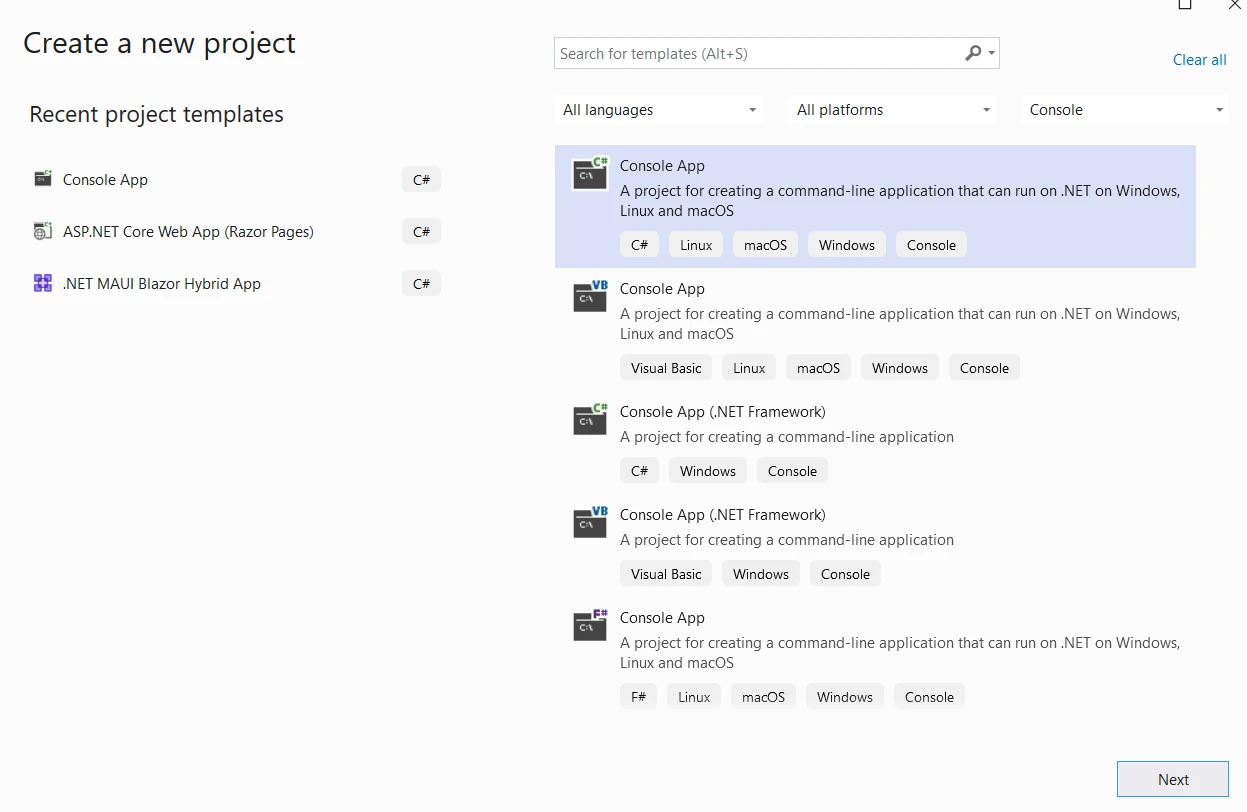
提供專案名稱和位置。
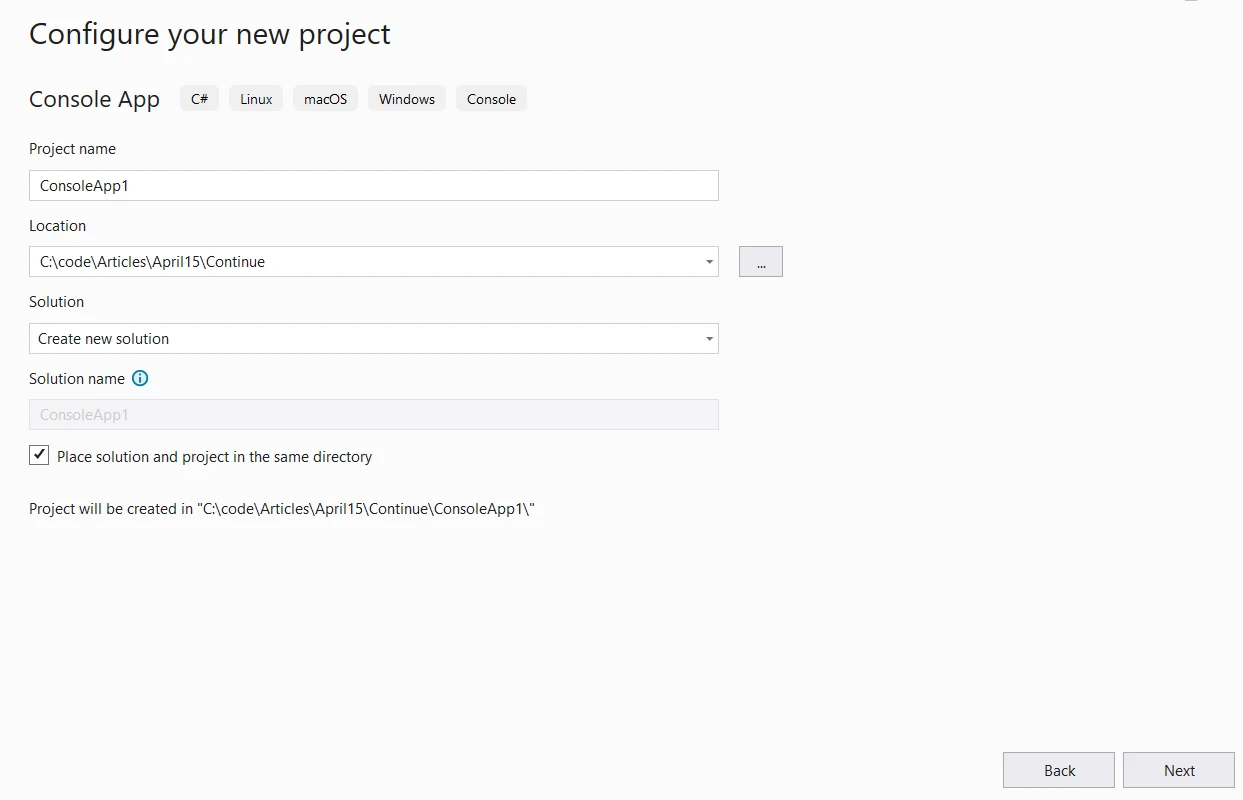
下一步,選擇所需的 .NET 版本並點擊建立。
現在使用以下指令安裝 IronPDF。
dotnet add package IronPdf --version 2024.4.2
現在讓我們使用控制語句生成一個 PDF 文件。
using System;
using System.Threading.Tasks;
using IronPdf;

class Program
{
    public static async Task Main()
    {
        Console.WriteLine("Generate PDF document Using IronPDF");

        // Initialize a ChromePdfRenderer to render HTML content to PDF
        var htmlToPdf = new ChromePdfRenderer();
        var content = "<h1>Generate Numbers from 1 to 10, skip 5</h1>";

        // Use continue statement to build HTML content
        for (int i = 0; i < 10; i++)
        {
            if (i == 5)
            {
                continue; // Skip appending number 5 to the content
            }
            content += $"<p>{i}</p>";
        }

        content += "<h1>Generate Numbers from 1 to 10, stop at 7</h1>";

        // Use break statement to terminate loop at 7
        for (int i = 0; i < 10; i++)
        {
            if (i == 7)
            {
                break; // Stop appending numbers after 6
            }
            content += $"<p>{i}</p>";
        }

        // Render the HTML content as a PDF document
        var pdf = await htmlToPdf.RenderHtmlAsPdfAsync(content);
        pdf.SaveAs("AwesomeIronPDF.pdf");

        Console.WriteLine("PDF generated successfully.");
    }
}
using System;
using System.Threading.Tasks;
using IronPdf;
class Program
{
public static async Task Main()
{
Console.WriteLine("Generate PDF document Using IronPDF");
// Initialize a ChromePdfRenderer to render HTML content to PDF
var htmlToPdf = new ChromePdfRenderer();
var content = "<h1>Generate Numbers from 1 to 10, skip 5</h1>";
// Use continue statement to build HTML content
for (int i = 0; i < 10; i++)
{
if (i == 5)
{
continue; // Skip appending number 5 to the content
}
content += $"<p>{i}</p>";
}
content += "<h1>Generate Numbers from 1 to 10, stop at 7</h1>";
// Use break statement to terminate loop at 7
for (int i = 0; i < 10; i++)
{
if (i == 7)
{
break; // Stop appending numbers after 6
}
content += $"<p>{i}</p>";
}
// Render the HTML content as a PDF document
var pdf = await htmlToPdf.RenderHtmlAsPdfAsync(content);
pdf.SaveAs("AwesomeIronPDF.pdf");
Console.WriteLine("PDF generated successfully.");
}
}Imports System
Imports System.Threading.Tasks
Imports IronPdf
Friend Class Program
Public Shared Async Function Main() As Task
Console.WriteLine("Generate PDF document Using IronPDF")
' Initialize a ChromePdfRenderer to render HTML content to PDF
Dim htmlToPdf = New ChromePdfRenderer()
Dim content = "<h1>Generate Numbers from 1 to 10, skip 5</h1>"
' Use continue statement to build HTML content
For i As Integer = 0 To 9
If i = 5 Then
Continue For ' Skip appending number 5 to the content
End If
content &= $"<p>{i}</p>"
Next i
content &= "<h1>Generate Numbers from 1 to 10, stop at 7</h1>"
' Use break statement to terminate loop at 7
For i As Integer = 0 To 9
If i = 7 Then
Exit For ' Stop appending numbers after 6
End If
content &= $"<p>{i}</p>"
Next i
' Render the HTML content as a PDF document
Dim pdf = Await htmlToPdf.RenderHtmlAsPdfAsync(content)
pdf.SaveAs("AwesomeIronPDF.pdf")
Console.WriteLine("PDF generated successfully.")
End Function
End Class程式碼説明
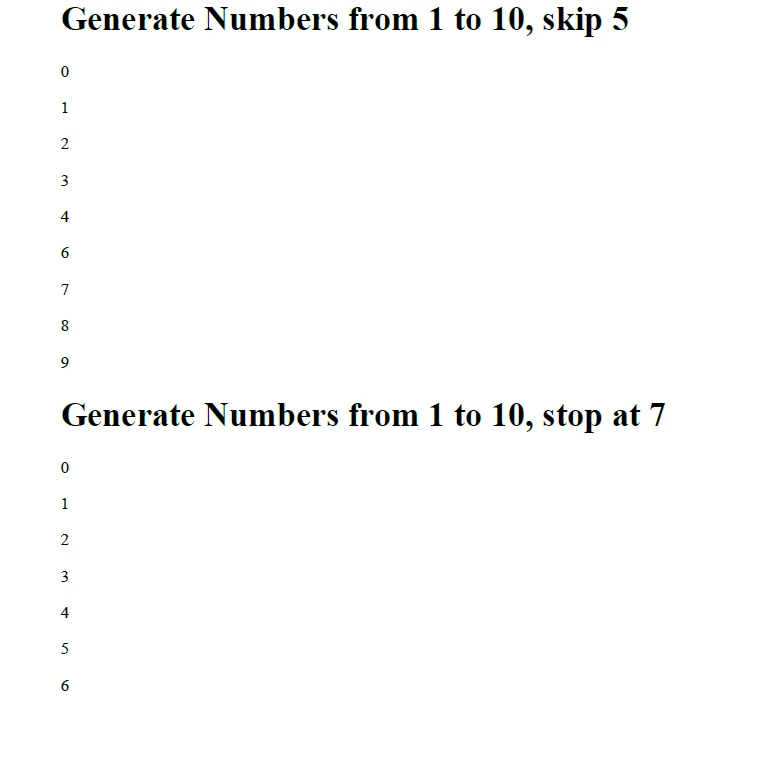
- 初始化和定義內容: 我們首先定義要包含在 PDF 中的 HTML 內容。
- 使用
continue: 在第一個迴圈中,我們使用 continue 語句在生成 1 到 10 的數字時跳過數字 5。 - 使用
break: 在第二個迴圈中,我們使用 break 語句一旦達到數字 7 就停止迴圈。 - 渲染 PDF: 我們使用一個
ChromePdfRenderer物件將 HTML 內容轉換為 PDF 檔並儲存它。
輸出
最佳實踐和考量
- 清晰和可讀性: 在大多數情況下,使用結構化的控制流程語句,如 break、continue 或巢狀迴圈,可以讓您的程式碼更易讀和理解。 goto 語句可能會讓程式碼更難以跟蹤,尤其對於大規模的程式碼基礎或過度使用時。
- 避免意外後果: 誤用 goto 會導致程式碼意大利麵現象,使推理程式行為變得困難。 重要的是謹慎使用 goto 並確保其使用是清楚和有文件記錄的。
- 錯誤處理: 一個常見的 goto 用例是在錯誤處理場景中,goto 可以用來跳到清理或錯誤處理例程。然而,現代 C# 程式碼基地通常使用結構化異常處理 (try-catch-finally) 來進行錯誤處理,這提供了一個更結構化和可讀性強的方法。
- 性能考量: 就性能而言,goto 通常具有最小的影響。 然而,對於 goto 的主要關注點是可維護性和可讀性,而不是性能。
授權(試用可用)
可以獲得一個試用開發者許可証 獲取試用許可証。
請替換如下所示的 appSettings.json 文件中的金鑰。
{
  "IronPdf.License.LicenseKey": "The Key Here"
}
結論
總之,continue 和 break 方法是控制 C# 迴圈執行的必不可少的工具。 通過戰略性地將這些語句納入您的程式碼,您可以提升程式碼的效率、可讀性和可維護性。 儘管 C# 中的 goto 語句提供了一種改變執行流程的機制,但應謹慎使用。 在大多數情況下,結構化的控制流程語句如 break、continue 或巢狀迴圈提供了更清晰和可維護的解決方案。 然而,在某些錯誤處理情況下,goto 可以被有效和安全地使用。 與任何程式設計結構一樣,決定是否使用 goto 時,至關重要的是要權衡利弊,考慮程式碼的可讀性和可維護性。
憑藉 IronPDF - 全面的 PDF 解決方案 程式庫來自 Iron Software,開發人員可以獲得開發現代應用程式的高級技能。
常見問題
C#中的'continue'語句是如何工作的?
C#中的'continue'語句在迴圈中使用,以跳過當前迴圈中的剩餘程式碼,並直接進入下一次迴圈。這對於繞過某些條件或值非常有用,例如在迴圈中跳過數字5。
在迴圈中'break'語句的作用是什麼?
當特定條件滿足時,使用'break'語句提早退出迴圈。這對於在某個點停止迴圈很有幫助,例如到達數字6後停止迴圈。
什麼時候應該在C#中使用'goto'語句?
雖然'goto'語句允許您跳轉到有標籤的程式碼區段,但通常不建議使用,因為可能會有可讀性問題。最好在其他控制結構效率較低或不清楚的特定場景中使用。
如何將IronPDF整合到C#專案中?
IronPDF 可以使用命令dotnet add package IronPdf --version [version_number]整合到C#專案中,允許在各種.NET環境中建立、編輯和轉換PDF。
使用全面的PDF程式庫在C#中的優勢是什麼?
像IronPDF這樣的全面PDF程式庫,通過提供強大的PDF建立、編輯和轉換功能來增強C#應用程式。它支援HTML到PDF的轉換並提供跨平台支援,使其成為開發者的多功能工具。
控制流語句如何改善C#中的PDF生成?
控制流語句如'continue'和'break'可以用於管理PDF生成過程中的迴圈執行,允許開發者根據特定條件選擇性地新增內容或停止內容生成。
IronPDF的相容性特點是什麼?
IronPDF與各種.NET版本相容,包括.NET Core、.NET Standard和.NET Framework。它支援多種語言,如C#、VB.NET和F#,並整合了如Microsoft Visual Studio和JetBrains Rider等IDE。










 免費開始
免費開始 免費開始
免費開始 預訂免費直播演示
















