




已更新 2026年4月23日
在 .NET 中用 Microsoft.Extensions.AI 簡化 LLM 整合
AI 正在改變軟體開發,但將大型語言模型 (LLM) 整合到 .NET 中一直很複雜。利用 IronPdf.AI 將 AI 整合推向更遠,為 .NET 應用程式帶來由 OpenAI 驅動的 PDF 解析、資料擷取和內容總結。
閱讀更多

作為一名使用IronPDF進行動態PDF生成的.NET開發者,您通常需要表示和管理一系列特定型別的資料——如不同型別的文件資料、日誌記錄資訊、使用者角色或導出選項。 這就是C#判別聯合概念派上用場的地方。
雖然C#不像F#或Rust那樣原生支援判別聯合,但您仍然可以有效模擬判別聯合。 在這篇部落格文章中,我們將深入探討如何在C#中定義和使用判別聯合型別,展示如何將其應用於IronPDF以進行實際的PDF處理,並探索當與模式匹配配對時,這種模式能提供的優勢。
判別聯合,也被稱為標記聯合或聯合型別,允許變數持有一個來自有限選項集的值,每個選項都與一個獨特的案例識別符相關聯。
在其他語言如F#中,您可以使用union關鍵字來定義它們。 C#沒有原生提供這個功能,但開發者可以通過巧妙結合記錄型別、類和switch表達式來模擬它們。
例如:
public abstract record PdfAction;
public record GenerateReport(string ReportName) : PdfAction;
public record LogError(string Message) : PdfAction;
public record ExportToExcel(string FilePath) : PdfAction;Public MustOverride ReadOnly Property PdfAction() As record
public record GenerateReport(String ReportName) : PdfAction
public record LogError(String Message) : PdfAction
public record ExportToExcel(String FilePath) : PdfAction上述的每個記錄都代表該聯合的唯一個案。 基礎PdfAction型別是判別體。
想像一下您正在使用IronPDF構建PDF報告生成器,您需要根據使用者的輸入執行不同的操作——可能是生成PDF、記錄錯誤或導出資料。
在C#中使用判別聯合可以讓您清楚地表示這些選項型別,從而達到編譯時安全、減少錯誤和更清晰的邏輯。
這是您可能在IronPDF中使用的方法:
void HandlePdfAction(PdfAction action)
{
    switch (action)
    {
        case GenerateReport r:
            var pdf = new IronPdf.HtmlToPdf().RenderHtmlAsPdf("<h1>" + r.ReportName + "</h1>");
            pdf.SaveAs(r.ReportName + ".pdf");
            break;
        case LogError e:
            Console.WriteLine("Logging Error: " + e.Message);
            break;
        case ExportToExcel x:
            Console.WriteLine("Exporting to Excel at " + x.FilePath);
            break;
        default:
            throw new NotSupportedException("Unknown action");
    }
}Private Sub HandlePdfAction(ByVal action As PdfAction)
Select Case action
'INSTANT VB TODO TASK: The following 'case' pattern variable is not converted by Instant VB:
'ORIGINAL LINE: case GenerateReport r:
Case GenerateReport r
Dim pdf = (New IronPdf.HtmlToPdf()).RenderHtmlAsPdf("<h1>" & r.ReportName & "</h1>")
pdf.SaveAs(r.ReportName & ".pdf")
'INSTANT VB TODO TASK: The following 'case' pattern variable is not converted by Instant VB:
'ORIGINAL LINE: case LogError e:
Case LogError e
Console.WriteLine("Logging Error: " & e.Message)
'INSTANT VB TODO TASK: The following 'case' pattern variable is not converted by Instant VB:
'ORIGINAL LINE: case ExportToExcel x:
Case ExportToExcel x
Console.WriteLine("Exporting to Excel at " & x.FilePath)
Case Else
Throw New NotSupportedException("Unknown action")
End Select
End Sub這種方法保持您的程式碼組織良好且強大,並且使開發者更容易在單一位置理解所有可能的選項。
雖然C#缺乏union關鍵字,但您可以使用以下方法來模擬判別聯合:
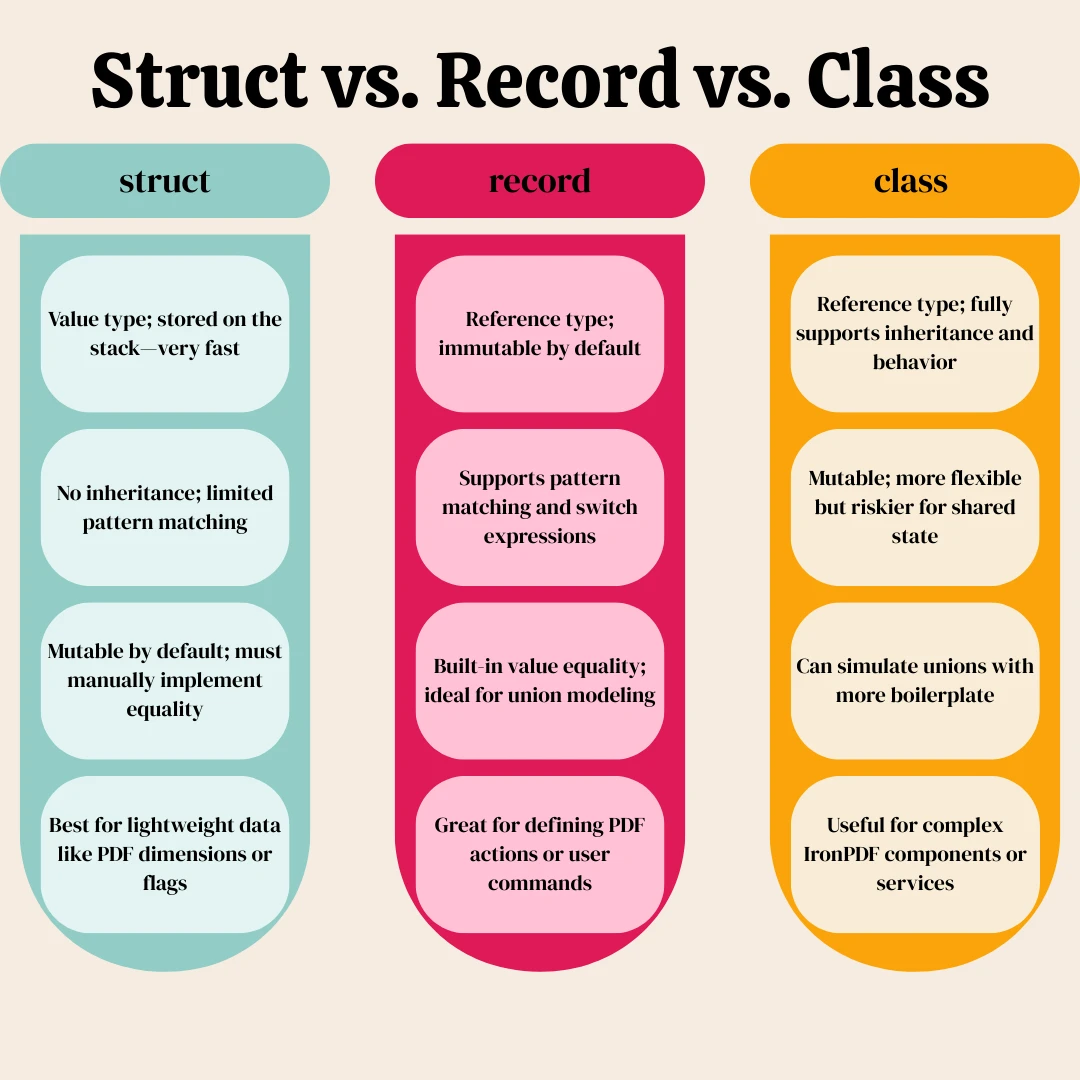
如果性能和記憶體佈局很重要——例如在高吞吐量的PDF日誌記錄中,您可能會考慮謹慎使用結構型判別聯合:
public interface IAction { }
public readonly struct SaveAction : IAction
{
    public string FileName { get; }
    public SaveAction(string fileName) => FileName = fileName;
}Public Interface IAction
End Interface
'INSTANT VB WARNING: VB has no equivalent to the C# readonly struct:
'ORIGINAL LINE: public readonly struct SaveAction : IAction
Public Structure SaveAction
Implements IAction
Public ReadOnly Property FileName() As String
Public Sub New(ByVal fileName As String)
Me.FileName = fileName
End Sub
End Structure注意:使用結構時,尤其是在依賴switch表達式時,您將失去一些模式匹配的好處。
採用這種軟體工程模式有幾個關鍵優勢:
當與IronPDF配合使用時,這使得管理使用者輸入、渲染邏輯或建立具有不同值管線的動態範本更容易。
以下是該模式表現優秀的一些實際情境:
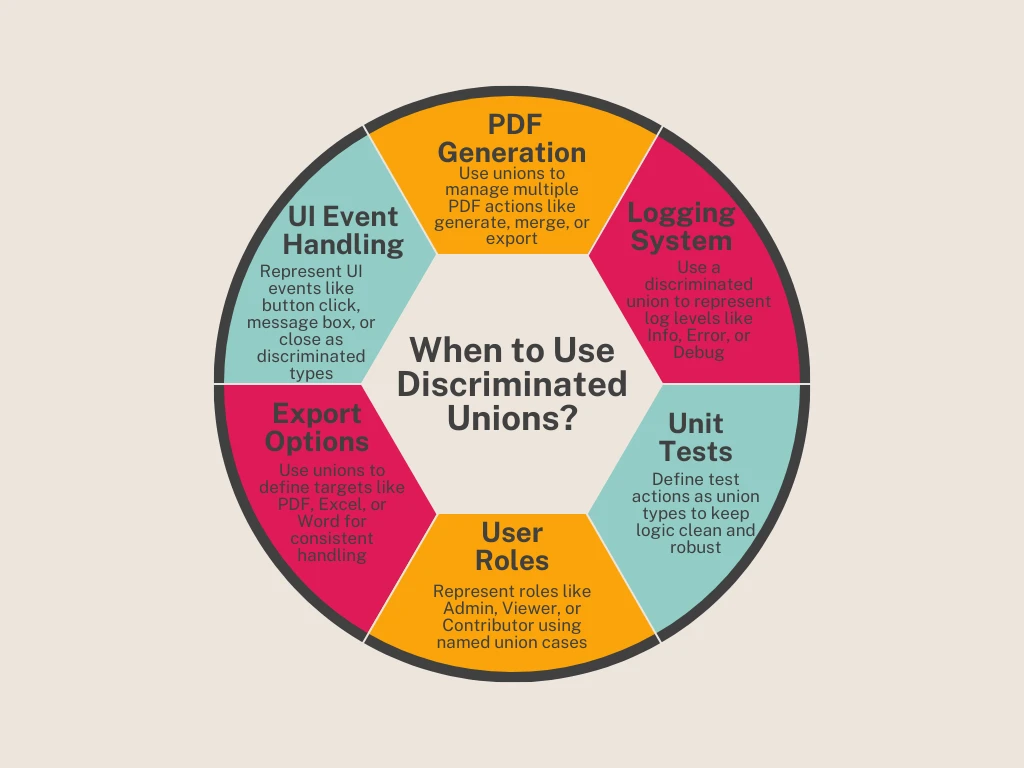
假如您正在捕捉UI事件並希望使用判別聯合將它們路由到IronPDF任務:
public abstract record UserAction;
public record GeneratePdf(string HtmlContent, string FileName) : UserAction;
public record ShowMessage(string Text) : UserAction;
public record ExitApplication() : UserAction;
void OnUserEvent(UserAction action)
{
    switch (action)
    {
        case GeneratePdf pdf:
            var renderer = new IronPdf.HtmlToPdf();
            var document = renderer.RenderHtmlAsPdf(pdf.HtmlContent);
            document.SaveAs(pdf.FileName);
            break;
        case ShowMessage msg:
            MessageBox.Show(msg.Text);
            break;
        case ExitApplication:
            Application.Exit();
            break;
    }
}Public MustOverride ReadOnly Property UserAction() As record
public record GeneratePdf(String HtmlContent, String FileName) : UserAction
public record ShowMessage(String Text) : UserAction
public record ExitApplication() : UserAction
'INSTANT VB TODO TASK: Local functions are not converted by Instant VB:
'void OnUserEvent(UserAction action)
'{
' switch (action)
' {
' case GeneratePdf pdf:
' var renderer = New IronPdf.HtmlToPdf();
' var document = renderer.RenderHtmlAsPdf(pdf.HtmlContent);
' document.SaveAs(pdf.FileName);
' break;
' case ShowMessage msg:
' MessageBox.Show(msg.Text);
' break;
' case ExitApplication:
' Application.@Exit();
' break;
' }
'}這讓您可以用清晰的邏輯來表示事件,並減少對公用物件型別或過於動態的處理的依賴。
已經有提案要在C#中增加對判別聯合的原生支援,尤其是在對更表達型型別系統的需求增長的情況下。 雖然該語言尚未引入真正的union關鍵字,但C#仍在不斷演變——引入類似於記錄型別、模式匹配和switch表達式等特性,這些特性與完整的判別聯合功能越來越接近。
對現代、支援功能型語言特性的.NET開發者來說,這一領域值得密切關注。
即使沒有原生支援,在C#中使用判別聯合也可以顯著改善您在IronPDF應用中如何結構和表示邏輯。 通過利用記錄型別、switch表達式和基礎型別,您將使您的程式碼庫更易讀、更易維護、抗錯誤——同時也開啟了一個以更聲明式和表達性方式處理PDF相關任務的門路。
如果您是一位構建現代、靈活.NET應用的軟體工程師,這種模式是您工具包中必備的一員。
準備好將您的C# PDF生成提升到下一個層次了嗎? 下載IronPDF並開始免費試用。 無論您是從HTML生成文件、記錄導出,還是使用判別聯合自動化報告——IronPDF為您的應用程式提供了應有的性能和效能。

Jacob Mellor是Iron Software的首席技術官,一位在C# PDF技術上開創先河的遠見工程師。作為Iron Software核心程式碼庫的原開發者,他從創立以來就一直在塑造公司的產品架構,與首席執行官Cameron Rimington一起將公司轉變為服務於NASA、特斯拉和全球政府公司的50多名人員的公司。



IronPDF 是 IRONSUITE 的一部分
10 款適用於辦公室文件的 .NET API 產品

當您需要您的PDF看起來像HTML一樣快速。


