


C# Discriminated Unions (How it Works for Developers)

As a .NET developer working with dynamic PDF generation using IronPDF, you often need to represent and manage a range of specific types - think of different kinds of document data, logging messages, user roles, or export options. This is where the concept of a C# discriminated union comes into play.
While C# doesn't have native support for discriminated unions in the way F# or Rust does, you can still simulate discriminated unions effectively. In this blog post, we'll dive into how to define and use a discriminated union type in C#, demonstrate how to apply it with IronPDF for real-world PDF processing, and explore the benefits this pattern provides - especially when paired with pattern matching.
What Are Discriminated Unions in C#?
Discriminated unions, also known as tagged unions or union types, allow a variable to hold one value from a limited set of possible options, where each option is associated with a unique case identifier.
In other languages like F#, you might define them using the union keyword. C# doesn't provide this feature natively, but developers can use clever combinations of records, classes, and switch expressions to mimic them.
For example:
public abstract record PdfAction;
public record GenerateReport(string ReportName) : PdfAction;
public record LogError(string Message) : PdfAction;
public record ExportToExcel(string FilePath) : PdfAction;
public abstract record PdfAction;
public record GenerateReport(string ReportName) : PdfAction;
public record LogError(string Message) : PdfAction;
public record ExportToExcel(string FilePath) : PdfAction;Public MustOverride ReadOnly Property PdfAction() As record
public record GenerateReport(String ReportName) : PdfAction
public record LogError(String Message) : PdfAction
public record ExportToExcel(String FilePath) : PdfActionEach record above represents a single case of the union. The base PdfAction type is the discriminant.
Why Discriminated Unions Matter in IronPDF Workflows
Imagine you're building a PDF report generator using IronPDF, and you need to perform different actions based on a user's input - maybe generating a PDF, logging an error, or exporting data.
Using discriminated unions in C# lets you represent these option types cleanly, leading to compile-time safety, fewer bugs, and clearer logic.
Here's how you might use it with IronPDF:
void HandlePdfAction(PdfAction action)
{
    switch (action)
    {
        case GenerateReport r:
            var pdf = new IronPdf.HtmlToPdf().RenderHtmlAsPdf("<h1>" + r.ReportName + "</h1>");
            pdf.SaveAs(r.ReportName + ".pdf");
            break;
        case LogError e:
            Console.WriteLine("Logging Error: " + e.Message);
            break;
        case ExportToExcel x:
            Console.WriteLine("Exporting to Excel at " + x.FilePath);
            break;
        default:
            throw new NotSupportedException("Unknown action");
    }
}
void HandlePdfAction(PdfAction action)
{
switch (action)
{
case GenerateReport r:
var pdf = new IronPdf.HtmlToPdf().RenderHtmlAsPdf("<h1>" + r.ReportName + "</h1>");
pdf.SaveAs(r.ReportName + ".pdf");
break;
case LogError e:
Console.WriteLine("Logging Error: " + e.Message);
break;
case ExportToExcel x:
Console.WriteLine("Exporting to Excel at " + x.FilePath);
break;
default:
throw new NotSupportedException("Unknown action");
}
}Private Sub HandlePdfAction(ByVal action As PdfAction)
Select Case action
'INSTANT VB TODO TASK: The following 'case' pattern variable is not converted by Instant VB:
'ORIGINAL LINE: case GenerateReport r:
Case GenerateReport r
Dim pdf = (New IronPdf.HtmlToPdf()).RenderHtmlAsPdf("<h1>" & r.ReportName & "</h1>")
pdf.SaveAs(r.ReportName & ".pdf")
'INSTANT VB TODO TASK: The following 'case' pattern variable is not converted by Instant VB:
'ORIGINAL LINE: case LogError e:
Case LogError e
Console.WriteLine("Logging Error: " & e.Message)
'INSTANT VB TODO TASK: The following 'case' pattern variable is not converted by Instant VB:
'ORIGINAL LINE: case ExportToExcel x:
Case ExportToExcel x
Console.WriteLine("Exporting to Excel at " & x.FilePath)
Case Else
Throw New NotSupportedException("Unknown action")
End Select
End SubThis approach keeps your code organized and robust, and makes it easier for developers to understand all possible options in a single location.
Simulating Discriminated Unions in C# - Struct vs. Record vs. Class
Although C# lacks the union keyword, you can simulate discriminated unions using:
- Records: Ideal for immutable data, and supports pattern matching cleanly.
- Classes: More flexible with inheritance and reference semantics.
- Structs: Useful for value types, but less flexible when dealing with reference types or inheritance.
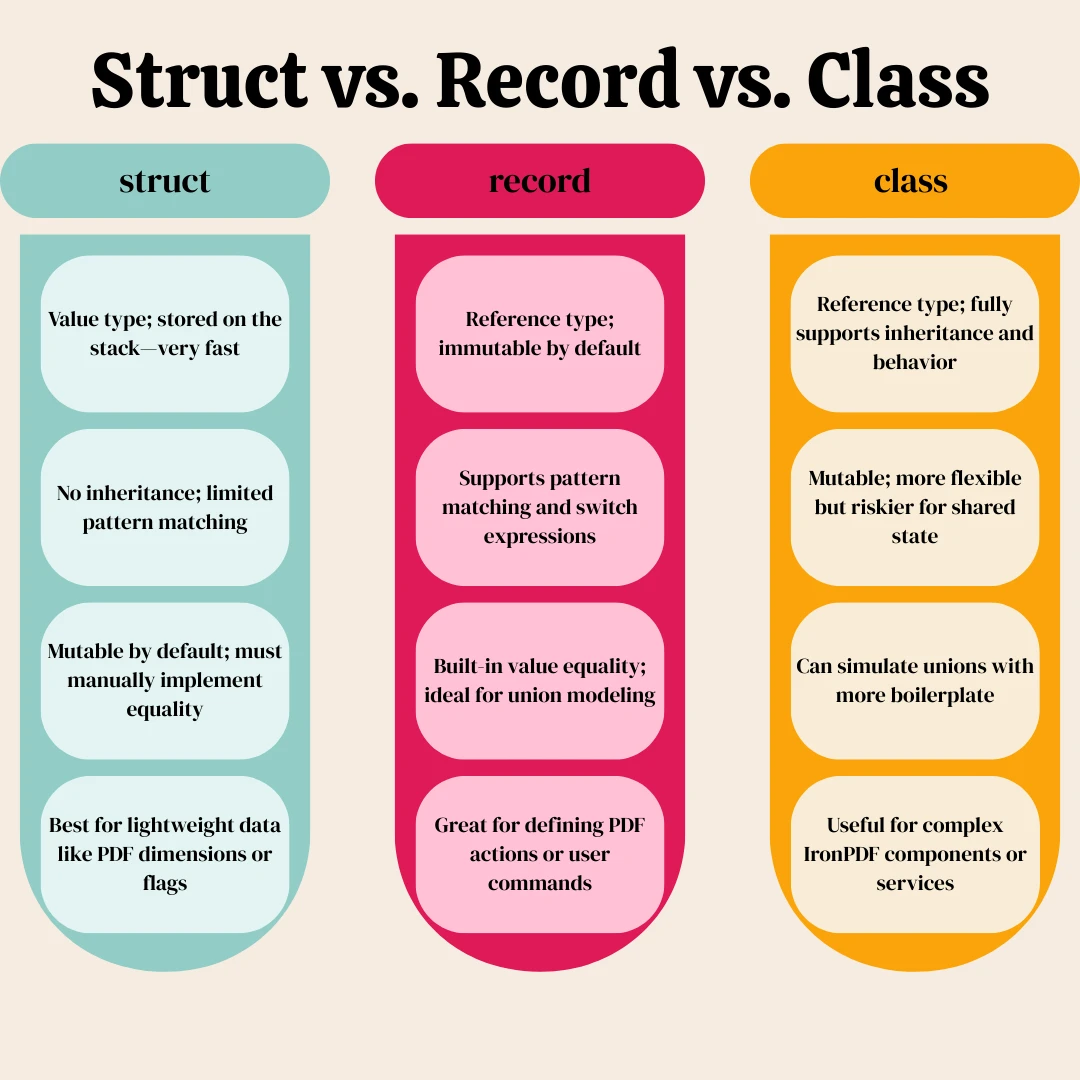
If performance and memory layout are important - for example, in high-throughput PDF logging - you might consider using struct discriminated unions carefully:
public interface IAction { }
public readonly struct SaveAction : IAction
{
    public string FileName { get; }
    public SaveAction(string fileName) => FileName = fileName;
}
public interface IAction { }
public readonly struct SaveAction : IAction
{
public string FileName { get; }
public SaveAction(string fileName) => FileName = fileName;
}Public Interface IAction
End Interface
'INSTANT VB WARNING: VB has no equivalent to the C# readonly struct:
'ORIGINAL LINE: public readonly struct SaveAction : IAction
Public Structure SaveAction
Implements IAction
Public ReadOnly Property FileName() As String
Public Sub New(ByVal fileName As String)
Me.FileName = fileName
End Sub
End StructureNote: You'll lose some pattern matching benefits with structs, especially when relying on switch expressions.
Benefits of Using Discriminated Unions in C#
There are several key advantages to adopting this software engineering pattern:
- Compile-time safety: You'll catch missing cases in a switch expression before runtime.
- Clearer logic: It's easier to write, comment, and reason about actions with named cases.
- Separation of concerns: You decouple behaviors based on data rather than type hierarchies.
- Refactoring ease: Adding or removing cases becomes more straightforward.
When paired with IronPDF, this makes it easier to manage user input, rendering logic, or create dynamic templates with different value pipelines.
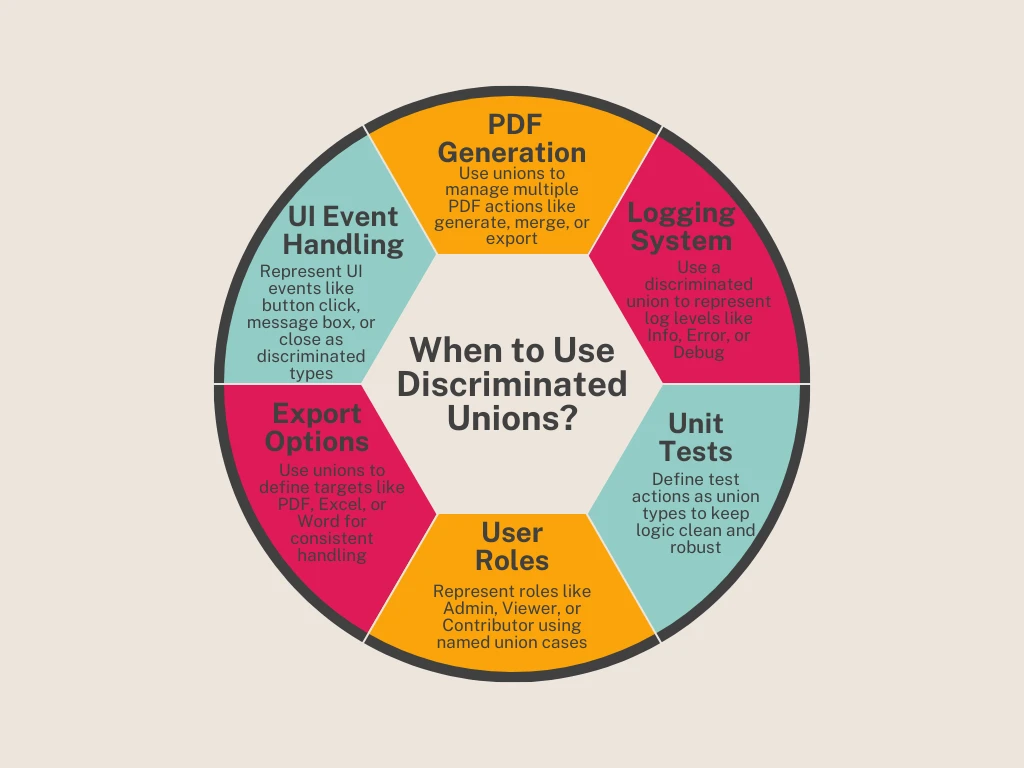
When to Use Discriminated Unions with IronPDF
Here are some practical scenarios where this pattern excels:
- PDF Generation Workflows: Different steps in a document lifecycle (generate, save, email).
- Permission Models: Represent different user access levels.
- Logging Systems: Use discriminated union types for log levels (info, error, debug).
- Unit Tests: Define test actions as union types for maintainable logic trees.
- Export Options: Represent output targets like PDF, Excel, Word as union instances.
Example - Handling PDF Actions from UI Events
Let's say you're capturing UI events and want to route them to IronPDF tasks using discriminated unions:
public abstract record UserAction;
public record GeneratePdf(string HtmlContent, string FileName) : UserAction;
public record ShowMessage(string Text) : UserAction;
public record ExitApplication() : UserAction;
void OnUserEvent(UserAction action)
{
    switch (action)
    {
        case GeneratePdf pdf:
            var renderer = new IronPdf.HtmlToPdf();
            var document = renderer.RenderHtmlAsPdf(pdf.HtmlContent);
            document.SaveAs(pdf.FileName);
            break;
        case ShowMessage msg:
            MessageBox.Show(msg.Text);
            break;
        case ExitApplication:
            Application.Exit();
            break;
    }
}
public abstract record UserAction;
public record GeneratePdf(string HtmlContent, string FileName) : UserAction;
public record ShowMessage(string Text) : UserAction;
public record ExitApplication() : UserAction;
void OnUserEvent(UserAction action)
{
switch (action)
{
case GeneratePdf pdf:
var renderer = new IronPdf.HtmlToPdf();
var document = renderer.RenderHtmlAsPdf(pdf.HtmlContent);
document.SaveAs(pdf.FileName);
break;
case ShowMessage msg:
MessageBox.Show(msg.Text);
break;
case ExitApplication:
Application.Exit();
break;
}
}Public MustOverride ReadOnly Property UserAction() As record
public record GeneratePdf(String HtmlContent, String FileName) : UserAction
public record ShowMessage(String Text) : UserAction
public record ExitApplication() : UserAction
'INSTANT VB TODO TASK: Local functions are not converted by Instant VB:
'void OnUserEvent(UserAction action)
'{
' switch (action)
' {
' case GeneratePdf pdf:
' var renderer = New IronPdf.HtmlToPdf();
' var document = renderer.RenderHtmlAsPdf(pdf.HtmlContent);
' document.SaveAs(pdf.FileName);
' break;
' case ShowMessage msg:
' MessageBox.Show(msg.Text);
' break;
' case ExitApplication:
' Application.@Exit();
' break;
' }
'}This lets you represent events with clear logic and reduces reliance on public object types or overly dynamic handling.
Future Outlook - Will C# Ever Support Native Discriminated Unions?
There's already been a proposal to add native support for discriminated unions in C#, especially with growing demand for more expressive type systems. While the language hasn't yet introduced a true union keyword, C# continues to evolve - bringing features like records, pattern matching, and switch expressions closer to full discriminated union functionality.
.NET developers interested in modern, functional-friendly language constructs will want to watch this space closely.
Final Thoughts
Using discriminated unions in C#, even without native support, can significantly improve how you structure and represent logic in IronPDF applications. By leveraging records, switch expressions, and base classes, you'll make your codebase more readable, maintainable, and resilient to errors - while also unlocking a more declarative and expressive way to handle PDF-related tasks.
If you're a software engineer building modern, flexible .NET applications, this pattern is a must-have in your toolkit.
Try IronPDF Free Today
Ready to take your C# PDF generation to the next level? Download IronPDF and get started with a free trial. Whether you're generating documents from HTML, logging exports, or automating reports using discriminated unions - IronPDF gives you the power and performance your app deserves.
Frequently Asked Questions
How can I implement discriminated unions in C#?
In C#, you can simulate discriminated unions by defining a base class and several derived classes to represent each possible case. This approach, combined with pattern matching, allows you to effectively manage multiple related data types.
What is the role of pattern matching in discriminated unions?
Pattern matching in C# is crucial when working with discriminated unions because it lets you handle each case of the union in a concise manner, improving code readability and reducing the need for multiple conditional statements.
How do discriminated unions compare to enums in C#?
While both discriminated unions and enums allow you to define a fixed set of options, discriminated unions offer more flexibility as they can hold different types of data, whereas enums are limited to named constants of a single data type.
Can I enhance data manipulation with Iron Software while using discriminated unions?
Yes, Iron Software products like IronPDF can complement discriminated unions by providing advanced data handling and processing capabilities, making it easier to manipulate and present different types of data in .NET applications.
What are the advantages of using discriminated unions in C#?
Discriminated unions provide enhanced type safety, clarity, and maintainability in your C# code by allowing you to define a type with specific possible forms, facilitating robust type-checking and reducing errors.
How does using discriminated unions affect code readability?
By allowing developers to clearly define and handle multiple related data types, discriminated unions improve code readability. Pattern matching further simplifies the code by reducing the need for complex conditional logic.
What is the significance of using classes to simulate discriminated unions in C#?
Simulating discriminated unions with classes in C# involves creating a base class with derived classes for each case, enabling a flexible and expressive way to model different related types, akin to functional programming languages.
How can discriminated unions enhance error handling in C#?
Discriminated unions can improve error handling by providing more precise type-checking and enabling pattern matching, which helps catch potential errors at compile time, enhancing the reliability of your application.










 Get started for FREE
 Get started for FREE
 Book Free Live Demo
















