


C# 主建構函數(開發者的工作原理)

在 C# 程式設計的物件導向世界中,主構造函式的引入為該語言帶來了新的優雅和簡單層次。 主構造函式以及攔截器和集合表達式等功能在 C# 12 中出現,作為強大的功能,為使用參數聲明構造函式提供了更簡潔的語法。 您可以在Microsoft C# 指南中深入探索主構造函式。
在本文中,我們將學習如何有效使用 C# 12 主構造函式,同時探索其功能、用例以及它們如何改變開發人員處理類初始化的方式。
Understanding the Basics: Constructors in C
構造函式在物件導向程式設計中扮演關鍵角色,作為初始化物件的藍圖。 傳統上,C# 開發人員使用預設構造函式或參數化構造函式來設置其類的初始狀態。 然而,主構造函式的引入為 C# 開發中的這個關鍵方面提供了一種更精簡的方法。
主構造函式的本質
C# 中的主構造函式是一種簡明方法,可以在類宣告中直接聲明和初始化屬性。 它簡化了定義和分配屬性值的過程,提供了更具聲明性和可讀性的語法。
主構造函式的優點
- 簡潔性:主構造函式提供了簡明的語法,減少了樣板程式碼並提高了可讀性。
- 範疇:與傳統構造函式不同,主構造函式中的參數在整個類或結構內具有範疇,在使用中提供了靈活性。
- 預設值:預設參數值簡化了物件建立,方便了開發人員。
聲明主構造函式
主構造函式的語法涉及在類頭中直接聲明屬性。 讓我們考慮一個基本的 Person 類別範例:
public class Person(string name, int age)
{
    public string Name { get; } = name;
    public int Age { get; } = age;
    public override string ToString() => $"Name: {Name}, Age: {Age}";
}
public class Person(string name, int age)
{
public string Name { get; } = name;
public int Age { get; } = age;
public override string ToString() => $"Name: {Name}, Age: {Age}";
}Public Class Person(String name, Integer age)
Public ReadOnly Property Name() As String = name
Public ReadOnly Property Age() As Integer = age
Public Overrides Function ToString() As String
Return $"Name: {Name}, Age: {Age}"
End Function
End Class在上面的程式碼片段中,Person 類具有一個主構造函式,用於初始化實例成員 Name 和實例成員 Age 屬性。 構造函式參數與類或結構名稱一起聲明,並在定義公共屬性時,將參數值分配給它們。
範例 1:二維空間中的不可變點
public readonly struct Point(double x, double y)
{
    public double X { get; } = x;
    public double Y { get; } = y;
    public double Magnitude => Math.Sqrt(X * X + Y * Y);
}
public readonly struct Point(double x, double y)
{
public double X { get; } = x;
public double Y { get; } = y;
public double Magnitude => Math.Sqrt(X * X + Y * Y);
}'INSTANT VB WARNING: VB has no equivalent to the C# readonly struct:
'ORIGINAL LINE: public readonly struct Point(double x, double y)
Public Structure Point(Double x, Double y)
Public ReadOnly Property X() As Double = x
Public ReadOnly Property Y() As Double = y
Public ReadOnly Property Magnitude() As Double
Get
Return Math.Sqrt(X * X + Y * Y)
End Get
End Property
End Structure在此範例中,Point 結構的主構造函式初始化 X 和 Y 屬性,展示了語法如何簡潔而富有表達力。
範例 2:具有預設設置的可配置記錄器
public class Logger(string filePath = "log.txt", LogLevel level = LogLevel.Info)
{
    private readonly string _filePath = filePath;
    private readonly LogLevel _level = level;

    public void Log(string message)
    {
        // Actual logging implementation using _filePath and _level
    }
}
public class Logger(string filePath = "log.txt", LogLevel level = LogLevel.Info)
{
private readonly string _filePath = filePath;
private readonly LogLevel _level = level;
public void Log(string message)
{
// Actual logging implementation using _filePath and _level
}
}'INSTANT VB TODO TASK: The following line contains an assignment within expression that was not extracted by Instant VB:
'ORIGINAL LINE: public class Logger(string filePath = "log.txt", LogLevel level = LogLevel.Info)
Public Class Logger(String filePath = "log.txt", LogLevel level = LogLevel.Info)
Private ReadOnly _filePath As String = filePath
Private ReadOnly _level As LogLevel = level
Public Sub Log(ByVal message As String)
' Actual logging implementation using _filePath and _level
End Sub
End Class在此處,Logger 類的主構造函式提供 filePath 和 level 的預設值,使其既靈活且易於使用,同時保持可配置性。
範例 3:依賴注入
public interface IService
{
    Distance GetDistance();
}

public class ExampleController(IService service) : ControllerBase
{
    public ActionResult<Distance> Get() => service.GetDistance();
}
public interface IService
{
Distance GetDistance();
}
public class ExampleController(IService service) : ControllerBase
{
public ActionResult<Distance> Get() => service.GetDistance();
}Public Interface IService
Function GetDistance() As Distance
End Interface
Public Class ExampleController(IService service)
Inherits ControllerBase
Public Function [Get]() As ActionResult(Of Distance)
Return service.GetDistance()
End Function
End Class主構造函式適用於依賴注入場景。 在此範例中,控制器類表示其依賴性,加強了可維護性並促進單元測試。
範例 4:構建幾何形狀層次
public abstract class Shape(double width, double height)
{
    public double Width { get; } = width;
    public double Height { get; } = height;
    public abstract double CalculateArea();
}

public class Rectangle(double width, double height) : Shape(width, height)
{
    public override double CalculateArea() => Width * Height;
}

public class Circle : Shape
{
    public Circle(double radius) : base(radius * 2, radius * 2) { }
    public override double CalculateArea() => Math.PI * Math.Pow(Width / 2, 2);
}
public abstract class Shape(double width, double height)
{
public double Width { get; } = width;
public double Height { get; } = height;
public abstract double CalculateArea();
}
public class Rectangle(double width, double height) : Shape(width, height)
{
public override double CalculateArea() => Width * Height;
}
public class Circle : Shape
{
public Circle(double radius) : base(radius * 2, radius * 2) { }
public override double CalculateArea() => Math.PI * Math.Pow(Width / 2, 2);
}Public MustInherit Class Shape(Double width, Double height)
Public ReadOnly Property Width() As Double = width
Public ReadOnly Property Height() As Double = height
Public MustOverride Function CalculateArea() As Double
End Class
Public Class Rectangle(Double width, Double height)
Inherits Shape(width, height)
Public Overrides Function CalculateArea() As Double
Return Width * Height
End Function
End Class
Public Class Circle
Inherits Shape
Public Sub New(ByVal radius As Double)
MyBase.New(radius * 2, radius * 2)
End Sub
Public Overrides Function CalculateArea() As Double
Return Math.PI * Math.Pow(Width / 2, 2)
End Function
End Class在此範例中,Shape 類的主構造函式為幾何形狀層次結構奠定了基礎。 Rectangle 和 Circle 等子類利用主構造函式進行一致的初始化。 Rectangle 類本身聲明了主構造函式,並將捕獲的主構造函式參數傳遞給 Shape 類的主參數。 Circle 類透過在整個類中定義其構造函式,然後使用 base 關鍵字將其參數作為預設值傳遞給 Shape 構造函式,展示了靈活性。
介紹IronPDF
IronPDF 是一個多功能的C#程式庫,能讓開發人員輕鬆建立、操作和轉換PDF文件。 無論您正在生成發票、報告或其他任何文件,IronPDF 都允許您直接在 C# 應用程式中將 HTML 內容無縫轉換成完美和專業的 PDF。
IronPDF 是一個方便的開發人員工具,可以讓他們把網頁、URL 以及 HTML 轉換為 PDF。 最重要的是,這些 PDF 看起來就像原始網頁一樣,所有的格式和樣式都被保留。 它適合從網路內容建立 PDF,例如報告和發票。
using IronPdf;

class Program
{
    static void Main(string[] args)
    {
        var renderer = new ChromePdfRenderer();

        // 1. Convert HTML String to PDF
        var htmlContent = "<h1>Hello, IronPDF!</h1><p>This is a PDF from an HTML string.</p>";
        var pdfFromHtmlString = renderer.RenderHtmlAsPdf(htmlContent);
        pdfFromHtmlString.SaveAs("HTMLStringToPDF.pdf");

        // 2. Convert HTML File to PDF
        var htmlFilePath = "path_to_your_html_file.html"; // Specify the path to your HTML file
        var pdfFromHtmlFile = renderer.RenderHtmlFileAsPdf(htmlFilePath);
        pdfFromHtmlFile.SaveAs("HTMLFileToPDF.pdf");

        // 3. Convert URL to PDF
        var url = "http://ironpdf.com"; // Specify the URL
        var pdfFromUrl = renderer.RenderUrlAsPdf(url);
        pdfFromUrl.SaveAs("URLToPDF.pdf");
    }
}
using IronPdf;
class Program
{
static void Main(string[] args)
{
var renderer = new ChromePdfRenderer();
// 1. Convert HTML String to PDF
var htmlContent = "<h1>Hello, IronPDF!</h1><p>This is a PDF from an HTML string.</p>";
var pdfFromHtmlString = renderer.RenderHtmlAsPdf(htmlContent);
pdfFromHtmlString.SaveAs("HTMLStringToPDF.pdf");
// 2. Convert HTML File to PDF
var htmlFilePath = "path_to_your_html_file.html"; // Specify the path to your HTML file
var pdfFromHtmlFile = renderer.RenderHtmlFileAsPdf(htmlFilePath);
pdfFromHtmlFile.SaveAs("HTMLFileToPDF.pdf");
// 3. Convert URL to PDF
var url = "http://ironpdf.com"; // Specify the URL
var pdfFromUrl = renderer.RenderUrlAsPdf(url);
pdfFromUrl.SaveAs("URLToPDF.pdf");
}
}Imports IronPdf
Friend Class Program
Shared Sub Main(ByVal args() As String)
Dim renderer = New ChromePdfRenderer()
' 1. Convert HTML String to PDF
Dim htmlContent = "<h1>Hello, IronPDF!</h1><p>This is a PDF from an HTML string.</p>"
Dim pdfFromHtmlString = renderer.RenderHtmlAsPdf(htmlContent)
pdfFromHtmlString.SaveAs("HTMLStringToPDF.pdf")
' 2. Convert HTML File to PDF
Dim htmlFilePath = "path_to_your_html_file.html" ' Specify the path to your HTML file
Dim pdfFromHtmlFile = renderer.RenderHtmlFileAsPdf(htmlFilePath)
pdfFromHtmlFile.SaveAs("HTMLFileToPDF.pdf")
' 3. Convert URL to PDF
Dim url = "http://ironpdf.com" ' Specify the URL
Dim pdfFromUrl = renderer.RenderUrlAsPdf(url)
pdfFromUrl.SaveAs("URLToPDF.pdf")
End Sub
End Class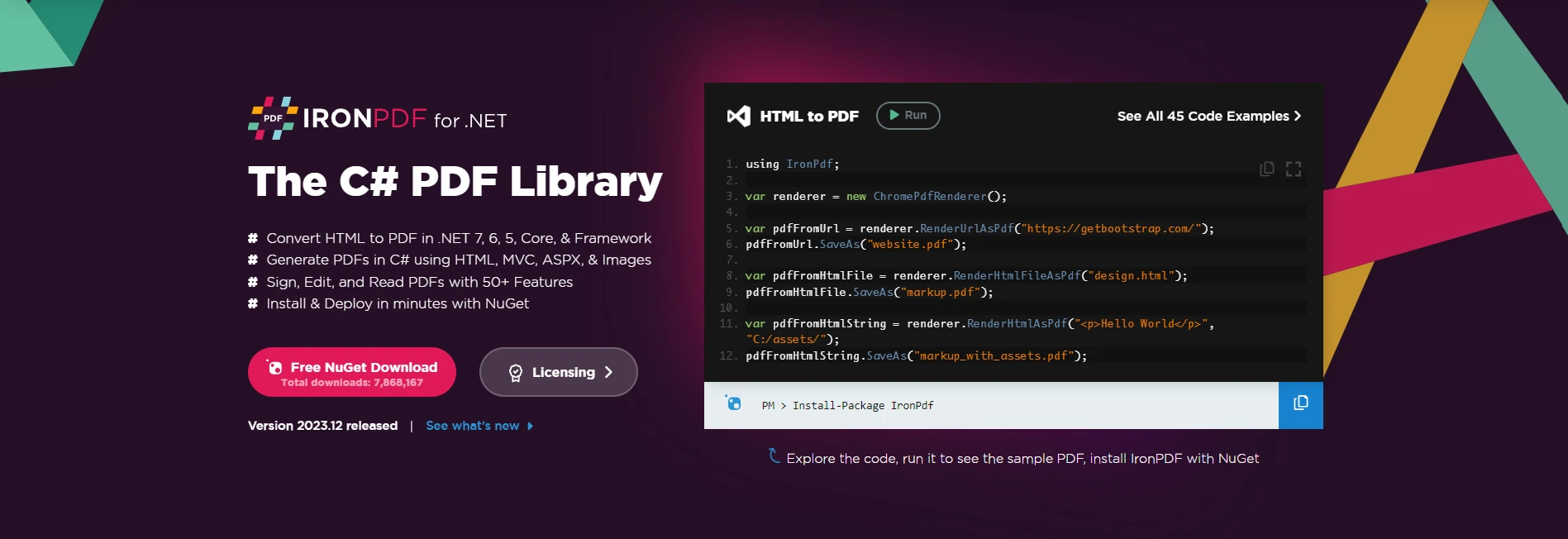
安裝IronPDF:快速入門
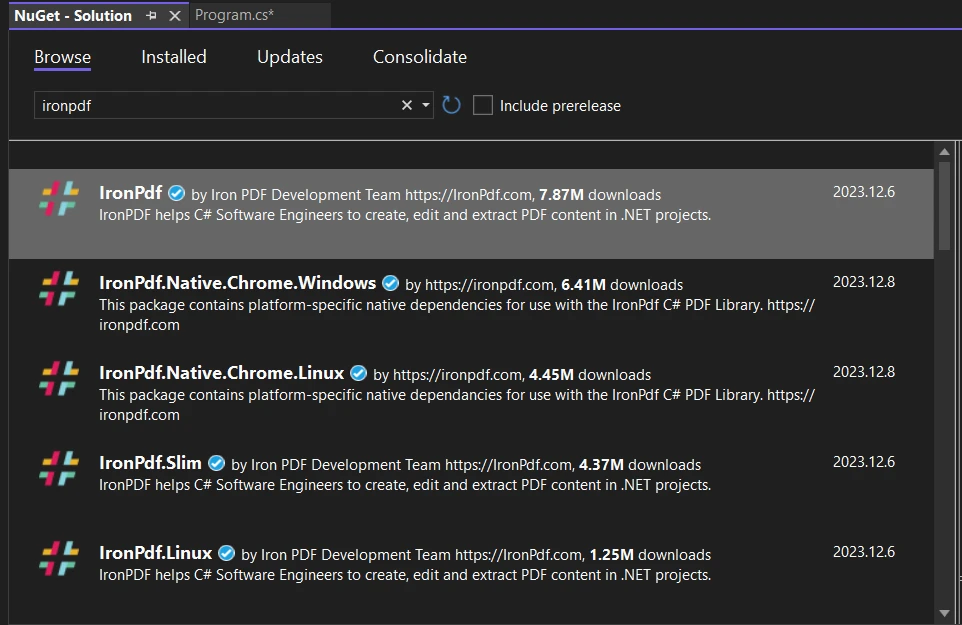
要將 IronPDF 整合到您的 C# 專案中,請首先安裝 IronPDF NuGet 包。 在您的套餐管理控制台中執行以下命令:
Install-Package IronPdf
或者,在 NuGet 套件管理器中找到 "IronPDF" 並從那裡繼續進行安裝。
使用 IronPDF 生成 PDF
using IronPDF 建立 PDF 是一個簡化的過程。 請考慮以下範例:
var htmlContent = "<html><body><h1>Hello, IronPDF!</h1></body></html>";
// Create a new PDF document
var pdfDocument = new IronPdf.ChromePdfRenderer();
pdfDocument.RenderHtmlAsPdf(htmlContent).SaveAs("C:/GeneratedDocument.pdf");
var htmlContent = "<html><body><h1>Hello, IronPDF!</h1></body></html>";
// Create a new PDF document
var pdfDocument = new IronPdf.ChromePdfRenderer();
pdfDocument.RenderHtmlAsPdf(htmlContent).SaveAs("C:/GeneratedDocument.pdf");Dim htmlContent = "<html><body><h1>Hello, IronPDF!</h1></body></html>"
' Create a new PDF document
Dim pdfDocument = New IronPdf.ChromePdfRenderer()
pdfDocument.RenderHtmlAsPdf(htmlContent).SaveAs("C:/GeneratedDocument.pdf")在此範例中,IronPDF 用來將 HTML 內容渲染到 PDF 文件中,並隨後保存到指定位置。 有關在 C# 中建立和操作 PDF 的更多細節,請存取此完整教學連結,要探索更多,請存取此文件頁面。
C# 主構造函式:類初始化革命
C# 主構造函式提供了一種聲明性和精簡的方法,直接在類聲明中初始化類屬性。 讓我們看看這個優雅的功能能否與 IronPDF 無縫整合。
C# 主構造函式與 IronPDF 的整合
儘管 C# 主構造函式主要是一個專注於類初始化的語言功能,它們與 IronPDF 的直接整合可能不是一個常見的用例。 IronPDF 的核心功能在於 PDF 文件的生成和操作,類初始化的細節可能與此工作流程不直接關聯。
然而,開發人員可以在定義與 IronPDF 配置或資料模型相關的自定義類或結構時利用 C# 主構造函式。 例如,如果您的應用需要一個特定的類結構來管理 PDF 相關的設置或配置,C# 主構造函式可以是一個寶貴的工具,用於精簡地初始化這些類。
public class PdfGenerationSettings(string title, bool includeHeader, bool includeFooter)
{
    public string Title { get; } = title;
    public bool IncludeHeader { get; } = includeHeader;
    public bool IncludeFooter { get; } = includeFooter;
    // Additional properties...
}

// Usage with IronPDF
var pdfSettings = new PdfGenerationSettings("My PDF Title", true, false);
var renderOptions = new ChromePdfRenderOptions
{
    PaperSize = IronPdf.Rendering.PdfPaperSize.A4,
    MarginTop = 20,
    MarginBottom = 20,
    MarginLeft = 10,
    MarginRight = 10,
    Title = pdfSettings.Title
};
// Apply settings from PdfGenerationSettings
if (pdfSettings.IncludeHeader)
{
    renderOptions.TextHeader = new TextHeaderFooter
    {
        CenterText = "Page {page} of {total-pages}",
        DrawDividerLine = true
    };
}
var pdfDocument = new IronPdf.ChromePdfRenderer();
pdfDocument.RenderingOptions = renderOptions;
pdfDocument.RenderHtmlAsPdf("<html><body><h1>Hello, IronPDF!</h1></body></html>").SaveAs("CustomizedDocument.pdf");
public class PdfGenerationSettings(string title, bool includeHeader, bool includeFooter)
{
public string Title { get; } = title;
public bool IncludeHeader { get; } = includeHeader;
public bool IncludeFooter { get; } = includeFooter;
// Additional properties...
}
// Usage with IronPDF
var pdfSettings = new PdfGenerationSettings("My PDF Title", true, false);
var renderOptions = new ChromePdfRenderOptions
{
PaperSize = IronPdf.Rendering.PdfPaperSize.A4,
MarginTop = 20,
MarginBottom = 20,
MarginLeft = 10,
MarginRight = 10,
Title = pdfSettings.Title
};
// Apply settings from PdfGenerationSettings
if (pdfSettings.IncludeHeader)
{
renderOptions.TextHeader = new TextHeaderFooter
{
CenterText = "Page {page} of {total-pages}",
DrawDividerLine = true
};
}
var pdfDocument = new IronPdf.ChromePdfRenderer();
pdfDocument.RenderingOptions = renderOptions;
pdfDocument.RenderHtmlAsPdf("<html><body><h1>Hello, IronPDF!</h1></body></html>").SaveAs("CustomizedDocument.pdf");Public Class PdfGenerationSettings(String title, Boolean includeHeader, Boolean includeFooter)
Public ReadOnly Property Title() As String = title
Public ReadOnly Property IncludeHeader() As Boolean = includeHeader
Public ReadOnly Property IncludeFooter() As Boolean = includeFooter
' Additional properties...
End Class
' Usage with IronPDF
Private pdfSettings = New PdfGenerationSettings("My PDF Title", True, False)
Private renderOptions = New ChromePdfRenderOptions With {
.PaperSize = IronPdf.Rendering.PdfPaperSize.A4,
.MarginTop = 20,
.MarginBottom = 20,
.MarginLeft = 10,
.MarginRight = 10,
.Title = pdfSettings.Title
}
' Apply settings from PdfGenerationSettings
If pdfSettings.IncludeHeader Then
renderOptions.TextHeader = New TextHeaderFooter With {
.CenterText = "Page {page} of {total-pages}",
.DrawDividerLine = True
}
End If
Dim pdfDocument = New IronPdf.ChromePdfRenderer()
pdfDocument.RenderingOptions = renderOptions
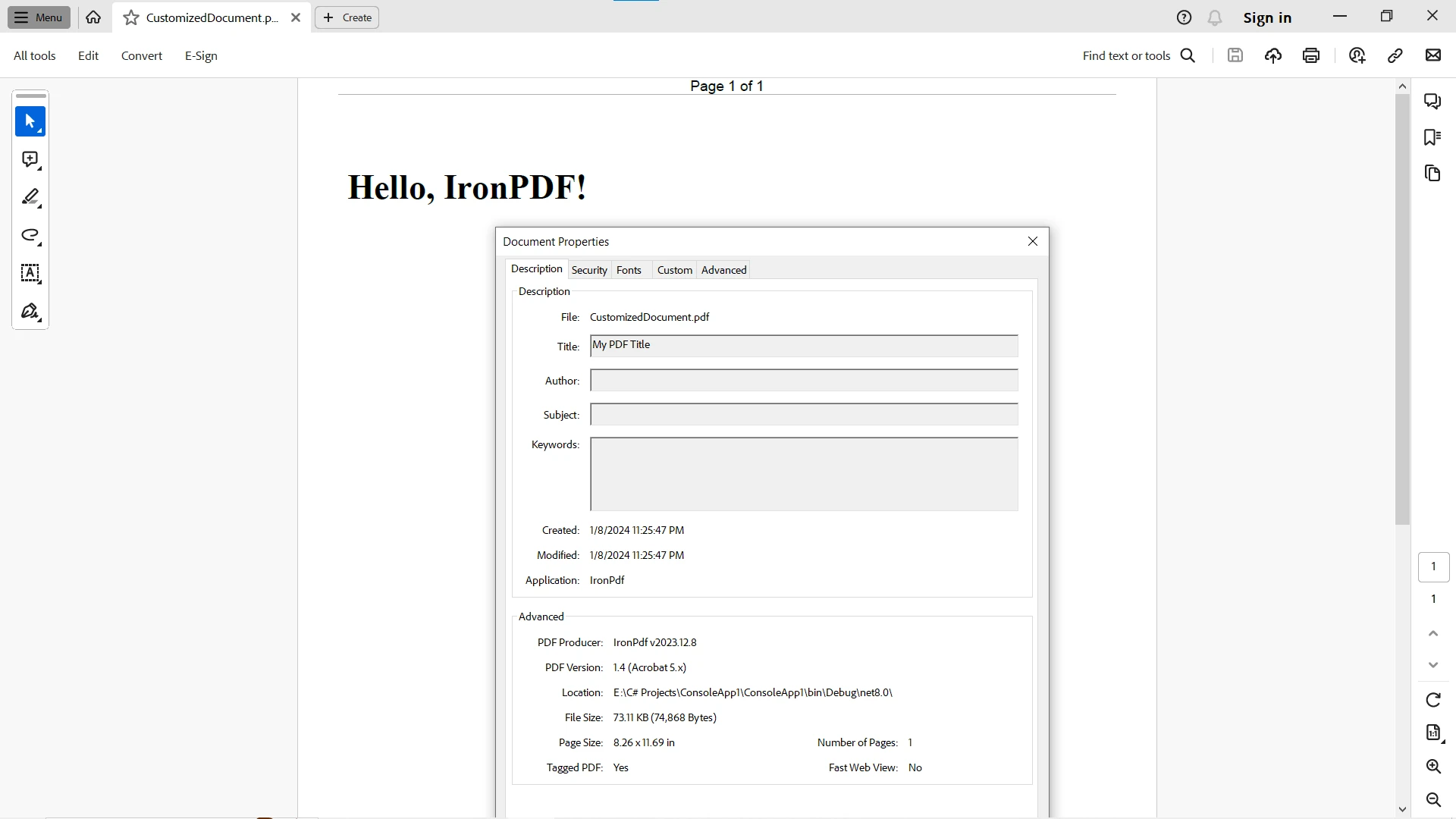
pdfDocument.RenderHtmlAsPdf("<html><body><h1>Hello, IronPDF!</h1></body></html>").SaveAs("CustomizedDocument.pdf")在此範例中,PdfGenerationSettings 類使用 C# 主構造函式來初始化與 PDF 生成設置相關的屬性,這些屬性後來可以用來決定新增和跳過哪些渲染選項。輸出包含一個標題文字和標題,因為它們是使用主構造函式參數設置的。
結論
總之,C# 中的主構造函式提供了一種精緻且富有表現力的類初始化方法。 它們的聲明性語法增強了程式碼的可讀性,推動了不可變性,並簡化了建立具有預設值的物件的過程。 無論您是在定義屬性、強化不可變性,還是在採用預設值,主構造函式都賦予開發人員掌握 C# 程式設計動態世界中類初始化藝術的能力。
儘管 C# 主構造函式與 IronPDF 的直接整合可能不是重點,但這兩個元素可以和諧地合作。 C# 主構造函式增強了類初始化的清晰性和簡單性,使它們對於定義與 IronPDF 工作流程有關的結構或配置非常有價值。
利用 IronPDF 的強大功能進行強大的 PDF 生成,並在類初始化優雅至關重要時使用 C# 主構造函式。 這個動態組合使您能夠在 C# 程式設計的活躍世界中,以創意和效率來駕馭文件生成的複雜性。
常見問題
主要建構子如何讓 C# 程式碼更簡潔?
主要建構子允許您在類別宣告內直接宣告和初始化屬性,減少樣板程式碼的數量並增強可讀性。
C# 12 引入了哪些新功能?
C# 12 引入了主要建構子、中介程式和集合表達式,這些功能為開發者提供了更簡潔且功能強大的語法選項。
主要建構子可以用於不可變資料結構嗎?
是的,主要建構子非常適合不可變資料結構,因為它們允許在建構子中直接初始化唯讀屬性。
如何使用 C# 將 HTML 內容轉換為 PDF?
您可以使用 IronPDF 的 ChromePdfRenderer 類別將 HTML 內容轉換為 PDF,確保格式和樣式在輸出文件中得到保留。
using IronPDF 生成 PDF 的優勢是什麼?
IronPDF 提供了一個強大的平台來在 C# 中建立和操作 PDF 文件,支持 HTML 到 PDF 的轉換、合併 PDF 以及詳細樣式保留等功能。
主要建構子如何加強依賴注入?
主要建構子透過在建構子參數中明確標示出類依賴來加強依賴注入,從而簡化了依賴關係圖的設置和維護。
如何將主要建構子與 PDF 文件生成整合?
當使用像 IronPDF 這樣的程式庫時,主要建構子可用來初始化與 PDF 設定相關的配置類別或結構,精簡設置過程。
有哪些實際應用主要建構子的範例?
實際範例包括幾何形狀階層的初始化以及在需要清晰和簡潔性的依賴注入場景中。
開發者如何在其專案中開始使用 IronPDF?
開發者可以透過包管理器控制台或 NuGet包管理器安裝 IronPDF NuGet 包,並參考完整的文件以獲取實施細節。
IronPDF 在文件生成工作流程中扮演什麼角色?
IronPDF 可增強文件生成工作流程,允許開發者輕鬆地在 C# 中建立、轉換和操作 PDF,支持與其他 C# 功能的無縫整合。










 免費開始
免費開始 免費開始
免費開始 預訂免費直播演示
















