




已更新 2026年4月23日
在 .NET 中用 Microsoft.Extensions.AI 簡化 LLM 整合
AI 正在改變軟體開發,但將大型語言模型 (LLM) 整合到 .NET 中一直很複雜。利用 IronPdf.AI 將 AI 整合推向更遠,為 .NET 應用程式帶來由 OpenAI 驅動的 PDF 解析、資料擷取和內容總結。
閱讀更多

在C#程式設計的多樣性中,有效的字串操作是顯示清晰和動態輸出的基石。 String.Format方法作為一個強大的工具出現,為開發人員提供靈活且表現力豐富的字串格式化手段。 要正確使用String.Format方法並在C#中建立自定義格式字串,請參閱其在微軟官方 .NET 文件網站的文件:String.Format 方法。
在這份全面指南中,我們將探討String Format的複雜性,它的語法、用法以及提升C#字串格式化效率的方法。
從本質上來說,String.Format是一個設計用來透過替換佔位符來格式化字串的方法。 該方法是C#中的System.String類的一部分,在建立結構良好的、自定義化的字串中扮演關鍵角色。
String Format方法的語法涉及使用帶有佔位符的格式項,後面跟著要替換的值。 這是一個基本範例:
// String.Format example demonstrating basic placeholder usage
string formattedString = string.Format("Hello, {0}! Today is {1}.", "John", DateTime.Now.DayOfWeek);' String.Format example demonstrating basic placeholder usage
Dim formattedString As String = String.Format("Hello, {0}! Today is {1}.", "John", DateTime.Now.DayOfWeek)在此範例中,{0}和{1}是佔位符,後續的參數("John"和DateTime.Now.DayOfWeek)在格式化的字串中替換這些佔位符。
String.Format的一個強大功能是能夠根據特定模式格式化數字和日期/時間值。 例如:
// Formatting numeric and date/time values
decimal price = 19.95m;
DateTime currentDate = DateTime.Now;

string formattedNumeric = string.Format("Price: {0:C}", price); // Formats the numeric value as currency
string formattedDate = string.Format("Today's date: {0:yyyy-MM-dd}", currentDate); // Formats the date' Formatting numeric and date/time values
Dim price As Decimal = 19.95D
Dim currentDate As DateTime = DateTime.Now
Dim formattedNumeric As String = String.Format("Price: {0:C}", price) ' Formats the numeric value as currency
Dim formattedDate As String = String.Format("Today's date: {0:yyyy-MM-dd}", currentDate) ' Formats the date在此片段中,{0:C}將數字值格式化為貨幣,{0:yyyy-MM-dd}將日期格式化為指定模式。
在C#中,string.Format方法允許開發人員在格式字串中使用數字索引作為佔位符。 這有助於以特定順序插入對應的值。
// Demonstrating multiple format items with numerical indices
string formattedNamed = string.Format("Hello, {0}! Your age is {1}.", "Alice", 30);' Demonstrating multiple format items with numerical indices
Dim formattedNamed As String = String.Format("Hello, {0}! Your age is {1}.", "Alice", 30)在這裡,{0}和{1}是數字佔位符,值按照傳遞給string.Format方法的參數順序提供。
C#不支持string.Format方法中如上所示的命名佔位符。 如果需要命名佔位符,您應該使用字串插值或由外部程式庫提供的其他方法。 以下是一個字串插值表達式的範例:
在C# 6.0中引入,字串插值允許開發人員直接在字串實字中使用表達式,使程式碼更加可讀,並減少調整參數順序時產生錯誤的風險。
// String interpolation example demonstrating direct variable use
var name = "Alice";
var age = 30;
string formattedNamed = $"Hello, {name}! Your age is {age}.";' String interpolation example demonstrating direct variable use
Dim name = "Alice"
Dim age = 30
Dim formattedNamed As String = $"Hello, {name}! Your age is {age}."在此範例中,{name}和{age}在字串中直接被評估,值則由相關變數提供。
String.Format對格式化值的對齊和間距提供了精確的控制。 透過向格式項新增對齊和寬度規範,開發人員可以建立整齊對齊的輸出。 使用String.Format在C#中控制間距涉及指明插入字串的寬度,允許對前置或後置空格進行精確控制。 例如,考慮在銷售報告中對齊產品名稱和價格:
// Using String.Format for aligning product names and prices
string[] products = { "Laptop", "Printer", "Headphones" };
decimal[] prices = { 1200.50m, 349.99m, 99.95m };

Console.WriteLine(String.Format("{0,-15} {1,-10}\n", "Product", "Price"));

for (int index = 0; index < products.Length; index++)
{
    string formattedProduct = String.Format("{0,-15} {1,-10:C}", products[index], prices[index]);
    Console.WriteLine(formattedProduct);
}Imports Microsoft.VisualBasic
' Using String.Format for aligning product names and prices
Dim products() As String = { "Laptop", "Printer", "Headphones" }
Dim prices() As Decimal = { 1200.50D, 349.99D, 99.95D }
Console.WriteLine(String.Format("{0,-15} {1,-10}" & vbLf, "Product", "Price"))
For index As Integer = 0 To products.Length - 1
Dim formattedProduct As String = String.Format("{0,-15} {1,-10:C}", products(index), prices(index))
Console.WriteLine(formattedProduct)
Next index在此範例中,{0,-15}和{1,-10}格式控制"產品"和"價格"標籤的寬度,確保左對齊並允許前置或後置空格。 迴圈隨後用產品名稱和價格填充表格,建立出間距精確控制的整齊格式的銷售報告。 調整這些寬度參數允許您有效管理顯示資料的對齊和間距。
在String.Format內使用三元運算符可以根據特定標準進行條件格式化。 例如:
// Using ternary operator for conditional formatting
int temperature = 25;
string weatherForecast = string.Format("The weather is {0}.", temperature > 20 ? "warm" : "cool");' Using ternary operator for conditional formatting
Dim temperature As Integer = 25
Dim weatherForecast As String = String.Format("The weather is {0}.",If(temperature > 20, "warm", "cool"))在這裡,根據溫度變更天氣描述。
為了改進C#中物件的顯示,整合格式字串,也稱為"複合格式字串",以控制字串表示。 例如,使用{0:d}表示法將"d"格式規範應用於列表中的第一個物件。在格式化字串或複合格式化功能的背景下,這些格式規範指導數字、小數點、日期和時間以及自定義型別的呈現。
這是一個包括一個物件和兩個格式項的例子,結合複合格式字串和字串插值:
// Combining composite format strings and string interpolation
string formattedDateTime = $"It is now {DateTime.Now:d} at {DateTime.Now:t}";
Console.WriteLine(formattedDateTime); // Output similar to: 'It is now 4/10/2015 at 10:04 AM'' Combining composite format strings and string interpolation
Dim formattedDateTime As String = $"It is now {DateTime.Now:d} at {DateTime.Now:t}"
Console.WriteLine(formattedDateTime) ' Output similar to: 'It is now 4/10/2015 at 10:04 AM'在這種方法中,可以根據特定格式裁剪物件的字串表示,以促成更具控制性和視覺吸引力的輸出。 插值字串直接包括變數,提供簡潔的語法。
IronPDF 是一個C#程式庫,協助使用HTML建立PDF文件,從PDF文件中提取文字,以及管理PDF中的修訂和歷史。 它為開發人員提供了一套完整的工具,以便在其C#應用程式中生成、修改和渲染PDF文件。 使用IronPDF,開發人員可以建立出符合特定需求的複雜且視覺吸引力的PDF文件。
要在您的C#專案中開始使用IronPDF程式庫,可以輕鬆安裝IronPDF NuGet套件。 在您的套件管理器控制台中使用以下命令:
# Install the IronPdf NuGet package
Install-Package IronPdf或者,您可以在NuGet套件管理器中搜尋"IronPDF"並從那裡安裝它。
C#的String.Format方法因其在製作格式化字串中的多樣性而聞名。 它允許開發人員在格式字串中定義佔位符並用對應值替換,提供對字串輸出的精確控制。 格式化數字值、日期/時間資訊並對齊文字的能力使String.Format成為建立清晰且結構化文字內容的不可或缺的工具。
當涉及到String.Format與IronPDF的整合時,答案是響亮的肯定。 String.Format所提供的格式化功能可以用來動態生成內容,然後使用IronPDF的功能將其整合到PDF文件中。
讓我們考慮一個簡單的例子:
using IronPdf;

// Class to generate PDF with formatted content
class PdfGenerator
{
    // Method to generate a PDF for a customer's invoice
    public static void GeneratePdf(string customerName, decimal totalAmount)
    {
        // Format the content dynamically using String.Format
        string formattedContent = string.Format("Thank you, {0}, for your purchase! Your total amount is: {1:C}.", customerName, totalAmount);

        // Create a new PDF document using IronPDF
        var pdfDocument = new ChromePdfRenderer();

        // Add the dynamically formatted content to the PDF and save it
        pdfDocument.RenderHtmlAsPdf(formattedContent).SaveAs("Invoice.pdf");
    }
}

public class Program
{
    // Main method to execute PDF generation
    public static void Main(string[] args)
    {
        PdfGenerator.GeneratePdf("John Doe", 1204.23m);
    }
}Imports IronPdf
' Class to generate PDF with formatted content
Friend Class PdfGenerator
' Method to generate a PDF for a customer's invoice
Public Shared Sub GeneratePdf(ByVal customerName As String, ByVal totalAmount As Decimal)
' Format the content dynamically using String.Format
Dim formattedContent As String = String.Format("Thank you, {0}, for your purchase! Your total amount is: {1:C}.", customerName, totalAmount)
' Create a new PDF document using IronPDF
Dim pdfDocument = New ChromePdfRenderer()
' Add the dynamically formatted content to the PDF and save it
pdfDocument.RenderHtmlAsPdf(formattedContent).SaveAs("Invoice.pdf")
End Sub
End Class
Public Class Program
' Main method to execute PDF generation
Public Shared Sub Main(ByVal args() As String)
PdfGenerator.GeneratePdf("John Doe", 1204.23D)
End Sub
End Class在此例子中,String.Format方法被用來動態生成客戶發票的個性化訊息。格式化後的內容使用IronPDF的ChromePdfRenderer功能加入到PDF文件中。
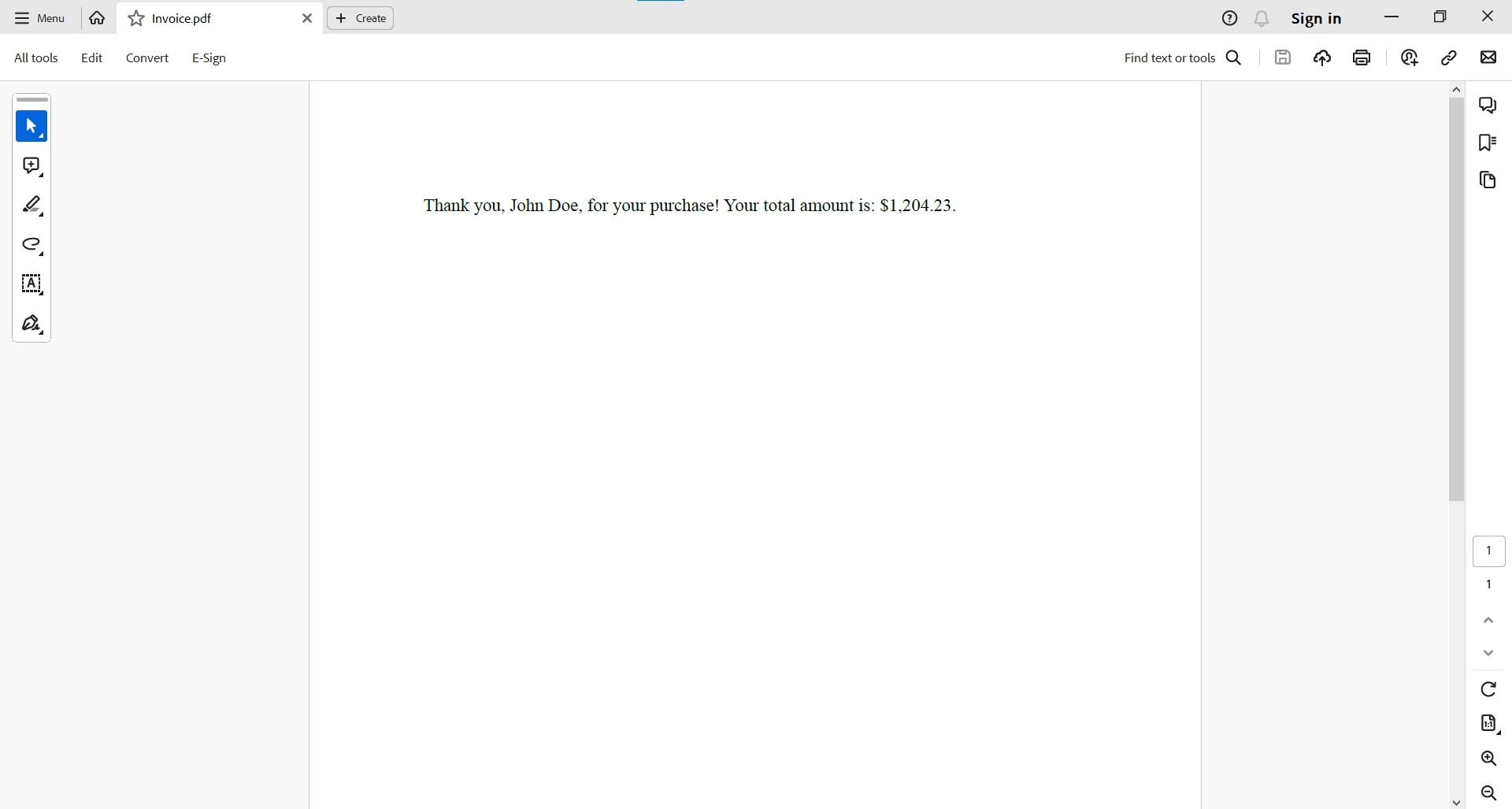
有關使用HTML字串表示建立PDF的更詳細資訊,請參考IronPDF檔案頁面。
總而言之,String.Format在C#程式設計中始終如一地發揮著重要作用,為開發人員提供建立格式化字串的強大機制。 無論是處理數字值、日期/時間資訊還是自定義模式,String.Format都提供了一個多樣且高效的解決方案。 當您在C#開發的廣闊領域中前進時,掌握使用String.Format的字串格式化技巧無疑會提升您的能力,使您能在應用程式中建立清晰、動態和視覺上吸引人的輸出。
開發人員可以利用String.Format的強大格式化功能動態建立內容,然後使用IronPDF將其無縫整合到PDF文件中。 這種協作方式使開發人員能夠生成高度自定義且視覺吸引力的PDF,為他們的文件生成能力增添了一層複雜性。
IronPDF提供IronPDF的完整功能免費試用,以便測試其完整功能,就像在商業模式下一樣。 不過,試用期結束後,您需要一個IronPDF授權。

Jacob Mellor是Iron Software的首席技術官,一位在C# PDF技術上開創先河的遠見工程師。作為Iron Software核心程式碼庫的原開發者,他從創立以來就一直在塑造公司的產品架構,與首席執行官Cameron Rimington一起將公司轉變為服務於NASA、特斯拉和全球政府公司的50多名人員的公司。



IronPDF 是 IRONSUITE 的一部分
10 款適用於辦公室文件的 .NET API 產品

當您需要您的PDF看起來像HTML一樣快速。


