




已更新 2026年4月23日
在 .NET 中用 Microsoft.Extensions.AI 簡化 LLM 整合
AI 正在改變軟體開發,但將大型語言模型 (LLM) 整合到 .NET 中一直很複雜。利用 IronPdf.AI 將 AI 整合推向更遠,為 .NET 應用程式帶來由 OpenAI 驅動的 PDF 解析、資料擷取和內容總結。
閱讀更多

JUnit 框架是一個廣泛使用的單元測試框架,適用於Java應用程式。 它提供了一種簡單、優雅的方式來編寫和運行可重複的測試。 透過JUnit Java,開發者可以透過編寫單元測試來確保其程式碼的行為符合預期,並驗證軟體的各個方面。 此外,開發者還可以編寫測試類別來組織測試案例,並利用測試運行器來執行測試和獲取回饋。 單元測試框架不僅有助於識別錯誤,還能促進更好的設計和可維護性。
在這篇文章中,我們將討論JUnit Java測試的執行,並探討不同的方法。 我們還將使用IronPDF for Java編寫一個PDF建立測試。
JUnit 測試框架是由Kent Beck和Erich Gamma建立的,他們是軟體開發社區中的兩位重要人物。 自從20世紀90年代末問世以來,JUnit經歷了多次迭代,每次都增加了更多的功能並改進了易用性。 目前的穩定版本JUnit 5,也稱為JUnit Jupiter,與其前身相比引入了數項增強功能,使其更加健壯和靈活。
註解: JUnit 使用註解來定義和配置測試。 常用的註解包括:
@Test: 標記一個方法為測試方法。@BeforeEach: 在每次測試前運行。@AfterEach: 在每次測試後運行。@BeforeAll: 在所有測試前運行一次。@AfterAll: 在所有測試後運行一次。斷言: 斷言用於檢查測試結果是否符合預期。 一些常見的斷言包括:
assertEquals(expected, actual): 檢查兩個值是否相等。assertTrue(condition): 檢查條件是否為真。assertFalse(condition): 檢查條件是否為假。assertNull(object): 檢查物件是否為null。assertNotNull(object): 檢查物件是否不為null。參數化測試: JUnit支持參數化測試,允許以不同的參數運行相同的測試,提高測試效率。
測試套件: 測試可以分組成測試套件,以一起運行多個測試。
例外測試: JUnit 可以測試方法是否拋出了預期的例外。
與構建工具整合: JUnit 可以無縫整合到如Maven等廣泛使用的構建工具中。 這使您在構建過程中自動運行測試和測試程式碼,並在構建過程中任何測試失敗時通知開發者。

JUnit 可以無縫整合到像Maven等廣泛使用的構建工具中。 這使您能夠在構建過程中自動運行測試。
要使用JUnit與Maven,將以下依賴項新增至您的pom.xml文件中:
<dependencies>
    <dependency>
        <groupId>org.junit.jupiter</groupId>
        <artifactId>junit-jupiter-api</artifactId>
        <version>5.8.1</version>
        <scope>test</scope>
    </dependency>
    <dependency>
        <groupId>org.junit.jupiter</groupId>
        <artifactId>junit-jupiter-engine</artifactId>
        <version>5.8.1</version>
        <scope>test</scope>
    </dependency>
</dependencies>在深入更複雜的例子之前,我們先從簡單的單元測試案例開始。 我們將為一個基本計算器類編寫測試。
// Calculator.java
public class Calculator {
    // Method to add two integers
    public int add(int a, int b) {
        return a + b;
    }

    // Method to subtract one integer from another
    public int subtract(int a, int b) {
        return a - b;
    }
}
// CalculatorTest.java
import org.junit.jupiter.api.Test;
import static org.junit.jupiter.api.Assertions.*;
public class CalculatorTest {
// Test method for addition
@Test
public void testAdd() {
Calculator calculator = new Calculator();
assertEquals(5, calculator.add(2, 3)); // Asserts that the sum of 2 and 3 is 5
}
// Test method for subtraction
@Test
public void testSubtract() {
Calculator calculator = new Calculator();
assertEquals(1, calculator.subtract(3, 2)); // Asserts that 3 minus 2 is 1
}
}CalculatorTest範例包含兩個測試方法,一個用於測試加法:testAdd,一個用於測試減法:testSubtract。 每個方法建立subtract方法的正確性。
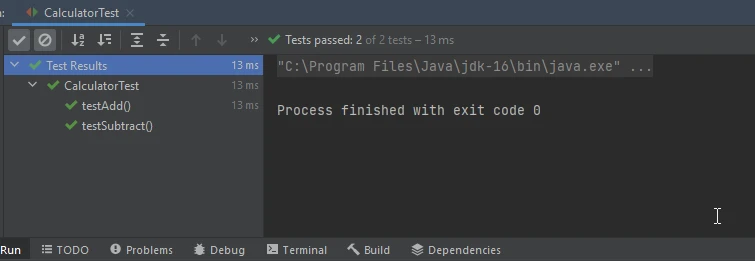
參數化測試允許您以不同的參數集運行相同的測試。 這對於使用廣泛輸入測試方法十分有用。
import org.junit.jupiter.params.ParameterizedTest;
import org.junit.jupiter.params.provider.CsvSource;
import static org.junit.jupiter.api.Assertions.*;

public class CalculatorParameterizedTest {
    @ParameterizedTest
    @CsvSource({
        "1, 1, 2",
        "2, 3, 5",
        "10, 20, 30"
    })
    public void testAdd(int a, int b, int expected) {
        Calculator calculator = new Calculator();
        assertEquals(expected, calculator.add(a, b)); // Asserts that the addition of a and b equals expected
    }
}在此範例中,CsvSource指定。
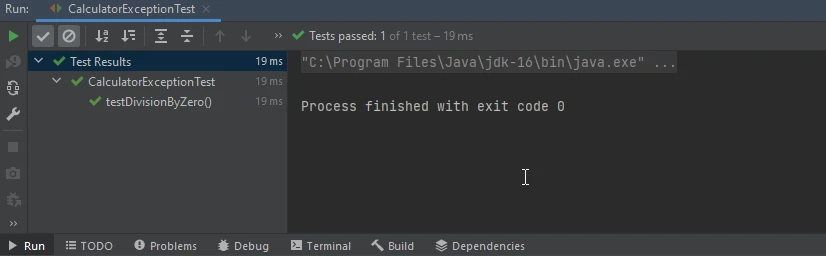
有時,您需要驗證一個方法拋出了預期的例外。
將以下方法新增到您的計算器類中。
// Method to divide one integer by another, potentially throwing an exception if division by zero occurs
public float divide(int a, int b) {
    return a / b;
}測試類:
import org.junit.jupiter.api.Test;
import static org.junit.jupiter.api.Assertions.*;

class CalculatorExceptionTest {
    // Test method to verify division by zero throws ArithmeticException
    @Test
    public void testDivisionByZero() {
        Calculator calculator = new Calculator();
        assertThrows(ArithmeticException.class, () -> calculator.divide(1, 0)); // Asserts that dividing by zero throws an exception
    }
}
IronPDF是一個強大的程式庫,專用於在Java應用程式中生成PDF文件。 將IronPDF與JUnit整合,允許您自動化PDF生成功能的測試,確保文件準確生成並符合所需規範。
要將IronPDF與JUnit整合,您首先需要在專案依賴中包含IronPDF庫。
<dependencies>
    <!-- Adds IronPDF Java. Use the latest version in the version tag. -->
    <dependency>
        <groupId>com.ironsoftware</groupId>
        <artifactId>ironpdf</artifactId>
        <version>20xx.xx.xxxx</version>
    </dependency>
    <!-- Adds the slf4j logger which IronPDF Java uses. -->
    <dependency>
        <groupId>org.slf4j</groupId>
        <artifactId>slf4j-simple</artifactId>
        <version>2.0.3</version>
    </dependency>
</dependencies>完成後,您可以編寫測試案例來使用IronPDF的API驗證PDF生成邏輯。以下是一個如何使用JUnit測試IronPDF生成PDF的範例:
import org.junit.jupiter.api.Test;
import static org.junit.jupiter.api.Assertions.*;

import com.ironsoftware.ironpdf.*;
import java.io.File;
import java.io.IOException;

class PdfGenerationTest {
    // Test method to verify PDF generation
    @Test
    public void testPdfGeneration() throws IOException {
        // Define HTML content
        String htmlContent = "<html><body><h1>Hello, IronPDF!</h1></body></html>";
        // Convert HTML to PDF
        PdfDocument pdfDocument = PdfDocument.renderHtmlAsPdf(htmlContent);
        // Save PDF to file
        pdfDocument.saveAs("output.pdf");
        // Assert PDF generation
        assertTrue(new File("output.pdf").exists()); // Asserts that the PDF file was created successfully
    }
}在此範例中,我們建立了一個測試案例testPdfGeneration(),使用IronPDF將HTML內容轉換成PDF文件。 測試然後透過檢查PDF文件在文件系統上的存在來驗證其是否成功生成。

JUnit 是一個多才多藝的Java測試框架,簡化了撰寫和執行自動化測試的過程。 透過利用其如參數化測試、例外處理和註解等功能,開發人員可確保其程式碼庫的可靠性和健壯性。
將IronPDF與JUnit整合,可在Java應用程式中全面測試PDF生成功能,確保生成的文件達到品質標準並符合作業規範。 透過將JUnit和IronPDF的力量結合,開發者可以精簡測試流程,並自信地提供高品質的軟體。
如需了解更多關於如何將HTML字串轉換為PDF,請參閱以下連結。

Jacob Mellor是Iron Software的首席技術官,一位在C# PDF技術上開創先河的遠見工程師。作為Iron Software核心程式碼庫的原開發者,他從創立以來就一直在塑造公司的產品架構,與首席執行官Cameron Rimington一起將公司轉變為服務於NASA、特斯拉和全球政府公司的50多名人員的公司。



IronPDF 是 IRONSUITE 的一部分
10 款適用於辦公室文件的 .NET API 產品

當您需要您的PDF看起來像HTML一樣快速。












