using IronPdf;

// Disable local disk access or cross-origin requests
Installation.EnableWebSecurity = true;

// Instantiate Renderer
var renderer = new ChromePdfRenderer();

// Create a PDF from a HTML string using C#
var pdf = renderer.RenderHtmlAsPdf("<h1>Hello World</h1>");

// Export to a file or Stream
pdf.SaveAs("output.pdf");

// Advanced Example with HTML Assets
// Load external html assets: Images, CSS and JavaScript.
// An optional BasePath 'C:\site\assets\' is set as the file location to load assets from
var myAdvancedPdf = renderer.RenderHtmlAsPdf("<img src='icons/iron.png'>", @"C:\site\assets\");
myAdvancedPdf.SaveAs("html-with-assets.pdf");
using IronPdf;// Disable local disk access or cross-origin requestsInstallation.EnableWebSecurity = true;// Instantiate Renderervar renderer = new ChromePdfRenderer();// Create a PDF from a HTML string using C#var pdf = renderer.RenderHtmlAsPdf("<h1>Hello World</h1>");// Export to a file or Streampdf.SaveAs("output.pdf");// Advanced Example with HTML Assets// Load external html assets: Images, CSS and JavaScript.// An optional BasePath 'C:\site\assets\' is set as the file location to load assets fromvar myAdvancedPdf = renderer.RenderHtmlAsPdf("<img src='icons/iron.png'>", @"C:\site\assets\");myAdvancedPdf.SaveAs("html-with-assets.pdf");
PM >Install-Package IronPdf
Install-Package IronPdf
PRODUCT COMPARISONS
Generate PDF in ASP.NET MVC: iTextSharp vs. IronPDF Guide
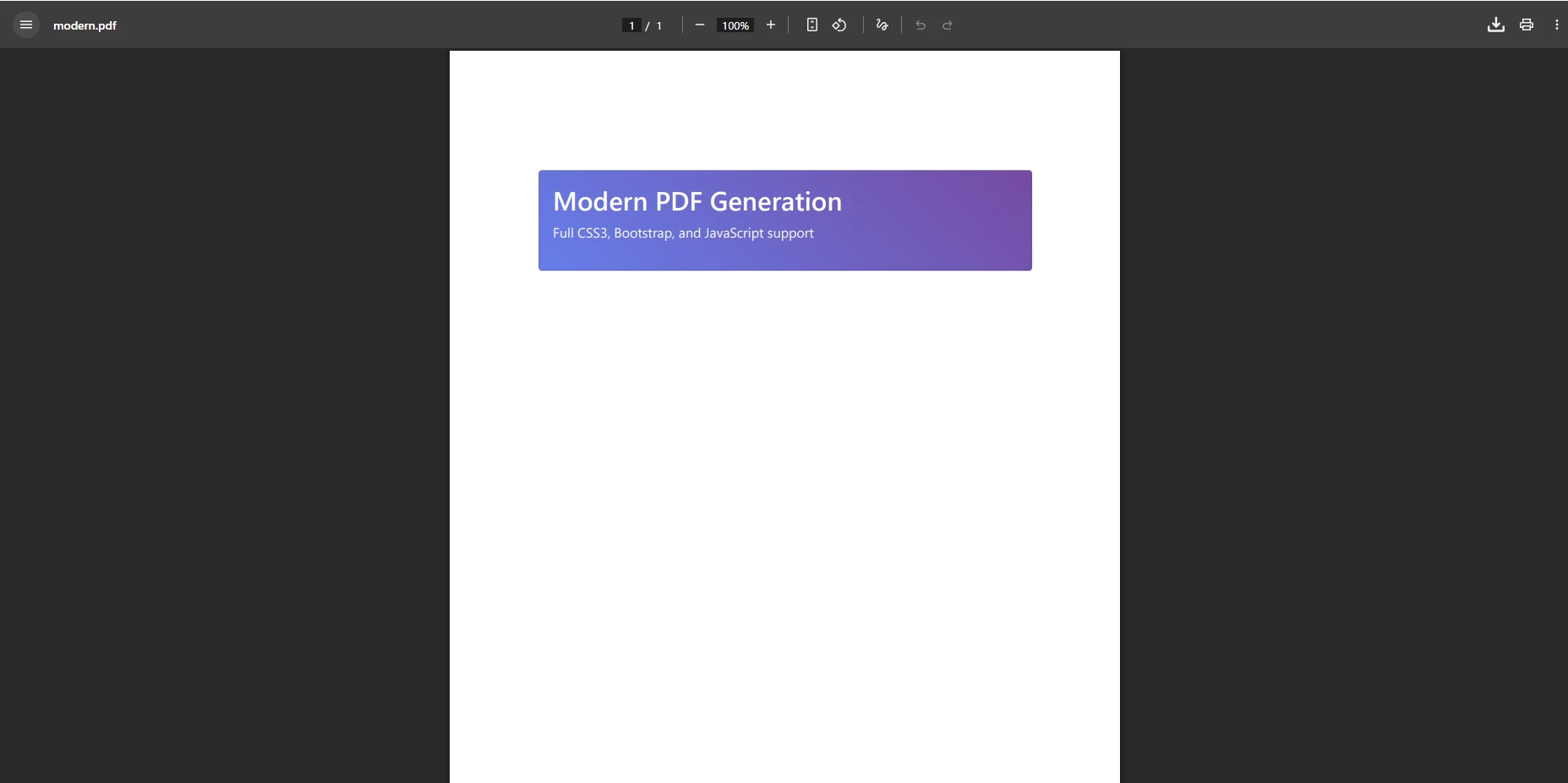
IronPDF provides excellent HTML-to-PDF conversion with full CSS3 and JavaScript support using Chrome rendering. In contrast, iText offers programmatic PDF creation but struggles with modern HTML conversion, making IronPDF a better choice for ASP.NET MVC applications that require web-standard PDFs.
Creating PDF documents in ASP.NET MVC applications is a common requirement for generating reports, invoices, and downloadable content. While iText has been a popular choice for years, IronPDF offers a modern alternative with superior HTML rendering capabilities. This article explores both approaches to help you make an informed decision for your .NET PDF generation needs.
Both libraries solve the same core problem -- generating PDFs in a .NET web context -- but they take fundamentally different approaches. iText builds PDFs programmatically through an object model, while IronPDF converts HTML to PDF using a full Chrome rendering engine. Understanding that architectural difference is the key to selecting the right tool. The ASP.NET MVC framework from Microsoft supports both integration patterns, and either library can be wired into the standard controller-action pipeline.
How Do You Install Each Library?
Before writing any code, you need to get each library into your project. NuGet is the standard package manager for .NET and handles both installations cleanly. For iText, install the legacy package via NuGet:
dotnet add package iTextSharp
dotnet add package iTextSharp
SHELL
For IronPDF, install through NuGet as well:
> dotnet add package IronPdf
dotnet add package IronPdf
IronPDF bundles the Chrome rendering engine with the package, so no additional browser installation is required on your server. The library supports Windows, Linux, macOS, and container environments out of the box. After installing, add your IronPDF license key during application startup.
How Do You Generate PDF Using iText in MVC?
To generate PDF files using iText in your ASP.NET MVC application, first install the library through NuGet. The iText library provides low-level control over PDF creation through its Document class and object model.
The following code demonstrates a production-ready implementation for creating PDFs with iText in an MVC controller:
// Production-ready iTextSharp implementation with proper resource disposalpublic class ReportController : Controller{ private readonly ILogger<ReportController> _logger; publicReportController(ILogger<ReportController> logger) { _logger = logger; } public ActionResultGeneratePDF() { try { using var memoryStream = new MemoryStream(); using var document = new Document(PageSize.A4, 50, 50, 25, 25); using var writer = PdfWriter.GetInstance(document, memoryStream); document.Open(); document.AddTitle("Generated Report"); document.AddCreationDate(); var titleFont = FontFactory.GetFont(FontFactory.HELVETICA_BOLD, 16); document.Add(new Paragraph("Hello World", titleFont)); document.Add(new Paragraph("This is a PDF document created with iTextSharp")); var table = new PdfPTable(3); table.AddCell("Header 1"); table.AddCell("Header 2"); table.AddCell("Header 3"); document.Add(table); document.Close(); var pdfBytes = memoryStream.ToArray();Response.Headers.Add("Content-Disposition", "inline; filename=report.pdf"); _logger.LogInformation("PDF generated: {Size} bytes", pdfBytes.Length); returnFile(pdfBytes, "application/pdf"); } catch (Exception ex) { _logger.LogError(ex, "Error generating PDF"); returnStatusCode(500, "Error generating PDF document"); } }}
// Production-ready iTextSharp implementation with proper resource disposal
public class ReportController : Controller
{
    private readonly ILogger<ReportController> _logger;

    public ReportController(ILogger<ReportController> logger)
    {
        _logger = logger;
    }

    public ActionResult GeneratePDF()
    {
        try
        {
            using var memoryStream = new MemoryStream();
            using var document = new Document(PageSize.A4, 50, 50, 25, 25);
            using var writer = PdfWriter.GetInstance(document, memoryStream);

            document.Open();
            document.AddTitle("Generated Report");
            document.AddCreationDate();

            var titleFont = FontFactory.GetFont(FontFactory.HELVETICA_BOLD, 16);
            document.Add(new Paragraph("Hello World", titleFont));
            document.Add(new Paragraph("This is a PDF document created with iTextSharp"));

            var table = new PdfPTable(3);
            table.AddCell("Header 1");
            table.AddCell("Header 2");
            table.AddCell("Header 3");
            document.Add(table);

            document.Close();

            var pdfBytes = memoryStream.ToArray();
            Response.Headers.Add("Content-Disposition", "inline; filename=report.pdf");
            _logger.LogInformation("PDF generated: {Size} bytes", pdfBytes.Length);
            return File(pdfBytes, "application/pdf");
        }
        catch (Exception ex)
        {
            _logger.LogError(ex, "Error generating PDF");
            return StatusCode(500, "Error generating PDF document");
        }
    }
}
ImportsSystemImportsSystem.IOImportsMicrosoft.AspNetCore.MvcImportsMicrosoft.Extensions.LoggingImports iTextSharp.textImports iTextSharp.text.pdfPublic Class ReportControllerInheritsController PrivateReadOnly _logger AsILogger(OfReportController) Public Sub New(logger AsILogger(OfReportController)) _logger = logger End Sub Public Function GeneratePDF() AsActionResultTryUsing memoryStream As New MemoryStream()Using document As New Document(PageSize.A4, 50, 50, 25, 25)Using writer AsPdfWriter = PdfWriter.GetInstance(document, memoryStream) document.Open() document.AddTitle("Generated Report") document.AddCreationDate() Dim titleFont AsFont = FontFactory.GetFont(FontFactory.HELVETICA_BOLD, 16) document.Add(New Paragraph("Hello World", titleFont)) document.Add(New Paragraph("This is a PDF document created with iTextSharp")) Dim table As New PdfPTable(3) table.AddCell("Header 1") table.AddCell("Header 2") table.AddCell("Header 3") document.Add(table) document.Close() Dim pdfBytes AsByte() = memoryStream.ToArray() Response.Headers.Add("Content-Disposition", "inline; filename=report.pdf") _logger.LogInformation("PDF generated: {Size} bytes", pdfBytes.Length) ReturnFile(pdfBytes, "application/pdf")EndUsingEndUsingEndUsingCatch ex AsException _logger.LogError(ex, "Error generating PDF") ReturnStatusCode(500, "Error generating PDF document")EndTry End FunctionEnd Class
Imports System
Imports System.IO
Imports Microsoft.AspNetCore.Mvc
Imports Microsoft.Extensions.Logging
Imports iTextSharp.text
Imports iTextSharp.text.pdf

Public Class ReportController
    Inherits Controller

    Private ReadOnly _logger As ILogger(Of ReportController)

    Public Sub New(logger As ILogger(Of ReportController))
        _logger = logger
    End Sub

    Public Function GeneratePDF() As ActionResult
        Try
            Using memoryStream As New MemoryStream()
                Using document As New Document(PageSize.A4, 50, 50, 25, 25)
                    Using writer As PdfWriter = PdfWriter.GetInstance(document, memoryStream)
                        document.Open()
                        document.AddTitle("Generated Report")
                        document.AddCreationDate()

                        Dim titleFont As Font = FontFactory.GetFont(FontFactory.HELVETICA_BOLD, 16)
                        document.Add(New Paragraph("Hello World", titleFont))
                        document.Add(New Paragraph("This is a PDF document created with iTextSharp"))

                        Dim table As New PdfPTable(3)
                        table.AddCell("Header 1")
                        table.AddCell("Header 2")
                        table.AddCell("Header 3")
                        document.Add(table)

                        document.Close()

                        Dim pdfBytes As Byte() = memoryStream.ToArray()
                        Response.Headers.Add("Content-Disposition", "inline; filename=report.pdf")
                        _logger.LogInformation("PDF generated: {Size} bytes", pdfBytes.Length)
                        Return File(pdfBytes, "application/pdf")
                    End Using
                End Using
            End Using
        Catch ex As Exception
            _logger.LogError(ex, "Error generating PDF")
            Return StatusCode(500, "Error generating PDF document")
        End Try
    End Function
End Class
What Does the iText Output Look Like?
This code demonstrates the fundamental approach: create a Document instance, attach a PdfWriter to a stream, add content using element objects, and return the file through an action result. The implementation handles resource disposal patterns essential for production systems. For more advanced scenarios, you can configure custom paper sizes, manage page orientation, or add page numbers.
The programmatic approach gives you fine-grained control over every element on the page. That precision is useful when generating documents with fixed layouts such as invoices, certificates, or forms where the structure is always the same. However, it becomes a burden as soon as the content is dynamic or driven by an HTML template.
What Are the Challenges with HTML to PDF Conversion with the iText Library?
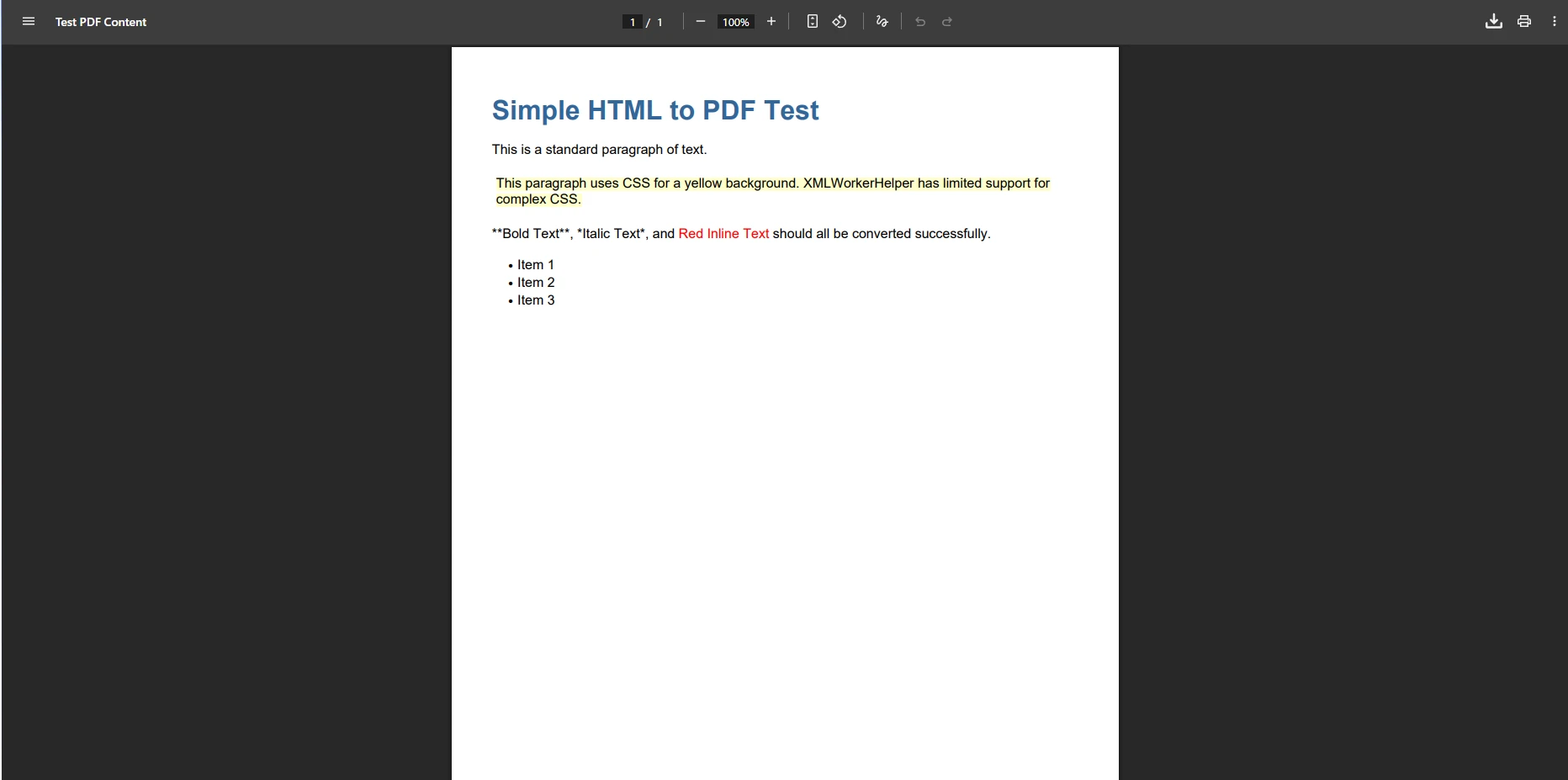
While iText excels at programmatic PDF creation, converting HTML to PDF presents significant challenges. The deprecated HTMLWorker class and its replacement XMLWorker have limited CSS support and struggle with modern web content, particularly when dealing with responsive CSS and JavaScript-rendered content.
// HTML conversion with iTextSharp -- note the CSS limitationspublic class HtmlToPdfController : Controller{ private readonly ILogger<HtmlToPdfController> _logger; publicHtmlToPdfController(ILogger<HtmlToPdfController> logger) { _logger = logger; } public async Task<ActionResult> ConvertHtmlAsync(string htmlContent) { if (string.IsNullOrWhiteSpace(htmlContent)) returnBadRequest("HTML content is required"); return awaitTask.Run(() => { using var stream = new MemoryStream(); using var document = new Document(PageSize.A4); using var writer = PdfWriter.GetInstance(document, stream); document.Open(); var cssResolver = XMLWorkerHelper.GetInstance().GetDefaultCssResolver(true); var fontProvider = new XMLWorkerFontProvider(); var cssAppliers = new CssAppliersImpl(fontProvider); var htmlContext = new HtmlPipelineContext(cssAppliers); htmlContext.SetTagFactory(Tags.GetHtmlTagProcessorFactory()); // Pipeline with limited CSS3 support var pdf = new PdfWriterPipeline(document, writer); var html = new HtmlPipeline(htmlContext, pdf); var css = new CssResolverPipeline(cssResolver, html); var worker = new XMLWorker(css, true); var parser = new XMLParser(worker); using var stringReader = new StringReader(htmlContent); parser.Parse(stringReader); document.Close(); returnFile(stream.ToArray(), "application/pdf", "converted.pdf"); }); }}
// HTML conversion with iTextSharp -- note the CSS limitations
public class HtmlToPdfController : Controller
{
    private readonly ILogger<HtmlToPdfController> _logger;

    public HtmlToPdfController(ILogger<HtmlToPdfController> logger)
    {
        _logger = logger;
    }

    public async Task<ActionResult> ConvertHtmlAsync(string htmlContent)
    {
        if (string.IsNullOrWhiteSpace(htmlContent))
            return BadRequest("HTML content is required");

        return await Task.Run(() =>
        {
            using var stream = new MemoryStream();
            using var document = new Document(PageSize.A4);
            using var writer = PdfWriter.GetInstance(document, stream);

            document.Open();

            var cssResolver = XMLWorkerHelper.GetInstance().GetDefaultCssResolver(true);
            var fontProvider = new XMLWorkerFontProvider();
            var cssAppliers = new CssAppliersImpl(fontProvider);
            var htmlContext = new HtmlPipelineContext(cssAppliers);
            htmlContext.SetTagFactory(Tags.GetHtmlTagProcessorFactory());

            // Pipeline with limited CSS3 support
            var pdf = new PdfWriterPipeline(document, writer);
            var html = new HtmlPipeline(htmlContext, pdf);
            var css = new CssResolverPipeline(cssResolver, html);

            var worker = new XMLWorker(css, true);
            var parser = new XMLParser(worker);

            using var stringReader = new StringReader(htmlContent);
            parser.Parse(stringReader);
            document.Close();

            return File(stream.ToArray(), "application/pdf", "converted.pdf");
        });
    }
}
ImportsSystemImportsSystem.IOImportsSystem.Threading.TasksImportsSystem.Web.MvcImports iTextSharp.textImports iTextSharp.text.pdfImports iTextSharp.tool.xmlImports iTextSharp.tool.xml.pipeline.cssImports iTextSharp.tool.xml.pipeline.htmlImports iTextSharp.tool.xml.pipeline.endImportsMicrosoft.Extensions.Logging' HTML conversion with iTextSharp -- note the CSS limitationsPublic Class HtmlToPdfControllerInheritsController PrivateReadOnly _logger AsILogger(OfHtmlToPdfController) Public Sub New(logger AsILogger(OfHtmlToPdfController)) _logger = logger End Sub PublicAsync Function ConvertHtmlAsync(htmlContent AsString) AsTask(OfActionResult) IfString.IsNullOrWhiteSpace(htmlContent) Then ReturnBadRequest("HTML content is required") End If ReturnAwaitTask.Run(Function()Using stream As New MemoryStream()Using document As New Document(PageSize.A4)Using writer = PdfWriter.GetInstance(document, stream) document.Open() Dim cssResolver = XMLWorkerHelper.GetInstance().GetDefaultCssResolver(True) Dim fontProvider = New XMLWorkerFontProvider() Dim cssAppliers = New CssAppliersImpl(fontProvider) Dim htmlContext = New HtmlPipelineContext(cssAppliers) htmlContext.SetTagFactory(Tags.GetHtmlTagProcessorFactory()) ' Pipeline with limited CSS3 support Dim pdf = New PdfWriterPipeline(document, writer) Dim html = New HtmlPipeline(htmlContext, pdf) Dim css = New CssResolverPipeline(cssResolver, html) Dim worker = New XMLWorker(css, True) Dim parser = New XMLParser(worker)Using stringReader As New StringReader(htmlContent) parser.Parse(stringReader)EndUsing document.Close()EndUsingEndUsingEndUsing ReturnFile(stream.ToArray(), "application/pdf", "converted.pdf") End Function) End FunctionEnd Class
Imports System
Imports System.IO
Imports System.Threading.Tasks
Imports System.Web.Mvc
Imports iTextSharp.text
Imports iTextSharp.text.pdf
Imports iTextSharp.tool.xml
Imports iTextSharp.tool.xml.pipeline.css
Imports iTextSharp.tool.xml.pipeline.html
Imports iTextSharp.tool.xml.pipeline.end
Imports Microsoft.Extensions.Logging

' HTML conversion with iTextSharp -- note the CSS limitations
Public Class HtmlToPdfController
    Inherits Controller

    Private ReadOnly _logger As ILogger(Of HtmlToPdfController)

    Public Sub New(logger As ILogger(Of HtmlToPdfController))
        _logger = logger
    End Sub

    Public Async Function ConvertHtmlAsync(htmlContent As String) As Task(Of ActionResult)
        If String.IsNullOrWhiteSpace(htmlContent) Then
            Return BadRequest("HTML content is required")
        End If

        Return Await Task.Run(Function()
                                  Using stream As New MemoryStream()
                                      Using document As New Document(PageSize.A4)
                                          Using writer = PdfWriter.GetInstance(document, stream)
                                              document.Open()

                                              Dim cssResolver = XMLWorkerHelper.GetInstance().GetDefaultCssResolver(True)
                                              Dim fontProvider = New XMLWorkerFontProvider()
                                              Dim cssAppliers = New CssAppliersImpl(fontProvider)
                                              Dim htmlContext = New HtmlPipelineContext(cssAppliers)
                                              htmlContext.SetTagFactory(Tags.GetHtmlTagProcessorFactory())

                                              ' Pipeline with limited CSS3 support
                                              Dim pdf = New PdfWriterPipeline(document, writer)
                                              Dim html = New HtmlPipeline(htmlContext, pdf)
                                              Dim css = New CssResolverPipeline(cssResolver, html)

                                              Dim worker = New XMLWorker(css, True)
                                              Dim parser = New XMLParser(worker)

                                              Using stringReader As New StringReader(htmlContent)
                                                  parser.Parse(stringReader)
                                              End Using

                                              document.Close()
                                          End Using
                                      End Using
                                  End Using

                                  Return File(stream.ToArray(), "application/pdf", "converted.pdf")
                              End Function)
    End Function
End Class
How Well Does iText Handle HTML Rendering?
The limitations become apparent when working with Bootstrap layouts, JavaScript-rendered content, or complex CSS3 styling. Common issues include missing web fonts, broken responsive layouts, and lack of support for CSS media types. Additionally, iText struggles with international language characters and SVG graphics when converting HTML content.
These limitations are not just cosmetic. When a customer-facing invoice or report renders incorrectly because a background color does not appear or a grid collapses, the PDF loses its purpose. For teams that maintain HTML templates, rebuilding the same layout in iText's object model means maintaining two versions of every document design. That duplication adds cost and introduces drift between the web view and the PDF output.
How Do You Generate PDFs from HTML Using the Chrome Engine?
IronPDF transforms PDF generation by using a Chrome rendering engine, ensuring pixel-perfect HTML to PDF conversion. Install the IronPDF NuGet package to get started with a simplified approach in your Visual Studio project.
using IronPdf;// Configure IronPDF in Program.cs (top-level statements, .NET 10)var builder = WebApplication.CreateBuilder(args);builder.Services.AddSingleton<ChromePdfRenderer>(_ =>{ var renderer = new ChromePdfRenderer(); renderer.RenderingOptions.MarginTop = 10; renderer.RenderingOptions.MarginBottom = 10; renderer.RenderingOptions.EnableJavaScript = true; renderer.RenderingOptions.CssMediaType = PdfCssMediaType.Print; return renderer;});builder.Services.AddMemoryCache();builder.Services.AddControllersWithViews();var app = builder.Build();app.MapControllers();app.Run();
using IronPdf;

// Configure IronPDF in Program.cs (top-level statements, .NET 10)
var builder = WebApplication.CreateBuilder(args);

builder.Services.AddSingleton<ChromePdfRenderer>(_ =>
{
    var renderer = new ChromePdfRenderer();
    renderer.RenderingOptions.MarginTop = 10;
    renderer.RenderingOptions.MarginBottom = 10;
    renderer.RenderingOptions.EnableJavaScript = true;
    renderer.RenderingOptions.CssMediaType = PdfCssMediaType.Print;
    return renderer;
});

builder.Services.AddMemoryCache();
builder.Services.AddControllersWithViews();

var app = builder.Build();
app.MapControllers();
app.Run();
How Do You Convert a Razor View to PDF in ASP.NET MVC?
IronPDF stands out with its Razor Engine view rendering capabilities. You can convert entire Razor views directly to PDF with full support for ViewBag, ViewData, and model binding. The following example renders an invoice view server-side and returns it as a downloadable PDF:
// Production-ready Razor view to PDFpublic class InvoiceController : Controller{ private readonly ChromePdfRenderer _pdfRenderer; private readonly IInvoiceService _invoiceService; private readonly IRazorViewToStringRenderer _razorRenderer; publicInvoiceController( ChromePdfRenderer pdfRenderer, IInvoiceService invoiceService, IRazorViewToStringRenderer razorRenderer) { _pdfRenderer = pdfRenderer; _invoiceService = invoiceService; _razorRenderer = razorRenderer; } [HttpGet] public async Task<IActionResult> DownloadInvoiceAsync(int id) { var invoice = await _invoiceService.GetInvoiceAsync(id); if (invoice == null) returnNotFound(); var htmlContent = await _razorRenderer.RenderViewToStringAsync( "Invoice/InvoiceTemplate", invoice); var renderOptions = new ChromePdfRenderOptions {PaperSize = PdfPaperSize.A4,MarginTop = 20,MarginBottom = 20,PrintHtmlBackgrounds = true,CreatePdfFormsFromHtml = true }; var pdf = awaitTask.Run(() => _pdfRenderer.RenderHtmlAsPdf(htmlContent, renderOptions)); pdf.MetaData.Title = $"Invoice-{invoice.InvoiceNumber}"; pdf.MetaData.Subject = $"Invoice for {invoice.CustomerName}"; var fileName = $"Invoice-{invoice.InvoiceNumber}-{DateTime.UtcNow:yyyyMMdd}.pdf"; returnFile(pdf.BinaryData, "application/pdf", fileName); }}
// Production-ready Razor view to PDF
public class InvoiceController : Controller
{
    private readonly ChromePdfRenderer _pdfRenderer;
    private readonly IInvoiceService _invoiceService;
    private readonly IRazorViewToStringRenderer _razorRenderer;

    public InvoiceController(
        ChromePdfRenderer pdfRenderer,
        IInvoiceService invoiceService,
        IRazorViewToStringRenderer razorRenderer)
    {
        _pdfRenderer = pdfRenderer;
        _invoiceService = invoiceService;
        _razorRenderer = razorRenderer;
    }

    [HttpGet]
    public async Task<IActionResult> DownloadInvoiceAsync(int id)
    {
        var invoice = await _invoiceService.GetInvoiceAsync(id);
        if (invoice == null) return NotFound();

        var htmlContent = await _razorRenderer.RenderViewToStringAsync(
            "Invoice/InvoiceTemplate", invoice);

        var renderOptions = new ChromePdfRenderOptions
        {
            PaperSize = PdfPaperSize.A4,
            MarginTop = 20,
            MarginBottom = 20,
            PrintHtmlBackgrounds = true,
            CreatePdfFormsFromHtml = true
        };

        var pdf = await Task.Run(() =>
            _pdfRenderer.RenderHtmlAsPdf(htmlContent, renderOptions));

        pdf.MetaData.Title = $"Invoice-{invoice.InvoiceNumber}";
        pdf.MetaData.Subject = $"Invoice for {invoice.CustomerName}";

        var fileName = $"Invoice-{invoice.InvoiceNumber}-{DateTime.UtcNow:yyyyMMdd}.pdf";
        return File(pdf.BinaryData, "application/pdf", fileName);
    }
}
ImportsSystemImportsSystem.Threading.TasksImportsMicrosoft.AspNetCore.Mvc' Production-ready Razor view to PDFPublic Class InvoiceControllerInheritsController PrivateReadOnly _pdfRenderer AsChromePdfRenderer PrivateReadOnly _invoiceService AsIInvoiceService PrivateReadOnly _razorRenderer AsIRazorViewToStringRenderer Public Sub New(pdfRenderer AsChromePdfRenderer, invoiceService AsIInvoiceService, razorRenderer AsIRazorViewToStringRenderer) _pdfRenderer = pdfRenderer _invoiceService = invoiceService _razorRenderer = razorRenderer End Sub <HttpGet> PublicAsync Function DownloadInvoiceAsync(id AsInteger) AsTask(OfIActionResult) Dim invoice = Await _invoiceService.GetInvoiceAsync(id) If invoice Is Nothing Then ReturnNotFound() Dim htmlContent = Await _razorRenderer.RenderViewToStringAsync("Invoice/InvoiceTemplate", invoice) Dim renderOptions As New ChromePdfRenderOptionsWith { .PaperSize = PdfPaperSize.A4, .MarginTop = 20, .MarginBottom = 20, .PrintHtmlBackgrounds = True, .CreatePdfFormsFromHtml = True } Dim pdf = AwaitTask.Run(Function() _pdfRenderer.RenderHtmlAsPdf(htmlContent, renderOptions)) pdf.MetaData.Title = $"Invoice-{invoice.InvoiceNumber}" pdf.MetaData.Subject = $"Invoice for {invoice.CustomerName}" Dim fileName = $"Invoice-{invoice.InvoiceNumber}-{DateTime.UtcNow:yyyyMMdd}.pdf" ReturnFile(pdf.BinaryData, "application/pdf", fileName) End FunctionEnd Class
Imports System
Imports System.Threading.Tasks
Imports Microsoft.AspNetCore.Mvc

' Production-ready Razor view to PDF
Public Class InvoiceController
    Inherits Controller

    Private ReadOnly _pdfRenderer As ChromePdfRenderer
    Private ReadOnly _invoiceService As IInvoiceService
    Private ReadOnly _razorRenderer As IRazorViewToStringRenderer

    Public Sub New(pdfRenderer As ChromePdfRenderer, invoiceService As IInvoiceService, razorRenderer As IRazorViewToStringRenderer)
        _pdfRenderer = pdfRenderer
        _invoiceService = invoiceService
        _razorRenderer = razorRenderer
    End Sub

    <HttpGet>
    Public Async Function DownloadInvoiceAsync(id As Integer) As Task(Of IActionResult)
        Dim invoice = Await _invoiceService.GetInvoiceAsync(id)
        If invoice Is Nothing Then Return NotFound()

        Dim htmlContent = Await _razorRenderer.RenderViewToStringAsync("Invoice/InvoiceTemplate", invoice)

        Dim renderOptions As New ChromePdfRenderOptions With {
            .PaperSize = PdfPaperSize.A4,
            .MarginTop = 20,
            .MarginBottom = 20,
            .PrintHtmlBackgrounds = True,
            .CreatePdfFormsFromHtml = True
        }

        Dim pdf = Await Task.Run(Function() _pdfRenderer.RenderHtmlAsPdf(htmlContent, renderOptions))

        pdf.MetaData.Title = $"Invoice-{invoice.InvoiceNumber}"
        pdf.MetaData.Subject = $"Invoice for {invoice.CustomerName}"

        Dim fileName = $"Invoice-{invoice.InvoiceNumber}-{DateTime.UtcNow:yyyyMMdd}.pdf"
        Return File(pdf.BinaryData, "application/pdf", fileName)
    End Function
End Class
How Does Razor View Conversion Compare to Manual Building?
Contrast that with iText's approach, which requires manually building the document structure in code. Every heading, table cell, font choice, and spacing adjustment must be expressed as a C# object. There is no HTML template to iterate on in a browser; every change requires a compile-and-check cycle against the PDF output.
IronPDF's Razor integration allows you to reuse existing Razor views, HTML files, or HTML strings for PDF generation. You can also work with HTML ZIP files or implement base URL configurations for asset loading. The CSHTML to PDF how-to guide walks through the full Razor rendering pattern including dependency injection setup.
How Do You Handle File Downloads and Streaming to Create a PDF?
Both libraries support various output methods for PDF files in web applications. IronPDF offers additional features like PDF compression, linearization for fast web viewing, and rasterization to images. The streaming controller below demonstrates how to handle large PDFs with caching and range request support:
// Streaming controller for large PDFspublic class StreamingPdfController : Controller{ private readonly ChromePdfRenderer _ironPdfRenderer; private readonly IMemoryCache _cache; publicStreamingPdfController(ChromePdfRenderer ironPdfRenderer, IMemoryCache cache) { _ironPdfRenderer = ironPdfRenderer; _cache = cache; } [HttpGet] public async Task<IActionResult> StreamLargePdf(string reportId) { var cacheKey = $"pdf_stream_{reportId}"; if (_cache.TryGetValue<byte[]>(cacheKey, out var cachedPdf)) returnFile(cachedPdf, "application/pdf", $"report_{reportId}.pdf");Response.ContentType = "application/pdf";Response.Headers.Add("Content-Disposition", $"attachment; filename=large_report_{reportId}.pdf"); await using var stream = Response.BodyWriter.AsStream(); var html = awaitGenerateLargeHtmlReport(reportId); var pdf = _ironPdfRenderer.RenderHtmlAsPdf(html); pdf.SaveAs(stream); if (pdf.BinaryData.Length < 10_000_000) _cache.Set(cacheKey, pdf.BinaryData, TimeSpan.FromMinutes(30)); return new EmptyResult(); } [HttpGet] public IActionResultDownloadWithRangeSupport(string documentId) { var pdfBytes = GetPdfBytes(documentId); returnFile(pdfBytes, "application/pdf", $"document_{documentId}.pdf", enableRangeProcessing: true); }}
// Streaming controller for large PDFs
public class StreamingPdfController : Controller
{
    private readonly ChromePdfRenderer _ironPdfRenderer;
    private readonly IMemoryCache _cache;

    public StreamingPdfController(ChromePdfRenderer ironPdfRenderer, IMemoryCache cache)
    {
        _ironPdfRenderer = ironPdfRenderer;
        _cache = cache;
    }

    [HttpGet]
    public async Task<IActionResult> StreamLargePdf(string reportId)
    {
        var cacheKey = $"pdf_stream_{reportId}";
        if (_cache.TryGetValue<byte[]>(cacheKey, out var cachedPdf))
            return File(cachedPdf, "application/pdf", $"report_{reportId}.pdf");

        Response.ContentType = "application/pdf";
        Response.Headers.Add("Content-Disposition",
            $"attachment; filename=large_report_{reportId}.pdf");

        await using var stream = Response.BodyWriter.AsStream();
        var html = await GenerateLargeHtmlReport(reportId);
        var pdf = _ironPdfRenderer.RenderHtmlAsPdf(html);
        pdf.SaveAs(stream);

        if (pdf.BinaryData.Length < 10_000_000)
            _cache.Set(cacheKey, pdf.BinaryData, TimeSpan.FromMinutes(30));

        return new EmptyResult();
    }

    [HttpGet]
    public IActionResult DownloadWithRangeSupport(string documentId)
    {
        var pdfBytes = GetPdfBytes(documentId);
        return File(pdfBytes, "application/pdf",
            $"document_{documentId}.pdf", enableRangeProcessing: true);
    }
}
ImportsSystemImportsSystem.Threading.TasksImportsMicrosoft.AspNetCore.MvcImportsMicrosoft.Extensions.Caching.Memory' Streaming controller for large PDFsPublic Class StreamingPdfControllerInheritsController PrivateReadOnly _ironPdfRenderer AsChromePdfRenderer PrivateReadOnly _cache AsIMemoryCache Public Sub New(ironPdfRenderer AsChromePdfRenderer, cache AsIMemoryCache) _ironPdfRenderer = ironPdfRenderer _cache = cache End Sub <HttpGet> PublicAsync Function StreamLargePdf(reportId AsString) AsTask(OfIActionResult) Dim cacheKey = $"pdf_stream_{reportId}" Dim cachedPdf AsByte() = Nothing If _cache.TryGetValue(cacheKey, cachedPdf) Then ReturnFile(cachedPdf, "application/pdf", $"report_{reportId}.pdf") End If Response.ContentType = "application/pdf" Response.Headers.Add("Content-Disposition", $"attachment; filename=large_report_{reportId}.pdf")AwaitUsing stream = Response.BodyWriter.AsStream() Dim html = AwaitGenerateLargeHtmlReport(reportId) Dim pdf = _ironPdfRenderer.RenderHtmlAsPdf(html) pdf.SaveAs(stream) If pdf.BinaryData.Length < 10000000 Then _cache.Set(cacheKey, pdf.BinaryData, TimeSpan.FromMinutes(30)) End IfEndUsing Return New EmptyResult() End Function <HttpGet> Public Function DownloadWithRangeSupport(documentId AsString) AsIActionResult Dim pdfBytes = GetPdfBytes(documentId) ReturnFile(pdfBytes, "application/pdf", $"document_{documentId}.pdf", enableRangeProcessing:=True) End FunctionEnd Class
Imports System
Imports System.Threading.Tasks
Imports Microsoft.AspNetCore.Mvc
Imports Microsoft.Extensions.Caching.Memory

' Streaming controller for large PDFs
Public Class StreamingPdfController
    Inherits Controller

    Private ReadOnly _ironPdfRenderer As ChromePdfRenderer
    Private ReadOnly _cache As IMemoryCache

    Public Sub New(ironPdfRenderer As ChromePdfRenderer, cache As IMemoryCache)
        _ironPdfRenderer = ironPdfRenderer
        _cache = cache
    End Sub

    <HttpGet>
    Public Async Function StreamLargePdf(reportId As String) As Task(Of IActionResult)
        Dim cacheKey = $"pdf_stream_{reportId}"
        Dim cachedPdf As Byte() = Nothing

        If _cache.TryGetValue(cacheKey, cachedPdf) Then
            Return File(cachedPdf, "application/pdf", $"report_{reportId}.pdf")
        End If

        Response.ContentType = "application/pdf"
        Response.Headers.Add("Content-Disposition", $"attachment; filename=large_report_{reportId}.pdf")

        Await Using stream = Response.BodyWriter.AsStream()
            Dim html = Await GenerateLargeHtmlReport(reportId)
            Dim pdf = _ironPdfRenderer.RenderHtmlAsPdf(html)
            pdf.SaveAs(stream)

            If pdf.BinaryData.Length < 10000000 Then
                _cache.Set(cacheKey, pdf.BinaryData, TimeSpan.FromMinutes(30))
            End If
        End Using

        Return New EmptyResult()
    End Function

    <HttpGet>
    Public Function DownloadWithRangeSupport(documentId As String) As IActionResult
        Dim pdfBytes = GetPdfBytes(documentId)
        Return File(pdfBytes, "application/pdf", $"document_{documentId}.pdf", enableRangeProcessing:=True)
    End Function
End Class
For advanced scenarios, IronPDF supports parallel PDF generation, multi-threaded processing, and batch operations. You can implement custom logging, handle network authentication, work with cookies, and add HTTP request headers for secure document generation.
How Do the Two Libraries Compare Side by Side?
The table below summarizes the key differences between iText and IronPDF for ASP.NET MVC projects:
iText vs. IronPDF -- Feature Comparison for ASP.NET MVC
Feature
iText
IronPDF
HTML-to-PDF rendering
Limited (XMLWorker, no modern CSS3)
Full Chrome engine (CSS3, JS, Flexbox)
Razor / CSHTML support
No native support
Built-in Razor view rendering
Thread safety
Requires manual locking
Thread-safe by default
Async API
No native async
Full async support
Linux / Docker
Supported
Supported
License type
AGPL (open-source) or commercial
Commercial with free trial
Digital signatures
Yes
Yes
PDF forms
Yes (manual)
Yes (from HTML form elements)
iText offers detailed control for programmatic PDF creation, making it a workable option when document structure is simple and fixed. IronPDF is the stronger choice when you need to convert HTML templates or Razor views into professional PDF documents with precise rendering, full CSS3 support, and JavaScript execution.
For production ASP.NET applications, IronPDF provides superior async support and integration with modern .NET patterns including dependency injection and middleware pipelines. Its capability to render Razor views, support digital signatures, and handle complex layouts makes it a preferred choice for enterprise applications. The library also supports Blazor Server applications and PDF/A compliance for archival documents.
What About Licensing and Project Considerations?
The iText library uses an AGPL license for its open-source version, which requires your application code to also be open-source. Commercial licenses are available from iText Group for proprietary projects. This licensing consideration is particularly important for SaaS products or internal enterprise tools where you cannot publish source code.
IronPDF uses a commercial licensing model with a free trial for development and testing. Licenses scale by deployment environment: developer, single server, or unlimited deployment options. When implementing either solution, consider deployment scenarios including Docker, Azure, and Linux environments.
Performance considerations for high-traffic scenarios include implementing async operations, proper memory management, and caching strategies. IronPDF's Chrome engine provides superior performance for complex HTML rendering, while iText may be more efficient for simple programmatic PDF generation without HTML involved. For applications that generate hundreds of PDFs per minute, benchmarking under realistic load is the most reliable guide to which library suits your infrastructure.
Migration from iText to IronPDF is straightforward for most MVC projects. The core change is replacing the manual document-building code with an HTML template rendered by the Chrome engine. IronPDF provides extensive documentation, code examples, and engineering support to make transitions go smoothly.
What Are Your Next Steps?
For new projects requiring HTML to PDF conversion with modern web standards support, IronPDF offers a clear advantage with its Chrome-based rendering. Legacy projects already using iText for basic PDF creation can continue with their existing implementation unless HTML rendering accuracy becomes a requirement.
For a broader look at how IronPDF compares with the iText product family, see the dedicated iText vs. IronPDF comparison page.
Please note: iText is a registered trademark of its respective owner. This site is not affiliated with, endorsed by, or sponsored by iText. All product names, logos, and brands are property of their respective owners. Comparisons are for informational purposes only and reflect publicly available information at the time of writing.
Curtis Chau holds a Bachelor’s degree in Computer Science (Carleton University) and specializes in front-end development with expertise in Node.js, TypeScript, JavaScript, and React. Passionate about crafting intuitive and aesthetically pleasing user interfaces, Curtis enjoys working with modern frameworks and creating well-structured, visually appealing manuals.