




Updated April 23, 2026
Bridging CLI Simplicity & .NET : Using Curl DotNet with IronPDF
Jacob Mellor has bridged this gap with CurlDotNet, a library created to bring the familiarity of cURL to the .NET ecosystem.
Read More

Converting a long to a string is a fundamental operation in C# programming. While the process might seem straightforward, it's essential to understand the various methods and their nuances to choose the most suitable one for your needs. In the following comprehensive guide, we will delve deep into different methods and provide detailed examples to clarify each method's usage for C# long-to-string interpolation. We will also convert long values to strings and use that value in PDF creation, leveraging the IronPDF C# PDF Library for C#.
ToString() MethodThe ToString() method](https://learn.microsoft.com/en-us/dotnet/api/system.int64.tostring?view=net-8.0) is the most straightforward way to convert numeric data types such as a long value to a string. This method is provided with a long data type and returns a string representation of the number.
long number = 1234567890123456789;
string strNumber = number.ToString();
Console.WriteLine(strNumber);Dim number As Long = 1234567890123456789
Dim strNumber As String = number.ToString()
Console.WriteLine(strNumber)This example outputs: 1234567890123456789
String.FormatThe String.Format() method allows you to define a format specifier for a string and insert the long number into it. This method provides more flexibility in formatting the output.
long number = 123123123;
string strNumber = String.Format("{0}", number);
Console.WriteLine(strNumber);Dim number As Long = 123123123
Dim strNumber As String = String.Format("{0}", number)
Console.WriteLine(strNumber)This example outputs: 123123123
String.ConcatThe String.Concat() method concatenates one or more objects, converting them into a single string. You can pass the long number directly to this method to convert it to a string.
long number = 751258425;
string strNumber = String.Concat(number);
Console.WriteLine(strNumber);Dim number As Long = 751258425
Dim strNumber As String = String.Concat(number)
Console.WriteLine(strNumber)This example outputs: 751258425
StringBuilderWhen dealing with multiple string object manipulations or large amounts of data, using StringBuilder can be more efficient than other methods. StringBuilder allows you to append, insert, or remove characters without creating new string objects each time, which can be beneficial for performance.
using System.Text;

long number = 78885555;
StringBuilder sb = new StringBuilder();
sb.Append(number);
string strNumber = sb.ToString();
Console.WriteLine(strNumber);Imports System.Text
Private number As Long = 78885555
Private sb As New StringBuilder()
sb.Append(number)
Dim strNumber As String = sb.ToString()
Console.WriteLine(strNumber)This example outputs: 78885555
Convert.ToString()The Convert.ToString() method is a versatile method that can convert values from various data types to strings, including long.
long number = 556456456;
string strNumber = Convert.ToString(number);
Console.WriteLine(strNumber);Dim number As Long = 556456456
Dim strNumber As String = Convert.ToString(number)
Console.WriteLine(strNumber)This example outputs: 556456456
IronPDF is a powerful C# library designed to facilitate PDF-based document creation, editing, and manipulation within .NET applications. It provides a comprehensive set of features to work with PDF files, including converting HTML content to PDF.
IronPDF excels in HTML to PDF conversions, ensuring precise preservation of original layouts and styles. It's perfect for creating PDFs from web-based content such as reports, invoices, and documentation. With support for HTML files, URLs, and raw HTML strings, IronPDF easily produces high-quality PDF documents.
using IronPdf;

class Program
{
    static void Main(string[] args)
    {
        var renderer = new ChromePdfRenderer();

        // 1. Convert HTML String to PDF
        var htmlContent = "<h1>Hello, IronPDF!</h1><p>This is a PDF from an HTML string.</p>";
        var pdfFromHtmlString = renderer.RenderHtmlAsPdf(htmlContent);
        pdfFromHtmlString.SaveAs("HTMLStringToPDF.pdf");

        // 2. Convert HTML File to PDF
        var htmlFilePath = "path_to_your_html_file.html"; // Specify the path to your HTML file
        var pdfFromHtmlFile = renderer.RenderHtmlFileAsPdf(htmlFilePath);
        pdfFromHtmlFile.SaveAs("HTMLFileToPDF.pdf");

        // 3. Convert URL to PDF
        var url = "http://ironpdf.com"; // Specify the URL
        var pdfFromUrl = renderer.RenderUrlAsPdf(url);
        pdfFromUrl.SaveAs("URLToPDF.pdf");
    }
}Imports IronPdf
Friend Class Program
Shared Sub Main(ByVal args() As String)
Dim renderer = New ChromePdfRenderer()
' 1. Convert HTML String to PDF
Dim htmlContent = "<h1>Hello, IronPDF!</h1><p>This is a PDF from an HTML string.</p>"
Dim pdfFromHtmlString = renderer.RenderHtmlAsPdf(htmlContent)
pdfFromHtmlString.SaveAs("HTMLStringToPDF.pdf")
' 2. Convert HTML File to PDF
Dim htmlFilePath = "path_to_your_html_file.html" ' Specify the path to your HTML file
Dim pdfFromHtmlFile = renderer.RenderHtmlFileAsPdf(htmlFilePath)
pdfFromHtmlFile.SaveAs("HTMLFileToPDF.pdf")
' 3. Convert URL to PDF
Dim url = "http://ironpdf.com" ' Specify the URL
Dim pdfFromUrl = renderer.RenderUrlAsPdf(url)
pdfFromUrl.SaveAs("URLToPDF.pdf")
End Sub
End ClassTo get started with IronPDF, you need to install the IronPDF package from NuGet. Run the following command in the NuGet Package Manager Console:
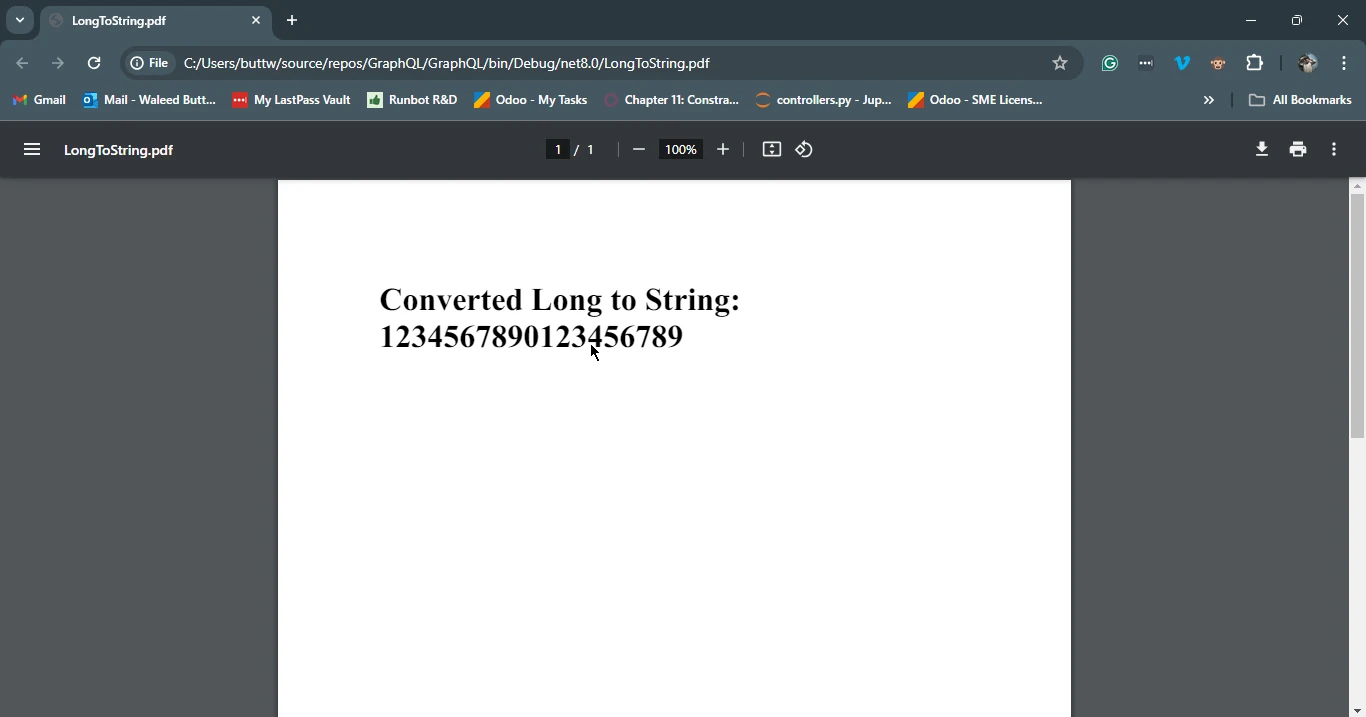
Now that you have a basic understanding of converting long to string, let's see how we can integrate this conversion with IronPDF to create a PDF document.
using IronPdf;

class Program
{
    static void Main()
    {
        long number = 1234567890123456789;
        string strNumber = number.ToString(); // Convert the long number to a string representation

        // Create a new PDF document
        var pdf = new ChromePdfRenderer();

        // HTML content embedded with the converted long to string
        string htmlContent = $"<html><body><h1>Converted Long to String: {strNumber}</h1></body></html>";

        // Convert HTML to PDF using IronPDF
        var pdfDocument = pdf.RenderHtmlAsPdf(htmlContent);

        // Save the PDF to a file named "LongToString.pdf"
        pdfDocument.SaveAs("LongToString.pdf");

        // Open the saved PDF file with the default PDF viewer
        System.Diagnostics.Process.Start("LongToString.pdf");
    }
}Imports IronPdf
Friend Class Program
Shared Sub Main()
Dim number As Long = 1234567890123456789
Dim strNumber As String = number.ToString() ' Convert the long number to a string representation
' Create a new PDF document
Dim pdf = New ChromePdfRenderer()
' HTML content embedded with the converted long to string
Dim htmlContent As String = $"<html><body><h1>Converted Long to String: {strNumber}</h1></body></html>"
' Convert HTML to PDF using IronPDF
Dim pdfDocument = pdf.RenderHtmlAsPdf(htmlContent)
' Save the PDF to a file named "LongToString.pdf"
pdfDocument.SaveAs("LongToString.pdf")
' Open the saved PDF file with the default PDF viewer
System.Diagnostics.Process.Start("LongToString.pdf")
End Sub
End ClassIn this example, we first convert the long number to a string. Then, we create an HTML string that includes this converted number. Next, we use IronPDF's HtmlToPdf functionality to convert this HTML content to a PDF document. Finally, we save the PDF document to a file named "LongToString.pdf" and open it using the default PDF viewer.
Converting a long to a string in C# is a simple yet crucial task that developers often encounter. In this guide, we explored various methods to achieve this conversion, including using ToString(), String.Format(), String.Concat(), StringBuilder, and Convert.ToString(). Each method has its advantages, and the choice depends on your specific requirements and preferences.
By understanding these techniques and tools, you can effectively handle long variable to string conversions in your C# applications and utilize them in more complex tasks, such as generating PDF documents or performing string manipulations. Whether you are a beginner or an experienced developer, having a solid grasp of these fundamentals will enhance your coding skills and enable you to write more efficient and robust C# applications.

Jacob Mellor is Chief Technology Officer at Iron Software and a visionary engineer pioneering C# PDF technology. As the original developer behind Iron Software's core codebase, he has shaped the company's product architecture since its inception, transforming it alongside CEO Cameron Rimington into a 50+ person company serving NASA, Tesla, and global government agencies.



IronPDF is a part of IRONSUITE
10 .NET API products for your office documents











When you need your PDF to look like HTML, fast.


