Para este tutorial, analizaremos cómo extraer texto de documentos PDF (Formato de Documento Portátil) en C# utilizando dos bibliotecas PDF diferentes.
En la era moderna de la web de hoy, hay una serie de bibliotecas que son capaces de extraer texto e imágenes de archivos PDF para su análisis y lectura. Hoy, utilizaremos dos poderosas bibliotecas PDF, IronPDF y QuestPDF, para extraer texto de un archivo PDF. Al comparar cómo estas dos bibliotecas manejan una tarea sencilla de extracción de texto, podemos determinar cuál puede ser más adecuada para manejar tareas avanzadas de PDF. Antes de entrar en la sección de comparación, primero tomemos un momento para ver una breve introducción de cada biblioteca.
QuestPDF
QuestPDF es una biblioteca de generación de PDF de vanguardia y de código abierto, diseñada específicamente para desarrolladores .NET. Utiliza una API declarativa moderna que permite a los usuarios definir y generar diseños de PDF complejos con gran flexibilidad y precisión. Aunque el enfoque principal de QuestPDF es la generación de documentos y no la extracción de texto, proporciona un enfoque limpio e intuitivo para crear documentos desde cero y manipular diferentes elementos dentro del documento. Esto lo hace particularmente adecuado para aplicaciones que requieren contenido PDF personalizado y dinámico.
IronPDF
IronPDF es una versátil biblioteca de procesamiento de PDF diseñada para facilitar y hacer más eficiente el trabajo con PDFs en C#. A diferencia de QuestPDF, IronPDF está específicamente diseñada tanto para la generación como para la manipulación de PDF. Las características que ofrece incluyen cifrado de PDF, extenso soporte para edición y anotación de PDFs existentes, conversión de varios documentos a formato PDF, adición de encabezados y pies de página (que pueden usarse para mostrar números de página), edición de metadatos del documento, soporte para multiprocesamiento y asíncrono, y herramientas avanzadas de conversión de PDF.
Además de su rico conjunto de características, IronPDF proporciona soporte completo multiplataforma, ofreciendo compatibilidad con .NET 5/6/7, .NET Core y .NET Framework. También es totalmente compatible con Windows, macOS, Linux y plataformas en la nube como Azure y AWS, lo que lo convierte en una gran elección para aplicaciones .NET multiplataforma.
Para el ejemplo de hoy, extraeremos texto de nuestro documento de factura de ejemplo en PDF utilizando ambas bibliotecas.
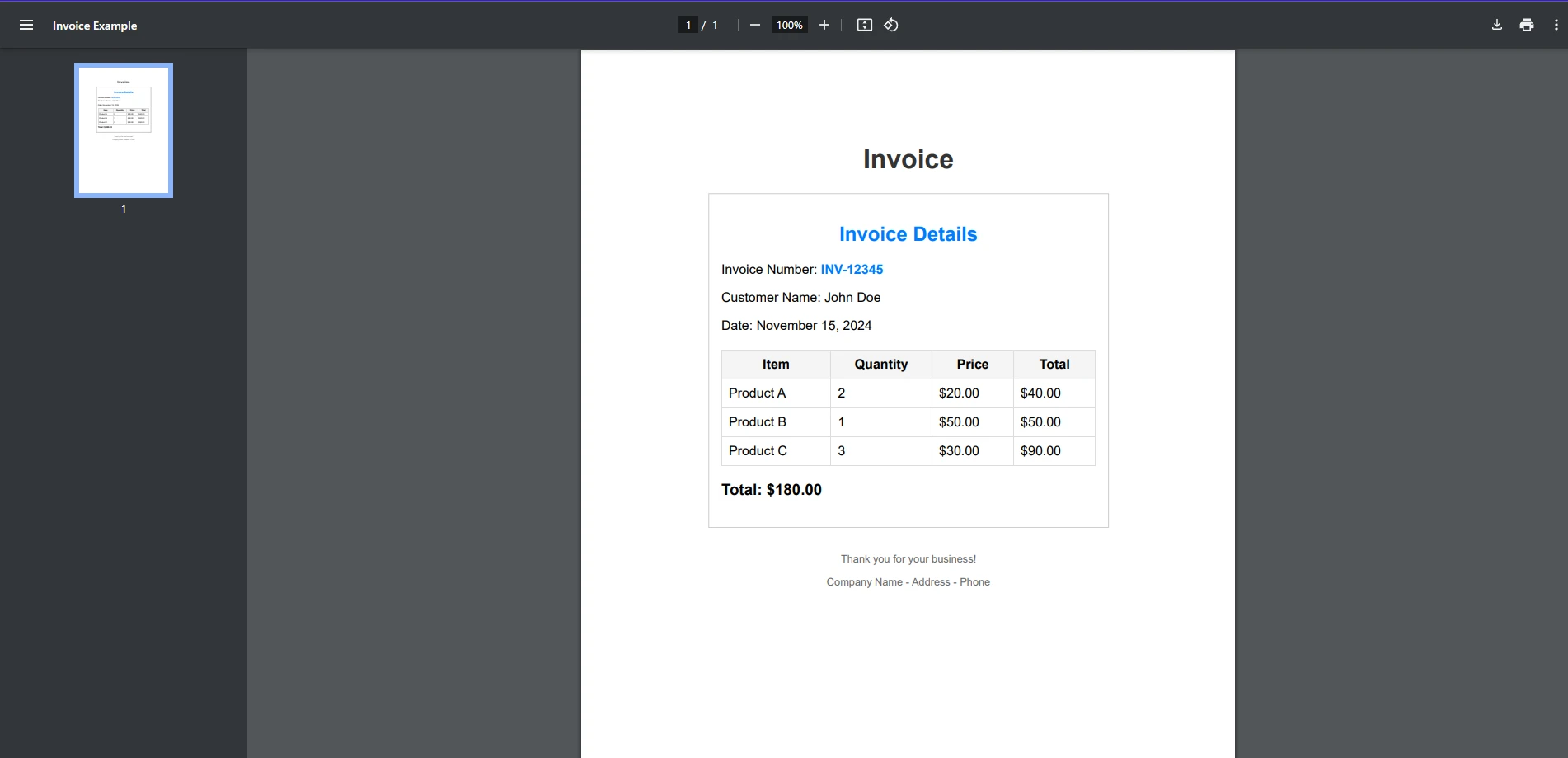
Primero, veremos si QuestPDF puede manejar esta tarea.
Desafortunadamente, aunque QuestPDF sobresale en el manejo de la creación de PDFs y en la realización de ciertas tareas con PDFs, la extracción de texto no está entre sus características actuales. Aunque QuestPDF no está inherentemente diseñado para extraer texto de archivos PDF existentes, proporciona herramientas básicas para trabajar con PDFs, que pueden extenderse para la extracción de texto con lógica adicional o integraciones de terceros. Por ejemplo, QuestPDF podría usarse para generar documentos PDF con contenido estructurado, y podrías implementar una solución personalizada para extraer contenido basado en la estructura del documento utilizando una biblioteca de terceros.
La extracción de texto es solo una de las tareas en las que IronPDF sobresale al trabajar con PDFs. En solo unas pocas líneas de código, podemos extraer texto de un documento PDF completo. Esto se puede ver en el siguiente fragmento de código:
using IronPdf;

public class Program
{
    public static void Main(string[] args)
    {
        // Load the PDF document
        PdfDocument pdf = PdfDocument.FromFile("exampleInvoice.pdf");

        // Extract all the text from the loaded PDF document
        string text = pdf.ExtractAllText();

        // Print the extracted text to the console
        Console.WriteLine(text);
    }
}
using IronPdf;

public class Program
{
    public static void Main(string[] args)
    {
        // Load the PDF document
        PdfDocument pdf = PdfDocument.FromFile("exampleInvoice.pdf");

        // Extract all the text from the loaded PDF document
        string text = pdf.ExtractAllText();

        // Print the extracted text to the console
        Console.WriteLine(text);
    }
}
Imports IronPdf
Public Class Program
Public Shared Sub Main(args As String())
' Load the PDF document
Dim pdf As PdfDocument = PdfDocument.FromFile("exampleInvoice.pdf")
' Extract all the text from the loaded PDF document
Dim text As String = pdf.ExtractAllText()
' Print the extracted text to the console
Console.WriteLine(text)
End Sub
End Class
Imports IronPdf

Public Class Program
    Public Shared Sub Main(args As String())
        ' Load the PDF document
        Dim pdf As PdfDocument = PdfDocument.FromFile("exampleInvoice.pdf")

        ' Extract all the text from the loaded PDF document
        Dim text As String = pdf.ExtractAllText()

        ' Print the extracted text to the console
        Console.WriteLine(text)
    End Sub
End Class
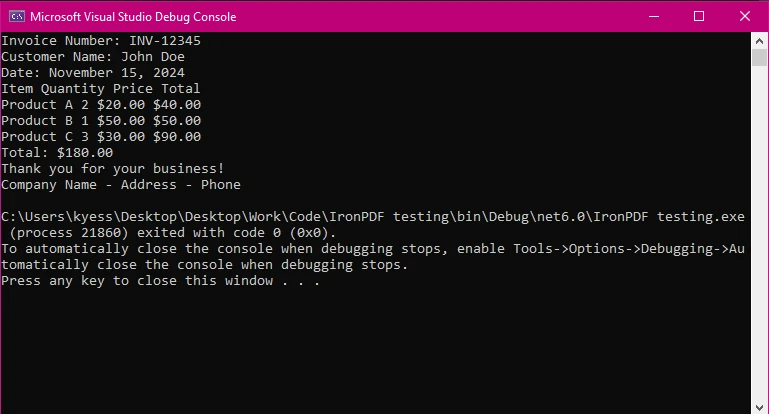
Archivo de salida
Comparación
IronPDF proporciona una API simple para extraer texto, lo que lo hace ideal para desarrolladores enfocados en la eficiencia. En solo tres líneas, pudimos extraer el contenido de texto dentro de nuestro documento PDF y mostrarlo para ser leído. Desde aquí, podrías fácilmente guardar el texto extraído para su uso o manipulación futura.
QuestPDF, por otro lado, no pudo manejar una tarea como la extracción de texto, debido a un número más limitado de características en comparación con bibliotecas como IronPDF. Aunque puede manejar otras tareas como la generación de PDFs y la manipulación básica, necesitarías implementar bibliotecas externas para extraer texto.
Conclusión
Cuando se trata de extraer texto, QuestPDF es gratuito a través del uso de su licencia comunitaria para proyectos privados, pero también tiene la opción de licencias comerciales.
Ambas bibliotecas son precisas y confiables, pero la elección depende en última instancia de los requisitos de tu proyecto.
Para una comparación más profunda de estas bibliotecas, consulta el blog completo en IronPDF vs QuestPDF.
QuestPDF es una marca registrada de su respectivo dueño. Este sitio no está afiliado, respaldado o patrocinado por QuestPDF. Todos los nombres de producto, logotipos y marcas son propiedad de sus respectivos dueños. Las comparaciones son solo para fines informativos y reflejan información públicamente disponible en el momento de la redacción.























