



更新日 2026年8月16日
How to Sign a PDF on iPhone: Every Method Explained (2026)
Need to add your signature to a PDF from your iPhone? Learn every method, from the built-in Markup tool in Files to dedicated e-signature apps, no download required.
詳しく読む

PDF(ポータブル・ドキュメント・フォーマット)ファイルは広く文書交換に使用されており、プログラムによってその内容を読み取ることができることは、様々なアプリケーションにおいて価値があります。 C++でPDFを読むために利用可能なライブラリには、Poppler、MuPDF、Haru無償PDFライブラリ、Xpdf、およびQpdfがあります。
この記事では、Xpdfコマンドラインツールを使用してC++でPDFファイルを読む方法を探ります。 Xpdfは、PDFファイルの作業に便利なユーティリティを幅広く提供しており、テキストコンテンツを抽出することができます。 C++プログラムにXpdfを統合することにより、PDFファイルからテキストを抽出し、プログラムによって処理することができます。
Xpdfは、PDF(ポータブル・ドキュメント・フォーマット)ファイル用のツールとライブラリのコレクションを提供するオープンソースソフトウェアスイートです。 Xpdfスイートには、様々なPDF関連機能を実現するコマンドラインユーティリティとC++ライブラリが含まれており、解析、レンダリング、テキスト抽出などが可能です。 Xpdfの主要なコンポーネントには、pdfimages、pdftops、pdfinfo、およびpdftotextがあります。 ここでは、pdftotextを使用してPDFドキュメントを読み取ります。
pdftotextは、PDFファイルからテキスト内容を抽出し、それをプレーンテキストとして出力するコマンドラインツールです。 このツールは、PDFからテキスト情報を抽出してさらに処理や分析する必要がある場合に特に役立ちます。 オプションを使用すると、テキストを抽出するページやページの指定もできます。
テキストを抽出するPDFリーダープロジェクトを作成するには、次の前提条件を整える必要があります。
まず、必要なヘッダーファイルをmain.cppファイルの先頭に追加しましょう。
#include <cstdlib>  // For system call
#include <iostream> // For basic input and output
#include <fstream> // For file stream operationsPDFドキュメントからテキストコンテンツを抽出するために、Xpdfコマンドラインツールを呼び出すC++コードを書きましょう。 次のinput.pdfファイルを使用します。
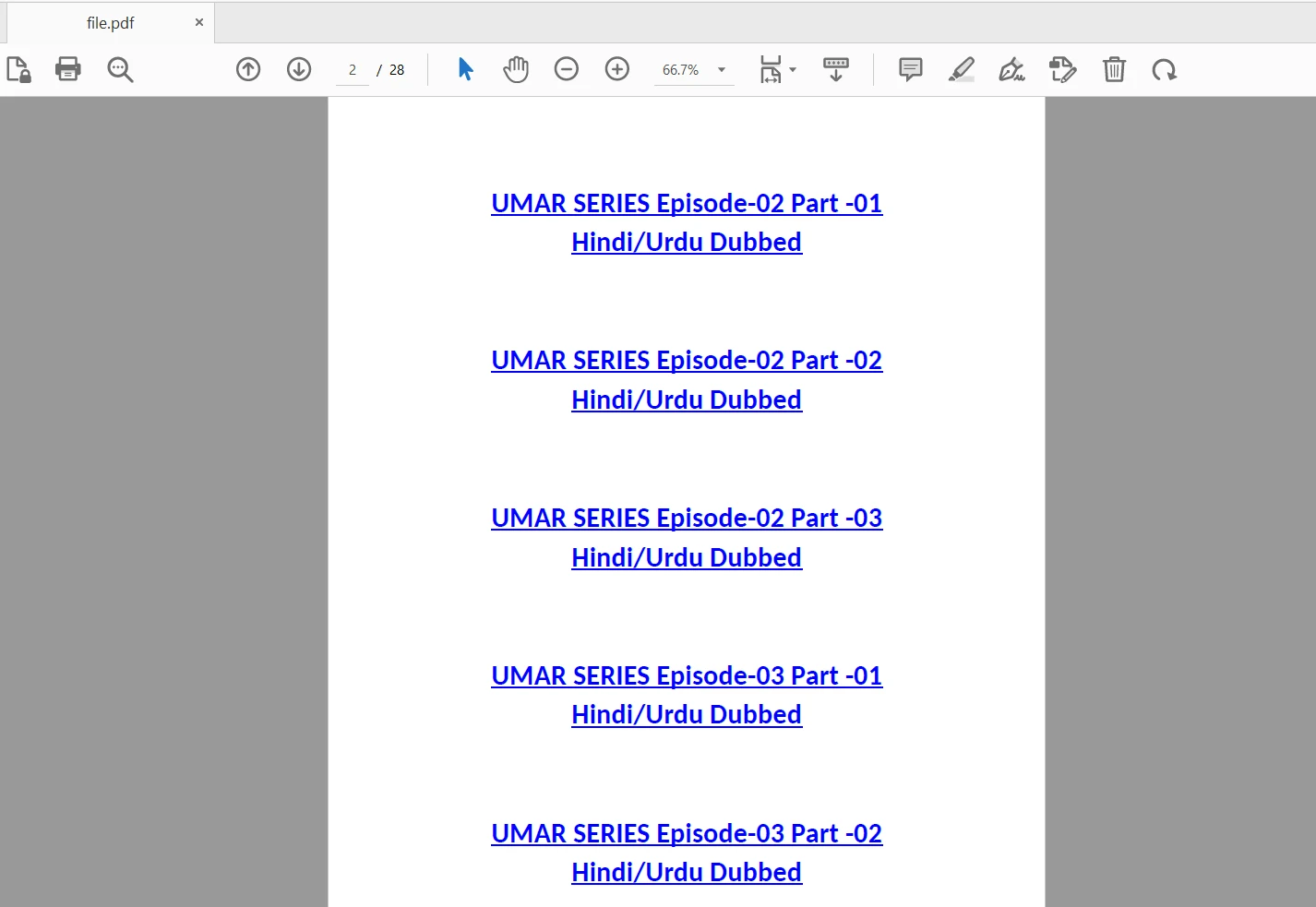
コード例は次のとおりです:
#include <cstdlib>
#include <iostream>
#include <fstream>

using namespace std;

int main() {
    // Specify the input and output file paths
    string pdfPath = "input.pdf";
    string outputFilePath = "output.txt";

    // Construct the command to run pdftotext
    string command = "pdftotext " + pdfPath + " " + outputFilePath;
    int status = system(command.c_str());

    // Check if the command executed successfully
    if (status == 0) {
        cout << "Text extraction successful." << endl;
    } else {
        cout << "Text extraction failed." << endl;
        return 1; // Exit the program with error code
    }

    // Open the output file to read the extracted text
    ifstream outputFile(outputFilePath);
    if (outputFile.is_open()) {
        string textContent;
        string line;
        while (getline(outputFile, line)) {
            textContent += line + "\n"; // Append each line to the textContent
        }
        outputFile.close();

        // Display the extracted text
        cout << "Text content extracted from PDF document:" << endl;
        cout << textContent << endl;
    } else {
        cout << "Failed to open output file." << endl;
        return 1; // Exit the program with error code
    }

    return 0; // Exit the program successfully
}上記のコードでは、入力PDFファイルへのパスを保持するpdfPath変数を定義しています。実際の入力PDFドキュメントへの適切なパスで置き換えてください。
また、Xpdfによって生成される出力テキストファイルへのパスを保持するoutputFilePath変数も定義しています。
コードはpdftotextコマンドを実行し、入力PDFファイルパスと出力テキストファイルパスをコマンドライン引数として渡します。 status変数はコマンドの終了ステータスをキャプチャします。
ifstreamを使って出力テキストファイルを開きます。 その後、テキスト内容を行ごとに読み取り、textContent文字列に格納します。
最終的に、生成された出力ファイルからコンソールに抽出されたテキストコンテンツを出力します。 編集可能な出力テキストファイルが不要な場合やディスクスペースを解放したい場合、プログラムの最後にmain関数を終了する前に、次のコマンドを使用してそれを削除します:
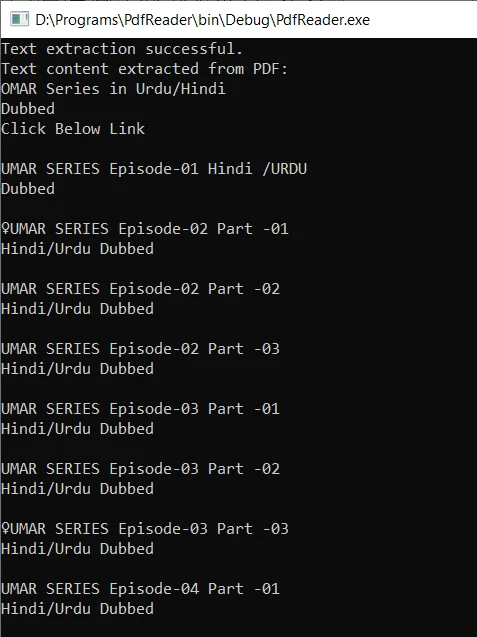
remove(outputFilePath.c_str());C++コードをコンパイルし、実行可能ファイルを実行します。 もしpdftotextが環境変数システムパスに追加されている場合、そのコマンドは正常に実行されます。 プログラムは出力テキストファイルを生成し、PDFドキュメントからテキストコンテンツを抽出します。 抽出されたテキストはその後コンソールに表示されます。
IronPDFは、PDFドキュメントの操作に強力な機能を提供する人気のC# PDFライブラリです。 開発者がプログラムでPDFファイルを作成、編集、変更、および読み取ることを可能にします。
IronPDFライブラリを使用してPDF文書を読むことは、簡単なプロセスです。 ライブラリは様々なメソッドとプロパティを提供しており、開発者がPDFページからテキスト、画像、メタデータ、その他のデータを抽出することを可能にします。 抽出された情報はアプリケーション内でのさらなる処理、分析、または表示に使用できます。
次に示すコード例では、IronPDFを使ってPDFファイルを読みます:
// Import necessary namespaces
using IronPdf; // For PDF functionalities
using IronSoftware.Drawing; // For handling images
using System.Collections.Generic; // For using the List

// Example of extracting text and images from PDF using IronPDF

// Open a 128-bit encrypted PDF
var pdf = PdfDocument.FromFile("encrypted.pdf", "password");

// Get all text from the PDF
string text = pdf.ExtractAllText();

// Extract all images from the PDF
var allImages = pdf.ExtractAllImages();

// Iterate over each page to extract text and images
for (var index = 0; index < pdf.PageCount; index++) {
    int pageNumber = index + 1;
    text = pdf.ExtractTextFromPage(index);
    List<AnyBitmap> images = pdf.ExtractBitmapsFromPage(index);
    // Perform actions with text and images...
}' Import necessary namespaces
Imports IronPdf ' For PDF functionalities
Imports IronSoftware.Drawing ' For handling images
Imports System.Collections.Generic ' For using the List
' Example of extracting text and images from PDF using IronPDF
' Open a 128-bit encrypted PDF
Private pdf = PdfDocument.FromFile("encrypted.pdf", "password")
' Get all text from the PDF
Private text As String = pdf.ExtractAllText()
' Extract all images from the PDF
Private allImages = pdf.ExtractAllImages()
' Iterate over each page to extract text and images
For index = 0 To pdf.PageCount - 1
Dim pageNumber As Integer = index + 1
text = pdf.ExtractTextFromPage(index)
Dim images As List(Of AnyBitmap) = pdf.ExtractBitmapsFromPage(index)
' Perform actions with text and images...
Next indexPDFドキュメントの読み取り方法の詳細な情報については、IronPDF C# PDFリーディングガイドをご覧ください。
この記事では、Xpdfコマンドラインツールを使用してC++でPDFドキュメントの内容を読む方法を学びました。 XpdfをC++プログラムに統合することで、PDFファイルからテキストコンテンツをプログラムで数秒で抽出できます。 このアプローチにより、C++アプリケーション内で抽出されたテキストを処理および分析することが可能になります。
IronPDFは、PDFファイルを読み取りおよび操作することを容易にする強力なC#ライブラリです。 その広範な機能、使いやすさ、および信頼性の高いレンダリングエンジンにより、C#プロジェクトでPDFドキュメントを扱う開発者に人気のある選択肢となっています。
IronPDFは開発のために無料であり、商業利用のための無償試用版を提供しています。 これを超えた場合は、商業目的で使用するためにライセンスを取得する必要があります。

Curtis Chauは、カールトン大学でコンピュータサイエンスの学士号を取得し、Node.js、TypeScript、JavaScript、およびReactに精通したフロントエンド開発を専門としています。直感的で美しいユーザーインターフェースを作成することに情熱を持ち、Curtisは現代のフレームワークを用いた開発や、構造の良い視覚的に魅力的なマニュアルの作成を楽しんでいます。

IronPDF はIRONSUITEの一部です
オフィス文書向けの.NET API製品10個

PDFがHTMLのように見える必要があるとき、迅速に。












