워터마크 추가는 문서 보안, 브랜딩 및 버전 제어를 위한 일반적인 요구 사항입니다. 문서를 기밀로 표시하거나, 공식 보고서를 브랜딩하거나, 무단 복제를 방지할 때 워터마크는 필수 기능입니다.
C#에서는 개발자가 다양한 라이브러리를 선택할 수 있으며, IronPDF와 PDFSharp는 가장 인기 있는 두 가지 옵션입니다. 그러나 이들의 접근 방식, 사용의 용이성, 성능 및 라이센스 구조는 크게 다릅니다. 이 문서는 기존 PDF에 워터마크를 추가하기 위한 IronPDF와 PDFSharp의 상세한 비교를 제공하여, 기능, 구현 프로세스 및 맞춤화 기능에 대한 통찰을 제공합니다.
이 비교에서는 두 라이브러리의 워터마킹 API를 실제 작동 코드 예제와 함께 다루므로, 어떤 라이브러리가 프로젝트 요구 사항에 더 적합한지 평가할 수 있습니다.
PDF 워터마크 이해하기
워터마크란?
워터마크는 문서에 식별자, 억제 또는 브랜딩 요소로 작용하는 그래픽 또는 텍스트 오버레이입니다. 워터마크는 목적에 따라 보이거나 보이지 않을 수 있으며, 문서 주석에 사용되는 텍스트 및 이미지 스탬프 와 밀접한 관련이 있습니다.
워터마크의 유형
- 텍스트 워터마크 – 일반적으로 '기밀' 또는 '초안' 같은 메시지가 포함된 반투명 오버레이.
- 이미지 워터마크 – 문서에 삽입된 로고, 배지 또는 그래픽.
- 투명 워터마크 – 문서의 가독성을 방해하지 않는 미묘한 브랜딩 마크.
- 스탬프 워터마크 – 가시성을 보장하는 더 두드러진 굵은 표시.
일반 사용 사례
- 보안 및 보호 – 문서를 소유물로 표시하여 무단 복제를 방지.
- 브랜딩 – 문서 전반에 걸쳐 브랜드 일관성을 유지하기 위한 회사 로고나 서명 추가.
- 버전 제어 – 초안, 최종 버전 또는 문서 수정본에 레이블 지정.
IronPDF와 PDFSharp는 무엇입니까?
IronPDF
IronPDF 는 PDF 생성 부터 고급 조작 작업에 이르기까지 PDF 처리를 간소화하도록 설계된 프리미엄급의 기능이 풍부한 .NET 라이브러리입니다. 특히 워터마크를 포함한 PDF 조작 작업의 쉬운 구현을 찾는 개발자에게 유용합니다.
주요 기능:
- 최소한의 코드가 필요한 간단하고 직관적인 API.
- 사용자 정의 옵션이 있는 텍스트 및 이미지 워터마크 지원.
- 정확한 배치를 위한 불투명도 제어, 위치 조정 및 회전 가능.
- .NET 6+, .NET Core 및 .NET Framework와 호환 가능.
- 장기 사용을 위한 영구 라이센스 모델로 제공됨.
- 추가 기능으로는 PDF 주석, HTML을 PDF로 변환, 전자 서명 등이 포함됩니다.
PDFSharp
PDFSharp은 개발자가 C#에서 PDF를 생성, 편집 및 조작할 수 있게 해주는 오픈 소스 라이브러리입니다. 현재 PDFSharp를 사용 중이며 전환을 고려하고 있다면, PDFSharp에서 IronPDF로의 마이그레이션 가이드가 전환 과정을 안내합니다. 이 프로그램은 그리기 작업에 대한 세밀한 제어 기능을 제공하지만, 워터마킹은 IronPDF의 추상화된 접근 방식보다 수동 구현이 더 많이 필요합니다.
주요 기능:
- 무료 및 오픈 소스로 예산에 민감한 프로젝트에 비용 효율적.
- 테두리가 있는 그래픽 경로와 투명한 그래픽 경로 모두에 대한 PDF 드로잉 작업에 대한 저수준 제어 제공.
- 텍스트와 이미지 워터마크를 모두 지원하지만 변환에 대한 추가 코드가 필요합니다.
- .NET Framework 및 .NET Core(비아 PDFSharpCore)에서 작동합니다.
- 고수준 워터마킹 기능이 내장되어 있지 않습니다. 개발자는 투명도 및 회전과 같은 기능을 드로잉 API를 통해 직접 구현합니다.
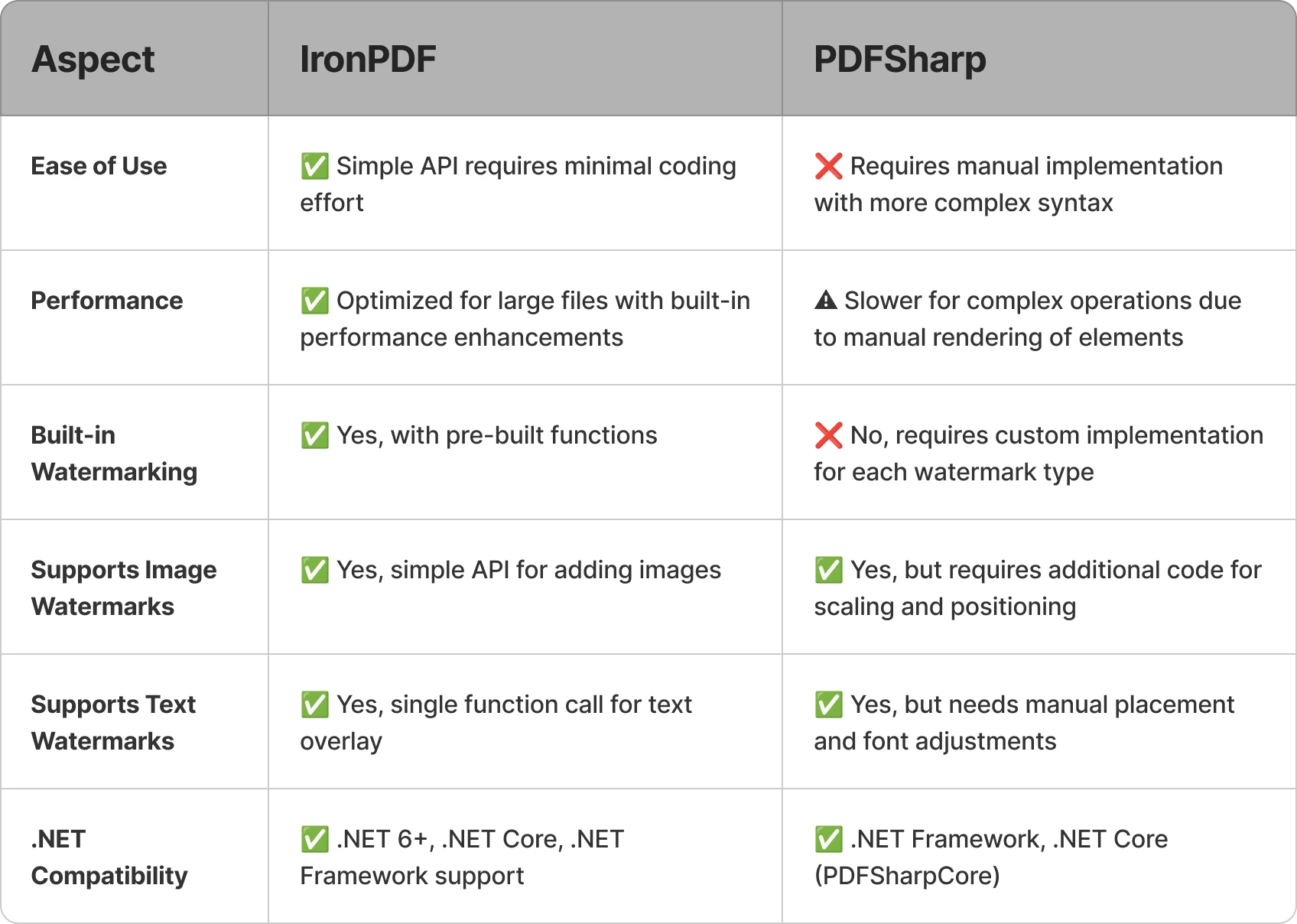
다음은 두 라이브러리의 워터마킹 작업 성능을 비교한 간단한 요약입니다.
IronPDF의 [30일 무료 체험판](trial-license에는 아래 예제에 사용된 전체 워터마킹 API가 포함되어 있습니다.
IronPDF로 워터마크 추가하기
IronPDF 개발자가 수동 좌표 계산이나 그래픽 파이프라인 설정 없이 단 몇 줄의 코드로 워터마크를 적용 할 수 있도록 하는 고급 API를 제공합니다. IronPDF의 워터마크 도구는 라이브러리 전체에서 사용되는 Chromium 기반 HTML 렌더링 엔진을 활용하여 HTML/CSS 문자열을 허용하므로, 익숙한 웹 마크업을 사용하여 스타일, 위치 및 모양을 완벽하게 제어할 수 있습니다.
텍스트 워터마크 예시
using IronPdf;

const string filename = "existing.pdf";
// Load the existing PDF file
PdfDocument pdf = PdfDocument.FromFile(filename);

// Create a simple HTML-based watermark
string watermark = "<h1 style='color:red'>Confidential!</h1>";

// Apply the watermark to the PDF
pdf.ApplyWatermark(watermark);

// Save the updated document with the applied watermark
pdf.SaveAs("watermarked.pdf");
using IronPdf;

const string filename = "existing.pdf";
// Load the existing PDF file
PdfDocument pdf = PdfDocument.FromFile(filename);

// Create a simple HTML-based watermark
string watermark = "<h1 style='color:red'>Confidential!</h1>";

// Apply the watermark to the PDF
pdf.ApplyWatermark(watermark);

// Save the updated document with the applied watermark
pdf.SaveAs("watermarked.pdf");
Imports IronPdf
Private Const filename As String = "existing.pdf"
' Load the existing PDF file
Private pdf As PdfDocument = PdfDocument.FromFile(filename)
' Create a simple HTML-based watermark
Private watermark As String = "<h1 style='color:red'>Confidential!</h1>"
' Apply the watermark to the PDF
pdf.ApplyWatermark(watermark)
' Save the updated document with the applied watermark
pdf.SaveAs("watermarked.pdf")
Imports IronPdf

Private Const filename As String = "existing.pdf"
' Load the existing PDF file
Private pdf As PdfDocument = PdfDocument.FromFile(filename)

' Create a simple HTML-based watermark
Private watermark As String = "<h1 style='color:red'>Confidential!</h1>"

' Apply the watermark to the PDF
pdf.ApplyWatermark(watermark)

' Save the updated document with the applied watermark
pdf.SaveAs("watermarked.pdf")
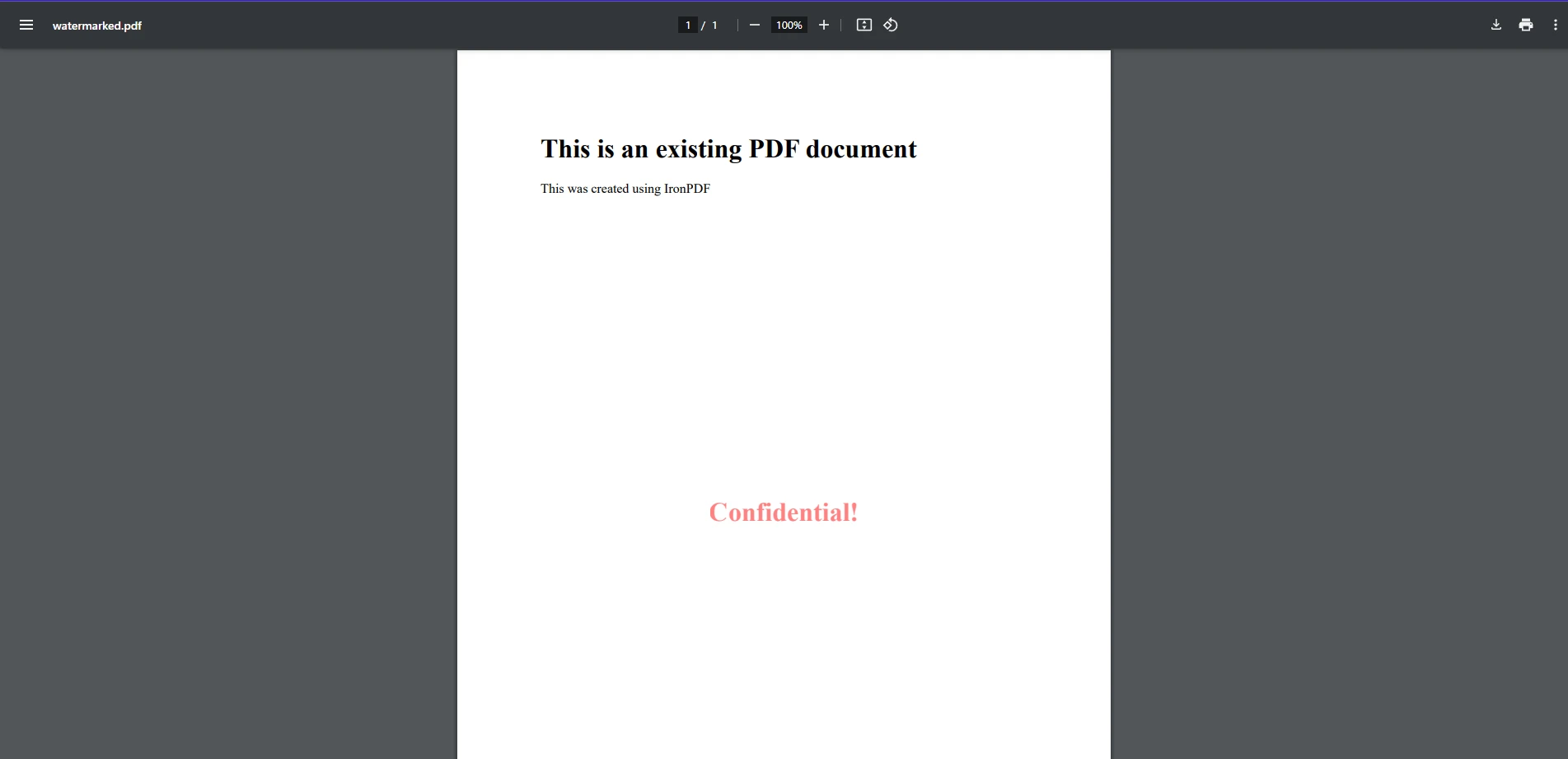
이 코드 예제에서는 IronPDF를 사용하여 기존의 PDF 파일에 워터마크를 얼마나 쉽게 적용할 수 있는지 확인할 수 있습니다. 여기서 기존 PDF를 FromFile 방법을 사용하여 로드합니다. 그런 다음 HTML 요소로 형식화된 간단한 문자열을 워터마크로 작성하고 ApplyWatermark를 사용하여 PDF에 적용합니다. 이는 HTML을 사용하여 PDF를 처음부터 생성하는 방식과 유사합니다. 출력 이미지에서 보이듯이, 우리의 PDF에 '비밀'이라는 간단한 텍스트 문자열이 워터마크로 추가되었습니다.
이미지 워터마크 예시
using IronPdf;

// Load the PDF document
PdfDocument pdf = PdfDocument.FromFile("existing.pdf");

// Create an HTML-based watermark containing the image
string watermark = "<img src='https://ironsoftware.com/img/products/ironpdf-logo-text-dotnet.svg'>";

// Apply the watermark to the PDF with rotation and opacity
pdf.ApplyWatermark(watermark, rotation: 45, opacity: 80);

// Save the watermarked document
pdf.SaveAs("watermarked.pdf");
using IronPdf;

// Load the PDF document
PdfDocument pdf = PdfDocument.FromFile("existing.pdf");

// Create an HTML-based watermark containing the image
string watermark = "<img src='https://ironsoftware.com/img/products/ironpdf-logo-text-dotnet.svg'>";

// Apply the watermark to the PDF with rotation and opacity
pdf.ApplyWatermark(watermark, rotation: 45, opacity: 80);

// Save the watermarked document
pdf.SaveAs("watermarked.pdf");
Imports IronPdf
' Load the PDF document
Private pdf As PdfDocument = PdfDocument.FromFile("existing.pdf")
' Create an HTML-based watermark containing the image
Private watermark As String = "<img src='https://ironsoftware.com/img/products/ironpdf-logo-text-dotnet.svg'>"
' Apply the watermark to the PDF with rotation and opacity
pdf.ApplyWatermark(watermark, rotation:= 45, opacity:= 80)
' Save the watermarked document
pdf.SaveAs("watermarked.pdf")
Imports IronPdf

' Load the PDF document
Private pdf As PdfDocument = PdfDocument.FromFile("existing.pdf")

' Create an HTML-based watermark containing the image
Private watermark As String = "<img src='https://ironsoftware.com/img/products/ironpdf-logo-text-dotnet.svg'>"

' Apply the watermark to the PDF with rotation and opacity
pdf.ApplyWatermark(watermark, rotation:= 45, opacity:= 80)

' Save the watermarked document
pdf.SaveAs("watermarked.pdf")
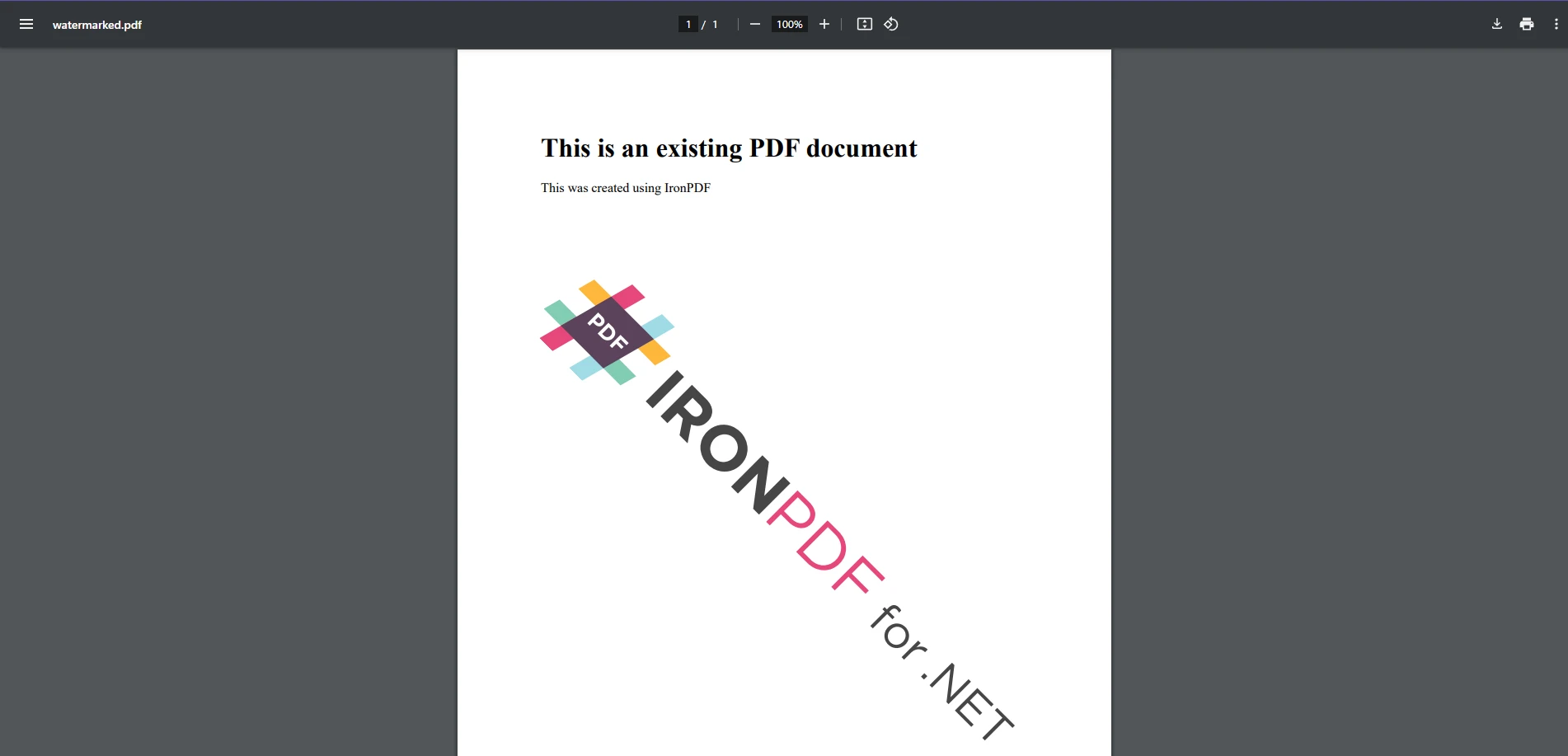
이미지를 워터마크로 추가하는 것은 텍스트를 추가하는 것만큼 쉽습니다. 둘 다 동일한 방법을 사용합니다. 텍스트 예제처럼 우리는 이미지 URL을 가리키는 HTML 이미지 태그를 포함하는 새로운 워터마크 문자열 변수를 생성하고 이를 적용합니다. 이번에는 IronPDF의 렌더링 옵션 매개변수를 통해 사용자 지정 회전 및 투명도 변환을 포함합니다.
이 접근법은 이미지를 지정 위치에 워터마크로 겹쳐놓으며, 사용자 정의 위치 및 투명성을 허용합니다.
PDFSharp로 워터마크 추가하기
PDFSharp은 개발자가 GDI+ 드로잉 API를 사용하여 텍스트 및 이미지를 수동으로 렌더링해야 합니다. 기존의 PDF 파일에 워터마크를 추가하려면 그리기를 위한 XGraphics 객체를 생성하고 원하는 콘텐츠를 적용합니다.
텍스트 워터마크 예시
using PdfSharp.Pdf;
using PdfSharp.Drawing;
using PdfSharp.Pdf.IO;

const string filename = "existing.pdf";
// Open the PDF document in modify mode
var document = PdfReader.Open(filename, PdfDocumentOpenMode.Modify);

foreach (var page in document.Pages)
{
    // Create an XGraphics object for drawing
    var gfx = XGraphics.FromPdfPage(page);

    // Move the origin to the center of the page for rotation purposes
    gfx.TranslateTransform(page.Width / 2, page.Height / 2);

    // Rotate for diagonal watermark placement
    gfx.RotateTransform(Math.Atan(page.Height / page.Width));

    // Define font and brush for drawing the watermark text
    var font = new XFont("Arial", 40);
    var brush = new XSolidBrush(XColor.FromArgb(128, XColors.Red));  // Semi-transparent red

    // Draw the watermark text centered on the page
    gfx.DrawString("WATERMARK", font, brush, new XPoint(0, 0));
}

// Save modified document
document.Save("watermarked.pdf");
using PdfSharp.Pdf;
using PdfSharp.Drawing;
using PdfSharp.Pdf.IO;

const string filename = "existing.pdf";
// Open the PDF document in modify mode
var document = PdfReader.Open(filename, PdfDocumentOpenMode.Modify);

foreach (var page in document.Pages)
{
    // Create an XGraphics object for drawing
    var gfx = XGraphics.FromPdfPage(page);

    // Move the origin to the center of the page for rotation purposes
    gfx.TranslateTransform(page.Width / 2, page.Height / 2);

    // Rotate for diagonal watermark placement
    gfx.RotateTransform(Math.Atan(page.Height / page.Width));

    // Define font and brush for drawing the watermark text
    var font = new XFont("Arial", 40);
    var brush = new XSolidBrush(XColor.FromArgb(128, XColors.Red));  // Semi-transparent red

    // Draw the watermark text centered on the page
    gfx.DrawString("WATERMARK", font, brush, new XPoint(0, 0));
}

// Save modified document
document.Save("watermarked.pdf");
Imports PdfSharp.Pdf
Imports PdfSharp.Drawing
Imports PdfSharp.Pdf.IO
Private Const filename As String = "existing.pdf"
' Open the PDF document in modify mode
Private document = PdfReader.Open(filename, PdfDocumentOpenMode.Modify)
For Each page In document.Pages
' Create an XGraphics object for drawing
Dim gfx = XGraphics.FromPdfPage(page)
' Move the origin to the center of the page for rotation purposes
gfx.TranslateTransform(page.Width \ 2, page.Height \ 2)
' Rotate for diagonal watermark placement
gfx.RotateTransform(Math.Atan(page.Height \ page.Width))
' Define font and brush for drawing the watermark text
Dim font = New XFont("Arial", 40)
Dim brush = New XSolidBrush(XColor.FromArgb(128, XColors.Red)) ' Semi-transparent red
' Draw the watermark text centered on the page
gfx.DrawString("WATERMARK", font, brush, New XPoint(0, 0))
Next page
' Save modified document
document.Save("watermarked.pdf")
Imports PdfSharp.Pdf
Imports PdfSharp.Drawing
Imports PdfSharp.Pdf.IO

Private Const filename As String = "existing.pdf"
' Open the PDF document in modify mode
Private document = PdfReader.Open(filename, PdfDocumentOpenMode.Modify)

For Each page In document.Pages
	' Create an XGraphics object for drawing
	Dim gfx = XGraphics.FromPdfPage(page)

	' Move the origin to the center of the page for rotation purposes
	gfx.TranslateTransform(page.Width \ 2, page.Height \ 2)

	' Rotate for diagonal watermark placement
	gfx.RotateTransform(Math.Atan(page.Height \ page.Width))

	' Define font and brush for drawing the watermark text
	Dim font = New XFont("Arial", 40)
	Dim brush = New XSolidBrush(XColor.FromArgb(128, XColors.Red)) ' Semi-transparent red

	' Draw the watermark text centered on the page
	gfx.DrawString("WATERMARK", font, brush, New XPoint(0, 0))
Next page

' Save modified document
document.Save("watermarked.pdf")
이 구현 방식은 명시적인 좌표 기반 위치 지정을 통해 각 페이지에 워터마크를 그립니다.IronPDF예제와 유사한 출력을 생성하지만, PDFSharp의 접근 방식은 더 많은 코드를 포함합니다. IronPDF의 텍스트 워터마크는 약 4개의 활성 행만 필요로 하는 반면, PDFSharp은 레이아웃 결정(transformation, rotation, font selection)을 개발자에게 맡기기 때문에 10개가 필요합니다.
이미지 워터마크 예시
using PdfSharp.Pdf;
using PdfSharp.Drawing;
using PdfSharp.Pdf.IO;

// Open the existing PDF document in modify mode
var document = PdfReader.Open("sample.pdf", PdfDocumentOpenMode.Modify);

// Load the watermark image
XImage watermark = XImage.FromFile("watermark.png");

foreach (var page in document.Pages)
{
    // Create a graphics object from the page
    XGraphics gfx = XGraphics.FromPdfPage(page);

    // Draw the image watermark at the specified position and size
    gfx.DrawImage(watermark, 50, 100, watermark.PixelWidth / 2, watermark.PixelHeight / 2);
}

// Save the modified PDF document
document.Save("watermarked.pdf");
using PdfSharp.Pdf;
using PdfSharp.Drawing;
using PdfSharp.Pdf.IO;

// Open the existing PDF document in modify mode
var document = PdfReader.Open("sample.pdf", PdfDocumentOpenMode.Modify);

// Load the watermark image
XImage watermark = XImage.FromFile("watermark.png");

foreach (var page in document.Pages)
{
    // Create a graphics object from the page
    XGraphics gfx = XGraphics.FromPdfPage(page);

    // Draw the image watermark at the specified position and size
    gfx.DrawImage(watermark, 50, 100, watermark.PixelWidth / 2, watermark.PixelHeight / 2);
}

// Save the modified PDF document
document.Save("watermarked.pdf");
Imports PdfSharp.Pdf
Imports PdfSharp.Drawing
Imports PdfSharp.Pdf.IO
' Open the existing PDF document in modify mode
Private document = PdfReader.Open("sample.pdf", PdfDocumentOpenMode.Modify)
' Load the watermark image
Private watermark As XImage = XImage.FromFile("watermark.png")
For Each page In document.Pages
' Create a graphics object from the page
Dim gfx As XGraphics = XGraphics.FromPdfPage(page)
' Draw the image watermark at the specified position and size
'INSTANT VB WARNING: Instant VB cannot determine whether both operands of this division are integer types - if they are then you should use the VB integer division operator:
gfx.DrawImage(watermark, 50, 100, watermark.PixelWidth / 2, watermark.PixelHeight / 2)
Next page
' Save the modified PDF document
document.Save("watermarked.pdf")
Imports PdfSharp.Pdf
Imports PdfSharp.Drawing
Imports PdfSharp.Pdf.IO

' Open the existing PDF document in modify mode
Private document = PdfReader.Open("sample.pdf", PdfDocumentOpenMode.Modify)

' Load the watermark image
Private watermark As XImage = XImage.FromFile("watermark.png")

For Each page In document.Pages
	' Create a graphics object from the page
	Dim gfx As XGraphics = XGraphics.FromPdfPage(page)

	' Draw the image watermark at the specified position and size
'INSTANT VB WARNING: Instant VB cannot determine whether both operands of this division are integer types - if they are then you should use the VB integer division operator:
	gfx.DrawImage(watermark, 50, 100, watermark.PixelWidth / 2, watermark.PixelHeight / 2)
Next page

' Save the modified PDF document
document.Save("watermarked.pdf")
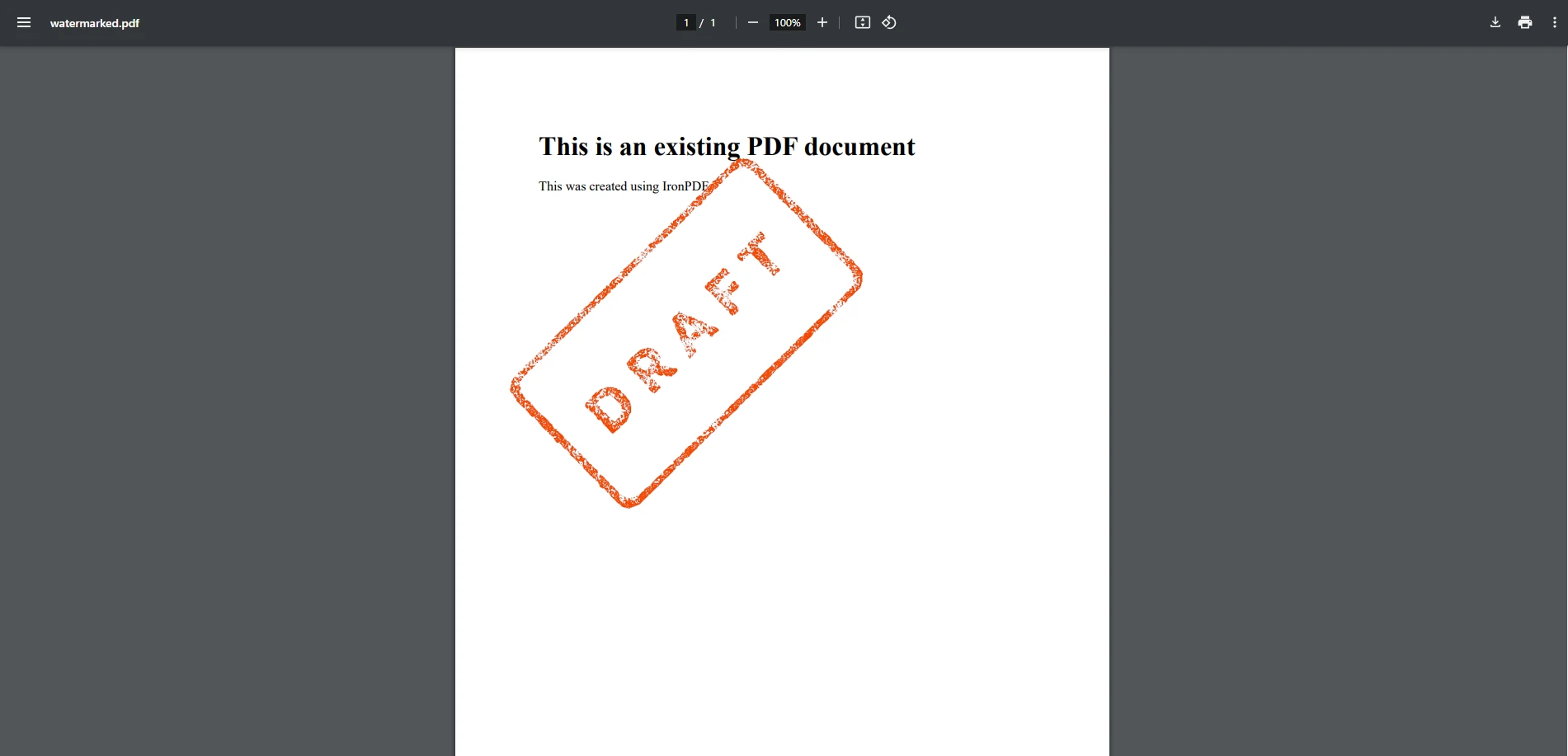
이 방법은 고정된 위치와 크기에 이미지 워터마크를 배치합니다. 불투명도 처리는 PDFSharp의 단일 호출 API 표면에 포함되지 않으며, 투명성 제어가 필요한 개발자는 직접 XGraphics 파이프라인을 통해 관리해야 합니다. 텍스트 워터마크 예제처럼, PDFSharp은 IronPDF의 고급 워터마킹 API에 비해 추가 설정이 필요하지만 렌더링에 대한 세밀한 제어를 제공합니다.
IronPDF와 PDFSharp의 워터마킹 비교하기
사용의 용이성
- IronPDF: 최소한의 코드로 워터마킹을 간단하게 하는 고수준 기능을 제공합니다. 복잡한 작업을 추상화하여, 빠르고 효율적인 솔루션이 필요한 개발자에게 이상적입니다.
- PDFSharp: 그래픽 API를 사용한 수동 구현이 필요하여 복잡성과 개발 시간 증가. 렌더링에 대해 세밀한 제어가 필요하고 추가 코딩에 익숙한 개발자에게 더 적합합니다.
성능
- IronPDF: 단일 NuGet 패키지로 제공되며, 불투명도, 회전 및 위치 지정을 하나의 메서드 호출로 처리하는 워터마크 작업이 포함되어 있어 여러 페이지로 구성된 문서에 워터마크를 적용할 때 페이지별 처리 오버헤드를 줄입니다. 대규모 워크플로의 경우 IronPDF 성능 최적화 가이드를 참조하십시오.
- PDFSharp: 가볍고 의존성 사용량이 적습니다. 페이지당 여러 변환을 포함한 복잡한 워터마킹 작업에 대해, 개발자는 드로잉 로직을 프로파일링하고 최적화해야 할 수 있으며, 이는 PDFSharp이 이러한 작업을 내부적으로 일괄 처리하지 않기 때문입니다.
사용자 정의 옵션
- IronPDF: 불투명도, 회전, 위치 및 글꼴 크기 조정을 위한 지원이 내장되어 있습니다. 사용자는 복잡한 렌더링 논리에 들어가지 않고 설정을 쉽게 조정할 수 있습니다.
- PDFSharp: 불투명도, 투명 효과 및 변환 처리를 위한 추가 코딩이 필요합니다. 강력하지만
var 형식을 사용하여 특정 렌더링 작업을 수행해야 하는 등 개발자로부터 더 높은 수준의 맞춤화를 요구합니다.
호환성
- IronPDF: .NET 6+, .NET Core 및 .NET Framework와 완벽히 호환되어 최신 및 레거시 애플리케이션에 적합합니다.
- PDFSharp: .NET Framework 및 .NET Core (PDFSharpCore를 통해)를 지원합니다. 선택한 커뮤니티 포트에 따라 일부 최신 프레임워크 기능은 현재 지원 범위에서 제외될 수 있습니다.
라이선스 및 비용
- IronPDF: 상용 제품으로 유료 라이선스가 필요하지만 영구 라이선스 옵션, 고객 지원 및 지속적인 업데이트를 포함합니다.
- PDFSharp: 오픈 소스 및 무료로 사용할 수 있어 제한 없는 라이선스 모델을 선호하지만 자체 지원 및 업데이트 관리에 기꺼이 응하는 개발자에게 비용 효율적인 솔루션입니다.
라이선스 비용 외에도 총 프로젝트 비용에는 수동 좌표 기반 위치 지정, 사용자 지정 투명도 및 회전 로직,IronPDF단일 메서드 호출로 처리하는 페이지별 그리기 코드에 소요된 개발자 시간이 포함됩니다. 수년에 걸친 프로젝트 수명 주기 동안 비용을 평가하는 팀의 경우, 이러한 구현 및 유지 관리 시간은 오픈 소스 라이선스와 상용 라이선스 간의 차이를 훨씬 능가하는 경우가 많습니다.
어떤 라이브러리를 선택해야 합니까?
PDFSharp은 견고한 저수준 드로잉 제어와 오픈 소스 라이선스를 제공하여 타이트한 예산과 기본 워터마킹 로직을 처음부터 구축할 수 있는 개발 역량을 가진 팀에게 진정한 이점을 제공합니다. 워터마크 위치 지정, 투명도 조절, 회전, HTML/CSS 기반 스타일링 등의 기능을 핵심 기능으로 활용해야 하는 팀의 경우, IronPDF 구현 시간을 단축하는 더욱 포괄적인 API를 제공합니다. 궁극적으로 최적의 선택은 프로젝트 요구 사항, 코딩 전문성, 그리고 가용 리소스에 따라 달라집니다.
무료 체험판을 다운로드하여 IronPDF를 직접 체험해보고 오늘 바로 C# PDF 프로젝트를 차원 높게 만들어 보세요!
PDFSharp는 해당 소유자의 등록 상표입니다. 이 사이트는 PDFSharp와 관련이 없으며, PDFSharp의 지지나 후원을 받지 않습니다. 모든 제품 이름, 로고 및 브랜드는 각각의 소유자의 자산입니다. 비교는 정보 제공 목적으로만 사용되며, 작성 시점에 공개적으로 이용 가능한 정보를 반영합니다.























