using IronPdf;

// Disable local disk access or cross-origin requests
Installation.EnableWebSecurity = true;

// Instantiate Renderer
var renderer = new ChromePdfRenderer();

// Create a PDF from a HTML string using C#
var pdf = renderer.RenderHtmlAsPdf("<h1>Hello World</h1>");

// Export to a file or Stream
pdf.SaveAs("output.pdf");

// Advanced Example with HTML Assets
// Load external html assets: Images, CSS and JavaScript.
// An optional BasePath 'C:\site\assets\' is set as the file location to load assets from
var myAdvancedPdf = renderer.RenderHtmlAsPdf("<img src='icons/iron.png'>", @"C:\site\assets\");
myAdvancedPdf.SaveAs("html-with-assets.pdf");
using IronPdf;// Disable local disk access or cross-origin requestsInstallation.EnableWebSecurity = true;// Instantiate Renderervar renderer = new ChromePdfRenderer();// Create a PDF from a HTML string using C#var pdf = renderer.RenderHtmlAsPdf("<h1>Hello World</h1>");// Export to a file or Streampdf.SaveAs("output.pdf");// Advanced Example with HTML Assets// Load external html assets: Images, CSS and JavaScript.// An optional BasePath 'C:\site\assets\' is set as the file location to load assets fromvar myAdvancedPdf = renderer.RenderHtmlAsPdf("<img src='icons/iron.png'>", @"C:\site\assets\");myAdvancedPdf.SaveAs("html-with-assets.pdf");
using IronPdf;using System.Drawing;class Program{ static voidMain(string[] args) { // Create a new instance of ChromePdfRenderer for rendering PDFs ChromePdfRenderer renderer = new ChromePdfRenderer(); // Render PDF from a URL PdfDocument pdf = renderer.RenderUrlAsPdf("https://www.nuget.org/packages/IronPdf/#readme-body-tab"); // Convert rendered PDF pages to image files pdf.RasterizeToImageFiles("IronPdfImage.png"); }}
using IronPdf;
using System.Drawing;

class Program
{
    static void Main(string[] args)
    {
        // Create a new instance of ChromePdfRenderer for rendering PDFs
        ChromePdfRenderer renderer = new ChromePdfRenderer();

        // Render PDF from a URL
        PdfDocument pdf = renderer.RenderUrlAsPdf("https://www.nuget.org/packages/IronPdf/#readme-body-tab");

        // Convert rendered PDF pages to image files
        pdf.RasterizeToImageFiles("IronPdfImage.png");
    }
}
ImportsIronPdfImportsSystem.DrawingModuleProgram Sub Main(args AsString()) ' Create a new instance of ChromePdfRenderer for rendering PDFs Dim renderer As New ChromePdfRenderer() ' Render PDF from a URL Dim pdf AsPdfDocument = renderer.RenderUrlAsPdf("https://www.nuget.org/packages/IronPdf/#readme-body-tab") ' Convert rendered PDF pages to image files pdf.RasterizeToImageFiles("IronPdfImage.png") End SubEndModule
Imports IronPdf
Imports System.Drawing

Module Program
    Sub Main(args As String())
        ' Create a new instance of ChromePdfRenderer for rendering PDFs
        Dim renderer As New ChromePdfRenderer()

        ' Render PDF from a URL
        Dim pdf As PdfDocument = renderer.RenderUrlAsPdf("https://www.nuget.org/packages/IronPdf/#readme-body-tab")

        ' Convert rendered PDF pages to image files
        pdf.RasterizeToImageFiles("IronPdfImage.png")
    End Sub
End Module
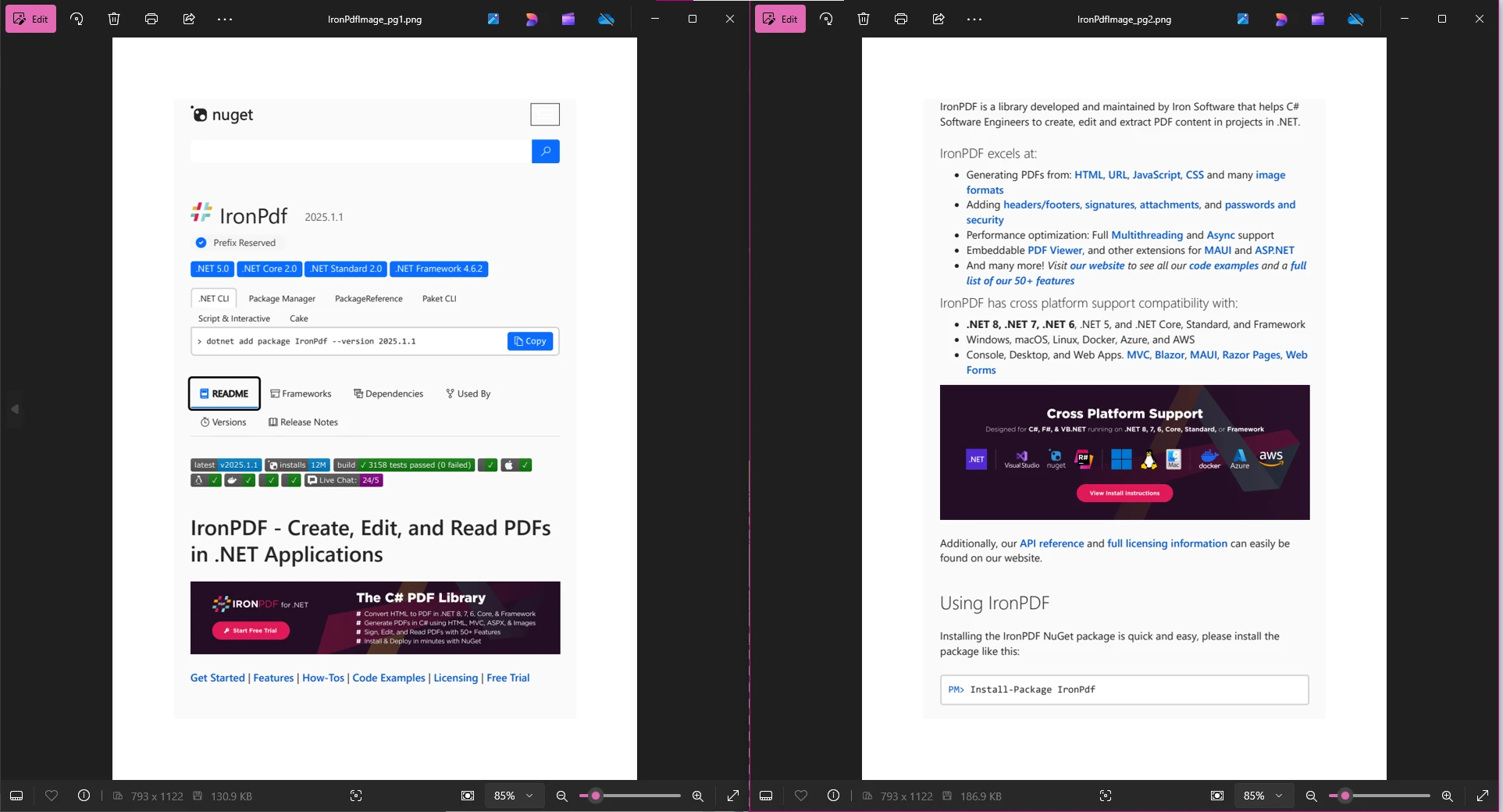
산출
이 예제에서 우리는 ChromePdfRenderer 렌더링 엔진을 사용하여 URL을 PDF로 렌더링하여 새로운 PDF 문서를 생성합니다. 그런 다음 이 새로운 PDF를 RasterizeToImageFiles 메서드를 사용하여 이미지를 변환하여 각 페이지에 대한 고품질 이미지를 생성합니다. 오류 처리를 개선하려면 이 코드 블록을 try-catch 구조에 넣어 예외를 우아하게 관리할 수 있습니다.
QuestPDF를 사용하여 PDF를 이미지로 변환하는 방법
QuestPDF는 PDF 문서를 이미지로 변환하는 것을 네이티브로 지원하지 않습니다. QuestPDF는 주로 PDF 생성에 중점을 두고 있으며, PDF 파일을 이미지로 추출하거나 렌더링하는 기본 기능을 제공하지 않습니다. 그 구조는 복잡한 PDF 레이아웃 생성을 위한 설계되어 개발자가 경계, 이미지, 열 및 행과 같은 시각 요소의 상세 관리와 같은 PDF 생성 프로세스에 정밀한 제어를 할 수 있도록 합니다.
기존 PDF 작업(이미지로 변환, 텍스트 추출, 편집 등)이 필요한 경우 QuestPDF는 이러한 사용 사례에 적합하지 않습니다. 대신, IronPDF, Aspose.PDF, iText 등과 같은 이러한 작업을 위해 설계된 대체 라이브러리를 고려하세요. QuestPDF로 초기 PDF 문서를 Document.Create(container => { ...}) 메서드를 사용하여 생성할 수 있지만, 추가 작업을 처리하기 위해 다른 라이브러리가 필요합니다.
결론
QuestPDF와 IronPDF를 비교할 때, 이 라이브러리들이 각기 다른 목적을 가지고 있음이 분명합니다. QuestPDF는 현대적이고 유연한 API를 통해 복잡하고 동적인 PDF를 생성하는 데 뛰어나지만, 기존 PDF를 조작하거나 PDF를 이미지로 변환하는 기능을 지원하지 않습니다.
반면, IronPDF는 PDF 생성 및 조작 모두에서 뛰어난 종합 솔루션입니다. PDF 페이지를 고품질 이미지로 변환하는 기능으로 프레젠테이션, 웹 페이지, 소셜 미디어에 PDF 콘텐츠를 통합하기에 이상적입니다. 추가적으로, HTML을 PDF로 변환, 병합, PDF에 배경 추가, 편집과 같은 기능으로 다양한 워크플로우에 유용한 도구입니다.
IronPDF는 인콤를 보장하고 비즈니스의 확장성을 제공하는 무료 체험판을 포함하여 유연한 라이선스 옵션을 제공합니다.
PDF를 이미지로 변환해야 하는 개발자에게는 IronPDF가 탁월한 선택입니다. QuestPDF는 PDF를 생성하기에 완벽하지만, IronPDF, Aspose.PDF, PDFium.NET SDK와 같은 라이브러리는 고급 PDF 조작 작업에 더 적합합니다. 프로젝트의 요구사항에 맞는 라이브러리를 선택하여 최상의 결과를 얻으세요.
참고해 주세요: QuestPDF는 해당 소유주의 등록 상표입니다. 이 사이트는 QuestPDF와 관련이 없으며, QuestPDF의 후원이나 승인을 받지 않았습니다. 모든 제품명, 로고 및 브랜드는 해당 소유자의 자산입니다. 비교는 정보 제공 목적으로만 사용되며, 작성 시점에 공개적으로 이용 가능한 정보를 반영합니다.
커티스 차우는 칼턴 대학교에서 컴퓨터 과학 학사 학위를 취득했으며, Node.js, TypeScript, JavaScript, React를 전문으로 하는 프론트엔드 개발자입니다. 직관적이고 미적으로 뛰어난 사용자 인터페이스를 만드는 데 열정을 가진 그는 최신 프레임워크를 활용하고, 잘 구성되고 시각적으로 매력적인 매뉴얼을 제작하는 것을 즐깁니다.