using IronPdf;

// Disable local disk access or cross-origin requests
Installation.EnableWebSecurity = true;

// Instantiate Renderer
var renderer = new ChromePdfRenderer();

// Create a PDF from a HTML string using C#
var pdf = renderer.RenderHtmlAsPdf("<h1>Hello World</h1>");

// Export to a file or Stream
pdf.SaveAs("output.pdf");

// Advanced Example with HTML Assets
// Load external html assets: Images, CSS and JavaScript.
// An optional BasePath 'C:\site\assets\' is set as the file location to load assets from
var myAdvancedPdf = renderer.RenderHtmlAsPdf("<img src='icons/iron.png'>", @"C:\site\assets\");
myAdvancedPdf.SaveAs("html-with-assets.pdf");
using IronPdf;// Disable local disk access or cross-origin requestsInstallation.EnableWebSecurity = true;// Instantiate Renderervar renderer = new ChromePdfRenderer();// Create a PDF from a HTML string using C#var pdf = renderer.RenderHtmlAsPdf("<h1>Hello World</h1>");// Export to a file or Streampdf.SaveAs("output.pdf");// Advanced Example with HTML Assets// Load external html assets: Images, CSS and JavaScript.// An optional BasePath 'C:\site\assets\' is set as the file location to load assets fromvar myAdvancedPdf = renderer.RenderHtmlAsPdf("<img src='icons/iron.png'>", @"C:\site\assets\");myAdvancedPdf.SaveAs("html-with-assets.pdf");
Zbuduj gotowe do produkcji API PDF .NET za pomocą ASP.NET Core i IronPDF, aby scentralizować logikę generowania PDF, umożliwiając spójną tworzenie dokumentów w aplikacjach z użyciem punktów końcowych RESTful do konwersji HTML na PDF, scałania, dodawania znaków wodnych i przetwarzania szablonów dynamicznych.
Pracując z nowoczesnymi aplikacjami, deweloperzy .NET często muszą zbudować scentralizowaną usługę generowania PDF. Niezależnie od tego, czy generujesz faktury, raporty, certyfikaty, czy umowy, posiadanie dedykowanego API PDF .NET poprawia przepływ pracy związany z generowaniem PDF. Jak to pomaga? Zapewnia spójność, łatwość utrzymania i skalowalność w aplikacjach desktopowych i internetowych. Zarządzanie treścią dokumentów, stronami PDF i [polami formularzy PDF](https://ironpdf.com/how-to/edit-forms/) staje się proste.
W tym samouczku dowiesz się, jak zbudować gotowe do produkcji API PDF za pomocą ASP.NET Core i [IronPDF](https://ironpdf.com/), potężnej biblioteki PDF .NET. Utworzymy punkty końcowe RESTful, które generują PDF z HTML, [scałają dokumenty](https://ironpdf.com/how-to/merge-or-split-pdfs/), dodają [znaki wodne](https://ironpdf.com/how-to/custom-watermark/) i obsługują różne scenariusze PDF w twoim Web API.
## Dlaczego warto zbudować dedykowane API PDF?
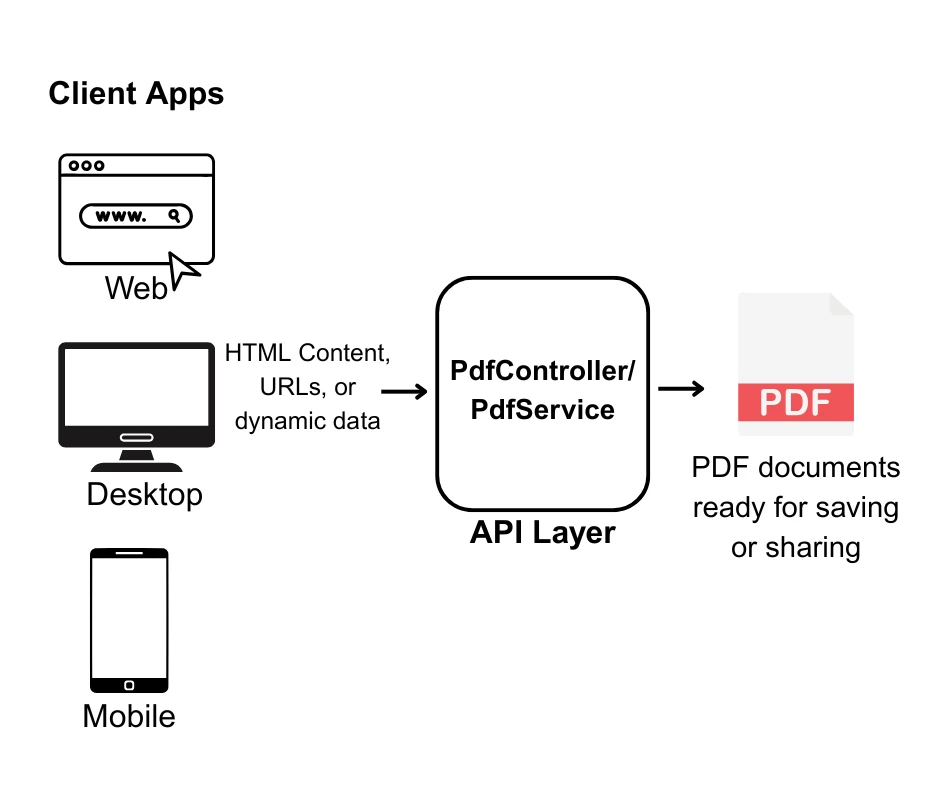
Zanim zagłębimy się w kod, zastanówmy się, dlaczego tworzenie dedykowanego API PDF ma sens:
* **Scentralizowana logika**: Cała logika generowania PDF znajduje się w jednym miejscu, upraszczając utrzymanie i aktualizacje.
* **Architektura mikroserwisów**: Idealne dla architektur zorientowanych na usługi, gdzie różne aplikacje potrzebują funkcji PDF.
* **Optymalizacja wydajności**: Łatwiej skalować i optymalizować dedykowaną usługę dla dużych PDF, wielu stron i dynamicznych danych używając [operacji asynchronicznych](https://ironpdf.com/how-to/async/) i [technik wydajności](https://ironpdf.com/troubleshooting/ironpdf-performance-assistance/).
* **Neutralność językowa**: Każda aplikacja kliencka może używać API niezależnie od języka programowania.
* **Spójny wynik**: Zapewnia, że wszystkie PDF w twojej organizacji mają spójny układ, formatowanie i treść.
Czy jesteś gotowy do rozpoczęcia budowy? Pobierz [bezpłatną wersję próbną IronPDF](trial-license) i postępuj zgodnie z tym samouczkiem, aby programowo tworzyć pliki PDF w swoich projektach .NET Framework.
## Co czyni IronPDF kompletną biblioteką PDF .NET?
[IronPDF](https://ironpdf.com/) wyróżnia się jako wiodąca biblioteka PDF dla deweloperów .NET, oferując kompleksowy zestaw funkcji, które sprawiają, że generowanie PDF w projektach Web API jest proste i niezawodne. Oparta na [silniku renderującym Chrome](https://ironpdf.com/how-to/ironpdf-2021-chrome-rendering-engine-eap/), zapewnia konwersje HTML na PDF z zachowaniem pikseli w kilku liniach kodu, jednocześnie zachowując wszystkie style, [wykonania JavaScript](https://ironpdf.com/how-to/javascript-to-pdf/) i [responsywne układy](https://ironpdf.com/how-to/html-to-pdf-responsive-css/).
Kluczowe możliwości, które czynią IronPDF idealnym wyborem dla rozwoju PDF API .NET:
* **Renderowanie oparte na Chrome**: Używa silnika Google Chrome do dokładnej konwersji HTML na PDF z pełnym wsparciem dla [osadzonych obrazów](https://ironpdf.com/how-to/add-images-to-pdfs/) i zasobów webowych.
* **Bogaty zestaw funkcji**: Edytuj dokumenty za pomocą [podpisów cyfrowych](https://ironpdf.com/how-to/signing/), [formularzy PDF](https://ironpdf.com/how-to/create-forms/), [adnotacji](https://ironpdf.com/how-to/annotations/), [szyfrowania](https://ironpdf.com/how-to/pdf-permissions-passwords/), [kompresji](https://ironpdf.com/how-to/pdf-compression/) i więcej.
* **Twórz bezpieczne PDF**: Zarządzaj treścią poufną używając [szyfrowania](https://ironpdf.com/examples/encryption-and-decryption/), [podpisów cyfrowych](https://ironpdf.com/examples/digitally-sign-a-pdf/) i ochrony dokumentów.
* **Wiele formatów wejściowych**: Używaj HTML, URL, [obrazów](https://ironpdf.com/how-to/image-to-pdf/) i [dokumentów Office](https://ironpdf.com/how-to/docx-to-pdf/) do tworzenia PDF.
* **Zaawansowana manipulacja**: [Scałaj strony](https://ironpdf.com/examples/merge-pdfs/), [dziel dokumenty](https://ironpdf.com/how-to/split-multipage-pdf/), stosuj [znaki wodne](https://ironpdf.com/examples/pdf-watermarking/), twórz [formy interaktywne](https://ironpdf.com/examples/form-data/) i manipuluj PDF programatycznie.
* **Wsparcie wielopłatformowe**: Działa na [Windows](https://ironpdf.com/how-to/windows/), [Linux](https://ironpdf.com/get-started/linux/), [macOS](https://ironpdf.com/get-started/macos/), [Docker](https://ironpdf.com/get-started/ironpdf-docker/) i [platformach chmurowych](https://ironpdf.com/get-started/azure/).
* **Optymalizacja wydajności**: [Operacje asynchroniczne](https://ironpdf.com/how-to/async/), efektywne zarządzanie pamięcią i szybkie renderowanie z [opcjami opóźnienia renderowania](https://ironpdf.com/how-to/waitfor/).
## Jak skonfigurować projekt API dokumentów PDF?
Zacznijmy od stworzenia nowego projektu ASP.NET Core Web API i zainstalowania niezbędnych pakietów.
### Jakie są wymagania wstępne?
* [.NET 6.0 SDK](https://dotnet.microsoft.com/download) lub nowszy
* Visual Studio 2022 lub Visual Studio Code
* [Postman](https://www.postman.com/) lub podobne narzędzie do testowania API do testowania twojego API PDF REST
### Jak utworzyć projekt?
Najpierw, utwórzmy projekt, w którym zbudujemy nasze narzędzie do generowania PDF.
```bash
dotnet new webapi -n PdfApiService
cd PdfApiService
```
### Jak zainstalować IronPDF?
Następnie, dodaj IronPDF do swojego projektu za pomocą NuGet:
```shell
:InstallCmd dotnet add package IronPdf
```
Lub, używając Konsoli Menedżera Pakietów NuGet w Visual Studio:
```shell
:ProductInstall
```
Dla zaawansowanych opcji instalacji, w tym [pakietów specyficznych dla platformy](https://ironpdf.com/get-started/advanced-installation-nuget/), [konfiguracji Dockera](https://ironpdf.com/get-started/ironpdf-docker/) lub [konfiguracji Linuxa](https://ironpdf.com/troubleshooting/ironpdf-linux/), zobacz [dokumentację instalacyjną IronPDF](https://ironpdf.com/get-started/installation-overview/).
### Jaką strukturę projektu powinienem zastosować?
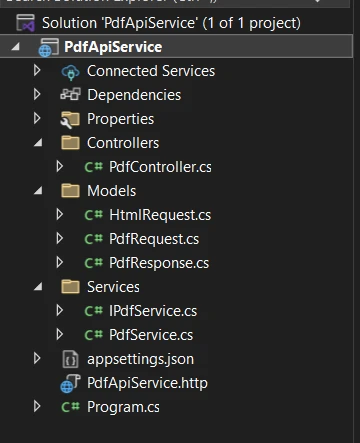
Dobra praktyka programowania w C# wymaga utrzymania czystego i dobrze zorganizowanego folderu projektu. Na przykład:
## Jak stworzyć swoje pierwsze odniesienie PDF?
Zbudujmy prosty punkt końcowy, który konwertuje HTML na format PDF. Najpierw stwórzmy interfejs usługi i implementację:
### Jak utworzyć serwis PDF?
Najpierw dodaj następujące elementy do pliku `IPdfService.cs`:
```cs
public interface IPdfService
{
    byte[] GeneratePdfFromHtml(string htmlContent);
    byte[] GeneratePdfFromUrl(string url);
}
```
W pliku `PdfService.cs` dodaj to:
```cs
using IronPdf;
public class PdfService : IPdfService
{
private readonly ChromePdfRenderer _renderer;
public PdfService()
{
_renderer = new ChromePdfRenderer();
// Configure rendering options for optimal PDF generation in .NET
_renderer.RenderingOptions.MarginTop = 20;
_renderer.RenderingOptions.MarginBottom = 20;
_renderer.RenderingOptions.PrintHtmlBackgrounds = true;
}
public byte[] GeneratePdfFromHtml(string htmlContent)
{
// Generate PDF from HTML using the .NET PDF API
var pdf = _renderer.RenderHtmlAsPdf(htmlContent);
return pdf.BinaryData;
}
public byte[] GeneratePdfFromUrl(string url)
{
// Convert URL to PDF in the REST API
var pdf = _renderer.RenderUrlAsPdf(url);
return pdf.BinaryData;
}
}
```
`PdfService` obsługuje konwersję HTML na PDF. Używając `ChromePdfRenderer` IronPDF, ta klasa konfiguruje domyślne ustawienia takie jak [marginesy strony](https://ironpdf.com/how-to/custom-margins/) i [renderowanie tła](https://ironpdf.com/how-to/background-foreground/) dla profesjonalnych wyników. Dla zaawansowanych konfiguracji renderowania, zapoznaj się z [opcje renderowania IronPDF](https://ironpdf.com/how-to/rendering-options/).
Kiedy kontroler przekazuje surowe HTML, serwis renderuje to do wysokiej jakości PDF i zwraca dane bajtowe do pobrania. Przekształca również całe strony internetowe bezpośrednio do PDF przy użyciu [konwersji URL na PDF](https://ironpdf.com/how-to/url-to-pdf/).
### Jak utworzyć kontroler?
Teraz utwórz kontroler dla swojego API. To zapewnia punkt końcowy, który generuje pliki PDF z HTML i pozwala [pobierać i zapisywać dokumenty PDF](https://ironpdf.com/how-to/export-save-pdf-csharp/) na swoim systemie.
```cs
// Controllers/PdfController.cs
using Microsoft.AspNetCore.Mvc;
[ApiController]
[Route("api/[controller]")]
public class PdfController : ControllerBase
{
private readonly IPdfService _pdfService;
public PdfController(IPdfService pdfService)
{
_pdfService = pdfService;
}
[HttpPost("html-to-pdf")]
public IActionResult ConvertHtmlToPdf([FromBody] HtmlRequest request)
{
try
{
var pdfBytes = _pdfService.GeneratePdfFromHtml(request.HtmlContent);
// Return as downloadable file
return File(pdfBytes, "application/pdf", "document.pdf");
}
catch (Exception ex)
{
return BadRequest($"Error generating PDF: {ex.Message}");
}
}
}
```
Następnie w pliku `HtmlRequest.cs` dodaj to:
```cs
// Models/HtmlRequest.cs
public class HtmlRequest
{
public string HtmlContent { get; set; }
public string FileName { get; set; } = "document.pdf";
}
```
To ustawia punkt końcowy API, który konwertuje HTML na PDF do pobrania. Gdy ktoś prześle HTML do `api/pdf/html-to-pdf`, `PdfController` deleguje konwersję na usługę.
Po utworzeniu kontroler zwraca PDF jako plik do pobrania. Żądanie używa modelu `HtmlRequest`, który zawiera HTML i opcjonalnie nazwę pliku. To ułatwia klientom przesyłanie HTML i odbieranie dopracowanego PDF.
### Jak zarejestrować serwisy?
Zaktualizuj swój `Program.cs`, aby zarejestrować usługę PDF:
```cs
var builder = WebApplication.CreateBuilder(args);
builder.Services.AddControllers();
builder.Services.AddEndpointsApiExplorer();
builder.Services.AddSwaggerGen();
// Register PDF service
builder.Services.AddSingleton<IPdfService, PdfService>();
var app = builder.Build();
if (app.Environment.IsDevelopment())
{
app.UseSwagger();
app.UseSwaggerUI();
}
app.UseHttpsRedirection();
app.MapControllers();
app.Run();
```
## Jak obsłużyć różne typy odpowiedzi?
Twoje API powinno obsługiwać różne sposoby zwracania PDF w zależności od potrzeb klienta:
```cs
[HttpPost("generate")]
public IActionResult GeneratePdf([FromBody] PdfRequest request)
{
var pdfBytes = _pdfService.GeneratePdfFromHtml(request.HtmlContent);
switch (request.ResponseType?.ToLower())
{
case "base64":
return Ok(new
{
data = Convert.ToBase64String(pdfBytes),
filename = request.FileName
});
case "inline":
return File(pdfBytes, "application/pdf");
default: // download
return File(pdfBytes, "application/pdf", request.FileName);
}
}
```
To dodaje elastyczny punkt końcowy generowania PDF. Zamiast wymuszać pobieranie, metoda `GeneratePdf` pozwala klientom wybrać, jak chcą otrzymać wyniki: jako pobranie, w linii w przeglądarce lub [zakodowane w Base64](https://ironpdf.com/troubleshooting/convert-pdf-to-base64/) do użytku API.
Model `PdfRequest` rozszerza `HtmlRequest` o opcję `ResponseType`. To daje użytkownikom kontrolę nad dostarczaniem PDF, czyniąc API bardziej wszechstronnym. Dla obsługi PDF w pamięci bez dostępu do systemu plików, zobacz [dokumentację strumieni pamięci IronPDF](https://ironpdf.com/how-to/pdf-memory-stream/).
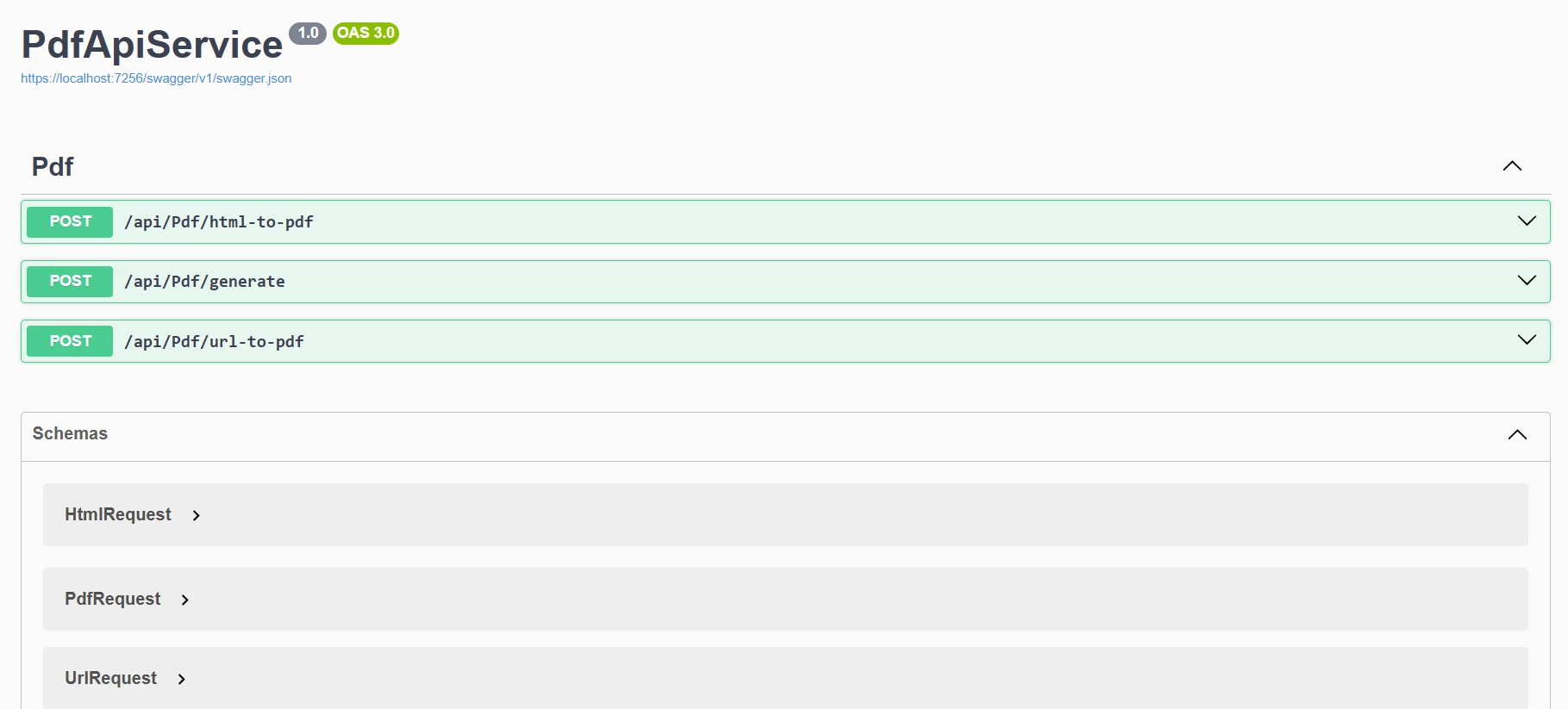
Kiedy uruchomimy nasz program, zobaczymy ten wynik na Swagger:
## Jak zaimplementować powszechne operacje PDF?
Rozszerzmy naszą usługę o obsługę różnych scenariuszy generowania PDF:
### Jak przetworzyć URL na PDF?
```cs
[HttpPost("url-to-pdf")]
public async Task<IActionResult> ConvertUrlToPdf([FromBody] UrlRequest request)
{
try
{
var pdfBytes = await Task.Run(() =>
_pdfService.GeneratePdfFromUrl(request.Url));
return File(pdfBytes, "application/pdf",
$"{request.FileName ?? "website"}.pdf");
}
catch (Exception ex)
{
return BadRequest($"Failed to convert URL: {ex.Message}");
}
}
public class UrlRequest
{
public string Url { get; set; }
public string FileName { get; set; }
}
```
Ten punkt końcowy konwertuje URL na PDF do pobrania. Gdy żądanie POST trafi na `/api/pdf/url-to-pdf`, kontroler używa `_pdfService` do konwersji URL na bajty PDF w tle, a następnie zwraca je do pobrania. Jeśli konwersja się nie powiedzie, odpowiada jasnym komunikatem o błędzie. Dla stron internetowych z autentykacją, zapoznaj się z [dokumentacją logowania IronPDF](https://ironpdf.com/how-to/logins/).
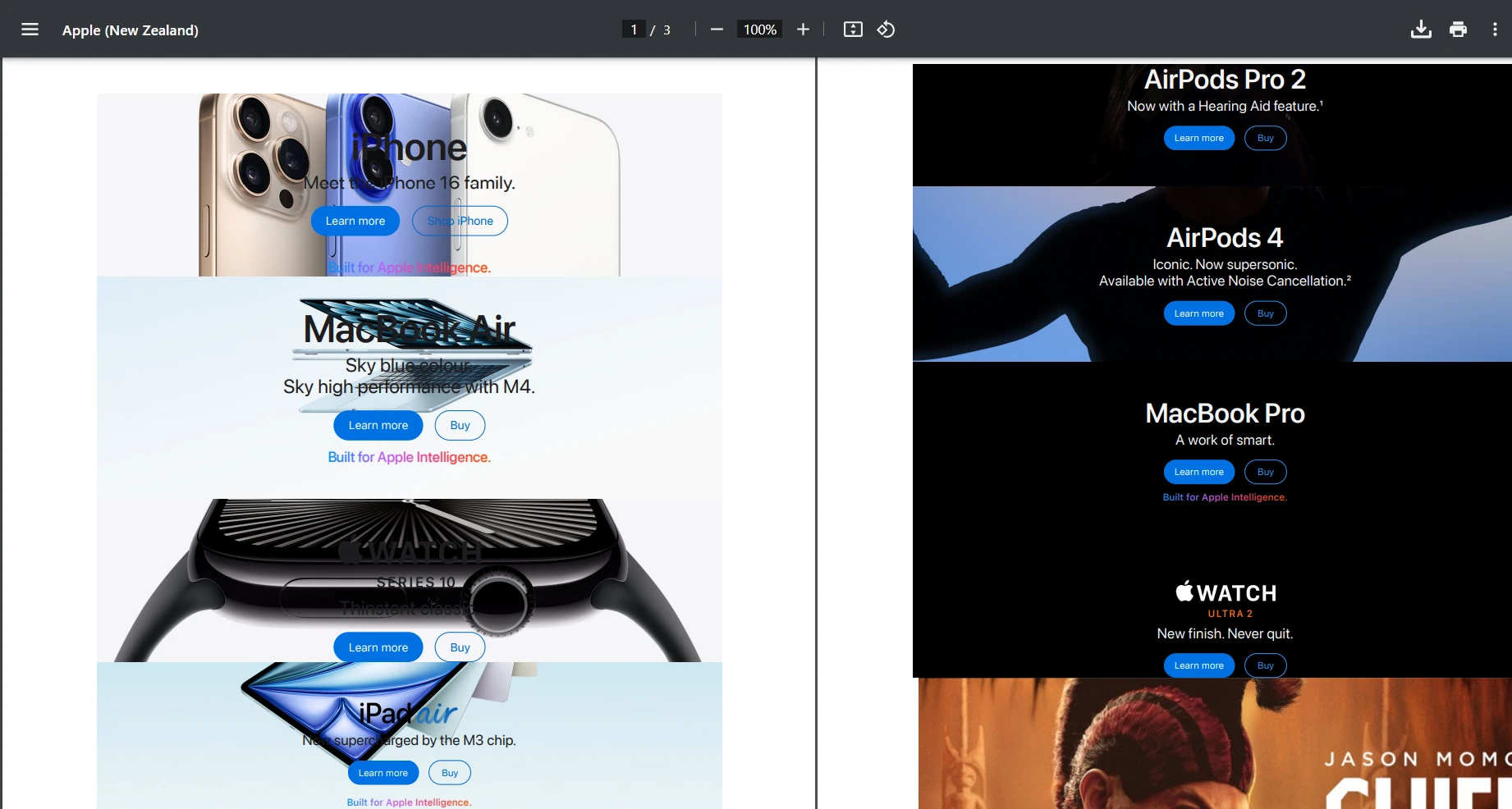
Spróbujmy użyć URL "[https://www.apple.com/nz](https://www.apple.com/nz)" i przetestujmy żądanie POST. Poniżej znajduje się uzyskany wynik:
#### Jak wygląda wynik?
### Jak dodać własne znaki wodne?
```cs
public byte[] AddWatermarkFromFile(string filePath, string watermarkText)
{
// Load PDF directly from file
var pdf = PdfDocument.FromFile(filePath);
pdf.ApplyWatermark(
$"<h1 style='color:red;font-size:72px;'>{watermarkText}</h1>",
75,
IronPdf.Editing.VerticalAlignment.Middle,
IronPdf.Editing.HorizontalAlignment.Center
);
return pdf.BinaryData;
}
```
To ręcznie ładuje lokalny plik do testowania. Możesz dostosować to tak, aby twoje API PDF generowało PDF, a następnie łatwo dodawało własne znaki wodne. Dla zaawansowanych opcji dodawania znaków wodnych, w tym znaków wodnych w formie obrazów i niestandardowego pozycjonowania, zobacz [przewodnik dodawania znaków wodnych](https://ironpdf.com/how-to/custom-watermark/).
#### Jak wygląda wynik z dodanym znakiem wodnym?

## Jak dodać dynamiczne dane za pomocą szablonów?
W przypadku aplikacji rzeczywistego świata, często będziesz musiał generować PDF-y ze szablonów z dynamicznymi danymi:
```cs
[HttpPost("from-template")]
public IActionResult GenerateFromTemplate([FromBody] TemplateRequest request)
{
// Simple template replacement
var html = request.Template;
foreach (var item in request.Data)
{
html = html.Replace($"{{{{{item.Key}}}}}", item.Value);
}
var pdfBytes = _pdfService.GeneratePdfFromHtml(html);
return File(pdfBytes, "application/pdf", request.FileName);
}
public class TemplateRequest
{
public string Template { get; set; }
public Dictionary<string, string> Data { get; set; }
public string FileName { get; set; } = "document.pdf";
}
```
Dla zaawansowanych scenariuszy szablonów z użyciem Razor, Handlebars lub innych silników, zobacz [dokumentację HTML na PDF IronPDF](/how-to/html-string-to-pdf/). Możesz również zbadać [konwersję CSHTML do PDF](/how-to/cshtml-to-pdf-mvc-core/) dla aplikacji MVC i [Razor do PDF](/how-to/razor-to-pdf-blazor-server/) dla aplikacji Blazor. Dla renderowania Razor w trybie bezgłowym, zapoznaj się z [przewodnikiem CSHTML dla renderowania bezgłowego](/how-to/cshtml-to-pdf-razor-headlessly/).
## Jak zoptymalizować wydajność?
Podczas tworzenia API PDF do produkcji, wydajność jest kluczowa. Oto kluczowe strategie optymalizacji:
### Dlaczego używać operacji asynchronicznych?
Używaj kodowania asynchronicznego, gdy projekty obejmują operacje I/O. To jest szczególnie pomocne, gdy zawartość PDF pochodzi z zewnętrznych źródeł, takich jak:
* Pobieranie stron HTML (`RenderUrlAsPdf`)
Pobieranie obrazów, CSS lub fontów przez HTTP⟩
Odczyt/zapis plików na dysk lub do chmurowej przechowalni⟩
Te operacje mogą blokować wątki, ale async zapobiega oczekiwaniu wątków API na bezczynnie. Dla pełnych wzorców generacji PDF async, zobacz [przewodnik generacji PDF async](https://ironpdf.com/examples/async/).
Przykład:
```cs
public async Task<byte[]> GeneratePdfFromHtmlAsync(string htmlContent)
{
return await Task.Run(() =>
{
var pdf = _renderer.RenderHtmlAsPdf(htmlContent);
return pdf.BinaryData;
});
}
```
Dla scenariuszy równoległej generacji PDF, eksploruj [wielowątkowe](https://ironpdf.com/examples/threading/) i [równoległe przetwarzanie](https://ironpdf.com/examples/parallel/) technik.
### Jakie opcje renderowania należy skonfigurować?
Skonfiguruj IronPDF dla optymalnej wydajności:
```cs
_renderer.RenderingOptions.EnableJavaScript = false; // If JS not needed
_renderer.RenderingOptions.CssMediaType = PdfCssMediaType.Print;
_renderer.RenderingOptions.RenderDelay = 0; // Remove if no JS
_renderer.RenderingOptions.Timeout = 30; // Set reasonable timeout
```
Dla pełnych opcji konfiguracji renderowania, w tym [ustawień widoku](https://ironpdf.com/how-to/viewport-zoom/), [niestandardowych rozmiarów papieru](https://ironpdf.com/how-to/custom-paper-size/) i [orientacji stron](https://ironpdf.com/how-to/page-orientation-rotation/), zobacz [dokumentację opcji renderowania](https://ironpdf.com/how-to/rendering-options/).
## Jak zabezpieczyć swoje API PDF?
Bezpieczeństwo jest kluczowe dla każdego API produkcyjnego. Oto proste podejście do uwierzytelniania za pomocą klucza API:
```cs
// Middleware/ApiKeyMiddleware.cs
public class ApiKeyMiddleware
{
private readonly RequestDelegate _next;
private const string ApiKeyHeader = "X-API-Key";
public ApiKeyMiddleware(RequestDelegate next)
{
_next = next;
}
public async Task InvokeAsync(HttpContext context)
{
if (!context.Request.Headers.TryGetValue(ApiKeyHeader, out var apiKey))
{
context.Response.StatusCode = 401;
await context.Response.WriteAsync("API Key required");
return;
}
// Validate API key (in production, check against database)
var validApiKey = context.RequestServices
.GetRequiredService<IConfiguration>()["ApiKey"];
if (apiKey != validApiKey)
{
context.Response.StatusCode = 403;
await context.Response.WriteAsync("Invalid API Key");
return;
}
await _next(context);
}
}
// In Program.cs
app.UseMiddleware<ApiKeyMiddleware>();
```
Dla zaawansowanych scenariuszy uwierzytelniania, rozważ:
* [Uwierzytelnianie JWT](https://learn.microsoft.com/en-us/entra/identity-platform/jwt-claims-customization) - Standard branżowy dla uwierzytelniania API
* [OAuth 2.0](https://learn.microsoft.com/en-us/entra/identity-platform/v2-oauth2-auth-code-flow) - Dla integracji zewnętrznych
* [Integracja z Azure AD](https://learn.microsoft.com/en-us/azure/active-directory/develop/) - Uwierzytelnianie korporacyjne
* [Ograniczenie szybkości API](https://github.com/stefanprodan/AspNetCoreRateLimit) - Zapobiegaj nadużyciom i zapewniaj uczciwe użycie
* [Nagłówki HTTP](https://ironpdf.com/how-to/http-request-header/) - Konfiguracja niestandardowych nagłówków dla zwiększenia bezpieczeństwa
Dla zabezpieczeń specyficznych dla PDF, wdroż [ochronę hasłem](https://ironpdf.com/how-to/pdf-permissions-passwords/), [podpisy cyfrowe](https://ironpdf.com/how-to/signing/) i [sanitację PDF](https://ironpdf.com/how-to/sanitize-pdf/), aby usunąć potencjalnie złośliwe treści.
## Jak zbudować API generowania faktur w rzeczywistości?
Zbudujmy praktyczny punkt końcowy generowania faktur, demonstrujący pełną implementację. Ten przykład pokazuje, jak produkcyjne API PDF .NET generuje profesjonalne faktury z dynamicznymi danymi.
!!!--LIBRARY_GET_STARTED_WITH_PRODUCT_TRIAL_BLOCK--!!!
Najpierw utwórz nowy plik w katalogu Models. Tutaj nazwałem go `Invoice.cs`. Następnie dodaj następujący kod:
```cs
public class Invoice
{
public string InvoiceNumber { get; set; }
public DateTime Date { get; set; }
public string CustomerName { get; set; }
public string CustomerAddress { get; set; }
public List<InvoiceItem> Items { get; set; }
public decimal Tax { get; set; }
}
public class InvoiceItem
{
public string Description { get; set; }
public int Quantity { get; set; }
public decimal UnitPrice { get; set; }
public decimal Total => Quantity * UnitPrice;
}
```
Następnie utwórz nowy plik serwisowy dla generatora faktur. W folderze Services dodaj poniższy kod. Utworzyłem plik o nazwie `InvoiceService.cs`. Ten kod obsługuje stylizację i układ twojej faktury PDF:
```cs
public class InvoiceService
{
private readonly ChromePdfRenderer _renderer;
public InvoiceService()
{
_renderer = new ChromePdfRenderer();
_renderer.RenderingOptions.MarginTop = 10;
_renderer.RenderingOptions.MarginBottom = 10;
_renderer.RenderingOptions.PrintHtmlBackgrounds = true;
}
public byte[] GenerateInvoice(Invoice invoice)
{
var html = BuildInvoiceHtml(invoice);
// Add footer with page numbers
_renderer.RenderingOptions.HtmlFooter = new HtmlHeaderFooter
{
MaxHeight = 15,
HtmlFragment = "<center><i>{page} of {total-pages}</i></center>",
DrawDividerLine = true
};
var pdf = _renderer.RenderHtmlAsPdf(html);
return pdf.BinaryData;
}
private string BuildInvoiceHtml(Invoice invoice)
{
var subtotal = invoice.Items.Sum(i => i.Total);
var taxAmount = subtotal * (invoice.Tax / 100);
var total = subtotal + taxAmount;
var itemsHtml = string.Join("", invoice.Items.Select(item =>
$@"<tr>
<td>{item.Description}</td>
<td class='text-center'>{item.Quantity}</td>
<td class='text-right'>${item.UnitPrice:F2}</td>
<td class='text-right'>${item.Total:F2}</td>
</tr>"));
return $@"
<!DOCTYPE html>
<html>
<head>
<style>
body {{font-family: Arial, sans-serif;}}
.invoice-header {{background-color: #f8f9fa;
padding: 20px;
margin-bottom: 20px;}}
table {{width: 100%;
border-collapse: collapse;}}
th, td {{padding: 10px;
border-bottom: 1px solid #ddd;}}
th {{background-color: #007bff;
color: white;}}
.text-right {{text-align: right;}}
.text-center {{text-align: center;}}
.total-section {{margin-top: 20px;
text-align: right;}}
</style>
</head>
<body>
<div class='invoice-header'>
<h1>Invoice #{invoice.InvoiceNumber}</h1>
<p>Date: {invoice.Date:yyyy-MM-dd}</p>
</div>
<div>
<h3>Bill To:</h3>
<p>{invoice.CustomerName}<br/>{invoice.CustomerAddress}</p>
</div>
<table>
<thead>
<tr>
<th>Description</th>
<th>Quantity</th>
<th>Unit Price</th>
<th>Total</th>
</tr>
</thead>
<tbody>
{itemsHtml}
</tbody>
</table>
<div class='total-section'>
<p>Subtotal: ${subtotal:F2}</p>
<p>Tax ({invoice.Tax}%): ${taxAmount:F2}</p>
<h3>Total: ${total:F2}</h3>
</div>
</body>
</html>";
}
}
```
Na koniec utwórz nowy kontroler, aby uzyskać dostęp i tworzyć faktury za pomocą API:
```cs
[ApiController]
[Route("api/[controller]")]
public class InvoiceController : ControllerBase
{
private readonly InvoiceService _invoiceService;
public InvoiceController(InvoiceService invoiceService)
{
_invoiceService = invoiceService;
}
[HttpPost("generate")]
public IActionResult GenerateInvoice([FromBody] Invoice invoice)
{
try
{
var pdfBytes = _invoiceService.GenerateInvoice(invoice);
var fileName = $"Invoice_{invoice.InvoiceNumber}.pdf";
return File(pdfBytes, "application/pdf", fileName);
}
catch (Exception ex)
{
return StatusCode(500, $"Error generating invoice: {ex.Message}");
}
}
}
```
Dla zaawansowanych funkcji faktur, rozważ dodanie [kodów kreskowych](https://ironpdf.com/examples/barcode-htmltopdf/), [kodów QR](https://ironsoftware.com/csharp/qr/), [numerów stron](https://ironpdf.com/how-to/page-numbers/) i [niestandardowych nagłówków/stopki](https://ironpdf.com/how-to/headers-and-footers/). Możesz również wdrożyć zgodność z [PDF/A](https://ironpdf.com/how-to/pdfa/) do długoterminowego archiwizowania lub zintegrować z [przepływami pracy z podpisami elektronicznymi](https://ironpdf.com/how-to/signing-pdf-with-hsm/).
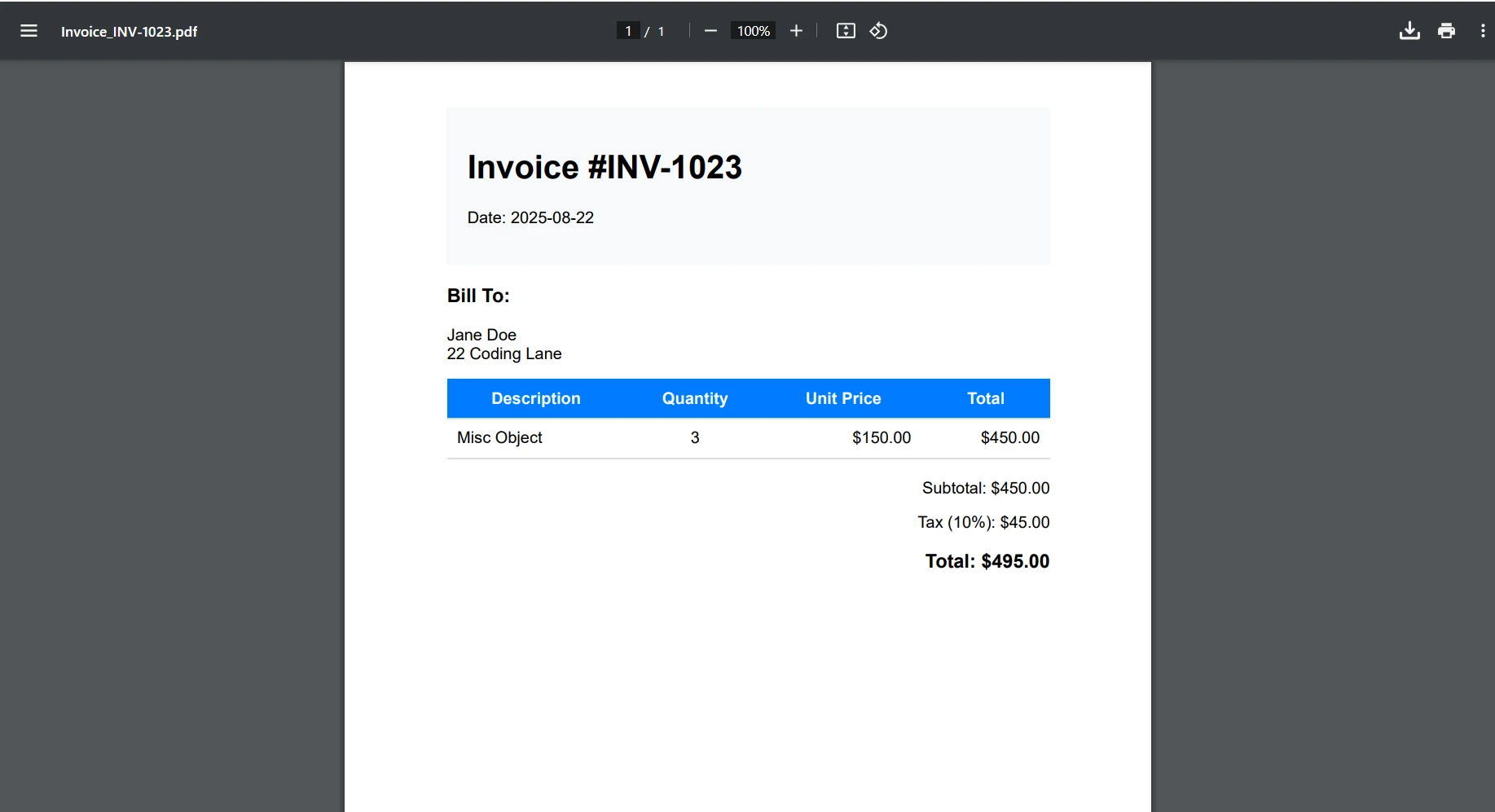
#### Jak wygląda wynik generowania faktur?
## Jakie są kwestie wdrożeniowe dotyczące kontenerów?
Chociaż ten samouczek koncentruje się na lokalnym rozwoju, oto krótki przegląd konteneryzacji Twojego API PDF:
### Jak utworzyć podstawowy plik Dockerfile?
```dockerfile
FROM mcr.microsoft.com/dotnet/aspnet:6.0 AS base
WORKDIR /app
EXPOSE 80
FROM mcr.microsoft.com/dotnet/sdk:6.0 AS build
WORKDIR /src
COPY ["PdfApiService.csproj", "."]
RUN dotnet restore
COPY . .
RUN dotnet build -c Release -o /app/build
FROM build AS publish
RUN dotnet publish -c Release -o /app/publish
FROM base AS final
WORKDIR /app
COPY --from=publish /app/publish .
# IronPDF requires additional dependencies on Linux
RUN apt-get update && apt-get install -y \
libgdiplus \
libc6-dev \
libx11-dev \
&& rm -rf /var/lib/apt/lists/*
ENTRYPOINT ["dotnet", "PdfApiService.dll"]
```
Dla szczegółowych przewodników wdrożeniowych Twojego API PDF .NET, zobacz:
* [Dokumentacja Docker IronPDF](/get-started/ironpdf-docker/) - Kompletny przewodnik po konteneryzacji
* [Wdrożenie IronPDF na Azure](/get-started/azure/) - Azure Functions i App Service
* [Wdrożenie IronPDF na AWS](/get-started/aws/) - Wdrożenie Lambda i EC2
* [Konfiguracja IronPDF na Linux](/get-started/linux/) - Konfiguracja specyficzna dla Linux
* [Działa jako zdalny kontener](https://ironpdf.com/get-started/ironpdfengine-docker/) - konteneryzacja silnika IronPDF
* [Silnik natywne vs zdalne](https://ironpdf.com/get-started/ironpdfengine/) - opcje architektury wdrożenia
## Jakie są najlepsze praktyki obsługi błędów?
Dla programów odporne na błędy, zaimplementuj globalny obsługiwacz błędów dla spójnych odpowiedzi błędów:
```cs
// Middleware/ErrorHandlingMiddleware.cs
public class ErrorHandlingMiddleware
{
private readonly RequestDelegate _next;
private readonly ILogger<ErrorHandlingMiddleware> _logger;
public ErrorHandlingMiddleware(RequestDelegate next, ILogger<ErrorHandlingMiddleware> logger)
{
_next = next;
_logger = logger;
}
public async Task InvokeAsync(HttpContext context)
{
try
{
await _next(context);
}
catch (Exception ex)
{
_logger.LogError(ex, "An error occurred processing request {Path}", context.Request.Path);
await HandleExceptionAsync(context, ex);
}
}
private static async Task HandleExceptionAsync(HttpContext context, Exception ex)
{
context.Response.ContentType = "application/json";
context.Response.StatusCode = ex switch
{
ArgumentNullException => 400,
UnauthorizedAccessException => 401,
_ => 500
};
var response = new
{
error = "An error occurred processing your request",
message = ex.Message,
statusCode = context.Response.StatusCode
};
await context.Response.WriteAsync(JsonSerializer.Serialize(response));
}
}
```
Dla specyficznych scenariuszy rozwiązywania problemów z IronPDF, zapoznaj się z:
* [Przewodnik szybkiego rozwiązywania problemów](/troubleshooting/quick-ironpdf-troubleshooting/)
* [Przewodnik wsparcia inżynieryjnego](https://ironpdf.com/troubleshooting/engineering-support-for-ironpdf/)
* [Konfiguracja niestandardowego logowania](https://ironpdf.com/how-to/custom-logging/)
* [Zapobieganie wyciekom pamięci](https://ironpdf.com/troubleshooting/memory-leak-in-ironpdf/)
* [Porady dotyczące optymalizacji wydajności](https://ironpdf.com/troubleshooting/ironpdf-performance-assistance/)
## Gotowy na zbudowanie swojego gotowego do produkcji API PDF .NET?
Zbudowałeś teraz solidne API PDF .NET używając ASP.NET Core i IronPDF, które obsługuje różne scenariusze generowania dokumentów. To REST API zapewnia solidną podstawę do scentralizowanych operacji PDF w Twoich aplikacjach.
Najważniejsze wnioski:
* IronPDF sprawia, że generowanie PDF w projektach Web API jest proste dzięki [renderowaniu opartemu na Chrome](https://ironpdf.com/how-to/pixel-perfect-html-to-pdf/).
* Łatwo edytuj istniejące PDF za pomocą [zaawansowanych narzędzi edycyjnych IronPDF](https://ironpdf.com/features/edit/).
* Zasady projektowania RESTful zapewniają, że twoje API PDF jest intuicyjne i łatwe w utrzymaniu.
* Poprawna obsługa błędów i środki bezpieczeństwa są niezbędne do produkcji.
* Optymalizacja wydajności poprzez [operacje asynchroniczne](https://ironpdf.com/how-to/async/) i [buforowanie](https://ironpdf.com/troubleshooting/initial-render-slow/) poprawia skalowalność.
* Pełna obsługa aplikacji desktopowych i internetowych z skalowalnymi rozwiązaniami dokumentówymi.
IronPDF pozwala deweloperom tworzyć PDF, [zapisywać pliki PDF](https://ironpdf.com/how-to/export-save-pdf-csharp/) i efektywnie konwertować HTML, czyniąc go niezbędnym API PDF dla nowoczesnych aplikacji .NET Framework.
### Jakie są kolejne kroki?
Gotowy do wdrożenia IronPDF w swoim produkcyjnym .NET PDF API? Oto Twoje następne kroki:
1. [**Rozpocznij darmowy okres próbny**](trial-license) - Przetestuj IronPDF z pełną funkcjonalnością w swoim środowisku deweloperskim.
2. **Poznawaj zaawansowane funkcje** - Odkryj [podpisy cyfrowe](/how-to/signing/), [formularze PDF](/how-to/create-forms/), [zgodność z PDF/A](https://ironpdf.com/how-to/pdfa/), [zarządzanie metadanymi](https://ironpdf.com/how-to/metadata/) i inne [zaawansowane funkcje PDF](https://ironpdf.com/features/others/).
3. **Skaluj z pewnością** - Zapoznaj się z [opcje licencjonowania](licensing) dla swoich potrzeb API produkcyjnego, w tym [rozszerzenia](https://ironpdf.com/licensing/extensions/) i [ulepszenia](https://ironpdf.com/licensing/upgrades/).
Zbuduj swoje .NET PDF API już dziś i usprawnij generowanie dokumentów w całym ekosystemie aplikacji dzięki IronPDF!
Zbuduj gotowe do produkcji API PDF .NET za pomocą ASP.NET Core i IronPDF, aby scentralizować logikę generowania PDF, umożliwiając spójną tworzenie dokumentów w aplikacjach z użyciem punktów końcowych RESTful do konwersji HTML na PDF, scałania, dodawania znaków wodnych i przetwarzania szablonów dynamicznych.
Pracując z nowoczesnymi aplikacjami, deweloperzy .NET często muszą zbudować scentralizowaną usługę generowania PDF. Niezależnie od tego, czy generujesz faktury, raporty, certyfikaty, czy umowy, posiadanie dedykowanego API PDF .NET poprawia przepływ pracy związany z generowaniem PDF. Jak to pomaga? Zapewnia spójność, łatwość utrzymania i skalowalność w aplikacjach desktopowych i internetowych. Zarządzanie treścią dokumentów, stronami PDF i polami formularzy PDF staje się proste.
W tym samouczku dowiesz się, jak zbudować gotowe do produkcji API PDF za pomocą ASP.NET Core i IronPDF, potężnej biblioteki PDF .NET. Utworzymy punkty końcowe RESTful, które generują PDF z HTML, scałają dokumenty, dodają znaki wodne i obsługują różne scenariusze PDF w twoim Web API.
Dlaczego warto zbudować dedykowane API PDF?
Zanim zagłębimy się w kod, zastanówmy się, dlaczego tworzenie dedykowanego API PDF ma sens:
Scentralizowana logika: Cała logika generowania PDF znajduje się w jednym miejscu, upraszczając utrzymanie i aktualizacje.
Architektura mikroserwisów: Idealne dla architektur zorientowanych na usługi, gdzie różne aplikacje potrzebują funkcji PDF.
Optymalizacja wydajności: Łatwiej skalować i optymalizować dedykowaną usługę dla dużych PDF, wielu stron i dynamicznych danych używając operacji asynchronicznych i technik wydajności.
Neutralność językowa: Każda aplikacja kliencka może używać API niezależnie od języka programowania.
Spójny wynik: Zapewnia, że wszystkie PDF w twojej organizacji mają spójny układ, formatowanie i treść.
Czy jesteś gotowy do rozpoczęcia budowy? Pobierz bezpłatną wersję próbną IronPDF i postępuj zgodnie z tym samouczkiem, aby programowo tworzyć pliki PDF w swoich projektach .NET Framework.
Co czyni IronPDF kompletną biblioteką PDF .NET?
IronPDF wyróżnia się jako wiodąca biblioteka PDF dla deweloperów .NET, oferując kompleksowy zestaw funkcji, które sprawiają, że generowanie PDF w projektach Web API jest proste i niezawodne. Oparta na silniku renderującym Chrome, zapewnia konwersje HTML na PDF z zachowaniem pikseli w kilku liniach kodu, jednocześnie zachowując wszystkie style, wykonania JavaScript i responsywne układy.
Kluczowe możliwości, które czynią IronPDF idealnym wyborem dla rozwoju PDF API .NET:
Renderowanie oparte na Chrome: Używa silnika Google Chrome do dokładnej konwersji HTML na PDF z pełnym wsparciem dla osadzonych obrazów i zasobów webowych.
PublicInterfaceIPdfService Function GeneratePdfFromHtml(htmlContent AsString) AsByte() Function GeneratePdfFromUrl(url AsString) AsByte()EndInterface
Public Interface IPdfService
    Function GeneratePdfFromHtml(htmlContent As String) As Byte()
    Function GeneratePdfFromUrl(url As String) As Byte()
End Interface
W pliku PdfService.cs dodaj to:
using IronPdf;public class PdfService : IPdfService{ private readonly ChromePdfRenderer _renderer; publicPdfService() { _renderer = new ChromePdfRenderer(); // Configure rendering options for optimal PDF generation in .NET _renderer.RenderingOptions.MarginTop = 20; _renderer.RenderingOptions.MarginBottom = 20; _renderer.RenderingOptions.PrintHtmlBackgrounds = true; } public byte[] GeneratePdfFromHtml(string htmlContent) { // Generate PDF from HTML using the .NET PDF API var pdf = _renderer.RenderHtmlAsPdf(htmlContent); return pdf.BinaryData; } public byte[] GeneratePdfFromUrl(string url) { // Convert URL to PDF in the REST API var pdf = _renderer.RenderUrlAsPdf(url); return pdf.BinaryData; }}
using IronPdf;
public class PdfService : IPdfService
{
    private readonly ChromePdfRenderer _renderer;
    public PdfService()
    {
        _renderer = new ChromePdfRenderer();
        // Configure rendering options for optimal PDF generation in .NET
        _renderer.RenderingOptions.MarginTop = 20;
        _renderer.RenderingOptions.MarginBottom = 20;
        _renderer.RenderingOptions.PrintHtmlBackgrounds = true;
    }
    public byte[] GeneratePdfFromHtml(string htmlContent)
    {
        // Generate PDF from HTML using the .NET PDF API
        var pdf = _renderer.RenderHtmlAsPdf(htmlContent);
        return pdf.BinaryData;
    }
    public byte[] GeneratePdfFromUrl(string url)
    {
        // Convert URL to PDF in the REST API
        var pdf = _renderer.RenderUrlAsPdf(url);
        return pdf.BinaryData;
    }
}
ImportsIronPdfPublic Class PdfServiceImplementsIPdfService PrivateReadOnly _renderer AsChromePdfRenderer Public Sub New() _renderer = New ChromePdfRenderer() ' Configure rendering options for optimal PDF generation in .NET _renderer.RenderingOptions.MarginTop = 20 _renderer.RenderingOptions.MarginBottom = 20 _renderer.RenderingOptions.PrintHtmlBackgrounds = True End Sub Public Function GeneratePdfFromHtml(htmlContent AsString) AsByte() ' Generate PDF from HTML using the .NET PDF API Dim pdf = _renderer.RenderHtmlAsPdf(htmlContent) Return pdf.BinaryData End Function Public Function GeneratePdfFromUrl(url AsString) AsByte() ' Convert URL to PDF in the REST API Dim pdf = _renderer.RenderUrlAsPdf(url) Return pdf.BinaryData End FunctionEnd Class
Imports IronPdf

Public Class PdfService
    Implements IPdfService

    Private ReadOnly _renderer As ChromePdfRenderer

    Public Sub New()
        _renderer = New ChromePdfRenderer()
        ' Configure rendering options for optimal PDF generation in .NET
        _renderer.RenderingOptions.MarginTop = 20
        _renderer.RenderingOptions.MarginBottom = 20
        _renderer.RenderingOptions.PrintHtmlBackgrounds = True
    End Sub

    Public Function GeneratePdfFromHtml(htmlContent As String) As Byte()
        ' Generate PDF from HTML using the .NET PDF API
        Dim pdf = _renderer.RenderHtmlAsPdf(htmlContent)
        Return pdf.BinaryData
    End Function

    Public Function GeneratePdfFromUrl(url As String) As Byte()
        ' Convert URL to PDF in the REST API
        Dim pdf = _renderer.RenderUrlAsPdf(url)
        Return pdf.BinaryData
    End Function

End Class
PdfService obsługuje konwersję HTML na PDF. Używając ChromePdfRenderer IronPDF, ta klasa konfiguruje domyślne ustawienia takie jak marginesy strony i renderowanie tła dla profesjonalnych wyników. Dla zaawansowanych konfiguracji renderowania, zapoznaj się z opcje renderowania IronPDF.
Kiedy kontroler przekazuje surowe HTML, serwis renderuje to do wysokiej jakości PDF i zwraca dane bajtowe do pobrania. Przekształca również całe strony internetowe bezpośrednio do PDF przy użyciu konwersji URL na PDF.
Jak utworzyć kontroler?
Teraz utwórz kontroler dla swojego API. To zapewnia punkt końcowy, który generuje pliki PDF z HTML i pozwala pobierać i zapisywać dokumenty PDF na swoim systemie.
// Controllers/PdfController.cs
using Microsoft.AspNetCore.Mvc;
[ApiController]
[Route("api/[controller]")]
public class PdfController : ControllerBase
{
    private readonly IPdfService _pdfService;
    public PdfController(IPdfService pdfService)
    {
        _pdfService = pdfService;
    }
    [HttpPost("html-to-pdf")]
    public IActionResult ConvertHtmlToPdf([FromBody] HtmlRequest request)
    {
        try
        {
            var pdfBytes = _pdfService.GeneratePdfFromHtml(request.HtmlContent);
            // Return as downloadable file
            return File(pdfBytes, "application/pdf", "document.pdf");
        }
        catch (Exception ex)
        {
            return BadRequest($"Error generating PDF: {ex.Message}");
        }
    }
}
ImportsMicrosoft.AspNetCore.Mvc<ApiController><Route("api/[controller]")>Public Class PdfControllerInheritsControllerBase PrivateReadOnly _pdfService AsIPdfService Public Sub New(pdfService AsIPdfService) _pdfService = pdfService End Sub <HttpPost("html-to-pdf")> Public Function ConvertHtmlToPdf(<FromBody> request AsHtmlRequest) AsIActionResultTry Dim pdfBytes = _pdfService.GeneratePdfFromHtml(request.HtmlContent) ' Return as downloadable file ReturnFile(pdfBytes, "application/pdf", "document.pdf")Catch ex AsException ReturnBadRequest($"Error generating PDF: {ex.Message}")EndTry End FunctionEnd Class
Imports Microsoft.AspNetCore.Mvc

<ApiController>
<Route("api/[controller]")>
Public Class PdfController
    Inherits ControllerBase

    Private ReadOnly _pdfService As IPdfService

    Public Sub New(pdfService As IPdfService)
        _pdfService = pdfService
    End Sub

    <HttpPost("html-to-pdf")>
    Public Function ConvertHtmlToPdf(<FromBody> request As HtmlRequest) As IActionResult
        Try
            Dim pdfBytes = _pdfService.GeneratePdfFromHtml(request.HtmlContent)
            ' Return as downloadable file
            Return File(pdfBytes, "application/pdf", "document.pdf")
        Catch ex As Exception
            Return BadRequest($"Error generating PDF: {ex.Message}")
        End Try
    End Function
End Class
Następnie w pliku HtmlRequest.cs dodaj to:
// Models/HtmlRequest.cspublic class HtmlRequest{ public stringHtmlContent { get; set; } public stringFileName { get; set; } = "document.pdf";}
// Models/HtmlRequest.cs
public class HtmlRequest
{
    public string HtmlContent { get; set; }
    public string FileName { get; set; } = "document.pdf";
}
' Models/HtmlRequest.vbPublic Class HtmlRequest Public Property HtmlContentAsString Public Property FileNameAsString = "document.pdf"End Class
' Models/HtmlRequest.vb
Public Class HtmlRequest
    Public Property HtmlContent As String
    Public Property FileName As String = "document.pdf"
End Class
To ustawia punkt końcowy API, który konwertuje HTML na PDF do pobrania. Gdy ktoś prześle HTML do api/pdf/html-to-pdf, PdfController deleguje konwersję na usługę.
Po utworzeniu kontroler zwraca PDF jako plik do pobrania. Żądanie używa modelu HtmlRequest, który zawiera HTML i opcjonalnie nazwę pliku. To ułatwia klientom przesyłanie HTML i odbieranie dopracowanego PDF.
Jak zarejestrować serwisy?
Zaktualizuj swój Program.cs, aby zarejestrować usługę PDF:
var builder = WebApplication.CreateBuilder(args);builder.Services.AddControllers();builder.Services.AddEndpointsApiExplorer();builder.Services.AddSwaggerGen();// Register PDF servicebuilder.Services.AddSingleton<IPdfService, PdfService>();var app = builder.Build();if (app.Environment.IsDevelopment()){ app.UseSwagger(); app.UseSwaggerUI();}app.UseHttpsRedirection();app.MapControllers();app.Run();
var builder = WebApplication.CreateBuilder(args);
builder.Services.AddControllers();
builder.Services.AddEndpointsApiExplorer();
builder.Services.AddSwaggerGen();
// Register PDF service
builder.Services.AddSingleton<IPdfService, PdfService>();
var app = builder.Build();
if (app.Environment.IsDevelopment())
{
    app.UseSwagger();
    app.UseSwaggerUI();
}
app.UseHttpsRedirection();
app.MapControllers();
app.Run();
ImportsMicrosoft.AspNetCore.BuilderImportsMicrosoft.Extensions.DependencyInjectionDim builder = WebApplication.CreateBuilder(args)builder.Services.AddControllers()builder.Services.AddEndpointsApiExplorer()builder.Services.AddSwaggerGen()' Register PDF servicebuilder.Services.AddSingleton(OfIPdfService, PdfService)()Dim app = builder.Build()If app.Environment.IsDevelopment() Then app.UseSwagger() app.UseSwaggerUI()End Ifapp.UseHttpsRedirection()app.MapControllers()app.Run()
Imports Microsoft.AspNetCore.Builder
Imports Microsoft.Extensions.DependencyInjection

Dim builder = WebApplication.CreateBuilder(args)
builder.Services.AddControllers()
builder.Services.AddEndpointsApiExplorer()
builder.Services.AddSwaggerGen()
' Register PDF service
builder.Services.AddSingleton(Of IPdfService, PdfService)()
Dim app = builder.Build()
If app.Environment.IsDevelopment() Then
    app.UseSwagger()
    app.UseSwaggerUI()
End If
app.UseHttpsRedirection()
app.MapControllers()
app.Run()
Jak obsłużyć różne typy odpowiedzi?
Twoje API powinno obsługiwać różne sposoby zwracania PDF w zależności od potrzeb klienta:
[HttpPost("generate")]public IActionResultGeneratePdf([FromBody] PdfRequest request){ var pdfBytes = _pdfService.GeneratePdfFromHtml(request.HtmlContent); switch (request.ResponseType?.ToLower()) { case "base64": returnOk(new { data = Convert.ToBase64String(pdfBytes), filename = request.FileName }); case "inline": returnFile(pdfBytes, "application/pdf"); default: // download returnFile(pdfBytes, "application/pdf", request.FileName); }}
[HttpPost("generate")]
public IActionResult GeneratePdf([FromBody] PdfRequest request)
{
    var pdfBytes = _pdfService.GeneratePdfFromHtml(request.HtmlContent);
    switch (request.ResponseType?.ToLower())
    {
        case "base64":
            return Ok(new
            {
                data = Convert.ToBase64String(pdfBytes),
                filename = request.FileName
            });
        case "inline":
            return File(pdfBytes, "application/pdf");
        default: // download
            return File(pdfBytes, "application/pdf", request.FileName);
    }
}
ImportsMicrosoft.AspNetCore.Mvc<HttpPost("generate")>Public Function GeneratePdf(<FromBody> request AsPdfRequest) AsIActionResult Dim pdfBytes = _pdfService.GeneratePdfFromHtml(request.HtmlContent) Select Case request.ResponseType?.ToLower() Case "base64" ReturnOk(New With { .data = Convert.ToBase64String(pdfBytes), .filename = request.FileName }) Case "inline" ReturnFile(pdfBytes, "application/pdf") Case Else ' download ReturnFile(pdfBytes, "application/pdf", request.FileName) End SelectEnd Function
Imports Microsoft.AspNetCore.Mvc

<HttpPost("generate")>
Public Function GeneratePdf(<FromBody> request As PdfRequest) As IActionResult
    Dim pdfBytes = _pdfService.GeneratePdfFromHtml(request.HtmlContent)
    Select Case request.ResponseType?.ToLower()
        Case "base64"
            Return Ok(New With {
                .data = Convert.ToBase64String(pdfBytes),
                .filename = request.FileName
            })
        Case "inline"
            Return File(pdfBytes, "application/pdf")
        Case Else ' download
            Return File(pdfBytes, "application/pdf", request.FileName)
    End Select
End Function
To dodaje elastyczny punkt końcowy generowania PDF. Zamiast wymuszać pobieranie, metoda GeneratePdf pozwala klientom wybrać, jak chcą otrzymać wyniki: jako pobranie, w linii w przeglądarce lub zakodowane w Base64 do użytku API.
Model PdfRequest rozszerza HtmlRequest o opcję ResponseType. To daje użytkownikom kontrolę nad dostarczaniem PDF, czyniąc API bardziej wszechstronnym. Dla obsługi PDF w pamięci bez dostępu do systemu plików, zobacz dokumentację strumieni pamięci IronPDF.
Kiedy uruchomimy nasz program, zobaczymy ten wynik na Swagger:
Jak zaimplementować powszechne operacje PDF?
Rozszerzmy naszą usługę o obsługę różnych scenariuszy generowania PDF:
Jak przetworzyć URL na PDF?
[HttpPost("url-to-pdf")]public async Task<IActionResult> ConvertUrlToPdf([FromBody] UrlRequest request){ try { var pdfBytes = awaitTask.Run(() => _pdfService.GeneratePdfFromUrl(request.Url)); returnFile(pdfBytes, "application/pdf", $"{request.FileName ?? "website"}.pdf"); } catch (Exception ex) { returnBadRequest($"Failed to convert URL: {ex.Message}"); }}public class UrlRequest{ public stringUrl { get; set; } public stringFileName { get; set; }}
[HttpPost("url-to-pdf")]
public async Task<IActionResult> ConvertUrlToPdf([FromBody] UrlRequest request)
{
    try
    {
        var pdfBytes = await Task.Run(() =>
            _pdfService.GeneratePdfFromUrl(request.Url));
        return File(pdfBytes, "application/pdf",
            $"{request.FileName ?? "website"}.pdf");
    }
    catch (Exception ex)
    {
        return BadRequest($"Failed to convert URL: {ex.Message}");
    }
}
public class UrlRequest
{
    public string Url { get; set; }
    public string FileName { get; set; }
}
ImportsSystem.Threading.TasksImportsMicrosoft.AspNetCore.Mvc<HttpPost("url-to-pdf")>PublicAsync Function ConvertUrlToPdf(<FromBody> request AsUrlRequest) AsTask(OfIActionResult)Try Dim pdfBytes = AwaitTask.Run(Function() _pdfService.GeneratePdfFromUrl(request.Url)) ReturnFile(pdfBytes, "application/pdf", $"{If(request.FileName, "website")}.pdf")Catch ex AsException ReturnBadRequest($"Failed to convert URL: {ex.Message}")EndTryEnd FunctionPublic Class UrlRequest Public Property UrlAsString Public Property FileNameAsStringEnd Class
Imports System.Threading.Tasks
Imports Microsoft.AspNetCore.Mvc

<HttpPost("url-to-pdf")>
Public Async Function ConvertUrlToPdf(<FromBody> request As UrlRequest) As Task(Of IActionResult)
    Try
        Dim pdfBytes = Await Task.Run(Function() _pdfService.GeneratePdfFromUrl(request.Url))
        Return File(pdfBytes, "application/pdf", $"{If(request.FileName, "website")}.pdf")
    Catch ex As Exception
        Return BadRequest($"Failed to convert URL: {ex.Message}")
    End Try
End Function

Public Class UrlRequest
    Public Property Url As String
    Public Property FileName As String
End Class
Ten punkt końcowy konwertuje URL na PDF do pobrania. Gdy żądanie POST trafi na /api/pdf/url-to-pdf, kontroler używa _pdfService do konwersji URL na bajty PDF w tle, a następnie zwraca je do pobrania. Jeśli konwersja się nie powiedzie, odpowiada jasnym komunikatem o błędzie. Dla stron internetowych z autentykacją, zapoznaj się z dokumentacją logowania IronPDF.
Spróbujmy użyć URL "https://www.apple.com/nz" i przetestujmy żądanie POST. Poniżej znajduje się uzyskany wynik:
Jak wygląda wynik?
Jak dodać własne znaki wodne?
public byte[] AddWatermarkFromFile(string filePath, string watermarkText){ // Load PDF directly from file var pdf = PdfDocument.FromFile(filePath); pdf.ApplyWatermark( $"<h1 style='color:red;font-size:72px;'>{watermarkText}</h1>", 75,IronPdf.Editing.VerticalAlignment.Middle,IronPdf.Editing.HorizontalAlignment.Center ); return pdf.BinaryData;}
public byte[] AddWatermarkFromFile(string filePath, string watermarkText)
{
    // Load PDF directly from file
    var pdf = PdfDocument.FromFile(filePath);
    pdf.ApplyWatermark(
        $"<h1 style='color:red;font-size:72px;'>{watermarkText}</h1>",
        75,
        IronPdf.Editing.VerticalAlignment.Middle,
        IronPdf.Editing.HorizontalAlignment.Center
    );
    return pdf.BinaryData;
}
ImportsIronPdfPublic Function AddWatermarkFromFile(filePath AsString, watermarkText AsString) AsByte() ' Load PDF directly from file Dim pdf = PdfDocument.FromFile(filePath) pdf.ApplyWatermark( $"<h1 style='color:red;font-size:72px;'>{watermarkText}</h1>", 75,IronPdf.Editing.VerticalAlignment.Middle,IronPdf.Editing.HorizontalAlignment.Center ) Return pdf.BinaryDataEnd Function
Imports IronPdf

Public Function AddWatermarkFromFile(filePath As String, watermarkText As String) As Byte()
    ' Load PDF directly from file
    Dim pdf = PdfDocument.FromFile(filePath)
    pdf.ApplyWatermark(
        $"<h1 style='color:red;font-size:72px;'>{watermarkText}</h1>",
        75,
        IronPdf.Editing.VerticalAlignment.Middle,
        IronPdf.Editing.HorizontalAlignment.Center
    )
    Return pdf.BinaryData
End Function
To ręcznie ładuje lokalny plik do testowania. Możesz dostosować to tak, aby twoje API PDF generowało PDF, a następnie łatwo dodawało własne znaki wodne. Dla zaawansowanych opcji dodawania znaków wodnych, w tym znaków wodnych w formie obrazów i niestandardowego pozycjonowania, zobacz przewodnik dodawania znaków wodnych.
Jak wygląda wynik z dodanym znakiem wodnym?
Jak dodać dynamiczne dane za pomocą szablonów?
W przypadku aplikacji rzeczywistego świata, często będziesz musiał generować PDF-y ze szablonów z dynamicznymi danymi:
[HttpPost("from-template")]public IActionResultGenerateFromTemplate([FromBody] TemplateRequest request){ // Simple template replacement var html = request.Template; foreach (var item in request.Data) { html = html.Replace($"{{{{{item.Key}}}}}", item.Value); } var pdfBytes = _pdfService.GeneratePdfFromHtml(html); returnFile(pdfBytes, "application/pdf", request.FileName);}public class TemplateRequest{ public stringTemplate { get; set; } public Dictionary<string, string> Data { get; set; } public stringFileName { get; set; } = "document.pdf";}
[HttpPost("from-template")]
public IActionResult GenerateFromTemplate([FromBody] TemplateRequest request)
{
    // Simple template replacement
    var html = request.Template;
    foreach (var item in request.Data)
    {
        html = html.Replace($"{{{{{item.Key}}}}}", item.Value);
    }
    var pdfBytes = _pdfService.GeneratePdfFromHtml(html);
    return File(pdfBytes, "application/pdf", request.FileName);
}
public class TemplateRequest
{
    public string Template { get; set; }
    public Dictionary<string, string> Data { get; set; }
    public string FileName { get; set; } = "document.pdf";
}
ImportsMicrosoft.AspNetCore.Mvc<HttpPost("from-template")>Public Function GenerateFromTemplate(<FromBody> request AsTemplateRequest) AsIActionResult ' Simple template replacement Dim html AsString = request.Template For Each item Inrequest.Data html = html.Replace($"{{{{{item.Key}}}}}", item.Value) Next Dim pdfBytes AsByte() = _pdfService.GeneratePdfFromHtml(html) ReturnFile(pdfBytes, "application/pdf", request.FileName)End FunctionPublic Class TemplateRequest Public Property TemplateAsString Public Property DataAsDictionary(OfString, String) Public Property FileNameAsString = "document.pdf"End Class
Imports Microsoft.AspNetCore.Mvc

<HttpPost("from-template")>
Public Function GenerateFromTemplate(<FromBody> request As TemplateRequest) As IActionResult
    ' Simple template replacement
    Dim html As String = request.Template
    For Each item In request.Data
        html = html.Replace($"{{{{{item.Key}}}}}", item.Value)
    Next
    Dim pdfBytes As Byte() = _pdfService.GeneratePdfFromHtml(html)
    Return File(pdfBytes, "application/pdf", request.FileName)
End Function

Public Class TemplateRequest
    Public Property Template As String
    Public Property Data As Dictionary(Of String, String)
    Public Property FileName As String = "document.pdf"
End Class
Podczas tworzenia API PDF do produkcji, wydajność jest kluczowa. Oto kluczowe strategie optymalizacji:
Dlaczego używać operacji asynchronicznych?
Używaj kodowania asynchronicznego, gdy projekty obejmują operacje I/O. To jest szczególnie pomocne, gdy zawartość PDF pochodzi z zewnętrznych źródeł, takich jak:
Pobieranie stron HTML (RenderUrlAsPdf)
Pobieranie obrazów, CSS lub fontów przez HTTP⟩
Odczyt/zapis plików na dysk lub do chmurowej przechowalni⟩
Te operacje mogą blokować wątki, ale async zapobiega oczekiwaniu wątków API na bezczynnie. Dla pełnych wzorców generacji PDF async, zobacz przewodnik generacji PDF async.
Przykład:
public async Task<byte[]> GeneratePdfFromHtmlAsync(string htmlContent){ return awaitTask.Run(() => { var pdf = _renderer.RenderHtmlAsPdf(htmlContent); return pdf.BinaryData; });}
public async Task<byte[]> GeneratePdfFromHtmlAsync(string htmlContent)
{
    return await Task.Run(() =>
    {
        var pdf = _renderer.RenderHtmlAsPdf(htmlContent);
        return pdf.BinaryData;
    });
}
ImportsSystem.Threading.TasksPublicAsync Function GeneratePdfFromHtmlAsync(htmlContent AsString) AsTask(OfByte()) ReturnAwaitTask.Run(Function() Dim pdf = _renderer.RenderHtmlAsPdf(htmlContent) Return pdf.BinaryData End Function)End Function
Imports System.Threading.Tasks

Public Async Function GeneratePdfFromHtmlAsync(htmlContent As String) As Task(Of Byte())
    Return Await Task.Run(Function()
                              Dim pdf = _renderer.RenderHtmlAsPdf(htmlContent)
                              Return pdf.BinaryData
                          End Function)
End Function
_renderer.RenderingOptions.EnableJavaScript = false; // If JS not needed_renderer.RenderingOptions.CssMediaType = PdfCssMediaType.Print;_renderer.RenderingOptions.RenderDelay = 0; // Remove if no JS_renderer.RenderingOptions.Timeout = 30; // Set reasonable timeout
_renderer.RenderingOptions.EnableJavaScript = false; // If JS not needed
_renderer.RenderingOptions.CssMediaType = PdfCssMediaType.Print;
_renderer.RenderingOptions.RenderDelay = 0; // Remove if no JS
_renderer.RenderingOptions.Timeout = 30; // Set reasonable timeout
Bezpieczeństwo jest kluczowe dla każdego API produkcyjnego. Oto proste podejście do uwierzytelniania za pomocą klucza API:
// Middleware/ApiKeyMiddleware.cspublic class ApiKeyMiddleware{ private readonly RequestDelegate _next; private const stringApiKeyHeader = "X-API-Key"; publicApiKeyMiddleware(RequestDelegate next) { _next = next; } public async TaskInvokeAsync(HttpContext context) { if (!context.Request.Headers.TryGetValue(ApiKeyHeader, out var apiKey)) { context.Response.StatusCode = 401; await context.Response.WriteAsync("API Key required"); return; } // Validate API key (in production, check against database) var validApiKey = context.RequestServices .GetRequiredService<IConfiguration>()["ApiKey"]; if (apiKey != validApiKey) { context.Response.StatusCode = 403; await context.Response.WriteAsync("Invalid API Key"); return; } await _next(context); }}// In Program.csapp.UseMiddleware<ApiKeyMiddleware>();
// Middleware/ApiKeyMiddleware.cs
public class ApiKeyMiddleware
{
    private readonly RequestDelegate _next;
    private const string ApiKeyHeader = "X-API-Key";
    public ApiKeyMiddleware(RequestDelegate next)
    {
        _next = next;
    }
    public async Task InvokeAsync(HttpContext context)
    {
        if (!context.Request.Headers.TryGetValue(ApiKeyHeader, out var apiKey))
        {
            context.Response.StatusCode = 401;
            await context.Response.WriteAsync("API Key required");
            return;
        }
        // Validate API key (in production, check against database)
        var validApiKey = context.RequestServices
            .GetRequiredService<IConfiguration>()["ApiKey"];
        if (apiKey != validApiKey)
        {
            context.Response.StatusCode = 403;
            await context.Response.WriteAsync("Invalid API Key");
            return;
        }
        await _next(context);
    }
}
// In Program.cs
app.UseMiddleware<ApiKeyMiddleware>();
ImportsMicrosoft.AspNetCore.HttpImportsMicrosoft.Extensions.ConfigurationImportsSystem.Threading.Tasks' Middleware/ApiKeyMiddleware.vbPublic Class ApiKeyMiddleware PrivateReadOnly _next AsRequestDelegate Private Const ApiKeyHeaderAsString = "X-API-Key" Public Sub New(nextAsRequestDelegate) _next = next End Sub PublicAsync Function InvokeAsync(context AsHttpContext) AsTask Dim apiKey AsString = Nothing IfNot context.Request.Headers.TryGetValue(ApiKeyHeader, apiKey) Then context.Response.StatusCode = 401Await context.Response.WriteAsync("API Key required") Return End If ' Validate API key (in production, check against database) Dim validApiKey AsString = context.RequestServices.GetRequiredService(OfIConfiguration)()("ApiKey") If apiKey <> validApiKey Then context.Response.StatusCode = 403Await context.Response.WriteAsync("Invalid API Key") Return End IfAwait _next(context) End FunctionEnd Class' In Program.vbapp.UseMiddleware(OfApiKeyMiddleware)()
Imports Microsoft.AspNetCore.Http
Imports Microsoft.Extensions.Configuration
Imports System.Threading.Tasks

' Middleware/ApiKeyMiddleware.vb
Public Class ApiKeyMiddleware
    Private ReadOnly _next As RequestDelegate
    Private Const ApiKeyHeader As String = "X-API-Key"

    Public Sub New(next As RequestDelegate)
        _next = next
    End Sub

    Public Async Function InvokeAsync(context As HttpContext) As Task
        Dim apiKey As String = Nothing
        If Not context.Request.Headers.TryGetValue(ApiKeyHeader, apiKey) Then
            context.Response.StatusCode = 401
            Await context.Response.WriteAsync("API Key required")
            Return
        End If

        ' Validate API key (in production, check against database)
        Dim validApiKey As String = context.RequestServices.GetRequiredService(Of IConfiguration)()("ApiKey")
        If apiKey <> validApiKey Then
            context.Response.StatusCode = 403
            Await context.Response.WriteAsync("Invalid API Key")
            Return
        End If

        Await _next(context)
    End Function
End Class

' In Program.vb
app.UseMiddleware(Of ApiKeyMiddleware)()
Dla zaawansowanych scenariuszy uwierzytelniania, rozważ:
Jak zbudować API generowania faktur w rzeczywistości?
Zbudujmy praktyczny punkt końcowy generowania faktur, demonstrujący pełną implementację. Ten przykład pokazuje, jak produkcyjne API PDF .NET generuje profesjonalne faktury z dynamicznymi danymi.
Pierwszy krok:
Najpierw utwórz nowy plik w katalogu Models. Tutaj nazwałem go Invoice.cs. Następnie dodaj następujący kod:
public class Invoice{ public stringInvoiceNumber { get; set; } public DateTimeDate { get; set; } public stringCustomerName { get; set; } public stringCustomerAddress { get; set; } public List<InvoiceItem> Items { get; set; } public decimalTax { get; set; }}public class InvoiceItem{ public stringDescription { get; set; } public intQuantity { get; set; } public decimalUnitPrice { get; set; } public decimalTotal => Quantity * UnitPrice;}
public class Invoice
{
    public string InvoiceNumber { get; set; }
    public DateTime Date { get; set; }
    public string CustomerName { get; set; }
    public string CustomerAddress { get; set; }
    public List<InvoiceItem> Items { get; set; }
    public decimal Tax { get; set; }
}
public class InvoiceItem
{
    public string Description { get; set; }
    public int Quantity { get; set; }
    public decimal UnitPrice { get; set; }
    public decimal Total => Quantity * UnitPrice;
}
Public Class Invoice Public Property InvoiceNumberAsString Public Property [Date] AsDateTime Public Property CustomerNameAsString Public Property CustomerAddressAsString Public Property ItemsAsList(OfInvoiceItem) Public Property TaxAsDecimalEnd ClassPublic Class InvoiceItem Public Property DescriptionAsString Public Property QuantityAsInteger Public Property UnitPriceAsDecimal PublicReadOnlyPropertyTotalAsDecimal Get ReturnQuantity * UnitPriceEnd Get End PropertyEnd Class
Public Class Invoice
    Public Property InvoiceNumber As String
    Public Property [Date] As DateTime
    Public Property CustomerName As String
    Public Property CustomerAddress As String
    Public Property Items As List(Of InvoiceItem)
    Public Property Tax As Decimal
End Class

Public Class InvoiceItem
    Public Property Description As String
    Public Property Quantity As Integer
    Public Property UnitPrice As Decimal
    Public ReadOnly Property Total As Decimal
        Get
            Return Quantity * UnitPrice
        End Get
    End Property
End Class
Następnie utwórz nowy plik serwisowy dla generatora faktur. W folderze Services dodaj poniższy kod. Utworzyłem plik o nazwie InvoiceService.cs. Ten kod obsługuje stylizację i układ twojej faktury PDF:
[ApiController]
[Route("api/[controller]")]
public class InvoiceController : ControllerBase
{
    private readonly InvoiceService _invoiceService;
    public InvoiceController(InvoiceService invoiceService)
    {
        _invoiceService = invoiceService;
    }
    [HttpPost("generate")]
    public IActionResult GenerateInvoice([FromBody] Invoice invoice)
    {
        try
        {
            var pdfBytes = _invoiceService.GenerateInvoice(invoice);
            var fileName = $"Invoice_{invoice.InvoiceNumber}.pdf";
            return File(pdfBytes, "application/pdf", fileName);
        }
        catch (Exception ex)
        {
            return StatusCode(500, $"Error generating invoice: {ex.Message}");
        }
    }
}
ImportsMicrosoft.AspNetCore.Mvc<ApiController><Route("api/[controller]")>Public Class InvoiceControllerInheritsControllerBase PrivateReadOnly _invoiceService AsInvoiceService Public Sub New(invoiceService AsInvoiceService) _invoiceService = invoiceService End Sub <HttpPost("generate")> Public Function GenerateInvoice(<FromBody> invoice AsInvoice) AsIActionResultTry Dim pdfBytes = _invoiceService.GenerateInvoice(invoice) Dim fileName = $"Invoice_{invoice.InvoiceNumber}.pdf" ReturnFile(pdfBytes, "application/pdf", fileName)Catch ex AsException ReturnStatusCode(500, $"Error generating invoice: {ex.Message}")EndTry End FunctionEnd Class
Imports Microsoft.AspNetCore.Mvc

<ApiController>
<Route("api/[controller]")>
Public Class InvoiceController
    Inherits ControllerBase

    Private ReadOnly _invoiceService As InvoiceService

    Public Sub New(invoiceService As InvoiceService)
        _invoiceService = invoiceService
    End Sub

    <HttpPost("generate")>
    Public Function GenerateInvoice(<FromBody> invoice As Invoice) As IActionResult
        Try
            Dim pdfBytes = _invoiceService.GenerateInvoice(invoice)
            Dim fileName = $"Invoice_{invoice.InvoiceNumber}.pdf"
            Return File(pdfBytes, "application/pdf", fileName)
        Catch ex As Exception
            Return StatusCode(500, $"Error generating invoice: {ex.Message}")
        End Try
    End Function
End Class
Jakie są kwestie wdrożeniowe dotyczące kontenerów?
Chociaż ten samouczek koncentruje się na lokalnym rozwoju, oto krótki przegląd konteneryzacji Twojego API PDF:
Jak utworzyć podstawowy plik Dockerfile?
FROM mcr.microsoft.com/dotnet/aspnet:6.0 AS baseWORKDIR /appEXPOSE 80FROM mcr.microsoft.com/dotnet/sdk:6.0 AS buildWORKDIR /srcCOPY ["PdfApiService.csproj", "."]RUN dotnet restoreCOPY . .RUN dotnet build -c Release -o /app/buildFROM build AS publishRUN dotnet publish -c Release -o /app/publishFROM base AS finalWORKDIR /appCOPY --from=publish /app/publish .# IronPDF requires additional dependencies on LinuxRUN apt-get update && apt-get install -y \ libgdiplus \ libc6-dev \ libx11-dev \ && rm -rf /var/lib/apt/lists/*ENTRYPOINT ["dotnet", "PdfApiService.dll"]
FROM mcr.microsoft.com/dotnet/aspnet:6.0 AS base
WORKDIR /app
EXPOSE 80
FROM mcr.microsoft.com/dotnet/sdk:6.0 AS build
WORKDIR /src
COPY ["PdfApiService.csproj", "."]
RUN dotnet restore
COPY . .
RUN dotnet build -c Release -o /app/build
FROM build AS publish
RUN dotnet publish -c Release -o /app/publish
FROM base AS final
WORKDIR /app
COPY --from=publish /app/publish .
# IronPDF requires additional dependencies on Linux
RUN apt-get update && apt-get install -y \
    libgdiplus \
    libc6-dev \
    libx11-dev \
    && rm -rf /var/lib/apt/lists/*
ENTRYPOINT ["dotnet", "PdfApiService.dll"]
Text
Dla szczegółowych przewodników wdrożeniowych Twojego API PDF .NET, zobacz:
' Middleware/ErrorHandlingMiddleware.vbPublic Class ErrorHandlingMiddleware PrivateReadOnly _next AsRequestDelegate PrivateReadOnly _logger AsILogger(OfErrorHandlingMiddleware) Public Sub New(ByVal [next] AsRequestDelegate, ByVal logger AsILogger(OfErrorHandlingMiddleware)) _next = [next] _logger = logger End Sub PublicAsync Function InvokeAsync(ByVal context AsHttpContext) AsTaskTryAwait _next(context)Catch ex AsException _logger.LogError(ex, "An error occurred processing request {Path}", context.Request.Path)AwaitHandleExceptionAsync(context, ex)EndTry End Function PrivateSharedAsync Function HandleExceptionAsync(ByVal context AsHttpContext, ByVal ex AsException) AsTask context.Response.ContentType = "application/json" context.Response.StatusCode = If(TypeOf ex IsArgumentNullException, 400, If(TypeOf ex IsUnauthorizedAccessException, 401, 500)) Dim response = New With { .error = "An error occurred processing your request", .message = ex.Message, .statusCode = context.Response.StatusCode }Await context.Response.WriteAsync(JsonSerializer.Serialize(response)) End FunctionEnd Class
' Middleware/ErrorHandlingMiddleware.vb
Public Class ErrorHandlingMiddleware
    Private ReadOnly _next As RequestDelegate
    Private ReadOnly _logger As ILogger(Of ErrorHandlingMiddleware)

    Public Sub New(ByVal [next] As RequestDelegate, ByVal logger As ILogger(Of ErrorHandlingMiddleware))
        _next = [next]
        _logger = logger
    End Sub

    Public Async Function InvokeAsync(ByVal context As HttpContext) As Task
        Try
            Await _next(context)
        Catch ex As Exception
            _logger.LogError(ex, "An error occurred processing request {Path}", context.Request.Path)
            Await HandleExceptionAsync(context, ex)
        End Try
    End Function

    Private Shared Async Function HandleExceptionAsync(ByVal context As HttpContext, ByVal ex As Exception) As Task
        context.Response.ContentType = "application/json"
        context.Response.StatusCode = If(TypeOf ex Is ArgumentNullException, 400, If(TypeOf ex Is UnauthorizedAccessException, 401, 500))
        Dim response = New With {
            .error = "An error occurred processing your request",
            .message = ex.Message,
            .statusCode = context.Response.StatusCode
        }
        Await context.Response.WriteAsync(JsonSerializer.Serialize(response))
    End Function
End Class
Dla specyficznych scenariuszy rozwiązywania problemów z IronPDF, zapoznaj się z:
Gotowy na zbudowanie swojego gotowego do produkcji API PDF .NET?
Zbudowałeś teraz solidne API PDF .NET używając ASP.NET Core i IronPDF, które obsługuje różne scenariusze generowania dokumentów. To REST API zapewnia solidną podstawę do scentralizowanych operacji PDF w Twoich aplikacjach.
Pełna obsługa aplikacji desktopowych i internetowych z skalowalnymi rozwiązaniami dokumentówymi.
IronPDF pozwala deweloperom tworzyć PDF, zapisywać pliki PDF i efektywnie konwertować HTML, czyniąc go niezbędnym API PDF dla nowoczesnych aplikacji .NET Framework.
Jakie są kolejne kroki?
Gotowy do wdrożenia IronPDF w swoim produkcyjnym .NET PDF API? Oto Twoje następne kroki:
Curtis Chau posiada tytuł licencjata z informatyki (Uniwersytet Carleton) i specjalizuje się w front-endowym rozwoju, z ekspertką w Node.js, TypeScript, JavaScript i React. Pasjonuje się tworzeniem intuicyjnych i estetycznie przyjemnych interfejsów użytkownika, Curtis cieszy się pracą z nowoczesnymi frameworkami i tworzeniem dobrze zorganizowanych, atrakcyjnych wizualnie podręczników.





















