


C# 類型轉換 (如何為開發人員運作)

C# 鑄造入門
C# 中的鑄造是一項強大的功能,可讓開發人員將一種資料類型的變數轉換為另一種資料類型。 它在物件導向程式設計中扮演重要的角色,尤其是在處理繼承層級結構或使用介面時。 當使用 IronPDF 之類的函式庫進行 PDF 操作時,要有效管理各種類型的 PDF 元素和操作,瞭解鑄造就變得非常重要。
在本文中,我們將探討 C# 中 "鑄造"(casting)的概念、其意義,以及在使用 IronPDF 時如何應用。 到最後,您將會了解利用鑄造如何增強您的 PDF 處理能力,並簡化您的開發流程。 我們鼓勵您試用 IronPDF 免費試用版,親身體驗這些優點。
瞭解 C# 中的型別轉換
隱式鑄造與顯式鑄造
在 C# 中,轉換大致可分為兩種類型:隱式轉換和顯式轉換。
*隱式轉換:當編譯器自動執行轉換時,就會發生這種情況。 安全且不會導致資料遺失。 例如,將較小的資料類型 (如整數變數) 轉換為較大的類型 (如 double 變數) 是隱含的:
```csharp
int myInt = 10; // Integer variable
double myDouble = myInt; // Implicit casting from int to double
```

此過程常被稱為自動轉換,因為 C# 編譯器無需開發人員的任何明確指示即可處理。*明確轉換:這需要進行類型轉換操作,並且在從較大類型轉換為較小類型時是必要的,因為這可能會導致資料遺失。 舉例來說
```csharp
double myDouble = 9.78;
int myInt = (int)myDouble; // Explicit casting from double to int
```

在這種情況下,開發人員必須表明他們打算將資料類型轉換為另一種類型,因此稱為明確類型轉換 (explicit type casting)。
常見的鑄造情境
鑄造通常用於涉及基類和派生類的情況。 例如,在處理類的階層結構時,您可以將衍生類的物件轉換為其基類的類型:
class Base { }
class Derived : Base { }
Derived derived = new Derived();
Base baseRef = derived; // Implicit casting to base class
class Base { }
class Derived : Base { }
Derived derived = new Derived();
Base baseRef = derived; // Implicit casting to base classFriend Class Base
End Class
Friend Class Derived
Inherits Base
End Class
Private derived As New Derived()
Private baseRef As Base = derived ' Implicit casting to base class使用 IronPDF 時,當您處理各種 PDF 相關的類別時,例如當您想要將一般的 PDF 物件轉換成更特定的類型,以存取某些屬性或方法時,鑄造是不可或缺的。
使用 IronPDF 進行鑄造。
安裝 IronPDF。
若要開始使用 IronPDF,您首先需要安裝它。 如果已安裝,則可跳至下一節; 另外,以下步驟涵蓋了如何安裝 IronPDF 函式庫。
透過 NuGet 套件管理員控制台
要使用 NuGet Package Manager Console 安裝 IronPDF,請開啟 Visual Studio 並導航至 Package Manager Console。 然後執行以下指令:
Install-Package IronPdf
透過解決方案的 NuGet 套件管理員
打開 Visual Studio,進入"工具 -> NuGet 套件管理員 -> 管理解決方案的 NuGet 套件",搜尋 IronPDF。 從這裡開始,您只需要選擇專案,然後按一下"安裝",IronPDF 就會加入您的專案中。
安裝 IronPDF 之後,您只需在程式碼頂端加上正確的 using statement 即可開始使用 IronPDF:
using IronPdf;using IronPdf;Imports IronPdf使用 PDF 文件物件工作
IronPDF 提供多個類別來操作 PDF 文件,例如 PDFDocument、ChromePdfRenderer,以及 PDFPage。 瞭解這些類型如何透過鑄造進行互動,對於有效的 PDF 操作至關重要。
舉例來說,您可能有一系列通用的 PdfDocument 物件,但需要使用特定的 PdfPage 物件。 您可以透過鑄造來達成這個目標:
PdfDocument pdfDoc = new PdfDocument(210, 297);
PdfPage page = (PdfPage)pdfDoc.Pages[0]; // Casting a generic PDF page to a specific type
PdfDocument pdfDoc = new PdfDocument(210, 297);
PdfPage page = (PdfPage)pdfDoc.Pages[0]; // Casting a generic PDF page to a specific typeDim pdfDoc As New PdfDocument(210, 297)
Dim page As PdfPage = CType(pdfDoc.Pages(0), PdfPage) ' Casting a generic PDF page to a specific type此鑄造允許您存取 PdfPage 特有的屬性和方法,增強您對 PDF 內容的控制。
範例:實作中的鑄造
讓我們來看看以下範例,我們需要從 PDF 中抽取文字,並適當地投射物件:
using IronPdf;
using IronPdf.Pages;
using System;

public static void Main(string[] args)
{
    PdfDocument pdf = PdfDocument.FromFile("example.pdf");
    foreach (PdfPage page in pdf.Pages)
    {
        PdfPage pdfPage = (PdfPage)page;
        string text = pdfPage.Text;
        Console.WriteLine($"Text from Page {pdfPage.PageIndex}: {text}");
    }
}
using IronPdf;
using IronPdf.Pages;
using System;
public static void Main(string[] args)
{
PdfDocument pdf = PdfDocument.FromFile("example.pdf");
foreach (PdfPage page in pdf.Pages)
{
PdfPage pdfPage = (PdfPage)page;
string text = pdfPage.Text;
Console.WriteLine($"Text from Page {pdfPage.PageIndex}: {text}");
}
}Imports IronPdf
Imports IronPdf.Pages
Imports System
Public Shared Sub Main(ByVal args() As String)
Dim pdf As PdfDocument = PdfDocument.FromFile("example.pdf")
For Each page As PdfPage In pdf.Pages
Dim pdfPage As PdfPage = CType(page, PdfPage)
Dim text As String = pdfPage.Text
Console.WriteLine($"Text from Page {pdfPage.PageIndex}: {text}")
Next page
End Sub輸入 PDF:
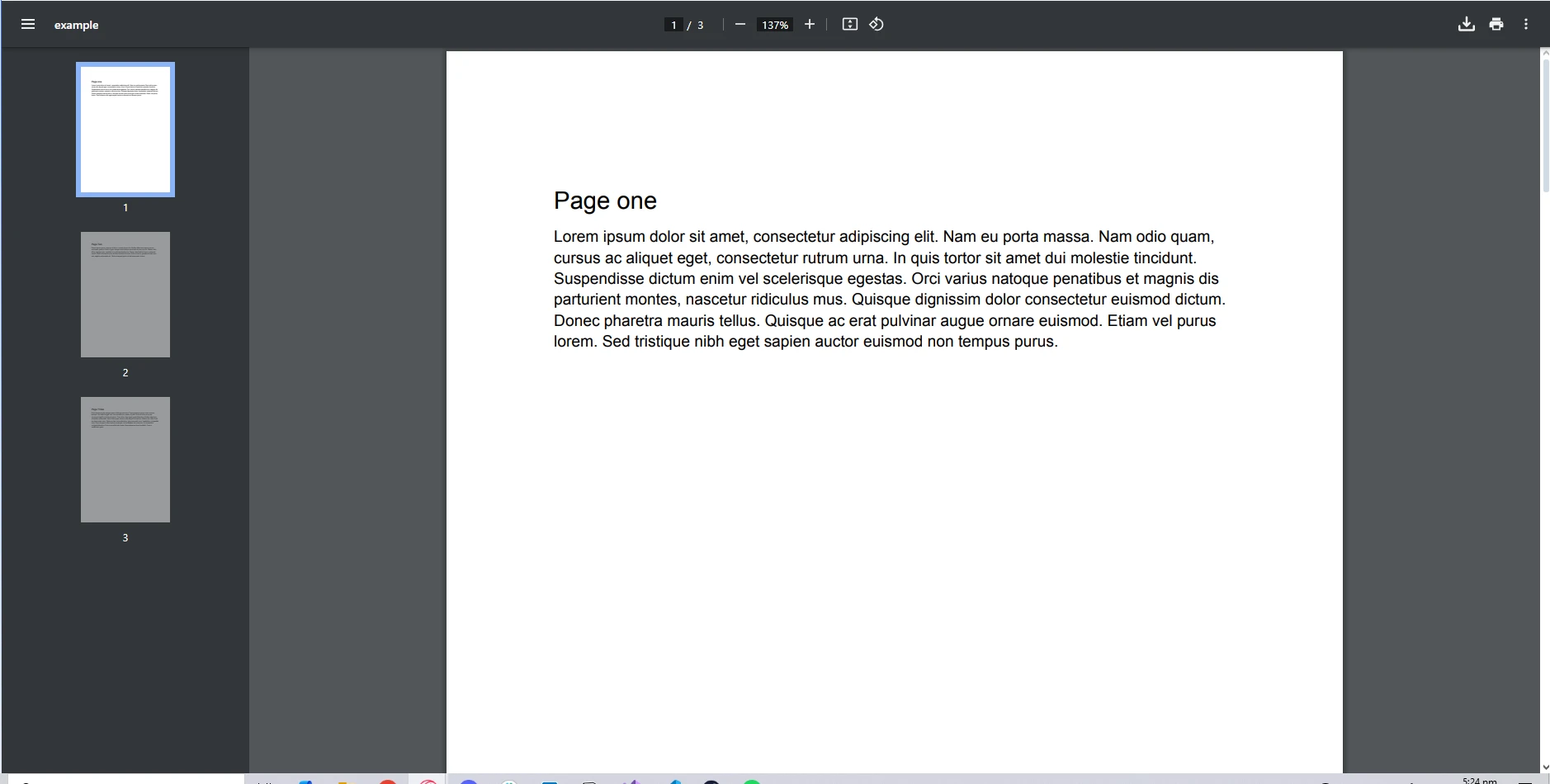
控制台輸出:
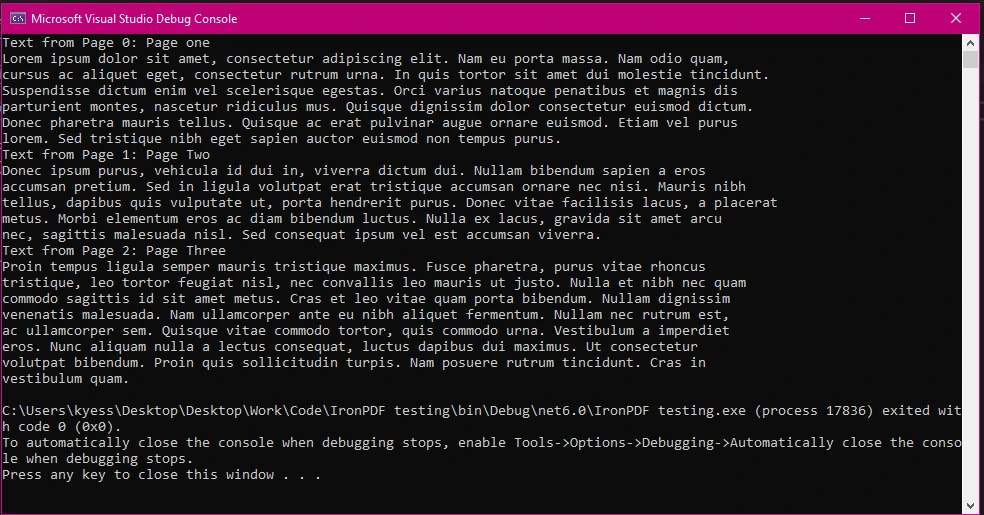
在這個範例中,我們載入 PDF 文件,遍歷其頁面,並將每個頁面轉換為 PdfPage 以擷取文字內容。 其中強調了鑄造如何使您能夠使用 IronPDF 類別的特定屬性和方法。
C# 型別轉換的最佳實務
避免 InvalidCastException。
在進行轉換時,必須確保轉換有效,以避免在執行時發生 InvalidCastException。以下是一些最佳實務:
1.使用 as 關鍵字:此關鍵字可讓您嘗試進行類型轉換,如果失敗則不會拋出例外。 相反,它會回傳 null。
```csharp
PdfPage pdfPage = page as PdfPage; // Safe cast
if (pdfPage != null)
{
    // Proceed with pdfPage
}
```2.使用 is 進行類型檢查:在進行類型轉換之前,可以使用 is 關鍵字檢查物件的類型。
```csharp
if (page is PdfPage)
{
    PdfPage pdfPage = (PdfPage)page; // Safe cast after type check
}
```3.使用者自訂轉換: C# 允許開發人員透過使用者自訂轉換為自訂類別定義自己的類型轉換規則。 當您想要促進以更直覺的方式在不同的使用者定義類型之間進行轉換時,這可能會特別有用。
```csharp
public class MyCustomType
{
    public static explicit operator MyCustomType(int value)
    {
        return new MyCustomType(/* conversion logic */);
    }
}

int myInt = 5;
MyCustomType myCustomType = (MyCustomType)myInt; // Using explicit user-defined conversion
```
效能考量
鑄造通常是有效率的,但過度或不必要的鑄造可能會導致效能問題,尤其是在涉及大型集合或複雜物件的情況下。 優化效能:
- 盡可能使用最特定的類型,以減少鑄造。
- 避免在性能關鍵的迴圈中進行鑄造,而是在可行的情況下快取結果。
- 盡可能利用內建方法進行類型轉換,因為它們通常可以提供更優化的效能。
結論
鑄造是 C# 程式設計中不可或缺的一環,尤其是在使用 IronPDF 之類的函式庫進行 PDF 操作時。 透過瞭解隱式與顯式鑄造,以及運用最佳實務,您可以提升有效管理 PDF 物件的能力。
使用 IronPDF 的功能並配合適當的鑄造,可以簡化工作流程,讓您輕鬆精準地處理 PDF 內容。 若要開始探索 IronPDF 的廣泛功能,請務必查看 免費試用。
常見問題
怎樣在 C# 中將 HTML 轉換為 PDF?
您可以使用 IronPDF 的 RenderHtmlAsPdf 方法将 HTML 字符串轉換為 PDF。此外,RenderHtmlFileAsPdf 方法允許您将 HTML 文件直接轉換為 PDF。
C# 中的強制類型轉換是什么?
C# 中的強制類型轉換是将一個變數從一种資料類型轉換為另一种資料類型的過程。这對于面向對象程式設計尤為重要,因為它有助于管理继承层次結构中的不同類型或与接口交互時的類型管理。
C# 中隱式轉換和顯式轉換有什么区别?
隱式轉換由 C# 編譯器自動處理,不会導致資料丢失,通常發生在從較小類型轉換為較大類型時。顯式轉換需要開發人员指定的轉換操作,用于從較大類型轉換為較小類型時,可能導致資料丢失。
強制類型轉換如何用于 PDF 操作?
在 IronPDF 中,強制類型轉換用于将通用 PDF 對象轉換為更具体的類型,以便访問特定的属性或方法。例如,您可以将 PdfDocument 對象轉換為 PdfPage 以操作 PDF 中的单個頁面。
如何避免 C# 中的 InvalidCastException?
為避免 InvalidCastException,请使用 'as' 關鍵字進行安全轉換,使用 'is' 验證類型,并為自定义类定义用戶特定的轉換。这些策略可确保有效的轉換,避免運行時異常。
為什么在面向對象程式設計中強制類型轉換很重要?
在面向對象程式設計中,強制類型轉換至关重要,因為它允許對象被视為其基類型,促進多态性并支持接口和類別層次結构的有效使用。
C# 中強制類型轉換的一些最佳實践是什么?
強制類型轉換的最佳實践包括使用 'is' 進行類型检查,利用 'as' 關鍵字進行安全轉換,并通過最小化不必要的轉換来提升性能。还建议在可能的情况下使用內置方法進行轉換。
如何在我的項目中安装 PDF 庫?
您可以通過在 Visual Studio 的 NuGet 包管理控制台中执行 'Install-Package IronPDF' 来安装 IronPDF,或使用解决方案的 NuGet 包管理器搜索并安装適用于您項目的包。
使用 PDF 庫進行強制類型轉換的示例是什么?
使用 IronPDF 進行強制類型轉換的一個示例是将通用 PdfDocument 對象轉換為 PdfPage 對象以访問文本內容。这使開發人员可以高效地操作 PDF 中的各個頁面。
C# 中強制類型轉換的性能考量是什么?
虽然強制類型轉換通常是高效的,但過多的轉換会影响性能。為了最佳化,建议使用特定的類型,避免在關鍵循环中進行轉換,并利用內置轉換方法以增強性能。
我能在 C# 中定义自定义的強制類型轉換規则嗎?
是的,C# 允許開發人员通過用戶定义的轉換来定义自定义強制類型轉換規则。此功能對于在各种用戶定义類型之间创建直观的轉換非常有用。
如何在 C# 中從 PDF 提取文本?
在 IronPDF 中,您可以在将文檔對象轉換為特定頁面對象後,使用 ExtractTextFromPage 方法從 PDF 中提取文本,從而使您能够检索各個頁面的文本內容。
高效的強制類型轉換如何提升 C# 應用程序的性能?
高效的強制類型轉換减少了不必要的處理過程并最佳化了資源使用。通過最小化冗余轉換并利用特定類型,您可以提升 C# 應用程序的性能,尤其是在类似 PDF 操作的資源密集任务中。









 立即免費開始
 立即免費開始
 預約免費線上示範





 無需信用卡或註冊帳號










