




Updated April 23, 2026
Bridging CLI Simplicity & .NET : Using Curl DotNet with IronPDF
Jacob Mellor has bridged this gap with CurlDotNet, a library created to bring the familiarity of cURL to the .NET ecosystem.
Read More

Casting in C# is a powerful feature that allows developers to convert a variable of one data type to another. It plays a crucial role in object-oriented programming, especially when dealing with inheritance hierarchies or working with interfaces. When using libraries like IronPDF for PDF manipulation, understanding casting becomes essential to effectively manage various types of PDF elements and operations.
In this article, we will explore the concept of casting in C#, its significance, and how it can be applied when working with IronPDF. By the end, you'll see how utilizing casting can enhance your PDF handling capabilities and streamline your development process. We encourage you to try the IronPDF free trial to experience these benefits firsthand.
In C#, casting can be broadly categorized into two types: implicit conversion and explicit conversion.
Implicit Conversion: This occurs when a conversion is performed automatically by the compiler. It is safe and does not lead to data loss. For instance, converting a smaller data type (like an integer variable) to a larger type (like a double variable) is implicit:
int myInt = 10; // Integer variable
double myDouble = myInt; // Implicit casting from int to doubleDim myInt As Integer = 10 ' Integer variable
Dim myDouble As Double = myInt ' Implicit casting from int to doubleThis process is often referred to as automatic conversion, as the C# compiler handles it without any explicit instruction from the developer.
Explicit Conversion: This requires a cast operation and is necessary when converting from a larger type to a smaller type, as it may lead to data loss. For example:
double myDouble = 9.78;
int myInt = (int)myDouble; // Explicit casting from double to intImports System
Dim myDouble As Double = 9.78
Dim myInt As Integer = CInt(Math.Truncate(myDouble)) ' Explicit casting from double to intIn this case, the developer must indicate their intention to convert the data type to another type, hence the term explicit type casting.
Casting is commonly used in scenarios involving base and derived classes. For example, when working with a class hierarchy, you can cast a derived class object to its base class type:
class Base { }
class Derived : Base { }
Derived derived = new Derived();
Base baseRef = derived; // Implicit casting to base classFriend Class Base
End Class
Friend Class Derived
Inherits Base
End Class
Private derived As New Derived()
Private baseRef As Base = derived ' Implicit casting to base classWhen using IronPDF, casting is essential when dealing with various PDF-related classes, such as when you want to convert a generic PDF object to a more specific type to access certain properties or methods.
To start using IronPDF, you will first need to install it. If it's already installed, then you can skip to the next section; otherwise, the following steps cover how to install the IronPDF library.
To install IronPDF using the NuGet Package Manager Console, open Visual Studio and navigate to the Package Manager Console. Then run the following command:
Opening Visual Studio, go to "Tools -> NuGet Package Manager -> Manage NuGet Packages for Solution," and search for IronPDF. From here, all you need to do is select your project and click "Install," and IronPDF will be added to your project.
Once you have installed IronPDF, all you need to add to start using IronPDF is the correct using statement at the top of your code:
using IronPdf;Imports IronPdfIronPDF provides several classes to manipulate PDF documents, such as PdfDocument, ChromePdfRenderer, and PdfPage. Understanding how these types interact through casting is crucial for effective PDF manipulation.
For instance, you may have a collection of generic PdfDocument objects and need to work with a specific PdfPage object. You can achieve this through casting:
PdfDocument pdfDoc = new PdfDocument(210, 297);
PdfPage page = (PdfPage)pdfDoc.Pages[0]; // Casting a generic PDF page to a specific typeDim pdfDoc As New PdfDocument(210, 297)
Dim page As PdfPage = CType(pdfDoc.Pages(0), PdfPage) ' Casting a generic PDF page to a specific typeThis casting allows you to access properties and methods specific to PdfPage, enhancing your control over the PDF content.
Let's look at the following example, where we need to extract text from a PDF and cast objects appropriately:
using IronPdf;
using IronPdf.Pages;
using System;

public static void Main(string[] args)
{
    PdfDocument pdf = PdfDocument.FromFile("example.pdf");
    foreach (PdfPage page in pdf.Pages)
    {
        PdfPage pdfPage = (PdfPage)page;
        string text = pdfPage.Text;
        Console.WriteLine($"Text from Page {pdfPage.PageIndex}: {text}");
    }
}Imports IronPdf
Imports IronPdf.Pages
Imports System
Public Shared Sub Main(ByVal args() As String)
Dim pdf As PdfDocument = PdfDocument.FromFile("example.pdf")
For Each page As PdfPage In pdf.Pages
Dim pdfPage As PdfPage = CType(page, PdfPage)
Dim text As String = pdfPage.Text
Console.WriteLine($"Text from Page {pdfPage.PageIndex}: {text}")
Next page
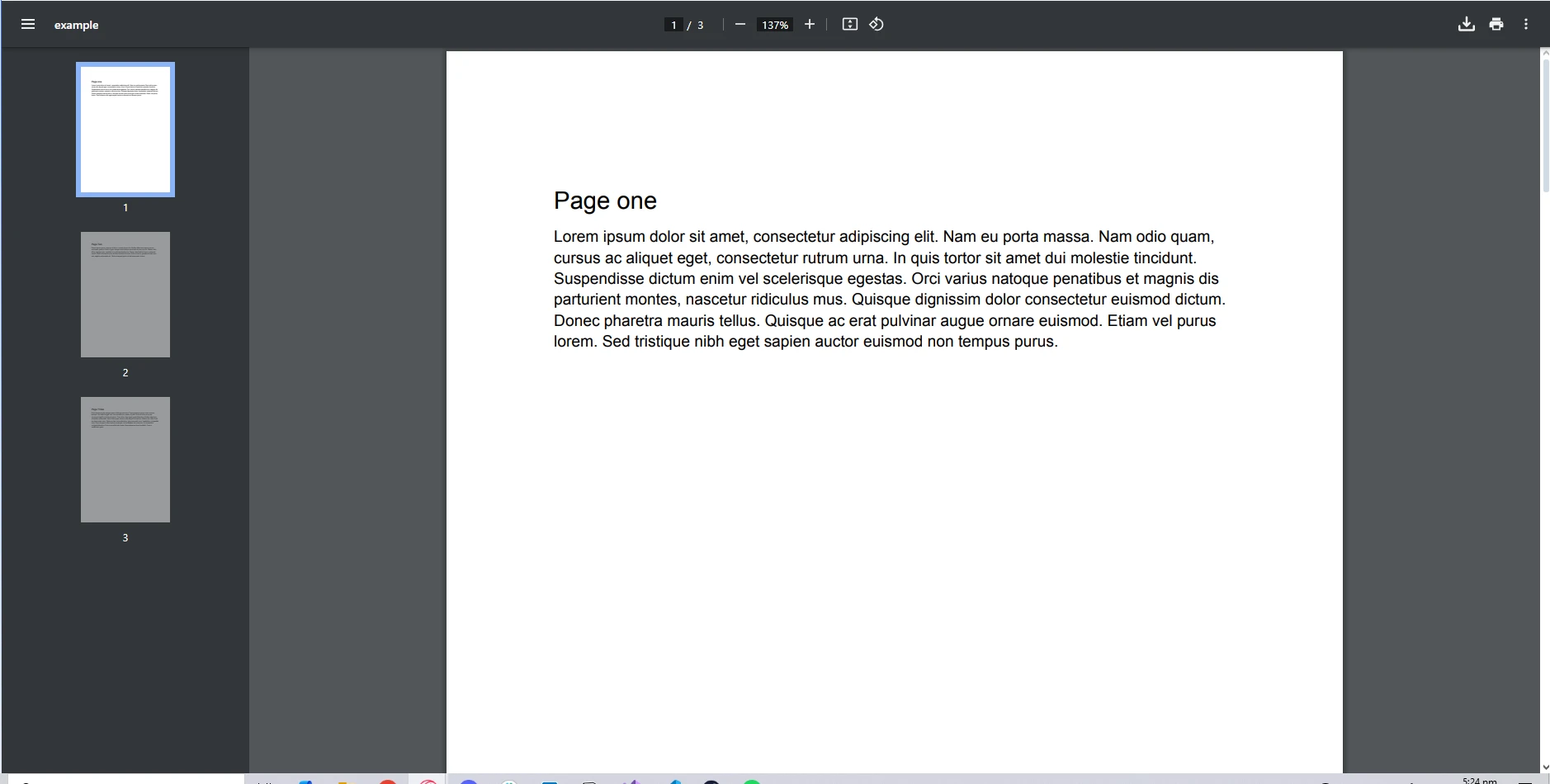
End SubInput PDF:
Console Output:
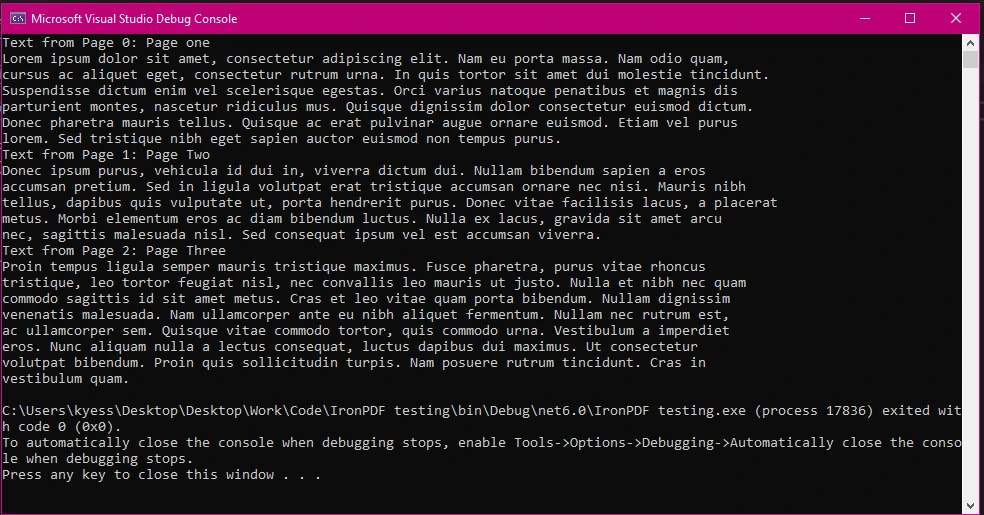
In this example, we load a PDF document, iterate through its pages, and cast each page to PdfPage to extract text content. This highlights how casting enables you to work with the specific properties and methods of IronPDF classes.
When casting, it's important to ensure that the conversion is valid to avoid an InvalidCastException at runtime. Here are some best practices:
Use the as Keyword: This keyword allows you to attempt a cast without throwing an exception if it fails. Instead, it returns null.
PdfPage pdfPage = page as PdfPage; // Safe cast
if (pdfPage != null)
{
    // Proceed with pdfPage
}Dim pdfPage As PdfPage = TryCast(page, PdfPage) ' Safe cast
If pdfPage IsNot Nothing Then
' Proceed with pdfPage
End IfType Checking with is: Before casting, you can check the type of the object using the is keyword.
if (page is PdfPage)
{
    PdfPage pdfPage = (PdfPage)page; // Safe cast after type check
}If TypeOf page Is PdfPage Then
Dim pdfPage As PdfPage = CType(page, PdfPage) ' Safe cast after type check
End IfUser-Defined Conversions: C# allows developers to define their own casting rules for custom classes through user-defined conversions. This can be particularly useful when you want to facilitate a more intuitive way of converting between different user-defined types.
public class MyCustomType
{
    public static explicit operator MyCustomType(int value)
    {
        return new MyCustomType(/* conversion logic */);
    }
}

int myInt = 5;
MyCustomType myCustomType = (MyCustomType)myInt; // Using explicit user-defined conversionPublic Class MyCustomType
Public Shared Narrowing Operator CType(ByVal value As Integer) As MyCustomType
Return New MyCustomType()
End Operator
End Class
Private myInt As Integer = 5
Private myCustomType As MyCustomType = CType(myInt, MyCustomType) ' Using explicit user-defined conversionWhile casting is generally efficient, excessive or unnecessary casting can lead to performance issues, especially in scenarios involving large collections or complex objects. To optimize performance:
Casting is an essential aspect of C# programming, especially when working with libraries like IronPDF for PDF manipulation. By understanding implicit and explicit casting, as well as employing best practices, you can enhance your ability to manage PDF objects effectively.
Using IronPDF's capabilities with proper casting allows for streamlined workflows, enabling you to manipulate PDF content with ease and precision. To begin exploring IronPDF's extensive range of features for yourself, be sure to check out the free trial.

Jacob Mellor is Chief Technology Officer at Iron Software and a visionary engineer pioneering C# PDF technology. As the original developer behind Iron Software's core codebase, he has shaped the company's product architecture since its inception, transforming it alongside CEO Cameron Rimington into a 50+ person company serving NASA, Tesla, and global government agencies.



IronPDF is a part of IRONSUITE
10 .NET API products for your office documents

When you need your PDF to look like HTML, fast.


