


Grapevine .NET(對開發者如何理解的工作)

Grapevine 是一個簡單但有效的 C# 微型網頁框架。 它為程式設計師提供了一種快速、簡便且適應性強的方法來構建RESTful 網路服務。 由於其可擴展性和易用性,Grapevine 對於小型專案和原型製作而言是完美的選擇。 它也足夠強大,可以處理更複雜的應用程式。
借助知名的 .NET 封裝 IronPDF,程式設計師可以生成、修改和從 PDF 文件中提取內容。 IronPDF 的豐富功能集使在 C# 應用程式中處理 PDF 變得更容易,成為許多開發人員的重要工具。
透過在您的網路服務中實現流暢的 PDF 建立和操作,結合 Grapevine 和 IronPDF 可以大大改善您的 C# 網頁應用程式。 這個連接提供了一種有效的方法來建立發票、報告或任何其他型別的文件。
什麼是 Grapevine C#?
using Grapevine,可以建立一個輕量、快速且可適應的 RESTful 網路服務和 API,這是一個 C# 微型網頁框架。 由於其簡單的模式和基本的架構,保証了快速設置和卓越的性能,因此非常適合需要高效處理 HTTP 請求的小型專案、原型和微服務。
Grapevine 提供了一個靈活且使用者友好的路由機制,使識別和管理端點的過程變得更簡單。 它透過支援包括 GET、POST、PUT 和 DELETE 在內的多個 HTTP 方法,簡化了 CRUD 操作和組織良好的 RESTful API 的建立。 它還支援中介軟體,使程式設計師可以通過建立日誌記錄、身份驗證和錯誤處理的自定義組件來增加更多功能。
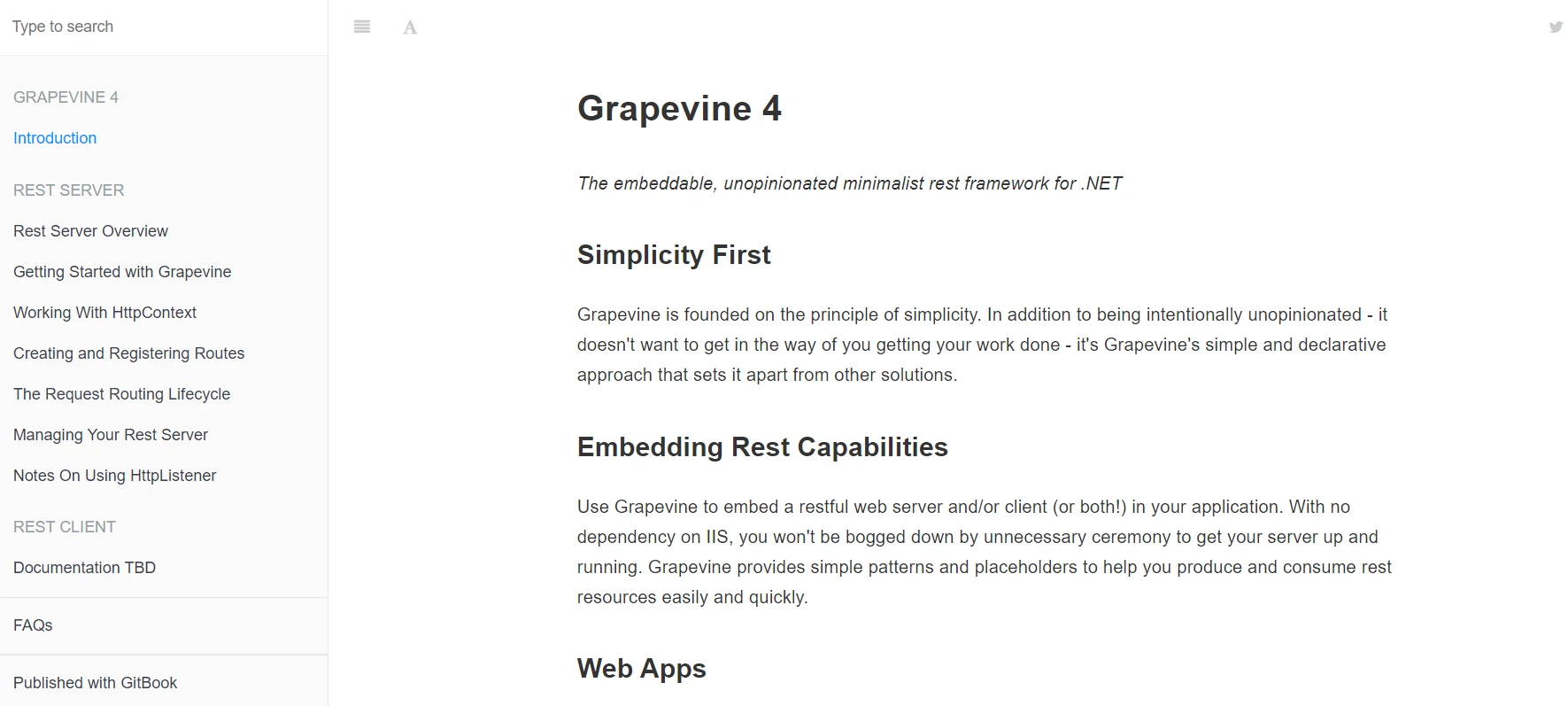
由於該框架遵循 REST 原則,開發人員可以建立可擴展和可靠的 API。 其簡單性和易用性使其成為開發人員的絕佳選擇,允許他們在不處理大型框架的複雜性的情況下快速製作和啟動網路服務。 其輕量化設計使 Grapevine 適合不需要複雜網頁框架的開發開銷的微服務和應用程式。
Grapevine C# 的功能
輕量且快速
Grapevine 的基本設計保證了小佔用空間和卓越的性能,使其成為對速度要求極高應用程式的理想選擇。
直觀的路由
該框架簡化了 HTTP 端點的定義和管理,提供了一個簡單且使用者友好的路由系統。
RESTful API 設計
Grapevine 是以 REST 概念為基礎開發的,支持包括 GET、POST、PUT 和 DELETE 在內的多個 HTTP 方法,以促進可靠和有組織的 API 的建立。
中介軟體支援
自訂中介組件對於日誌記錄、身份驗證、授權和錯誤處理等任務有幫助,允許開發人員擴展 Grapevine 的功能。
易用性
Grapevine 的簡單設計使設置和開發快速,對於網路服務的原型製作和部署非常完美。
相容性
其與其他 .NET 程式庫和工具的相容性使其在多種應用場景中都很有用。
模塊化
框架的模塊化設計允許開發人員僅整合必要的功能,以維持應用程式的效率和輕便性。
可擴展性
儘管其輕量化性質,Grapevine 可以適應多種專案大小,並可擴展以配合更複雜的應用程式。
社群與支援
活躍的 Grapevine 社群提供工具、指導和案例研究以幫助開發人員最大限度地利用框架。
靈活的配置
框架的廣泛配置選項允許開發人員調整 REST 伺服器和設置以滿足特定需求。
建立和配置 Grapevine C
建立和配置 Grapevine C# 專案涉及的階段包括設置開發環境、安裝所需封裝以及配置 Grapevine 框架。 這裡有一個逐步的教程指南來幫助您入門:
建立新的.NET專案
- 打開命令提示符或終端。
- 通過輸入以下內容來啟動新建立的 .NET 控制台應用程式:
dotnet new console -n GrapevineExample
cd GrapevineExample
dotnet new console -n GrapevineExample
cd GrapevineExample安裝 Grapevine
- 將 Grapevine 封裝新增到您的專案中:
dotnet add package Grapevinedotnet add package Grapevine配置 Grapevine
using Grapevine;
using Grapevine.Interfaces.Server;
using Grapevine.Server;
using Grapevine.Server.Attributes;
using Grapevine.Shared;

public class Program
{
    public static void Main(string[] args)
    {
        // Create and start a new REST server
        var server = new RestServer();
        server.Start();
        Console.WriteLine("Server is running...");
        Console.WriteLine("Press enter to stop the server.");
        Console.ReadKey();
        server.Stop();
    }
}

[RestResource]
public class SampleResource
{
    // Defines a route method for the /hello endpoint
    [RestRoute(HttpMethod = HttpMethod.GET, PathInfo = "/hello")]
    public IHttpContext HelloWorld(IHttpContext context)
    {
        // Send a response for the GET request at /hello
        context.Response.SendResponse("Hello, World!");
        return context;
    }
}
using Grapevine;
using Grapevine.Interfaces.Server;
using Grapevine.Server;
using Grapevine.Server.Attributes;
using Grapevine.Shared;
public class Program
{
public static void Main(string[] args)
{
// Create and start a new REST server
var server = new RestServer();
server.Start();
Console.WriteLine("Server is running...");
Console.WriteLine("Press enter to stop the server.");
Console.ReadKey();
server.Stop();
}
}
[RestResource]
public class SampleResource
{
// Defines a route method for the /hello endpoint
[RestRoute(HttpMethod = HttpMethod.GET, PathInfo = "/hello")]
public IHttpContext HelloWorld(IHttpContext context)
{
// Send a response for the GET request at /hello
context.Response.SendResponse("Hello, World!");
return context;
}
}Imports Grapevine
Imports Grapevine.Interfaces.Server
Imports Grapevine.Server
Imports Grapevine.Server.Attributes
Imports Grapevine.Shared
Public Class Program
Public Shared Sub Main(ByVal args() As String)
' Create and start a new REST server
Dim server = New RestServer()
server.Start()
Console.WriteLine("Server is running...")
Console.WriteLine("Press enter to stop the server.")
Console.ReadKey()
server.Stop()
End Sub
End Class
<RestResource>
Public Class SampleResource
' Defines a route method for the /hello endpoint
<RestRoute(HttpMethod := HttpMethod.GET, PathInfo := "/hello")>
Public Function HelloWorld(ByVal context As IHttpContext) As IHttpContext
' Send a response for the GET request at /hello
context.Response.SendResponse("Hello, World!")
Return context
End Function
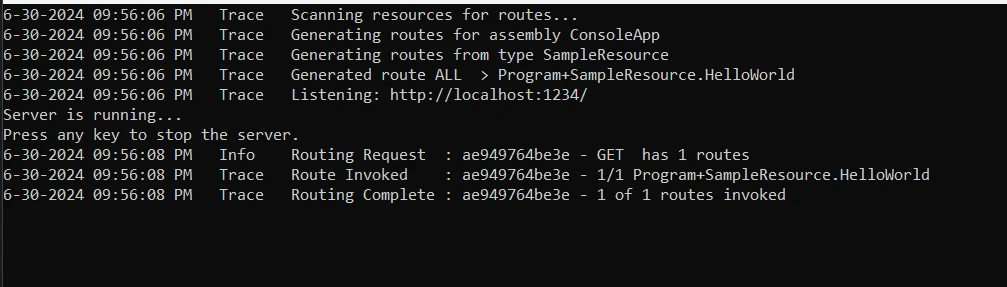
End Class第一步涉及從 Grapevine 程式庫中導入必要的命名空間來幫助進行 HTTP 請求處理、路由和伺服器操作。 Main 類別中的 Program 函式建立並啟動一個 RestServer 物件來監聽新的 HTTP 請求。
當伺服器已啟動並運行時,控制台將通知使用者,並在按下任意鍵時終止。 SampleResource 類別用於定義一個端點,並由 [RestResource] 屬性標記,其中還指定了在 /hello 位置對 GET 請求做出響應的 HelloWorld 函式。
在端點成功命中後,HelloWorld 方法使用 IHttpContext 參數向客戶端返回"Hello, World!"響應,以及有關 HTTP 請求和響應的詳細資訊。 此簡單配置演示了如何構建單路徑輕量網路伺服器,突出 Grapevine 在 C# 中使用者友好的 HTTP 請求處理。
入門
設置一個專案,透過在 C# 中結合使用 Grapevine 建立 RESTful 網路服務和 IronPDF 來建立或修改 PDF 文件,是熟悉 Grapevine 和 IronPDF 的第一步。 這裡有一個逐步教程幫助您開始:
什麼是IronPDF?
C# 程式可以使用功能豐富的 .NET 程式庫IronPDF建立、閱讀和編輯 PDF 文件。 開發人員可以輕鬆使用此工具將 HTML、CSS 和 JavaScript 內容轉換成高質量可列印的 PDF 文件。 IronPDF 可以完成的最重要的工作之一包括新增頁眉和頁腳、分割與合併 PDF、水印文件,以及將 HTML 轉換為 PDF。 IronPDF支持.NET Framework和.NET Core,這使得它適用於廣泛的應用程式。
由於 PDF 使用者友好並提供豐富的資訊,開發人員可以輕鬆將其整合到產品中。 IronPDF 處理復雜佈局和格式的能力意味着它生成的 PDF 與原始 HTML 文字高度相似。
IronPDF的功能
從HTML生成PDF
將HTML、CSS和JavaScript轉換為PDF。 IronPDF 支持現代網頁標準如媒體查詢和響應式設計,對於使用 HTML 和 CSS 動態設計 PDF 發票、報告和文件大有幫助。
PDF編輯
可以向現有的 PDF 新增文字、圖片及其他素材。 使用 IronPDF 提取文字和圖像,將多個 PDF 合併成一個文件,將 PDF 文件分割為單獨的文件,以及在 PDF 頁面上新增頁眉、頁腳、註釋和水印。
PDF轉換
將 Word、Excel 和圖像文件轉換為 PDF,或反之,將 PDF 文件轉換為圖像格式(PNG、JPEG 等)。
性能和可靠性
對於工業環境,設計的高性能和可靠性是可取的,能夠輕鬆處理大文件集。
安裝IronPDF
安裝 IronPDF 封裝以獲得在 .NET 專案中處理 PDF 的工具。
dotnet add package IronPdf
使用 IronPDF 的 Grapevine
要讓您的第一台伺服器在程式中處理 HTTP 請求和響應,必須通過執行 Program.cs 文件來初始化 Grapevine RestServer 實例。 使用 rest 伺服器的 Start() 和 Stop() 方法來管理伺服器,並在按鍵時暫停控制台指示。
using Grapevine.Interfaces.Server;
using Grapevine.Server.Attributes;
using Grapevine.Server;
using Grapevine.Shared;
using IronPdf;
using System.Threading.Tasks;
using System;

class Program
{
    [RestResource]
    public class PdfResource
    {
        // Route method for PDF generation
        [RestRoute(HttpMethod = Grapevine.Shared.HttpMethod.GET, PathInfo = "/generate-pdf")]
        public IHttpContext GeneratePdf(IHttpContext context)
        {
            // HTML content to be converted to PDF
            var htmlContent = "<h1>Hello, PDF!</h1><p>This is a PDF generated using IronPDF.</p>";

            // Create a new PDF renderer
            var renderer = new ChromePdfRenderer();

            // Render the PDF from the HTML content
            var pdf = renderer.RenderHtmlAsPdf(htmlContent);

            // Convert PDF to byte array
            var pdfBytes = pdf.BinaryData;

            // Set response content type and length
            context.Response.ContentType = ContentType.CUSTOM_BINARY;
            context.Response.ContentLength64 = pdfBytes.Length;

            // Send PDF byte array as response
            context.Response.SendResponse(pdfBytes);

            return context;
        }
    }

    static async Task Main(string[] args)
    {
        // Create and start a new REST server
        var server = new RestServer();
        server.LogToConsole().Start();
        Console.WriteLine("Server is running...");
        Console.WriteLine("Press any key to stop the server.");
        Console.ReadKey();
        server.Stop();
    }
}
using Grapevine.Interfaces.Server;
using Grapevine.Server.Attributes;
using Grapevine.Server;
using Grapevine.Shared;
using IronPdf;
using System.Threading.Tasks;
using System;
class Program
{
[RestResource]
public class PdfResource
{
// Route method for PDF generation
[RestRoute(HttpMethod = Grapevine.Shared.HttpMethod.GET, PathInfo = "/generate-pdf")]
public IHttpContext GeneratePdf(IHttpContext context)
{
// HTML content to be converted to PDF
var htmlContent = "<h1>Hello, PDF!</h1><p>This is a PDF generated using IronPDF.</p>";
// Create a new PDF renderer
var renderer = new ChromePdfRenderer();
// Render the PDF from the HTML content
var pdf = renderer.RenderHtmlAsPdf(htmlContent);
// Convert PDF to byte array
var pdfBytes = pdf.BinaryData;
// Set response content type and length
context.Response.ContentType = ContentType.CUSTOM_BINARY;
context.Response.ContentLength64 = pdfBytes.Length;
// Send PDF byte array as response
context.Response.SendResponse(pdfBytes);
return context;
}
}
static async Task Main(string[] args)
{
// Create and start a new REST server
var server = new RestServer();
server.LogToConsole().Start();
Console.WriteLine("Server is running...");
Console.WriteLine("Press any key to stop the server.");
Console.ReadKey();
server.Stop();
}
}Imports Grapevine.Interfaces.Server
Imports Grapevine.Server.Attributes
Imports Grapevine.Server
Imports Grapevine.Shared
Imports IronPdf
Imports System.Threading.Tasks
Imports System
Friend Class Program
<RestResource>
Public Class PdfResource
' Route method for PDF generation
<RestRoute(HttpMethod := Grapevine.Shared.HttpMethod.GET, PathInfo := "/generate-pdf")>
Public Function GeneratePdf(ByVal context As IHttpContext) As IHttpContext
' HTML content to be converted to PDF
Dim htmlContent = "<h1>Hello, PDF!</h1><p>This is a PDF generated using IronPDF.</p>"
' Create a new PDF renderer
Dim renderer = New ChromePdfRenderer()
' Render the PDF from the HTML content
Dim pdf = renderer.RenderHtmlAsPdf(htmlContent)
' Convert PDF to byte array
Dim pdfBytes = pdf.BinaryData
' Set response content type and length
context.Response.ContentType = ContentType.CUSTOM_BINARY
context.Response.ContentLength64 = pdfBytes.Length
' Send PDF byte array as response
context.Response.SendResponse(pdfBytes)
Return context
End Function
End Class
Shared Async Function Main(ByVal args() As String) As Task
' Create and start a new REST server
Dim server = New RestServer()
server.LogToConsole().Start()
Console.WriteLine("Server is running...")
Console.WriteLine("Press any key to stop the server.")
Console.ReadKey()
server.Stop()
End Function
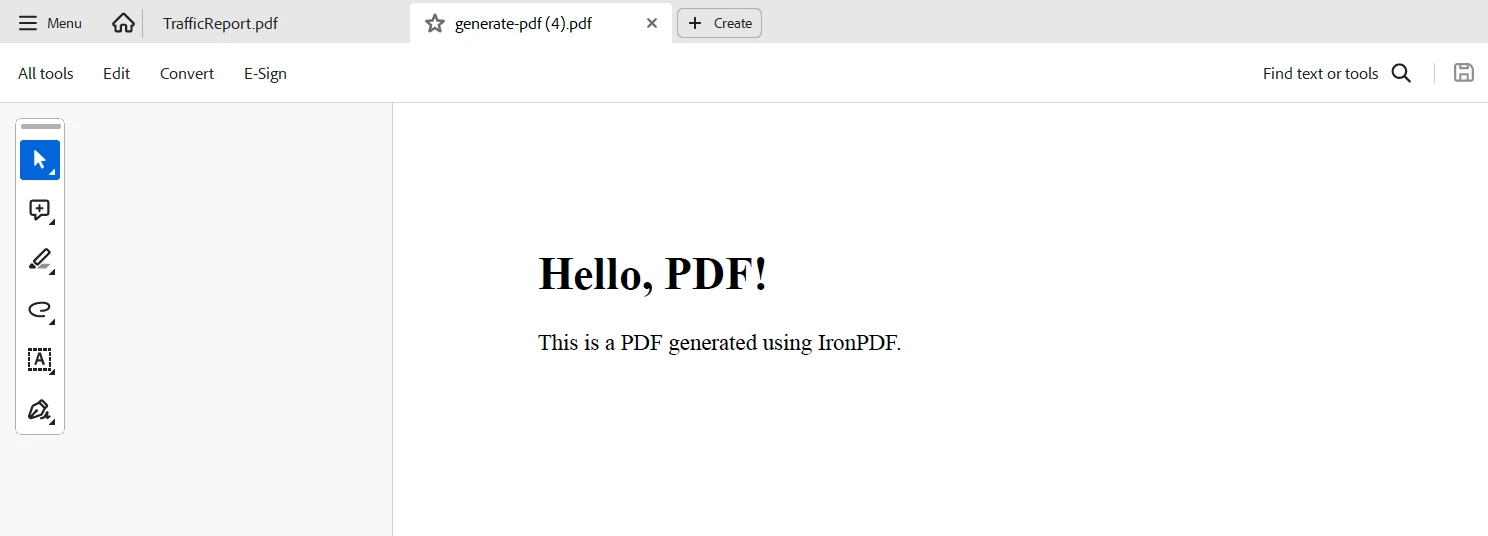
End Class在 Grapevine 配置中定義了一個 PdfResource 類來管理與 PDF 建立相關的特定 HTTP 請求。 當存在 [RestResource] 屬性時,表明該類具有可以響應 RESTful 路由的方法。
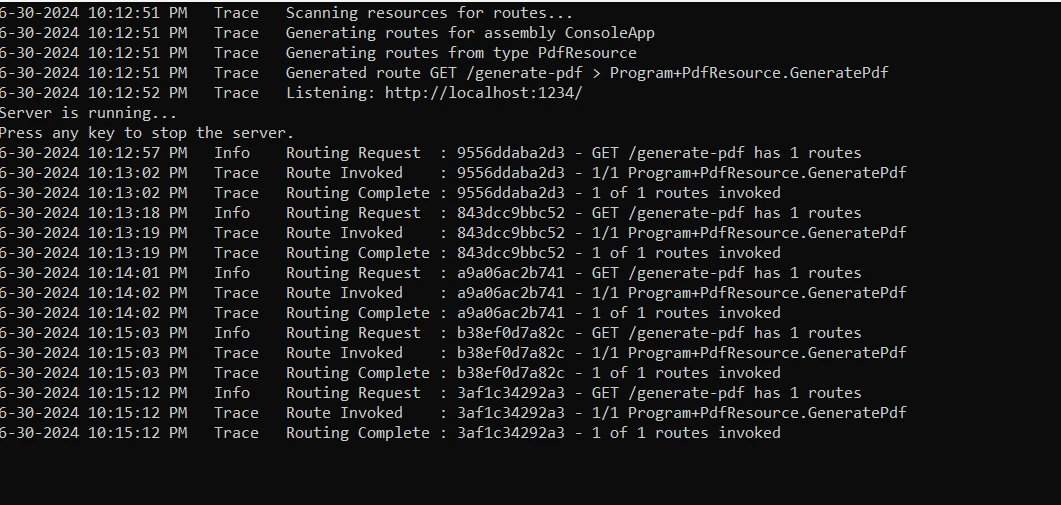
[RestRoute(HttpMethod = HttpMethod.GET, PathInfo = "/generate-pdf")] 注釋在 PdfResource 中的 GeneratePdf 方法上指示該方法響應 /generate-pdf 端點的 GET 請求。 在程式中:
- 將 HTML 內容字串(
htmlContent)定義,用以表示將轉換成 PDF 的內容。 - 使用 IronPDF 的
ChromePdfRenderer從 HTML 文字建立 PDF 文件(pdf)。 - 從最終的 PDF 文件建立字節陣列(
pdfBytes)。 - HTTP 上下文(
context)被設置為以 PDF 內容型別進行回應,並使用SendResponse將 PDF 字節陣列傳回給客戶端。
結論
總之,開發人員希望在其應用程式中整合具有動態 PDF 生成功能的網路服務,Grapevine C# 與 IronPDF 的整合將成為堅固的解決方案。 Grapevine 的輕量且使用者友好的極簡網頁框架簡化了 RESTful 端點的設置和實作,還促進了 HTTP 請求的處理和自定義路由的建立。 另一方面,IronPDF 可通過支持包含 JavaScript 和 CSS 造型整合的 HTML 資訊,輕鬆轉換為優秀的 PDF 文件,以提升應用程式。
此連接允許開發人員建立動態的、專業的 PDF,並且簡化了交互性、資料驅動網路服務的建立和分發。 Grapevine 和 IronPDF 的結合提供了一個靈活的工具箱,無論是生成報告、發票或其他型別的文件,都滿足當代網路應用程式開發的需求。 透過結合 IronPDF 的強大 PDF 建立功能和 Grapevine 的使用者友好介面,開發人員可以建立滿足使用者需求和企業目標的靈活高效解決方案。
有了 IronPDF,並在Iron Software的支持下,開發人員獲得更多網頁應用程式和功能以及更高效的開發。 這是通過將全面的支持與極具靈活性的 Iron Software 系統和套件相結合,提供特定於專案的明確授權選項,讓開發人員可以輕鬆選擇最佳化的模型來完成的。 這些好處使開發人員能夠快速、連貫且有效地實施解決方案,適用於各種挑戰。
常見問題
我可以如何在 C# 中建立 RESTful 網路服務?
您可以使用 Grapevine,一個 C# 微型網路框架,來快速輕鬆地建立 RESTful 網路服務。它提供直觀的路由和中介軟體支持以實現自訂功能。
為什麼 Grapevine 適合作為小型專案和原型的選擇?
Grapevine 是輕量且可擴展的,非常適合小型專案和原型。其使用者友好的設計和模組化允許開發者建立高效且可適應的網路服務而不需要不必要的負擔。
我可以如何在 C# 應用程式中從 HTML 內容生成 PDF?
您可以使用 IronPDF 將 HTML 內容轉換為高品質 PDF 文件。IronPDF 支持 HTML、CSS 和 JavaScript,使其能夠輕鬆地從網頁內容生成專業外觀的 PDF。
using Grapevine 與 IronPDF 有哪些好處?
將 Grapevine 與 IronPDF 結合使開發者能夠高效地建立能生成和操作 PDF 文件的網路服務。這種整合非常適用於需要生成文件如發票和報告的應用程式。
Grapevine 為開發 RESTful API 提供了哪些功能?
Grapevine 提供了直觀的路由、中介軟體支持和 RESTful API 設計等功能。這些功能簡化了開發過程,並允許建立可擴展且有序的網路服務。
中介軟體如何增強 C# 網路框架的功能?
在 Grapevine 中,中介軟體允許開發者通過實現自訂組件來擴展框架的功能,例如日誌記錄、身份驗證和錯誤處理。
IronPDF 能夠處理複雜的 PDF 文件佈局嗎?
是的,IronPDF 能夠通過支持現代網路標準如媒體查詢和響應式設計來處理複雜的佈局。這對於使用 HTML 和 CSS 動態樣式 PDF 很有用。
什麼型別的應用程式能夠受益於使用 Grapevine 和 IronPDF?
需要動態網路服務和 PDF 生成的應用程式,例如生成報告或發票的應用程式,可以大大受益於 Grapevine 和 IronPDF 的組合。










 免費開始
免費開始 免費開始
免費開始 預訂免費直播演示
















