


Rebus .NET Core 示例(對於開發者的運行原理)

在.NET開發的複雜世界中,管理服務之間的非同步通訊是建立可靠且可擴展應用程式的關鍵。 進入Rebus .NET,一個強大的程式庫,簡化了.NET生態系統中的基於訊息的通訊和路由。 讓我們探索Rebus如何賦予開發者充分利用服務匯流排和排隊服務呼叫機制的潛力,根據提供的關鍵字。
開發者可以通過將Rebus .NET與IronPDF的PDF生成功能結合,建立能夠生成PDF文件作為其訊息操作的一部分的複雜分佈式系統。 例如,一個Rebus建立的系統可能會收到生成PDF文件的請求,利用Rebus處理程式處理請求,然後使用IronPDF生成文件並回應。
開發者可以利用Rebus和IronPDF建立功能豐富、可擴展且可靠的分佈式應用,這些應用可以輕鬆整合到PDF生成的訊息工作流程中。 這種整合為開發各種型別的應用提供了一個強大的基礎,例如報告工具和文件管理系統。
什麼是Rebus?
在分佈式系統的核心,是需要有效的訊息路由和處理。 Rebus概述和資源,具有直觀的API和全面的功能,作為分佈式應用程式不同元件之間的橋樑。 無論是協調微服務之間的通訊,還是管理非同步任務,Rebus都提供了必要的工具來簡化訊息處理和傳遞。
服務匯流排和訊息路由
使用Rebus,根據預定義標準路由訊息變得輕而易舉。 開發者可利用Rebus的路由能力將訊息引導到特定的處理程式或佇列,確保每條訊息有效地到達其預定目的地。 通過使用Rebus的擴展方法定義路由規則,開發者可以根據其應用結構的獨特需求自定義訊息流。
多功能的訊息模式
Rebus .NET相容多種訊息模式,比如訊息路由、命令/查詢、請求/回應以及發布/訂閱。由於這種多樣性,開發者可以選擇最適合其特定用例的設計。
非同步訊息
Rebus.NET使分佈式系統的元件能夠互相通訊而無需等待回應或互相阻礙。 這種非同步通訊增強了系統的響應能力和可擴展性。
分佈式架構
Rebus.NET旨在為分佈式系統的開發提供支持,其中多個進程或網路用作元件間通訊的手段。 它提供處理訊息序列化和反序列化、維持訊息傳遞可靠性及管理訊息佇列的能力。
可擴展性
Rebus.NET非常可擴展,使程式開發人員能夠根據其需求修改和擴展其功能。 它提供與多個中介軟體平台、序列化格式和訊息代理的整合點。
錯誤處理和重試技術
Rebus.NET內建的重試和錯誤處理技術,確保訊息即使在短暫中斷或網路問題時也能穩定處理。 開發者可以設置重試策略和錯誤處理技術,以滿足其應用的韌性需求。
訊息加密和安全性
Rebus.NET為開發者提供訊息加密和安全功能,保護跨多個分散元件、託管環境及混合雲應用程式傳輸的敏感資料。 它與加密程式庫和協議輕鬆整合,保證混合雲應用程式的安全通訊通道。
非同步訊息處理
處理非同步訊息是Rebus的核心功能。 通過使用await bus模式,開發者可以讓應用程式程式碼等待訊息的到來並非同步執行相應的訊息處理程式。 這允許非阻塞訊息處理,確保應用在承受重負載時仍保持響應性和可擴展性。
容錯和失敗訊息管理
在分佈式系統中,故障是不可避免的。 Rebus為開發者配備了管理和優雅處理失敗訊息的機制。 通過配置錯誤日誌記錄和重試策略,開發人員可以定義Rebus如何處理失敗訊息,無論是重試錯誤訊息的傳遞,將訊息移至死信佇列,還是記錄錯誤以供進一步日誌記錄和分析。
建立和配置Rebus
與.NET Core的整合
Rebus完全相容.NET Core,使其成為現代、跨平台應用程式的理想選擇。 無論您是在構建微服務、無伺服器功能、混合雲應用程式還是本地應用程式,Rebus在.NET Core生態系統中為非同步通訊和訊息處理提供了堅實的基礎。
配置訊息處理程式
然後必須建立訊息處理程式類別以處理接收到的訊息。 每個訊息處理程式類別都應實現MyMessage為處理程式類別將處理的訊息型別。
public class MyMessageHandler : IHandleMessages<MyMessage>
{
    public async Task Handle(MyMessage message)
    {
        // Process the incoming message here
        // Example: Log the message or perform some business logic
    }
}
public class MyMessageHandler : IHandleMessages<MyMessage>
{
public async Task Handle(MyMessage message)
{
// Process the incoming message here
// Example: Log the message or perform some business logic
}
}Public Class MyMessageHandler
Implements IHandleMessages(Of MyMessage)
Public Async Function Handle(ByVal message As MyMessage) As Task
' Process the incoming message here
' Example: Log the message or perform some business logic
End Function
End Class配置訊息傳輸
Rebus必須配置一個訊息傳輸機制,以便傳輸和接收訊息。 Rebus相容多個傳輸選擇,例如用於測試的記憶體傳輸、Azure Service Bus、RabbitMQ和SQL Server。 因此,它不僅僅限於任何特定的排隊技術,並且可以移至任何託管環境。
例如,若要利用RabbitMQ作為訊息傳輸:
var services = new ServiceCollection();
// Configure the message transport with RabbitMQ
services.AddRebus(configure => configure
    .Transport(t => t.UseRabbitMq("amqp://guest:guest@localhost", "my-queue"))
    .Routing(r => r.TypeBased().Map<MyMessage>("my-queue")));
var services = new ServiceCollection();
// Configure the message transport with RabbitMQ
services.AddRebus(configure => configure
.Transport(t => t.UseRabbitMq("amqp://guest:guest@localhost", "my-queue"))
.Routing(r => r.TypeBased().Map<MyMessage>("my-queue")));Dim services = New ServiceCollection()
' Configure the message transport with RabbitMQ
services.AddRebus(Function(configure) configure.Transport(Function(t) t.UseRabbitMq("amqp://guest:guest@localhost", "my-queue")).Routing(Function(r) r.TypeBased().Map(Of MyMessage)("my-queue")))初始化Rebus
最後,您必須開始訊息處理迴圈過程,並用配置好的服務初始化Rebus。
var serviceProvider = services.BuildServiceProvider();
var bus = serviceProvider.GetRequiredService<IBus>();
await bus.Start(); // Start the Rebus message processing loop
var serviceProvider = services.BuildServiceProvider();
var bus = serviceProvider.GetRequiredService<IBus>();
await bus.Start(); // Start the Rebus message processing loopDim serviceProvider = services.BuildServiceProvider()
Dim bus = serviceProvider.GetRequiredService(Of IBus)()
Await bus.Start() ' Start the Rebus message processing loop其他配置
重試策略:通過在配置中包含重試選項,您可以將Rebus設置為在失敗時重試訊息處理。
並發控制:通過調整工作執行緒或處理程式的數量,Rebus讓您可以調整訊息處理的並發性。
訊息序列化:Rebus可以將訊息序列化為多種格式,包括JSON、XML和Protobuf。 序列化設置是可配置的,以符合您的應用程式程式碼和需求。
快速入門
什麼是IronPDF?
一個讓我們在程式中建立、修改和渲染PDF文件的著名.NET程式庫被稱為IronPDF。 處理PDF可以用多種方式進行,包括使用IronPDF範例將HTML頁面轉換為PDF,並將文字、圖像和形狀插入既有的PDF文件。甚至更好的是,您可以使用IronPDF通過HTML建立PDF的應用程式程式碼、圖像或未處理的資料來建立新的PDF文件。
IronPDF在HTML到PDF轉換方面表現出色,確保精確保留原始佈局和樣式。 它特別適合從基於網頁的內容建立PDF,例如報告、發票和文件。 IronPDF支持HTML文件、URL和原始HTML字串,可輕鬆製作高質量的PDF文件。
using IronPdf;

class Program
{
    static void Main(string[] args)
    {
        var renderer = new ChromePdfRenderer();

        // 1. Convert HTML String to PDF
        var htmlContent = "<h1>Hello, IronPDF!</h1><p>This is a PDF from an HTML string.</p>";
        var pdfFromHtmlString = renderer.RenderHtmlAsPdf(htmlContent);
        pdfFromHtmlString.SaveAs("HTMLStringToPDF.pdf");

        // 2. Convert HTML File to PDF
        var htmlFilePath = "path_to_your_html_file.html"; // Specify the path to your HTML file
        var pdfFromHtmlFile = renderer.RenderHtmlFileAsPdf(htmlFilePath);
        pdfFromHtmlFile.SaveAs("HTMLFileToPDF.pdf");

        // 3. Convert URL to PDF
        var url = "http://ironpdf.com"; // Specify the URL
        var pdfFromUrl = renderer.RenderUrlAsPdf(url);
        pdfFromUrl.SaveAs("URLToPDF.pdf");
    }
}
using IronPdf;
class Program
{
static void Main(string[] args)
{
var renderer = new ChromePdfRenderer();
// 1. Convert HTML String to PDF
var htmlContent = "<h1>Hello, IronPDF!</h1><p>This is a PDF from an HTML string.</p>";
var pdfFromHtmlString = renderer.RenderHtmlAsPdf(htmlContent);
pdfFromHtmlString.SaveAs("HTMLStringToPDF.pdf");
// 2. Convert HTML File to PDF
var htmlFilePath = "path_to_your_html_file.html"; // Specify the path to your HTML file
var pdfFromHtmlFile = renderer.RenderHtmlFileAsPdf(htmlFilePath);
pdfFromHtmlFile.SaveAs("HTMLFileToPDF.pdf");
// 3. Convert URL to PDF
var url = "http://ironpdf.com"; // Specify the URL
var pdfFromUrl = renderer.RenderUrlAsPdf(url);
pdfFromUrl.SaveAs("URLToPDF.pdf");
}
}Imports IronPdf
Friend Class Program
Shared Sub Main(ByVal args() As String)
Dim renderer = New ChromePdfRenderer()
' 1. Convert HTML String to PDF
Dim htmlContent = "<h1>Hello, IronPDF!</h1><p>This is a PDF from an HTML string.</p>"
Dim pdfFromHtmlString = renderer.RenderHtmlAsPdf(htmlContent)
pdfFromHtmlString.SaveAs("HTMLStringToPDF.pdf")
' 2. Convert HTML File to PDF
Dim htmlFilePath = "path_to_your_html_file.html" ' Specify the path to your HTML file
Dim pdfFromHtmlFile = renderer.RenderHtmlFileAsPdf(htmlFilePath)
pdfFromHtmlFile.SaveAs("HTMLFileToPDF.pdf")
' 3. Convert URL to PDF
Dim url = "http://ironpdf.com" ' Specify the URL
Dim pdfFromUrl = renderer.RenderUrlAsPdf(url)
pdfFromUrl.SaveAs("URLToPDF.pdf")
End Sub
End ClassIronPDF的易用性是其主要優勢之一。 由於其使用者友好的API和廣泛的文件,開發人員可以迅速開始在其.NET應用程式中建立PDF。IronPDF的效率和速度是另一個幫助開發者迅速建立高品質PDF文件的兩個特徵。
IronPDF的優勢
一些IronPDF功能的優勢:
- 從HTML、圖片和原始資料建立PDF。
- 從PDF文件中刪除文字和圖像。
- 新增水印、標頭和頁尾到PDF文件。
- 使用密碼和加密來保護PDF文件。
- 能夠電子填寫和簽署文件。
安裝程式庫
為了在.NET應用程式中使用它們,您必須首先為訊息設置Rebus,然後為PDF生成設置IronPDF。 這裡有詳細的如何操作:
Install-Package Rebus
Install-Package Rebus.ServiceProvider
Install-Package IronPdf
Install-Package Rebus
Install-Package Rebus.ServiceProvider
Install-Package IronPdf配置您的應用程式以通過Rebus處理訊息。 要發送和接收消息,通過配置Rebus與一個訊息傳輸機制(例如RabbitMQ或Azure Service Bus)。 這項服務可以管理失敗的訊息。
這是一個簡單的例子,其中使用RabbitMQ設置訊息傳輸的佇列名稱:
// Create service broker config
var services = new ServiceCollection();
// Add Rebus configuration to the services
services.AddRebus(configure => configure
    .Transport(t => t.UseRabbitMq("amqp://guest:guest@localhost", "my-queue"))
    .Routing(r => r.TypeBased().Map<MyMessage>("my-queue")));
var serviceProvider = services.BuildServiceProvider();
var bus = serviceProvider.GetRequiredService<IBus>();
await bus.Start();
// Create service broker config
var services = new ServiceCollection();
// Add Rebus configuration to the services
services.AddRebus(configure => configure
.Transport(t => t.UseRabbitMq("amqp://guest:guest@localhost", "my-queue"))
.Routing(r => r.TypeBased().Map<MyMessage>("my-queue")));
var serviceProvider = services.BuildServiceProvider();
var bus = serviceProvider.GetRequiredService<IBus>();
await bus.Start();' Create service broker config
Dim services = New ServiceCollection()
' Add Rebus configuration to the services
services.AddRebus(Function(configure) configure.Transport(Function(t) t.UseRabbitMq("amqp://guest:guest@localhost", "my-queue")).Routing(Function(r) r.TypeBased().Map(Of MyMessage)("my-queue")))
Dim serviceProvider = services.BuildServiceProvider()
Dim bus = serviceProvider.GetRequiredService(Of IBus)()
Await bus.Start()Rebus和IronPDF現在可以整合為讯息工作流程的一部分以支援和管理PDF建立與IronPDF工作。 對於一個Rebus實例,您可以使用Rebus來設計訊息處理程式,使其在接收到特定訊息時生成PDF。
public class GeneratePdfMessageHandler : IHandleMessages<GeneratePdfMessage>
{
    public async Task Handle(GeneratePdfMessage message)
    {
        // Create an instance of ChromePdfRenderer to render HTML as PDF
        var renderer = new IronPdf.ChromePdfRenderer();

        // Render the incoming HTML content to a PDF document
        var pdfDocument = renderer.RenderHtmlAsPdf(message.HtmlContent);

        // Save the generated PDF to the specified output path
        pdfDocument.SaveAs(message.OutputPath);
    }
}
public class GeneratePdfMessageHandler : IHandleMessages<GeneratePdfMessage>
{
public async Task Handle(GeneratePdfMessage message)
{
// Create an instance of ChromePdfRenderer to render HTML as PDF
var renderer = new IronPdf.ChromePdfRenderer();
// Render the incoming HTML content to a PDF document
var pdfDocument = renderer.RenderHtmlAsPdf(message.HtmlContent);
// Save the generated PDF to the specified output path
pdfDocument.SaveAs(message.OutputPath);
}
}Public Class GeneratePdfMessageHandler
Implements IHandleMessages(Of GeneratePdfMessage)
Public Async Function Handle(ByVal message As GeneratePdfMessage) As Task
' Create an instance of ChromePdfRenderer to render HTML as PDF
Dim renderer = New IronPdf.ChromePdfRenderer()
' Render the incoming HTML content to a PDF document
Dim pdfDocument = renderer.RenderHtmlAsPdf(message.HtmlContent)
' Save the generated PDF to the specified output path
pdfDocument.SaveAs(message.OutputPath)
End Function
End Class最後,通過向Rebus發送訊息,您可以啟動PDF建立任務。 例如:
var message = new GeneratePdfMessage
{
    HtmlContent = "<h1>Hello, IronPDF!</h1>",
    OutputPath = "Sample.pdf"
};
await bus.Send(message); // Send the message to the configured queue
var message = new GeneratePdfMessage
{
HtmlContent = "<h1>Hello, IronPDF!</h1>",
OutputPath = "Sample.pdf"
};
await bus.Send(message); // Send the message to the configured queueDim message = New GeneratePdfMessage With {
.HtmlContent = "<h1>Hello, IronPDF!</h1>",
.OutputPath = "Sample.pdf"
}
Await bus.Send(message) ' Send the message to the configured queue輸出
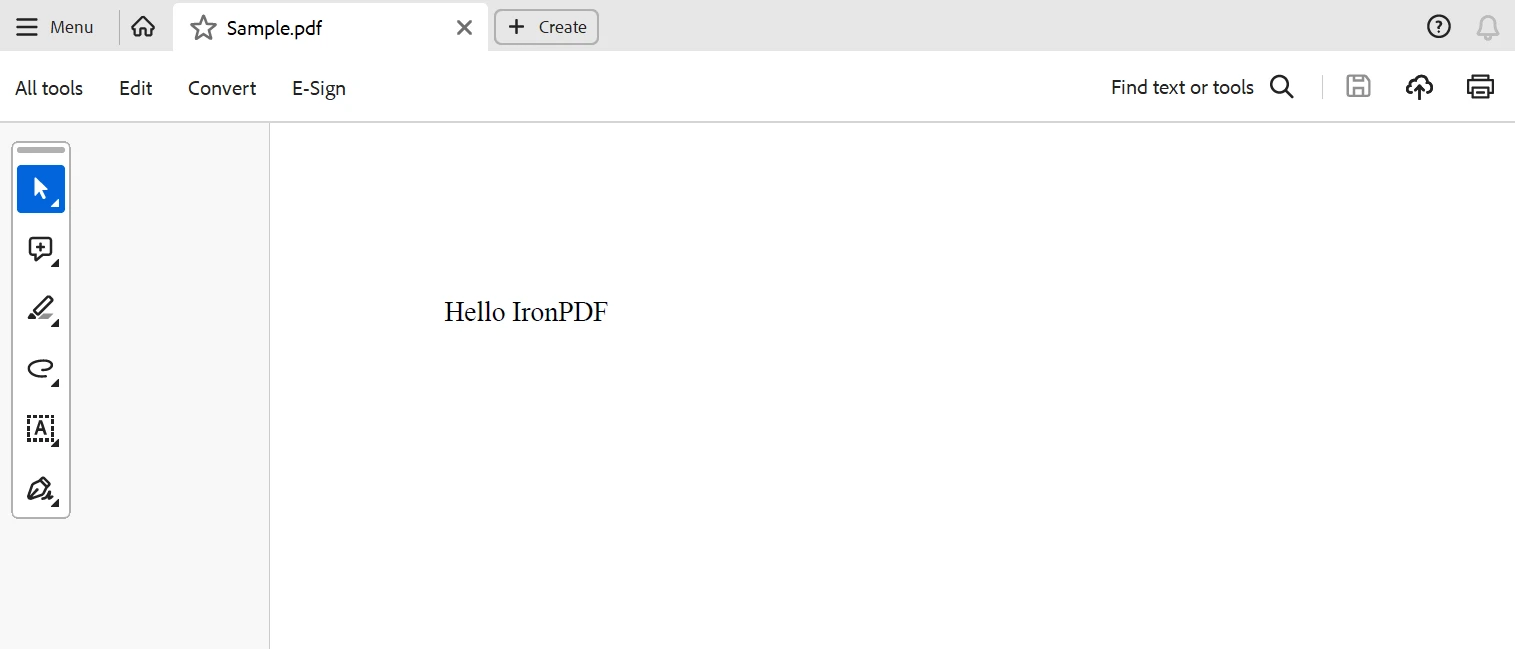
下面是上述原始程式碼的輸出。
結論
最終,開發人員現在有了一個強大的工具箱,可以在.NET應用中建立具有整合文件生成功能的分佈式系統,這是因為Rebus和IronPDF功能和能力的結合。
開發者可以利用Rebus的穩固和靈活訊息架構設計多樣化的訊息模式及協調分佈式系統中不同元件之間的通訊。 相反,IronPDF提供一個完整的方案來在.NET應用中生成PDF。開發者可以利用IronPDF從HTML內容、照片或未處理的資料建立專業外觀的PDF文件,並可以依照自己的需求改變PDF的樣式和佈局。
總而言之,通過結合Rebus和IronPDF解決方案,開發者可以建立具有整合文件生成功能的功能豐富、可擴展且可靠的分佈式系統。 Rebus和IronPDF提供了一個強大的基礎,適合開發尖端.NET應用和服務,可以讓消費者受益,無論是用於即時的文件、報告或發票生成服務。
IronPDF還提供其廣泛功能的IronPDF功能文件以及多個詳細程式碼範例。
IronPDF隨附一個經濟實惠的終身許可證,包括在套餐中。 這個套餐提供的優惠很棒,只需$999即可適用於多個系統。 對持有許可證者,提供全天候線上工程協助。 它還提供IronPDF的免費試用以獲取有關價格的額外資訊。 存取此Iron Software網站以獲取有關Iron Software產品的更多資訊。
常見問題
如何使用程式庫在C#中將HTML轉換為PDF?
您可以使用IronPDF透過RenderHtmlAsPdf方法轉換HTML字串或RenderHtmlFileAsPdf方法轉換HTML文件為PDF。IronPDF在轉換過程中確保精確保留布局和風格。
什麼是.NET中的Rebus以及它如何促進通信?
Rebus是一個.NET程式庫,旨在簡化分佈式系統中的基於消息的通信和路由。它使異步消息傳遞成為可能,讓組件可以在不等待回應的情況下有效地溝通,從而增強系統的響應性和可擴展性。
整合IronPDF與Rebus的好處是什麼?
透過將IronPDF與Rebus整合,開發人員可以建立將PDF生成整合到消息工作流程中的分佈式應用程式。此組合支援在通信過程中需要文件管理或報告生成的複雜系統。
我如何在基於Rebus的應用中實現錯誤處理?
Rebus提供內建的重試和錯誤處理機制,以在暫時性故障或網路問題期間一致地管理消息處理。開發人員可以配置這些功能以符合其應用程式的彈性要求。
Rebus可以與.NET Core一起使用於跨平台應用程式嗎?
可以,Rebus與.NET Core完全相容,為跨平台的異步通信提供了堅實的基礎。它是構建現代可擴展應用程式的理想選擇。
Rebus支持哪些消息序列化格式?
Rebus支持多種消息序列化格式,包括JSON、XML和Protobuf。這種靈活性讓開發人員可以選擇最適合其應用程式需求的序列化格式。
Rebus和IronPDF如何在分佈式應用中支持報告生成?
Rebus促進服務之間生成報告所需的通信和協調,而IronPDF則負責PDF文件的建立和呈現。兩者結合可開發出能夠有效生成和管理報告的系統。
Rebus支持哪些消息模式?
Rebus支持多種消息模式,如消息路由、命令/查詢、請求/回應和發布/訂閱,讓其適用於不同的應用程式設計。
Rebus如何增強.NET應用中的消息安全性?
Rebus與加密程式庫和協議整合,提供消息加密,確保經過分佈式組件的資料傳輸安全。此功能對於保護通信渠道中的敏感資訊至關重要。
在.NET專案中設置Rebus和PDF程式庫需涉及哪些步驟?
要在.NET專案中設置Rebus和如IronPDF的PDF程式庫,請安裝相應的NuGet包。配置Rebus以進行消息傳遞並整合PDF程式庫以處理文件生成作為應用程式工作流程的一部分。










 免費開始
免費開始 免費開始
免費開始 預訂免費直播演示
















