




已更新 2026年4月23日
在 .NET 中用 Microsoft.Extensions.AI 簡化 LLM 整合
AI 正在改變軟體開發,但將大型語言模型 (LLM) 整合到 .NET 中一直很複雜。利用 IronPdf.AI 將 AI 整合推向更遠,為 .NET 應用程式帶來由 OpenAI 驅動的 PDF 解析、資料擷取和內容總結。
閱讀更多

Specflow C# 是一個開源的測試框架,支援行為驅動開發 (BDD),允許您為測試場景建立功能文件。 它與 .NET Framework 專案無縫整合。
您可以使用簡單的語言描述測試。 此方法促進了開發人員與非開發人員之間的合作。 每個人都可以貢獻於測試場景。 Specflow 主要使用功能文件來管理和執行功能資料夾中的所有測試。
另一方面,IronPDF 是一個專注於 .NET 中 PDF 操作的程式庫。 它讓您輕鬆建立、編輯和讀取 PDF 文件。 您可以將 HTML 直接轉換為 PDFs。 此功能對於在應用程式中生成報告或文件特別有用。 IronPDF 與多個版本的 .NET 相容,包括 Core、Framework 和 Standard。
儘管 Specflow C# 和 IronPDF 具有不同的用途,但它們都是開發人員工具包中的寶貴工具。 它們可以在一個專案中有效地結合使用。 例如,您可以使用 Specflow C# 定義和測試一個提取和處理資料的功能,然後使用 IronPDF 根據測試結果生成報告。 這篇 Specflow 和 IronPDF 整合教學 展示了這些工具如何共同合作以增強您的應用程式開發過程。
要在您的 .NET 專案中開始使用 Specflow,您首先需要安裝 Specflow NuGet 套件以設置測試框架、建立功能文件並定義測試場景。
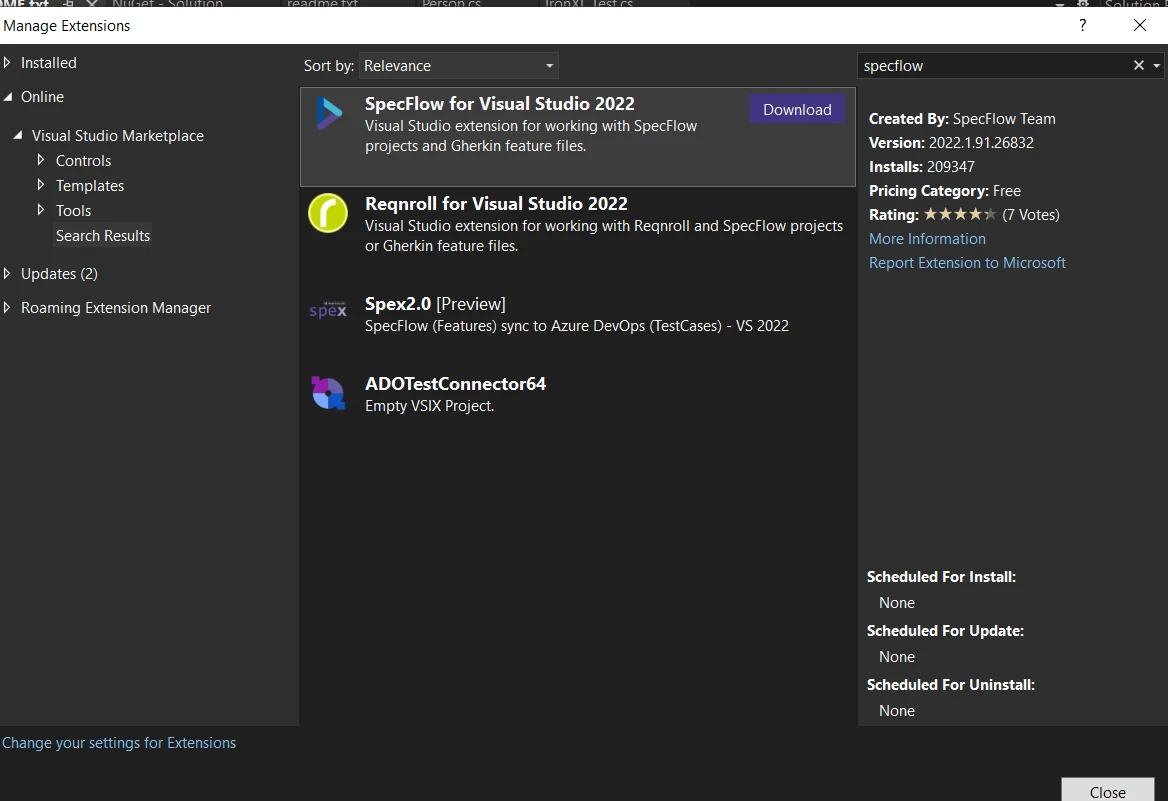
一旦設置好 Specflow,您就可以建立您的第一個功能文件,該文件將存在於功能資料夾中。 Specflow 中的功能文件以可讀格式概述您想要測試的行為。 以下是一個建立新功能文件和定義場景的簡單範例:
Feature: Login Feature
    Scenario: Successful Login with Valid Credentials
        Given I am on the login page
        When I enter valid credentials
Then I should be redirected to the dashboard此功能文件描述了一個基本的登錄過程。 Given 設置測試場景。When 描述動作。 Then 定義預期的結果。 您可以用簡單的英語撰寫這些陳述。 這使得理解測試的流程和目的變得容易。
在 Specflow 中,測試由功能文件中概述的場景驅動。 要使這些場景可執行,您需要步驟定義。 步驟定義將簡單的語言步驟與 C# 程式碼綁定。 下面是如何定義步驟定義的方法:
[Binding]
public class LoginSteps
{
    [Given(@"I am on the login page")]
    public void GivenIAmOnTheLoginPage()
    {
        // Code to navigate to the login page
    }

    [When(@"I enter valid credentials")]
    public void WhenIEnterValidCredentials()
    {
        // Code to input username and password
    }

    [Then(@"I should be redirected to the dashboard")]
    public void ThenIShouldBeRedirectedToTheDashboard()
    {
        // Code to verify the dashboard is displayed
    }
}<Binding>
Public Class LoginSteps
<Given("I am on the login page")>
Public Sub GivenIAmOnTheLoginPage()
' Code to navigate to the login page
End Sub
<[When]("I enter valid credentials")>
Public Sub WhenIEnterValidCredentials()
' Code to input username and password
End Sub
<[Then]("I should be redirected to the dashboard")>
Public Sub ThenIShouldBeRedirectedToTheDashboard()
' Code to verify the dashboard is displayed
End Sub
End Class此 C# 類別代表登錄場景的步驟。 每個方法都標註有一個 Specflow 屬性,對應於步驟型別,例如用於識別特定步驟的字串鍵。
Specflow 通過允許您在場景中使用不同的測試資料集來支援資料驅動測試。 這允許您用不同的資料集測試場景。 以下是一個在功能文件中使用表格的範例:
Scenario: Login with multiple users
    Given I am on the login page
    When I login with the following credentials:
        | Username  | Password |
        | user1     | pass1    |
        | user2     | pass2    |
Then I should see user specific dashboard在步驟定義中,您可以這樣存取該資料:
[When(@"I login with the following credentials:")]
public void WhenILoginWithTheFollowingCredentials(Table table)
{
    foreach(var row in table.Rows)
    {
        string username = row["Username"];
        string password = row["Password"];
        // Code to perform login
    }
}<[When]("I login with the following credentials:")>
Public Sub WhenILoginWithTheFollowingCredentials(ByVal table As Table)
For Each row In table.Rows
Dim username As String = row("Username")
Dim password As String = row("Password")
' Code to perform login
Next row
End SubSpecflow 與 Visual Studio 的測試瀏覽器整合,您可以在那裡高效地運行和管理所有測試。 這使得運行和管理你的測試變得容易。 確保您的專案配置正確。 一旦您建構專案,您的測試將出現在測試瀏覽器中。 您可以單獨運行個別測試或一次運行所有測試。
Specflow 支援運行平行測試以縮短整體執行時間。這減少了執行所有測試所需的時間。 您需要配置您的 specflow.json 文件或 AssemblyInfo.cs 以啟用平行執行:
{
  "specFlow": {
    "runtime": {
      "testThreadCount": 4,
      "testSchedulingMode": "Parallel"
    }
  }
}此配置允許最多四個測試同時運行。
Specflow 允許您定義自定義掛鉤。 這些掛鉤可以在測試生命周期中的各個點執行程式碼。 以下是如何定義一個在任何測試運行之前設置資料庫的掛鉤:
[BeforeTestRun]
public static void SetUpDatabase()
{
    // Code to set up database
}<BeforeTestRun>
Public Shared Sub SetUpDatabase()
' Code to set up database
End Sub自定義掛鉤是一個強大的功能。 它們幫助您管理測試設置和清理過程。
本節涵蓋了五個關鍵功能的 Specflow,它們可以增強 .NET 專案中的測試框架。 每個功能都旨在提高您的測試自動化工作的靈活性和效率。
IronPDF 是 C# 的一個程式庫,允許開發人員在 .NET 應用程式中生成、操作和呈現 PDF 文件。 當與 Specflow(.NET 的行為驅動開發(BDD)框架)一起使用時,這個強大的工具可以成為您測試武器庫中的珍貴資源。
透過與 IronPDF 整合,您可以自動化應用程式中 PDF 輸出的測試,確保它們符合所需規範。
IronPDF 與 Specflow 結合的一個實際使用案例是驗證您的應用程式生成的 PDF 報告的內容和格式。 例如,您可以自動測試報告是否包含正確的資料、是否符合預期的佈局,以及是否在規定的要求內可存取。 在需要準確的文件,如發票或合規報告的情況下,這種整合顯得特別有用。
確保您已安裝 IronPDF。 您可以透過 NuGet 包控制台安裝:
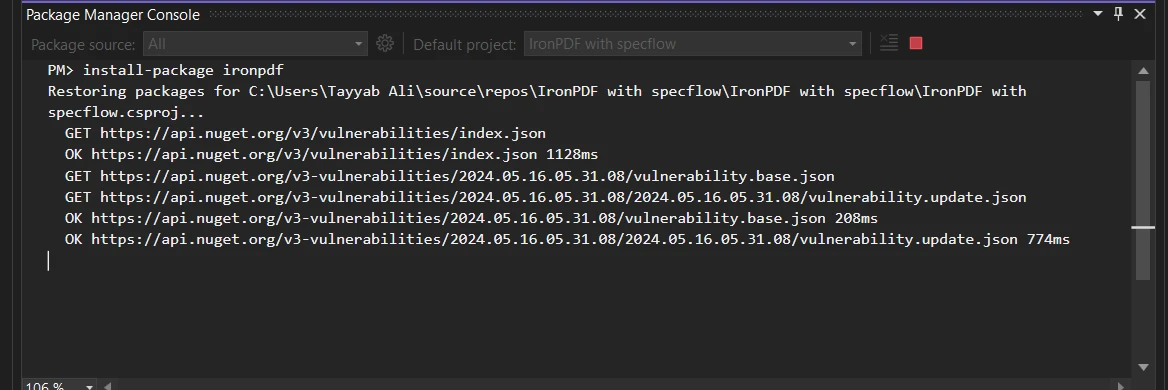
這是一個完整的程式碼範例,演示如何設置 SpecFlow 步驟定義來使用 IronPDF 測試 PDF 內容。 此範例假設您正在測試由您的應用程式生成的 PDF 文件,該文件應包含特定的文字:
using IronPdf;
using TechTalk.SpecFlow;

[Binding]
public class PdfContentSteps
{
    private string? _pdfPath;
    private PdfDocument? _pdfDocument;

    [Given(@"a PDF file generated at '(.*)'")]
    public void GivenAPDFFileGeneratedAt(string pdfPath)
    {
        _pdfPath = pdfPath;
        _pdfDocument = new PdfDocument(_pdfPath);
    }

    [Then(@"the PDF should contain the text '(.*)'")]
    public void ThenThePDFShouldContainTheText(string expectedText)
    {
        // Extract text from the PDF and check if it contains the expected text
        var textContent = _pdfDocument.ExtractAllText();
        if (!textContent.Contains(expectedText))
        {
            throw new Exception("PDF content does not contain the expected text.");
        }
    }
}Imports IronPdf
Imports TechTalk.SpecFlow
<Binding>
Public Class PdfContentSteps
'INSTANT VB WARNING: Nullable reference types have no equivalent in VB:
'ORIGINAL LINE: private string? _pdfPath;
Private _pdfPath As String
Private _pdfDocument? As PdfDocument
<Given("a PDF file generated at '(.*)'")>
Public Sub GivenAPDFFileGeneratedAt(ByVal pdfPath As String)
_pdfPath = pdfPath
_pdfDocument = New PdfDocument(_pdfPath)
End Sub
<[Then]("the PDF should contain the text '(.*)'")>
Public Sub ThenThePDFShouldContainTheText(ByVal expectedText As String)
' Extract text from the PDF and check if it contains the expected text
Dim textContent = _pdfDocument.ExtractAllText()
If Not textContent.Contains(expectedText) Then
Throw New Exception("PDF content does not contain the expected text.")
End If
End Sub
End Class在此程式碼中,我們定義了一個 Specflow 步驟,該步驟首先從指定路徑載入 PDF,然後驗證該 PDF 是否包含預期的文字。 IronPdf.PdfDocument 類用於載入和操作 PDF 文件。此設置允許您將 PDF 驗證整合到自動化測試中,使您更容易捕捉錯誤。
總之,結合使用 Specflow C# 和 IronPDF 增強了您的 .NET 專案的能力,特別是在處理 PDF 文件時。 Specflow 擅長使用簡單的語言定義和執行詳細的測試場景。
IronPDF 通過提供強大的 PDF 操作功能來補充這一點。 通過整合這兩個強大的工具,您可以簡化您的測試過程。 如果您想探索這些功能,免費試用 IronPDF。

Jacob Mellor是Iron Software的首席技術官,一位在C# PDF技術上開創先河的遠見工程師。作為Iron Software核心程式碼庫的原開發者,他從創立以來就一直在塑造公司的產品架構,與首席執行官Cameron Rimington一起將公司轉變為服務於NASA、特斯拉和全球政府公司的50多名人員的公司。



IronPDF 是 IRONSUITE 的一部分
10 款適用於辦公室文件的 .NET API 產品

當您需要您的PDF看起來像HTML一樣快速。












