




已更新 2026年4月23日
在 .NET 中用 Microsoft.Extensions.AI 簡化 LLM 整合
AI 正在改變軟體開發,但將大型語言模型 (LLM) 整合到 .NET 中一直很複雜。利用 IronPdf.AI 將 AI 整合推向更遠,為 .NET 應用程式帶來由 OpenAI 驅動的 PDF 解析、資料擷取和內容總結。
閱讀更多

如果您是C#程式設計的新手,您可能經常聽到"try catch"語句這個詞。 在本教程中,我們將深入探討異常處理的世界,重點關注catch塊,並探索如何使用try和catch語句使您的程式碼更能抵抗錯誤。 在過程中,我們將提供大量實際例子來幫助鞏固您的理解。
在C#中,異常表示程式運行時發生的一種事件,該事件會干擾程式執行指令的標準進程。 當異常發生時,程式的流程會被中斷,如果異常未被處理,程式將會突然終止。
異常處理是一種預測並管理這些干擾事件的方法,允許您的程式從意外問題中恢復並繼續按照預期運行。 通過使用try和catch塊,您可以確保您的程式碼優雅地處理錯誤,並向使用者提供有意義的反饋。
try塊是一段您預計可能生成異常的程式碼片段。 當您在try塊中包裝程式碼時,您告訴編譯器您想要處理在該塊內可能產生的潛在異常。
以下是一個使用try塊的基本範例:
try
{
    // Code that may generate an exception
}
catch (Exception ex)
{
    // Handle the exception
}Try
' Code that may generate an exception
Catch ex As Exception
' Handle the exception
End Trycatch語句與try塊一起使用以處理異常。 當try塊中發生異常時,程式執行跳轉到適當的catch塊,您可以在那裡指定程式應該如何響應該異常。
要捕獲異常,您需要在try塊之後立即建立一個catch塊。 catch塊通常包括一個代表捕獲的異常的參數。
以下是catch語句實施的範例:
try
{
    int result = 10 / 0;
}
catch (DivideByZeroException ex)
{
    Console.WriteLine("An error occurred: " + ex.Message);
}Try
Dim result As Integer = 10 \ 0
Catch ex As DivideByZeroException
Console.WriteLine("An error occurred: " & ex.Message)
End Try在這個例子中,try塊中的程式碼嘗試除以零,這將生成DivideByZeroException。 catch塊隨後處理異常,向使用者顯示一條消息。
有時,您的try塊可能生成不同型別的可能異常。 在這種情況下,您可以使用多個catch塊來單獨處理每種異常型別。
以下範例演示了使用多個catch塊:
try
{
    int[] numbers = new int[7];
    numbers[12] = 70; // This line will throw an exception
}
catch (IndexOutOfRangeException ex)
{
    Console.WriteLine("An index out of range error occurred: " + ex.Message);
}
catch (Exception e)
{
    Console.WriteLine("An unexpected error occurred: " + e.Message);
}Try
Dim numbers(6) As Integer
numbers(12) = 70 ' This line will throw an exception
Catch ex As IndexOutOfRangeException
Console.WriteLine("An index out of range error occurred: " & ex.Message)
Catch e As Exception
Console.WriteLine("An unexpected error occurred: " & e.Message)
End Try在此範例中,try塊中的程式碼嘗試將值分配給不存在的陣列索引,從而生成IndexOutOfRangeException。 第一個catch塊處理此特定異常,而第二個catch塊則捕獲任何可能發生的其他異常。
請記住,在使用多個catch塊時,請始終將它們排列為從最特定到最一般的異常型別。
異常過濾器允許您為catch塊新增條件,使您僅在滿足某個條件時捕獲異常。 要使用異常過濾器,請在catch語句中新增when關鍵字,後面跟著一個條件。
以下範例演示了異常過濾器的使用:
try
{
    int result = 10 / 0;
}
catch (DivideByZeroException ex) when (ex.Message.Contains("divide"))
{
    Console.WriteLine("An error occurred: " + ex.Message);
}
catch (DivideByZeroException ex)
{
    Console.WriteLine("A different divide by zero error occurred: " + ex.Message);
}Try
Dim result As Integer = 10 \ 0
Catch ex As DivideByZeroException When ex.Message.Contains("divide")
Console.WriteLine("An error occurred: " & ex.Message)
Catch ex As DivideByZeroException
Console.WriteLine("A different divide by zero error occurred: " & ex.Message)
End Try在上述範例中,第一個catch塊僅在異常消息包含"divide"一詞時處理DivideByZeroException。 如果不滿足條件,則第二個catch塊將處理異常。
在某些情況下,您可能想要確保無論是否發生異常都要執行特定程式碼段。 為此,您可以使用finally塊。
finally塊位於try和catch塊之後,無論是否發生異常都會被執行。
以下是一個使用finally塊的範例:
try
{
    int result = 10 / 2;
}
catch (DivideByZeroException ex)
{
    Console.WriteLine("An error occurred: " + ex.Message);
}
finally
{
    Console.WriteLine("This line will always be executed.");
}Try
Dim result As Integer = 10 \ 2
Catch ex As DivideByZeroException
Console.WriteLine("An error occurred: " & ex.Message)
Finally
Console.WriteLine("This line will always be executed.")
End Try在上述範例中,即使try塊中的程式碼未產生異常,finally塊仍將被執行。
有時,您可能想要建立自己的自定義異常來處理程式碼中特定的異常。 為此,您可以建立一個從Exception類繼承的新類。
以下是建立自定義異常的範例:
public class CustomException : Exception
{
    public CustomException(string errorMessage) : base(errorMessage)
    {
    }
}Public Class CustomException
Inherits Exception
Public Sub New(ByVal errorMessage As String)
MyBase.New(errorMessage)
End Sub
End Class現在,您可以在try和catch塊中使用此自定義異常,如下所示:
try
{
    throw new CustomException("This is a custom exception.");
}
catch (CustomException ex)
{
    Console.WriteLine("A custom exception occurred: " + ex.Message);
}Try
Throw New CustomException("This is a custom exception.")
Catch ex As CustomException
Console.WriteLine("A custom exception occurred: " & ex.Message)
End Try在此範例中,try塊拋出一個CustomException實例,然後由catch塊捕獲並處理。
了解更多關於IronPDF是一個流行的檔案庫,用於在C#中建立、編輯和提取PDF文件的內容。 在本節中,我們將探討如何將IronPDF與您的try-catch異常處理方法相結合,以優雅地處理潛在錯誤。
首先,您需要安裝IronPDF NuGet套件。 您可以使用套件管理者控制台完成這項工作:
或者,您可以在Visual Studio中的"管理NuGet套件"對話框中搜尋"IronPDF"。
假設您想要從HTML字串建立PDF文件與IronPDF。 由於建立PDF的過程可能會引發異常,您可以使用try-catch塊來處理它們。 以下是一個使用IronPDF建立PDF和處理異常的範例:
using IronPdf;
using System;

try
{
    var renderer = new ChromePdfRenderer();
    string html = "Hello, World!";
    PdfDocument PDF = renderer.RenderHtmlAsPdf(html);
    PDF.SaveAs("output.PDF");
    Console.WriteLine("PDF created successfully.");
}
catch (Exception ex)
{
    Console.WriteLine("An unexpected error occurred: " + ex.Message);
}Imports IronPdf
Imports System
Try
Dim renderer = New ChromePdfRenderer()
Dim html As String = "Hello, World!"
Dim PDF As PdfDocument = renderer.RenderHtmlAsPdf(html)
PDF.SaveAs("output.PDF")
Console.WriteLine("PDF created successfully.")
Catch ex As Exception
Console.WriteLine("An unexpected error occurred: " & ex.Message)
End Try在此範例中,try塊包含使用IronPDF建立PDF的程式碼。 如果在過程中發生異常,catch塊將處理錯誤,向使用者顯示相關的錯誤消息。
您可能還想使用IronPDF從PDF文件中提取文字。 如同之前的範例,您可以使用try-catch塊來處理潛在的異常。
以下是使用IronPDF從PDF文件中提取文字和處理異常的範例:
using IronPdf;
using System;
using System.IO;

try
{
    string pdfPath = "input.PDF";
    if (File.Exists(pdfPath))
    {
        PdfDocument PDF = PdfDocument.FromFile(pdfPath);
        string extractedText = PDF.ExtractAllText();
        Console.WriteLine("Text extracted successfully: " + extractedText);
    }
    else
    {
        Console.WriteLine("The specified PDF file does not exist.");
    }
}
catch (Exception ex)
{
    Console.WriteLine("An unexpected error occurred: " + ex.Message);
}Imports IronPdf
Imports System
Imports System.IO
Try
Dim pdfPath As String = "input.PDF"
If File.Exists(pdfPath) Then
Dim PDF As PdfDocument = PdfDocument.FromFile(pdfPath)
Dim extractedText As String = PDF.ExtractAllText()
Console.WriteLine("Text extracted successfully: " & extractedText)
Else
Console.WriteLine("The specified PDF file does not exist.")
End If
Catch ex As Exception
Console.WriteLine("An unexpected error occurred: " & ex.Message)
End Try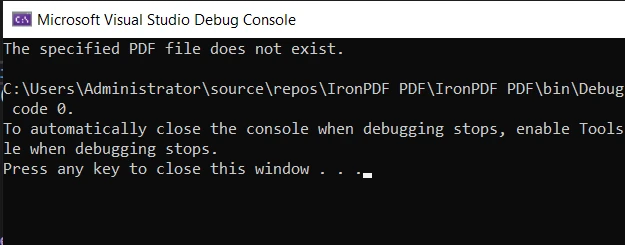
在這個例子中,try塊包含了用於使用IronPDF提取PDF文字的程式碼。 如果在過程中發生異常,catch塊將處理錯誤,向使用者顯示相關消息。
通過將IronPDF與您的try-catch異常處理方法結合使用,您可以建立能夠優雅地處理PDF文件錯誤的穩健應用程式。 這不僅提高了您應用程式的穩定性,還改善了整體使用者體驗。
請記住,當使用像IronPDF這樣的外部庫時,總是考慮潛在異常,並使用try和catch語句適當地處理它們。 這樣,您可以確保您的應用程式即使在處理意外問題時也能保持穩健且使用者友好。
IronPDF提供了一個免費試用其庫的機會,讓您能在不做出任何承諾的情況下探索其功能。 如果您在試用期後決定繼續使用IronPDF,授權費用從$999開始。

Jacob Mellor是Iron Software的首席技術官,一位在C# PDF技術上開創先河的遠見工程師。作為Iron Software核心程式碼庫的原開發者,他從創立以來就一直在塑造公司的產品架構,與首席執行官Cameron Rimington一起將公司轉變為服務於NASA、特斯拉和全球政府公司的50多名人員的公司。



IronPDF 是 IRONSUITE 的一部分
10 款適用於辦公室文件的 .NET API 產品

當您需要您的PDF看起來像HTML一樣快速。












