


Skip to footer content
PRODUCT COMPARISONS

C# HTML to PDF: Best Libraries Compared (2026, .NET 10)

Choosing a C# library to convert HTML to PDF in 2026 comes down to one decision: which rendering engine fits the documents you actually produce. On .NET 10, the field splits into three groups. Browser-based engines (Chromium through PuppeteerSharp, Playwright, or an embedded build) render modern CSS and JavaScript accurately. Programmatic libraries (iText, PdfSharp) draw PDFs from custom parsers and trade modern-web fidelity for a tiny footprint. Code-first layout tools (QuestPDF) skip HTML entirely. This comparison walks every option with working C# code, an evaluation rubric, original benchmarks, and the license terms that decide what you can ship.

TL;DR: the quick answer and fastest working code

For accurate rendering of current CSS and JavaScript, use a browser-grade engine. The free route is PuppeteerSharp or Playwright, which deliver Chrome-grade output but make you manage a separate browser process and a large binary. The commercial route embeds Chromium in the package, leaving nothing separate to install or launch. For simple static documents, a lightweight library such as PdfSharp is enough. For code-defined layouts with no HTML source, QuestPDF is the shortest route.

The quickest working path to a PDF using an embedded engine is a single render call:

using IronPdf;

// The embedded Chromium engine ships inside the package, so no browser is launched or downloaded
var renderer = new ChromePdfRenderer();
// One synchronous call parses the HTML string and produces an in-memory PDF document
var pdf = renderer.RenderHtmlAsPdf("<h1>Invoice</h1><p>Generated from HTML.</p>");
// Write the rendered document to disk
pdf.SaveAs("output.pdf");
using IronPdf;

// The embedded Chromium engine ships inside the package, so no browser is launched or downloaded
var renderer = new ChromePdfRenderer();
// One synchronous call parses the HTML string and produces an in-memory PDF document
var pdf = renderer.RenderHtmlAsPdf("<h1>Invoice</h1><p>Generated from HTML.</p>");
// Write the rendered document to disk
pdf.SaveAs("output.pdf");
Imports IronPdf

' The embedded Chromium engine ships inside the package, so no browser is launched or downloaded
Dim renderer As New ChromePdfRenderer()
' One synchronous call parses the HTML string and produces an in-memory PDF document
Dim pdf = renderer.RenderHtmlAsPdf("<h1>Invoice</h1><p>Generated from HTML.</p>")
' Write the rendered document to disk
pdf.SaveAs("output.pdf")
$vbLabelText   $csharpLabel

The full comparison, benchmarks, and license details follow below.

Quick recommendation table by scenario

Match your constraint to a pick before reading the deep dive.

If you need Recommended pick Why
Modern CSS, Flexbox, Grid, web fonts at scale IronPDF (embedded Chromium) Accurate rendering, fast warm renders, no external browser to deploy
Free browser-grade rendering, willing to manage ops PuppeteerSharp or Playwright Real Chromium, MIT license, heavier deployment footprint
Simple static HTML, no JavaScript PdfSharp with HtmlRenderer Lightweight, free, limited to legacy CSS
Programmatic fixed layouts, no HTML source QuestPDF Fluent C# API, very fast, not an HTML renderer
Zero infrastructure, hosted processing An HTML-to-PDF API No rendering engine to maintain in your app
Legacy project on wkhtmltopdf Migrate to a Chromium engine wkhtmltopdf is archived, fails on current CSS, and carries a critical SSRF CVE

What makes HTML to PDF hard in C#

Browsers render fluid content for screens; PDF demands fixed pages, exact dimensions, and strict pagination. The gap between those two models is where libraries succeed or fail. Five criteria separate them, and they apply to every tool regardless of vendor.

  1. Rendering engine and modern CSS: the engine that parses HTML and CSS is the core differentiator. Current templates lean on CSS Flexbox for alignment, CSS Grid for two-dimensional layout, @font-face for typography, and SVG for vector assets. Engines built on old WebKit forks or custom parsers tend to fail quietly on these and collapse styled layouts into a vertical stack. Correct handling of @media print rules matters just as much when turning a screen layout into a paper one.

  2. JavaScript execution and render waits: much of today's content is built client-side. Chart libraries such as Chart.js and single-page frameworks such as Blazor WebAssembly construct the DOM with JavaScript before the page is complete. A library without a JavaScript engine produces blank charts or half-loaded pages, which makes the ability to execute scripts and wait for a render-ready signal decisive for dynamic documents.

  3. Deployment weight and cold start: tools that drive an external headless browser download hundreds of megabytes of binaries, inflating container images and slowing cold starts. In serverless environments such as AWS Lambda or Azure Functions, where storage and memory are tight, the container weight can decide whether a library is viable at all.

  4. License and its legal reach: a license dictates more than cost. The .NET PDF field spans permissive terms (MIT, Apache 2.0), copyleft terms (AGPLv3) that can require disclosing your source for network-facing apps, revenue-gated community tiers, and perpetual commercial licenses. The wrong choice can create an obligation that surfaces only at audit time.

  5. Performance and memory at scale: a library that is fine in a console test can stall under a concurrent web API. Some stream the work; others load the whole document into memory at once and trigger garbage-collection pauses during batch jobs. Cold start, warm render, and per-render memory are three separate measurements that each need attention.

The libraries, each with working code

The free and open-source options come first. Every snippet below was compiled and run on .NET 10, and the Chromium engines show both HTML-string and URL input since they support each.

PuppeteerSharp

PuppeteerSharp is a .NET port of Google's Node.js Puppeteer, first released in 2017. It drives a headless Chromium instance over the Chrome DevTools Protocol. It is a process orchestrator rather than an in-process library: the application downloads a Chromium build with BrowserFetcher, launches the browser, sets the page content, and captures the PDF.

using PuppeteerSharp;
using System.Threading.Tasks;

public class PuppeteerExample
{
    public async Task GeneratePdfAsync()
    {
        // Download a matching Chromium build if it is not already present (the 100-300 MB fetch)
        await new BrowserFetcher().DownloadAsync();

        // Start a headless browser process; await using disposes it to avoid orphaned processes
        await using var browser = await Puppeteer.LaunchAsync(new LaunchOptions { Headless = true });
        // Open a fresh tab to work in
        await using var page = await browser.NewPageAsync();

        // Load the HTML directly into the page instead of navigating to a URL
        await page.SetContentAsync("<h1>Invoice Report</h1><p>Rendered with PuppeteerSharp.</p>");
        // Drive Chrome's print pipeline to emit the PDF file
        await page.PdfAsync("puppeteer_output.pdf");
    }
}
using PuppeteerSharp;
using System.Threading.Tasks;

public class PuppeteerExample
{
    public async Task GeneratePdfAsync()
    {
        // Download a matching Chromium build if it is not already present (the 100-300 MB fetch)
        await new BrowserFetcher().DownloadAsync();

        // Start a headless browser process; await using disposes it to avoid orphaned processes
        await using var browser = await Puppeteer.LaunchAsync(new LaunchOptions { Headless = true });
        // Open a fresh tab to work in
        await using var page = await browser.NewPageAsync();

        // Load the HTML directly into the page instead of navigating to a URL
        await page.SetContentAsync("<h1>Invoice Report</h1><p>Rendered with PuppeteerSharp.</p>");
        // Drive Chrome's print pipeline to emit the PDF file
        await page.PdfAsync("puppeteer_output.pdf");
    }
}
Imports PuppeteerSharp
Imports System.Threading.Tasks

Public Class PuppeteerExample
    Public Async Function GeneratePdfAsync() As Task
        ' Download a matching Chromium build if it is not already present (the 100-300 MB fetch)
        Await New BrowserFetcher().DownloadAsync()

        ' Start a headless browser process; using disposes it to avoid orphaned processes
        Using browser = Await Puppeteer.LaunchAsync(New LaunchOptions With {.Headless = True})
            ' Open a fresh tab to work in
            Using page = Await browser.NewPageAsync()
                ' Load the HTML directly into the page instead of navigating to a URL
                Await page.SetContentAsync("<h1>Invoice Report</h1><p>Rendered with PuppeteerSharp.</p>")
                ' Drive Chrome's print pipeline to emit the PDF file
                Await page.PdfAsync("puppeteer_output.pdf")
            End Using
        End Using
    End Function
End Class
$vbLabelText   $csharpLabel

To capture a live URL instead of a string, navigate to it before the call:

// Navigate the tab to a live URL so the loaded page becomes the render source
await page.GoToAsync("https://example.com");
// Capture whatever is currently displayed as a PDF
await page.PdfAsync("from_url.pdf");
// Navigate the tab to a live URL so the loaded page becomes the render source
await page.GoToAsync("https://example.com");
// Capture whatever is currently displayed as a PDF
await page.PdfAsync("from_url.pdf");
Imports System.Threading.Tasks

' Navigate the tab to a live URL so the loaded page becomes the render source
Await page.GoToAsync("https://example.com")
' Capture whatever is currently displayed as a PDF
Await page.PdfAsync("from_url.pdf")
$vbLabelText   $csharpLabel

Strengths:

  • Rendering matches Google Chrome, with full Flexbox, Grid, and web font support.
  • Executes JavaScript and can wait for network-idle before capture.
  • MIT licensed, so commercial use carries no copyleft obligation.

Limitations:

  • A first run downloads a 100 MB to 300 MB Chromium build.
  • Each browser instance consumes significant memory, so concurrent batches need a browser pool.
  • No built-in PDF/A or PDF/UA output.

License: MIT. Reach for it when you want free Chrome-fidelity output and the team can absorb the ops overhead. For a focused head-to-head on this tradeoff, see the PuppeteerSharp vs IronPDF comparison.

Playwright for .NET

Playwright is maintained by Microsoft as a cross-browser automation framework for Chromium, WebKit, and Firefox. Teams reuse it for HTML to PDF through Page.PdfAsync, though PDF generation works only with Chromium. Setup fetches browser binaries through a one-time install step.

using Microsoft.Playwright;
using System.Threading.Tasks;

public class PlaywrightExample
{
    public async Task GeneratePdfAsync()
    {
        // Create the Playwright driver that manages the installed browser binaries
        using var playwright = await Playwright.CreateAsync();
        // PDF output is Chromium-only, so launch the Chromium build specifically
        await using var browser = await playwright.Chromium.LaunchAsync();
        // Open a new page (tab) to render into
        var page = await browser.NewPageAsync();

        // Set the HTML content in place rather than navigating to a URL
        await page.SetContentAsync("<html><body><h1>Sales Dashboard</h1></body></html>");
        // Emit the PDF with an explicit A4 page format
        await page.PdfAsync(new PagePdfOptions { Path = "playwright_output.pdf", Format = "A4" });
    }
}
using Microsoft.Playwright;
using System.Threading.Tasks;

public class PlaywrightExample
{
    public async Task GeneratePdfAsync()
    {
        // Create the Playwright driver that manages the installed browser binaries
        using var playwright = await Playwright.CreateAsync();
        // PDF output is Chromium-only, so launch the Chromium build specifically
        await using var browser = await playwright.Chromium.LaunchAsync();
        // Open a new page (tab) to render into
        var page = await browser.NewPageAsync();

        // Set the HTML content in place rather than navigating to a URL
        await page.SetContentAsync("<html><body><h1>Sales Dashboard</h1></body></html>");
        // Emit the PDF with an explicit A4 page format
        await page.PdfAsync(new PagePdfOptions { Path = "playwright_output.pdf", Format = "A4" });
    }
}
Imports Microsoft.Playwright
Imports System.Threading.Tasks

Public Class PlaywrightExample
    Public Async Function GeneratePdfAsync() As Task
        ' Create the Playwright driver that manages the installed browser binaries
        Using playwright = Await Playwright.CreateAsync()
            ' PDF output is Chromium-only, so launch the Chromium build specifically
            Await Using browser = Await playwright.Chromium.LaunchAsync()
                ' Open a new page (tab) to render into
                Dim page = Await browser.NewPageAsync()

                ' Set the HTML content in place rather than navigating to a URL
                Await page.SetContentAsync("<html><body><h1>Sales Dashboard</h1></body></html>")
                ' Emit the PDF with an explicit A4 page format
                Await page.PdfAsync(New PagePdfOptions With {.Path = "playwright_output.pdf", .Format = "A4"})
            End Using
        End Using
    End Function
End Class
$vbLabelText   $csharpLabel

Before the first run, install the browser with pwsh bin/Debug/net10.0/playwright.ps1 install chromium (or call the equivalent install entry point in code).

For a live URL, navigate to the page first:

// Load a live URL so its rendered DOM becomes the PDF source
await page.GotoAsync("https://example.com");
// Export the loaded page as an A4 PDF
await page.PdfAsync(new PagePdfOptions { Path = "from_url.pdf", Format = "A4" });
// Load a live URL so its rendered DOM becomes the PDF source
await page.GotoAsync("https://example.com");
// Export the loaded page as an A4 PDF
await page.PdfAsync(new PagePdfOptions { Path = "from_url.pdf", Format = "A4" });
Imports System.Threading.Tasks

' Load a live URL so its rendered DOM becomes the PDF source
Await page.GotoAsync("https://example.com")
' Export the loaded page as an A4 PDF
Await page.PdfAsync(New PagePdfOptions With {.Path = "from_url.pdf", .Format = "A4"})
$vbLabelText   $csharpLabel

Where it shines:

  • Backed by Microsoft with an active release cycle.
  • Low first-render latency once the browser is up.
  • Renders modern web standards and client-side JavaScript accurately.

The catch:

  • Same heavy binary footprint and browser management as PuppeteerSharp.
  • Memory climbs without careful browser-context handling.
  • PDF output is a side feature of Chrome's print pipeline, so it lacks document-manipulation features.

License: MIT. Ideal when a project already runs Playwright for testing and wants free rendering alongside it.

wkhtmltopdf (via DinkToPdf)

For over a decade wkhtmltopdf was the default HTML to PDF tool. In .NET it is usually consumed through DinkToPdf, a C# wrapper over the native libwkhtmltox library. The wrapper API is clean, but the engine underneath is the problem.

using DinkToPdf;

public class DinkToPdfExample
{
    public void GeneratePdf()
    {
        // SynchronizedConverter serializes calls into the non-thread-safe native libwkhtmltox library
        var converter = new SynchronizedConverter(new PdfTools());

        // Describe the document: global page settings plus one or more HTML content objects
        var doc = new HtmlToPdfDocument
        {
            // Set the paper size and the output file path for the whole document
            GlobalSettings = { PaperSize = PaperKind.A4, Out = "legacy_output.pdf" },
            // Each object is a chunk of HTML to render into the PDF
            Objects = { new ObjectSettings { HtmlContent = "<h1>Legacy Report</h1>" } }
        };

        // Hand the descriptor to the native engine, which writes the file defined in Out
        converter.Convert(doc);
    }
}
using DinkToPdf;

public class DinkToPdfExample
{
    public void GeneratePdf()
    {
        // SynchronizedConverter serializes calls into the non-thread-safe native libwkhtmltox library
        var converter = new SynchronizedConverter(new PdfTools());

        // Describe the document: global page settings plus one or more HTML content objects
        var doc = new HtmlToPdfDocument
        {
            // Set the paper size and the output file path for the whole document
            GlobalSettings = { PaperSize = PaperKind.A4, Out = "legacy_output.pdf" },
            // Each object is a chunk of HTML to render into the PDF
            Objects = { new ObjectSettings { HtmlContent = "<h1>Legacy Report</h1>" } }
        };

        // Hand the descriptor to the native engine, which writes the file defined in Out
        converter.Convert(doc);
    }
}
Imports DinkToPdf

Public Class DinkToPdfExample
    Public Sub GeneratePdf()
        ' SynchronizedConverter serializes calls into the non-thread-safe native libwkhtmltox library
        Dim converter = New SynchronizedConverter(New PdfTools())

        ' Describe the document: global page settings plus one or more HTML content objects
        Dim doc = New HtmlToPdfDocument With {
            ' Set the paper size and the output file path for the whole document
            .GlobalSettings = New GlobalSettings With {.PaperSize = PaperKind.A4, .Out = "legacy_output.pdf"},
            ' Each object is a chunk of HTML to render into the PDF
            .Objects = {New ObjectSettings With {.HtmlContent = "<h1>Legacy Report</h1>"}}
        }

        ' Hand the descriptor to the native engine, which writes the file defined in Out
        converter.Convert(doc)
    End Sub
End Class
$vbLabelText   $csharpLabel

This code compiles, but running it on a clean machine throws System.DllNotFoundException: Unable to load DLL 'libwkhtmltox' until the native binaries are copied into the output directory. That native-dependency step is the first sign of the deployment friction this engine brings.

Upside:

  • Fast cold start, with no modern browser to initialize.
  • Low memory, roughly 50 MB per render.

Downside:

  • The QtWebKit engine it ships (a roughly 2012-2013 WebKit snapshot, which Qt itself deprecated in 2015 and removed in 2016) cannot render Flexbox, Grid, or modern JavaScript.
  • The wkhtmltopdf repository was archived on January 2, 2023, and the last release, 0.12.6, dates to June 2020.
  • It carries CVE-2022-35583, a Server-Side Request Forgery flaw rated CVSS 9.8 (critical) that is unpatched because the project is no longer maintained.

License: DinkToPdf itself is MIT, but it links the LGPLv3 wkhtmltopdf binaries, so the effective obligation comes from wkhtmltopdf. Suited to legacy workflows pending migration, with the security risk kept in view. See the wkhtmltopdf vs IronPDF comparison for the full migration picture.

PdfSharp and HtmlRenderer

PdfSharp is a widely used open-source library, but a common misconception is that it converts HTML on its own. It does not. PdfSharp provides a low-level, coordinate-based drawing API. To convert HTML, you pair it with the community bridge HtmlRenderer.PdfSharp, which parses HTML and emits PdfSharp drawing commands.

using PdfSharp;
using TheArtOfDev.HtmlRenderer.PdfSharp;

public class PdfSharpExample
{
    public void GeneratePdf()
    {
        string html = "<h1>Simple Title</h1><p>Statically rendered text.</p>";

        // The HtmlRenderer bridge parses the HTML and emits PdfSharp drawing commands onto an A4 page
        var pdf = PdfGenerator.GeneratePdf(html, PageSize.A4);
        // Persist the resulting PdfSharp document to disk
        pdf.Save("simple_document.pdf");
    }
}
using PdfSharp;
using TheArtOfDev.HtmlRenderer.PdfSharp;

public class PdfSharpExample
{
    public void GeneratePdf()
    {
        string html = "<h1>Simple Title</h1><p>Statically rendered text.</p>";

        // The HtmlRenderer bridge parses the HTML and emits PdfSharp drawing commands onto an A4 page
        var pdf = PdfGenerator.GeneratePdf(html, PageSize.A4);
        // Persist the resulting PdfSharp document to disk
        pdf.Save("simple_document.pdf");
    }
}
Imports PdfSharp
Imports TheArtOfDev.HtmlRenderer.PdfSharp

Public Class PdfSharpExample
    Public Sub GeneratePdf()
        Dim html As String = "<h1>Simple Title</h1><p>Statically rendered text.</p>"

        ' The HtmlRenderer bridge parses the HTML and emits PdfSharp drawing commands onto an A4 page
        Dim pdf = PdfGenerator.GeneratePdf(html, PageSize.A4)
        ' Persist the resulting PdfSharp document to disk
        pdf.Save("simple_document.pdf")
    End Sub
End Class
$vbLabelText   $csharpLabel

Two setup details matter on .NET 10. The bridge expects the Windows-1252 code page, which is absent by default on modern .NET, so register it once at startup with Encoding.RegisterProvider(CodePagesEncodingProvider.Instance). Pairing the bridge with a newer PdfSharp 6.x package also breaks at runtime with a MissingMethodException, so let HtmlRenderer pull its own compatible PdfSharp rather than pinning the latest.

What works:

  • Genuinely permissive MIT license with no revenue limits.
  • Lightweight, with no native binaries or browser fetchers.
  • Pure C#, so deployment across operating systems is straightforward.

What breaks:

  • The HTML bridge is limited to roughly HTML 4.01 and CSS Level 2, and it saw a single set of releases in late 2025 after nine years of dormancy.
  • No JavaScript execution at all.
  • Print rules such as page-break-inside: avoid are unsupported, so table rows split across pages.

License: PdfSharp MIT, HtmlRenderer BSD-3-Clause. The right call for simple static documents without complex layout. For a feature-by-feature breakdown, see the PdfSharp vs IronPDF comparison.

QuestPDF

QuestPDF takes a different path: it discards HTML and defines layouts in C# through a fluent API. For data that originates as objects rather than markup, this removes the step of generating HTML only to parse it back.

using QuestPDF.Fluent;
using QuestPDF.Helpers;
using QuestPDF.Infrastructure;

public class QuestPdfExample
{
    public void GeneratePdf()
    {
        // The revenue-gated license tier must be declared before any document is built
        QuestPDF.Settings.License = LicenseType.Community;

        // Compose the layout in C# through the fluent API; no HTML anywhere
        var document = Document.Create(container =>
        {
            container.Page(page =>
            {
                // Define the physical page size and margins
                page.Size(PageSizes.A4);
                page.Margin(2, Unit.Centimetre);
                // Place content into named page regions (header and body)
                page.Header().Text("Programmatic Invoice").FontSize(24);
                page.Content().Text("This document is generated without HTML.");
            });
        });

        // Run the layout engine and write the composed document to a file
        document.GeneratePdf("fluent_layout.pdf");
    }
}
using QuestPDF.Fluent;
using QuestPDF.Helpers;
using QuestPDF.Infrastructure;

public class QuestPdfExample
{
    public void GeneratePdf()
    {
        // The revenue-gated license tier must be declared before any document is built
        QuestPDF.Settings.License = LicenseType.Community;

        // Compose the layout in C# through the fluent API; no HTML anywhere
        var document = Document.Create(container =>
        {
            container.Page(page =>
            {
                // Define the physical page size and margins
                page.Size(PageSizes.A4);
                page.Margin(2, Unit.Centimetre);
                // Place content into named page regions (header and body)
                page.Header().Text("Programmatic Invoice").FontSize(24);
                page.Content().Text("This document is generated without HTML.");
            });
        });

        // Run the layout engine and write the composed document to a file
        document.GeneratePdf("fluent_layout.pdf");
    }
}
Imports QuestPDF.Fluent
Imports QuestPDF.Helpers
Imports QuestPDF.Infrastructure

Public Class QuestPdfExample
    Public Sub GeneratePdf()
        ' The revenue-gated license tier must be declared before any document is built
        QuestPDF.Settings.License = LicenseType.Community

        ' Compose the layout in VB.NET through the fluent API; no HTML anywhere
        Dim document = Document.Create(Sub(container)
                                           container.Page(Sub(page)
                                                              ' Define the physical page size and margins
                                                              page.Size(PageSizes.A4)
                                                              page.Margin(2, Unit.Centimetre)
                                                              ' Place content into named page regions (header and body)
                                                              page.Header().Text("Programmatic Invoice").FontSize(24)
                                                              page.Content().Text("This document is generated without HTML.")
                                                          End Sub)
                                       End Sub)

        ' Run the layout engine and write the composed document to a file
        document.GeneratePdf("fluent_layout.pdf")
    End Sub
End Class
$vbLabelText   $csharpLabel

Strong points:

  • Very fast, since it skips DOM parsing and browser layout.
  • Predictable, linear memory that suits high-throughput batch jobs.
  • A Companion app gives live preview and hot reload during design.

Weak points:

  • It is a layout engine, not an HTML renderer, so it cannot convert a URL or an existing HTML template.
  • Existing HTML or Razor documents would need a full rewrite into the fluent API.
  • The license moved from MIT to a revenue-gated model.

License: Community License (free for businesses under USD 1,000,000 in annual revenue) or a paid Professional and Enterprise tier. Fits code-defined, fixed-layout documents driven by structured data. See the QuestPDF vs IronPDF comparison for the HTML-versus-fluent-layout tradeoff.

iText (pdfHTML)

iText 7 and 8 are recognized for programmatic PDF manipulation, and the pdfHTML add-on converts HTML. Unlike the Chromium tools, pdfHTML uses a custom parser that maps HTML tags to iText objects rather than running a browser.

using iText.Html2pdf;
using System.IO;

public class iTextExample
{
    public void GeneratePdf()
    {
        string html = "<h1>Report</h1><p>Converted with pdfHTML.</p>";

        // Open the destination stream; using ensures the file handle is released after writing
        using var dest = File.Create("output.pdf");
        // pdfHTML maps the HTML tags to iText objects and writes them to the stream (no browser involved)
        HtmlConverter.ConvertToPdf(html, dest);
    }
}
using iText.Html2pdf;
using System.IO;

public class iTextExample
{
    public void GeneratePdf()
    {
        string html = "<h1>Report</h1><p>Converted with pdfHTML.</p>";

        // Open the destination stream; using ensures the file handle is released after writing
        using var dest = File.Create("output.pdf");
        // pdfHTML maps the HTML tags to iText objects and writes them to the stream (no browser involved)
        HtmlConverter.ConvertToPdf(html, dest);
    }
}
Imports iText.Html2pdf
Imports System.IO

Public Class iTextExample
    Public Sub GeneratePdf()
        Dim html As String = "<h1>Report</h1><p>Converted with pdfHTML.</p>"

        ' Open the destination stream; using ensures the file handle is released after writing
        Using dest As FileStream = File.Create("output.pdf")
            ' pdfHTML maps the HTML tags to iText objects and writes them to the stream (no browser involved)
            HtmlConverter.ConvertToPdf(html, dest)
        End Using
    End Sub
End Class
$vbLabelText   $csharpLabel

On a fresh project this throws until you add the itext7.bouncy-castle-adapter package, which iText requires for its cryptography path. That extra dependency is easy to miss and produces an opaque error without it.

Advantages:

  • Deep PDF manipulation, signing, and redaction across the iText ecosystem.
  • Produces PDF/A and PDF/UA from semantic HTML, which suits compliance work.
  • Quick startup time, since it launches no browser.

Drawbacks:

  • No script execution, so dynamic content does not render.
  • CSS3 features such as Grid are unsupported and fail silently.
  • The AGPLv3 license requires a commercial license for closed-source applications, and large files are buffered in full rather than streamed.

License: AGPLv3 or Commercial. Pick it for heavy PDF manipulation and compliance workflows with controlled, static HTML. For the licensing and manipulation details, see the iText 7 vs IronPDF comparison.

IronPDF

IronPDF embeds a Chromium engine inside its NuGet package and exposes it through a C# API, so nothing external needs to launch or pool. It sits between the free browser tools and the programmatic libraries, trading a license cost for rendering fidelity without the browser to manage.

using IronPdf;
using System.Threading.Tasks;

public class IronPdfExample
{
    public async Task GeneratePdfAsync()
    {
        // Create the in-process Chromium renderer (no external browser to launch)
        var renderer = new ChromePdfRenderer();
        // Turn on the JavaScript engine so client-side chart scripts execute before capture
        renderer.RenderingOptions.EnableJavaScript = true;
        // Wait 500 ms after load to let JavaScript-built content settle before rendering
        renderer.RenderingOptions.WaitFor.RenderDelay(500);

        // Render the HTML string asynchronously into an in-memory PDF
        var pdf = await renderer.RenderHtmlAsPdfAsync("<h1>Quarterly Report</h1><div class='chart'></div>");
        // Save the finished PDF to disk
        pdf.SaveAs("report.pdf");
    }
}
using IronPdf;
using System.Threading.Tasks;

public class IronPdfExample
{
    public async Task GeneratePdfAsync()
    {
        // Create the in-process Chromium renderer (no external browser to launch)
        var renderer = new ChromePdfRenderer();
        // Turn on the JavaScript engine so client-side chart scripts execute before capture
        renderer.RenderingOptions.EnableJavaScript = true;
        // Wait 500 ms after load to let JavaScript-built content settle before rendering
        renderer.RenderingOptions.WaitFor.RenderDelay(500);

        // Render the HTML string asynchronously into an in-memory PDF
        var pdf = await renderer.RenderHtmlAsPdfAsync("<h1>Quarterly Report</h1><div class='chart'></div>");
        // Save the finished PDF to disk
        pdf.SaveAs("report.pdf");
    }
}
Imports IronPdf
Imports System.Threading.Tasks

Public Class IronPdfExample
    Public Async Function GeneratePdfAsync() As Task
        ' Create the in-process Chromium renderer (no external browser to launch)
        Dim renderer As New ChromePdfRenderer()
        ' Turn on the JavaScript engine so client-side chart scripts execute before capture
        renderer.RenderingOptions.EnableJavaScript = True
        ' Wait 500 ms after load to let JavaScript-built content settle before rendering
        renderer.RenderingOptions.WaitFor.RenderDelay(500)

        ' Render the HTML string asynchronously into an in-memory PDF
        Dim pdf = Await renderer.RenderHtmlAsPdfAsync("<h1>Quarterly Report</h1><div class='chart'></div>")
        ' Save the finished PDF to disk
        pdf.SaveAs("report.pdf")
    End Function
End Class
$vbLabelText   $csharpLabel

The same renderer converts a URL to PDF with one call:

// RenderUrlAsPdf fetches and renders the live page in one call, no navigation step needed
var fromUrl = new ChromePdfRenderer().RenderUrlAsPdf("https://example.com");
// Write the captured page to disk
fromUrl.SaveAs("from_url.pdf");
// RenderUrlAsPdf fetches and renders the live page in one call, no navigation step needed
var fromUrl = new ChromePdfRenderer().RenderUrlAsPdf("https://example.com");
// Write the captured page to disk
fromUrl.SaveAs("from_url.pdf");
' RenderUrlAsPdf fetches and renders the live page in one call, no navigation step needed
Dim fromUrl = (New ChromePdfRenderer()).RenderUrlAsPdf("https://example.com")
' Write the captured page to disk
fromUrl.SaveAs("from_url.pdf")
$vbLabelText   $csharpLabel

It also renders Razor and MVC views to PDF and converts HTML files directly. The full feature walkthrough lives in the HTML to PDF tutorial.

Pros:

  • Browser-grade rendering that handles Grid, Flexbox, and client-side scripts.
  • Deployment without external executables or browser pooling.
  • Generates PDF/A and applies digital signatures, which separates it from the testing frameworks.

Cons:

  • A commercial license is required, with no free production tier.
  • After a fresh deployment, the opening render carries a one-off initialization cost, then later renders settle into a fast warm path.

License: Commercial, perpetual. Use it where current CSS at volume matters and the priorities are cutting ops overhead while holding fidelity high.

Full Comparison Table

One row per library, with the license column included because it drives the free-versus-paid decision directly.

Library Engine JavaScript Modern CSS Deploy weight License Best for
IronPDF Embedded Chromium Yes Full Light (NuGet) Commercial Modern CSS at scale
PuppeteerSharp External Chromium Yes Full Heavy (binary download) MIT Free browser rendering
Playwright External Chromium Yes Full Heavy (binary download) MIT Modern free rendering
wkhtmltopdf Old QtWebKit Limited Weak Medium (native libs) LGPLv3 (wrapper MIT) Legacy workflows
PdfSharp + HtmlRenderer Custom drawing No Limited Light MIT / BSD-3 Simple static HTML
QuestPDF Programmatic N/A N/A Light Community / Paid Code-defined layouts
iText pdfHTML Custom parser No Limited Medium AGPLv3 / Commercial PDF manipulation

Verify each cell against the current release of every library before integration, since licenses and engine support change.

Free vs Paid: when each is the right call

Tools which are "free" can hide operational and legal cost in the .NET PDF field, so naming the cases where a free tool is the right choice is the honest starting point.

A free open-source library is genuinely enough for plain, static documents, low volume, or a team with the operations capacity to manage external processes. A text-heavy receipt without intricate styling renders fine with MIT-licensed PdfSharp. Where a team already runs Playwright for testing and has solved the containerization, reusing it for occasional PDF jobs is efficient.

Free software does not mean a free implementation. The hidden cost of open-source headless browsers shows up in maintenance hours: pooling the browser lifecycle so the server does not crash under load, configuring Linux shared-library dependencies across container images, and absorbing the infrastructure cost of heavy browser processes. For trivial static documents, a paid browser engine is overkill, and a lightweight free library is the better call.

A commercial Chromium library becomes justified when the work demands accurate CSS3 at volume, accessible PDF/UA output, and deployment simplicity over procurement cost. Commercial licensing also removes copyleft exposure. Adding an AGPLv3 library such as iText to a SaaS platform can obligate the company to release its source unless a commercial license is purchased. The real comparison is total cost of ownership: operations time and legal risk on one side, license fees on the other.

Benchmarks

Every number below comes from a hands-on run on one machine, so treat them as directional. The test document is a 30-row invoice using CSS Grid in the header and an inline JavaScript bar chart. Testing ran on a standard Windows workstation on .NET 10. Each warm figure is the average of eight renders after the first, and peak memory is the peak working set of the .NET process plus any browser child processes it spawned.

Library Cold start (per process) Warm render (avg of 8) Peak memory
IronPDF 345 ms 202 ms 406 MB
PuppeteerSharp 746 ms 204 ms 611 MB
Playwright 588 ms 132 ms 515 MB
wkhtmltopdf, iText, PdfSharp sub-second not comparable 50 to 120 MB

Once warm, the three browser engines render the same document in roughly 130 to 200 ms, with Playwright fastest in this run and IronPDF and PuppeteerSharp close behind. On cold start, the embedded engine started fastest here because it runs in-process with no separate browser to launch, though the very first render after a brand-new deployment absorbs a single engine-initialization cost that later process starts skip. The legacy and custom-parser tools (wkhtmltopdf, iText, PdfSharp) start in under a second and use the least memory, but that advantage is moot for the test document, since they cannot render its Grid layout or its JavaScript chart correctly. wkhtmltopdf could not run at all without its native binaries supplied first.

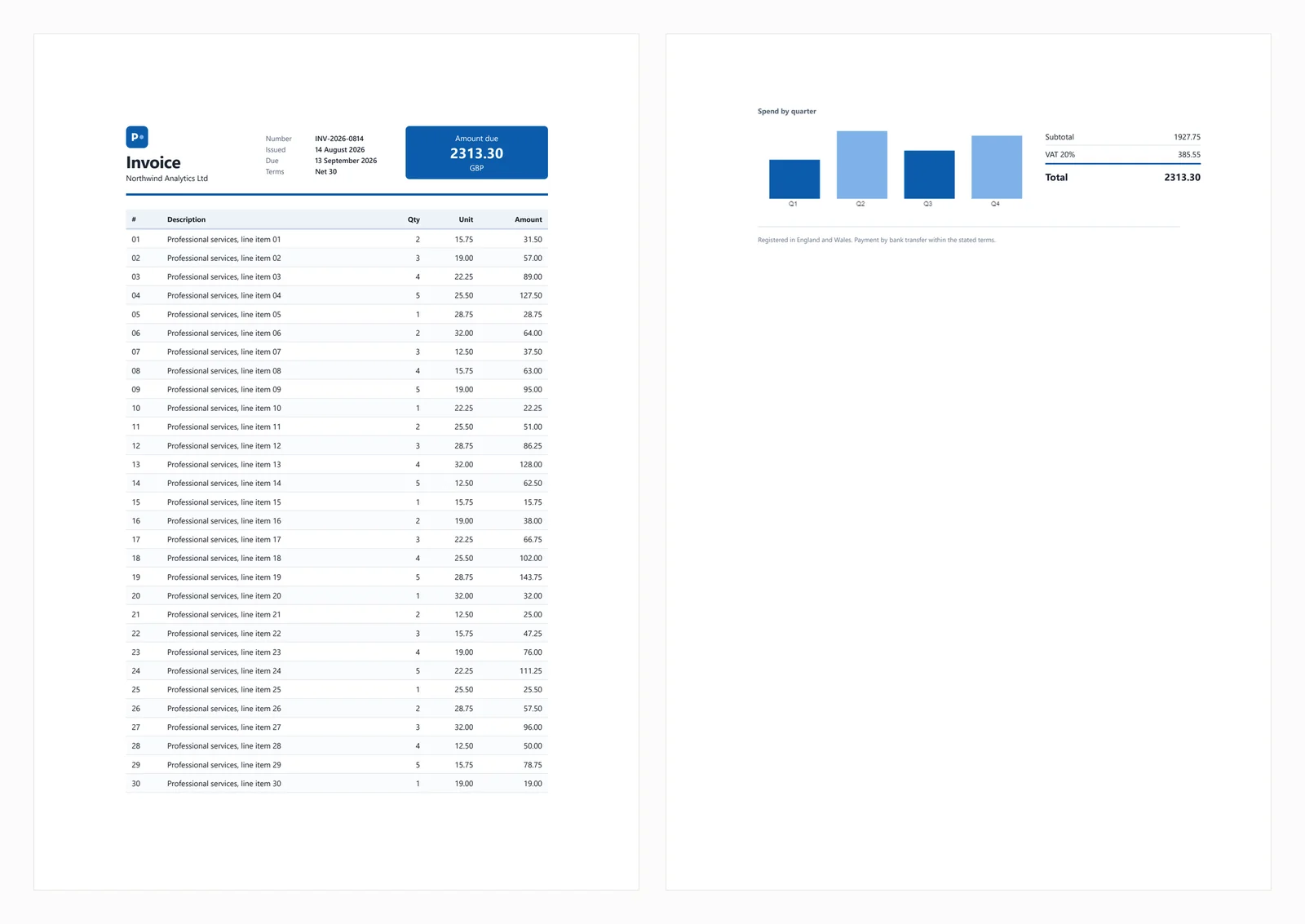
The fidelity gap shows in the output. The browser engine renders the CSS Grid header, the styled table, and the JavaScript bar chart:
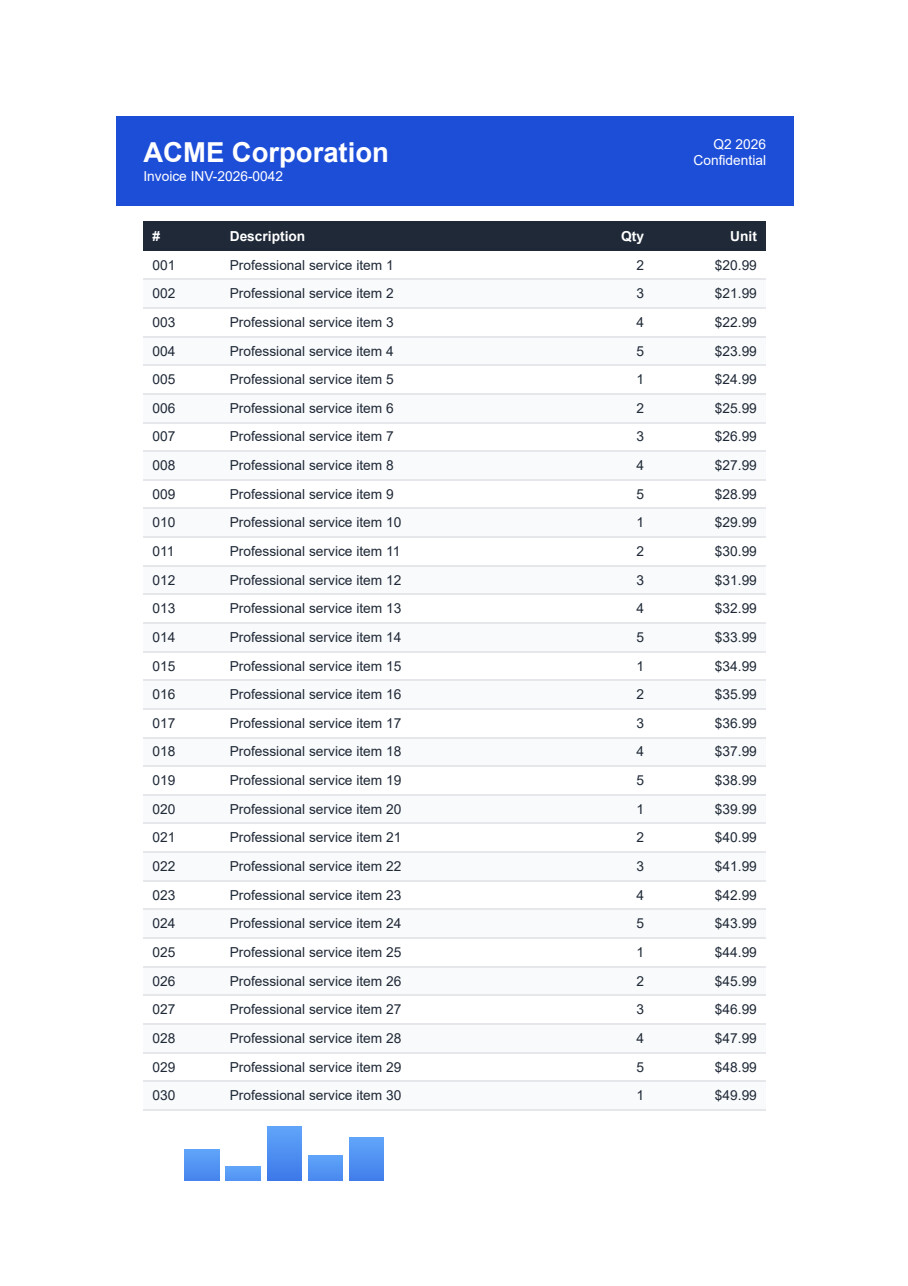
The test invoice rendered by a Chromium engine, with the CSS Grid header, styled table, and JavaScript bar chart all present

The same document through PdfSharp with HtmlRenderer drops the grid header, the table-header styling, and the JavaScript chart:
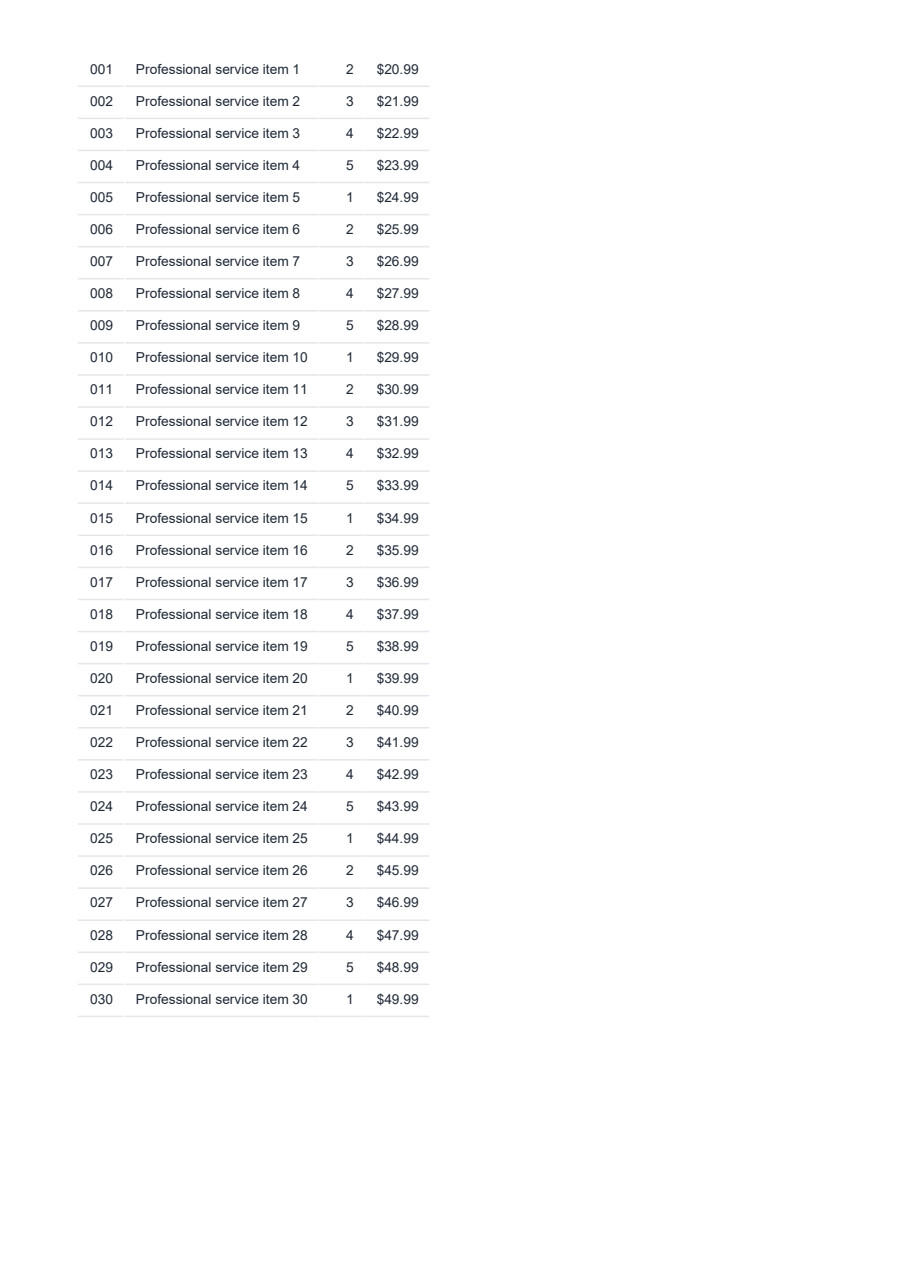
The same invoice rendered by PdfSharp with HtmlRenderer, missing the CSS Grid header and the JavaScript chart

Which should you use?

A short verdict for each common scenario:

  • CSS frameworks and single-page output: only a browser-grade renderer keeps up.
  • Simple static HTML or text receipts: PdfSharp and a small free stack cover it.
  • Programmatic, data-driven layouts with no markup: QuestPDF gets there quickest.
  • Free browser rendering with operations capacity: PuppeteerSharp or Playwright.
  • Zero infrastructure: a hosted HTML-to-PDF API.
  • Legacy wkhtmltopdf migration: move to an embedded engine for security and CSS support.

When heavy CSS-framework output meets a need for low ops, IronPDF is the embedded option to reach for first, while the free browser tools stay the right call for teams that can own the ops around a headless browser.

Deployment considerations

The biggest friction in .NET document generation is the gap between a library that works on a Windows laptop and one that fails on a Linux container. Selecting a library means anticipating where it ships.

In Docker, orchestrated browsers such as PuppeteerSharp and Playwright need a base image carrying Chromium's Linux dependencies, including libnss3, libatk-bridge2.0-0, and libgbm1. Microsoft publishes Playwright .NET images at mcr.microsoft.com/playwright/dotnet (for example, a v1.NN.0-noble tag) to cover these, and those images run close to a gigabyte. Embedded engines sidestep the bloat by shipping per-architecture NuGet packages, such as IronPdf.Linux, that bundle the native binaries and keep a standard aspnet base image working without manual apt-get steps.

AWS Lambda raises a different wall. It enforces a 250 MB hard limit on the unzipped deployment package, yet a headless Chromium build alone runs 150 MB to 300 MB. That makes a standard zip deployment of PuppeteerSharp or Playwright impractical and pushes teams onto container-based Lambda, which allows up to 10 GB at the cost of a worse cold start.

Azure App Service adds its own constraints on both operating systems. The Windows App Service sandbox blocks most User32 and GDI32 calls and thereby breaks GDI-dependent rendering paths. Deploying DinkToPdf on Linux App Service means copying unmanaged .so files into the output and installing dependencies such as libfontconfig1 and libxrender1; a missing one surfaces as an opaque System.DllNotFoundException. These are the same native-dependency and sandbox issues the verification run reproduced.

Conclusion and recommendation

The C# HTML to PDF field on .NET 10 rewards matching the tool to the document. A full browser engine is the baseline for CSS frameworks and responsive layouts and JavaScript-driven pages, and the split between free and commercial there is really a split between operations effort and license cost. Programmatic libraries stay efficient for fixed, static layouts, and QuestPDF is the fastest route when the input is structured data rather than markup. wkhtmltopdf belongs in migration plans only, given its archived engine and unpatched SSRF flaw. For teams that want accurate rendering without much ops overhead, IronPDF is the default embedded option, with URL to PDF, Razor view rendering, PDF/A output, and digital signatures available from the same API, while PuppeteerSharp and Playwright stay strong free choices where the browser lifecycle is something the team can own.

Try it on your own HTML

If accurate rendering with a light shipping cost fits your project, you can start a free IronPDF trial and run this same test invoice against your own templates before you commit. IronPDF is built by Iron Software, whose .NET libraries also cover OCR, barcodes, Word, and Excel.

Thanks for reading. Whichever library you land on, match it to the document in front of you.

Please noteIronPDF is a product of Iron Software. PuppeteerSharp, Playwright, wkhtmltopdf, DinkToPdf, PdfSharp, HtmlRenderer, QuestPDF, and iText are projects or trademarks of their respective owners. This article is not affiliated with, endorsed by, or sponsored by those projects. Comparisons reflect publicly available information and hands-on testing at the time of writing; verify current licensing and release details before relying on them.

Frequently Asked Questions

What are the main types of C# HTML to PDF libraries available for .NET 10 in 2026?

The main types of C# HTML to PDF libraries for .NET 10 in 2026 include browser-based engines like Chromium using PuppeteerSharp or Playwright, programmatic libraries such as iText and PdfSharp, and code-first layout tools like QuestPDF.

How do browser-based engines compare to programmatic libraries for HTML to PDF conversion?

Browser-based engines render modern CSS and JavaScript accurately, providing high fidelity to web standards, whereas programmatic libraries like iText and PdfSharp trade some web fidelity for a smaller footprint by drawing PDFs from custom parsers.

What advantages do code-first layout tools offer over traditional HTML to PDF methods?

Code-first layout tools like QuestPDF allow developers to skip HTML entirely, often resulting in more efficient and customizable PDF generation tailored to specific application needs.

Why is choosing the right rendering engine important for HTML to PDF conversion?

Choosing the right rendering engine is crucial because it determines how accurately your documents are rendered, especially in terms of modern CSS and JavaScript fidelity, which is important for maintaining the visual integrity of your PDFs.

What role do licensing terms play in selecting a C# HTML to PDF library?

Licensing terms are important as they dictate what you can legally do with the library, such as distributing the software commercially, and can affect the overall cost and feasibility of using the library in your projects.

Are there free options available for C# HTML to PDF conversion?

Yes, there are free options available, though they may come with limitations in terms of features and support compared to paid alternatives. It's important to weigh these against your project needs.

How do benchmarks help in evaluating C# HTML to PDF libraries?

Benchmarks provide a quantitative measure of performance, allowing developers to compare libraries based on speed, resource usage, and output quality, helping in making an informed decision.

What is the significance of runnable code examples in library comparisons?

Runnable code examples are significant as they allow developers to test libraries in real-world scenarios, providing insights into ease of use, integration complexity, and how well a library fits specific project requirements.

Can IronPDF be a suitable option for HTML to PDF conversion in .NET 10?

Yes, IronPDF is a suitable option, known for its ease of use, comprehensive features, and support for modern web standards, making it a strong contender for HTML to PDF conversion in .NET 10.

Curtis Chau
Technical Writer

Curtis Chau holds a Bachelor’s degree in Computer Science (Carleton University) and specializes in front-end development with expertise in Node.js, TypeScript, JavaScript, and React. Passionate about crafting intuitive and aesthetically pleasing user interfaces, Curtis enjoys working with modern frameworks and creating well-structured, visually appealing manuals.
...

Read More

Iron Support Team

We're online 24 hours, 5 days a week.
Chat
Email
Call Me








