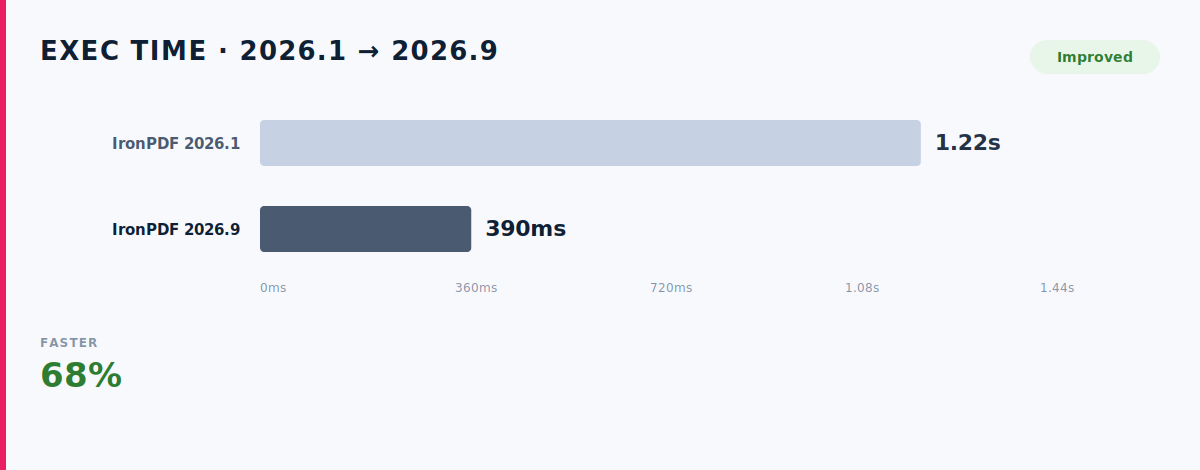
Microsoft has rearchitected C# Dev Kit, and .NET 11 brings union types, runtime async and file-based apps. This guide shows which of those features you can use with IronPDF to create PDF files in C# today, with every example built and run on .NET 11 RC1.
Microsoft shipped two releases for .NET developers this autumn. .NET 11 RC1 arrived on September 8 with a go-live support licence, which means Microsoft supports it in production. On October 6 the company announced a rearchitected C# Dev Kit for VS Code, and the extension now takes its version number from .NET, so it jumps from 3.3 to 11.0.
Both releases affect anyone who does PDF generation in C#. This post covers what is new, which .NET 11 features work with IronPDF, what IronPDF itself added during 2026 and how a PDF project behaves in the new tooling. I work at Iron Software, which makes IronPDF. I built and ran every code sample in this post on October 9, 2026.
What Are the Key Features of C# Dev Kit 11.0?
Microsoft's blog post describes three changes to how the extension works. The first is a project cache that is built the first time a project loads and reused on every load after that. Microsoft says that if you commit the cache files to version control, fresh clones and new git worktrees get fast tooling support immediately, which it calls great when working with agents. The second change replaces the six managed processes of version 3.3 with a single CSDevKit server compiled with Native AOT. The third brings fast up-to-date checks and Build Acceleration to VS Code, two features that Visual Studio has had for some time.
The release also adds two tools that matter to any project with a large NuGet package. Package references now get a CodeLens entry that shows when a newer version is available and when the version in use has a vulnerability. A new feature called C# Doctor gathers environment problems such as missing SDKs and failed restores in one place. The CodeLens appears again later in this post, because an IronPDF project gives it something to report.
Why Do You Need a .NET PDF Library?
The .NET runtime does not have a built-in PDF generation engine. That has not changed in .NET 11. Creating a PDF document in C# requires a third-party library. A search for C# create PDF returns one library after another. In .NET applications that generate PDFs for invoices, reports or archived records, that library comes from a NuGet package, which you add through the NuGet Package Manager in Visual Studio or with dotnet add package.
PDF generation in C# can be done using several libraries based on project requirements. Some of them handle programmatic PDF generation by drawing a document from scratch in C# code, while others convert HTML content with a browser engine. Libraries should be selected based on the document complexity, performance needs, and environment.
Which PDF Libraries Are Popular in .NET?
The table below lists the popular libraries with their download counts from NuGet on October 23, 2026.
Each of the code-first libraries suits a different kind of work. PDFsharp is an open-source library for creating PDFs in C#. PDFsharp allows precise control over layout and content. PDFsharp is an open-source library for creating PDFs entirely with C# code. That approach gives you full control, although you have to position every line yourself. Check the licence before you upgrade, because from version 6.5.0 PDFsharp is dual-licensed under the AGPL and a commercial licence, and your code has to select one.
QuestPDF offers a fluent API for document creation. QuestPDF is suitable for multi-page documents like invoices and reports. Libraries like QuestPDF facilitate handling pagination and layout management. Some comparison articles still use the following line. QuestPDF is an open-source library designed for modern document layouts. The current Community License no longer supports that description, because it calls itself a source-available commercial licence and states that it is not an OSI-approved open-source licence.
iText is a powerful library for low-level or complex PDF creation. iText 7 supports PDF/A, PDF/UA, and digital signatures. iText 7 has reached approximately 30 million downloads by 2025. On October 23, NuGet showed 55,461,775 downloads for the itext7 package alone, which iText has since renamed to itext.
Syncfusion's .NET PDF library supports creating PDFs from various formats. Those formats include Word and Excel files, which Syncfusion converts through its DocIO and XlsIO libraries. Syncfusion's library supports PDF/A and PDF/UA compliance. Companies with under USD 1 million in annual revenue, five or fewer developers and ten or fewer employees can use it under the free community license that Syncfusion offers.
How Does HTML to PDF Conversion Work in C#?
For teams that already build web pages, HTML is a direct route to a PDF. HTML-to-PDF conversions work well with libraries like IronPDF or PuppeteerSharp. PuppeteerSharp allows C# developers to convert web pages to PDF. Playwright for .NET converts dynamic web pages into high-fidelity PDFs. Both of them drive a separate headless browser process, and Playwright generates PDFs only with headless Chromium. Syncfusion's library supports HTML5, CSS3, and JavaScript rendering. DinkToPdf uses the WebKit engine for HTML to PDF conversion. The wkhtmltopdf project behind that engine is archived on GitHub, so anyone considering it should check for active maintenance first.
IronPDF uses a Chromium-based engine for HTML rendering. Installing IronPdf also installs its Windows Chromium build through the IronPdf.Native.Chrome.Windows dependency, so every Windows machine renders with the same browser build. Iron Software's case for that design is consistent rendering of fonts, images and complex layouts across environments, together with accurate rendering of HTML, CSS and JavaScript, so that web content looks the same in the PDF as it does in the browser. IronPDF runs on Windows, Linux and macOS.
How Do I Create a PDF File in C#? Basic PDF Creation With IronPDF
IronPDF simplifies PDF generation with minimal C# code. IronPDF uses a Chromium-based engine for HTML to PDF conversion. Start by installing the NuGet package.
dotnet add package IronPdf
dotnet add package IronPdf
SHELL
The next step passes HTML to ChromePdfRenderer. Every C# sample in this post is a complete Program.cs for a project made with dotnet new console.
using IronPdf;

var renderer = new ChromePdfRenderer();
PdfDocument pdf = renderer.RenderHtmlAsPdf("<h1>Invoice INV-1001</h1><p>Total: $43.00</p>");
pdf.SaveAs("invoice.pdf");
using IronPdf;

var renderer = new ChromePdfRenderer();
PdfDocument pdf = renderer.RenderHtmlAsPdf("<h1>Invoice INV-1001</h1><p>Total: $43.00</p>");
pdf.SaveAs("invoice.pdf");
C#
What Does This Code Do?
ChromePdfRenderer loads the HTML into the embedded Chromium, lays it out as a printed page and returns a PdfDocument, and SaveAs then writes the PDF file. The same three lines work in console apps, Windows Forms and ASP.NET Core web application projects. The package ships one .NET Standard 2.0 build, which NuGet lists as compatible with .NET Framework 4.6.2, .NET Core 2.0 and .NET 5 and later, so a single library covers .NET Framework, .NET Core and .NET 11 with cross platform compatibility on Windows, Linux and macOS. The HTML to PDF tutorial is a detailed guide to URLs, HTML files, headers and page settings.
Do I Need a License Key to Try It?
You can try IronPDF before you have a key. In version 2026.10.1 the render itself runs without one, so the PDF builds in memory and you can read PageCount and the page text. The licence applies when you call SaveAs, which throws Production License Required if no key is set. Add a free trial key or a paid license key before you write files, as the next sample shows.
using IronPdf;

License.LicenseKey = Environment.GetEnvironmentVariable("IRONPDF_LICENSE_KEY");
using IronPdf;

License.LicenseKey = Environment.GetEnvironmentVariable("IRONPDF_LICENSE_KEY");
C#
Which .NET 11 Features Can You Use With IronPDF?
I installed the .NET 11 RC1 SDK (11.0.100-rc.1.26425.128) and tested IronPDF 2026.10.1 against the main new features. The table summarises the results, and the sections after it give the code.
Can I Run IronPDF in a File-Based App?
IronPDF runs in a file-based app, and this is the quickest way to try the library and create PDF file output from a single script. A file-based app in .NET 11 is one .cs file that you start with dotnet run, with no project file. Save the following code as invoice.cs.
#:package IronPdf@2026.10.1
#:property PublishAot=false
using IronPdf;

var pdf = await new ChromePdfRenderer().RenderHtmlAsPdfAsync("<h1>Invoice INV-1001</h1><p>Total: $43.00</p>");
Console.WriteLine($"Rendered {pdf.PageCount} page(s)");
Console.WriteLine($"Page text: {pdf.Pages[0].Text.Trim()}");
#:package IronPdf@2026.10.1
#:property PublishAot=false
using IronPdf;

var pdf = await new ChromePdfRenderer().RenderHtmlAsPdfAsync("<h1>Invoice INV-1001</h1><p>Total: $43.00</p>");
Console.WriteLine($"Rendered {pdf.PageCount} page(s)");
Console.WriteLine($"Page text: {pdf.Pages[0].Text.Trim()}");
C#
Running dotnet run invoice.cs printed the following output.
Rendered 1 page(s)
Page text: Invoice INV-1001
Total: $43.00
Rendered 1 page(s)
Page text: Invoice INV-1001
Total: $43.00
Text
The #:property PublishAot=false line has to stay. File-based apps enable Native AOT publishing by default, and without that line the renderer stopped with PlatformNotSupportedException and the message Dynamic code generation is not supported on this platform. File-based apps also support an #:include directive in .NET 11 and in the 10.0.300 SDK, so a helper file that holds your HTML templates can sit next to invoice.cs.
How Do C# 15 Union Types Help With PDF Rendering?
A union type declares that a value is one of a fixed set of cases, and the compiler checks that a switch expression handles every case. That suits a render call, which returns either a document or a failure.
using IronPdf;

RenderResult result = await Invoices.RenderAsync("<h1>Invoice INV-1001</h1>");

string message = result switch
{
    PdfDocument pdf => $"PDF generated successfully: {pdf.PageCount} page(s)",
    RenderFailure f => $"Error generating PDF: {f.Reason}",
};
Console.WriteLine(message);

public record RenderFailure(string Reason);

public union RenderResult(PdfDocument, RenderFailure);

public static class Invoices
{
    public static async Task<RenderResult> RenderAsync(string html)
    {
        try
        {
            return await new ChromePdfRenderer().RenderHtmlAsPdfAsync(html);
        }
        catch (Exception ex)
        {
            return new RenderFailure(ex.Message);
        }
    }
}
using IronPdf;

RenderResult result = await Invoices.RenderAsync("<h1>Invoice INV-1001</h1>");

string message = result switch
{
    PdfDocument pdf => $"PDF generated successfully: {pdf.PageCount} page(s)",
    RenderFailure f => $"Error generating PDF: {f.Reason}",
};
Console.WriteLine(message);

public record RenderFailure(string Reason);

public union RenderResult(PdfDocument, RenderFailure);

public static class Invoices
{
    public static async Task<RenderResult> RenderAsync(string html)
    {
        try
        {
            return await new ChromePdfRenderer().RenderHtmlAsPdfAsync(html);
        }
        catch (Exception ex)
        {
            return new RenderFailure(ex.Message);
        }
    }
}
C#
On .NET 11 RC1 this printed PDF generated successfully: 1 page(s). The method catches render errors and returns them as a RenderFailure, so callers handle one result type and need no try block of their own. Adding a third case later makes the compiler flag every switch expression that does not handle it.
Does Runtime Async Work With IronPDF?
Runtime async, which starts moving async state machines out of the compiler and into the runtime, works with IronPDF. Microsoft's .NET 11 runtime notes list cleaner stack traces, better debugging and lower overhead as the benefits. It remains a preview feature, so each project has to opt in. The project file below is the complete one used for the union example above and the memory example in the next section.
<Project Sdk="Microsoft.NET.Sdk">

  <PropertyGroup>
    <OutputType>Exe</OutputType>
    <TargetFramework>net11.0</TargetFramework>
    <ImplicitUsings>enable</ImplicitUsings>
    <Nullable>enable</Nullable>
    <Features>runtime-async=on</Features>
  </PropertyGroup>

  <ItemGroup>
    <PackageReference Include="IronPdf" Version="2026.10.1" />
  </ItemGroup>

</Project>
<Project Sdk="Microsoft.NET.Sdk">

  <PropertyGroup>
    <OutputType>Exe</OutputType>
    <TargetFramework>net11.0</TargetFramework>
    <ImplicitUsings>enable</ImplicitUsings>
    <Nullable>enable</Nullable>
    <Features>runtime-async=on</Features>
  </PropertyGroup>

  <ItemGroup>
    <PackageReference Include="IronPdf" Version="2026.10.1" />
  </ItemGroup>

</Project>
XML
With that setting in place, RenderHtmlAsPdfAsync awaited normally in both examples. Asynchronous processing can help optimize performance during PDF generation. In a web application, an async render leaves request threads free while Chromium does its work, and the async guide for IronPDF explains how to render in parallel. It's important to separate document data from PDF generation logic for maintainability. In practice that means keeping the data in plain records and building the HTML in a separate template method, so the layout can change without any edit to the render code.
Can I Load and Merge PDFs From Memory?
.NET 11 adds stream types that wrap memory you already hold. ReadOnlyMemoryStream exposes a ReadOnlyMemory<byte> as a read-only Stream, and the PdfDocument constructor in IronPDF accepts it. Collection expression arguments in C# 15 let you set the capacity of the list in the same line.
using IronPdf;

byte[] bytes = File.ReadAllBytes("w9.pdf");
using var page = new PdfDocument(new ReadOnlyMemoryStream(bytes));

List<PdfDocument> parts = [with(capacity: 3), page, page, page];
using PdfDocument merged = PdfDocument.Merge(parts);
Console.WriteLine($"Merged pages: {merged.PageCount}");
using IronPdf;

byte[] bytes = File.ReadAllBytes("w9.pdf");
using var page = new PdfDocument(new ReadOnlyMemoryStream(bytes));

List<PdfDocument> parts = [with(capacity: 3), page, page, page];
using PdfDocument merged = PdfDocument.Merge(parts);
Console.WriteLine($"Merged pages: {merged.PageCount}");
C#
This printed Merged pages: 3 on .NET 11 RC1, and the guide to merging and splitting covers page ranges and inserts. The merged file below comes from the same code with a SaveAs call added at the end.
Should I Compress PDFs With Zstandard?
Zstandard did little for the two PDF files I tested. .NET 11 puts ZstandardStream in System.IO.Compression, and I used it to compress two PDF documents at CompressionLevel.SmallestSize. A 139,420-byte image-only PDF shrank to 138,587 bytes, and a 132,587-byte IRS form shrank to 125,598. For a smaller PDF, the compression options in IronPDF can downsample images, lower JPEG quality and drop the structure tree.
Does the MSBuild Server Make IronPDF Builds Faster?
The MSBuild server shortens IronPDF builds by a small margin. The .NET 11 SDK turns it on by default, and it keeps a warm MSBuild worker running between CLI invocations. On a five-project solution with IronPDF, with every project on net11.0, a no-change build took 1.20 to 1.26 seconds with the server and 1.72 to 2.27 seconds with MSBUILDUSESERVER=0, over three runs each.
Can I Publish an IronPDF App With Native AOT?
Native AOT does not work with IronPDF at the moment. On .NET 11 RC1 the publish succeeds with 12 trim and AOT warnings and writes a 37 MB executable, but the renderer then fails at runtime with a dependency injection error from an internal component (Error loading Ninject component). On .NET 8 the publish fails earlier with Failed to load assembly 'SkiaSharp'. IronPDF services should therefore run on the regular JIT runtime, and ReadyToRun is available if startup time matters.
What's New in IronPDF in 2026?
IronPDF ships about one release a month, and the changelog records what the releases from 2026.4.1 to 2026.9.2 added.
The security work came in the summer and autumn releases. Version 2026.8.1 added AES-128 and AES-256 encryption through PdfSecuritySettings.EncryptionType, along with RFC 3161 trusted timestamps for signing with an HSM. Version 2026.9.2 made SHA-256 the default for signatures through SignatureHashAlgorithm, and 2026.6.1 had already added ECDSA signatures.
Accessibility and document structure improved over the same period. PdfDocument.SetImageAltText in 2026.9.2 sets alternate text on images in existing PDFs and keeps it through PDF/UA conversion. Version 2026.7.2 added access to PDF layers and a ChromePdfRenderOptions.CssPageRulePolicy setting for margin handling, while 2026.5.2 brought LinkAnnotation for clickable internal links and automatic bookmarks from HTML headings.
File size and deployment received attention as well. AdvancedCompressionOptions in 2026.6.1 controls image DPI, JPEG quality and structure-tree removal, and LinearizePdfToBytes in 2026.5.2 prepares a PDF for fast web view entirely in memory. Version 2026.4.1 made rendering quicker by reusing browser tabs and cut the IronPdfEngine Docker image by 60%, from 2.89 GB to 1.14 GB, and 2026.9.2 made that image multi-architecture for AMD64 and ARM64.
How Do I Add PDF/A, Digital Signatures and Password Protection?
Most PDF workflows need more than a first render, and these advanced features are where libraries differ. PDF/A compliance is important for official legal documents and long-term archiving. iText 7 supports PDF/A compliance and HTML to PDF conversion. The HTML conversion comes from its pdfHTML add-on. Syncfusion .NET PDF library supports PDF/A and PDF/UA compliance. IronPDF covers the same ground with PDF/A, PDF/UA and digital signatures. Digital signatures and document protections are vital for confidential outputs. The sample below applies the AES-256 encryption added in 2026.8.1 together with password protection.
using IronPdf;
using IronPdf.Security;

var renderer = new ChromePdfRenderer();
using PdfDocument pdf = renderer.RenderHtmlAsPdf("<h1>Payroll summary</h1>");

pdf.SecuritySettings.EncryptionType = PdfEncryptionType.Aes_256;
pdf.SecuritySettings.UserPassword = "reader-password";
pdf.SecuritySettings.OwnerPassword = "owner-password";
pdf.SaveAs("payroll.pdf");
using IronPdf;
using IronPdf.Security;

var renderer = new ChromePdfRenderer();
using PdfDocument pdf = renderer.RenderHtmlAsPdf("<h1>Payroll summary</h1>");

pdf.SecuritySettings.EncryptionType = PdfEncryptionType.Aes_256;
pdf.SecuritySettings.UserPassword = "reader-password";
pdf.SecuritySettings.OwnerPassword = "owner-password";
pdf.SaveAs("payroll.pdf");
C#
The sample compiles against 2026.10.1, and its SaveAs call needs a license key. The guide to editing forms explains how to work with form fields. PDF generation is improved by managing resources like fonts and images effectively. Two ways to do that are loading the same web fonts from the HTML on every machine and resizing images before they go into the HTML.
The encrypted file below is the output of that sample, and it opens with the password reader-password.
How Does an IronPDF Project Look to C# Dev Kit 11.0?
C# Dev Kit 11.0 changes how builds are checked, but the build still has to copy whatever your packages place in the output, and an embedded Chromium takes a lot of space. I built net11.0 console apps with the .NET 11 SDK and measured bin/Release/net11.0. An empty console app produced 1 MB in 5 files. The same app with IronPdf 2026.10.1 produced 599 MB in 238 files, and with IronPdf.Slim 2026.10.1 it produced 83 MB in 45 files.
The full package carries Chromium for both 64-bit and 32-bit Windows (286 MB and 253 MB) as well as smaller Linux and macOS native files. Adding -r win-x64 raises the output to 835 MB in 325 files instead of reducing it, because IronPdf.Native.Chrome.Windows copies its runtimes folder twice. One copy comes from Content items and the other from a Copy task in a target named IronPdfChromeWindowsBuild.
The size multiplies in a solution. Five projects (a Reports class library with IronPDF, two apps and two test projects) produced 2,920 MB of output, and 517 MB of that sat in the class library alone. Build time stayed low, with no-change builds of about 1.2 seconds, so the real cost is disk space. Microsoft points to agents and new git worktrees as a reason to commit the Dev Kit cache, and every worktree builds its own bin folders. Four worktrees of that solution would hold about 11.7 GB.
I did not run Dev Kit 11.0 itself. The Build Acceleration docs warn that post-compile build steps are not reproduced correctly when acceleration bypasses MSBuild. If a stale native file appears after an accelerated build, set AccelerateBuildsInVisualStudio to false for that project.
What Will the Package CodeLens Flag in an IronPDF Project?
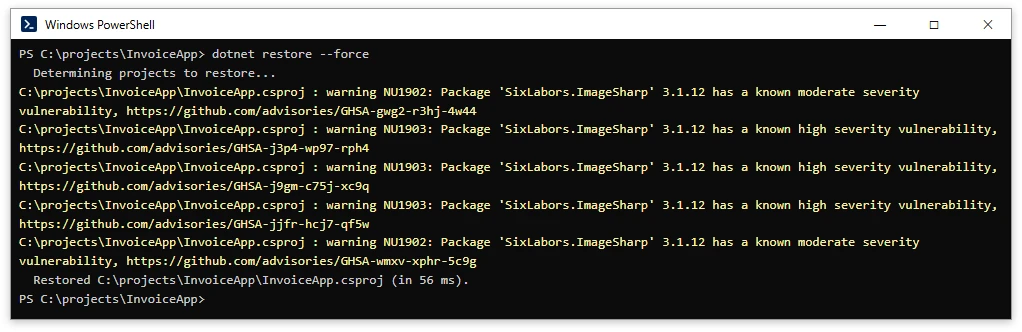
On .NET 6 and later, IronPDF 2026.10.1 pulls in SixLabors.ImageSharp 3.1.12 through its IronSoftware.System.Drawing dependency. On October 7 the GitHub Advisory Database added seven advisories for the SixLabors.ImageSharp package, and five of them affect version 3.1.12. Three are rated High (GHSA-j9gm-c75j-xc9q, GHSA-jjfr-hcj7-qf5w and GHSA-j3p4-wp97-rph4) and two are rated Moderate (GHSA-gwg2-r3hj-4w44 and GHSA-wmxv-xphr-5c9g). They cover TIFF encoding, BigTIFF decoding, ICC profiles and histogram equalization, and each one lists 4.1.2 as the patched version.
The target framework decides whether these warnings appear. According to Microsoft's NuGet audit docs, the audit mode defaults to all for projects that target net10.0 or higher and to direct for everything older. Every net11.0 sample in this post printed all five advisories as NU1902 and NU1903 warnings, while a net8.0 copy of the same project built with no warnings at all.
Upgrading IronPDF clears them on .NET 8 and later. Version 2026.10.3, released on October 12, depends on IronSoftware.System.Drawing 2026.11.3, which requires ImageSharp 4.1.3 on .NET 8 and later, and a net11.0 project on that version restored ImageSharp 4.1.3 with no advisories.

A .NET Framework 4.8 project on the same version still restored ImageSharp 2.1.13, which all five advisories cover, and its audit stayed silent by default. On .NET 6 and 7 the same dependency requires ImageSharp 3.2.0, which the five advisories also cover. For any project below net10.0 that still resolves one of those versions, add the following Directory.Build.props file.
<Project>
  <PropertyGroup>
    <NuGetAuditMode>all</NuGetAuditMode>
  </PropertyGroup>
</Project>
<Project>
  <PropertyGroup>
    <NuGetAuditMode>all</NuGetAuditMode>
  </PropertyGroup>
</Project>
XML
Referencing ImageSharp yourself is not a fix. Six Labors requires a license key at build time for any project that references ImageSharp directly, starting with versions 3.2.0 and 4.0.0. The 3.2.0 release notes mention backported v3 security fixes, but all five advisories still list 3.2.0 as affected, NuGet audit flagged it with all five, and a Release build stopped with the error No Six Labors license found. A direct reference to 4.1.3 behaved the same way, and in both cases a Debug build only warned.
How Do I Make an IronPDF Solution Lighter?
The fix is to reference IronPdf.Slim from class libraries and test projects and to keep the full IronPdf package for the apps that render HTML. The IronPdf.Slim page explains that ChromePdfRenderer is the only class that triggers a Chromium download. The page lists merging, editing, stamping, redacting and encrypting as work that needs no Chromium, and loading and rasterizing work too. The following sample ran from the Slim build and wrote page_1.png.
using IronPdf;

var pdf = new PdfDocument(args[0]);
Console.WriteLine($"Pages: {pdf.PageCount}");
pdf.RasterizeToImageFiles(Path.Combine(args[1], "page_*.png"));
using IronPdf;

var pdf = new PdfDocument(args[0]);
Console.WriteLine($"Pages: {pdf.PageCount}");
pdf.RasterizeToImageFiles(Path.Combine(args[1], "page_*.png"));
C#
The Reports.csproj file for the class library references Slim.
<Project Sdk="Microsoft.NET.Sdk">

  <PropertyGroup>
    <TargetFramework>net11.0</TargetFramework>
    <ImplicitUsings>enable</ImplicitUsings>
    <Nullable>enable</Nullable>
  </PropertyGroup>

  <ItemGroup>
    <PackageReference Include="IronPdf.Slim" Version="2026.10.1" />
  </ItemGroup>

</Project>
<Project Sdk="Microsoft.NET.Sdk">

  <PropertyGroup>
    <TargetFramework>net11.0</TargetFramework>
    <ImplicitUsings>enable</ImplicitUsings>
    <Nullable>enable</Nullable>
  </PropertyGroup>

  <ItemGroup>
    <PackageReference Include="IronPdf.Slim" Version="2026.10.1" />
  </ItemGroup>

</Project>
XML
The app that renders, named Api.csproj here, adds the full package.
<Project Sdk="Microsoft.NET.Sdk">

  <PropertyGroup>
    <OutputType>Exe</OutputType>
    <TargetFramework>net11.0</TargetFramework>
    <ImplicitUsings>enable</ImplicitUsings>
    <Nullable>enable</Nullable>
  </PropertyGroup>

  <ItemGroup>
    <ProjectReference Include="..\Reports\Reports.csproj" />
    <PackageReference Include="IronPdf" Version="2026.10.1" />
  </ItemGroup>

</Project>
<Project Sdk="Microsoft.NET.Sdk">

  <PropertyGroup>
    <OutputType>Exe</OutputType>
    <TargetFramework>net11.0</TargetFramework>
    <ImplicitUsings>enable</ImplicitUsings>
    <Nullable>enable</Nullable>
  </PropertyGroup>

  <ItemGroup>
    <ProjectReference Include="..\Reports\Reports.csproj" />
    <PackageReference Include="IronPdf" Version="2026.10.1" />
  </ItemGroup>

</Project>
XML
That layout reduced my five-project solution from 2,920 MB to 1,372 MB. The class library went from 517 MB to 1 MB, and each test project went from 604 MB to 88 MB.
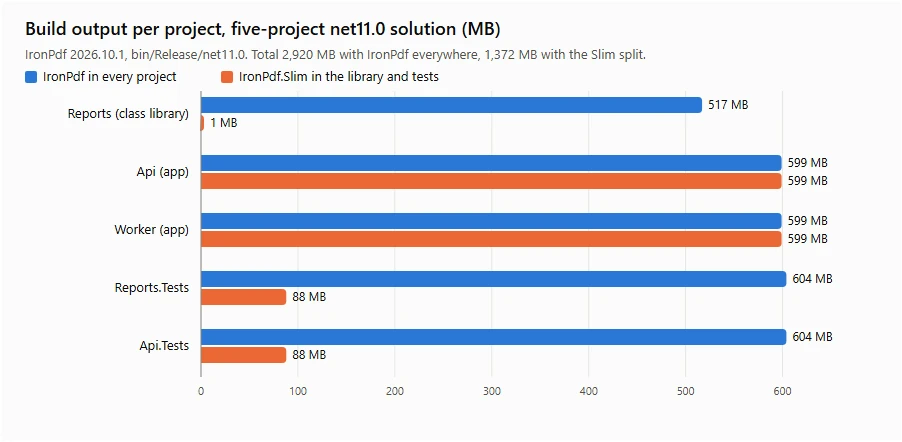
The split leaves the two apps unchanged, because they still render HTML. A Slim project that does need to render can download Chromium at runtime when Installation.AutomaticallyDownloadNativeBinaries is set to true.
The choice of a C# PDF library depends on a few key factors, and the first is your input. Existing HTML, Razor views or templates point to an HTML engine such as IronPDF, whereas a layout written in C# from scratch suits PDFsharp or QuestPDF. The second factor is the feature list. If you need PDF/A, PDF/UA, digital signatures, encryption or form fields, check that they are built in and not sold as add-ons.
Licensing comes next, because free libraries are released under very different terms that range from the MIT license to the AGPL and community licences with a revenue cap. A paid license with commercial licensing gives a business a clear answer on what it may ship.
Active maintenance and support also deserve a look. Claims of excellent support are hard to compare, so the release history is the better evidence. NuGet shows five IronPDF releases, from 2026.7.2 to 2026.10.3, between June 26 and October 12, 2026. IronPDF subscription licences include a year of support and updates, with Premium Support as an optional upgrade.
Deployment is the last factor. For Docker and Linux, consider IronPdfEngine, whose image became 60% smaller in 2026.4.1, along with IronPdf.Slim.
Final Thoughts
C# Dev Kit 11.0 and .NET 11 change a good deal for .NET developers, and IronPDF works with most of the new features. Union types, runtime async, file-based apps, ReadOnlyMemoryStream and the MSBuild server all ran in my tests, and only Native AOT failed. Splitting IronPdf.Slim and IronPdf across your projects cuts the build output. Upgrading to 2026.10.3 moves .NET 8 and later projects to ImageSharp 4.1.3, and setting NuGetAuditMode to all keeps the remaining advisories visible in projects below net10.0.
To try it, install the NuGet package, run the file-based example above with dotnet run invoice.cs and request a free trial license key when you are ready to save files.
Tested on October 9, 2026 on Windows 11 with IronPdf and IronPdf.Slim 2026.10.1 and the .NET 11.0.100-rc.1 SDK. Every C# sample and project file targets net11.0 and was compiled with that SDK. The net8.0 comparisons (the silent audit and the Native AOT build error) used the .NET 10.0.400 SDK. The file-based app, union, memory-stream and Slim samples were also run without a licence key, so rendered PDFs were checked in memory and not saved. The Zstandard and MSBuild server figures come from those runs, and build timings will differ on other machines. I did not run or benchmark C# Dev Kit 11.0, so the article makes no speed claims for it. Library descriptions are summary statements and not features I tested. Download counts were read from NuGet on October 23, 2026, and licence terms were rechecked on each vendor's page on that date. The figure of about 30 million iText 7 downloads by 2025 matches archived NuGet pages, which show the itext7 package at 26.1 million in January 2025 and 32.3 million in June 2025. The IronPdf 2026.10.3, .NET Framework 4.8 and ImageSharp 3.2.0 checks were run on October 19, 2026. Advisory details and package dependencies were rechecked on the GitHub Advisory Database and NuGet on October 23, 2026. This article is not legal advice.