using IronPdf;

// Disable local disk access or cross-origin requests
Installation.EnableWebSecurity = true;

// Instantiate Renderer
var renderer = new ChromePdfRenderer();

// Create a PDF from a HTML string using C#
var pdf = renderer.RenderHtmlAsPdf("<h1>Hello World</h1>");

// Export to a file or Stream
pdf.SaveAs("output.pdf");

// Advanced Example with HTML Assets
// Load external html assets: Images, CSS and JavaScript.
// An optional BasePath 'C:\site\assets\' is set as the file location to load assets from
var myAdvancedPdf = renderer.RenderHtmlAsPdf("<img src='icons/iron.png'>", @"C:\site\assets\");
myAdvancedPdf.SaveAs("html-with-assets.pdf");
using IronPdf;// Disable local disk access or cross-origin requestsInstallation.EnableWebSecurity = true;// Instantiate Renderervar renderer = new ChromePdfRenderer();// Create a PDF from a HTML string using C#var pdf = renderer.RenderHtmlAsPdf("<h1>Hello World</h1>");// Export to a file or Streampdf.SaveAs("output.pdf");// Advanced Example with HTML Assets// Load external html assets: Images, CSS and JavaScript.// An optional BasePath 'C:\site\assets\' is set as the file location to load assets fromvar myAdvancedPdf = renderer.RenderHtmlAsPdf("<img src='icons/iron.png'>", @"C:\site\assets\");myAdvancedPdf.SaveAs("html-with-assets.pdf");
ChromePdfRenderer는 Chrome 기반 렌더링과 98% HTML 정확성, 간결한 API 디자인 및 완전한 기능 범위를 갖춘 완전한 ASP.NET Core PDF 생성을 알림 측면에서 `$liteLicense`으로 제공합니다. 이는 경쟁사의 연간 구독보다 더 나은 가치를 제공하면서 우수한 [HTML을 PDF로 변환](https://ironpdf.com/how-to/html-string-to-pdf/) 기능을 제공합니다.
## ASP.NET PDF 라이브러리의 주요 차이점은 무엇입니까?
<table class="content__data-table" data-content-table>
<caption>ASP.NET PDF 라이브러리 기능 비교: ChromePdfRenderer vs Aspose.PDF vs Syncfusion</caption>
<thead>
<tr>
<th>특징</th>
<th>ChromePdfRenderer</th>
<th>Aspose.PDF</th>
<th>Syncfusion PDF</th>
</tr>
</thead>
<tbody>
<tr>
<td>HTML을 PDF로 렌더링</td>
<td><a href="https://ironpdf.com/how-to/ironpdf-2021-chrome-rendering-engine-eap/">Chrome engine</a></td>
<td>특허 HTML 엔진 (Aspose.HTML); CSS3 지원, JavaScript 렌더링은 브라우저 기반 엔진에 비해 제한적</td>
<td>WebKit 기반 (우수한 CSS 지원)</td>
</tr>
<tr>
<td>학습 곡선</td>
<td>단순하고 직관적인 API</td>
<td>복잡하고 장황함</td>
<td>중간 복잡성</td>
</tr>
<tr>
<td>JavaScript 지원</td>
<td><a href="https://ironpdf.com/how-to/javascript-to-pdf/">전체 지원</a></td>
<td>부분 지원 (브라우저 기반 엔진보다 덜 포괄적임)</td>
<td>부분 지원</td>
</tr>
<tr>
<td>양식 처리</td>
<td><a href="https://ironpdf.com/how-to/create-forms/">HTML 양식을 PDF 양식으로</a></td>
<td>완전한 양식 처리</td>
<td>대화식 양식 필드</td>
</tr>
<tr>
<td>플랫폼 지원</td>
<td>윈도우, 리눅스, macOS, Docker</td>
<td>모든 주요 플랫폼</td>
<td>Windows Forms, .NET Core, 웹</td>
</tr>
<tr>
<td>가격 모델</td>
<td>`$liteLicense` 영구</td>
<td>연간 $1,199 이상</td>
<td>연간 $995(무료 커뮤니티 버전)</td>
</tr>
<tr>
<td>문서</td>
<td><a href="https://ironpdf.com/docs/">예제와 함께 포괄적임</a></td>
<td>세부적이지만 복잡함</td>
<td>강좌가 잘 되어 있음</td>
</tr>
<tr>
<td>무료 체험</td>
<td><a href="https://ironpdf.com/licensing/">30일 동안 전체 기능</a></td>
<td>제한된 평가</td>
<td>커뮤니티 에디션 사용 가능</td>
</tr>
</tbody>
</table>
## ASP.NET PDF 라이브러리에서 무엇을 찾아야 합니까?
.NET 애플리케이션은 기본 생성 기능을 넘어선 완전한 PDF 기능을 필요로 합니다. 능력 있는 라이브러리는 HTML 페이지를 매끄럽게 변환하고, 기존 문서를 처리하며, 정확한 출력을 생성할 수 있어야 합니다. PDF 기능 유형을 이해하는 것은 - 생성, 조작, 변환 - 정보에 입각한 결정을 내리도록 도와줍니다.
평가해야 할 주요 요구 사항에는 CSS 스타일링 지원, 여러 PDF 파일 관리, ASP.NET Core 프로젝트와 외부 종속성 없이 원활한 통합이 포함됩니다. 대규모 문서 처리 시 서버 환경에서의 성능은 매우 중요합니다. 최적의 웹 애플리케이션 성능을 위해서는 [비동기 작업](https://ironpdf.com/how-to/async/) 지원도 중요합니다.
생성을 넘어 보안 관련 요구 사항을 고려하십시오 : 디지털 서명이 있는 문서 생성, 기존 PDF 병합, 파일 첨부 처리. 효율적인 출력 관리 기능은 필수적입니다. [Microsoft의 PDF 생성에 관한 문서](https://learn.microsoft.com/en-us/aspnet/core/mvc/views/)에 따르면, 라이브러리 선택은 개발 효율성과 장기 유지 관리 비용에 크게 영향을 미칩니다.
라이브러리를 평가할 때 간단한 샘플이 아닌 가장 복잡한 실제 문서를 테스트하십시오. 간단한 텍스트 문서를 쉽게 처리하는 라이브러리는 실제 HTML 템플릿, JavaScript 중심 콘텐츠, 또는 최신 CSS 그리드 레이아웃을 사용하는 페이지를 처리하는 데 어려움을 겪을 수 있습니다.
## Chrome 렌더링 엔진이 PDF 품질에 중요한 이유는 무엇입니까?
ChromePdfRenderer는 뛰어난 HTML을 PDF로 변환하는 정확성을 제공하는 [Chrome 렌더링 엔진](https://ironpdf.com/how-to/pixel-perfect-html-to-pdf/)으로 돋보입니다. 이 .NET 구성 요소는 CSS 충실도를 유지하고 JavaScript를 실행하여 복잡한 HTML 페이지를 변환하는 데 이상적입니다. 라이브러리는 반응형 CSS를 처리하고 브라우저와 동일한 충실도로 컨텐츠를 렌더링합니다.
이런 차이는 동적 콘텐츠, 차트, 또는 스타일된 테이블이 있는 문서에서 명확해집니다. ChromePdfRenderer가 Google Chrome과 동일한 엔진을 사용하기 때문에, 브라우저에서 올바르게 렌더링되는 모든 페이지가 PDF로도 정확하게 변환됩니다. 이것은 브라우저에서 보여지는 것과 PDF에 포함된 내용 사이의 격차라는 일반적인 문제를 제거합니다.
라이브러리는 변환 중에 외부 자원을 효율적으로 관리합니다. 다양한 위치에서 이미지를 추가하고, 외부 템플릿에서 데이터를 가져오며, 디자인 사양에 정확하게 맞는 출력을 생성할 수 있습니다.
[ChromePdfRenderer의 HTML을 PDF로 변환하는 기능](https://ironpdf.com/tutorials/html-to-pdf/)과 출력에 대한 보다 나은 제어를 향상시키기 위한 렌더링 옵션에 대해 배우십시오.
### ChromePdfRenderer로 인보이스 PDF를 어떻게 생성합니까?
먼저 패키지를 설치하십시오 ([NuGet](https://www.nuget.org/packages/IronPdf)에서 사용할 수 있음):
```bash
:ProductInstall
```
```bash
:InstallCmd dotnet add package IronPdf
```
그런 다음 HTML에서 스타일 된 인보이스 PDF를 생성하십시오:
```csharp
using IronPdf;

string invoiceHtml = @"
<!DOCTYPE html>
<html>
<head>
    <style>
        body { font-family: Arial; margin: 40px; }
        .header { background: #2c3e50; color: white; padding: 20px; }
        table { width: 100%; border-collapse: collapse; margin-top: 20px; }
        th { background: #34495e; color: white; padding: 10px; }
        td { border: 1px solid #ddd; padding: 10px; }
        .total { font-weight: bold; background: #ecf0f1; }
    </style>
</head>
<body>
    <div class='header'>
        <h1>Invoice #2024-001</h1>
    </div>
    <table>
        <tr><th>Item</th><th>Quantity</th><th>Price</th></tr>
        <tr><td>Software License</td><td>1</td><td>$999</td></tr>
        <tr class='total'><td colspan='2'>Total</td><td>$999</td></tr>
    </table>
</body>
</html>";

var renderer = new ChromePdfRenderer();

// Configure rendering options
renderer.RenderingOptions.MarginTop = 25;
renderer.RenderingOptions.MarginBottom = 25;
renderer.RenderingOptions.EnableJavaScript = true;

// Convert HTML string to PDF
var pdf = renderer.RenderHtmlAsPdf(invoiceHtml);

// Save the document
pdf.SaveAs("invoice.pdf");
```
이 코드는 CSS 스타일링이 적용된 복잡한 HTML을 처리하는 ChromePdfRenderer의 기능을 보여줍니다. Chrome 엔진은 PDF 출력이 브라우저 렌더링과 일치하도록 보장하여 모든 서식과 스타일을 유지합니다. 직관적인 API는 전문가 수준의 PDF를 생성하기 위해 최소한의 코드만 필요합니다. 맞춤형 여백을 설정하고, 머리글과 바닥글을 추가하고, 문서에 대한 용지 크기를 구성할 수 있습니다.
### 생성된 PDF 파일은 어떤 모습인가요?
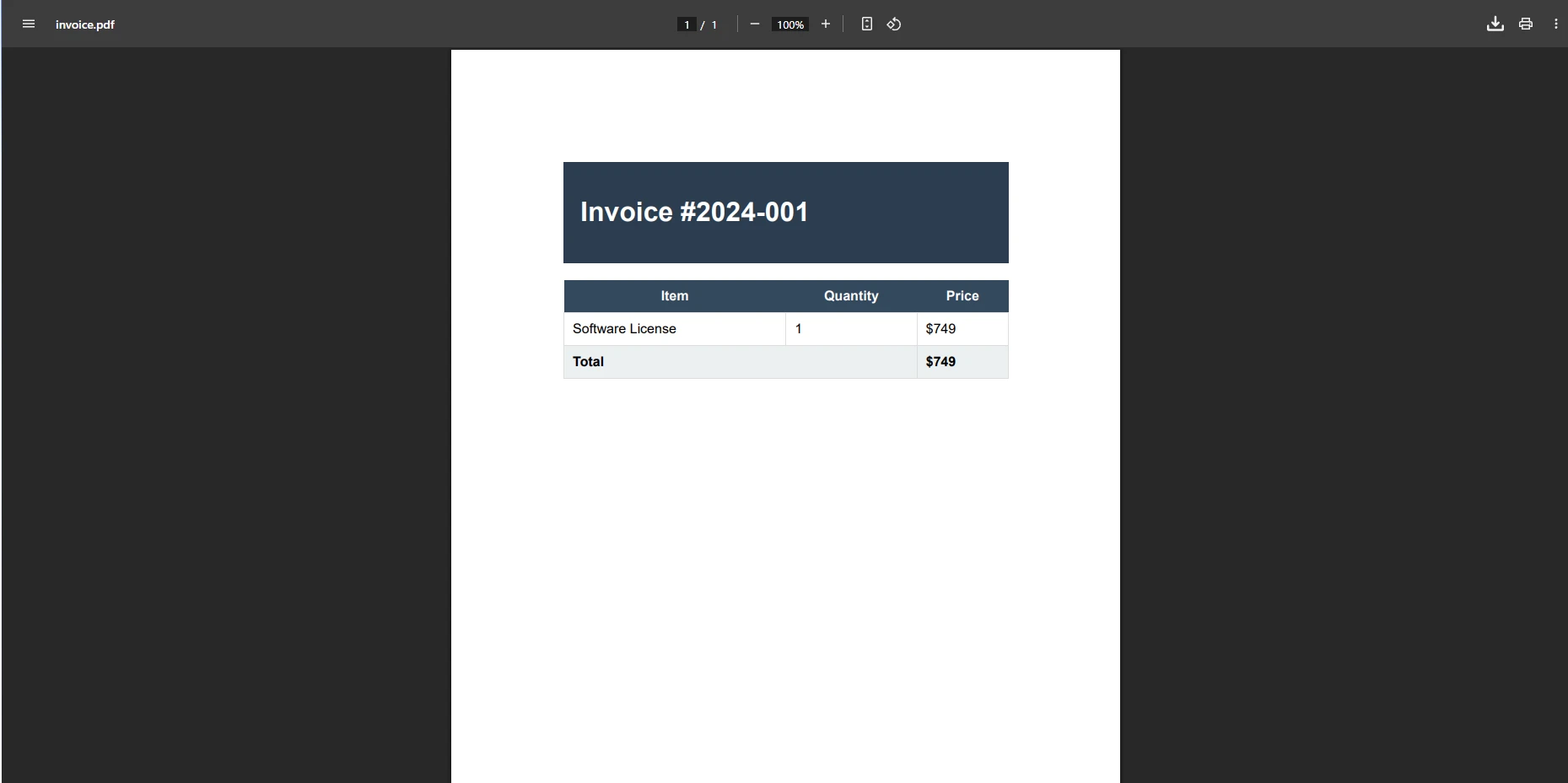
ChromePdfRenderer는 기존 PDF를 다루는 데 탁월하여 편집, 병합 및 조작을 가능하게 합니다. Windows, Linux 및 클라우드 플랫폼에 대한 지원은 배포 유연성을 보장합니다. 렌더링 엔진은 처리 동안 효율적인 메모리 사용을 유지합니다. PDF 압축을 사용하여 파일 크기를 줄이고 문서 관리 워크플로를 위해 [워터마크](https://ironpdf.com/how-to/custom-watermark/)와 주석을 적용할 수도 있습니다.
페이지 추가, 이미지 스탬프, 북마크 추가 및 양식 관리를 포함한 고급 기능에 대해 문서는 구현을 매 단계마다 안내합니다.
## 저수준 PDF API는 기업 요구 사항을 어떻게 처리하나요?
Aspose.PDF는 완전한 객체 모델을 통해 PDF에 대한 세부 제어를 제공합니다. 이 라이브러리는 정밀한 요소 제어로 프로그램적으로 PDF를 생성해야 하는 프로젝트에 적합합니다. 구성 요소는 귀하의 애플리케이션 아키텍처에 직접 통합됩니다. ChromePdfRenderer가 우수한 HTML 렌더링을 제공하는 반면, Aspose는 저수준 PDF 조작 작업에 뛰어납니다.
절충점은 장황함입니다: Aspose는 똑같은 시각적 결과를 얻기 위해 훨씬 더 많은 코드를 요구하는데 그것은 각 문서 요소를 수동으로 구성해야 하기 때문입니다. 이것은 세밀한 제어를 제공하지만 유지해야 할 템플릿 코드의 양이 증가합니다.
### Aspose로 프로그램적으로 PDF를 어떻게 만드나요?
```csharp
using Aspose.Pdf;
using Aspose.Pdf.Text;
// Create new document
Document document = new Document();
Page page = document.Pages.Add();
// Add formatted text
TextFragment title = new TextFragment("Invoice #INV-2024-001");
title.TextState.FontSize = 18;
title.TextState.Font = FontRepository.FindFont("Arial");
page.Paragraphs.Add(title);
// Create table
Table table = new Table();
table.ColumnWidths = "200 100 100";
// Add header row
Row headerRow = table.Rows.Add();
headerRow.Cells.Add("Item");
headerRow.Cells.Add("Quantity");
headerRow.Cells.Add("Price");
// Add data row
Row dataRow = table.Rows.Add();
dataRow.Cells.Add("Professional Services");
dataRow.Cells.Add("10");
dataRow.Cells.Add("$1,000");
page.Paragraphs.Add(table);
document.Save("invoice.pdf");
```
이 예제는 Aspose의 세부적이지만 효과적인 접근 방식을 보여줍니다. 비슷한 결과를 얻기 위해 더 많은 코드가 필요하지만, 완전한 문서 구조 제어를 얻을 수 있습니다. 라이브러리는 암호화된 문서를 생성하고 복잡한 주석을 처리하지만 학습 곡선이 더 가파릅니다. 기존 HTML 대신 각 요소를 수동으로 구성해야 합니다. 자세한 비교를 위해 [Aspose 대 ChromePdfRenderer](https://ironpdf.com/competitors/aspose-vs-ironpdf-update/) 분석을 참조하십시오.
### Aspose 출력 예제
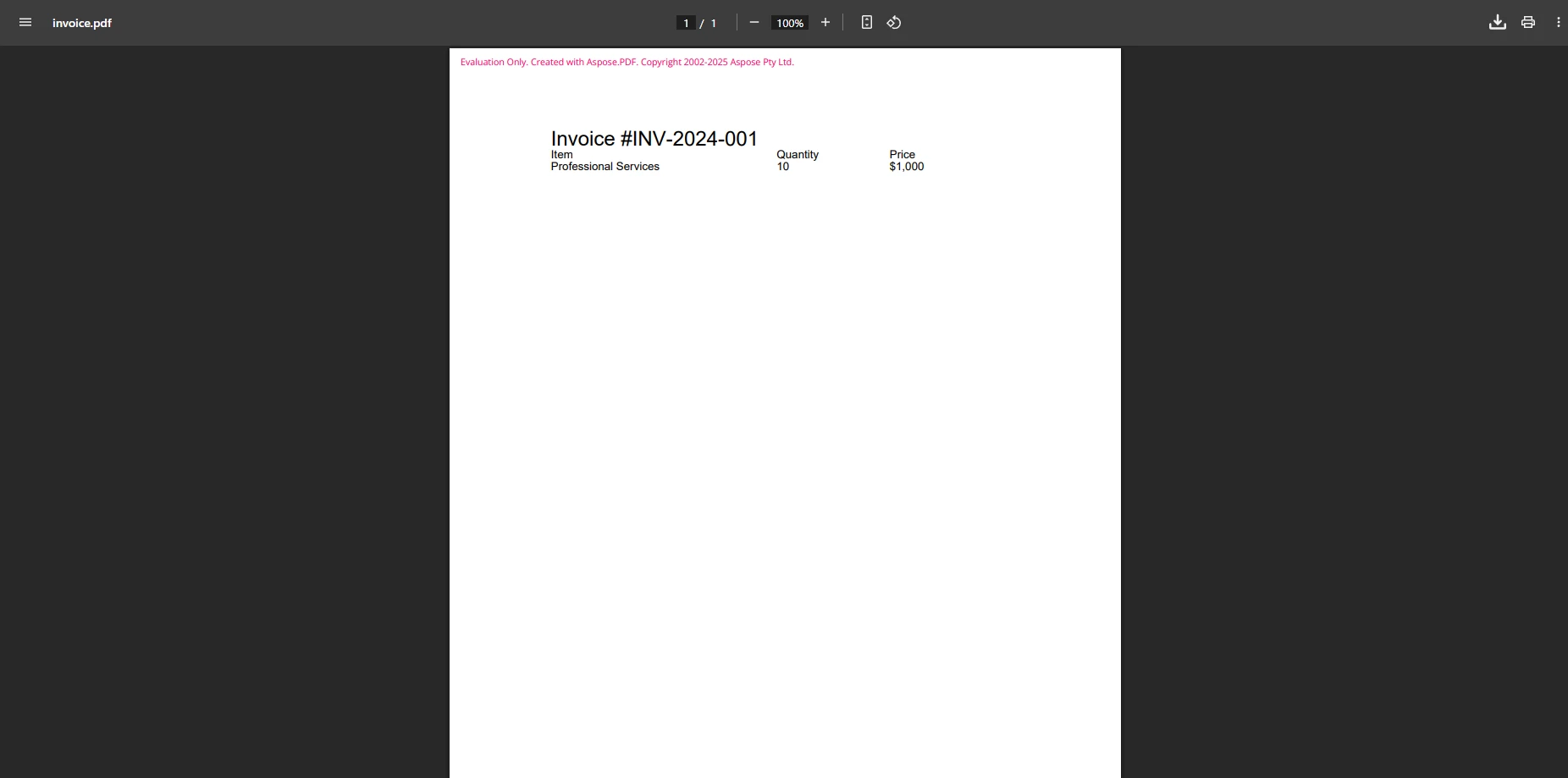
Aspose는 PDF/A 준수 및 고급 메타데이터 관리를 제공하지만 문서의 요구 사항과 비례하여 복잡성이 증가합니다. 라이브러리는 빠른 웹 보기를 위한 선형화된 PDF를 처리하고 아카이브 및 준수 워크플로를 위한 다양한 PDF 버전을 지원합니다.
## 생태계에 맞춘 PDF 라이브러리가 타당할 때는 언제인가요?
Syncfusion의 PDF 라이브러리는 그들의 더 광범위한 구성 요소 모음 내에서 잘 맞아, 완전한 도구 키트 내에서 견고한 PDF 기능을 제공합니다. 라이브러리는 신뢰할 수 있는 PDF 생성 및 편집 기능을 제공하면서도 합리적인 성능을 유지합니다. 자세한 비교를 위해 [Syncfusion 대 ChromePdfRenderer](https://ironpdf.com/competitors/syncfusion-vs-ironpdf/) 분석을 참조하십시오.
Syncfusion의 주요 장점은 생태계 일관성입니다: 프로젝트가 이미 Syncfusion의 UI 제어, 그리드 또는 차트에 의존하고 있다면, 그들의 PDF 라이브러리를 추가하면 종속성 트리를 일관되게 유지할 수 있습니다. 그렇긴 하지만, PDF 구성 요소는 ChromePdfRenderer가 달성하는 수준의 HTML-대-PDF 변환을 제공하지 않습니다.
### Syncfusion을 사용하여 PDF 생성을 어떻게 구현하나요?
```csharp
using Syncfusion.Pdf;
using Syncfusion.Pdf.Graphics;
using Syncfusion.Pdf.Grid;
// Create document
PdfDocument document = new PdfDocument();
PdfPage page = document.Pages.Add();
PdfGraphics graphics = page.Graphics;
// Draw text
PdfFont font = new PdfStandardFont(PdfFontFamily.Helvetica, 18);
graphics.DrawString("Invoice #INV-2024-001", font, PdfBrushes.Black, new PointF(10, 10));
// Create grid for items
PdfGrid grid = new PdfGrid();
grid.Columns.Add(3);
grid.Headers.Add(1);
PdfGridRow header = grid.Headers[0];
header.Cells[0].Value = "Item";
header.Cells[1].Value = "Quantity";
header.Cells[2].Value = "Price";
PdfGridRow row = grid.Rows.Add();
row.Cells[0].Value = "Professional Services";
row.Cells[1].Value = "10";
row.Cells[2].Value = "$1,000";
grid.Draw(page, new PointF(10, 50));
// Save document
using FileStream stream = new FileStream("invoice.pdf", FileMode.Create);
document.Save(stream);
document.Close(true);
```
Syncfusion은 Aspose와 유사하게 요소별로 PDF를 만들어야 하지만, 더 깔끔한 API 설계를 가지고 있습니다. 라이브러리는 폰트를 효과적으로 처리하며 다양한 출력 기능을 위한 지원을 포함합니다. 그들의 커뮤니티 에디션은 특정 사용 제한이 있는 소규모 팀에게 무료 접근을 제공합니다. 브라우저 다운로드를 위한 파일을 생성할 때 Syncfusion은 서버 측 생성을 신뢰할 수 있게 처리합니다.
### Syncfusion 출력 예제
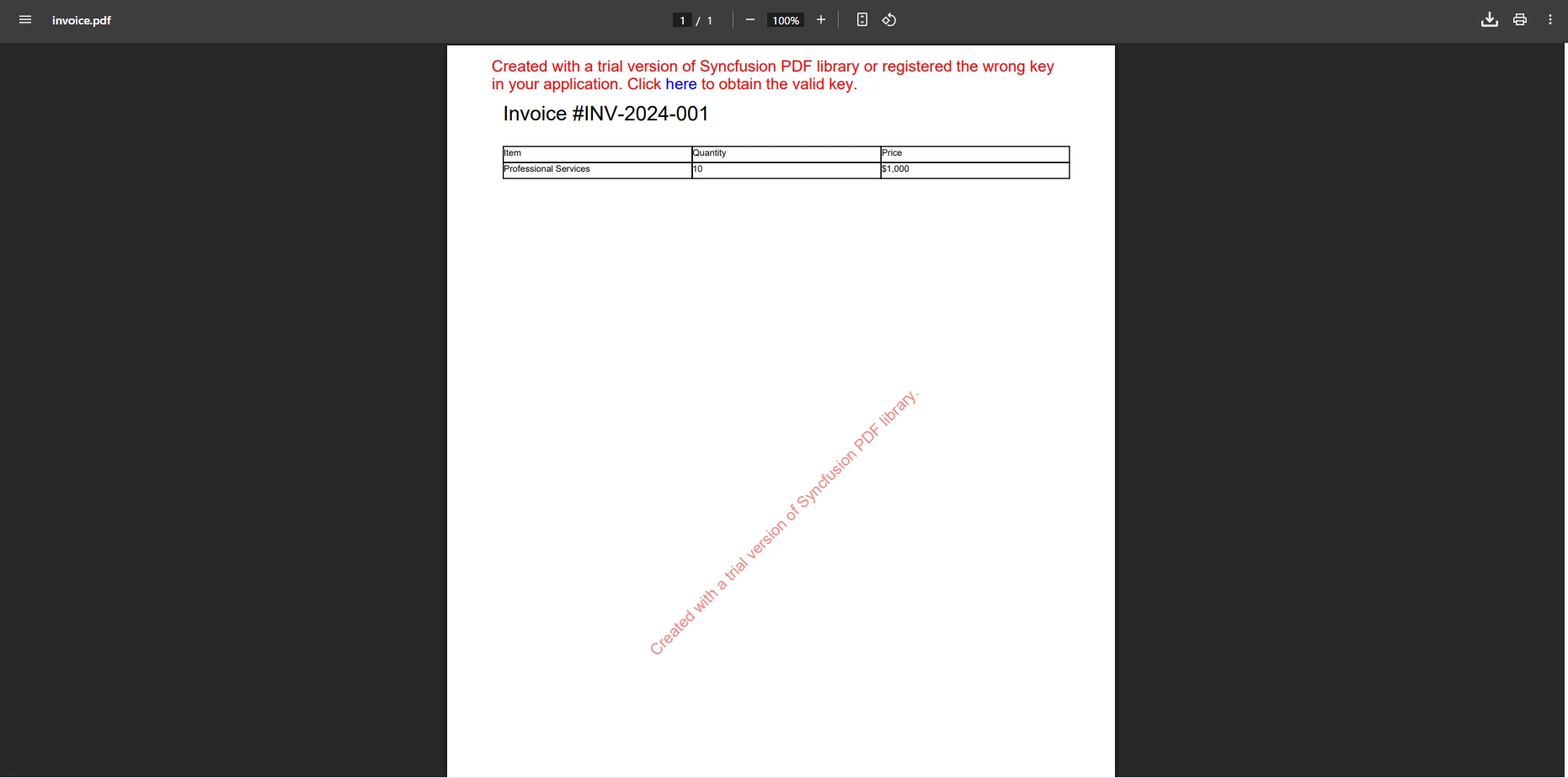
Syncfusion은 PDF 양식 생성 및 디지털 서명을 지원하지만 HTML 기반 접근보다 유연성이 적습니다. 라이브러리 또한 표준 문서 워크플로를 위한 PDF 압축 및 페이지 조작을 처리합니다.
### ChromePdfRenderer는 복잡한 문서 시나리오를 어떻게 처리하나요?
기본 생성 이상의 복잡한 문서 시나리오에 대해 ChromePdfRenderer는 풍부한 조작 도구 세트를 제공합니다:
```csharp
using IronPdf;
var pdf = PdfDocument.FromFile("invoice.pdf");
// Add watermark
pdf.ApplyWatermark("<h2 style='color:red;opacity:0.5;'>CONFIDENTIAL</h2>",
30, VerticalAlignment.Middle, HorizontalAlignment.Center);
// Add background layer
var backgroundPdf = new ChromePdfRenderer()
.RenderHtmlAsPdf("<div style='background:#f0f0f0;height:100vh'></div>");
pdf.AddBackgroundPdf(backgroundPdf);
// Add page numbers
pdf.AddTextFooters("Page {page} of {total-pages}",
IronPdf.Editing.TextAlignment.Center, new IronSoftware.Drawing.FontTypes.Font("Arial", 10));
pdf.SaveAs("invoice-final.pdf");
```
이 접근 방식은 문서가 원래 어떻게 생성되었는지에 관계없이 독립적으로 후처리할 수 있게 합니다. 출처에 관계없이 PDF에 일관된 브랜딩, 기밀 마커, 페이지 번호 매기기를 적용할 수 있습니다.
## .NET를 위한 오픈 소스 PDF 옵션이 존재하는가?
상용 라이브러리가 기업 시나리오를 지배하는 동안, 오픈 소스 대안도 알 가치가 있습니다. [QuestPDF](https://ironpdf.com/competitors/questpdf-vs-ironpdf/)는 PDF 생성을 위한 현대적이고 유연한 API를 제공하지만, HTML 변환 기능은 부족합니다. PDFSharp는 기본적 PDF 생성을 지원하지만 복잡한 레이아웃과 최신 CSS에서 어려움을 겪습니다.
이 옵션은 간단한 요구 사항에 맞지만 상용 솔루션의 완전한 기능과 전문 지원이 부족합니다. 오픈 소스 라이브러리에서 폼을 처리하려면 상당한 추가 개발 노력이 필요합니다.
PDF/A 준수, PDF/UA 접근성, 또는 신뢰할 수 있는 국제 언어 지원이 필요한 프로덕션 환경에서는 상업적 솔루션이 더 나은 신뢰성과 보장된 업데이트를 제공합니다. 오픈 소스 라이브러리는 상업적 대체 제품이 구성 없이 처리하는 SVG 렌더링이나 고급 CSS에 어려움을 겪을 수 있습니다.
## 프로젝트에 적합한 PDF 라이브러리를 선택하는 방법은?
HTML을 PDF로 변환해야 하는 대부분의 ASP.NET Core 프로젝트에서는 ChromePdfRenderer가 가장 실용적인 솔루션을 제공합니다. Chrome 기반의 렌더링은 웹 콘텐츠 변환의 정확성을 보장하며, 직관적인 API는 개발 시간을 크게 단축합니다.
기존 문서를 처리하고, 폼을 생성하고, 북마크를 추가하고, 복잡한 HTML을 처리할 수 있는 기능은 ChromePdfRenderer를 광범위한 사용 사례에 걸쳐 다재다능하게 만듭니다. 선택할 때 고려해야 할 요소:
* **HTML 렌더링 필요**: ChromePdfRenderer는 Chrome 엔진과 전체 JavaScript 지원으로 우수합니다.
* **API 단순성**: ChromePdfRenderer는 일반적인 작업에 가장 깔끔하고 간결한 코드를 제공합니다.
* **예산 제약**: 제한된 요구 사항을 가진 소규모 팀에게 Syncfusion의 커뮤니티 에디션이 도움이 됩니다.
* **Enterprise 요구 사항**: 모든 세 가지는 암호화 및 서명을 포함한 보안 기능을 제공합니다.
* **배포 시나리오**: Docker, Azure, AWS 지원 요구 사항을 고려하십시오.
* **성능 필요**: 대량 응용 프로그램을 위한 비동기 지원 및 멀티 스레딩을 평가하십시오.
Aspose.PDF는 HTML 변환이 주요 필요가 아닐 때 광범위한 프로그래밍 제어와 복잡한 문서 조작이 필요한 프로젝트에 적합합니다. Syncfusion의 생태계에 이미 투자한 조직은 그들의 PDF 컴포넌트를 선택하여 일관성을 유지할 수 있습니다. 추가 라이브러리와의 비교를 보려면 [iText 대 ChromePdfRenderer](https://ironpdf.com/competitors/itext-vs-ironpdf/) 및 [Apryse 대 ChromePdfRenderer](https://ironpdf.com/competitors/apryse-vs-ironpdf/)의 분석을 참조하십시오.
[무료 체험을 시작](trial-license)하여 개발 환경에서 ChromePdfRenderer의 기능을 경험하십시오.
## 어떤 ASP.NET PDF 라이브러리가 장기적 가치에 가장 적합합니까?
ASP.NET PDF 라이브러리를 선택하는 것은 개발 속도, 출력 품질 및 장기 유지보수에 영향을 미칩니다. ChromePdfRenderer는 정확한 HTML 렌더링, 간단한 API, 완전한 기능의 조화로 대부분의 .NET Core 응용 프로그램에 실용적인 선택을 제공합니다.
Aspose.PDF와 Syncfusion PDF는 특정 시나리오에 유용한 기능을 제공하지만, ChromePdfRenderer는 간소함과 기능성을 균형 있게 제공하는 동시에 철저한 문서화 및 대응 지원으로 현대적인 ASP.NET PDF 생성 요구사항에 잘 대응합니다.
주요 기능은 [디지털 서명된 문서](https://ironpdf.com/how-to/signing/)를 생성하고, PDF를 병합하고, 파일 첨부파일을 처리하는 것을 포함합니다. 이 라이브러리는 Blazor 통합, MAUI 지원, F# 개발과 같은 특수한 시나리오에서도 뛰어납니다. 강력한 텍스트 추출 기능은 생성된 문서 내에서 검색 기능을 가능하게 하여 최종 사용자에게 이점을 제공합니다.
[라이센스를 구매](https://ironpdf.com/licensing/)하여 프로덕션 환경에서 ChromePdfRenderer의 모든 기능에 액세스하십시오.
[[i:(Aspose와 Syncfusion은 각각의 소유자에 의해 등록된 상표입니다. 이 사이트는 Aspose 또는 Syncfusion과 관련이 없으며, 그에 의해 승인받거나 후원받지 않습니다. 모든 제품명, 로고 및 브랜드는 해당 소유자의 자산입니다. 비교는 정보 제공 목적으로만 사용되며, 작성 시점에 공개적으로 이용 가능한 정보를 반영합니다.
)]]
ChromePdfRenderer는 Chrome 기반 렌더링과 98% HTML 정확성, 간결한 API 디자인 및 완전한 기능 범위를 갖춘 완전한 ASP.NET Core PDF 생성을 알림 측면에서 $999으로 제공합니다. 이는 경쟁사의 연간 구독보다 더 나은 가치를 제공하면서 우수한 HTML을 PDF로 변환 기능을 제공합니다.
ASP.NET PDF 라이브러리의 주요 차이점은 무엇입니까?
ASP.NET PDF 라이브러리 기능 비교: ChromePdfRenderer vs Aspose.PDF vs Syncfusion
.NET 애플리케이션은 기본 생성 기능을 넘어선 완전한 PDF 기능을 필요로 합니다. 능력 있는 라이브러리는 HTML 페이지를 매끄럽게 변환하고, 기존 문서를 처리하며, 정확한 출력을 생성할 수 있어야 합니다. PDF 기능 유형을 이해하는 것은 - 생성, 조작, 변환 - 정보에 입각한 결정을 내리도록 도와줍니다.
평가해야 할 주요 요구 사항에는 CSS 스타일링 지원, 여러 PDF 파일 관리, ASP.NET Core 프로젝트와 외부 종속성 없이 원활한 통합이 포함됩니다. 대규모 문서 처리 시 서버 환경에서의 성능은 매우 중요합니다. 최적의 웹 애플리케이션 성능을 위해서는 비동기 작업 지원도 중요합니다.
생성을 넘어 보안 관련 요구 사항을 고려하십시오 : 디지털 서명이 있는 문서 생성, 기존 PDF 병합, 파일 첨부 처리. 효율적인 출력 관리 기능은 필수적입니다. Microsoft의 PDF 생성에 관한 문서에 따르면, 라이브러리 선택은 개발 효율성과 장기 유지 관리 비용에 크게 영향을 미칩니다.
라이브러리를 평가할 때 간단한 샘플이 아닌 가장 복잡한 실제 문서를 테스트하십시오. 간단한 텍스트 문서를 쉽게 처리하는 라이브러리는 실제 HTML 템플릿, JavaScript 중심 콘텐츠, 또는 최신 CSS 그리드 레이아웃을 사용하는 페이지를 처리하는 데 어려움을 겪을 수 있습니다.
Chrome 렌더링 엔진이 PDF 품질에 중요한 이유는 무엇입니까?
ChromePdfRenderer는 뛰어난 HTML을 PDF로 변환하는 정확성을 제공하는 Chrome 렌더링 엔진으로 돋보입니다. 이 .NET 구성 요소는 CSS 충실도를 유지하고 JavaScript를 실행하여 복잡한 HTML 페이지를 변환하는 데 이상적입니다. 라이브러리는 반응형 CSS를 처리하고 브라우저와 동일한 충실도로 컨텐츠를 렌더링합니다.
이런 차이는 동적 콘텐츠, 차트, 또는 스타일된 테이블이 있는 문서에서 명확해집니다. ChromePdfRenderer가 Google Chrome과 동일한 엔진을 사용하기 때문에, 브라우저에서 올바르게 렌더링되는 모든 페이지가 PDF로도 정확하게 변환됩니다. 이것은 브라우저에서 보여지는 것과 PDF에 포함된 내용 사이의 격차라는 일반적인 문제를 제거합니다.
라이브러리는 변환 중에 외부 자원을 효율적으로 관리합니다. 다양한 위치에서 이미지를 추가하고, 외부 템플릿에서 데이터를 가져오며, 디자인 사양에 정확하게 맞는 출력을 생성할 수 있습니다.
Imports IronPdf

Dim invoiceHtml As String = "
<!DOCTYPE html>
<html>
<head>
    <style>
        body { font-family: Arial; margin: 40px; }
        .header { background: #2c3e50; color: white; padding: 20px; }
        table { width: 100%; border-collapse: collapse; margin-top: 20px; }
        th { background: #34495e; color: white; padding: 10px; }
        td { border: 1px solid #ddd; padding: 10px; }
        .total { font-weight: bold; background: #ecf0f1; }
    </style>
</head>
<body>
    <div class='header'>
        <h1>Invoice #2024-001</h1>
    </div>
    <table>
        <tr><th>Item</th><th>Quantity</th><th>Price</th></tr>
        <tr><td>Software License</td><td>1</td><td>$999</td></tr>
        <tr class='total'><td colspan='2'>Total</td><td>$999</td></tr>
    </table>
</body>
</html>"

Dim renderer = New ChromePdfRenderer()

' Configure rendering options
renderer.RenderingOptions.MarginTop = 25
renderer.RenderingOptions.MarginBottom = 25
renderer.RenderingOptions.EnableJavaScript = True

' Convert HTML string to PDF
Dim pdf = renderer.RenderHtmlAsPdf(invoiceHtml)

' Save the document
pdf.SaveAs("invoice.pdf")
이 코드는 CSS 스타일링이 적용된 복잡한 HTML을 처리하는 ChromePdfRenderer의 기능을 보여줍니다. Chrome 엔진은 PDF 출력이 브라우저 렌더링과 일치하도록 보장하여 모든 서식과 스타일을 유지합니다. 직관적인 API는 전문가 수준의 PDF를 생성하기 위해 최소한의 코드만 필요합니다. 맞춤형 여백을 설정하고, 머리글과 바닥글을 추가하고, 문서에 대한 용지 크기를 구성할 수 있습니다.
생성된 PDF 파일은 어떤 모습인가요?
ChromePdfRenderer는 기존 PDF를 다루는 데 탁월하여 편집, 병합 및 조작을 가능하게 합니다. Windows, Linux 및 클라우드 플랫폼에 대한 지원은 배포 유연성을 보장합니다. 렌더링 엔진은 처리 동안 효율적인 메모리 사용을 유지합니다. PDF 압축을 사용하여 파일 크기를 줄이고 문서 관리 워크플로를 위해 워터마크와 주석을 적용할 수도 있습니다.
페이지 추가, 이미지 스탬프, 북마크 추가 및 양식 관리를 포함한 고급 기능에 대해 문서는 구현을 매 단계마다 안내합니다.
저수준 PDF API는 기업 요구 사항을 어떻게 처리하나요?
Aspose.PDF는 완전한 객체 모델을 통해 PDF에 대한 세부 제어를 제공합니다. 이 라이브러리는 정밀한 요소 제어로 프로그램적으로 PDF를 생성해야 하는 프로젝트에 적합합니다. 구성 요소는 귀하의 애플리케이션 아키텍처에 직접 통합됩니다. ChromePdfRenderer가 우수한 HTML 렌더링을 제공하는 반면, Aspose는 저수준 PDF 조작 작업에 뛰어납니다.
절충점은 장황함입니다: Aspose는 똑같은 시각적 결과를 얻기 위해 훨씬 더 많은 코드를 요구하는데 그것은 각 문서 요소를 수동으로 구성해야 하기 때문입니다. 이것은 세밀한 제어를 제공하지만 유지해야 할 템플릿 코드의 양이 증가합니다.
Aspose로 프로그램적으로 PDF를 어떻게 만드나요?
using Aspose.Pdf;using Aspose.Pdf.Text;// Create new documentDocument document = new Document();Page page = document.Pages.Add();// Add formatted textTextFragment title = new TextFragment("Invoice #INV-2024-001");title.TextState.FontSize = 18;title.TextState.Font = FontRepository.FindFont("Arial");page.Paragraphs.Add(title);// Create tableTable table = new Table();table.ColumnWidths = "200 100 100";// Add header rowRow headerRow = table.Rows.Add();headerRow.Cells.Add("Item");headerRow.Cells.Add("Quantity");headerRow.Cells.Add("Price");// Add data rowRow dataRow = table.Rows.Add();dataRow.Cells.Add("Professional Services");dataRow.Cells.Add("10");dataRow.Cells.Add("$1,000");page.Paragraphs.Add(table);document.Save("invoice.pdf");
using Aspose.Pdf;
using Aspose.Pdf.Text;

// Create new document
Document document = new Document();
Page page = document.Pages.Add();

// Add formatted text
TextFragment title = new TextFragment("Invoice #INV-2024-001");
title.TextState.FontSize = 18;
title.TextState.Font = FontRepository.FindFont("Arial");
page.Paragraphs.Add(title);

// Create table
Table table = new Table();
table.ColumnWidths = "200 100 100";

// Add header row
Row headerRow = table.Rows.Add();
headerRow.Cells.Add("Item");
headerRow.Cells.Add("Quantity");
headerRow.Cells.Add("Price");

// Add data row
Row dataRow = table.Rows.Add();
dataRow.Cells.Add("Professional Services");
dataRow.Cells.Add("10");
dataRow.Cells.Add("$1,000");

page.Paragraphs.Add(table);
document.Save("invoice.pdf");
ImportsAspose.PdfImportsAspose.Pdf.Text' Create new documentDim document As New Document()Dim page AsPage = document.Pages.Add()' Add formatted textDim title As New TextFragment("Invoice #INV-2024-001")title.TextState.FontSize = 18title.TextState.Font = FontRepository.FindFont("Arial")page.Paragraphs.Add(title)' Create tableDim table As New Table()table.ColumnWidths = "200 100 100"' Add header rowDim headerRow AsRow = table.Rows.Add()headerRow.Cells.Add("Item")headerRow.Cells.Add("Quantity")headerRow.Cells.Add("Price")' Add data rowDim dataRow AsRow = table.Rows.Add()dataRow.Cells.Add("Professional Services")dataRow.Cells.Add("10")dataRow.Cells.Add("$1,000")page.Paragraphs.Add(table)document.Save("invoice.pdf")
Imports Aspose.Pdf
Imports Aspose.Pdf.Text

' Create new document
Dim document As New Document()
Dim page As Page = document.Pages.Add()

' Add formatted text
Dim title As New TextFragment("Invoice #INV-2024-001")
title.TextState.FontSize = 18
title.TextState.Font = FontRepository.FindFont("Arial")
page.Paragraphs.Add(title)

' Create table
Dim table As New Table()
table.ColumnWidths = "200 100 100"

' Add header row
Dim headerRow As Row = table.Rows.Add()
headerRow.Cells.Add("Item")
headerRow.Cells.Add("Quantity")
headerRow.Cells.Add("Price")

' Add data row
Dim dataRow As Row = table.Rows.Add()
dataRow.Cells.Add("Professional Services")
dataRow.Cells.Add("10")
dataRow.Cells.Add("$1,000")

page.Paragraphs.Add(table)
document.Save("invoice.pdf")
이 예제는 Aspose의 세부적이지만 효과적인 접근 방식을 보여줍니다. 비슷한 결과를 얻기 위해 더 많은 코드가 필요하지만, 완전한 문서 구조 제어를 얻을 수 있습니다. 라이브러리는 암호화된 문서를 생성하고 복잡한 주석을 처리하지만 학습 곡선이 더 가파릅니다. 기존 HTML 대신 각 요소를 수동으로 구성해야 합니다. 자세한 비교를 위해 Aspose 대 ChromePdfRenderer 분석을 참조하십시오.
Aspose 출력 예제
Aspose는 PDF/A 준수 및 고급 메타데이터 관리를 제공하지만 문서의 요구 사항과 비례하여 복잡성이 증가합니다. 라이브러리는 빠른 웹 보기를 위한 선형화된 PDF를 처리하고 아카이브 및 준수 워크플로를 위한 다양한 PDF 버전을 지원합니다.
생태계에 맞춘 PDF 라이브러리가 타당할 때는 언제인가요?
Syncfusion의 PDF 라이브러리는 그들의 더 광범위한 구성 요소 모음 내에서 잘 맞아, 완전한 도구 키트 내에서 견고한 PDF 기능을 제공합니다. 라이브러리는 신뢰할 수 있는 PDF 생성 및 편집 기능을 제공하면서도 합리적인 성능을 유지합니다. 자세한 비교를 위해 Syncfusion 대 ChromePdfRenderer 분석을 참조하십시오.
Syncfusion의 주요 장점은 생태계 일관성입니다: 프로젝트가 이미 Syncfusion의 UI 제어, 그리드 또는 차트에 의존하고 있다면, 그들의 PDF 라이브러리를 추가하면 종속성 트리를 일관되게 유지할 수 있습니다. 그렇긴 하지만, PDF 구성 요소는 ChromePdfRenderer가 달성하는 수준의 HTML-대-PDF 변환을 제공하지 않습니다.
Syncfusion을 사용하여 PDF 생성을 어떻게 구현하나요?
using Syncfusion.Pdf;using Syncfusion.Pdf.Graphics;using Syncfusion.Pdf.Grid;// Create documentPdfDocument document = new PdfDocument();PdfPage page = document.Pages.Add();PdfGraphics graphics = page.Graphics;// Draw textPdfFont font = new PdfStandardFont(PdfFontFamily.Helvetica, 18);graphics.DrawString("Invoice #INV-2024-001", font, PdfBrushes.Black, new PointF(10, 10));// Create grid for itemsPdfGrid grid = new PdfGrid();grid.Columns.Add(3);grid.Headers.Add(1);PdfGridRow header = grid.Headers[0];header.Cells[0].Value = "Item";header.Cells[1].Value = "Quantity";header.Cells[2].Value = "Price";PdfGridRow row = grid.Rows.Add();row.Cells[0].Value = "Professional Services";row.Cells[1].Value = "10";row.Cells[2].Value = "$1,000";grid.Draw(page, new PointF(10, 50));// Save documentusing FileStream stream = new FileStream("invoice.pdf", FileMode.Create);document.Save(stream);document.Close(true);
using Syncfusion.Pdf;
using Syncfusion.Pdf.Graphics;
using Syncfusion.Pdf.Grid;

// Create document
PdfDocument document = new PdfDocument();
PdfPage page = document.Pages.Add();
PdfGraphics graphics = page.Graphics;

// Draw text
PdfFont font = new PdfStandardFont(PdfFontFamily.Helvetica, 18);
graphics.DrawString("Invoice #INV-2024-001", font, PdfBrushes.Black, new PointF(10, 10));

// Create grid for items
PdfGrid grid = new PdfGrid();
grid.Columns.Add(3);
grid.Headers.Add(1);
PdfGridRow header = grid.Headers[0];
header.Cells[0].Value = "Item";
header.Cells[1].Value = "Quantity";
header.Cells[2].Value = "Price";

PdfGridRow row = grid.Rows.Add();
row.Cells[0].Value = "Professional Services";
row.Cells[1].Value = "10";
row.Cells[2].Value = "$1,000";

grid.Draw(page, new PointF(10, 50));

// Save document
using FileStream stream = new FileStream("invoice.pdf", FileMode.Create);
document.Save(stream);
document.Close(true);
ImportsSyncfusion.PdfImportsSyncfusion.Pdf.GraphicsImportsSyncfusion.Pdf.GridImportsSystem.IO' Create documentDim document As New PdfDocument()Dim page AsPdfPage = document.Pages.Add()Dim graphics AsPdfGraphics = page.Graphics' Draw textDim font AsPdfFont = New PdfStandardFont(PdfFontFamily.Helvetica, 18)graphics.DrawString("Invoice #INV-2024-001", font, PdfBrushes.Black, New PointF(10, 10))' Create grid for itemsDim grid As New PdfGrid()grid.Columns.Add(3)grid.Headers.Add(1)Dim header AsPdfGridRow = grid.Headers(0)header.Cells(0).Value = "Item"header.Cells(1).Value = "Quantity"header.Cells(2).Value = "Price"Dim row AsPdfGridRow = grid.Rows.Add()row.Cells(0).Value = "Professional Services"row.Cells(1).Value = "10"row.Cells(2).Value = "$1,000"grid.Draw(page, New PointF(10, 50))' Save documentUsing stream As New FileStream("invoice.pdf", FileMode.Create) document.Save(stream)EndUsingdocument.Close(True)
Imports Syncfusion.Pdf
Imports Syncfusion.Pdf.Graphics
Imports Syncfusion.Pdf.Grid
Imports System.IO

' Create document
Dim document As New PdfDocument()
Dim page As PdfPage = document.Pages.Add()
Dim graphics As PdfGraphics = page.Graphics

' Draw text
Dim font As PdfFont = New PdfStandardFont(PdfFontFamily.Helvetica, 18)
graphics.DrawString("Invoice #INV-2024-001", font, PdfBrushes.Black, New PointF(10, 10))

' Create grid for items
Dim grid As New PdfGrid()
grid.Columns.Add(3)
grid.Headers.Add(1)
Dim header As PdfGridRow = grid.Headers(0)
header.Cells(0).Value = "Item"
header.Cells(1).Value = "Quantity"
header.Cells(2).Value = "Price"

Dim row As PdfGridRow = grid.Rows.Add()
row.Cells(0).Value = "Professional Services"
row.Cells(1).Value = "10"
row.Cells(2).Value = "$1,000"

grid.Draw(page, New PointF(10, 50))

' Save document
Using stream As New FileStream("invoice.pdf", FileMode.Create)
    document.Save(stream)
End Using
document.Close(True)
Syncfusion은 Aspose와 유사하게 요소별로 PDF를 만들어야 하지만, 더 깔끔한 API 설계를 가지고 있습니다. 라이브러리는 폰트를 효과적으로 처리하며 다양한 출력 기능을 위한 지원을 포함합니다. 그들의 커뮤니티 에디션은 특정 사용 제한이 있는 소규모 팀에게 무료 접근을 제공합니다. 브라우저 다운로드를 위한 파일을 생성할 때 Syncfusion은 서버 측 생성을 신뢰할 수 있게 처리합니다.
Syncfusion 출력 예제
Syncfusion은 PDF 양식 생성 및 디지털 서명을 지원하지만 HTML 기반 접근보다 유연성이 적습니다. 라이브러리 또한 표준 문서 워크플로를 위한 PDF 압축 및 페이지 조작을 처리합니다.
ChromePdfRenderer는 복잡한 문서 시나리오를 어떻게 처리하나요?
기본 생성 이상의 복잡한 문서 시나리오에 대해 ChromePdfRenderer는 풍부한 조작 도구 세트를 제공합니다:
using IronPdf;var pdf = PdfDocument.FromFile("invoice.pdf");// Add watermarkpdf.ApplyWatermark("<h2 style='color:red;opacity:0.5;'>CONFIDENTIAL</h2>", 30, VerticalAlignment.Middle, HorizontalAlignment.Center);// Add background layervar backgroundPdf = new ChromePdfRenderer() .RenderHtmlAsPdf("<div style='background:#f0f0f0;height:100vh'></div>");pdf.AddBackgroundPdf(backgroundPdf);// Add page numberspdf.AddTextFooters("Page {page} of {total-pages}",IronPdf.Editing.TextAlignment.Center, new IronSoftware.Drawing.FontTypes.Font("Arial", 10));pdf.SaveAs("invoice-final.pdf");
using IronPdf;

var pdf = PdfDocument.FromFile("invoice.pdf");

// Add watermark
pdf.ApplyWatermark("<h2 style='color:red;opacity:0.5;'>CONFIDENTIAL</h2>",
    30, VerticalAlignment.Middle, HorizontalAlignment.Center);

// Add background layer
var backgroundPdf = new ChromePdfRenderer()
    .RenderHtmlAsPdf("<div style='background:#f0f0f0;height:100vh'></div>");
pdf.AddBackgroundPdf(backgroundPdf);

// Add page numbers
pdf.AddTextFooters("Page {page} of {total-pages}",
    IronPdf.Editing.TextAlignment.Center, new IronSoftware.Drawing.FontTypes.Font("Arial", 10));

pdf.SaveAs("invoice-final.pdf");
ImportsIronPdfDim pdf = PdfDocument.FromFile("invoice.pdf")' Add watermarkpdf.ApplyWatermark("<h2 style='color:red;opacity:0.5;'>CONFIDENTIAL</h2>", 30, VerticalAlignment.Middle, HorizontalAlignment.Center)' Add background layerDim backgroundPdf = New ChromePdfRenderer().RenderHtmlAsPdf("<div style='background:#f0f0f0;height:100vh'></div>")pdf.AddBackgroundPdf(backgroundPdf)' Add page numberspdf.AddTextFooters("Page {page} of {total-pages}", IronPdf.Editing.TextAlignment.Center, New IronSoftware.Drawing.FontTypes.Font("Arial", 10))pdf.SaveAs("invoice-final.pdf")
Imports IronPdf

Dim pdf = PdfDocument.FromFile("invoice.pdf")

' Add watermark
pdf.ApplyWatermark("<h2 style='color:red;opacity:0.5;'>CONFIDENTIAL</h2>", 30, VerticalAlignment.Middle, HorizontalAlignment.Center)

' Add background layer
Dim backgroundPdf = New ChromePdfRenderer().RenderHtmlAsPdf("<div style='background:#f0f0f0;height:100vh'></div>")
pdf.AddBackgroundPdf(backgroundPdf)

' Add page numbers
pdf.AddTextFooters("Page {page} of {total-pages}", IronPdf.Editing.TextAlignment.Center, New IronSoftware.Drawing.FontTypes.Font("Arial", 10))

pdf.SaveAs("invoice-final.pdf")
이 접근 방식은 문서가 원래 어떻게 생성되었는지에 관계없이 독립적으로 후처리할 수 있게 합니다. 출처에 관계없이 PDF에 일관된 브랜딩, 기밀 마커, 페이지 번호 매기기를 적용할 수 있습니다.
.NET를 위한 오픈 소스 PDF 옵션이 존재하는가?
상용 라이브러리가 기업 시나리오를 지배하는 동안, 오픈 소스 대안도 알 가치가 있습니다. QuestPDF는 PDF 생성을 위한 현대적이고 유연한 API를 제공하지만, HTML 변환 기능은 부족합니다. PDFSharp는 기본적 PDF 생성을 지원하지만 복잡한 레이아웃과 최신 CSS에서 어려움을 겪습니다.
이 옵션은 간단한 요구 사항에 맞지만 상용 솔루션의 완전한 기능과 전문 지원이 부족합니다. 오픈 소스 라이브러리에서 폼을 처리하려면 상당한 추가 개발 노력이 필요합니다.
PDF/A 준수, PDF/UA 접근성, 또는 신뢰할 수 있는 국제 언어 지원이 필요한 프로덕션 환경에서는 상업적 솔루션이 더 나은 신뢰성과 보장된 업데이트를 제공합니다. 오픈 소스 라이브러리는 상업적 대체 제품이 구성 없이 처리하는 SVG 렌더링이나 고급 CSS에 어려움을 겪을 수 있습니다.
프로젝트에 적합한 PDF 라이브러리를 선택하는 방법은?
HTML을 PDF로 변환해야 하는 대부분의 ASP.NET Core 프로젝트에서는 ChromePdfRenderer가 가장 실용적인 솔루션을 제공합니다. Chrome 기반의 렌더링은 웹 콘텐츠 변환의 정확성을 보장하며, 직관적인 API는 개발 시간을 크게 단축합니다.
기존 문서를 처리하고, 폼을 생성하고, 북마크를 추가하고, 복잡한 HTML을 처리할 수 있는 기능은 ChromePdfRenderer를 광범위한 사용 사례에 걸쳐 다재다능하게 만듭니다. 선택할 때 고려해야 할 요소:
HTML 렌더링 필요: ChromePdfRenderer는 Chrome 엔진과 전체 JavaScript 지원으로 우수합니다.
API 단순성: ChromePdfRenderer는 일반적인 작업에 가장 깔끔하고 간결한 코드를 제공합니다.
예산 제약: 제한된 요구 사항을 가진 소규모 팀에게 Syncfusion의 커뮤니티 에디션이 도움이 됩니다.
Enterprise 요구 사항: 모든 세 가지는 암호화 및 서명을 포함한 보안 기능을 제공합니다.
배포 시나리오: Docker, Azure, AWS 지원 요구 사항을 고려하십시오.
성능 필요: 대량 응용 프로그램을 위한 비동기 지원 및 멀티 스레딩을 평가하십시오.
Aspose.PDF는 HTML 변환이 주요 필요가 아닐 때 광범위한 프로그래밍 제어와 복잡한 문서 조작이 필요한 프로젝트에 적합합니다. Syncfusion의 생태계에 이미 투자한 조직은 그들의 PDF 컴포넌트를 선택하여 일관성을 유지할 수 있습니다. 추가 라이브러리와의 비교를 보려면 iText 대 ChromePdfRenderer 및 Apryse 대 ChromePdfRenderer의 분석을 참조하십시오.
무료 체험을 시작하여 개발 환경에서 ChromePdfRenderer의 기능을 경험하십시오.
어떤 ASP.NET PDF 라이브러리가 장기적 가치에 가장 적합합니까?
ASP.NET PDF 라이브러리를 선택하는 것은 개발 속도, 출력 품질 및 장기 유지보수에 영향을 미칩니다. ChromePdfRenderer는 정확한 HTML 렌더링, 간단한 API, 완전한 기능의 조화로 대부분의 .NET Core 응용 프로그램에 실용적인 선택을 제공합니다.
Aspose.PDF와 Syncfusion PDF는 특정 시나리오에 유용한 기능을 제공하지만, ChromePdfRenderer는 간소함과 기능성을 균형 있게 제공하는 동시에 철저한 문서화 및 대응 지원으로 현대적인 ASP.NET PDF 생성 요구사항에 잘 대응합니다.
주요 기능은 디지털 서명된 문서를 생성하고, PDF를 병합하고, 파일 첨부파일을 처리하는 것을 포함합니다. 이 라이브러리는 Blazor 통합, MAUI 지원, F# 개발과 같은 특수한 시나리오에서도 뛰어납니다. 강력한 텍스트 추출 기능은 생성된 문서 내에서 검색 기능을 가능하게 하여 최종 사용자에게 이점을 제공합니다.
라이센스를 구매하여 프로덕션 환경에서 ChromePdfRenderer의 모든 기능에 액세스하십시오.
참고해 주세요: Aspose와 Syncfusion은 각각의 소유자에 의해 등록된 상표입니다. 이 사이트는 Aspose 또는 Syncfusion과 관련이 없으며, 그에 의해 승인받거나 후원받지 않습니다. 모든 제품명, 로고 및 브랜드는 해당 소유자의 자산입니다. 비교는 정보 제공 목적으로만 사용되며, 작성 시점에 공개적으로 이용 가능한 정보를 반영합니다.
커티스 차우는 칼턴 대학교에서 컴퓨터 과학 학사 학위를 취득했으며, Node.js, TypeScript, JavaScript, React를 전문으로 하는 프론트엔드 개발자입니다. 직관적이고 미적으로 뛰어난 사용자 인터페이스를 만드는 데 열정을 가진 그는 최신 프레임워크를 활용하고, 잘 구성되고 시각적으로 매력적인 매뉴얼을 제작하는 것을 즐깁니다.
















