오늘의 튜토리얼에서는 IronPDF 및 PDFSharp이라는 두 가지 강력한 PDF 라이브러리를 사용하여 PDF 문서에서 텍스트를 추출하는 방법을 탐색할 것입니다. 우리는 Adobe 라이브러리 라이선스를 소유할 필요 없이 이러한 도구를 사용해 텍스트 추출이 어떻게 작동하는지 배우고, 서로 비교해 볼 것입니다.
선택할 수 있는 PDF 중심의 라이브러리가 수십 개 있으며, 이를 비교하고 기능이 어떻게 작동하는지 배우는 데 시간을 투자하면, 프로젝트의 필요에 맞는 올바른 라이브러리를 선택할 수 있습니다. 텍스트 추출은 PDF에서 수행해야 할 수 있는 많은 작업 중 하나에 불과하며, 이것은 PDF 파일에서 데이터를 효율적으로 읽거나 파싱해야 할 상황에서 유용합니다.
PDFSharp
PDFSharp은 프로그램적으로 PDF 문서를 생성하고 수정하도록 설계된 오픈 소스 .NET 라이브러리입니다. 그 주요 강점은 PDF 생성 및 조작에 있지만, 적절한 외부 라이브러리와 결합할 경우 기존 PDF 파일을 읽고 콘텐츠를 추출하는 기본 도구도 제공합니다.
PDFSharp는 새로운 PDF 문서를 생성하는 것 이상을 수행할 수 있으며, 기존 PDF 파일을 수정하거나, 문서를 병합 및 분할하고, 주석을 추가하는 등의 작업을 수행할 수 있습니다.
IronPDF
IronPDF는 C#에서 PDF 문서 작업을 간소화하기 위해 설계된 전문적인 .NET 라이브러리입니다. 이 도구는 PDF 생성, 조작, PDF 암호화, PDF 파일 변환, PDF 페이지 병합, HTML을 PDF로 변환, 콘텐츠 추출 등과 관련된 애플리케이션을 구축하는 개발자들을 위해 설계되었습니다.
강력한 기능을 갖춘 IronPDF는 소규모 프로젝트와 기업 수준의 응용 프로그램 모두에서 PDF를 생성하고 관리하는 다용도의 솔루션으로 두각을 나타냅니다.
IronPDF는 .NET Core, .NET 5, .NET 6, 그리고 .NET 7과 같은 최신 .NET Framework와 레거시 버전인 .NET Framework와 호환되도록 설계되었습니다. 이 라이브러리는 Windows, macOS, Linux와 같은 운영 체제에서 매끄럽게 작동하며, Docker, Azure, AWS 환경과도 완벽히 호환됩니다. 이를 통해 개발자들은 PDF 워크플로를 어디서나 플랫폼이나 클라우드 서비스에 배포할 수 있습니다.
오늘의 예제에서는 Visual Studio 내에서 이 PDF 문서에서 텍스트를 추출하려고 합니다:
PDFSharp를 사용하여 PDF 파일에서 텍스트 추출하기
현재 버전의 PDFSharp는 PDF 문서에서 텍스트 추출을 지원하는 네이티브 기능이 없습니다. 이 라이브러리는 주로 그래픽 그리기, 내용 추가, 문서 병합 등의 PDF 생성 및 조작을 위해 설계되었지만, 자체적으로 텍스트 추출 메커니즘이 없어 특수 문자, 고급 인코딩 등을 다룰 수 없습니다. 이로 인해 분절되거나 불완전한 텍스트 출력이 될 수 있으며, 실제 PDF 콘텐츠 대신 빈 문자열이 나타날 수도 있습니다. 예를 들어:
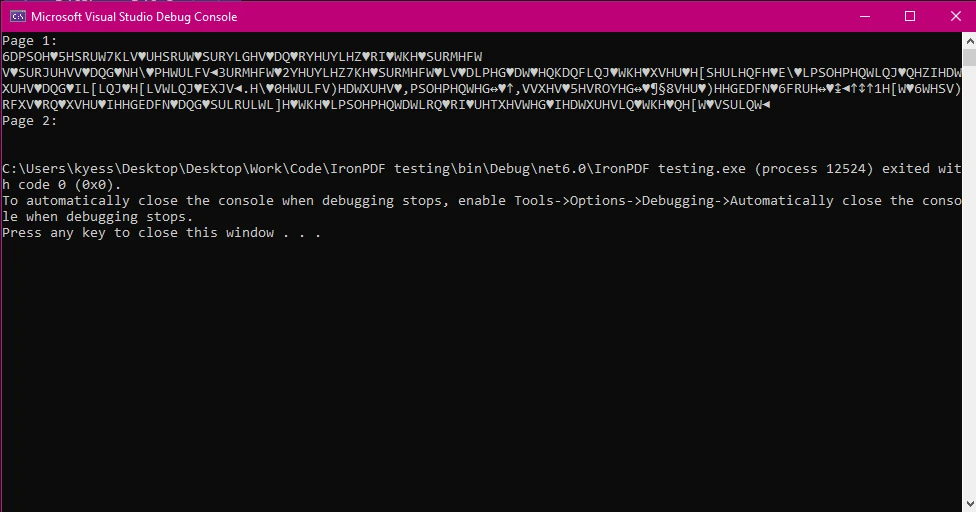
다양한 글꼴, 인코딩, 레이아웃에 대한 더 나은 지원으로 고급 텍스트 추출이 필요하다면, 다음과 같은 더 전문화된 라이브러리를 사용해야 할 것입니다:
-
iText (또는 iText): 강력한 텍스트 추출 및 파싱을 지원하는 인기 있는 PDF 라이브러리입니다.
-
Pdfium: 특히 복잡한 형식의 PDF에서 텍스트를 추출하는 데 뛰어난 또 다른 옵션입니다.
IronPDF를 사용하여 PDF 파일에서 텍스트 추출
이제 IronPDF를 사용하여 텍스트를 추출하는 방법을 살펴보겠습니다. IronPDF의 텍스트 추출 기능은 개발자에게 효율적으로 PDF 문서에서 텍스트를 추출할 수 있는 간결하지만 강력한 방법을 제공하며, 데이터 문자열을 올바르게 형식화하기 위해 추가 코드가 필요하지 않습니다.
using IronPdf;

public class Program
{
    public static void Main(string[] args)
    {
        // Provide the file path to the PDF document
        string pdfPath = @"invoice.pdf";

        // Load the PDF document using IronPDF
        var pdf = PdfDocument.FromFile(pdfPath);

        // Extract all text from the PDF
        var extractedText = pdf.ExtractAllText();

        // Output the extracted text to the console
        Console.WriteLine(extractedText);
    }
}
using IronPdf;

public class Program
{
    public static void Main(string[] args)
    {
        // Provide the file path to the PDF document
        string pdfPath = @"invoice.pdf";

        // Load the PDF document using IronPDF
        var pdf = PdfDocument.FromFile(pdfPath);

        // Extract all text from the PDF
        var extractedText = pdf.ExtractAllText();

        // Output the extracted text to the console
        Console.WriteLine(extractedText);
    }
}
Imports IronPdf
Public Class Program
Public Shared Sub Main(args As String())
' Provide the file path to the PDF document
Dim pdfPath As String = "invoice.pdf"
' Load the PDF document using IronPDF
Dim pdf = PdfDocument.FromFile(pdfPath)
' Extract all text from the PDF
Dim extractedText = pdf.ExtractAllText()
' Output the extracted text to the console
Console.WriteLine(extractedText)
End Sub
End Class
Imports IronPdf

Public Class Program
    Public Shared Sub Main(args As String())
        ' Provide the file path to the PDF document
        Dim pdfPath As String = "invoice.pdf"

        ' Load the PDF document using IronPDF
        Dim pdf = PdfDocument.FromFile(pdfPath)

        ' Extract all text from the PDF
        Dim extractedText = pdf.ExtractAllText()

        ' Output the extracted text to the console
        Console.WriteLine(extractedText)
    End Sub
End Class
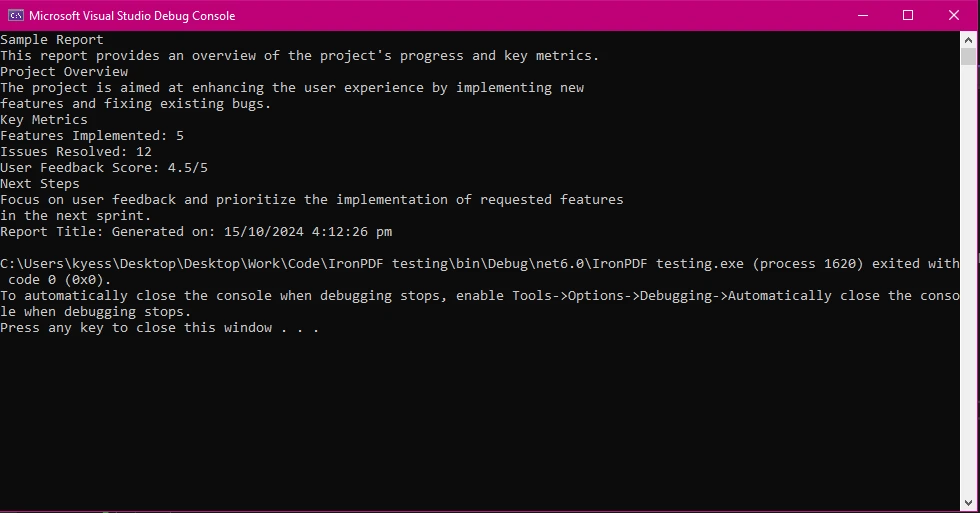
IronPDF는 주어진 PDF 경로에서 텍스트를 추출하기 위한 간단하고 효율적인 API를 제공합니다. 추출된 텍스트가 잘 구조화되고 정확성을 보장하여, 애플리케이션에서 PDF 콘텐츠를 처리해야 하는 개발자들에게 신뢰할 수 있는 옵션입니다.
비교
PDFSharp는 기본 PDF 생성 및 조작에 이상적인 무료 오픈소스 라이브러리이지만, 기능이 제한적이며 복잡한 PDF일 경우 어려움을 겪습니다. 이론상으로는 PDF 파일에서 텍스트를 추출할 수 있을지 모르지만, 이는 고급 텍스트 구문 분석을 필요로 하며 분절된 출력으로 이어질 수 있습니다.
IronPDF는 정확한 텍스트 추출, HTML-에서-PDF 변환 및 최신 PDF 표준 지원과 같은 고급 기능을 제공하는 더욱 강력한 솔루션입니다. 성능과 사용자 친화성에 최적화된 직관적인 API로 제공됩니다. 개발을 위해 무료로 사용할 수 있으며, 유료 라이선스 계층을 위한 상용 라이선싱도 제공합니다.
결론
PDFSharp와 IronPDF는 C#에서 PDF에서 텍스트를 추출하는 데 유용한 도구이지만, 서로 다른 용도에 맞추어져 있습니다:
- PDFSharp는 기본 PDF 생성 및 텍스트 추출을 위한 무료 오픈소스 라이브러리를 필요로 하는 개발자에게 훌륭한 선택입니다. 그러나, 그 텍스트 추출 기능은 제한적이며, 더 복잡한 응용 프로그램의 요구를 충족하지 못할 수 있습니다.
- 반면에 IronPDF는 텍스트 추출, HTML-에서-PDF 변환 및 고급 PDF 편집 작업에 뛰어납니다. 사용 용이성, 크로스 플랫폼 호환성 및 다양한 기능 때문에 전문적인 PDF 워크플로를 처리하는 개발자들에게 선호되는 선택입니다.
다른 라이브러리보다 IronPDF가 뛰어난 이유를 더 깊게 알아보려면 공식 IronPDF Documentation을 방문하세요.
PDFSharp는 해당 소유자의 등록 상표입니다. 이 사이트는 PDFSharp와 관련이 없으며, PDFSharp의 지지나 후원을 받지 않습니다. 모든 제품 이름, 로고 및 브랜드는 각각의 소유자의 자산입니다. 비교는 정보 제공 목적으로만 사용되며, 작성 시점에 공개적으로 이용 가능한 정보를 반영합니다.























