




업데이트됨 2026년 5월 8일
월별 계정 명세서를 PDF 문서로 생성하기
개발자는 IronPDF C# PDF 라이브러리를 사용하여 외부 서비스에 의존하지 않고도 .NET 프로젝트 내에서 HTML을 신뢰할 수 있는 PDF 파일로 변환할 수 있습니다.
더 읽어보기

x509certificate2은 기존 인증서에 대한 중요한 정보(유효 날짜, 발행자 등)를 얻는 데 사용할 수 있습니다. IronPDF는 C#을 사용하여 PDF에 디지털 서명을 할 수 있습니다. 새 문서를 만들거나 기존 PDF 파일에 서명할 수 있습니다. 아래의 간단한 단계에서 설명한 것처럼 코드 한 줄만 필요합니다.
귀사의 비즈니스가 PDF 보안 및 준수를 위한 연간 구독에 너무 많은 지출을 하고 있습니다. 디지털 서명, 편집, 암호화 및 보호와 같은 SaaS 서비스를 관리하기 위한 솔루션을 제공하는 IronSecureDoc을 고려하십시오. 일회성 결제로 제공됩니다. 지금 시도해보십시오
PdfSignature 클래스에 전달하세요.SignPdfFile 메서드를 사용하여 기존 PDF를 열고 서명하세요.먼저 Visual Studio 프로젝트에 IronPDF를 설치하세요. DLL 다운로드 또는 NuGet 웹사이트에서 여러분에게 더 쉬운 방법으로 얻으세요. Visual Studio에서 C# 라이브러리에 접근하여 서명을 추가합시다.
디지털 서명은 전자 운전면허증 또는 여권과 같아서 신원을 증명합니다. 디지털 ID는 일반적으로 이름, 이메일 주소, 발행자 기관의 이름, 일련 번호 및 만료일을 포함합니다. 디지털 ID는 인증서 보안 및 디지털 서명에 사용됩니다. 작동하려면 Adobe Acrobat으로 작성해야 합니다.
이제 C#을 사용하여 PDF에 디지털 서명을 위한 x509certificate2을(를) 만드는 단계를 알아보겠습니다.
오늘날 IronPDF 라이브러리는 서명을 적용하는 간단한 방법을 제공하여 코드 한 줄로 시간과 노력을 절약합니다. 작업을 테스트하기 위해 개발 중 무료로 사용할 수 있습니다. 그 다음, 프로젝트를 결정하세요. 새 문서를 만들거나 기존 PDF에 서명하시겠습니까?
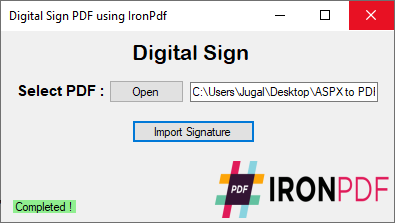
아래의 코드 예제에서는 사용자가 클릭 한 번으로 디지털 서명을 받을 PDF를 선택할 수 있도록 C# 양식을 사용했습니다.
개인 정보 교환 형식 .pfx file은(는), 개인 키의 도움을 받아 인증서를 전송하는 데 사용해야 합니다.
SignPdfFile(FileName) 메서드는 PdfSignature 클래스의 주 메서드입니다. 원하는 파일을 간단히 선택하세요.
using System.Drawing;
using System.Windows.Forms;
using IronPdf;

namespace DigitalSign
{
    public partial class Form1 : Form
    {
        public Form1()
        {
            InitializeComponent();
        }

        private void button1_Click(object sender, System.EventArgs e)
        {
            // Open a dialog to select the desired PDF file
            if (openFileDialog1.ShowDialog() == DialogResult.OK)
            {
                textBox1.Text = openFileDialog1.FileName; // Display selected PDF path in the textbox
            }
        }

        private void button2_Click(object sender, System.EventArgs e)
        {
            // Use PdfSignature method to digitally sign the selected PDF
            new PdfSignature("Ironpdf.pfx", "123456").SignPdfFile(textBox1.Text);

            // Provide user feedback that signing is complete
            label3.Text = "Completed!";
            label3.BackColor = Color.LightGreen;
            label3.ForeColor = Color.Black;
        }
    }
}Imports System.Drawing
Imports System.Windows.Forms
Imports IronPdf
Namespace DigitalSign
Partial Public Class Form1
Inherits Form
Public Sub New()
InitializeComponent()
End Sub
Private Sub button1_Click(ByVal sender As Object, ByVal e As System.EventArgs)
' Open a dialog to select the desired PDF file
If openFileDialog1.ShowDialog() = System.Windows.Forms.DialogResult.OK Then
textBox1.Text = openFileDialog1.FileName ' Display selected PDF path in the textbox
End If
End Sub
Private Sub button2_Click(ByVal sender As Object, ByVal e As System.EventArgs)
' Use PdfSignature method to digitally sign the selected PDF
Call (New PdfSignature("Ironpdf.pfx", "123456")).SignPdfFile(textBox1.Text)
' Provide user feedback that signing is complete
label3.Text = "Completed!"
label3.BackColor = Color.LightGreen
label3.ForeColor = Color.Black
End Sub
End Class
End Namespace위의 C# 코드는 Windows Form 애플리케이션을 나타내며, 여기서:
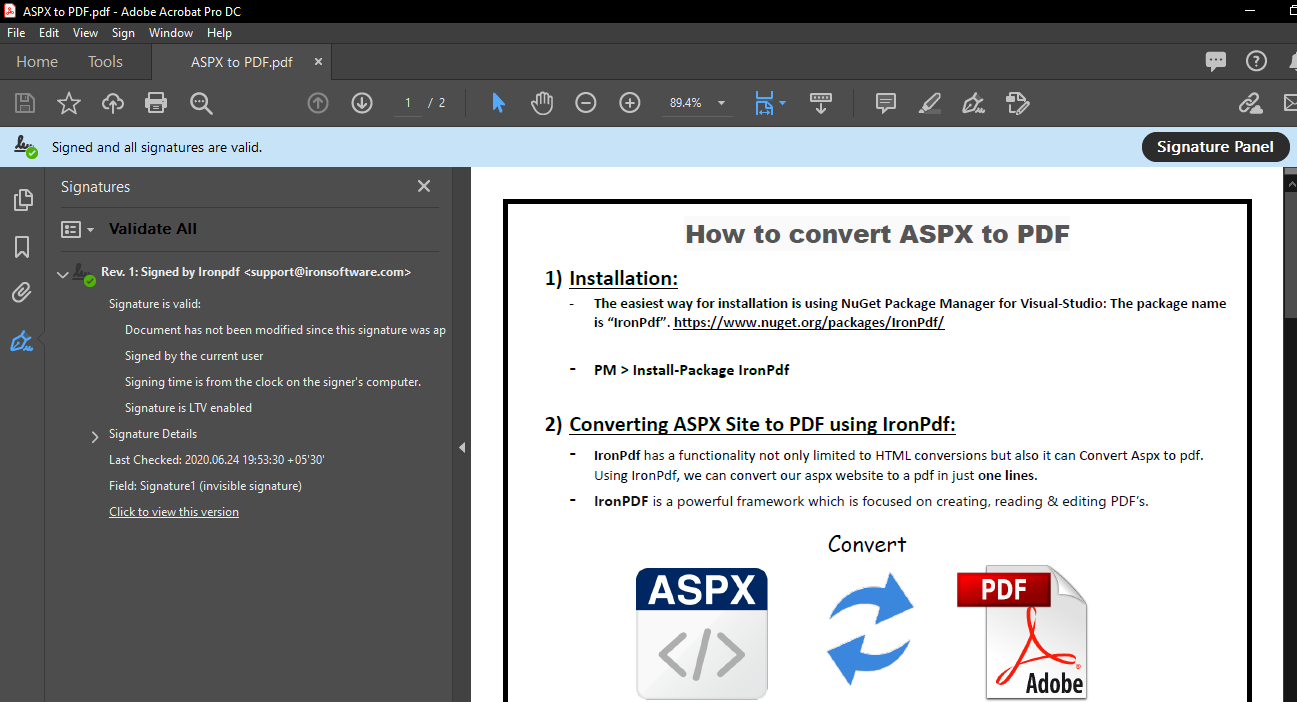
.pfx 파일과 암호를 사용하여 선택한 PDF의 서명을 트리거합니다.아래의 출력에서 볼 수 있듯이 PDF 파일이 선택되고 서명 가져오기 버튼이 클릭될 때마다 성공적으로 문서를 디지털 서명합니다. IronPDF로 단 한 줄의 코드로 가능합니다.
IronPDF는 C#을 사용한 PDF 관련 작업에 완벽한 도구입니다. IronPDF는 개발자에게 PDF 문서를 이미지로 렌더링하고 PDF로부터 텍스트와 콘텐츠를 추출하는 방법을 제공합니다. 추가적으로, IronPDF는 PDF에 차트를 렌더링하고, IronBarcode 라이브러리를 사용하여 바코드를 추가하며, 암호로 보안을 강화, 워터마킹, 심지어 PDF 양식을 처리하기도 합니다.


커티스 차우는 칼턴 대학교에서 컴퓨터 과학 학사 학위를 취득했으며, Node.js, TypeScript, JavaScript, React를 전문으로 하는 프론트엔드 개발자입니다. 직관적이고 미적으로 뛰어난 사용자 인터페이스를 만드는 데 열정을 가진 그는 최신 프레임워크를 활용하고, 잘 구성되고 시각적으로 매력적인 매뉴얼을 제작하는 것을 즐깁니다.



IronPDF는 IRON SUITE 의 일부입니다.
10개의 .NET API 제품, 당신의 사무 문서를 위해











PDF 파일을 HTML처럼 빠르게 변환해야 할 때.


