using IronPdf;

// Disable local disk access or cross-origin requests
Installation.EnableWebSecurity = true;

// Instantiate Renderer
var renderer = new ChromePdfRenderer();

// Create a PDF from a HTML string using C#
var pdf = renderer.RenderHtmlAsPdf("<h1>Hello World</h1>");

// Export to a file or Stream
pdf.SaveAs("output.pdf");

// Advanced Example with HTML Assets
// Load external html assets: Images, CSS and JavaScript.
// An optional BasePath 'C:\site\assets\' is set as the file location to load assets from
var myAdvancedPdf = renderer.RenderHtmlAsPdf("<img src='icons/iron.png'>", @"C:\site\assets\");
myAdvancedPdf.SaveAs("html-with-assets.pdf");
using IronPdf;// Disable local disk access or cross-origin requestsInstallation.EnableWebSecurity = true;// Instantiate Renderervar renderer = new ChromePdfRenderer();// Create a PDF from a HTML string using C#var pdf = renderer.RenderHtmlAsPdf("<h1>Hello World</h1>");// Export to a file or Streampdf.SaveAs("output.pdf");// Advanced Example with HTML Assets// Load external html assets: Images, CSS and JavaScript.// An optional BasePath 'C:\site\assets\' is set as the file location to load assets fromvar myAdvancedPdf = renderer.RenderHtmlAsPdf("<img src='icons/iron.png'>", @"C:\site\assets\");myAdvancedPdf.SaveAs("html-with-assets.pdf");
PM >Install-Package IronPdf
Install-Package IronPdf
IRONPDF KULLANARAK
html2pdf Sayfa Arasi Sabit C# (Geliştirici Eğitimi)
Modern uygulamalarla çalışırken, sizin gibi .NET geliştiricileri genellikle merkezi bir PDF oluşturma hizmeti oluşturmaları gerekebilir. Faturalandırmalar, raporlar, sertifikalar veya sözleşmeler oluşturuyor olun, özel bir .NET PDF API'sine sahip olmak PDF dosyalarını verimli bir şekilde yönetmenize yardımcı olabilir. Peki, bu PDF oluşturma görevlerinizi nasıl iyileştirebilir? Bu, masaüstü ve web uygulamalarınız arasında tutarlılık, sürdürülebilirlik ve ölçeklenebilirlik sağlayarak yapılır. Daha önce asla doküman içeriğini, PDF sayfalarını ve PDF form alanlarını yönetmek bu kadar kolay olmamıştı.
Bu eğitimde, güçlü bir .NET PDF kütüphanesi olan IronPDF, kullanarak ASP.NET Core ile üretime hazır bir PDF API'si oluşturmayı öğreneceksiniz. HTML'den PDF oluşturabilen, belgeleri birleştiren, filigran ekleyen ve Web API'nizdeki çeşitli gerçek dünyaya ait PDF oluşturma senaryolarını işleyen RESTful uç noktalar oluşturacağız.
Neden Özel Bir PDF API Oluşturmalısınız?
Koda dalmadan önce, özel bir PDF API oluşturmanın neden mantıklı olduğunu anlayalım:
Merkezi Mantık: Tüm PDF oluşturma mantığı tek bir yerde, bakım ve güncellemeleri kolaylaştırır
Mikroservis Mimarisi: Çeşitli uygulamaların PDF yeteneklerine ihtiyaç duyduğu hizmet odaklı mimariler için mükemmel
Performans Optimizasyonu: Büyük PDF dosyaları, birden çok sayfa ve dinamik veriler için adanmış bir hizmeti ölçeklendirmek ve optimize etmek daha kolaydır.
Dil Bağımsızlığı: Herhangi bir istemci uygulama API'yi programlama dilinden bağımsız olarak tüketebilir
Tutarlı Çıktı: Kuruluşunuz genelinde tüm PDF belgelerinin tutarlı belge düzeni, paragraf formatı ve PDF içeriği sağlamasını garantiler.
İşe başlamaya hazır mısınız? IronPDF'nin ücretsiz deneme sürümünü indirin ve bu eğitime katılarak NET Framework projelerinizde programatik olarak PDF dosyaları oluşturun.
IronPDF: Tam .NET PDF Kütüphanesi
IronPDF, Web API projelerinde PDF oluşturmayı basit ve güvenilir bir hale getiren kapsamlı özellikler seti sunarak .NET geliştiricileri için önde gelen PDF kütüphanesi olarak öne çıkar. Bu, Chrome render motoru üzerine kuruludur ve genellikle sadece birkaç kod satırı ile piksel mükemmelliğinde HTML'den PDF'e dönüşümleri sağlar. Bunu yaparken tüm stil, JavaScript yürütme ve duyarlı düzenleri korur.
IronPDF'yi .NET PDF API geliştirme için ideal kılan önemli yetenekler:
Chrome Tabanlı Render: Google Chrome'un render motorunu, HTML içeriğinden PDF belgeleri doğru biçimde dönüştürmek için kullanır, gömülü görüntüler ve diğer web varlıkları için tam destek ile
Zengin Özellik Seti: Yeni ve mevcut belgeleri, dijital imzalar, PDF formları, açıklamalar, şifreleme, sıkıştırma ve daha fazlası ile düzenlemeyi destekler
Güvenli PDF Belgeleri Oluşturun: Şifreleme, dijital imzalar ve belge koruma ile hassas PDF içeriğini yönetin.
Gelişmiş Manipülasyon: PDF sayfalarını birleştirin, belgeleri ayırın, filigranlar uygulayın, etkileşimli PDF formları oluşturun ve PDF dosyalarını programlı olarak manipüle edin.
PublicInterfaceIPdfService Function GeneratePdfFromHtml(htmlContent AsString) AsByte() Function GeneratePdfFromUrl(url AsString) AsByte()EndInterface
Public Interface IPdfService
    Function GeneratePdfFromHtml(htmlContent As String) As Byte()
    Function GeneratePdfFromUrl(url As String) As Byte()
End Interface
PdfService.cs dosyasında bunu ekleyeceğiz:
using IronPdf;public class PdfService : IPdfService{ private readonly ChromePdfRenderer _renderer; publicPdfService() { _renderer = new ChromePdfRenderer(); // Configure rendering options for optimal PDF generation in .NET _renderer.RenderingOptions.MarginTop = 20; _renderer.RenderingOptions.MarginBottom = 20; _renderer.RenderingOptions.PrintHtmlBackgrounds = true; } public byte[] GeneratePdfFromHtml(string htmlContent) { // Generate PDF from HTML using the .NET PDF API var pdf = _renderer.RenderHtmlAsPdf(htmlContent); return pdf.BinaryData; } public byte[] GeneratePdfFromUrl(string url) { // Convert URL to PDF in the REST API var pdf = _renderer.RenderUrlAsPdf(url); return pdf.BinaryData; }}
using IronPdf;
public class PdfService : IPdfService
{
    private readonly ChromePdfRenderer _renderer;
    public PdfService()
    {
        _renderer = new ChromePdfRenderer();
        // Configure rendering options for optimal PDF generation in .NET
        _renderer.RenderingOptions.MarginTop = 20;
        _renderer.RenderingOptions.MarginBottom = 20;
        _renderer.RenderingOptions.PrintHtmlBackgrounds = true;
    }
    public byte[] GeneratePdfFromHtml(string htmlContent)
    {
        // Generate PDF from HTML using the .NET PDF API
        var pdf = _renderer.RenderHtmlAsPdf(htmlContent);
        return pdf.BinaryData;
    }
    public byte[] GeneratePdfFromUrl(string url)
    {
        // Convert URL to PDF in the REST API
        var pdf = _renderer.RenderUrlAsPdf(url);
        return pdf.BinaryData;
    }
}
ImportsIronPdfPublic Class PdfServiceImplementsIPdfService PrivateReadOnly _renderer AsChromePdfRenderer Public Sub New() _renderer = New ChromePdfRenderer() ' Configure rendering options for optimal PDF generation in .NET _renderer.RenderingOptions.MarginTop = 20 _renderer.RenderingOptions.MarginBottom = 20 _renderer.RenderingOptions.PrintHtmlBackgrounds = True End Sub Public Function GeneratePdfFromHtml(htmlContent AsString) AsByte() ' Generate PDF from HTML using the .NET PDF API Dim pdf = _renderer.RenderHtmlAsPdf(htmlContent) Return pdf.BinaryData End Function Public Function GeneratePdfFromUrl(url AsString) AsByte() ' Convert URL to PDF in the REST API Dim pdf = _renderer.RenderUrlAsPdf(url) Return pdf.BinaryData End FunctionEnd Class
Imports IronPdf

Public Class PdfService
    Implements IPdfService

    Private ReadOnly _renderer As ChromePdfRenderer

    Public Sub New()
        _renderer = New ChromePdfRenderer()
        ' Configure rendering options for optimal PDF generation in .NET
        _renderer.RenderingOptions.MarginTop = 20
        _renderer.RenderingOptions.MarginBottom = 20
        _renderer.RenderingOptions.PrintHtmlBackgrounds = True
    End Sub

    Public Function GeneratePdfFromHtml(htmlContent As String) As Byte()
        ' Generate PDF from HTML using the .NET PDF API
        Dim pdf = _renderer.RenderHtmlAsPdf(htmlContent)
        Return pdf.BinaryData
    End Function

    Public Function GeneratePdfFromUrl(url As String) As Byte()
        ' Convert URL to PDF in the REST API
        Dim pdf = _renderer.RenderUrlAsPdf(url)
        Return pdf.BinaryData
    End Function

End Class
PdfService, HTML'yi PDF'e dönüştürme işleminin çekirdek kısmını yönetir. IronPDF'nin ChromePdfRenderer'ını kullanarak, bu sınıf mantıklı varsayılanlarla yapılandırılmıştır; sayfa kenar boşlukları ve arka plan işleme gibi, düzgün bir nihai belge üretmek amacıyla.
Kontrolör ham HTML'yi geçirdiğinde, servis bunu profesyonel kalitede PDF'e dönüştürmesi için IronPDF'yi kullanır ve sonuç olarak indirilmeye hazır byte verisi şeklinde geri döner. Ek olarak, bir URL'yi doğrudan PDF'e dönüştürerek tüm web sayfalarını da işleyebilir.
Denetleyiciyi Oluşturma
Artık API'miz için denetleyiciyi oluşturmanın zamanı geldi. Bu, HTML'den PDF dosyaları oluşturabilen bir API uç noktası sağlayacaktır. Daha sonra, PDF belgelerini sisteminize indirmek ve kaydetmek için kullanılabilir olacak.
// Controllers/PdfController.cs
using Microsoft.AspNetCore.Mvc;
[ApiController]
[Route("api/[controller]")]
public class PdfController : ControllerBase
{
    private readonly IPdfService _pdfService;
    public PdfController(IPdfService pdfService)
    {
        _pdfService = pdfService;
    }
    [HttpPost("html-to-pdf")]
    public IActionResult ConvertHtmlToPdf([FromBody] HtmlRequest request)
    {
        try
        {
            var pdfBytes = _pdfService.GeneratePdfFromHtml(request.HtmlContent);
            // Return as downloadable file
            return File(pdfBytes, "application/pdf", "document.pdf");
        }
        catch (Exception ex)
        {
            return BadRequest($"Error generating PDF: {ex.Message}");
        }
    }
}
ImportsMicrosoft.AspNetCore.Mvc<ApiController><Route("api/[controller]")>Public Class PdfControllerInheritsControllerBase PrivateReadOnly _pdfService AsIPdfService Public Sub New(pdfService AsIPdfService) _pdfService = pdfService End Sub <HttpPost("html-to-pdf")> Public Function ConvertHtmlToPdf(<FromBody> request AsHtmlRequest) AsIActionResultTry Dim pdfBytes = _pdfService.GeneratePdfFromHtml(request.HtmlContent) ' Return as downloadable file ReturnFile(pdfBytes, "application/pdf", "document.pdf")Catch ex AsException ReturnBadRequest($"Error generating PDF: {ex.Message}")EndTry End FunctionEnd Class
Imports Microsoft.AspNetCore.Mvc

<ApiController>
<Route("api/[controller]")>
Public Class PdfController
    Inherits ControllerBase

    Private ReadOnly _pdfService As IPdfService

    Public Sub New(pdfService As IPdfService)
        _pdfService = pdfService
    End Sub

    <HttpPost("html-to-pdf")>
    Public Function ConvertHtmlToPdf(<FromBody> request As HtmlRequest) As IActionResult
        Try
            Dim pdfBytes = _pdfService.GeneratePdfFromHtml(request.HtmlContent)
            ' Return as downloadable file
            Return File(pdfBytes, "application/pdf", "document.pdf")
        Catch ex As Exception
            Return BadRequest($"Error generating PDF: {ex.Message}")
        End Try
    End Function
End Class
HtmlRequest.cs dosyasında bunu ekleyeceğiz:
// Models/HtmlRequest.cspublic class HtmlRequest{ public stringHtmlContent { get; set; } public stringFileName { get; set; } = "document.pdf";}
// Models/HtmlRequest.cs
public class HtmlRequest
{
    public string HtmlContent { get; set; }
    public string FileName { get; set; } = "document.pdf";
}
' Models/HtmlRequest.vbPublic Class HtmlRequest Public Property HtmlContentAsString Public Property FileNameAsString = "document.pdf"End Class
' Models/HtmlRequest.vb
Public Class HtmlRequest
    Public Property HtmlContent As String
    Public Property FileName As String = "document.pdf"
End Class
İlk dosyada, HTML'yi indirilebilir PDF'e dönüştüren doğrudan bir API uç noktası kurulumu yapıyoruz. Biri api/pdf/html-to-pdf yoluna basit bir POST isteğiyle HTML içeriği gönderdiğinde, PdfController bunun PDF'e dönüştürülmesi görevini özel bir servise geçer.
PDF oluşturulduktan sonra, kontrolör bunu kullanıcıya indirilmeye hazır olarak geri verir. İstek kendi içinde, hem ham HTML'yi hem de son belge için isteğe bağlı bir dosya adını taşıyan HtmlRequest modeli kullanılarak yapılandırılır. Kısacası, bu yapı, istemcilerin HTML göndermesini ve anında cilalı bir PDF almasını kolaylaştırır.
Servisleri Kaydetme
Program.cs dosyanızı PDF hizmetini kaydetmek için güncelleyin:
var builder = WebApplication.CreateBuilder(args);builder.Services.AddControllers();builder.Services.AddEndpointsApiExplorer();builder.Services.AddSwaggerGen();// Register PDF servicebuilder.Services.AddSingleton<IPdfService, PdfService>();var app = builder.Build();if (app.Environment.IsDevelopment()){ app.UseSwagger(); app.UseSwaggerUI();}app.UseHttpsRedirection();app.MapControllers();app.Run();
var builder = WebApplication.CreateBuilder(args);
builder.Services.AddControllers();
builder.Services.AddEndpointsApiExplorer();
builder.Services.AddSwaggerGen();
// Register PDF service
builder.Services.AddSingleton<IPdfService, PdfService>();
var app = builder.Build();
if (app.Environment.IsDevelopment())
{
    app.UseSwagger();
    app.UseSwaggerUI();
}
app.UseHttpsRedirection();
app.MapControllers();
app.Run();
ImportsMicrosoft.AspNetCore.BuilderImportsMicrosoft.Extensions.DependencyInjectionDim builder = WebApplication.CreateBuilder(args)builder.Services.AddControllers()builder.Services.AddEndpointsApiExplorer()builder.Services.AddSwaggerGen()' Register PDF servicebuilder.Services.AddSingleton(OfIPdfService, PdfService)()Dim app = builder.Build()If app.Environment.IsDevelopment() Then app.UseSwagger() app.UseSwaggerUI()End Ifapp.UseHttpsRedirection()app.MapControllers()app.Run()
Imports Microsoft.AspNetCore.Builder
Imports Microsoft.Extensions.DependencyInjection

Dim builder = WebApplication.CreateBuilder(args)
builder.Services.AddControllers()
builder.Services.AddEndpointsApiExplorer()
builder.Services.AddSwaggerGen()
' Register PDF service
builder.Services.AddSingleton(Of IPdfService, PdfService)()
Dim app = builder.Build()
If app.Environment.IsDevelopment() Then
    app.UseSwagger()
    app.UseSwaggerUI()
End If
app.UseHttpsRedirection()
app.MapControllers()
app.Run()
Farklı Yanıt Türlerini Nasıl Ele Alırsınız?
API'niz, istemci ihtiyaçlarına dayalı olarak PDF'leri farklı yollarla döndürebilmelidir:
[HttpPost("generate")] public IActionResultGeneratePdf([FromBody] PdfRequest request) { var pdfBytes = _pdfService.GeneratePdfFromHtml(request.HtmlContent); switch (request.ResponseType?.ToLower()) { case "base64": returnOk(new { data = Convert.ToBase64String(pdfBytes), filename = request.FileName }); case "inline": returnFile(pdfBytes, "application/pdf"); default: // download returnFile(pdfBytes, "application/pdf", request.FileName); } }
[HttpPost("generate")]
 public IActionResult GeneratePdf([FromBody] PdfRequest request)
 {
     var pdfBytes = _pdfService.GeneratePdfFromHtml(request.HtmlContent);
     switch (request.ResponseType?.ToLower())
     {
         case "base64":
             return Ok(new
             {
                 data = Convert.ToBase64String(pdfBytes),
                 filename = request.FileName
             });
         case "inline":
             return File(pdfBytes, "application/pdf");
         default: // download
             return File(pdfBytes, "application/pdf", request.FileName);
     }
 }
ImportsMicrosoft.AspNetCore.Mvc<HttpPost("generate")>Public Function GeneratePdf(<FromBody> request AsPdfRequest) AsIActionResult Dim pdfBytes = _pdfService.GeneratePdfFromHtml(request.HtmlContent) Select Case request.ResponseType?.ToLower() Case "base64" ReturnOk(New With { .data = Convert.ToBase64String(pdfBytes), .filename = request.FileName }) Case "inline" ReturnFile(pdfBytes, "application/pdf") Case Else ' download ReturnFile(pdfBytes, "application/pdf", request.FileName) End SelectEnd Function
Imports Microsoft.AspNetCore.Mvc

<HttpPost("generate")>
Public Function GeneratePdf(<FromBody> request As PdfRequest) As IActionResult
    Dim pdfBytes = _pdfService.GeneratePdfFromHtml(request.HtmlContent)
    Select Case request.ResponseType?.ToLower()
        Case "base64"
            Return Ok(New With {
                .data = Convert.ToBase64String(pdfBytes),
                .filename = request.FileName
            })
        Case "inline"
            Return File(pdfBytes, "application/pdf")
        Case Else ' download
            Return File(pdfBytes, "application/pdf", request.FileName)
    End Select
End Function
Burada denetleyiciye daha esnek bir PDF oluşturma uç noktası ekledik. Her zaman dosya indirmeye zorlamak yerine, GeneratePdf metodu, istemcinin sonucu nasıl almak istediğini seçmesine olanak tanır. Bu seçenek PDF'lerin, indirilebilir bir dosya olarak, doğrudan tarayıcıda veya API'lerde kolay kullanım için Base64 string olarak çeşitli formatlarda görüntülenmesine esneklik sağlar.
İstek, önceki HtmlRequest üzerine kurulu olan ve ResponseType seçeneği ekleyen PdfRequest modeli tarafından tanımlanmıştır. Kısacası, bu, kullanıcılara PDF'lerini nasıl aldıkları üzerinde daha fazla kontrol vererek, API'yi daha çeşitli ve kullanıcı dostu hale getirir.
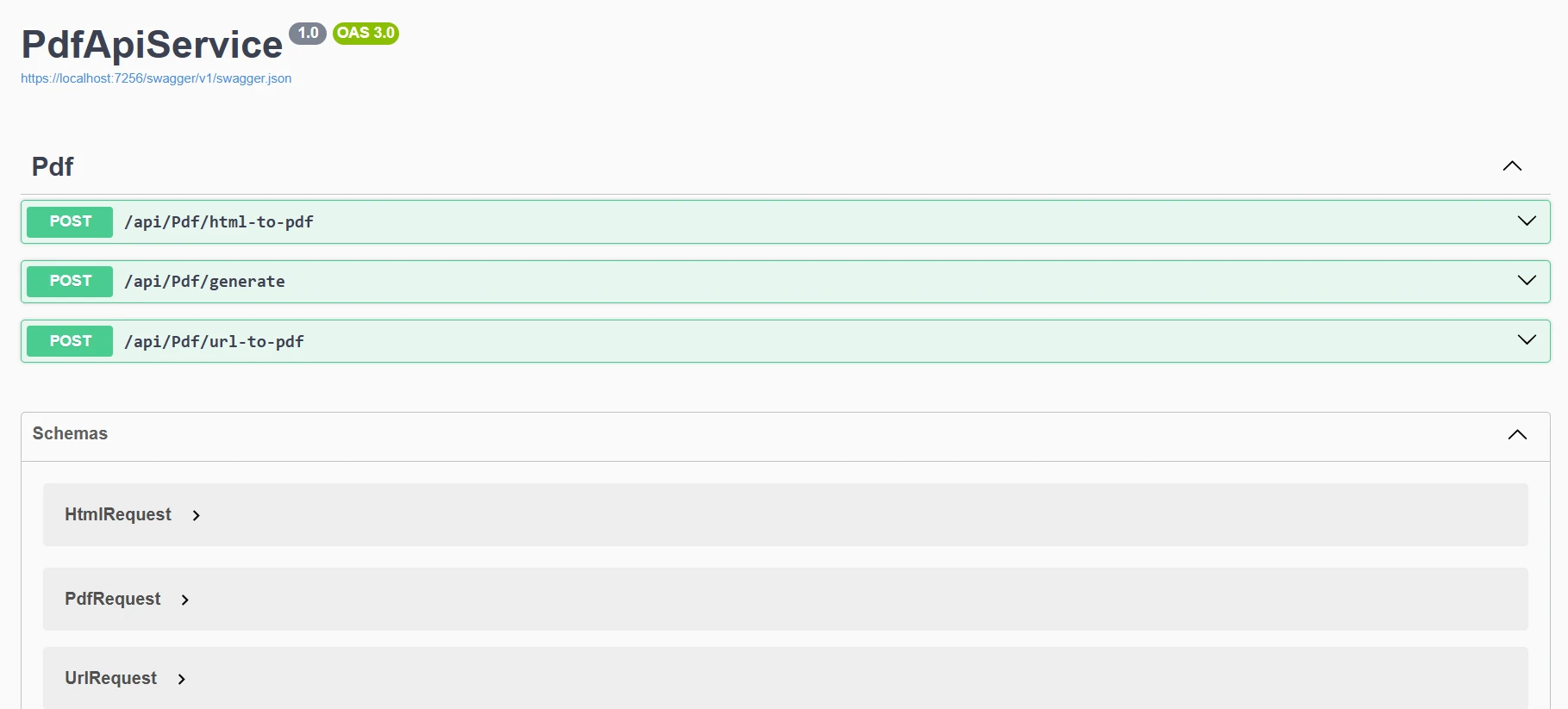
Artık, programımızı çalıştırdığımızda, bu çıktıyı Swagger'de göreceğiz.
Yaygın PDF İşlemlerini Nasıl Uygularsınız?
Hizmetimizi çeşitli PDF oluşturma senaryolarını ele alacak şekilde genişletelim:
URL'den PDF'ye Dönüşüm
[HttpPost("url-to-pdf")]public async Task<IActionResult> ConvertUrlToPdf([FromBody] UrlRequest request){ try { var pdfBytes = awaitTask.Run(() => _pdfService.GeneratePdfFromUrl(request.Url)); returnFile(pdfBytes, "application/pdf", $"{request.FileName ?? "website"}.pdf"); } catch (Exception ex) { returnBadRequest($"Failed to convert URL: {ex.Message}"); }}public class UrlRequest{ public stringUrl { get; set; } public stringFileName { get; set; }}
[HttpPost("url-to-pdf")]
public async Task<IActionResult> ConvertUrlToPdf([FromBody] UrlRequest request)
{
    try
    {
        var pdfBytes = await Task.Run(() =>
            _pdfService.GeneratePdfFromUrl(request.Url));
        return File(pdfBytes, "application/pdf",
            $"{request.FileName ?? "website"}.pdf");
    }
    catch (Exception ex)
    {
        return BadRequest($"Failed to convert URL: {ex.Message}");
    }
}
public class UrlRequest
{
    public string Url { get; set; }
    public string FileName { get; set; }
}
ImportsSystem.Threading.TasksImportsMicrosoft.AspNetCore.Mvc<HttpPost("url-to-pdf")>PublicAsync Function ConvertUrlToPdf(<FromBody> request AsUrlRequest) AsTask(OfIActionResult)Try Dim pdfBytes = AwaitTask.Run(Function() _pdfService.GeneratePdfFromUrl(request.Url)) ReturnFile(pdfBytes, "application/pdf", $"{If(request.FileName, "website")}.pdf")Catch ex AsException ReturnBadRequest($"Failed to convert URL: {ex.Message}")EndTryEnd FunctionPublic Class UrlRequest Public Property UrlAsString Public Property FileNameAsStringEnd Class
Imports System.Threading.Tasks
Imports Microsoft.AspNetCore.Mvc

<HttpPost("url-to-pdf")>
Public Async Function ConvertUrlToPdf(<FromBody> request As UrlRequest) As Task(Of IActionResult)
    Try
        Dim pdfBytes = Await Task.Run(Function() _pdfService.GeneratePdfFromUrl(request.Url))
        Return File(pdfBytes, "application/pdf", $"{If(request.FileName, "website")}.pdf")
    Catch ex As Exception
        Return BadRequest($"Failed to convert URL: {ex.Message}")
    End Try
End Function

Public Class UrlRequest
    Public Property Url As String
    Public Property FileName As String
End Class
Bu uç nokta, istemcilerin bir URL göndermesine ve o web sayfasının indirilmeye hazır PDF'ini geri almasına olanak tanır. /api/pdf/url-to-pdf POST isteği geldiğinde, denetleyici arka planda verilen URL'yi PDF baytlarına dönüştürmek için _pdfService'i kullanır ve ardından bunları bir dosya indirme olarak geri döner. Dönüştürme sırasında bir şeyler ters giderse, net bir hata mesajı ile zarif bir şekilde yanıt verir.
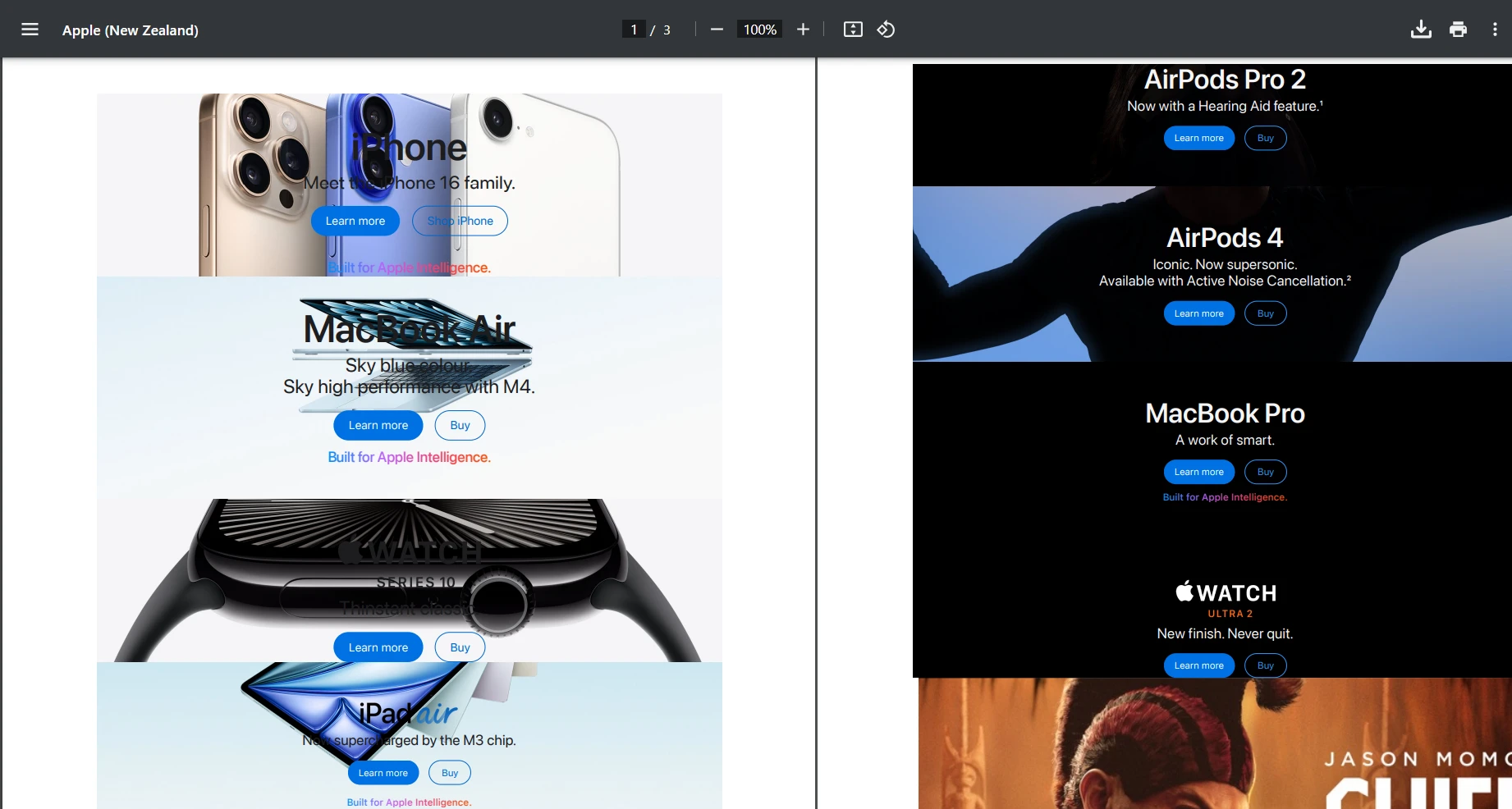
"https://www.apple.com/nz" URL'sini kullanmayı deneyelim ve POST isteğini test edelim. Aşağıda elde ettiğimiz çıktıyı görüyorsunuz.
Çıktı
Özel Filigranlar Eklemek
public byte[] AddWatermarkFromFile(string filePath, string watermarkText){ // Load PDF directly from file var pdf = PdfDocument.FromFile(filePath); pdf.ApplyWatermark( $"<h1 style='color:red;font-size:72px;'>{watermarkText}</h1>", 75,IronPdf.Editing.VerticalAlignment.Middle,IronPdf.Editing.HorizontalAlignment.Center ); return pdf.BinaryData;}
public byte[] AddWatermarkFromFile(string filePath, string watermarkText)
{
    // Load PDF directly from file
    var pdf = PdfDocument.FromFile(filePath);
    pdf.ApplyWatermark(
        $"<h1 style='color:red;font-size:72px;'>{watermarkText}</h1>",
        75,
        IronPdf.Editing.VerticalAlignment.Middle,
        IronPdf.Editing.HorizontalAlignment.Center
    );
    return pdf.BinaryData;
}
ImportsIronPdfPublic Function AddWatermarkFromFile(filePath AsString, watermarkText AsString) AsByte() ' Load PDF directly from file Dim pdf = PdfDocument.FromFile(filePath) pdf.ApplyWatermark( $"<h1 style='color:red;font-size:72px;'>{watermarkText}</h1>", 75,IronPdf.Editing.VerticalAlignment.Middle,IronPdf.Editing.HorizontalAlignment.Center ) Return pdf.BinaryDataEnd Function
Imports IronPdf

Public Function AddWatermarkFromFile(filePath As String, watermarkText As String) As Byte()
    ' Load PDF directly from file
    Dim pdf = PdfDocument.FromFile(filePath)
    pdf.ApplyWatermark(
        $"<h1 style='color:red;font-size:72px;'>{watermarkText}</h1>",
        75,
        IronPdf.Editing.VerticalAlignment.Middle,
        IronPdf.Editing.HorizontalAlignment.Center
    )
    Return pdf.BinaryData
End Function
Burada, sadece test amaçlı olarak yerel bir dosyayı manuel olarak yüklüyoruz. Ancak, PDF API'niz bir PDF belgesi oluşturacak ve ardından kolayca bir özel filigran uygulayacak şekilde ayarlayabilirsiniz.
Filigran Çıktısı
Şablonlarla Dinamik Veri Nasıl Eklenir?
Gerçek dünya uygulamaları için, genellikle dinamik verilerle şablonlardan PDF'ler oluşturmanız gerekecektir:
[HttpPost("from-template")]public IActionResultGenerateFromTemplate([FromBody] TemplateRequest request){ // Simple template replacement var html = request.Template; foreach (var item in request.Data) { html = html.Replace($"{{{{{item.Key}}}}}", item.Value); } var pdfBytes = _pdfService.GeneratePdfFromHtml(html); returnFile(pdfBytes, "application/pdf", request.FileName);}public class TemplateRequest{ public stringTemplate { get; set; } public Dictionary<string, string> Data { get; set; } public stringFileName { get; set; } = "document.pdf";}
[HttpPost("from-template")]
public IActionResult GenerateFromTemplate([FromBody] TemplateRequest request)
{
    // Simple template replacement
    var html = request.Template;
    foreach (var item in request.Data)
    {
        html = html.Replace($"{{{{{item.Key}}}}}", item.Value);
    }
    var pdfBytes = _pdfService.GeneratePdfFromHtml(html);
    return File(pdfBytes, "application/pdf", request.FileName);
}
public class TemplateRequest
{
    public string Template { get; set; }
    public Dictionary<string, string> Data { get; set; }
    public string FileName { get; set; } = "document.pdf";
}
ImportsMicrosoft.AspNetCore.Mvc<HttpPost("from-template")>Public Function GenerateFromTemplate(<FromBody> request AsTemplateRequest) AsIActionResult ' Simple template replacement Dim html AsString = request.Template For Each item Inrequest.Data html = html.Replace($"{{{{{item.Key}}}}}", item.Value) Next Dim pdfBytes AsByte() = _pdfService.GeneratePdfFromHtml(html) ReturnFile(pdfBytes, "application/pdf", request.FileName)End FunctionPublic Class TemplateRequest Public Property TemplateAsString Public Property DataAsDictionary(OfString, String) Public Property FileNameAsString = "document.pdf"End Class
Imports Microsoft.AspNetCore.Mvc

<HttpPost("from-template")>
Public Function GenerateFromTemplate(<FromBody> request As TemplateRequest) As IActionResult
    ' Simple template replacement
    Dim html As String = request.Template
    For Each item In request.Data
        html = html.Replace($"{{{{{item.Key}}}}}", item.Value)
    Next
    Dim pdfBytes As Byte() = _pdfService.GeneratePdfFromHtml(html)
    Return File(pdfBytes, "application/pdf", request.FileName)
End Function

Public Class TemplateRequest
    Public Property Template As String
    Public Property Data As Dictionary(Of String, String)
    Public Property FileName As String = "document.pdf"
End Class
Bir üretim PDF API'si oluştururken, performans son derece önemlidir. İşte önemli optimizasyon stratejileri:
Asenkron İşlemler
I/O işlemlerinin kullanılmasını içeren projeler oluşturduğunuzda, eş zamanlı kodlama kullanmak bilgece bir yaklaşımdır. Bu özellikle PDF içeriğiniz dış kaynaklardan elde ediliyorsa yardımcı olur:
HTML sayfalarını indirirken (RenderUrlAsPdf)
HTTP üzerinden görüntü, CSS veya yazı tipleri çekerken
Dosyaları disk veya bulut depolamaya okurken/yazarken
Bu işlemler bir thread'i engelleyebilir, ancak eş zamanlı kullanmak, API thread'inizin boşta beklememesini sağlar.
Örnek:
public async Task<byte[]> GeneratePdfFromHtmlAsync(string htmlContent){ return awaitTask.Run(() => { var pdf = _renderer.RenderHtmlAsPdf(htmlContent); return pdf.BinaryData; });}
public async Task<byte[]> GeneratePdfFromHtmlAsync(string htmlContent)
{
    return await Task.Run(() =>
    {
        var pdf = _renderer.RenderHtmlAsPdf(htmlContent);
        return pdf.BinaryData;
    });
}
ImportsSystem.Threading.TasksPublicAsync Function GeneratePdfFromHtmlAsync(htmlContent AsString) AsTask(OfByte()) ReturnAwaitTask.Run(Function() Dim pdf = _renderer.RenderHtmlAsPdf(htmlContent) Return pdf.BinaryData End Function)End Function
Imports System.Threading.Tasks

Public Async Function GeneratePdfFromHtmlAsync(htmlContent As String) As Task(Of Byte())
    Return Await Task.Run(Function()
                              Dim pdf = _renderer.RenderHtmlAsPdf(htmlContent)
                              Return pdf.BinaryData
                          End Function)
End Function
Render Seçenekleri
IronPDF'yi optimal performans için yapılandırın:
_renderer.RenderingOptions.EnableJavaScript = false; // If JS not needed_renderer.RenderingOptions.CssMediaType = PdfCssMediaType.Print;_renderer.RenderingOptions.RenderDelay = 0; // Remove if no JS_renderer.RenderingOptions.Timeout = 30; // Set reasonable timeout
_renderer.RenderingOptions.EnableJavaScript = false; // If JS not needed
_renderer.RenderingOptions.CssMediaType = PdfCssMediaType.Print;
_renderer.RenderingOptions.RenderDelay = 0; // Remove if no JS
_renderer.RenderingOptions.Timeout = 30; // Set reasonable timeout
net
net
PDF API'nizi Nasıl Güvenli Hale Getirirsiniz?
Her üretim API'si için güvenlik esastır. İşte basit bir API anahtar doğrulama yaklaşımı:
// Middleware/ApiKeyMiddleware.cspublic class ApiKeyMiddleware{ private readonly RequestDelegate _next; private const stringApiKeyHeader = "X-API-Key"; publicApiKeyMiddleware(RequestDelegate next) { _next = next; } public async TaskInvokeAsync(HttpContext context) { if (!context.Request.Headers.TryGetValue(ApiKeyHeader, out var apiKey)) { context.Response.StatusCode = 401; await context.Response.WriteAsync("API Key required"); return; } // Validate API key (in production, check against database) var validApiKey = context.RequestServices .GetRequiredService<IConfiguration>()["ApiKey"]; if (apiKey != validApiKey) { context.Response.StatusCode = 403; await context.Response.WriteAsync("Invalid API Key"); return; } await _next(context); }}// In Program.csapp.UseMiddleware<ApiKeyMiddleware>();
// Middleware/ApiKeyMiddleware.cs
public class ApiKeyMiddleware
{
    private readonly RequestDelegate _next;
    private const string ApiKeyHeader = "X-API-Key";
    public ApiKeyMiddleware(RequestDelegate next)
    {
        _next = next;
    }
    public async Task InvokeAsync(HttpContext context)
    {
        if (!context.Request.Headers.TryGetValue(ApiKeyHeader, out var apiKey))
        {
            context.Response.StatusCode = 401;
            await context.Response.WriteAsync("API Key required");
            return;
        }
        // Validate API key (in production, check against database)
        var validApiKey = context.RequestServices
            .GetRequiredService<IConfiguration>()["ApiKey"];
        if (apiKey != validApiKey)
        {
            context.Response.StatusCode = 403;
            await context.Response.WriteAsync("Invalid API Key");
            return;
        }
        await _next(context);
    }
}
// In Program.cs
app.UseMiddleware<ApiKeyMiddleware>();
ImportsMicrosoft.AspNetCore.HttpImportsMicrosoft.Extensions.ConfigurationImportsSystem.Threading.Tasks' Middleware/ApiKeyMiddleware.vbPublic Class ApiKeyMiddleware PrivateReadOnly _next AsRequestDelegate Private Const ApiKeyHeaderAsString = "X-API-Key" Public Sub New(nextAsRequestDelegate) _next = next End Sub PublicAsync Function InvokeAsync(context AsHttpContext) AsTask Dim apiKey AsString = Nothing IfNot context.Request.Headers.TryGetValue(ApiKeyHeader, apiKey) Then context.Response.StatusCode = 401Await context.Response.WriteAsync("API Key required") Return End If ' Validate API key (in production, check against database) Dim validApiKey AsString = context.RequestServices.GetRequiredService(OfIConfiguration)()("ApiKey") If apiKey <> validApiKey Then context.Response.StatusCode = 403Await context.Response.WriteAsync("Invalid API Key") Return End IfAwait _next(context) End FunctionEnd Class' In Program.vbapp.UseMiddleware(OfApiKeyMiddleware)()
Imports Microsoft.AspNetCore.Http
Imports Microsoft.Extensions.Configuration
Imports System.Threading.Tasks

' Middleware/ApiKeyMiddleware.vb
Public Class ApiKeyMiddleware
    Private ReadOnly _next As RequestDelegate
    Private Const ApiKeyHeader As String = "X-API-Key"

    Public Sub New(next As RequestDelegate)
        _next = next
    End Sub

    Public Async Function InvokeAsync(context As HttpContext) As Task
        Dim apiKey As String = Nothing
        If Not context.Request.Headers.TryGetValue(ApiKeyHeader, apiKey) Then
            context.Response.StatusCode = 401
            Await context.Response.WriteAsync("API Key required")
            Return
        End If

        ' Validate API key (in production, check against database)
        Dim validApiKey As String = context.RequestServices.GetRequiredService(Of IConfiguration)()("ApiKey")
        If apiKey <> validApiKey Then
            context.Response.StatusCode = 403
            Await context.Response.WriteAsync("Invalid API Key")
            Return
        End If

        Await _next(context)
    End Function
End Class

' In Program.vb
app.UseMiddleware(Of ApiKeyMiddleware)()
Daha gelişmiş kimlik doğrulama senaryoları için düşünün:
JWT Doğrulama - API kimlik doğrulaması için sektör standardı
API Hız Sınırlaması - Kötü niyetli kullanımı önleyin ve adil kullanım sağlayın
Gerçek Dünya Örneği: Fatura Oluşturma API'si
Eksiksiz bir uygulama gösteren pratik bir fatura oluşturma uç noktası oluşturalım. Bu örnek, bir üretim .NET PDF API'sinin dinamik verilerle profesyonel faturalar oluşturabileceğini gösterir.
İlk Adım:
Önce, Modeller klasörümüzde yeni bir dosya oluşturacağız. Burada, benimkini Invoice.cs olarak adlandırdım. Ardından, yeni dosyanıza aşağıdaki kodu ekleyin.
public class Invoice{ public stringInvoiceNumber { get; set; } public DateTimeDate { get; set; } public stringCustomerName { get; set; } public stringCustomerAddress { get; set; } public List<InvoiceItem> Items { get; set; } public decimalTax { get; set; }}public class InvoiceItem{ public stringDescription { get; set; } public intQuantity { get; set; } public decimalUnitPrice { get; set; } public decimalTotal => Quantity * UnitPrice;}
public class Invoice
{
    public string InvoiceNumber { get; set; }
    public DateTime Date { get; set; }
    public string CustomerName { get; set; }
    public string CustomerAddress { get; set; }
    public List<InvoiceItem> Items { get; set; }
    public decimal Tax { get; set; }
}
public class InvoiceItem
{
    public string Description { get; set; }
    public int Quantity { get; set; }
    public decimal UnitPrice { get; set; }
    public decimal Total => Quantity * UnitPrice;
}
Public Class Invoice Public Property InvoiceNumberAsString Public Property [Date] AsDateTime Public Property CustomerNameAsString Public Property CustomerAddressAsString Public Property ItemsAsList(OfInvoiceItem) Public Property TaxAsDecimalEnd ClassPublic Class InvoiceItem Public Property DescriptionAsString Public Property QuantityAsInteger Public Property UnitPriceAsDecimal PublicReadOnlyPropertyTotalAsDecimal Get ReturnQuantity * UnitPriceEnd Get End PropertyEnd Class
Public Class Invoice
    Public Property InvoiceNumber As String
    Public Property [Date] As DateTime
    Public Property CustomerName As String
    Public Property CustomerAddress As String
    Public Property Items As List(Of InvoiceItem)
    Public Property Tax As Decimal
End Class

Public Class InvoiceItem
    Public Property Description As String
    Public Property Quantity As Integer
    Public Property UnitPrice As Decimal
    Public ReadOnly Property Total As Decimal
        Get
            Return Quantity * UnitPrice
        End Get
    End Property
End Class
Ardından, fatura üreticimiz için yeni bir hizmet dosyası oluşturmamız gerekecek. Hizmetler klasörünüzde, aşağıdaki kodu ekleyin. Benim için, yeni bir dosya oluşturdum ve adına InvoiceService.cs dedim. Bu kod, Fatura PDF dosyamızın stilini ve düzenini yönetecek.
[ApiController]
[Route("api/[controller]")]
public class InvoiceController : ControllerBase
{
    private readonly InvoiceService _invoiceService;
    public InvoiceController(InvoiceService invoiceService)
    {
        _invoiceService = invoiceService;
    }
    [HttpPost("generate")]
    public IActionResult GenerateInvoice([FromBody] Invoice invoice)
    {
        try
        {
            var pdfBytes = _invoiceService.GenerateInvoice(invoice);
            var fileName = $"Invoice_{invoice.InvoiceNumber}.pdf";
            return File(pdfBytes, "application/pdf", fileName);
        }
        catch (Exception ex)
        {
            return StatusCode(500, $"Error generating invoice: {ex.Message}");
        }
    }
}
ImportsMicrosoft.AspNetCore.Mvc<ApiController><Route("api/[controller]")>Public Class InvoiceControllerInheritsControllerBase PrivateReadOnly _invoiceService AsInvoiceService Public Sub New(invoiceService AsInvoiceService) _invoiceService = invoiceService End Sub <HttpPost("generate")> Public Function GenerateInvoice(<FromBody> invoice AsInvoice) AsIActionResultTry Dim pdfBytes = _invoiceService.GenerateInvoice(invoice) Dim fileName = $"Invoice_{invoice.InvoiceNumber}.pdf" ReturnFile(pdfBytes, "application/pdf", fileName)Catch ex AsException ReturnStatusCode(500, $"Error generating invoice: {ex.Message}")EndTry End FunctionEnd Class
Imports Microsoft.AspNetCore.Mvc

<ApiController>
<Route("api/[controller]")>
Public Class InvoiceController
    Inherits ControllerBase

    Private ReadOnly _invoiceService As InvoiceService

    Public Sub New(invoiceService As InvoiceService)
        _invoiceService = invoiceService
    End Sub

    <HttpPost("generate")>
    Public Function GenerateInvoice(<FromBody> invoice As Invoice) As IActionResult
        Try
            Dim pdfBytes = _invoiceService.GenerateInvoice(invoice)
            Dim fileName = $"Invoice_{invoice.InvoiceNumber}.pdf"
            Return File(pdfBytes, "application/pdf", fileName)
        Catch ex As Exception
            Return StatusCode(500, $"Error generating invoice: {ex.Message}")
        End Try
    End Function
End Class
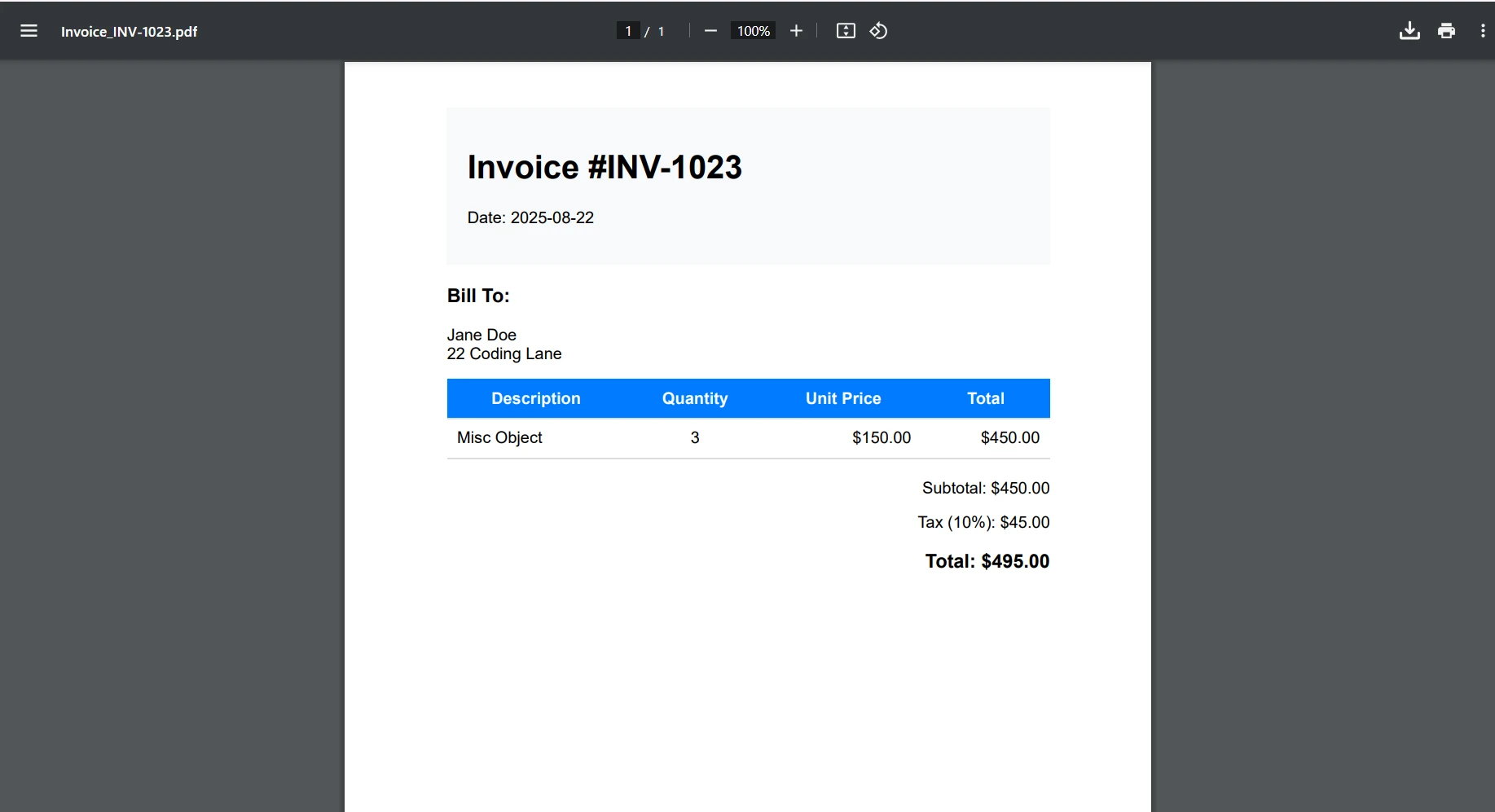
Fatura Çıktısı
Konteyner Dağıtım Düşünceleri
Bu eğitim yerel geliştirme üzerine odaklanırken, işte PDF API'nizi konteynere almanın kısa bir özeti:
FROM mcr.microsoft.com/dotnet/aspnet:6.0 AS base
WORKDIR /app
EXPOSE 80
FROM mcr.microsoft.com/dotnet/sdk:6.0 AS build
WORKDIR /src
COPY ["PdfApiService.csproj", "."]
RUN dotnet restore
COPY . .
RUN dotnet build -c Release -o /app/build
FROM build AS publish
RUN dotnet publish -c Release -o /app/publish
FROM base AS final
WORKDIR /app
COPY --from=publish /app/publish .
# IronPDF requires additional dependencies on Linux
RUN apt-get update && apt-get install -y \
    libgdiplus \
    libc6-dev \
    libx11-dev \
    && rm -rf /var/lib/apt/lists/*
ENTRYPOINT ["dotnet", "PdfApiService.dll"]
The provided code is a Dockerfile written for building and running a .NETapplication, not C# code. Dockerfiles are not converted toVB.NET as they are not programming language code but configuration scripts forDocker. If you have C# code that needs conversion toVB.NET, please provide that code instead.
The provided code is a Dockerfile written for building and running a .NET application, not C# code. Dockerfiles are not converted to VB.NET as they are not programming language code but configuration scripts for Docker. If you have C# code that needs conversion to VB.NET, please provide that code instead.
.NET PDF API'nizin dağıtım kılavuzları için ayrıntılı bilgi için bakınız:
Daha göncü bir toleranslı program için, en iyi uygulamalar, aşağıda belirtilenler gibi tutarlı hata yanıtları için küresel bir hata işleyici uygulamaktır:
ImportsSystem.Text.JsonImportsMicrosoft.AspNetCore.HttpImportsSystem.Threading.TasksPublic Class ErrorHandlingMiddleware PrivateReadOnly _next AsRequestDelegate Public Sub New(nextAsRequestDelegate) _next = next End Sub PublicAsync Function InvokeAsync(context AsHttpContext) AsTaskTryAwait _next(context)Catch ex AsExceptionAwaitHandleExceptionAsync(context, ex)EndTry End Function PrivateSharedAsync Function HandleExceptionAsync(context AsHttpContext, ex AsException) AsTask context.Response.ContentType = "application/json" context.Response.StatusCode = 500 Dim response = New With { .error = "An error occurred processing your request", .message = ex.Message }Await context.Response.WriteAsync(JsonSerializer.Serialize(response)) End FunctionEnd Class
Imports System.Text.Json
Imports Microsoft.AspNetCore.Http
Imports System.Threading.Tasks

Public Class ErrorHandlingMiddleware
    Private ReadOnly _next As RequestDelegate

    Public Sub New(next As RequestDelegate)
        _next = next
    End Sub

    Public Async Function InvokeAsync(context As HttpContext) As Task
        Try
            Await _next(context)
        Catch ex As Exception
            Await HandleExceptionAsync(context, ex)
        End Try
    End Function

    Private Shared Async Function HandleExceptionAsync(context As HttpContext, ex As Exception) As Task
        context.Response.ContentType = "application/json"
        context.Response.StatusCode = 500
        Dim response = New With {
            .error = "An error occurred processing your request",
            .message = ex.Message
        }
        Await context.Response.WriteAsync(JsonSerializer.Serialize(response))
    End Function
End Class
Artık ASP.NET Core ve IronPDF kullanarak çeşitli belge oluşturma senaryolarını işleyebilen sağlam bir .NET PDF API'si oluşturmuş oldunuz. Bu REST API, uygulamalarınızda merkezi PDF işlemleri için sağlam bir temel sağlar.
Öne çıkanlar:
IronPDF, Web API projelerinde PDF oluşturmaktan kullanıcı dostu ve basit bir hale getiriyor
Web API'nizi IronPDF'nin gelişmiş düzenleme araçlarıyla mevcut PDF belgelerini düzenleyecek şekilde kolayca ayarlayabilirsiniz
RESTful tasarım ilkeleri, PDF API'nizi anlaşılabilir ve sürdürülebilir kılar
Üretim için doğru hata yönetimi ve güvenlik önlemleri esastır
Eş zamanlı işlemler ve önbellekleme ile performans optimizasyonu, ölçeklenebilirliği artırır
Masaüstü ve web uygulamaları için ölçeklenebilir belge çözümleri desteğine sahip olacaksınız
IronPDF, geliştiricilerin modern .NET Framework uygulamaları için gerekli PDF belge API'si haline getirerek, PDF belgeleri oluşturmasına, PDF dosyalarını kaydetmesine ve HTML'yi verimli bir şekilde dönüştürmesine olanak tanır.
Sonraki Adımlar
Üretim .NET PDF API'nizde IronPDF'yi uygulamaya hazır mısınız? İşte bir sonraki adımlarınız:
Curtis Chau, Bilgisayar Bilimleri alanında Lisans Derecesine (Carleton Üniversitesi) sahip ve Node.js, TypeScript, JavaScript ve React konularında uzmanlaşmış ön uç geliştirmeyle ilgileniyor. Sezgisel ve estetik açıdan hoş kullanıcı arayüzleri oluşturma tutkunu, Curtis modern çerçevelerle çalışmayı ve iyi yapılandırılmış, görsel olarak çekici kılavuzlar oluşturmayı seviyor.