




已更新 2026年5月8日
生成每月账户报表(PDF 文档)
using IronPDF C# PDF 库,开发人员可以在 .NET 项目中将 HTML 转换为可靠的 PDF 文件,而无需依赖外部服务。
阅读更多

在使用现代应用程序时,像您这样的.NET开发人员可能会发现需要构建一个集中的PDF生成服务。无论您是生成发票、报告、证书或合同,拥有一个专门的.NET PDF API对于高效管理PDF文件都是有益的。 那么它如何改善您的PDF生成任务呢? 它通过在桌面和Web应用程序之间提供一致性、可维护性和可扩展性来实现这一点。 从未有过如此轻松地管理文档内容、PDF页面和PDF表单字段。
在本教程中,您将学习如何使用ASP.NET Core和IronPDF,一个强大的.NET PDF库,构建一个可用于生产的PDF API。 我们将创建可以从HTML生成PDF、合并文档、添加水印并处理Web API中各种实际PDF生成场景的RESTful端点。
在深入研究代码之前,让我们了解为什么创建一个专门的PDF API是有意义的:
准备好开始构建了吗? 下载IronPDF的免费试用版,并按此教程一起编程实现.NET Framework项目中的PDF文件创建。
IronPDF被认为是.NET开发人员的首选PDF库,提供了一套全面的功能,使Web API项目中的PDF生成过程简单可靠。 它建立在Chrome渲染引擎上,确保像素级精准的HTML到PDF转换,通常只需几行代码即可完成。 这在保持所有样式、JavaScript执行和响应布局的同时完成。
使IronPDF成为.NET PDF API开发的理想选择的关键能力有:
让我们从创建一个新的ASP.NET Core Web API项目并安装必要的包开始。
首先,让我们创建一个项目,我们将在其中构建我们的PDF生成工具。
dotnet new webapi -n PdfApiService
cd PdfApiService下一步是通过NuGet将IronPDF添加到您的项目中:
dotnet add package IronPdf或者,在Visual Studio中使用NuGet包管理器控制台:
C#开发的一个重要方面是保持一个干净且结构良好的项目文件夹。 例如:
让我们构建一个简单的端点,将HTML转换为PDF格式。 首先,创建服务接口和实现:
首先,我们将在我们的IPdfService.cs文件中添加以下内容:
public interface IPdfService
{
    byte[] GeneratePdfFromHtml(string htmlContent);
    byte[] GeneratePdfFromUrl(string url);
}Public Interface IPdfService
Function GeneratePdfFromHtml(htmlContent As String) As Byte()
Function GeneratePdfFromUrl(url As String) As Byte()
End Interface在PdfService.cs文件中,我们将添加:
using IronPdf;
public class PdfService : IPdfService
{
    private readonly ChromePdfRenderer _renderer;
    public PdfService()
    {
        _renderer = new ChromePdfRenderer();
        // Configure rendering options for optimal PDF generation in .NET
        _renderer.RenderingOptions.MarginTop = 20;
        _renderer.RenderingOptions.MarginBottom = 20;
        _renderer.RenderingOptions.PrintHtmlBackgrounds = true;
    }
    public byte[] GeneratePdfFromHtml(string htmlContent)
    {
        // Generate PDF from HTML using the .NET PDF API
        var pdf = _renderer.RenderHtmlAsPdf(htmlContent);
        return pdf.BinaryData;
    }
    public byte[] GeneratePdfFromUrl(string url)
    {
        // Convert URL to PDF in the REST API
        var pdf = _renderer.RenderUrlAsPdf(url);
        return pdf.BinaryData;
    }
}Imports IronPdf
Public Class PdfService
Implements IPdfService
Private ReadOnly _renderer As ChromePdfRenderer
Public Sub New()
_renderer = New ChromePdfRenderer()
' Configure rendering options for optimal PDF generation in .NET
_renderer.RenderingOptions.MarginTop = 20
_renderer.RenderingOptions.MarginBottom = 20
_renderer.RenderingOptions.PrintHtmlBackgrounds = True
End Sub
Public Function GeneratePdfFromHtml(htmlContent As String) As Byte()
' Generate PDF from HTML using the .NET PDF API
Dim pdf = _renderer.RenderHtmlAsPdf(htmlContent)
Return pdf.BinaryData
End Function
Public Function GeneratePdfFromUrl(url As String) As Byte()
' Convert URL to PDF in the REST API
Dim pdf = _renderer.RenderUrlAsPdf(url)
Return pdf.BinaryData
End Function
End ClassPdfService处理将HTML转换为PDF的核心过程。 利用IronPDF的ChromePdfRenderer,此类设置了合理的默认值,如页面边距和背景渲染,以生成一个精美的最终文档。
当控制器传递原始HTML时,服务使用IronPDF将其呈现为专业质量的PDF,并将结果返回为字节数据,准备好下载。 此外,它还可以通过将URL直接转换为PDF来处理整个网页。
现在是为我们的API创建控制器的时间了。 这将提供一个可以从HTML生成PDF文件的API端点。 然后,能够下载并将PDF文档保存到您的系统中,以便进一步使用或共享。
// Controllers/PdfController.cs
using Microsoft.AspNetCore.Mvc;
[ApiController]
[Route("api/[controller]")]
public class PdfController : ControllerBase
{
    private readonly IPdfService _pdfService;
    public PdfController(IPdfService pdfService)
    {
        _pdfService = pdfService;
    }
    [HttpPost("html-to-pdf")]
    public IActionResult ConvertHtmlToPdf([FromBody] HtmlRequest request)
    {
        try
        {
            var pdfBytes = _pdfService.GeneratePdfFromHtml(request.HtmlContent);
            // Return as downloadable file
            return File(pdfBytes, "application/pdf", "document.pdf");
        }
        catch (Exception ex)
        {
            return BadRequest($"Error generating PDF: {ex.Message}");
        }
    }
}Imports Microsoft.AspNetCore.Mvc
<ApiController>
<Route("api/[controller]")>
Public Class PdfController
Inherits ControllerBase
Private ReadOnly _pdfService As IPdfService
Public Sub New(pdfService As IPdfService)
_pdfService = pdfService
End Sub
<HttpPost("html-to-pdf")>
Public Function ConvertHtmlToPdf(<FromBody> request As HtmlRequest) As IActionResult
Try
Dim pdfBytes = _pdfService.GeneratePdfFromHtml(request.HtmlContent)
' Return as downloadable file
Return File(pdfBytes, "application/pdf", "document.pdf")
Catch ex As Exception
Return BadRequest($"Error generating PDF: {ex.Message}")
End Try
End Function
End Class然后,在HtmlRequest.cs文件中,我们将添加:
// Models/HtmlRequest.cs
public class HtmlRequest
{
    public string HtmlContent { get; set; }
    public string FileName { get; set; } = "document.pdf";
}' Models/HtmlRequest.vb
Public Class HtmlRequest
Public Property HtmlContent As String
Public Property FileName As String = "document.pdf"
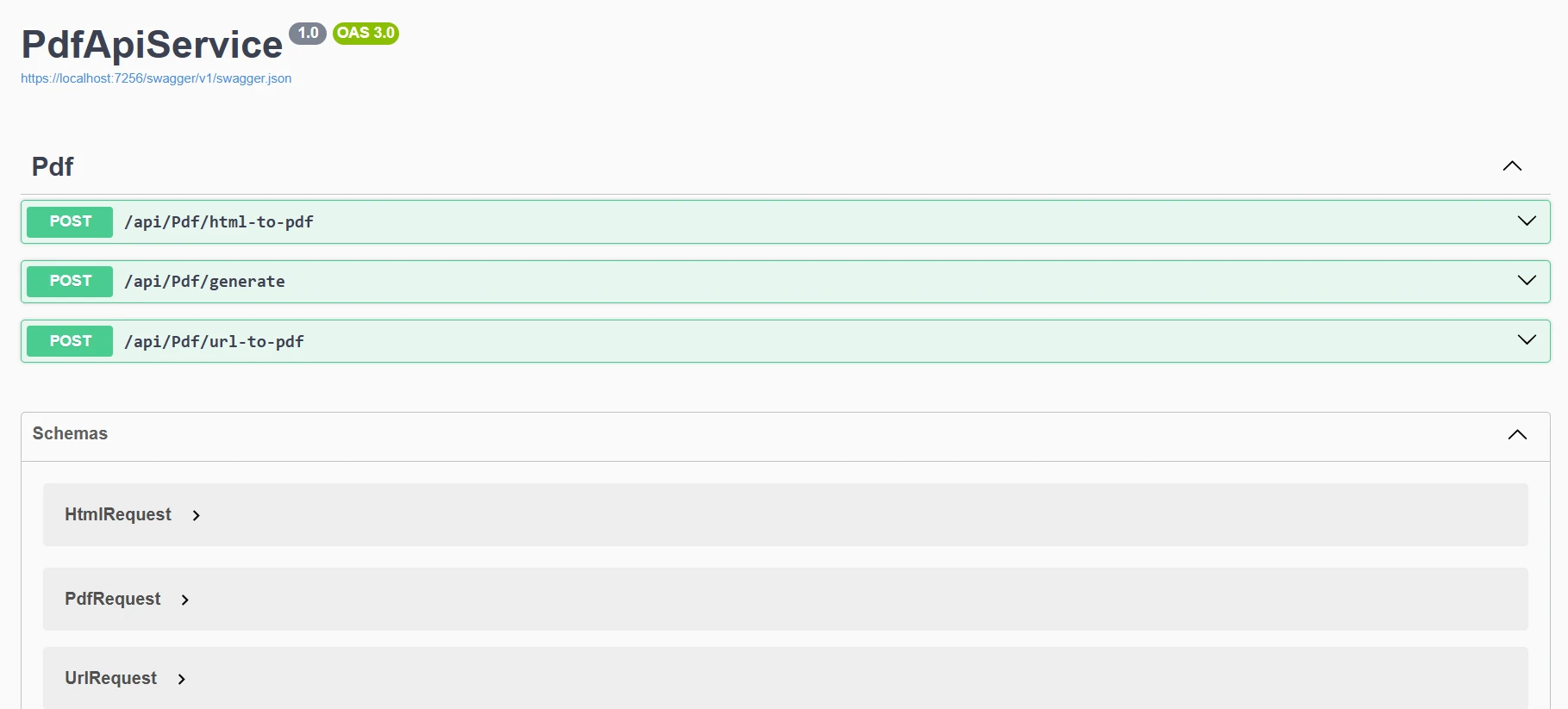
End Class在第一个文件中,我们设置了一个简单的API端点,将HTML转换为可下载的PDF。 当有人通过简单的POST请求将HTML内容发送到api/pdf/html-to-pdf路由时,PdfController将任务传递给专用的服务,将其转换为PDF。
一旦PDF创建完成,控制器将它作为一个准备好下载的文件返回给用户。请求本身是使用HtmlRequest模型结构化的,该模型携带原始HTML和用于最终文档的可选文件名。 简而言之,此设置使得客户端可以轻松发送HTML并立即获得一个精美的PDF作为返回。
更新您的Program.cs以注册PDF服务:
var builder = WebApplication.CreateBuilder(args);
builder.Services.AddControllers();
builder.Services.AddEndpointsApiExplorer();
builder.Services.AddSwaggerGen();
// Register PDF service
builder.Services.AddSingleton<IPdfService, PdfService>();
var app = builder.Build();
if (app.Environment.IsDevelopment())
{
    app.UseSwagger();
    app.UseSwaggerUI();
}
app.UseHttpsRedirection();
app.MapControllers();
app.Run();Imports Microsoft.AspNetCore.Builder
Imports Microsoft.Extensions.DependencyInjection
Dim builder = WebApplication.CreateBuilder(args)
builder.Services.AddControllers()
builder.Services.AddEndpointsApiExplorer()
builder.Services.AddSwaggerGen()
' Register PDF service
builder.Services.AddSingleton(Of IPdfService, PdfService)()
Dim app = builder.Build()
If app.Environment.IsDevelopment() Then
app.UseSwagger()
app.UseSwaggerUI()
End If
app.UseHttpsRedirection()
app.MapControllers()
app.Run()您的API应该支持基于客户端需求以不同方式返回PDF:
[HttpPost("generate")]
 public IActionResult GeneratePdf([FromBody] PdfRequest request)
 {
     var pdfBytes = _pdfService.GeneratePdfFromHtml(request.HtmlContent);
     switch (request.ResponseType?.ToLower())
     {
         case "base64":
             return Ok(new
             {
                 data = Convert.ToBase64String(pdfBytes),
                 filename = request.FileName
             });
         case "inline":
             return File(pdfBytes, "application/pdf");
         default: // download
             return File(pdfBytes, "application/pdf", request.FileName);
     }
}Imports Microsoft.AspNetCore.Mvc
<HttpPost("generate")>
Public Function GeneratePdf(<FromBody> request As PdfRequest) As IActionResult
Dim pdfBytes = _pdfService.GeneratePdfFromHtml(request.HtmlContent)
Select Case request.ResponseType?.ToLower()
Case "base64"
Return Ok(New With {
.data = Convert.ToBase64String(pdfBytes),
.filename = request.FileName
})
Case "inline"
Return File(pdfBytes, "application/pdf")
Case Else ' download
Return File(pdfBytes, "application/pdf", request.FileName)
End Select
End Function在这里,我们在控制器中添加了一个更灵活的PDF生成端点。 而不是总是强制下载文件,GeneratePdf方法让客户端选择他们希望结果如何返回。 此选项提供灵活性,允许PDF以多种格式显示:作为可下载文件,直接在浏览器中,或编码为Base64字符串以便在API中轻松使用。
请求由PdfRequest模型定义,该模型基于之前的HtmlRequest,并添加一个ResponseType选项。 总之,这使用户能够更好地控制如何接收他们的PDF,使API更加多样化和用户友好。
现在,当我们运行程序时,我们将在Swagger上看到此输出。
让我们扩展我们的服务以处理各种PDF生成场景:
[HttpPost("url-to-pdf")]
public async Task<IActionResult> ConvertUrlToPdf([FromBody] UrlRequest request)
{
    try
    {
        var pdfBytes = await Task.Run(() =>
            _pdfService.GeneratePdfFromUrl(request.Url));
        return File(pdfBytes, "application/pdf",
            $"{request.FileName ?? "website"}.pdf");
    }
    catch (Exception ex)
    {
        return BadRequest($"Failed to convert URL: {ex.Message}");
    }
}
public class UrlRequest
{
    public string Url { get; set; }
    public string FileName { get; set; }
}Imports System.Threading.Tasks
Imports Microsoft.AspNetCore.Mvc
<HttpPost("url-to-pdf")>
Public Async Function ConvertUrlToPdf(<FromBody> request As UrlRequest) As Task(Of IActionResult)
Try
Dim pdfBytes = Await Task.Run(Function() _pdfService.GeneratePdfFromUrl(request.Url))
Return File(pdfBytes, "application/pdf", $"{If(request.FileName, "website")}.pdf")
Catch ex As Exception
Return BadRequest($"Failed to convert URL: {ex.Message}")
End Try
End Function
Public Class UrlRequest
Public Property Url As String
Public Property FileName As String
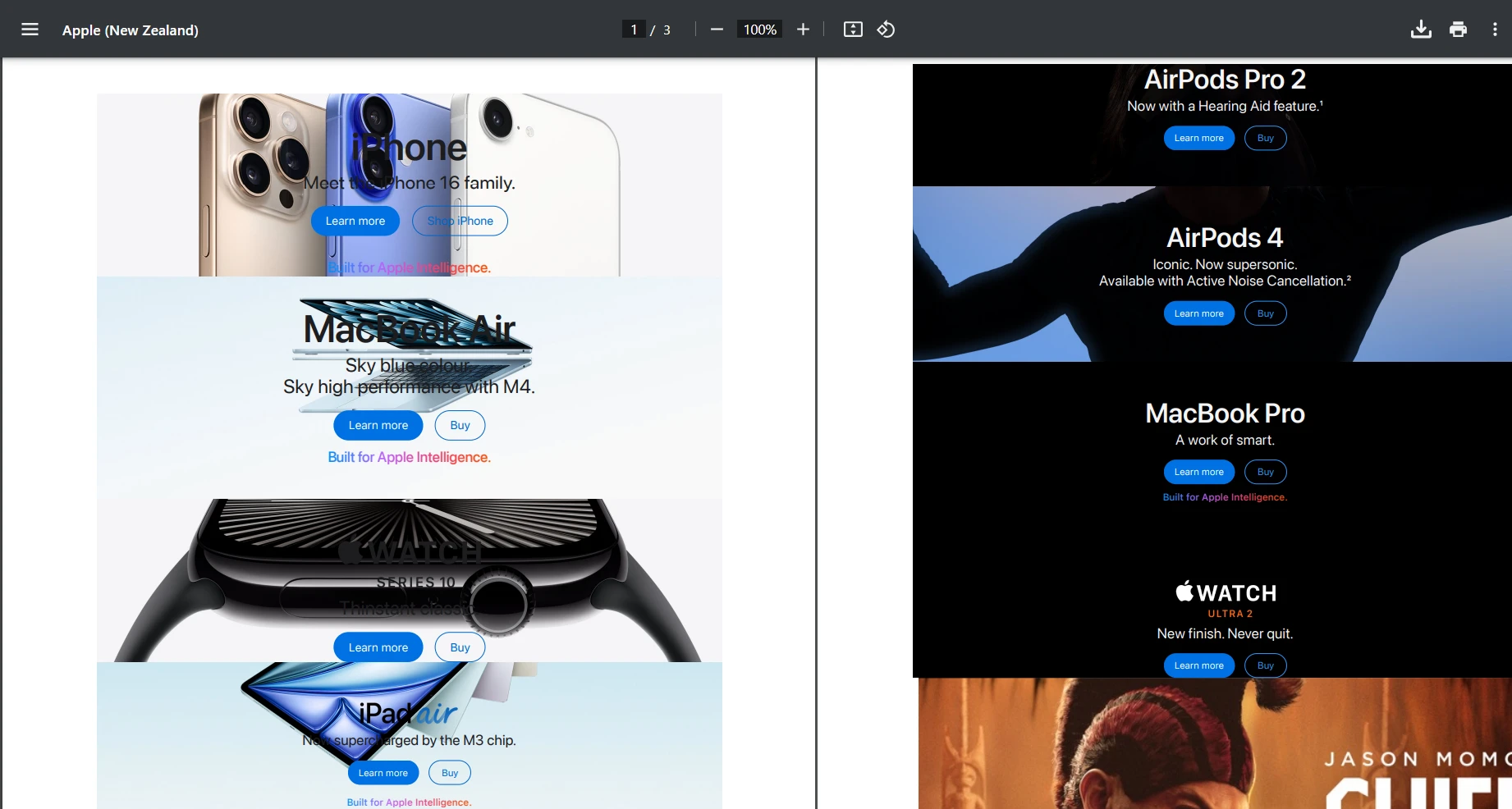
End Class此端点允许客户端发送一个URL并获取该网页的可下载PDF。 当POST /api/pdf/url-to-pdf请求到达时,控制器使用_pdfService后台将给定的URL转换为PDF字节,然后以文件下载的形式返回。 如果在转换过程中出现问题,它会优雅地响应一个清晰的错误信息。
让我们尝试使用网址"https://www.apple.com/nz"并测试POST请求。下面是我们获得的输出。
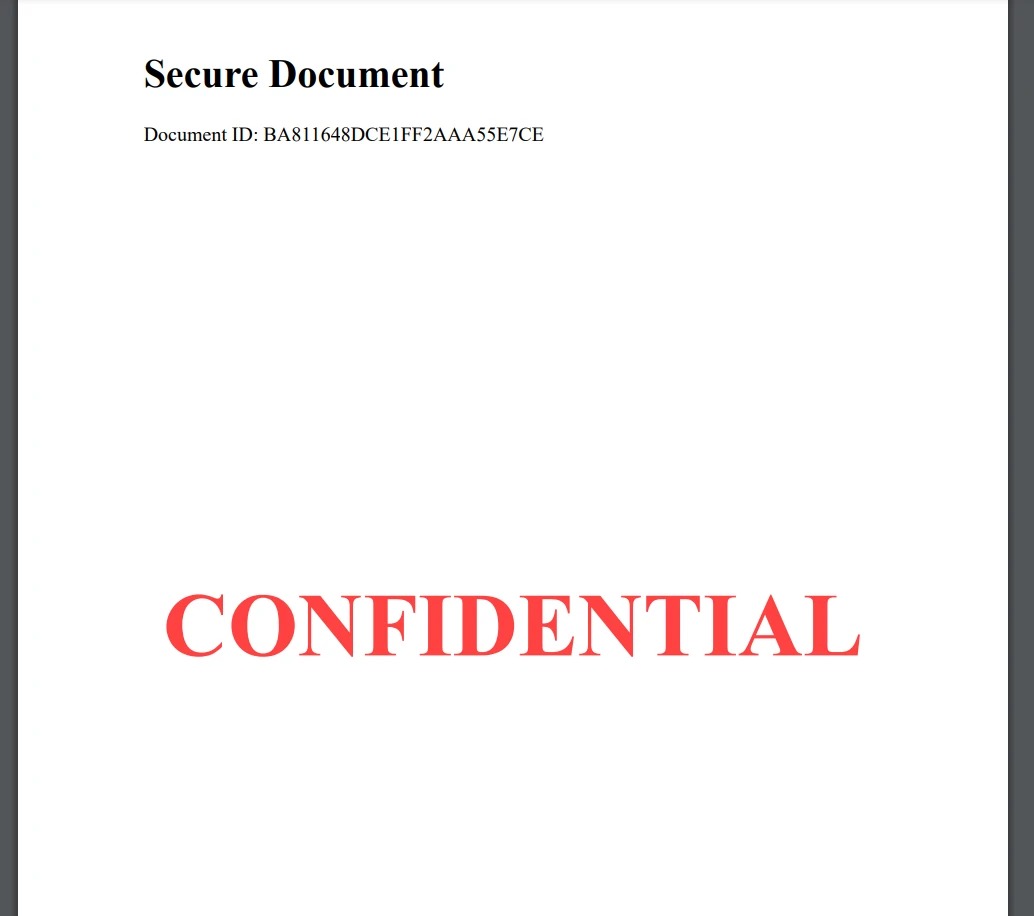
public byte[] AddWatermarkFromFile(string filePath, string watermarkText)
{
    // Load PDF directly from file
    var pdf = PdfDocument.FromFile(filePath);
    pdf.ApplyWatermark(
        $"<h1 style='color:red;font-size:72px;'>{watermarkText}</h1>",
        75,
        IronPdf.Editing.VerticalAlignment.Middle,
        IronPdf.Editing.HorizontalAlignment.Center
    );
    return pdf.BinaryData;
}Imports IronPdf
Public Function AddWatermarkFromFile(filePath As String, watermarkText As String) As Byte()
' Load PDF directly from file
Dim pdf = PdfDocument.FromFile(filePath)
pdf.ApplyWatermark(
$"<h1 style='color:red;font-size:72px;'>{watermarkText}</h1>",
75,
IronPdf.Editing.VerticalAlignment.Middle,
IronPdf.Editing.HorizontalAlignment.Center
)
Return pdf.BinaryData
End Function在这里,我们只是手动加载一个本地的文件以进行测试。 然而,您可以调整这个,以便您的PDF API生成PDF文档,然后轻松地应用自定义水印。
对于真实世界的应用程序,您通常需要从模板生成带有动态数据的PDFs:
[HttpPost("from-template")]
public IActionResult GenerateFromTemplate([FromBody] TemplateRequest request)
{
    // Simple template replacement
    var html = request.Template;
    foreach (var item in request.Data)
    {
        html = html.Replace($"{{{{{item.Key}}}}}", item.Value);
    }
    var pdfBytes = _pdfService.GeneratePdfFromHtml(html);
    return File(pdfBytes, "application/pdf", request.FileName);
}
public class TemplateRequest
{
    public string Template { get; set; }
    public Dictionary<string, string> Data { get; set; }
    public string FileName { get; set; } = "document.pdf";
}Imports Microsoft.AspNetCore.Mvc
<HttpPost("from-template")>
Public Function GenerateFromTemplate(<FromBody> request As TemplateRequest) As IActionResult
' Simple template replacement
Dim html As String = request.Template
For Each item In request.Data
html = html.Replace($"{{{{{item.Key}}}}}", item.Value)
Next
Dim pdfBytes As Byte() = _pdfService.GeneratePdfFromHtml(html)
Return File(pdfBytes, "application/pdf", request.FileName)
End Function
Public Class TemplateRequest
Public Property Template As String
Public Property Data As Dictionary(Of String, String)
Public Property FileName As String = "document.pdf"
End Class对于更高级的模板场景,请查看IronPDF的HTML到PDF文档。 您还可以探索CSHTML到PDF转换用于MVC应用程序和Razor到PDF用于Blazor应用程序。
在构建生产PDF API时,性能至关重要。 以下是关键的优化策略:
当构建涉及使用I/O操作的项目时,明智的做法是使用异步编码。 如果您的PDF内容来自外部资源,这尤其有用,例如:
这些操作可以阻塞线程,但使用异步可以防止您的API线程空闲等待。
例:
public async Task<byte[]> GeneratePdfFromHtmlAsync(string htmlContent)
{
    return await Task.Run(() =>
    {
        var pdf = _renderer.RenderHtmlAsPdf(htmlContent);
        return pdf.BinaryData;
    });
}Imports System.Threading.Tasks
Public Async Function GeneratePdfFromHtmlAsync(htmlContent As String) As Task(Of Byte())
Return Await Task.Run(Function()
Dim pdf = _renderer.RenderHtmlAsPdf(htmlContent)
Return pdf.BinaryData
End Function)
End Function配置IronPDF以获得最佳性能:
_renderer.RenderingOptions.EnableJavaScript = false; // If JS not needed
_renderer.RenderingOptions.CssMediaType = PdfCssMediaType.Print;
_renderer.RenderingOptions.RenderDelay = 0; // Remove if no JS
_renderer.RenderingOptions.Timeout = 30; // Set reasonable timeoutnet对于任何生产API,安全性都是至关重要的。 这里是一个简单的API密钥身份验证方法:
// Middleware/ApiKeyMiddleware.cs
public class ApiKeyMiddleware
{
    private readonly RequestDelegate _next;
    private const string ApiKeyHeader = "X-API-Key";
    public ApiKeyMiddleware(RequestDelegate next)
    {
        _next = next;
    }
    public async Task InvokeAsync(HttpContext context)
    {
        if (!context.Request.Headers.TryGetValue(ApiKeyHeader, out var apiKey))
        {
            context.Response.StatusCode = 401;
            await context.Response.WriteAsync("API Key required");
            return;
        }
        // Validate API key (in production, check against database)
        var validApiKey = context.RequestServices
            .GetRequiredService<IConfiguration>()["ApiKey"];
        if (apiKey != validApiKey)
        {
            context.Response.StatusCode = 403;
            await context.Response.WriteAsync("Invalid API Key");
            return;
        }
        await _next(context);
    }
}
// In Program.cs
app.UseMiddleware<ApiKeyMiddleware>();Imports Microsoft.AspNetCore.Http
Imports Microsoft.Extensions.Configuration
Imports System.Threading.Tasks
' Middleware/ApiKeyMiddleware.vb
Public Class ApiKeyMiddleware
Private ReadOnly _next As RequestDelegate
Private Const ApiKeyHeader As String = "X-API-Key"
Public Sub New(next As RequestDelegate)
_next = next
End Sub
Public Async Function InvokeAsync(context As HttpContext) As Task
Dim apiKey As String = Nothing
If Not context.Request.Headers.TryGetValue(ApiKeyHeader, apiKey) Then
context.Response.StatusCode = 401
Await context.Response.WriteAsync("API Key required")
Return
End If
' Validate API key (in production, check against database)
Dim validApiKey As String = context.RequestServices.GetRequiredService(Of IConfiguration)()("ApiKey")
If apiKey <> validApiKey Then
context.Response.StatusCode = 403
Await context.Response.WriteAsync("Invalid API Key")
Return
End If
Await _next(context)
End Function
End Class
' In Program.vb
app.UseMiddleware(Of ApiKeyMiddleware)()对于更高级的身份验证场景,请考虑:
让我们构建一个实际的发票生成端点,演示完整的实现。 此示例展示了如何使用生产.NET PDF API生成具有动态数据的专业发票。

首先,我们将在我们的Models文件夹中创建一个新文件。 在这里,我将其称之为Invoice.cs。 然后,将以下代码添加到您的新文件中。
public class Invoice
{
    public string InvoiceNumber { get; set; }
    public DateTime Date { get; set; }
    public string CustomerName { get; set; }
    public string CustomerAddress { get; set; }
    public List<InvoiceItem> Items { get; set; }
    public decimal Tax { get; set; }
}
public class InvoiceItem
{
    public string Description { get; set; }
    public int Quantity { get; set; }
    public decimal UnitPrice { get; set; }
    public decimal Total => Quantity * UnitPrice;
}Public Class Invoice
Public Property InvoiceNumber As String
Public Property [Date] As DateTime
Public Property CustomerName As String
Public Property CustomerAddress As String
Public Property Items As List(Of InvoiceItem)
Public Property Tax As Decimal
End Class
Public Class InvoiceItem
Public Property Description As String
Public Property Quantity As Integer
Public Property UnitPrice As Decimal
Public ReadOnly Property Total As Decimal
Get
Return Quantity * UnitPrice
End Get
End Property
End Class然后,我们将需要为我们的发票生成器创建一个新的服务文件。 在您的Services文件夹中,添加以下代码。 对于我的,我创建了一个名为InvoiceService.cs的新文件。 这段代码将处理我们的发票PDF文件的样式和布局。
public class InvoiceService
{
    private readonly ChromePdfRenderer _renderer;
    public InvoiceService()
    {
        _renderer = new ChromePdfRenderer();
        _renderer.RenderingOptions.MarginTop = 10;
        _renderer.RenderingOptions.MarginBottom = 10;
        _renderer.RenderingOptions.PrintHtmlBackgrounds = true;
    }
    public byte[] GenerateInvoice(Invoice invoice)
{
    var html = BuildInvoiceHtml(invoice);
    // Add footer with page numbers
    _renderer.RenderingOptions.HtmlFooter = new HtmlHeaderFooter
    {
        MaxHeight = 15,
        HtmlFragment = "<center><i>{page} of {total-pages}</i></center>",
        DrawDividerLine = true
    };
    var pdf = _renderer.RenderHtmlAsPdf(html);
    return pdf.BinaryData;
}
    private string BuildInvoiceHtml(Invoice invoice)
    {
        var subtotal = invoice.Items.Sum(i => i.Total);
        var taxAmount = subtotal * (invoice.Tax / 100);
        var total = subtotal + taxAmount;
        var itemsHtml = string.Join("", invoice.Items.Select(item =>
            $@"<tr>
                <td>{item.Description}</td>
                <td class='text-center'>{item.Quantity}</td>
                <td class='text-right'>${item.UnitPrice:F2}</td>
                <td class='text-right'>${item.Total:F2}</td>
            </tr>"));
        return $@"
        <!DOCTYPE html>
        <html>
        <head>
            <style>
                body {{font-family: Arial, sans-serif;}}
                .invoice-header {{background-color: #f8f9fa;
                    padding: 20px;
                    margin-bottom: 20px;}}
                table {{width: 100%;
                    border-collapse: collapse;}}
                th, td {{padding: 10px;
                    border-bottom: 1px solid #ddd;}}
                th {{background-color: #007bff;
                    color: white;}}
                .text-right {{text-align: right;}}
                .text-center {{text-align: center;}}
                .total-section {{margin-top: 20px;
                    text-align: right;}}
            </style>
        </head>
        <body>
            <div class='invoice-header'>
                <h1>Invoice #{invoice.InvoiceNumber}</h1>
                <p>Date: {invoice.Date:yyyy-MM-dd}</p>
            </div>
            <div>
                <h3>Bill To:</h3>
                <p>{invoice.CustomerName}<br/>{invoice.CustomerAddress}</p>
            </div>
            <table>
                <thead>
                    <tr>
                        <th>Description</th>
                        <th>Quantity</th>
                        <th>Unit Price</th>
                        <th>Total</th>
                    </tr>
                </thead>
                <tbody>
                    {itemsHtml}
                </tbody>
            </table>
            <div class='total-section'>
                <p>Subtotal: ${subtotal:F2}</p>
                <p>Tax ({invoice.Tax}%): ${taxAmount:F2}</p>
                <h3>Total: ${total:F2}</h3>
            </div>
        </body>
        </html>";
    }
}最后,您将需要创建一个新的控制器,以便通过API访问并创建一个新的发票。
[ApiController]
[Route("api/[controller]")]
public class InvoiceController : ControllerBase
{
    private readonly InvoiceService _invoiceService;
    public InvoiceController(InvoiceService invoiceService)
    {
        _invoiceService = invoiceService;
    }
    [HttpPost("generate")]
    public IActionResult GenerateInvoice([FromBody] Invoice invoice)
    {
        try
        {
            var pdfBytes = _invoiceService.GenerateInvoice(invoice);
            var fileName = $"Invoice_{invoice.InvoiceNumber}.pdf";
            return File(pdfBytes, "application/pdf", fileName);
        }
        catch (Exception ex)
        {
            return StatusCode(500, $"Error generating invoice: {ex.Message}");
        }
    }
}Imports Microsoft.AspNetCore.Mvc
<ApiController>
<Route("api/[controller]")>
Public Class InvoiceController
Inherits ControllerBase
Private ReadOnly _invoiceService As InvoiceService
Public Sub New(invoiceService As InvoiceService)
_invoiceService = invoiceService
End Sub
<HttpPost("generate")>
Public Function GenerateInvoice(<FromBody> invoice As Invoice) As IActionResult
Try
Dim pdfBytes = _invoiceService.GenerateInvoice(invoice)
Dim fileName = $"Invoice_{invoice.InvoiceNumber}.pdf"
Return File(pdfBytes, "application/pdf", fileName)
Catch ex As Exception
Return StatusCode(500, $"Error generating invoice: {ex.Message}")
End Try
End Function
End Class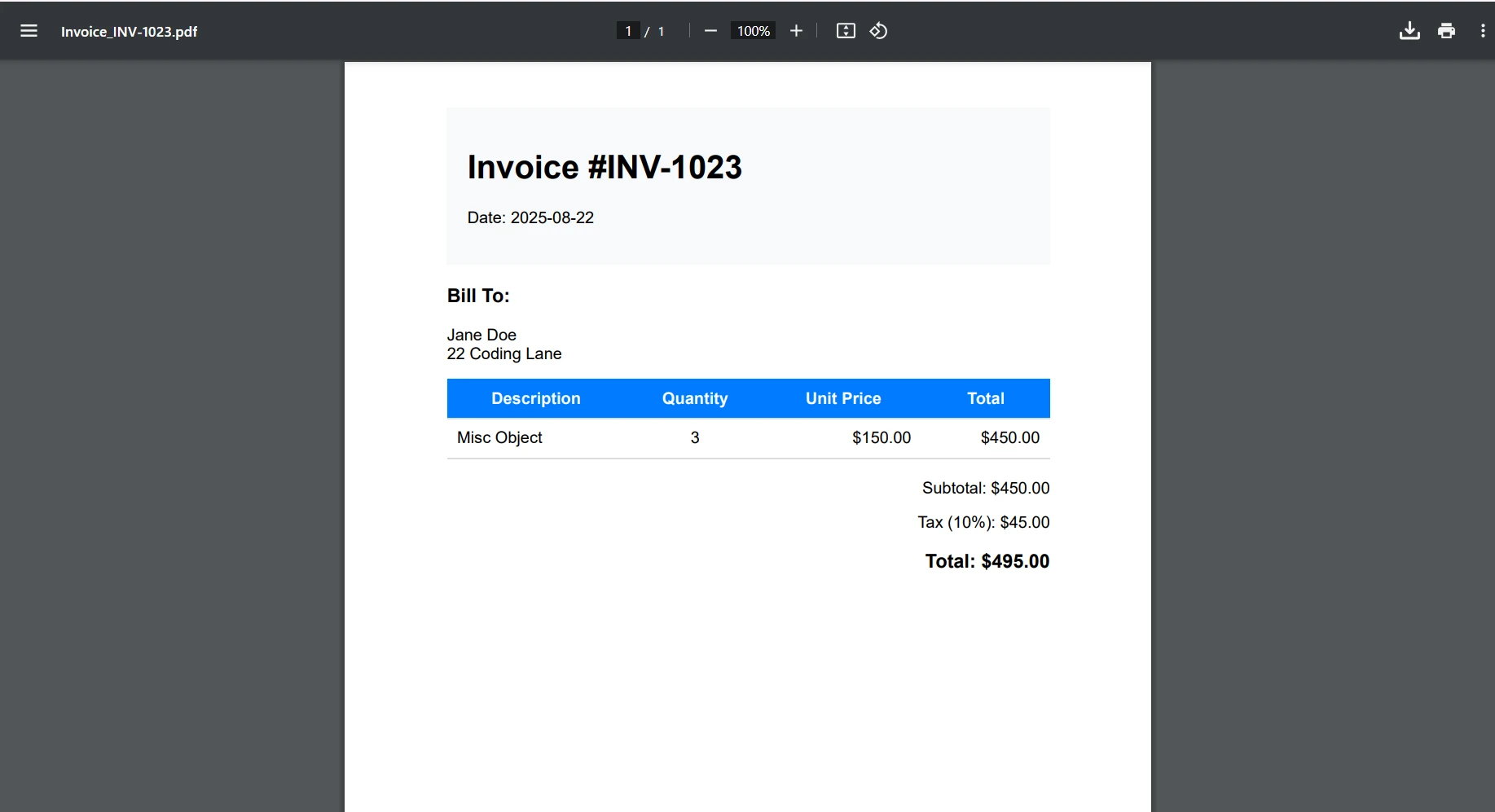
虽然本教程侧重于本地开发,但这里是关于将您的PDF API容器化的简要概述:
FROM mcr.microsoft.com/dotnet/aspnet:6.0 AS base
WORKDIR /app
EXPOSE 80
FROM mcr.microsoft.com/dotnet/sdk:6.0 AS build
WORKDIR /src
COPY ["PdfApiService.csproj", "."]
RUN dotnet restore
COPY . .
RUN dotnet build -c Release -o /app/build
FROM build AS publish
RUN dotnet publish -c Release -o /app/publish
FROM base AS final
WORKDIR /app
COPY --from=publish /app/publish .
# IronPDF requires additional dependencies on Linux
RUN apt-get update && apt-get install -y \
    libgdiplus \
    libc6-dev \
    libx11-dev \
    && rm -rf /var/lib/apt/lists/*
ENTRYPOINT ["dotnet", "PdfApiService.dll"]The provided code is a Dockerfile written for building and running a .NET application, not C# code. Dockerfiles are not converted to VB.NET as they are not programming language code but configuration scripts for Docker. If you have C# code that needs conversion to VB.NET, please provide that code instead.有关您的.NET PDF API的详细部署指南,请参阅:
为了设计更具容错性的程序,最佳实践是实施全局错误处理程序,以获得一致的错误响应,例如下面所示:
// Middleware/ErrorHandlingMiddleware.cs
public class ErrorHandlingMiddleware
{
    private readonly RequestDelegate _next;
    public ErrorHandlingMiddleware(RequestDelegate next)
    {
        _next = next;
    }
    public async Task InvokeAsync(HttpContext context)
    {
        try
        {
            await _next(context);
        }
        catch (Exception ex)
        {
            await HandleExceptionAsync(context, ex);
        }
    }
    private static async Task HandleExceptionAsync(HttpContext context, Exception ex)
    {
        context.Response.ContentType = "application/json";
        context.Response.StatusCode = 500;
        var response = new
        {
            error = "An error occurred processing your request",
            message = ex.Message
        };
        await context.Response.WriteAsync(JsonSerializer.Serialize(response));
    }
}Imports System.Text.Json
Imports Microsoft.AspNetCore.Http
Imports System.Threading.Tasks
Public Class ErrorHandlingMiddleware
Private ReadOnly _next As RequestDelegate
Public Sub New(next As RequestDelegate)
_next = next
End Sub
Public Async Function InvokeAsync(context As HttpContext) As Task
Try
Await _next(context)
Catch ex As Exception
Await HandleExceptionAsync(context, ex)
End Try
End Function
Private Shared Async Function HandleExceptionAsync(context As HttpContext, ex As Exception) As Task
context.Response.ContentType = "application/json"
context.Response.StatusCode = 500
Dim response = New With {
.error = "An error occurred processing your request",
.message = ex.Message
}
Await context.Response.WriteAsync(JsonSerializer.Serialize(response))
End Function
End Class对于特定的IronPDF故障排除场景,请参阅IronPDF故障排除指南。
您现在已经构建了一个强大的.NET PDF API,使用ASP.NET Core和IronPDF可以处理多种文档生成场景。 这个REST API为您的应用程序提供集中化PDF操作的坚实基础。
关键要点:
IronPDF允许开发人员高效地创建PDF文档、保存PDF文件和转换HTML,使其成为现代.NET Framework应用程序中的必备PDF文档API。
准备好在您的生产.NET PDF API中实施IronPDF了吗? 以下是您的下一步操作:
今天就构建您的.NET PDF API,并通过IronPDF在整个应用程序生态系统中简化文档生成!

Curtis Chau 拥有卡尔顿大学的计算机科学学士学位,专注于前端开发,精通 Node.js、TypeScript、JavaScript 和 React。他热衷于打造直观且美观的用户界面,喜欢使用现代框架并创建结构良好、视觉吸引力强的手册。

当您需要PDF看起来像HTML时,速度快。















