




更新日 2026年9月4日
月次口座明細書をPDF文書として生成する
IronPDF C# PDFライブラリを使用することで、開発者は外部サービスに依存することなく、.NETプロジェクト内でHTMLを信頼性の高いPDFファイルに変換することができます。
詳しく読む

現代のアプリケーションを扱うとき、.NET開発者は集中化されたPDF生成サービスを構築する必要があるかもしれません。請求書、レポート、証明書、契約書を生成するにせよ、専用 for .NET PDF APIを持つことは、PDFファイルを効率的に管理する上で有益です。 では、PDF生成タスクをどのように改善することができるのでしょうか? これは、一貫性、保守性、スケーラビリティをデスクトップおよびウェブアプリケーション全体に提供することによって行われます。 これまでにないほど、ドキュメントのコンテンツ、PDFページ、PDFフォームフィールドを管理することが簡単になりました。
このチュートリアルでは、ASP.NET CoreとIronPDF、強力な.NET PDFライブラリを使用して、実運用対応のPDF APIを構築する方法を学びます。 HTMLからPDFを生成したり、文書をマージしたり、透かしを追加したり、Web APIでのさまざまな実践的なPDF生成シナリオを処理できるRESTfulエンドポイントを作成します。
コードに飛び込む前に、専用PDF APIを作成する意義を理解しましょう:
*集中化されたロジック: PDF 生成ロジックはすべて 1 か所にまとめられており、メンテナンスと更新が容易になります。 ***マイクロサービスアーキテクチャ:**さまざまなアプリケーションが PDF 機能を必要とするサービス指向アーキテクチャに最適です。
構築開始の準備はできましたか? IronPDFの無料トライアルをダウンロードして、このチュートリアルに従って、.NET FrameworkプロジェクトでPDFファイルをプログラムで作成する方法を学びましょう。
IronPDFは、.NET開発者にとって、Web APIプロジェクトでのPDF生成をシンプルかつ確実にする数々の機能セットを提供する卓越したPDFライブラリです。 これはChromeのレンダリングエンジンに基づいて構築されており、HTMLからPDFへの変換をピクセル単位で完璧に行い、しばしば数行のコードで完了します。 すべてのスタイリング、JavaScript実行、レスポンシブレイアウトを維持しながら、これを実行します。
IronPDFが.NET PDF API開発に理想的な理由となる主な機能:
新しいASP.NET Core Web APIプロジェクトを作成し、必要なパッケージをインストールするところから始めましょう。
まず、PDF生成ツールを構築するプロジェクトを作成しましょう。
dotnet new webapi -n PdfApiService
cd PdfApiService次のステップは、NuGetを介してIronPDFをプロジェクトに追加することです。
dotnet add package IronPdfまたは、Visual StudioのNuGetパッケージマネージャーコンソールを使用して:
C#開発の重要な側面は、クリーンでよく構造化されたプロジェクトフォルダを維持することです。 例えば:
HTMLをPDF形式に変換するシンプルなエンドポイントを構築しましょう。 まず、サービスインターフェースと実装を作成します:
最初に、IPdfService.csファイルに以下を追加します:
public interface IPdfService
{
    byte[] GeneratePdfFromHtml(string htmlContent);
    byte[] GeneratePdfFromUrl(string url);
}Public Interface IPdfService
Function GeneratePdfFromHtml(htmlContent As String) As Byte()
Function GeneratePdfFromUrl(url As String) As Byte()
End Interface続いて、PdfService.csファイルに以下を追加します:
using IronPdf;
public class PdfService : IPdfService
{
    private readonly ChromePdfRenderer _renderer;
    public PdfService()
    {
        _renderer = new ChromePdfRenderer();
        // Configure rendering options for optimal PDF generation in .NET
        _renderer.RenderingOptions.MarginTop = 20;
        _renderer.RenderingOptions.MarginBottom = 20;
        _renderer.RenderingOptions.PrintHtmlBackgrounds = true;
    }
    public byte[] GeneratePdfFromHtml(string htmlContent)
    {
        // Generate PDF from HTML using the .NET PDF API
        var pdf = _renderer.RenderHtmlAsPdf(htmlContent);
        return pdf.BinaryData;
    }
    public byte[] GeneratePdfFromUrl(string url)
    {
        // Convert URL to PDF in the REST API
        var pdf = _renderer.RenderUrlAsPdf(url);
        return pdf.BinaryData;
    }
}Imports IronPdf
Public Class PdfService
Implements IPdfService
Private ReadOnly _renderer As ChromePdfRenderer
Public Sub New()
_renderer = New ChromePdfRenderer()
' Configure rendering options for optimal PDF generation in .NET
_renderer.RenderingOptions.MarginTop = 20
_renderer.RenderingOptions.MarginBottom = 20
_renderer.RenderingOptions.PrintHtmlBackgrounds = True
End Sub
Public Function GeneratePdfFromHtml(htmlContent As String) As Byte()
' Generate PDF from HTML using the .NET PDF API
Dim pdf = _renderer.RenderHtmlAsPdf(htmlContent)
Return pdf.BinaryData
End Function
Public Function GeneratePdfFromUrl(url As String) As Byte()
' Convert URL to PDF in the REST API
Dim pdf = _renderer.RenderUrlAsPdf(url)
Return pdf.BinaryData
End Function
End ClassPdfServiceはHTMLをPDFに変換する主要なプロセスを担当します。 IronPDFのChromePdfRendererを利用して、ページの余白や背景レンダリングなどの適切なデフォルト設定が施されたドキュメントを作成します。
コントローラーが生のHTMLを通過させると、サービスはIronPDFを使用してそれをプロフェッショナル品質のPDFにレンダリングし、その結果をダウンロード準備が整ったバイトデータとして返します。 また、URLを直接PDFに変換して、ウェブページ全体を処理することも可能です。
次に、APIのコントローラを作成する時が来ました。 これにより、HTMLからPDFファイルを生成するAPIエンドポイントが提供されます。 その後、PDFドキュメントをシステムにダウンロードして保存し、さらなる使用や共有が可能です。
// Controllers/PdfController.cs
using Microsoft.AspNetCore.Mvc;
[ApiController]
[Route("api/[controller]")]
public class PdfController : ControllerBase
{
    private readonly IPdfService _pdfService;
    public PdfController(IPdfService pdfService)
    {
        _pdfService = pdfService;
    }
    [HttpPost("html-to-pdf")]
    public IActionResult ConvertHtmlToPdf([FromBody] HtmlRequest request)
    {
        try
        {
            var pdfBytes = _pdfService.GeneratePdfFromHtml(request.HtmlContent);
            // Return as downloadable file
            return File(pdfBytes, "application/pdf", "document.pdf");
        }
        catch (Exception ex)
        {
            return BadRequest($"Error generating PDF: {ex.Message}");
        }
    }
}Imports Microsoft.AspNetCore.Mvc
<ApiController>
<Route("api/[controller]")>
Public Class PdfController
Inherits ControllerBase
Private ReadOnly _pdfService As IPdfService
Public Sub New(pdfService As IPdfService)
_pdfService = pdfService
End Sub
<HttpPost("html-to-pdf")>
Public Function ConvertHtmlToPdf(<FromBody> request As HtmlRequest) As IActionResult
Try
Dim pdfBytes = _pdfService.GeneratePdfFromHtml(request.HtmlContent)
' Return as downloadable file
Return File(pdfBytes, "application/pdf", "document.pdf")
Catch ex As Exception
Return BadRequest($"Error generating PDF: {ex.Message}")
End Try
End Function
End Class続いて、HtmlRequest.csファイルに以下を追加します:
// Models/HtmlRequest.cs
public class HtmlRequest
{
    public string HtmlContent { get; set; }
    public string FileName { get; set; } = "document.pdf";
}' Models/HtmlRequest.vb
Public Class HtmlRequest
Public Property HtmlContent As String
Public Property FileName As String = "document.pdf"
End Class最初のファイルでは、HTMLをダウンロード可能なPDFに変換するシンプルなAPIエンドポイントを設定します。 誰かがapi/pdf/html-to-pdfルートに簡単なPOSTリクエストとともにHTMLコンテンツを送信すると、PdfControllerはそれをPDFに変換する仕事を専用のサービスに渡します。
PDFが作成されると、コントローラはそれをダウンロード準備が整ったファイルとしてユーザーに戻します。 リクエスト自体はHtmlRequestモデルを使用して構成され、元のHTML全体と最終ドキュメントのオプションのファイル名を持ち運びます。 要するに、このセットアップにより、クライアントはHTMLを送信してすぐに洗練されたPDFを取得することが容易になります。
Program.csを更新してPDFサービスを登録します:
var builder = WebApplication.CreateBuilder(args);
builder.Services.AddControllers();
builder.Services.AddEndpointsApiExplorer();
builder.Services.AddSwaggerGen();
// Register PDF service
builder.Services.AddSingleton<IPdfService, PdfService>();
var app = builder.Build();
if (app.Environment.IsDevelopment())
{
    app.UseSwagger();
    app.UseSwaggerUI();
}
app.UseHttpsRedirection();
app.MapControllers();
app.Run();Imports Microsoft.AspNetCore.Builder
Imports Microsoft.Extensions.DependencyInjection
Dim builder = WebApplication.CreateBuilder(args)
builder.Services.AddControllers()
builder.Services.AddEndpointsApiExplorer()
builder.Services.AddSwaggerGen()
' Register PDF service
builder.Services.AddSingleton(Of IPdfService, PdfService)()
Dim app = builder.Build()
If app.Environment.IsDevelopment() Then
app.UseSwagger()
app.UseSwaggerUI()
End If
app.UseHttpsRedirection()
app.MapControllers()
app.Run()APIは、クライアントのニーズに基づいてPDFを返すさまざまな方法をサポートすべきです:
[HttpPost("generate")]
 public IActionResult GeneratePdf([FromBody] PdfRequest request)
 {
     var pdfBytes = _pdfService.GeneratePdfFromHtml(request.HtmlContent);
     switch (request.ResponseType?.ToLower())
     {
         case "base64":
             return Ok(new
             {
                 data = Convert.ToBase64String(pdfBytes),
                 filename = request.FileName
             });
         case "inline":
             return File(pdfBytes, "application/pdf");
         default: // download
             return File(pdfBytes, "application/pdf", request.FileName);
     }
}Imports Microsoft.AspNetCore.Mvc
<HttpPost("generate")>
Public Function GeneratePdf(<FromBody> request As PdfRequest) As IActionResult
Dim pdfBytes = _pdfService.GeneratePdfFromHtml(request.HtmlContent)
Select Case request.ResponseType?.ToLower()
Case "base64"
Return Ok(New With {
.data = Convert.ToBase64String(pdfBytes),
.filename = request.FileName
})
Case "inline"
Return File(pdfBytes, "application/pdf")
Case Else ' download
Return File(pdfBytes, "application/pdf", request.FileName)
End Select
End Functionここで、コントローラにより柔軟なPDF生成エンドポイントを追加しました。 ファイルダウンロードを強制する代わりに、GeneratePdfメソッドはクライアントに結果をどのように返したいか選ばせます。 このオプションは柔軟性を提供し、PDFをさまざまな形式で表示できるようにします:ダウンロード可能なファイルとして、ブラウザ内で直接表示、またはAPIで簡単に使用できるBase64文字列として。
リクエストはPdfRequestモデルによって定義され、以前のHtmlRequestに基づき、ResponseTypeオプションを追加します。 要するに、これにより、ユーザーがPDFを受け取る方法に関する制御が強まり、APIがもっと多様性を持ち、ユーザーフレンドリーになります。
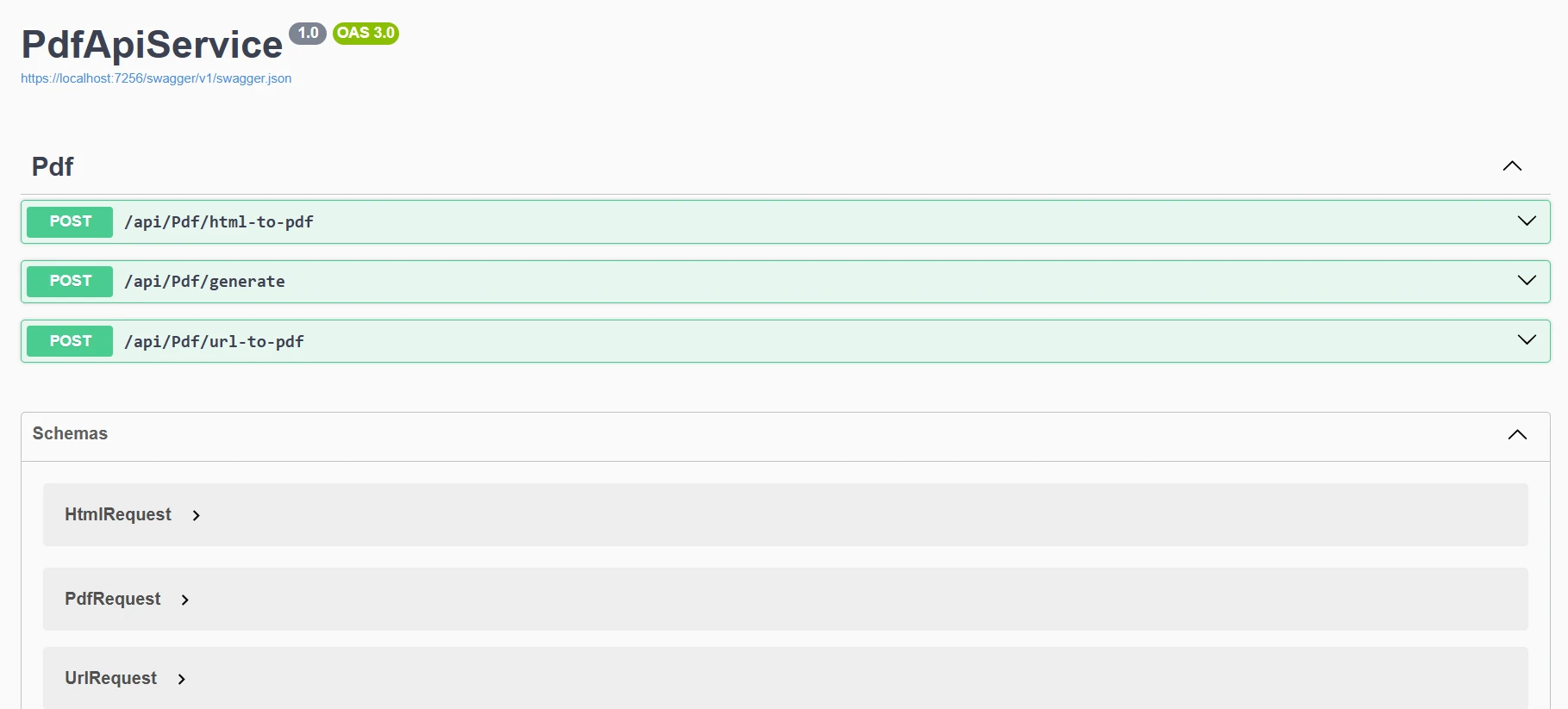
今プログラムを実行すると、Swaggerでこの出力が表示されます。
さまざまなPDF生成シナリオを処理するために、サービスを拡張しましょう:
[HttpPost("url-to-pdf")]
public async Task<IActionResult> ConvertUrlToPdf([FromBody] UrlRequest request)
{
    try
    {
        var pdfBytes = await Task.Run(() =>
            _pdfService.GeneratePdfFromUrl(request.Url));
        return File(pdfBytes, "application/pdf",
            $"{request.FileName ?? "website"}.pdf");
    }
    catch (Exception ex)
    {
        return BadRequest($"Failed to convert URL: {ex.Message}");
    }
}
public class UrlRequest
{
    public string Url { get; set; }
    public string FileName { get; set; }
}Imports System.Threading.Tasks
Imports Microsoft.AspNetCore.Mvc
<HttpPost("url-to-pdf")>
Public Async Function ConvertUrlToPdf(<FromBody> request As UrlRequest) As Task(Of IActionResult)
Try
Dim pdfBytes = Await Task.Run(Function() _pdfService.GeneratePdfFromUrl(request.Url))
Return File(pdfBytes, "application/pdf", $"{If(request.FileName, "website")}.pdf")
Catch ex As Exception
Return BadRequest($"Failed to convert URL: {ex.Message}")
End Try
End Function
Public Class UrlRequest
Public Property Url As String
Public Property FileName As String
End Classこのエンドポイントは、クライアントがURLを送信すると、そのウェブページのダウンロード可能なPDFを返します。 POST /api/pdf/url-to-pdf リクエストが届くと、コントローラはバックグラウンドで指定されたURLをPDFバイトに変換するために _pdfService を使用し、それをファイルダウンロードとして返します。 変換中に何かがうまくいかなかった場合、明確なエラーメッセージで優雅に応答します。
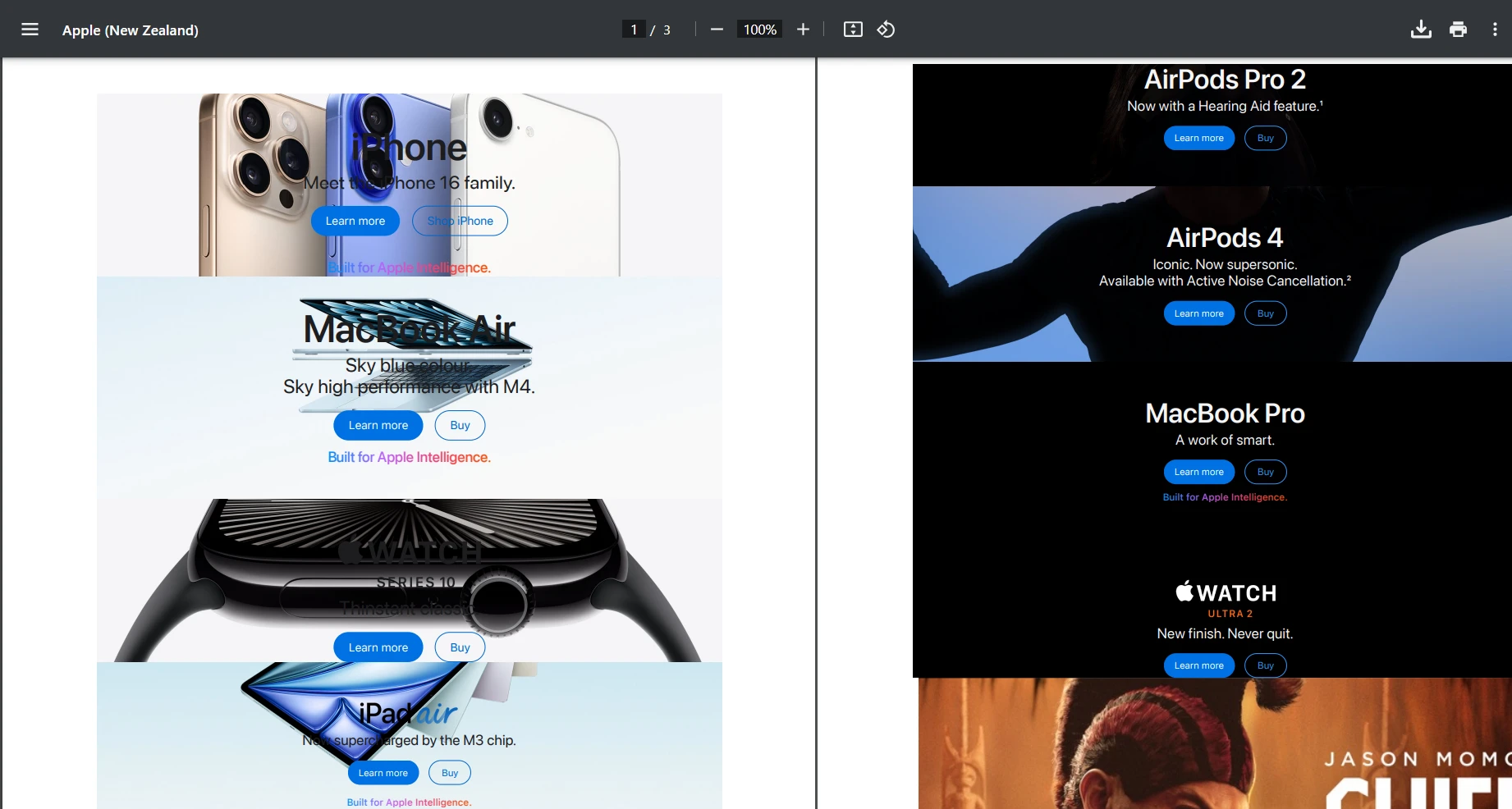
"https://www.apple.com/nz" のURLを使用してPOSTリクエストを試してみましょう。以下は取得した出力です。
public byte[] AddWatermarkFromFile(string filePath, string watermarkText)
{
    // Load PDF directly from file
    var pdf = PdfDocument.FromFile(filePath);
    pdf.ApplyWatermark(
        $"<h1 style='color:red;font-size:72px;'>{watermarkText}</h1>",
        75,
        IronPdf.Editing.VerticalAlignment.Middle,
        IronPdf.Editing.HorizontalAlignment.Center
    );
    return pdf.BinaryData;
}Imports IronPdf
Public Function AddWatermarkFromFile(filePath As String, watermarkText As String) As Byte()
' Load PDF directly from file
Dim pdf = PdfDocument.FromFile(filePath)
pdf.ApplyWatermark(
$"<h1 style='color:red;font-size:72px;'>{watermarkText}</h1>",
75,
IronPdf.Editing.VerticalAlignment.Middle,
IronPdf.Editing.HorizontalAlignment.Center
)
Return pdf.BinaryData
End Functionここでは、テスト目的のためにローカルファイルを手動で読み込んでいます。 ただし、PDF APIでPDFドキュメントを生成し、それにカスタムの透かしを適用するよう調整することができます。

実際の世界のアプリケーションでは、動的データを含むテンプレートからPDFを生成する必要がよくあります:
[HttpPost("from-template")]
public IActionResult GenerateFromTemplate([FromBody] TemplateRequest request)
{
    // Simple template replacement
    var html = request.Template;
    foreach (var item in request.Data)
    {
        html = html.Replace($"{{{{{item.Key}}}}}", item.Value);
    }
    var pdfBytes = _pdfService.GeneratePdfFromHtml(html);
    return File(pdfBytes, "application/pdf", request.FileName);
}
public class TemplateRequest
{
    public string Template { get; set; }
    public Dictionary<string, string> Data { get; set; }
    public string FileName { get; set; } = "document.pdf";
}Imports Microsoft.AspNetCore.Mvc
<HttpPost("from-template")>
Public Function GenerateFromTemplate(<FromBody> request As TemplateRequest) As IActionResult
' Simple template replacement
Dim html As String = request.Template
For Each item In request.Data
html = html.Replace($"{{{{{item.Key}}}}}", item.Value)
Next
Dim pdfBytes As Byte() = _pdfService.GeneratePdfFromHtml(html)
Return File(pdfBytes, "application/pdf", request.FileName)
End Function
Public Class TemplateRequest
Public Property Template As String
Public Property Data As Dictionary(Of String, String)
Public Property FileName As String = "document.pdf"
End ClassRazor、Handlebars、他のエンジンを使用した高度なテンプレートシナリオについては、IronPDFのHTMLからPDFへのドキュメンテーションをご確認ください。 また、MVCアプリケーションでのCSHTMLからPDF変換や、BlazorアプリケーションでのRazorからPDF変換を探索することもできます。
本番PDF APIを構築する際には、パフォーマンスが重要です。 最適化のための重要な戦略は以下の通りです:
I/Oオペレーションを含むプロジェクトを構築する際には、非同期コーディングを使用するのが賢明です。 これは特に、PDFコンテンツが外部リソースから来る場合に役立ちます:
これらのオペレーションはスレッドをブロックする可能性がありますが、非同期を使用することでAPIスレッドが待機状態になることを防ぎます。
例:
public async Task<byte[]> GeneratePdfFromHtmlAsync(string htmlContent)
{
    return await Task.Run(() =>
    {
        var pdf = _renderer.RenderHtmlAsPdf(htmlContent);
        return pdf.BinaryData;
    });
}Imports System.Threading.Tasks
Public Async Function GeneratePdfFromHtmlAsync(htmlContent As String) As Task(Of Byte())
Return Await Task.Run(Function()
Dim pdf = _renderer.RenderHtmlAsPdf(htmlContent)
Return pdf.BinaryData
End Function)
End FunctionIronPDFを最適なパフォーマンスに設定します:
_renderer.RenderingOptions.EnableJavaScript = false; // If JS not needed
_renderer.RenderingOptions.CssMediaType = PdfCssMediaType.Print;
_renderer.RenderingOptions.RenderDelay = 0; // Remove if no JS
_renderer.RenderingOptions.Timeout = 30; // Set reasonable timeoutnetセキュリティは、どの本番APIにおいても不可欠です。 シンプルなAPIキーベースの認証アプローチは以下の通りです:
// Middleware/ApiKeyMiddleware.cs
public class ApiKeyMiddleware
{
    private readonly RequestDelegate _next;
    private const string ApiKeyHeader = "X-API-Key";
    public ApiKeyMiddleware(RequestDelegate next)
    {
        _next = next;
    }
    public async Task InvokeAsync(HttpContext context)
    {
        if (!context.Request.Headers.TryGetValue(ApiKeyHeader, out var apiKey))
        {
            context.Response.StatusCode = 401;
            await context.Response.WriteAsync("API Key required");
            return;
        }
        // Validate API key (in production, check against database)
        var validApiKey = context.RequestServices
            .GetRequiredService<IConfiguration>()["ApiKey"];
        if (apiKey != validApiKey)
        {
            context.Response.StatusCode = 403;
            await context.Response.WriteAsync("Invalid API Key");
            return;
        }
        await _next(context);
    }
}
// In Program.cs
app.UseMiddleware<ApiKeyMiddleware>();Imports Microsoft.AspNetCore.Http
Imports Microsoft.Extensions.Configuration
Imports System.Threading.Tasks
' Middleware/ApiKeyMiddleware.vb
Public Class ApiKeyMiddleware
Private ReadOnly _next As RequestDelegate
Private Const ApiKeyHeader As String = "X-API-Key"
Public Sub New(next As RequestDelegate)
_next = next
End Sub
Public Async Function InvokeAsync(context As HttpContext) As Task
Dim apiKey As String = Nothing
If Not context.Request.Headers.TryGetValue(ApiKeyHeader, apiKey) Then
context.Response.StatusCode = 401
Await context.Response.WriteAsync("API Key required")
Return
End If
' Validate API key (in production, check against database)
Dim validApiKey As String = context.RequestServices.GetRequiredService(Of IConfiguration)()("ApiKey")
If apiKey <> validApiKey Then
context.Response.StatusCode = 403
Await context.Response.WriteAsync("Invalid API Key")
Return
End If
Await _next(context)
End Function
End Class
' In Program.vb
app.UseMiddleware(Of ApiKeyMiddleware)()高度な認証シナリオを検討してください:
完全な実装を示す実用的な請求書生成エンドポイントを構築しましょう。 この例はどのように本番環境 for .NET PDF APIが動的データを持つプロフェッショナルな請求書を生成できるか示しています。

まず、Modelsフォルダ内に新しいファイルを作成します。 ここでは、自分のファイルをInvoice.csと呼びました。 その後、新しいファイルに次のコードを追加します。
public class Invoice
{
    public string InvoiceNumber { get; set; }
    public DateTime Date { get; set; }
    public string CustomerName { get; set; }
    public string CustomerAddress { get; set; }
    public List<InvoiceItem> Items { get; set; }
    public decimal Tax { get; set; }
}
public class InvoiceItem
{
    public string Description { get; set; }
    public int Quantity { get; set; }
    public decimal UnitPrice { get; set; }
    public decimal Total => Quantity * UnitPrice;
}Public Class Invoice
Public Property InvoiceNumber As String
Public Property [Date] As DateTime
Public Property CustomerName As String
Public Property CustomerAddress As String
Public Property Items As List(Of InvoiceItem)
Public Property Tax As Decimal
End Class
Public Class InvoiceItem
Public Property Description As String
Public Property Quantity As Integer
Public Property UnitPrice As Decimal
Public ReadOnly Property Total As Decimal
Get
Return Quantity * UnitPrice
End Get
End Property
End Class次に、請求書ジェネレーターのための新しいサービスファイルを作成する必要があります。 Servicesフォルダ内に次のコードを追加します。 私のために、InvoiceService.csという新しいファイルを作成しました。 このコードはInvoice PDFファイルのスタイリングとレイアウトの処理をします。
public class InvoiceService
{
    private readonly ChromePdfRenderer _renderer;
    public InvoiceService()
    {
        _renderer = new ChromePdfRenderer();
        _renderer.RenderingOptions.MarginTop = 10;
        _renderer.RenderingOptions.MarginBottom = 10;
        _renderer.RenderingOptions.PrintHtmlBackgrounds = true;
    }
    public byte[] GenerateInvoice(Invoice invoice)
{
    var html = BuildInvoiceHtml(invoice);
    // Add footer with page numbers
    _renderer.RenderingOptions.HtmlFooter = new HtmlHeaderFooter
    {
        MaxHeight = 15,
        HtmlFragment = "<center><i>{page} of {total-pages}</i></center>",
        DrawDividerLine = true
    };
    var pdf = _renderer.RenderHtmlAsPdf(html);
    return pdf.BinaryData;
}
    private string BuildInvoiceHtml(Invoice invoice)
    {
        var subtotal = invoice.Items.Sum(i => i.Total);
        var taxAmount = subtotal * (invoice.Tax / 100);
        var total = subtotal + taxAmount;
        var itemsHtml = string.Join("", invoice.Items.Select(item =>
            $@"<tr>
                <td>{item.Description}</td>
                <td class='text-center'>{item.Quantity}</td>
                <td class='text-right'>${item.UnitPrice:F2}</td>
                <td class='text-right'>${item.Total:F2}</td>
            </tr>"));
        return $@"
        <!DOCTYPE html>
        <html>
        <head>
            <style>
                body {{font-family: Arial, sans-serif;}}
                .invoice-header {{background-color: #f8f9fa;
                    padding: 20px;
                    margin-bottom: 20px;}}
                table {{width: 100%;
                    border-collapse: collapse;}}
                th, td {{padding: 10px;
                    border-bottom: 1px solid #ddd;}}
                th {{background-color: #007bff;
                    color: white;}}
                .text-right {{text-align: right;}}
                .text-center {{text-align: center;}}
                .total-section {{margin-top: 20px;
                    text-align: right;}}
            </style>
        </head>
        <body>
            <div class='invoice-header'>
                <h1>Invoice #{invoice.InvoiceNumber}</h1>
                <p>Date: {invoice.Date:yyyy-MM-dd}</p>
            </div>
            <div>
                <h3>Bill To:</h3>
                <p>{invoice.CustomerName}<br/>{invoice.CustomerAddress}</p>
            </div>
            <table>
                <thead>
                    <tr>
                        <th>Description</th>
                        <th>Quantity</th>
                        <th>Unit Price</th>
                        <th>Total</th>
                    </tr>
                </thead>
                <tbody>
                    {itemsHtml}
                </tbody>
            </table>
            <div class='total-section'>
                <p>Subtotal: ${subtotal:F2}</p>
                <p>Tax ({invoice.Tax}%): ${taxAmount:F2}</p>
                <h3>Total: ${total:F2}</h3>
            </div>
        </body>
        </html>";
    }
}最後に、新しい請求書をAPIを通じて作成およびアクセスするための新しいコントローラーを作成する必要があります。
[ApiController]
[Route("api/[controller]")]
public class InvoiceController : ControllerBase
{
    private readonly InvoiceService _invoiceService;
    public InvoiceController(InvoiceService invoiceService)
    {
        _invoiceService = invoiceService;
    }
    [HttpPost("generate")]
    public IActionResult GenerateInvoice([FromBody] Invoice invoice)
    {
        try
        {
            var pdfBytes = _invoiceService.GenerateInvoice(invoice);
            var fileName = $"Invoice_{invoice.InvoiceNumber}.pdf";
            return File(pdfBytes, "application/pdf", fileName);
        }
        catch (Exception ex)
        {
            return StatusCode(500, $"Error generating invoice: {ex.Message}");
        }
    }
}Imports Microsoft.AspNetCore.Mvc
<ApiController>
<Route("api/[controller]")>
Public Class InvoiceController
Inherits ControllerBase
Private ReadOnly _invoiceService As InvoiceService
Public Sub New(invoiceService As InvoiceService)
_invoiceService = invoiceService
End Sub
<HttpPost("generate")>
Public Function GenerateInvoice(<FromBody> invoice As Invoice) As IActionResult
Try
Dim pdfBytes = _invoiceService.GenerateInvoice(invoice)
Dim fileName = $"Invoice_{invoice.InvoiceNumber}.pdf"
Return File(pdfBytes, "application/pdf", fileName)
Catch ex As Exception
Return StatusCode(500, $"Error generating invoice: {ex.Message}")
End Try
End Function
End Class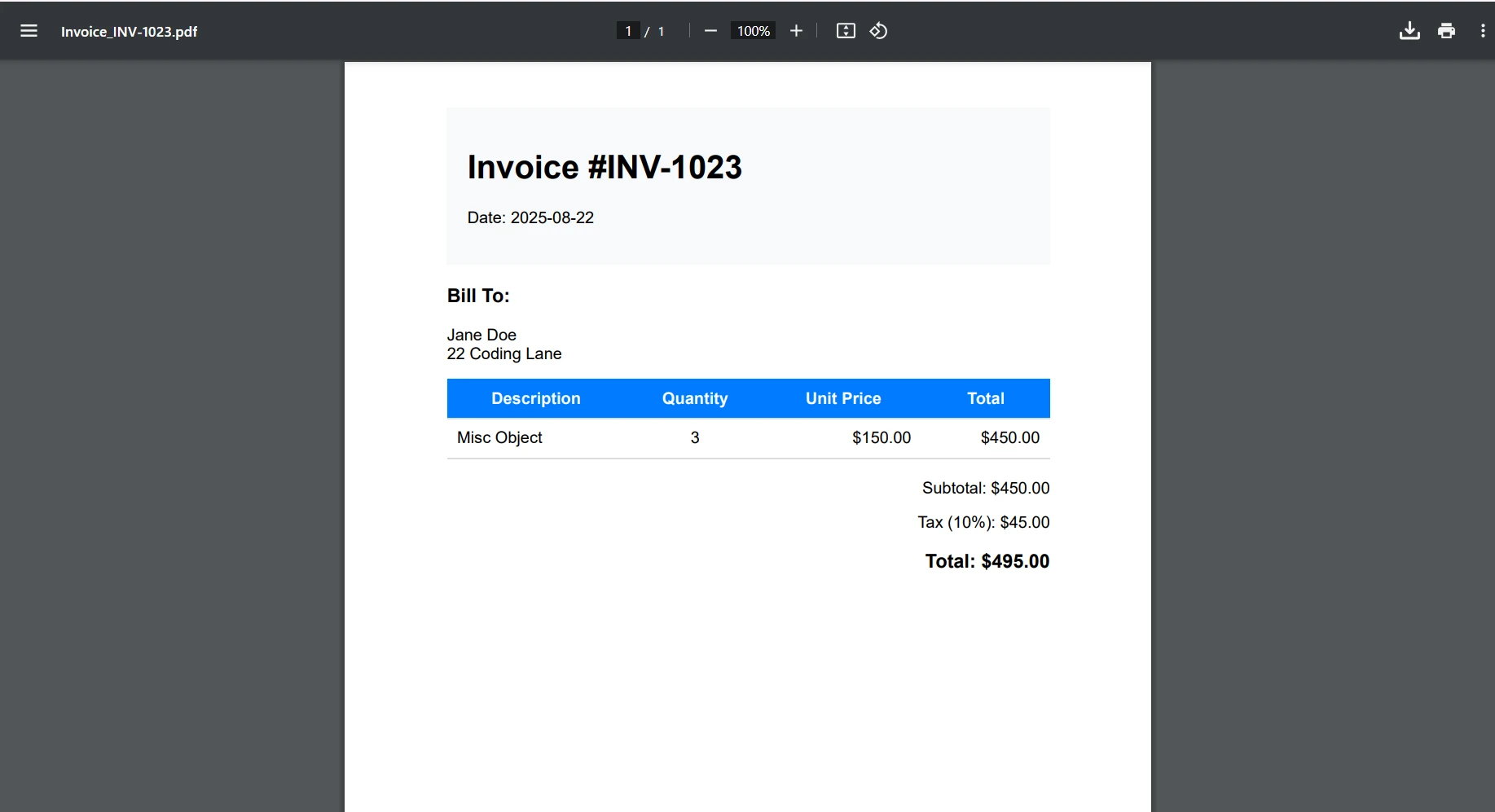
このチュートリアルはローカル開発に焦点を当てていますが、PDF APIをコンテナ化する簡単な概要は以下の通りです:
FROM mcr.microsoft.com/dotnet/aspnet:6.0 AS base
WORKDIR /app
EXPOSE 80
FROM mcr.microsoft.com/dotnet/sdk:6.0 AS build
WORKDIR /src
COPY ["PdfApiService.csproj", "."]
RUN dotnet restore
COPY . .
RUN dotnet build -c Release -o /app/build
FROM build AS publish
RUN dotnet publish -c Release -o /app/publish
FROM base AS final
WORKDIR /app
COPY --from=publish /app/publish .
# IronPDF requires additional dependencies on Linux
RUN apt-get update && apt-get install -y \
    libgdiplus \
    libc6-dev \
    libx11-dev \
    && rm -rf /var/lib/apt/lists/*
ENTRYPOINT ["dotnet", "PdfApiService.dll"]The provided code is a Dockerfile written for building and running a .NET application, not C# code. Dockerfiles are not converted to VB.NET as they are not programming language code but configuration scripts for Docker. If you have C# code that needs conversion to VB.NET, please provide that code instead.あなた for .NET PDF APIのための詳細なデプロイメントガイドはこちら:
より耐障害性のあるプログラムを作成するために、以下のような一貫したエラーレスポンスのためのグローバルエラーハンドラーを実装することがベストプラクティスです:
// Middleware/ErrorHandlingMiddleware.cs
public class ErrorHandlingMiddleware
{
    private readonly RequestDelegate _next;
    public ErrorHandlingMiddleware(RequestDelegate next)
    {
        _next = next;
    }
    public async Task InvokeAsync(HttpContext context)
    {
        try
        {
            await _next(context);
        }
        catch (Exception ex)
        {
            await HandleExceptionAsync(context, ex);
        }
    }
    private static async Task HandleExceptionAsync(HttpContext context, Exception ex)
    {
        context.Response.ContentType = "application/json";
        context.Response.StatusCode = 500;
        var response = new
        {
            error = "An error occurred processing your request",
            message = ex.Message
        };
        await context.Response.WriteAsync(JsonSerializer.Serialize(response));
    }
}Imports System.Text.Json
Imports Microsoft.AspNetCore.Http
Imports System.Threading.Tasks
Public Class ErrorHandlingMiddleware
Private ReadOnly _next As RequestDelegate
Public Sub New(next As RequestDelegate)
_next = next
End Sub
Public Async Function InvokeAsync(context As HttpContext) As Task
Try
Await _next(context)
Catch ex As Exception
Await HandleExceptionAsync(context, ex)
End Try
End Function
Private Shared Async Function HandleExceptionAsync(context As HttpContext, ex As Exception) As Task
context.Response.ContentType = "application/json"
context.Response.StatusCode = 500
Dim response = New With {
.error = "An error occurred processing your request",
.message = ex.Message
}
Await context.Response.WriteAsync(JsonSerializer.Serialize(response))
End Function
End Class特定のIronPDFトラブルシューティングシナリオについては、IronPDFトラブルシューティングガイドを参照してください。
これで、ASP.NET CoreおよびIronPDFを使用した強力な.NET PDF APIを構築し、さまざまなドキュメント生成のシナリオを処理できるようになりました。 このREST APIは、アプリケーション全体で集中管理されたPDF操作のための堅牢な基盤を提供します。
主なポイント:
IronPDFは開発者にPDFドキュメントを作成し、PDFファイルを保存し、HTMLを効率的に変換させることで、現代 for .NET Frameworkアプリケーションに必須のPDFドキュメントAPIを提供します。
本番用.NET PDF APIにIronPDFを実装する準備はできましたか? 次のアクションはこちらです:
あなた for .NET PDF APIを今日構築して、アプリケーション全体のドキュメント生成をIronPDFで合理化してください!

Curtis Chauは、カールトン大学でコンピュータサイエンスの学士号を取得し、Node.js、TypeScript、JavaScript、およびReactに精通したフロントエンド開発を専門としています。直感的で美しいユーザーインターフェースを作成することに情熱を持ち、Curtisは現代のフレームワークを用いた開発や、構造の良い視覚的に魅力的なマニュアルの作成を楽しんでいます。

IronPDF はIRONSUITEの一部です
オフィス文書向けの.NET API製品10個

PDFがHTMLのように見える必要があるとき、迅速に。














