using IronPdf;

// Disable local disk access or cross-origin requests
Installation.EnableWebSecurity = true;

// Instantiate Renderer
var renderer = new ChromePdfRenderer();

// Create a PDF from a HTML string using C#
var pdf = renderer.RenderHtmlAsPdf("<h1>Hello World</h1>");

// Export to a file or Stream
pdf.SaveAs("output.pdf");

// Advanced Example with HTML Assets
// Load external html assets: Images, CSS and JavaScript.
// An optional BasePath 'C:\site\assets\' is set as the file location to load assets from
var myAdvancedPdf = renderer.RenderHtmlAsPdf("<img src='icons/iron.png'>", @"C:\site\assets\");
myAdvancedPdf.SaveAs("html-with-assets.pdf");
using IronPdf;// Disable local disk access or cross-origin requestsInstallation.EnableWebSecurity = true;// Instantiate Renderervar renderer = new ChromePdfRenderer();// Create a PDF from a HTML string using C#var pdf = renderer.RenderHtmlAsPdf("<h1>Hello World</h1>");// Export to a file or Streampdf.SaveAs("output.pdf");// Advanced Example with HTML Assets// Load external html assets: Images, CSS and JavaScript.// An optional BasePath 'C:\site\assets\' is set as the file location to load assets fromvar myAdvancedPdf = renderer.RenderHtmlAsPdf("<img src='icons/iron.png'>", @"C:\site\assets\");myAdvancedPdf.SaveAs("html-with-assets.pdf");
PM >Install-Package IronPdf
Install-Package IronPdf
USANDO IRONPDF
html2pdf Corrección de Salto de Página en C# (Tutorial para Desarrolladores)
Al trabajar con aplicaciones modernas, los desarrolladores de .NET como usted pueden encontrarse necesitando construir un servicio centralizado de generación de PDF. Ya sea que esté generando facturas, informes, certificados o contratos, tener una API dedicada de PDF para .NET puede ser beneficioso para gestionar de manera eficiente archivos PDF. En España, este patrón es especialmente relevante para ISV que desarrollan software de facturación bajo **VeriFactu** (Real Decreto 1007/2023): la API centraliza la generación de facturas **Facturae** con la leyenda obligatoria **VERI*FACTU** validable en la **AEAT**, aplicando firmas **PAdES** conformes a **eIDAS** mediante certificados de la **FNMT** y garantizando que los datos personales se procesen en el servidor para cumplir con la **LOPDGDD** supervisada por la **AEPD**. ¿Entonces, cómo puede mejorar sus tareas de generación de PDF? Lo hace proporcionando consistencia, mantenibilidad y escalabilidad en sus aplicaciones de escritorio y web. Nunca antes ha sido tan fácil gestionar el contenido de documentos, las páginas PDF y los campos de formularios PDF.
En este tutorial, aprenderá cómo construir una API de PDF lista para producción utilizando ASP.NET Core e [IronPDF](/), una potente biblioteca PDF para .NET. Crearemos endpoints RESTful que pueden generar PDF a partir de HTML, fusionar documentos, añadir marcas de agua y manejar diversos escenarios de generación de PDF en su API web.
## ¿Por qué crear una API PDF dedicada?
Antes de sumergirnos en el código, entendamos por qué tiene sentido crear una API dedicada de PDF:
* **Lógica centralizada:** toda la lógica de generación de PDF reside en un solo lugar, lo que facilita el mantenimiento y las actualizaciones.
* **Arquitectura de microservicios:** perfecta para arquitecturas orientadas a servicios donde diferentes aplicaciones necesitan capacidades PDF
* **Optimización del Rendimiento:** Más fácil de escalar y optimizar un servicio dedicado para archivos PDF grandes, múltiples páginas y datos dinámicos.
* **Agnóstico del lenguaje:** cualquier aplicación cliente puede consumir la API independientemente del lenguaje de programación.
* **Resultado Consistente:** Garantiza que todos los documentos PDF en su organización mantengan un diseño de documento consistente, formato de párrafo y contenido PDF.
¿Listo para empezar a construir? Descargue la [prueba gratuita de IronPDF](trial-license) y siga este tutorial para crear archivos PDF programáticamente en sus proyectos de .NET Framework.
## IronPDF: La biblioteca PDF .NET completa
[IronPDF](/) destaca como la principal biblioteca de PDF para desarrolladores de .NET, ofreciendo un conjunto integral de características que hacen que la generación de PDF en proyectos API web sea sencilla y confiable. Está construida sobre un motor de renderizado de Chrome, lo que garantiza [conversión HTML a PDF](/how-to/html-string-to-pdf/) con precisión de píxel, a menudo en solo unas pocas líneas de código. Hace todo esto manteniendo todos los estilos, ejecución de JavaScript y diseños responsivos.
Las capacidades clave que hacen que IronPDF sea ideal para el desarrollo de API de PDF para .NET:
* **Representación basada en Chrome:** aprovecha el motor de representación de Google Chrome para convertir documentos PDF a partir de contenido HTML con precisión, con soporte completo para imágenes incrustadas y otros activos web.
* **Amplio conjunto de funciones:** admite la edición de documentos nuevos y existentes con [firmas digitales](/how-to/signing/) **PAdES** conformes a **eIDAS** (compatibles con certificados **FNMT** y el sistema **Cl@ve** para documentos **TicketBAI** de Bizkaia, Gipuzkoa y Araba), formularios PDF, [anotaciones](/how-to/annotations/) , cifrado, compresión y más.
* **Crear Documentos PDF Seguros:** Gestione contenido PDF sensible con cifrado, firmas digitales y protección de documentos.
* **Múltiples formatos de entrada:** utilice HTML, URL, [imágenes](/how-to/image-to-pdf/) y [documentos de Office](/how-to/docx-to-pdf/) para crear documentos PDF
* **Manipulación Avanzada:** Fusione páginas PDF, divida documentos, aplique marcas de agua, cree formularios PDF interactivos y manipule archivos PDF programáticamente.
* **Compatibilidad multiplataforma:** funciona en Windows, [Linux](/get-started/linux/) , macOS, [Docker](/get-started/ironpdf-docker/) y plataformas en la nube.
* **Rendimiento optimizado:** [operaciones asincrónicas](/how-to/async/) , gestión eficiente de la memoria y renderizado rápido.
## ¿Cómo configurar su proyecto de API de documentos PDF?
Comencemos creando un nuevo proyecto API web de ASP.NET Core e instalando los paquetes necesarios.
### Prerrequisitos
* [SDK de .NET 6.0](https://dotnet.microsoft.com/download) o posterior
* Visual Studio 2022 or Visual Studio Code
* [Postman](https://www.postman.com/) o una herramienta similar de prueba de API para probar su API REST de PDF
### Creación del proyecto
Primero, cree el proyecto en el cual construiremos nuestra herramienta de generación de PDF.
```cli
dotnet new webapi -n PdfApiService
cd PdfApiService
```
### Instalación de IronPDF
El siguiente paso es añadir IronPDF a su proyecto a través de NuGet:
```cli
dotnet add package IronPdf
```
O, utilizando el Consola del Administrador de Paquetes de NuGet en Visual Studio:
```shell
:ProductInstall
```
### Estructura del proyecto
Un aspecto esencial del desarrollo en C# es mantener una carpeta del proyecto limpia y bien estructurada. Por ejemplo:
## ¿Cómo crear su primer punto final PDF?
Construyamos un endpoint simple que convierta HTML al formato PDF. Primero, cree la interfaz del servicio y la implementación:
### Creación del servicio PDF
Primero, añadiremos lo siguiente a nuestro archivo IPdfService.cs:
```cs
public interface IPdfService
{
    byte[] GeneratePdfFromHtml(string htmlContent);
    byte[] GeneratePdfFromUrl(string url);
}
```
En el archivo PdfService.cs, añadiremos esto:
```cs
using IronPdf;
public class PdfService : IPdfService
{
private readonly ChromePdfRenderer _renderer;
public PdfService()
{
_renderer = new ChromePdfRenderer();
// Configure rendering options for optimal PDF generation in .NET
_renderer.RenderingOptions.MarginTop = 20;
_renderer.RenderingOptions.MarginBottom = 20;
_renderer.RenderingOptions.PrintHtmlBackgrounds = true;
}
public byte[] GeneratePdfFromHtml(string htmlContent)
{
// Generate PDF from HTML using the .NET PDF API
var pdf = _renderer.RenderHtmlAsPdf(htmlContent);
return pdf.BinaryData;
}
public byte[] GeneratePdfFromUrl(string url)
{
// Convert URL to PDF in the REST API
var pdf = _renderer.RenderUrlAsPdf(url);
return pdf.BinaryData;
}
}
```
El servicio de PDF maneja el proceso central de convertir HTML en PDF. Utilizando el ChromePdfRenderer de IronPDF, esta clase está configurada con valores predeterminados razonables como márgenes de página y renderizado de fondo para producir un documento final pulido.
Cuando el controlador pasa HTML sin procesar, el servicio utiliza IronPDF para renderizarlo en un PDF de calidad profesional y devuelve el resultado como datos byte, listos para descargar. Además, también puede manejar páginas web enteras convirtiendo una URL directamente en un PDF.
### Creación del controlador
Ahora es el momento de crear el controlador para nuestra API. Esto proporcionará un endpoint API capaz de generar archivos PDF desde HTML. Luego podrá descargar y guardar documentos PDF en su sistema para un mayor uso o compartición.
```cs
// Controllers/PdfController.cs
using Microsoft.AspNetCore.Mvc;
[ApiController]
[Route("api/[controller]")]
public class PdfController : ControllerBase
{
private readonly IPdfService _pdfService;
public PdfController(IPdfService pdfService)
{
_pdfService = pdfService;
}
[HttpPost("html-to-pdf")]
public IActionResult ConvertHtmlToPdf([FromBody] HtmlRequest request)
{
try
{
var pdfBytes = _pdfService.GeneratePdfFromHtml(request.HtmlContent);
// Return as downloadable file
return File(pdfBytes, "application/pdf", "document.pdf");
}
catch (Exception ex)
{
return BadRequest($"Error generating PDF: {ex.Message}");
}
}
}
```
Luego, en el archivo HtmlRequest.cs, añadiremos esto:
```cs
// Models/HtmlRequest.cs
public class HtmlRequest
{
public string HtmlContent { get; set; }
public string FileName { get; set; } = "document.pdf";
}
```
En el primer archivo, configuramos un endpoint API sencillo que convierte HTML en un PDF descargable. Cuando alguien envía contenido HTML a la ruta api/pdf/html-to-pdf con una simple solicitud POST, el PdfController le pasa el trabajo de convertirlo en un PDF a un servicio dedicado.
Una vez que se crea el PDF, el controlador se lo devuelve al usuario como un archivo listo para descargar. La solicitud está estructurada utilizando el modelo HtmlRequest, que lleva tanto el HTML sin procesar como un nombre de archivo opcional para el documento final. En resumen, esta configuración facilita que los clientes envíen HTML y reciban instantáneamente un PDF pulido a cambio.
### Registro de servicios
Actualice su Program.cs para registrar el servicio de PDF:
```cs
var builder = WebApplication.CreateBuilder(args);
builder.Services.AddControllers();
builder.Services.AddEndpointsApiExplorer();
builder.Services.AddSwaggerGen();
// Register PDF service
builder.Services.AddSingleton<IPdfService, PdfService>();
var app = builder.Build();
if (app.Environment.IsDevelopment())
{
app.UseSwagger();
app.UseSwaggerUI();
}
app.UseHttpsRedirection();
app.MapControllers();
app.Run();
```
## ¿Cómo manejar diferentes tipos de respuesta?
Su API debería soportar diferentes formas de devolver PDFs en función de las necesidades del cliente:
```cs
[HttpPost("generate")]
public IActionResult GeneratePdf([FromBody] PdfRequest request)
{
var pdfBytes = _pdfService.GeneratePdfFromHtml(request.HtmlContent);
switch (request.ResponseType?.ToLower())
{
case "base64":
return Ok(new
{
data = Convert.ToBase64String(pdfBytes),
filename = request.FileName
});
case "inline":
return File(pdfBytes, "application/pdf");
default: // download
return File(pdfBytes, "application/pdf", request.FileName);
}
}
```
Aquí, hemos añadido un endpoint de generación de PDF más flexible al controlador. En lugar de siempre forzar una descarga de archivo, el método GeneratePdf permite al cliente elegir cómo quieren que se devuelva el resultado. Esta opción ofrece flexibilidad, permitiendo que los PDFs se muestren en varios formatos: como archivo descargable, directamente en el navegador o codificado como una cadena Base64 para uso fácil en APIs.
La solicitud está definida por el modelo PdfRequest, que se basa en el anterior HtmlRequest y añade una opción ResponseType. En resumen, esto les da a los usuarios más control sobre cómo reciben sus PDFs, haciendo que la API sea más versátil y fácil de usar.
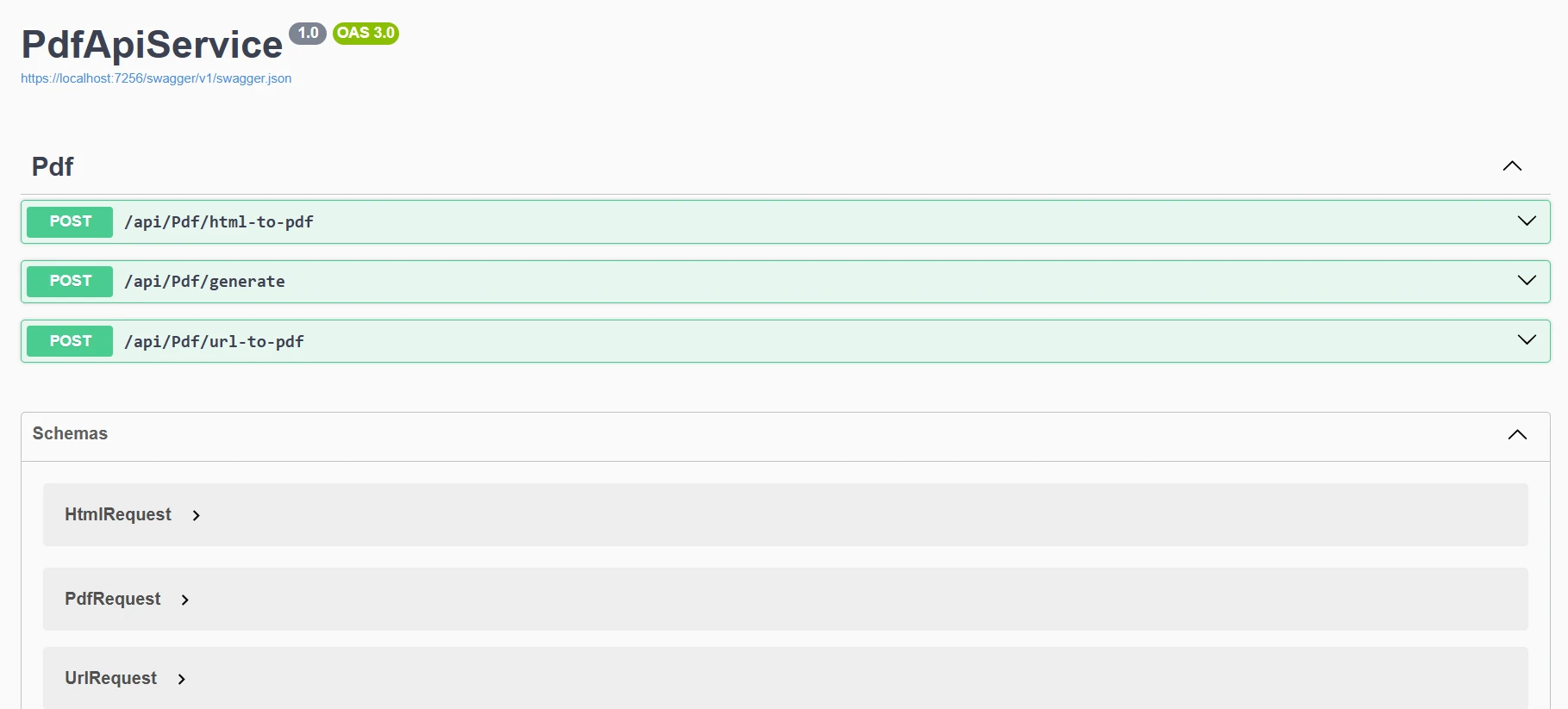
Ahora, cuando ejecutamos nuestro programa, veremos este resultado en Swagger.
## ¿Cómo implementar operaciones PDF comunes?
Ampliemos nuestro servicio para manejar varios escenarios de generación de PDF:
### Conversión de URL a PDF
```cs
[HttpPost("url-to-pdf")]
public async Task<IActionResult> ConvertUrlToPdf([FromBody] UrlRequest request)
{
try
{
var pdfBytes = await Task.Run(() =>
_pdfService.GeneratePdfFromUrl(request.Url));
return File(pdfBytes, "application/pdf",
$"{request.FileName ?? "website"}.pdf");
}
catch (Exception ex)
{
return BadRequest($"Failed to convert URL: {ex.Message}");
}
}
public class UrlRequest
{
public string Url { get; set; }
public string FileName { get; set; }
}
```
Este endpoint permite a los clientes enviar una URL y obtener un PDF listo para descargar de esa página web. Cuando llega una solicitud POST /api/pdf/url-to-pdf, el controlador utiliza _pdfService para convertir la URL dada en bytes de PDF en segundo plano, luego los devuelve como una descarga de archivo. Si algo sale mal durante la conversión, responde de manera elegante con un mensaje de error claro.
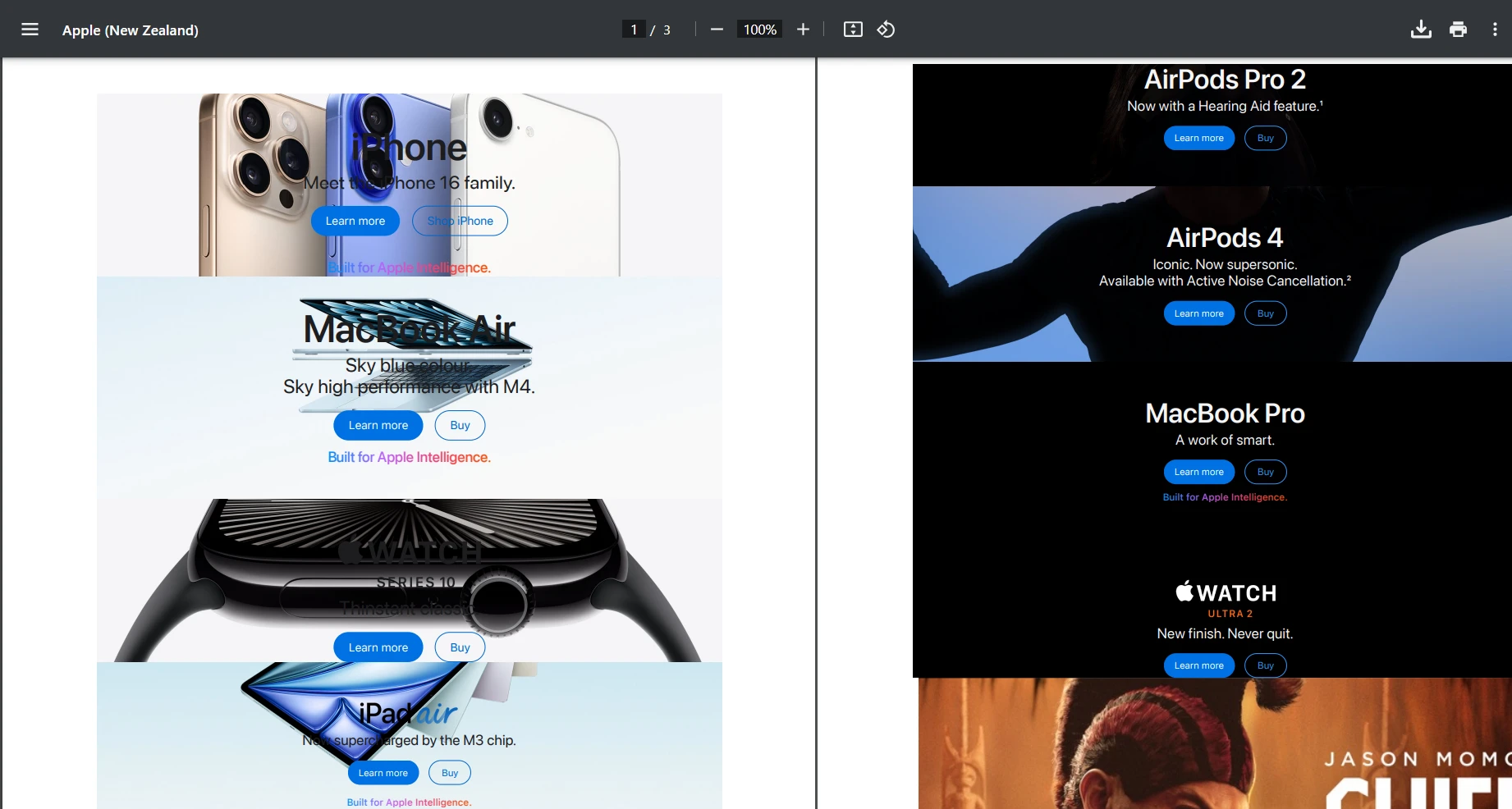
Probemos usando la URL "[https://www.apple.com/nz](https://www.apple.com/nz)" y probemos la solicitud POST. A continuación se muestra el resultado que obtuvimos.
#### Resultado
### Añadir marcas de agua personalizadas
```cs
public byte[] AddWatermarkFromFile(string filePath, string watermarkText)
{
// Load PDF directly from file
var pdf = PdfDocument.FromFile(filePath);
pdf.ApplyWatermark(
$"<h1 style='color:red;font-size:72px;'>{watermarkText}</h1>",
75,
IronPdf.Editing.VerticalAlignment.Middle,
IronPdf.Editing.HorizontalAlignment.Center
);
return pdf.BinaryData;
}
```
Aquí, solo estamos cargando manualmente un archivo local para propósitos de prueba. Sin embargo, puede ajustar esto para que su API de PDF genere un documento PDF y luego aplique una marca de agua personalizada con facilidad.
#### Salida de la marca de agua

## Cómo añadir datos dinámicos con plantillas
Para aplicaciones del mundo real, a menudo necesitará generar PDFs a partir de plantillas con datos dinámicos:
```cs
[HttpPost("from-template")]
public IActionResult GenerateFromTemplate([FromBody] TemplateRequest request)
{
// Simple template replacement
var html = request.Template;
foreach (var item in request.Data)
{
html = html.Replace($"{{{{{item.Key}}}}}", item.Value);
}
var pdfBytes = _pdfService.GeneratePdfFromHtml(html);
return File(pdfBytes, "application/pdf", request.FileName);
}
public class TemplateRequest
{
public string Template { get; set; }
public Dictionary<string, string> Data { get; set; }
public string FileName { get; set; } = "document.pdf";
}
```
Para escenarios de plantillas más avanzados con Razor, Handlebars u otros motores, consulte la [documentación de HTML a PDF de IronPDF](/how-to/html-string-to-pdf/). También puede explorar la [conversión de CSHTML a PDF](/how-to/cshtml-to-pdf-mvc-core/) para aplicaciones MVC y [Razor a PDF](/how-to/razor-to-pdf-blazor-server/) para aplicaciones Blazor.
## ¿Cómo optimizar el rendimiento?
Al construir una API de PDF de producción, el rendimiento es crucial. Aquí hay estrategias clave de optimización:
### Operaciones asíncronas
Al construir proyectos que involucren el uso de operaciones de I/O, es prudente utilizar la codificación asincrónica. Esto es especialmente útil si su contenido PDF proviene de recursos externos como:
* Descargando páginas HTML (RenderUrlAsPdf)
* Recuperando imágenes, CSS o fuentes a través de HTTP
* Leyendo/escribiendo archivos en disco o almacenamiento en la nube
Estas operaciones pueden entonces bloquear un hilo, pero el uso de async evita que su hilo API espere inactivo.
Ejemplo:
```cs
public async Task<byte[]> GeneratePdfFromHtmlAsync(string htmlContent)
{
return await Task.Run(() =>
{
var pdf = _renderer.RenderHtmlAsPdf(htmlContent);
return pdf.BinaryData;
});
}
```
### Opciones de renderización
Configure IronPDF para un rendimiento óptimo:
```cs
_renderer.RenderingOptions.EnableJavaScript = false; // If JS not needed
_renderer.RenderingOptions.CssMediaType = PdfCssMediaType.Print;
_renderer.RenderingOptions.RenderDelay = 0; // Remove if no JS
_renderer.RenderingOptions.Timeout = 30; // Set reasonable timeout
```
## ¿Cómo proteger su API PDF?
La seguridad es esencial para cualquier API de producción. Aquí hay un enfoque simple de autenticación con clave API:
```cs
// Middleware/ApiKeyMiddleware.cs
public class ApiKeyMiddleware
{
private readonly RequestDelegate _next;
private const string ApiKeyHeader = "X-API-Key";
public ApiKeyMiddleware(RequestDelegate next)
{
_next = next;
}
public async Task InvokeAsync(HttpContext context)
{
if (!context.Request.Headers.TryGetValue(ApiKeyHeader, out var apiKey))
{
context.Response.StatusCode = 401;
await context.Response.WriteAsync("API Key required");
return;
}
// Validate API key (in production, check against database)
var validApiKey = context.RequestServices
.GetRequiredService<IConfiguration>()["ApiKey"];
if (apiKey != validApiKey)
{
context.Response.StatusCode = 403;
await context.Response.WriteAsync("Invalid API Key");
return;
}
await _next(context);
}
}
// In Program.cs
app.UseMiddleware<ApiKeyMiddleware>();
```
Para escenarios de autenticación más avanzados, considere:
* [Autenticación JWT](https://learn.microsoft.com/en-us/entra/identity-platform/jwt-claims-customization) : estándar de la industria para la autenticación de API
* [OAuth 2.0](https://learn.microsoft.com/en-us/entra/identity-platform/v2-oauth2-auth-code-flow) - Para integraciones de terceros
* [Integración AD de Azure](https://learn.microsoft.com/en-us/azure/active-directory/develop/) - Autenticación empresarial
* [Limitación de Tasa API](https://github.com/stefanprodan/AspNetCoreRateLimit) - Prevenir abusos y garantizar un uso justo
## Ejemplo del mundo real: API de generación de facturas
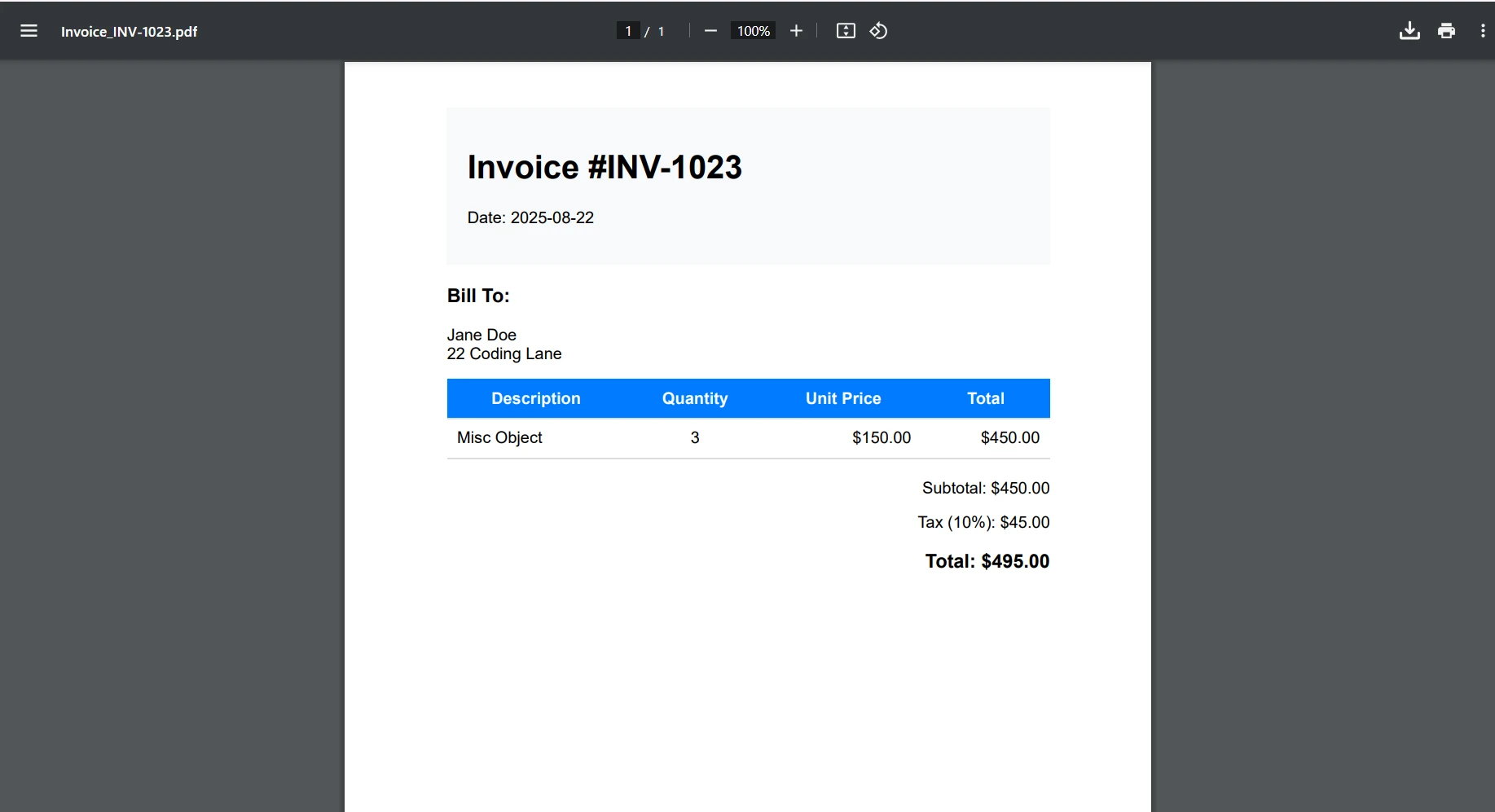
Construyamos un endpoint práctico de generación de facturas que demuestre una implementación completa. Este ejemplo muestra cómo una API de PDF de producción para .NET puede generar facturas profesionales con datos dinámicos.
!!!--LIBRARY_GET_STARTED_WITH_PRODUCT_TRIAL_BLOCK--!!!
Primero, crearemos un nuevo archivo en nuestra carpeta de Modelos. Aquí, he llamado al mío Invoice.cs. Luego, añada el siguiente código a su nuevo archivo.
```cs
public class Invoice
{
public string InvoiceNumber { get; set; }
public DateTime Date { get; set; }
public string CustomerName { get; set; }
public string CustomerAddress { get; set; }
public List<InvoiceItem> Items { get; set; }
public decimal Tax { get; set; }
}
public class InvoiceItem
{
public string Description { get; set; }
public int Quantity { get; set; }
public decimal UnitPrice { get; set; }
public decimal Total => Quantity * UnitPrice;
}
```
Luego, necesitaremos crear un nuevo archivo de servicio para nuestro generador de facturas. En su carpeta de Servicios, añada el siguiente código. Por mi parte, hice un nuevo archivo llamado InvoiceService.cs. Este código manejará el estilo y diseño de nuestro archivo PDF de Factura.
```cs
public class InvoiceService
{
private readonly ChromePdfRenderer _renderer;
public InvoiceService()
{
_renderer = new ChromePdfRenderer();
_renderer.RenderingOptions.MarginTop = 10;
_renderer.RenderingOptions.MarginBottom = 10;
_renderer.RenderingOptions.PrintHtmlBackgrounds = true;
}
public byte[] GenerateInvoice(Invoice invoice)
{
var html = BuildInvoiceHtml(invoice);
// Add footer with page numbers
_renderer.RenderingOptions.HtmlFooter = new HtmlHeaderFooter
{
MaxHeight = 15,
HtmlFragment = "<center><i>{page} of {total-pages}</i></center>",
DrawDividerLine = true
};
var pdf = _renderer.RenderHtmlAsPdf(html);
return pdf.BinaryData;
}
private string BuildInvoiceHtml(Invoice invoice)
{
var subtotal = invoice.Items.Sum(i => i.Total);
var taxAmount = subtotal * (invoice.Tax / 100);
var total = subtotal + taxAmount;
var itemsHtml = string.Join("", invoice.Items.Select(item =>
$@"<tr>
<td>{item.Description}</td>
<td class='text-center'>{item.Quantity}</td>
<td class='text-right'>${item.UnitPrice:F2}</td>
<td class='text-right'>${item.Total:F2}</td>
</tr>"));
return $@"
<!DOCTYPE html>
<html>
<head>
<style>
body {{ font-family: Arial, sans-serif; }}
.invoice-header {{
background-color: #f8f9fa;
padding: 20px;
margin-bottom: 20px;
}}
table {{
width: 100%;
border-collapse: collapse;
}}
th, td {{
padding: 10px;
border-bottom: 1px solid #ddd;
}}
th {{
background-color: #007bff;
color: white;
}}
.text-right {{ text-align: right; }}
.text-center {{ text-align: center; }}
.total-section {{
margin-top: 20px;
text-align: right;
}}
</style>
</head>
<body>
<div class='invoice-header'>
<h1>Invoice #{invoice.InvoiceNumber}</h1>
<p>Date: {invoice.Date:yyyy-MM-dd}</p>
</div>
<div>
<h3>Bill To:</h3>
<p>{invoice.CustomerName}<br/>{invoice.CustomerAddress}</p>
</div>
<table>
<thead>
<tr>
<th>Description</th>
<th>Quantity</th>
<th>Unit Price</th>
<th>Total</th>
</tr>
</thead>
<tbody>
{itemsHtml}
</tbody>
</table>
<div class='total-section'>
<p>Subtotal: ${subtotal:F2}</p>
<p>Tax ({invoice.Tax}%): ${taxAmount:F2}</p>
<h3>Total: ${total:F2}</h3>
</div>
</body>
</html>";
}
}
```
Finalmente, necesitará crear un nuevo Controlador para poder acceder y crear una nueva factura utilizando la API.
```cs
[ApiController]
[Route("api/[controller]")]
public class InvoiceController : ControllerBase
{
private readonly InvoiceService _invoiceService;
public InvoiceController(InvoiceService invoiceService)
{
_invoiceService = invoiceService;
}
[HttpPost("generate")]
public IActionResult GenerateInvoice([FromBody] Invoice invoice)
{
try
{
var pdfBytes = _invoiceService.GenerateInvoice(invoice);
var fileName = $"Invoice_{invoice.InvoiceNumber}.pdf";
return File(pdfBytes, "application/pdf", fileName);
}
catch (Exception ex)
{
return StatusCode(500, $"Error generating invoice: {ex.Message}");
}
}
}
```
#### Facturación
## Extensión del modelo de factura para el mercado español: NIF, IBAN, VeriFactu y SII
<a id="anchor-factura-espana-api"></a>
Para adaptar la API de facturas al mercado español, el modelo `Invoice` debe extenderse con los campos exigidos por la **AEAT** bajo el régimen **VeriFactu** (Real Decreto 1007/2023) y el **SII** (Suministro Inmediato de Información):
```csharp
public class FacturaEspanola : Invoice
{
// Identificadores fiscales españoles
public string NifEmisor { get; set; } // p.ej. "B87654321"
public string NifReceptor { get; set; } // p.ej. "A28015834"
public string IbanEmisor { get; set; } // p.ej. "ES91 2100 0418 4502 0005 1332"
public string NumeroModelo { get; set; } // p.ej. "F1" (completa) o "F2" (simplificada)
public decimal BaseImponible { get; set; } // Importe en EUR sin IVA
public decimal TipoIVA { get; set; } // 21% general, 10% reducido, 4% superreducido
public bool IncluyeQrAeat { get; set; } // true si está sujeta a VeriFactu
public string LeyendaObligatoria =>
IncluyeQrAeat ? "VERI*FACTU" : string.Empty;
}
```
El endpoint del controlador que genera estas facturas integra el cifrado **LOPDGDD**: los datos personales (NIF del receptor, IBAN) deben protegerse con AES-256 antes de almacenarse o transmitirse, conforme a las obligaciones de la **AEPD**. El mismo pipeline puede ampliarse para enviar el registro XML al **SII** de la **AEAT**, garantizando que el PDF visual y el registro electrónico estén siempre en sincronía.
Para aplicaciones con clientes en el **País Vasco**, el modelo puede ampliarse con los campos específicos de **TicketBAI**: la identificación de la diputación foral (Bizkaia, Gipuzkoa o Araba) y el identificador de la firma **XAdES** encadenada. La **Ley Crea y Crece** (Ley 18/2022) anticipará la obligatoriedad de la facturación electrónica B2B desde 2027, lo que hará que esta API centralizada sea el punto de evolución natural hacia el soporte de **Facturae** con perfil **EN 16931** / **CIUS-ES**.
## Consideraciones sobre el despliegue de contenedores
Aunque este tutorial se enfoca en el desarrollo local, aquí hay una breve descripción de cómo contenerizar su API de PDF:
### Dockerfile básico
```cs
FROM mcr.microsoft.com/dotnet/aspnet:6.0 AS base
WORKDIR /app
EXPOSE 80
FROM mcr.microsoft.com/dotnet/sdk:6.0 AS build
WORKDIR /src
COPY ["PdfApiService.csproj", "."]
RUN dotnet restore
COPY . .
RUN dotnet build -c Release -o /app/build
FROM build AS publish
RUN dotnet publish -c Release -o /app/publish
FROM base AS final
WORKDIR /app
COPY --from=publish /app/publish .
# IronPDF requires additional dependencies on Linux
RUN apt-get update && apt-get install -y \
libgdiplus \
libc6-dev \
libx11-dev \
&& rm -rf /var/lib/apt/lists/*
ENTRYPOINT ["dotnet", "PdfApiService.dll"]
```
Para guías de despliegue detalladas para su API de PDF de .NET, vea:
* [Documentación de Docker de IronPDF](/get-started/ironpdf-docker/) - Guía completa de contenerización
* [Despliegue de IronPDF en Azure](/get-started/azure/) - Funciones de Azure y App Service
* [Despliegue de IronPDF en AWS](/get-started/aws/) - Despliegue en Lambda y EC2
* [Configuración de IronPDF en Linux](/get-started/linux/) - Configuración específica de Linux
## Mejores prácticas en la gestión de errores
Para un programa más tolerante a fallos, las mejores prácticas son implementar un manejador de errores global para respuestas de error consistentes, como a continuación:
```cs
// Middleware/ErrorHandlingMiddleware.cs
public class ErrorHandlingMiddleware
{
private readonly RequestDelegate _next;
public ErrorHandlingMiddleware(RequestDelegate next)
{
_next = next;
}
public async Task InvokeAsync(HttpContext context)
{
try
{
await _next(context);
}
catch (Exception ex)
{
await HandleExceptionAsync(context, ex);
}
}
private static async Task HandleExceptionAsync(HttpContext context, Exception ex)
{
context.Response.ContentType = "application/json";
context.Response.StatusCode = 500;
var response = new
{
error = "An error occurred processing your request",
message = ex.Message
};
await context.Response.WriteAsync(JsonSerializer.Serialize(response));
}
}
```
Para escenarios específicos de solución de problemas de IronPDF, consulte la [guía de solución de problemas de IronPDF](/troubleshooting/quick-ironpdf-troubleshooting/).
## La API PDF centralizada en el ecosistema de facturación electrónica español
<a id="anchor-api-facturacion-espana"></a>
Para ISVs y equipos de desarrollo en España, una API PDF centralizada construida con IronPDF es la arquitectura idónea para gestionar los múltiples flujos de facturación electrónica que coexisten en el mercado ibérico:
**VeriFactu (Real Decreto 1007/2023, AEAT):** El endpoint de la API recibe los datos de la factura - incluyendo **NIF** del emisor (`B87654321`), **NIF/CIF** del receptor (`A28015834`), **IBAN** de domiciliación bancaria (`ES91 2100 0418 4502 0005 1332`), base imponible en **EUR** (`1.500,00`), tipo IVA (21%), cuota IVA (`315,00 EUR`), Modelo de factura (`F1`) - y devuelve el PDF con la leyenda `VERI\*FACTU` y el código QR de verificación de la **AEAT** embebidos. La misma petición puede incluir el hash de la huella encadenada requerida por el sistema VeriFactu.
**TicketBAI (País Vasco):** Para comercios con operaciones en **Bizkaia**, **Gipuzkoa** o **Araba**, el endpoint acepta el identificador de la diputación foral y el hash de la firma **XAdES** encadenada del XML TicketBAI, y devuelve el PDF del ticket con el QR TicketBAI específico de la hacienda foral correspondiente.
**FACe/Facturae (B2G):** Para facturas a las Administraciones Públicas, el endpoint genera el PDF de visualización del documento **Facturae** con firma **PAdES** (certificado de la **FNMT** bajo **eIDAS**), que acompaña al XML Facturae firmado en la plataforma FACe.
**Crea y Crece (B2B desde 2027):** La **Ley 18/2022** hará obligatoria la facturación electrónica B2B a partir de 2027 (>8M EUR) y 2028 (resto) bajo el estándar **Facturae** / **EN 16931** / **CIUS-ES**. La API PDF centralizada es el punto de evolución natural hacia este nuevo requisito: solo se necesita añadir la capa de generación y firma del XML Facturae en formato EN 16931/CIUS-ES al pipeline existente, sin rediseñar la capa de renderizado PDF.
Todos estos flujos comparten un denominador común bajo la **LOPDGDD** (supervisada por la **AEPD**): los datos personales en las facturas - NIF, IBAN, dirección del cliente - deben protegerse con cifrado AES-256 antes de almacenarse y no deben transmitirse a servicios externos. El patrón `using var pdfDoc = renderer.RenderHtmlAsPdf(html)` garantiza que el PDF se libere de memoria inmediatamente tras el almacenamiento, cumpliendo el principio de minimización del tratamiento.
## Conclusión
Ahora ha construido una API robusta de PDF para .NET usando ASP.NET Core e IronPDF que puede manejar varios escenarios de generación de documentos. Esta API REST proporciona una base sólida para operaciones centralizadas de PDF en sus aplicaciones.
Conclusiones clave:
* IronPDF hace que la generación de PDF en proyectos API web sea sencilla con su renderizado basado en Chrome
* Puede ajustar fácilmente su API web para editar documentos PDF existentes con las herramientas avanzadas de edición de IronPDF
* Los principios de diseño RESTful garantizan que su API de PDF sea intuitiva y mantenible
* El manejo de errores adecuado y las medidas de seguridad son esenciales para la producción
* La optimización del rendimiento a través de operaciones asincrónicas y almacenamiento en caché mejora la escalabilidad
* Tendrá soporte para aplicaciones de escritorio y web con soluciones de documentos escalables
IronPDF permite a los desarrolladores crear documentos PDF, guardar archivos PDF y convertir HTML de manera eficiente, convirtiéndolo en la esencial API de documentos PDF para aplicaciones modernas de .NET Framework.
### Siguientes pasos
¿Listo para implementar IronPDF en su API de PDF de producción para .NET? Aquí están sus próximas acciones:
1. [**Comience su prueba gratuita**](trial-license) - Pruebe IronPDF con toda su funcionalidad en su entorno de desarrollo
2. **Explore características avanzadas** - Consulte [firmas digitales](/how-to/signing/), [formularios PDF](/how-to/create-forms/) y otras características avanzadas de PDF
3. **Escale con confianza** - Revise [opciones de licenciamiento](licensing) para sus necesidades de API de producción. Para ISV en España bajo la Ley Crea y Crece, la licencia comercial de IronPDF elimina el riesgo AGPL de iText, que puede acarrear sanciones de hasta **€150.000/año** por parte de la **AEAT** para ISV no conformes con **VeriFactu**, mientras que IronPDF es plenamente compatible con la generación de PDFs para **Facturae** y la leyenda **VERI*FACTU**.
¡Construya su API de PDF para .NET hoy y optimice la generación de documentos en todo su ecosistema de aplicaciones con IronPDF!
Al trabajar con aplicaciones modernas, los desarrolladores de .NET como usted pueden encontrarse necesitando construir un servicio centralizado de generación de PDF. Ya sea que esté generando facturas, informes, certificados o contratos, tener una API dedicada de PDF para .NET puede ser beneficioso para gestionar de manera eficiente archivos PDF. En España, este patrón es especialmente relevante para ISV que desarrollan software de facturación bajo VeriFactu (Real Decreto 1007/2023): la API centraliza la generación de facturas Facturae con la leyenda obligatoria VERI*FACTU validable en la AEAT, aplicando firmas PAdES conformes a eIDAS mediante certificados de la FNMT y garantizando que los datos personales se procesen en el servidor para cumplir con la LOPDGDD supervisada por la AEPD. ¿Entonces, cómo puede mejorar sus tareas de generación de PDF? Lo hace proporcionando consistencia, mantenibilidad y escalabilidad en sus aplicaciones de escritorio y web. Nunca antes ha sido tan fácil gestionar el contenido de documentos, las páginas PDF y los campos de formularios PDF.
En este tutorial, aprenderá cómo construir una API de PDF lista para producción utilizando ASP.NET Core e IronPDF, una potente biblioteca PDF para .NET. Crearemos endpoints RESTful que pueden generar PDF a partir de HTML, fusionar documentos, añadir marcas de agua y manejar diversos escenarios de generación de PDF en su API web.
¿Por qué crear una API PDF dedicada?
Antes de sumergirnos en el código, entendamos por qué tiene sentido crear una API dedicada de PDF:
Lógica centralizada: toda la lógica de generación de PDF reside en un solo lugar, lo que facilita el mantenimiento y las actualizaciones.
Arquitectura de microservicios: perfecta para arquitecturas orientadas a servicios donde diferentes aplicaciones necesitan capacidades PDF
Optimización del Rendimiento: Más fácil de escalar y optimizar un servicio dedicado para archivos PDF grandes, múltiples páginas y datos dinámicos.
Agnóstico del lenguaje: cualquier aplicación cliente puede consumir la API independientemente del lenguaje de programación.
Resultado Consistente: Garantiza que todos los documentos PDF en su organización mantengan un diseño de documento consistente, formato de párrafo y contenido PDF.
¿Listo para empezar a construir? Descargue la prueba gratuita de IronPDF y siga este tutorial para crear archivos PDF programáticamente en sus proyectos de .NET Framework.
IronPDF: La biblioteca PDF .NET completa
IronPDF destaca como la principal biblioteca de PDF para desarrolladores de .NET, ofreciendo un conjunto integral de características que hacen que la generación de PDF en proyectos API web sea sencilla y confiable. Está construida sobre un motor de renderizado de Chrome, lo que garantiza conversión HTML a PDF con precisión de píxel, a menudo en solo unas pocas líneas de código. Hace todo esto manteniendo todos los estilos, ejecución de JavaScript y diseños responsivos.
Las capacidades clave que hacen que IronPDF sea ideal para el desarrollo de API de PDF para .NET:
Representación basada en Chrome: aprovecha el motor de representación de Google Chrome para convertir documentos PDF a partir de contenido HTML con precisión, con soporte completo para imágenes incrustadas y otros activos web.
Amplio conjunto de funciones: admite la edición de documentos nuevos y existentes con firmas digitalesPAdES conformes a eIDAS (compatibles con certificados FNMT y el sistema Cl@ve para documentos TicketBAI de Bizkaia, Gipuzkoa y Araba), formularios PDF, anotaciones , cifrado, compresión y más.
Crear Documentos PDF Seguros: Gestione contenido PDF sensible con cifrado, firmas digitales y protección de documentos.
Manipulación Avanzada: Fusione páginas PDF, divida documentos, aplique marcas de agua, cree formularios PDF interactivos y manipule archivos PDF programáticamente.
Compatibilidad multiplataforma: funciona en Windows, Linux , macOS, Docker y plataformas en la nube.
Rendimiento optimizado:operaciones asincrónicas , gestión eficiente de la memoria y renderizado rápido.
¿Cómo configurar su proyecto de API de documentos PDF?
Comencemos creando un nuevo proyecto API web de ASP.NET Core e instalando los paquetes necesarios.
PublicInterfaceIPdfService Function GeneratePdfFromHtml(htmlContent AsString) AsByte() Function GeneratePdfFromUrl(url AsString) AsByte()EndInterface
Public Interface IPdfService
    Function GeneratePdfFromHtml(htmlContent As String) As Byte()
    Function GeneratePdfFromUrl(url As String) As Byte()
End Interface
En el archivo PdfService.cs, añadiremos esto:
using IronPdf;public class PdfService : IPdfService{ private readonly ChromePdfRenderer _renderer; publicPdfService() { _renderer = new ChromePdfRenderer(); // Configure rendering options for optimal PDF generation in .NET _renderer.RenderingOptions.MarginTop = 20; _renderer.RenderingOptions.MarginBottom = 20; _renderer.RenderingOptions.PrintHtmlBackgrounds = true; } public byte[] GeneratePdfFromHtml(string htmlContent) { // Generate PDF from HTML using the .NET PDF API var pdf = _renderer.RenderHtmlAsPdf(htmlContent); return pdf.BinaryData; } public byte[] GeneratePdfFromUrl(string url) { // Convert URL to PDF in the REST API var pdf = _renderer.RenderUrlAsPdf(url); return pdf.BinaryData; }}
using IronPdf;
public class PdfService : IPdfService
{
    private readonly ChromePdfRenderer _renderer;
    public PdfService()
    {
        _renderer = new ChromePdfRenderer();
        // Configure rendering options for optimal PDF generation in .NET
        _renderer.RenderingOptions.MarginTop = 20;
        _renderer.RenderingOptions.MarginBottom = 20;
        _renderer.RenderingOptions.PrintHtmlBackgrounds = true;
    }
    public byte[] GeneratePdfFromHtml(string htmlContent)
    {
        // Generate PDF from HTML using the .NET PDF API
        var pdf = _renderer.RenderHtmlAsPdf(htmlContent);
        return pdf.BinaryData;
    }
    public byte[] GeneratePdfFromUrl(string url)
    {
        // Convert URL to PDF in the REST API
        var pdf = _renderer.RenderUrlAsPdf(url);
        return pdf.BinaryData;
    }
}
ImportsIronPdfPublic Class PdfServiceImplementsIPdfService PrivateReadOnly _renderer AsChromePdfRenderer Public Sub New() _renderer = New ChromePdfRenderer() ' Configure rendering options for optimal PDF generation in .NET _renderer.RenderingOptions.MarginTop = 20 _renderer.RenderingOptions.MarginBottom = 20 _renderer.RenderingOptions.PrintHtmlBackgrounds = True End Sub Public Function GeneratePdfFromHtml(htmlContent AsString) AsByte() ' Generate PDF from HTML using the .NET PDF API Dim pdf = _renderer.RenderHtmlAsPdf(htmlContent) Return pdf.BinaryData End Function Public Function GeneratePdfFromUrl(url AsString) AsByte() ' Convert URL to PDF in the REST API Dim pdf = _renderer.RenderUrlAsPdf(url) Return pdf.BinaryData End FunctionEnd Class
Imports IronPdf

Public Class PdfService
    Implements IPdfService

    Private ReadOnly _renderer As ChromePdfRenderer

    Public Sub New()
        _renderer = New ChromePdfRenderer()
        ' Configure rendering options for optimal PDF generation in .NET
        _renderer.RenderingOptions.MarginTop = 20
        _renderer.RenderingOptions.MarginBottom = 20
        _renderer.RenderingOptions.PrintHtmlBackgrounds = True
    End Sub

    Public Function GeneratePdfFromHtml(htmlContent As String) As Byte()
        ' Generate PDF from HTML using the .NET PDF API
        Dim pdf = _renderer.RenderHtmlAsPdf(htmlContent)
        Return pdf.BinaryData
    End Function

    Public Function GeneratePdfFromUrl(url As String) As Byte()
        ' Convert URL to PDF in the REST API
        Dim pdf = _renderer.RenderUrlAsPdf(url)
        Return pdf.BinaryData
    End Function

End Class
El servicio de PDF maneja el proceso central de convertir HTML en PDF. Utilizando el ChromePdfRenderer de IronPDF, esta clase está configurada con valores predeterminados razonables como márgenes de página y renderizado de fondo para producir un documento final pulido.
Cuando el controlador pasa HTML sin procesar, el servicio utiliza IronPDF para renderizarlo en un PDF de calidad profesional y devuelve el resultado como datos byte, listos para descargar. Además, también puede manejar páginas web enteras convirtiendo una URL directamente en un PDF.
Creación del controlador
Ahora es el momento de crear el controlador para nuestra API. Esto proporcionará un endpoint API capaz de generar archivos PDF desde HTML. Luego podrá descargar y guardar documentos PDF en su sistema para un mayor uso o compartición.
// Controllers/PdfController.cs
using Microsoft.AspNetCore.Mvc;
[ApiController]
[Route("api/[controller]")]
public class PdfController : ControllerBase
{
    private readonly IPdfService _pdfService;
    public PdfController(IPdfService pdfService)
    {
        _pdfService = pdfService;
    }
    [HttpPost("html-to-pdf")]
    public IActionResult ConvertHtmlToPdf([FromBody] HtmlRequest request)
    {
        try
        {
            var pdfBytes = _pdfService.GeneratePdfFromHtml(request.HtmlContent);
            // Return as downloadable file
            return File(pdfBytes, "application/pdf", "document.pdf");
        }
        catch (Exception ex)
        {
            return BadRequest($"Error generating PDF: {ex.Message}");
        }
    }
}
ImportsMicrosoft.AspNetCore.Mvc<ApiController><Route("api/[controller]")>Public Class PdfControllerInheritsControllerBase PrivateReadOnly _pdfService AsIPdfService Public Sub New(pdfService AsIPdfService) _pdfService = pdfService End Sub <HttpPost("html-to-pdf")> Public Function ConvertHtmlToPdf(<FromBody> request AsHtmlRequest) AsIActionResultTry Dim pdfBytes = _pdfService.GeneratePdfFromHtml(request.HtmlContent) ' Return as downloadable file ReturnFile(pdfBytes, "application/pdf", "document.pdf")Catch ex AsException ReturnBadRequest($"Error generating PDF: {ex.Message}")EndTry End FunctionEnd Class
Imports Microsoft.AspNetCore.Mvc

<ApiController>
<Route("api/[controller]")>
Public Class PdfController
    Inherits ControllerBase

    Private ReadOnly _pdfService As IPdfService

    Public Sub New(pdfService As IPdfService)
        _pdfService = pdfService
    End Sub

    <HttpPost("html-to-pdf")>
    Public Function ConvertHtmlToPdf(<FromBody> request As HtmlRequest) As IActionResult
        Try
            Dim pdfBytes = _pdfService.GeneratePdfFromHtml(request.HtmlContent)
            ' Return as downloadable file
            Return File(pdfBytes, "application/pdf", "document.pdf")
        Catch ex As Exception
            Return BadRequest($"Error generating PDF: {ex.Message}")
        End Try
    End Function
End Class
Luego, en el archivo HtmlRequest.cs, añadiremos esto:
// Models/HtmlRequest.cspublic class HtmlRequest{ public stringHtmlContent { get; set; } public stringFileName { get; set; } = "document.pdf";}
// Models/HtmlRequest.cs
public class HtmlRequest
{
    public string HtmlContent { get; set; }
    public string FileName { get; set; } = "document.pdf";
}
' Models/HtmlRequest.vbPublic Class HtmlRequest Public Property HtmlContentAsString Public Property FileNameAsString = "document.pdf"End Class
' Models/HtmlRequest.vb
Public Class HtmlRequest
    Public Property HtmlContent As String
    Public Property FileName As String = "document.pdf"
End Class
En el primer archivo, configuramos un endpoint API sencillo que convierte HTML en un PDF descargable. Cuando alguien envía contenido HTML a la ruta api/pdf/html-to-pdf con una simple solicitud POST, el PdfController le pasa el trabajo de convertirlo en un PDF a un servicio dedicado.
Una vez que se crea el PDF, el controlador se lo devuelve al usuario como un archivo listo para descargar. La solicitud está estructurada utilizando el modelo HtmlRequest, que lleva tanto el HTML sin procesar como un nombre de archivo opcional para el documento final. En resumen, esta configuración facilita que los clientes envíen HTML y reciban instantáneamente un PDF pulido a cambio.
Registro de servicios
Actualice su Program.cs para registrar el servicio de PDF:
var builder = WebApplication.CreateBuilder(args);builder.Services.AddControllers();builder.Services.AddEndpointsApiExplorer();builder.Services.AddSwaggerGen();// Register PDF servicebuilder.Services.AddSingleton<IPdfService, PdfService>();var app = builder.Build();if (app.Environment.IsDevelopment()){ app.UseSwagger(); app.UseSwaggerUI();}app.UseHttpsRedirection();app.MapControllers();app.Run();
var builder = WebApplication.CreateBuilder(args);
builder.Services.AddControllers();
builder.Services.AddEndpointsApiExplorer();
builder.Services.AddSwaggerGen();
// Register PDF service
builder.Services.AddSingleton<IPdfService, PdfService>();
var app = builder.Build();
if (app.Environment.IsDevelopment())
{
    app.UseSwagger();
    app.UseSwaggerUI();
}
app.UseHttpsRedirection();
app.MapControllers();
app.Run();
ImportsMicrosoft.AspNetCore.BuilderImportsMicrosoft.Extensions.DependencyInjectionDim builder = WebApplication.CreateBuilder(args)builder.Services.AddControllers()builder.Services.AddEndpointsApiExplorer()builder.Services.AddSwaggerGen()' Register PDF servicebuilder.Services.AddSingleton(OfIPdfService, PdfService)()Dim app = builder.Build()If app.Environment.IsDevelopment() Then app.UseSwagger() app.UseSwaggerUI()End Ifapp.UseHttpsRedirection()app.MapControllers()app.Run()
Imports Microsoft.AspNetCore.Builder
Imports Microsoft.Extensions.DependencyInjection

Dim builder = WebApplication.CreateBuilder(args)
builder.Services.AddControllers()
builder.Services.AddEndpointsApiExplorer()
builder.Services.AddSwaggerGen()
' Register PDF service
builder.Services.AddSingleton(Of IPdfService, PdfService)()
Dim app = builder.Build()
If app.Environment.IsDevelopment() Then
    app.UseSwagger()
    app.UseSwaggerUI()
End If
app.UseHttpsRedirection()
app.MapControllers()
app.Run()
¿Cómo manejar diferentes tipos de respuesta?
Su API debería soportar diferentes formas de devolver PDFs en función de las necesidades del cliente:
[HttpPost("generate")] public IActionResultGeneratePdf([FromBody] PdfRequest request) { var pdfBytes = _pdfService.GeneratePdfFromHtml(request.HtmlContent); switch (request.ResponseType?.ToLower()) { case "base64": returnOk(new { data = Convert.ToBase64String(pdfBytes), filename = request.FileName }); case "inline": returnFile(pdfBytes, "application/pdf"); default: // download returnFile(pdfBytes, "application/pdf", request.FileName); } }
[HttpPost("generate")]
 public IActionResult GeneratePdf([FromBody] PdfRequest request)
 {
     var pdfBytes = _pdfService.GeneratePdfFromHtml(request.HtmlContent);
     switch (request.ResponseType?.ToLower())
     {
         case "base64":
             return Ok(new
             {
                 data = Convert.ToBase64String(pdfBytes),
                 filename = request.FileName
             });
         case "inline":
             return File(pdfBytes, "application/pdf");
         default: // download
             return File(pdfBytes, "application/pdf", request.FileName);
     }
 }
ImportsMicrosoft.AspNetCore.Mvc<HttpPost("generate")>Public Function GeneratePdf(<FromBody> request AsPdfRequest) AsIActionResult Dim pdfBytes = _pdfService.GeneratePdfFromHtml(request.HtmlContent) Select Case request.ResponseType?.ToLower() Case "base64" ReturnOk(New With { .data = Convert.ToBase64String(pdfBytes), .filename = request.FileName }) Case "inline" ReturnFile(pdfBytes, "application/pdf") Case Else ' download ReturnFile(pdfBytes, "application/pdf", request.FileName) End SelectEnd Function
Imports Microsoft.AspNetCore.Mvc

<HttpPost("generate")>
Public Function GeneratePdf(<FromBody> request As PdfRequest) As IActionResult
    Dim pdfBytes = _pdfService.GeneratePdfFromHtml(request.HtmlContent)
    Select Case request.ResponseType?.ToLower()
        Case "base64"
            Return Ok(New With {
                .data = Convert.ToBase64String(pdfBytes),
                .filename = request.FileName
            })
        Case "inline"
            Return File(pdfBytes, "application/pdf")
        Case Else ' download
            Return File(pdfBytes, "application/pdf", request.FileName)
    End Select
End Function
Aquí, hemos añadido un endpoint de generación de PDF más flexible al controlador. En lugar de siempre forzar una descarga de archivo, el método GeneratePdf permite al cliente elegir cómo quieren que se devuelva el resultado. Esta opción ofrece flexibilidad, permitiendo que los PDFs se muestren en varios formatos: como archivo descargable, directamente en el navegador o codificado como una cadena Base64 para uso fácil en APIs.
La solicitud está definida por el modelo PdfRequest, que se basa en el anterior HtmlRequest y añade una opción ResponseType. En resumen, esto les da a los usuarios más control sobre cómo reciben sus PDFs, haciendo que la API sea más versátil y fácil de usar.
Ahora, cuando ejecutamos nuestro programa, veremos este resultado en Swagger.
¿Cómo implementar operaciones PDF comunes?
Ampliemos nuestro servicio para manejar varios escenarios de generación de PDF:
Conversión de URL a PDF
[HttpPost("url-to-pdf")]public async Task<IActionResult> ConvertUrlToPdf([FromBody] UrlRequest request){ try { var pdfBytes = awaitTask.Run(() => _pdfService.GeneratePdfFromUrl(request.Url)); returnFile(pdfBytes, "application/pdf", $"{request.FileName ?? "website"}.pdf"); } catch (Exception ex) { returnBadRequest($"Failed to convert URL: {ex.Message}"); }}public class UrlRequest{ public stringUrl { get; set; } public stringFileName { get; set; }}
[HttpPost("url-to-pdf")]
public async Task<IActionResult> ConvertUrlToPdf([FromBody] UrlRequest request)
{
    try
    {
        var pdfBytes = await Task.Run(() =>
            _pdfService.GeneratePdfFromUrl(request.Url));
        return File(pdfBytes, "application/pdf",
            $"{request.FileName ?? "website"}.pdf");
    }
    catch (Exception ex)
    {
        return BadRequest($"Failed to convert URL: {ex.Message}");
    }
}
public class UrlRequest
{
    public string Url { get; set; }
    public string FileName { get; set; }
}
ImportsSystem.Threading.TasksImportsMicrosoft.AspNetCore.Mvc<HttpPost("url-to-pdf")>PublicAsync Function ConvertUrlToPdf(<FromBody> request AsUrlRequest) AsTask(OfIActionResult)Try Dim pdfBytes = AwaitTask.Run(Function() _pdfService.GeneratePdfFromUrl(request.Url)) ReturnFile(pdfBytes, "application/pdf", $"{If(request.FileName, "website")}.pdf")Catch ex AsException ReturnBadRequest($"Failed to convert URL: {ex.Message}")EndTryEnd FunctionPublic Class UrlRequest Public Property UrlAsString Public Property FileNameAsStringEnd Class
Imports System.Threading.Tasks
Imports Microsoft.AspNetCore.Mvc

<HttpPost("url-to-pdf")>
Public Async Function ConvertUrlToPdf(<FromBody> request As UrlRequest) As Task(Of IActionResult)
    Try
        Dim pdfBytes = Await Task.Run(Function() _pdfService.GeneratePdfFromUrl(request.Url))
        Return File(pdfBytes, "application/pdf", $"{If(request.FileName, "website")}.pdf")
    Catch ex As Exception
        Return BadRequest($"Failed to convert URL: {ex.Message}")
    End Try
End Function

Public Class UrlRequest
    Public Property Url As String
    Public Property FileName As String
End Class
Este endpoint permite a los clientes enviar una URL y obtener un PDF listo para descargar de esa página web. Cuando llega una solicitud POST /api/pdf/url-to-pdf, el controlador utiliza _pdfService para convertir la URL dada en bytes de PDF en segundo plano, luego los devuelve como una descarga de archivo. Si algo sale mal durante la conversión, responde de manera elegante con un mensaje de error claro.
Probemos usando la URL "https://www.apple.com/nz" y probemos la solicitud POST. A continuación se muestra el resultado que obtuvimos.
Resultado
Añadir marcas de agua personalizadas
public byte[] AddWatermarkFromFile(string filePath, string watermarkText){ // Load PDF directly from file var pdf = PdfDocument.FromFile(filePath); pdf.ApplyWatermark( $"<h1 style='color:red;font-size:72px;'>{watermarkText}</h1>", 75,IronPdf.Editing.VerticalAlignment.Middle,IronPdf.Editing.HorizontalAlignment.Center ); return pdf.BinaryData;}
public byte[] AddWatermarkFromFile(string filePath, string watermarkText)
{
    // Load PDF directly from file
    var pdf = PdfDocument.FromFile(filePath);
    pdf.ApplyWatermark(
        $"<h1 style='color:red;font-size:72px;'>{watermarkText}</h1>",
        75,
        IronPdf.Editing.VerticalAlignment.Middle,
        IronPdf.Editing.HorizontalAlignment.Center
    );
    return pdf.BinaryData;
}
ImportsIronPdfPublic Function AddWatermarkFromFile(filePath AsString, watermarkText AsString) AsByte() ' Load PDF directly from file Dim pdf = PdfDocument.FromFile(filePath) pdf.ApplyWatermark( $"<h1 style='color:red;font-size:72px;'>{watermarkText}</h1>", 75,IronPdf.Editing.VerticalAlignment.Middle,IronPdf.Editing.HorizontalAlignment.Center ) Return pdf.BinaryDataEnd Function
Imports IronPdf

Public Function AddWatermarkFromFile(filePath As String, watermarkText As String) As Byte()
    ' Load PDF directly from file
    Dim pdf = PdfDocument.FromFile(filePath)
    pdf.ApplyWatermark(
        $"<h1 style='color:red;font-size:72px;'>{watermarkText}</h1>",
        75,
        IronPdf.Editing.VerticalAlignment.Middle,
        IronPdf.Editing.HorizontalAlignment.Center
    )
    Return pdf.BinaryData
End Function
Aquí, solo estamos cargando manualmente un archivo local para propósitos de prueba. Sin embargo, puede ajustar esto para que su API de PDF genere un documento PDF y luego aplique una marca de agua personalizada con facilidad.
Salida de la marca de agua
Cómo añadir datos dinámicos con plantillas
Para aplicaciones del mundo real, a menudo necesitará generar PDFs a partir de plantillas con datos dinámicos:
[HttpPost("from-template")]public IActionResultGenerateFromTemplate([FromBody] TemplateRequest request){ // Simple template replacement var html = request.Template; foreach (var item in request.Data) { html = html.Replace($"{{{{{item.Key}}}}}", item.Value); } var pdfBytes = _pdfService.GeneratePdfFromHtml(html); returnFile(pdfBytes, "application/pdf", request.FileName);}public class TemplateRequest{ public stringTemplate { get; set; } public Dictionary<string, string> Data { get; set; } public stringFileName { get; set; } = "document.pdf";}
[HttpPost("from-template")]
public IActionResult GenerateFromTemplate([FromBody] TemplateRequest request)
{
    // Simple template replacement
    var html = request.Template;
    foreach (var item in request.Data)
    {
        html = html.Replace($"{{{{{item.Key}}}}}", item.Value);
    }
    var pdfBytes = _pdfService.GeneratePdfFromHtml(html);
    return File(pdfBytes, "application/pdf", request.FileName);
}
public class TemplateRequest
{
    public string Template { get; set; }
    public Dictionary<string, string> Data { get; set; }
    public string FileName { get; set; } = "document.pdf";
}
ImportsMicrosoft.AspNetCore.Mvc<HttpPost("from-template")>Public Function GenerateFromTemplate(<FromBody> request AsTemplateRequest) AsIActionResult ' Simple template replacement Dim html AsString = request.Template For Each item Inrequest.Data html = html.Replace($"{{{{{item.Key}}}}}", item.Value) Next Dim pdfBytes AsByte() = _pdfService.GeneratePdfFromHtml(html) ReturnFile(pdfBytes, "application/pdf", request.FileName)End FunctionPublic Class TemplateRequest Public Property TemplateAsString Public Property DataAsDictionary(OfString, String) Public Property FileNameAsString = "document.pdf"End Class
Imports Microsoft.AspNetCore.Mvc

<HttpPost("from-template")>
Public Function GenerateFromTemplate(<FromBody> request As TemplateRequest) As IActionResult
    ' Simple template replacement
    Dim html As String = request.Template
    For Each item In request.Data
        html = html.Replace($"{{{{{item.Key}}}}}", item.Value)
    Next
    Dim pdfBytes As Byte() = _pdfService.GeneratePdfFromHtml(html)
    Return File(pdfBytes, "application/pdf", request.FileName)
End Function

Public Class TemplateRequest
    Public Property Template As String
    Public Property Data As Dictionary(Of String, String)
    Public Property FileName As String = "document.pdf"
End Class
Al construir una API de PDF de producción, el rendimiento es crucial. Aquí hay estrategias clave de optimización:
Operaciones asíncronas
Al construir proyectos que involucren el uso de operaciones de I/O, es prudente utilizar la codificación asincrónica. Esto es especialmente útil si su contenido PDF proviene de recursos externos como:
Descargando páginas HTML (RenderUrlAsPdf)
Recuperando imágenes, CSS o fuentes a través de HTTP
Leyendo/escribiendo archivos en disco o almacenamiento en la nube
Estas operaciones pueden entonces bloquear un hilo, pero el uso de async evita que su hilo API espere inactivo.
Ejemplo:
public async Task<byte[]> GeneratePdfFromHtmlAsync(string htmlContent){ return awaitTask.Run(() => { var pdf = _renderer.RenderHtmlAsPdf(htmlContent); return pdf.BinaryData; });}
public async Task<byte[]> GeneratePdfFromHtmlAsync(string htmlContent)
{
    return await Task.Run(() =>
    {
        var pdf = _renderer.RenderHtmlAsPdf(htmlContent);
        return pdf.BinaryData;
    });
}
ImportsSystem.Threading.TasksPublicAsync Function GeneratePdfFromHtmlAsync(htmlContent AsString) AsTask(OfByte()) ReturnAwaitTask.Run(Function() Dim pdf = _renderer.RenderHtmlAsPdf(htmlContent) Return pdf.BinaryData End Function)End Function
Imports System.Threading.Tasks

Public Async Function GeneratePdfFromHtmlAsync(htmlContent As String) As Task(Of Byte())
    Return Await Task.Run(Function()
                              Dim pdf = _renderer.RenderHtmlAsPdf(htmlContent)
                              Return pdf.BinaryData
                          End Function)
End Function
Opciones de renderización
Configure IronPDF para un rendimiento óptimo:
_renderer.RenderingOptions.EnableJavaScript = false; // If JS not needed_renderer.RenderingOptions.CssMediaType = PdfCssMediaType.Print;_renderer.RenderingOptions.RenderDelay = 0; // Remove if no JS_renderer.RenderingOptions.Timeout = 30; // Set reasonable timeout
_renderer.RenderingOptions.EnableJavaScript = false; // If JS not needed
_renderer.RenderingOptions.CssMediaType = PdfCssMediaType.Print;
_renderer.RenderingOptions.RenderDelay = 0; // Remove if no JS
_renderer.RenderingOptions.Timeout = 30; // Set reasonable timeout
net
net
¿Cómo proteger su API PDF?
La seguridad es esencial para cualquier API de producción. Aquí hay un enfoque simple de autenticación con clave API:
// Middleware/ApiKeyMiddleware.cspublic class ApiKeyMiddleware{ private readonly RequestDelegate _next; private const stringApiKeyHeader = "X-API-Key"; publicApiKeyMiddleware(RequestDelegate next) { _next = next; } public async TaskInvokeAsync(HttpContext context) { if (!context.Request.Headers.TryGetValue(ApiKeyHeader, out var apiKey)) { context.Response.StatusCode = 401; await context.Response.WriteAsync("API Key required"); return; } // Validate API key (in production, check against database) var validApiKey = context.RequestServices .GetRequiredService<IConfiguration>()["ApiKey"]; if (apiKey != validApiKey) { context.Response.StatusCode = 403; await context.Response.WriteAsync("Invalid API Key"); return; } await _next(context); }}// In Program.csapp.UseMiddleware<ApiKeyMiddleware>();
// Middleware/ApiKeyMiddleware.cs
public class ApiKeyMiddleware
{
    private readonly RequestDelegate _next;
    private const string ApiKeyHeader = "X-API-Key";
    public ApiKeyMiddleware(RequestDelegate next)
    {
        _next = next;
    }
    public async Task InvokeAsync(HttpContext context)
    {
        if (!context.Request.Headers.TryGetValue(ApiKeyHeader, out var apiKey))
        {
            context.Response.StatusCode = 401;
            await context.Response.WriteAsync("API Key required");
            return;
        }
        // Validate API key (in production, check against database)
        var validApiKey = context.RequestServices
            .GetRequiredService<IConfiguration>()["ApiKey"];
        if (apiKey != validApiKey)
        {
            context.Response.StatusCode = 403;
            await context.Response.WriteAsync("Invalid API Key");
            return;
        }
        await _next(context);
    }
}
// In Program.cs
app.UseMiddleware<ApiKeyMiddleware>();
ImportsMicrosoft.AspNetCore.HttpImportsMicrosoft.Extensions.ConfigurationImportsSystem.Threading.Tasks' Middleware/ApiKeyMiddleware.vbPublic Class ApiKeyMiddleware PrivateReadOnly _next AsRequestDelegate Private Const ApiKeyHeaderAsString = "X-API-Key" Public Sub New(nextAsRequestDelegate) _next = next End Sub PublicAsync Function InvokeAsync(context AsHttpContext) AsTask Dim apiKey AsString = Nothing IfNot context.Request.Headers.TryGetValue(ApiKeyHeader, apiKey) Then context.Response.StatusCode = 401Await context.Response.WriteAsync("API Key required") Return End If ' Validate API key (in production, check against database) Dim validApiKey AsString = context.RequestServices.GetRequiredService(OfIConfiguration)()("ApiKey") If apiKey <> validApiKey Then context.Response.StatusCode = 403Await context.Response.WriteAsync("Invalid API Key") Return End IfAwait _next(context) End FunctionEnd Class' In Program.vbapp.UseMiddleware(OfApiKeyMiddleware)()
Imports Microsoft.AspNetCore.Http
Imports Microsoft.Extensions.Configuration
Imports System.Threading.Tasks

' Middleware/ApiKeyMiddleware.vb
Public Class ApiKeyMiddleware
    Private ReadOnly _next As RequestDelegate
    Private Const ApiKeyHeader As String = "X-API-Key"

    Public Sub New(next As RequestDelegate)
        _next = next
    End Sub

    Public Async Function InvokeAsync(context As HttpContext) As Task
        Dim apiKey As String = Nothing
        If Not context.Request.Headers.TryGetValue(ApiKeyHeader, apiKey) Then
            context.Response.StatusCode = 401
            Await context.Response.WriteAsync("API Key required")
            Return
        End If

        ' Validate API key (in production, check against database)
        Dim validApiKey As String = context.RequestServices.GetRequiredService(Of IConfiguration)()("ApiKey")
        If apiKey <> validApiKey Then
            context.Response.StatusCode = 403
            Await context.Response.WriteAsync("Invalid API Key")
            Return
        End If

        Await _next(context)
    End Function
End Class

' In Program.vb
app.UseMiddleware(Of ApiKeyMiddleware)()
Para escenarios de autenticación más avanzados, considere:
Autenticación JWT : estándar de la industria para la autenticación de API
Ejemplo del mundo real: API de generación de facturas
Construyamos un endpoint práctico de generación de facturas que demuestre una implementación completa. Este ejemplo muestra cómo una API de PDF de producción para .NET puede generar facturas profesionales con datos dinámicos.
Primer Paso:
Primero, crearemos un nuevo archivo en nuestra carpeta de Modelos. Aquí, he llamado al mío Invoice.cs. Luego, añada el siguiente código a su nuevo archivo.
public class Invoice{ public stringInvoiceNumber { get; set; } public DateTimeDate { get; set; } public stringCustomerName { get; set; } public stringCustomerAddress { get; set; } public List<InvoiceItem> Items { get; set; } public decimalTax { get; set; }}public class InvoiceItem{ public stringDescription { get; set; } public intQuantity { get; set; } public decimalUnitPrice { get; set; } public decimalTotal => Quantity * UnitPrice;}
public class Invoice
{
    public string InvoiceNumber { get; set; }
    public DateTime Date { get; set; }
    public string CustomerName { get; set; }
    public string CustomerAddress { get; set; }
    public List<InvoiceItem> Items { get; set; }
    public decimal Tax { get; set; }
}
public class InvoiceItem
{
    public string Description { get; set; }
    public int Quantity { get; set; }
    public decimal UnitPrice { get; set; }
    public decimal Total => Quantity * UnitPrice;
}
Public Class Invoice Public Property InvoiceNumberAsString Public Property [Date] AsDateTime Public Property CustomerNameAsString Public Property CustomerAddressAsString Public Property ItemsAsList(OfInvoiceItem) Public Property TaxAsDecimalEnd ClassPublic Class InvoiceItem Public Property DescriptionAsString Public Property QuantityAsInteger Public Property UnitPriceAsDecimal PublicReadOnlyPropertyTotalAsDecimal Get ReturnQuantity * UnitPriceEnd Get End PropertyEnd Class
Public Class Invoice
    Public Property InvoiceNumber As String
    Public Property [Date] As DateTime
    Public Property CustomerName As String
    Public Property CustomerAddress As String
    Public Property Items As List(Of InvoiceItem)
    Public Property Tax As Decimal
End Class

Public Class InvoiceItem
    Public Property Description As String
    Public Property Quantity As Integer
    Public Property UnitPrice As Decimal
    Public ReadOnly Property Total As Decimal
        Get
            Return Quantity * UnitPrice
        End Get
    End Property
End Class
Luego, necesitaremos crear un nuevo archivo de servicio para nuestro generador de facturas. En su carpeta de Servicios, añada el siguiente código. Por mi parte, hice un nuevo archivo llamado InvoiceService.cs. Este código manejará el estilo y diseño de nuestro archivo PDF de Factura.
[ApiController]
[Route("api/[controller]")]
public class InvoiceController : ControllerBase
{
    private readonly InvoiceService _invoiceService;
    public InvoiceController(InvoiceService invoiceService)
    {
        _invoiceService = invoiceService;
    }
    [HttpPost("generate")]
    public IActionResult GenerateInvoice([FromBody] Invoice invoice)
    {
        try
        {
            var pdfBytes = _invoiceService.GenerateInvoice(invoice);
            var fileName = $"Invoice_{invoice.InvoiceNumber}.pdf";
            return File(pdfBytes, "application/pdf", fileName);
        }
        catch (Exception ex)
        {
            return StatusCode(500, $"Error generating invoice: {ex.Message}");
        }
    }
}
ImportsMicrosoft.AspNetCore.Mvc<ApiController><Route("api/[controller]")>Public Class InvoiceControllerInheritsControllerBase PrivateReadOnly _invoiceService AsInvoiceService Public Sub New(invoiceService AsInvoiceService) _invoiceService = invoiceService End Sub <HttpPost("generate")> Public Function GenerateInvoice(<FromBody> invoice AsInvoice) AsIActionResultTry Dim pdfBytes = _invoiceService.GenerateInvoice(invoice) Dim fileName = $"Invoice_{invoice.InvoiceNumber}.pdf" ReturnFile(pdfBytes, "application/pdf", fileName)Catch ex AsException ReturnStatusCode(500, $"Error generating invoice: {ex.Message}")EndTry End FunctionEnd Class
Imports Microsoft.AspNetCore.Mvc

<ApiController>
<Route("api/[controller]")>
Public Class InvoiceController
    Inherits ControllerBase

    Private ReadOnly _invoiceService As InvoiceService

    Public Sub New(invoiceService As InvoiceService)
        _invoiceService = invoiceService
    End Sub

    <HttpPost("generate")>
    Public Function GenerateInvoice(<FromBody> invoice As Invoice) As IActionResult
        Try
            Dim pdfBytes = _invoiceService.GenerateInvoice(invoice)
            Dim fileName = $"Invoice_{invoice.InvoiceNumber}.pdf"
            Return File(pdfBytes, "application/pdf", fileName)
        Catch ex As Exception
            Return StatusCode(500, $"Error generating invoice: {ex.Message}")
        End Try
    End Function
End Class
Facturación
Extensión del modelo de factura para el mercado español: NIF, IBAN, VeriFactu y SII
Para adaptar la API de facturas al mercado español, el modelo Invoice debe extenderse con los campos exigidos por la AEAT bajo el régimen VeriFactu (Real Decreto 1007/2023) y el SII (Suministro Inmediato de Información):
public class FacturaEspanola : Invoice{ // Identificadores fiscales españoles public stringNifEmisor { get; set; } // p.ej. "B87654321" public stringNifReceptor { get; set; } // p.ej. "A28015834" public stringIbanEmisor { get; set; } // p.ej. "ES91 2100 0418 4502 0005 1332" public stringNumeroModelo { get; set; } // p.ej. "F1" (completa) o "F2" (simplificada) public decimalBaseImponible { get; set; } // Importe en EUR sin IVA public decimalTipoIVA { get; set; } // 21% general, 10% reducido, 4% superreducido public boolIncluyeQrAeat { get; set; } // true si está sujeta a VeriFactu public stringLeyendaObligatoria =>IncluyeQrAeat ? "VERI*FACTU" : string.Empty;}
public class FacturaEspanola : Invoice
{
    // Identificadores fiscales españoles
    public string NifEmisor { get; set; }        // p.ej. "B87654321"
    public string NifReceptor { get; set; }       // p.ej. "A28015834"
    public string IbanEmisor { get; set; }         // p.ej. "ES91 2100 0418 4502 0005 1332"
    public string NumeroModelo { get; set; }       // p.ej. "F1" (completa) o "F2" (simplificada)
    public decimal BaseImponible { get; set; }     // Importe en EUR sin IVA
    public decimal TipoIVA { get; set; }           // 21% general, 10% reducido, 4% superreducido
    public bool IncluyeQrAeat { get; set; }        // true si está sujeta a VeriFactu
    public string LeyendaObligatoria =>
        IncluyeQrAeat ? "VERI*FACTU" : string.Empty;
}
ImportsSystemPublic Class FacturaEspanolaInheritsInvoice ' Identificadores fiscales españoles Public Property NifEmisorAsString ' p.ej. "B87654321" Public Property NifReceptorAsString ' p.ej. "A28015834" Public Property IbanEmisorAsString ' p.ej. "ES91 2100 0418 4502 0005 1332" Public Property NumeroModeloAsString ' p.ej. "F1" (completa) o "F2" (simplificada) Public Property BaseImponibleAsDecimal ' Importe en EUR sin IVA Public Property TipoIVAAsDecimal ' 21% general, 10% reducido, 4% superreducido Public Property IncluyeQrAeatAsBoolean ' true si está sujeta a VeriFactu PublicReadOnlyPropertyLeyendaObligatoriaAsString Get Return If(IncluyeQrAeat, "VERI*FACTU", String.Empty)End Get End PropertyEnd Class
Imports System

Public Class FacturaEspanola
    Inherits Invoice

    ' Identificadores fiscales españoles
    Public Property NifEmisor As String ' p.ej. "B87654321"
    Public Property NifReceptor As String ' p.ej. "A28015834"
    Public Property IbanEmisor As String ' p.ej. "ES91 2100 0418 4502 0005 1332"
    Public Property NumeroModelo As String ' p.ej. "F1" (completa) o "F2" (simplificada)
    Public Property BaseImponible As Decimal ' Importe en EUR sin IVA
    Public Property TipoIVA As Decimal ' 21% general, 10% reducido, 4% superreducido
    Public Property IncluyeQrAeat As Boolean ' true si está sujeta a VeriFactu

    Public ReadOnly Property LeyendaObligatoria As String
        Get
            Return If(IncluyeQrAeat, "VERI*FACTU", String.Empty)
        End Get
    End Property
End Class
El endpoint del controlador que genera estas facturas integra el cifrado LOPDGDD: los datos personales (NIF del receptor, IBAN) deben protegerse con AES-256 antes de almacenarse o transmitirse, conforme a las obligaciones de la AEPD. El mismo pipeline puede ampliarse para enviar el registro XML al SII de la AEAT, garantizando que el PDF visual y el registro electrónico estén siempre en sincronía.
Para aplicaciones con clientes en el País Vasco, el modelo puede ampliarse con los campos específicos de TicketBAI: la identificación de la diputación foral (Bizkaia, Gipuzkoa o Araba) y el identificador de la firma XAdES encadenada. La Ley Crea y Crece (Ley 18/2022) anticipará la obligatoriedad de la facturación electrónica B2B desde 2027, lo que hará que esta API centralizada sea el punto de evolución natural hacia el soporte de Facturae con perfil EN 16931 / CIUS-ES.
Consideraciones sobre el despliegue de contenedores
Aunque este tutorial se enfoca en el desarrollo local, aquí hay una breve descripción de cómo contenerizar su API de PDF:
FROM mcr.microsoft.com/dotnet/aspnet:6.0 AS base
WORKDIR /app
EXPOSE 80
FROM mcr.microsoft.com/dotnet/sdk:6.0 AS build
WORKDIR /src
COPY ["PdfApiService.csproj", "."]
RUN dotnet restore
COPY . .
RUN dotnet build -c Release -o /app/build
FROM build AS publish
RUN dotnet publish -c Release -o /app/publish
FROM base AS final
WORKDIR /app
COPY --from=publish /app/publish .
# IronPDF requires additional dependencies on Linux
RUN apt-get update && apt-get install -y \
    libgdiplus \
    libc6-dev \
    libx11-dev \
    && rm -rf /var/lib/apt/lists/*
ENTRYPOINT ["dotnet", "PdfApiService.dll"]
The provided code is a Dockerfile written for building and running a .NETapplication, not C# code. Dockerfiles are not converted toVB.NET as they are not programming language code but configuration scripts forDocker. If you have C# code that needs conversion toVB.NET, please provide that code instead.
The provided code is a Dockerfile written for building and running a .NET application, not C# code. Dockerfiles are not converted to VB.NET as they are not programming language code but configuration scripts for Docker. If you have C# code that needs conversion to VB.NET, please provide that code instead.
Para guías de despliegue detalladas para su API de PDF de .NET, vea:
Para un programa más tolerante a fallos, las mejores prácticas son implementar un manejador de errores global para respuestas de error consistentes, como a continuación:
ImportsSystem.Text.JsonImportsMicrosoft.AspNetCore.HttpImportsSystem.Threading.TasksPublic Class ErrorHandlingMiddleware PrivateReadOnly _next AsRequestDelegate Public Sub New(nextAsRequestDelegate) _next = next End Sub PublicAsync Function InvokeAsync(context AsHttpContext) AsTaskTryAwait _next(context)Catch ex AsExceptionAwaitHandleExceptionAsync(context, ex)EndTry End Function PrivateSharedAsync Function HandleExceptionAsync(context AsHttpContext, ex AsException) AsTask context.Response.ContentType = "application/json" context.Response.StatusCode = 500 Dim response = New With { .error = "An error occurred processing your request", .message = ex.Message }Await context.Response.WriteAsync(JsonSerializer.Serialize(response)) End FunctionEnd Class
Imports System.Text.Json
Imports Microsoft.AspNetCore.Http
Imports System.Threading.Tasks

Public Class ErrorHandlingMiddleware
    Private ReadOnly _next As RequestDelegate

    Public Sub New(next As RequestDelegate)
        _next = next
    End Sub

    Public Async Function InvokeAsync(context As HttpContext) As Task
        Try
            Await _next(context)
        Catch ex As Exception
            Await HandleExceptionAsync(context, ex)
        End Try
    End Function

    Private Shared Async Function HandleExceptionAsync(context As HttpContext, ex As Exception) As Task
        context.Response.ContentType = "application/json"
        context.Response.StatusCode = 500
        Dim response = New With {
            .error = "An error occurred processing your request",
            .message = ex.Message
        }
        Await context.Response.WriteAsync(JsonSerializer.Serialize(response))
    End Function
End Class
La API PDF centralizada en el ecosistema de facturación electrónica español
Para ISVs y equipos de desarrollo en España, una API PDF centralizada construida con IronPDF es la arquitectura idónea para gestionar los múltiples flujos de facturación electrónica que coexisten en el mercado ibérico:
VeriFactu (Real Decreto 1007/2023, AEAT): El endpoint de la API recibe los datos de la factura - incluyendo NIF del emisor (B87654321), NIF/CIF del receptor (A28015834), IBAN de domiciliación bancaria (ES91 2100 0418 4502 0005 1332), base imponible en EUR (1.500,00), tipo IVA (21%), cuota IVA (315,00 EUR), Modelo de factura (F1) - y devuelve el PDF con la leyenda VERI\*FACTU y el código QR de verificación de la AEAT embebidos. La misma petición puede incluir el hash de la huella encadenada requerida por el sistema VeriFactu.
TicketBAI (País Vasco): Para comercios con operaciones en Bizkaia, Gipuzkoa o Araba, el endpoint acepta el identificador de la diputación foral y el hash de la firma XAdES encadenada del XML TicketBAI, y devuelve el PDF del ticket con el QR TicketBAI específico de la hacienda foral correspondiente.
FACe/Facturae (B2G): Para facturas a las Administraciones Públicas, el endpoint genera el PDF de visualización del documento Facturae con firma PAdES (certificado de la FNMT bajo eIDAS), que acompaña al XML Facturae firmado en la plataforma FACe.
Crea y Crece (B2B desde 2027): La Ley 18/2022 hará obligatoria la facturación electrónica B2B a partir de 2027 (>8M EUR) y 2028 (resto) bajo el estándar Facturae / EN 16931 / CIUS-ES. La API PDF centralizada es el punto de evolución natural hacia este nuevo requisito: solo se necesita añadir la capa de generación y firma del XML Facturae en formato EN 16931/CIUS-ES al pipeline existente, sin rediseñar la capa de renderizado PDF.
Todos estos flujos comparten un denominador común bajo la LOPDGDD (supervisada por la AEPD): los datos personales en las facturas - NIF, IBAN, dirección del cliente - deben protegerse con cifrado AES-256 antes de almacenarse y no deben transmitirse a servicios externos. El patrón using var pdfDoc = renderer.RenderHtmlAsPdf(html) garantiza que el PDF se libere de memoria inmediatamente tras el almacenamiento, cumpliendo el principio de minimización del tratamiento.
Conclusión
Ahora ha construido una API robusta de PDF para .NET usando ASP.NET Core e IronPDF que puede manejar varios escenarios de generación de documentos. Esta API REST proporciona una base sólida para operaciones centralizadas de PDF en sus aplicaciones.
Conclusiones clave:
IronPDF hace que la generación de PDF en proyectos API web sea sencilla con su renderizado basado en Chrome
Puede ajustar fácilmente su API web para editar documentos PDF existentes con las herramientas avanzadas de edición de IronPDF
Los principios de diseño RESTful garantizan que su API de PDF sea intuitiva y mantenible
El manejo de errores adecuado y las medidas de seguridad son esenciales para la producción
La optimización del rendimiento a través de operaciones asincrónicas y almacenamiento en caché mejora la escalabilidad
Tendrá soporte para aplicaciones de escritorio y web con soluciones de documentos escalables
IronPDF permite a los desarrolladores crear documentos PDF, guardar archivos PDF y convertir HTML de manera eficiente, convirtiéndolo en la esencial API de documentos PDF para aplicaciones modernas de .NET Framework.
Siguientes pasos
¿Listo para implementar IronPDF en su API de PDF de producción para .NET? Aquí están sus próximas acciones:
Escale con confianza - Revise opciones de licenciamiento para sus necesidades de API de producción. Para ISV en España bajo la Ley Crea y Crece, la licencia comercial de IronPDF elimina el riesgo AGPL de iText, que puede acarrear sanciones de hasta €150.000/año por parte de la AEAT para ISV no conformes con VeriFactu, mientras que IronPDF es plenamente compatible con la generación de PDFs para Facturae y la leyenda VERI*FACTU.
¡Construya su API de PDF para .NET hoy y optimice la generación de documentos en todo su ecosistema de aplicaciones con IronPDF!
Curtis Chau tiene una licenciatura en Ciencias de la Computación (Carleton University) y se especializa en el desarrollo front-end con experiencia en Node.js, TypeScript, JavaScript y React. Apasionado por crear interfaces de usuario intuitivas y estéticamente agradables, disfruta trabajando con frameworks modernos y creando manuales bien estructurados y visualmente atractivos.




























